ASO marketing: how to build and run your app store growth strategy

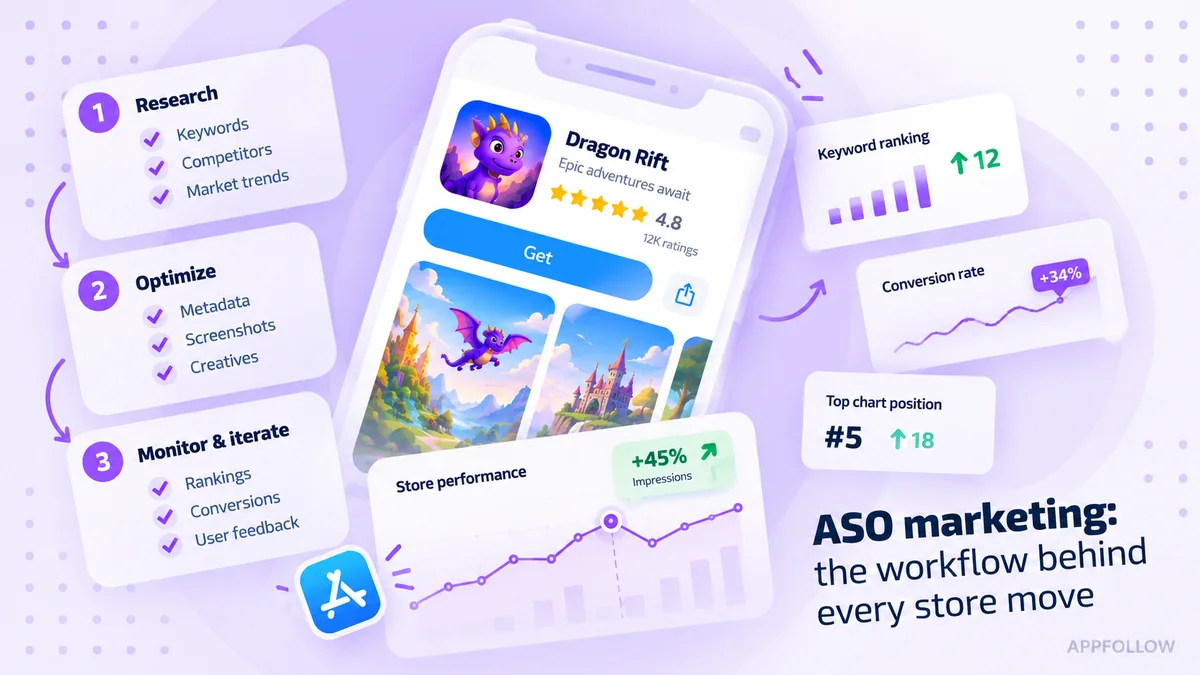
Table of Content:
- Key insights: ASO marketing in practice
- What is ASO marketing?
- How ASO marketing differs between the App Store and Google Play
- A six-step ASO marketing workflow for app teams
- How to measure ASO marketing performance
- How to choose your next ASO action
- How to investigate an ASO change in AppFollow
- FAQ: running an ASO marketing program
- Make the next ASO change worth measuring
Your app moves up for a priority keyword, but downloads barely change. The next update is already on the calendar. Do you rewrite the title, replace the first screenshot, or investigate the complaints that arrived after the last release?
ASO marketing gives that decision a method. It connects app store visibility, listing performance, ratings, reviews, and competitor changes so the team can choose a useful next action. The work includes keywords and creative assets, but it also includes knowing when another listing edit would solve the wrong problem.
This guide shows how to establish a baseline, plan separately for the App Store and Google Play, test a hypothesis, and decide what to do with the result. It also explains where AppFollow fits when research, store performance, and user feedback need to inform the same decision.
Key insights: ASO marketing in practice
- Define the problem before editing the listing. A visibility problem, a weak message, and a broken login need different owners and different fixes.
- Build separate plans for the App Store and Google Play. Metadata, testing options, and metric definitions do not transfer unchanged.
- Treat keyword rankings as evidence of position. Check actual store performance before calling a ranking gain an acquisition win.
- Use reviews to form hypotheses about messaging and product friction. Reviewers have installed the app; their comments do not prove why someone else chose not to install.
- Review progress regularly, but let traffic, test results, and product urgency determine when to act. A weekly meeting does not require a weekly metadata release.
What is ASO marketing?
ASO marketing is the recurring work of improving how people discover, understand, and choose an app in the App Store and Google Play. It brings keyword research, metadata, creative testing, ratings, reviews, and measurement into the app’s acquisition strategy.
ASO stands for app store optimization. “ASO in marketing” and “ASO in digital marketing” describe that same discipline in a broader growth context; they are not separate methods. A useful program has two linked questions: are the right people finding the app, and does its store presence give them a credible reason to install?
The answers determine the work. Low visibility for a relevant search may justify keyword research. Plenty of attention with weak response may justify a creative test. Complaints about a feature that stopped working need product investigation, even if the first symptom appears in an ASO report.
For the underlying terminology, use the app store optimization guide. Here, the focus is how to turn that knowledge into a process a growth team can run.
Where ASO fits alongside SEO, paid acquisition, and product marketing
Each discipline owns a different question, and ASO is where the promise meets the store page.
- SEO owns whether people can find your content on the web. It shares demand language with ASO: web search queries become metadata you test in the stores.
- Paid acquisition owns whether you can buy distribution profitably. The same campaign context tells you whether a weak result is the listing or the buy.
- Product marketing owns who the app is for and what it promises. ASO carries that promise into the store and reports back whether the page keeps it.
- ASO owns whether the promise converts in the store. It owns metadata, creatives, and store conversion, and routes recurring complaints to whoever owns the fix.
The distinction matters when results disappoint. At the same spend and with comparable traffic, fewer attributed installs mean a higher effective cost per install. A listing test may help, but it cannot establish whether campaign targeting, bidding, or attribution is correct. Paid and ASO teams need to compare the same campaign context before choosing a fix.
Product and support have a different handoff. ASO can surface a recurring complaint or an expectation the listing creates; the team responsible for the underlying experience investigates and verifies the change. For the mechanics of web search versus store discovery, see ASO vs SEO.
Why app store optimization matters for growth
Treat the store listing as a keyword report and you will undersell it in every budget conversation. The listing is the conversion surface for almost all of your acquisition, not just organic search, and that is where ASO earns its keep.
- Search is your biggest channel. Search still drives the largest share of App Store installs, and Sensor Tower’s download-source study puts it near 60%. The terms you rank for decide how much of that channel you even reach, which is the work behind ASO keywords.
- The listing converts every channel. Paid, referral, a press hit, a creator link: nearly all of it routes through the product page before anyone installs. AppTweak’s 2025 benchmarks put the average page-view-to-install rate at 8.56% on the App Store and 16.15% on Google Play, with category swings from about 5% to over 50%. A few points of conversion compound across paid and organic at once.
- The two stores don’t share one funnel. Browse surfaces and some ad formats install an app with no classic page view, so a single universal impressions-to-installs chart will misread at least one store. Match the metric to the path the download actually took, per store.
- ASO leaves an auditable record. It gives the team a dated log of what changed in the listing and what moved afterward in rank, conversion, and rating. That turns “we think the new screenshots helped” into an attributable call you watch on an app store rank tracker next to the review trend.
How ASO marketing differs between the App Store and Google Play
Start with a separate listing plan for each store. The same positioning can carry across both, while the fields and tests used to express it differ.
Planning question | App Store | Google Play |
|---|---|---|
Where does the listing explain relevance? | App name, subtitle, keyword field, and category are named search-relevance inputs. The description also explains the offer to visitors. | Title, descriptions, category, and other listing context help describe the app. User relevance and app quality also inform discovery. |
Where can the team test creative assets? | Product Page Optimization supports tests of icons, screenshots, and app previews. | Store listing experiments support the assets and text available for the selected experiment type. |
What must be planned separately? | Metadata allocation, creative treatments, localization, and report definitions. | Listing copy, graphics, localized experiments, quality checks, and report definitions. |
Apple’s search guidance names text relevance and user behavior among its inputs. Google’s discovery documentation describes relevance and the quality of the app experience, among other considerations. Neither provides a formula that turns one metadata edit into a guaranteed position. Use the ASO ranking factors guide for a deeper explanation of those signals.
Choose a country and a language before localizing
A country is not a language. Choose the market, identify the listing language users see, and research the terms people use there. Then check whether the product, payment options, units, and first screenshot support the promise. Literal translation can preserve the wording while losing the reason someone would choose the app.
Keep a separate keyword map and change log for each store and locale. Compare results within that scope before combining markets into a global report. The ASO localization guide covers the detailed workflow; the Google Play ASO guide develops the store-specific work for game teams.
cta_get_started_purple
A six-step ASO marketing workflow for app teams
Work through one decision at a time. The sequence below leaves the team with a saved baseline, a specific hypothesis, and a record of whether the change deserves to stay.
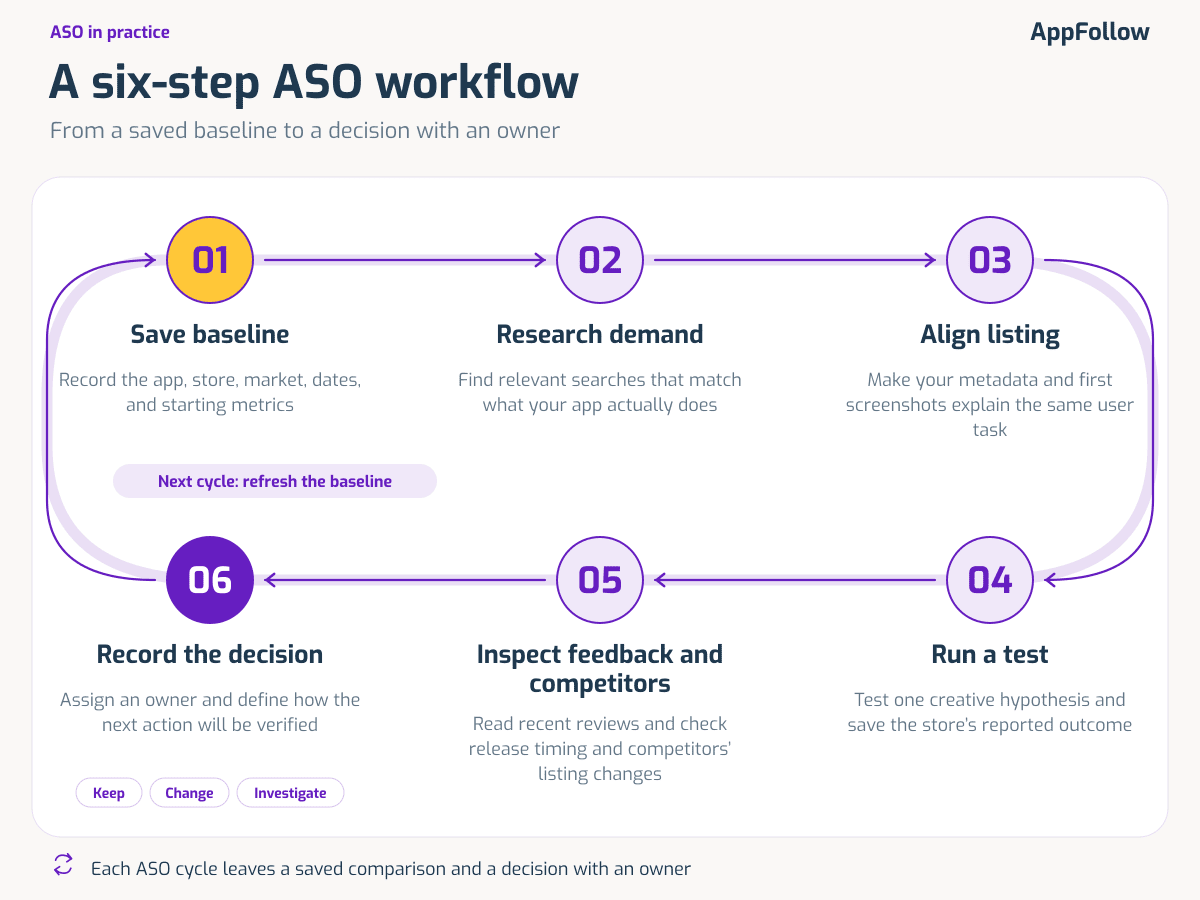
1. Save a baseline and define the decision
The baseline is the cheapest insurance you’ll ever buy.
Before you change a single field, write down the app, store, country, language or locale, traffic source, and reporting dates, and save the real export, not a screenshot of the headline number. Next to it, record the keyword positions, the store performance metric you care about, the recent ratings and review topics, and any campaign or product change already in flight. If a source can’t give you one of those, write “not available” rather than leaving a blank that someone later reads as a zero.
A filled baseline is mundane on purpose. For a budgeting app it might read: App Store, US English, organic search, Sept 1 to 14; “budget planner” sitting at #18; store conversion 7.9%; rating 4.3 with a rising cluster of sync complaints.
Then pick one metric that matches the question you’re actually asking. A discovery change is judged on visibility and downloads; a creative test is judged on whatever the store experiment reports. Activation or purchase data is a useful backstop, but only if your analytics can tie it to the same audience.
An experiment card can be a few lines. The one below is illustrative, not a customer result.
Field | Illustrative entry |
|---|---|
Hypothesis | Showing the weekly budget screen first will make the app’s planning function clearer to new visitors. |
Scope and change | App Store; English (US) treatment localization. Change only the first screenshot and record the actual test audience. |
Primary outcome | Product Page Optimization conversion rate for the treatment versus the original page, using the test report’s definition. |
Decision rule | Apply a treatment after Product Page Optimization reports it performing better with at least 90% confidence. Retain the original if it loses; do not name an inconclusive test a winner. |
Ownership and verification | ASO lead owns the test; product analytics checks downstream quality; the next review uses the saved test report. |
Match periods with a similar weekday mix, and subtract the noise of any promo or release that overlapped. Usable traffic, not the calendar, decides how much you can learn. A real product regression, though, jumps the queue: you escalate it the moment you see it.
2. Research demand and build the keyword map
The apps you think you compete with and the apps you compete with in search are rarely the same list.
So build the set from what actually ranks for your target queries in the target store, then read what those listings promise, not the logos you expected. Overlapping queries, visible metadata, creative angles, recent public edits: that’s your evidence. Sort it into brand, category, feature, and problem searches, and bin any term the product can’t honestly deliver before popularity or difficulty ever enter the conversation. Those scores rank your effort; they don’t vouch for relevance, and they never forecast a download.
Run it against a real app and the judgment calls get obvious. A budgeting app with manual tracking and weekly planning would map its first candidates like this:
Candidate query | Decision | Reason and next check |
|---|---|---|
budget planner | Investigate as a target | Matches the planning function. Check local demand, competition, current rank, and the most useful field for this store. |
expense tracker | Investigate as a target | Matches a working feature. Verify that the listing shows the tracking task clearly. |
automatic bank sync | Reject for this app | The app does not connect to banks. More exposure would bring people expecting a feature it lacks. |
Fill in the source, the date you checked, the current position, and the field you’d use for each term as the data arrives. The ASO keyword research guide handles prioritization; finding competitors’ app keywords shows how to widen the net.
3. Align metadata and creative messages with the same task
Metadata and creatives have to point at the one job the keyword map defined, or the listing sends mixed signals. Start from the approved map and give each store field a role instead of stuffing them all with the same terms. The app title carries the most weight, so it gets one clear job; the other fields are where the real capabilities get spelled out.
When you write app store descriptions, you are writing for two readers at once: the person deciding whether to install, and the store’s documented ranking context. Repeating a phrase five times is not a strategy.
Take a budget planner. The title claims the core task (“Budget Planner, Expense Tracker”), the subtitle picks up a capability the map flagged (“Sync accounts, set spending limits”), and the description opens on the job the user came for, not the company mission.
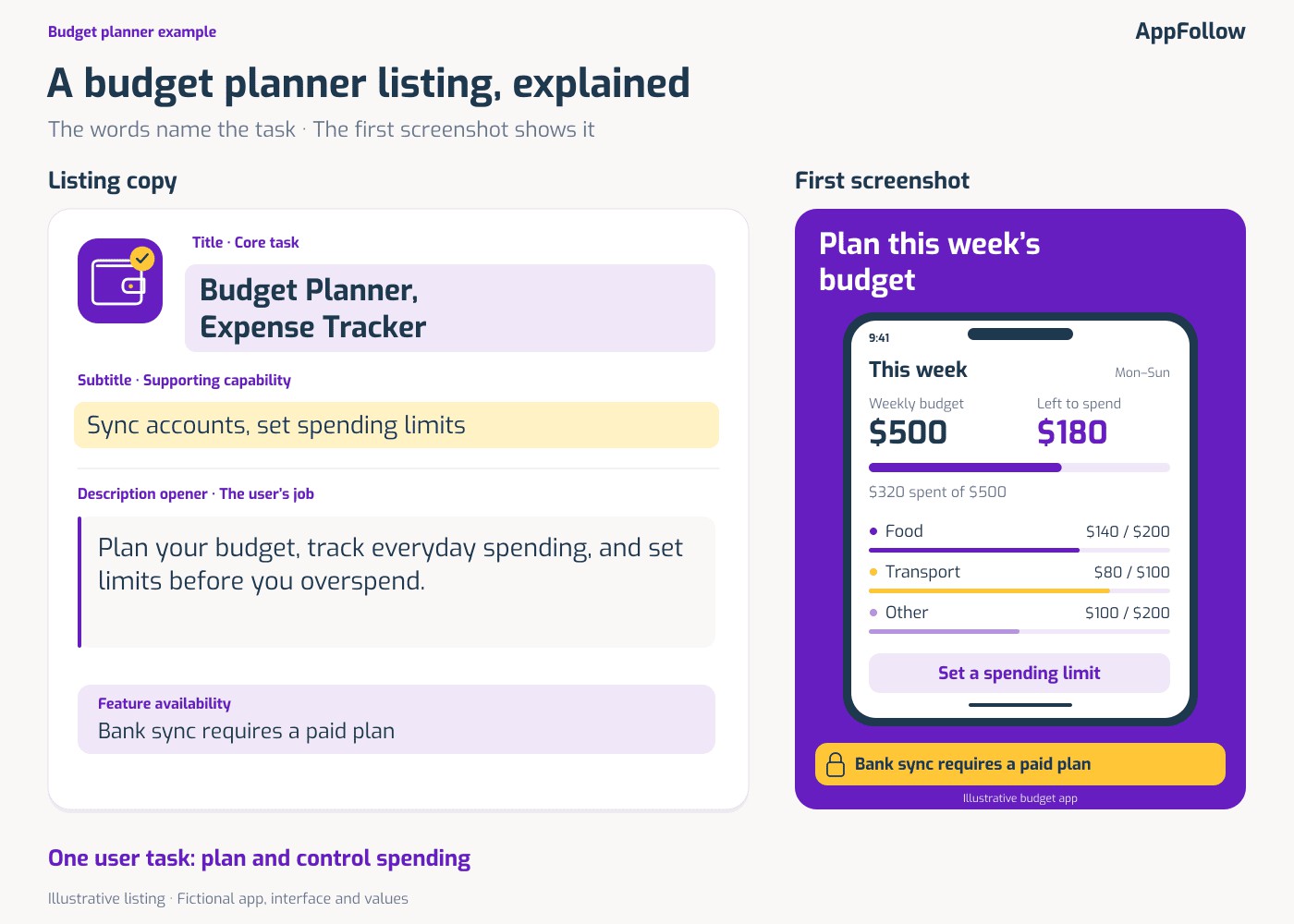
The first screenshot shows the planning dashboard, not a smiling person with a phone. And if bank sync sits behind the paid tier, the caption says so rather than letting the frame imply it is free.
Creatives are where most of that work is won or lost, and the order matters as much as the content. Lead with the frames that prove the core task, then let secondary capabilities follow. The ASO screenshots guide goes deeper on sequencing. Video earns a slot only when seeing the interaction moves the decision, a call the ASO video guide works through.
The output is a field-by-field copy plan and one creative hypothesis you can test. Park the release notes, campaign changes, and approval dates next to it, so the next reviewer can tell what shipped from what was only proposed.
4. Test the creative hypothesis in the store
Start from the question, not the asset. Here it’s blunt: does leading with the budget screen help people understand the app?
Keep the current first screenshot as the control. Build exactly one treatment, opening on the planning screen with a concrete message, and freeze every other asset so the test moves a single variable. Set the eligible locale and audience in the store’s own test setup, then let the reported result and your pre-written decision rule decide it, not your gut on day two.
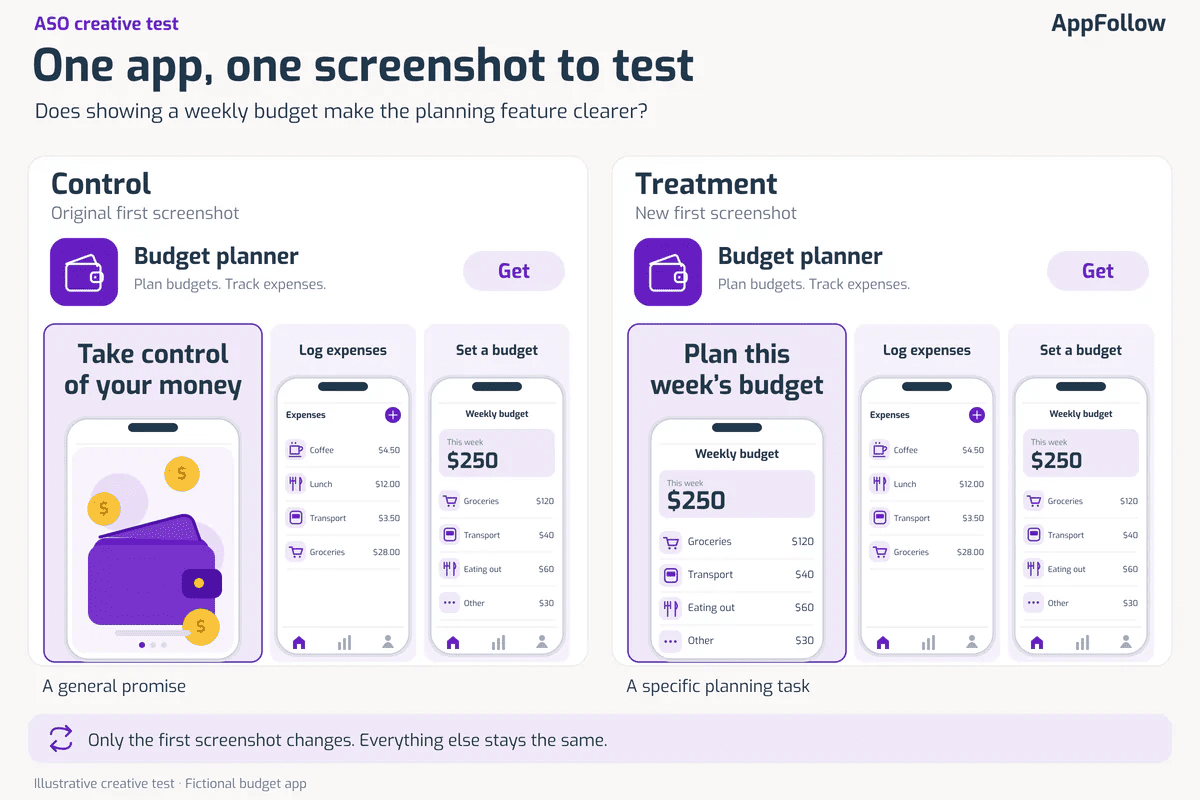
The tooling splits by store. App Store creative tests run in Product Page Optimization; Google Play uses store listing experiments, each limited to the assets and text its experiment type allows. The two share neither settings nor math, so judge each on its own output instead of nailing both to one deadline.
A daily uptick is a cue to look, not to stop.
Inconclusive is a finding, and it stays written as inconclusive, never quietly promoted to a win. When the traffic can’t carry the comparison, drop variants or narrow the question before you burn the window. And if no controlled test is on the table? Run a before-and-after, log everything that moved alongside it, and call it an observation. The app conversion rate optimization guide takes the method further.
5. Read release feedback and competitor changes
Picture the morning after a release: forty fresh reviews, and nine of them describe the same login loop.
That’s where you look first, not at the ranking chart. Read the recent reviews for the affected store and market, watch for a shift in which topics keep recurring, and lay the dates over your release log. Grab the app version wherever the source records it. A cluster of login failures and a run of “where did the export button go?” are two different investigations, and running them as one buries both.
One caveat you can’t skip: every reviewer already installed. Their words expose a messaging gap or a product fault, but they can’t account for the people who saw the page and left. Confirm the story with product evidence, a test, or the right acquisition report before you act on it.
Competitors round out the read. When your position drops, check whether it slipped across several related terms or just one, then pull the competitor’s public listing history for the same market. A visible edit earns a look; its timing alone proves nothing. See how reviews affect ASO for the feedback loop.
A few situations you’ll hit after a release, and the read for each:
- Nine of forty new reviews describe the same login loop. Filter to that store and market, confirm the topic is genuinely climbing rather than arriving in one batch, note the build, and send it to product with its own record instead of the ranking chart.
- The feed names several unrelated problems at once. Keep them apart, since “can’t log in” and “where did export go” reach different teams, and merging them hides the bigger one behind the noise.
- Ratings held and the feed is quiet, but installs fell. Everyone who reviewed already installed, so the person who read the first screenshot and left never shows up here. Confirm with an acquisition report or a test before you clear the listing.
- A competitor climbs on a keyword you share. Check whether you slipped on one term or a cluster of related ones, line the dates up against your own release, then read the competitor’s public listing history for the same market. The timing alone proves nothing.
6. Record the decision and assign the follow-up
A review is only finished when it produces a move someone can make: keep the listing, ship a supported treatment, test a fresh hypothesis, send it to product, or go get more evidence. Attach an owner and the next point where you’ll check it. “Monitor performance” isn’t a decision until you’ve written down what result would change it.
For example: “Keep the current screenshots. The treatment has not produced a conclusive result. The ASO lead will review the same experiment next week; product analytics will check whether the treatment audience behaves differently after install.” That is an illustrative decision record, not a rule to wait a week in every situation.
Put the review on a regular cadence, and jump on urgent changes sooner. The ASO tips and weekly checklist helps you hold that rhythm without turning every meeting into a reason to ship another edit.
How to measure ASO marketing performance
Measure the part of the journey the change was intended to affect, then check the next relevant outcome. A ranking improvement, a store download, and an activated customer answer different questions. Keep the source and definition attached to each number.
Separate store metrics before comparing results
Apple defines Conversion Rate as total downloads and pre-orders divided by unique device impressions. Total Downloads includes first-time downloads and redownloads. This is not a universal downloads ÷ product-page views formula, and it is not the same as completed installations in a usage report.
Google’s current store-listing documentation distinguishes CTR from acquisitions. CTR describes visitors clicking an available Install, Open, or Pre-register button and replaces the legacy Conversion Rate label in that report. Acquisitions measure a different event. Preserve the original label and definition in historical exports rather than silently joining old and new series.
Document the metric used by the specific report and test. An iOS rate and an Android rate can both be correct while measuring different behavior. Compare each with its own relevant baseline.
Match the evidence to the question
- Discovery: use keyword positions and calculated visibility indicators to understand search presence; use available store impressions or acquisition data to check the scale of the opportunity.
- Listing response: read the store’s defined rate or experiment result within the same market, source, and audience scope.
- Product and trust: inspect recent ratings, review topics, and product-quality evidence. Look for a testable explanation, not a convenient correlation.
- Business value: use product or attribution analytics for activation, purchase, or retention questions that the store report cannot answer.
Public competitor data helps with relative position and visible changes. It does not disclose a competitor’s private conversion or revenue reports. Likewise, AppFollow’s Search Visibility Score is a calculated indicator, not a count of impressions or a share of organic downloads.
Be especially careful with “organic.” App Store Search can include Apple Ads activity. AppFollow documents an Apple Ads connection that separates those paid search downloads. Check the setup and source definitions before reporting the entire search channel as unpaid growth.
For each comparison, retain the report/export date, period, dimensions, metric definition, known concurrent changes, and decision. Use the ASO metrics guide for the full measurement framework rather than expanding this weekly view into a second analytics manual.
How to choose your next ASO action
The following scenarios are illustrative. Their numbers and app situations are teaching examples, not AppFollow customer results or benchmarks.
More visibility, the same number of downloads
A released app’s App Store report shows 10,000 unique device impressions and 1,000 total downloads in one complete period. In the next comparable period, impressions reach 12,500 and total downloads remain at 1,000. There are no pre-orders in this example. Using the definition above, the rate moves from 10% to 8%: a decline of 2 percentage points.
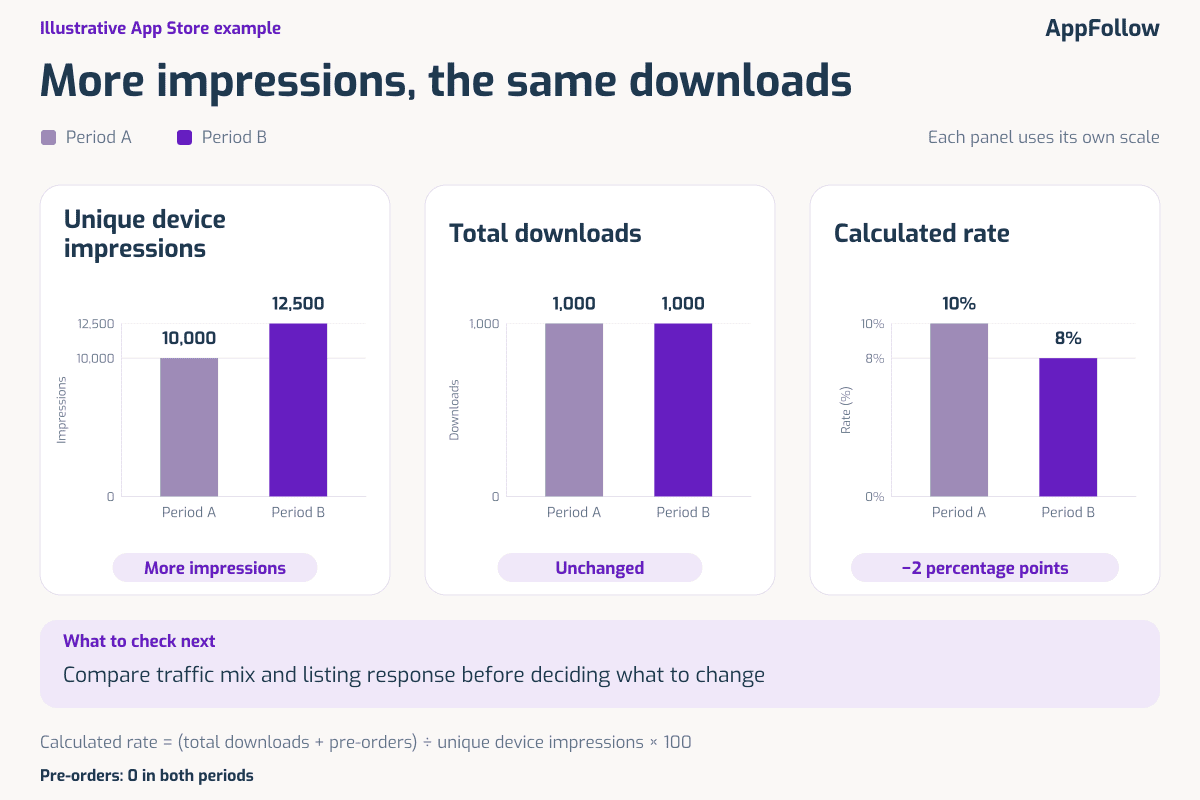
The arithmetic identifies a weaker aggregate response, not its cause. First check whether the source, country, device mix, or audience changed. Compare first-time downloads separately when the business question is new-user acquisition. An expansion into less relevant traffic could change the rate even if the listing works equally well for the original audience.
If the comparable audience still responds less often, inspect the promise in the title and first assets and choose a focused test. The ASO owner records the hypothesis; the test report determines whether the treatment wins. Another keyword edit should follow evidence of a discovery problem, not the desire to react to a lower percentage.
Negative reviews increase after a release
In an illustrative review sample, login complaints rise from 8 of 40 newly received reviews to 24 of 60 in comparable reporting windows. Both the count and the share increase: 20% becomes 40%. That is a reason to investigate login, not proof that every download or rating change has the same cause.
Read the underlying records, check available version and device details, and ask product or engineering to compare the reports with authentication failures. Support needs a response path for affected users. If a release introduced a confirmed defect, the owner verifies the fix against product evidence and subsequent feedback; changing a screenshot cannot repair authentication.
Other themes need different responses. Use a review-to-action map to prevent every complaint from becoming either a copy task or a generic support ticket.
Review theme | Check before acting | Owner, action, and verification |
|---|---|---|
The feature is hard to find | Does it work as intended, and where does the listing create an expectation? | ASO and product marketing clarify the message; product checks discoverability. Verify with the appropriate test or product evidence. |
The price or paid restriction was unexpected | Compare the listing’s promise with the actual offer and paywall. | Product marketing checks expectation-setting. Change unclear copy where needed and watch comparable feedback; do not assume a pricing change is required. |
Login stopped working | Read the affected records and check release/version information and authentication logs. | Product or engineering investigates; support handles affected users. Verify a confirmed fix before treating the issue as resolved. |
A competitor gains a keyword you both target
Start with the timeline rather than the new headline. Did the competitor change its listing before the ranking movement? Did it gain across related terms or just one? Did other apps move too? Compare the same store and market, and keep your own release or campaign changes in view.
A rival’s new wording can reveal a job your app also performs, but copying it does not reproduce the conditions behind its result. Add the relevant gap to your keyword map, check the product fit, and decide whether your metadata actually fails to communicate it. Keep your current listing when the available evidence does not justify a change.
The owner’s output is a documented opportunity or a decision to wait, supported by dated observations. For reported real-world examples, continue to the ASO case studies; retain each case’s scope when interpreting its outcome.
How to investigate an ASO change in AppFollow
Once the team has a specific question, the product workflow becomes more useful. Consider a fall in search downloads for one of your own apps. The job is to locate the change, check plausible explanations, and pass a concrete task to the right owner.
Start with the app, country, and reporting period
For your own performance data, connect the appropriate store account and open the Organic Dashboard. Select the app, country, and comparison period. Check whether the performance change is concentrated in that market before investigating the worldwide total.
Read the actual field labels and definitions in the selected view. If keyword position is the question, inspect the terms in Keyword Tracking; use the overall visibility score as a separate calculated indicator. A missing connection or unavailable metric is a data gap to fix, not evidence that performance is zero.
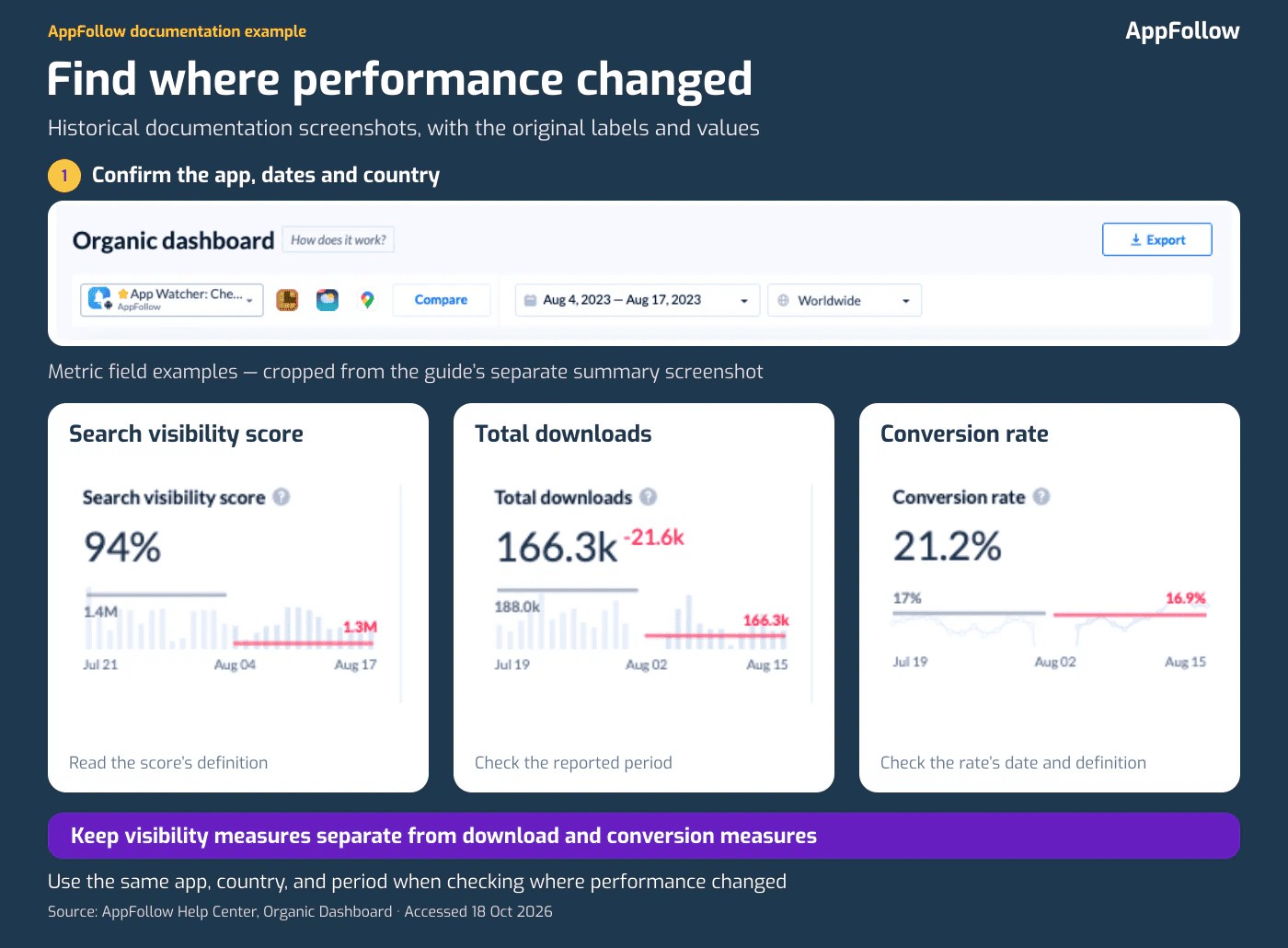
If the change is concentrated in one country, keep the investigation there rather than averaging it away in the global total. Inspect the relevant keyword set and the store-reported download data for that scope before choosing the next check.
Check the feedback behind the period
Next, inspect reviews for the relevant store, market, and dates. Phrase Analysis helps identify recurring language and the records behind it; semantic tags organize reviews into topics. Read the underlying reviews before deciding that a category such as “login” describes a single issue.
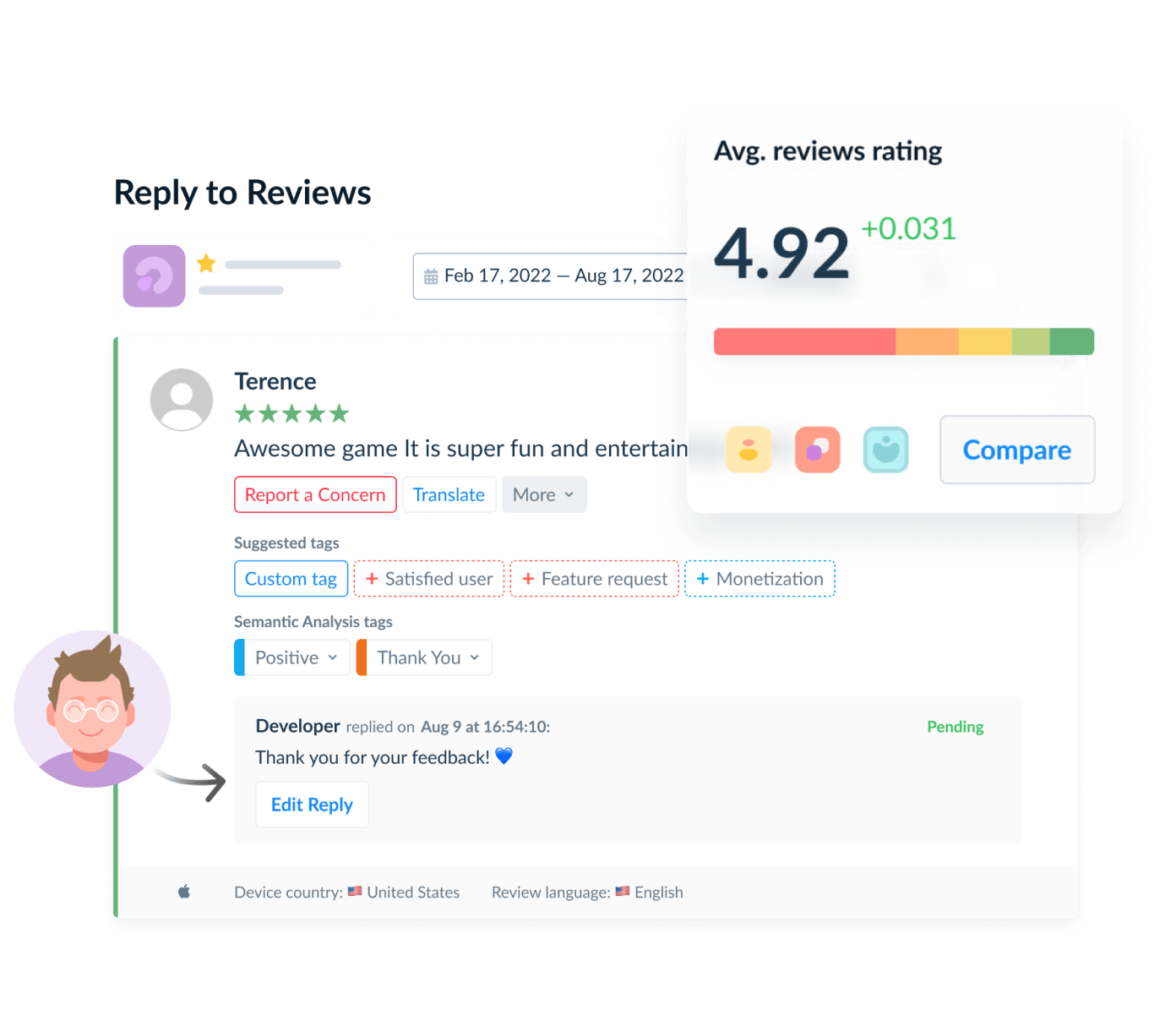
This is where the review management workflow connects to ASO. A marketer can distinguish an expectation worth testing in the listing from a problem that needs product or support investigation. Keep version-level claims limited to records where that information is actually available.
Bring in competitor context and assign the action
Use competitor analysis to check public keyword positions and visible listing changes in the same market. Competitors’ private download, conversion, and revenue reports are not part of that public comparison.
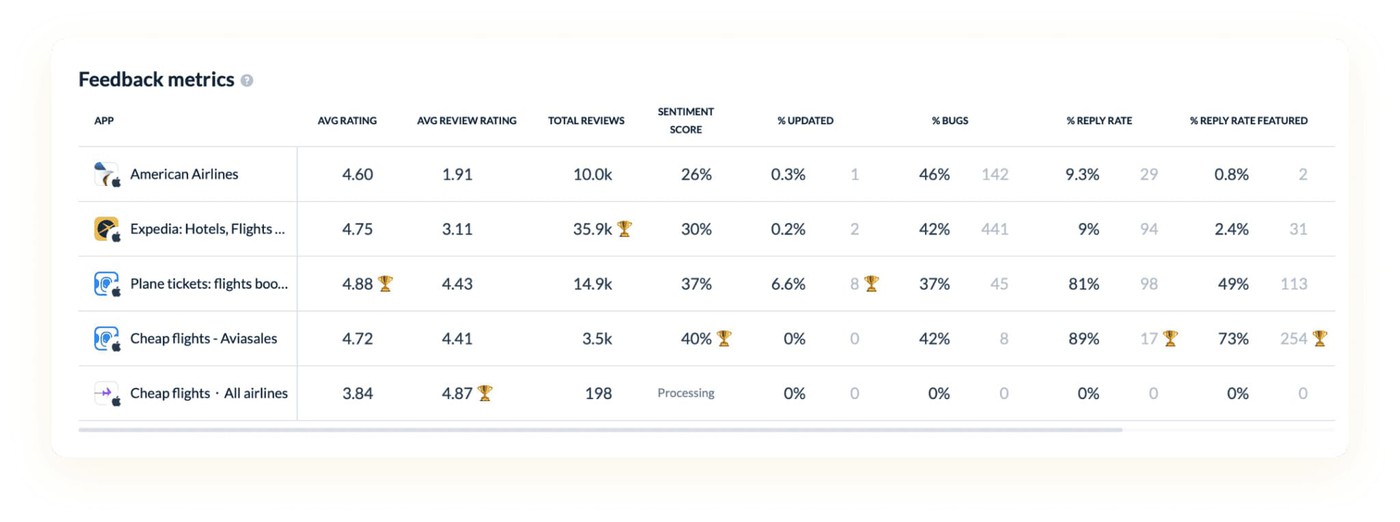
The review should end with a saved scope, relevant records, a proposed explanation, and an owner. AppFollow’s monitoring workflow supports ongoing checks, while integrations can move selected information into the team’s existing tools. Verify the available connection and data before designing the handoff.
Store intelligence and review analysis complement a dedicated product analytics or cross-channel attribution setup. The team still has to validate the hypothesis and the result. If you are choosing a platform rather than investigating a live issue, the ASO tools comparison covers that separate decision.
cta_get_started_yellow
FAQ: running an ASO marketing program
How long should I wait before judging an ASO change?
There is no fixed number of days that works for every app. Allow the store to process the change, use complete reporting periods, and check whether the available traffic supports the comparison. For a controlled test, follow the store’s result and uncertainty assessment. Record an inconclusive result instead of forcing a winner.
What should a low-traffic app prioritize?
Start with accuracy and obvious mismatches: the listing should explain a real use case, show the feature, and set the right expectations. Avoid splitting a small audience across many variants. Choose one important hypothesis and collect evidence over a suitable window; a weak sample cannot support a precise uplift claim.
Should a product fix interrupt an ASO experiment?
A serious user-impacting problem should not wait for marketing measurement. Document the interruption and any product or listing changes. Pause or restart the comparison when necessary, and do not report the interrupted result as if conditions stayed unchanged.
How often should the team review the listing?
Use a regular review cadence and investigate important releases or unexpected changes sooner. Review frequency and publishing frequency are separate decisions. Keep a working listing when the evidence does not justify another edit, and record what would make the team reconsider.
Make the next ASO change worth measuring
Before scheduling another listing update, save the baseline and name the question it should answer. Choose the store and market, decide who owns the action, and specify how the team will verify it. When the evidence points to the product, route the issue there. When the result is inconclusive, keep that uncertainty visible.
The useful output of ASO marketing is a better decision about the app’s store presence, supported by evidence the next reviewer can inspect.
Method note: The numerical scenarios and keyword map in this guide are illustrative teaching examples, not customer outcomes or benchmarks. Store and product descriptions were checked against Apple, Google Play, and AppFollow documentation on October 15, 2026.