App Store Optimization Localization: The 2026 Playbook for Multi-Market Growth (App Store + Google Play)

Table of Content:
- Key insights
- What ASO localization actually is?
- Why localization is the highest-ROI ASO lever you're not pulling
- App Store vs Google Play: How localisation differs between the two stores
- Which markets should you localize first
- Per-locale keyword research: how to build a semantic core in a language you don't speak
- Why direct translation fails
- The localization workflow: TMS + ASO tool + Console + native LQA
- What localization actually costs
- Case study: Komorebi (711% App Store install lift across 10 localizations)
- How AppFollow helps you run ASO localization at scale
- Frequently asked questions about ASO localization
App store optimization localization is one of the most overlooked growth levers in ASO. Apple supports more than 40 store languages, while Google Play supports more than 70. Most apps optimize three of them and stop. The remaining locales hold keyword opportunities, search visibility, and conversion gains that many teams never pursue.
ASO localization is treated as a translation task, and that's usually where the problem starts. Users in Germany, Japan, Brazil, and Saudi Arabia don't search the same way, even when they're looking for the same product. A translated keyword can be linguistically correct and still generate no installs.
Strong app localization begins with market-specific keyword research, then extends into app store localization, creative adaptation, and review management. Whether you're working in App Store Connect, Google Play Console, Custom Product Pages, or Custom Store Listings, the goal stays the same: expand your visibility footprint market by market.
Start with the key insights below. They'll give you the framework for everything that follows.
Key insights
Most localization discussions get lost in translation workflows and language lists. The fundamentals are much simpler. These are the six ideas that drive nearly every successful ASO localization program.
- App store optimization localization is the practice of adapting your store metadata, creatives, and reviews for each market, not simply translating them. Done well, localization can increase downloads by 26% to 128% per locale.
- Apple's App Store supports more than 40 localizations. Google Play supports more than 70. Most apps activate only a handful of them. Every untouched locale represents additional keyword coverage, new search visibility, and potential conversion gains.
- Apple's cross-localization system lets you stack secondary locales onto a primary locale. On the US storefront alone, activating all available secondary locales expands the indexable keyword footprint from 160 characters to 1,440.
- Google Play solves the localization problem differently. Custom Store Listings let you publish separate versions of the same app page for different markets. A team targeting Brazil, Germany, and Japan can tailor screenshots, copy, and positioning to each audience without touching the default listing.
- Translation itself is rarely the expensive part. The budget starts to grow when screenshot updates, market-specific creative work, and linguistic QA enter the picture. For many teams, a new locale ends up costing somewhere between $1,000 and $5,000 from start to launch.
- Localized reviews and review responses influence ratings, conversion rates, and organic performance. With auto-translation, one support team can manage customer feedback across multiple markets while maintaining a consistent brand voice.
What ASO localization actually is?
App store optimization localization is the process of adapting your app's store presence for a specific market. Language is only one part of the job. Search behavior changes across countries. So do user expectations, competitor landscapes, and the keywords that drive installs.
That's why localized app store optimization focuses on visibility and conversion, not just translation.
Translation, localization, and transcreation are different things
Translation | Localization | Transcreation |
Swaps words from one language to another | Adapts the store listing for local search behavior and market expectations | Rewrites messaging for a specific market while preserving brand intent |
Focuses on linguistic accuracy | Focuses on discoverability and conversion | Focuses on market resonance and positioning |
Lowest impact on ASO performance | Direct impact on rankings and CVR | Strongest impact on brand perception |
- A translated app description can be grammatically perfect and still perform poorly in search. I've seen plenty of listings where the wording was accurate, but the keywords simply weren't the terms people used in that market.
- Localization starts with how users search and evaluate apps locally. The language is part of it, but so are the keywords, screenshots, and overall positioning. Some teams go a step further and adapt the messaging itself to better match local expectations without changing the product's core promise.
ASO localization brings these pieces together. It combines keyword research, creative adaptation, and app store localization into a single process measured by per-country visibility and conversion rate.
Why localization is the highest-ROI ASO lever you're not pulling
Most ASO initiatives focus on squeezing a little more performance from markets that already generate installs. ASO localization works differently: instead of fighting for incremental gains inside an existing keyword footprint, you're creating entirely new opportunities to rank, convert, and grow.
That's why the ROI can look disproportionate. Storemaven's widely cited localization research found localized listings increased conversion rate (CVR) by 26%.
Other industry studies report download lifts of up to 128% when apps expand from an English-only presence to a well-executed multi-market footprint.
The largest gains typically come from markets that have received little or no localization investment, not from countries where the app already has strong visibility.
The mechanics behind those gains are straightforward. Every new locale creates additional keyword inventory. On Apple's App Store, keyword fields are indexed separately by locale.
A localization isn't simply a translated version of an existing page. It's another opportunity to target search terms, regional vocabulary, and long-tail phrases that may never fit inside your primary locale. When teams start activating secondary locales in App Store Connect, the available ranking surface expands quickly.
"One of the easiest iOS wins to miss is treating localization like a publishing chore instead of a keyword lever. Add another English locale, and you are opening another place to support search coverage. That gives teams more room for long-tail terms, regional wording, and secondary phrases that never should have been forced into the primary locale in the first place."
— Yaroslav Rudnitskiy, Senior Professional Services Manager (ASO) at AppFollow
Google Play introduces another consideration. A localized listing in Google Play Console generally won't start ranking for keywords in a market until it accumulates roughly 10,000 downloads in that locale.
Many teams launch a localization, see little organic traction, and move on. In reality, the market often needs a paid-acquisition push before keyword indexing and organic discovery begin to compound.
cta_get_started_purple
App Store vs Google Play: How localisation differs between the two stores
Most localization mistakes happen because teams assume Apple and Google handle languages the same way. Both stores support multi-market growth, but they approach keyword indexing, metadata, localization, and testing from different directions. Understanding those differences changes how you prioritize keywords, structure metadata, and plan your release calendar.
Metadata fields, character limits, and indexing rules
Localization element | App Store | Google Play |
Supported locales | 40+ | 70+ |
App name | 30 characters | 30 characters |
Subtitle / short description | Subtitle: 30 characters | Short description: 80 characters |
Keyword field | Dedicated 100-character keyword field | No dedicated keyword field |
Full description | 4,000 characters | 4,000 characters |
Promo text | 170 characters | Not available |
Keyword indexing | App name, subtitle, keyword field | App name, short description, full description |
Missing locale handling | Falls back to the default locale | May display machine-translated content in some markets |
Review process | Locale-specific review possible | Faster localization publishing workflow |
Localization features | Secondary locales, Custom Product Pages (CPP) | Custom Store Listings (CSL), Store Listing Experiments (SLE) |
The biggest strategic difference lies in the indexing model. App Store Connect localization gives you a dedicated keyword field for every locale. Google Play localization does not. Instead, Google extracts relevance signals from the title, short description, and long description for each language.
That means keyword placement and semantic fit matter much more on Google Play than they do on iOS.
App Store localization and cross-localization
Apple's localization system is built around primary and secondary locales. Each storefront has one primary locale that users see by default, plus a set of secondary locales that developers can activate for additional keyword coverage.
The US storefront, for example, supports nine secondary locales. Every activated locale opens another 160-character keyword field. A US app that activates all available secondary locales expands its keyword footprint from 160 characters to 1,440.
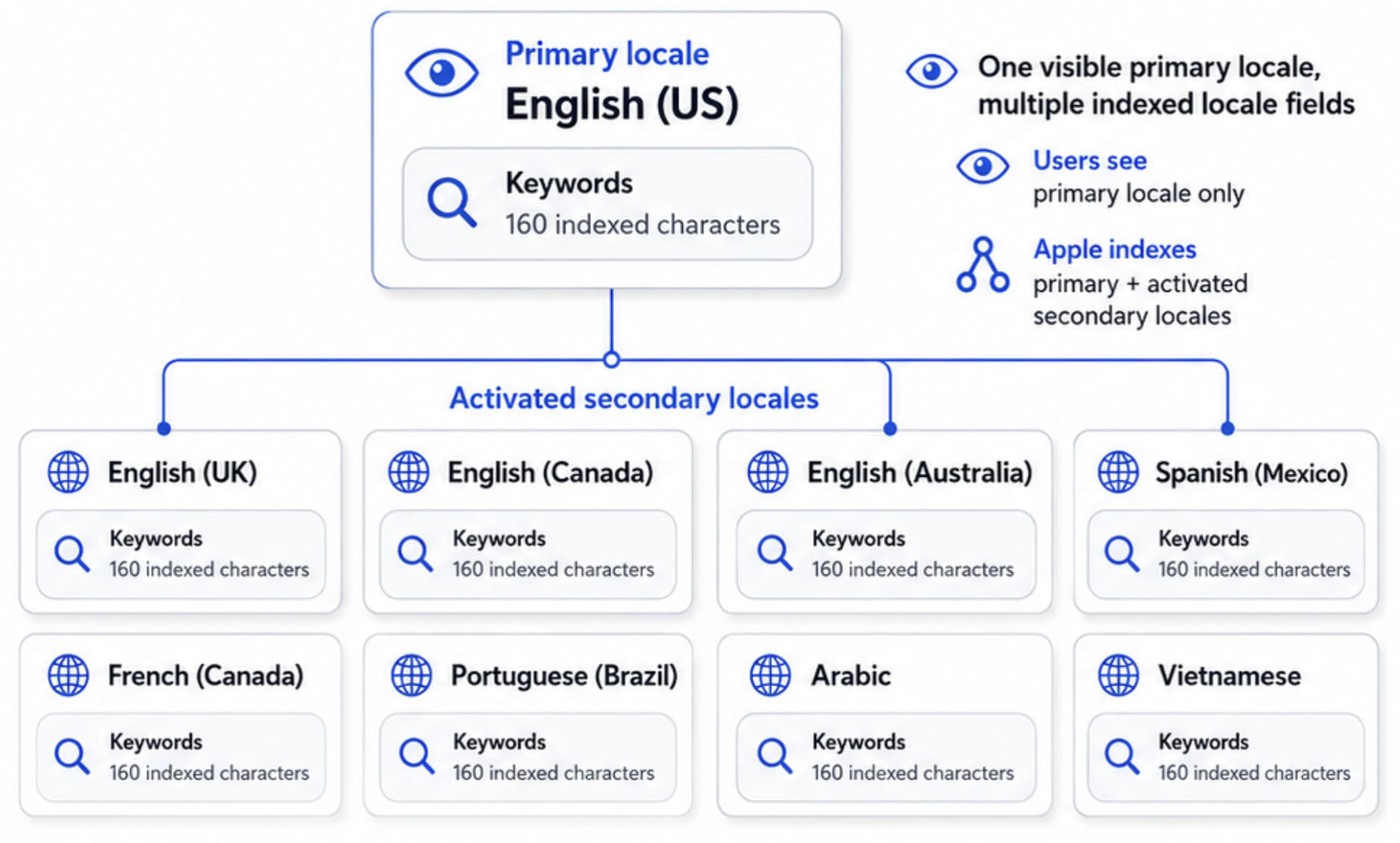
That's additional space for regional wording, long-tail queries, and secondary keywords that would otherwise compete for room in the primary locale.
Visitors still see the primary locale. Apple indexes both the primary locale and the activated secondary locales. As a result, iOS app localization often becomes a keyword-expansion strategy as much as a localization strategy.
“Successful cross-localization requires discipline. Duplicate keywords across secondary locales don't create additional indexing value. Try to give each locale its own job. If the same keywords appear everywhere, you're spending extra metadata space without gaining much in return.”
- Ilia Kukharev, Product Manager at AppFollow
Custom Product Pages can help here as well. A team might keep the main listing focused on broad appeal while creating separate page variants for specific audiences, campaigns, or use cases. The app stays the same, but the screenshots and messaging can be tailored to the people most likely to convert.
Google Play localization and Custom Store Listings
Google Play handles localization through Custom Store Listings, not secondary keyword fields. Each listing can target a specific country, language, acquisition source, search keyword, user state, or URL.
For each version, teams can adapt the app name, short description, long description, screenshots, icon, video, and feature graphic.
Google Play allows up to 50 Custom Store Listings per app.
For ASO teams, the value is simple: one language can still require several market pages. Mexico and Argentina may both use Spanish, but search terms, pricing sensitivity, screenshots, and benefit order can differ. A finance app might lead with “control your expenses” in one market and “manage cash flow” in another. A fitness app might show body goals in one country and daily habit tracking in another.
A practical CSL setup usually starts with three page types:
CSL type | Best use case | What to adapt |
Country listing | Localizing for one priority market | Keywords, screenshots, benefits, pricing cues |
Campaign listing | Matching Google Ads or influencer traffic | First screenshot, CTA, promise, offer |
URL-based listing | Sending traffic from partners, QR codes, email, or landing pages | Message continuity from source to store page |
Store Listing Experiments help validate the strongest version before scaling it. Start with one high-impact variable: first screenshot, feature graphic, short description, or benefit order. Then measure visitors, installs, conversion rate, retained users, and buyers by country or source. The goal is to learn which local promise converts, not just which translation reads better.
A lean workflow looks like this:
- Pick one market with existing traffic or paid acquisition volume.
- Build a country-specific Custom Store Listing.
- Localize keywords, screenshots, and the first-screen value proposition.
- Run a Store Listing Experiment on one major element.
- Roll out the winner, then repeat for the next market.
Read also: App review management at portfolio scale - brand voice across 10+ games
Which markets should you localize first
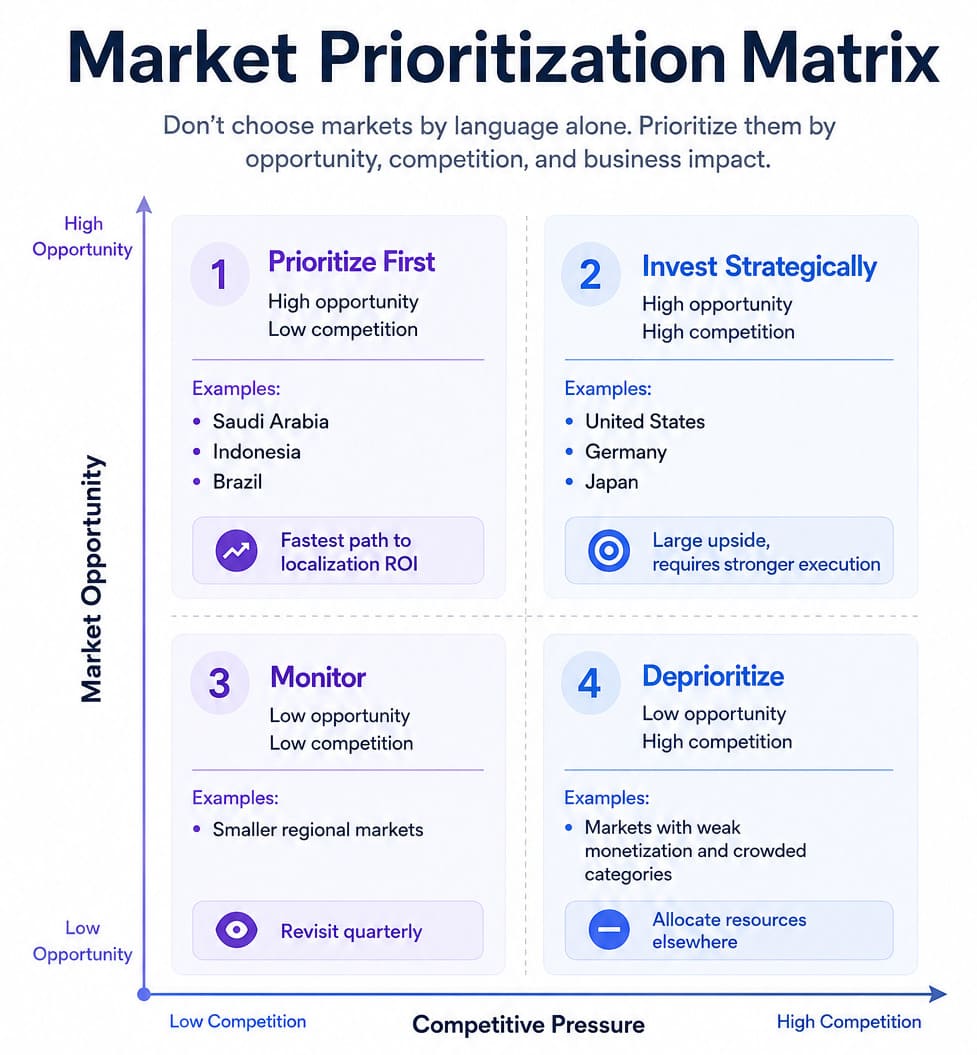
One of the most expensive localization mistakes is choosing markets based on language alone. High download volume doesn't automatically mean high opportunity, and neither does a large population. The goal is to find markets where demand, monetization potential, and competitive conditions create a realistic path to growth.
That's why I prefer a scorecard approach. It forces teams to evaluate markets using the same criteria instead of chasing whichever country looks attractive in the moment.
Start with opportunity, not language count
Scoring note: 5 = strongest opportunity / lowest friction. For competitor density, localization cost, and regulatory complexity, a higher score means “easier to win,” not “more crowded” or “more expensive.”
Evaluation factor | Brazil | Mexico | South Korea | Germany | Japan |
Existing organic visibility | 3 | 3 | 2 | 3 | 2 |
Category install share | 5 | 4 | 4 | 3 | 4 |
Competitor density | 4 | 4 | 2 | 2 | 2 |
ARPU potential | 3 | 3 | 5 | 5 | 5 |
Localization cost | 4 | 4 | 3 | 3 | 2 |
Regulatory complexity | 4 | 4 | 3 | 2 | 3 |
Total score | 23 | 22 | 19 | 18 | 18 |
In this sample, Brazil and Mexico look like faster localization ROI markets: meaningful install opportunity, manageable cost, and lower execution friction. South Korea, Germany, and Japan still matter, but they sit closer to “strategic investment” territory because competition, language nuance, and market expectations raise the execution bar.
Each row maps directly to a localization decision. Existing visibility comes from App Performance. Category demand can be validated through Top Chart Rankings. Competitive pressure is easier to assess with App Competitor Analysis and Compare Discovery. ARPU, localization cost, and regulatory complexity complete the picture.
Once the scoring is finished, total the columns and rank the markets. The top three become your localization roadmap for the next quarter. The lowest-scoring markets don't disappear forever, but they move out of the current planning cycle so the team can focus resources where they're most likely to generate returns.
Markets that deserve special attention in 2026
Market | What makes it different | Localization watch-out |
Japan | Katakana, limited title space, conservative creative norms | Validate Katakana vs Kanji keyword variants |
South Korea | Hangul-first search behavior | English keywords often underperform |
China | Multi-store Android ecosystem | Requires separate store strategy |
Hong Kong / Taiwan | Traditional Chinese | Don't reuse Simplified Chinese metadata |
Germany | Compound words | Keyword segmentation matters |
France | Diacritics and local terminology | Avoid excessive anglicisms |
Brazil | Brazilian Portuguese | Don't reuse Portugal Portuguese |
Mexico / LATAM | Regional Spanish differences | Mexican Spanish doesn't fit every LATAM market |
Spain | Distinct vocabulary and grammar | Consider Catalan opportunities |
India | New Apple locales added in 2026 | Regional languages matter beyond Hindi |
A few patterns show up again and again. Teams expanding into Japan quickly run into keyword-format challenges. Germany forces decisions around compound-word targeting. Brazil often underperforms when European Portuguese is reused. In India, language choice has become more complicated since Apple added support for additional regional locales.
The table isn't a list of the "best" markets to localize. Think of it as a checklist of places where translation alone tends to fall short. Once you've chosen a market, the real work begins: understanding how people search, what competitors are doing, and what a localized experience should actually look like.
"The first question is never 'what should we localize next?' but 'which of the markets we already have any visibility in is converting the worst relative to its potential?' Localization works best when it follows momentum."
— Yaroslav Rudnitskiy, Senior Professional Services Manager (ASO) at AppFollow
That's the transition point. Once you've identified the markets worth pursuing, the next step is understanding what users in those markets actually search for.
Read also: How to Find, Place, and Track Google Play ASO Keywords (with Examples)
Per-locale keyword research: how to build a semantic core in a language you don't speak
The question I hear most often from ASO teams expanding internationally is simple: how do I find keywords in a language I don't speak?
The answer is that you don't start with translation. You start with search behavior. Every successful localization project is built on a semantic core: the collection of keywords, phrases, and search patterns users actually use when looking for an app like yours. Build that foundation first, and the language becomes much less intimidating.
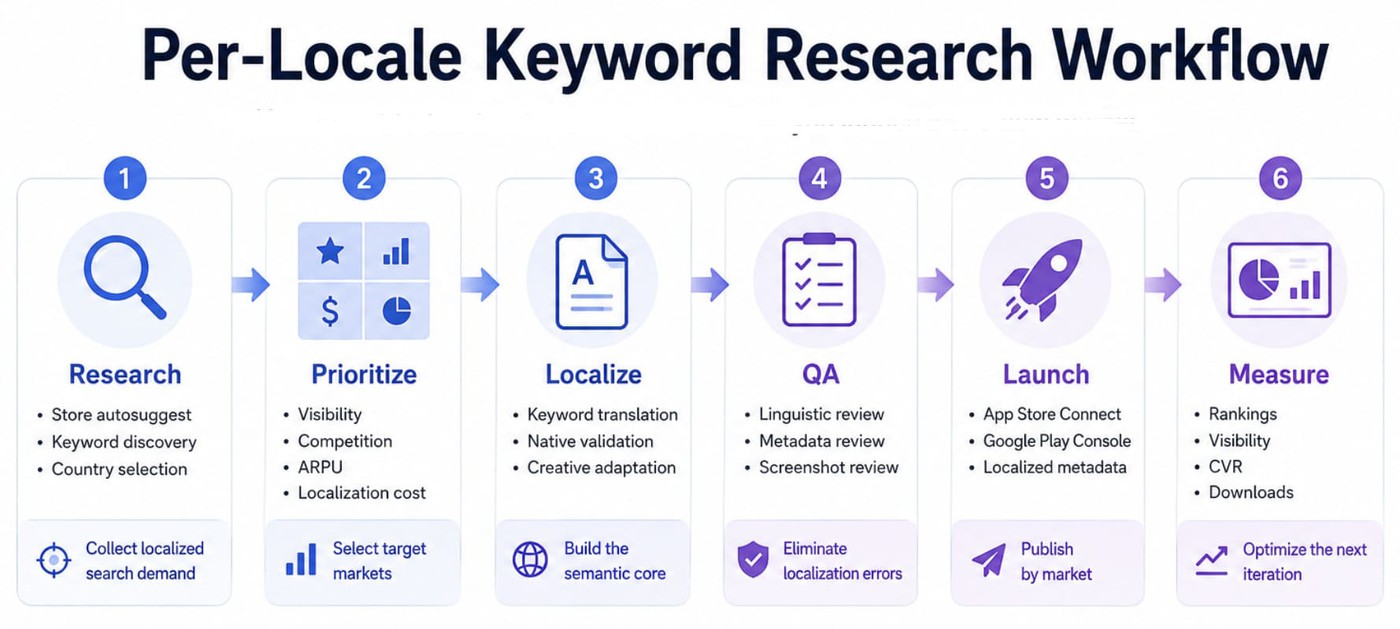
Stage 1: Research
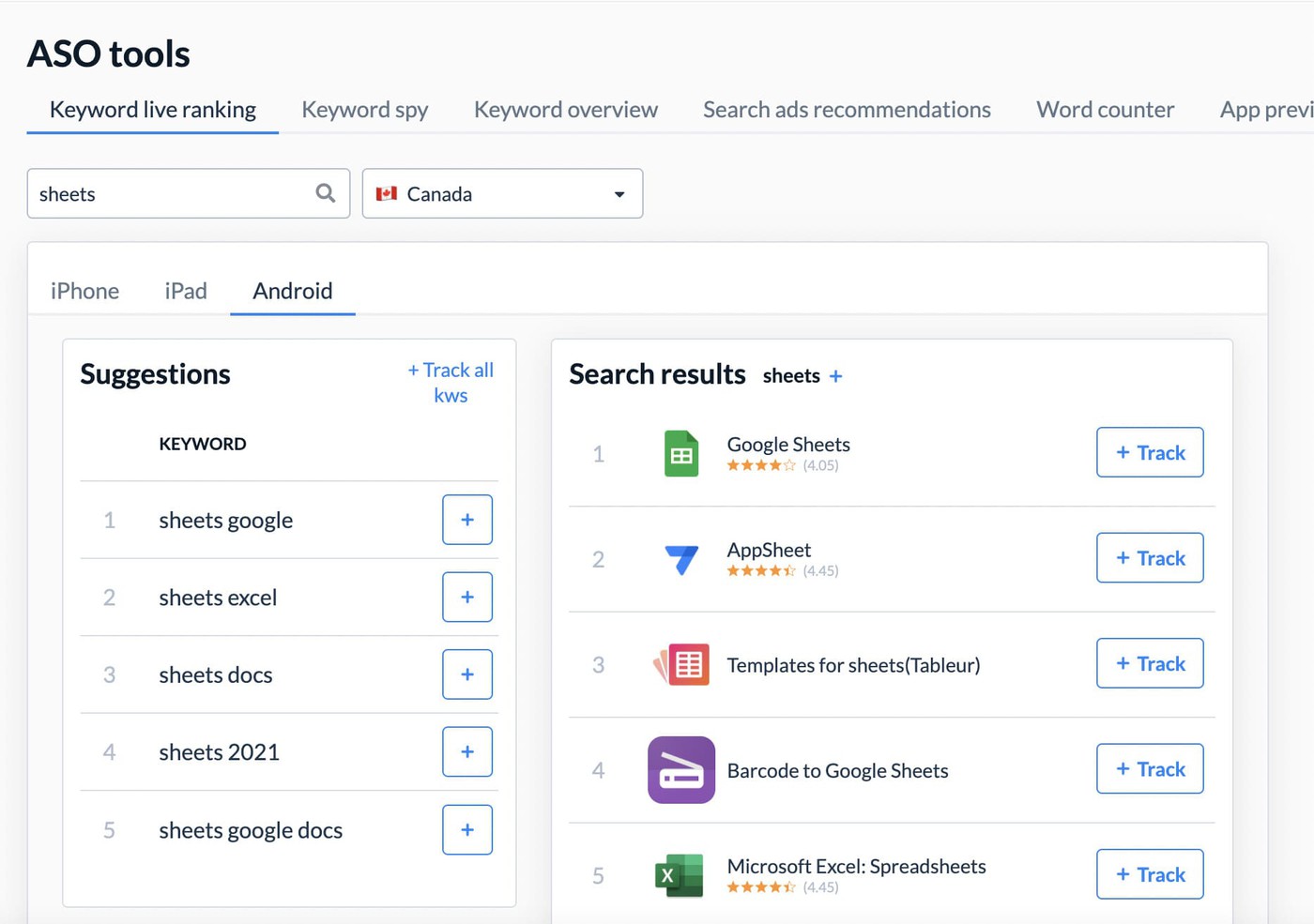
Start with the stores themselves. Apple's autosuggest is storefront-specific. Google Play's suggestions depend on locale and device language. Enter your seed terms, capture the suggestion tree, then expand those suggestions again.
This is often the fastest way to uncover localized keywords that never appear in direct translations. AppFollow's Keyword Live Ranking simulates store search behavior by country, making it easier to collect per-country keyword research without constantly switching storefronts.
Next, look at the apps already winning visibility in the market.
Competitor analysis is usually the highest-leverage step in the entire process because it reveals the language that already drives rankings. AppFollow's Keyword Spy extracts the keyword field for iOS competitors on a per-locale basis and identifies indexed keyword opportunities from Google Play metadata.
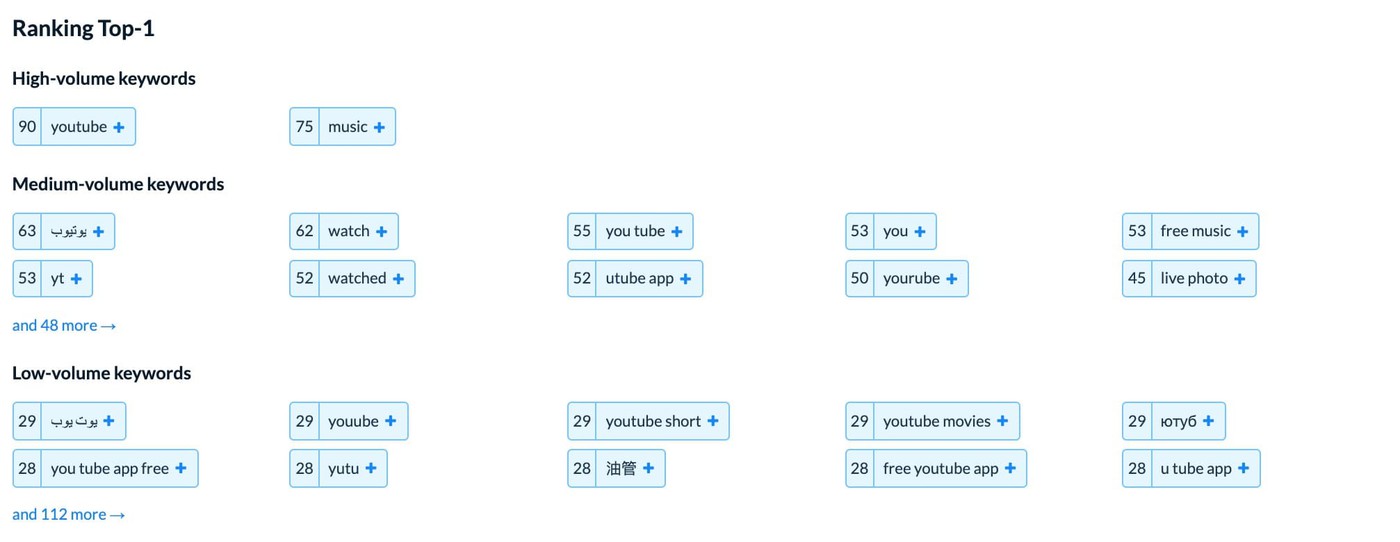
Instead of guessing which terms matter, you're starting from proven market behavior.
Stage 2: Localization production
Once the initial keyword set exists, translation becomes useful.
Run the candidate list through AppFollow's Keyword Auto-translation Tool to generate a first draft.
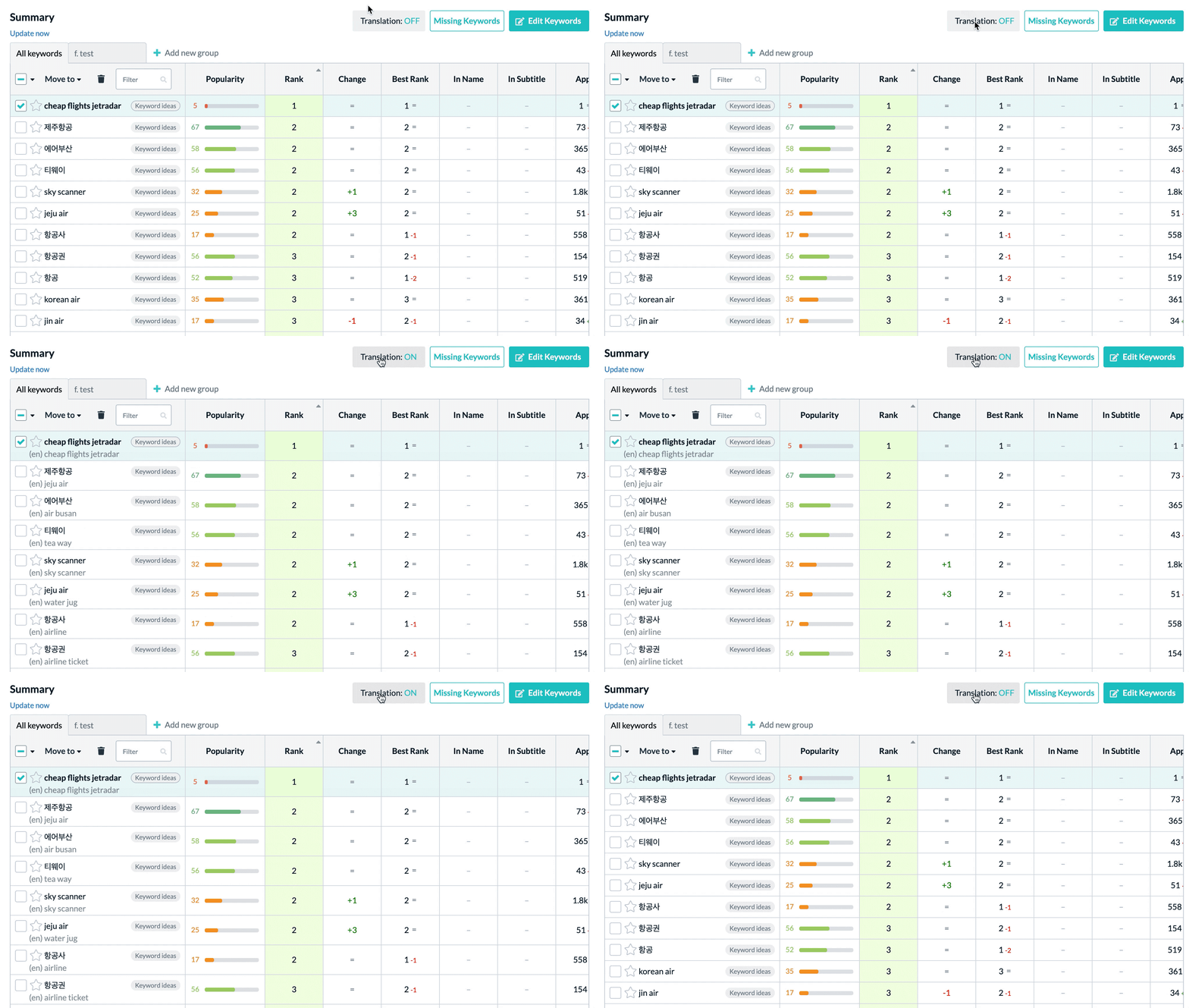
Then hand that list to a native speaker. Local slang, regional vocabulary, and false friends rarely survive machine translation intact. Never publish metadata without a native-language review.
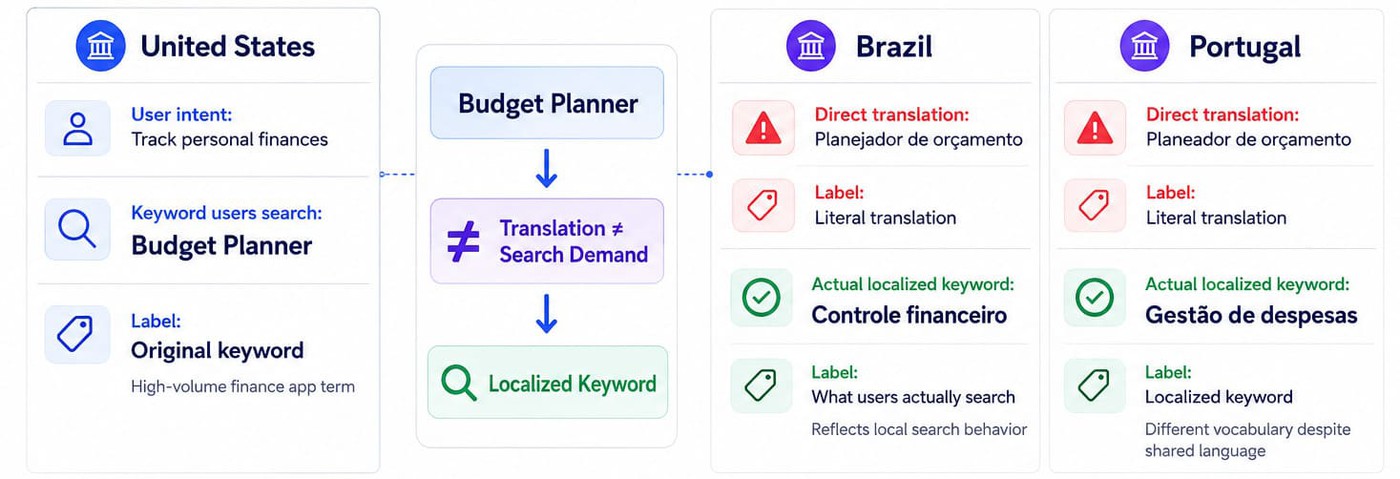
This is where app store keywords localization becomes less about language and more about intent. The goal is not to find equivalent words, but the terms local users actually search.
If the market supports Apple Search Ads, use it as a research tool.
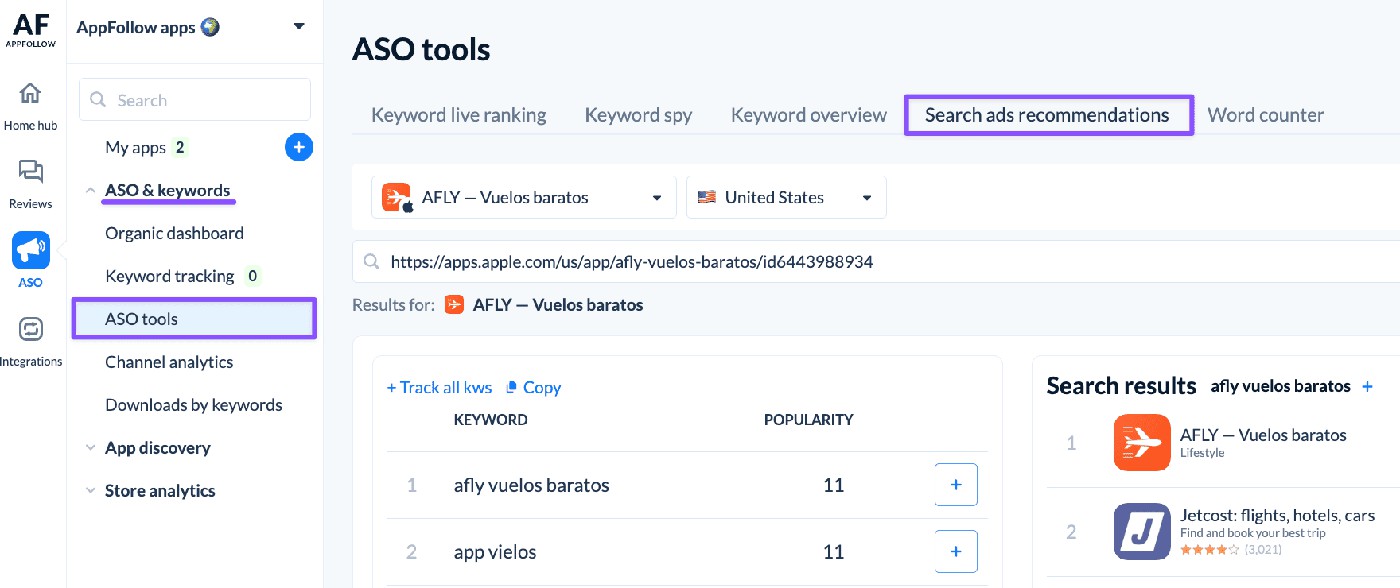
A short campaign can quickly reveal which keywords generate meaningful install intent and which simply generate impressions. Think of ASA spend in this context as research rather than acquisition. AppFollow's Search Ads Recommendations module surfaces keyword popularity scores by locale, helping teams prioritize opportunities before launch.
"Repetition feels safe. On iOS, it usually wastes space. Apple already indexes words from the app name, subtitle, and category, so using the same terms again in the keyword field just burns characters you could have spent on fresh search intent. The smarter move is to let each field do a different job. Put the strongest core term in the name, support it in the subtitle, then use the keyword field to widen the footprint with terms you have not used yet."
— Yaroslav Rudnitskiy, Senior Professional Services Manager (ASO) at AppFollow
Stage 3: QA, launch, and iteration
After publishing the update through App Store Connect or Google Play Console, shift your attention to the numbers. Early visibility, ranking movement, and conversion trends often tell a clearer story than the translation itself.
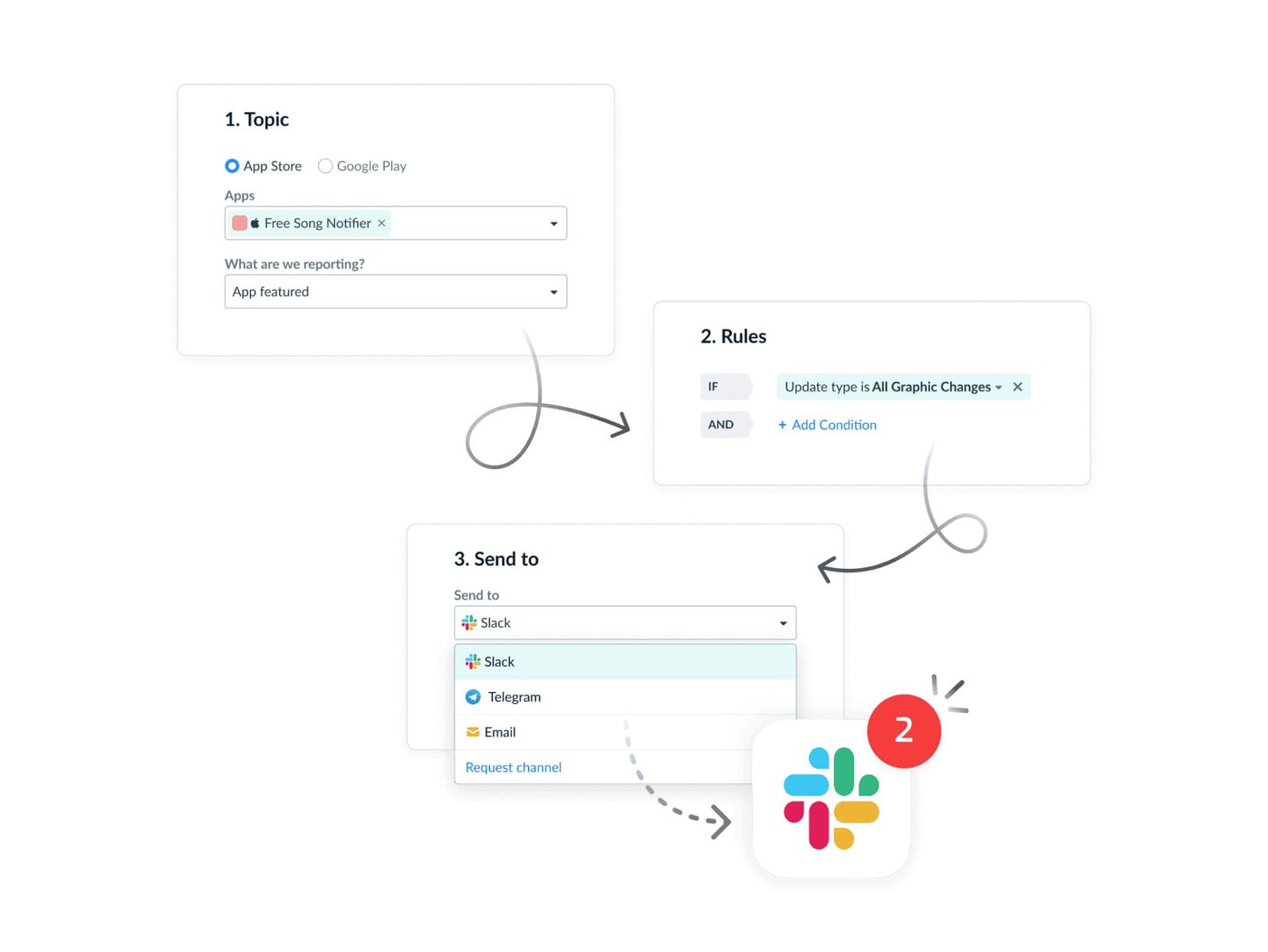
AppFollow Alerts confirm when metadata changes go live. App Performance tracks the resulting impact on visibility, rankings, and conversion rate by market.
Give the localization enough time to generate meaningful data. In most cases, the first review point arrives within 14 to 21 days.
The first version is rarely the final version. Once rankings and conversion data start coming in, you'll spot terms that deserve more space and others that aren't pulling their weight. Those insights tend to be far more useful than anything that came out of a spreadsheet before launch.
Read also: When to Apologize Publicly in the App Store - A Gaming Crisis Communication Playbook
Why direct translation fails
Direct translation fails because users in different markets rarely search using direct equivalents of the same words. Search behavior, competitor vocabulary, cultural references, and keyword popularity vary by locale. A phrase that performs well in the US may have little search volume in Germany, Brazil, or Japan. Successful ASO localization starts with local search intent and then builds metadata around it.
Translation is only one stage in the process. Keyword research comes first. Performance measurement comes last. Everything in between exists to preserve search intent as the app moves from one market to another.
- The workflow begins with per-country keyword research. This is where AppFollow's Keyword Live Ranking, Keyword Spy, and Search Ads Recommendations are most valuable. The goal is to produce a prioritized keyword list for each target locale based on search demand, competitor intelligence, and keyword popularity.
- Next comes source-language metadata creation. Titles, subtitles, descriptions, promo text, and screenshot copy are written with the keyword strategy already embedded. That source version becomes the foundation for every future localization.
Translation and glossary management sit in the middle of the workflow. Teams commonly use platforms such as Lokalise, Phrase, Crowdin, OneSky, Smartling, POEditor, or Transifex to manage multilingual content. The keyword list generated during ASO research should become part of the glossary and terminology rules. Approved keywords, preferred phrasing, and forbidden terms belong inside the TMS from the beginning.
The localization workflow: TMS + ASO tool + Console + native LQA
Most localization programs break down at the handoff points. The ASO team finishes keyword research. Translators never see the keyword strategy. The localization team delivers translated assets. Nobody validates them in the store environment. By the time performance data arrives, it's often impossible to tell where things went wrong.
A stronger app localization workflow treats localization as a continuous system rather than a sequence of disconnected tasks.
Localization-first workflow
Successful localization doesn't happen when the translation is delivered. It happens when keyword research, translation, QA, publishing, and measurement work together as a system. The workflow below helps teams preserve search intent from the initial keyword list all the way through launch and optimization.
- Linguistic QA and cultural review. Once translations are complete, linguistic quality assurance becomes the most important checkpoint. Native reviewers validate language, identify false friends, catch cultural issues, and confirm that keywords still sound natural in context. Tools such as Lokalise's in-context editor and OneSky's testing environments help streamline the process. Teams that need additional support often rely on AppFollow Consulting's native-speaker network for market validation and localization QA.
- Publish to the stores. Publishing comes next. Most TMS platforms still require export workflows rather than direct synchronization with App Store Connect or Google Play Console. Metadata is typically pushed through XLIFF, JSON, CSV, or similar formats before being uploaded into the store consoles. This is also the stage where teams create Custom Product Pages for iOS and Custom Store Listings for Google Play.
- Measure performance. Once the update is live, the measurement layer takes over. AppFollow App Performance tracks rankings, visibility, and conversion rates by country. App Competitor Analysis monitors localized competitors, while Alerts notify teams when metadata changes or ranking shifts occur.
- Test and iterate. The final stage is experimentation. Product Page Optimization on iOS and Store Listing Experiments on Google Play provide a structured way to improve localized creatives and messaging over time. Winning variants become the new baseline, and the workflow starts again.
The best localization programs move continuously through research, localization, QA, publishing, measurement, and testing. That's where localization shifts from a translation project into a repeatable growth system.
Read also: Game rating dropped after an update? The mobile game publisher's triage and recovery playbook
What localization actually costs
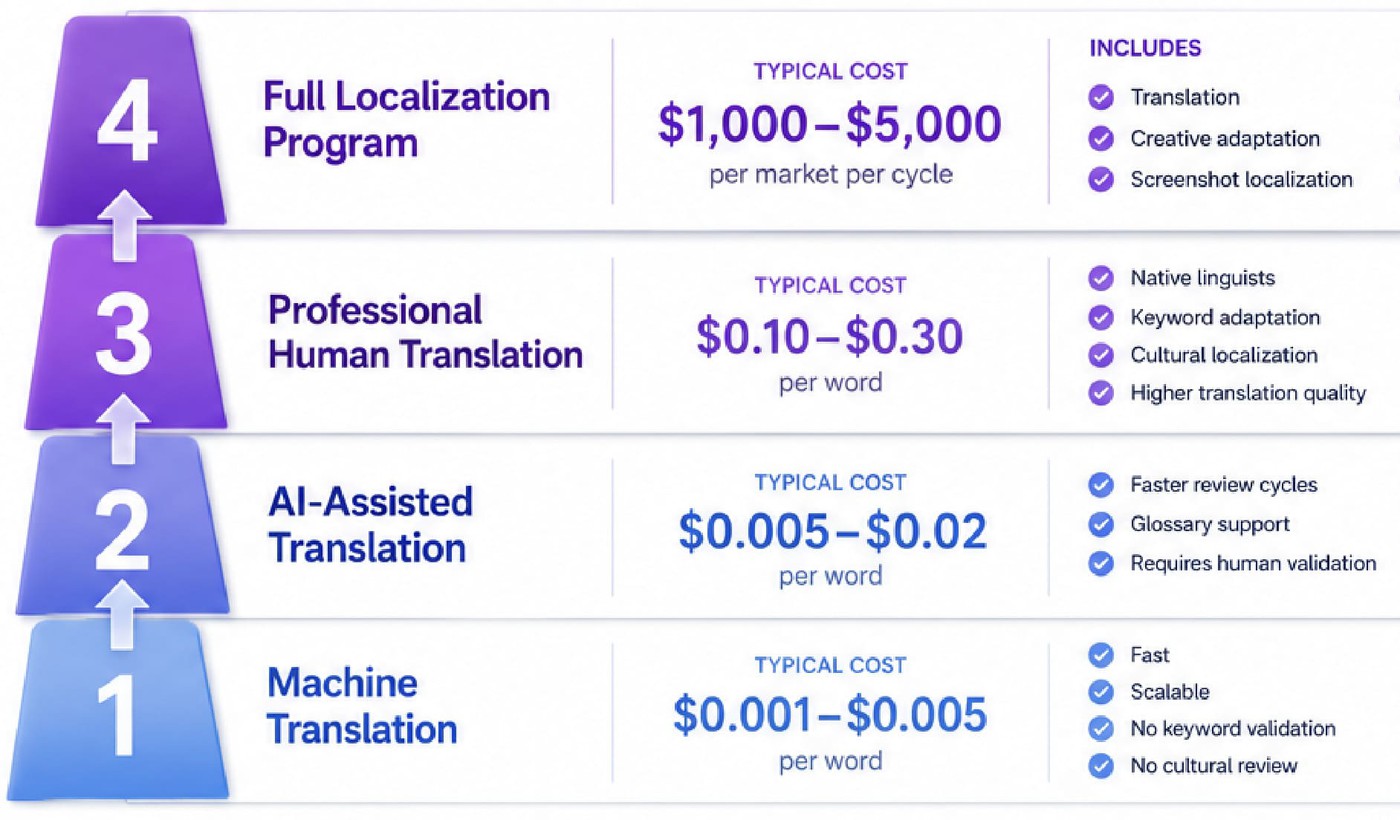
Most teams underestimate app localization cost because they focus on translation and ignore everything that comes after it. The translation itself is often the smallest line item. Keyword research, creative adaptation, linguistic review, testing, and ongoing iteration usually account for a larger share of the budget.
Per-word pricing
Translation pricing varies dramatically depending on the workflow. The cheapest option is usually machine translation. Services such as DeepL Pro and Google Cloud Translation process large volumes of text for a fraction of a cent per word. AI-assisted workflows cost a little more. OneSky's AI translation offering, for example, starts around half a cent per word.
Human translation is where costs start to vary. Language pair, subject matter, and review requirements all influence pricing. For a typical app-store localization project, rates often land somewhere between $0.10 and $0.30 per word. Teams working in highly regulated industries or content-heavy categories such as gaming can expect to pay more, especially when translators need domain expertise rather than language skills alone.
The lowest rate is not always the cheapest option. Poor translations create rework, ranking losses, and conversion problems that are far more expensive to fix later.
Per-locale launch costs
A full-market launch includes much more than translated metadata.
For most apps, a single localization cycle covering translation, screenshot copy, creative adaptation, and linguistic quality assurance costs between $1,000 and $5,000 per market. Teams producing localized screenshots, app preview videos, or voiceovers should expect another $500 to $2,000 per refresh cycle.
Geography does not automatically determine quality. Brazilian Portuguese, Indonesian, and many Eastern European languages often have lower per-word translation rates than Western European languages. The quality of the linguist and review process matters far more than the market itself.
Full program costs
This is where localization ROI becomes a planning question rather than a translation question.
The total cost of a localization program depends on the number of markets, update frequency, creative requirements, and QA process. A team localizing three markets may spend only a few thousand dollars annually, while programs spanning dozens of locales can reach six figures once translation, creative adaptation, tooling, and linguistic QA are included.
Most teams also need supporting infrastructure. A translation management system such as Lokalise, Phrase, Crowdin, Smartling, POEditor, Transifex, or OneSky usually adds several hundred to several thousand dollars per month. Native-speaker LQA introduces an additional review cost that varies based on language, content volume, and testing requirements.
Some teams prefer not to manage the procurement, TMS, LQA, and measurement stack themselves. In those cases, AppFollow Consulting helps teams execute multi-market ASO strategies across 40+ store languages, including keyword research, metadata optimization, creative recommendations, and localization-focused growth initiatives. Across the broader market, multi-country ASO consulting is typically structured as a monthly retainer, with pricing varying based on the number of markets, localization scope, creative production requirements, and ongoing optimization support.
Read also: App Store Optimization Metrics - The Complete 2026 Guide to ASO Tracking
Case study: Komorebi (711% App Store install lift across 10 localizations)
If you're looking for an app localization case study with real scale, Komorebi is one of the strongest examples I've seen. The company has more than 60 million downloads across 100+ apps and already has experience growing mobile products. Even so, launching a new app into new markets required a different ASO approach.
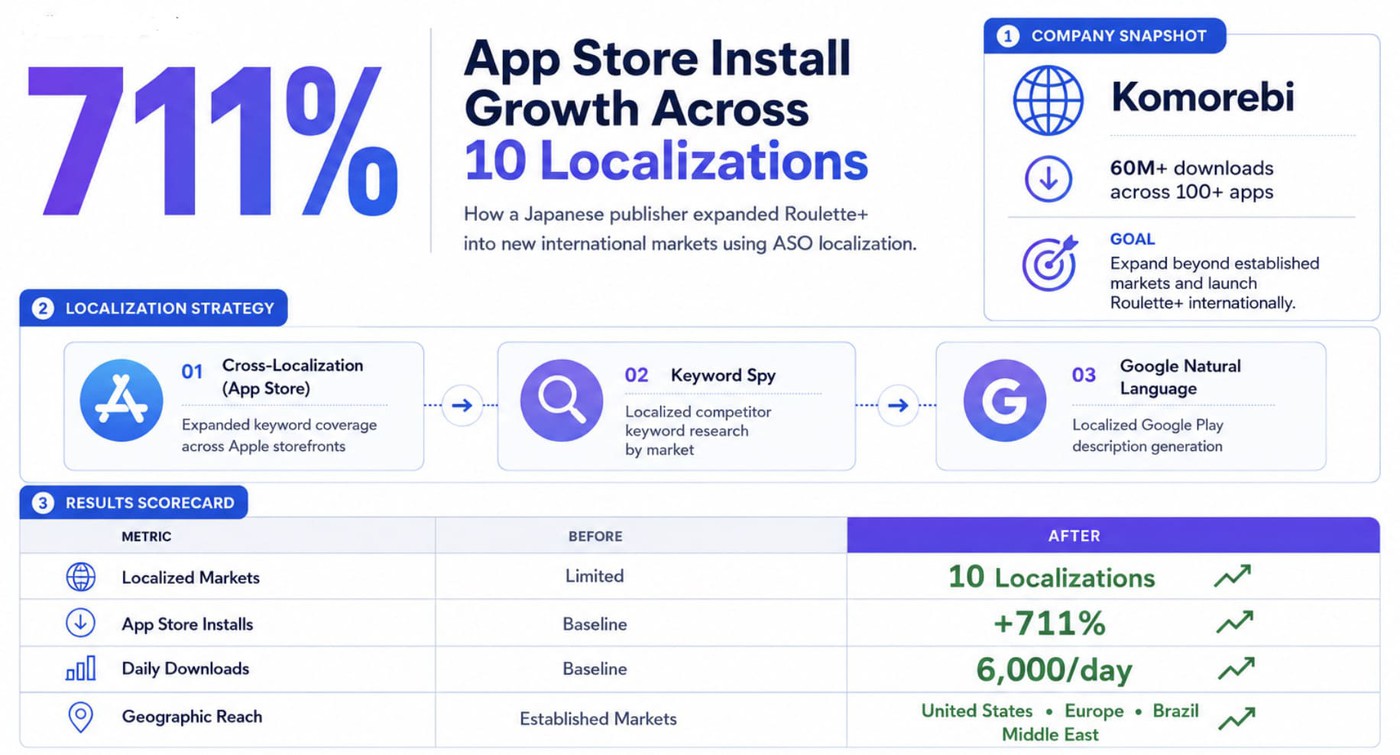
Komorebi launched Roulette+ and wanted to expand beyond its established markets. Reaching users in the United States, Korea, Latin America, and Europe meant competing against local apps already optimized for those audiences. To support the launch, Komorebi partnered with AppFollow Consulting to build a localization strategy from day one.
The localization strategy
The project covered 10 new localizations: United States, Mexico (English and Spanish), Korea, United Kingdom, Traditional Chinese, Germany, Canada, Brazil, Russia, and France.
The team combined several localization techniques discussed throughout this guide. App Store cross-localization expanded keyword coverage across Apple storefronts. Keyword Spy was used to extract competitor keywords on a per-locale basis and uncover market-specific opportunities. For Google Play, Google Natural Language helped generate localized descriptions aligned with local search intent.
Instead of translating one store listing ten times, the strategy was built around how users searched, compared, and downloaded apps in each market.
The results
Eight months after launch, Roulette+ reached 6,000 daily downloads and achieved a 711% increase in App Store installs. Growth came from far more than the company's traditional markets.
As Komorebi explained:
"With the text for our app page prepared with well-researched ASO from the very beginning, our new app has grown the quickest among our apps. Even though it's only been 8 months since its release, our daily download rate has reached 6000. It's really incredible that the downloads come not only from Europe and the United States but also from new regions such as Brazil and the Middle East."
For teams researching app store localization in Japan, Korea, Brazil, or other international markets, the lesson is straightforward: localization creates the largest impact when keyword research, metadata strategy, and market-specific optimization happen before launch rather than after growth stalls.
Read also: 12 Biggest Mobile Game Companies in 2026 (Ranked by Revenue)
How AppFollow helps you run ASO localization at scale
Localization gets harder as market coverage expands. Keyword research, measurement, reviews, and competitor monitoring all become more difficult when you're operating across multiple countries and languages. AppFollow helps teams manage those workflows from research through optimization.
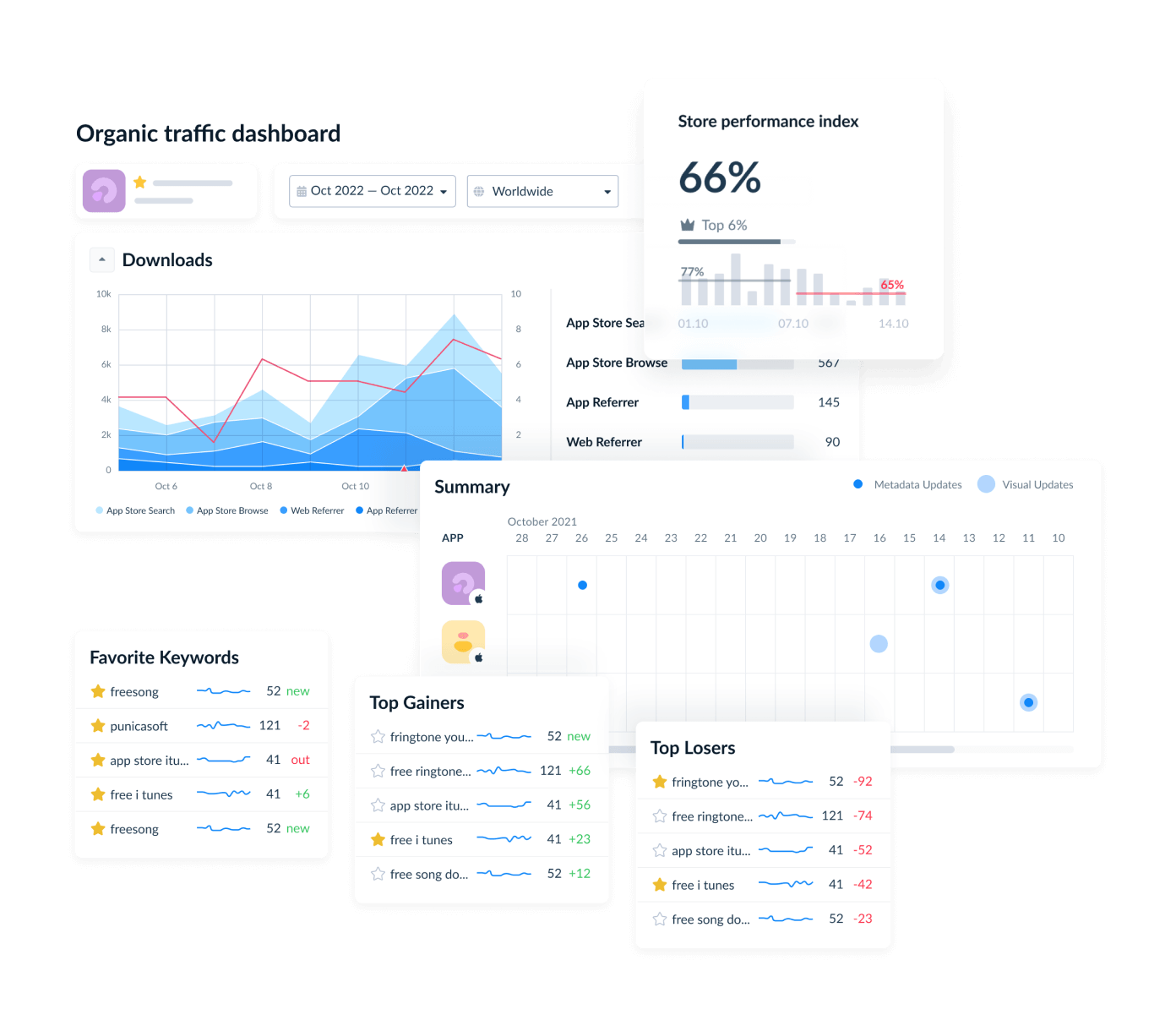
- Keyword Live Ranking for country-specific search results
- Keyword Spy for competitor keyword analysis by locale
- Keyword Auto-translation Tool for initial keyword discovery
- Search Ads Recommendations with keyword popularity scores (5–100)
- App Performance for country-level downloads, visibility, impressions, and conversion rate
- App Competitor Analysis for local competitive benchmarking
- Alerts for ranking and metadata changes
- AI Review Management with review and response translation
- App Monitor for sentiment tracking and anomaly detection
- Workflow Automation for market-specific response rules
cta_get_started_yellow
Frequently asked questions about ASO localization
What is app store optimization localization?
App store optimization localization is the process of adapting an app’s store presence to how people search for and evaluate apps in a specific market. It usually includes localizing keywords, screenshots, messaging, reviews, and performance tracking. Translation is part of the process, but it rarely drives results on its own.
What is ASO localization, and how is it different from translation?
A translated app listing can be accurate and still struggle to rank because people in different markets do not always use direct equivalents of the same words. ASO localization starts with local search behavior and then adapts metadata and creatives around it. Some teams also rewrite parts of the messaging so the listing feels native to the market.
How much does it cost to localize an app?
App localization costs depend on the language, content volume, creative requirements, and quality assurance process. Machine translation is inexpensive, while human translation costs more, especially when subject-matter expertise is required. Once screenshots, metadata updates, and linguistic review are included, many teams spend between $1,000 and $5,000 to launch a new locale.
Which languages should I localize my app into first?
Start with countries where people already discover the app but convert less often than expected. Existing visibility gives localization something to build on. The right markets vary by app, although Japan, South Korea, Germany, France, Brazil, and Mexico frequently appear near the top of localization prioritization exercises.
How does Apple App Store cross-localization work?
Apple can index keyword fields from secondary locales in addition to the primary locale. This gives ASO teams more room for regional wording, long-tail keywords, and market-specific search behavior. Repeating the same keywords across multiple locales, however, usually adds little value.
How many languages do App Store Connect and Google Play support?
The App Store supports more than 40 locales, while Google Play supports more than 70. Most apps use only a small number of them. Google Play also offers Custom Store Listings, which allow teams to tailor messaging and creatives for specific markets without changing the default store listing.
How do I find keywords in a language I don’t speak?
Start with local search data rather than direct translation. Store autosuggest, competitor research, and native-speaker validation usually reveal more useful keywords than translated terms alone. Teams can also use Apple Search Ads to check whether a keyword attracts relevant traffic before adding it to app metadata.
Do localized reviews affect ASO rankings?
Localized ratings and reviews can affect ASO performance because they are evaluated within each market. A strong reputation in one country does not automatically carry over to another. Responding in the user’s language can improve trust, while local review trends can reveal market-specific issues that analytics alone may not show.
Which ASO tools support localization so I can optimize my app for multiple countries and languages?
ASO localization tools generally fall into two categories. Translation management platforms such as Lokalise, Crowdin, and Phrase handle the linguistic side by adapting app metadata into another language. ASO platforms such as AppFollow, AppTweak, and MobileAction handle the performance side by tracking how each localized listing ranks and converts after publication.
AppFollow’s Keyword Live Ranking and App Performance provide rankings, visibility, and conversion data for individual countries and store locales. This helps teams identify which markets are performing instead of relying on one blended global number.
What ASO platform should I choose to manage localization and translation for multiple app store markets?
If translation is the main bottleneck, use a dedicated translation management system such as Lokalise, Crowdin, Phrase, or Smartling. For the ASO side—prioritizing markets, researching country-specific keywords, and confirming whether a new locale drives installs—AppFollow provides Keyword Live Ranking, Keyword Spy, and App Performance data broken down by country.
Most teams use both types of platforms: a translation management system for the linguistic workflow and AppFollow for keyword strategy and market-by-market performance measurement.