ASO Ranking Factors: Everything That Affects Your App's Visibility in 2026


Table of Content:
- TL;DR
- What Is the App Store ranking algorithm?
- Top 5 on-metadata ASO ranking factors you control
- Off-Metadata ASO Ranking Signals
- App Store vs. Google Play, How ASO ranking factors differ
- How to monitor ASO ranking factors and algorithm changes
- How AppFollow helps you optimize every ASO ranking factor
- FAQs
The App Store ranking algorithm has never published its rules. Most teams end up optimizing the 20% they can see: the title, the icon, maybe the screenshots. While the other 80% of app store optimization factors quietly decide their fate.
Download velocity, behavioral signals, and conversion rates from search: these are the ASO ranking factors that separate apps sitting at position 47 from the ones owning the top three spots.
So together with Yaroslav Rudnitskiy, Senior Professional Services Manager and one of the sharpest ASO minds in the room, we mapped every signal that moves the needle, both on-metadata and off.
- What really determines app visibility in search?
- Why do two apps with identical keywords rank ten positions apart?
- Does your rating directly affect ASO ranking, or is that a myth?
- How does the app store ranking algorithm treat Google Play differently from iOS, and are you leaving organic installs on the table by running one strategy for both stores?
Every answer is below; the mechanics of search visibility and app discoverability that your roadmap should be built around.
TL;DR
- Metadata still does the heaviest lifting upfront. Your title, subtitle, and keyword field are the highest-leverage on-page ASO factors because they decide which searches your app is even eligible to appear in. Good keyword research in App Store Connect is still the foundation.
- Off-metadata signals decide who wins the top spots. Recent install velocity and conversion rate from search are the strongest behavioral signals shaping visibility in organic search results once your metadata gets you into the race.
- Ratings are not just social proof. Once your app stays above 4.0, rankings tend to improve measurably because users trust the listing more, and the algorithm reads that as stronger quality.
- Apple expanded what can influence discoverability. In 2025-2026, screenshot text and keyword mapping for custom product pages became real ASO opportunities, which means visuals now do more than convert. They can help shape visibility, too.
- Google Play and the App Store do not index the same way. Google Play uses your full description for ranking, while Apple does not, so one shared metadata strategy across both stores usually leaves traffic on the table.
- Algorithm updates rarely come with a warning. Rankings can shift silently, which is why daily keyword movement tracking is the fastest way to catch changes before they turn into a bigger traffic drop.
- Monitoring is where strategy becomes operational. AppFollow’s Review & Rating dashboard plus Keyword Rank Tracker help teams watch rankings, review trends, and conversion signals in one place instead of piecing them together manually.
What Is the App Store ranking algorithm?
App Store ranking algorithm is Apple's (and Google's) automated system for deciding which apps appear, and where, across search results, top charts, and category rankings. Neither company publishes the formula. What the industry has mapped out through years of testing is that the algorithm runs two parallel evaluations on every app: relevance and quality.
- Relevance is the metadata side. Your title, subtitle, keyword field, these tell the algorithm what your app is and which search queries it should surface for. Get this wrong and no amount of great reviews saves you, because the algorithm won't even consider you for the right searches.
- Quality is where most teams underinvest. Downloads, retention, ratings, conversion rate from search, and behavioral signals that tell the algorithm whether real users want what you're offering. An app can have perfect metadata and still rank below a competitor with messier copy but stronger engagement numbers.
“The algorithm doesn't evaluate your app once. Rankings shift constantly as competitors update their metadata in App Store Connect, as your own install velocity fluctuates, and as Apple and Google run their own experiments. Understanding ASO ranking fundamentals and keeping a live keyword strategy, not a set-it-once doc, is what compounds into sustainable organic traffic over time.”
- Yaroslav Rudnitskiy, ASO guru
Category ranking follows similar logic but adds a relative element: your behavioral signals are measured against other apps in your category. That's why an app with 10,000 downloads can rank #1 in a niche category while a similar download count barely makes a dent in a saturated one.
Top 5 on-metadata ASO ranking factors you control
Once you understand how the algorithm scores relevance and quality together, the logical next question is: where do you start? On-metadata app store optimization ranking factors are the answer, because these are the variables sitting directly in App Store Connect and Google Play Console, waiting for you to edit them right now.
The data here comes from a combination of Apple's own developer documentation, years of community testing by ASO practitioners, and Yaroslav's hands-on experience managing ASO for apps across multiple categories and storefronts. These are mechanics that move rankings when you pull the right lever.
1. App title
Your app name is the single most heavily weighted text field in the entire App Store ranking system.
Full stop. The algorithm reads your title first, weighs keyword relevance from it most aggressively, and uses it to decide which search queries your app is eligible to appear in. Every other metadata field builds on this foundation, which makes getting the title right the highest-ROI move in your entire ASO workflow.
The character limit is 30. That sounds generous until you're trying to fit a brand name and a meaningful keyword into the same string without it reading like a ransom note.
The pattern that consistently outperforms is simple:
[Brand] – [Primary Keyword]
Lead with your brand for recognition, follow with the keyword your target users are typing. Here's what that looks like in practice:
- "Centr" as an app name tells the algorithm almost nothing.
- "Centr: Workout & Fitness Plan" immediately signals relevance for fitness-related search queries.
The keyword-optimized version ranks for terms the generic version simply isn't in the running for, because the algorithm never identified it as a fitness app.
Critically, position within those 30 characters matters. The first keyword carries more weight than the last. If your primary target term is "expense tracker," that phrase should open your title, not close it.
Many teams bury their strongest keyword after a long brand name and lose ranking potential they never knew they had.
2. Keyword field (iOS) and description (Google Play)
Apple's keyword field has been capped at 100 characters since 2016. The limit never changed. What changed is how competitive the allocation decisions inside those 100 characters have become, because everyone knows the basics now and the edge lives in the details most guides skip.
How Apple parses the field
The keyword field doesn't work in isolation. Apple's algorithm combines your keyword field tokens with the terms in your title and subtitle to build a searchable phrase index. So if your title contains "Fitness" and your keyword field contains "tracker,women,home," the algorithm can surface your app for "fitness tracker for women at home", even though that exact phrase appears nowhere in your metadata.
Most developers don't know this.
“Your keyword field should contain zero terms already present in your title or subtitle. Those 100 characters are exclusively for net-new vocabulary. Repeating "fitness" in the keyword field when it's already in your title burns characters that could be indexing an entirely different search query.”
Yaroslav Rudnitskiy, ASO guru
The field is a token list. Commas separate tokens, spaces waste characters, articles and prepositions add nothing.
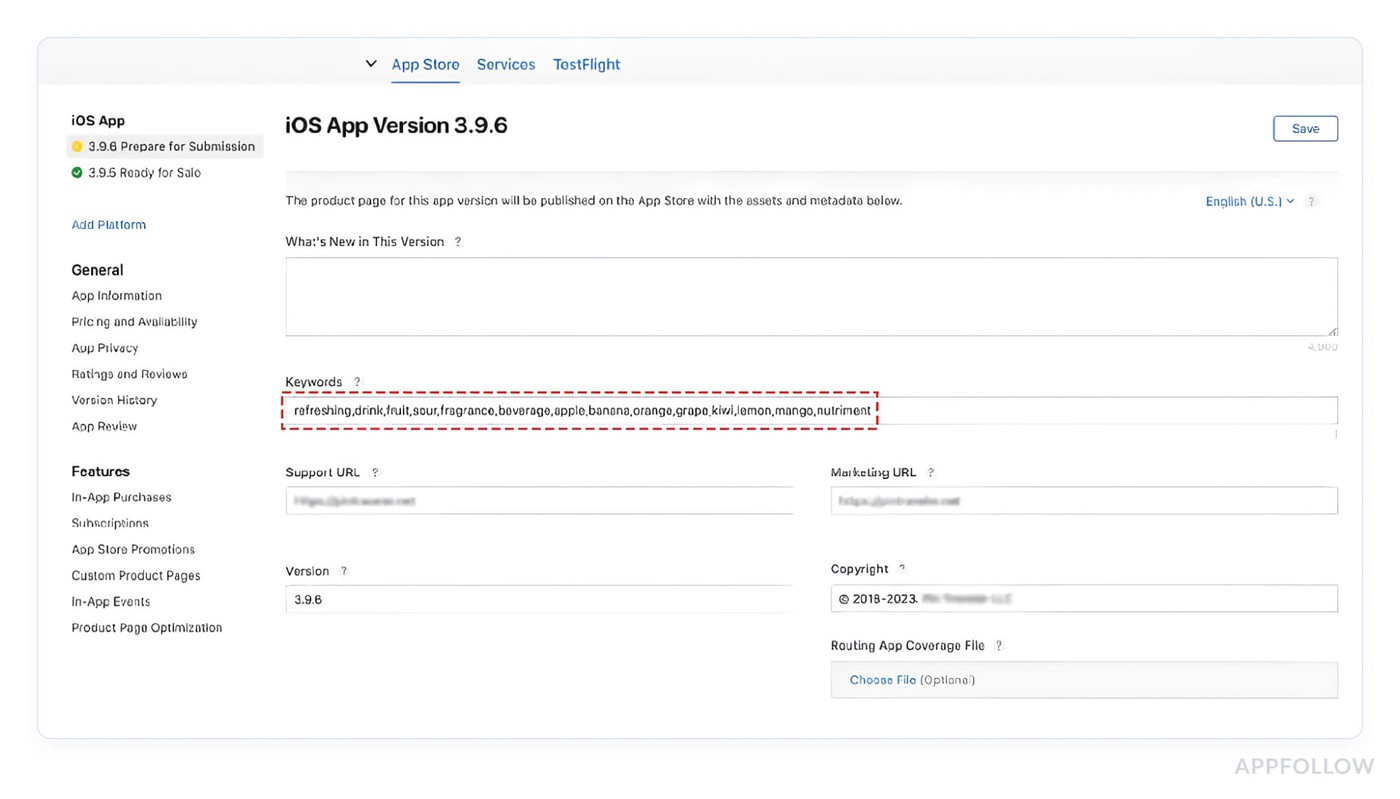
Once you internalize that, the formatting rules stop feeling arbitrary.
Here's what the difference looks like in practice:
Weak allocation: budget tracker, expense tracker, Characters used: 57 Unique new terms indexed: roughly 3. The word "tracker" repeats four times and contributes exactly once to the index. | Strong allocation: budget, expense, money, bills, savings, salary, receipt, tax, invoice, wallet Characters used: 63. Unique new terms indexed: 10. Every character is doing new work. |
The second example is a fundamentally different understanding of what the field is for. Long-tail keywords belong here too, but broken apart.
Instead of spending 35 characters on "meditation app for anxiety," write meditation, anxiety, sleep, calm, mindfulness, breathing and let Apple's combinatorial indexing reconstruct the relevance. You get six indexed terms for the same character spend.
One thing most teams discover too late: the App Store keyword field resets its indexing when you push a new app version. Ranking gains from a well-optimized keyword set can take two to four weeks to fully stabilize after an update. Teams that change their keyword field with every release and check rankings three days later are measuring noise. Give each keyword configuration at least two to three weeks of data before drawing any conclusions.
Google Play runs on completely different logic
There's no hidden keyword field on Android. The Play Console indexes the app name (50 characters), the short description (80 characters), and the entire long description (up to 4,000 characters), Google's own documentation confirms this.
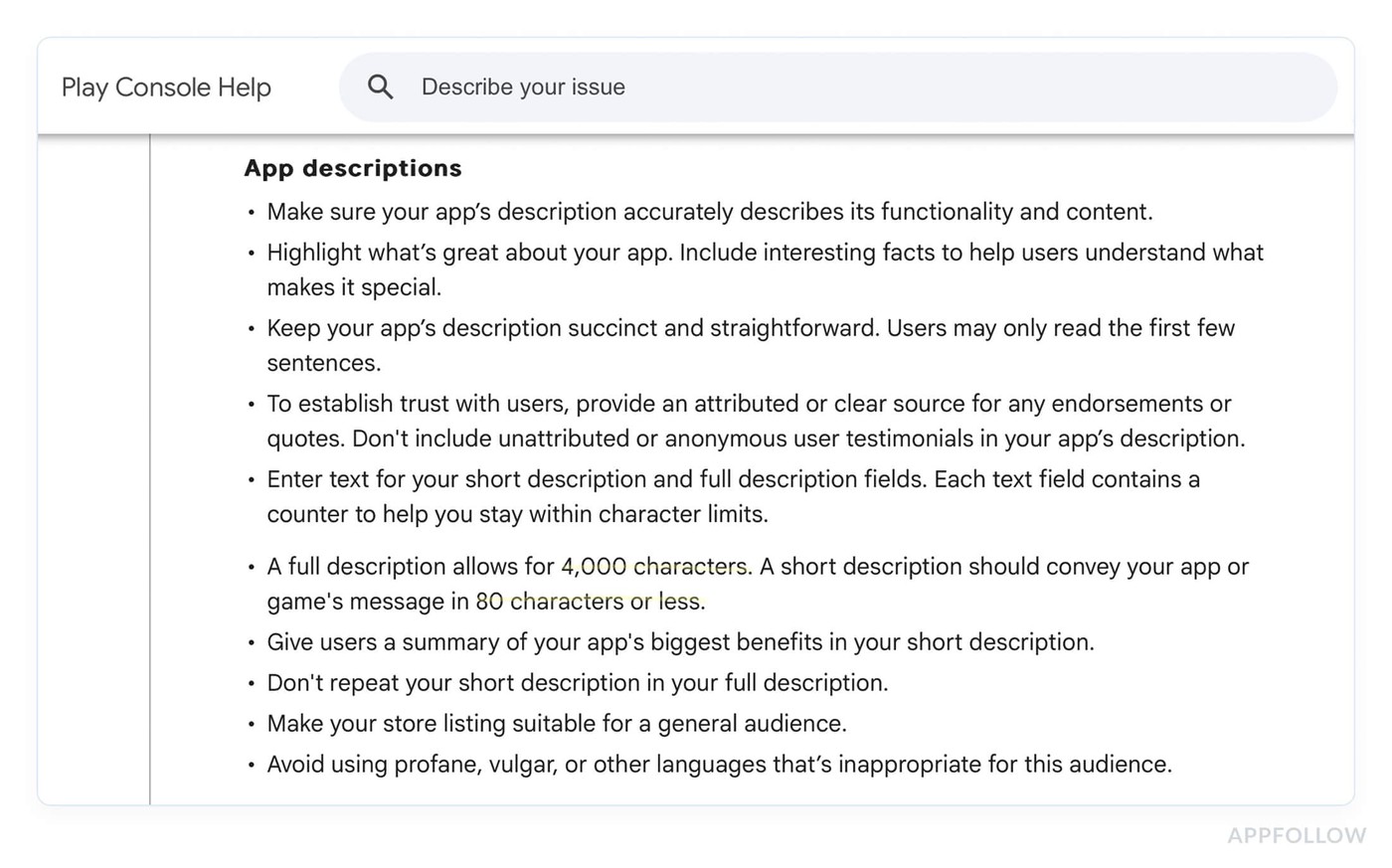
It's closer to traditional web SEO than anything Apple does, which means keyword placement and density matter in ways that would be irrelevant on iOS.
The short description carries disproportionate weight relative to its length. Think of it as your meta description, except here it directly influences ranking, not just click-through. Your primary keyword belongs in the first sentence, full stop. | Inside the long description, the pattern that shows up consistently in top-ranking Play Store listings: primary keyword in the opening paragraph, then distributed 2-3 more times through the body, never back-to-back, always in context. That keeps density high enough to signal relevance without triggering repetition penalties that hurt both ranking and conversion. |
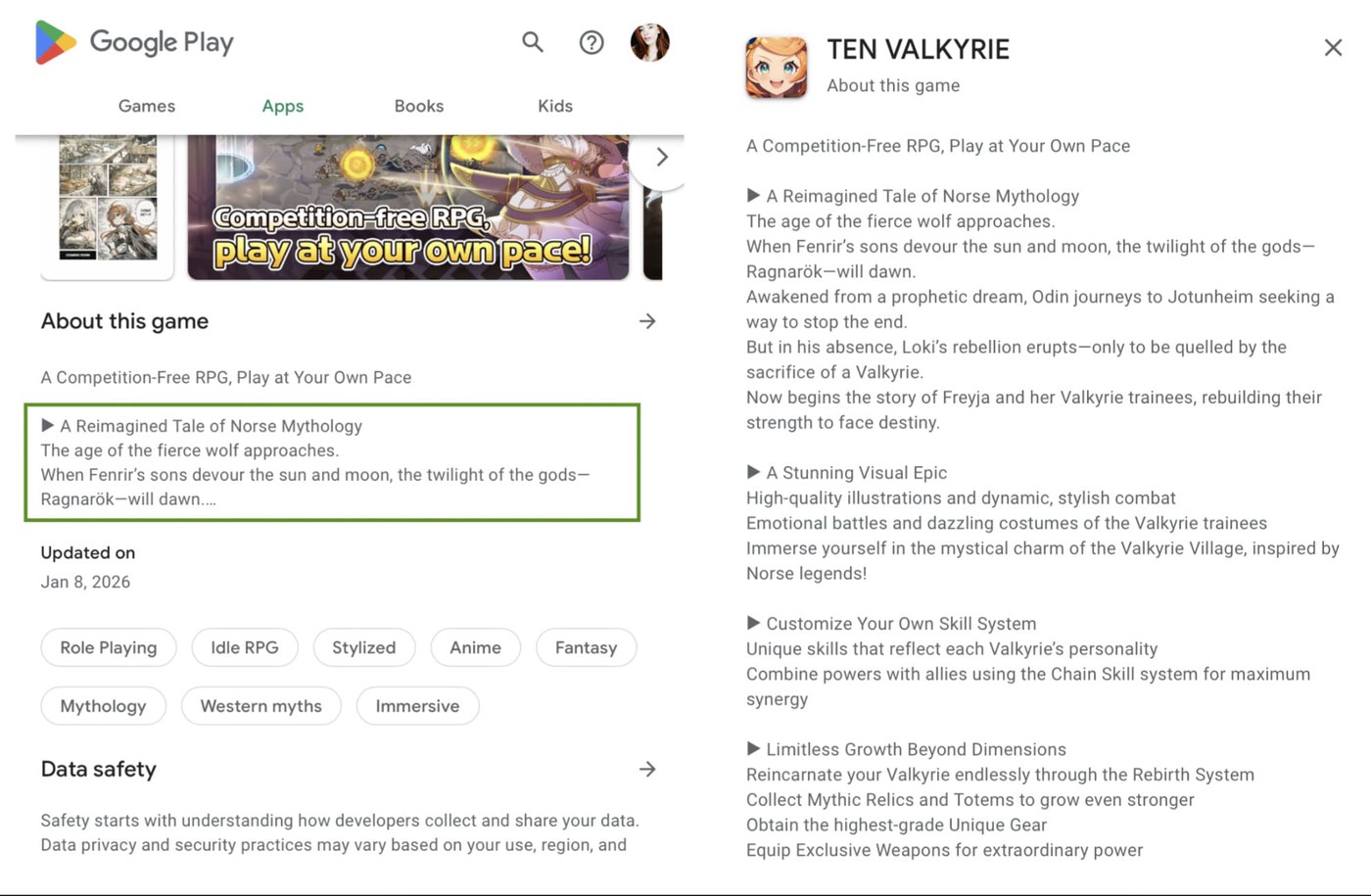
Keyword stuffing here backfires the same way it does on the web, and the Play algorithm has been sophisticated enough to penalize it for years.
Two details competitors rarely mention.
- First, keywords in the short description appear to carry higher weight than equivalent mentions buried in the long description body. Place your strongest terms accordingly.
- Second, localized descriptions are indexed separately per locale. Your English description does nothing for your ranking in Germany, France, or Japan. Each of the 40+ available locales is its own independent keyword opportunity, and most apps are actively optimizing maybe three of them. That gap is real traffic sitting unclaimed.
Running one keyword strategy across both platforms is one of the most expensive ASO mistakes you can make. The research required to do both well, separate search volume data, separate competitive landscapes, separate indexing logic, is exactly where AppFollow's Keyword Overview removes the guesswork. It pulls search volume estimates and keyword difficulty scores separately for iOS and Google Play.
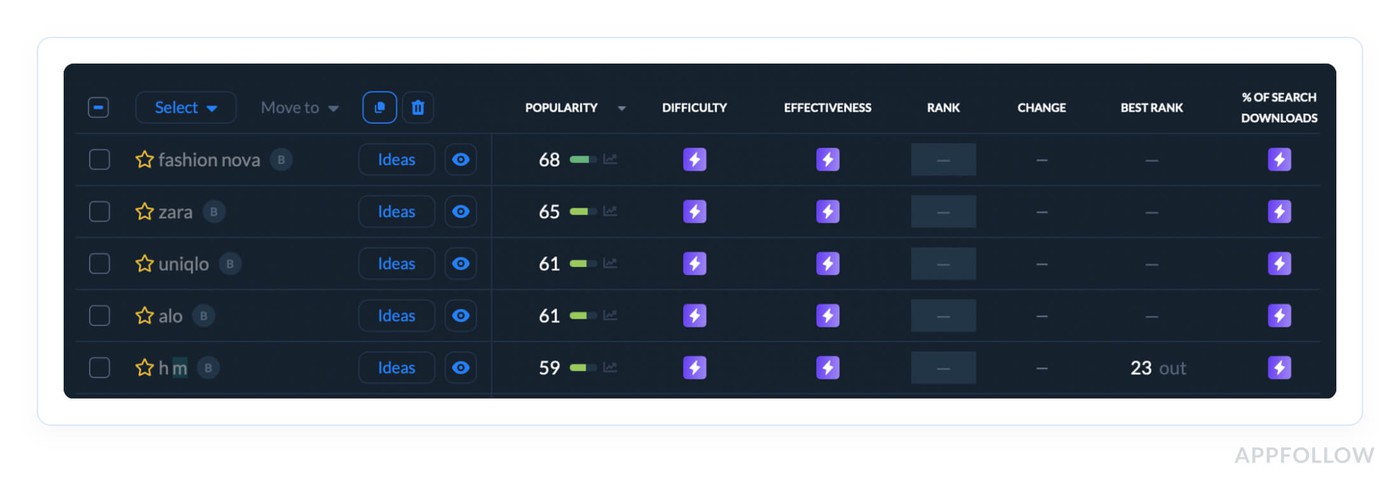
Additionally it surfaces terms your competitors are ranking for that you haven't targeted yet.
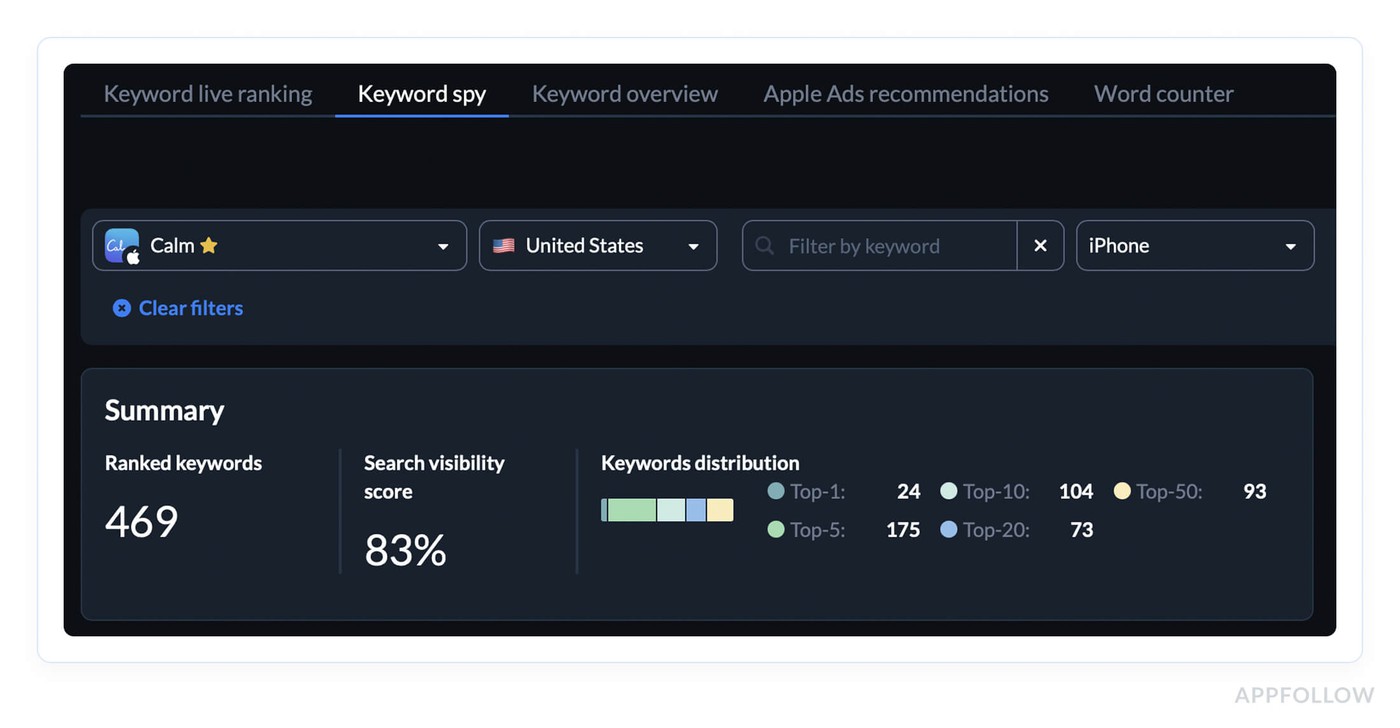
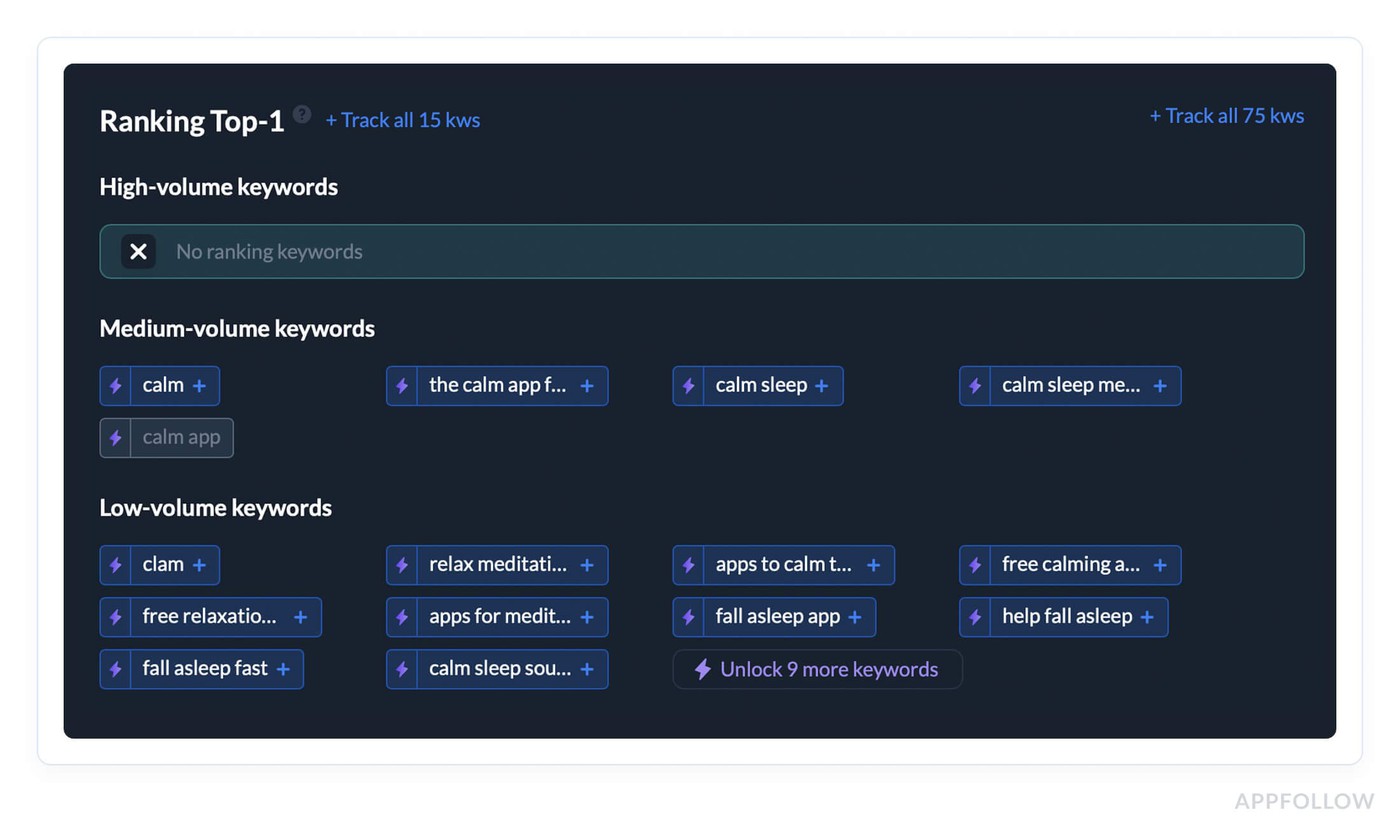
Those are the exact inputs you need to make your 100 iOS characters and your Android description work as hard as possible.
cta_get_started_purple
The keyword field and description determine which searches you're eligible to appear in. What converts the users who find you, and why that conversion rate feeds directly back into your rankings, is a different mechanism, and a more counterintuitive one than most teams expect.
Read also: Proven tips on Optimizing Your App's Metadata
3. App description doesn't rank directly, but converts users who do find you
Apple doesn't index your iOS description for ranking. That fact lulls most teams into treating it as an afterthought, which is exactly why it quietly destroys rankings for apps that should be performing better.
The mechanism is straightforward once you see it. Conversion rate from search, the percentage of users who see your app in results and tap "Get", is one of the strongest behavioral signals feeding back into ASO ranking.
Average App Store conversion from search sits around 3–5% across most categories. Moving from 3% to 5% on a keyword driving 10,000 monthly impressions means 200 extra installs from zero additional spend. Those 200 installs signal stronger relevance to the algorithm, ranking improves, impressions increase, and the loop compounds.
The first three lines of your app description are carrying almost all the weight
Industry data suggests fewer than 2% of App Store visitors ever tap "more" to expand the full description.
You're writing up to 4,000 characters for a tiny fraction of your audience, which means the first 170 to 255 characters (depending on device) need to convert the 95% who never scroll.
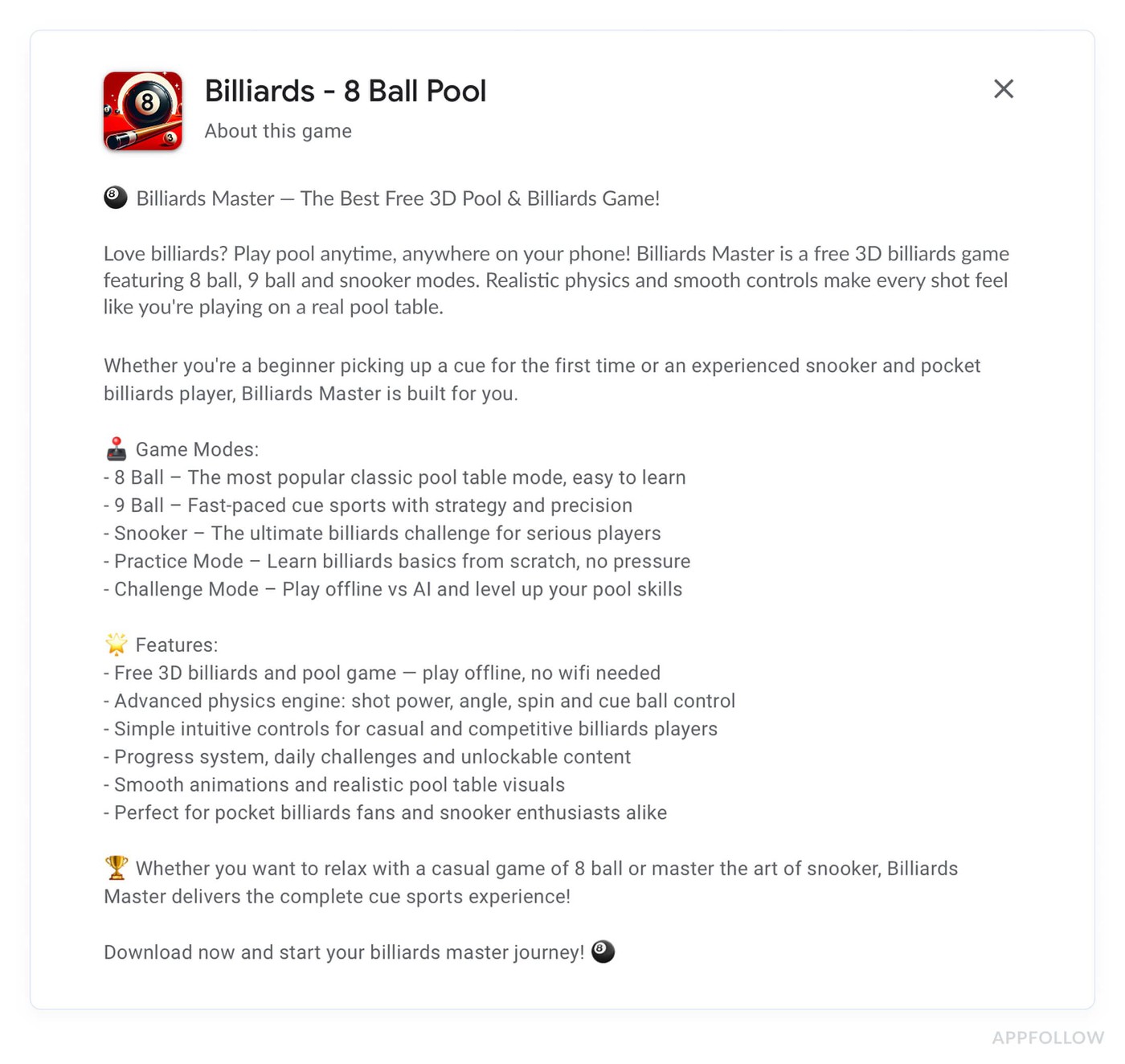
Most app listings open with company boilerplate. "Welcome to [App Name]! We're a team of passionate developers..." That's the highest-value real estate in your entire app listing, spent on copy that helps nobody make a download decision.
The descriptions that convert best in competitive categories follow a pattern:
- outcome in line one,
- mechanism in line two,
- proof or urgency in line three.
"Track every expense in 10 seconds. Automatic categorization, zero manual entry. Trusted by 2M+ users."
Three lines, three jobs done. A call to action or social proof in that window consistently outperforms feature-led openers, because users who land on your listing from search already know roughly what the app does. They need a reASOn (ha) to trust it and a nudge to act.
Below the fold, structure the remaining copy for the small percentage who do scroll:
- bullet points for scannability,
- benefit-led language,
- social proof embedded naturally rather than appended as an afterthought at the end.
Localization is a conversion lever most teams treat as a translation task
Storemaven research has shown localized store listings can improve conversion rates by 26% or more in non-English markets. On a keyword driving meaningful volume in Germany or Japan, that conversion lift feeds directly into regional ranking, stronger engagement signals from local users tell the algorithm your app is relevant for that market specifically.
Translation converts words. App localization converts users. The difference is rewriting the value proposition for cultural context, adjusting the CTA for local norms, reflecting the specific pain points that resonate in that market rather than the ones that resonate in yours.
“Teams running Apple Search Ads to default product pages in localized markets but haven't localized the description are paying to drive traffic to a listing converting at English-market rates. The ad spend is working. The listing is bleeding it. Fixing the description in those markets is one of the fastest user acquisition wins available, and most teams haven't taken it.”Yaroslav Rudnitskiy, ASO guru
On Google Play the description carries double duty
Unlike iOS, the Play Store description handles both keyword indexing and conversion simultaneously, which creates a real tension.
The practical resolution: optimize the first paragraph, your short description and the opening lines of the long description, for search visibility with primary keywords placed naturally. Let the remaining 3,800 characters work purely on conversion.
Trying to maintain keyword density throughout the full copy while keeping it persuasive is where most Android descriptions fall apart, and it shows in both rankings and install rates.
4. Screenshots and visual assets
The description converts users who find you through keyword-matched searches. Screenshots were always the conversion layer that closed the deal, the visual proof that the app does what the metadata promised.
What changed in 2025 is that screenshots appear to have crossed from pure conversion territory into ranking territory, and the ASO community noticed before Apple said a word about it.
Apple has not confirmed that screenshot text influences search rankings. What practitioners have documented, repeatedly, across categories, is a pattern too consistent to dismiss as coincidence.
Apps that added keyword-rich captions to their screenshots started ranking for terms those keywords represented, without any changes to their title, subtitle, or keyword field.
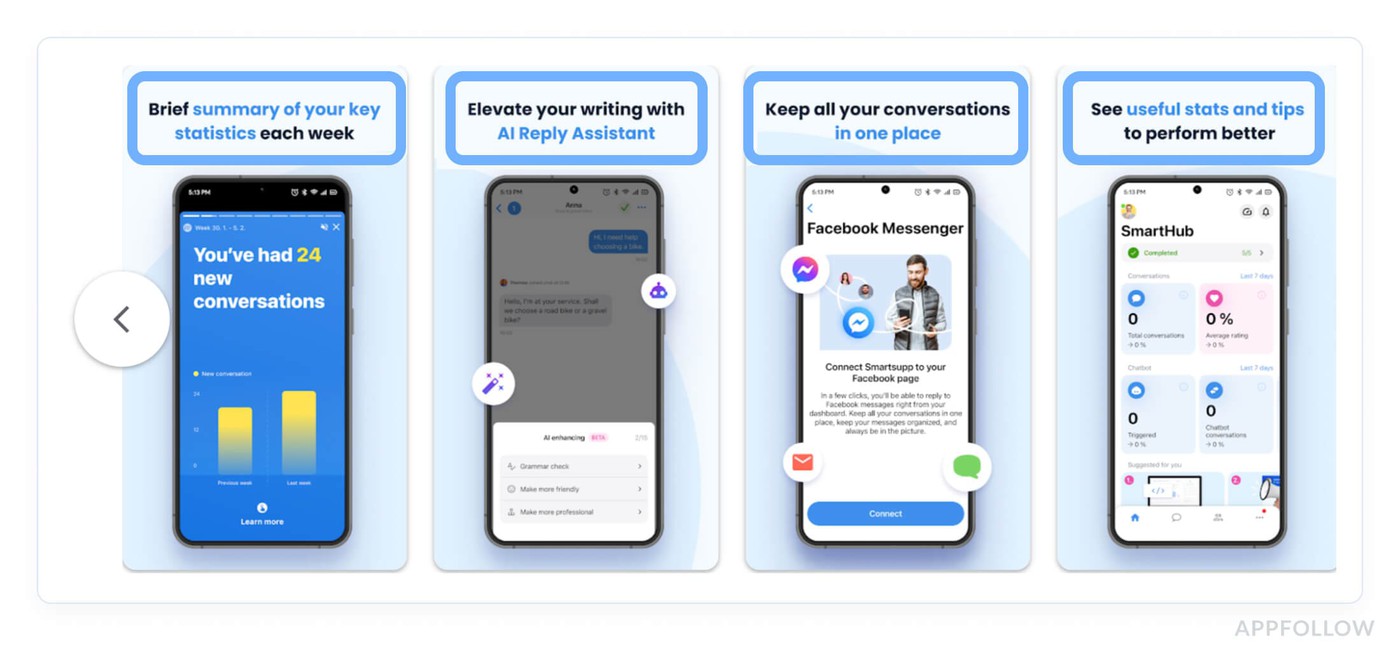
Prequel, a photo and video app, ranks at the top of search results for "photo" while featuring the word prominently across its first two screenshots.
Correlation isn't confirmation, but when the same pattern shows up across enough apps and enough categories, it becomes operationally useful whether Apple officially acknowledges it or not.
“Apple's algorithm may be running optical character recognition on screenshot images and factoring the extracted text into its relevance index. If accurate, your visual assets just became metadata. Every caption is a keyword placement opportunity your competitors may not be using yet.”
Yaroslav Rudnitskiy, ASO guru
The first screenshot is in a different category entirely
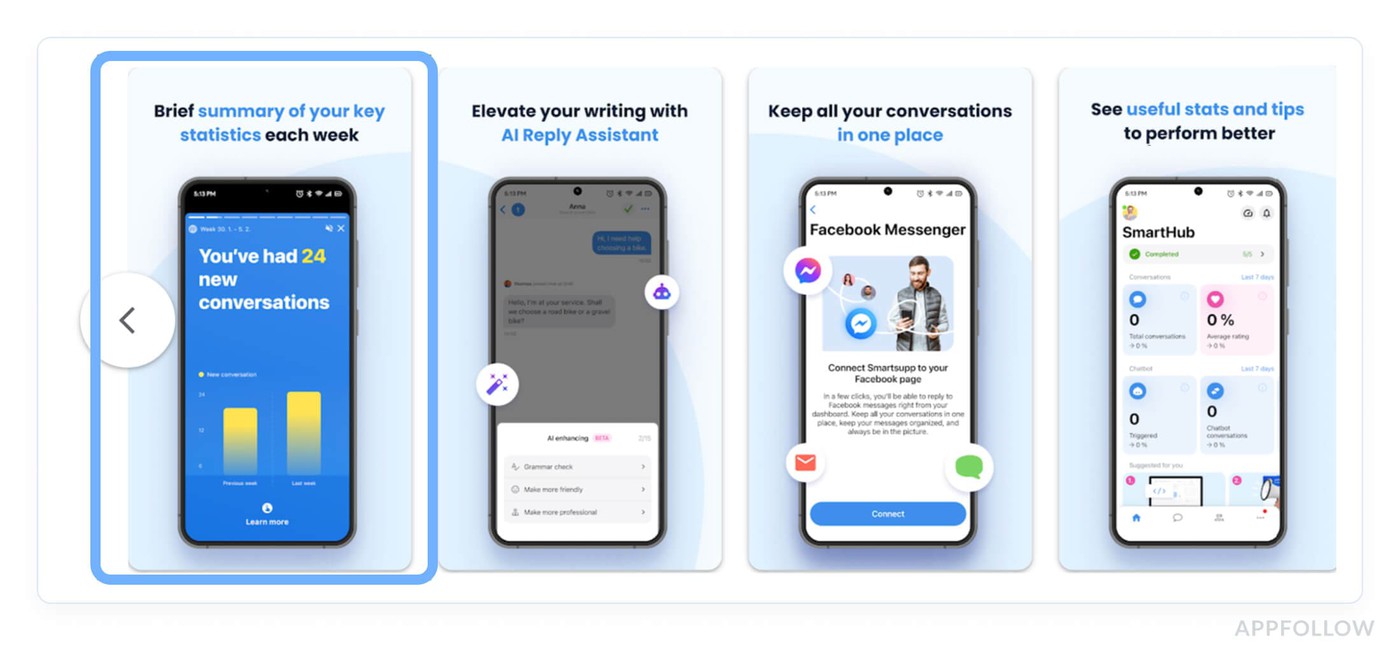
Screenshot optimization starts with understanding that not all screenshots carry equal weight. The first screenshot, or your app preview video thumbnail if you're running one, appears directly in search results before a user taps through to your store listing.
No other screenshot gets that exposure. A user scrolling through search results sees your icon, your title, your rating, and your first screenshot. That's the complete conversion unit deciding whether they tap or keep scrolling.
Most first screenshots show the app interface. The ones that convert better show an outcome.
"Lost 18 lbs in 3 months" over a progress screen outperforms a clean UI shot of the dashboard every time, because the user in search mode is outcome-oriented.
The interface can impress them after they tap. The first screenshot has one job: make them tap.
For conversion optimization across the full screenshot sequence, the pattern that holds across high-performing store listings is a narrative arc rather than a feature parade.
- Screenshot one earns the tap.
- Screenshots two and three establish the core value.
- Screenshots four and five handle objections and reinforce trust.
- The last screenshot closes with social proof or a CTA.
Users who view multiple screenshots convert at higher rates than those who see only the first, so the sequence matters as much as any individual frame.
Caption text is doing double duty now
Captions should lead with action-oriented keyword phrases that match actual search queries, not generic feature descriptions.
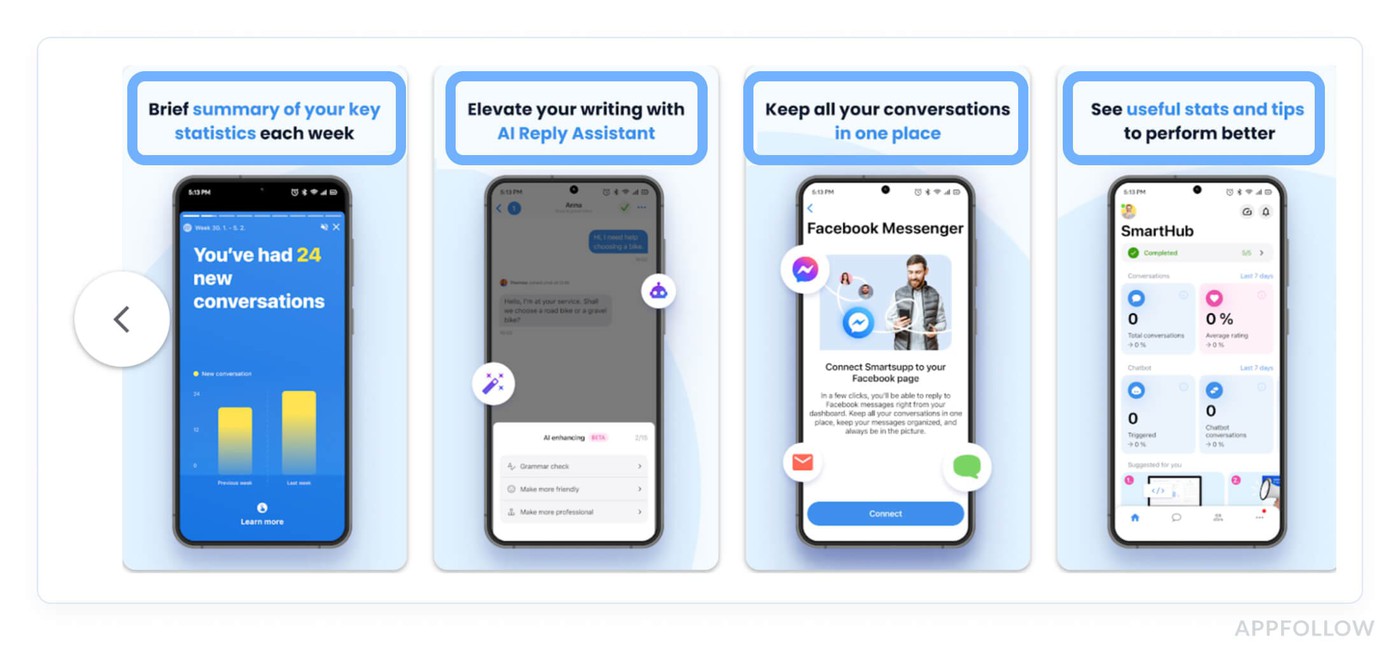
- "Track expenses automatically" is a caption.
- "Expense tracker, automatic categorization" is a caption optimized for both conversion and potential ranking.
The difference is seventeen characters and a keyword that aligns with real search behavior. Passive, generic captions like "Easy to use" or "Powerful features" waste the real estate entirely.
“For apps targeting multiple markets, localized screenshots, with captions in the local language, serve both ranking and conversion in those locales independently. Reusing English-language visual assets in non-English markets is the screenshot equivalent of not localizing your description: you're leaving regional conversion rates and potentially regional ranking signals on the table simultaneously.”
Yaroslav Rudnitskiy, ASO guru
The thumbnail frame is your first screenshot equivalent in markets where video auto-plays in search results. Most teams set the video thumbnail to the opening frame by default. That opening frame should be treated with the same deliberateness as your first static screenshot, it's the first visual signal users process before the video even starts playing.
5. In-app events and custom product pages
Screenshots proved that Apple was expanding what counts as indexable content well beyond traditional metadata fields. In-app events and custom product pages pushed that logic even further, and the 2025 updates quietly turned both into organic ranking assets most teams are still sleeping on.
In-app events: still the most underused ranking surface in the App Store
Apple has indexed in-app events in search results for a few years now. The majority of teams still schedule them like promotional banners and write titles like "January Fitness Event." That's a missed ranking opportunity dressed up as a calendar entry.
The algorithm reads event titles and metadata for keyword relevance exactly the way it reads your app name. A seasonal event titled "30-Day Weight Loss Challenge" can rank your app for queries your default listing has never touched, because it's a discrete indexable entity with its own keyword footprint.
Tournaments, livestreams, major content drops: each one is a chance to expand your search surface area without touching your core metadata.
Teams that treat event naming as a copywriting decision rather than a keyword decision are leaving organic reach on the table every single time they publish one.
What WWDC 2025 changed about custom product pages
Until mid-2025, CPPs existed entirely in paid territory. You built them, pointed Apple Search Ads campaigns at them, and organic search never saw them. That changed fundamentally at WWDC 2025.
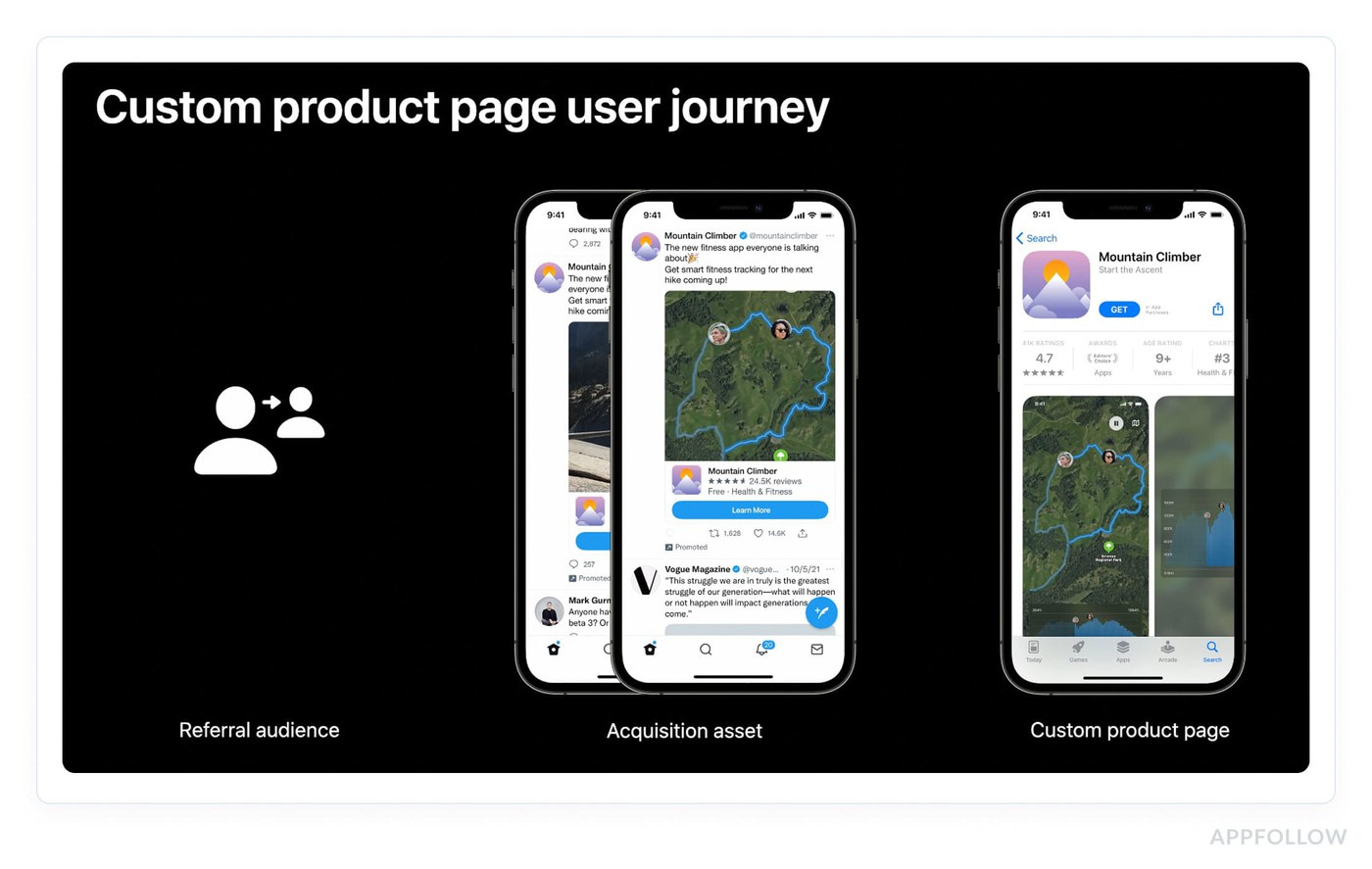
Apple now lets you assign keywords from your keyword field directly to custom product pages inside App Store Connect. When your app ranks for an assigned keyword, the matching CPP surfaces in organic search results instead of your default listing.
The scale of what this enables is worth sitting with. Up to 70 custom product pages, each mapped to distinct user intent, each appearing organically for its assigned keywords.
A meditation app can show a sleep-focused CPP to users searching "sleep sounds" and a completely different anxiety-focused page to users searching "stress relief", same app, two conversion contexts, zero paid amplification required.
Localization sharpens it further. The same CPP can carry different keyword assignments across different locales, so your UK and US versions of the identical page target region-specific search intent independently. That's a granular keyword strategy at a scale that simply didn't exist before this update.
Off-Metadata ASO Ranking Signals
Every metadata decision covered so far determines which searches your app is eligible to appear in. What determines where you land within those searches, and whether you stay there, is a separate category of signals entirely.
These are behavioral, generated by real users interacting with your app, and they're part of ASO ranking most teams underinvest in because you can't edit them in App Store Connect.
That's exactly what makes them a harder-to-copy competitive advantage. A competitor can replicate your keyword strategy overnight. Replicating your download velocity, your rating trajectory, your retention numbers, that takes months.
1. Download velocity, the ranking signal that feeds itself
Among all the ASO ranking signals the algorithm evaluates, download velocity is the one that most directly mimics how social proof works in the real world: momentum attracts momentum.
Total download volume matters, but the algorithm weights recent install velocity significantly higher than lifetime count. An app with 50,000 total downloads but 2,000 installs last week ranks above an app with 500,000 lifetime downloads, sitting at 200 installs last week.
The algorithm reads velocity as a signal of current relevance, proof that users today, searching today's queries, want what you're offering.
The feedback loop this creates is worth understanding mechanically. Higher install velocity pushes rankings up. Better rankings generate more impressions. More impressions produce more organic installs. Installs push velocity higher. The loop is real, and it compounds, but it requires an initial push to start spinning.
Apple Search Ads is the cleanest legal mechanism for generating that push.
- A targeted paid UA campaign drives install volume on keywords, which lifts velocity signals for those exact terms, which can move organic rankings for the same queries.
- The paid campaign eventually ends.
- The organic ranking lift, if the velocity was sustained long enough, often doesn't. That's why smart teams treat Apple Search Ads budgets as ranking investments, not just user acquisition line items.
The quality caveat matters enormously here. Low-quality installs, incentivized downloads, bought traffic, users who install and delete within 24 hours, generate a spike in download volume followed by an uninstall rate spike.
The algorithm tracks both. A high uninstall rate signals the opposite of relevance: users expected one thing, got another, and left. That negative signal can actively suppress rankings for the keywords that drove those installs. Velocity built on low-retention users causes measurable damage.
Velocity gets your app in front of more users. What those users do the moment they see your listing, before they ever tap "Get", is the signal Apple appears to weigh most aggressively of all.
2. Conversion rate from search
Download velocity tells the algorithm your app is gaining momentum. Conversion rate from search tells it something more specific: that your app is the right answer for a particular query.
The mechanism is precise: Apple measures the percentage of users who see your app in search results and tap "Get", not tap through to your product page, but hit install directly from the results screen.
That tap-through rate is query-specific, meaning your conversion rate for "expense tracker" is tracked separately from your conversion rate for "budget app." An app converting well on one keyword and poorly on another will rank differently for each, even with identical metadata. The algorithm interprets high CVR as relevance confirmation, users saw your app listed for that search and immediately wanted it.
Three elements drive conversion rate optimization from the search results screen, in rough order of impact.
- The first screenshot carries the most weight because it's the largest visual element visible before any tap.
- A rating of 4.0 or above is visible directly in results and functions as instant credibility shorthand, users make download decisions partly on that number before they read a single word of your listing.
- Title clarity is the third lever: a title that immediately communicates what the app does removes friction from the decision. Users shouldn't need to tap through to your product page to understand the core value proposition.
“Conversion rate optimization at the search results level and conversion optimization on the full product page are related but distinct problems. The search results screen conversion is what moves rankings. The product page conversion is what moves install volume after the tap. Both matter, but they require different interventions.”
Yaroslav Rudnitskiy, ASO guru
Conversion rate signals relevance per query. Ratings signal something broader, overall app quality, and their influence on ranking operates through a different mechanism than most teams expect.

3. Ratings and reviews
Conversion rate is query-specific and fluctuates daily. Ratings operate differently, they're a persistent quality signal the algorithm applies across every search your app appears in, which makes them one of the highest-leverage factors to get right and one of the most damaging to neglect.
The threshold that matters most is 4.0. Apps rated below 3.5 stars see measurably reduced search visibility across the board, the algorithm treats a low star rating as a quality flag that suppresses ranking regardless of how strong your metadata or velocity signals are. Above 4.0, the correlation between rating score and keyword ranking position strengthens progressively.
The apps consistently sitting in the top three positions for competitive keywords almost universally maintain ratings above 4.5.
Volume compounds the score signal. A 4.8 rating from 200 reviews carries less algorithmic weight than a 4.6 from 12,000 reviews, because volume is proof of sustained quality over time, not a snapshot.
Recent review volume matters separately: a steady stream of new user reviews signals ongoing engagement, which feeds the same behavioral signals as retention and session data.
Rating prompt timing is where most teams leave easy wins uncollected. Triggering the native iOS rating prompt immediately after install, before a user has experienced any value, produces lower ratings and lower response rates than prompting after a completed core action.
A user who just finished their first workout, sent their first invoice, or hit a savings milestone is in a fundamentally different emotional state than someone who opened the app thirty seconds ago. That emotional context shows up directly in the star rating they leave.
Developer response to user reviews is a signal worth taking seriously, particularly on Google Play where responsiveness is a confirmed ranking factor.
On iOS the signal is less direct but the conversion impact is real, potential users read recent reviews and developer responses before downloading. A pattern of thoughtful, specific responses to negative reviews demonstrably improves the conversion rate of users who read them.
Managing review volume across both stores at scale is where the operational challenge lives. AppFollow's Review Management dashboard aggregates user reviews from both App Store and Google Play.
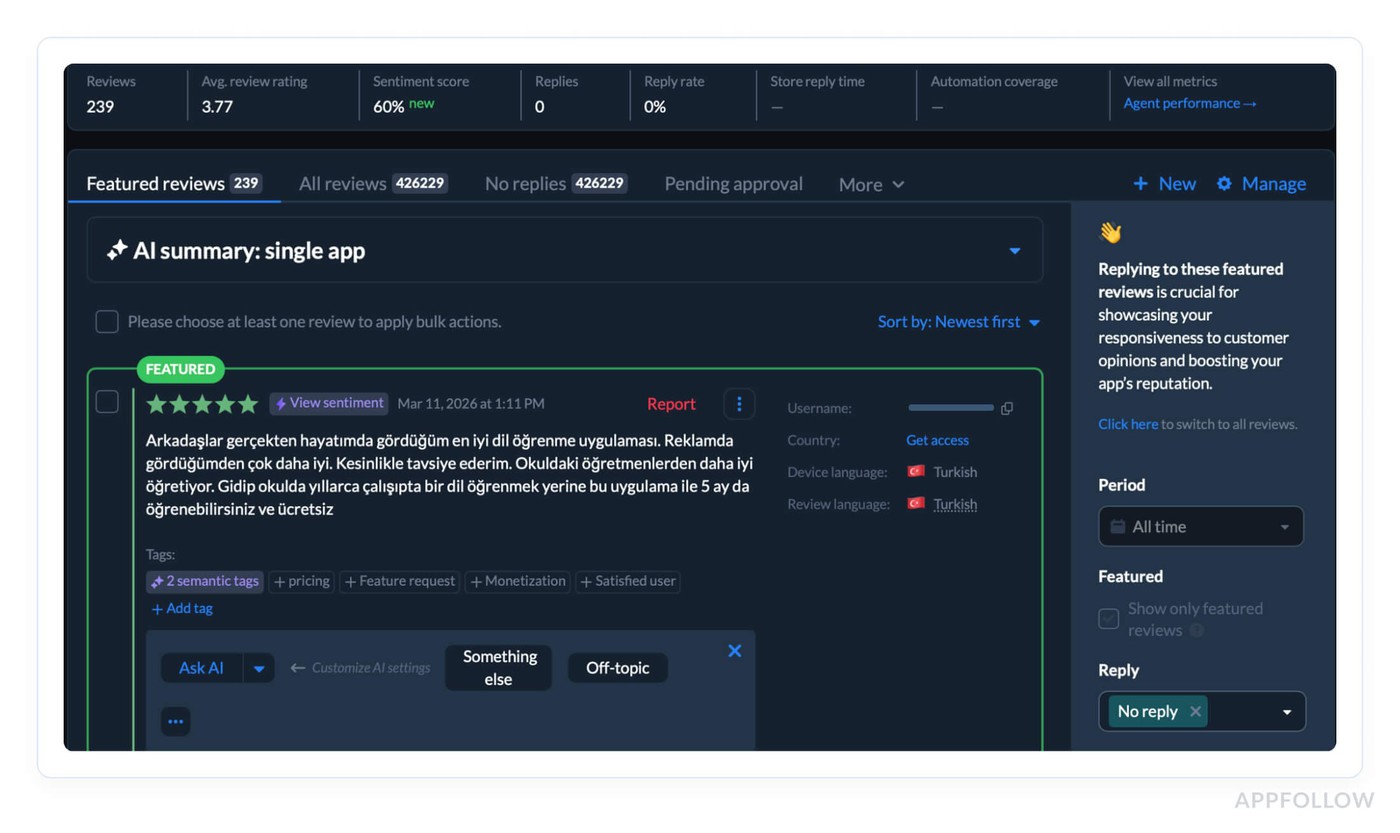
The platform uses AI to categorize sentiment by topic, and lets teams respond at scale, which is what maintaining a 4.5+ rating across a growing app requires in practice.
cta_free_trial_purple
4. Retention, engagement, and session metrics
Ratings tell the algorithm users liked your app enough to say so. Retention tells it something harder to fake: that users kept coming back.
Daily active users, session length, churn rate, uninstall rate, both Apple and Google track these behavioral patterns as indicators of genuine app quality.
- An app with strong retention rate signals that it delivers on its metadata promise repeatedly, not just once at install.
- Session length tells the algorithm users are finding value worth their time.
- Churn rate and uninstall rate tell the opposite story when they spike.
The bought traffic mistake surfaces here in its most damaging form. A burst of incentivized installs generates impressive download volume for about 72 hours, followed by an uninstall rate spike that the algorithm reads as a quality failure.
User engagement that evaporates immediately after install is worse than modest organic growth, because the algorithm now has explicit evidence that your app didn't deliver what users expected. That signal suppresses rankings for the exact keywords that drove those installs, often for weeks after the campaign ends.
App performance sits underneath all of this. Crash rates, load times, ANR errors on Google Play, technical failures that interrupt sessions feed directly into the same quality scoring as behavioral engagement metrics. An app that crashes regularly will see engagement metrics deteriorate naturally, and the ranking impact follows.
Engagement metrics measure what happens inside your app. Update frequency signals something different to the algorithm, that your app is actively maintained, responsive to user feedback, and worth keeping visible in search results over the long term.
5. Update frequency
Retention signals come from your users. This one comes from your engineering calendar, and it's the most controllable ranking signal in the entire off-metadata category.
Two to four weeks. That's the release cadence that shows up consistently in high-ranking apps across both stores. Not because the algorithm counts your commits, but because regular app updates produce downstream effects the algorithm absolutely does measure: lower crash rates, better session stability, stronger engagement numbers.
A well-maintained app performs better, and better app performance feeds every behavioral metric covered in the previous section.
What most teams miss is the Google Play opportunity sitting inside each release. Store listing experiments, Google's native A/B testing tool, let you test icons, screenshots, feature graphics, and short descriptions against live traffic.
Every new version is a new experiment slot. Ship every two weeks, and you're running 25 experiments a year. Ship quarterly, and you're running four. That gap in conversion rate learning compounds fast.
“Bug fixes deserve a specific mention because teams often underestimate their ranking impact. A meaningful crash rate reduction after an update produces measurable engagement metric improvements within two to three weeks, which flows directly back into ranking through the behavioral signal pathway. Sometimes the highest-ROI ASO move on the roadmap is the stability release nobody wanted to prioritize.”
Yaroslav Rudnitskiy, ASO guru
App Store vs. Google Play, How ASO ranking factors differ
Understanding app store optimization factors in isolation only gets you so far. The moment you're managing presence on both platforms, which most serious app publishers are, the differences between iOS App Store and Google Play ranking logic stop being academic and start costing you real organic traffic when you ignore them.
The surface-level version of this comparison is "Apple uses a keyword field, Google indexes descriptions." True, but that framing undersells how fundamentally different the two systems are.
These aren't variations on the same model. They're built on different assumptions about what signals indicate relevance and quality, which means your keyword strategy, your metadata structure, and your technical priorities need to fork at the platform level.
Here's where the differences live:
Factor | App Store (iOS) | Google Play |
Keyword indexing | Title, subtitle, keyword field, screenshot text | Full description (all of it) |
Keyword field | 100 chars, hidden from users | Not applicable |
Reviews response | Indirect signal | Direct ranking signal |
Description | Not indexed for ranking | Indexed, first 167 chars weighted most |
Performance sensitivity | Moderate | High (ANR errors penalized heavily) |
In-app events | Indexed in organic search | Not directly indexed |
Now let's go through what each of these means in practice, because the table tells you what differs, not why it matters.
Keyword indexing: structured vocabulary vs. full-text search
The iOS App Store runs on a constrained vocabulary model. Apple indexes exactly four surfaces: your title, subtitle, keyword field, and, based on 2025 community observations, screenshot text.
That's it.
Every word outside those fields is invisible to the ranking algorithm, which is why the 100-character keyword field allocation decisions covered earlier in this guide matter so much. You get one carefully curated vocabulary list, and the algorithm builds relevance from it.
Google Play's Android app optimization logic is closer to how Google's web search engine works, because it essentially is Google's search engine applied to apps. The entire description is crawled, parsed, and weighted for keyword relevance.
- Primary keywords in the short description carry more weight than body mentions.
- Keywords appearing multiple times across the full description signal stronger relevance than single mentions.
The copywriting decisions inside your Play Console listing are SEO decisions in the traditional sense, keyword placement, density, and context all matter in ways that are completely irrelevant on iOS.
“Your iOS keyword strategy is an allocation problem, fitting maximum unique terms into constrained fields. Your Google Play keyword strategy is a content problem, writing copy that naturally integrates target terms at the right density across 4,000 characters.”
Yaroslav Rudnitskiy, ASO guru
Read also: How to Read App Ranking Analytics and Find Growth Gaps
Review responses: optional on iOS, operational on Google Play
On the iOS App Store, responding to reviews is a conversion signal, potential users read your responses and form quality judgments before installing. The ranking impact is indirect, filtered through conversion rate rather than applied directly by the algorithm.
Google Play confirmed developer responsiveness as a direct Google Play Store ranking signal. The Play algorithm factors in whether developers respond to reviews, how quickly they respond, and the sentiment trajectory of reviews over time.
An app with consistent developer responses and improving sentiment scores ranks better than an equivalent app with identical ratings but no engagement from the developer side.
The ANR problem most iOS teams don't know exists
Both stores penalize poor app performance, but Google Play's sensitivity is in a different category entirely. Application Not Responding errors, ANRs, where the app freezes and the OS displays the "App isn't responding" dialog, are tracked by the Play Console and weighted heavily in ranking calculations. Apple monitors crash rates and factors them into visibility, but the penalization threshold is more forgiving than Google's.
Teams that port their iOS app to Android and apply the same performance standards often discover their Play Store rankings are suppressed by technical issues that would be below the penalty threshold on iOS. ANR rate and crash rate are visible directly in Play Console's Android vitals dashboard. These numbers should be on your weekly review alongside keyword rankings, not buried in an engineering backlog.
In-app events: iOS exclusive ranking surface
Apple indexes in-app event titles and metadata in organic search results, giving you additional keyword-indexed surfaces beyond your core listing. Google Play has no equivalent mechanism. Seasonal events, tournaments, and content drops on Android don't generate independent search visibility the way they do on iOS.
The ranking benefit of a well-titled in-app event is an iOS-only lever in your ASO toolkit.
Knowing how the two algorithms differ tells you where to focus your optimization energy. Knowing when the algorithms change, without any official announcement from either Apple or Google, is the operational challenge that separates teams that maintain rankings from teams that react to losing them.
How to monitor ASO ranking factors and algorithm changes
Every ASO ranking gain covered in this guide can evaporate overnight without a single change on your end. Apple and Google update their ranking algorithms regularly, no changelog, no announcement, no warning.
One morning your keyword position for a term you've owned for six months has dropped eight spots, and nothing in your App Store Connect account explains why.
That's the operational reality of ASO ranking.
The teams that maintain top positions long-term aren't necessarily the ones with the best metadata. They're the ones who notice ranking shifts within hours rather than weeks and respond before the damage compounds.
What monitoring looks like in practice
Keyword tracking at daily granularity is the baseline. Weekly check-ins create blind spots, a ranking drop on Monday that you catch Friday has already cost you four days of impressions and installs at reduced visibility.
The minimum viable monitoring setup is daily position tracking across every keyword you're actively targeting, with alerts configured for movements beyond a defined threshold.
The detection method for algorithm updates is pattern recognition across your keyword portfolio. A single keyword dropping suggests a metadata or competitor issue. Ten keywords dropping simultaneously, across different categories of terms, on the same date, that's an algorithm update.
Correlating position changes with calendar dates is how the ASO community maps updates that Apple and Google never officially disclose. Those date correlations, shared across practitioner communities, are often the earliest signal that something systemic shifted.
Competitor analysis runs parallel to your own rank monitoring. A competitor gaining eight positions on a keyword you both target tells you two things: the algorithm rewarded something they did, and you need to understand what.
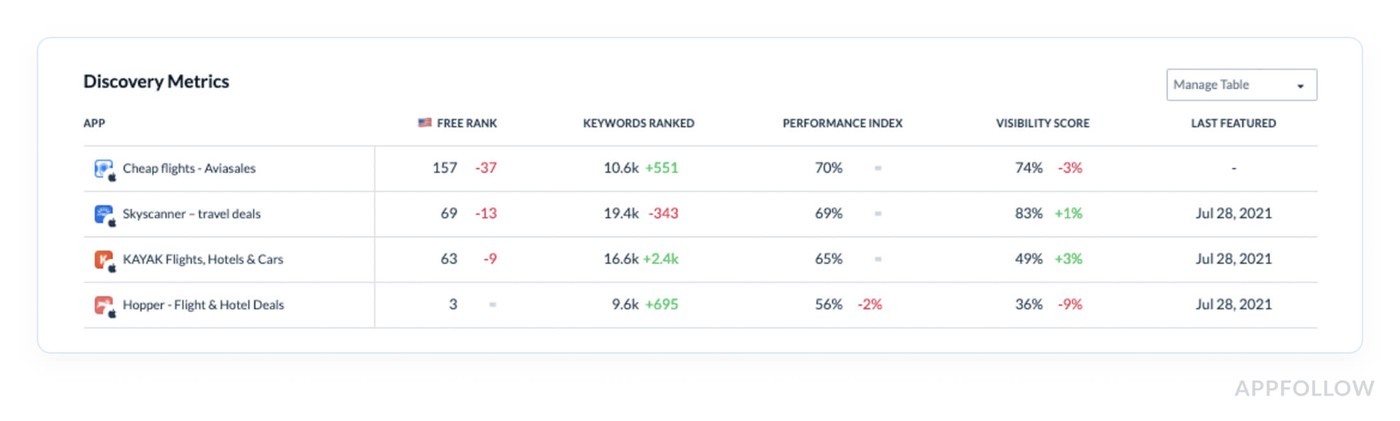
Competitors analysis in AppFollow
Watching competitor metadata changes, rating trajectories, and update frequency alongside your own keyword position data turns isolated observations into explainable patterns.
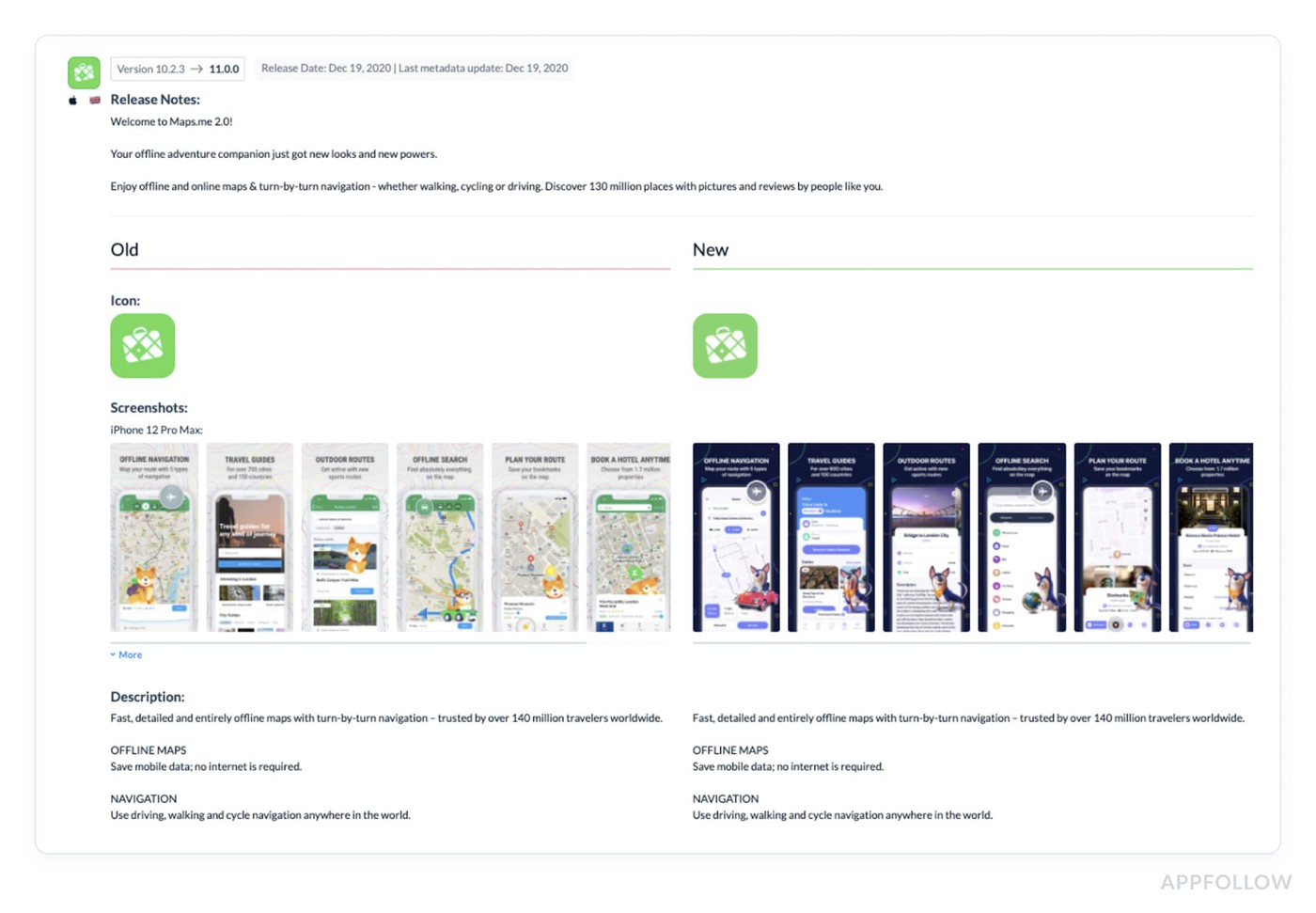
Competitors analysis in AppFollow
Install velocity and rating momentum belong in the same monitoring view as keyword positions.
A velocity drop that precedes a ranking drop by three to five days is a leading indicator, you're watching the cause before the effect appears in your keyword data. Catching that sequence early creates a response window that waiting for rank monitoring alone never provides.
How AppFollow helps you optimize every ASO ranking factor
Knowing what to optimize is half the battle. The other half is catching signals fast enough to act before a ranking drop compounds into a traffic problem. Here's where AppFollow fits into the workflow.
Keyword Rankings
Most teams find out their rankings have dropped when someone pulls a monthly report. AppFollow's Keyword Overview runs daily across both App Store and Google Play, with historical charts that make algorithm update dates visible as obvious inflection points rather than mysteries.
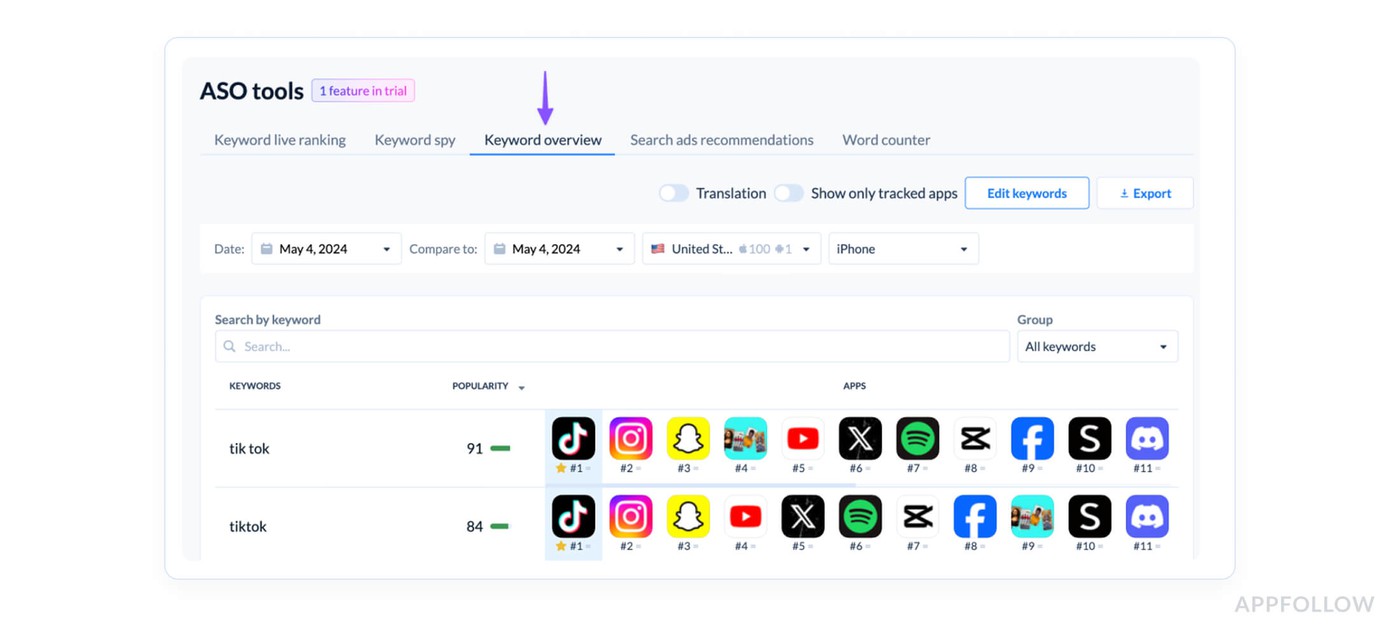
The Keyword Overview sits alongside it, competitor keyword gaps, search volume estimates, difficulty scores. Every metadata refresh cycle at AppFollow starts here.
Review & Rating Management
AppFollow's AI tagging categorizes incoming sentiment by topic automatically, flags score trajectory before it becomes a crisis, and handles bulk responses across both stores.
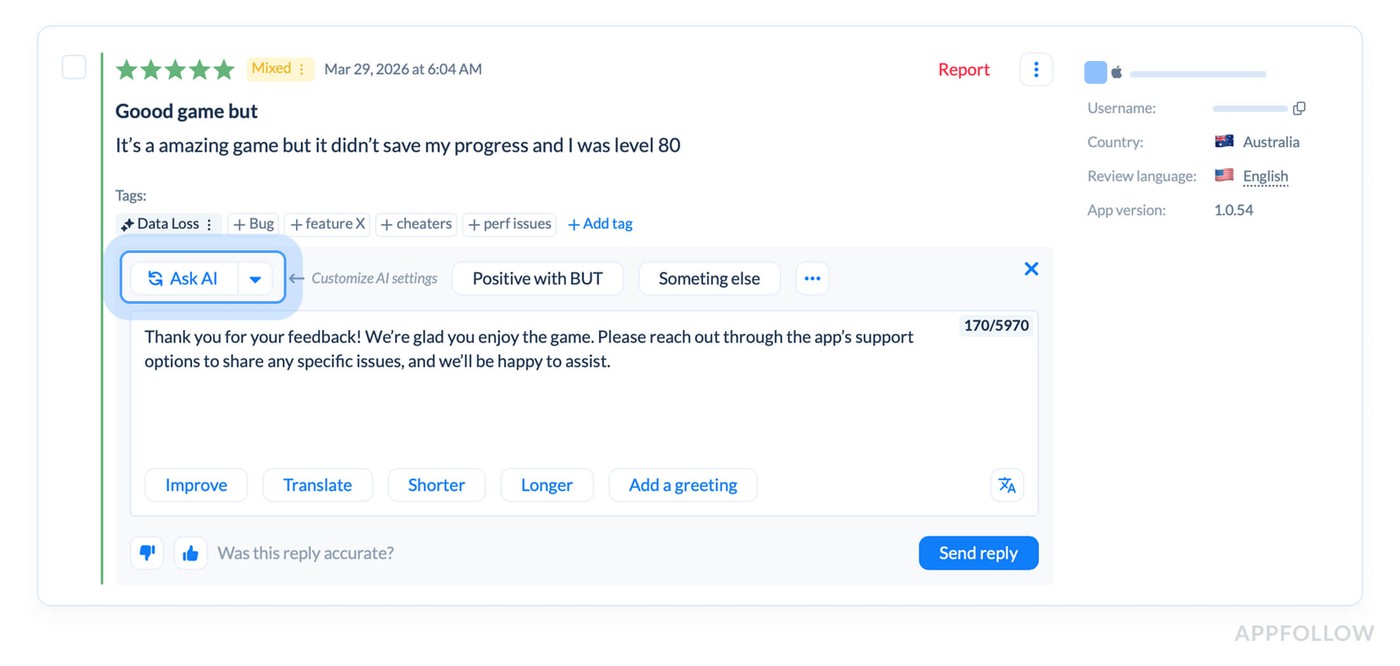
On Google Play specifically, where response speed is a confirmed direct ranking input, this isn't reputation management. It's ranking maintenance.
Competitor Intelligence tracks rival metadata changes, rating trends, and release timelines alongside your own data, so the distinction between "they did something" and "the algorithm shifted" is usually clear within hours.
Release & Update Tracking. AppFollow logs your update history and competitor release timelines in the same view as your keyword positions. When a ranking shift happens, the cause is usually sitting right there in the timeline. That visibility also makes the internal case for maintaining a consistent release cadence considerably easier, because you're showing what the last update did to rankings, not arguing from theory.
Ready to stop discovering ranking drops in quarterly reviews?
AppFollow puts keyword tracking, review management, competitive intelligence, and release correlation in one place, so your team is working with current data, not last month's.
FAQs
What are the most important ASO ranking factors in 2026?
In 2026, the heavy hitters are still keyword relevance, conversion, and product quality.
- On Apple, search ranking is tied to text relevance from your title, subtitle, keyword field, and primary category, plus user behavior like downloads, ratings, and reviews.
- On Google Play, the system looks broader at your title, description, category, store assets, app content/functionality, ratings, reviews, engagement, and even technical quality like crash and ANR performance that can affect discoverability.
Do ratings and reviews affect App Store ranking?
Yes. Apple says it plainly: ratings and reviews influence how your app ranks in search. They also shape tap behavior because that summary rating shows up right in search results, so better sentiment can lift both ranking signals and conversion at the same time.
What is download velocity, and why does it matter for ASO ranking?
Download velocity is just the speed of installs over a short period, usually during a launch, featuring spike, seASOnal campaign, or paid burst. It matters because Apple includes downloads in search behavior signals, and in practice fast install momentum tends to move keyword ranks and visibility much faster than the same number of installs spread thin over a month. Think of it as proof of demand right now, not someday.
How is App Store ranking different from Google Play ranking?
Apple Search is more metadata-led. Your title, subtitle, keyword field, primary category, and search-result conversion assets do a lot of the lifting. Google Play is more context-led. It uses your title, description, category, graphics, what Google understands about the app’s functionality, and user feedback like ratings, reviews, and engagement.
Then it layers in app quality signals, including technical stability.
How often do App Store ranking algorithms change?
There isn’t a neat public schedule. Apple says it is constantly evolving search, and Google says it constantly tests and optimizes discovery and ranking. So the real answer is: expect small shifts all year, watch your keyword positions and conversion trends weekly, and don’t build your ASO strategy around one mythical “big update.”
Does Apple Search Ads affect organic ranking?
No official source says Apple Ads give you a direct organic ranking boost. What Apple does say is that ads can increase awareness and downloads, and Apple case studies describe a correlation between Apple Ads, more installs, and stronger organic growth.
So the smart read is this: Apple Ads are not a secret ranking button, but they can absolutely improve organic performance indirectly by driving installs, sharpening keyword learnings, and improving product-page fit.