Mobile Game User Acquisition: How Reviews Shape Store Conversion

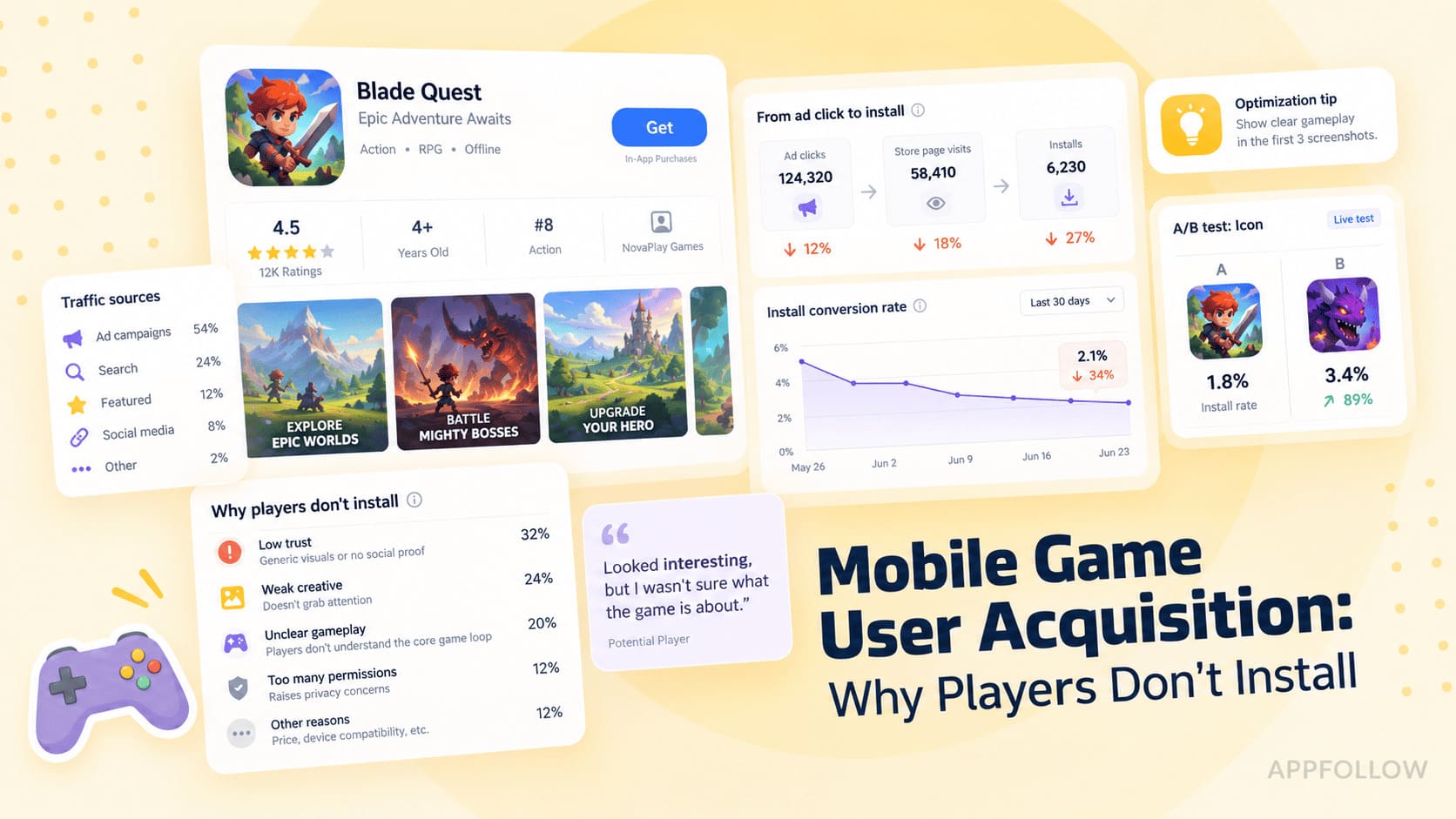
Table of Content:
- Key takeaways: Where mobile game installs are won and lost
- What mobile game user acquisition means inside app stores
- Build a mobile game acquisition baseline before scaling
- Strategy 1: Capture store search demand with keyword tracking
- Strategy 2: Use reviews and ratings to diagnose lost installs
- Strategy 3: Use category rankings to monitor market momentum
- Strategy 4: Test creative against the actual game experience
- Strategy 5: Use soft launch to validate acquisition quality
- App Store vs Google Play: Two different acquisition readouts
- Example: A five-step acquisition audit before the US launch
- Support the users acquisition workflow with AppFollow
- Conclusion: Find the bottleneck before you buy more traffic
Mobile game user acquisition can look healthy right up to the install button. Ads generate attention. Store search captures intent. But when players meet an unconvincing listing— vague screenshots, shaky ratings, or recent complaints—the momentum can stop there.
Picture a Monday UA report: cost per tap is steady, but CPI is climbing. Changing bids might be the wrong first move. Open the store report. If the share of visitors installing has fallen, break conversion down by platform, country, traffic source, and release date. Only then compare creative changes with the latest player feedback.
Organic acquisition has a similar trap. A game can move up for a valuable keyword and still gain few installs. Or rise in a top chart while players report a new crash. Visibility, trust, and conversion don't always move together.
This playbook focuses on the App Store and Google Play. We'll find the weak link in the store funnel, choose a useful test, and decide when to scale or hold. AppFollow helps with keyword, competitor, rating, and review intelligence; first-party store analytics supplies the conversion evidence.
Key takeaways: Where mobile game installs are won and lost
Think of store-side acquisition as three jobs: get found, make a convincing case to install, and learn whether the experience matches the promise. Search visibility measures the first. Store conversion tests the second. Reviews, stability, and retention help explain the third.
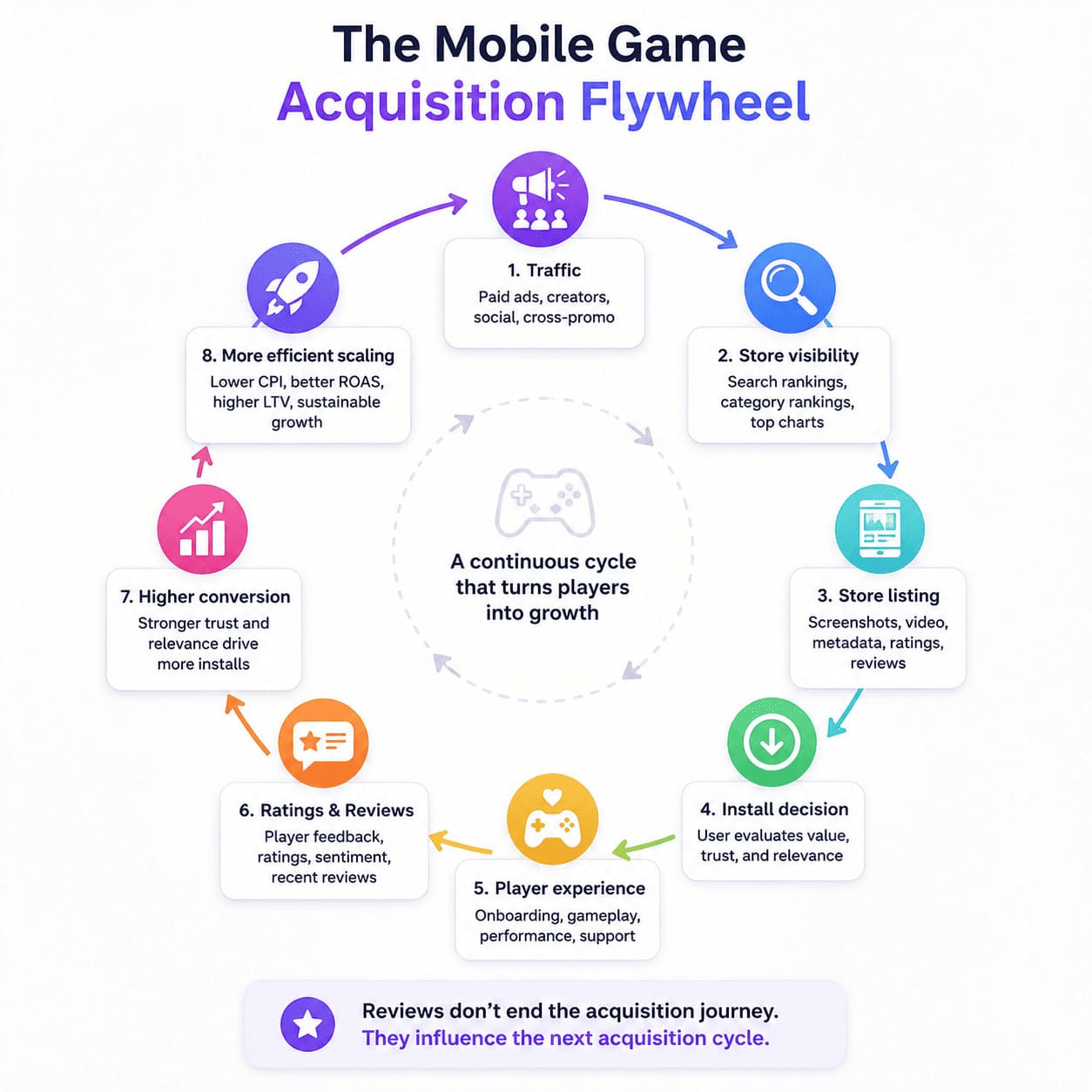
Six checks to make before the next budget increase:
- Choose one market and platform first. Read search position, listing conversion, rating trend, and emerging review themes over matching dates.
- Know which system owns each metric. AppFollow covers keyword and competitor visibility plus review intelligence. Your store console and measurement stack provide owned conversion, attribution, and retention.
- Look beyond the average star score. A new cluster of version-specific crash complaints can matter well before the headline rating changes.
- Watch the denominator. CPI is spend divided by attributed installs; when the install rate falls at unchanged traffic cost, CPI rises. Find where the drop occurred before blaming the creative—or the reviews.
- Bring product quality into the launch call. Confirm severe review themes against crash telemetry, retention, and cohort economics before you raise spend.
- Give the finding an owner. Send the message mismatch to ASO, a crash spike to engineering, and a source-mix problem to UA. A report without a next action is just a report.
What mobile game user acquisition means inside app stores
User acquisition in game development means attracting new players and converting interest into installs. Here, the focus is narrower: organic discovery and the store experience. Paid channels, attribution, and monetization still affect the economics, but they are inputs to this store-side playbook rather than separate channel tutorials.
Not everyone opens the full product page; some store and ad placements offer shorter install paths. Audit the assets visible at the actual point of decision.
User acquisition vs mobile game marketing vs ASO
The distinction is useful when deciding who should change what:
- Mobile game marketing creates demand through paid media, creators, communities, and PR.
- Player acquisition asks how that demand turns into installs—and whether the resulting cohorts are worth acquiring.
App store optimization (ASO) is the store-side discipline: research relevant terms, improve metadata and creative, and test what helps qualified visitors install. Apple documents the product-page fields and discovery considerations in its official guide: Creating Your Product Page
Use the comparison below to identify where the next test belongs.
Paid acquisition | Store-side optimization |
Measures spend, targeting, taps, and attributed installs | Measures discovery, metadata, creative, reviews, and store conversion |
CPI = spend / attributed installs | CVR = installs / eligible store visitors or impressions (definition varies) |
Experiment: audience, bid, format, traffic source | Experiment: product-page assets, listing text, localization |
Needs attribution, retention, and revenue checks | Needs first-party store analytics, review diagnostics, and ASO monitoring |
If impressions and taps are growing but installs are not, resist the urge to celebrate cheaper traffic. Follow the journey from tap to install, then into early retention.
Why App Store and Google Play change the acquisition math
A player might meet your game in search, a category chart, a featured slot, or an ad. Each surface shows a different mix of icon, title, screenshots, rating, and context.
Take a casual puzzle game. Search results may sell the idea with an icon and title; the product page then has to show genuine gameplay. A review warning about intrusive ads can challenge that promise. Judge the exact journey players take, not an imaginary universal funnel.
Check each store surface and placement rather than assuming every visitor opens the full listing. For Google Play, follow the official guidance on storefront content and presentation: Store listing best practices
Reviews add a layer that polished creative cannot provide: the player's side of the story. When the same objection keeps returning, test whether the complaint reflects a real product problem, a misleading claim, or both.
Find the leak first. Choose the lever second.
Build a mobile game acquisition baseline before scaling
Before a larger spend or country launch, freeze a clear picture of the game: keyword coverage, listing conversion, new review themes, rating distribution, install sources, and early retention. Segment by platform, country, and version. Without that baseline, a later spike or dip is guesswork.
Pick the markets and competitors that actually matter
Your competitor set should reflect what players actually see—not just the publishers on an internal slide.
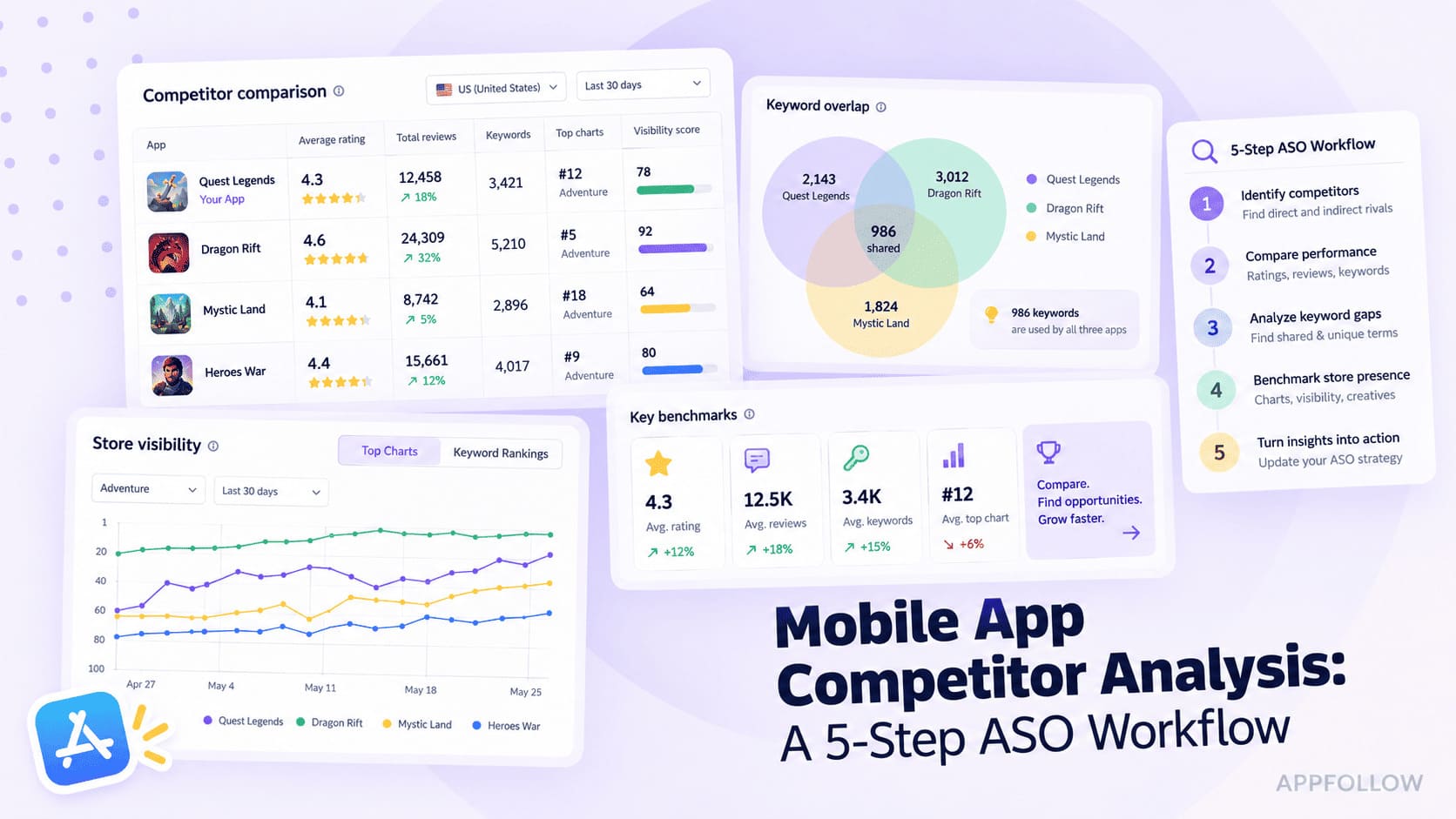
Start with one country. Pick three to five titles competing for the same intent: games ranking for priority queries, sharing chart space, or promising a comparable mechanic. An emerging puzzle game climbing for “offline puzzle” may teach you more about discoverability than a category giant whose audience already searches its brand.
Capture the basics—title, icon, first two screenshots, update date, positions, and rating movement. Mark what changed; investigate why afterward.
Set the minimum dashboard: visibility, conversion, trust, feedback
Build the baseline around one question: where could the next thousand visitors be lost? Use the same reporting window for each layer.
Keep these six lenses in view:
- Search visibility: priority keyword positions and changes by store and market
- Browse context: category and top-chart movement, plus competitor updates
- Conversion: product-page views, installs, source split, and CVR from first-party store analytics
- Trust: rating distribution and recent one- or two-star review volume
- Feedback: recurring review tags, app-version issues, and sentiment shifts
- Quality: crash rate, D1/D7 retention, and monetization/ROAS targets in product or attribution analytics
In AppFollow, compare keyword tracking, ratings, review analysis, and chart movement for the same market.
Where first-party App Store Connect or Google Play Console connections and relevant product capabilities are available, include conversion and search-download reporting. Otherwise, place store-console conversion beside AppFollow trends rather than assuming every metric lives in one public dashboard.
Read the gaps between the lines. More search visibility with flat installs points toward traffic intent or page conversion. Steady store conversion with a higher CPI points back toward the acquisition mix and auction. Two symptoms; two very different investigations.
A simple diagnostic example (illustrative): 10,000 product-page views at 25% conversion produce 2,500 installs. At 20% conversion, the same views produce 2,000 installs—a 20% drop in installs. If those views came from paid traffic at unchanged spend, effective CPI would increase by 25%.
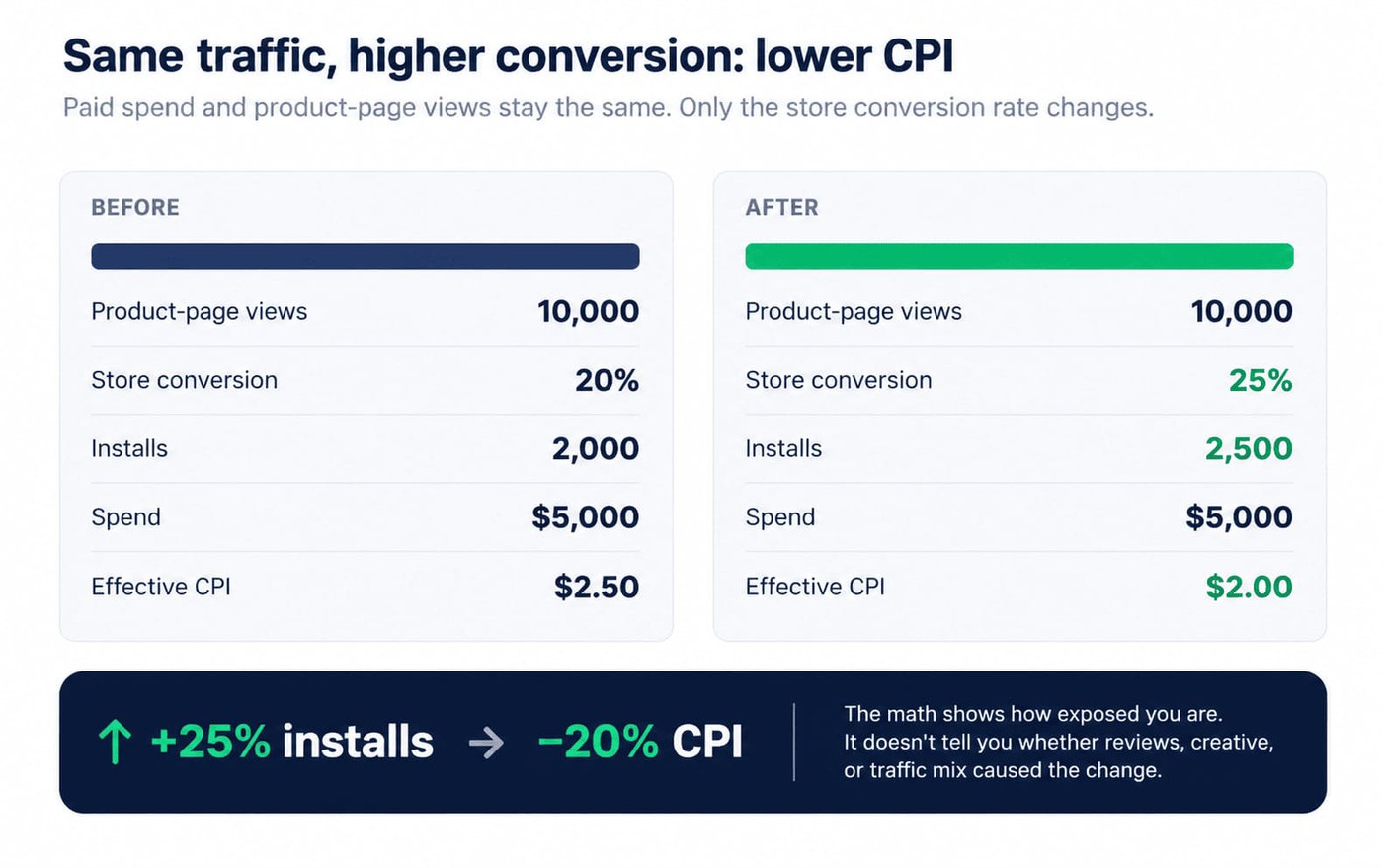
With spend and page views unchanged, a five-point drop in store conversion cuts installs by 20% and raises effective CPI by 25%.
The arithmetic identifies exposure to conversion risk; it does not assign the decline to reviews or creative.
Follow the data into one test: segment by source and country, match pre/post periods, inspect release notes and assigned variants, and verify technical complaints. Change one plausible variable, then watch what moves.
Set launch thresholds relative to your baseline
A universal star-rating cutoff such as 4.2 makes for a neat traffic light and a poor launch policy. Genre, country, volume, and store-specific rating calculations all matter.
Before launch, define a warning threshold for deviations from your own recent baseline and genre peers, plus an escalation rule for severe issues such as crashes or broken login. Each threshold needs an owner and a date for re-evaluation.
Status | Decision rule (illustrative; set market and genre baselines) |
GREEN | Stable or improving conversion and retention; no unresolved high-severity defect; recent review themes within normal range. Eligible for a controlled scale test. |
WATCH | Significant divergence from the prior comparable period, concentrated negative themes, or weakened keyword coverage. Investigate before increasing spend. |
HOLD | Confirmed severe crash/login issue, misleading store claim, or a failed retention/economics gate. Fix, verify, then retest. |
Recheck the threshold against comparable release windows. On low volume, one bad day can look like a trend; a sustained crash cluster is harder to dismiss.
Strategy 1: Capture store search demand with keyword tracking
Store search gives you a rare opportunity to match the game with an already-stated need. Find the terms that describe the experience players will actually get. Then measure whether your metadata earns relevant visibility and search downloads—not just a prettier average rank.
Map player intent, not only genre labels
Genre names are shelves. Search queries reveal the shopping list.
“Offline car game” promises a different session from “multiplayer racing.” That nuance matters more than the temptation to chase whichever keyword has the biggest number beside it.
Group terms by gameplay, setting, and player expectation. Prioritize relevance; use search popularity and competitive difficulty to choose among viable opportunities.
Once you've identified the right opportunities, optimize the assets each store uses for search. On the App Store, that includes the title, subtitle, and keyword field. On Google Play, the title, short description, and long description carry much more weight.
ASO also means adapting those elements through localization instead of translating them word for word, because search behavior changes from one market to another.
If you're optimizing specifically for Google Play, our guide to Google Play ASO keywords explains how search behavior differs from Apple's ecosystem.
Track ranks against relevant competitors
A rank chart needs context: store, country, date range, and the competitors actually seen for that query.
Follow priority terms daily around a launch, then review a broader cluster weekly. Annotate the dates of metadata changes, updates, and major events. One keyword jumping five places is a lead; a whole high-fit cluster moving is a stronger reason to investigate.
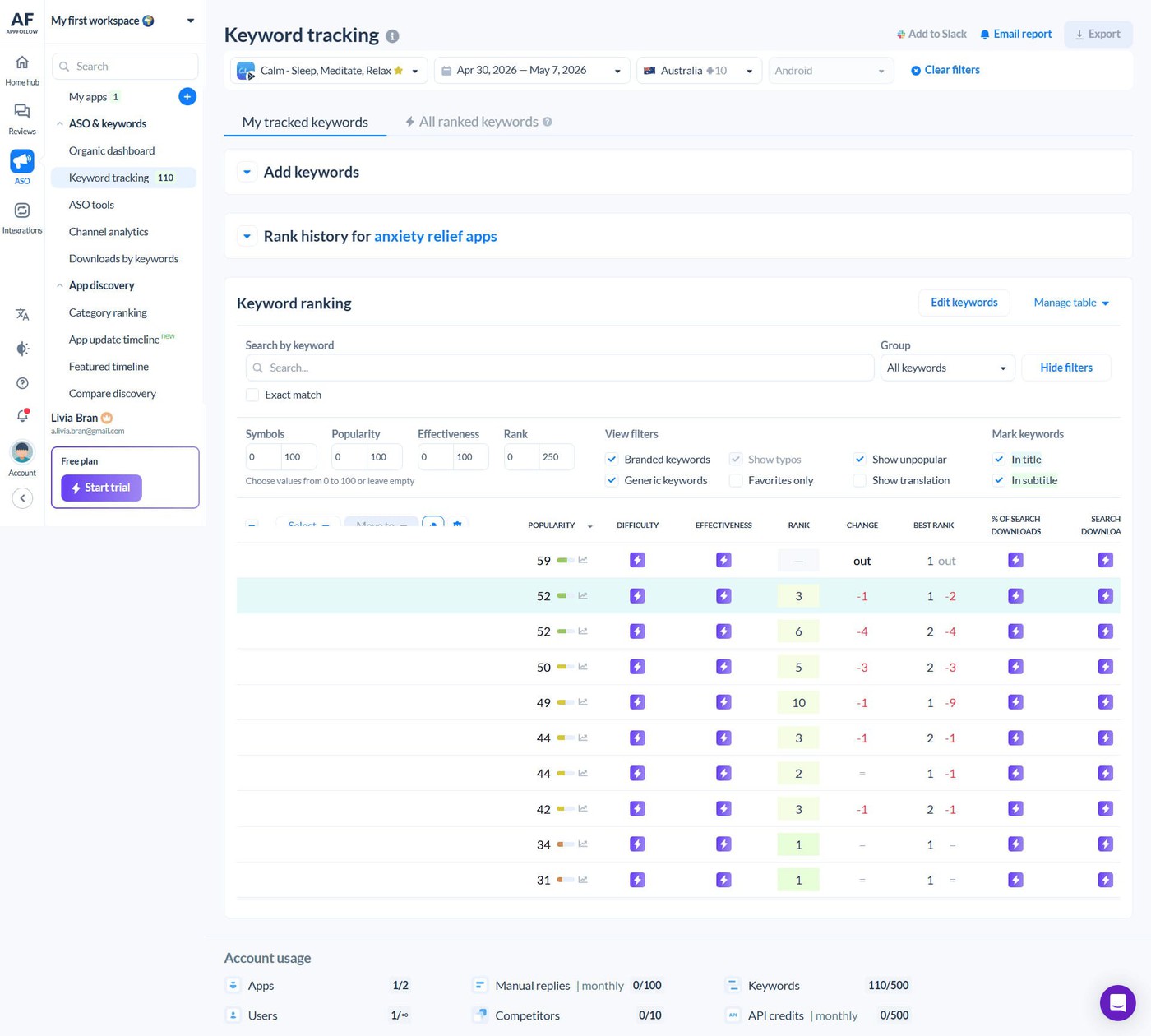
AppFollow ASO keyword tracking: review keyword positions by store and country, then inspect changes against competing games. Example AppFollow screenshot; account figures are illustrative of the screen, not of the fictional game.
A competitor overtakes you, capture the date and review its current metadata, recent release, and search footprint. That gives the next ASO test a starting point.
Our guide on how to find competitors' keywords covers practical ways to identify those opportunities before they become harder to reclaim.
Turn ranking movement into a decision
Ask one question per keyword cluster: did the rank change bring more relevant visitors, and did they install? Say a relevant phrase moves from #18 to #6 after a metadata update. Good. Now look at search impressions and downloads in that country. If visibility improved but installs barely changed, the next experiment might belong on the product page.
If the traffic is relevant, test what the listing shows first: gameplay, value proposition, localization, or the promise attached to that query. Don't reset the entire keyword set because one metric lagged.
Strategy 2: Use reviews and ratings to diagnose lost installs
Your screenshots make the promise. Players write the footnotes.
A review can't give you a measured conversion rate. It can, however, tell you exactly what to investigate: a misleading ad promise, a rough onboarding flow, a paywall surprise, or a version-specific bug.
Why reviews affect player acquisition
Consider a fresh “crashes after the update” review. It flags a potential product issue; it doesn't identify how many shoppers abandoned the listing. Use it to direct the investigation.
Those comments either reinforce the story your screenshots and metadata tell or unravel it in seconds. Apple's ratings and reviews documentation explains how players can browse ratings, written reviews, and developer responses directly on an App Store product page before deciding to install.
Suppose your screenshots promise relaxing play, but complaints describe an ad break after every round. Verify the frequency in the live build. If the experience is intentional, change the promise. If not, hand the issue to the monetization team.
That's the value of a review theme: it narrows the search for the cause. Match its timing with store conversion and post-install data to judge the scope.
What to monitor before, during, and after a UA push
Slice feedback by country and release before looking for a trend:
- Displayed rating and rating distribution, with the store-specific calculation in mind
- New one- and two-star reviews per 1,000 new reviews, not just raw counts
- Positive, neutral, and negative themes by game feature
- Review timestamps, app version, country, and language where available
- Competitor rating trend; competitor review access depends on your AppFollow plan and beta availability
Normalize the noise. Ten new one-star reviews after a small patch tell a different story from ten after a global launch. Compare theme share and review rate with your baseline, then inspect stability and session analytics.
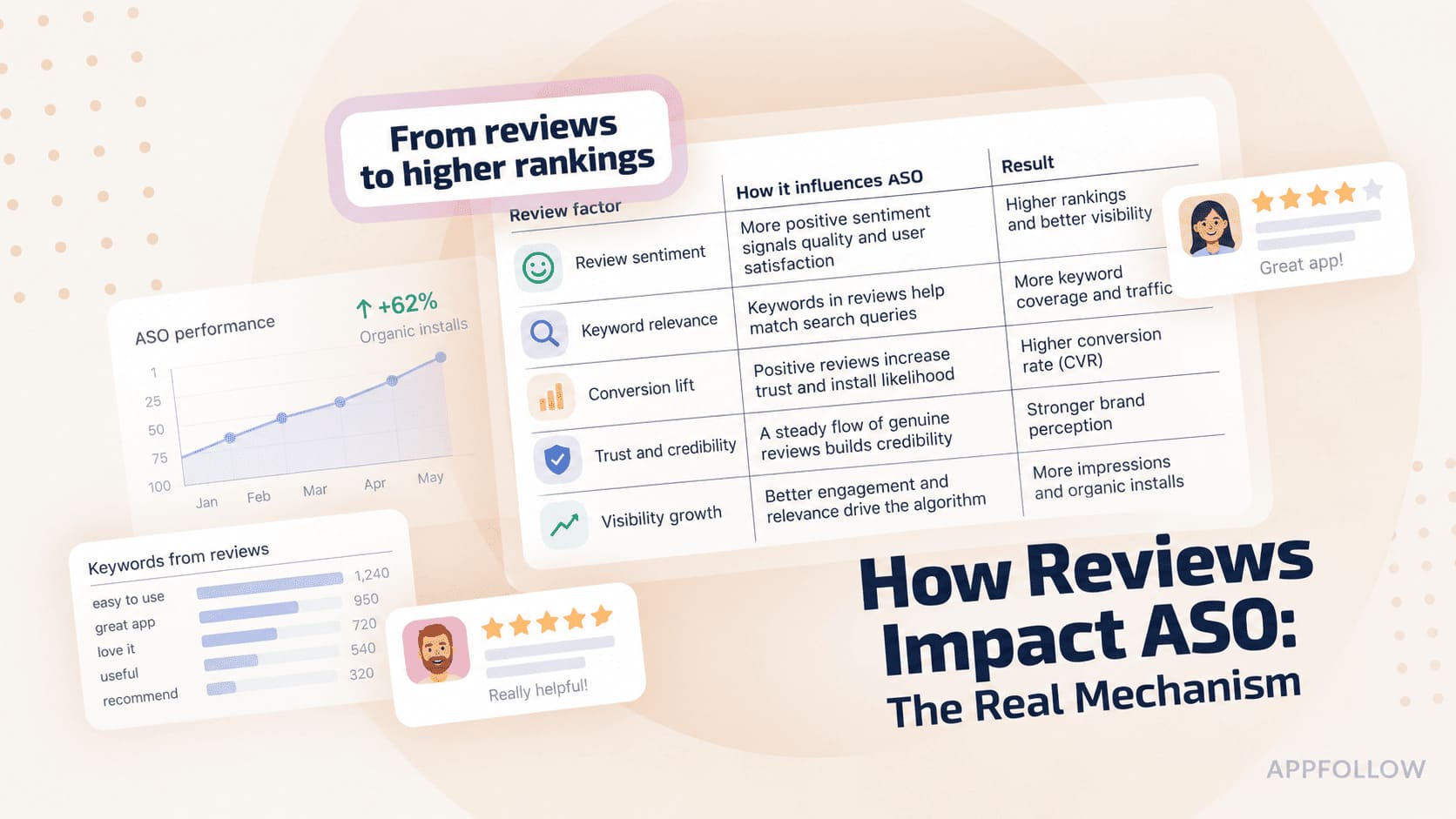
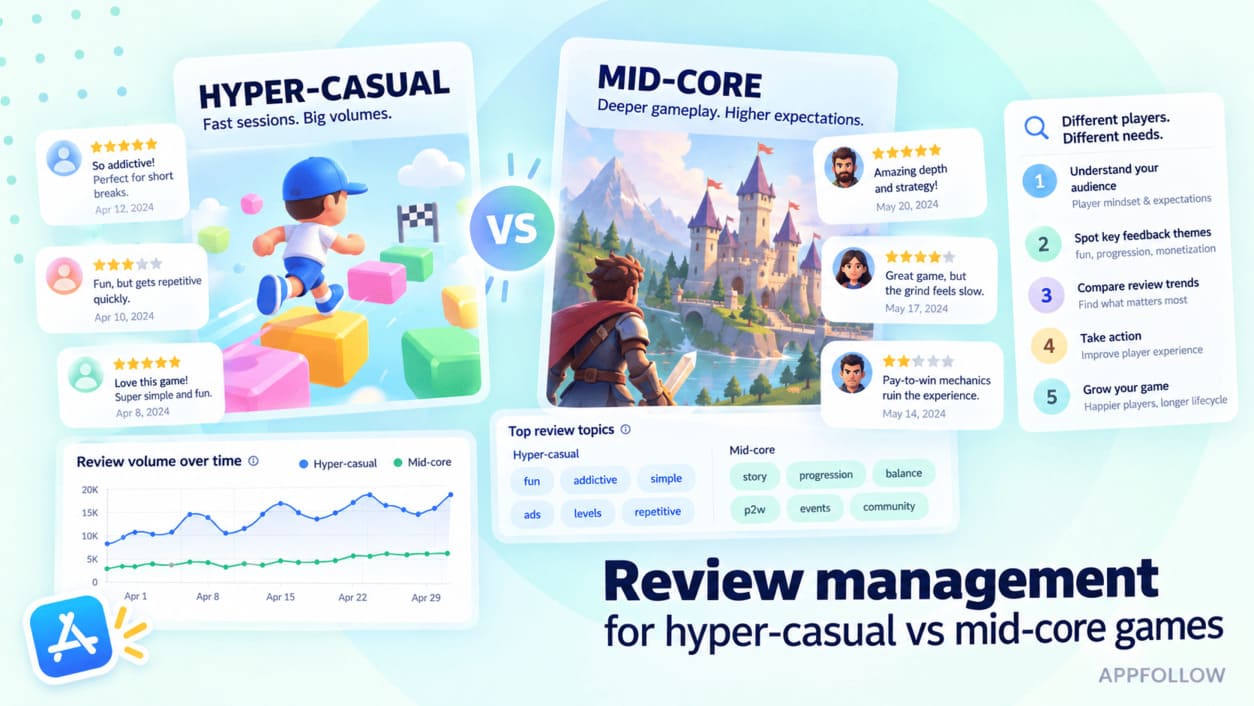
AppFollow Research analyzed 51.5 million reviews across more than 22,800 gaming apps (January 2025–January 2026). Its reported average sentiment scores differed substantially: 65.5 on Google Play and 46.4 on the App Store.
That is a reason to benchmark against the same store and genre, not to treat an iOS–Android sentiment gap as proof that the iOS product is worse. The study scores sentiment from review text rather than stars, and its platform averages are descriptive benchmarks, not estimates of how reviews change install conversion. Read the 2026 gaming sentiment research.
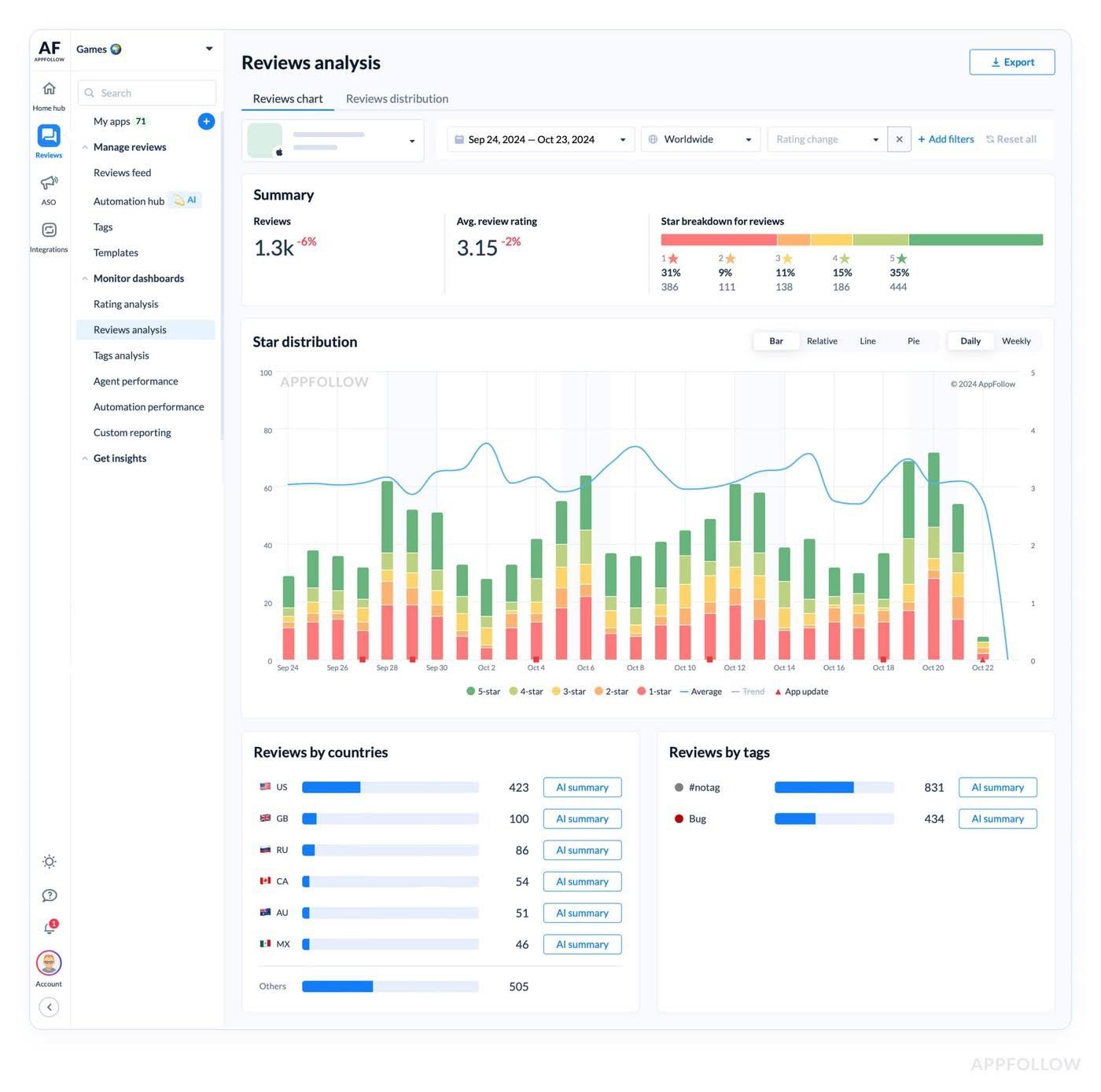
In AppFollow, isolate the game's own reviews by country, rating, version, and tag. Put the dominant complaints beside the release calendar. If players mention freezing on launch, check crash telemetry before drafting a reply or rewriting the listing.
cta_free_trial_yellow
Separate expectation mismatch from product defects
One star is a score, not a diagnosis. Treat every repeating complaint as a provisional lead. Tag the likely cause, estimate its share of recent reviews, and name the team that can verify it.
Review theme | Likely issue to verify | Owner / next evidence |
“Not like the screenshots” | Expectation mismatch | ASO + product: compare the claim with gameplay |
“Too many ads” | Ad frequency / monetization expectations | Monetization: inspect ad load and session data |
“Pay to win” | Economy balance / positioning | Game design: inspect payer and progression cohorts |
“Laggy after update” | Device/version performance | Engineering: inspect performance and crash logs |
“Can’t find friends” | Onboarding / social UX | Product: reproduce flow and review completion events |
“I thought it worked offline” belongs with ASO if the listing implies offline play. “It freezes on Android 15” goes to engineering. A screenshot revision cannot fix a crash; a code patch cannot correct a misleading promise.
A practical escalation note might read: “Crash complaints rose after v2.4, concentrated on Android 15; owner: engineering; verify against crash-free sessions today.” That gets the work moving faster than another sentiment dashboard.
That distinction can disappear when you look only at the average rating. Our gaming store review rating gap in 2026 digs into what the headline score can miss.
Prioritize review responses for visibility and severity
The newest review is not always the most urgent. Lead with comments that reveal a widespread defect or a damaging mismatch:
- Recent low-star reviews
- Helpful-voted comments
- Localized reviews in your priority markets
- Repeated complaints about the same issue
Review response is useful when it resolves a real question or provides accurate fix status. Google documents public response permissions and workflows in Play Console ratings and reviews help.
Keep the reply precise: acknowledge the issue, say what is confirmed, and avoid promising a release date the team hasn't approved.
Escalate crashes, purchases, and unresolved issues to a human. Product work matters more than clearing a counter. If you're reviewing response efficiency across markets, our gaming reply time benchmarks for 2026 provide useful comparison data.
Let player language shape the next creative test
Put screenshot one next to what players actually say. If “fast matches” keeps appearing in praise, make that a candidate headline and show the mechanic. If rewards trigger complaints, inspect any claim that implies effortless progress.
Then test. Apple's Product Page Optimization and Google Play Store Listing Experiments can show whether the more faithful version converts better for a comparable audience.
Strategy 3: Use category rankings to monitor market momentum
Chart positions are useful for noticing momentum, but they don't show how many installs came from browsing. Use a ranking change to start a timeline investigation: release, paid activity, featuring, competitor movement, and owned source data.
Read category movement as a relative signal
Imagine a strategy game jumping from #48 to #19 after a seasonal event. Was the lift driven by paid installs, featuring, a popular event, or a competitor slowing down? Put those dates beside the install-source report before choosing the next move.
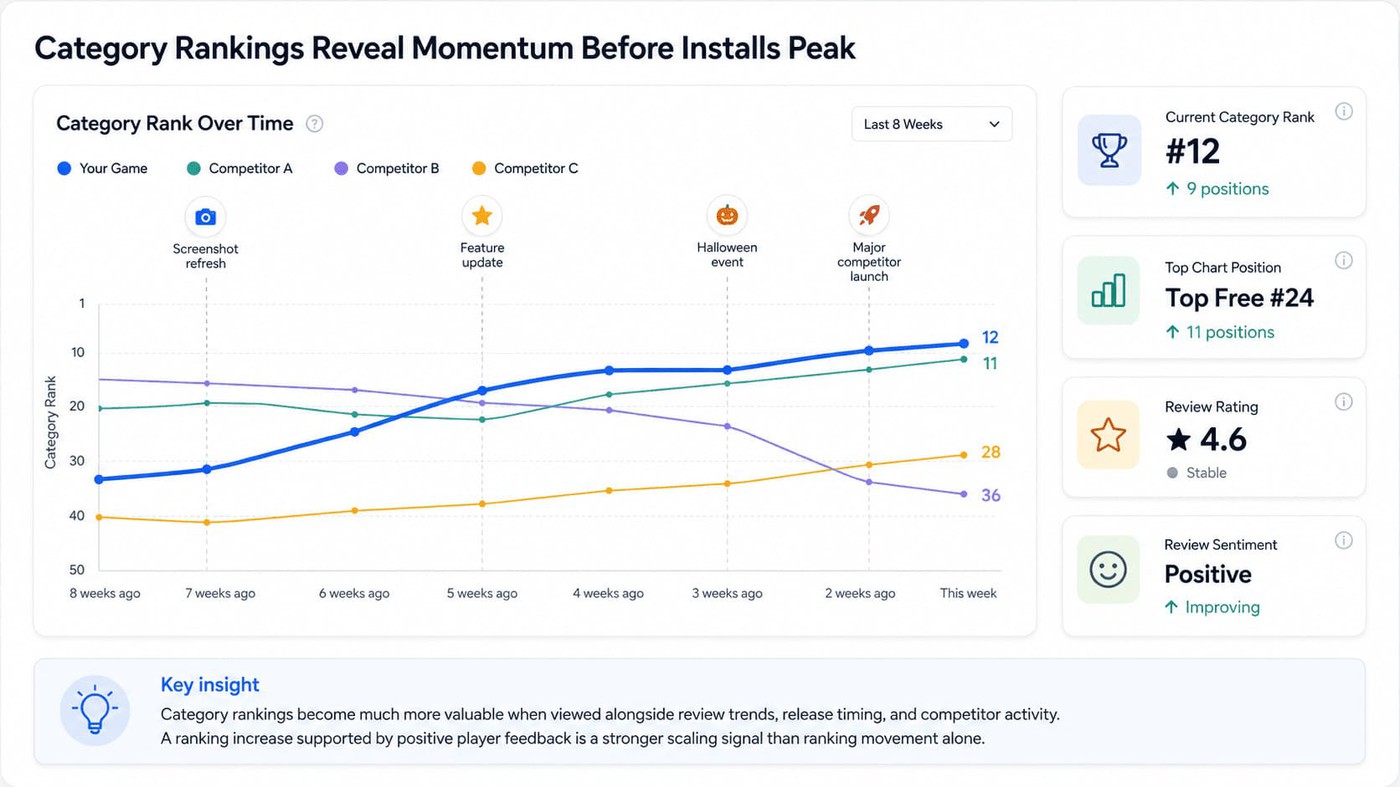
Put chart changes on the release calendar
Plot releases, LiveOps events, featuring, and creative tests on the same timeline as chart movement. A rise in Top Free might start outside the store; source data will tell you how much browsing contributed.
When charts rise but reviews turn negative
The chart is climbing. Great. Meanwhile, players are suddenly reporting failed matchmaking,
- Hold the victory lap and check the affected version.
- Compare new complaint themes with release dates and crash analytics. A larger audience can make an old defect impossible to ignore.
- Track category and top-chart movement in AppFollow, and review competitor metadata and rating shifts. Monitoring agents can notify you about your own tracked apps; do not assume competitor apps support the same agent setup.
Strategy 4: Test creative against the actual game experience
A polished screenshot can win a tap. Only the game can keep its promise.
Start this audit with a mismatch, not an aesthetic preference. What does the first asset claim? What will a new player experience in the first session? And what do recent reviews dispute?
Audit your icon, screenshots, video, and feature graphic
Audit the first impression on the actual store surface. Does the icon distinguish the game? Do the first two screenshots show gameplay rather than a feature list? Can a visitor tell the genre and core mechanic without reading the description?
The answer differs by genre. Match-3 players may look for satisfying combinations; RPG players for combat and progression; party-royale players for a recognizable multiplayer moment. Borrow the evaluation method, not another game's art direction.
Save the opening assets from three comparable listings. Write down each game's lead benefit and how quickly the player sees real gameplay. Now compare your own opening frame: what is missing, unclear, or overclaimed?
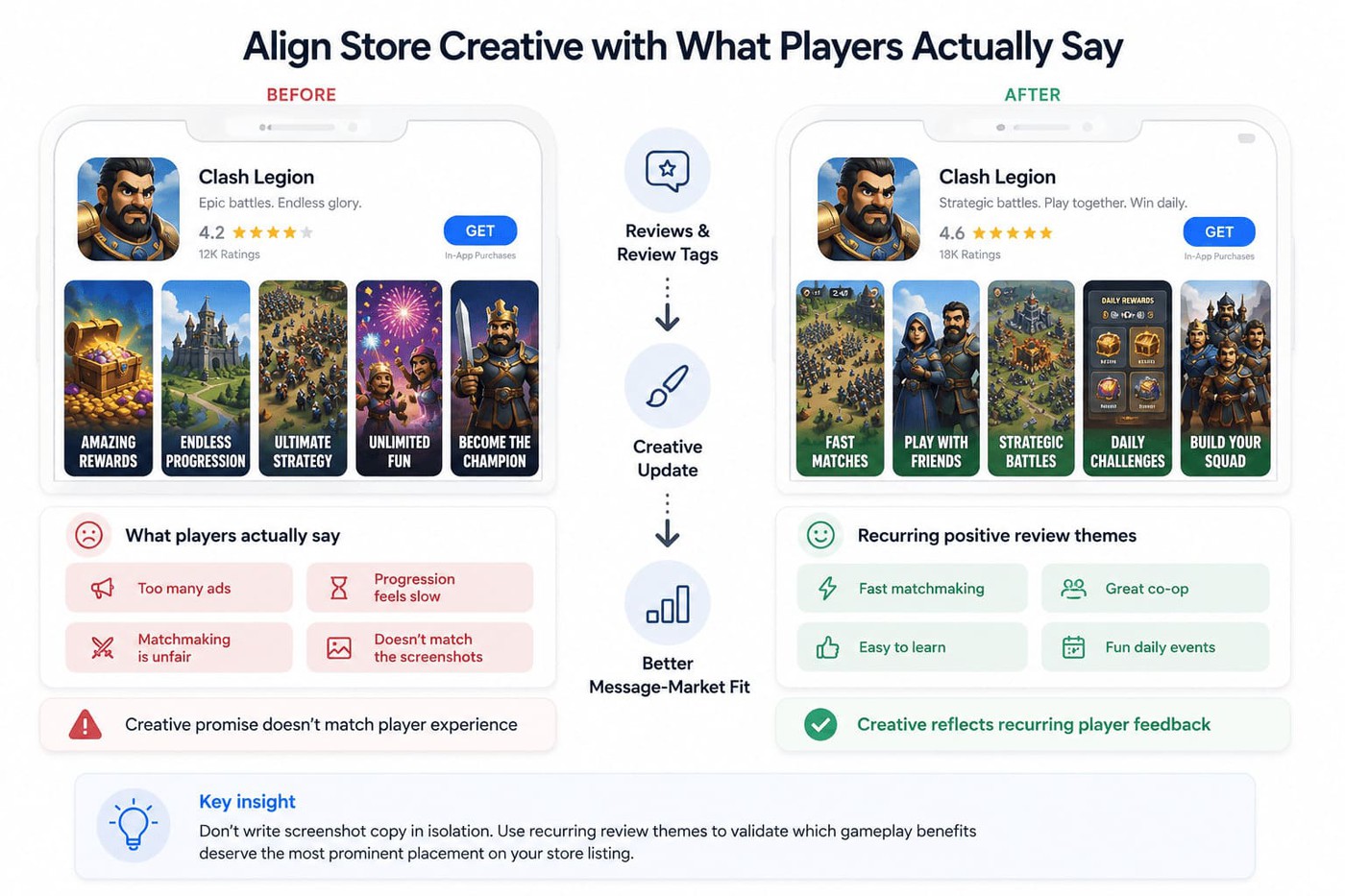
Conceptual before/after creative mock-up. Validate any proposed lift in a store experiment.
Know the limits before you plan the test. On the App Store, Product Page Optimization runs one test at a time with up to three treatments (icon, screenshots, or app previews) for up to 90 days, and new assets need App Review approval first.
In Google Play Console, a default graphics experiment compares up to two variants with your current listing; you can run one such experiment, or up to five localized ones, at a time.
Turn feedback into a creative hypothesis
Build a brief with five fields: recurring theme, evidence, current listing promise, one proposed variant, and the success metric. That's enough to prevent a creative review from turning into a debate about taste.
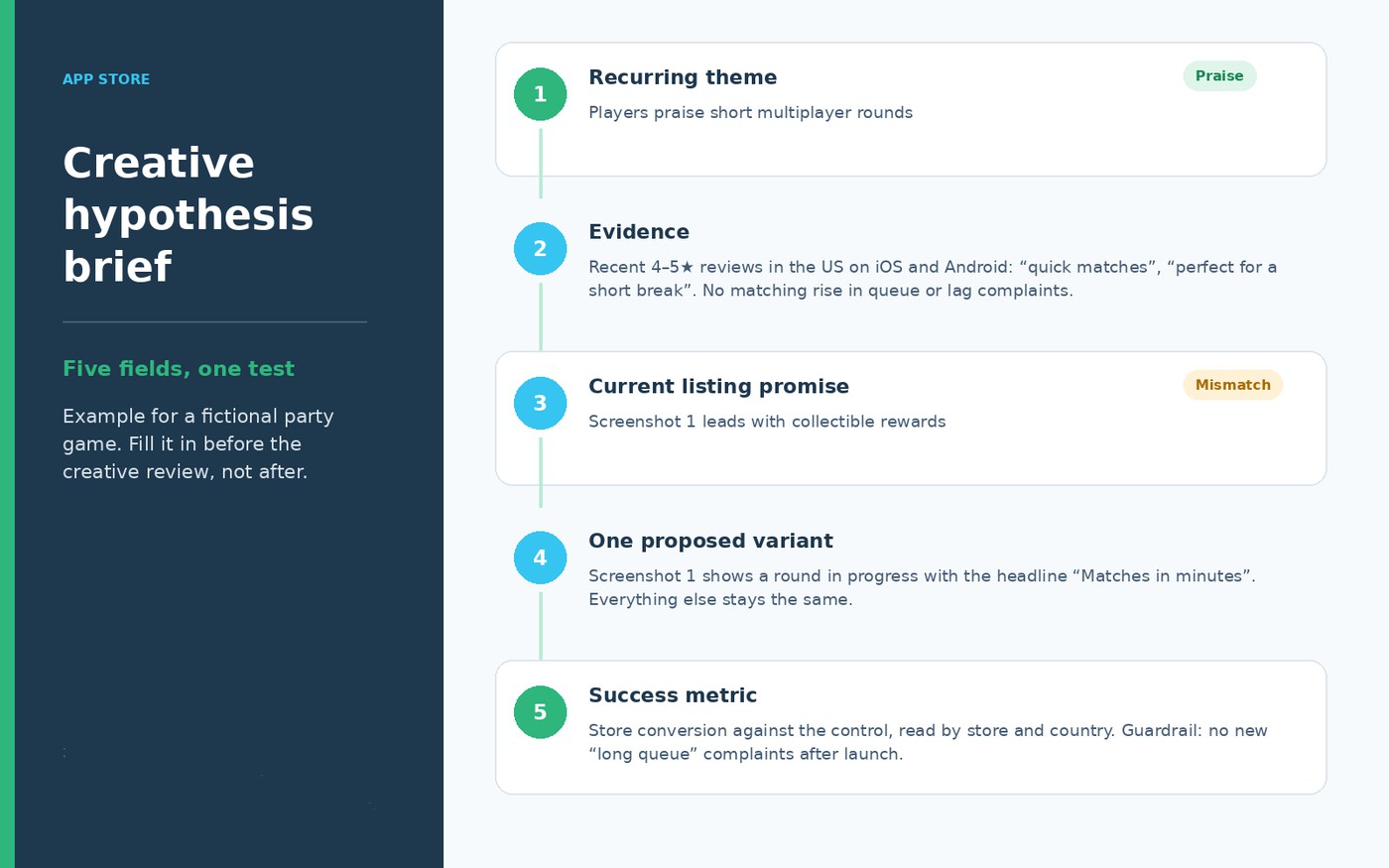
Example creative hypothesis brief for a fictional party game: one review theme, one variant, one success metric.
- Read both sides of the feedback. Five-star praise reveals what players love; recent critical reviews show what the listing may be failing to explain. Their intersection is often the most useful creative territory.
- Suppose players praise short multiplayer rounds, while screenshot one focuses on collectible rewards. Test a gameplay-first version. But if reviews complain about long queues, verify performance before promising “instant matches.”
- Change one central message per experiment. Keep the market and traffic mix comparable, allow enough traffic for a meaningful result, and evaluate installs—not which design won the internal vote.
Do not publish claims your players can disprove
“Ad-free gameplay” is a promise that can be checked after the first session. If the game serves interstitial ads, don't imply uninterrupted play. If a release introduced crashes, avoid pushing creative that centers the broken feature until engineering verifies the fix.
Name the owner of each mismatch: ASO for positioning, design for progression, monetization for ad pressure, engineering for stability. Re-test after the experience supports the claim.
A quick test for any claim: could a new player confirm it within the first five minutes? If not, move it out of the first screenshot.
Strategy 5: Use soft launch to validate acquisition quality
A good mobile game user acquisition strategy treats soft launch as a learning phase, not a cheaper version of global rollout. The test must answer three questions: do the right players arrive, does the listing convert, and do those players stay?
Give each market a specific purpose. For teams running soft launch games, a clean technical readout and a reliable retention cohort are more valuable than a blended headline that hides both.
Choose markets for the question you need answered
Testing onboarding? Choose a market where language and player expectations resemble your target. Testing purchases? Match buying behavior. Testing stability? Prioritize device and operating-system coverage over cheap installs.
Write down what the test market can—and cannot—predict about launch markets. Otherwise, an attractive CPI in a low-cost country may create false confidence.
Keep conversion, technical health, and cohort economics as separate pass/fail conversations. They answer different launch questions.
Run a CPI test with the full funnel in view
Start with the definition: CPI = attributed acquisition spend ÷ attributed installs. Then put it next to tap-to-install or store-page conversion, traffic mix, D1/D7 retention, and early payer behavior. Attribution and store-console counts won't always agree; label each denominator.
For example, $4,000 in spend and 2,000 attributed installs produce a $2.00 CPI. The same spend with 1,600 installs produces $2.50. That's a 25% increase. Investigate bid costs, traffic composition, listing conversion, and measurement before changing the media plan.
Review one shared test window, with a clear owner for every metric:
- First-party product-page views, conversion rate, and source mix
- Search and category rank movement (diagnostic context, not causal proof)
- Rating level and trend by country and platform
- Volume of recent reviews, normalized for installs where possible
- Negative topics by version and severity
- Crash-free sessions, D1/D7 retention, and cost-to-LTV economics
Here's the expensive mistake: a listing converts beautifully, but its new players leave after the tutorial. Store CVR says the promise is attractive; D1 retention says the experience isn't sticking. The expansion decision needs both.
A quick check. A $1.50 install that brings in $1.00 over 30 days loses money; a $2.50 install that brings in $4.00 pays back. Compare cost with value per cohort, not CPI alone. That's where broader mobile game monetization metrics, such as LTV, provide much better context for deciding whether a market is ready for additional investment.
Read the first reviews before declaring success
Imagine the first test report meets its CPI and conversion targets. Then the review feed changes.
Players repeatedly report that the game closes after the tutorial. Match those posts with the crash-free session rate for the affected build. That's a launch blocker. A handful of complaints about puzzle difficulty, with stable retention and no technical issue, may call for observation instead.
Use AppFollow to spot review and rating shifts by market, then bring in store-console performance and game analytics. Make the scale/hold call with UA, product, and engineering in the same room.
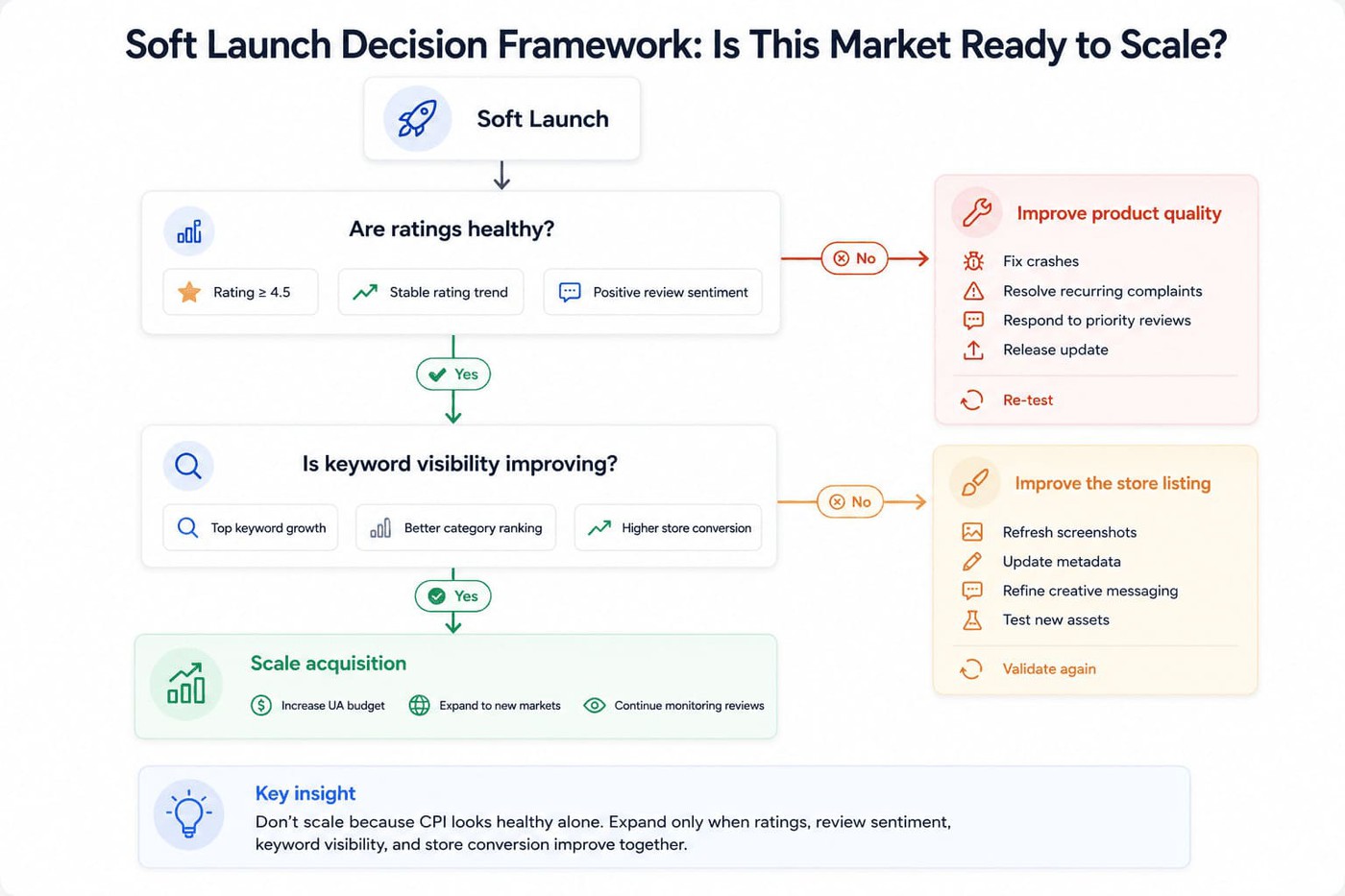
App Store vs Google Play: Two different acquisition readouts
One campaign can generate two very different store outcomes. Apple and Google expose different metadata fields, testing controls, ratings breakdowns, and attribution views. Report iOS and Android separately before rolling their numbers into an executive total.
App Store: Metadata, product pages, and conversion experiments
Apple's searchable metadata includes the app name, subtitle, and dedicated keyword field. The product page then makes the case through icon, screenshots, app previews, ratings, and reviews.
Apple Ads campaigns can use custom product pages, so paid and organic audiences may see different creative. Mark the page variant before comparing conversion.
Custom Product Pages tailor the message to a segment or campaign. Product Page Optimization tests alternative assets against a default product page; it doesn't run tests on custom product pages. Read the relevant variation in App Store Connect rather than blending everything into one CVR.
Google Play: Search metadata and store listing experiments
Google Play works with an app title, short description, long description, and localized listings. More searchable copy gives teams room to describe gameplay, but a long keyword list won't solve weak intent fit.
Store Listing Experiments let you test eligible graphics and text in Play Console. Don't promote the apparent winner from a tiny sample: evaluate the experiment result, audience, and traffic quality before rolling it out.
Review breakdowns add useful context: look at device, country, and app version to find whether a release issue is concentrated or widespread. Peer comparisons help place the rating in market context.
Keep the platform differences visible
Your combined dashboard can be neat. The decision underneath it still needs separate iOS and Android evidence.
An iOS keyword win can sit beside flat Android store conversion. That's not a contradiction; the stores had different metadata, assets, visitors, and test histories. Diagnose the result on its own terms.
At minimum, keep the store-specific fields and experiments in separate columns:
App Store | Google Play |
App name, subtitle, separate keyword field | Title, short description, indexed long description |
Product Page Optimization: test default-page assets | Store Listing Experiments: test text and graphic assets |
Custom Product Pages: tailored URLs/keywords, separate from PPO | Custom store listings and supported listing experiments |
App Store Connect: product-page views, downloads, tests | Play Console: visitor acquisition, conversion and experiments |
Ratings/reviews and geography-specific analysis | Ratings by country, version, device and peers |
Example: A five-step acquisition audit before the US launch
Friday afternoon. A fictional party knockout game is one week from its US launch, and the UA team wants more budget. Before approving it, work through five checks. The scenario is illustrative—not a customer case study or an AppFollow performance claim.
Setup: A new party knockout game entering the US
Choose three to five competitors visible for the same gameplay queries. Stumble Guys may belong in that set; unrelated Roblox experiences may not. Search overlap matters more than a recognizable logo.
Save the US iOS and Android competitor set with priority terms and release dates. Competitor keyword positions and ratings analysis are standard AppFollow capabilities. Competitor Reviews Feed is in closed beta, and monitoring agents work only for your own apps, so check your workspace access before you copy this workflow.
Step 1: Find out whether players can discover the game
Start with 15–25 queries: genre, core mechanic, and specific player needs. Keep the set consistent before and after a release, and chart it separately for US iOS and Android.
Suppose five high-fit terms climb together but installs barely budge. That points toward a conversion or demand-size question. Compare owned search downloads where available; don't celebrate a top-ten badge in isolation.
Use AppFollow for the rank and competitor picture. Pull owned discovery results from the connected store data where supported.
Step 2: Locate the source of chart momentum
Map competitor updates, your own release, the launch campaign, LiveOps, and featuring against category positions. Ask which other acquisition sources changed on the same dates. If rankings rose the week creative changed, record the overlap. Then check channel mix and experiment data before calling the creative the cause.
Step 3: Decide whether feedback reveals a launch blocker
Filter your own reviews by version, platform, and US market. Group them into gameplay expectations, matchmaking, monetization, performance, and onboarding. Flag what requires a fix today.
For the team handoff, use a short tag set:
- Matchmaking
- Too many ads
- Pay to win
- Lag
- Crashes
- Controls
If new crash reports cluster in one release, severity matters more than whether rival games also get occasional negative reviews. Competitor review access may require beta entitlement; public store listings remain a manual fallback.
Step 4: Write one creative hypothesis
Put the first two screenshots and opening value proposition beside three search competitors. Then read your recent praise and complaints: which real benefit is invisible in the listing, and which claim is risky?
If players praise quick rounds but screenshot one sells rewards, test a quick-play version. Keep the current one as the control; measure conversion by store and country.
Step 5: Make the decision and name an owner
End the audit with one sentence that makes the next week unambiguous: scale, fix, localize, or retest; who owns it; and which evidence will change the call.
Evidence | Decision and owner |
Stable conversion + retention + economics; no critical issue | Run a controlled scale test; UA owns the budget gate |
Good visibility + repeated product complaints confirmed by logs | Fix before scale; engineering/product own root cause |
One market outperforms; audience fit supported by cohorts | Test localization in comparable market; ASO/UA |
Good visibility + poor measured page conversion | Run a creative experiment; ASO/creative |
Recurring unanswered reviews about a known issue | Reply accurately and escalate the defect; support/product |
Ranks down + conversion/retention deteriorating | Hold and diagnose by source, store, and release; UA/ASO |
Schedule a weekly AppFollow store-health review and attach owned installs, source mix, and retention from first-party systems. Alerts can surface important changes between meetings. Record decisions where product, UA, and support can see them.
cta_get_started_purple
Example decision log: “Hold US Android expansion for seven days. Engineering owns the v2.4 crash fix; reassess when crash-free sessions return to baseline and new crash complaints decline. UA retests spend after the fix is verified.” A concrete hold condition is more useful than a green/red label.
Support the users acquisition workflow with AppFollow
AppFollow is the store-intelligence layer in this workflow, not the attribution system. It connects what changed in search and rankings with what people report in ratings and reviews, so the team can decide what deserves attention first.
From there, use App Store Connect, Google Play Console, your MMP, and game analytics to test whether the action changed installs or player economics. That division of labor keeps the reporting honest.
Find search and competitor opportunities
Start with the question: which high-fit searches or markets are slipping?
Watch target keywords and competitor positions in AppFollow, then check recent metadata and localized results. Pick the most plausible opportunity for the next test rather than refreshing every listing at once.
Category and chart trends add competitive context. Owned discovery metrics show whether that opportunity is material.
When a rival's rating drops after an update, check which version and countries are affected. Players often compare alternatives in that window, so make sure your own listing answers the same complaint.
The next question: what frustrated the players who actually installed?
Review tags, sentiment, rating distribution, and version filters reveal recurring issues. Route technical failures to engineering, economy complaints to game design, and promise mismatches to ASO.
To keep this manageable, review the top five tags for the latest version every week and compare their share with the previous release. A tag that doubles after an update is a release question. A tag that has stayed flat for months is a positioning or design question, and it belongs in the backlog rather than the incident channel.
Manage response volume without losing accuracy
A useful reply answers a real player question or gives a verified status update. Use AppFollow's AI-assisted response workflow for suitable routine feedback, with people reviewing sensitive cases.
Escalate purchase failures and severe regressions instead of replying around them. A polished answer won't replace a fix. For your own monitored apps, configure alerts around changes that demand action rather than every movement in the data.
AppFollow integrations can help route selected findings to tools such as Slack and Zendesk. Check integration availability and configuration for your workspace before promising a specific route.
Make it a weekly operating habit
Keep the meeting to three questions: what moved, what might explain it, and who does what before the next one?
One useful scorecard contains:
- Priority keyword and search-download movement
- Category and top-chart context
- Store and market with the strongest divergence
- Rating trends, review topics, and severe defects
- Creative tests and their measured results
- Decision owner, next step, and review date
Example weekly scorecard for a fictional game. Each row ends with an owner and a next step, not just a status.
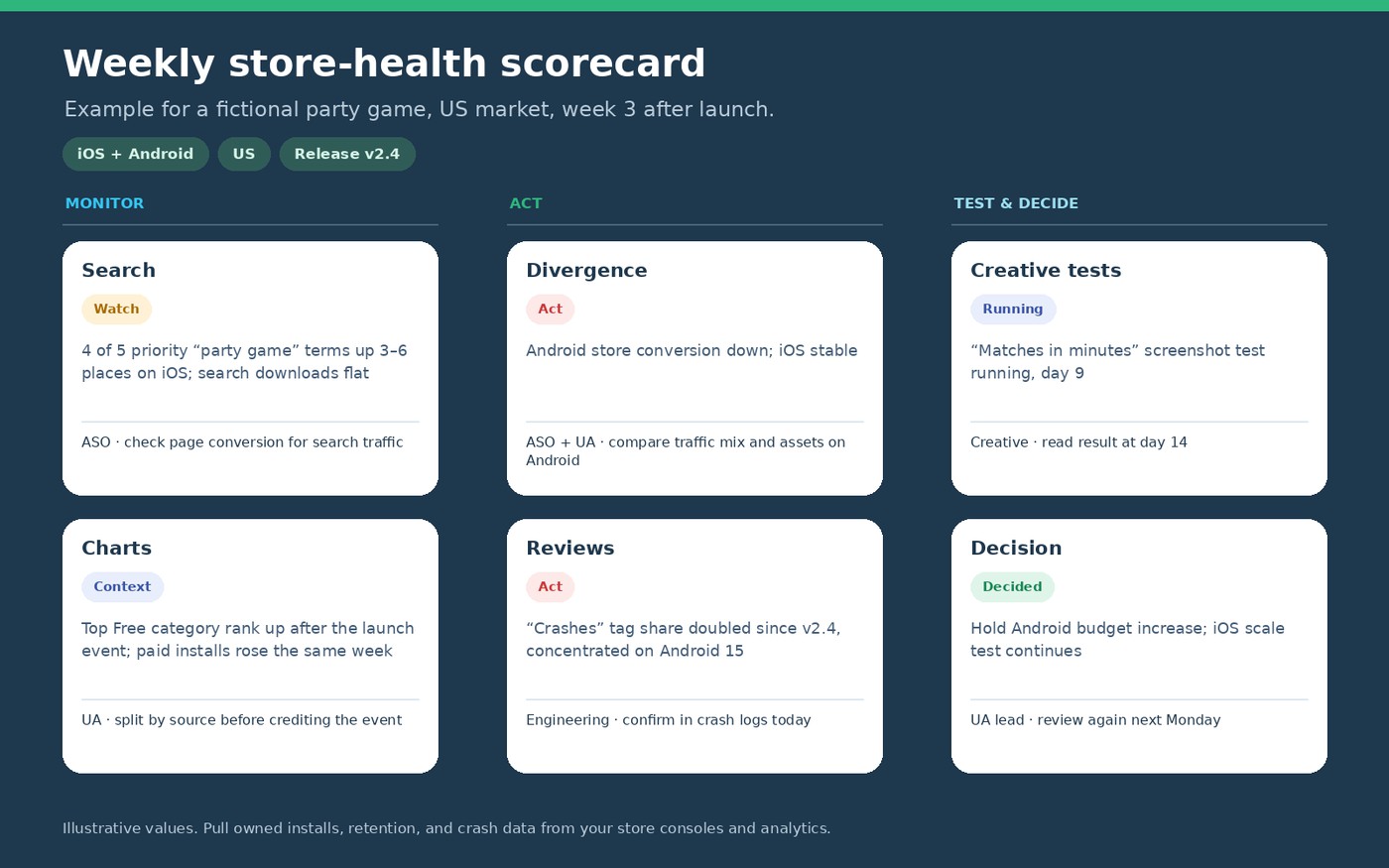
Share the scorecard across UA, ASO, product, and support. Attach the owned install and retention measures so nobody mistakes store sentiment for acquisition profitability.
cta_get_started_yellow
Tool boundaries: AppFollow handles store visibility, competitor context, and review analysis. App Store Connect and Google Play Console provide owned listing performance; your measurement stack provides spend, attribution, crashes, retention, and revenue. Individual integrations depend on account access.
Frequently asked questions
What is mobile game user acquisition?
Mobile game user acquisition covers finding prospective players and turning interest into installs. In the App Store and Google Play, that involves search and browse visibility, persuasive creative, ratings, reviews, and listing conversion. Paid channels and post-install economics sit around that store-side process.
How do reviews affect mobile game user acquisition?
Recent reviews can reassure a hesitant player—or raise questions the screenshots don't answer. Watch for repeated themes such as crashes, misleading gameplay, or intrusive ads. Match the feedback to the relevant version and conversion trend before deciding whether creative or product needs changing.
What should a game team check before scaling acquisition?
Before scaling, review keyword coverage, store conversion, traffic-source mix, ratings, new complaint themes, crash-free sessions, D1/D7 retention, and CPI or ROAS. Compare the same platform, country, and release window. If a severe defect appears, assign an owner before adding budget.
How do you run a CPI test for mobile games?
A CPI test calculates spend divided by attributed installs, then checks what sits behind the number: store conversion, acquisition mix, retention, and technical quality. A cheap install that churns immediately can be expensive in practice. Use review themes to identify issues worth validating in game analytics.
What is the difference between ASO and mobile game user acquisition?
ASO focuses on discoverability and conversion inside app stores: search terms, metadata, localized creative, and store experiments. User acquisition is broader: it brings in players and evaluates cost and quality across channels. Reviews help both teams understand whether the listing promise matches reality.
Are indie game marketing tips different for app stores?
For indie teams, the best indie game marketing tips are deliberately narrow: choose one or two viable markets, target high-fit search terms, and make the gameplay obvious in the first screenshot. Respond to repeat objections and test one improvement at a time; don't try to outspend a category leader.
How can AppFollow help with player acquisition?
AppFollow helps teams identify visibility gaps, monitor keyword and competitor movement, analyze their own ratings and reviews, and organize response work. Combine those findings with owned store conversion, attribution, and retention data when deciding what to scale. Competitor review access requires beta eligibility.
Conclusion: Find the bottleneck before you buy more traffic
More installs begin with a clearer diagnosis. See where the store funnel weakens: fewer relevant searches, weaker listing conversion, a promise players don't believe, or a product problem that needs fixing before the next campaign.
Then choose one move. Test a more accurate screenshot. Repair the regression. Improve the localized metadata. Or leave the budget alone until the evidence changes. Good acquisition work is as much about knowing when not to scale as knowing when to push.
One market. One leading problem. One owner. One test you can actually measure.
![[Webinar recap] What gaming apps get wrong (and right) in the app stores](https://cdn.appfollow.io/blog/static/appfollow_91581b29-8387-4dbd-88b5-2009875121ac.jpg)