ASO Video Strategies: The 2026 Guide to App Preview Videos and Google Play Promo Videos

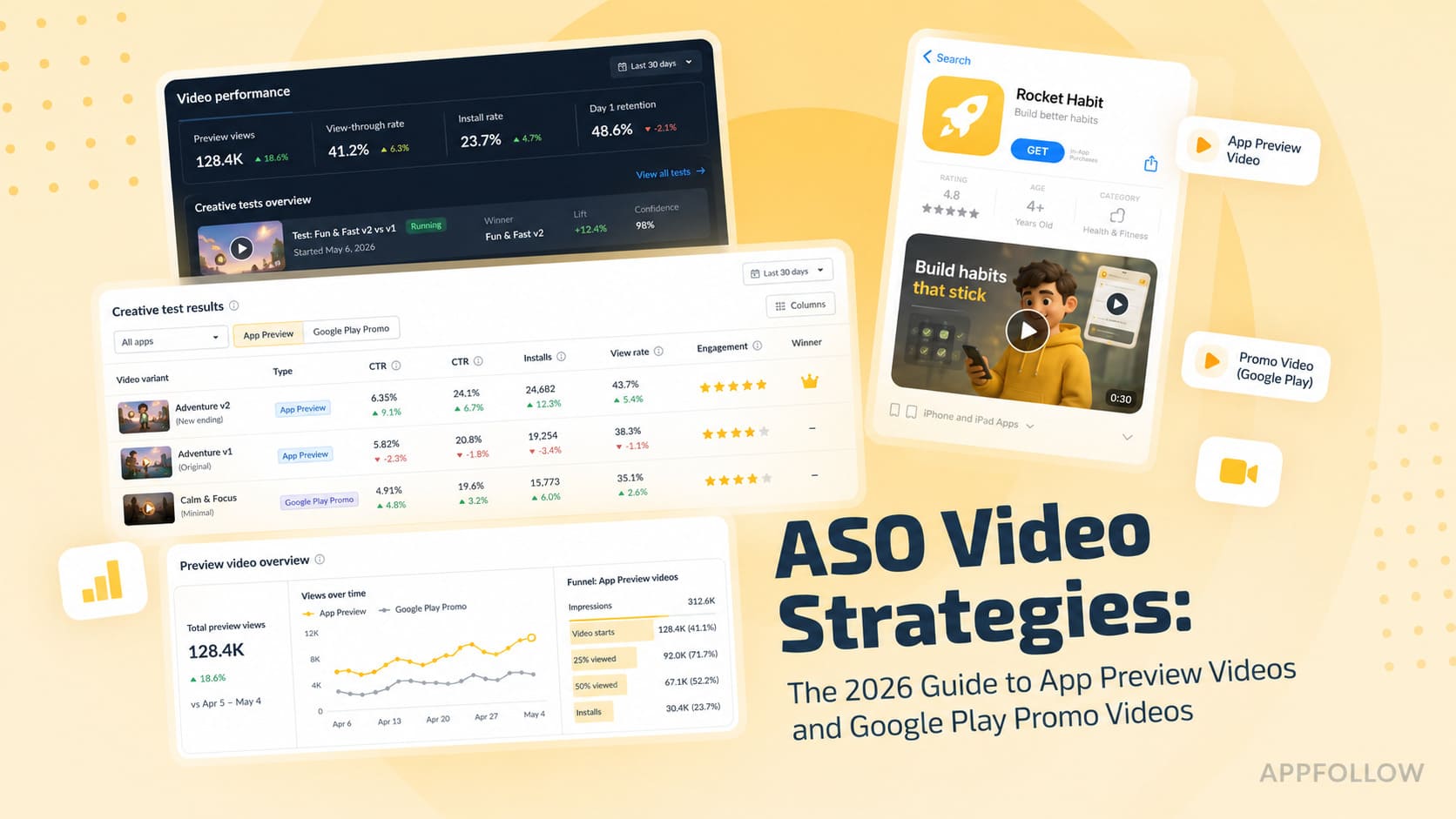
Table of Content:
- Key insights
- What ASO video strategies actually mean in 2026
- App Store Preview Video specs (Apple, 2026)
- Google Play Promo Video specs (Google, 2026)
- The side-by-side comparison: iOS App Preview vs. Google Play Promo Video
- 5 ASO video strategies that actually move CVR
- How to A/B test app preview videos (the practical playbook)
- Video CVR benchmarks by app category
- Production workflow: brief, shoot, cut, localize, ship
- Common App Store rejection reasons for app preview videos
- Optimize your app performance on app stores with AppFollow
Most teams still treat video like a brand asset. They polish motion, transitions, and voiceovers, upload the file, and then hope installs follow.
ASO video strategies work differently. The teams that beat their category treat video as the highest-leverage conversion experiment on the page, because a weak first frame or missing asset can quietly drain installs every day.
An app store optimization video sits between visibility and conversion. Your app preview video or Google Play promo video has to work inside both App Store Connect and Google Play Console, while also influencing behavior in the App Store and Google Play itself. Poster frames affect taps on the Store Listing. The Product Page experience shapes video CVR and overall conversion rate (CVR).
As Yaroslav Rudnitskiy, Senior Professional Services Manager (ASO) at AppFollow, puts it:
“Conversion rate optimization at the search results level and conversion on the full product page are related but distinct problems. The search results screen conversion is what moves rankings. The product-page conversion is what moves install volume after the tap. Both matter, but they require different interventions.”
This guide breaks down what actually works in 2026 and how to test video by surface, store, and intent.
Key insights
- App videos work best when they stop behaving like creative projects and start behaving like systems. The strongest teams build around intent, test behavior instead of opinions, and optimize for how users actually move through store surfaces.
- Treat video as a conversion asset, not a brand asset. Strong ASO video strategies influence both search results performance and product page conversion.
- The first three seconds carry disproportionate weight. Muted autoplay means captions, motion, and visual contrast often matter more than narration.
- Your poster frame quietly does more work than most teams realize. Many users see the first visual before watching the video itself.
- Match the keyword promise to the creative promise. If users search for “offline budget tracker,” show it immediately.
- Borrow from social platforms, but do not copy them. TikTok-style pacing works. TikTok editing logic often doesn't.
- Localize beyond translation. Adapt captions, use cases, and first-frame visuals for each market.
- Measure before rebuilding creative. Watch conversion rate (CVR), tap-through rate (TTR), keyword performance, and country-level behavior before changing assets or running app preview video A/B testing.
What ASO video strategies actually mean in 2026
Video ASO means building creative around user behavior, store mechanics, and conversion goals. Every scene, caption, and visual cue should help move performance on either search results or the product page. The job starts before a user installs and sometimes before they even tap.
The funnel works like this:
⇩keyword visibility creates impressions
⇩poster frame or autoplay creates taps
video plus screenshots convert visits into installs.
That is what makes video unusually powerful. A stronger opening can improve tap-through rate (TTR) from search results, while stronger sequencing later in the video can increase conversion rate (CVR) on the product page. Same asset, different jobs.
This is also why teams increasingly compare visibility, TTR, downloads, and CVR together before changing creative. In AppFollow, teams often use App Performance and ASO reporting to identify whether video is actually the right lever before rebuilding assets.
ASO video vs. paid creative vs. social ad
A top-performing TikTok video rarely becomes a winning App Store preview without changes. Different surface, different behavior, different success metric.
Asset | Goal | Success metric | Creative style |
ASO video | Convert store traffic | TTR + CVR | Silent-first, fast value reveal |
Paid creative | Acquire users | CPI, ROAS | Audience-specific messaging |
Social video | Stop scrolling | Watch time, engagement | Sound-first, trend-driven |
Brand video | Build awareness | Reach, recall | Storytelling and positioning |
The best teams borrow ideas rather than copy formats. A strong social hook may survive the jump into the store. The editing rhythm usually does not.
App Store Preview Video specs (Apple, 2026)
The official documentation for app preview video specs changes often enough that teams still get caught by avoidable mistakes. Most rejections are not creative failures. They're formatting problems. Apple's requirements in App Store Connect are strict, especially around duration, supported devices, and asset formatting.
Requirement | Current Apple rule |
App preview video length | 15–30 seconds |
Frame rate | Maximum 30 fps |
File size | Up to 500 MB |
Supported formats | M4V, MP4, MOV |
Orientation | Portrait or landscape |
Videos per locale | Up to 3 |
Video order | Displayed in upload order |
Device support | Must match supported device resolutions |
Aspect ratio | Depends on target device generation |
Apple also requires device-specific resolutions for iPhone and iPad generations, so app preview video dimensions, app preview video aspect ratio, and app preview video size are tied directly to the devices selected in your listing.
The full matrix changes often enough that teams should always validate against Apple documentation before exporting final files.
How many videos you can ship per locale
Apple allows up to three videos per locale. Order matters because the first asset receives the most exposure across surfaces.
Localized variants behave differently than many teams expect. If a market-specific version is unavailable, Apple falls back to the default locale. Sounds harmless until your Japanese store page quietly starts serving English content.
I've seen teams localize metadata and screenshots but leave preview videos untouched. Users notice.
Poster frame and the autoplay paradox
This mechanic gets ignored more than almost anything else.
Many users never watch your full video.
The poster frame often becomes the asset doing the real work.
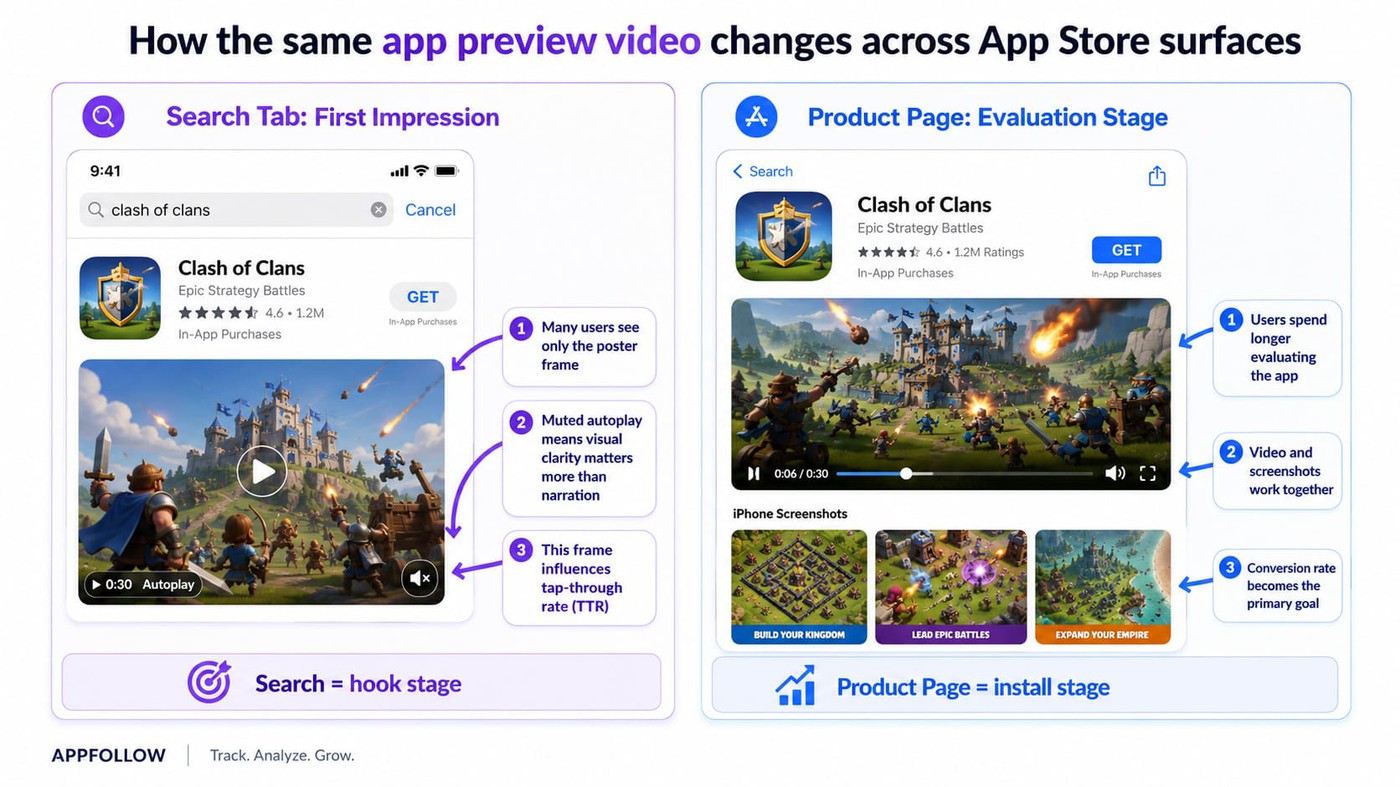
On the Search tab, users may see only partial muted autoplay behavior or a static first visual depending on placement and device behavior. | On the Today tab and the Product Page, autoplay behavior changes again. |
Different surface. Different viewing conditions.
That means your first frame needs to communicate value instantly, even with autoplay muted. Think of it less like video design and more like a thumbnail system wearing video clothing.
Localization rules and per-market variants
Localized content increasingly acts like a conversion layer rather than a simple translation. Subtitles often work well when feature understanding matters and voice is secondary, but dubbing tends to win when narrative flow or emotional context carries the message.
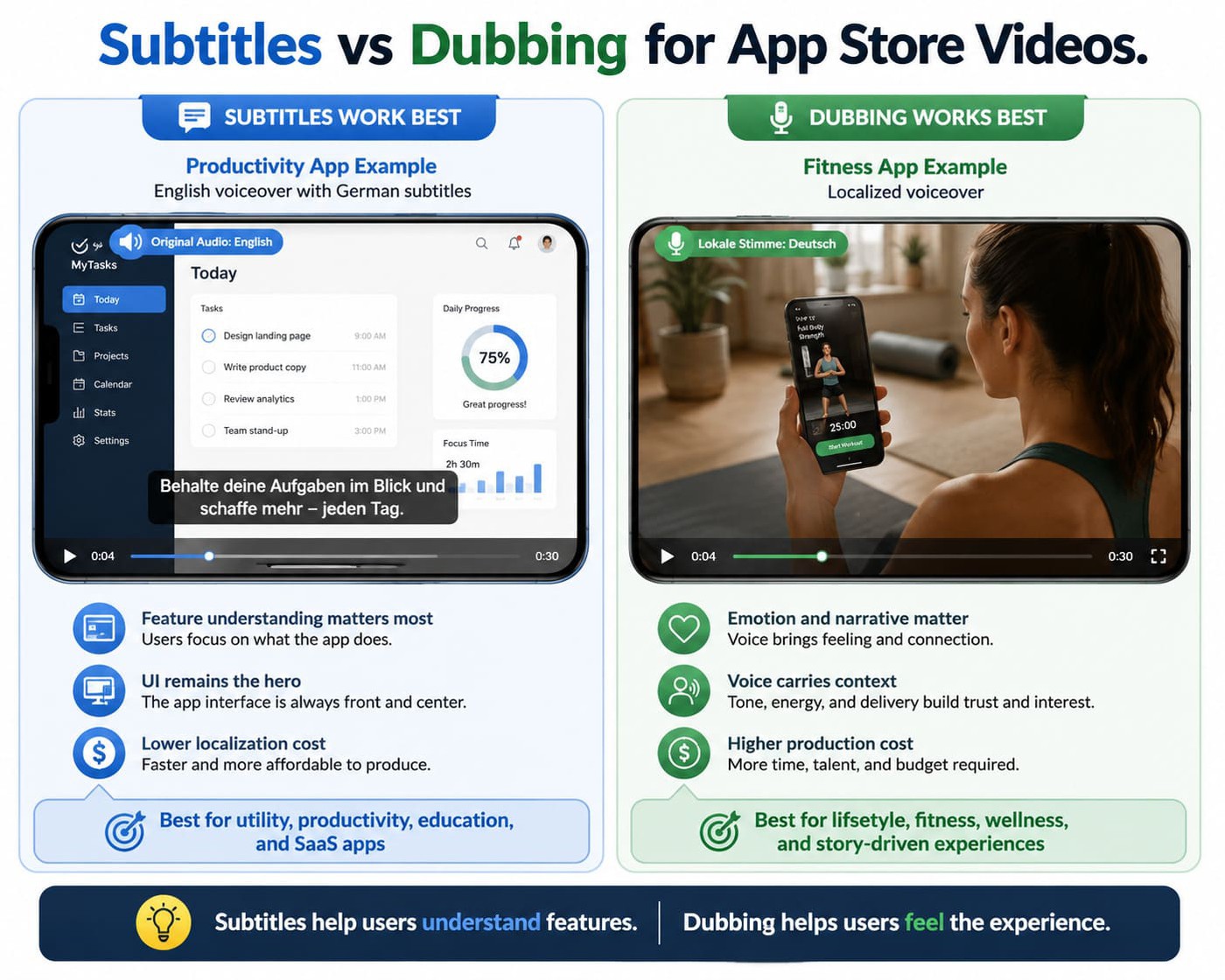
Gaming categories often tolerate subtitles better than lifestyle or fintech apps.
The effect is small but real. Localized assets frequently improve performance in non-English markets because users understand value faster.
Google Play Promo Video specs (Google, 2026)
Most ASO articles spend pages on Apple and then treat Google Play like a footnote. That misses one of the biggest differences in video behavior across stores. A Google Play promo video does not work like an iOS preview. The creative format, technical setup, and viewing environment all change.
The YouTube URL requirement and the Chrome problem
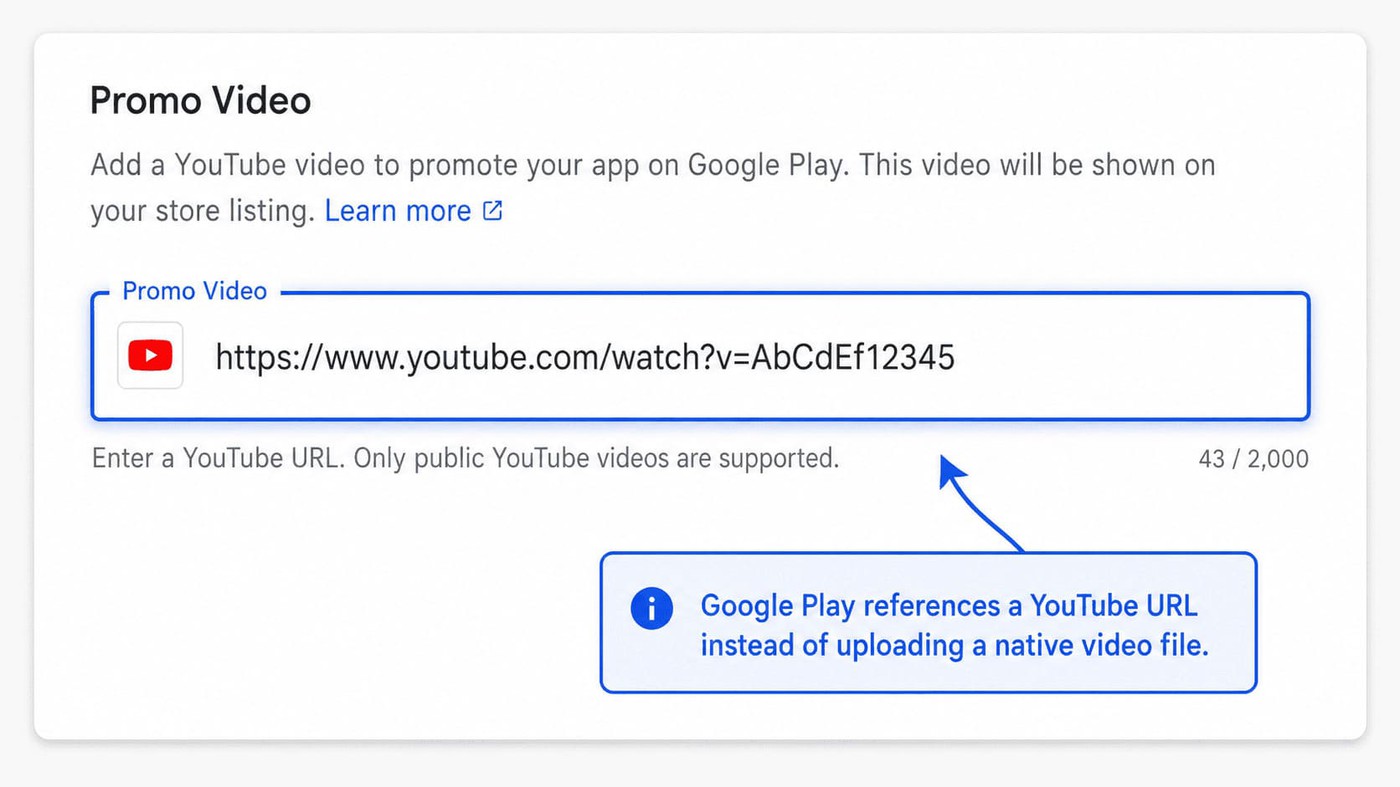
Unlike Apple, Google does not upload video files directly into Google Play Console. A YouTube promo video Play Store setup works through a linked YouTube URL.
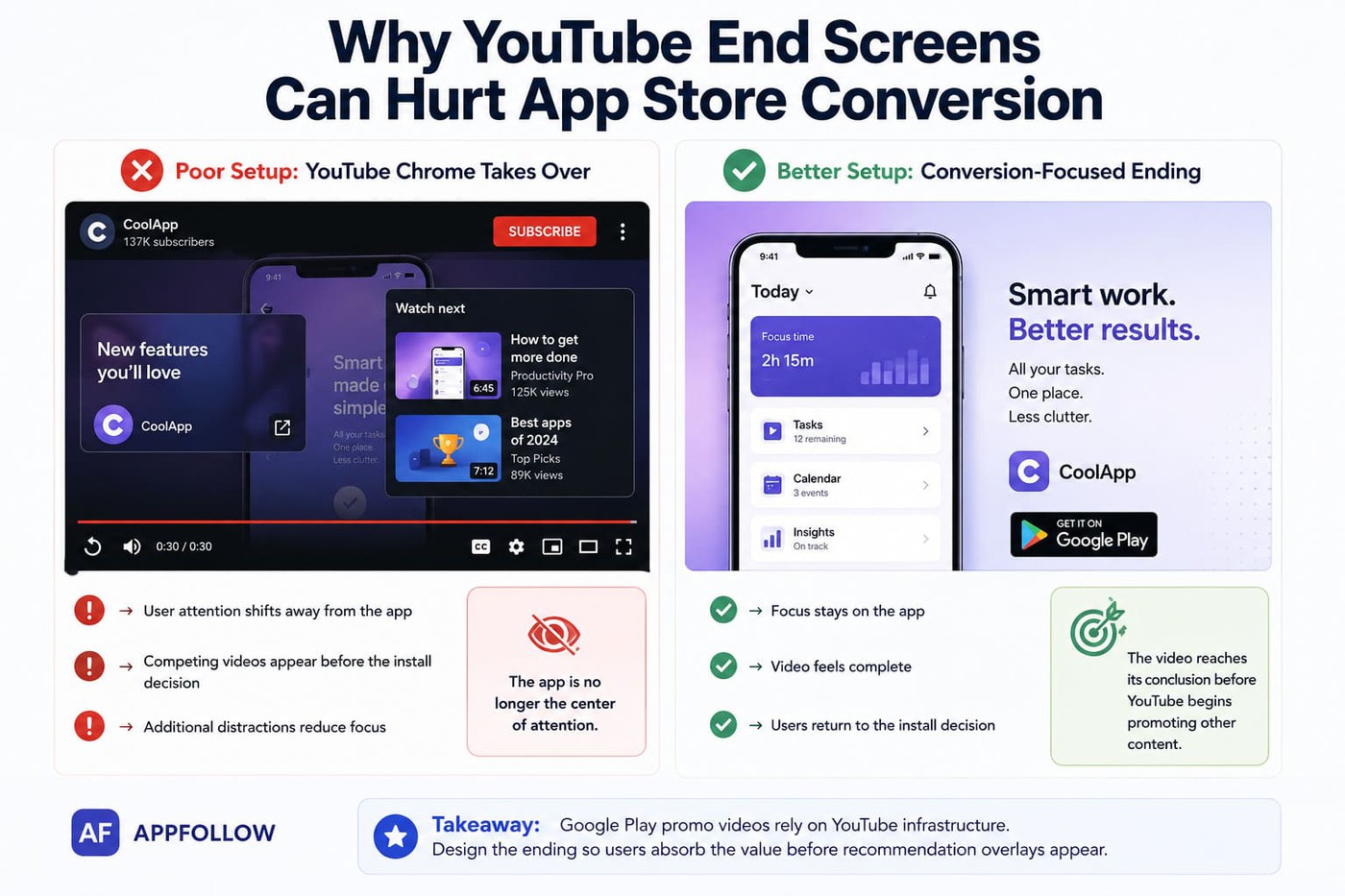
That creates a strange problem. Your app listing can inherit YouTube clutter.
Recommendations, end screens, suggested videos, creator branding, and overlays can appear if settings are configured poorly.
I have seen app teams accidentally send users from a product page to unrelated gaming videos simply because YouTube defaults stayed untouched.
"Most teams use unlisted YouTube videos for Google Play because the goal isn't audience growth. The goal is isolating store performance. Public videos can introduce external traffic and engagement signals that make it harder to understand what the listing itself is contributing. We generally want the promo video to behave like a conversion asset, not a content channel."
— Yaroslav Rudnitskiy, Senior Professional Services Manager, AppFollow
Pro tip: Top apps also remove end screens, avoid clickable overlays, and design endings that feel complete before YouTube interface elements appear.
Length, aspect ratio, and the 16:9 trap
Current Google Play promo video requirements remain fairly flexible. There is no strict Play-side duration limit because rendering comes from YouTube. Still, Google Play promo video specs usually settle around practical ranges:
Requirement | Recommended approach |
Duration | 30–90 seconds |
Best-performing window | Around 30 seconds |
Play Store video format | YouTube URL |
Orientation | Landscape preferred |
Aspect ratio | 16:9 recommended |
This creates an issue for portrait-first apps. A vertical app experience squeezed into a horizontal 16:9 container often feels awkward on the product page.
Teams frequently solve this by using device frames, zoomed UI sections, or edited layouts that create motion without forcing tiny portrait footage into a wide canvas.
Where the promo video appears in Play listings
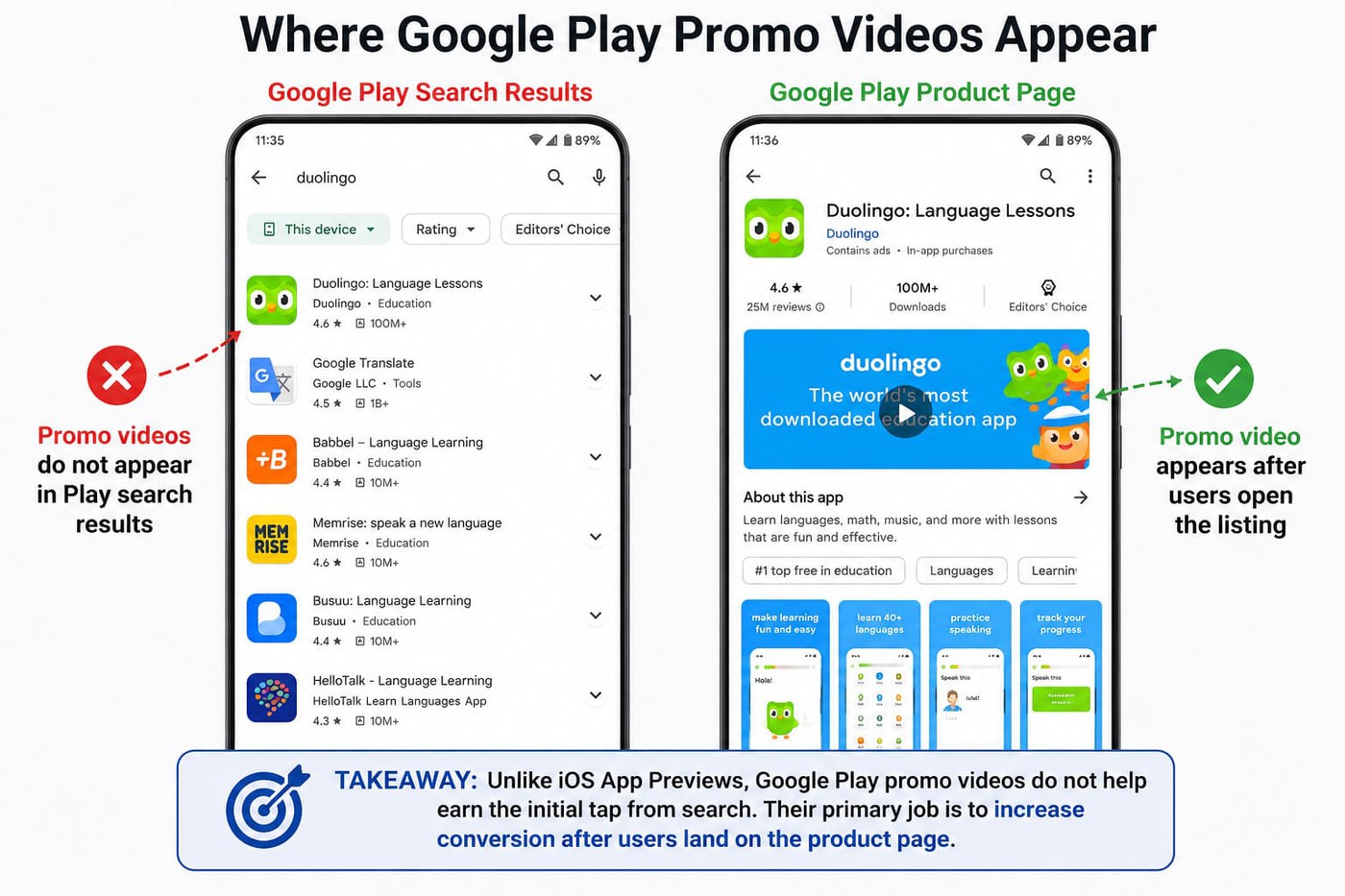
Placement changes the entire creative strategy. On Google Play, promo videos appear on the Product Page above the feature graphic. They do not appear in Play search results.
That sounds small. It isn't.
On iOS, video can influence discovery and taps because users may encounter autoplay behavior earlier in the journey. Google removes that pressure. Users have already reached your listing before seeing the video.
That gives teams more room to tell a story. Less first-second hook pressure. More space for sequencing and product explanation.
cta_get_started_yellow
The side-by-side comparison: iOS App Preview vs. Google Play Promo Video
Most articles explain Apple and Google separately. The problem is that teams build creative briefs separately, too. Looking at an app preview video vs Google Play promo video side by side changes how you plan production, localization, and testing from the start.
Factor | iOS App Preview | Google Play Promo Video |
Videos allowed | Up to 3 per locale | 1 per listing |
Length | 15–30 sec | Recommended 30–90 sec |
Aspect ratio | Portrait or landscape | 16:9 preferred |
Format | MP4, M4V, MOV | YouTube URL |
Surfaces | Search + Product Page + other placements | Product Page only |
Autoplay | Partial autoplay on some surfaces | Product Page autoplay behavior only |
Audio | Starts muted | Often muted by default |
Poster frame | Critical | Less influential |
Localization | Per-locale assets supported | Listing-level localization |
Review process | Apple review required | YouTube + Play setup |
A/B testing | Custom Product Pages + PPO | Store Listing Experiments |
Paid surfaces | Apple Ads creative variations | Google App Campaign integrations |
Analytics | App Store Connect | Google Play Console |
The differences change the brief immediately.
- iOS is hook-loaded. The first frame, muted autoplay behavior, and the poster frame carry pressure because users may encounter the asset before landing on the page.
- Google Play is more story-loaded. Users have already reached the listing, which gives more room for explanation and sequencing.
That does not mean one production becomes two. Reuse works. Blind copying usually doesn't. A TikTok-style opening may survive across stores. Entire edits rarely do.
“For apps targeting multiple markets, localized screenshots and videos, with captions in the local language, serve both ranking and conversion in those locales independently. Reusing English-language visual assets in non-English markets is the screenshot equivalent of not localizing your description.”
- Yaroslav Rudnitskiy, Senior Professional Services Manager (ASO) at AppFollow
Teams using AppFollow often validate that through per-country CVR, per-country keyword tracking, and competitor analysis before expanding localization efforts.

5 ASO video strategies that actually move CVR
ASO video strategies stopped being about “making a better trailer” a long time ago. In 2026, the teams improving installs are not producing prettier videos. They're designing assets around user behavior, store mechanics, and measurable conversion outcomes.
The strongest app preview video best practices increasingly come down to five repeatable systems.
Strategy 1: Design for muted autoplay and short-form attention
The first three seconds still matter. The reason changed.
Users no longer compare your video to a TV ad. They compare it to a feed full of short-form content. Most store surfaces autoplay muted, and attention behavior now looks suspiciously close to scrolling behavior. Logo intros are mostly dead. Slow fades usually die with them.
For video CVR optimization, think in micro-hooks.
- Strong teams cut every 1.5–2 seconds,
- use large typography,
- increase contrast,
- and build around a high-signal first frame.
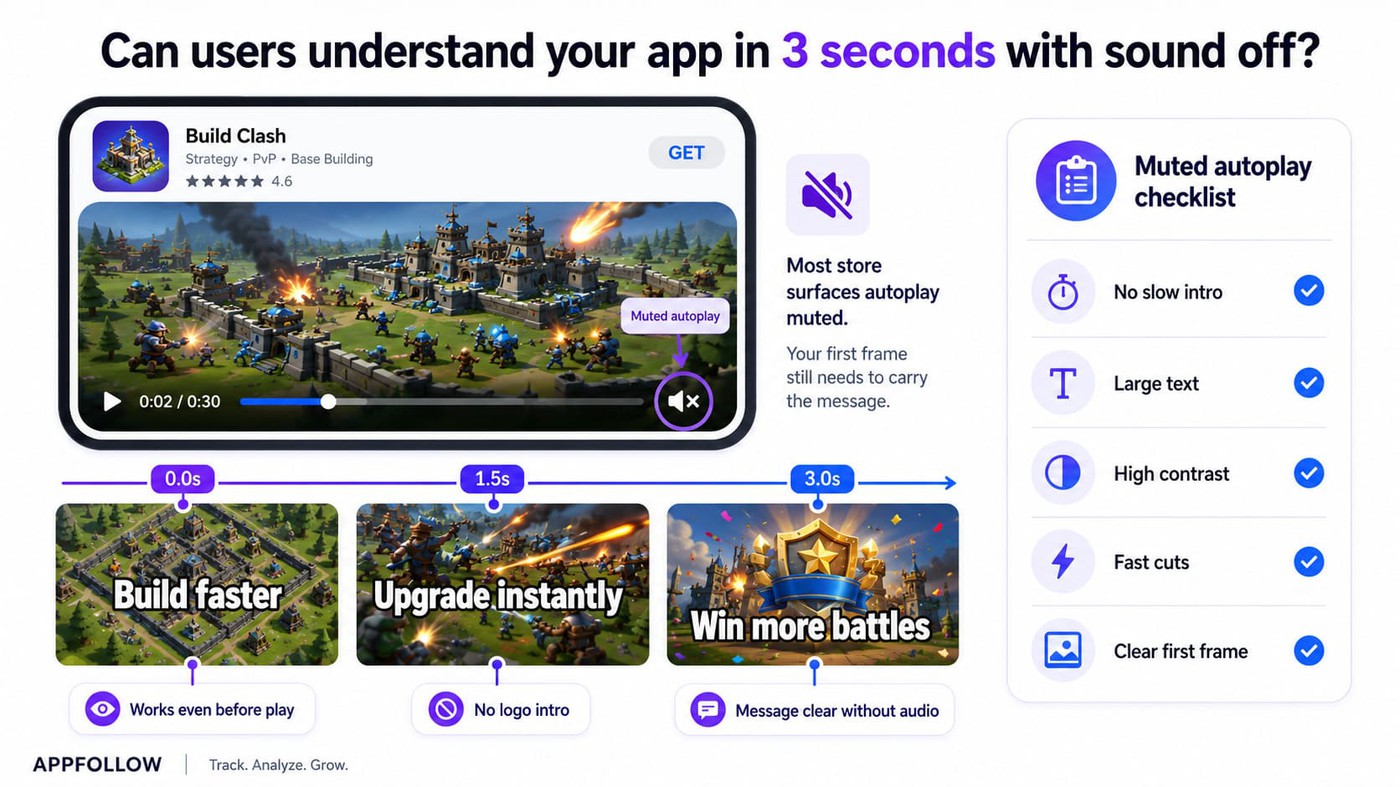
A poster frame should still make sense even if someone never presses play.
Open your current video and mute it. Watch only the first three seconds. If value is unclear without audio, rebuild the opening. Mix UI captures with real-world context and think in terms of a vertical video rhythm, even inside a 30-second asset.
Strategy 2: Lead with the feature users already value
Founding stories feel important internally. Users care about outcomes.
Outside of major consumer brands, feature-led openings consistently outperform company-led openings in video conversion rate app store tests. Users want proof quickly.
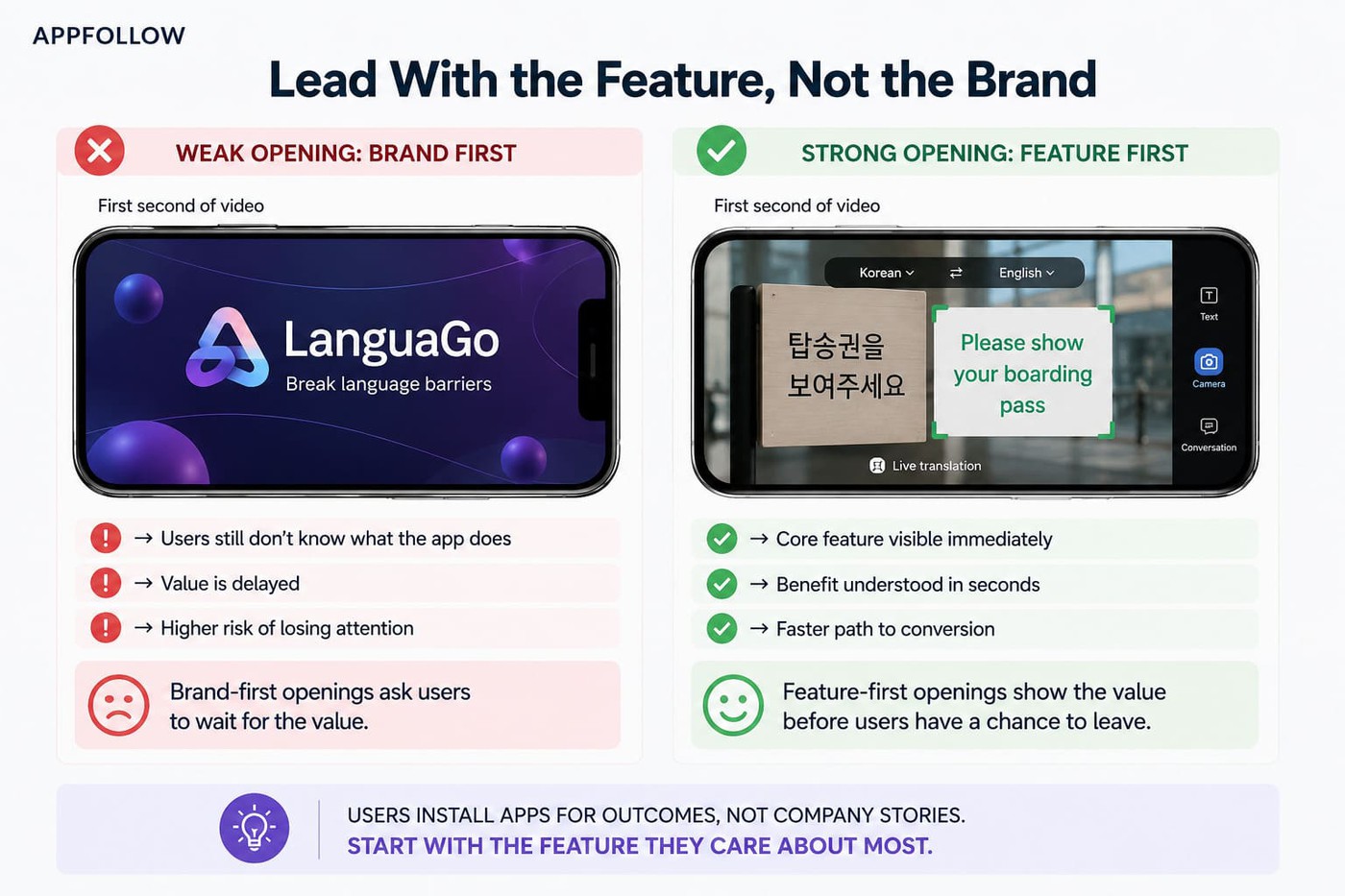
The challenge is knowing which feature deserves first position.
Imagine you're running a trivia game. Internally, the team believes the biggest selling point is the size of the question database. But after reviewing feedback through AppFollow's App Monitor and AI Semantic tags, a different pattern emerges. AI Semantic tags repeatedly group reviews around multiplayer challenges, friend competitions, and daily tournaments. AI Summary highlights the same trend. Users rarely talk about the number of questions. They talk about beating their friends.
That's the feature your video should open with.
Instead of spending the first few seconds explaining the breadth of the content library, the preview starts with a head-to-head challenge, a leaderboard update, or a victory moment. The creative follows the language users already use rather than the language the product team prefers.
Pull recent reviews and identify the feature users mention most naturally. If reviewers keep saying “offline mode saved me during travel,” start there instead of opening with your logo.
Strategy 3: Match the keyword promise to the creative promise
If your top keyword is “offline budget tracker,” users should see offline budget tracking immediately.
Consider a budgeting app targeting the keyword "offline budget tracker." If the video opens with brand messaging, account setup, or generic financial planning screens, users have to wait to confirm they're in the right place. A stronger approach is showing offline transaction tracking immediately, followed by a caption such as "Track spending anywhere, even without internet access." The keyword promise and the creative promise match from the first few seconds.
I've seen teams rank for high-intent keywords and still struggle with installs because the video opened on abstract lifestyle footage. Visibility alone does not close the loop.
“A keyword is only valuable when three things line up at once. The app can rank for it, the store page can convert it, and the product can satisfy the user. Video is the most efficient way to prove the second one to a skeptical user.”
- Yaroslav Rudnitskiy, Senior Professional Services Manager (ASO)
Pull top-impression keywords and compare them against your first five seconds. What the keyword promises, the creative must deliver.
Strategy 4: Localize the message, not just the language
High-performing teams localize people, use cases, captions, and emotional framing. Fitness apps may emphasize performance in one market and wellness in another. Fintech apps often shift trust signals by region.
The same principle applies to video. A poster frame that works in the United States may not resonate in Germany or Japan. User expectations, search behavior, and even the language people use to describe value often vary by market.
For example, a budgeting app could lead with "Take control of your spending" in one market and "Plan family finances confidently" in another. The product remains the same, but the emotional entry point changes.
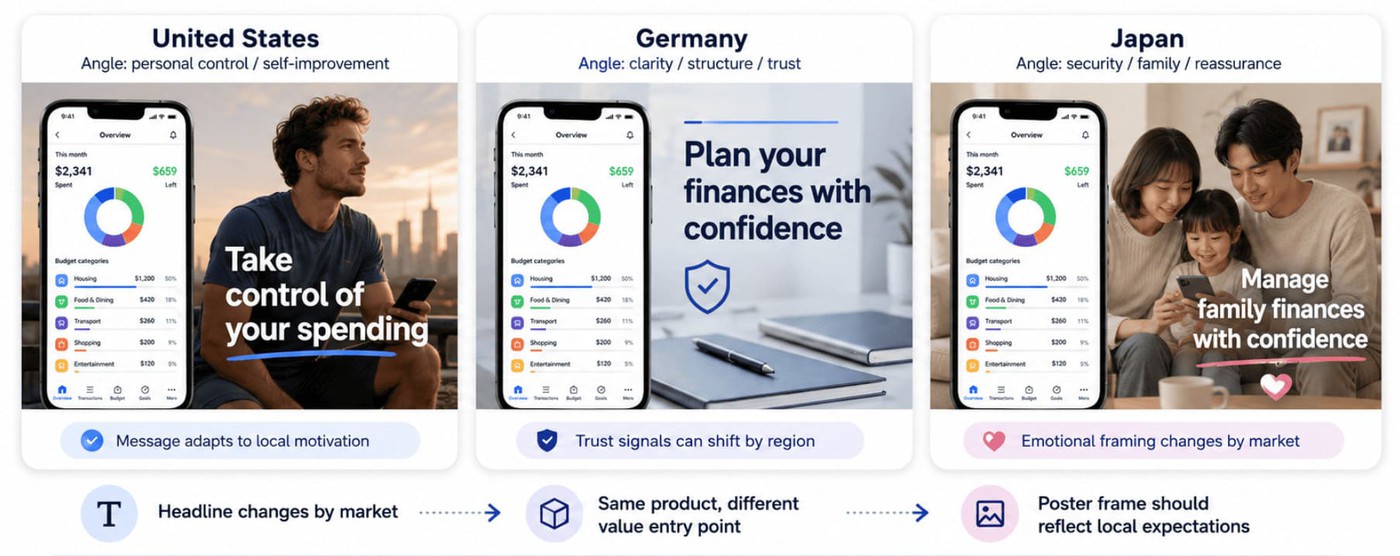
If resources are tight, localize the first three seconds, keyword-led captions, and the poster frame first.
Strategy 5: Test by audience and channel
Traffic sources behave differently. Search traffic behaves differently from influencer traffic. Partnership users often arrive with stronger context than cold acquisition users.
This is where Custom Product Pages and Store Listing Experiments become useful. Instead of forcing one universal video, create variants around audience intent.
Build at least one alternate version tied to the acquisition source. Treat app preview video A/B testing as an ongoing system rather than a launch task.
We'll cover App Store review rejection traps separately because some high-performing videos never survive the review process.
How to A/B test app preview videos (the practical playbook)
Most articles tell you to run video A/B testing app store experiments. Very few explain how teams actually break them. The mistake usually happens before the test starts. Teams change a video, split traffic, and wait for a winner without identifying where conversion is leaking.
“The first question is never ‘what should we optimize next?’ It's ‘where exactly is the loss happening?’ If you test video without first locating which surface, which keyword, and which country is leaking conversion, you've already lost the experiment.”
- As Yaroslav Rudnitskiy, Senior Professional Services Manager (ASO) at AppFollow
Testing mechanics by store
The workflows behind app preview video A/B testing differ more than most teams expect.
iOS PPO | Google Play SLE | |
Tool | Product Page Optimization (PPO) | Store Listing Experiments (SLE) |
Variants | Up to 3 vs baseline | Multiple variants |
Max duration | 90 days | Flexible |
Traffic split | Apple controls allocation | Manual allocation available |
Common failure | Seasonal traffic spikes | Declaring winners too early |
The “3-by-90 rule” works well on iOS: no more than three variants and never let tests drift for months. Flat results are also useful. A flat result often means the creative was not the problem.
For Store Listing Experiments video testing on Google Play, low-confidence winners deserve skepticism. A “winner” with weak confidence often disappears when traffic grows.
Sample sizing without the statistics degree
Most teams obsess over 95% statistical significance. Smaller apps usually should not.
As a practical rule, avoid reading results before each variant reaches a meaningful install count. Many ASO practitioners treat roughly 1,000 installs per variant as a minimum directional threshold, while larger tests often require several thousand installs before differences become trustworthy.
If one version leads consistently across multiple weeks and multiple markets, you often have enough evidence to make a decision before textbook significance arrives. The goal is not perfect certainty. The goal is to reduce the risk of choosing the wrong creative.
The experiment template you can copy
Hypothesis: Showing offline mode in the first three seconds improves CVR among users searching “offline budget tracker.”
Variant: Version B opens with offline use instead of the dashboard UI.
Success metric: Product-page CVR
Sample size: 3,000 installs per variant
Read date: Day 21
Decision rule: Ship only if uplift exceeds 8%
Teams using AppFollow often connect App Store Connect data with Keyword Tracker and metadata Alerts to map variant launches against keyword movement and conversion changes. Per-country slicing becomes especially useful when using Custom Product Pages across multiple markets.
Video CVR benchmarks by app category
Teams love asking for benchmark numbers. The problem is that video conversion rate app store gains do not behave like universal laws. A +10% lift in gaming can be ordinary. A +5% increase in utilities can be massive.
Intent changes everything.
Categories with emotional or visual appeal create larger movement because users decide faster. More considered categories like fintech or utilities often see smaller gains because users spend longer evaluating trust, credibility, and product fit. This is why app preview video benchmarks matter directionally rather than absolutely.
Category | Directional CVR lift range | Typical reason |
Gaming | +8–18% | Gameplay and immersion are highly visual |
Utilities | +3–9% | Functional value takes longer to prove |
Fintech | +6–12% | Trust and clarity matter heavily |
Social | +5–11% | User interaction and network effects benefit from demonstration |
Health & fitness | +7–14% | Transformation and outcomes are visual |
E-commerce | +4–10% | Product discovery improves with context |
Methodology note: directional ranges based on anonymized AppFollow customer engagements and aggregated public ASO observations. Final figures should be reviewed before publication.
Flat or negative tests deserve more respect than teams give them. A weak result rarely means “video doesn't work.” It usually means something else failed. The keyword promise may not match the creative. The wrong audience may have entered the test. A localized variant might have worked in one market and failed elsewhere. Sometimes sample sizes simply stay too small.
Watch both conversion rate (CVR) and tap-through rate (TTR). A lift on the product page with weaker search-results behavior can create confusing outcomes.
“Monthly reporting is for pattern recognition, not first discovery. If a video test is the first time your team learns CVR dropped, the loss has already had time to spread through rankings, ratings, and conversion.”
- As Dzianis Shalkou, Senior Professional Services Manager at AppFollow
This is one reason mature teams increasingly use alerts and continuous monitoring instead of waiting for monthly reporting cycles.
Production workflow: brief, shoot, cut, localize, ship
A lot of ASO advice ends at “make better videos.” Real teams need a workflow. If you're figuring out how to make an app preview video, the process usually matters more than the editing software. The fastest teams treat production like a system, not a creative event.
Step 1: The brief
The strongest videos start long before recording. Start with users.
AppFollow's App Monitor and AI Semantic tags surface the exact language users repeatedly use around your strongest features. Pair that with Keyword Explorer data from AppFollow ASO tools to identify the search intents your video needs to satisfy.
Keep the brief to one page. Every scene should connect to three things: feature, keyword, and review phrase. Think less storyboard, more evidence map.
Step 2: The shoot
Capture more than you think you need.
Record on real devices whenever possible. Simulators look unnaturally clean and can miss real gestures, transitions, or loading behavior. Capture clean versions with no on-screen text so localization becomes easier later. Also record extra UI sequences and alternate flows because today's secondary footage often becomes tomorrow's localized variant.
Step 3: The cut
Most editing mistakes happen because teams edit for storytelling before editing for comprehension.
Build for muted viewing first. Keep captions large, cut every 1.5–2 seconds, and assume users may watch only fragments. Tools like Captions and Descript handle AI-assisted captioning well. AI works nicely for speed and transcription. It still struggles with creative judgment and pacing.
Step 4: Localization
The minimum viable version is smaller than people think.
Localize the poster, first three seconds, and high-value captions first. Those elements usually carry disproportionate weight. If resources are limited, don't translate all thirty seconds equally.
Step 5: Ship and instrument
Upload assets into App Store Connect and Google Play Console, then connect the release to Custom Product Pages or Store Listing Experiments when relevant.
Set a read date before launch. Configure metadata change alerts and performance tracking early. Teams using App Performance and AppFollow Alerts usually catch ranking movement faster than teams relying on monthly reporting.
As Ilia Kukharev, Product Manager at AppFollow:
“Teams lose speed when they spread effort across visibility, conversion, and reputation at the same time. The better approach is to identify which layer is underperforming enough to hold back the others. If your app already gets search traffic, keyword work has done its part for now. The next question is whether the store page is converting that attention.
In AppFollow, teams usually validate that by comparing visibility, traffic, downloads, and conversion rate side by side, then filtering by country, store, and channel.”
Common App Store rejection reasons for app preview videos
When teams ask, “Why was my app preview rejected?”, they usually assume something technical broke. Most of the time, the issue is creative. Apple treats previews as product demonstrations, not ads. The App Store Review Guidelines around preview videos are stricter than many teams expect, which is why an app preview video rejection notice often surprises first-time publishers.
Common app store review guidelines preview video violations our clients’ve got:
- Showing pricing or promotional offers – Preview videos cannot include temporary discounts, pricing, or promotional claims.
- Using awards or ratings overlays – “#1 App” or review-score badges frequently trigger review issues.
- Opening with marketing footage before showing the app – Users should see the product experience quickly. Long cinematic intros create risk.
- Using footage that doesn't exist in the app – Gameplay, UI, and interactions should accurately reflect reality.
- Showing future features not currently available – Preview assets must represent the shipped experience.
- Adding external calls to action – “Visit our website” or “Subscribe now” creates problems.
- Using a UI that no longer matches the app – Product updates quietly create mismatches that teams overlook.
- Including misleading edits or exaggerated effects – Heavy visual manipulation around product behavior can create review concerns.
- Uploading the wrong localized asset – Language mismatches happen more often than teams admit.
- Treating previews like ads instead of product demos – Apple wants product-first communication, not campaign creative.
Optimize your app performance on app stores with AppFollow
At some point, video work stops being a creative problem and becomes an operating problem. Teams do not struggle because they cannot make videos. They struggle because visibility, reviews, keywords, rankings, competitors, and conversion data live in different places.
AppFollow becomes the operating layer connecting them.
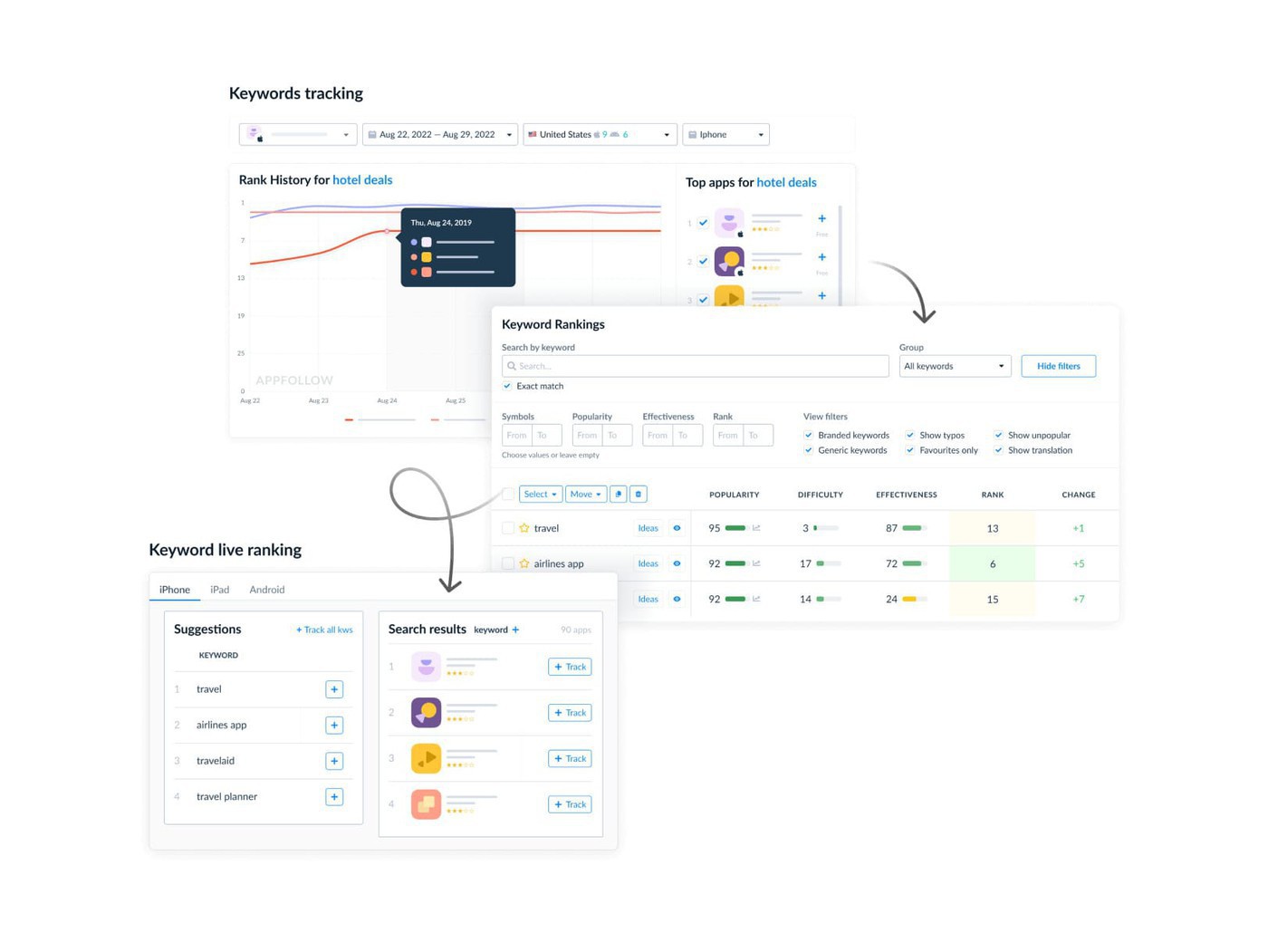
- Keyword Explorer and Keyword Intelligence help teams identify the 1–3 search intents a video must satisfy through visibility, popularity, rankings, difficulty scoring, and AI-powered suggestions. Instead of treating keywords as metadata, AppFollow turns them into creative decisions. Stronger ASO video performance often starts here.
- Mine the feature reviewers already love. Users already tell you what matters. Most teams just never organize the signal.
- App Monitor with AI Semantic tags and AI Summary helps teams extract the exact phrases people use around high-value features. AppFollow calls this: “Harness user feedback as a powerful selling point.” Those verbs and nouns often become the voiceover, captions, and opening sequence behind stronger video CVR optimization and app preview video best practices.
- Watch competitors swap creative before rankings move. Creative changes rarely happen in isolation. App Competitor Analysis and Compare Discovery, paired with metadata-change Alerts, help teams detect competitor video swaps early enough to react. Sometimes the smartest move is not immediately copying a change. Sometimes it means waiting and watching what happens next.
- Slice performance in one place. App Performance and Consoles Data Aggregator bring visibility, downloads, rankings, and conversion metrics together. AppFollow lets teams compare country, store, and keyword performance without constant switching between tools, which makes app preview video A/B testing much easier to interpret.
- Wire AppFollow into the team's workflow. Insights lose value when they sit in dashboards. Slack, Tableau, webhooks, and API integrations help AppFollow push results where teams already work.
Real prioritization starts by identifying the constraint holding growth back, then fixing that first.
cta_get_started_purple