App competitor analysis: how to benchmark apps across ASO, reviews, ratings, creative, and store performance

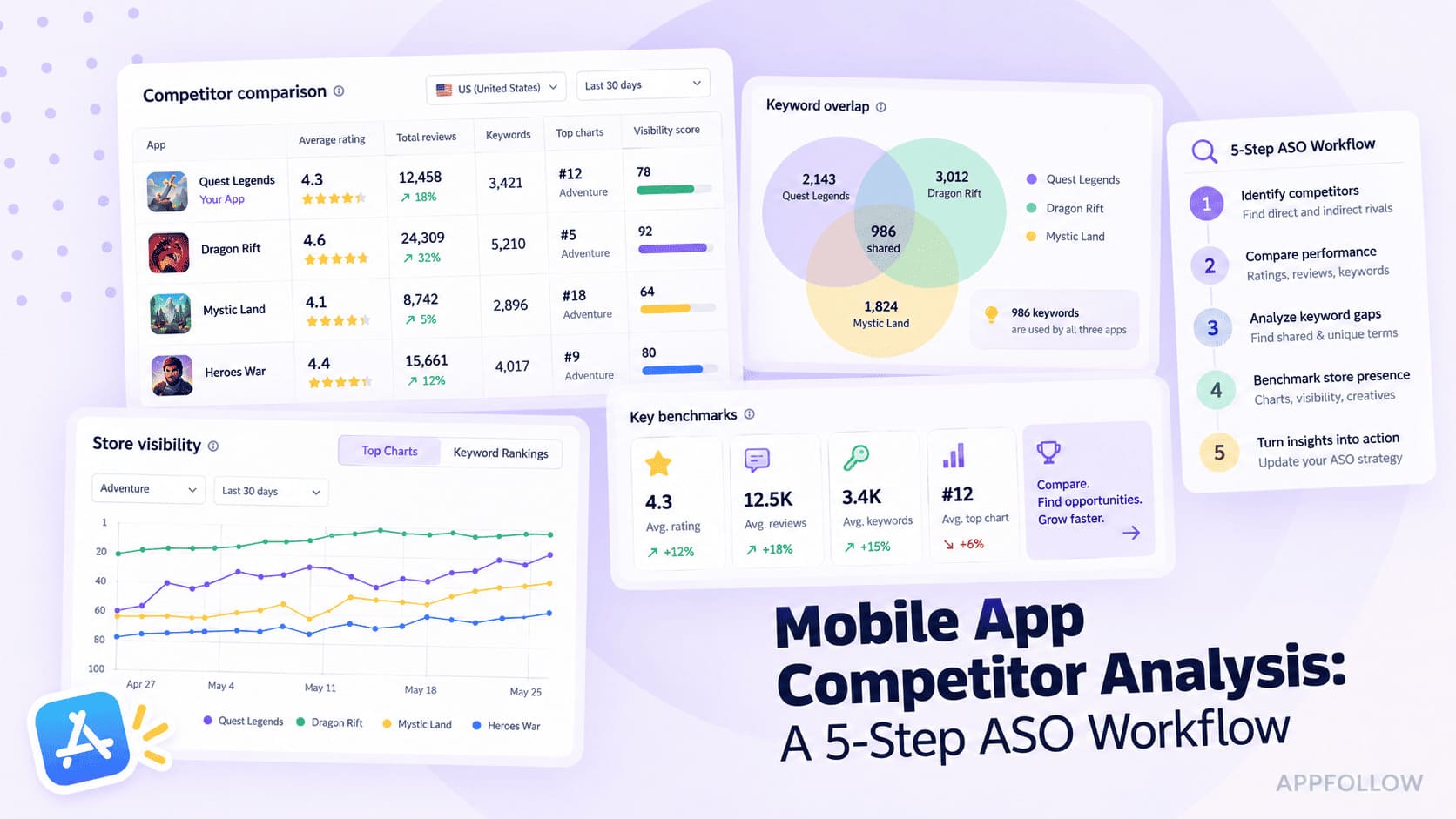
Table of Content:
- TL;DR: App competitor analysis in one workflow
- What is app competitor analysis?
- Before you start: define the competitor set correctly
- Step 1. Compare app pages, metadata, and creative assets
- Step 2. Run competitor keyword analysis
- Step 3. Benchmark category rankings and top chart movement
- Step 4. Compare reviews, ratings, sentiment, and support quality
- Step 5. Track competitor updates and experiments over time
- What this looks like in practice: a match-3 walkthrough
- Turn competitor analysis into ASO experiments
- Benchmark and monitor your app competitors with AppFollow
- Frequently asked questions
Most teams begin app competitor analysis with the obvious rivals. That's a useful first step, but it rarely reflects the competition users actually see in the App Store or Google Play. Search for a high-value keyword, and you'll find apps solving the same problem in different ways. Open a category chart, compare screenshots, or read recent reviews, and the competitive landscape changes again.
One lesson surprised me early on. The apps costing you the most visibility often don't look like your closest competitors. One app owns the keyword you want. Another dominates branded searches in a key market. A third climbs category rankings after refreshing its screenshots. Yet another earns more installs because it addresses user frustration better in reviews. Those are the patterns worth studying.
This guide walks through a practical app competitor analysis workflow you can repeat every release cycle. You'll learn how to identify the right competitors, benchmark metadata and creative, compare keyword coverage, analyze rankings, uncover patterns in ratings and reviews, and turn those findings into ASO experiments worth running.
TL;DR: App competitor analysis in one workflow
Keyword data can show you who gets discovered. It cannot explain, on its own, why users install one app and skip another. Reviews expose product friction, but they do not show who owns the search results. A useful benchmark connects those signals and turns them into testable decisions.
- Analyze the App Store and Google Play separately. Rankings, indexed metadata, creative formats, and country performance differ by store. A combined benchmark can hide the gap you actually need to fix.
- Split competitors into working groups. Track direct competitors, keyword competitors, category leaders, and strong regional apps. You will use each group for a different part of the analysis.
- Compare visibility with conversion signals. Keyword rankings tell you who appears. Icons, screenshots, videos, ratings, and reviews help you judge what may be influencing the install decision.
- Read competitor reviews for gaps. Recurring complaints can expose unmet expectations, product weaknesses, and messaging opportunities you won't find in keyword data alone.
- Recheck competitors after releases. Benchmarking works best over time. Revisit metadata, creative, ratings, and category movement after your updates and major competitor releases.
Signal | What it tells you | AppFollow surface |
|---|---|---|
Keywords and search visibility | Who owns organic discovery and where your keyword coverage is thin | Keyword Tracking, Compare Discovery |
Metadata | How competitors position the app by store, country, and language | App Page, App Update Timeline |
Creative assets | Which messages, features, and visual hooks competitors prioritize | App Page, App Update Timeline |
Ratings and reviews | Product friction, sentiment changes, and messaging gaps | Reviews & Ratings |
Rankings and updates | Market momentum and the timing of competitor changes | Category Rankings, App Update Timeline |
What is app competitor analysis?
App competitor analysis is the process of comparing your app against direct, keyword, category, and regional competitors across the store signals that influence visibility and conversion. Those signals include search visibility, metadata, creative assets, category rankings, ratings, reviews, and update history. The goal isn't to collect competitor data for its own sake. It's to understand why users discover one app before another and what persuades them to install it.
The first lesson most ASO teams learn is that business competitors and app store competitors aren't always the same. A meditation app might lose visibility to a sleep tracker because both rank for the same search terms. A budgeting app may compete with digital banks in one market and finance trackers in another. Competition shifts with keywords, categories, countries, languages, and even devices.
The mistake teams make is treating competitors as a fixed list of similar apps. In ASO, competitors change by keyword, country, store, and even by device. The apps you benchmark should reflect the search landscape, not just your product category.
Yaroslav Rudnytskiy, ASO Expert at AppFollow
This is where the work differs from traditional market research. You're not evaluating another company's pricing model, funding, or sales strategy. You're benchmarking how competing apps perform inside the stores where users make install decisions. That means comparing store listings, creative assets, keyword coverage, ratings, review trends, and release cadence to understand which changes are moving the market.
App stores also behave very differently from the web. Search results are country-specific, store-specific, category-specific, and influenced by a combination of metadata relevance, install velocity, ratings, reviews, and user engagement signals. The app outranking you in the App Store may barely appear in Google Play, while the category leader in Japan might not even register in the United States. Looking at one market or one platform rarely tells the whole story.
Repetition is what makes this useful. A screenshot refresh may mean nothing on its own. The same goes for a sudden rating dip or metadata change. Watch those moves over time, though, and you get a baseline for deciding what deserves a closer look or a test.
For readers new to this workflow, it's worth reviewing the fundamentals of App Store Optimization before going deeper into app competitor analysis techniques and the tools that automate continuous benchmarking.
Before you start: define the competitor set correctly
A benchmark is only as good as the list of apps behind it. Pick the wrong competitors and every conclusion that follows becomes less useful. I've seen teams spend weeks comparing themselves to well-known brands while missing the newer apps quietly taking their keyword rankings or climbing category charts.
For most products, five to ten competitors is a practical range. Include established leaders, but leave room for fast-growing challengers. In mobile games, for example, a match-3 studio shouldn't only watch Candy Crush Saga or Homescapes. A newer title gaining search visibility or category momentum in a target market may reveal the next trend long before it reaches the top charts. That's the kind of signal this workflow is built to catch.
Direct competitors
Start with the obvious choices. These apps target a similar audience, solve the same problem, belong to the same genre or category, and often share a comparable monetization model. They show how your positioning, pricing, feature set, and store listing compare with the products users are most likely to consider alongside yours.
Keyword competitors
Your keyword competitors may not look like direct substitutes at all. They simply rank for the same searches and compete for the same organic traffic, which is why competitor keyword analysis belongs alongside product comparisons.
A budgeting app might compete with expense trackers for search visibility, while a sleep app may share high-value keywords with meditation apps. These competitors often expose keyword gaps long before they become obvious in rankings.
Category and top chart competitors
Browse traffic creates another competitive landscape. Apps appearing near yours in category rankings or Free, Paid, and Grossing charts compete for attention even when users aren't searching. Both the App Store and Google Play organize apps into categories that influence browse discovery.
Look beyond current positions and watch which apps are steadily climbing across countries or devices. Momentum usually tells a more interesting story than a single chart snapshot.
Regional and localization competitors
Don't assume the global market tells the whole story. Some apps dominate one language or country while remaining relatively small elsewhere. Local leaders often set user expectations before global competitors adapt their app store optimization localization strategy.
A competitor can be weak globally and still be the app you need to beat in one country. Localization changes the competitive landscape much faster than most teams expect.
Dzianis Shalkou, ASO Expert at AppFollow
You don't need every competitor to fit neatly into one bucket. In practice, I keep a mix of all four. A category leader tells me something different from an app gaining ground on a target keyword, while a strong local player can reveal a market the global leaders haven't figured out yet.
Competitor type | Look for | Useful for |
|---|---|---|
Direct | Similar use case, genre, audience, or monetization | Positioning, feature messaging, conversion |
Keyword | Apps showing up for the searches you target | Search visibility and missed keywords |
Category | Apps competing in your category or top charts | Browse visibility and category movement |
Regional | Apps performing well in one country or language | Localization and regional growth |
Step 1. Compare app pages, metadata, and creative assets
An app page does two jobs at once. It helps the store understand what your app is about, and it convinces people to install it. That's why the first step isn't opening a keyword report. It's comparing the app pages users actually see.
Don't look at one competitor in isolation. Put five or six listings side by side and patterns emerge quickly.
- Which features appear in every title?
- What benefit dominates the first screenshot?
- Which apps keep rewriting their store listings while others barely change?
Those patterns often reveal where the category is heading.
Metadata fields to compare
Start with app metadata, because it influences both discoverability and positioning. Compare app titles, subtitles, promotional text, and other App Store product page assets.
Then look back. AppFollow's App Update Timeline shows how a competitor's metadata has changed over time, so you can see whether a new title, description, or positioning angle arrived with a particular release.
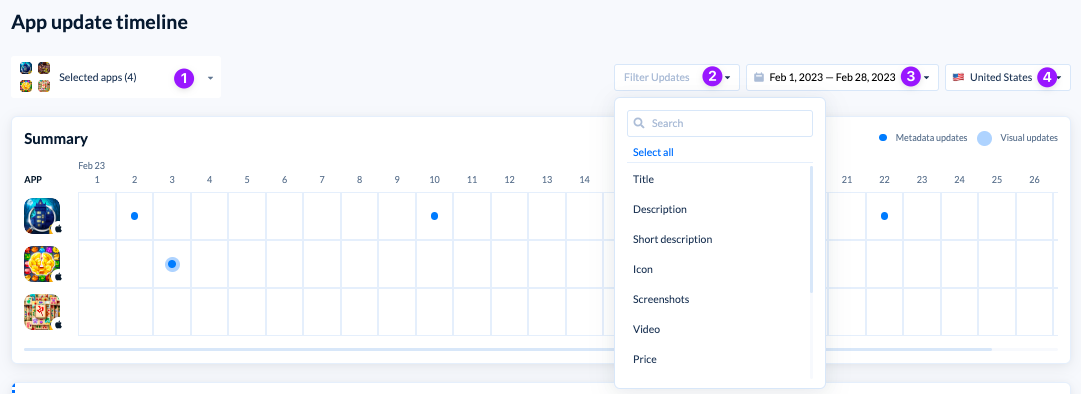
The wording matters as much as the field itself. Two apps can promote essentially the same feature and frame it very differently. One might sell "daily challenges"; another calls the experience "relaxing puzzles." That difference tells you which motivation each competitor is betting on, and gives you something concrete to test against your own positioning.
Creative assets to compare
Creative assets explain why two apps with similar rankings can perform very differently once users reach the store page. Compare the app icon, first screenshot, screenshot sequence, preview video, and, on Google Play, the feature graphic. Focus on the story they tell, not just the design style.
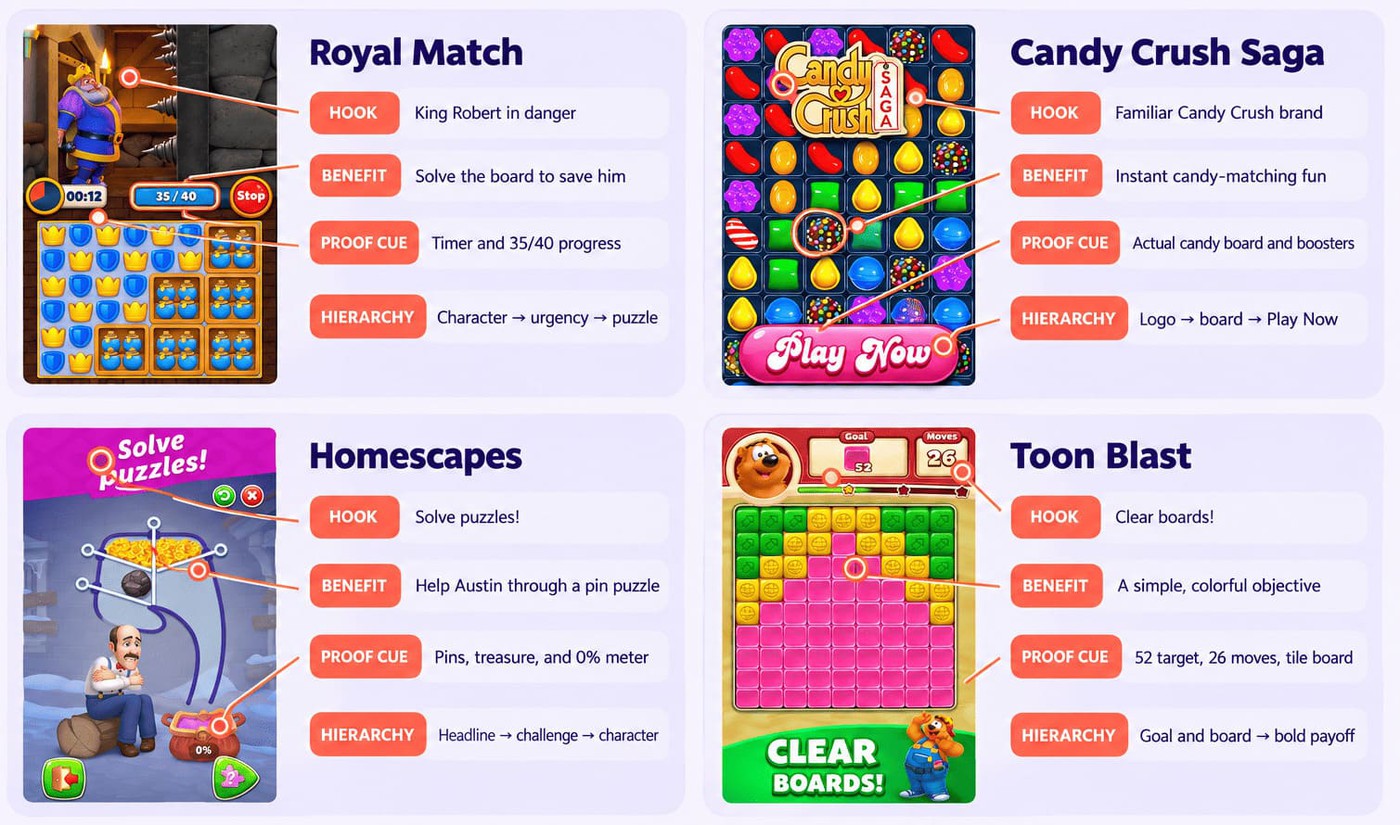
Match-3 listings show how little the genre label settles. Both Royal Match and Homescapes put the mechanic in the subtitle, where it earns indexing: "King Robert's Match 3 Puzzles" and "Match 3 Puzzle & Home Design" respectively. The differentiation happens one line later, in the opening of the description. Royal Match leads with a job to do for a character: "King Robert needs your help to restore Royal Castle's former glory." Homescapes leads with the mechanic and attaches the reward to it: "Solve match-3 puzzles to restore a wonderful mansion on a verdant street."
Same genre, same subtitle strategy, two different opening bets. That's the level at which positioning decisions actually get made, and it's invisible if you only compare titles.
Look closely at the first screenshot. That's usually where competitors make their strongest argument for installing the app.
Localization and country coverage
A listing that works in the US isn't automatically the version I'd take into Japan or Brazil. You need a country-level view: check which metadata competitors localize, whether the screenshots change, and which features get more space in each market.
ASO localization can tell you quite a bit about what competitors think matters locally. Maybe social play gets pushed harder in one market, while seasonal events barely appear elsewhere. I wouldn't copy those choices, but I'd use them to decide what deserves testing in my own localized listing.
What to do with the findings
The goal isn't to copy competitors. It's to understand why they're making certain decisions and decide whether those patterns are worth testing in your own app.
If every leading competitor suddenly introduces battle-pass messaging, don't rush to do the same. Ask what they're trying to communicate. Is it long-term progression? Better rewards? More reasons to return every day? Your answer might be a completely different angle built around fairness, collection, or shorter play sessions.
Leave this step with a shortlist of experiments, not a folder full of screenshots. That's what turns observations into better ASO decisions.
Step 2. Run competitor keyword analysis
Keyword research becomes much more useful when you stop treating it as a list of search terms and start treating it as competitive intelligence. Your keyword competitors are rarely limited to apps offering the same product. They compete for the same search intent, and that's what matters inside the stores.
A strategy game, for example, might compete with Clash of Clans for broad searches while also sharing visibility with idle games for terms like build army, base defense, kingdom, heroes, or offline rewards. Those apps attract different audiences, but store behavior may place them in the same search results.
Start with your current ranked keywords
Before looking at competitors, establish your baseline with Keyword Tracking. Review your current ranked keywords, search visibility, keyword history, and performance separately for the App Store and Google Play.
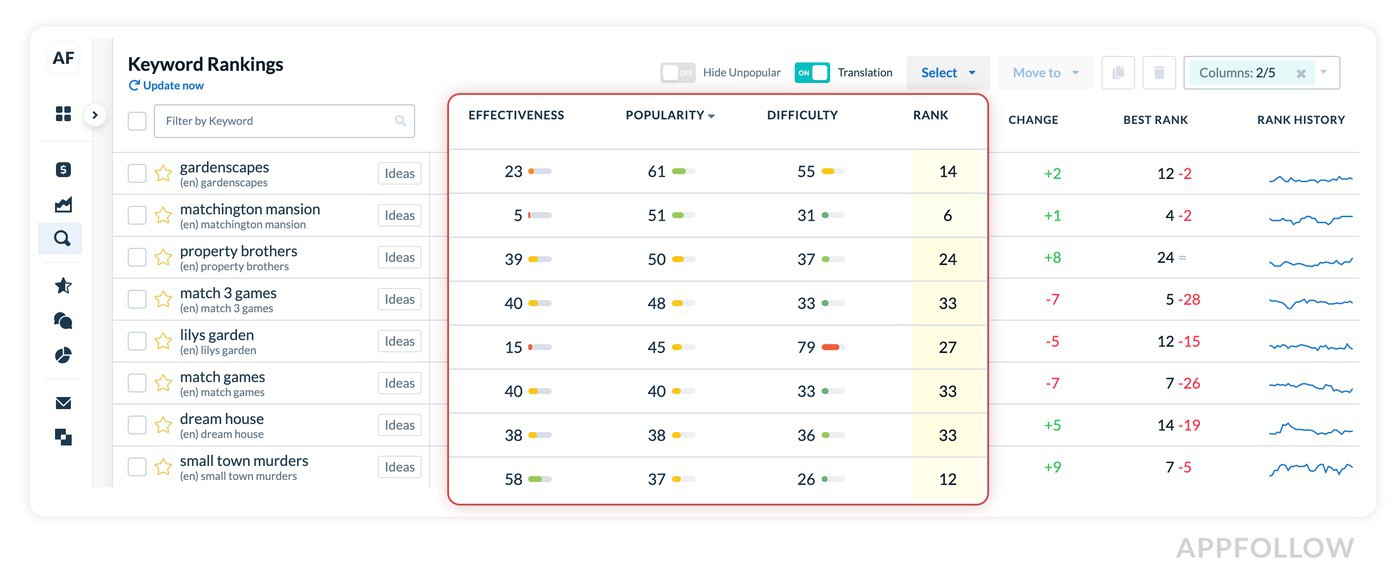
Include both branded and non-branded terms, then ask a simple question: are these keywords actually describing the audience you want to attract?
Keyword rankings only become meaningful when you compare them over time. A term moving from position 18 to 9 deserves more attention than one sitting at position 3 for months without generating meaningful traffic.
Identify keyword gaps
The most valuable insights usually come from what you're missing rather than what you're already ranking for. Separate four types of opportunity:
- Keywords competitors rank for, but you don't.
- Shared keywords where you're stuck several positions behind.
- Popular searches that look tempting but don't really fit the app.
- Lower-difficulty terms with enough intent to be worth a test.
Then check what happens when those rankings meet the store page. A competitor outranking you on the same term may not have found some magical metadata formula. Their screenshots may make the value clearer, their rating may inspire more confidence, or the whole listing may simply do a better job of turning that search into an install.
Compare search visibility and share of organic discovery
A few keyword wins can give you the wrong impression. Zoom out and check Search Visibility Score, ranked keyword coverage, non-branded organic keyword share, and Brand Power. You may find that the competitor you keep beating on a priority term still shows up in far more relevant searches overall.
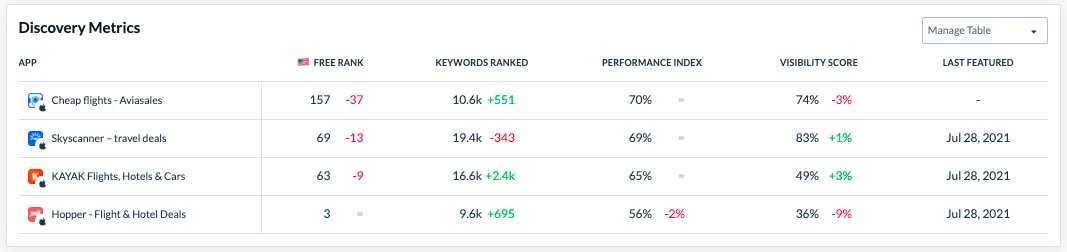
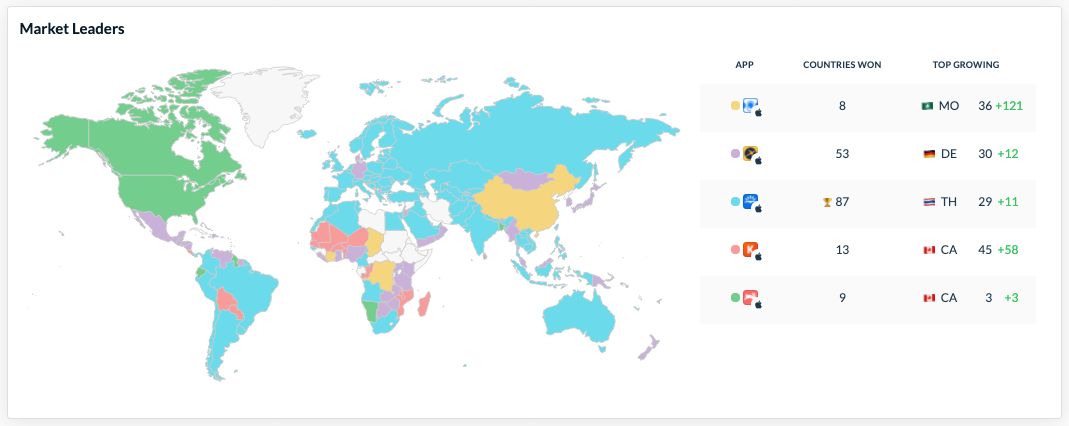
That's a more useful benchmark. I want to know who keeps appearing across the market, not just who happens to own position #1 for a keyword I'm watching.
cta_get_started_purple
Use downloads-by-keywords logic carefully
Many ASO platforms estimate installs using Downloads by Keywords. Those numbers can be useful for spotting trends, but they shouldn't be treated as exact measurements.
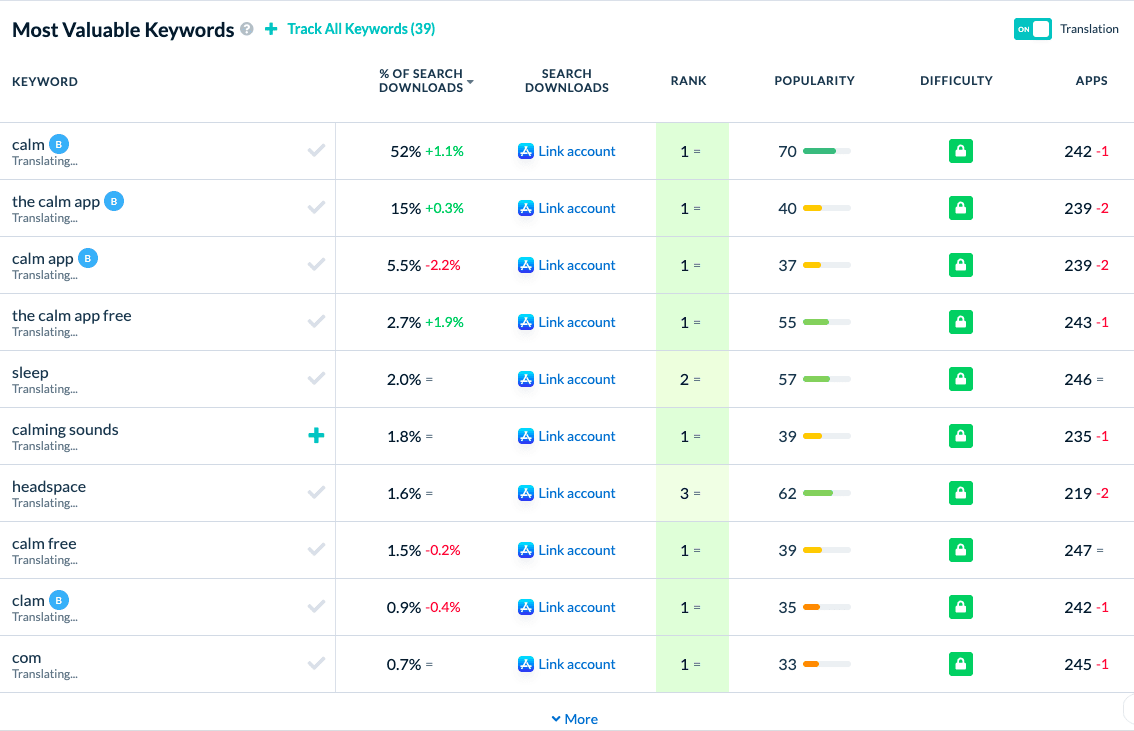
Treat estimated competitor downloads as a clue, not a market-share calculation. If one keyword seems to bring in far more installs, dig into it before adding it to your target list.
Does the intent fit?
Are competitors converting that traffic with stronger creative or ratings?
The estimate is useful for spotting opportunities, but visibility and conversion context tell you whether they're actually worth pursuing.
Step 3. Benchmark category rankings and top chart movement
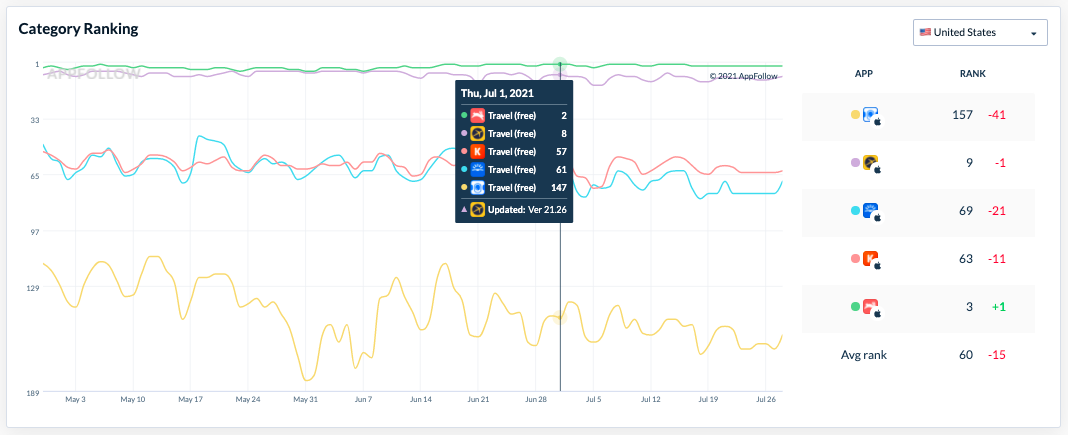
Keyword rankings tell you how visible your app is in search. Category Rankings and top charts reveal something different: how your app is performing when users browse instead of search. That's why I never look at keyword data in isolation. Browse visibility often explains shifts that keyword rankings alone cannot.
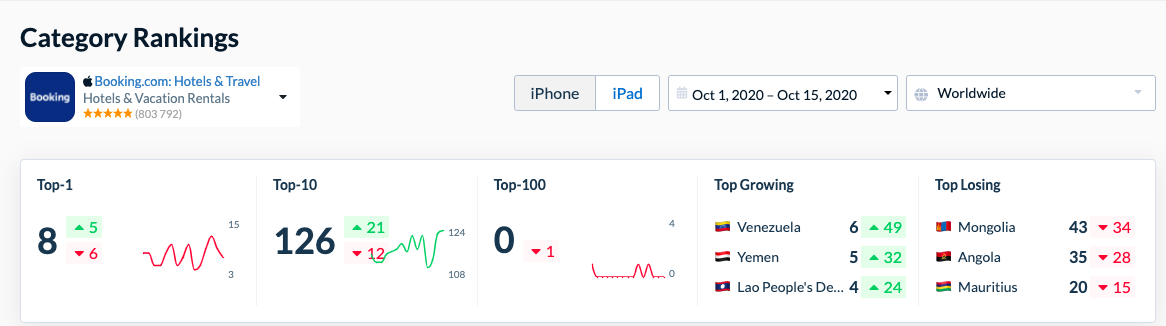
A few positions up or down usually aren't worth chasing. I pay more attention when the movement sticks, or when it lines up with an update, campaign, or wider shift in the category.
Compare rank by country and store
Compare rankings separately for the App Store and Google Play. Then narrow the comparison further by country, category, device, and date range. A strategy game climbing the charts in South Korea may be completely stable in the United States, while an iPhone ranking can tell a different story from Android.
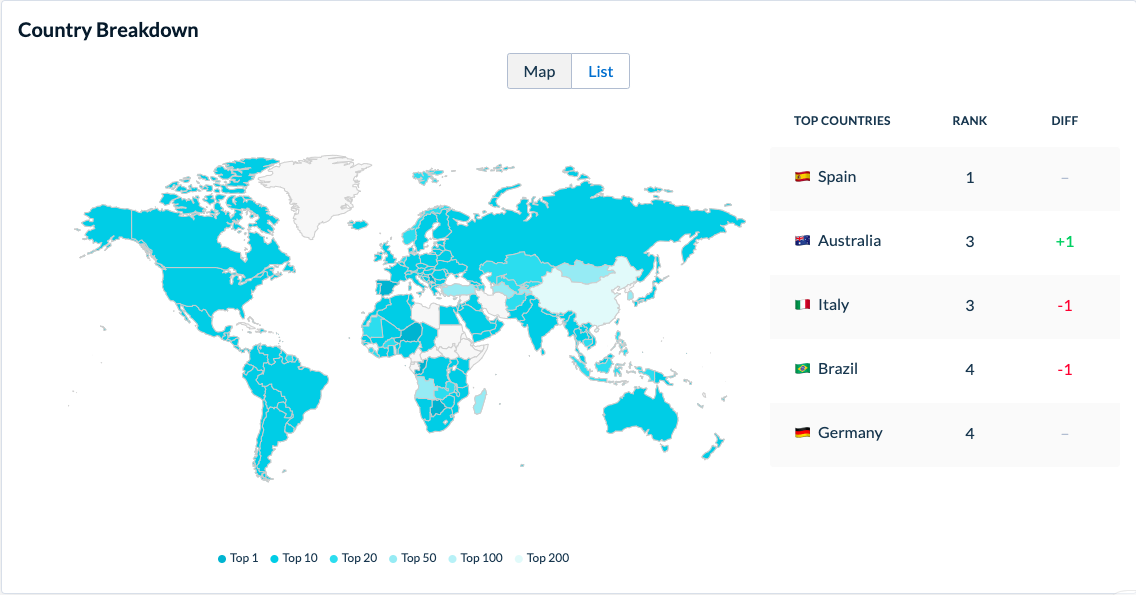
I also compare several competitors side by side instead of tracking only one. A shared movement across multiple apps often points to a market-wide event, while a single app climbing quickly usually deserves a closer look.
Read Free, Paid, and Grossing charts differently
I don't read a jump in Free Rank the same way as a move in Grossing.
- Free can pick up when acquisition accelerates, whether that's organic, paid, seasonal, or helped by featuring.
- Paid tells you something about willingness to pay upfront.
- Grossing gives you a window into monetization through purchases or subscriptions, not an exact revenue number.
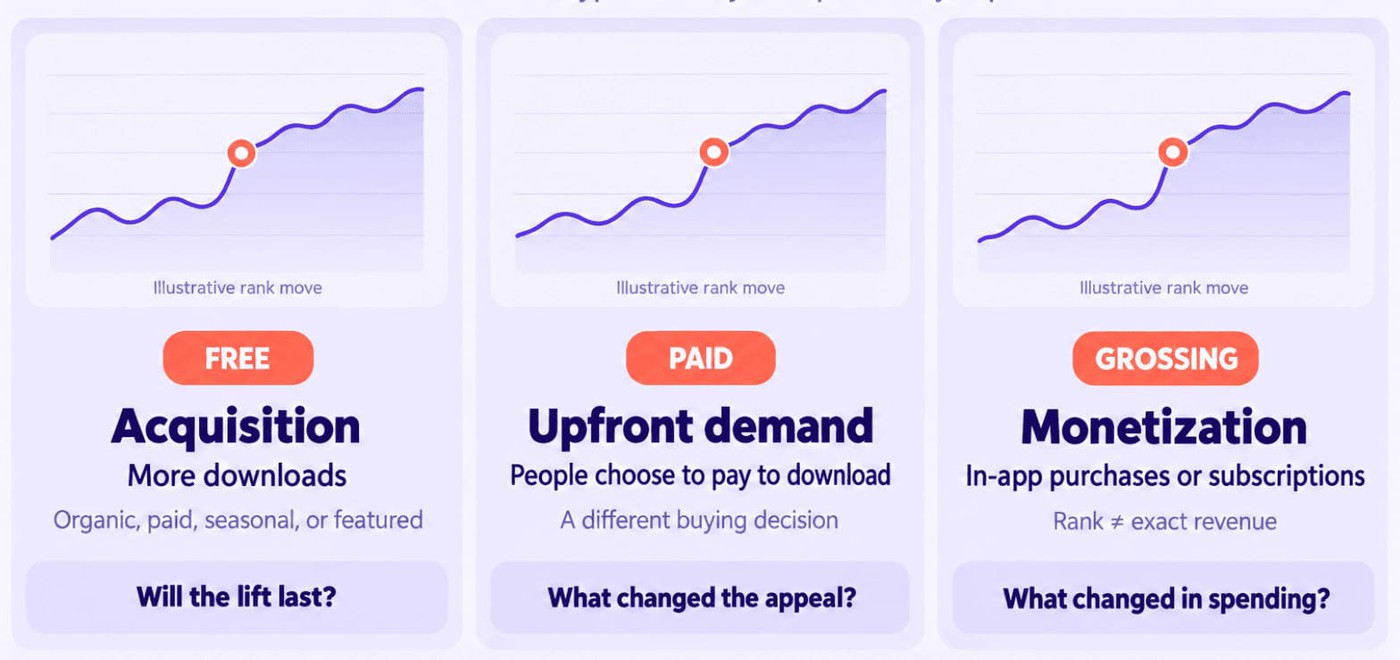
Context matters more than the position itself. A Free Rank spike can disappear just as quickly as it arrived. Check what was happening around the move: new creative, a release, stronger ratings, a campaign, or a change in reviews. That's usually more useful than staring at the chart position on its own.
Annotate rank changes against app updates
The biggest mistakes happen when teams compare rankings without context. Every noticeable movement deserves a second question: what changed?
Look at
- release notes,
- creative updates,
- localization launches,
- featuring opportunities,
- seasonal campaigns,
- influencer activity,
- or paid user acquisition bursts.
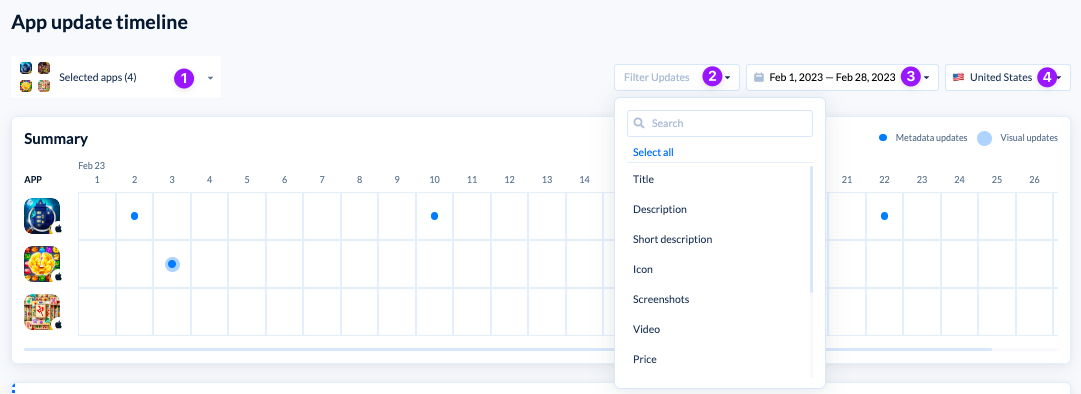
Gaming categories move especially quickly around major content updates and live events, making timing just as important as the ranking itself.
Over time, this becomes competitor monitoring rather than simple rank tracking. You're building a timeline that connects competitor actions with market response, making it much easier to recognize meaningful shifts and ignore everyday volatility.
Step 4. Compare reviews, ratings, sentiment, and support quality
Keywords tell you how people find an app. Reviews explain what happens after they install it. That's why I treat review analysis as one of the most valuable parts of this workflow. Competitor reviews don't just highlight another team's problems. They reveal what users expect from the category and where those expectations are changing.
A hundred complaints about intrusive ads, unfair matchmaking, or lost progress don't automatically mean your app should solve those problems next. They do tell you those topics matter enough to influence ratings, retention, and store perception.
Compare ratings by country and version
Start with Reviews & Ratings before reading individual reviews. Compare average rating, star distribution, review volume, rating trends by app version, and ratings by country.
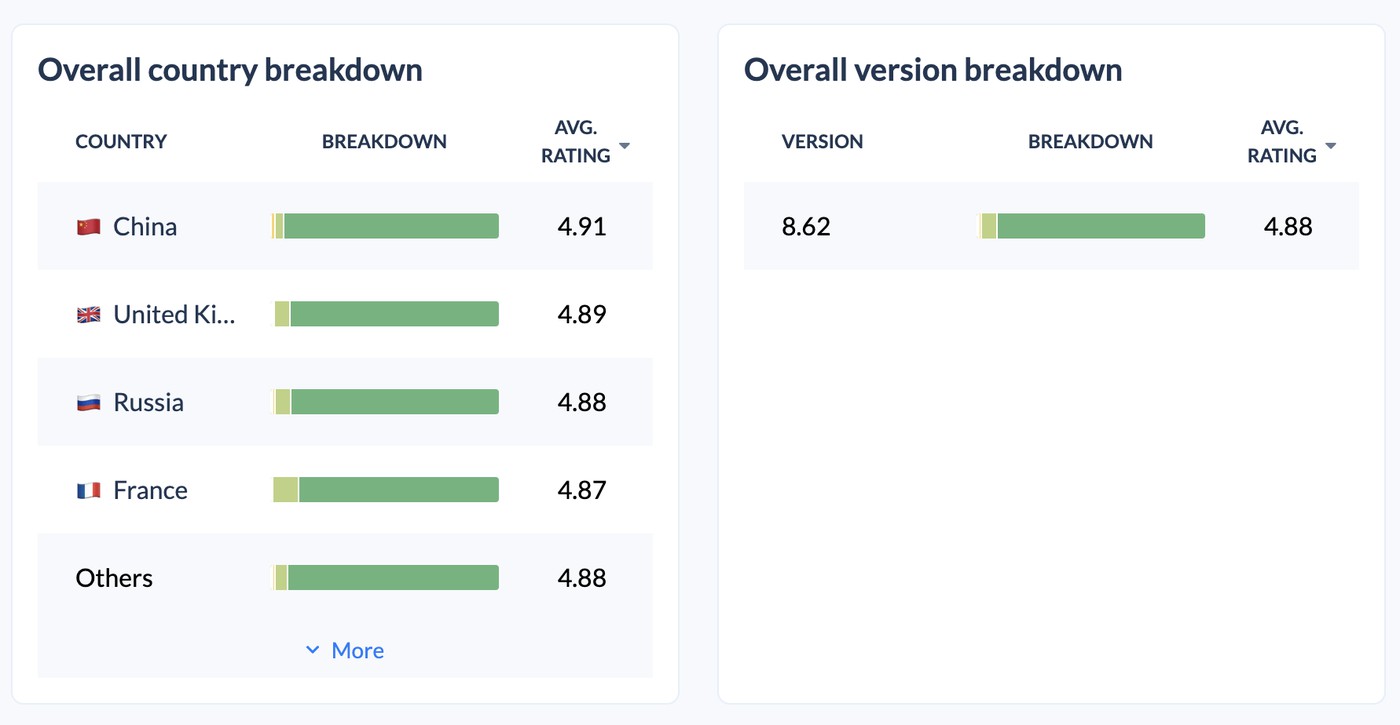
Looking at a global average alone can hide meaningful regional differences. An app holding a 4.6-star rating overall may have dropped to 3.9 after a recent release in one market while remaining stable everywhere else.
Watch the pace of new reviews as well. If one-star ratings suddenly start piling up after a release, I'd check the reviews before blaming a later ranking drop on ASO.
Mine competitor reviews for product gaps
Once you've established the trend, start reading. The goal isn't to collect dramatic one-star reviews. Look for recurring patterns instead.
Feature requests, bugs, pricing objections, UX friction, crashes, performance issues, and monetization complaints often appear weeks before they become obvious in broader market metrics.
In mobile games, I pay attention when the same complaints keep coming back: too many ads, stamina limits, pay-to-win mechanics, bad matchmaking, lost progress. That's usually a better clue to what players are fed up with than any single angry review.
Competitor reviews are one of the fastest ways to learn the category standard. Don't focus on isolated complaints. Watch for themes that appear consistently across countries, versions, and competitors.
Veronika Bocharova, Customer Success Expert at AppFollow
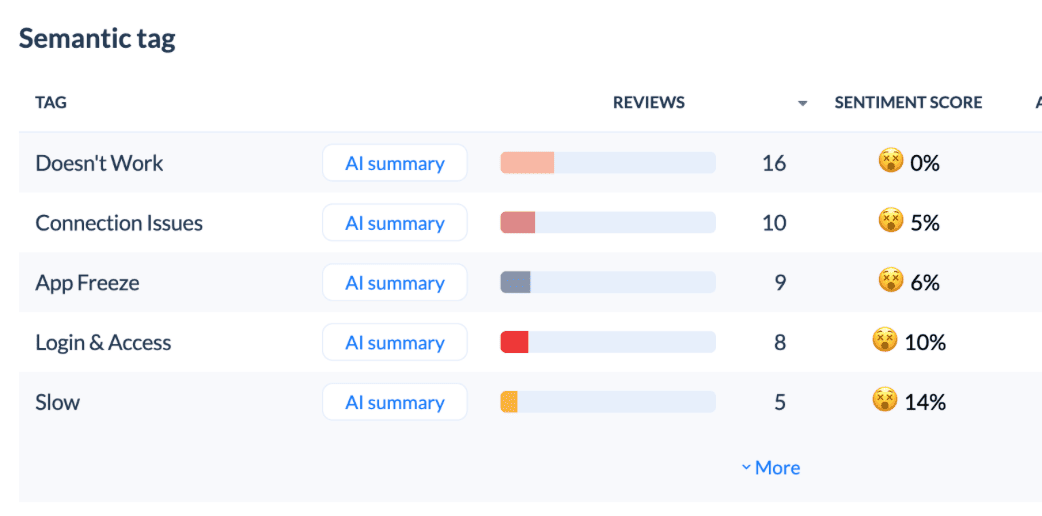
Use sentiment and tags to quantify themes
You can read reviews manually until the volume gets silly. At that point, sentiment analysis and review tagging are much more useful. I use them to see whether a topic keeps resurfacing and, more importantly, how much of the review conversation it actually accounts for.
Then slice those themes by country, app version, or competitor. Ten complaints about pricing may be noise. The same complaint showing up month after month, or suddenly taking off after a release, deserves attention. Onboarding, stability, support, monetization: the pattern matters more than the loudest review.

Theme | Competitor mention volume | Sentiment | Your app | Opportunity |
|---|---|---|---|---|
Ads | High | Negative | Low | Position around fewer interruptions |
Matchmaking | Medium | Negative | Medium | Monitor after gameplay updates |
Stability | High | Negative | Low | Reinforce reliability in store messaging |
Live events | High | Positive | Medium | Evaluate event visibility in screenshots |
Benchmark support quality
Good competitor work doesn't stop with the reviews themselves. Look at how competitors respond. Compare reply rate, response quality, tone, templates, and whether replies actually address the user's issue or simply acknowledge it.
Google Play Console offers peer benchmarks for ratings and review topics, while AppFollow centralizes competitor monitoring across both stores and connects it with broader ASO workflows. A centralized workflow automation system makes it easier to compare competitors across both the App Store and Google Play, monitor changes over time, and connect review insights with the rest of the work.
Good app review management isn't just about replying faster. Fast, thoughtful replies won't fix a broken feature, but they can reduce frustration, improve public perception, and show future users that feedback receives attention. That's worth benchmarking alongside keywords, metadata, and creative assets rather than treating customer support as a separate conversation.
Step 5. Track competitor updates and experiments over time
The biggest mistake I see isn't choosing the wrong competitors. It's analyzing them once, exporting a report, and never looking again.
Every update creates new information. App Update Timeline helps you track changes to titles, descriptions, screenshots, icons, release notes, and languages over time instead of relying on memory.
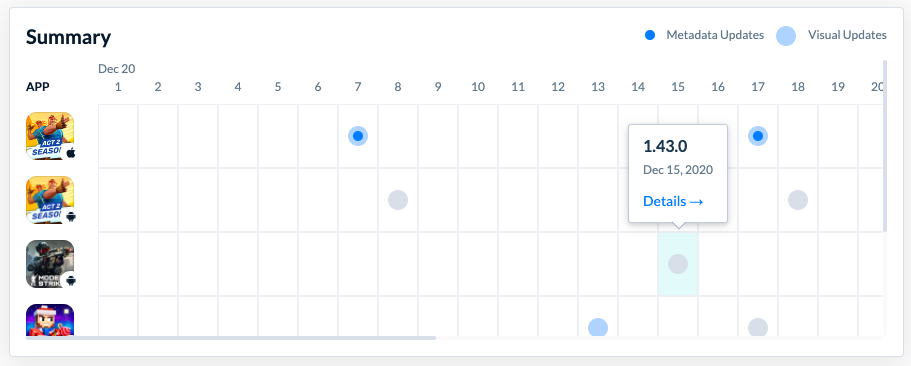
A competitor changes its title, refreshes its screenshots, launches a new language, or rewrites its release notes. One change doesn't tell you much. Compare several updates over time, then watch what happens to rankings, reviews, and visibility. That's when patterns start to emerge.
cta_get_started_yellow
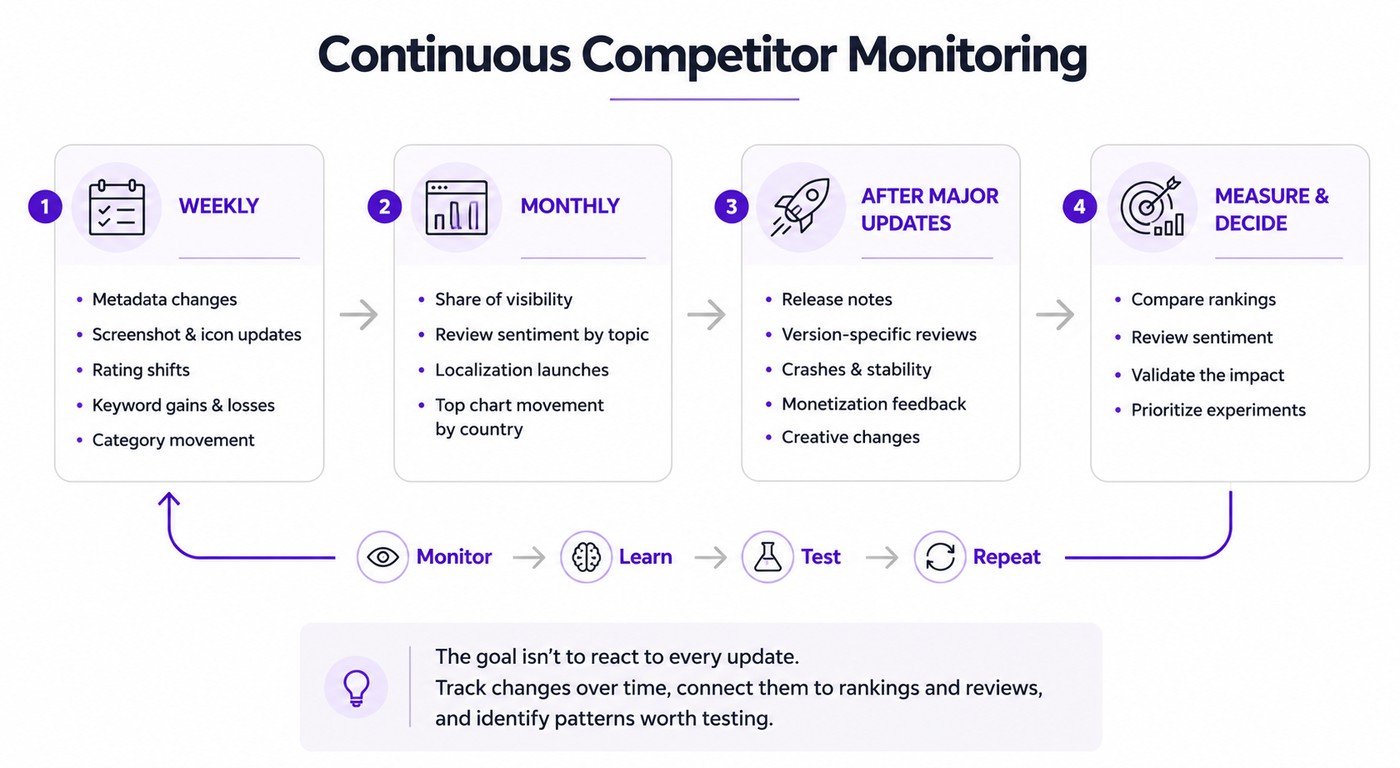
What to track weekly
Once a week, I look for anything that moved: a new title, fresh screenshots or icon, a rating shift, keywords gained or lost, or a noticeable category jump. Most weeks, there won't be a big story. But when several changes happen around the same time, that's when I dig into what the competitor may be testing.
Set up alerts for important competitor changes so you don't have to manually check every listing each week. A timeline makes these changes much easier to interpret because it shows what changed before you start asking why.
What to track monthly
Once a month, zoom out. Compare overall share of visibility, review sentiment by topic, localization launches, and top chart movement across your priority countries. Looking at a longer time frame helps separate temporary spikes from genuine market shifts. Custom reporting also makes it easier to compare long-term trends across countries, competitors, and app versions.
This broader view also reveals whether competitors are expanding into new markets or gradually changing their messaging across multiple locales instead of running isolated experiments.
What to track after major updates
Major releases deserve their own review. Compare release notes with changes to titles, descriptions, screenshots, icons, app size, supported languages, and review themes. Then monitor whether new complaints appear around stability, crashes, monetization, or onboarding after the update goes live.
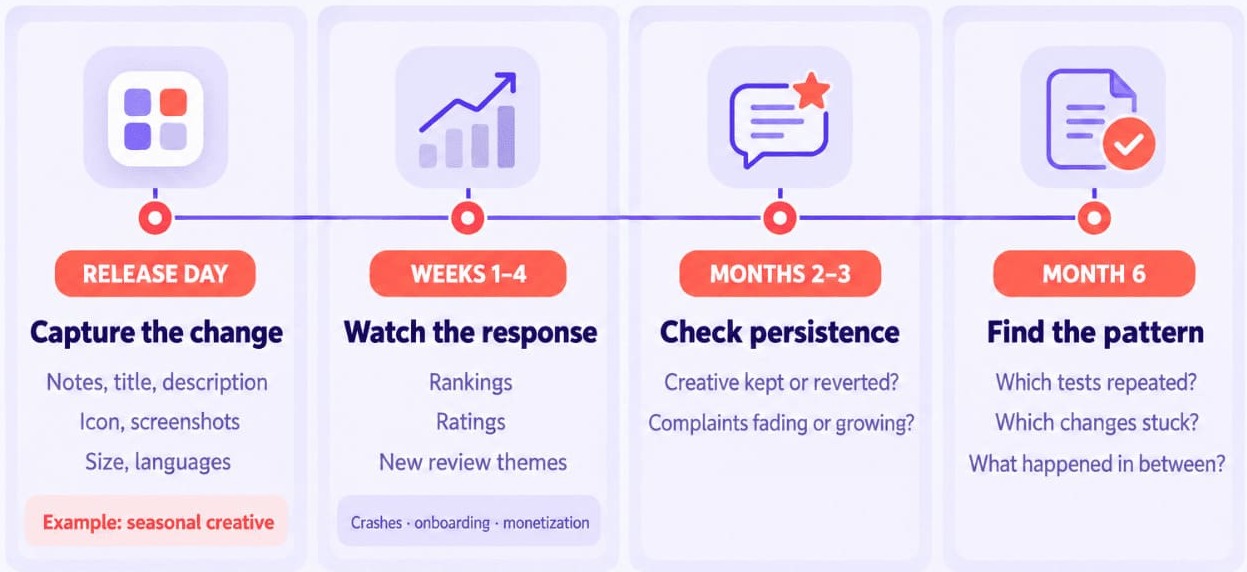
Puzzle games provide a good example. If a competitor refreshes its icon and screenshots before Easter, Halloween, or a large live event, treat it as an experiment rather than a redesign. Log the changes, then revisit rankings, ratings, and reviews over the following weeks to see whether the new creative coincides with stronger store performance.
The strongest teams don't run competitor analysis before a launch and then forget it. They build a monitoring rhythm that turns every competitor update into another learning opportunity.
Lucija Knezic, ASO & Customer Success Expert at AppFollow
Monitoring gets more useful the longer you keep at it. Six months of changes can show you which experiments stuck, which disappeared after a release or two, and what happened to rankings and reviews in between. That's far more useful than trying to reconstruct the story from a one-off audit.
What this looks like in practice: a match-3 walkthrough
Say the ASO brief lands on your desk: a new match-3 game is preparing to enter the US market. Before touching the metadata or creative, you need to know what it's walking into.
What follows is a walkthrough of the method, not a set of measured results. The competitors are real; the conclusions you'd draw are the ones your own data would have to support.
Setting the scope
For this exercise, the scope is US smartphones, with the App Store and Google Play analyzed separately. The initial competitor set includes Candy Crush Saga, Royal Match, Homescapes, Gardenscapes, Toon Blast, and Match Factory.
Six apps are enough to make the comparison useful without turning it into a census of the Puzzle category. You have long-established names in the mix, plus apps worth watching for non-branded search visibility and changing category momentum.
One practical note: Compare Discovery compares up to five apps at once, so a set of six means either splitting the comparison or using Benchmark Reports, which handles one app against nineteen competitors.
From there, work through the same workflow you've already built: compare keywords, metadata, app screenshots, category movement, reviews, ratings, and recent updates before drawing any conclusions.
What the comparison surfaces
Expect it to get messy, and treat that as useful. The app with the biggest brand isn't necessarily the one to watch for non-branded puzzle searches, and a smaller competitor may be showing up for more of those terms while someone else is more aggressive with seasonal screenshots.
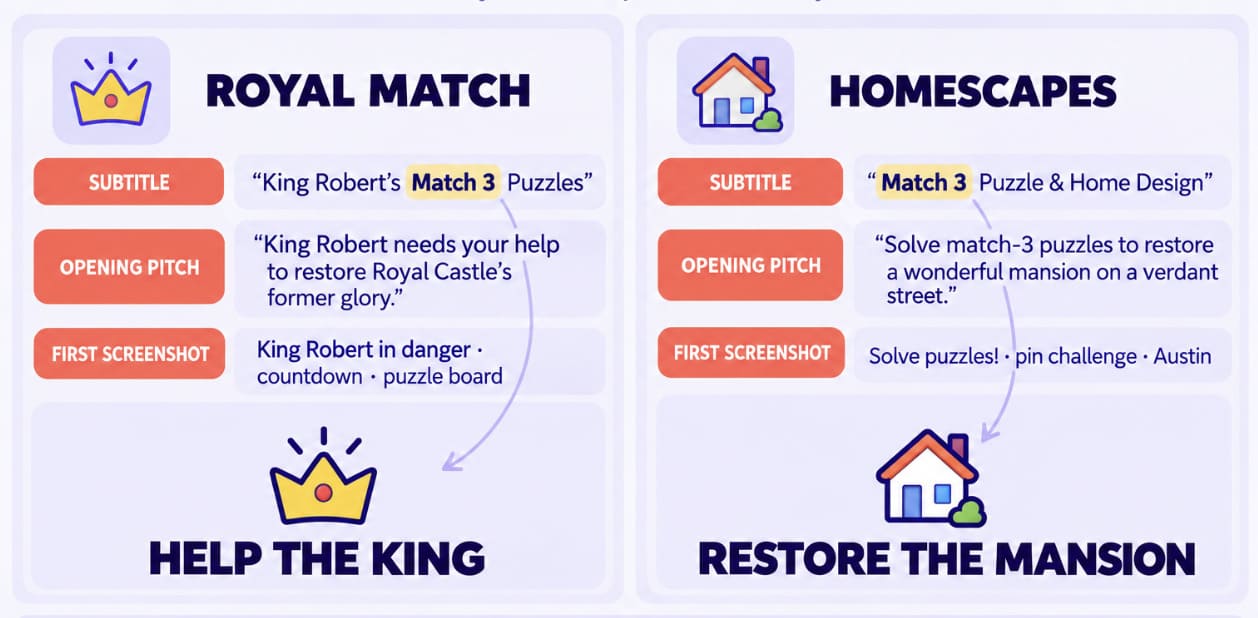
The subtitle comparison from Step 1 is the kind of concrete finding this stage produces. Both Royal Match and Homescapes spend their subtitle on the mechanic, then differentiate in the first line of the description. That tells you the subtitle is contested indexing space in this category rather than positioning space, which changes where you'd run your own test.
Reviews add context rankings can't. Ads, difficulty spikes, limited lives, expensive purchases, crashes, support: whichever of these keeps resurfacing across several competitors is a stronger signal than any single complaint. I wouldn't turn that list straight into a roadmap. I'd look for what repeats.
Turning it into an action plan
Rather than copying the strongest competitor, turn those observations into a shortlist of experiments.
Put the first tests where the evidence is strongest. That might mean a metadata refresh around a few relevant non-branded puzzle terms, followed by a first-screenshot test built around the game's clearest differentiator. Recurring review themes can go into review tagging so they don't get lost, while rankings and category movement stay split by country. A US win doesn't automatically travel.
App | Keyword angle to check | Creative angle to check | Ratings to watch | Review themes to check | Updates to watch |
|---|---|---|---|---|---|
Candy Crush Saga | Branded vs. generic puzzle demand | Rewards and live events | Rating movement | Ads, purchases | Seasonal campaigns |
Royal Match | Non-branded puzzle terms | Puzzle challenge | Changes after releases | Difficulty progression | Content updates |
Homescapes | Puzzle + adjacent terms | Renovation and story | Version-level changes | Progression | Seasonal creative |
Gardenscapes | Category and search visibility | Story and progression | Country differences | Monetization | Live events |
Toon Blast | Casual puzzle terms | Fast-session messaging | Rating shifts | Lives and difficulty | Gameplay events |
Match Factory | Emerging keyword coverage | Core puzzle appeal | Recent movement | Feature requests | Listing changes |
Turn competitor analysis into ASO experiments
This work should leave you with things to try. If I finish one with twenty observations and no idea what to test next, I've probably spent too much time collecting data and not enough time making decisions.
Competitor analysis should end with a backlog, not a report. Every observation should become a hypothesis you can prioritize, test, and measure.
Ilya Kataev, Product Expert at AppFollow
That doesn't mean borrowing whatever seems to work for the category leader. Doing it better or differently, then testing the idea, is the part that pays. Your product still has to be relevant to the search and give users a reason to choose it.
Signal | Hypothesis | Test | Metric | Decision |
|---|---|---|---|---|
Competitor ranks for "co-op puzzle" but barely mentions co-op in its creative | Co-op may have more creative potential | Put co-op messaging in Screenshot 2 or the short description | Keyword rank, conversion | Keep, revise, or drop |
Onboarding complaints keep appearing in competitor reviews | A simpler first impression may help | Test a clearer first-screenshot hook | Conversion, review sentiment | Compare with baseline |
Seasonal creative appears around major events | Timely creative may be worth testing | Run seasonal screenshots | Category movement, installs | Use again if the lift holds |
Prioritize by traffic channel
I wouldn't give every finding equal weight. If search is where the opportunity showed up, metadata is the obvious place to investigate first. A browse problem sends me toward the creative. Top-chart movement needs more caution because an ASO change may have had nothing to do with it.
Branded traffic and paid spillover need their own context too. Before adding anything to the test backlog, trace the signal back to the channel that produced it.
Prioritize by effort and risk
A title or subtitle change can be relatively quick to ship. New screenshots need design time, while video raises the effort again. Product Page Optimization and Store Listing Experiments give you a way to test creative rather than rolling out a hunch everywhere at once.
The bar goes up for bigger bets. Localization needs enough market evidence to justify the work, and a finding that points to the product roadmap has to compete with engineering priorities. I usually take the cheap, well-supported tests first and see what they teach me.
Build a 30-day monitoring loop
Take a baseline before the test goes live. Then give the change enough time to produce a signal and keep an eye on keyword tracking, conversion, category movement, and the reviews coming in around it. Thirty days is a useful working window here, not a promise that every ASO test needs exactly 30 days.
At the end, write down what actually happened. Maybe the new screenshot helped conversion, but rankings didn't budge. Maybe nothing moved at all. Both results narrow the next decision. That's where this work earns its keep: not in the original competitor report, but in the tests you stop, keep, or try next.
cta_get_started_purple
Benchmark and monitor your app competitors with AppFollow
The workflow in this guide only works if the data is easy to connect. Keyword rankings, store listings, reviews, category movement, and competitor updates often live in different tools, making it difficult to understand what actually changed.
A useful competitor workflow connects signals that usually sit in different places. Rankings, reviews, metadata, and visibility should explain one another instead of being analyzed in isolation.
Ilia Kukharev, Product Manager at AppFollow
AppFollow brings those signals together so teams can move from observation to action instead of switching between disconnected dashboards.
Compare Discovery for market and visibility benchmarks
A good app competitor analysis tool starts by helping you identify the right competitors. Compare Discovery benchmarks up to five apps using metrics such as Brand Power, App Reputation Index, Search Visibility Score, ranked keywords, and non-branded organic keyword share.
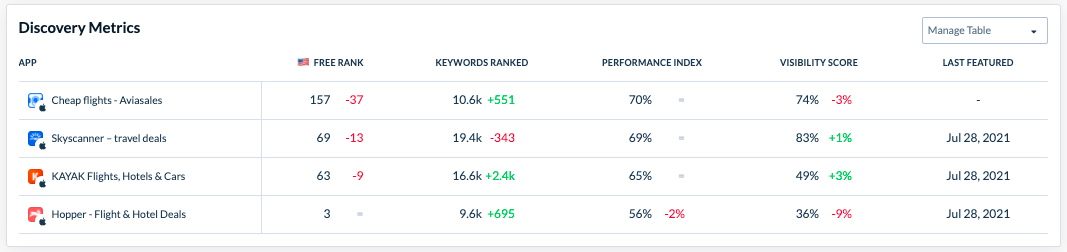
For a wider set, Benchmark Reports compare one app against up to nineteen competitors. Instead of relying on assumptions, you can see which competitors dominate visibility in a specific market and how that changes over time.
App Page and metadata comparison for app-store assets
Once you've identified your competitors, compare their store listings side by side. App Page lets you review metadata, descriptions, screenshots, videos, in-app purchases, updates, similar apps, and localized store assets across countries and languages. That makes it easier to spot positioning differences without manually opening dozens of listings.
Keyword Tracking and competitor keyword monitoring
Keyword Tracking gives you the ranking history behind the current position, across both the App Store and Google Play.
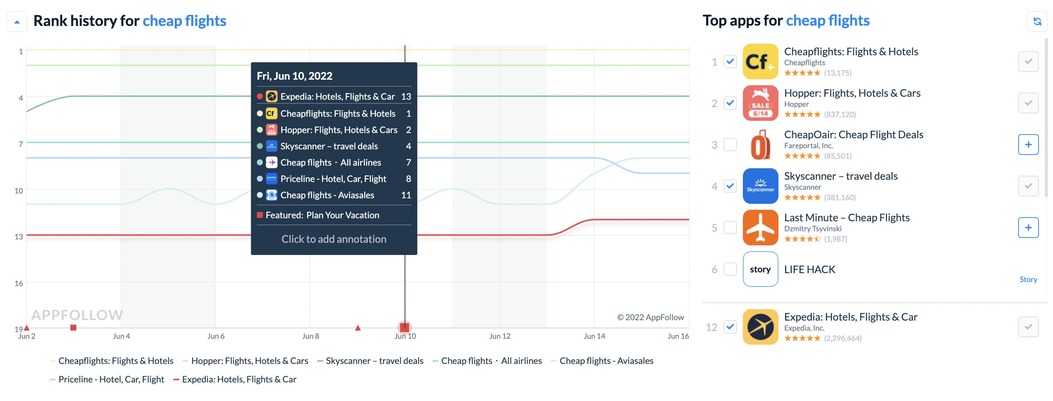
Use that history to spot keyword gaps and see whether a competitor started gaining ground around a particular store update. High volume alone doesn't make a keyword interesting. Relevance, realistic ranking potential, and actual search demand still have to line up.
Category Rankings and top chart movement
Search isn't the only source of visibility. Category Rankings tracks daily movement across countries, categories, and devices, covering Free, Paid, and Grossing charts. Viewing those changes alongside metadata updates or seasonal campaigns makes it much easier to separate temporary spikes from sustained momentum. For a public view of who currently sits where, the top charts browse pages cover both stores by category and country.
Review and rating analysis with sentiment and tags
Competitor work becomes much more actionable when you understand why users leave positive or negative reviews. AppFollow centralizes ratings by country, review volume, sentiment, tags, feature requests, pricing feedback, bugs, user satisfaction, and support quality across competitors.
Custom reporting, alerts, and integrations
Competitive data doesn't help much if it sits with the ASO team. Custom reports, alerts, and integrations with Slack, Zendesk, Salesforce, and Tableau can put relevant changes in front of product, support, or leadership without another manual handoff. If something starts moving, the people who need to know don't have to wait for the next scheduled audit.
cta_get_started_yellow
Frequently asked questions
What is app competitor analysis?
App competitor analysis compares your app with the products you actually compete against in the stores. That includes direct rivals, apps targeting your keywords, category leaders, and strong regional players. Look at visibility, metadata, creative, rankings, ratings, reviews, and update history to find opportunities worth testing.
How do you do mobile app competitor analysis?
Start with five to ten relevant competitors in the market you're targeting. From there, compare their keywords and store pages, check category movement, dig into ratings and reviews, and watch what changes after releases. Any useful pattern should eventually give you something specific to investigate or test.
What is ASO competitor analysis?
ASO competitor analysis looks at the parts of competition that affect app store discovery and conversion. That means checking who ranks for your target searches, how competitors use metadata and creative, where they sit in categories, and what their ratings and reviews tell you across the App Store and Google Play.
How do I find competitors for my app?
Don't stop at apps that look like yours. Search your important keywords, check category and top-chart leaders, and see which apps are strong in the countries you're targeting. Work with five to ten competitors, mixing direct rivals, search competitors, category leaders, and regional apps.
What should I include in an app competitor analysis?
At minimum, compare keyword visibility, metadata, creative assets, category performance, ratings, reviews, and recent updates. Add localization and support quality when they're relevant to your market. Looking across those areas explains a competitor's movement much better than a single ranking or rating ever will.
What is the best app competitor analysis tool?
The right tool depends on how much of the workflow you need to cover. For ongoing ASO work, look for keyword and ranking history, store-page monitoring, review and rating analysis, country-level comparisons, and alerts. Having those signals together makes changes much easier to investigate.
How often should app teams monitor competitors?
Check fast-moving signals weekly, then zoom out once a month to see whether anything has actually stuck. Major competitor releases deserve another look as well. That cadence catches metadata, creative, ranking, and review changes without turning every small daily fluctuation into an ASO emergency.
Can AppFollow track competitor apps?
Yes. AppFollow compares competitor keywords, store metadata, category and top-chart rankings, ratings, reviews, sentiment, and app updates across markets, using public store data from the App Store and Google Play. Reports, alerts, and integrations also help teams keep watching those changes without rebuilding the analysis from scratch each time.
![[Webinar recap] What gaming apps get wrong (and right) in the app stores](https://cdn.appfollow.io/blog/static/appfollow_91581b29-8387-4dbd-88b5-2009875121ac.jpg)