ASO Tips for 2026: 24 App Store Optimization Techniques, Guidelines, and a Weekly Checklist


Table of Content:
- Key takeaways
- What changed in ASO in 2026 (and what most guides still get wrong)
- 3 app store optimization strategies that improve growth
- ASO Techniques for Keyword Research and Metadata Prioritization
- App Store Optimization best practices for screenshots, icons, and conversion
- ASO tips for ratings, reviews, and reputation signals
- ASO guidelines: what to avoid, monitor, and test
- Localization ASO best practices
- ASO performance monitoring tips
- App store optimization checklist for weekly and monthly audits
- Turn ASO tips into a working system with AppFollow
- FAQs
Updated 25 August 2026. Store limits and features verified against Apple and Google documentation this month. Reviewed by Yaroslav Rudnitskiy, Senior Professional Services Manager, AppFollow.
You’ve tweaked titles, swapped screenshots, maybe chased a few keywords, and still the installs don’t move the way they should. That’s frustrating. Most ASO tips online stop at surface-level advice, while real growth usually comes from getting three things right at once: relevance, conversion, and review signals.
At AppFollow, our team works with apps across categories and markets, and we’ve also studied how ASO leaders in the industry approach rankings, creative testing, and localization when every small lift compounds.
So what actually deserves your attention first:
- Which keyword changes can improve visibility without tanking conversion?
- When should you rework screenshots instead of metadata?
- How much do ratings and review timing really affect performance?
- Which markets are worth localizing for?
- And which ASO guidelines still matter in 2026, now that app stores reward stronger, sharper user signals?
Key takeaways
- Diagnose before you optimize. Low impressions, low conversion and low retention are three different problems. Treating them the same wastes a release cycle.
- Keyword relevance beats keyword volume. A term you can rank top-10 for and convert on is worth more than a head term you'll sit at #47 on forever.
- Your first screenshot answers a doubt, not a feature list. Users scan, they don't read.
- Reviews are product feedback with a ranking side effect. Google Play publishes an average +0.7 rating lift for responding to a negative review.
- Localize, don't translate. Practitioners consistently report non-English markets as the easier win, and one on Reddit reports half of revenue arriving only after localization.
- Change one thing at a time. Three simultaneous asset changes give you one uninterpretable result.
- Apple now generates App Store Tags with LLMs from your en-US metadata. US English copy is a global discovery input as of 2026.
- Google Play switched store-listing reporting to clicks and intent in July 2026. Conversion Rate is gone as a primary metric.
- Custom Product Pages doubled to 70 and can now carry their own keywords. A CPP, not your default page, can serve a search query.
What changed in ASO in 2026 (and what most guides still get wrong)
Store mechanics moved more in the last year than in the three before it. Six changes matter for anyone shipping metadata this quarter.
Apple now writes tags about your app using an LLM
App Store Tags shipped out of WWDC25 and they're live in the US. Apple's own wording: tags "are generated using large language models (LLMs) based on the metadata you've provided in App Store Connect", refined with AI and human curation (App Store search). Tags now appear on the product page as well as in search, and they're tappable into tag-based browse pages.
Two operational consequences most teams have missed. Tags are generated from en-US metadata only, so your US English copy is now an input into discovery in every market. And you can deselect tags in App Information, with Apple warning that "deselecting all tags may affect your discoverability" (managing app tags).
Practical move: read your assigned tags before your next submission. If a tag is wrong, the fix is usually the metadata that produced it, not the tag toggle.
Custom Product Pages doubled, and they can carry keywords now
Apple raised the CPP cap from 35 to 70 on 29 October 2025, and added something bigger: you can assign keywords from your latest approved app version to a specific CPP (Apple developer news, configuring product page versions). So a CPP, not your default page, can be the page that serves a search query.
Any guide still saying "35 custom product pages" was written before November 2025.
Google Play stopped reporting conversion rate
From July 2026, Play store listing performance reports measure user intent (clicks) instead of outcomes (acquisitions). The primary metrics are now unique-user Install clicks, Open clicks, Pre-registration clicks, and click-through rate, which Google states "replaces the legacy 'Conversion Rate' metric" (Play Console documentation). Acquisitions still exist in the Grow users overview, Statistics, and CSV exports.
If your Android reporting still compares this quarter's conversion rate to last quarter's, the comparison broke in July and your dashboard did not tell you.
Play search is becoming conversational
Ask Play landed at I/O 2026: an AI conversational search layer inside Play, with context awareness, adaptive follow-ups, and "Ask Play highlights" that summarize a results page. Google notes its existing AI Q&A already answers 95% of user queries (Android Developers Blog). Alongside it: Play Shorts, a full-screen short-form video feed, and app suggestions surfacing in Gemini on Android and Web, deep-linking straight into app content.
Read that as discovery leaving the ten-blue-links shape inside the store, the same way it left it in web search. Metadata is becoming input to an answer, not a listing.
Apple is adding a creative slot above your screenshots
Creative Assets arrives with iOS 27 this autumn, and it appears in the product page header and in organic search results, plus the Apple Games app, In-App Events, CPPs and PPO tests. Apple's framing: "go beyond showing your apps and games in use, highlighting things like your brand, seasonal offerings, exciting new content" (Apple developer news, 5 Aug 2026, asset best practices).
An Asset Library ships with it, letting you submit assets independently of an app submission and get them "approved in advance". Creative review stops being tied to your release train, which changes how often a conversion test can realistically run.
Two more worth a line
Apple added 11 App Store languages on 31 March 2026, bringing the total to 50: Bangla, Gujarati, Kannada, Malayalam, Marathi, Odia, Punjabi, Slovenian, Tamil, Telugu, Urdu (announcement). Each is a fresh localized metadata and keyword surface, added with your next version submission. India-heavy, and largely uncontested.
Google Play now translates app strings with Gemini at no cost (September 2025), plus CSV and Sheets bulk upload for multi-language listings (Play Console what's new). The old excuse that localization is too expensive to test just got weaker.
Which changes need an app submission?
Change | Apple | Needs a new version? |
|---|---|---|
Keyword field | version metadata | Yes |
App name, subtitle | version metadata | Yes |
Promotional text | live edit | No. Apple: "without requiring an updated submission" |
Custom Product Page | separate review | No. Submittable "independent of an app update" |
PPO test without an alternate icon | separate review | No |
PPO test with an alternate icon | ships in the binary | Yes |
In-App Event | separate review | No, and since Oct 2025 submittable independently of other in-flight submissions |
Sources: Apple platform version information, Custom product pages, Oct 2025 submission enhancements.
3 app store optimization strategies that improve growth
No long intro, these are the best performing app store optimization strategies AppFollow clients implement when they want to improve their apps ranking on app stores.
Tip 1. Diagnose the bottleneck before you optimize anything
Most ASO work goes sideways for one simple reason: teams start editing assets before they know which metric is actually broken.
A drop in performance is not one problem. It is usually one broken link in a chain.
⬇ Low impressions mean the app is not winning enough discoverability.
⬇High store traffic with weak installs means the page is losing on conversion.
⬇Healthy installs with soft rating growth usually point to a trust or product-experience issue.
Messy movement across markets often means weak monitoring discipline, not weak creative.
That distinction matters because each problem needs a different fix.
Take a budgeting app. Say it ranks on page one for a few mid-volume terms, app page traffic is rising, but install rate stays flat. That app does not need another metadata rewrite. The keyword is already doing its job.
The real job now is to fix the handoff. Usually that means tightening the first screenshot, clarifying the value proposition faster, showing stronger trust proof, or removing confusion from the page.
If the same app gets decent installs but ratings stall after an update, the next move is different again. Now you need to read review themes, find the friction point, and fix the product or onboarding issue that is weakening endorsement.
Yaroslav Rudnitskiy, ASO guru:
“The first question is never ‘What should we optimize next?’ It’s ‘Where exactly is the loss happening?’ If visibility is weak, work on relevance and keyword coverage. If traffic is healthy but installs lag, fix the app page promise and screenshot logic. If users install but stop rewarding the app with strong ratings, stop polishing metadata and go look at the experience. Teams move faster when each metric is tied to one operational decision, not one vague ASO plan.”
A practical diagnosis flow from companies using AppFollow looks like this:
- Check visibility first. Look at keyword coverage, position changes, and market-level visibility.
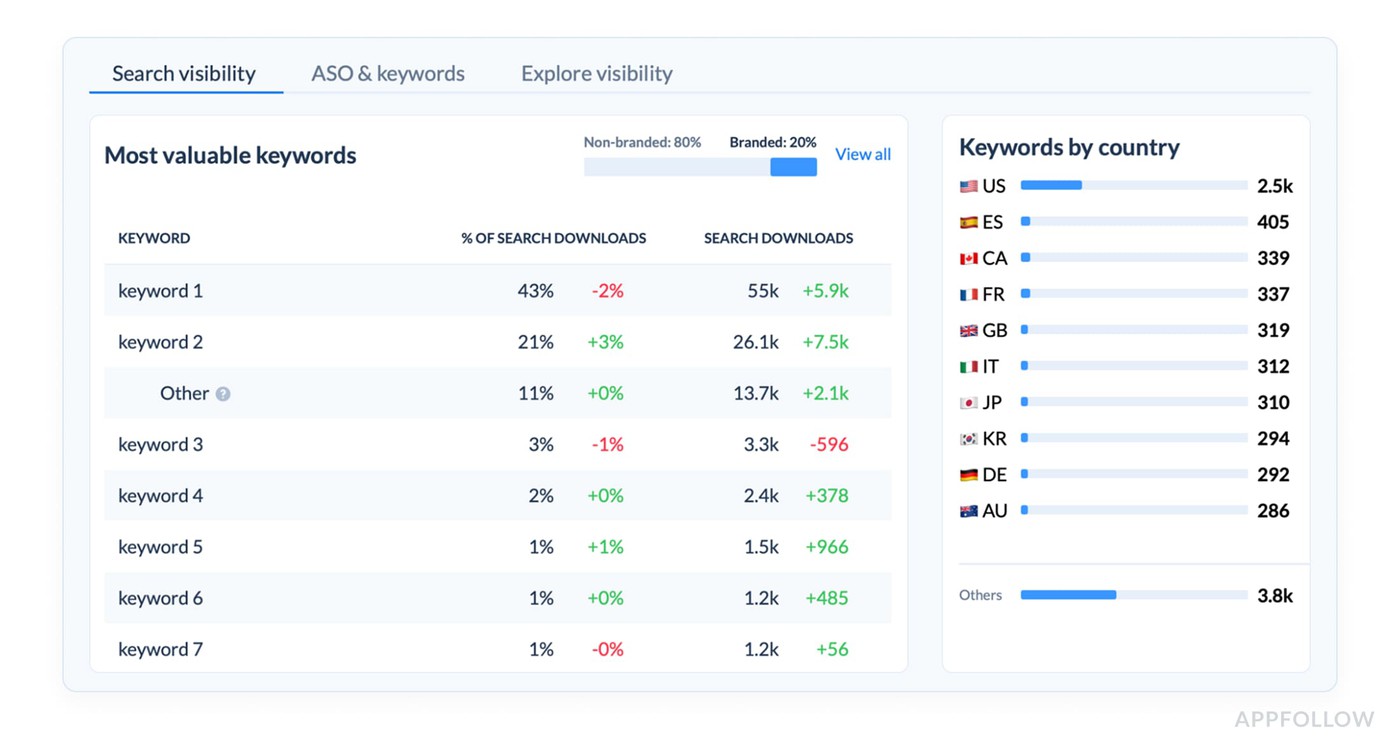
If impressions are weak, review metadata relevance, missing keyword clusters, and competitor ranking gains.
- Then check the page-to-install gap. If visibility is fine but installs are underperforming, review icon strength, first-screen message, screenshot sequence, and whether the page is answering the user’s first doubt fast enough.
- Then check rating momentum and review themes.
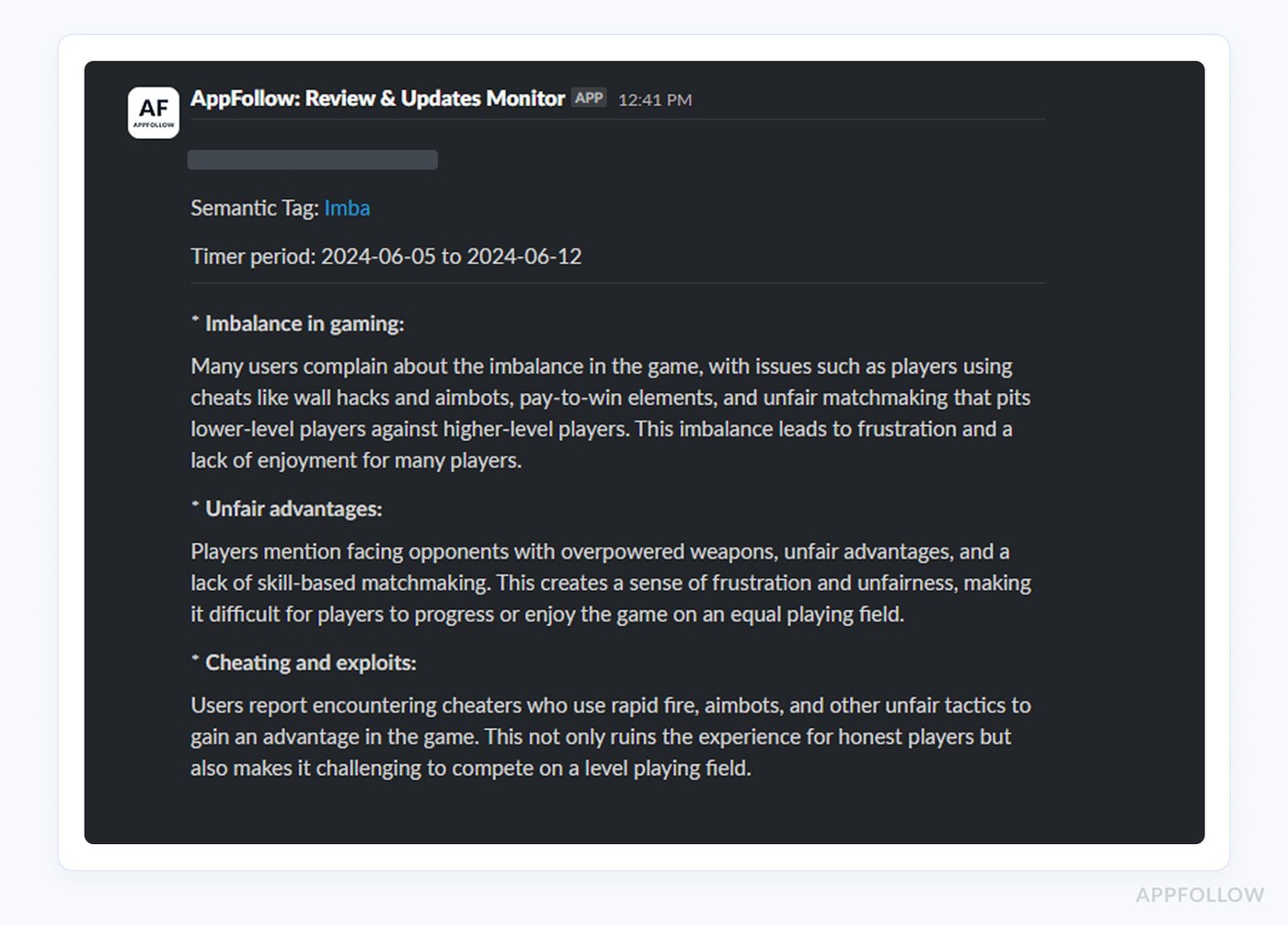
If users arrive and install but do not reward the app, read repeated complaints by version, feature, or journey stage. That is usually where product friction shows up before ranking damage becomes obvious. - Then check change history.
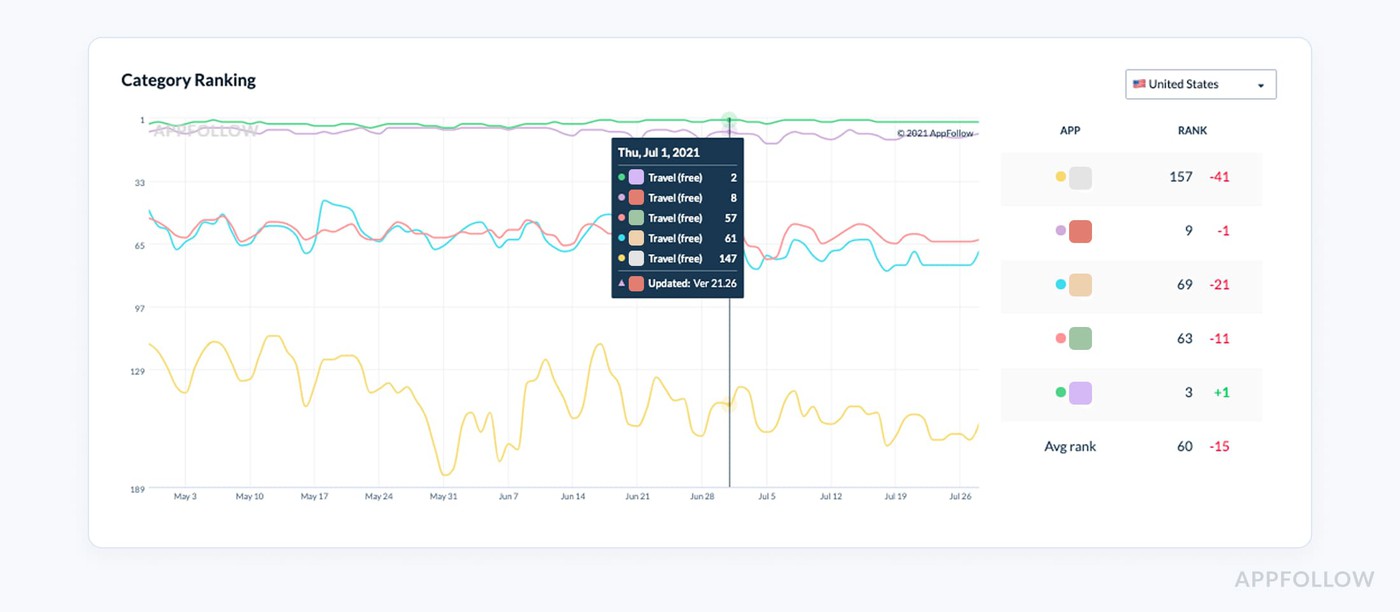 If results are unstable, ask what changed: metadata, screenshots, localization, featuring, competitor movement, ratings, or release quality.
Tip 2. Fix the weakest layer first, not the easiest one
A weak ASO program usually does not have three problems at once. It has one main constraint, and everything downstream starts reacting to it.
That is why smarter app store optimization best practices do not begin with a checklist of tasks. They begin with one decision: which layer is currently limiting growth most?
- If the app is barely getting seen, the issue is discoverability.
- If traffic is healthy but installs stay soft, the issue is conversion.
- If installs happen but ratings flatten and review quality weakens, the issue is post-install trust.
The mistake is treating all three like they deserve equal effort at the same time. They don’t.
Take a sleep app that already ranks in the top 10 for several mid-volume keywords. Search visibility looks decent. App page traffic is stable. Install rate, though, is weak compared with category benchmarks.
That app does not need another metadata pass yet. It needs a stronger conversion strategy.
At that point, the work becomes much more specific:
- check whether the first screenshot explains the use case in under two seconds,
- compare the page promise against top-converting competitors in the category,
- review whether the icon signals the right emotional expectation,
- test whether the first screen should lead with outcome, trust, or feature clarity,
- compare review language with screenshot copy to spot message gaps.
That is what expert prioritization looks like. Not “optimize the page.” Diagnose the exact weak layer, then work only there until it stops being the bottleneck.
Ilia Kukharev, AppFollow Product Manager:
“Teams lose speed when they spread effort across visibility, conversion, and reputation at the same time. The better approach is to identify which layer is underperforming enough to hold back the others. If your app already gets search traffic, keyword work has done its part for now. The next question is whether the store page is converting that attention.
In AppFollow, teams usually validate that by comparing visibility, traffic, downloads, and conversion rate side by side, then filtering by country, store, and channel. That makes it much easier to see whether the problem is reach, message, or trust.”
That is the difference between activity and strategy. Strong app store optimization strategies do not try to improve everything at once. They isolate the weakest layer, fix the handoff there, then move to the next constraint only after the metrics prove it is time.
Tip 3. Prioritize by impact, not by how easy the task looks
One of the easiest ways to waste a quarter in ASO is to work on whatever feels fast instead of whatever moves the needle. A subtitle tweak ships quickly. Swapping two screenshots feels productive. Rewriting a few lines in the description is easy to check off. None of that matters much if the real bottleneck sits higher up.
Ilia Kukharev, AppFollow Product Manager:
“Teams usually lose momentum when they confuse activity with impact. The easiest ASO task is rarely the highest-value one. Real prioritization starts by asking which layer is limiting growth right now, then fixing that constraint before polishing everything around it.”
Strong ASO strategies start with leverage:
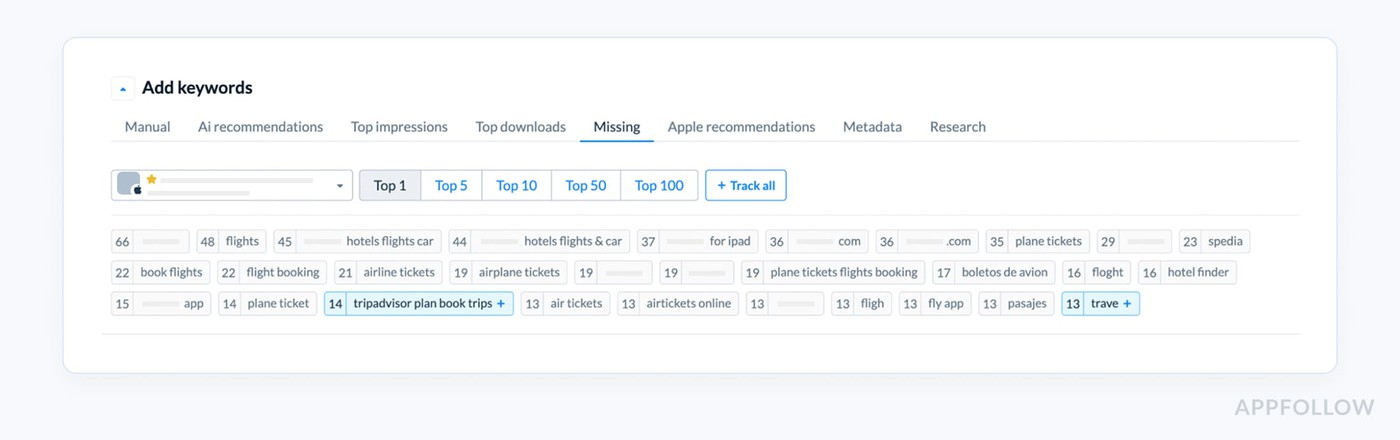
- First, fix relevance gaps so the app shows up for the right searches. One of the dashboards Appfollow users analyze to find out missed opportunities is Missing Keywords:
- Then tighten weak app page messaging, because visibility without installs is just noisy traffic.
- After that, deal with review and product friction. If users arrive, hesitate, and leave mediocre feedback, your rankings and conversion will eventually feel it.
- Localization comes next, once the core page already works. Only then does it make sense to scale monitoring and build a sharper testing roadmap.
That order matters because ASO compounds unevenly. Better relevance improves qualified impressions. Stronger messaging lifts installs. Cleaner experience signals improve trust. Broader localization expands reach once the foundation holds.
Prioritizing is one of the basic but very crucial tips for app store optimization that actually create momentum, because they follow the real growth levers instead of chasing cosmetic wins.
ASO Techniques for Keyword Research and Metadata Prioritization
Here you’ll find app store optimization techniques my team advice on every webinar. And for a reason! Every idea is tested by our experts and clients in 2025-2026.
Tip 4. Start with relevance, then prove the keyword can win
The easiest way to waste an ASO sprint is to pick a term because the keyword volume looks exciting.
Big number. Nice spreadsheet. Weak business result.
Better ASO techniques start with a harder filter: does this keyword describe the app closely enough that the right user would install after seeing the page?
That means every keyword should pass four checks before it earns space in your metadata.
- It needs real keyword relevance. If the term does not match the core use case, drop it.
- It needs realistic ranking room. If the app has no chance of breaking through current leaders, the term is usually too expensive in effort.
- The intent has to be close to the install decision. Broad curiosity traffic is rarely enough.
- The product and page need to fulfill the promise behind the term. If the keyword is stronger than the actual experience, conversion and ratings will expose it fast.
A meditation app is a good example. “Meditation” looks attractive because the volume is huge.
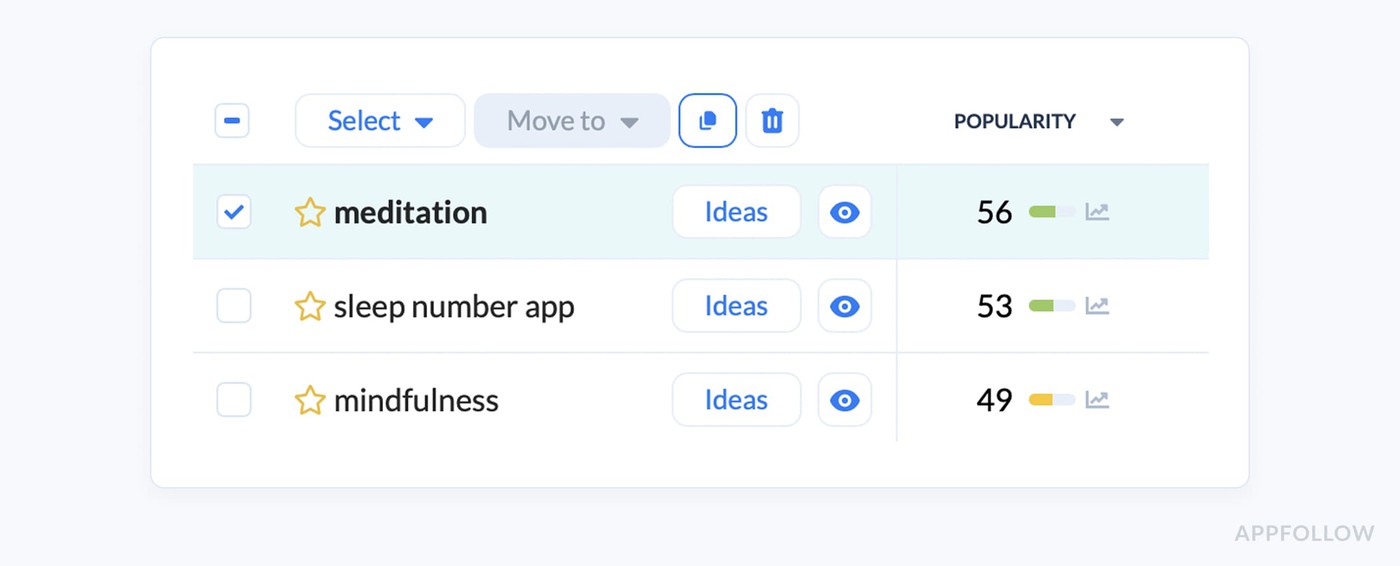
An element of the keyword research dashboard in AppFollow. Check how it works live
It is also broad, crowded, and full of mixed intent. Some users want stress relief. Some want to sleep. Some want breathing exercises. Some want spiritual content.
A smaller app often gets more traction by targeting something tighter like “sleep meditation for anxiety” or “guided sleep sounds,” because the user need is clearer, the expected feature set is narrower, and the page can speak directly to that problem.
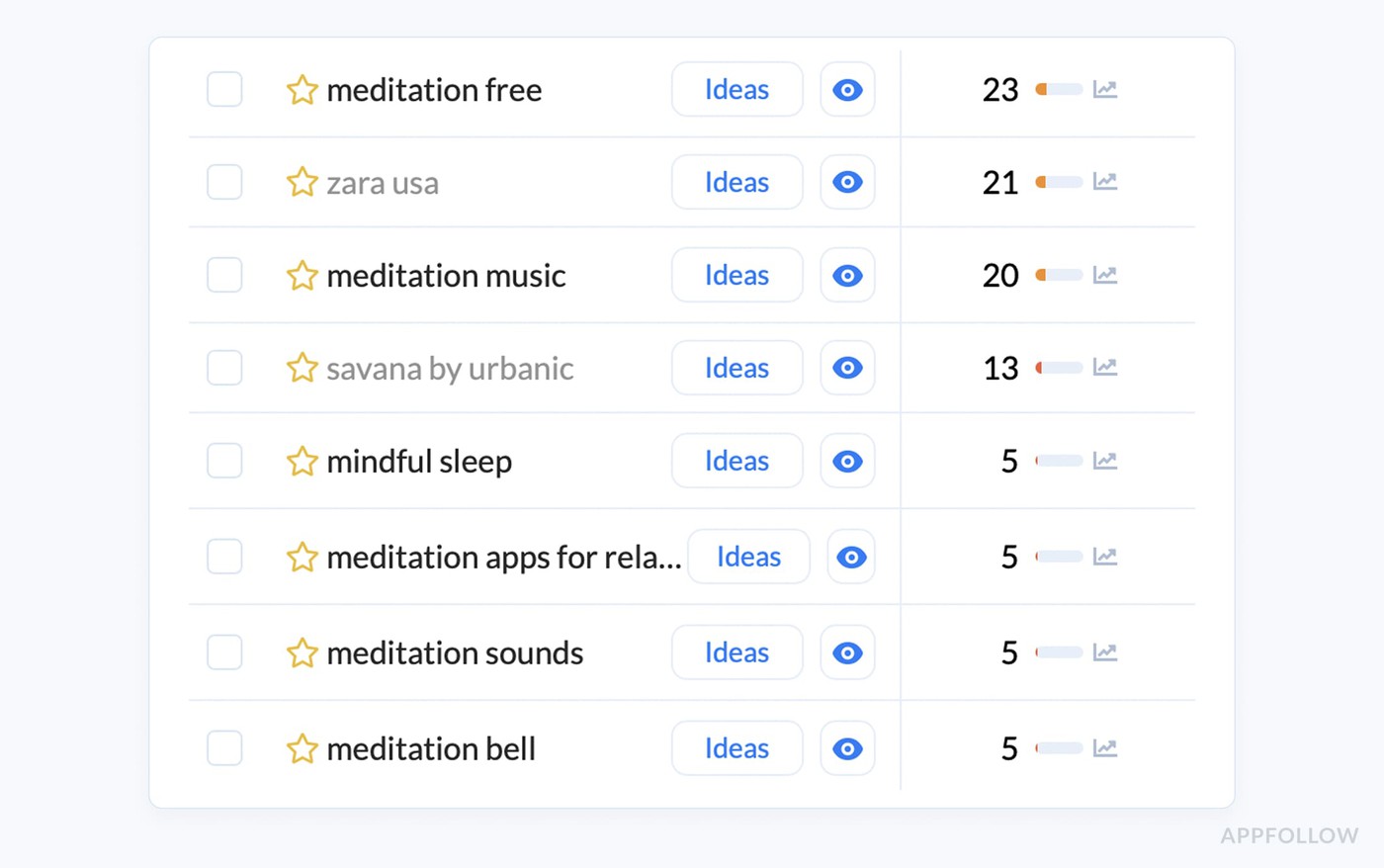
An element of the keyword research dashboard in AppFollow. Check how it works live
That is how stronger app store optimization techniques work. They do not chase the biggest term. They choose the term with the best chance to turn visibility into installs.
Yaroslav Rudnitskiy, ASO guru:
“A keyword is only valuable when three things line up at once. The app can rank for it, the store page can convert it, and the product can satisfy the user who arrives from it. Teams usually overvalue search size and undervalue fit. The better workflow is to score a term by relevance first, then check current rank, keyword difficulty, and whether that query has any sign of real download impact. If one of those breaks, the keyword is weaker than it looks.”
Tip 5. Build keyword groups around user problems, features, and outcomes
Most app store optimization tips treat keyword research like a shopping list. Pick a few big terms, squeeze them into metadata, move on. That is exactly how teams end up ranking for traffic they cannot convert.
A stronger approach starts with keyword clustering. Group terms by
- the user problem first,
- then layer in feature keywords,
- outcome-driven keywords,
- relevant category terms,
- and the audience segment most likely to care.
That structure forces you to think in search intent, not just vocabulary.
Take a budgeting app. “Budget planner” belongs in the category bucket. “Track expenses” fits the core feature group. “Save money fast” is an outcome term. “Budget app for students” speaks to an audience segment.
Now the keyword set starts to reflect how real users search, and metadata choices get much easier to prioritize.
That is where mature app store optimization techniques feel different from surface-level ASO. You stop stuffing disconnected phrases into a page and start building a clearer match between intent, message, and install likelihood.
Yaroslav Rudnitskiy, ASO guru:
“The best keyword set is never a random mix of high-potential terms. It should reflect how real users think. What problem are they trying to solve, which feature are they looking for, what outcome do they care about, and how do they describe that category in the store? When those clusters are clear, metadata gets much easier to prioritize.”
Tip 6. Mine competitors for keyword gaps before inventing your own list
Most teams build a keyword list in isolation, and that is usually where the blind spots start. You brainstorm what sounds right, pull a few obvious terms, maybe borrow language from your own landing page, then wonder why the list feels thin.
Smarter ASO techniques start one step to the side. Open the apps already winning in your category and mine them for signals. Not to copy them blindly, but to catch what your own team is too close to see:
- missing use-case language,
- stronger semantic patterns,
- market-specific ranking gaps,
- and category wording that never comes up in an internal brainstorm.
A period tracker, for example, might think only in terms like “period app” or “cycle tracker,” while a stronger competitor set reveals adjacent phrases around fertility, ovulation, symptom logging, or pregnancy planning.
That is not just vocabulary. It is demand hiding in plain sight.
Yaroslav Rudnitskiy, ASO guru:
“Competitor research is where keyword strategy gets less theoretical. Your own app description tells you how you talk about the product. Competitors show how the market talks about it, how stores classify it, and where ranking opportunities still exist. That gap is often where the best keywords live.”
The real advantage comes when you look beyond raw competitor keywords and read the full market picture.
- Which category competitors keep surfacing in search?
- What terms seem tied to installs rather than just impressions?
- Which markets show different winners for the same use case?
- Are shifts in top charts or featuring events changing the language users respond to?
Companies that use AppFollow see answers to those questions in dashboards like Keyword Spy:
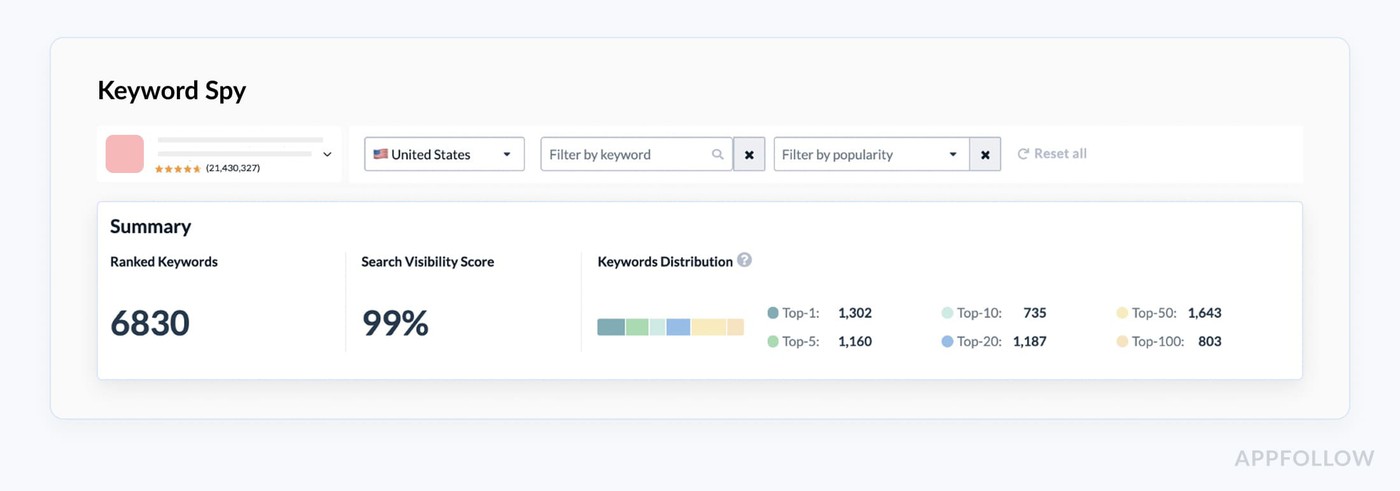
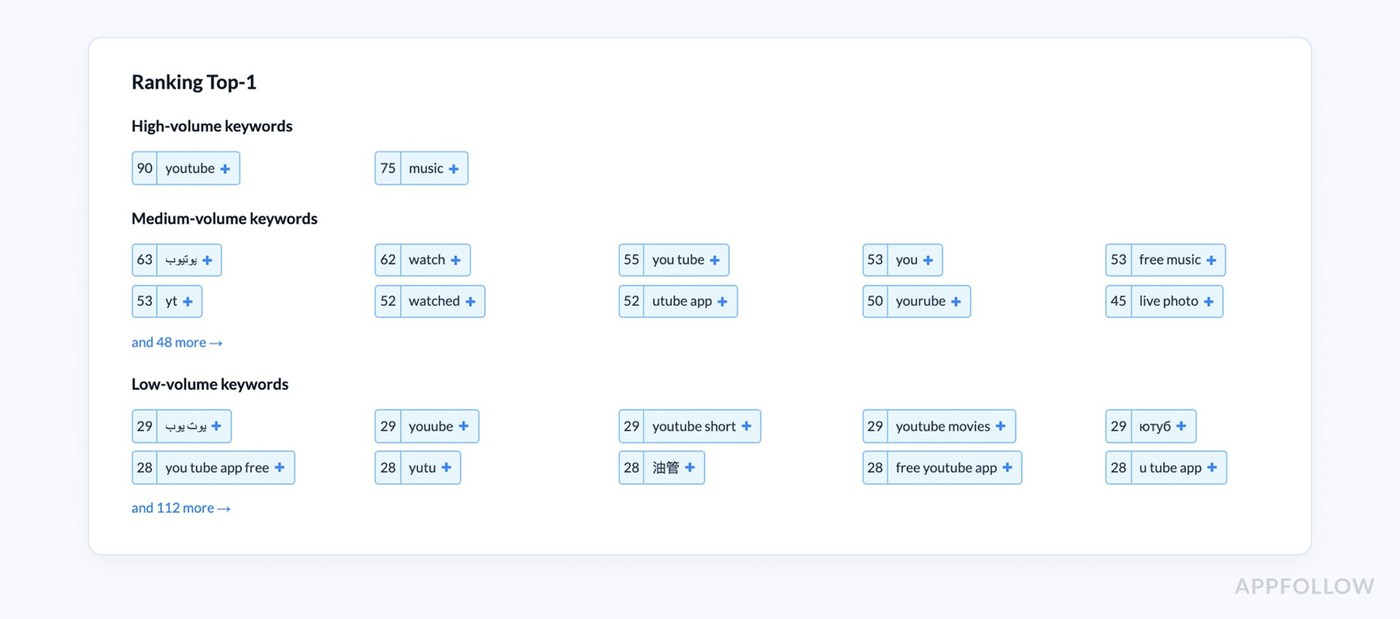
Just add a competitor's app and see their keywords and get new ideas for optimizing your own strategy.
That is where stronger ASO strategies start to form, because now you are building from evidence instead of opinion.
cta_get_started_purple
Tip 7. Adapt metadata by store instead of copying one version everywhere
Copying one metadata template across both stores is one of those shortcuts that looks efficient and quietly costs you rankings. The App Store and Google Play do not read the same way.
Apple explicitly says apps are searchable by
Its search guidance points to title, subtitle, keyword field, and primary category as text-relevance inputs. | Google Play, by contrast, structures the listing around
Its help docs state the short description is limited to 80 characters and the full description to 4,000. |
That is why stronger app store optimization techniques treat metadata by store, not by habit.
- On iOS, your title, subtitle, and keyword field have to do more of the discovery work.
- On Google Play, the short description carries more front-loaded message weight and the long description needs to support the listing more fully.
A finance app, for example, might keep “budget planner” in the App Store title logic, then use the Google Play short description to push a clearer benefit like “Track expenses and plan savings in minutes.”
Same product. Different surface. Different job.
Those are the ASO guidelines that save teams from flattening both stores into one generic version.
App Store Optimization best practices for screenshots, icons, and conversion
Tip 8. Your first screenshot should answer the user’s first doubt
A lot of screenshot advice stays at the design layer, and that is why it underperforms. The first image in your sequence has a harder job. It has to kill doubt fast.
In a crowded store listing, users are not asking whether your app looks polished. They are trying to figure out what it does, whether it matters to them, and why they should care now.
That is where real app store optimization best practices begin.
Lucija Knezic, Senior CSM & Product Strategy Manager
“The first screenshot should not introduce the interface. It should introduce the decision. If a user cannot tell who the app is for, what problem it solves, and why it is worth their time from that first frame, the rest of the gallery is already working too hard.”
Think about a meal-planning app. A weak opener says something vague like “Healthy eating made easy.” A stronger one gets specific: “Plan a week of high-protein meals in 5 minutes.”
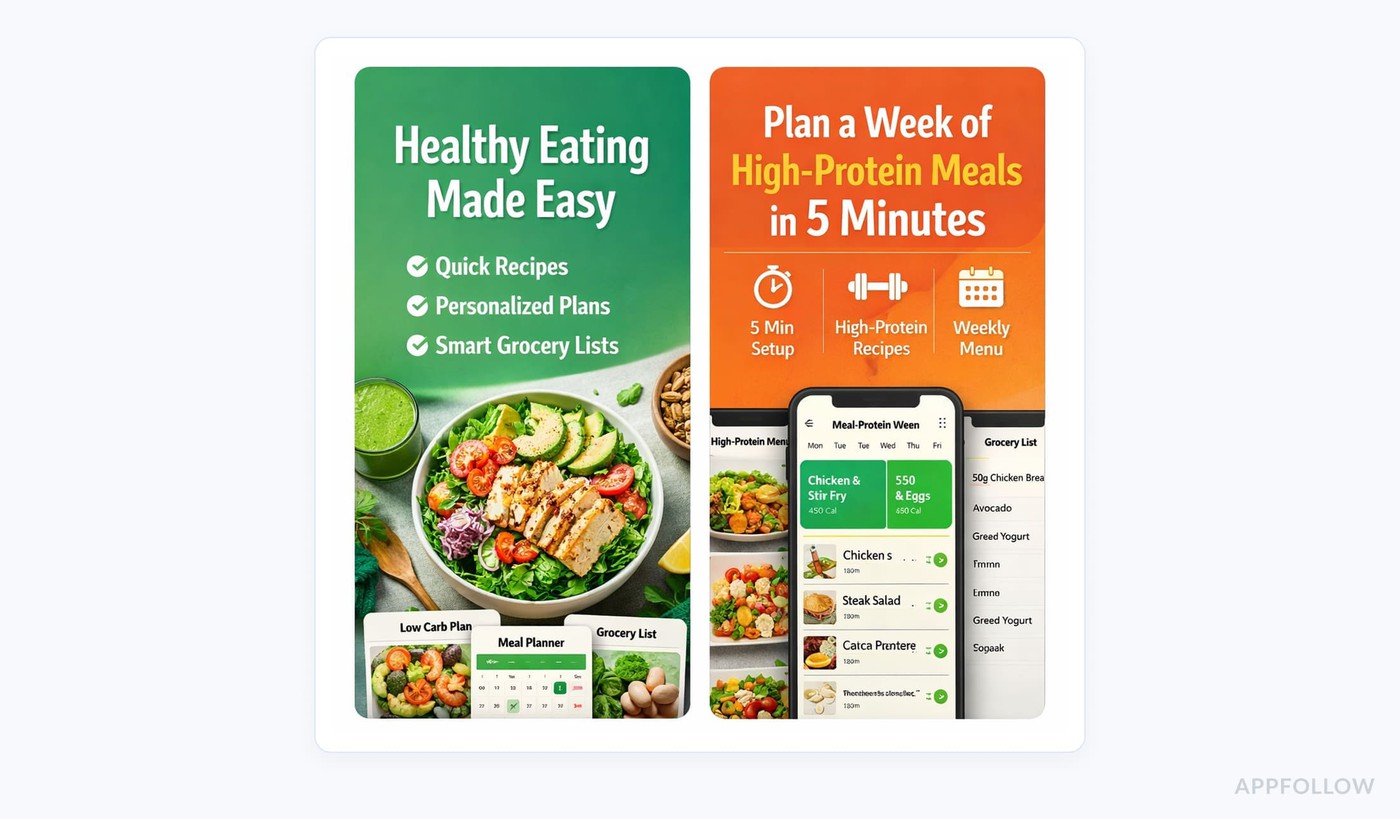
Now the user sees the use case, the outcome, and the audience signal in one glance. That is a better screenshot copy because it sharpens the value proposition instead of decorating the page.
When the first screen removes uncertainty, the rest of the gallery can expand the story and support conversion.
Tip 9. Use review language to decide what your screenshots should say
One of the smartest ASO tips and tricks is to stop writing screenshot copy from the inside out. Your team calls a feature “AI meal planning.” Users might keep saying “it saves me from thinking about dinner.”
That difference matters. The line that wins on the app page is usually the one your users already proved they understand.
Start with the reviews. Open your AppFollow review dashboards and look for repeated praise themes first.
Spot the strongest user sentiment, and pull out the phrases users repeat when they describe value in their own words.
First, collect 4-star and 5-star reviews around the feature or use case you want to sell.
Then scan the summary and tagged clusters for repeated wording. If users keep saying “easy to stay on track,” “finally understand my spending,” or “found meals my kids will actually eat,” that is not just nice feedback.
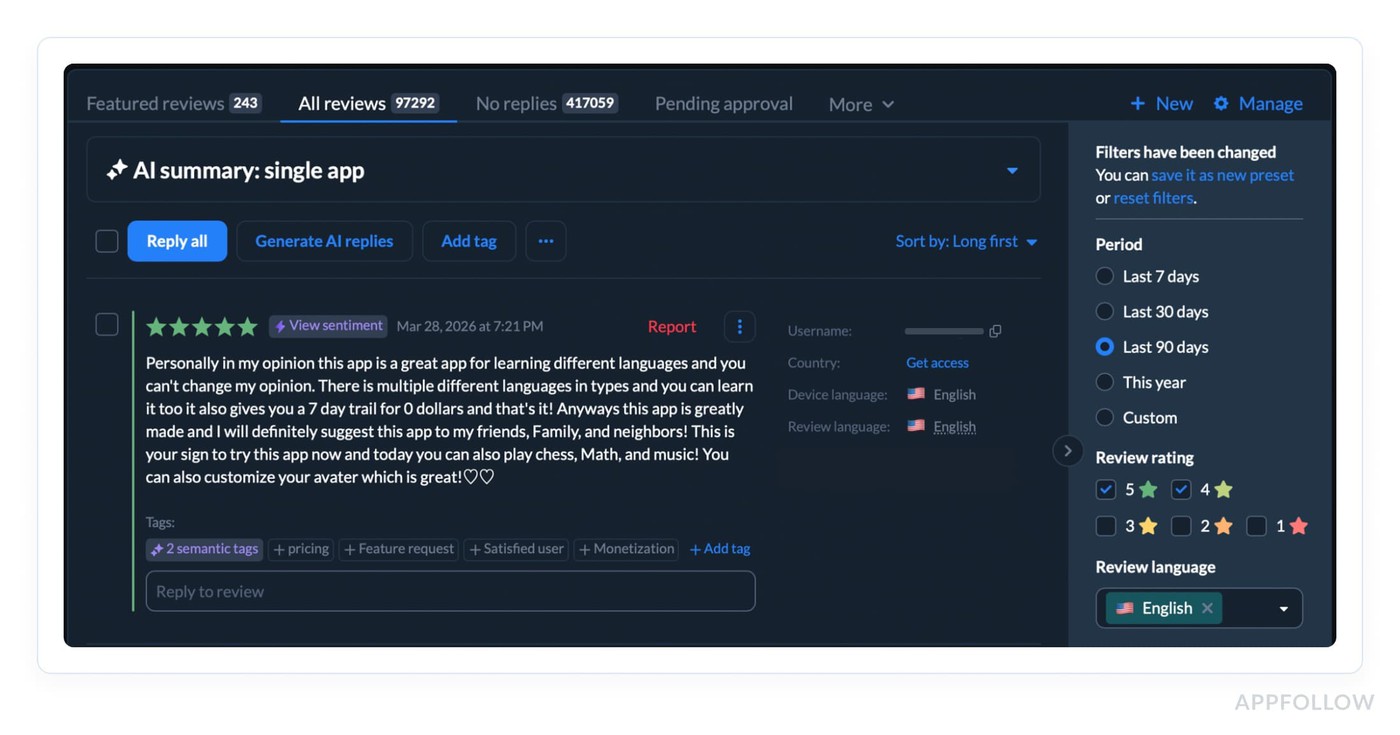
That is raw material for screenshot messaging. Those phrases already passed the hardest test. Real users chose them after experiencing the product.
AppFollow’s review categorization and custom tags make this easier because feedback can be grouped by sentiment, keywords, low or high ratings, and routed to the right team instead of staying buried in a queue.
Do the same thing with negative reviews. Not to mirror complaints in the screenshots, but to handle objections before they cost you the install.
If 1-star and 2-star reviews keep mentioning “confusing setup,” “too many ads,” or “hard to find recipes I’ll actually use,” your later screenshot cards should answer that tension directly. “Start with a 5-minute setup.” “High-protein plans matched to your goals.” “Weekly menus plus auto-built grocery lists.”
That is better app page positioning because it closes the gap between what users fear and what the app actually solves.
cta_get_started_purple
Tip 10. Test narratives, not just visuals
A lot of teams say they test screenshots when what they really test is layout, color, or card order.
Useful, sure. Still too shallow.
The bigger win usually comes from testing the story the page is telling. That means one app page narrative against another. Feature-first versus outcome-first. Trust-first versus speed-first. Beginner framing against advanced-user framing. Problem-led copy versus aspiration-led copy.
They change what the user believes the app is for before they ever install.
Picture a sleep app:
- One version leads with “Sleep sounds, breathing exercises, bedtime tracker.” Clean feature set.
- Another opens with “Fall asleep faster tonight without overthinking.”
Same product. Totally different emotional entry point. Stronger app store optimization techniques look at that difference and ask which message removes friction faster for this audience.
Karen Taborda, Customer Growth Team Lead:
“The screenshot test that matters most is the one that changes interpretation. If users see the same app through a different promise, you’re no longer testing design taste. You’re testing decision psychology.”
That is where sharper app store optimization tips start to create real conversion lift.
ASO tips for ratings, reviews, and reputation signals
Tip 11. Ask your app users for ratings after REAL value moments
A rating prompt should not appear when the app wants feedback. It should appear when the user has evidence.
That is the difference most teams miss.
If someone has not completed the core job yet, the prompt is premature. If they are still in onboarding, still setting preferences, still waiting for the first result, you are not measuring satisfaction. You are interrupting uncertainty. That usually leads to silence at best and low-quality ratings at worst.
The better trigger is a completed success event tied to the app’s real promise. Not any event. The right event.
- For a budgeting app, that might be the first fully categorized week of spending or the first budget hit.
- For a fitness app, it could be the end of the third completed workout, not the end of the first.
- For a food delivery app, it is after a successful delivery, not after checkout.
- For a language app, it may be after a streak milestone or the first lesson block completed without drop-off.
- For a meditation app, it might be after the third session finished, once the user has actually felt the benefit.
That is the practical rule: trigger the ask after the user experiences the outcome you sell on the store page.
A simple framework helps:
- tie the prompt to one meaningful product event
- wait until the user has repeated that event at least once if the value is not instant
- suppress the ask after crashes, payment errors, support contact, or failed flows
- do not show it during onboarding or immediately after install
- set a cooldown so frequent users are not over-prompted
Veronika Bocharova, Customer Success Manager:
“This is where teams usually get it wrong. They trigger on login count, session count, or days since install because those are easy to set up. Easy does not mean smart. Those are weak proxies. A user can open an app three times and still have no reason to rate it. Another user can get value in one session if the core job is done fast.
The point is not to ask more often. It is to ask at the moment when the user can honestly think, “Yes, this did what I came for.”
That is what improves rating quality. And over time, better timing does more than lift averages. It gives you cleaner review text, stronger public proof, and a healthier signal for conversion.

Tip 12. Build your review response strategy instead of random replies
A reply strategy matters because it changes two things at once: what the next user thinks when they read your reviews, and what your team learns from the pattern underneath them.
Strong app store optimization best practices do not treat replies as courtesy work. A fast, specific review response can recover a frustrated user, signal reliability in public, and turn a one-off complaint into structured product insight when the same issue keeps repeating.
AppFollow’s own review tooling is built around that exact workflow with AI semantic analysis, tags, dashboards, summaries, alerts, and integrations that help teams route feedback instead of reading it one comment at a time.
Here is what that looks like in practice. Say your fintech app gets a wave of 2-star reviews after an update. On the surface, the problem sounds broad: “app is broken,” “can’t log in,” “subscription confusing.”
A weak reply system answers each review in isolation. A mature review management workflow does more:
- First, support responds quickly enough to rebuild trust with affected users.
- Then the team groups the reviews by theme, spots whether “login” or “billing” is the real trigger, checks whether the spike is isolated to one version or market, and decides what needs fixing first.
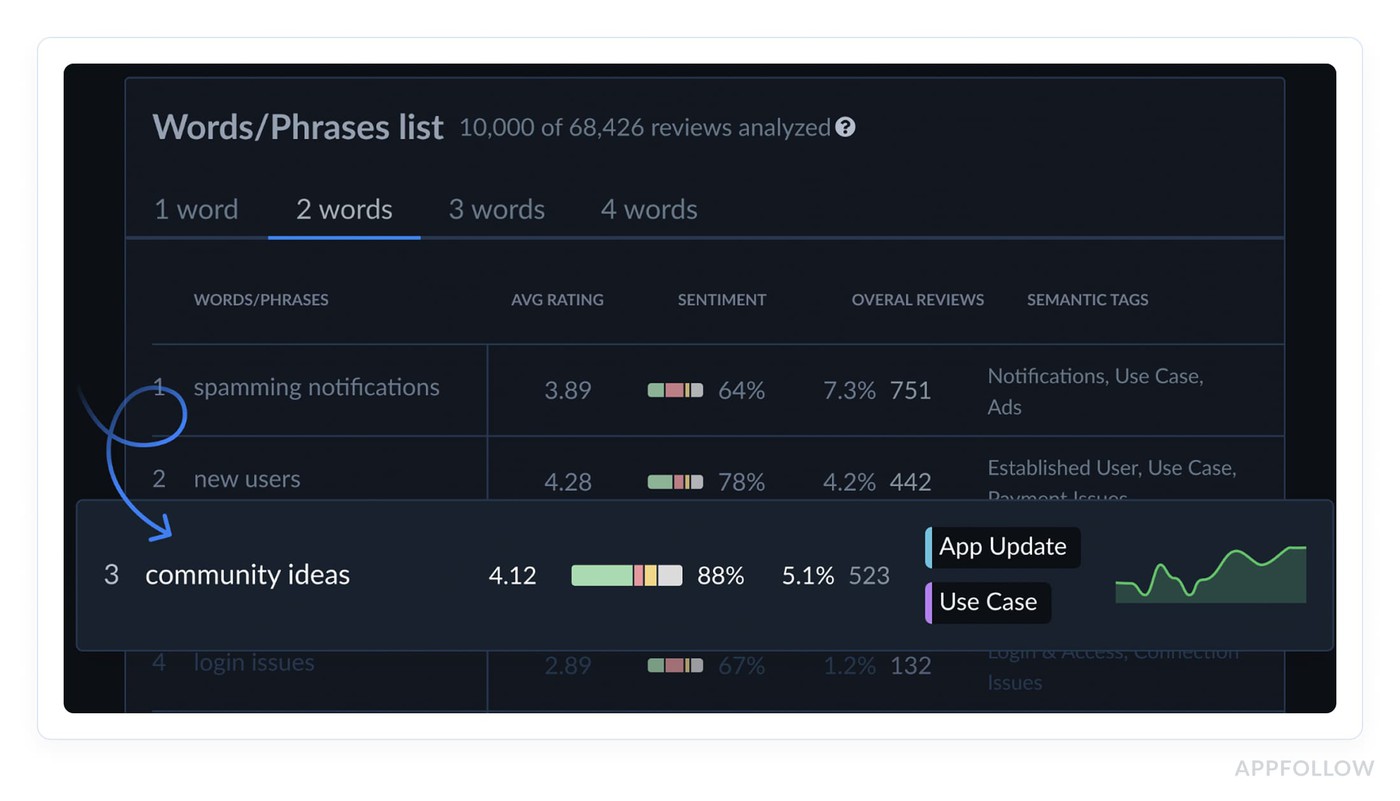
AppFollow’s Semantic Analysis feature is designed to detect issues tied to dissatisfaction, lower ratings, and uninstalls, while alerts can flag review spikes and rule-based conditions like rating or semantic tags.
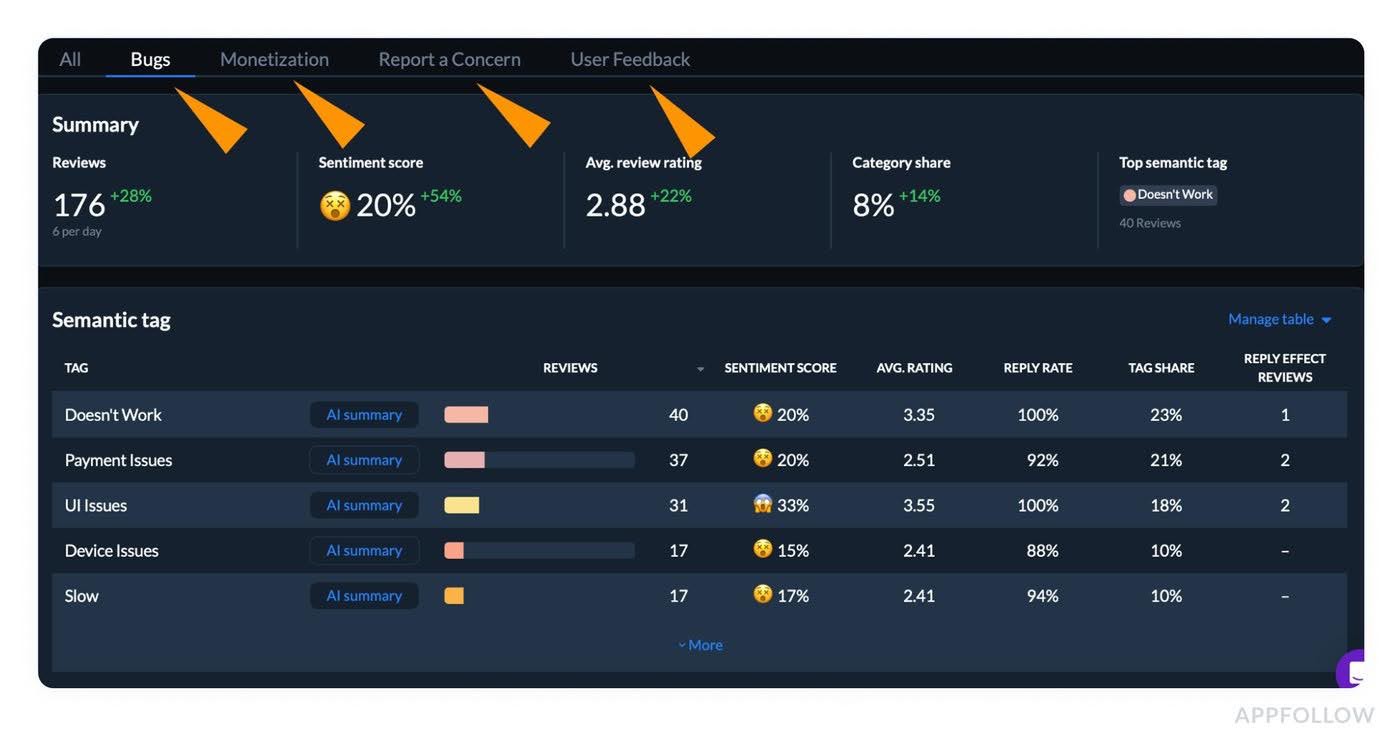
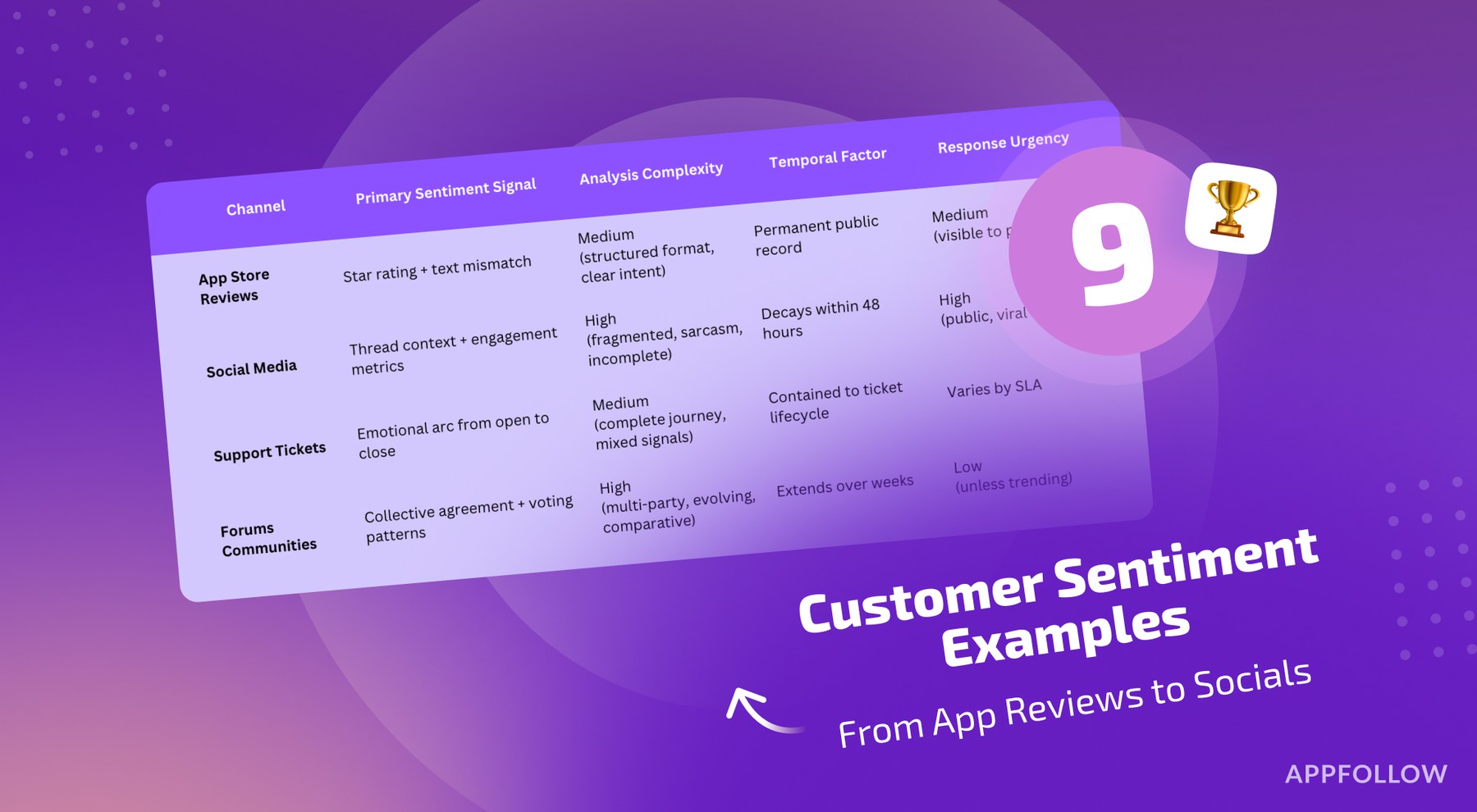
Read also: Customer Sentiment Analysis - How To Turn Reviews Into Decisions
Replies are early-warning system for sentiment shifts that can hurt conversion or retention before dashboards make the drop obvious.
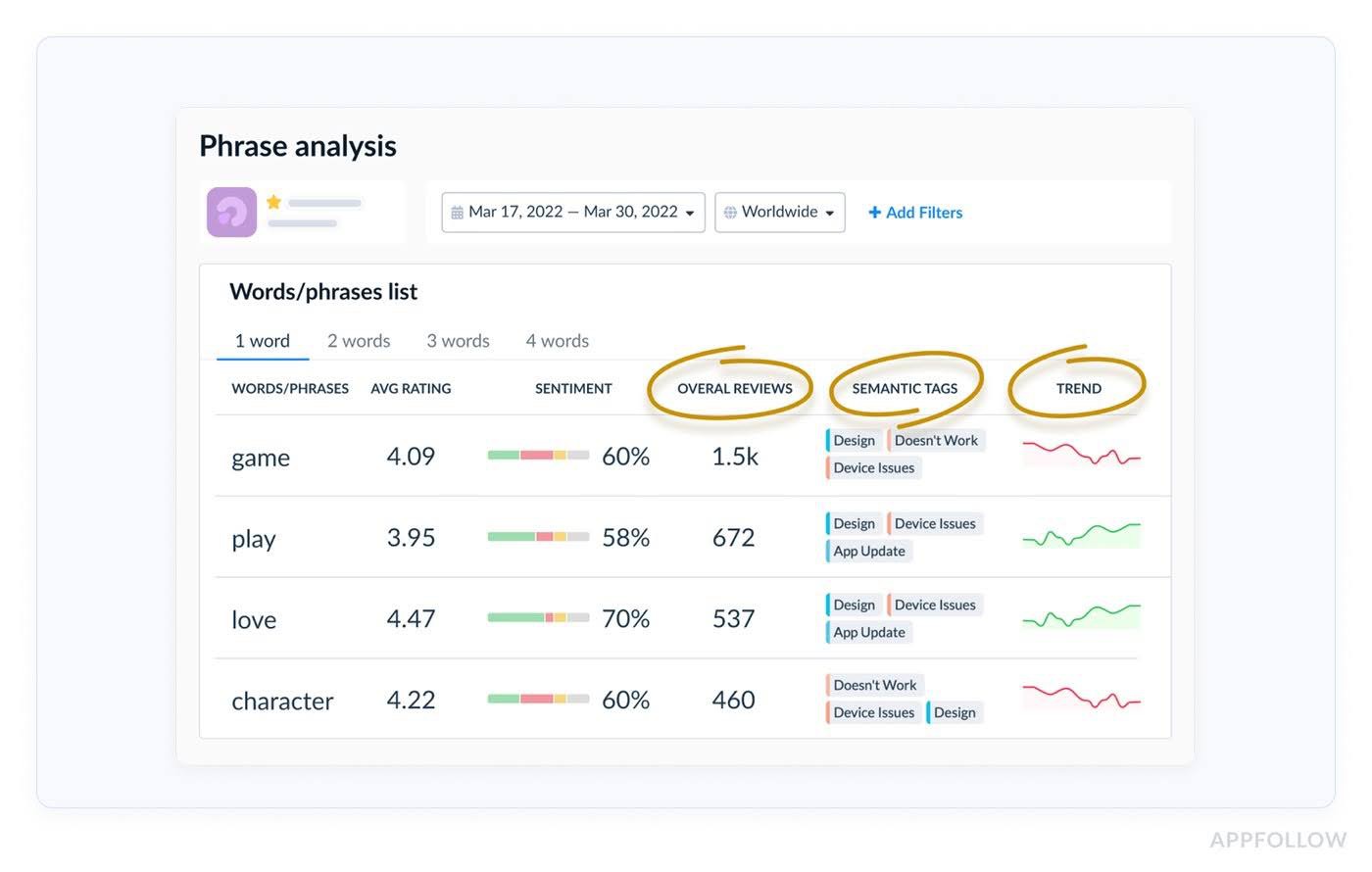
Reviews sentiment analysis by phrases in AppFollow. Check how it works live
If users keep complaining that onboarding feels confusing, that is not just a support queue issue. It may be the same friction dragging down store-page-to-install expectations, first-session success, and long-term retention.
A better reply strategy should therefore follow a simple loop: answer fast, classify the reason, count repetition, route the issue to the right owner, then decide whether the fix belongs in the product, onboarding copy, release notes, or even the app page promise itself.
Tip 13. Use review themes to prioritize fixes that support ASO
One of the most practical app store optimization tips is this: stop treating reviews like a reputation score and start treating them like a diagnostic feed. Repeated complaints usually point to the exact product gap that is dragging down store performance.
Onboarding friction hurts first-session confidence.
Pricing confusion creates buyer’s remorse before value is clear.
Bugs kill trust fast.
Weak feature explanation makes users feel the app overpromised.
Those product issues do not stay inside the app. They show up in lower review quality, softer rating trends, weaker conversion, and eventually less efficient keyword performance because the listing attracts users the experience fails to satisfy.
Say a budgeting app ranks for “expense tracker” and gets solid traffic.
On paper, the keyword looks right. Then the reviews start repeating the same points: “too hard to connect my bank,” “trial starts before I understand the app,” “categories are confusing.”
The ASO problem is no longer discoverability. The keyword is doing its job. The app is not delivering on the promise behind the install. Fix the setup flow, clarify the paywall, and explain the core feature earlier, and you usually improve ratings, reduce friction, and support better conversion from the same traffic.
Lucija Knezic, Senior CSM & Product Strategy Manager:
“The review theme matters more than the review itself. One complaint is noise. Fifty reviews pointing to the same friction point is a ranking problem in disguise, because it weakens trust, lowers rating momentum, and reduces the odds that future users convert after seeing the store page.”
The solution is not to read reviews manually forever. Classify them by cause, then prioritize by frequency and business impact. AppFollow helps teams do that faster with semantic analysis, smart tags, and category-level review insights.
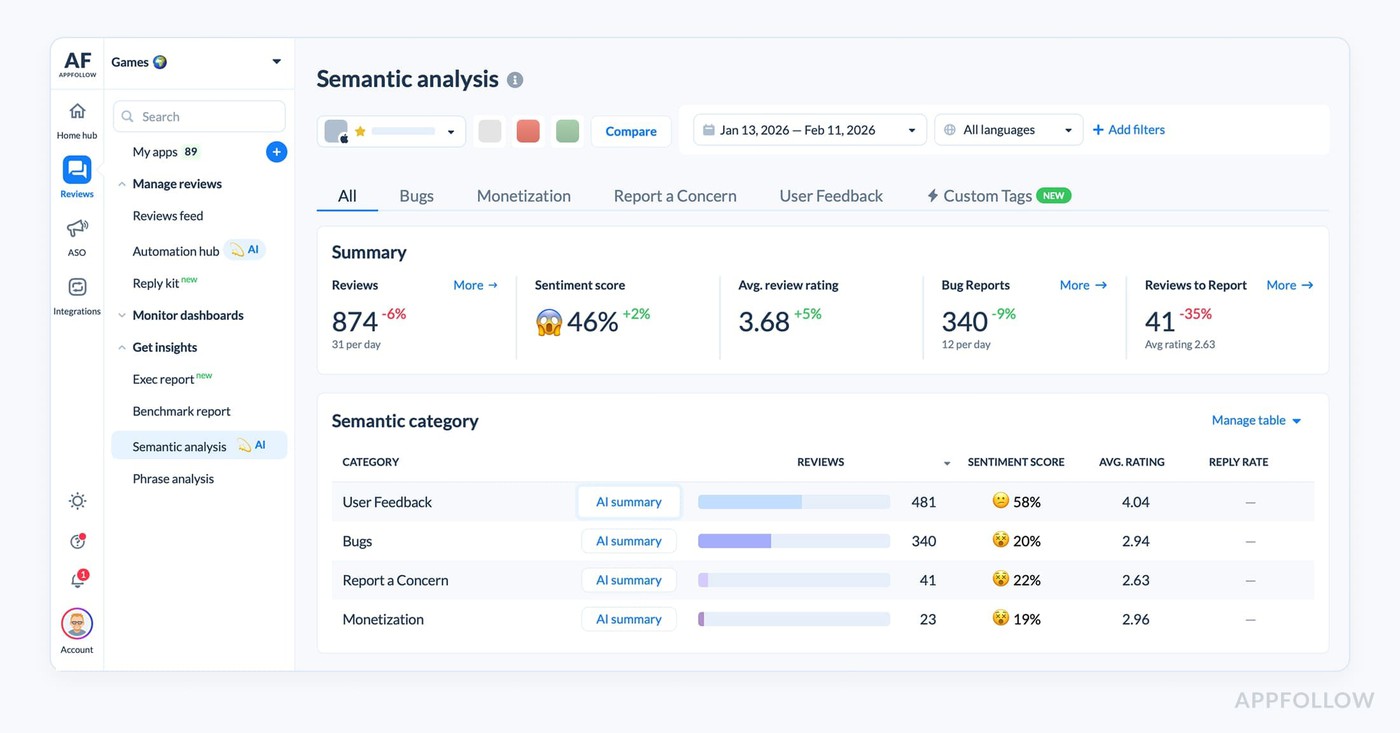
So repeated negative reviews turn into a clear fix list instead of a vague feeling that “users seem unhappy.”
cta_get_started_purple
ASO guidelines: what to avoid, monitor, and test
Tip 14. Don’t chase keywords that bring traffic but not installs
A keyword can make your dashboard look alive and your growth look dead. That is the trap. You win more impressions, maybe climb a few positions, maybe even feel progress because the graph moves.
Then the installs stay flat. That is low-conversion traffic. In real ASO work, a keyword only matters when the user who finds you is also likely to want you. Relevance and install fit beat vanity visibility every time.
This is one of the sharper ASO guidelines to follow because the damage is easy to miss. A broad term can pull in people with the wrong expectation, create a keyword mismatch, and quietly drag down conversion.
Picture a budgeting app ranking for “money app.” Big traffic. Weak install intent. The term is too loose. People searching it may want banking, investing, loans, or expense tracking. Compare that with “weekly budget planner” or “expense tracker for couples.”
Lower volume, better fit, stronger chance to turn a store visit into an install. That is the difference between busy metrics and actual growth.
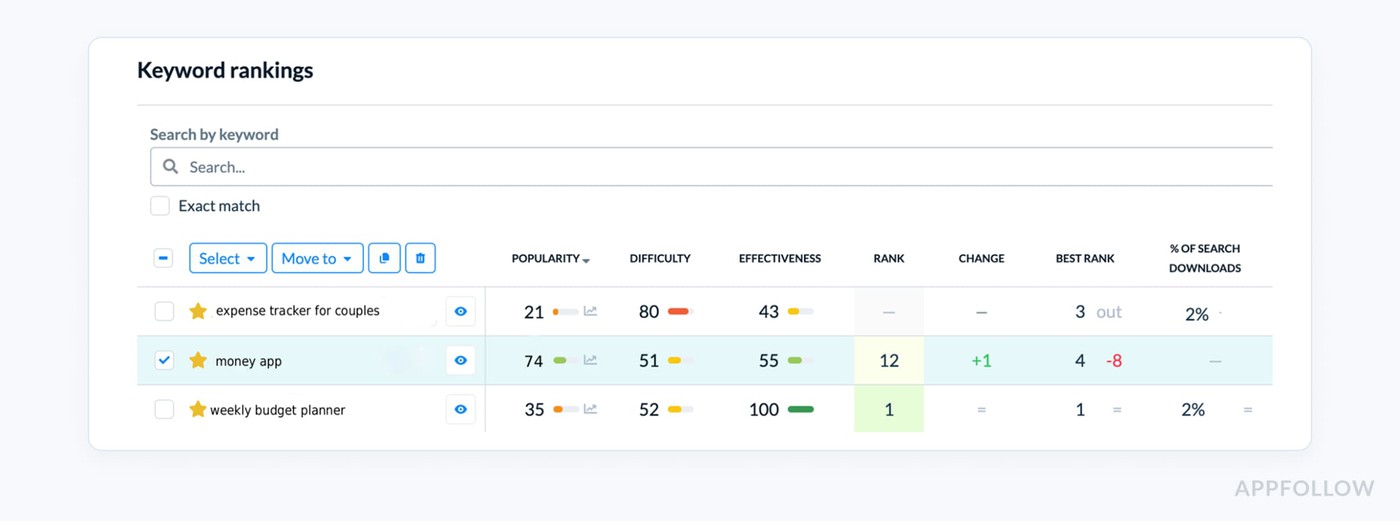
A practical ASO best practice here is to stop judging keywords by position alone. Look at what happens after the rank improves. Does the term drive installs, or just page views? Does the app convert for that audience, or are you forcing traffic through a promise the product does not fully meet?
Tip 15. Avoid changing too many assets at once
One of the easiest ways to sabotage your own ASO learning is to update the title, subtitle, screenshots, icon, and localization at the same time.
Then try to explain the result afterward.
You can’t.
If impressions go up, was it metadata? If installs rise, was it the new creative? If one market improves and another drops, was it localization, category pressure, or seasonality?
This is where weak app store optimization techniques create fake confidence. The graph moves, but the team has no clean attribution.
The reason this matters is simple. Different assets influence different stages of performance.
- A title or subtitle change is usually a discoverability test.
- Screenshots and icon changes are much closer to conversion.
- Localization adds another layer because it changes both language fit and market behavior.
Blend all of that into one release, and your experiment design collapses. You are no longer testing. You are just redecorating the store page and hoping for a lift.
Use strict test discipline! Separate metadata tests from creative tests. Keep localization out of the first round unless that is the thing you are specifically measuring.
Let one change settle long enough to read movement in impressions, store-page views, installs, and rating trend before pushing the next one. If a finance app rewrites its title and subtitle this week, it should not also swap screenshots and launch Spanish localization in the same cycle.
Otherwise the team cannot tell whether the gain came from ranking improvement, stronger conversion, or a new audience entering through localization.
Tip 16. Monitor rankings, ratings, metadata, and competitor changes together
A ranking drop almost never comes from one neat cause. Teams see a slide in position and rush to blame keywords, when the real story is usually messier.
Maybe a recent metadata edit changed relevance.
Maybe reviews got worse after an update and trust dropped.
Maybe a competitor got featured.
Maybe the category shifted, or one local market got more aggressive.
Good ASO guidelines start with that assumption: if rankings move, check the whole system before you touch anything.
Yaroslav Rudnitskiy, ASO guru:
“The dangerous part of ranking loss is not the drop itself. It is the false diagnosis that follows. One team blames keywords, another blames screenshots, while the actual cause sits in a mix of rating decline, competitor pressure, and a store-page edit that changed relevance. If you do not read those signals together, you fix the wrong thing and create a second problem on top of the first.”
- If positions fell right after metadata changes, check whether the updated title or subtitle weakened query fit.
- If the ranking drop came with lower ratings or worse review tone, that points to deteriorating user experience.
- If your app held steady until a rival climbed, this is a competitor monitoring problem, not a copy problem.
- If only one country slipped, local market behavior or localization may be involved.
That is why stronger app store optimization strategies rely on change detection, not guesswork.
Localization ASO best practices
Even though localization is not one of your main exact-match keywords, it absolutely belongs in the article because it is core to advanced ASO and a common gap in weaker guides.
Tip 17. Prioritize localization where ranking and demand already show potential
A lot of teams pick markets by instinct, translate everything, ship fast, then wait for growth that never really comes.
Better ASO strategies start with evidence. Localize where the app is already showing signs it can win. That means real search demand, at least some early traction in regional rankings, a category where competitors are beatable, and a use case that actually travels well from one market to the next.
Say your meditation app is ranking weakly in Germany, invisible in Japan, and quietly picking up impressions plus a few installs in Brazil. Brazil is probably the smarter next move.
Why? There is already a signal. The store has started matching the app with local demand. That changes the whole country's strategy. You are no longer expanding blindly. You are leaning into a visible market opportunity.
Yaroslav Rudnitskiy, ASO guru:
“Localization works best when it follows momentum. If a country already shows visibility, installs, or even a small keyword footprint, that is your proof that the store understands the app there.
- Filter your app performance by country, time frame, channel, and store,
- compare where demand exists versus where conversion is lagging,
- and decide whether the next step is metadata localization, creative adaptation, or deeper market research.”
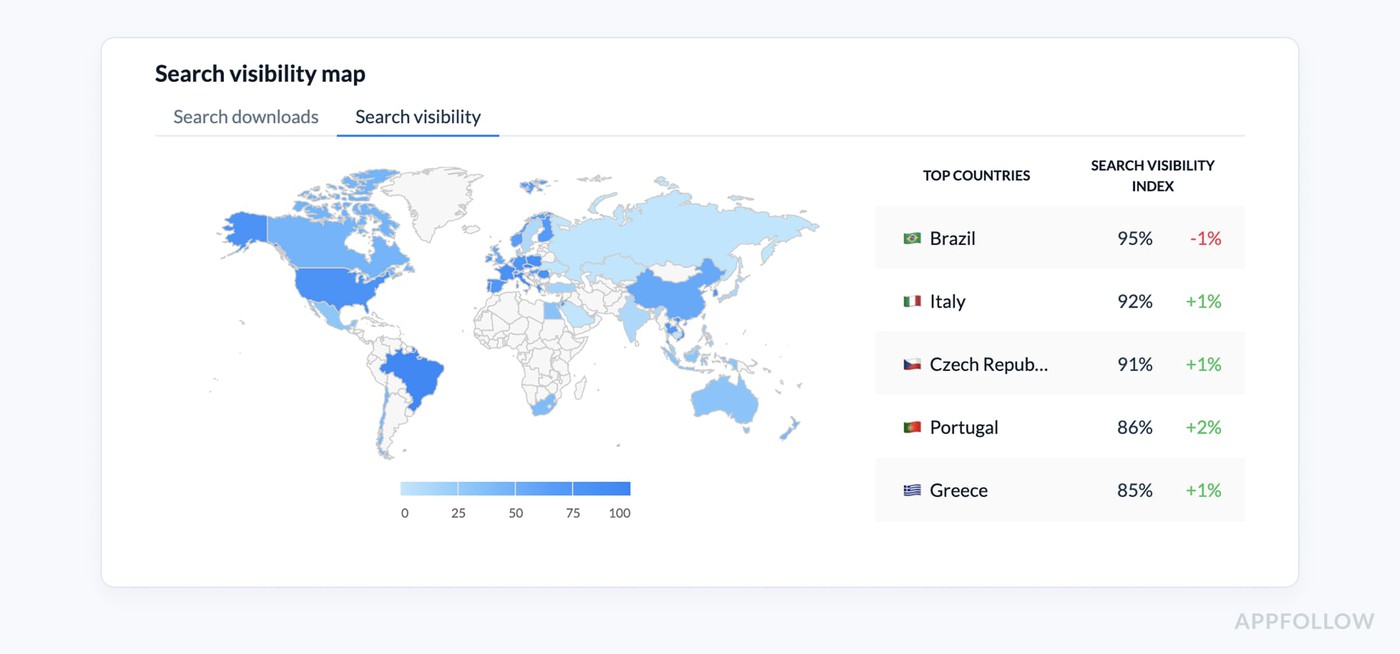
One of AppFollow dashboards app publishers use during localization. Check your app
That is what stronger app store optimization strategies look like in practice. You do not translate everywhere. You choose the markets where store localization has a real chance to compound.
Tip 18. Don’t translate - adapt your app page copy
Translation alone does not localize an app page. It just makes the same message readable in another language. Real localization changes the promise. That is one of the more useful app store optimization best practices to get right, because
Users in different markets often search differently, compare differently, and care about different proof points before they install. So start your localization right:
- Do not translate your English keyword set word for word. Rebuild them from local search behavior.
- Then move to the page itself. Rewrite screenshot text based on what users in that market actually respond to. Change the first screenshot headline first, because that is where the install decision starts.
A budgeting app, for example, may lead with “control monthly spending” in one market, but “manage family expenses easily” in another.
Same product. Different trigger. That is local search language turning into conversion logic.
- Next, review the top apps in that country and category. What benefits do they push first? Trust? Simplicity? Speed? Privacy? Savings? That tells you what region-specific messaging already fits local expectations. Build your translated metadata and localized screenshots around that pattern, then test one market-specific angle at a time.
These are the tips for app store optimization that actually improve market fit, because they adapt the page to local demand instead of just changing the words.
ASO performance monitoring tips
Tip 19. Track the metrics that show whether ASO is actually working
A lot of teams still judge ASO by one number - usually rank.
That is risky. A keyword can climb while installs stay flat. Traffic can grow while the page converts worse. Ratings can slip before visibility drops.
Real app store optimization strategies look at the full chain, because ASO only works when discovery, conversion, and post-install sentiment move in the same direction.
Start with a simple scorecard.
- Track keyword tracking for your priority terms, but never read positions alone.
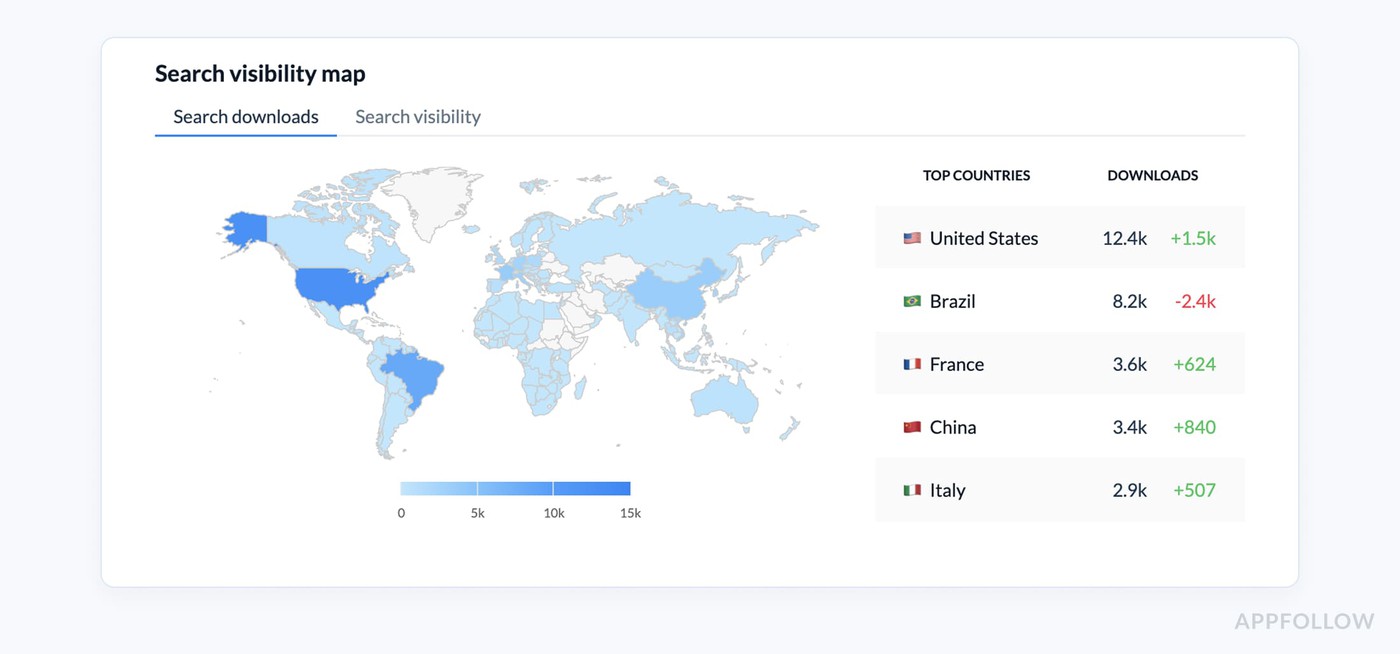
- Add search visibility, app page traffic, and conversion rate so you can see whether better discovery is turning into action.

- Then watch rating average, rating volume, and recurring review themes. That is where you catch the story behind the numbers.
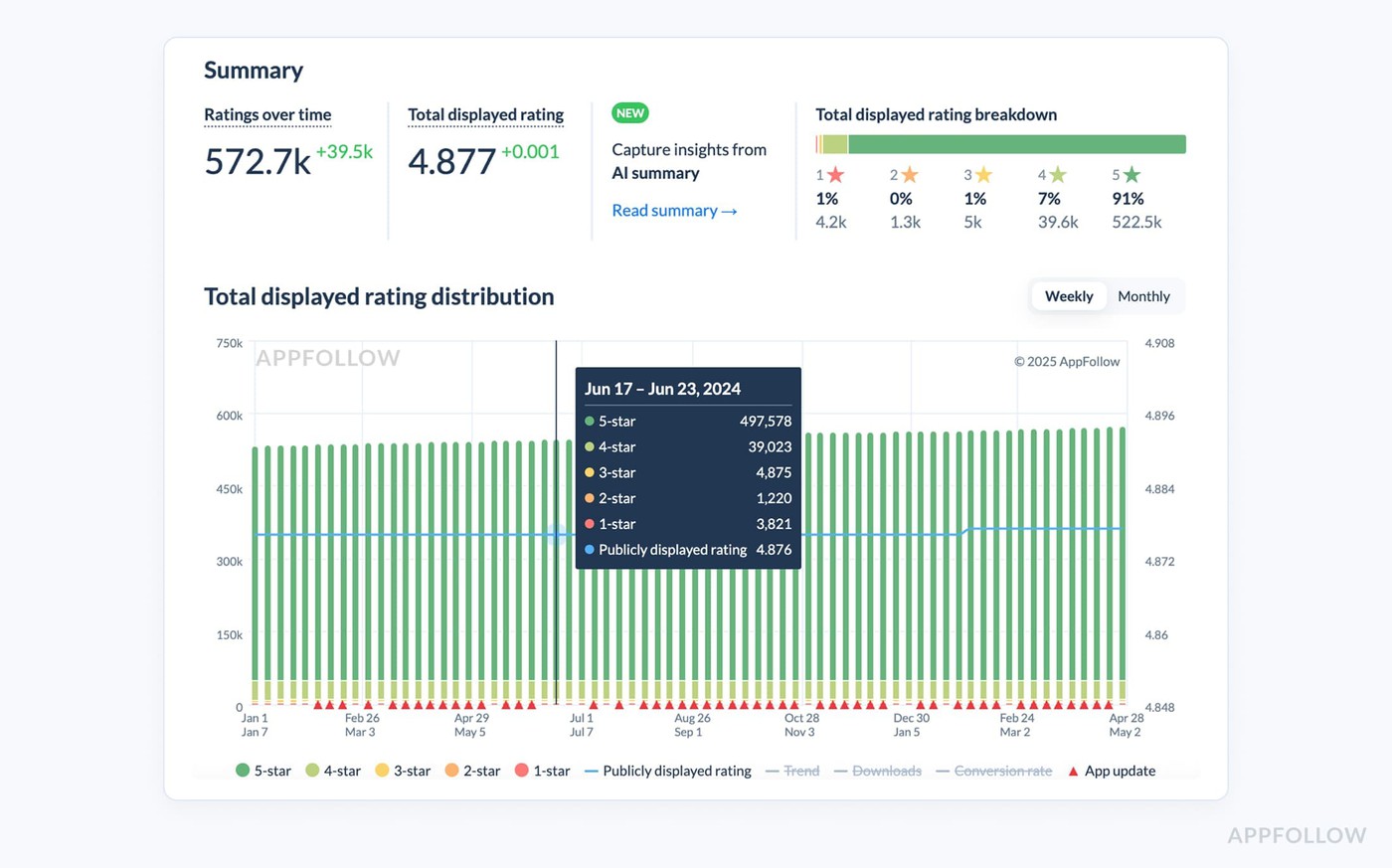
If rankings hold but ratings dip after a release, the issue is probably product experience, not metadata. If visibility rises but downloads do not, the page promise is not closing the gap. - Search-driven download movement matters most because it tells you whether your ASO is creating business impact or just nicer charts.
Yaroslav Rudnitskiy, ASO guru:
“The metric stack matters more than the metric itself. Position is only the first signal. A keyword moving from 12 to 6 looks great until you see that traffic rose, conversion stayed weak, and ratings deteriorated in the same week.
That is a visibility gain with a weak handoff. The teams that improve fastest are the ones that read rankings, page behavior, and feedback together before they decide what to change next.”
A delivery app is a good example. If “grocery delivery” jumps in rank, app page visits rise, but installs barely move, the next task is not another keyword edit. It is probably creative or message work. If installs improve and review themes suddenly mention late deliveries or promo-code confusion, that tells you the listing is doing its job and the product is now dragging down future performance.
ASO techniques do not stop at rank tracking. They measure whether discovery is qualified, whether the page converts, and whether the product experience is strong enough to protect future growth.
Tip 20. Watch competitors for momentum shifts, not just keyword overlap
Most teams compare a keyword list, notice overlap, maybe copy a few terms, and call that competitor intelligence. That misses the part that actually matters.
Strong ASO strategies are built around momentum.
- Who is suddenly gaining positions?
- Which app just changed its screenshot story?
- Who moved up in the category after an update?
- Did someone get featured events support, or start winning more from a specific market?
Those shifts tell you where demand is moving before your own numbers fully react. AppFollow’s app competitor ASO tooling is designed around exactly that view: what competitors rank for, what brings them installs, and how top-chart and category signals change over time.
The practical move is to stop watching competitors only for keyword overlap and start reading them like a live market feed. Check new ranking gains, fresh screenshot or messaging changes, movement inside top charts, and changes in category conversion.
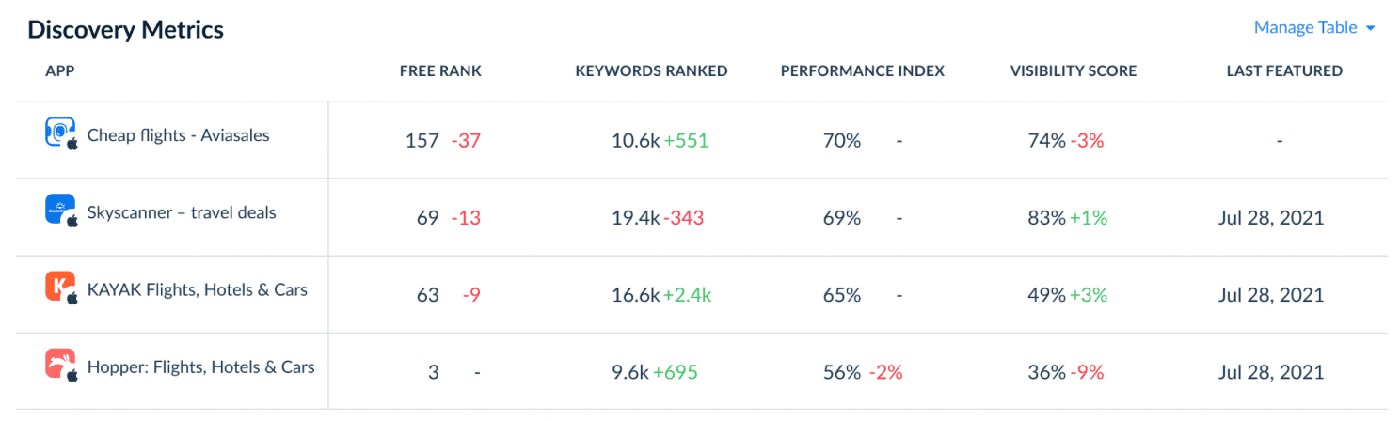
Then ask a harder question: which of their terms are just visible, and which look like install-driving keywords?
A meditation app, for example, may see a rival climb not because they added one better keyword, but because they reframed the first screenshot from “sleep sounds” to “fall asleep faster tonight,” got featured, and started converting more efficiently in Health & Fitness.
Yaroslav Rudnitskiy:
“The useful question is never ‘What keywords do competitors use?’ It’s ‘What changed in their system before they moved?’
Sometimes the answer is metadata. Sometimes it is creative. Sometimes they entered a market more aggressively, improved conversion in a category, or got external visibility through a feature.
When you track those signals together, you stop reacting to competitors late and start understanding the mechanism behind their growth.”
Tip 21. Use alerts so ASO does not become a monthly surprise
If ASO only shows up during the monthly report, the team is already late. By then the ranking drops have been sitting there for days, a ratings problem may have snowballed into a review crisis, and a competitor could have changed its screenshots or metadata without anyone reacting.
Good ASO is about how fast you notice that something changed. A sudden keyword loss, a dip in rating average, a burst of negative reviews after a release, or a competitor move in the same category should not wait for the end-of-month deck.
AppFollow users use email and Slack alerts for events like:
For example → | 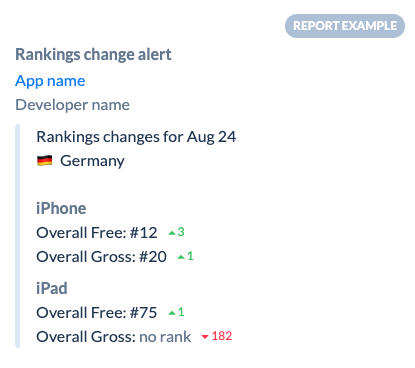 |
Dzianis Shalkou, Senior Professional Services Manager
“Monthly reporting is for pattern recognition, not first discovery. If that is the first moment your team learns something went wrong, the loss has already had time to spread through rankings, ratings, and conversion. The more mature setup uses alerts as an operating layer.
You do not wait to review ASO. You run ongoing change monitoring, then use the monthly report to explain what the alerts already surfaced.”
App store optimization checklist for weekly and monthly audits
This framework comes from the patterns AppFollow’s team sees again and again while working with app teams that monitor growth closely, catch ranking shifts early, and treat ASO like an operating rhythm instead of a once-a-month cleanup.
A good app store optimization checklist does not just help you stay organized. It helps you notice what changed before performance slips far enough to hurt installs.
Here’s the practical split. A weekly audit is for movement. You check what shifted, what spiked, what dropped, and what needs attention now. That means priority keyword rankings, rating average, rating velocity, review patterns, market-level movement, competitor changes, and any alerts that signal the store already reacted to something. Weekly work is about catching change while it is still small.
Weekly ASO Checklist
- Review ranking movement for priority keywords
- Check rating average and rating velocity
- Scan new reviews for repeated themes
- Review competitor messaging or creative changes
- Check alerts for metadata changes, featuring, and ranking shifts
- Compare top markets against slipping markets
- Flag any sudden traffic or conversion anomalies
- Note what needs action this week
Monthly reviews do a different job. That is where strategy gets cleaned up. You revisit the keyword map, remove terms that bring the wrong traffic, compare countries and stores more deeply, review creative and messaging, and document what actually worked.
This is where smart app store optimization tips become a repeatable process.
Monthly ASO Checklist
- Refresh the keyword map
- Remove low-fit keywords that do not convert
- Review screenshot copy against real review language
- Assess localization opportunities by market
- Compare country and store performance side by side
- Review competitor changes across the month
- Document test outcomes and next hypotheses
- Decide what to scale, what to pause, and what to test next
If weekly checks help you react in time, monthly checks help you get smarter. One protects momentum. The other improves direction. And when both are in place, review monitoring stops being reactive noise and starts becoming part of a real growth system.
Turn ASO tips into a working system with AppFollow
This is where good ASO stops being a pile of recommendations and starts working like an operating system. AppFollow brings the moving parts into one place, so teams are not bouncing between keyword tools, review dashboards, spreadsheets, and monthly reports.
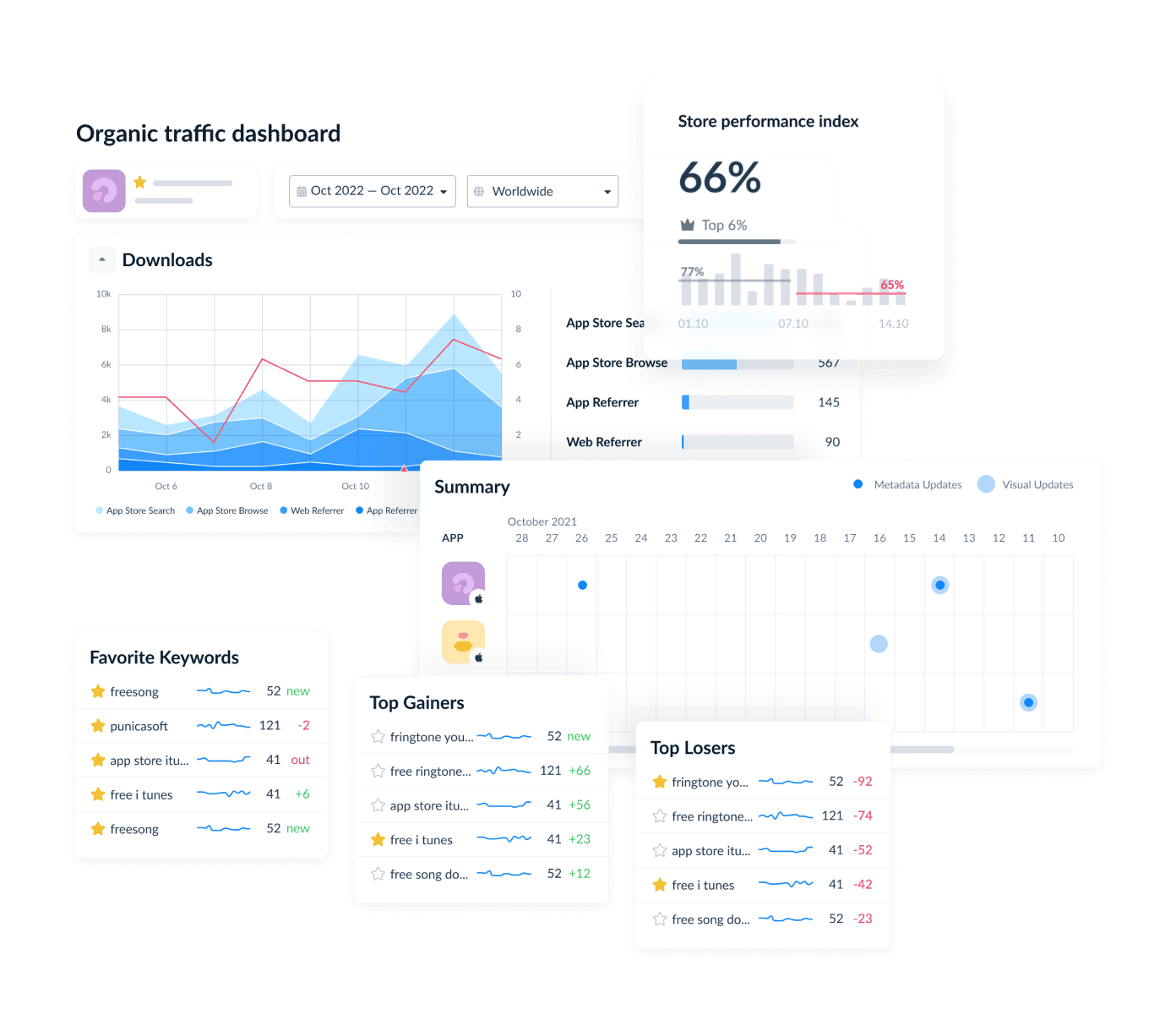
Its value comes down to three things: it helps teams see what is happening in the store, understand why it is happening, and react before momentum slips. On the ASO side, that means keyword performance, visibility, downloads, traffic, conversion rates, competitor intelligence, and alerts tied to the changes that actually affect growth.
On the reputation side, it connects user feedback, ratings, and review workflows back to store performance.
Key features
- Keyword intelligence with visibility, popularity, rank, difficulty, and impact on actual downloads.
- App store performance views for visibility, downloads, traffic, and conversion rates.
- Filters by country, time frame, channel, and store
- Competitor intelligence for competitor keywords, install-driving terms, rankings, top charts, featuring events, and category conversion rates.
- Alerts for ranking, rating, featuring, reviews, and metadata changes.
- Review management and analysis for feedback monitoring and workflow support.
- User-feedback insights that can inform app-page messaging and screenshots.
- Integrations with Slack, Zendesk, Salesforce, Helpshift, Intercom, Freshdesk, Help Scout, Discord, Tableau, and more.
cta_get_started_purple
FAQs
What are the most important ASO tips for beginners?
The best ASO tips for beginners are simple: start with relevant keywords, improve the first screenshot, time your review prompts after a positive user moment, and monitor rankings every week. Treat reviews as product feedback, not just a reputation metric. That is how beginner ASO starts improving app store visibility and conversion at the same time.
What is the difference between ASO strategies and ASO techniques?
ASO strategies are the big-picture system. They define prioritization, goals, and the overall growth framework.
ASO techniques are the specific actions inside that plan, like rewriting metadata, testing screenshots, improving review timing, or updating localization. In other words, strategy decides the direction. Techniques handle execution inside the ASO workflow.
What should an app store optimization checklist include?
A good app store optimization checklist should include keyword ranks, conversion rate, ratings, review themes, competitor monitoring, localization opportunities, and a clear testing cadence. The practical version usually has a weekly checklist for rankings, reviews, and sudden changes, plus a monthly audit for keyword cleanup, creative review, and market expansion decisions. That is what makes the ASO review process useful instead of reactive.
What are the most important ASO guidelines to follow?
The core ASO guidelines are straightforward: do not chase irrelevant volume, do not change everything at once, do not ignore reviews, do not skip monitoring, and do not copy one market’s metadata everywhere. Most ASO mistakes start there. That is how teams create metadata issues, miss early signals behind ranking drops, and lose monitoring discipline.
What are the best ASO tips for 2026? Diagnose whether your problem is impressions, conversion or retention before changing anything. Then, in order: fix the weakest layer, target keywords you can realistically rank and convert on, rewrite the first screenshot to answer a doubt, respond to negative reviews, and localize into markets where you already show ranking potential.
What are ASO guidelines? ASO guidelines are the rules and constraints you optimize inside: store character limits, what needs a version submission, what each field is indexed for, and what the store policies prohibit. Techniques are what you do. Guidelines are what you're allowed to do.
What is the difference between ASO strategies, techniques and best practices? Strategy decides what to fix first. Techniques are the specific actions. Best practices are the actions that hold up across enough apps to be worth defaulting to.
How long does ASO take to work? Indexing for a new term can happen within days of a version going live. Moving up the rankings for a competitive term usually takes weeks to months, and practitioners in the thread above describe multi-month timelines for localized wins.
How often should you change app store metadata? Keywords and titles are tied to version submissions, so they move on your release cadence. Promotional text, Custom Product Pages and most PPO tests are decoupled from the binary, so those can run weekly.
Does responding to reviews improve ASO? Indirectly. Google publishes an average +0.7 rating lift from responding to a negative review (Play Console), and rating feeds store trust and conversion. Google does not state that replies themselves are a ranking factor.
What are App Store Tags and can you control them? Tags are Apple's LLM-generated descriptors, built from your App Store Connect metadata, appearing in search results and on your product page. You can deselect them in App Information, and Apple warns that deselecting all of them may hurt discoverability.
Is ASO still worth it in 2026? Apple publishes that almost 65% of downloads happen directly after a search. That share is the whole case, and it hasn't moved much. What has moved is where the search happens: Play is adding conversational search, and Gemini now surfaces app suggestions outside the store entirely.