What Holiday Updates Cost Games: 51.5M Reviews

Table of Content:
- Key insights
- Where the numbers come from
- What the data shows about seasonal update costs
- Why holiday updates can be harder to recover from
- Five event examples and the decisions they expose
- What to do before, during, and after the event
- How to run the seasonal event watch in AppFollow
- Seasonal update backlash FAQ
Seasonal events have a well-documented upside. GameRefinery’s 2024 analysis found that more than 90% of the top-grossing 100 iOS games used them. Clash of Clans recorded a daily revenue jump above 300% in mid-December 2023, alongside its Christmas event and major Town Hall and Hero Equipment changes. That last detail matters: the holiday did not operate alone.
The less visible bill arrives in the review queue: missing rewards, disputed prices, unfinished paid tasks, and players who cannot enter the event. Support has to answer them while someone else decides whether the event itself should change.
AppFollow’s Gaming App Reputation Benchmarks 2026 gives that workload some context: 51.5 million reviews across more than 22,800 games. Combine those annual findings with seasonal revenue research and documented event disputes, and a useful question emerges: how much extra work and reputation risk can your event’s expected return justify?
Here is what the published numbers support, where the cases differ, and how to calculate a staffing budget for your next Halloween or Christmas update.
Key insights
- Halloween is not an automatic revenue windfall. Naavik’s analysis puts median Halloween-week revenue at 0.97–1.05 times a normal week across its selected mobile games and markets.
- A review surge can land on an already thinly covered queue. AppFollow’s gaming benchmark reports a 24.8% average reply rate; 29% of games never answered a review.
- Response delays can outlast a short event. Published averages were 299.3 hours for manual replies versus 24.8 hours for AI-powered replies—about 12.5 days versus one day.
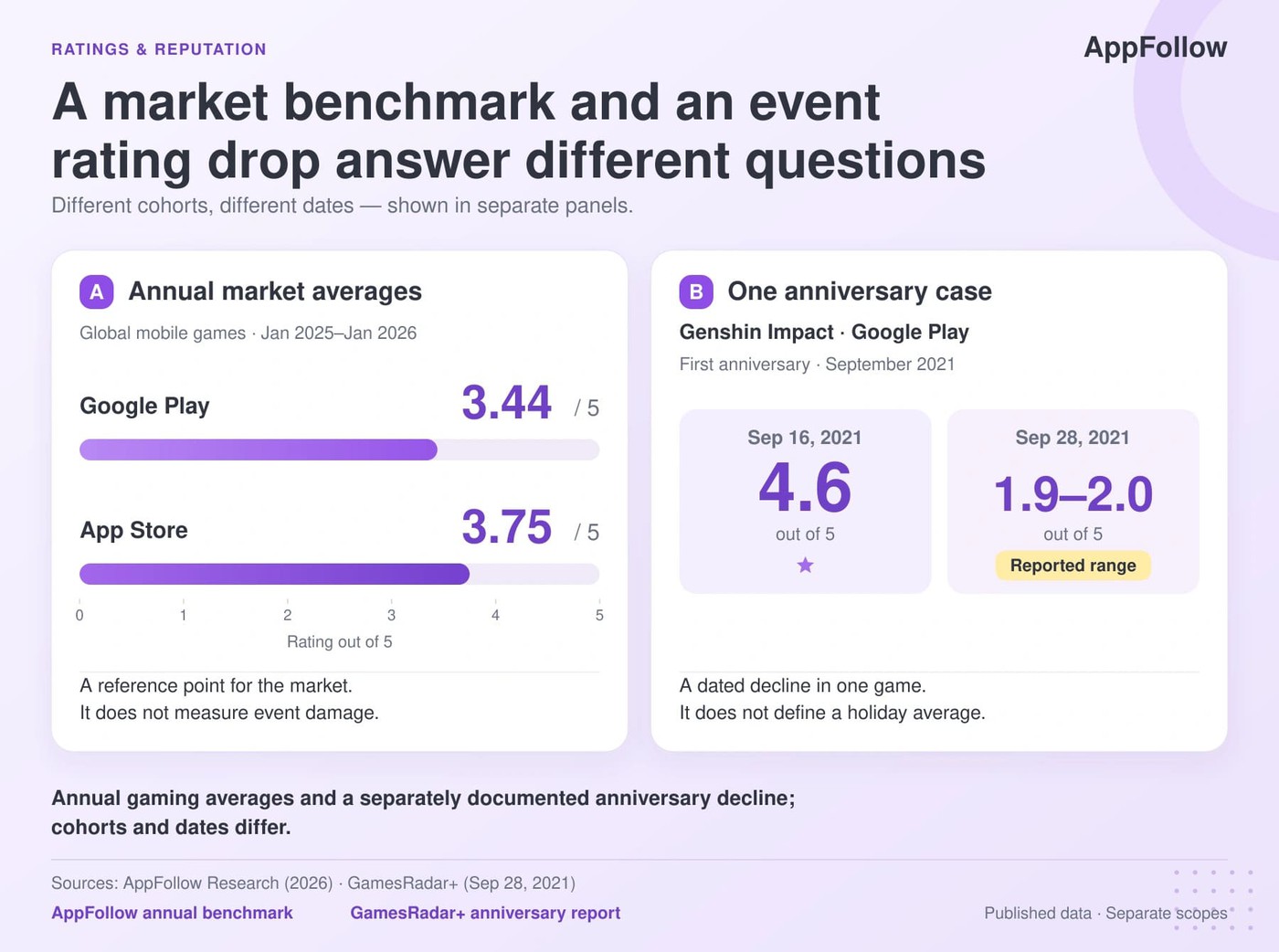
- Reward disputes can move ratings sharply. During Genshin Impact’s first anniversary in 2021, GamesRadar+ recorded Google Play at 1.9–2.0 stars, down from 4.6 earlier that month. This was an anniversary case, not a holiday average.
- Staffing needs a game-specific calculation. In the worked example below, 300 reviews a day at a 50% reply target require 150 replies and 10 hours of handling time. Those are planning assumptions, clearly separated from observed benchmarks.
- A response date is not a recovery date. Wuthering Waves announced 30 additional Tides on April 21, 2025. That documents compensation; it does not establish when ratings returned to baseline.
Where the numbers come from
This article combines published research and dated game examples, checked on October 27, 2026. AppFollow’s gaming rating analysis covers January 1, 2025–January 1, 2026: 51.5 million reviews, more than 561,000 developer replies, and 22,800-plus gaming apps across the App Store and Google Play.
That research combines AppFollow client telemetry and public store data across 15 gaming genres. Its app-level analysis includes 2,115 games. It is an annual reputation benchmark; its published figures do not measure average Halloween or Christmas rating damage.
Naavik’s September 2026 seasonal analysis uses a decade of Sensor Tower revenue and download data across 14 named mobile titles. Individual event examples below draw on official announcements and contemporary reporting.
The datasets answer different questions. Revenue estimates describe spending, review benchmarks describe reputation operations, and individual disputes show possible failure modes. Combining them cannot establish that a holiday caused a rating change.
The staffing and complaint-share calculations are illustrative. For your own event, use its actual opening and closing dates, a preceding 28-day baseline, and separate store, country, and version cohorts. Keep campaigns and major releases on the same timeline so their effects remain visible.
What the data shows about seasonal update costs
A seasonal event can earn money and still leave a costly support problem. Track revenue, recent review ratings, complaint share, and workload separately. Each tells you whether to change the event, add reply capacity, or investigate a broken release.
Do game ratings drop during Halloween and Christmas events?
A holiday does not imply a predictable star-rating penalty. The annual AppFollow rating benchmark puts the global average at 3.44 on Google Play and 3.75 on the App Store. Those are market reference points, not changes caused by seasonal updates.
For an individual release, compare the average rating of new reviews during the event with the preceding four weeks. Then inspect the displayed store rating separately. A stable headline rating can coexist with sharply worse recent feedback, especially when the game has a large historical rating base.
The stores also calculate ratings differently. Google Play weights recent ratings more heavily, while Apple displays a territory-specific summary rating. Preserve that distinction when someone asks whether “the game’s rating” recovered.
“Calendar windows cannot prove that every movement came from an event. They show where the seasonal pattern becomes strong enough to investigate at game, store, country, and version level.”
— Dzianis Shalkou, Senior Professional Services, AppFollow
Seasonal revenue needs the same care. Naavik’s five long-running Christmas-event titles had a median Christmas-week revenue multiplier of 1.88 in 2017 and 1.01 in 2025. Its U.S. Christmas 2025 comparison showed downloads at 1.41 times baseline against revenue at 1.05 times. See the cohort analysis.
For a live-ops budget, that is a reason to check incremental contribution after production, promotion, compensation, and support costs. A large daily spending spike and a profitable event are different calculations.
cta_get_started_purple
How much review volume should an event team prepare for?
Start with your own review history. AppFollow’s published 24.8% gaming reply-rate benchmark measures the share answered, not how much review volume grows during a holiday. Use comparable previous events to estimate the surge; keep a higher scenario ready for an incident.
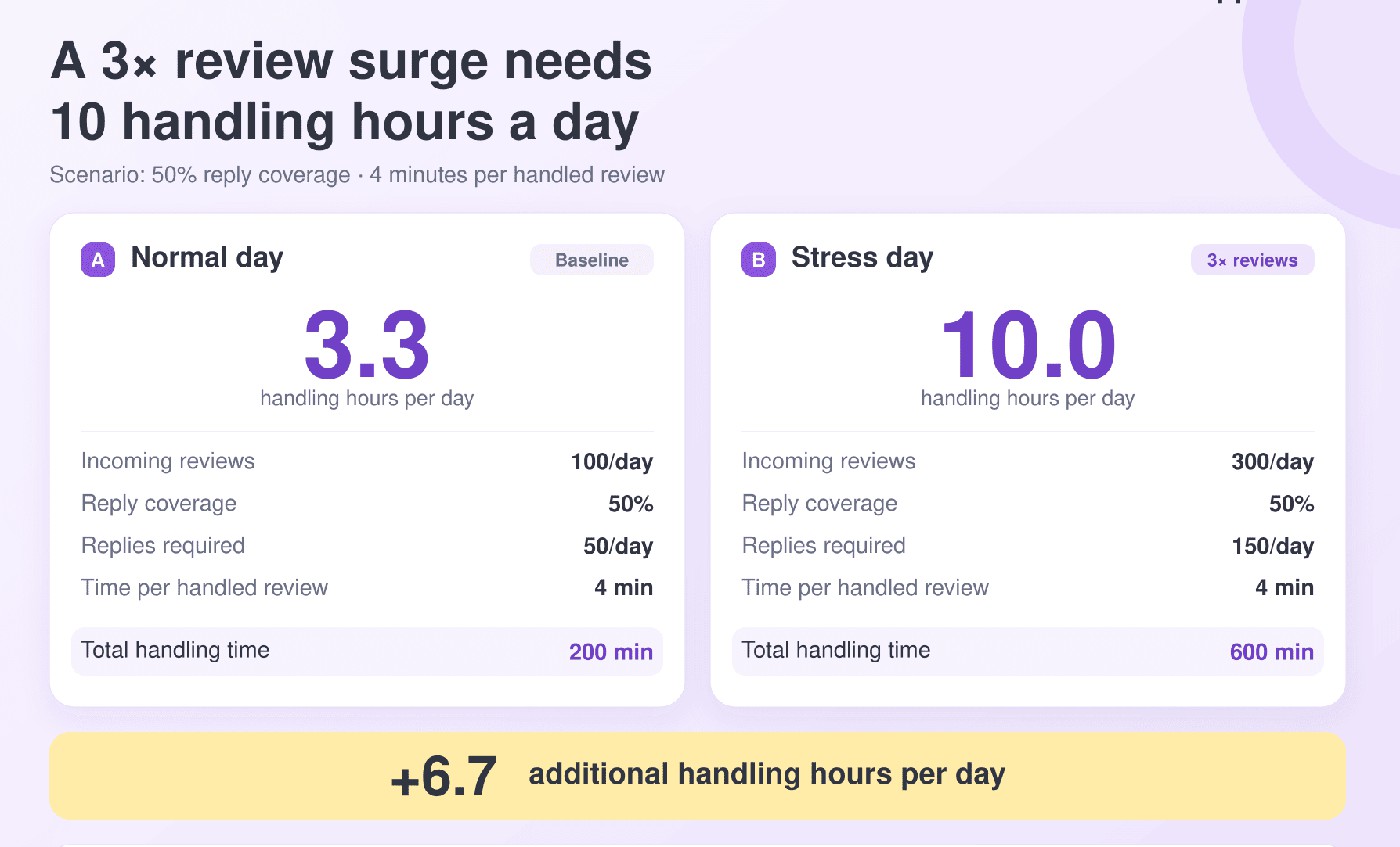
Illustrative capacity calculation: a game normally receives 100 reviews a day. A deliberately chosen 3× stress scenario raises that to 300. At 24.8% coverage, around 74 would receive replies and 226 would remain unanswered each day.
That is a workload calculation, not an observed seasonal multiplier.
If the team instead targets 50% coverage and allows four minutes per handled review, it needs 150 replies × 4 minutes = 600 minutes, or 10 handling hours daily. The same policy at normal volume needs about 3.3 hours. The surge therefore adds roughly 6.7 hours a day, before breaks, translation, and product investigation.
Use this formula with measured handling times: daily handling hours = incoming reviews × target reply rate × minutes per handled review ÷ 60. Staff for the busiest plausible day. If priority cases alone exceed the estimate, revise capacity rather than treating 50% as a ceiling.
Which complaints need an event change rather than another reply?
The distinction between ratings and sentiment is useful here. AppFollow’s gaming sentiment research reports scores of 62.4 for apps that reply and 61.9 for those that do not—a 0.5-point difference. That observational comparison gives no basis for assuming that more replies alone will resolve an unpopular reward system.
Separate complaints about prices, paywalls, competitive advantage, and refund requests from crashes, failed payments, connection problems, and lost progress. A successful charge with missing currency may need both support and engineering; “monetization” is too broad an assignment.
AppFollow Semantic Analysis groups review themes and shows category share, sentiment, and average review rating.

Use it to identify the cluster, then read representative reviews before assigning an owner. Economy and design leads need evidence about value or progression; engineers need the affected build, device details, and failure sequence.
Compare proportions as well as counts. Illustrative example: monetization complaints rise from 40 of 200 reviews before launch to 150 of 500 during the event. Their count grew 3.75×, while their share rose from 20% to 30%—10 percentage points. Volume alone would hide the change in the mix.
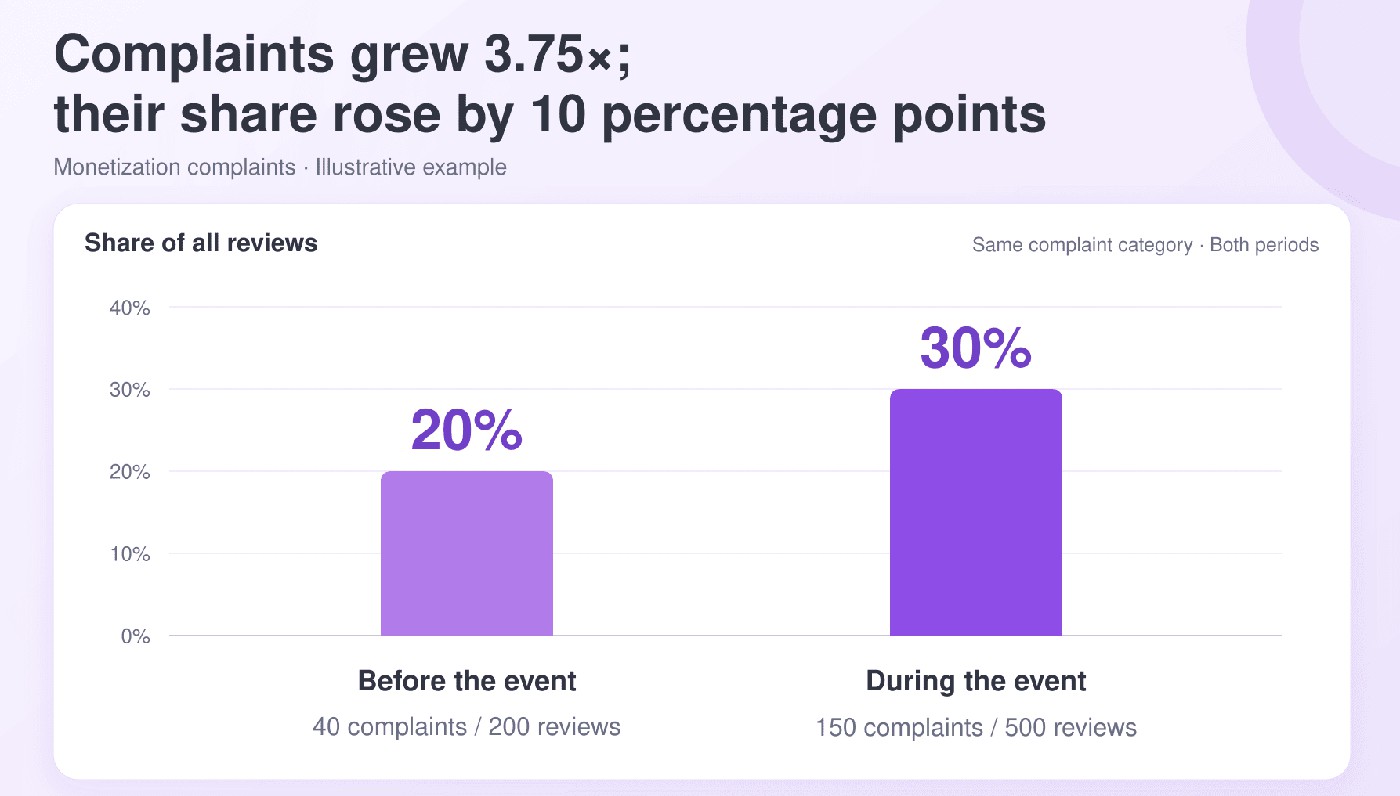
Record the sample size beside every share. A single complaint in ten reviews carries a different weight from 100 in 1,000. If classification is incomplete or multiple tags can apply to one review, preserve that limitation instead of forcing the categories to total 100%.
Why holiday updates can be harder to recover from
The calendar adds a constraint that an ordinary release may avoid: players have a fixed window to earn or claim rewards. If the event fails halfway through, fixing the build may still leave players without enough time to finish.
A seasonal event changes more than the artwork
A Halloween skin can be cosmetic. The pass, limited bundle, gacha banner, and event currency underneath it change what players can earn and what they must buy. Review the offer as an economy decision before reviewing it as a festive campaign.
Pokémon GO’s Winter Holiday 2023 announcement listed two optional Timed Research tickets, priced at US$2 and US$5.

Both carried a December 31, 8 p.m. local-time completion and reward-claim deadline. The ticket sale ended two days earlier.
That creates three separate things to communicate: what the ticket buys, when it stops being sold, and when tasks and claims expire. Put all three beside the purchase. For replies to price and reward complaints, use the monetization complaints playbook.
A hotfix does not restore lost event time
Before launch, name who can extend an event, grant missed rewards, change a price, and approve an emergency release. Check their holiday coverage. A support lead who can acknowledge a problem but cannot reach the decision-maker has only solved the first part.
Set a decision deadline against the event clock. If a paid task expires tomorrow, waiting three days for a complete incident report leaves the player without a usable remedy. Engineering can investigate the fault while the live-ops owner decides whether to pause the timer or protect completion.
Record compensation eligibility before issuing a public promise: affected dates, stores, versions, task progress, and how claims will be verified. A vague promise of “something for everyone” creates another queue when players disagree about what they were owed.
“Holiday events leave teams with less room to recover. By the time review volume confirms the problem, the people who can change rewards, pricing, or progression may be unavailable. Strong teams decide before launch who can authorize compensation, a hotfix, or an economy change during that window.”
— Lucija Knezic, Senior CSM and Product Strategy Manager, AppFollow
Acquisition sends new players to the same review page
Holiday promotion can bring a larger audience into contact with unresolved complaints. GameRefinery’s Halloween 2022 review reports a 500% download increase around Clash of Clans’ October 10 Town Hall update, which also promoted its Halloween plans. The major release is an important confounder.
Check product-page conversion in the affected market alongside review themes. If conversion weakens while incoming traffic rises, preserve the channel and country breakdown before changing spend. A rating decline by itself cannot tell you how many installs or how much revenue were lost.
Country and version breakdowns help narrow the investigation.
In AppFollow Rating Analysis, inspect the timeline and available country and version breakdowns; Google Play’s detailed breakdowns require the Ratings integration.
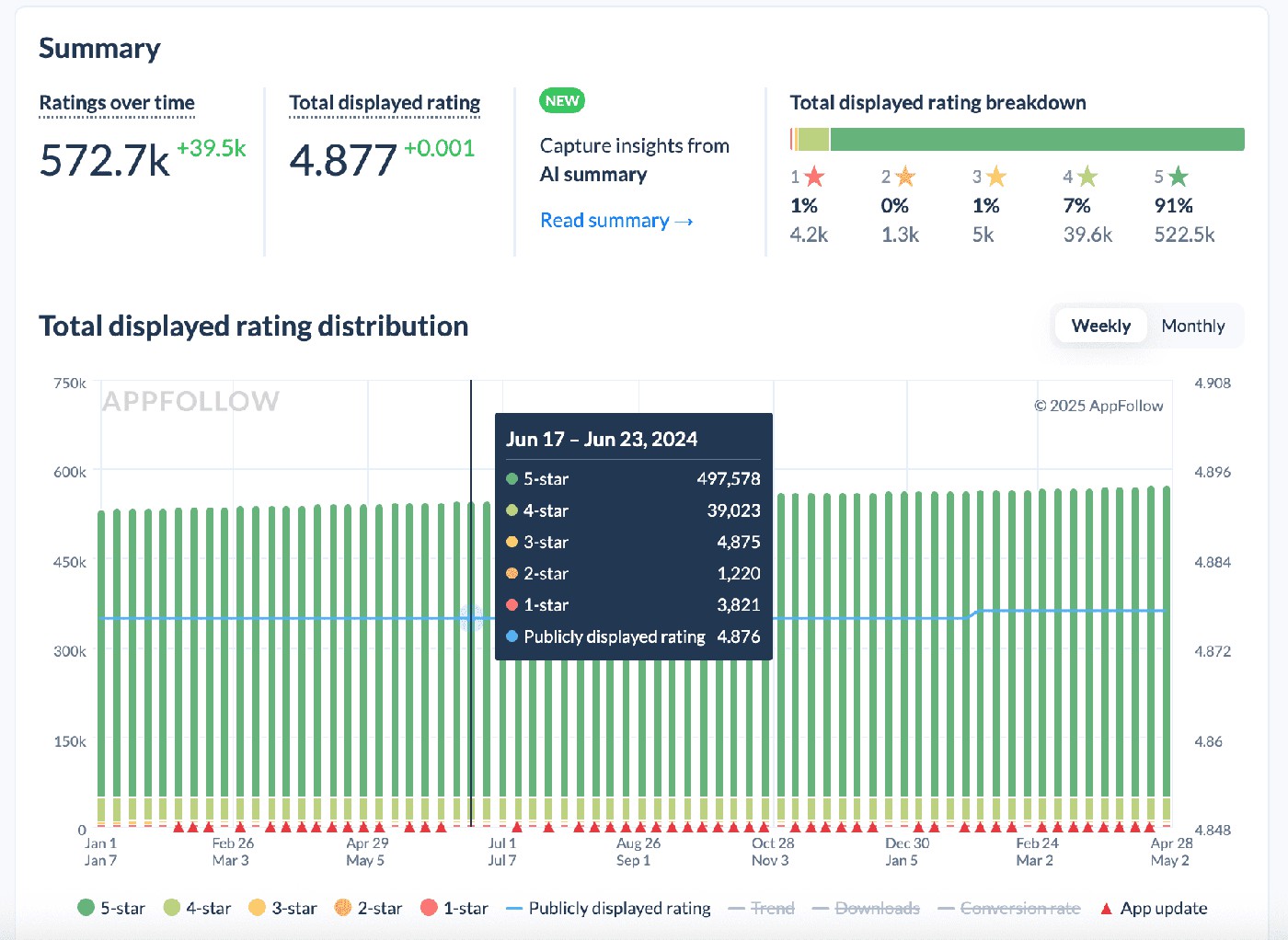
Pair the chart with release dates, event changes, and campaign starts.
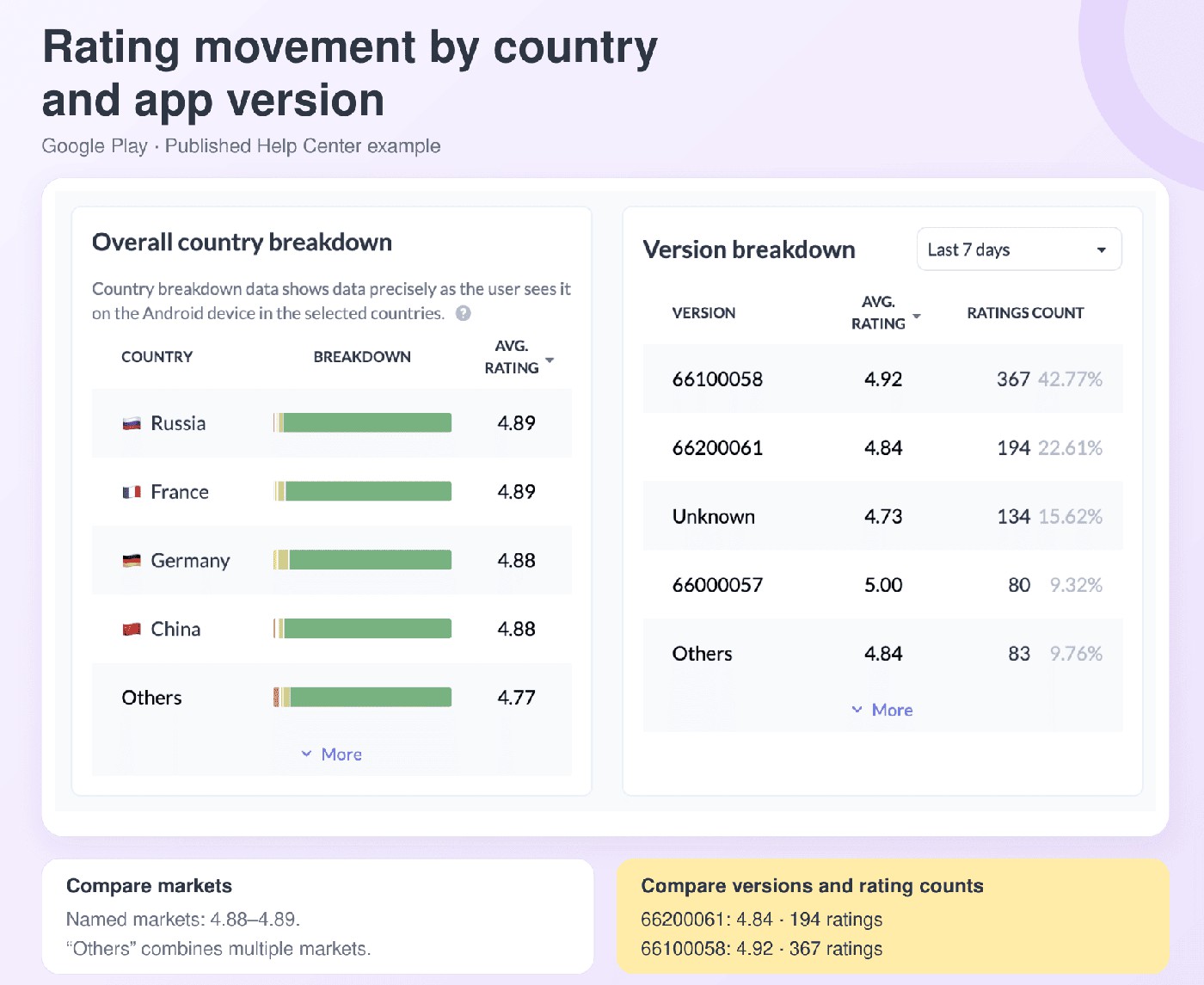
A fall concentrated in one country across versions points toward a localized offer, translation, or audience issue. A fall concentrated in one build across countries points toward the release. Treat both as hypotheses and verify them against review text and internal incident data.
cta_get_started_yellow
Five event examples and the decisions they expose
Christmas offer design and anniversary disputes reveal different risks. The table keeps the documented numbers beside the action they can inform; response dates describe what a studio did, rather than proving that its rating recovered.
Player-facing change | Published evidence | Dated action or condition |
Clash Royale, 2025–2026 update sequence Season Shop removal, followed by level and Hero changes | Supercell described a Google Play rating decline and sustained negative sentiment | Major complaints addressed by March 2026; commitment against further card levels in June |
Pokémon GO, Winter Holiday 2023 Two optional paid Timed Research tracks | Tickets cost US$2 and US$5 | Tasks and rewards expired December 31 at 8 p.m. local time |
Wuthering Waves, first-anniversary preview, April 2025 Disappointing anniversary rewards | 30 additional Tides announced: 10 of each of three types | Apology and reward announcement on April 21 |
Blue Archive, 5.5th anniversary, July 2026 Gacha-system overhaul announced shortly before implementation | Announcement July 26; planned implementation July 29 | Producer apology and fuller explanation July 28 |
Genshin Impact, first anniversary, September 2021 Anniversary rewards fell short of player expectations | Google Play: 4.6 on September 16; 1.9–2.0 reported September 28 | Contemporary reporting captured a changing rating snapshot |
The Clash Royale account from Supercell’s Gamescom Dev talk is particularly useful because the team described both stronger engagement after one change and backlash among players who lost something they valued. The lesson for a seasonal launch is to review the affected player segment, not just the portfolio average.
Wuthering Waves’ additional rewards were specific: 10 Radiant Tides, 10 Lustrous Tides, and 10 Forging Tides. For an apology to be operationally useful, players need that level of clarity about what changes, who qualifies, and when it arrives.
Blue Archive’s July 2026 dispute highlights notice as a product risk. The overhaul was announced on July 26 ahead of planned July 29 implementation; an apology and fuller explanation followed on July 28. A short gap between disclosure and launch leaves little room to resolve uncertainty.
Use anniversaries as examples of reward and progression disputes, while measuring your own holiday cohort separately. For identifying coordinated abuse and using store reporting tools, see the review bombing recovery guide.
What to do before, during, and after the event
The release-response playbook covers general update incidents. For a seasonal event, add the reward deadline, compensation authority, and holiday staffing coverage to that process.
Two weeks out: establish the baseline and escalation route
Pull the previous 28 days of review volume, new-review ratings, sentiment, and priority complaint shares. Use comparable weekdays and keep planned campaigns visible. The two-week preparation window gives you time to agree thresholds; it is not a claim that every event gives two weeks of warning.
Configure New Reviews Spike for the relevant app, rating range, tags, and timeframe. Add Total Rating Change and a scheduled AI Summary from the Monitoring Agents library. Choose thresholds from the game’s history and give each alert a named recipient.
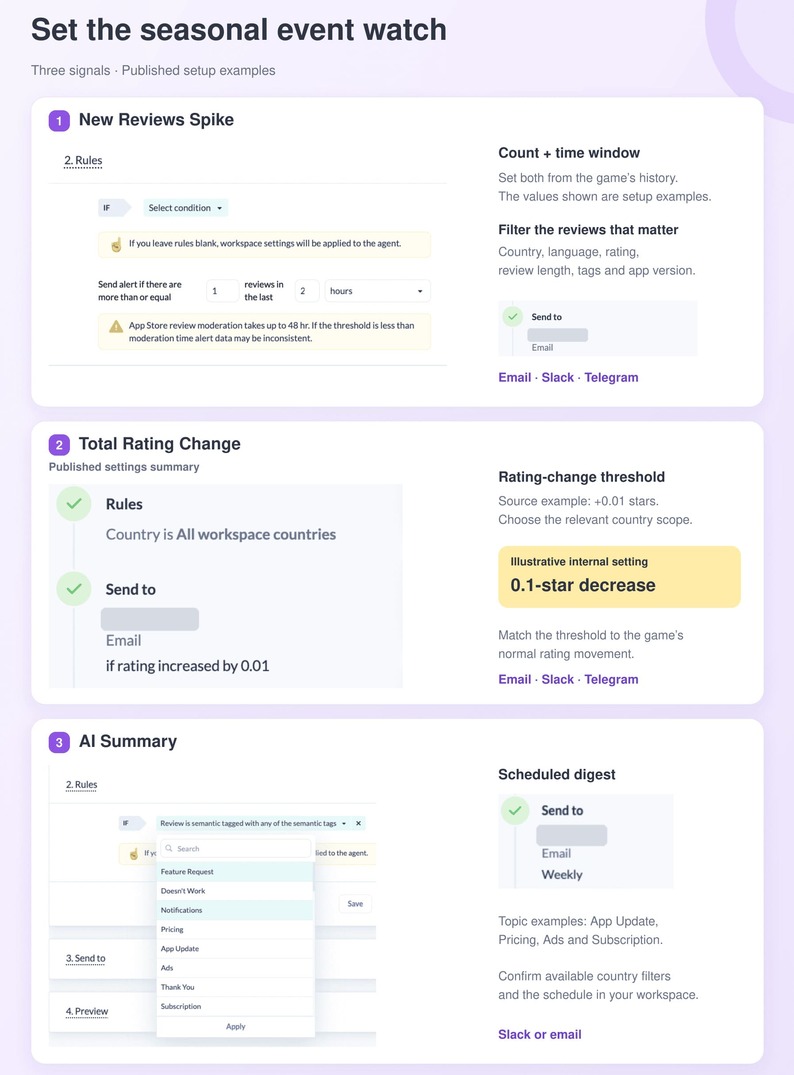
A practical internal rule might open an investigation when negative event-related reviews exceed twice their usual daily count and the cluster contains at least 20 reviews. This is an illustrative triage rule, not an industry benchmark. Compare it with normal volatility before using it.
Test the route before launch: trigger a notification, confirm the on-call owner receives it, and check that the person can reach engineering and the economy lead. An alert without authority behind it only documents the delay.
cta_free_trial_purple
Event week: route the issue before scaling replies
Start the daily review with the most consequential complaints. Paid access failures, missing purchases, and lost progress need a support or engineering owner immediately. Reward-value and progression disputes need the live-ops or economy lead to decide whether the design changes.
Attach a small evidence packet: review count and share, baseline comparison, affected country and version, representative messages, and the event deadline. Ask for a decision—extend, compensate, fix, explain, or hold—so support can use approved facts in its replies.
The gaming reply-rate benchmark found 3.77 average stars among games replying to 30–50% of reviews, versus 3.25 among those replying to under 1%. That is an association between groups. It supports paying attention to coverage; it does not promise a half-star recovery from a reply campaign.
Use approved templates or AI-assisted drafts for repeatable questions. Keep account-specific refunds, compensation eligibility, missing purchases, and lost progress with people who can verify the case. Measure how many priority reviews remain unanswered, not just how many replies the team sends.
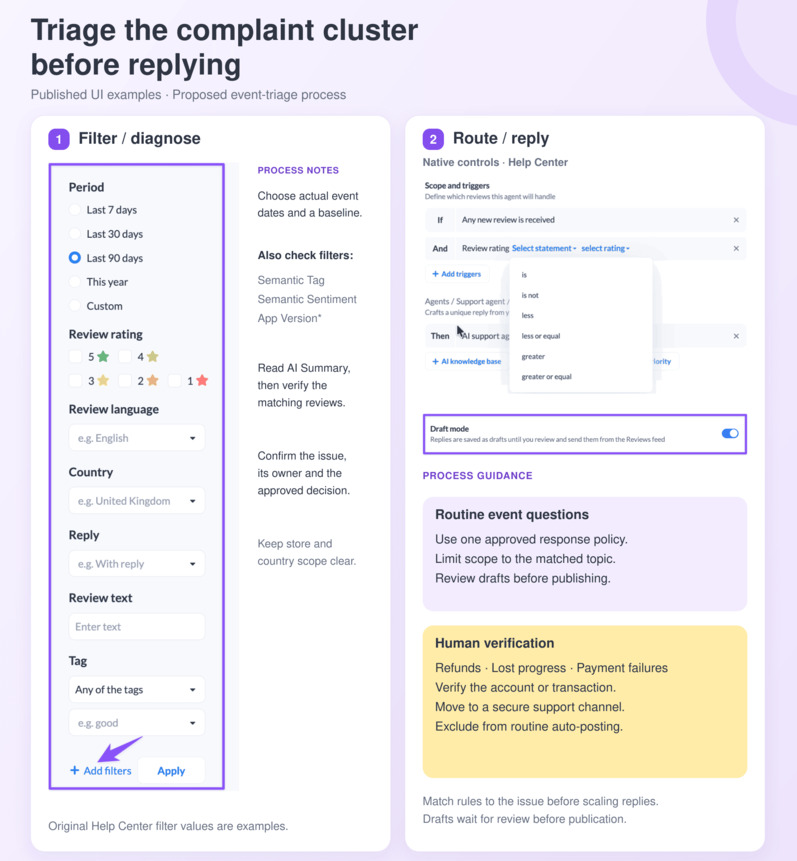
“Studios that stay in control separate decisions from replies. One owner decides whether the event changes. Support handles recoverable conversations, while engineering receives version-linked failures.”
— Karen Taborda, Customer Growth Team Lead, AppFollow
After the event: measure recovery and preserve the evidence
Define recovery before reporting it. One useful internal rule is a seven-day average new-review rating back at or above the preceding 28-day baseline for seven consecutive days, alongside complaint share and backlog returning to their usual ranges. This is a proposed operating definition, not a published industry standard.
Avoid a reflex App Store rating reset. Apple applies it across all countries or regions for the selected platform version; after release, the previous rating cannot be restored. Written reviews remain visible. A localized event problem deserves investigation before that decision.
Report policy violations with evidence, while continuing to handle genuine criticism. Google normally delays public ratings and reviews by around 24 hours and may pause publication while investigating suspicious activity. A rise after removals must be recorded separately from players revising their opinions.
“Resetting removes the comparison number while complaints remain visible. Mass-reporting adds delay without fixing the event. Preserve the evidence, separate abuse from genuine feedback, and measure recovery against baseline.”
— Dzianis Shalkou, Senior Professional Services, AppFollow
Keep the event record: first warning, decision time, fix or compensation date, priority reply coverage, complaint-share trend, and the date your recovery rule was met. If observation ends first, report the event as still below baseline rather than assigning it a recovery duration.
How to run the seasonal event watch in AppFollow
Translate the operating plan into three views, each tied to a decision.
- Before launch, use Monitoring Agents to deliver review spikes, rating changes, and summaries to the responsible team. New Reviews Spike supports email, Slack, or Telegram. Test delivery with the same filters and destination you will use during the event.
- During the event, use Semantic Analysis to compare complaint categories, then inspect country and version patterns in Rating Analysis. Semantic Analysis is a paid add-on; country filtering for Google Play requires a Reply to Reviews data connection. Confirm those connections before the review shift begins.
- For repeatable feedback, Automation Agents apply configured rules every 10 minutes and require an active reply connection. Their availability depends on the plan. Keep the automated scope narrow enough that it cannot promise an unapproved refund, extension, or reward.
After the reply push, inspect Agent Performance: replies submitted, agent reply time, platform reply time, and Reply Effect
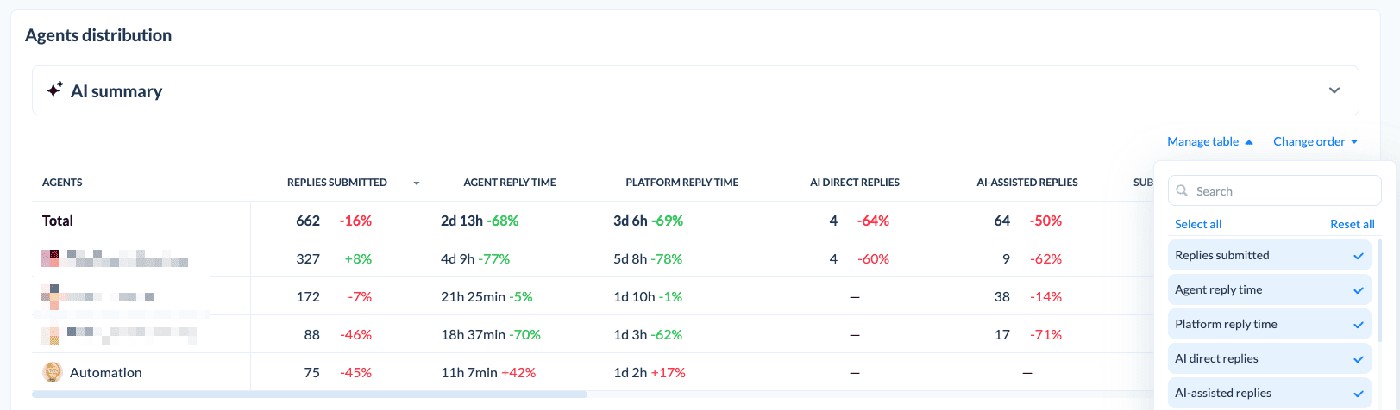
Separate the time your team takes to respond from the store’s moderation time. Check the reporting period: Agent Performance filters by reply date, which differs from a review-date cohort.
Reply Effect tracks qualifying review updates after replies.
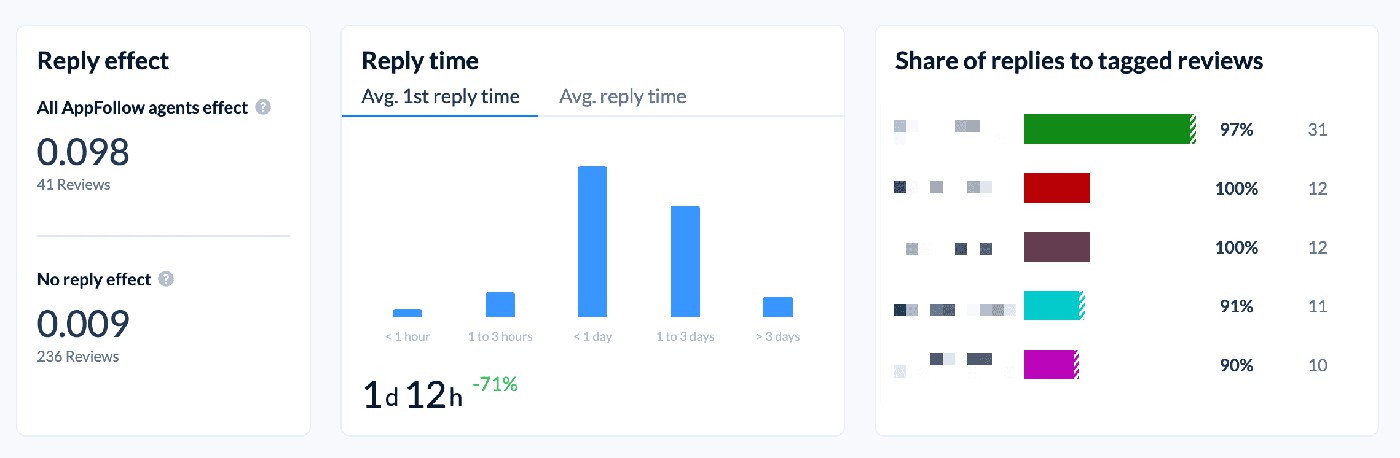
Use a documented observation window and inspect the review history; a later change may follow compensation or a product fix as well as the conversation. Assess the unanswered cohort and overall event metrics alongside it.
cta_free_trial_purple
Seasonal update backlash FAQ
What is a normal rating drop during a holiday event?
There is no defensible universal figure in the research used here. Benchmark your event against the same game, store, and country over the preceding 28 days. Report the change in new-review rating separately from the displayed store rating, with review counts beside both.
Why do seasonal updates attract negative reviews?
Players may dispute a paid offer’s value, a progression change, a reward deadline, or a technical failure that blocks participation. Those need different decisions. First identify what the player could not do or receive; then decide whether the remedy belongs to support, engineering, or the economy team.
How long should rating recovery take?
Response time and recovery time are separate measures. A studio can announce compensation within days while negative reviews continue. Track recovery from a defined low point to a sustained return to your own baseline, and record the fix, reward, and moderation dates alongside it.
Should I reset the App Store rating after a bad seasonal update?
Treat it as an exceptional decision. Apple’s reset affects all countries and regions for that platform version, cannot be undone after release, and leaves written reviews visible. Fix the underlying issue and assess the affected markets before discarding the existing rating base.
Can event review bombs be removed?
Stores can remove policy-breaking submissions. Google’s documented process includes holding new ratings and reviews while suspicious activity is investigated. Anger about a real price, reward, or bug does not become abusive simply because many players share it. Preserve evidence and report the specific violation.
How much extra reply capacity should we budget?
Multiply your expected daily reviews by the target reply rate and measured handling time, then divide by 60. For example, 300 reviews × 50% × four minutes needs 10 handling hours daily. Add time for escalation and specialist cases, and check coverage against the peak day.cta_event_signup_purple