Review bombing in mobile games: App Store and Google Play recovery guide

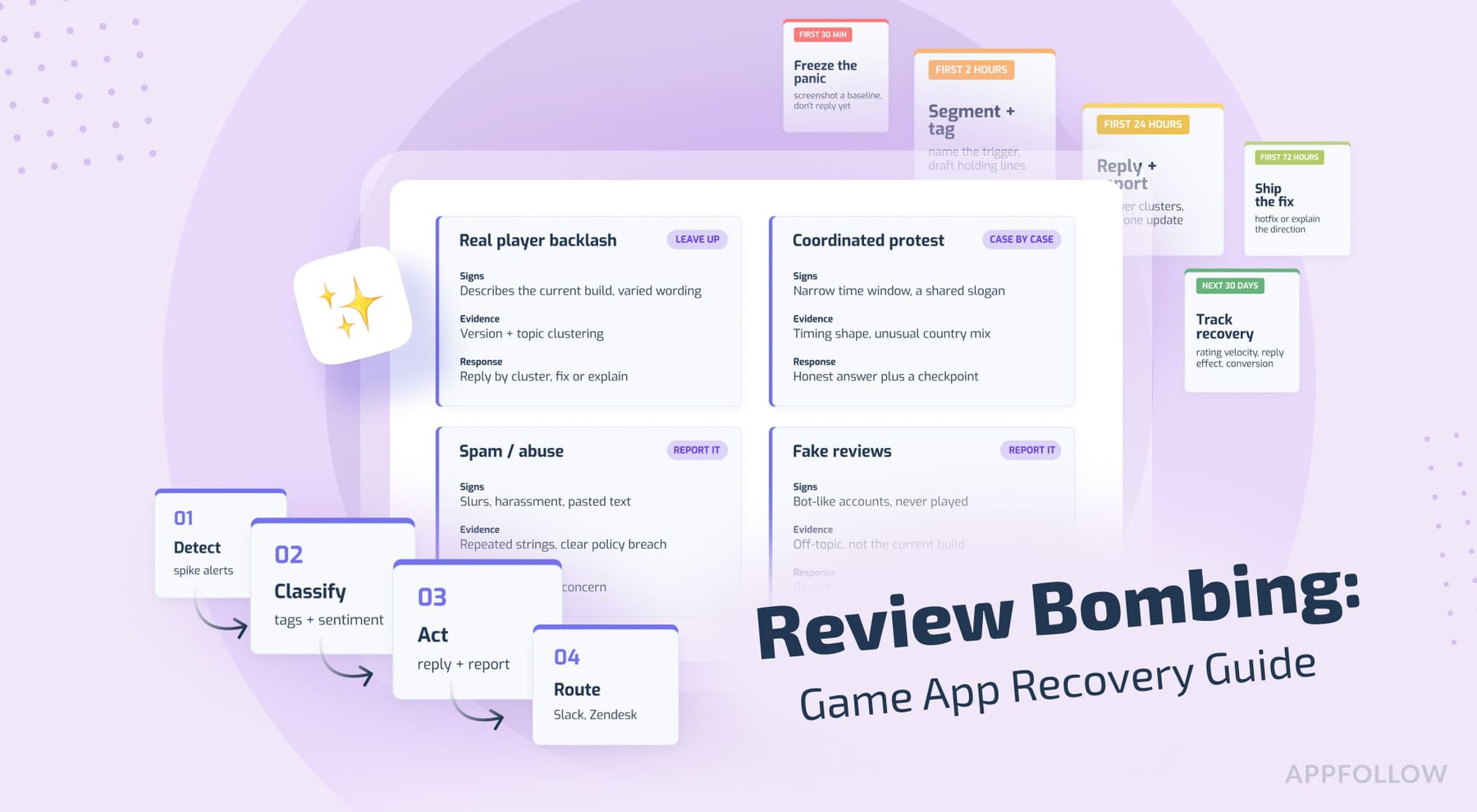
Table of Content:
- Key insights: what to do in the first 24 hours
- What is review bombing in mobile games?
- First-response triage: confirm the trigger before you reply
- How to handle review bombing after a controversial update
- Dealing with coordinated negative reviews
- Players leaving 1-star reviews after a nerf or balance patch
- How to respond to mass negative reviews without making it worse
- App Store review bombing recovery guide
- Google Play review bombing recovery guide
- After the wave: rebuild rating, trust, and store conversion
- How AppFollow helps during review bombing and backlash
- Afterword
- FAQ
Review bombing is a sudden wave of low ratings and negative reviews aimed at a game app, usually set off by an update, a nerf, a monetization change, a server incident, or a coordinated community push.
A patch goes live at 9 a.m., and by lunchtime the review bombing has started. Discord is loud, there's a Reddit thread climbing the front page, and your store rating has already slipped before anyone on your side has agreed on what happened. Both the App Store and Google Play let that number move faster than your team can get into a room, which is the part that makes it feel like an emergency.
This guide is a working playbook for that moment: diagnose the spike, respond in public without feeding it, report the reviews that break store policy, and rebuild your rating once the noise settles. It's written for the people who tend to catch this first, so game developers, marketers, publishers, ASO leads, community managers, and support all get something they can act on.
A quick map of what's below, because you probably don't have time to read the whole thing right now: first 24 hours, what review bombing is in a games context, triage, the main backlash scenarios (controversial updates, coordinated campaigns, nerfs), how to reply at scale, store-by-store recovery for App Store and Google Play, and a longer recovery plan for after the wave.
Key insights: what to do in the first 24 hours
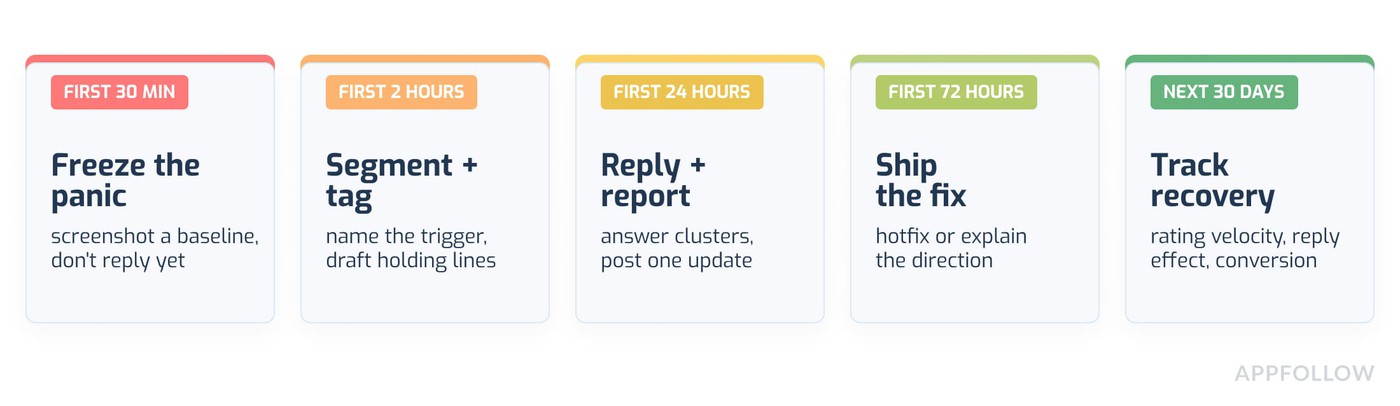
When a game is being review-bombed, the fastest useful move is to slow down for about twenty minutes, confirm what triggered it, and group the reviews before anyone starts replying. A rating drop feels urgent, and the instinct is to answer everything at once. That instinct is usually what makes it worse.
Here's the short version if someone just Slacked you asking "what do we do about all these 1-star reviews":
- Confirm the trigger. Tie the spike to a specific release version, server event, price change, or community post.
- Tag the review clusters. Most bombs are two or three complaints repeated thousands of times.
- Reply to representative reviews, not every duplicate. One good reply per cluster does more than a thousand copy-pastes.
- Report only the reviews that break store policy (spam, harassment, off-topic), with evidence.
- Publish one clear update saying what you know and when you'll say more.
Do this first, in order:
- Screenshot the rating and review count now, so you have a baseline.
- Pull the reviews from the last 24 to 72 hours into one view.
- Sort by store, version, country, and language.
- Read fifty of them and write down the two or three phrases that keep coming up.
- Decide who owns the public response before you write a word of it.
One line to keep on the wall: do not mass-reply before you know whether the reviews are product feedback, coordinated protest, spam, or abuse. Those four things need four different responses, and treating them as one blob is how a rating drop turns into a second news cycle.
Time window | What's usually happening | What you do |
First 30 minutes | Panic, screenshots, someone pasting the rating into leadership chat | Freeze the panic. Take a baseline. Don't reply yet. |
First 2 hours | Reviews still landing, patterns forming | Segment and tag. Name the trigger. Draft holding language. |
First 24 hours | Community narrative sets | Reply to clusters. Report policy-violating reviews. Post one update. |
First 72 hours | Fix or reversal decided (or not) | Ship the hotfix or explain the direction. Update release notes. |
Next 30 days | Slow recovery | Track rating velocity, reply effect, sentiment, conversion. |
What is review bombing in mobile games?
Review bombing is a spike of coordinated or accelerated negative app reviews meant to punish or pressure a game, often over one specific decision. Not every spike is a "bomb," and that distinction matters for how you handle app review bombing. Some spikes are just a lot of people who are genuinely unhappy at the same time.
For a store team, the useful way to think about it is signal quality. A review bomb mixes real product pain, protest language that may be off-topic, and sometimes spam or abuse that breaks store rules. Your first job is sorting those groups, because each one leads somewhere different.
"For an app-store team, a review bomb is a signal, a quality problem. Some reviews describe real product pain. Some are protest language. Some may violate store policy. The first job is to separate those groups before anyone replies, reports, or decides the release was a failure."
- Yaroslav Rudnitskiy, Senior Professional Services Manager, AppFollow
Review bombing vs real backlash
Real backlash is a lot of players describing an experience they had. Game review bombing, in the narrow sense, is players using the rating as a lever to force a change, sometimes with reviews that don't describe the current build at all. In practice, most incidents are a mix, and the mix shifts by the hour. You'll see the ratio in the text once you read enough of them.
Why games are especially exposed
Live-service games ship changes constantly, and every change is a chance to upset someone. Nerfs, economy tweaks, battle pass pricing, gacha rates, matchmaking changes, event rewards, server downtime. On top of that, game communities are organized (Discord, subreddits, creators with big audiences) and they can mobilize in an afternoon. A single creator video can turn a grumble into a campaign before your support team clocks in.
What makes app-store review bombing different from Steam or Metacritic
Steam shows a review score that Valve can flag with an "off-topic review activity" notice, and Metacritic separates critic and user scores. The App Store and Google Play don't do either of those things in the same way. They fold everything into one star average that shoppers see next to your install button, which is why an app review bombing event hits conversion directly and fast.
First-response triage: confirm the trigger before you reply
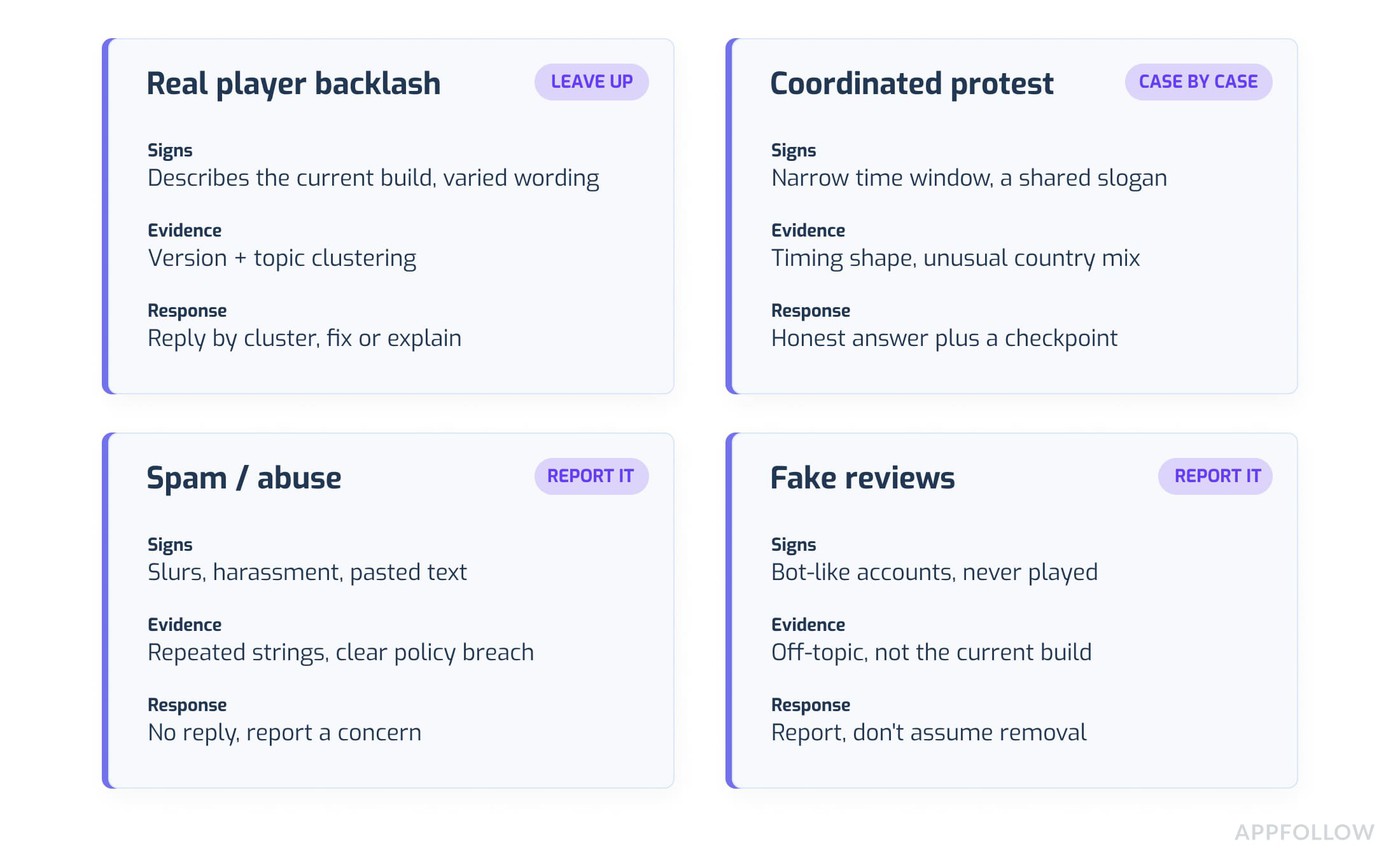
Triage is the part that decides whether you recover in a week or argue with the crowd for a month. Every review bomb has a trigger (what set it off), a shape (who's complaining, from where, about what), and a recoverability level (product bug, design disagreement, or coordinated abuse). Map those three before writing replies.
The reason this comes first is boring but real: coordinated negative app reviews and legitimate bug reports can look identical in a list of 1-stars. You only see the difference once you group them.
"The worst response to review bombing is to treat every 1-star review as the same object. Product teams need the trigger, the release version, the affected market, the user segment, and the repeated language. Once you connect those pieces, the incident stops being noise and becomes a product decision."
- Ilia Kukharev, Product Manager, AppFollow
Step 1: map the timeline
Line up the spike against everything that happened around it. Release time, server incident, price or currency change, a nerf in the patch notes, a creator post, a Reddit thread, a Discord announcement. The trigger is almost always sitting right before the first negative reviews happen. Write down the timestamp of the first cluster and work backward from there.
Step 2: segment by store, country, version, star rating, language, topic, and repeated phrases
A flat list of negative app reviews tells you nothing.
The same reviews split by version and country tell you almost everything. If the 1-stars are concentrated in one app version, you probably shipped a bug. If they're spread across versions but concentrated in a short time window with similar wording, you're looking at a campaign. (In AppFollow you can save these filter combinations as presets so you're not rebuilding the view every time the rating twitches.)
Step 3: separate real product pain from off-topic protest and policy-violating abuse
Read for content. A review that says "crashes on launch after the 4.2 update" is a bug report. A review that says "1 star until you revert the nerf" is protest, and it may be perfectly on-topic. A review with a slur, or copied text pasted a hundred times, or a complaint about something that isn't in your game, is a candidate for reporting.
Keep these in separate buckets from the start.
Step 4: assign review statuses
Give every cluster a status so nobody replies twice or misses one: needs reply, needs product escalation, needs store report, duplicate or monitor, resolved. Statuses are what let a support lead hand this off at shift change without a handover meeting. This is also where review statuses (open, closed, re-opened) in a tool like AppFollow save you from tracking it all in a spreadsheet that's already out of date.
How to handle review bombing after a controversial update
Review bombing after a controversial update is its own case, because the reviews are often about a decision rather than a defect. The update changed the economy, the UI, ad frequency, matchmaking, monetization, privacy, account linking, or core progression, and players are using the store to object. Your reply has to name what changed, say what you're looking into, and give a date for the next word.
The Helldivers 2 case in 2024 is the clean example, even though it happened on Steam. Sony announced a mandatory PlayStation Network account link for PC players, over 60,000 negative reviews landed in a day, and the rating cratered to "overwhelmingly negative." Sony reversed the requirement within days, and the community then ran an organized push to flip their own reviews back to positive. The Arrowhead CEO's public apology is worth reading for tone. The takeaway for a store team is timing: the reversal worked partly because it was fast and specific, before the narrative fully hardened.
When the update is genuinely broken
If it's a bug, this is the easier version. Confirm it, say you've confirmed it, give a fix window, and reply to the bug-report cluster with the actual status. Players forgive a broken build much more readily than silence about it.
When the update works as designed, but players hate the direction
This is harder and needs honesty.
If you're keeping the change, don't imply a rollback you haven't agreed to. Explain the design reason in plain language and give players a checkpoint, some future moment where you'll review the data and revisit it. A vague "we hear you" with no date reads as a brush-off, and the mobile game backlash gets a second wind.
What to say in review replies and release notes
Keep it short and specific.
Name the change, name what you're doing, give a date. Put the same message in your patch notes and your in-app messaging so the story is consistent everywhere a player might land. Don't argue the merits in a store reply. That's a fight you can't win in 350 characters, and a public audience will screenshot it.
Dealing with coordinated negative reviews
Coordinated negative reviews are worth reporting only when you can show a pattern, and the pattern is the whole job. App stores act on policy violations, and being unhappy about your rating isn't one. So the question is never "can we get these removed," it's "which of these break the rules, and can we prove it."
There's a real difference between "coordinated" and "invalid." A community that agrees to leave honest 1-stars about a real decision is coordinated, and those reviews usually stay up because they're legitimate. Reviews that are off-topic, bot-generated, harassing, or pasted verbatim are the invalid ones, and those are your reporting targets.
"Coordinated reviews often have a pattern: identical phrasing, narrow time windows, unusual country mix, or complaints unrelated to the current build. The team should document those patterns before escalating to the stores. Screenshots are useful, but structured evidence is much stronger."
- Dzianis Shalkou, Senior Professional Services Manager, AppFollow
Signs the campaign is coordinated
Identical or near-identical phrasing across many reviews. A very narrow time window (thousands of reviews in a few hours). A country mix that doesn't match your player base. Complaints about something that isn't in your game, or that references a different game entirely (this happened during the Genshin Impact anniversary backlash in 2021, when angry players left 1-stars on unrelated games too). Reviews from accounts that clearly never played the current build.
What evidence to collect before reporting
Pull the repeated text strings, the timestamps showing the spike shape, the country and language breakdown, and specific examples of policy violations (harassment, spam, off-topic). A structured package like that does more for you than a folder of loose screenshots. Store reporting tools want a reason and, on iOS, a description. The stronger and more specific your evidence, the better your odds.
Report a Concern feature in AppFollow lets you flag spam, offensive, or inappropriate reviews straight to both stores and track the status (pending, submitted, declined, satisfied, deleted), which at least gives you a record instead of guessing whether anything happened.
What not to report
Don't report legitimate criticism, even when it stings. Harsh but relevant feedback stays. A monetization complaint that describes a real player experience ("the new banner odds feel predatory") is on-topic and reportable by nobody. Reporting honest reviews wastes your daily report quota, annoys the stores, and if it leaks, hands the community a new grievance.
Players leaving 1-star reviews after a nerf or balance patch
Players leaving 1-star reviews after a nerf are almost always reacting to fairness, not to the raw numbers. A nerf gives you two jobs at once: explain the design reason, and give players a future point where the balance gets revisited. The reply should not debate the player, and it should not promise a rollback unless the team has decided on one.
Game review bombing over balance tends to spike hard and fade faster than a monetization bomb, as long as you handle it early. War Thunder's economy backlash in 2023 is a useful reference here, where the developers reverted changes, apologized, and committed to an economy roadmap. Players wanted the roadmap more than the apology.
"Players can accept a nerf when the reason is visible. They react harder when the change feels arbitrary, hidden, or monetized. In reviews, that difference is obvious. If the complaint is about fairness, the response must explain the design reason and the next balancing checkpoint, not simply apologize."
- Ilya Kataev, Professional Services Team Lead, AppFollow
Balance backlash is usually about fairness
Players rarely have the exact damage numbers. What they have is a feeling that the thing they invested in got worse for a reason they can't see. If the change also happens to push them toward spending, the trust damage is bigger and slower to repair. Name the reasoning, even briefly, and a lot of the heat comes off.
Reply template for nerf complaints
Something like: "Thanks for the feedback on the [unit/weapon] change. We adjusted it because [short, honest reason, e.g. it was dominating high-tier matches]. We're watching the data and will revisit balance in [patch/date]. If something feels off in your matches, tell us here: [support link]." No blame, one reason, one checkpoint, one route to support.
When to publish a balance roadmap or compensation
Publish a roadmap when the complaint is really about not knowing where the game is headed. Offer compensation carefully, and only for genuine loss (a bug that deleted progress, say), because compensation offered to quiet a design argument teaches players that review bombing pays. Decide this at the leadership level before anyone hints at it in a reply.
How to respond to mass negative reviews without making it worse
Knowing how to respond to mass negative reviews starts with accepting that you will not, and should not, write a unique reply to every one. You build a small set of approved reply variants tied to your main complaint clusters, then apply them to representative reviews. The goal is that a player reading replies sees a human who understood their specific complaint, even when four thousand people are complaining.
This is also where the usual advice on how to respond to negative reviews falls short, because it's written for a business getting five bad reviews a week, not a game getting five thousand in a night.
"Mass replies should not sound mass-produced. The team needs a shared message architecture, then several variants for the main complaint clusters. A user who lost progress, a user angry about a nerf, and a user repeating a meme should not receive the same answer."
- Veronika Bocharova, Customer Success Manager, AppFollow
Build one message architecture
Every reply, whatever the cluster, runs on the same bones: acknowledge the specific issue, clarify what's true (briefly), give the next step or date, point to a support route, and skip the blame. Once the architecture is agreed, the variants write themselves.
Reply to representative clusters, not every duplicate review
Prioritize the reviews worth a human reply: low star rating, detailed text, recent, and on a high-impact topic. A detailed 1-star from yesterday about a crash is worth ten identical "reverted the nerf" pastes. Reply to the representative ones in each cluster and let the pattern do the rest. Replying to literal duplicates is a use of time you don't have.
Example reply for a broken update
"We found the crash affecting [device/version] after the [x.x] update and a fix is rolling out in [timeframe]. Sorry for the disruption, and thanks for flagging your device details, that's what helped us pin it down. If it's still happening after you update, reach us at [support link]."
Example reply for economy or nerf backlash
"We hear you on the [economy/nerf] change. We made it because [short reason], and we're tracking how it plays out with a balance review planned for [patch/date]. Your feedback goes straight to the design team. Details here: [link]."
Example reply for off-topic coordinated protest
For on-topic protest, reply with the relevant variant above. For genuinely off-topic or policy-violating reviews, don't reply at all, report them instead. A public reply to bait is how you end up quoted in a thread titled "look how the devs responded."
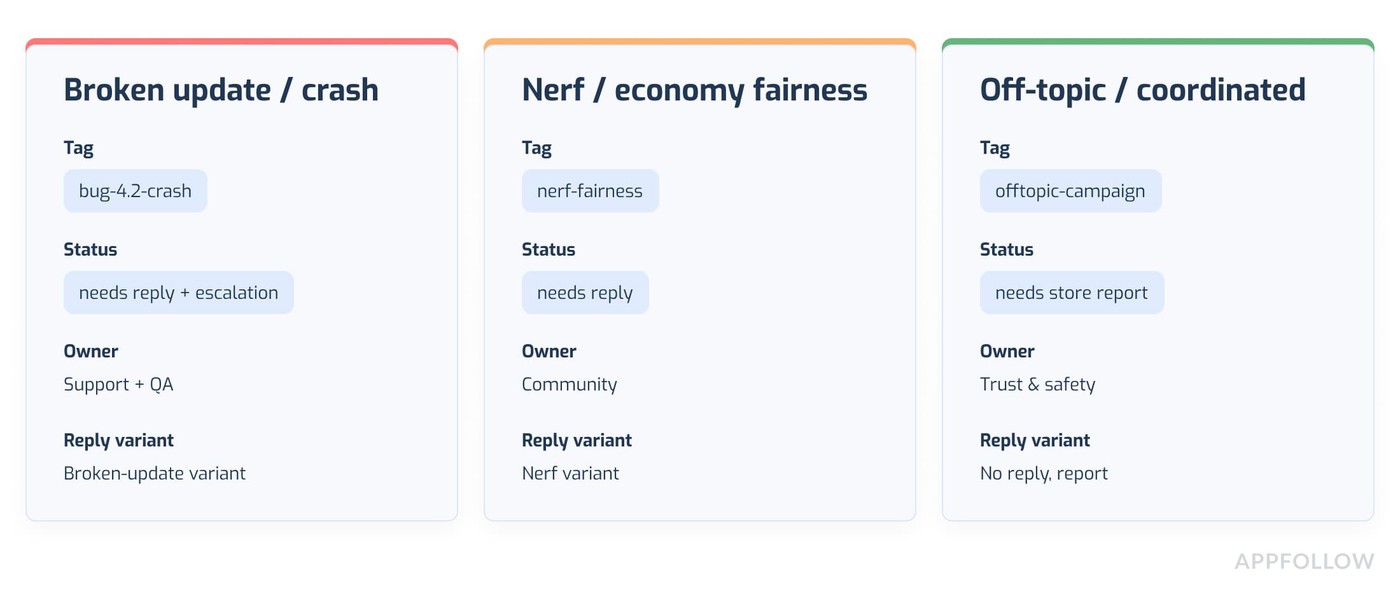
Here's what the cluster map can look like once it's set up:
Complaint cluster | Example tag | Status | Reply owner | Response variant |
Broken update / crash | bug-4.2-crash | Needs reply + escalation | Support + QA | Broken-update variant |
Nerf / economy fairness | nerf-fairness | Needs reply | Community | Nerf variant |
Off-topic / coordinated | offtopic-campaign | Needs store report | Trust & safety | No reply, report |
App Store review bombing recovery guide
App Store review bombing recovery runs through App Store Connect, and the honest headline is that Apple will not remove reviews just because they hurt. You can reply to reviews, report policy violations, and in some cases reset your summary rating, but no button makes a legitimate 1-star wave disappear.
What you can do in App Store Connect
You can respond to any review, from any date, and the reviewer gets notified and can update their review. Apple recommends replying promptly after a major release, which lines up with exactly the moment you're being bombed. Set up the email alerts so you know when someone edits a review you replied to.
When to report a review and what evidence to attach
If a review is spam, offensive, or otherwise breaks Apple's terms, use Report a Concern in App Store Connect rather than replying. The reviewer isn't notified. On iOS, you have to give a reason, so have your evidence (repeated text, off-topic content, harassment) written up before you start. Note that "this review is unfair" is not a reportable reason. Only policy violations qualify.
Rating reset: why it is not a crisis fix
Apple lets you reset your summary rating when you release a new version, and a message appears on your product page saying the rating was recently reset. It's tempting during a bomb. It's also risky, because you throw away all your good ratings too, and "Not Enough Ratings" next to your install button can hurt conversion more than a dented average would. Apple itself says to use it sparingly. Treat it as a tool for a genuine fresh start after a big fix.
How to rebuild iOS rating momentum after the incident
Ship the fix, reply to the bug clusters so those users can update their reviews, and time your in-app rating prompts for players who are having a good session (after a win, after a completed level, not mid-crash). The iOS review summaries that Apple now generates with LLMs pull from your recent reviews, so getting fresh, calmer reviews flowing again feeds that summary over time.
Google Play review bombing recovery guide
Google Play review bombing recovery has one big thing working in your favor and one working against you. Google weights recent ratings more heavily than lifetime ones, so a bomb drops you fast, and a steady flow of new positive reviews also pulls you back up faster than the old lifetime-average model ever allowed.
What you can do in Google Play Console
Reply to reviews directly, report ones that break policy, and read the ratings split by version, country, device, and language. Android's data is granular, and during a bomb, that granularity is your evidence. If you've connected the Play Console, review updates come through fast (Google Play data can refresh every 10 to 15 minutes with a live connection), which matters when the rating is moving by the hour.
How to use version, device, and country signals to prove the trigger
Because Google localizes ratings by country and weights recent ones, a bomb often shows up as a sharp cluster in specific versions, countries, or devices. Pull that breakdown. If every 1-star is on one app version in two countries, you have both your trigger and, if the reviews are off-topic or coordinated, a big chunk of your reporting evidence in one view.
When to report spam, abusive, or off-topic reviews
Google Play forbids fake, inaccurate, repeated, and misleading reviews, and it does act on spam at scale sometimes (during the Genshin anniversary bomb, a chunk of the flagged 1-stars were removed and the rating recovered as moderation caught up). Report the reviews that clearly break those rules. Don't assume removal, and don't report honest criticism.
How to recover with hotfixes, staged rollout, and review-request timing
Ship the hotfix, and if the bomb came from a bad release, consider a staged rollout next time so you catch problems on 5% of users instead of 100%. Then, once the fix is live and stable, restart your in-app review requests. Because recent reviews carry the weight, a couple of good weeks move the number more than you'd expect. (Android Vitals matters here too, since a bad release can hurt your quality signals on top of your rating, and that's a slower thing to repair.)
App Store | Google Play | |
Where you work | App Store Connect | Google Play Console |
Reply to reviews | Any review, any date; reviewer notified | Yes; reviewer notified |
Report reviews | Report a Concern; reason required on iOS | Report; no details required |
Rating behavior | Summary rating per territory | Recent ratings weighted; localized by country |
Version/country signals | Available | Very granular (version, device, country) |
Reset option | Reset summary rating on new version (use sparingly) | No manual reset |
Main risk | Reset wipes good ratings too | Bad release also dents quality signals |
After the wave: rebuild rating, trust, and store conversion
Once the spike stops, the work shifts from response to recovery, and recovery is a slower, quieter thing that runs on weekly numbers rather than hourly panic. This is the review bombing recovery guide part that teams forget, because by now the Slack channel has gone quiet and everyone wants to move on.
Post-incident metrics to track for 30 days
Watch rating average and rating velocity (how fast new ratings are landing and at what level), topic sentiment (is the angry cluster shrinking), reply effect (are the people you replied to updating their reviews), conversion rate on your store page, keyword rankings, and competitor visibility if the incident knocked you down the charts. If conversion recovered but rankings didn't, that's a different problem to chase.
How to ask for new reviews without looking manipulative
Prompt players at genuinely good moments, and never bribe for a rating (both stores prohibit it, and players smell it). A prompt after a completed level or a win, aimed at engaged players, brings in the calmer reviews that rebuild the average. Don't prompt everyone, and don't prompt right after a crash, which sounds obvious and gets missed constantly.
What to include in the internal postmortem
Write down the trigger, the timeline, what you shipped, what you said, what worked, and what you'd change. Note which cluster grew fastest and whether an older, unresolved grievance made the bomb bigger than the trigger alone would explain (this is common, and worth auditing). Store the report somewhere the next release owner will find it.
"Review-bombing recovery affects conversion, paid campaign efficiency, brand trust, and product planning. The teams that recover fastest usually have one source of truth for reviews, and one agreed response owner before the incident starts."
- Karen Taborda, Customer Growth Team Lead, AppFollow
How AppFollow helps during review bombing and backlash
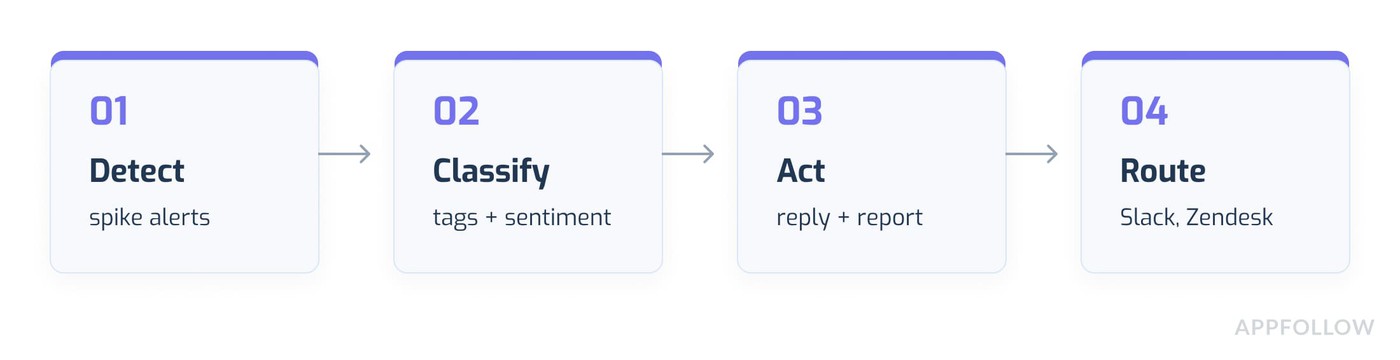
You've got the playbook. AppFollow is the system to run it in, so support isn't reading thousands of reviews one at a time while the rating keeps sliding. The workflow below maps to the incident tasks above.
"During a backlash spike, the practical question is: which reviews need a human, which can be handled with an approved template, and which need reporting? AppFollow helps teams build that queue quickly, so support is not reading thousands of reviews one by one while the rating keeps moving."
- Lucija Knezic, Senior CSM & Product Strategy Manager, AppFollow
Detect the spike
Review monitoring pulls App Store, Google Play, and other stores into one feed, and ratings analysis shows the drop against version and country. New reviews spike alerts and total rating change alerts fire into Slack or MS Teams the moment volume jumps, so you find out from a notification instead of a panicked message from leadership. Competitor monitoring tells you if it's just you or the whole category.
Classify the noise
Semantic analysis auto-categorizes reviews into bugs, monetization, user feedback, and report-a-concern buckets with sentiment attached, so the "is this a bug or a protest" question gets a head start. Layer custom tags for the specific trigger (make one for the nerf, one for the account-linking change, whatever this incident is), set auto-tags to apply them to incoming reviews, and use review statuses to track what's handled.
Act at scale
AI replies generate a suggested response for any review, and you can edit before sending or hold everything for approval. Bulk actions apply a template, a tag, or a report to a whole cluster at once. In a backlash, keep AI in approval mode, because AI should speed up your approved variants, not invent policy or promise compensation nobody signed off on. Report a concern flags policy-violating reviews to both stores, and deleted-reviews tracking shows what came down.
Route and report
Send urgent clusters to Slack, Zendesk, or Salesforce so the right team picks them up, wire alerts through webhooks if you have your own tooling, and build a custom report after the fix ships that shows what changed. That report is your postmortem evidence and your "here's what we did" for leadership, in one place.
Afterword
The principle under all of this is simple: don't argue with the crowd, classify the signal, and act in the right lane. Real product pain needs a fix and a reply. If it's a coordinated protest, give an honest answer and a checkpoint. Anything that's spam or abuse should be reported. Get those lanes right and most review bombing turns back into an ordinary, recoverable rating dip.cta_get_started_purple
FAQ
What is review bombing?
Review bombing is a sudden wave of low ratings and negative app reviews aimed at an app or game, usually triggered by a controversial update, a nerf, a monetization change, a server outage, or a coordinated community campaign. It can be legitimate player anger, coordinated protest, or policy-violating spam, and the recovery path is different for each.
How do you stop app review bombing?
You can't stop people leaving reviews, but you can shorten the wave. Confirm the trigger, group the reviews by version and topic, reply to representative complaints, report only the reviews that break store policy, and publish one clear update with a fix or a date. The calmer and more specific your update is, the faster the wave tends to pass.
Can App Store review bombing be removed?
Apple removes reviews that violate its terms (spam, offensive content, off-topic), reported through Report a Concern in App Store Connect. Apple will not remove reviews just because they're negative or hurt your rating. You can reset your summary rating on a new version, but that wipes your good ratings too, so use it sparingly.
Can Google Play remove coordinated negative app reviews?
Google Play forbids fake, inaccurate, repeated, and misleading reviews, and it does sometimes remove spam at scale during large bombs. Report the reviews that clearly break policy with evidence like repeated text and off-topic content. Don't count on removal, and don't report honest criticism, which stays up and wastes your reporting quota.
How should game teams respond to 1-star reviews after a nerf?
Explain the design reason briefly, give a future checkpoint where you'll revisit balance, and point to support. Don't debate the player, and don't promise a rollback unless leadership decided on one. Players leaving 1-star reviews after a nerf are usually reacting to a sense of unfairness, so a visible reason takes most of the heat out.
Is review bombing illegal?
Usually no. Review bombing is most often a store policy violation rather than a crime, and stores handle it through their own rules. It can cross into unlawful territory when it involves harassment, threats, extortion, or coordinated fraud. If you're seeing any of that, document everything and talk to legal counsel. This isn't legal advice.
How long does rating recovery take after review bombing?
It depends on your review volume and the store. Google Play weights recent ratings, so a steady flow of new positive reviews can move the number within weeks. The App Store summary rating recovers more slowly. Nobody can promise a timeline, and any tool that guarantees one is guessing. Plan for a 30 to 90 day arc.