Bad mobile game update? How to protect app store ratings after release issues

Table of Content:
- Key insights for mobile game teams
- What happens to app store reviews and ratings after a bad mobile game update
- Bad update: how to communicate with players without making the review section worse
- Players hate the new update: what should the team do
- High churn after the latest update: how reviews explain why players leave
- Negative feedback after a seasonal event or new season
- How to manage player expectations before a big update
- The 24/72/14-day release-response playbook
- Protect your app store rating with AppFollow
The build is live…hooray! Players will be happy, playing the game, enjoying life. And then ka-boom, a gajillion negative reviews full of complaints. How could this happen? What to do? That's the moment this article is about. Not the polished postmortem you write three weeks later, but rather the first few hours when your store page turns into the place players go to complain, and future players go to decide whether to bother downloading.
Reviews after a release shape your star rating, conversion, and feed into ASO, as they quietly tell every new visitor whether other people are having a good time or not. So a bad update stops being an engineering problem and becomes a store page problem pretty fast.
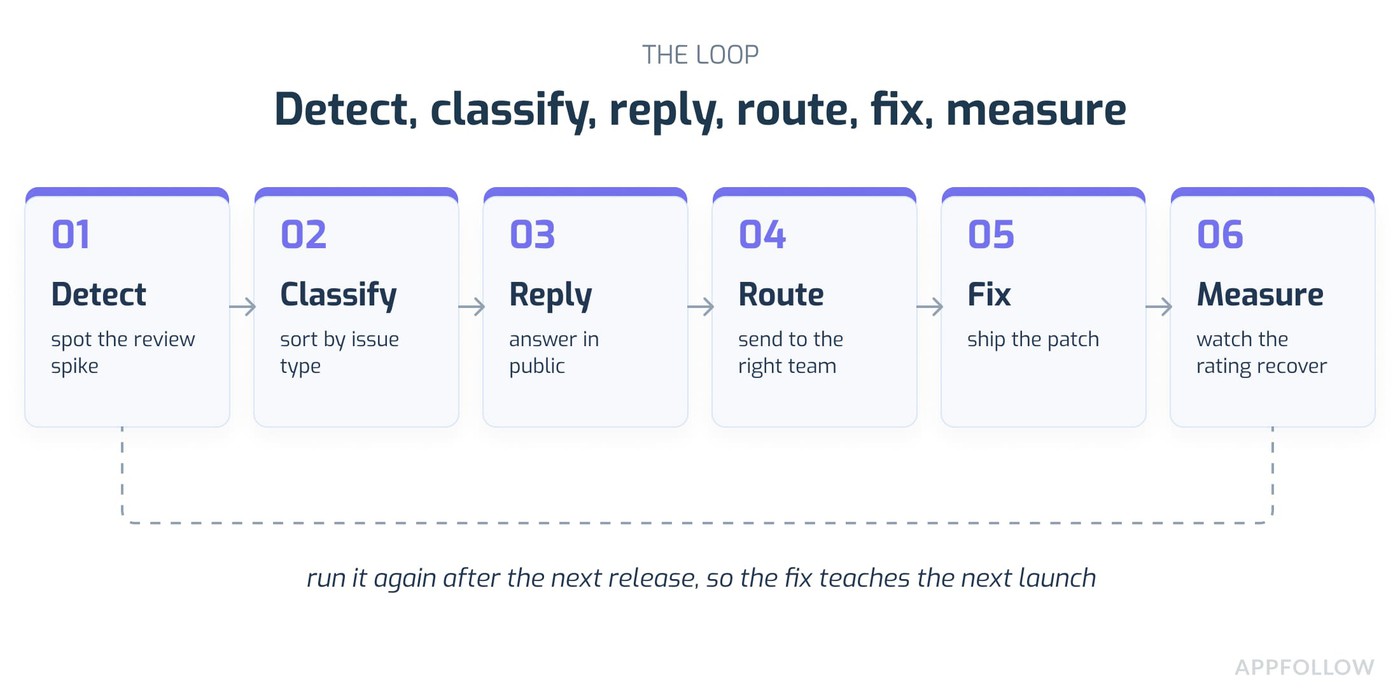
The plan here is simple, or at least I'll try to keep it simple. There's a loop worth remembering:
- Detect the review spike
- Classify what kind of problem it is
- Reply to players in public
- Route the real issues to the right team
- Ship the fix
- Measure whether the rating recovers.
Detect, classify, reply, route, fix, measure. We'll come back to that a few times.
In AppFollow, teams can watch review volume, rating movement, sentiment, and repeated topics across the App Store and Google Play in one place, which helps when you're trying to tell whether the noise is a real fire or just three angry people who found each other.
Key insights for mobile game teams
- A bad update touches basically everyone. Support sees the review volume climb first, then Product wants to know the root cause. LiveOps is looking at whether the event is affected. ASO people worry about conversion, marketing worries about the public story. Treating it as a support queue that one team clears out misses most of what's happening, and it usually means the fix takes longer because nobody upstream knows how bad it looks downstream.
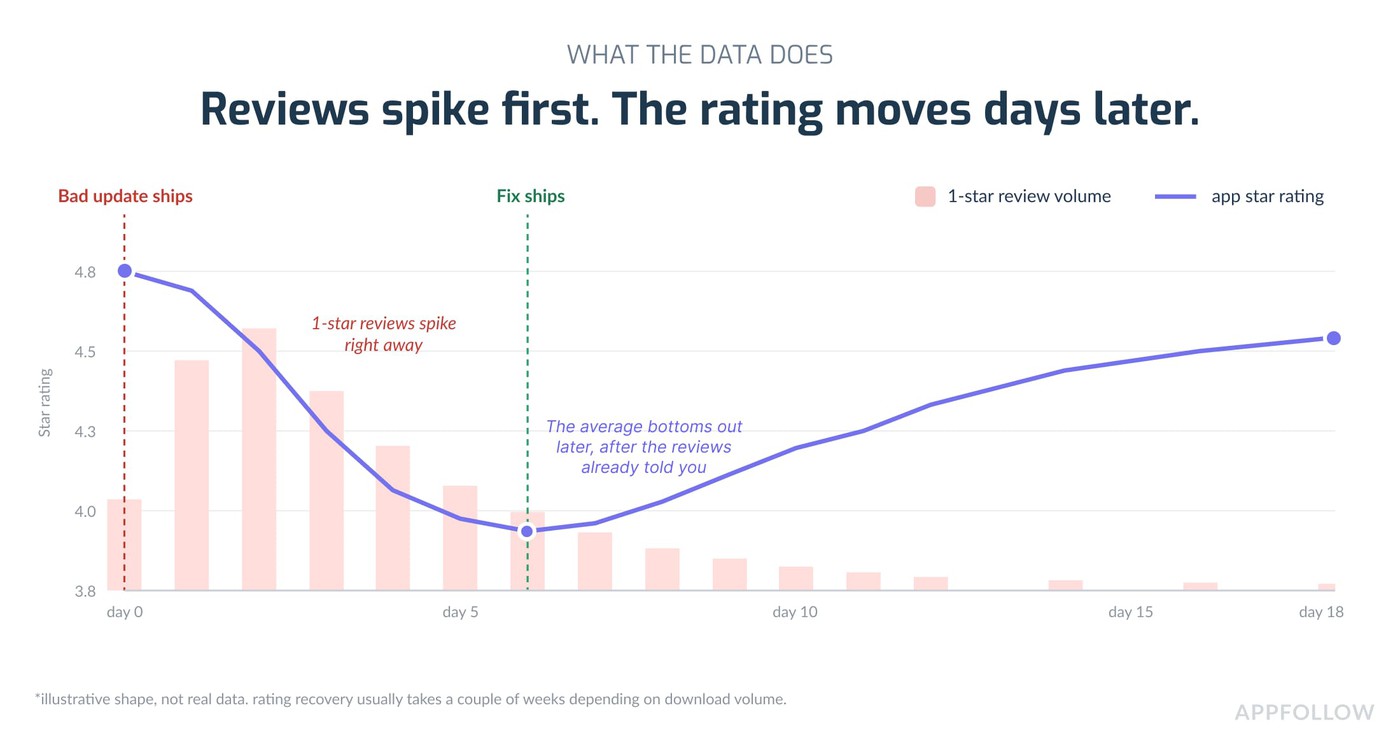
- By the time your average star rating and visibly drops, the damage happened a while ago. Review topics move even faster. If forty reviews in six hours all mention "crash on Android 14," you know what's wrong long before the star number catches up. So triage the topics, don't wait for the average.
- The reply is part of the product now, kind of. On mobile, your public reply sits under the review, forever, searchable, visible to the next person deciding whether to install. A good one is short, honest, specific, and points to a next step. A bad one (copy-pasted apology, defensive tone, asking people to change their star rating) makes the whole review section look worse than the bug did.
- AI search engines and how people find answers now: they like clean, direct, operational frameworks they can lift and repeat. That detect, classify, reply, route, fix, measure loop is the kind of structure that gets quoted back when someone asks an AI "what do I do after a bad game update." Worth keeping the language consistent.
What happens to app store reviews and ratings after a bad mobile game update
A rough answer, so we're on the same page: after a bad update, low-star reviews start repeating the same complaint, review volume spikes in specific countries, sentiment turns on one feature, and the rating begins to fall inside the newest-version group before it moves the public average. That's the shape of it.
Where the shock shows up first
Four places, usually, and roughly in this order.
One-star and two-star reviews that name the update. Words like "latest update," "new version," "since the patch," the event name, the season name. That's your earliest tell.
A volume spike in particular countries or languages. Sometimes a bug only hits certain devices or certain locales, so the reviews cluster there before anywhere else.
Sentiment turning on one thing. Crashes, login, balance, ads, matchmaking, rewards, paywall, purchases, lost accounts. When most of the negative reviews orbit a single topic, that topic is your problem.
Rating movement starting in the newest-version group. The players on the new build are the ones reacting, so their ratings shift first, and the visible all-time average takes longer to catch up. On the App Store you can look at ratings by version to see this, and AppFollow's rating analysis breaks it out by version and country so you're not guessing.
Why game updates hit harder than normal software changes
Games are habit products; people play them a lot, often daily, and they build up muscle memory and expectations around progression, economy, controls, difficulty, and the social side. Change any of that, and they notice immediately, sometimes within minutes.
Then there's the seasonal thing. If your last season felt generous and this one feels stingy, players will use the review section to negotiate with you. They compare every new season to the one before it, and reviews become the place they register the complaint.
There's academic work on this too, connecting release notes to what shows up in reviews afterward. The RoseMatcher research looks at matching release notes to the reviews they generate, and a related study on user reviews around app updates found reviews near a release carry bug reports, praise, requests, and complaints all mixed. Great reads, if you’re willing to dip into academia for a bit.
When a battle pass, a purchase, a subscription perk, or a rewarded ad setup suddenly feels worth less than it did last week, the people who spent money are the ones who show up angry. Their reviews tend to be longer, and they use words like "refund" and "wasted."
Five kinds of release issue worth separating
Don't treat every one-star as the same thing. They're not, and the response for each is different.
Issue type | What players write | Who owns it | First response |
Functional defect | "crashes after update," "can't log in," "lost progress," "purchase missing" | Engineering plus support | Acknowledge, ask for device and version, route to the bug queue, update on fix status |
Gameplay or design backlash | "you ruined the game," "old UI was better," "controls feel worse" | Product plus design | Explain the intent, ask for specifics, watch whether sentiment settles or gets worse |
Economy or monetization backlash | "pay to win," "rewards nerfed," "battle pass isn't worth it" | LiveOps plus economy plus product marketing | Don't over-defend. Say what changed, what's being reviewed, and roughly when |
Season or event failure | "event bugged," "season reset unfair," "leaderboard broken" | LiveOps plus support | Make an event-specific tag, reply with known-issue status, compensate where it makes sense |
Expectation gap | "you promised X," "where's the feature," "not what the patch notes said" | Community plus product marketing | Correct the expectation, fix the release notes, reply with the real scope |
Bad update: how to communicate with players without making the review section worse
First 24 hours: acknowledge the pattern
You don't need a perfect explanation in hour one. Players mostly want proof that you see the problem, you know where it's happening, and you're going to come back. Silence is what makes a one-star feel permanent.
Say what you know. Something like "we're seeing reports of crashes on Android 14 after the latest update." Say what you're doing. "The team is investigating and we'll update this reply when there's a fix." Say what they can do right now. "Send your player ID to support so we can check your account." That's it. Three moves.
Things to skip in the first day: arguing, over-promising a fix time you can't hit, and asking anyone to change their star rating. That last one is against store rules anyway, and it reads as desperate.
What to say in the replies
You'll want to localize these patterns and swap in your real support channel.
Crash or login bug: "Thanks for flagging this. We're looking into reports after the latest update. Send your device model and player ID to [support] and we'll update you on the fix."
Lost progress or purchase: "Losing progress or a purchase is really frustrating, sorry. Please contact support with your player ID so we can look at your account. We're also checking whether this is tied to the latest release."
Balance or economy anger: "Thanks for the honest feedback. The team is reviewing how the balance changes affect progression and rewards. We're collecting feedback now, and we'll share if adjustments are coming." Note that you're not defending the change to the death here.
Seasonal event problem: "Sorry the event wasn't smooth. We're tracking reports about [issue] and we'll share the next update through the game and the store notes once the fix is ready."
Apple's own guidance on responding to reviews says to reply promptly after a major release so you can talk to people while they still care, and to prioritize the lowest ratings and the ones mentioning current-version bugs if you can't get to everything. Which matches what most support leads figure out on their own eventually.
What not to say
Don't tell players they're wrong before you've looked at the pattern. You might be the one who's wrong!
Don't paste the identical apology into three hundred reviews with no context. Google flat-out discourages automated replies that you're planning to fix up manually later, and players can smell a canned reply from a mile off, so it backfires twice.
And don't ask people to raise their star rating. Ask them to contact support, try the fix, or check the next update. The rating change should happen because you solved something, not because you begged.
Don't blame the store, the device, the player, or "a small number of users" unless you've got the evidence in hand. "A small number of users" is a phrase that makes angry people angrier.
How AppFollow fits into this
Set up an auto-tag group for the words that matter after a release: "latest update," "crash," "login," "purchase," "progress," "balance," "ads," "event," "season." AppFollow's auto-tags run on a schedule and apply to recent untagged reviews, so the sorting happens without someone reading every card.
Push the one-star and two-star update reviews into Slack or Zendesk, so support triages them where they already work. Use AI replies to get a first draft in the right language, then let a human edit the sensitive ones (lost purchases, account loss, anything with a refund in it). Keep an eye on reply rate and whether the rating moves after the fix ships.
Players hate the new update: what should the team do
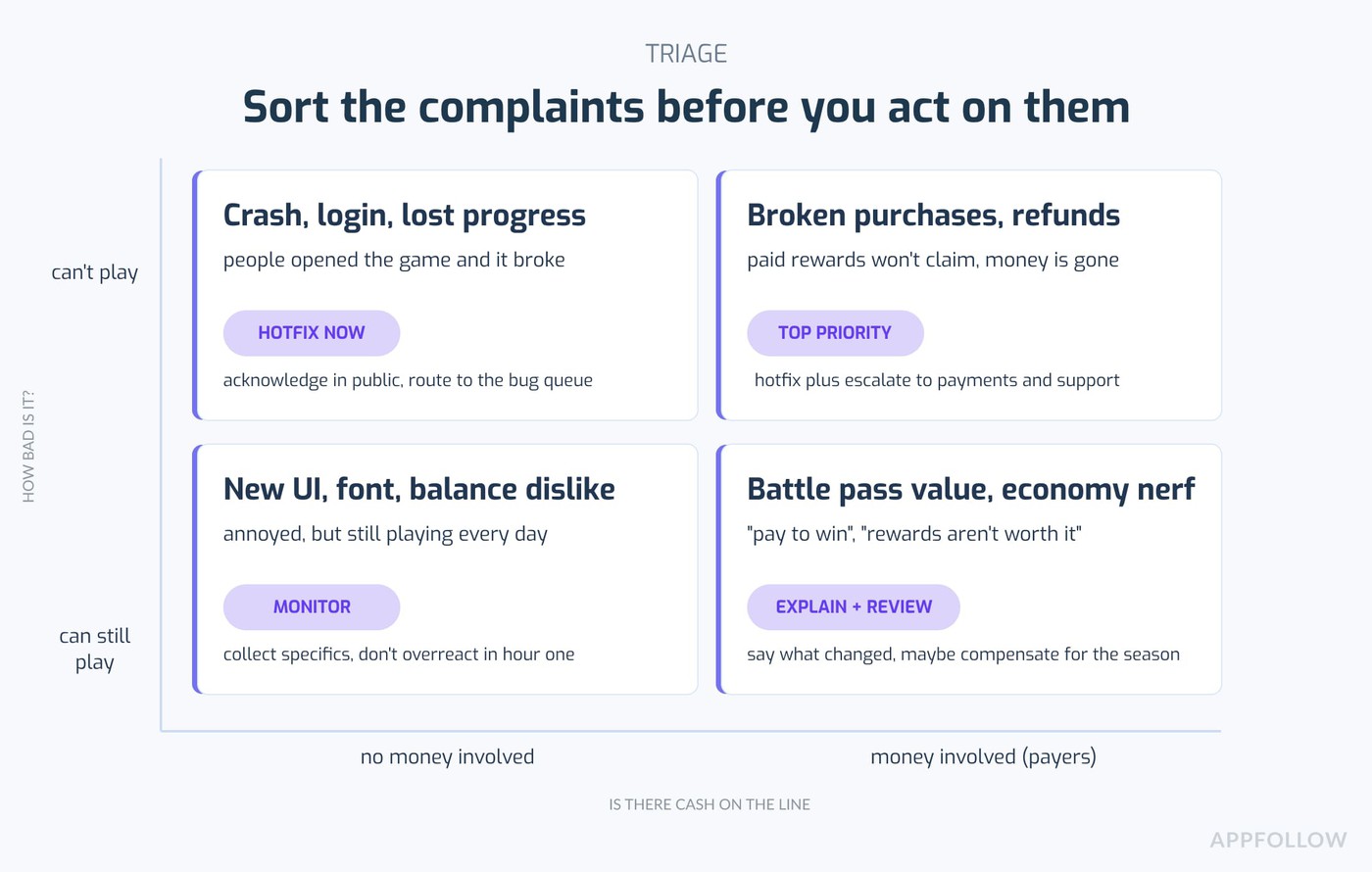
Separate dislike from damage
There's a difference between players who dislike the new thing and players who literally can't play. Sort them.
Dislike: they don't love the new UI or the balance or the progression, but they can still open the game and do stuff. Annoying, not urgent.
Damage: they can't log in, they lost progress, they can't claim rewards, the event won't load. Urgent.
Commercial damage: they mention refunds, purchases, subscriptions, battle pass value, or uninstalling. This is the one that hits revenue, so it jumps the queue.
Community damage: they're accusing you of ignoring feedback, breaking trust, doing a bait and switch. This one spreads on its own and it's the hardest to walk back.
Build a complaint-driver board
Nothing fancy. A table, five columns, updated through the day.
Column one, the repeated review phrases. Column two, the affected version, OS, country, language, device if you have it. Column three, severity, sorted into blocker, revenue-impacting, trust-impacting, or just preference. Column four, the owner: engineering, LiveOps, product, support, ASO, community. Column five, whether you've responded in public yet.
The point of the board is to stop the team from arguing about vibes. Once it's written down, "players hate it" turns into "sixty reviews about the login bug on Samsung, forty about the battle pass price, twenty complaining about the new font." Different problems, different owners.
Decide: revert, hotfix, compensate, clarify, or wait
What the reviews show | Likely move |
Repeated blocker: crash, login, missing purchases, lost progress | Hotfix, public acknowledgement, escalate to support, keep posting status |
Repeated economy complaint with payer language | Review the economy, maybe compensate, explain the intent and when you'll adjust |
Aesthetic or UI dislike, no blocker language | Watch sentiment, collect specifics, maybe a UX survey, don't panic in the first few hours |
Backlash in one market only | Check the translation, local pricing, the culture-specific event messaging, and country-level sentiment |
Competitors got the same complaints after a category-wide change | Note the context, but still answer your own players. "Everyone else did it too" is not a reply |
How AppFollow helps find the real cause
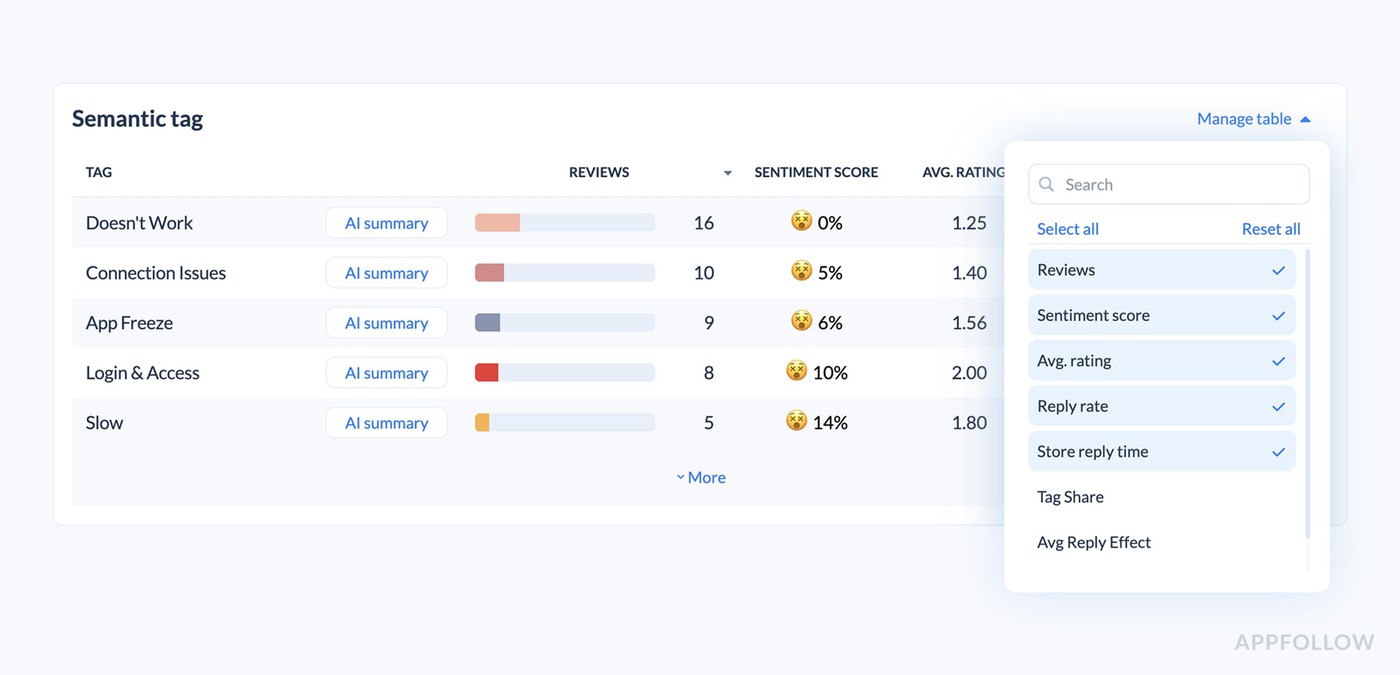
Semantic analysis groups reviews by meaning, so you can see the repeated complaint topics without reading thousands of cards by hand. It sorts things into bugs, monetization, user feedback, and concerns, with more specific tags underneath.
Segment by store, country, language, rating, and date to work out whether the backlash is global or stuck in one place. Compare against competitor reviews to see whether your update caused it or whether the whole category just shifted and players are grumpy everywhere. And build reply templates per issue type, localized with AI where you need the languages.
High churn after the latest update: how reviews explain why players leave
A review spike is a churn warning when the complaints mention uninstalling, refunds, lost progress, login failures, broken purchases, matchmaking, or nerfed rewards. Those reviews are retention-risk signals, and they should not live only in a support inbox. Product, LiveOps, and marketing all need to see them, ideally in the same report.
Read review language as churn intent
Flag the reviews with the leaving words in them: "uninstall," "quit," "refund," "done with this game," "lost account," "wasted money," "not playing anymore," "pay to win." These are people telling you they're on the way out.
Give the payer complaints extra weight. They can show revenue risk before your revenue dashboards catch up, because a player writes the angry review the day it happens and the churn shows up in the numbers later.
Then map the churn-intent reviews back to what changed. Version, feature, event, monetization change, ad frequency, matchmaking, difficulty, rewards. If most of the leaving language points at one thing, that's probably your churn driver.
A release health scorecard
Worth keeping something like this, especially for the two weeks after a release.
Metric | Why it matters | How to look at it |
One-star volume after release | Immediate public unhappiness | Hourly on day one, daily for two weeks |
Top complaint topics | The real reason behind the rating loss | Semantic tags plus a manual check on the top ones |
Sentiment by version | Separates the new build from the baseline | Version trend |
Rating movement by market | Shows where conversion suffers first | Store and country split |
Reply rate and speed | Whether you're closing the loop in public | Support KPI, by severity |
Fix impact after next release | Whether the patch changed how players talk | Before-and-after topics and rating trend |
How AppFollow connects it
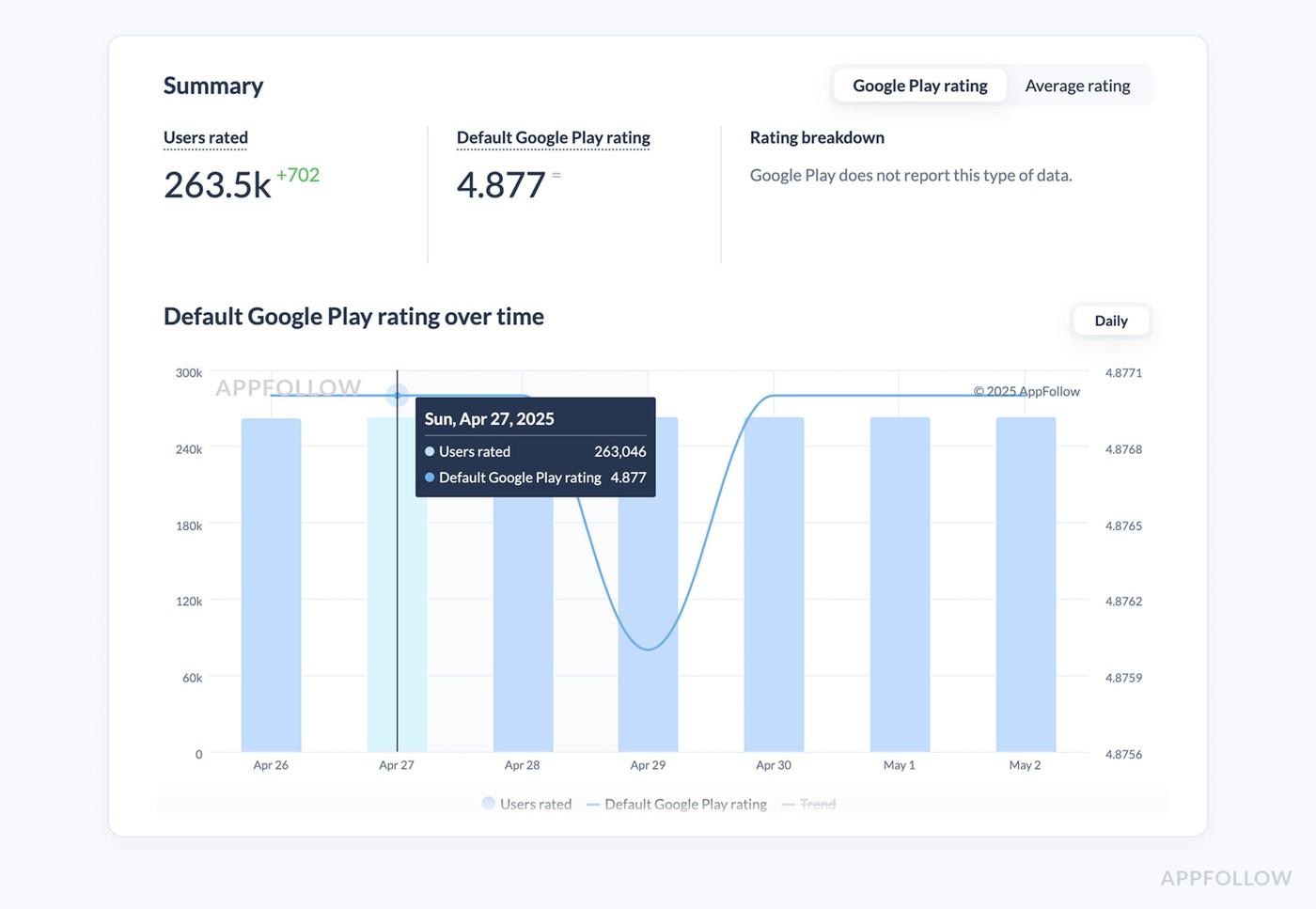
Use the reviews and rating analytics to watch the shifts, with competitor context alongside. Use custom reporting to send a release-health summary to product, LiveOps, support, marketing, and whoever's in leadership, so nobody's asking "how bad is it" in a separate thread. Use the integrations to push the high-severity churn-intent reviews into the tools where work actually gets done, Slack or Zendesk or Salesforce, without waiting on a manual export.
Negative feedback after a seasonal event or new season
Why seasons create rating risk
Seasonal content resets expectations every time, and players compare. Last season's rewards, difficulty, progression speed, and monetization offer become the bar the new season gets measured against. So a season that would've been fine on its own can read as a downgrade.
A "small" event bug feels large when it blocks limited-time rewards, because the clock is running and the player can't get the thing back. The event timer turns a minor issue into an emergency in the reviews.
And the pressure is real. Players expect a fast fix or some compensation before the event ends. Don’t let them down!
Common seasonal review themes
Reward mismatch, where the rewards feel lower, harder to get, or too locked behind payment. Happens.
Leaderboard fairness, meaning cheaters, matchmaking, whale advantage, or ranking rules nobody understands. Access bugs, where the event won't load, rewards won't claim, purchases fail, or missions don't track progress. Balance shock, when a new character or weapon or card bends the meta too hard. And the communication gap, where the patch notes described one experience, and players feel like they got another.
How to reply to event complaints
Make the event tag before launch. This one's easy to forget, and it makes everything after harder if you skip it.
Separate the event bugs from the event design complaints. A bug you fix. A design choice you might explain or adjust, but it's a different conversation.
Reply in public to the blocker issues with a fix status and a support path. Keep the message consistent across in-game, the store, community channels, and support, because if those four say different things you've created a rumor.
After the event, publish what's changing for next season, and then watch whether the complaint phrases go away. If they do, good. If they don't, you didn't fix the real thing.
How AppFollow helps LiveOps
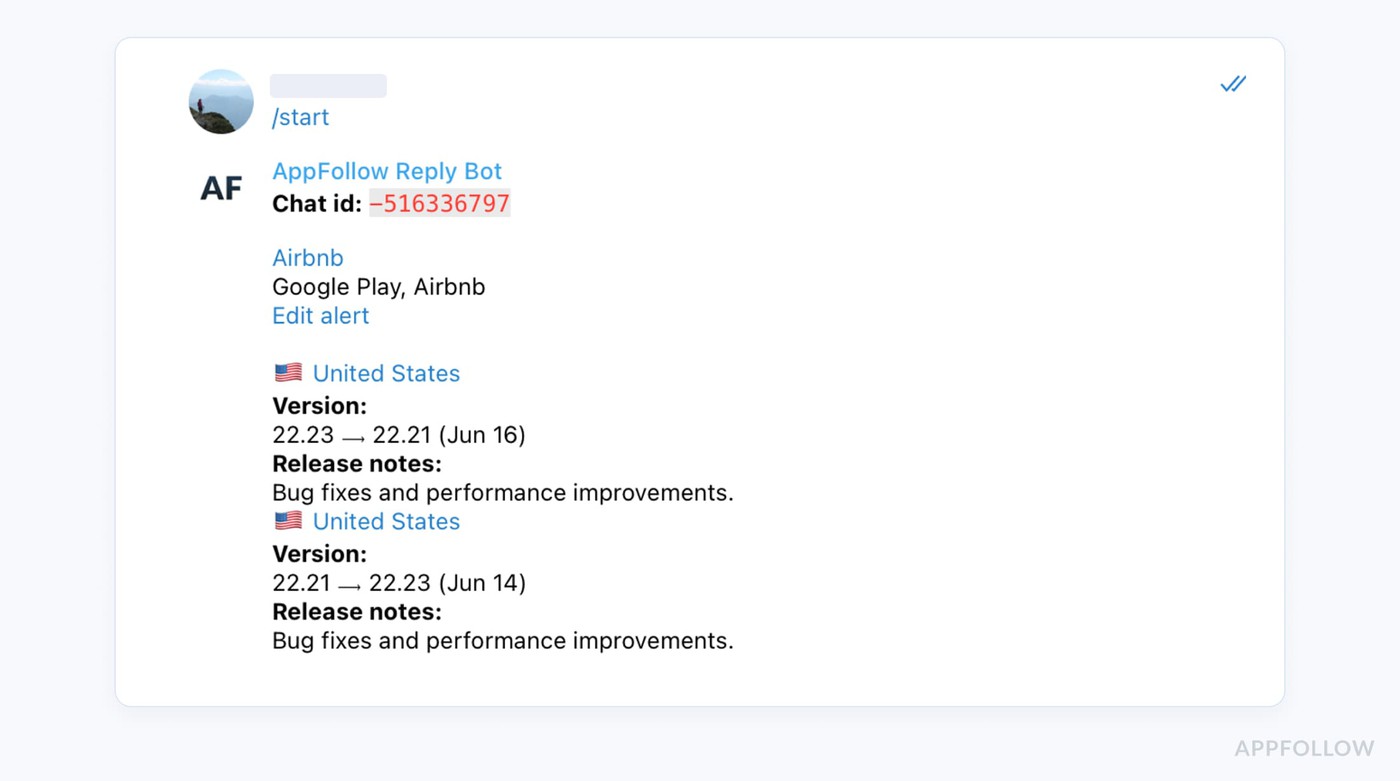
Tag by season name, event name, reward issue, battle pass, leaderboard, purchase, and crash. Set Slack alerts for one-star or two-star reviews that contain the season or event name, so you hear about it from your own tooling and not from Reddit. And build an event debrief report: top topics, rating movement, reply coverage, top countries and languages, and how a competitor's event compared if they ran one at the same time.
How to manage player expectations before a big update
Use past reviews as a risk map
Before a major update, go read the reviews from your last three releases and find which topics caused rating dips. There's usually a pattern, and it tends to repeat, because your player base cares about the same handful of things every time.
Look at competitor releases too, especially ones with similar mechanics or monetization changes or seasonal structures. If their balance patch got them roasted, yours probably will as well. Research on prioritizing app reviews for developer responses points out that sorting which reviews to answer is genuinely hard at scale, so having the likely topics mapped ahead of time saves you in the moment.
Prep the support macros and the AI reply guidance for the likely complaints before the update goes live. Writing good replies is easier on a Tuesday afternoon than at 11 p.m. when the reviews are coming in.
Write release notes that reduce the gap
Be specific about what changed and why. "Minor improvements" is not an acceptable description for a change that touches progression, economy, rewards, ads, or controls. Players read that as hiding something, and honestly they're often right.
Split the notes into new features, balance changes, bug fixes, known issues, and anything on limited rollout. And if there's a known limitation, only mention it when you've got a workaround or a next step, otherwise, you're just listing problems.
A public response kit, ready before launch
Asset | Owner | What it needs |
Patch notes | Product marketing plus LiveOps | What changed, why, known limits, where to get help |
Reply templates | Support plus community | Short replies for bugs, login, lost rewards, balance, purchases, event questions |
Escalation rules | Support ops | Which reviews go to engineering, LiveOps, payments, trust and safety, ASO |
Sentiment alert rules | App marketer or insights lead | Thresholds for review volume, one-star spikes, topic spikes, rating movement |
Release debrief template | Product ops | Before-and-after rating, sentiment, top topics, reply rate, fix impact |
Consider a phased rollout
This is the prevention move that most reliably keeps a bad build from becoming a bad rating. Both stores let you release gradually.
On Google Play's staged rollout, you pick the percentage of users who get the update, you can bump it up manually when things look fine, and you can halt the rollout if you spot a problem, which stops new users from receiving the version.
Apple's phased release runs on a fixed 7-day schedule, going 1%, 2%, 5%, 10%, 20%, 50%, then 100%, advancing every 24 hours. You can pause it for up to 30 days total. One catch worth knowing: there's no real rollback on iOS. Users who already got the version keep it, and the only way to stop a bad version reaching everyone is to ship a new version over the top of it. So phased release limits the blast radius, it doesn't undo anything.
How AppFollow helps before release day
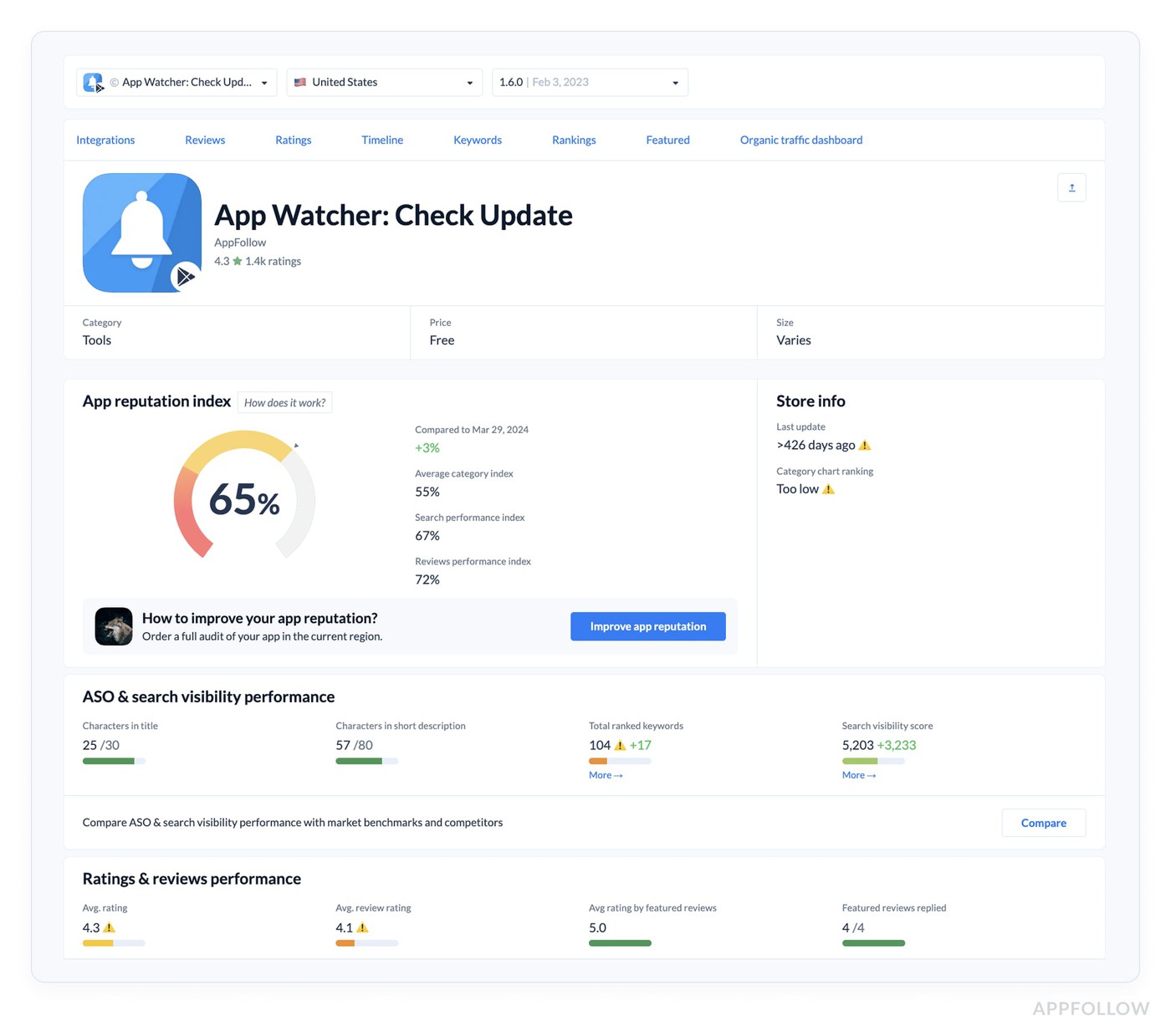
Use competitor app monitoring to see how similar titles communicated their updates and what players criticized. Set the auto-tags and alert rules before launch so the machinery's already running when the build goes out. Watch reviews and ratings during the phased rollout or the first 48 hours. And use the reports to compare what you expected players to say with what they said.
cta_get_started_purple
The 24/72/14-day release-response playbook
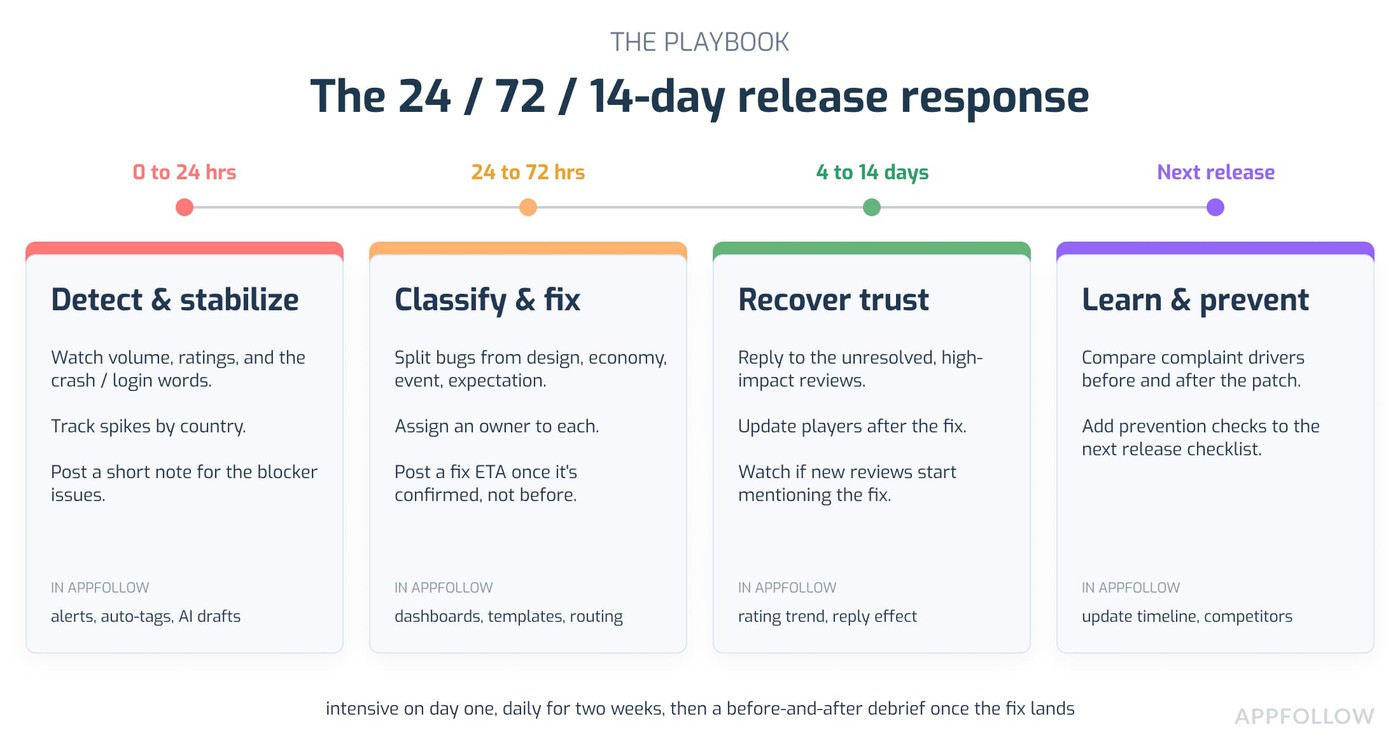
Here's the whole thing on one timeline.
0 to 24 hours, detect and stabilize. Watch review volume, rating movement, sentiment, the crash/login/purchase words, and country spikes. Post a short acknowledgement for the blocker issues. Tools: alerts, auto-tags, semantic analysis, Slack or Zendesk routing, AI reply drafts.
24 to 72 hours, classify and fix. Separate the bug reviews from design backlash, monetization anger, event failures, and expectation gaps. Assign owners. Post fix status or an ETA once it's confirmed, not before. Tools: topic dashboards, custom tags, reply templates, integrations, custom reports.
4 to 14 days, recover rating and trust. Reply to the unresolved high-impact reviews. Update players after the hotfix lands. Watch whether new reviews mention the fix. Brief the ASO and product teams. Tools: rating trend, reply effect, sentiment change, before-and-after topic report.
After the next release, learn and prevent. Compare the complaint drivers before and after the patch. Add prevention checks to the next release checklist. Tools: app update timeline, competitor review analysis, custom reporting.
Protect your app store rating with AppFollow
Quick version of where the platform slots into all this.
When a bad update causes a review spike, AppFollow pulls App Store and Google Play reviews into one workspace, so you can see whether the spike is isolated, stuck in one market, or spreading. When players hate a gameplay or economy change, the AI semantic tags group the complaints by balance, rewards, ads, matchmaking, crashes, purchases, and event names, so nobody's reading every review by hand.
![[Webinar recap] What fintech apps get wrong (and right) in the app stores](https://cdn.appfollow.io/blog/static/appfollow_a050ea8b-0d8b-4b36-b97d-342fc4c20648.jpg)