The 9 best app competitor analysis tools, compared for the App Store and Google Play

Table of Content:
- Key insights
- What app competitor analysis tools actually do (and the three types)
- How we evaluated these tools
- The criteria that actually change the decision
- App competitor analysis tools compared at a glance
- AppFollow: best all-in-one for reviews, ASO, and competitor benchmarking
- AppTweak: best for deep ASO keyword and market intelligence
- Sensor Tower (now including data.ai): best for market-size and ad intelligence
- Similarweb App Intelligence: best for cross-channel market context
- Mobile Action: best value ASO + Apple Ads intelligence
- Appfigures: best transparent, low-entry ASO + analytics
- Asodesk: best for ASO plus review replies on a budget
- App Radar: best all-in-one ASO for lean teams
- Appbot: best for competitor review and sentiment analysis
- How to choose the right app competitor analysis tool
- FAQs
Search for app competitor analysis tools, and the results drift into social media monitoring, web SEO, and marketing suites. That does not help when a rival has passed your app in the App Store category chart, claimed a Google Play keyword, or released a feature users love.
For this guide, we compared documentation, product materials, and public pricing for nine app-focused platforms in October 2026. We checked how pricing, data history, competitor limits, and store coverage change each tool’s value, then built a shortlist around the job each handles best.
The category becomes clearer once you split it in two. Discovery tools show who is winning attention through keyword rankings, category movement, download and revenue estimates, or ad visibility. Feedback tools help explain why through ratings, reviews, sentiment, and recurring complaints. Some products connect both sides. The right choice depends on which half of that loop your team needs to improve and whether the handoff matters.
Key insights
- AppFollow: best for benchmarking competitor search visibility, ratings, and review feedback in one workflow.
- AppTweak: best for finding competitor keyword gaps and investigating changes in their organic rankings.
- Sensor Tower: best for comparing estimated competitor downloads, revenue, and advertising activity across markets.
- Similarweb App Intelligence: best for connecting competitor app usage and audience trends with web performance.
- Mobile Action: best for researching competitors’ organic keywords alongside their Apple Ads keywords and creatives.
- Appfigures: best for small publishers combining competitor keyword research with app performance analytics.
- Asodesk: best for tracking competitor keyword visibility by country alongside review monitoring.
- App Radar: best for monitoring rival keywords and listing changes to guide a lean team’s ASO updates.
- Appbot: best for finding recurring complaints, feature requests, and sentiment patterns in competitor reviews.
What app competitor analysis tools actually do (and the three types)
App competitor analysis tools are software that tracks rival apps’ visibility, performance, and user feedback across the App Store and Google Play. They pull public store signals into comparable views, helping teams monitor keyword rankings, category positions, metadata changes, ratings, reviews, advertising activity, and modeled download or revenue estimates.
The value depends on the decision behind the dashboard. An ASO manager may use mobile app competitor analysis tools to find keywords a rival ranks for and compare listing updates by country. A product marketer might inspect recurring review complaints before prioritizing a feature. For a market analyst, estimated downloads and revenue help size an opportunity, provided those figures are treated as directional models rather than exact competitor data.
If you need the operating process rather than a vendor shortlist, start with how to run an app competitor analysis or learn how to find your competitors’ keywords. For tool selection, the category becomes clearer when divided by the evidence each platform handles best.
Discovery tools vs. feedback tools vs. all-in-one platforms
- Discovery tools show how competitors attract attention. Market-intelligence estimators such as Sensor Tower and Similarweb model downloads, revenue, usage, and ad activity. ASO platforms including AppTweak, MobileAction, App Radar, Asodesk, and Appfigures focus on keyword tracking, category rankings, and listing changes.
- Feedback tools explain what users report after installation. Appbot specializes in competitor reviews, sentiment analysis, topics, and recurring issues, making it useful when product or support teams need evidence for feature, bug, or service decisions.
- All-in-one platforms connect discovery and feedback. AppFollow combines competitor visibility and keyword data with ratings, review intelligence, and response workflows for connected apps. This type fits teams that want ASO, product, and support to investigate the same competitor movement without reconciling separate dashboards.
Tool type | What they help you analyze | Best for |
Discovery tools | How competitors attract users: keyword rankings, listing changes, category movement, and estimated downloads, revenue, usage, or advertising activity. Coverage depends on the tool. | ASO and acquisition teams identifying keyword gaps, tracking rival listings, or assessing market opportunities. |
Feedback tools | What users report after installation: review sentiment, recurring complaints, feature requests, and bugs. | Product and support teams using competitor feedback to prioritize improvements and investigate service gaps. |
All-in-one platforms | How visibility and user feedback connect: competitor keywords, rankings, ratings, and review themes, alongside response workflows for your connected apps. | Teams bringing ASO, product, and support into the same competitor analysis workflow. |
How we evaluated these tools
More than 12 platforms made the initial research list, covering ASO, mobile market intelligence, competitor tracking, and review analysis. The question behind the shortlist: what tools help with app competitor analysis in practice? Each product needed competitor data for the App Store, Google Play, or both. Nine qualified.
Showing up in search wasn’t enough to earn a spot. Generic web and social-media tools fell outside the scope. Semrush’s domain comparisons and Hootsuite’s social monitoring serve different jobs. Here, the focus was on app-store questions: which keywords a rival ranks for, where its category position moved, and what its users say in reviews.
The assessment draws on official documentation, product pages, public pricing, and G2 and Capterra evidence reviewed in October 2026. No paid hands-on tests were conducted. This is a public-evidence assessment, so the findings reflect what those sources support.
Every tool faced the same checklist: store and regional coverage, discovery and feedback depth, historical data, competitor and keyword limits, automation, pricing transparency, and trial access.
Two caveats matter when reading the results. Download and revenue figures are modeled estimates unless sourced from a connected store console. Quote-only pricing also leaves part of the cost picture unresolved until procurement begins.
AppFollow publishes this article and appears among the nine tools. The same criteria applied throughout, with credit given to dedicated market-intelligence estimators where they offer deeper data. Pricing, plan limits, and review signals are dated snapshots. Check current terms before committing.
The criteria that actually change the decision
Most mobile app competitor analysis tools can produce an impressive dashboard. Compare one level lower: which signals are covered, how far back the data goes, and when the entry plan stops fitting.
- Store and region coverage. Confirm support for the App Store and Google Play, then check which countries are available for each metric. A US keyword rank cannot explain a visibility drop isolated to Brazil.
- Discovery versus feedback depth. Discovery tools cover competitor keywords, category rankings, download or revenue estimates, creative activity, and ad share of voice. Feedback tools examine ratings, reviews, sentiment, bugs, and feature requests. Prioritize the evidence behind your team’s recurring decisions.
- Estimate transparency. Vendors cannot access another publisher’s console data, so competitor downloads and revenue are modeled. Look for a documented methodology and treat estimates as directional trends rather than exact totals.
- Historical data. Six months may cover one release cycle and still miss annual seasonality. For year-over-year comparisons, verify whether 12, 24, or all-time history requires a higher tier.
- Competitor, app, and keyword allowances. A low starting price loses its appeal when a plan tracks five apps but only three competitors per app. Count your portfolio and markets, then check the term allowance before you track keyword rankings across every app and country.
- Pricing and commitment. Transparent monthly plans simplify trials and budget approval. Quote-based platforms may bundle deeper datasets, APIs, onboarding, or annual contracts, so compare the total commitment rather than a hypothetical starting price.
- Alerts and team workflow. Data creates value when someone acts on it. Check whether the tool can notify an owner, share reports, support the required seats, route review findings, or manage replies without another export.
Use these criteria as elimination rules. A tool that misses a required store, market, historical window, or allowance should leave the shortlist before interface polish enters the discussion.
App competitor analysis tools compared at a glance
Nine platforms made the shortlist, but they solve different versions of the same problem. Some estimate market size and advertising activity. Others dig into keyword visibility or competitor reviews. A smaller group connects discovery and feedback in one workspace.
Start with the primary job column. If you need download, revenue, or ad intelligence for an investment case, narrow the list to discovery platforms. For keyword and category decisions, prioritize ASO depth. When the task is understanding complaints, feature requests, or rating changes, look for feedback analysis and review workflows.
Then check store coverage, starting price, and trial access against your portfolio. A low monthly fee can hide tight limits on apps, keywords, competitors, seats, or historical data. Prices and review signals were verified in October 2026; quote-based tools are marked accordingly.
App competitor analysis tools compared; pricing verified October 2026.
Tool | Best for | Starting price /month | Free trial days | G2 |
AppFollow | Teams managing ASO and reviews together | $19 | 10 | 4.6/5 |
AppTweak | ASO specialists needing deep keyword and market intelligence | $79 | 7 | 4.6/5 |
Sensor Tower, including data.ai | Enterprise market sizing and ad intelligence | Custom | - | G2: 4.3/5, 144 reviews |
Similarweb App Intelligence | Analysts connecting app, web, and audience data | $125 | - | 4.5/5 |
MobileAction | Growth teams combining ASO with Apple Ads intelligence | $15 | 7 | 4.5/5 |
Appfigures | Indie developers wanting modular analytics and ASO | $9.99 | - | 4.0/5 |
Asodesk | Budget-conscious teams combining ASO with review replies | From $47/month for ASO | 7 | 4.8/5 |
App Radar | Lean teams wanting ASO and light review management | $69 | 7 | 4.3/5 |
Appbot | Product and support teams mining competitor reviews | Custom | 14 | - |
AppFollow: best all-in-one for reviews, ASO, and competitor benchmarking
AppFollow connects competitor discovery with product and support workflows. Compare Discovery places your app beside four rivals on visibility, rankings, featuring, and updates. Benchmark Reports extend feedback comparison to 19 competitors through ratings, sentiment, bug share, and reply performance. The combined view helps assign a gap to ASO, product, or support.
Best for: multi-app publishers and support-led growth teams.
Features
- Discovery benchmarking: Compare keywords, category movement, featuring, and updates.
- Feedback benchmarking: Inspect review volume, sentiment, bugs, reply rates, and response times.
- Review workflows: Tag and answer reviews for connected apps through app review management. Competitor reviews remain read-only.
Pricing
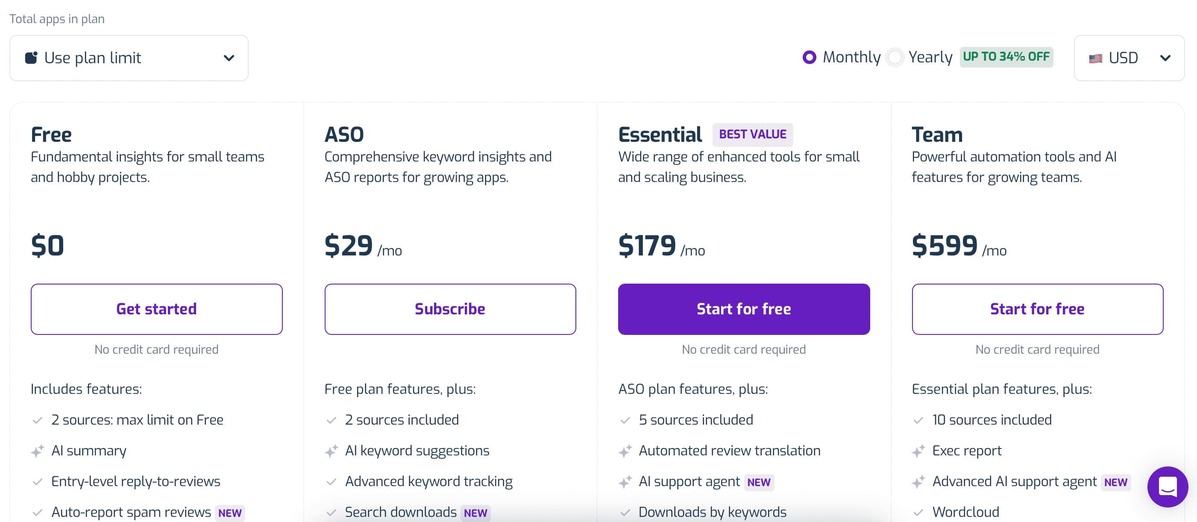
Adding colleagues does not add seats to the bill. AppFollow includes unlimited users; apps, keyword and competitor allowances, historical depth, and features determine the plan.
- Solo developer, 1–2 apps: Start with Free ($0) for basic monitoring and seven days of history. For deeper keyword research, the ASO option is advertised from $19/month billed annually, with 500 keywords and 30 competitors. It is listed as an add-on, so confirm the full subscription total.
- Growing team, up to 5 apps: Essential costs $179/month, or $129/month billed annually. Its 3,000 keywords, 100 competitors, and 365 days of history make sense when ASO and review analysis become recurring work.
- Publisher with 10–15 apps: Team is $599/month, or $425/month billed annually, with 9,000 keywords, 250 competitors, and full history. Choose it for the larger research workload and reporting depth. Enterprise is custom-priced for requirements beyond those allowances.
A 10-day trial lets the team check its actual workload before committing. Pricing checked October 27, 2026.
Pros and cons
Selected reviewer experiences focus on feedback analysis, ASO, and the workflows around competitor research.
✅ A feedback baseline for competitor benchmarks: “The weekly insights it generates are tremendous for understanding customer sentiment better.” (Yatin G., G2, March 2026). Useful when your team needs to understand its own feedback before comparing rival apps.
✅ Review trends are quick to investigate: “how quickly it lets me track review dynamics.” (Alexey S., G2, February 2026). The reviewer also described tagging and AI analysis as part of that workflow.
✅ Research connects with owned-app responses: “Easy to respond to reviews with AI.” (Eric E., G2, January 2026). A practical advantage when the same team handles feedback analysis and its own review backlog.
⚠️ Slack setup may need attention: “It took me some time to get it set up.” (Yatin G., G2, March 2026). This referred to the Slack integration; include setup time when planning alerts.
⚠️ AI rating summaries need checking: “Sometimes Al shows wrong info about the google play console rating.” (Alexey S., G2, February 2026). Cross-check a consequential rating claim against the underlying store data.
⚠️ ASO specialists may want more depth: “Wish there was some more ASO tools but the ones they have are great” (Eric E., G2, January 2026). Test the particular research task you need before choosing an all-in-one workflow.
Who should skip it: Teams focused on download and revenue estimation should consider Sensor Tower.
Review signal: G2: 4.6/5 from 195 reviews, as of October 2026. Explore AppFollow’s competitor analysis and review management workflows.
cta_get_started_purple
AppTweak: best for deep ASO keyword and market intelligence
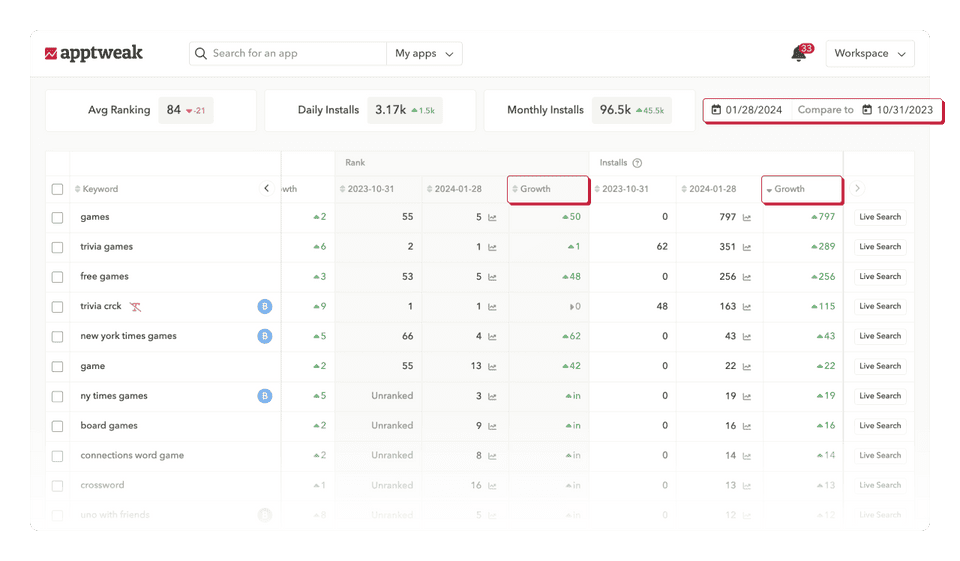
AppTweak helps explain a rival’s keyword gain by placing rankings beside metadata changes, creative updates, featuring, and estimated organic installs. That depth supports decisions about which keywords or listing changes to challenge.
Best for: ASO specialists and multi-market growth teams.
Source: AppTweak ASO tools.
Features
- Keyword intelligence: Compare rankings, volume, difficulty, relevance, and estimated organic installs.
- Store monitoring: Inspect competitors’ metadata, creatives, A/B tests, in-app events, and featuring history.
- Market intelligence: Benchmark estimated downloads and revenue across 100+ countries.
Pricing
AppTweak pricing buys research depth as well as capacity. At the displayed five-app configuration, Essential starts at $79/month billed annually: 500 tracked keywords, five competitors per app, six months of history, and one seat.
For a solo developer with 1–2 apps, Essential is the sensible starting point. Move up when the keyword pool or comparison history runs out, rather than buying a higher tier just because the portfolio has grown.
One ASO specialist supporting a small team should compare Grow at $249/month billed annually (1,500 keywords, 10 competitors per app, 12 months of history) with Expand at $499/month (3,000 keywords, 15 competitors per app, 24 months). Both displayed configurations still include five apps and one seat.
A team needing several logins or a larger app portfolio should request a configuration covering its actual apps and users, including an Enterprise quote. Upgrading research depth does not automatically solve the seat limit. Market Intelligence is a separate product to budget for.
Self-serve ASO plans offer a seven-day trial. Prices checked October 27, 2026; all rates above use annual billing. Source: AppTweak pricing.
Pros and cons
The strongest review evidence concerns keyword research, competitor creatives, and the effort needed to navigate the data.
✅ Keyword research supports a clear shortlist: “identify high-impact keywords, refine listings, and analyze competitors.” (Juan Esteban V., G2, April 2026). The reviewer used the platform for ongoing app visibility and optimization work.
✅ Competitor creatives are easier to inspect: “custom product pages and custom store listings” (Andy F., G2, May 2026). Andy described checking rival assets and metadata changes without jumping between tools.
✅ Reviews can expose positioning gaps: “spot gaps we can fill” (Andy F., G2, May 2026). This referred specifically to competitor ratings and reviews, including opportunities in product positioning.
⚠️ Navigation can slow down research: “The UI and UX can feel overwhelming.” (Andy F., G2, May 2026). Finding a particular report was the main friction in an otherwise useful research workflow.
⚠️ Useful limits can push the budget upward: “limited packages.” (Verified user in Banking, G2, January 2026). The reviewer felt that impactful features and allowances pushed buyers toward Enterprise.
⚠️ Estimated data needs a sanity check: “Sometimes data is not accurate. rest is good enough” (Ashish Sankhe, G2, February 2026). The review concerned competitor downloads and app tracking; verify material conclusions against other evidence.
Who should skip it: Teams whose primary job is high-volume review operations should consider AppFollow.
Review signal: G2: 4.6/5 from 208 reviews, as of October 2026. Read the AppTweak alternative comparison.
Sensor Tower (now including data.ai): best for market-size and ad intelligence
Sensor Tower supports decisions about which market to enter, which publisher is gaining share, and where competitors advertise. Its 2024 acquisition of data.ai expanded its app-intelligence coverage. Downloads and revenue remain modeled estimates, so use them for directional analysis and relative benchmarking rather than financial reporting.
Best for: enterprise strategy and user-acquisition teams comparing apps, publishers, and countries at scale.
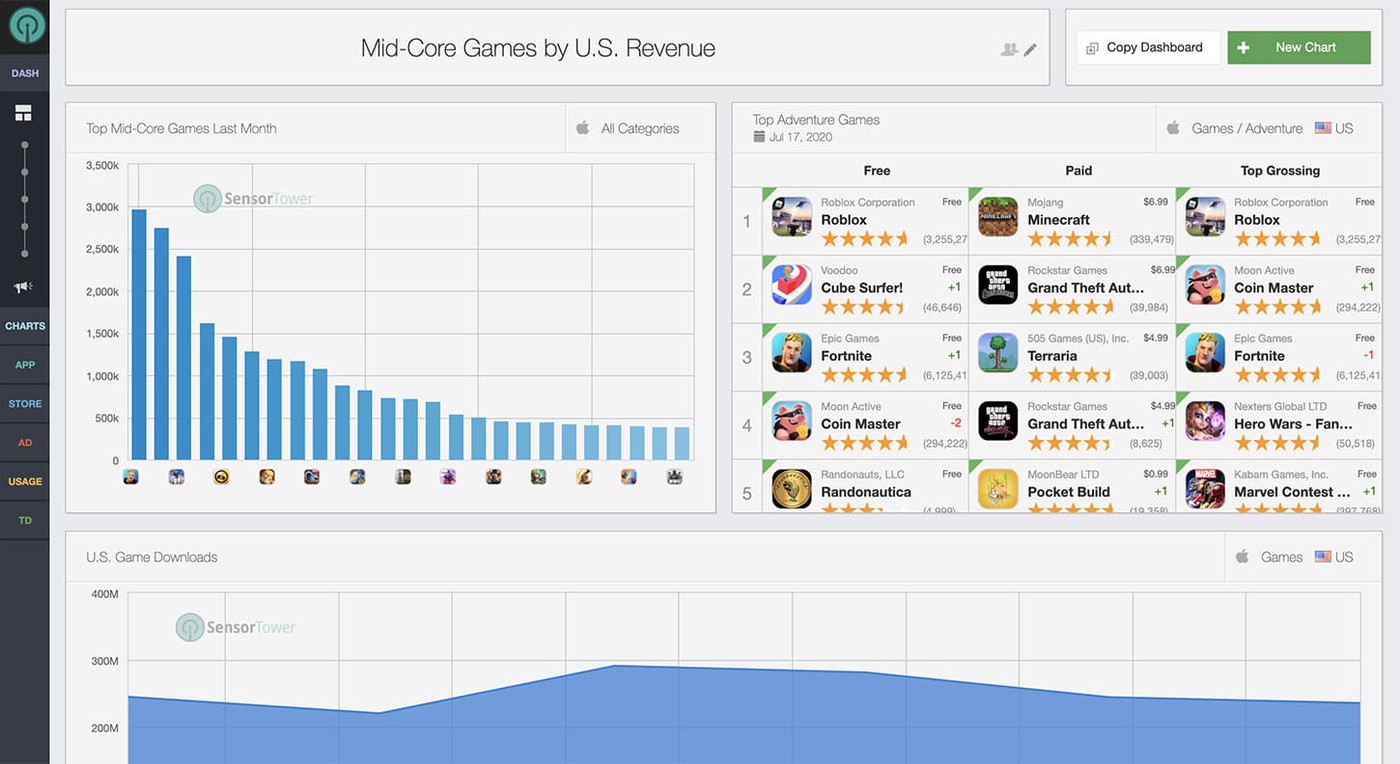
Source: Sensor Tower.
Features
- App performance: Compare estimated downloads, revenue, active users, engagement, retention, and rankings.
- Ad intelligence: Inspect competitor channels, creatives, impression trends, and share of voice.
- Audience insights: Examine usage and audience overlap to identify rivals and expansion opportunities.
Pricing
Sensor Tower customizes each subscription. There is no published dollar starting price or public tariff showing a fixed charge per app, user, or country. Build the quote around the research you need: Mobile App, Digital Advertising, Audience, or a combination.
- Solo developer with 1–2 apps: If the job is weekly keyword and listing checks, start with a self-serve ASO tool. Request a Sensor Tower quote when market-size or advertising evidence will inform a specific launch or investment decision.
- Small strategy team: Ask for a Mobile App-only proposal first, with the required countries, history, users, and exports spelled out. Add advertising or audience products only if they answer questions the base proposal cannot.
- Publisher managing a broad portfolio: Scope the relevant products together and ask for separate prices for platform access, API delivery, and any additional permissions. App count alone cannot tell you the bill. Compare the quoted coverage with the decisions your team makes each month.
Pricing model checked October 27, 2026.
Pros and cons
App-market research and advertising research have different strengths and limits. These excerpts identify the relevant part of the suite.
✅ Download and revenue benchmarking: “download and revenue estimates” (Pingaksh S., G2, October 2026). The reviewer used cross-market competitor estimates to benchmark app performance.
✅ Visibility into rival creative activity: “which creatives competitors are running” (Pingaksh S., G2, October 2026). The same review described checking networks and creative run duration to inform creative strategy.
✅ Category context around app movement: “market and category trend views” (Pingaksh S., G2, October 2026). This helps place a competitor’s growth in the context of its category.
⚠️ Module costs can restrict access: “The main drawback is cost.” (Pingaksh S., G2, October 2026). The reviewer reported that useful modules required separate or higher-tier plans.
⚠️ Performance views can take time to navigate: “The UI could be a bit better and simpler to understand.” (Verified user in Apparel & Fashion, G2, October 2026). The user found navigation harder when checking performance and ROI.
⚠️ Check geographic drill-down in the ad product: “I wish I could drill down to specific geographies” (Jeremy A., G2, October 2026). This feedback concerns Pathmatics advertising research; confirm its geographic detail separately from mobile app coverage.
Who should skip it: Smaller keyword-led teams should consider AppTweak. Review-led teams needing benchmarking and response workflows should consider AppFollow.
Review signal: G2: 4.3/5 from 144 reviews, as of October 2026.
Similarweb App Intelligence: best for cross-channel market context
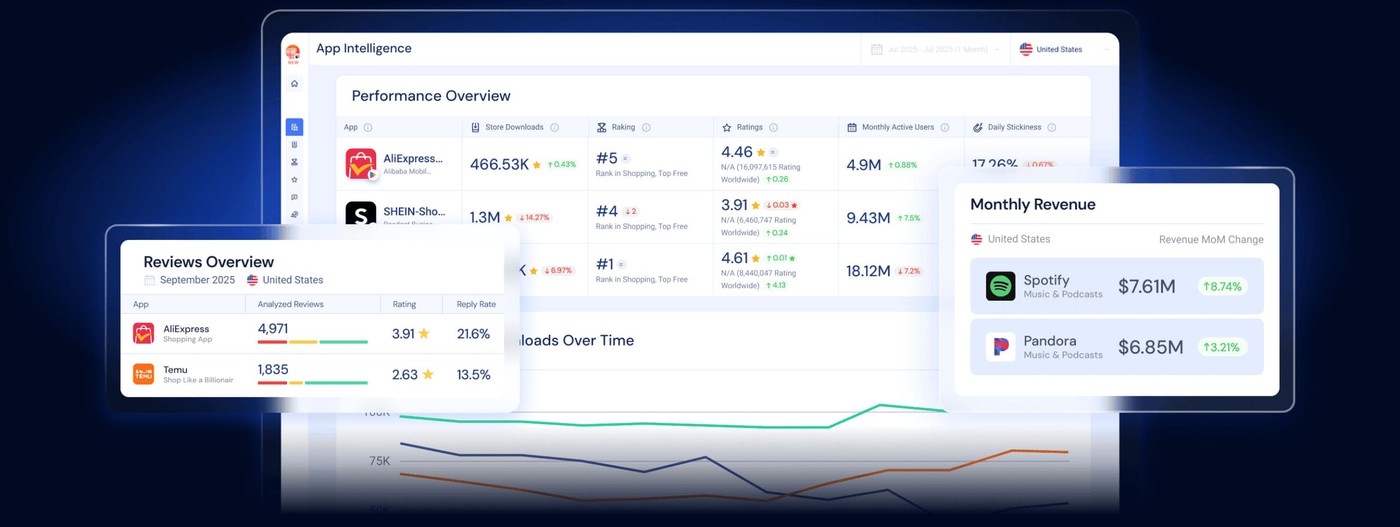
An app can lose share while its website gains traffic. Similarweb helps analysts read both movements before attributing the change to store visibility, engagement, or a broader channel shift. App Intelligence covers iOS and Android, while App-Web Insights supplies cross-channel context.
Best for: strategy and growth teams evaluating competitors across apps and the web.
Features
- Performance benchmarking: Compare downloads, rankings, active users, sessions, retention, and ratings by competitor and country.
- Market and audience analysis: Inspect category trends, demographics, interests, and app overlap before prioritizing a segment.
- Revenue and review analysis: Assess in-app purchase revenue, ratings, and review themes behind performance changes.
Pricing
The first pricing decision is which datasets to buy. Similarweb sells App Intelligence on its own or bundled with Web Intelligence. Review and sentiment analysis, in-app purchase revenue analytics, and app technographics are advertised as add-ons. No public starting price is listed for App Intelligence.
With 1–2 apps and a solo ASO workload, prioritize a self-serve keyword tool. A sales-led App Intelligence package becomes worth evaluating when competitor usage, retention, or audience data would change a business decision.
For a small product or growth team, request a standalone App Intelligence quote. Specify the stores, countries, history, and people who need access. Ask which metrics are included before adding review or revenue analysis to the budget.
A larger team comparing an app portfolio with competitors’ websites should price the app-and-web bundle. Have sales itemize add-ons and API access so the proposal reflects the intended workflow. A separate web-analytics subscription price is not a reliable starting price for this package.
Pricing structure checked October 27, 2026.
Pros and cons
These excerpts come from reviews of Similarweb App Intelligence itself, rather than the broader web-analytics product.
✅ Structured app benchmarks: “structured, scalable data” (Víctor F., G2, February 2026). Víctor used app performance data to fill gaps left by web-only competitor analysis.
✅ A view of emerging competitors: “identify emerging competitors” (Jamie R., G2, May 2026). The reviewer tracked global app performance and market share for client research.
✅ Data can feed existing reporting workflows: “Looker Studio” (George C., G2, April 2026). George described bringing app rankings and download metrics into internal dashboards and Excel.
⚠️ App comparisons may feel less flexible than web reports: “comparison tools are more limited” (Víctor F., G2, February 2026). His criticism concerned dashboard flexibility and analytical depth in the app module.
⚠️ Niche-app and smaller-market coverage needs checking: “data is often sparse or simply unavailable” (Prisca P., G2, May 2026). The review flagged smaller competitors and less mature markets as research blind spots.
⚠️ Built-in categories may not match your market: “predefined categories” (Verified user in Real Estate, G2, April 2026). The reviewer wanted custom categories or segments for a more relevant competitor set.
Who should skip it: ASO-first teams needing keyword-level moves should choose AppTweak or Mobile Action. Teams combining store visibility with competitor review evidence should consider AppFollow’s app competitor analysis software.
Review signal: G2: 4.5/5 from 1,213 reviews, as of October 2026.
Mobile Action: best value ASO + Apple Ads intelligence
Mobile Action connects organic and paid acquisition research. Compare rival keywords, Apple Ads visibility, custom product pages, and creative activity before deciding where to compete.
Best for: growth teams combining ASO with Apple Ads research.
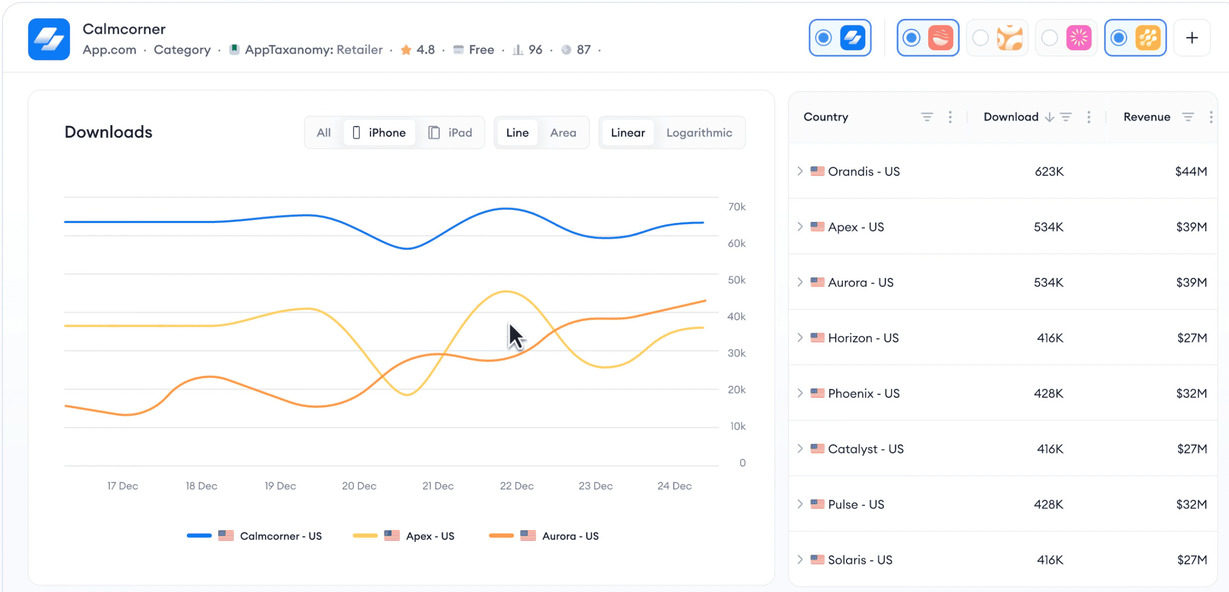
Source: Mobile Action Ad Intelligence.
Features
- Keyword tracking: Follow rankings, metadata changes, keyword gaps, and category movement across both stores.
- Search Ads Intelligence: Find competitors’ paid keywords, impression share, placements, and leading advertisers by storefront.
- Creative and CPP intelligence: Compare ads and custom product pages to identify concepts worth investigating.
Pricing
MobileAction scales ASO pricing through keywords, apps, competitors per app, seats, and history. The jump between tiers can be triggered by one limit even when the others still have room.
- Solo developer, 1–2 apps: Lite costs $15/month, or $12.50/month billed annually. It covers 100 keywords, five apps, three competitors per app, one seat, and three months of history. Choose Basic when rival research needs more depth: $69/month or $59/month annually buys 500 keywords, eight apps, and 10 competitors per app, still with one seat.
- Two- or three-person team: Pro is $239/month, or $199/month annually, with three seats, 10 apps, 1,500 keywords, 15 competitors per app, and 12 months of history. Basic’s lower price stops helping when several people need access.
- Larger publisher: Request Enterprise pricing for more seats and broader competitor coverage; its published configuration lists 20 apps and unlimited competitors per app. Quote paid-search and creative intelligence explicitly rather than assuming the entry ASO price includes them.
ASO trials last seven days. Pricing checked October 27, 2026.
Pros and cons
Reviewers connect competitor research with both organic keywords and Apple Ads, while reporting a few analytical and workflow limits.
✅ Keyword tracking puts your app beside rivals: “where we stand against competitors.” (Jimmy, G2, August 2025). The reviewer used keyword tracking to understand competitive position while refining campaigns.
✅ Paid acquisition data sits beside competitive research: “ability to see conversions from Apple Ads” (Steve H., G2, August 2025). Steve also cited competitor activity analysis, making the combined workflow relevant to growth teams.
✅ Guidance helps teams use the research: “proactive in guiding us to optimize campaigns effectively.” (Karin A., G2, August 2025). Karin described an account manager who helped turn platform insights into campaign changes.
⚠️ Custom analysis can hit interface limits: “specific segments or custom reports.” (Jimmy, G2, August 2025). Jimmy found drilling into those views more limited than the broader competitive insights.
⚠️ Some proprietary ad metrics need interpretation: “metrics that sometimes do not make sense” (Verified user in Online Media, G2, August 2025). This complaint referred to MobileAction-created metrics, not imported Apple Ads data; the reviewer also questioned some creative-tab signals.
⚠️ Occasional bugs can interrupt the workflow: “small bugs or glitches.” (Timofei O., G2, August 2025). Timofei reported short interruptions and said support resolved them quickly.
Who should skip it: Review-led teams needing competitor sentiment and reply automation should choose AppFollow or Appbot.
Review signal: G2: 4.4/5 from 113 reviews, as of October 2026.
Appfigures: best transparent, low-entry ASO + analytics
Appfigures lets small studios start with owned-app analytics, then add ASO and competitor intelligence as they grow. Its published limits show when an upgrade becomes necessary.
Best for: indie developers and small publishers scaling research by module.

Source: Appfigures.
Features
- Performance analytics: Consolidate downloads and revenue; compare store ranks, ratings, and featuring changes.
- ASO research: Track rankings and uncover competitors’ organic and Apple Ads keywords across the App Store and Google Play.
- App intelligence: Estimate rival downloads and revenue, inspect custom product pages, and monitor premium competitors.
Pricing
The $9.99/month Connect price gets you owned-app analytics. For competitor keyword research, budget for Optimize at $149.99/month, or $119.99/month billed annually. The price rises with research features, keyword allowances, premium competitor intelligence, and connected apps.
Solo with 1–2 apps: choose Connect for your own performance data, or Optimize for ASO research with 500 keywords. The free Starter plan is another way to begin. Buying analytics alone does not unlock the full competitor research workflow.
A small studio with 10 connected apps can keep Optimize if keyword research is enough. Five apps are included; the next five add $9.95, bringing monthly billing to $159.94. Boost at $599.99/month ($449.99/month annually) adds full app intelligence for two tracked competitors and 1,000 keywords.
For a larger portfolio requiring broad competitor intelligence, Amplify costs $1,399.99/month, or $999.99/month annually, with 2,500 keywords and unlimited competitors. Extra connected apps still cost $1.99 each beyond the first five. Size the research allowance separately from the owned-app count.
An Optimize trial is offered. Pricing checked October 27, 2026.
Pros and cons
The reviews distinguish useful keyword tracking from feature access, billing, and owned-app analytics limitations.
✅ Keyword tracking can cover the core research job: “Keyword performance tracker was robust for what we needed” (Verified user in Computer Games, G2, May 2026). Even this critical reviewer credited the tracker with meeting the team’s requirements.
✅ Live App Store rankings support keyword checks: “They brings live App Store search ranking to you, that's very good.” (Melih M., G2, July 2025). Melih used the platform to find keywords and work on app visibility.
✅ Owned-app data provides a reporting baseline: “combines data from multiple sources.” (Verified user in Sports, G2, May 2023). The reviewer consolidated downloads and usage across apps, useful context for a competitor benchmark.
⚠️ Feature gates can change the value calculation: “Everything is gated, and once you bite the bullet the features fall short” (Verified user in Computer Games, G2, May 2026). That was this reviewer’s experience; test the required research features on the actual paid tier.
⚠️ Clarify renewal and overage charges: “they tried to charge me $4K” (Melih M., G2, July 2025). Melih reported an early renewal demand after extra usage. Confirm billing triggers in writing rather than assuming the base subscription is the full bill.
⚠️ Check the ad networks behind your baseline: “Limited ad networks” (Verified user in Sports, G2, May 2023). This older complaint concerned owned-app ad monetization analytics. Verify your required networks during the trial.
Who should skip it: Teams needing automated review workflows at scale should choose AppFollow.
Review signal: G2: 4.0/5 from 18 reviews; Capterra: 4.5/5 from four reviews, as of October 2026.
Asodesk: best for ASO plus review replies on a budget
Asodesk combines competitor keyword research with review monitoring and replies across the App Store and Google Play. It suits teams that want to compare rivals’ search visibility, then act on user feedback without enterprise pricing.
Best for: budget-conscious growth and support teams needing ASO research and review handling.
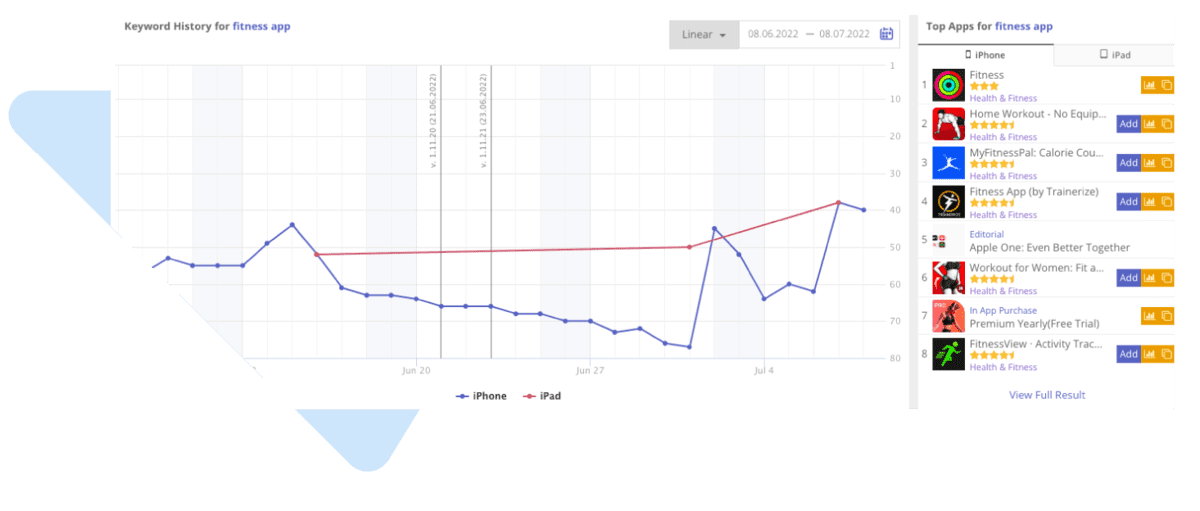
Source: Asodesk competitor research.
Features
- Keyword research: Track rankings, traffic estimates, difficulty, and competitors’ keywords by country.
- Competitor monitoring: Inspect rivals’ metadata, visibility, category, and ranking changes.
- Review workflows: Analyze sentiment and reply with templates, bulk actions, or rule-based automation.
Pricing
Asodesk has separate ASO and review-management plans, plus review add-ons. ASO tiers include 100 monthly replies, so a second subscription is not automatic. The bill grows with keywords, apps, users, reply volume, and the tools you need.
- Solo developer, 1–2 apps: Free covers one app and 200 keywords. For two apps, ASO Pro lists $59/month, with 700 keywords, 200 competitor apps, and two users. The advertised annual rate is $47/month; do not confuse that with monthly billing.
- Small team, up to 10 apps: ASO Guru is $199/month for 3,000 keywords and five users. Add review tooling only if the included access falls short. Standalone review plans start at $49/month; price the combined workflow before comparing it with an all-in-one subscription.
- Publisher with up to 30 apps: ASO Power lists $449/month, 5,000 keywords, and 10 users. Request a custom configuration if the portfolio or review workload exceeds those limits. Avoid paying for a larger ASO plan just to solve a review-volume problem.
The trial lasts seven days. Pricing checked October 27, 2026; promotional offers vary.
Pros and cons
The public review evidence is mostly older. Dates below distinguish historical feedback from current plan facts.
✅ Country coverage supports international research: “Amount of countries the service tracks” (Nika G., G2, January 2019; rating updated November 2025). The reviewer used Asodesk to analyze competitors across the App Store and Google Play.
✅ Competitors and keywords are straightforward to find: “It's easy to find competitors, keywords, track positions.” (Alexandra A., G2, July 2023). Alexandra also described the navigation as intuitive after more than a year of use.
✅ ASO and review tasks share a workflow: “competitor analysis and review management” (Mykyta H., G2, April 2023). Mykyta reported reducing the time an ASO specialist spent on those tasks.
⚠️ Interface density is worth testing: “UX is a little bit overloaded” (Nika G., G2, January 2019; rating updated November 2025). This is historical feedback. Check how quickly a new user can complete your own competitor research task.
⚠️ Comfortable ongoing use may need a paid tier: “you have to buy a subscription to be comfortable” (Alexandra A., G2, July 2023). Alexandra still considered it worthwhile; compare the free allowances with your actual app and keyword workload.
⚠️ Include technical reliability in the trial: “some technical issues have cropped up occasionally” (Mykyta H., G2, April 2023). The reviewer also said Asodesk’s managers responded quickly and resolved the problems.
Who should skip it: Teams wanting ASO and review operations under one subscription should consider AppFollow.
Review signal: G2: 4.6/5 from 44 reviews, as of October 2026.
App Radar: best all-in-one ASO for lean teams
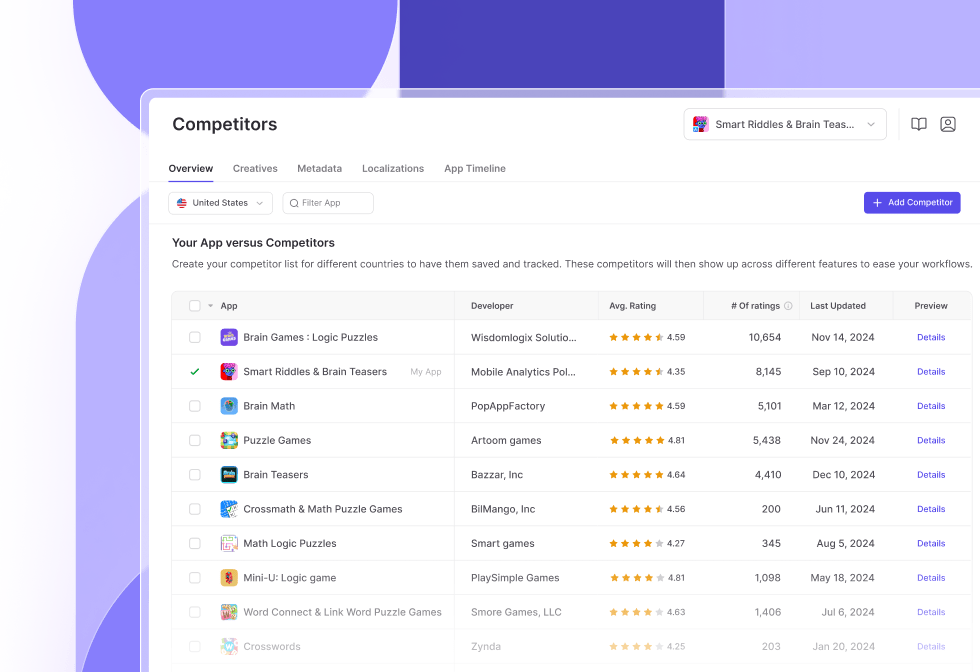
App Radar keeps competitor research close to the work it triggers. Compare rivals’ keywords, creative changes, and reviews, then update listings or reply from the same platform. It fits lean publishers defending visibility without a separate market-intelligence suite.
Best for: lean teams combining ASO with review management.
Source: App Radar competitor intelligence.
Features
- Competitor tracking: Follow shared keywords, category ranks, metadata, creatives, and updates across the App Store and Google Play.
- Review intelligence: Use AI summaries to identify themes in your reviews and competitors’ feedback; AI-assisted replies support owned-app responses.
- ASO analytics: Keyword and visibility trends show whether listing changes gained ground.
Pricing
Count store listings before choosing App Radar. One app in one store uses one app slot, so the same product on iOS and Android uses two. Keywords, competitor allowances, seats, and review features also change by tier.
For a solo developer with one cross-platform app, Essentials fits the two listings: €58/month billed annually, 500 keywords, 25 competitors, and one seat. Two cross-platform products need four slots, which already exceeds Essentials.
A two-person team with five cross-platform apps uses 10 listings. Growth covers that at €141/month billed annually, with 1,500 keywords and 100 competitors. It is a practical match only while two seats and those account-wide allowances cover the workload.
Seven cross-platform apps and five users point toward Scale: €250/month billed annually, 15 listings, 3,000 keywords, and 250 competitors. Beyond 15 listings or five seats, request an Enterprise quote. Storefront localizations do not consume extra app slots, but tracked keywords share the account allowance.
A seven-day trial is available. Prices checked October 27, 2026; annual rates are displayed monthly equivalents.
Pros and cons
Review excerpts cover keyword research, recurring monitoring, and the practical friction around day-to-day ASO work.
✅ Competitor research informs listing decisions: “The competitor as well as the keyword analysis of the tool is very valuable” (Dominik G., G2, July 2022). Dominik used those insights to improve the app’s store listing.
✅ Recurring updates reduce manual monitoring: “Daily keyword, ranking and featuring updates and Slack integration for ranking updates are great” (Ylli Q., G2, July 2022). The reviewer highlighted the benefit of replacing repeated manual checks.
✅ Feedback and localization work stay close to ASO: “managing reviews and optimizing listings in different countries.” (Ben T., G2, December 2025). Ben described using these alongside keyword tracking and competitor insights.
⚠️ The cost can feel steep for lighter use: “price, which seems a little steep.” (Ben T., G2, December 2025). Check that the included listings and seats fit the workload before choosing a tier.
⚠️ Data loading can interrupt a reporting session: “Sometimes it doesn't load data” (Karolina C., G2, October 2024). Karolina reported having to return later or log in again; reproduce your weekly report during the trial.
⚠️ Support speed can vary: “slower response times from support.” (Ben T., G2, December 2025). Ben still said the product functioned well overall, so this is an individual service experience.
Who should skip it: Teams needing deep download and revenue estimates should choose Sensor Tower.
Review signal: G2: 4.3/5 from 32 reviews, as October 2026.
Appbot: best for competitor review and sentiment analysis
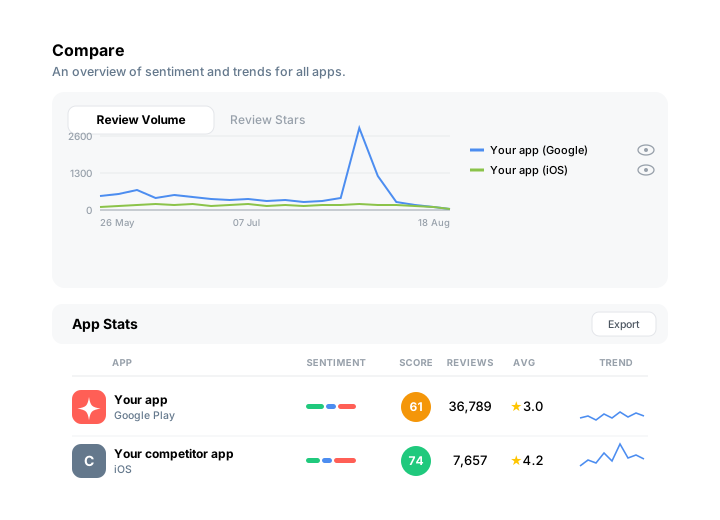
Choose Appbot when the useful competitor signal lives in users’ words. Product teams can compare complaints, feature requests, and sentiment before deciding which gaps belong on the roadmap. It does not provide ASO keyword research or market-size estimates.
Best for: product teams researching competitor reviews.
Source: Appbot competitor analysis
Features
- Sentiment analysis: Classifies sentiment, emotions, and topics with vendor-reported 93%+ accuracy.
- Competitor monitoring: Compares ratings, review volume, topics, and history across the App Store, Google Play, and Microsoft Store.
- Language support: Analyzes 200+ languages and translates 30+ into English.
Pricing
Appbot pricing starts with sources and seats. One app in one store equals one source, including all countries. Your apps and competitors share that allowance. One cross-platform app plus two cross-platform rivals already means six sources.
- Solo developer: Small costs $59/month, or $49/month billed annually, for one user and five sources. It can cover 1–2 apps plus a few competitor listings. The six-source example above needs Medium even though only one person is doing the work.
- Three-person team: Medium is $119/month, or $99/month annually, with 40 sources. Ten owned apps and 10 competitors, each tracked in both stores, fill those 40 slots. It suits review research without the advanced response workflow.
- Larger portfolio: Large starts at $219/month, or $166/month annually, for seven users and 100 sources. Choose it when exports, replies, or additional source capacity are needed. Premium starts at $479/month, annual-only, for 20 users and SSO; API access is an add-on.
The 14-day trial requires no card. Pricing checked October 27, 2026.
Pros and cons
The cited G2 experiences date from 2021–2023. Older limitations below are trial checks, not claims that the same issues remain today.
✅ Reviews become a recurring research input: “Appbot helps to monitor reviews. It also provides data visualizations.” (Sandhya R., G2, May 2023). Sandhya also described regular reports summarizing app reviews.
✅ Sentiment findings can enter a BI workflow: “sentiment analysis tool and integration with Tableau” (Nitin J., G2, May 2023). The reviewer valued combining review and rating analysis with an existing reporting tool.
✅ Exports support your own comparison views: “export the data as an excel sheet and create custom dashboards” (Verified user in Computer Software, G2, November 2022). That makes it possible to select the evidence a product or support team needs.
⚠️ A solo user may find the feature upgrade expensive: “For a single user, Pricing vs Features is not so good.” (Nitin J., G2, May 2023). Nitin specifically questioned paying for Large just to manage one app’s reviews and ratings.
⚠️ Check the rating detail required for your benchmark: “exact number of ratings for a specific day/time frame” (Verified user in Computer Software, G2, November 2022). The reviewer found that harder to inspect than review counts. Test the precise time window your report needs.
⚠️ Cross-store comparisons deserve a trial check: “Some awkwardness in analyses spanning iOS/Android apps.” (Michael H., G2, August 2021). This historical report concerns comparisons across stores; run the same app cohort through both before committing.
Who should skip it: Teams needing competitor keywords should choose AppTweak; teams combining ASO with review workflows should consider AppFollow.
Review signal: G2: 4.6/5 from 18 reviews, as of October 2026.
How to choose the right app competitor analysis tool
Start with the decision your team cannot make today. That bottleneck narrows the shortlist faster than comparing every feature across nine platforms.
- For market sizing and investment cases: Choose an estimator. Sensor Tower fits when download, revenue, and advertising intelligence must support market-entry or portfolio decisions. Similarweb adds cross-channel context when stakeholders also expect web traffic and audience data. Treat competitor estimates as directional. Compare trends and relative positions instead of presenting them as audited figures.
- For ASO moves: Choose AppTweak for keyword and market-intelligence depth. Mobile Action, App Radar, and Appfigures give smaller teams self-serve ways to track competitor keywords, category rankings, creatives, and metadata changes. Asodesk is worth considering when review replies must sit beside ASO work.
- For the reasons behind a competitor’s rating: Appbot specializes in sentiment, topics, and review evidence. AppFollow fits when those findings must continue into benchmarking, alerts, review management, and automated replies. Teams needing discovery and feedback together can avoid another tool and workflow handoff.
Next, check the limits that shape the bill. Count the listings you need to monitor, then estimate keyword volume, competitor slots, markets, seats, and required historical data. A low entry price can disappear when additional apps or users trigger a higher tier. Quote-only plans add procurement time; annual commitments reduce flexibility if your portfolio changes.
The best tools for app competitor analysis become easier to separate in real scenarios:
- A three-person indie studio tracking two apps should start with Appfigures or App Radar, accepting lighter market estimates in exchange for self-serve pricing.
- A 20-app publisher with separate ASO and support teams should shortlist AppFollow. Multiple owners can move from competitor signals to review action without rebuilding the workflow elsewhere.
- A user-acquisition team preparing a board deck should favor Sensor Tower. Its market and ad intelligence suits investment arguments, although pricing and procurement are heavier.
Choose against the bottleneck first. Scale, workflow, and budget decide the final fit.
cta_get_started_yellow
FAQs
What tools help with app competitor analysis?
Three categories cover most jobs. ASO platforms compare keywords, rankings, metadata, and visibility. Market-intelligence products estimate downloads, revenue, and advertising activity. Review-intelligence tools surface sentiment and recurring complaints. Choose the category that matches your decision, then check whether it covers adjacent workflows without weakening the core analysis.
What is the best tool for mobile app competitor analysis?
It depends on the evidence you need. AppTweak is strong for keyword and discovery research, while Sensor Tower suits market sizing and ad intelligence. Appbot focuses on competitor reviews and sentiment. AppFollow is the balanced option when ASO benchmarking, ratings, review themes, and response workflows need to sit together.
Is there a free way to do app competitor analysis?
Yes, although free access usually limits apps, markets, keywords, history, or exports. Appfigures and Asodesk offer free plans, while Mobile Action provides a free campaign-management plan. AppFollow’s free ASO tools provide quick top-chart, featuring, and conversion checks; its free trial opens the broader tracking workflow. Verify current limits before building a recurring report around any free tier.
Can these tools track both the App Store and Google Play?
Most tools compared here cover the App Store and Google Play, including AppFollow, AppTweak, Sensor Tower, Mobile Action, Appfigures, Asodesk, and App Radar. Appbot also supports Microsoft Store reviews. Confirm which metrics, countries, historical ranges, and review functions are available because depth can differ by store.
How accurate are competitor download and revenue estimates?
Treat them as directional models rather than audited store-console figures. Vendors infer performance from proprietary datasets and modeling, so totals may disagree. The useful signal is relative: whether a competitor is accelerating, losing momentum, or gaining share over the same period. Avoid combining estimates from different providers in one trend line.
Do I need a separate tool for competitor reviews?
Only if your ASO platform cannot analyze competitor feedback at the depth your team needs. AppFollow, Appbot, Asodesk, and App Radar combine review monitoring with other app-growth functions to varying degrees. Check for sentiment, topic or tag analysis, rating trends, filters, and exports. Competitor reviews remain research data; you can reply only to reviews for apps you own and connect.
cta_get_started_purple