10 Best Keywords Tools for ASO in 2026: Features & Pricing Compared by an Expert

Table of Content:
- TL;DR: Best ASO keyword tools by use case
- What Is an ASO Keyword Tool?
- Methodology: How we tested these app store search optimization tools
- Comparison table of the best ASO keyword tools
- AppFollow — All-in-One ASO Keyword Research Tool
- AppTweak — AI-Powered ASO Keyword Suggestion Tool
- Sensor Tower
- 42matters
- MobileAction — ASO Keyword Tool for Competitor Spying
- Asodesk
- App Radar
- Appfigures — ASO Keyword Planner for Indie Devs
- ASOMobile
- SplitMetrics Acquire
- How to choose the best keywords tools for ASO
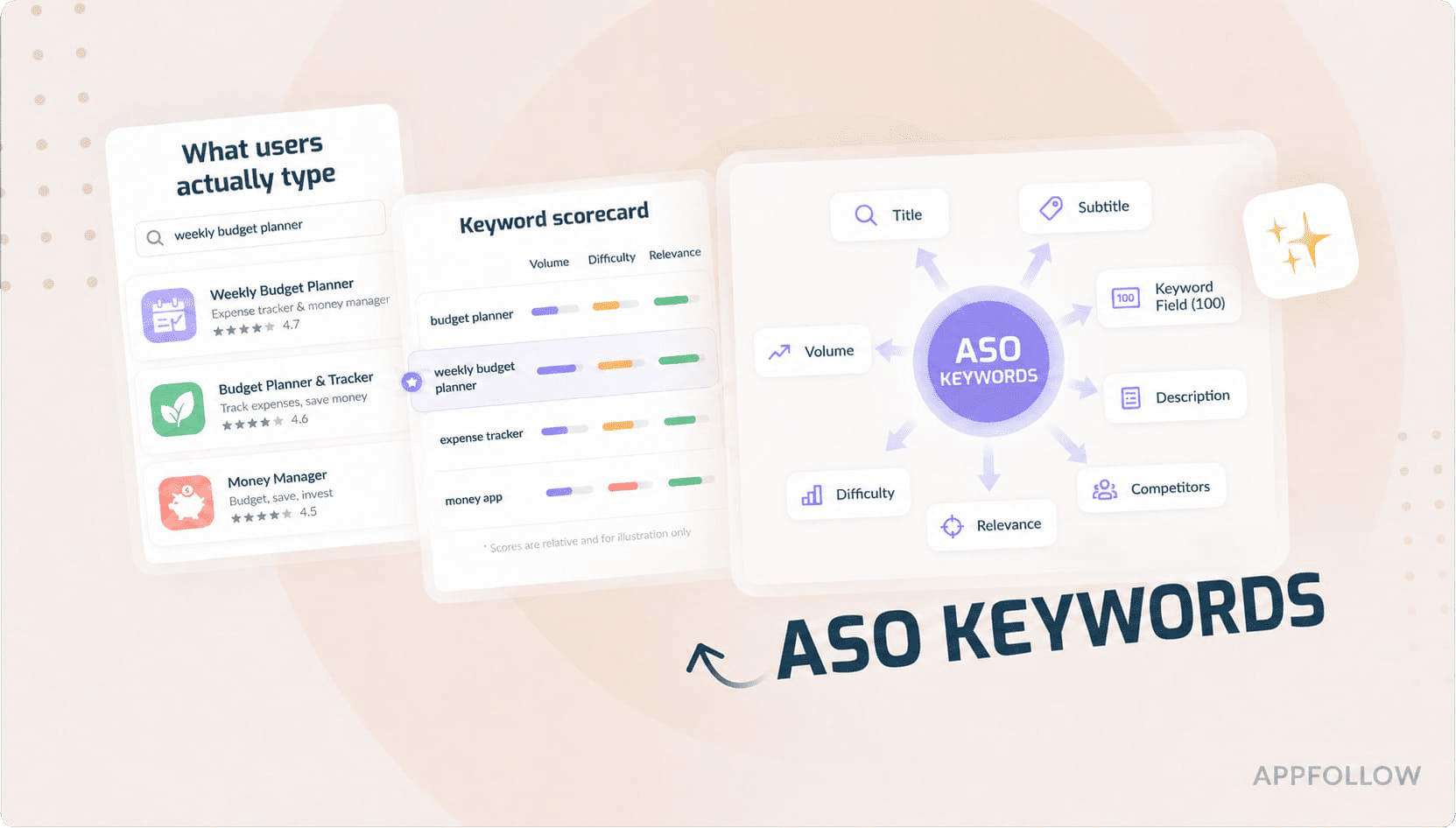
Search remains the biggest discovery channel in app stores. Apple has previously reported that roughly 65% of App Store downloads begin with a search, which means visibility often comes down to the keywords you target. The challenge is that neither Apple nor Google provides true keyword volume data, so ASO teams rely on third-party platforms to estimate search popularity, keyword difficulty, and ranking opportunities.
The market for keywords tools for ASO is crowded. Pricing is often opaque, feature lists look similar, and the wrong choice can leave you chasing low-volume keywords, missing localization opportunities, or reacting too slowly to competitor moves.
To narrow the field, I looked at 10 platforms that show up repeatedly in ASO teams' workflows. Some are built around keyword research. Others started as market-intelligence or Apple Search Ads products and expanded from there. I compared them on keyword discovery, search-volume estimates, localization support, rank tracking, competitor research, and cost to see where each one actually stands out.
Short on time? Skip to the comparison table →
TL;DR: Best ASO keyword tools by use case
Not every tool on this list solves the same problem. Here's where each one stands out.
- Best keywords tools for ASO overall: AppFollow. A good fit if you manage both iOS and Google Play and want keyword research, localization, rank tracking, and reporting in one place.
- Best ASO keyword research tool for enterprises: Sensor Tower. Choose it when historical trends, category benchmarks, and market intelligence matter as much as keyword rankings.
- Best ASO keyword suggestion tool for localization: AppTweak. Built for teams expanding into new markets with localized keyword discovery across dozens of languages.
- Best ASO keyword planner for indie devs: Appfigures. The free plan, approachable interface, and lightweight workflow make it an easy place to start.
- Best free ASO keyword tool: ASOMobile. You can explore keyword opportunities and monitor rankings before spending money on a larger platform.
- Best AI-powered keyword tool: App Radar. Helpful for generating keyword ideas, drafting metadata, and speeding up routine ASO work.
- Best for competitor keyword spying: MobileAction. A strong choice if your strategy starts with understanding how competing apps win visibility.
- Best for rank tracking and alerts: Asodesk. Designed for teams that keep a close eye on ranking changes and app reviews every day.
- Best for Apple Search Ads keyword research: SplitMetrics Acquire. Ideal when Apple Search Ads plays a central role in your acquisition strategy.
- Best for app intelligence and custom analytics: 42matters. Best suited to companies that need direct access to large-scale app store datasets through flexible APIs.
What Is an ASO Keyword Tool?
An ASO keyword tool is a platform that helps app marketers discover, evaluate, and track keywords across the App Store and Google Play.
The reason these tools exist is fairly simple. Apple and Google don't publish actual keyword search volumes. Every vendor is working from estimates. They look at search results, autocomplete suggestions, ranking movements, and other signals to model demand. The numbers differ slightly from platform to platform, but they're usually directionally useful.
For ASO teams, that information answers practical questions. Is this keyword worth targeting? How difficult will it be to rank? Is a competitor gaining visibility somewhere you're not looking?
Keywords are still one of the clearest signals app stores use to understand relevance. If you'd like a deeper look at the factors behind rankings, check out our guide to ASO Ranking Factors.
5 Types of ASO keyword research tools
Not every ASO tool solves the same problem, so it helps to know what you're actually shopping for.
- Keyword discovery and suggestion tools are where most research starts. They surface seed terms, long-tail phrases, and search opportunities you might not have considered.
- Keyword volume and difficulty tools help answer a different question: is this keyword worth pursuing, or is the competition simply too strong?
- Rank trackers tell you what happened after you made a change by following your keyword positions over time.
- Competitor intelligence tools let you peek behind the curtain to see which keywords other apps rank for and how their visibility shifts.
- All-in-one ASO platforms bring everything together, combining research, tracking, localization, and competitor analysis in a single workspace.
Methodology: How we tested these app store search optimization tools
This wasn't a one-afternoon comparison. I spent roughly three weeks testing the tools between May and June 2026. Some let me get hands-on through a free trial. Others required demos or conversations with the product team because there was no self-serve access. I paid less attention to marketing pages than to how each platform handled everyday ASO work, from keyword research and localization to reporting and competitor analysis.
One thing mattered more than feature count: whether the data was actually useful. To get a sense of consistency, I compared keyword-volume estimates against AppFollow data and a 200-keyword sample covering the US, Germany, and Japan. Country coverage, localization support, rank tracking, integrations, reporting, and overall usability were all part of the evaluation.
Product pages always highlight the best-case scenario, so I wanted another perspective. I went through reviews on G2, Capterra, TrustRadius, and Product Hunt and paid attention to recurring patterns. If dozens of people praise the same feature or run into the same limitation, that's usually more useful than a single five-star review.
We also evaluated keyword volume accuracy, ranking history, localization support, and reporting capabilities. If you're still deciding which KPIs matter most, our guide to App Store Optimization Metrics breaks down the metrics ASO teams track most closely.
This review covers 10 of the most popular ASO keyword research tools used by app marketers today. For transparency, AppFollow appears in this list and was evaluated using the same criteria and scoring framework as every other platform.
Comparison table of the best ASO keyword tools
Before diving into individual reviews, scan the table below. I find that most teams can eliminate half their shortlist in under a minute once they compare localization support, competitor research capabilities, and pricing side by side.
Legend: ➕ Available | ▲ Limited / Add-on | 一 Not Core
Tool | Best For | KW Volum | Difficulty Score | Localization | KW Spy | ASO Ads | Trial days |
AppFollow | Multi-store ASO teams | ➕ | ➕ | ➕ | ➕ | ➕ | 14 |
Sensor Tower | Enterprise intelligence | ➕ | ➕ | ▲ | ➕ | ▲ | 一 |
42matters | App intelligence & custom analytics | ➕ | 一 | ▲ | ➕ | 一 | Limited free trial |
AppTweak | Localization | ➕ | ➕ | ➕ | ➕ | ➕ | 7 |
Appfigures | Indie developers | ➕ | ➕ | ▲ | ▲ | 一 | ➕ |
ASOMobile | Free ASO research | ➕ | ➕ | ▲ | ▲ | ▲ | 3 |
App Radar | AI-powered workflows | ➕ | ➕ | ▲ | ➕ | ▲ | 14 |
MobileAction | Competitor research | ➕ | ➕ | ▲ | ➕ | ➕ | 7 |
Asodesk | Rank tracking | ➕ | ➕ | ▲ | ▲ | ➕ | 7 |
SplitMetrics Acquire | Apple Search Ads | ▲ | 一 | 一 | ▲ | ➕ | 一 |
Quick-scan grid for 10 keywords tools for ASO. Use it as your shortlist before reading the full reviews.
AppFollow — All-in-One ASO Keyword Research Tool
G2 rating: 4.6/5
Capterra rating: 4.6/5
Best for: Combined review management and ASO analytics, tracking user reviews, keyword positions, app visibility, and competitor performance in one workflow.
Free trial: 10 days
Starting price: $29 /month
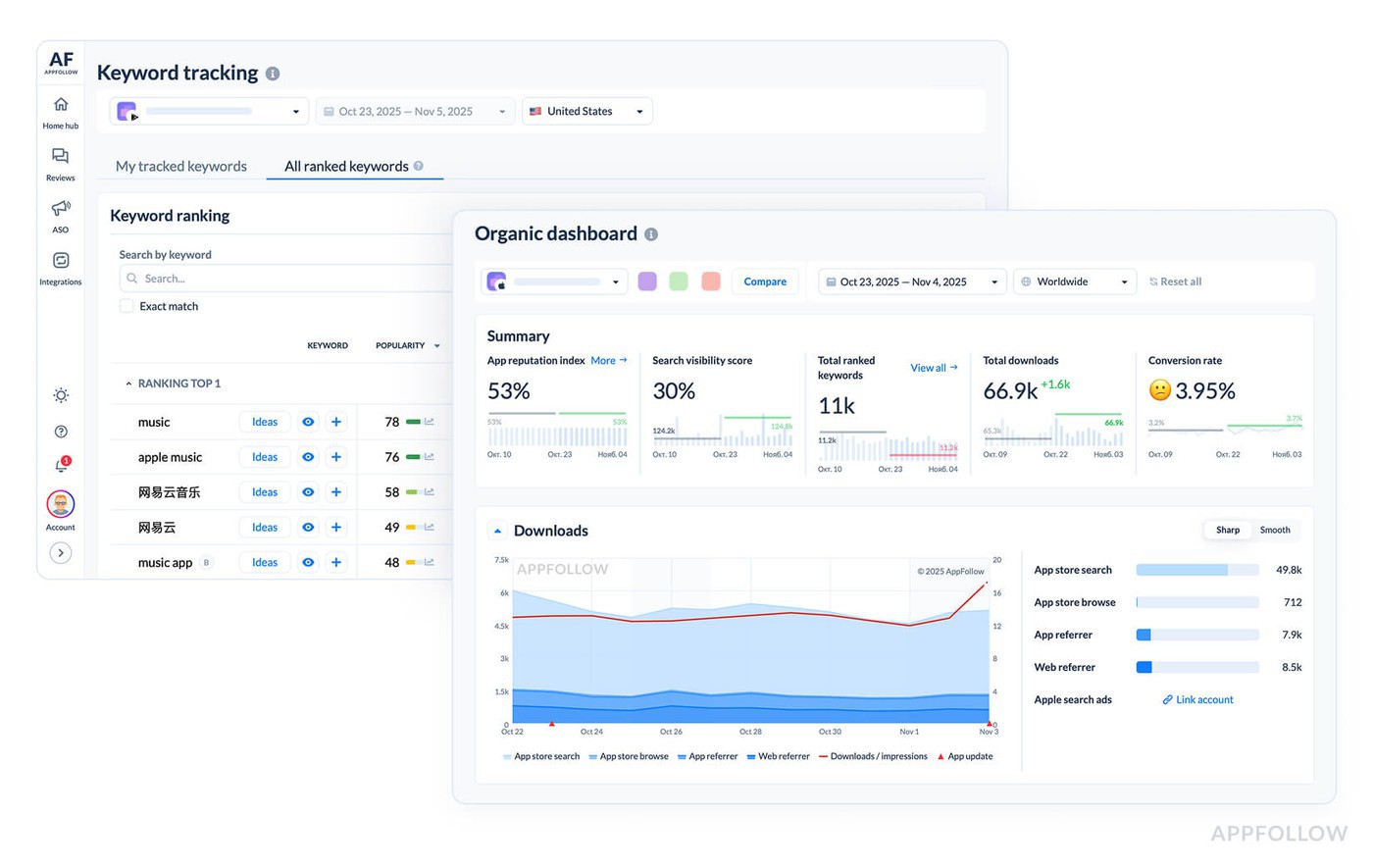
AppFollow is one of the strongest keywords tools for ASO when your workflow extends beyond keyword research. Its database covers more than 3 million keywords across iOS and Google Play, then connects that data to rank tracking, localization, review management, and reporting.
The standout feature is Keyword Opportunities, which combines search popularity, keyword difficulty, and chance score into a single metric.
As an ASO keyword research tool, AppFollow is unusually balanced across both stores, while many competitors lean heavily toward iOS. Companies such as Discord, Booking.com, Lufthansa, and Glovo use the platform. Pricing is aimed at growing teams rather than solo developers.
Features
- Keyword discovery across iOS and Google Play
- Search popularity, difficulty, and chance scores
- Keyword Opportunities recommendations
- Daily keyword rank tracking
- Competitor keyword monitoring
- Keyword gap analysis
- Apple Search Ads keyword insights
- Localization keyword research
Pricing
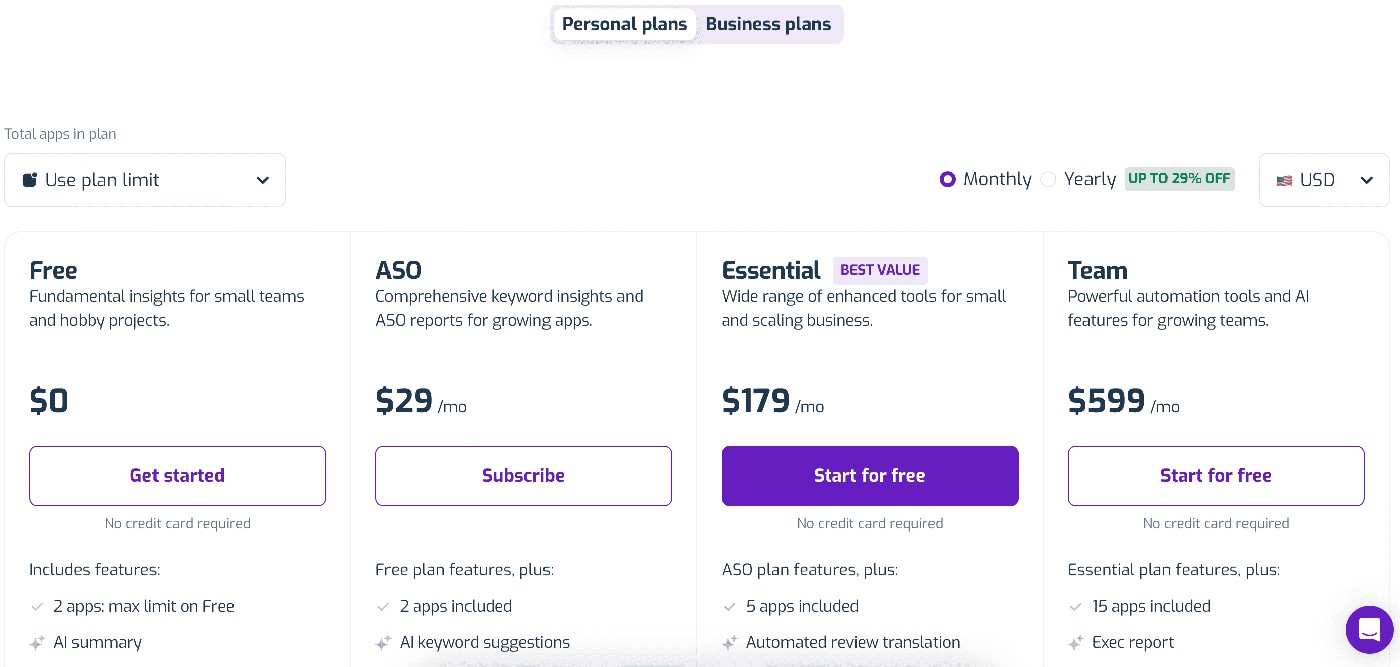
Image source: AppFollow pricing page
AppFollow uses tiered pricing based on your workspace, the number of apps, tracked keywords, and countries. Plans start with a Free tier (€0), while Enterprise pricing is customized for larger organizations. Paid plans begin at €136/month, and you can try the platform free for 10 days without a credit card. Pricing is fairly straightforward. The bigger question is whether the day-to-day workflow justifies the investment, which is where user feedback becomes useful.
Pros & Cons
Pros
- Real-time review monitoring for ASO feedback loops: “The reviewer says AppFollow gives real-time updates from the App Store and Google Play, helps the team stay aligned on customer feedback, generates weekly sentiment insights, and makes review monitoring easier through Slack integration.” – G2, review “Real-Time Feedback Revolution with AppFollow”, 3/3/2026 (G2)
- AI-assisted review tracking and tagging: “The reviewer says the strongest part is how quickly AppFollow lets them track review dynamics, tag reviews, use AI features, and work with app feedback faster.” – G2, review “Fast Review Tracking with Smart AI Analysis and Responsive Support” (G2)
- Centralized ASO and feedback management: “The reviewer says one standout feature is that AppFollow centralizes app store optimization and user feedback management, which makes it easier to keep ASO and review workflows together.” – G2, review “AppFollow is just what I needed!” (G2)
Cons
- Slack setup can be harder than expected: “The reviewer says integrating AppFollow with Slack was initially challenging and would have been easier with a guided setup journey.” – G2, review “Real-Time Feedback Revolution with AppFollow”, 3/3/2026 (G2)
- AI data accuracy issue for Google Play ratings: “The reviewer says the AI sometimes shows wrong information about the Google Play Console rating, which creates a trust problem for reporting.” – G2, review “Fast Review Tracking with Smart AI Analysis and Responsive Support” (G2)
- Pricing may be high for smaller teams: “The reviewer says pricing can be on the higher side, especially for smaller businesses or independent developers.” – G2, review “AppFollow is just what I needed!” (G2)
cta_get_started_purple
AppTweak — AI-Powered ASO Keyword Suggestion Tool
G2 rating: 4.6/5
Capterra rating: 4.2/5
Best for: Deep ASO and app market research: keyword research, metadata optimization, competitor tracking, and visibility analysis
Free trial: 7 days
Starting price: $79/month
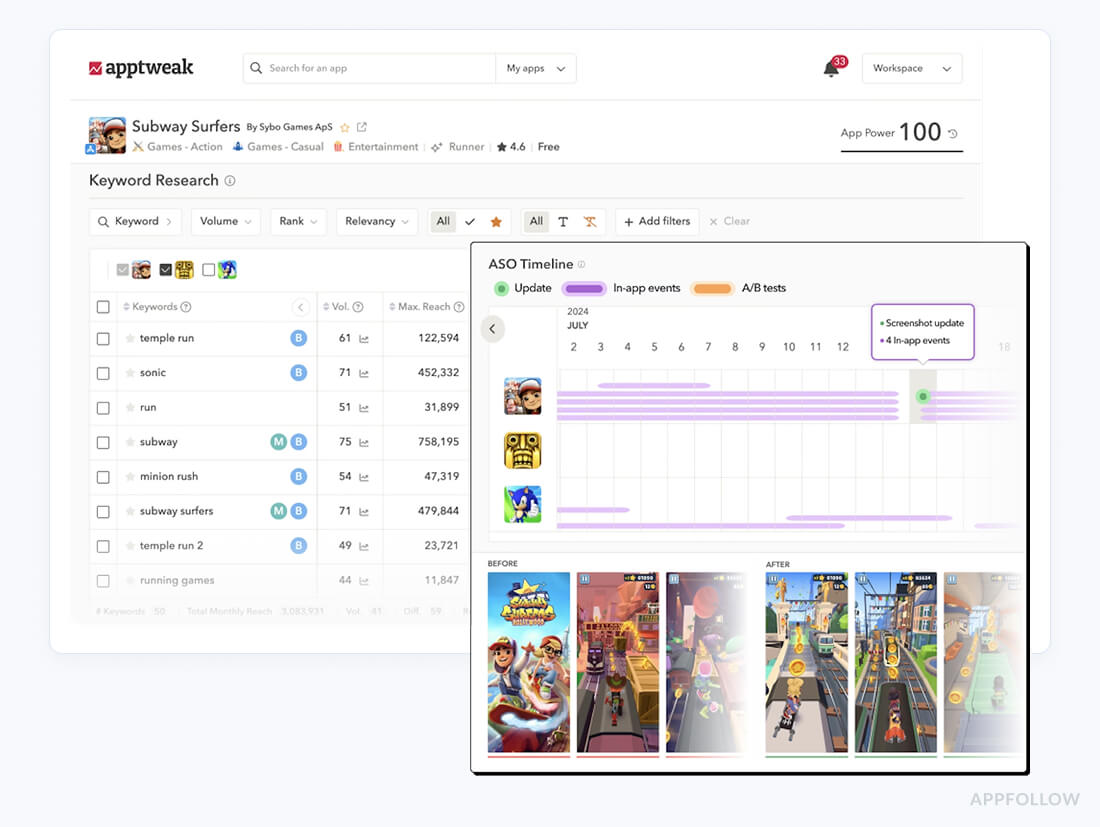
Image source: AppTweak
AppTweak is built for teams that view localization as a growth strategy. Most ASO tools can handle one market reasonably well. Things get more complicated when you're juggling ten, twenty, or fifty of them at the same time. That's the situation AppTweak was built for. Between support for more than 100 languages and its Keyword Live tracking, the platform makes it easier to spot local search opportunities that might otherwise go unnoticed.
For teams rolling out apps across several countries at once, having Apple Search Ads and organic keyword data side by side is genuinely useful. It saves a lot of switching between tools and helps prioritize the keywords most likely to drive visibility. Companies including Adobe, Yelp, and Jam City have publicly used the platform.
Pricing rises as you add countries, apps, and advanced features. For teams focused on international growth, AppTweak remains one of the strongest localization-focused platforms available.
Features
- Discover and translate keywords across 100+ languages
- Keyword Live tracking for near real-time ranking updates
- Apple Search Ads and Google Ads insights in the same workflow
- Competitor overlap reports that highlight shared keyword opportunities
- Storefront analytics for monitoring visibility across markets
- API access available on higher-tier plans
Pricing
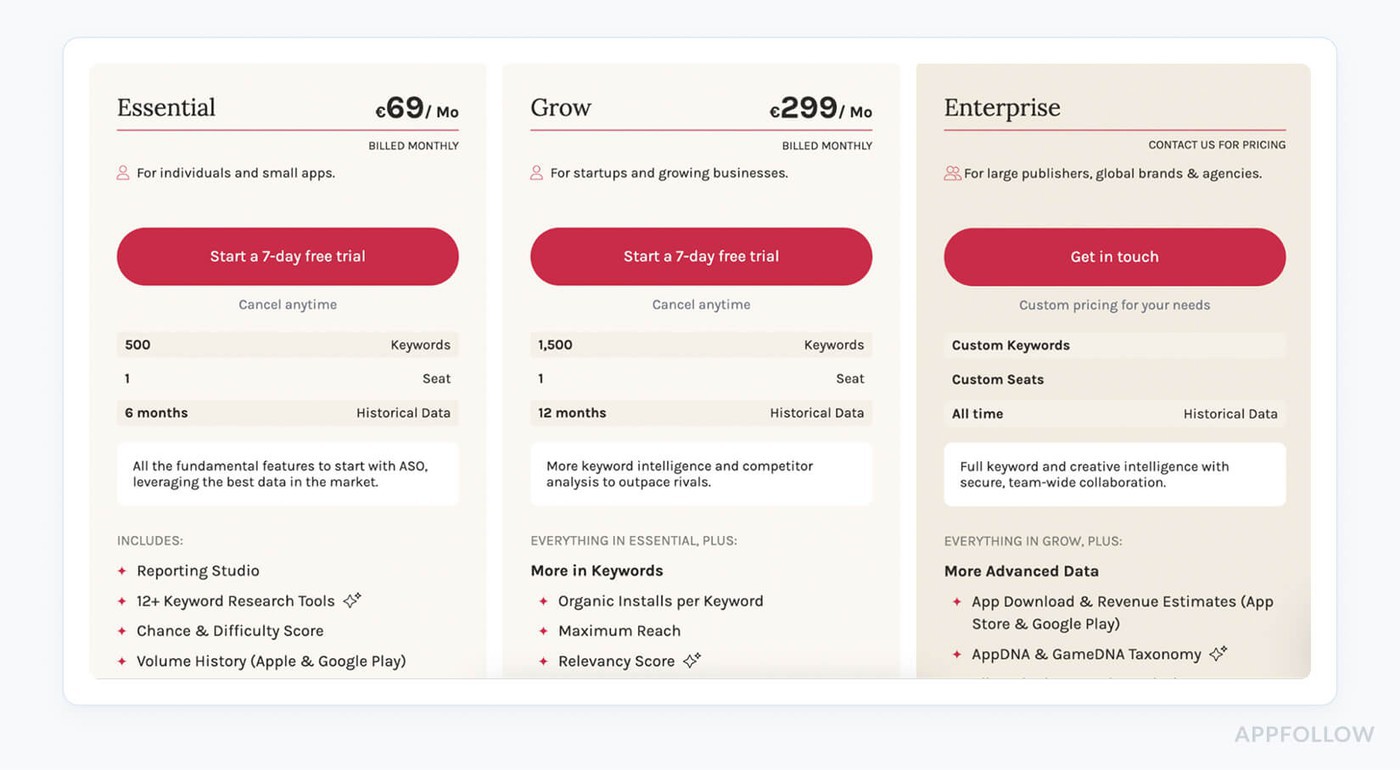
Image source: AppTweak pricing page
AppTweak prices its plans based on the number of apps, countries, and features you need. Paid plans start at €83/month (Starter), while Enterprise pricing is available on request.
A 7-day free trial lets you test the platform before committing. Once pricing is out of the way, the real question is whether the workflow fits your team.
Pros & Cons
Pros
- Strong keyword research and rank tracking: “The reviewer says AppTweak is excellent for ASO, especially keyword research, competitor insights, rank tracking, and turning findings into reports.” – G2, review “Excellent ASO Tool with Intuitive UI and Actionable Insights”, 1/8/2026 (G2)
- Useful keyword benchmarks after metadata updates: “The reviewer highlights keyword research data and the ability to annotate benchmarks, which helps monitor post-update performance.” – G2, review “Powerful Keyword Insights and Benchmarking”, 1/12/2026 (G2)
- Good for competitor and category analysis: “The reviewer says AppTweak supports keyword research, competitor analysis, reporting, and category-level ASO analysis for app growth and performance marketing.” – G2, review “Platform for Competitor & Category Analysis For App Growth via ASO & Performance Marketing”, 12/18/2025 (G2)
Cons
- Some keyword metrics are estimates: “The reviewer says some metrics are estimates and can be imprecise, so teams need to cross-check AppTweak data with internal data.” – G2, review “Excellent ASO Tool with Intuitive UI and Actionable Insights”, 1/8/2026 (G2)
- Package limits push teams toward enterprise: “The reviewer says packages feel limited, and companies may be forced into enterprise plans to access the most impactful features or limits.” – G2, review “Powerful Keyword Insights and Benchmarking”, 1/12/2026 (G2)
- Interface can be hard to navigate: “The reviewer says the UI can be very difficult to navigate and that they often need help from an account manager.” – G2, review “Platform for Competitor & Category Analysis For App Growth via ASO & Performance Marketing”, 12/18/2025 (G2)
Sensor Tower
G2 rating: 4.3/5
Capterra rating: 4.3/5
Best for: Mobile market intelligence: estimating downloads, revenue, ad performance, user metrics, and competitor growth.
Free trial: No
Starting price: Custom pricing
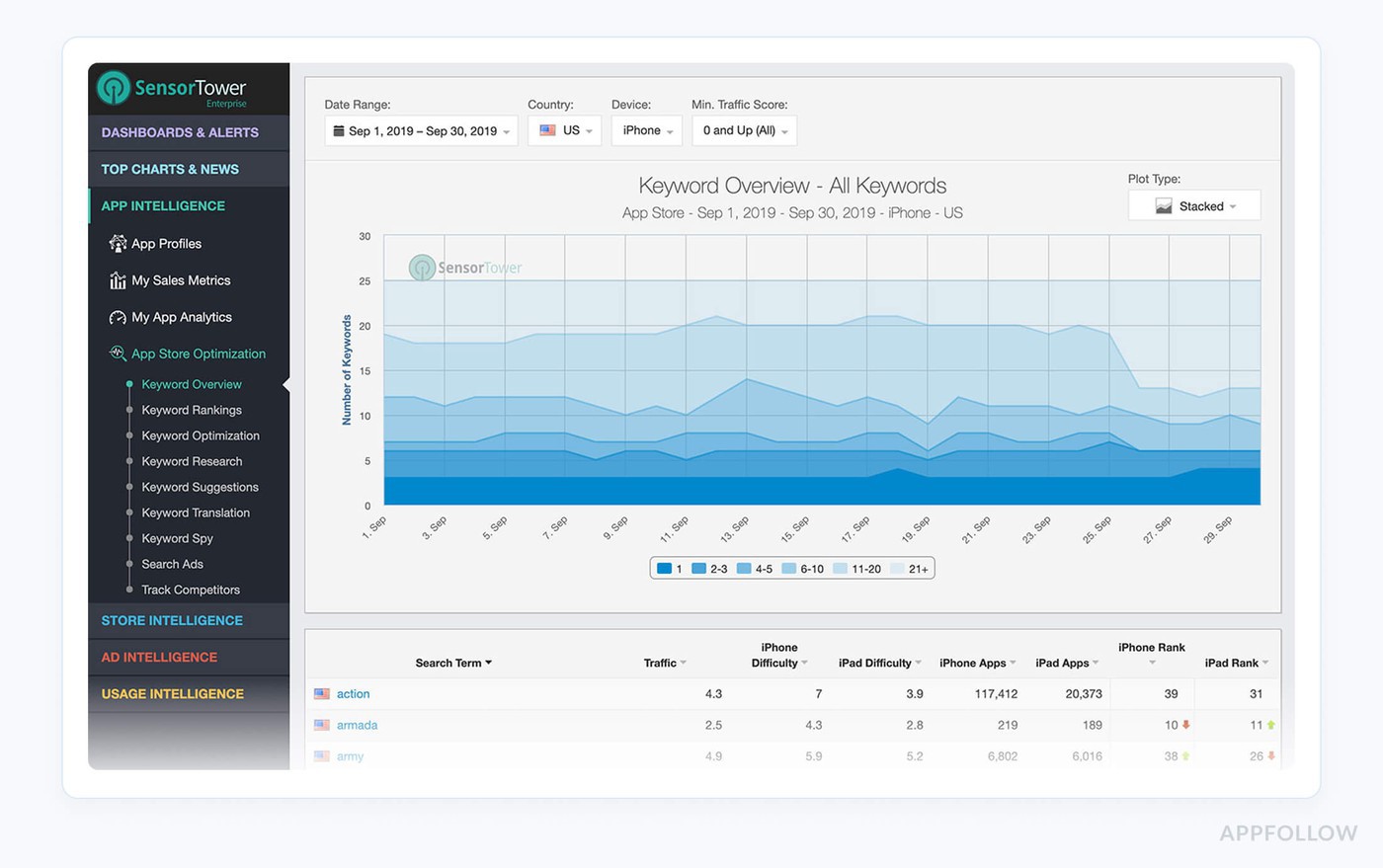
Image source: Sensor Tower
Sensor Tower tends to come up whenever the conversation shifts from keyword rankings to market intelligence. The platform has spent years building datasets around downloads, revenue, advertising activity, and category performance, which is why it's widely used by analysts, agencies, and larger app publishers.
What stands out isn't necessarily the keyword research itself. It's the ability to put those keywords into context. If you're trying to understand whether a category is growing, whether a competitor's visibility spike is seasonal, or how a market has changed over the past few years, historical data becomes much more valuable than a current ranking snapshot.
That depth comes with trade-offs. Sensor Tower isn't designed as a lightweight ASO tool, and there isn't a self-serve starter plan for smaller teams. For organizations that need broader market visibility alongside ASO data, though, few platforms have a comparable track record.
Features
- Historical keyword data going back several years
- Revenue, downloads, and retention estimates for competing apps
- Ad intelligence covering major acquisition channels
- Category benchmarking and market-share analysis
- Custom alerts, API access, and enterprise integrations
Pricing
Sensor Tower uses custom enterprise contracts, with pricing based on the data products and intelligence modules you choose. There is no self-serve paid plan. A limited Free Snapshot is available, while full access requires a custom quote. Product evaluations typically begin with a guided demo rather than a free trial. That enterprise approach is also reflected in the platform's strengths and trade-offs.
Pros & Cons
Pros
- Accurate download and revenue estimates: “Exact excerpt: ‘data accuracy.’ Review meaning: the product manager says Sensor Tower’s download and revenue estimates are precise enough to support strategic decisions, which matters when ASO teams validate keyword growth against market movement.” – G2 review, “Accurate Data, but Needs More Granular Paid vs. Organic Traffic Insights,” 4/9/2026. (G2)
- Keyword optimization and competitor bidding visibility: “Exact excerpt: ‘optimizing our keywords.’ Review meaning: a marketing reviewer says Sensor Tower helped them choose better keywords for content launches and see which competitors were bidding against their brand.” – G2 review, “Data AI has been a valuable tool for ASO and competitive insights,” 10/30/2023. (G2)
- Organic keyword rank monitoring after ASO changes: “Exact excerpt: ‘monitoring our rank for each target keyword.’ Review meaning: a growth marketer says the platform helped track organic keyword rankings and observe the impact of ASO changes.” – G2 review, “I love the platform but would love to see more new features in the future,” 10/31/2023. (G2)
Cons
- Paid vs organic traffic split is not granular enough: “Exact excerpt: ‘hard to tell exactly what portion of the traffic is paid versus organic.’ Review meaning: the user wants clearer acquisition-source breakdowns before using Sensor Tower data to optimize marketing spend.” – G2 review, “Accurate Data, but Needs More Granular Paid vs. Organic Traffic Insights,” 4/9/2026. (G2)
- ASO impact from app updates could be easier to see: “Exact excerpt: ‘see the effect of application updates.’ Review meaning: the reviewer wants a clearer view of how app updates affect downloads and revenue, which is directly relevant to ASO metadata and creative update analysis.” – G2 review, “Market Researcher,” 7/25/2023. (G2)
- Some creative / SOV data may be unreliable: “Exact excerpt: ‘some parts are wrong and missing.’ Review meaning: the reviewer says SOV and network data on the creative side were not healthy when checked against their own products.” – G2 review, “Market Researcher,” 7/25/2023. (G2)
42matters
Best for: Broad mobile app market analysis: app discovery, SDK intelligence, historical download trends, app metadata, and competitive datasets.
Free trial: Limited API trial available
Starting price: ≈ $405/month
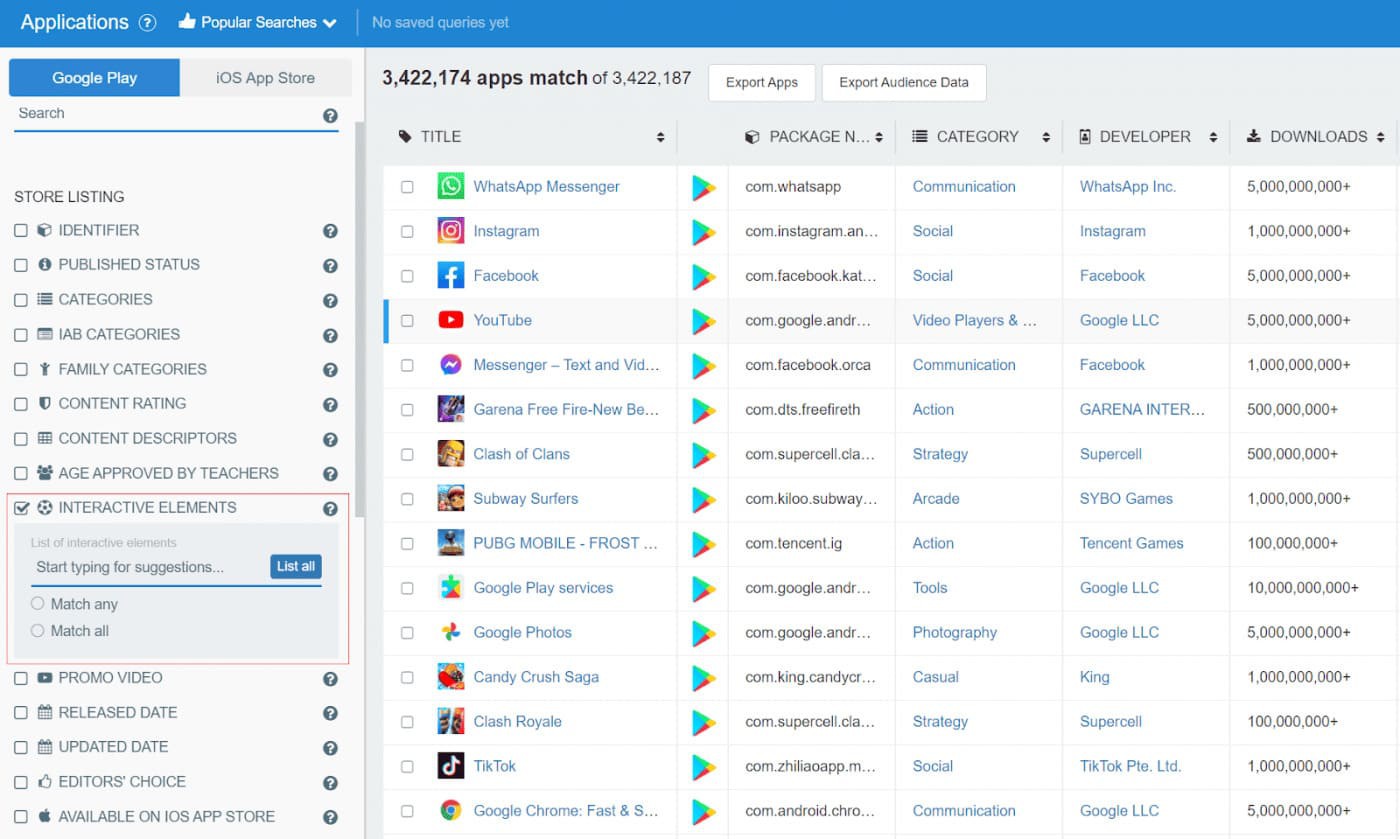
Image source: 42matters
If you're expecting another ASO dashboard, 42matters may catch you off guard. The platform is built around APIs rather than a traditional interface, making it a better fit for analysts, agencies, and engineering teams that prefer to work directly with app store data.
What you get is access to large datasets covering app metadata, category rankings, SDKs, reviews, and other store information that can be fed into your own reporting or competitive analysis. That flexibility is the main attraction, especially if you're tracking hundreds or thousands of apps across different markets.
There's a flip side, though. Getting the most out of 42matters usually requires some technical work, so it isn't as approachable as a typical ASO platform. If your team needs raw app intelligence instead of a ready-made workflow, it's a compelling option.
Features
- App metadata and keyword intelligence APIs
- Category rankings and competitor monitoring
- Reviews and ratings datasets
- SDK intelligence and technology tracking
- Enterprise reporting and API access
Pricing
42matters offers subscription-based pricing for its APIs, with plans scaling by data access and usage. Pricing starts with the Starter plan, while Enterprise packages are tailored to larger teams. A limited free trial is available, making it possible to explore the APIs before committing. Whether that flexibility is worth it depends on how you plan to use the data.
Pros & Cons
Pros
- Strong app metadata coverage for mobile intelligence: “Exact excerpt: ‘localized app metadata.’ Review meaning: the reviewer says 42matters’ app metadata file dumps improved reporting across mobile and CTV platforms, useful when ASO teams need structured store metadata at scale.” – G2 review, “Excellent App Intelligence Tool,” 3/6/2024. (G2)
- Cross-store app matching despite ASO metadata differences: “Exact excerpt: ‘different keywords in app titles/metadata.’ Review meaning: the reviewer says 42matters helped match app names across stores even when publishers used different ASO naming and metadata strategies.” – G2 review, “Flexible app intelligence solutions for the AdTech space,” 5/7/2024. (G2)
- Useful app search and SDK discovery: “Exact excerpt: ‘very good search of mobile apps and sdks.’ Review meaning: the user says 42matters helped investigate clients and reduce manual discovery work, which is useful for app research and competitive mapping.” – G2 review, “Reliable service helping us understand our clients better,” 12/18/2023. (G2)
Cons
- Learning curve during setup: “Exact excerpt: ‘a bit of a learning curve.’ Review meaning: the reviewer says the amount of data was valuable but required adjustment during setup and navigation.” – G2 review, “Excellent App Intelligence Tool,” 3/6/2024. (G2)
- Not always ready out of the box for novel use cases: “Exact excerpt: ‘didn’t have it ready out of the box.’ Review meaning: the reviewer says their DSP use case required adaptation rather than a ready-made setup.” – G2 review, “42matters was the missing piece for app discovery on our DSP,” 5/8/2024. (G2)
- Base version can limit large data extraction: “Exact excerpt: ‘limitation when extracting a large amount of data.’ Review meaning: the reviewer says the base version limits large exports, which can matter for ASO teams pulling large keyword/app datasets.” – G2 review, “Easy to use, it has an easy-to-use interface,” 11/9/2023. (G2)
MobileAction — ASO Keyword Tool for Competitor Spying
G2 rating: 4.4/5
Capterra rating: 4.3/5
Best for: ASO and paid campaign intelligence: Apple Search Ads automation, keyword research, creative analysis, and rank monitoring.
Free trial: 7 days
Starting price: $15/month
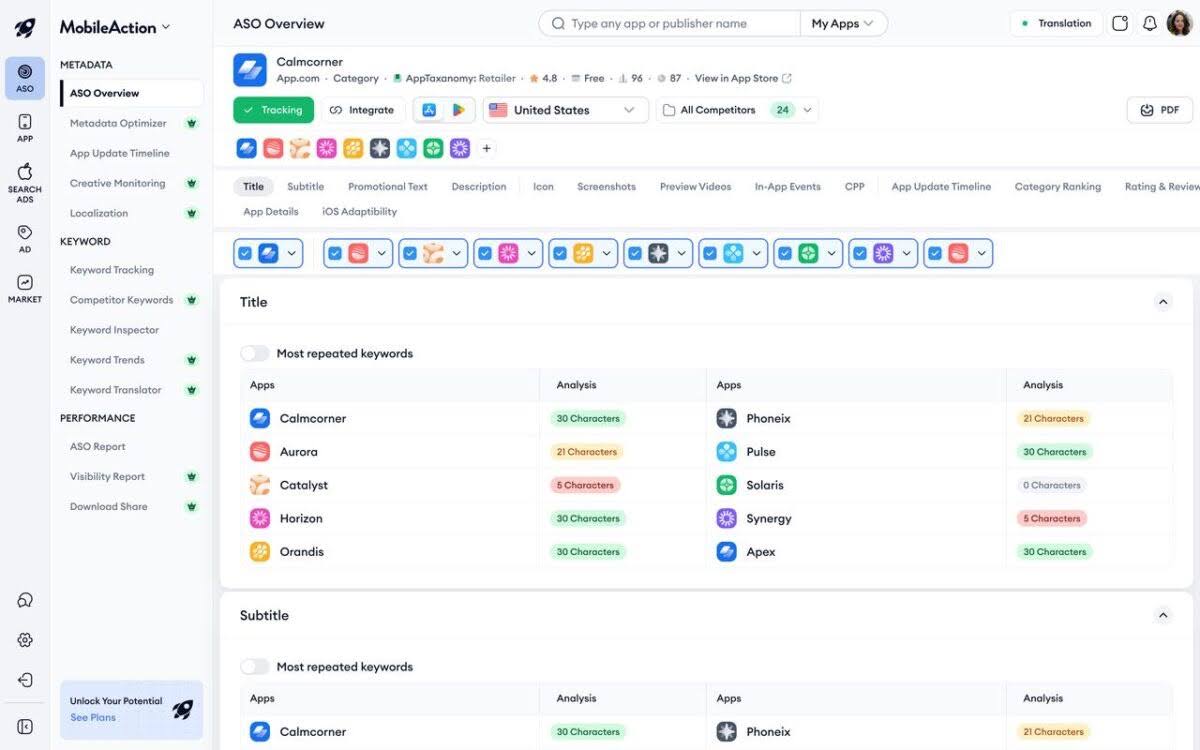
Image source: MobileAction
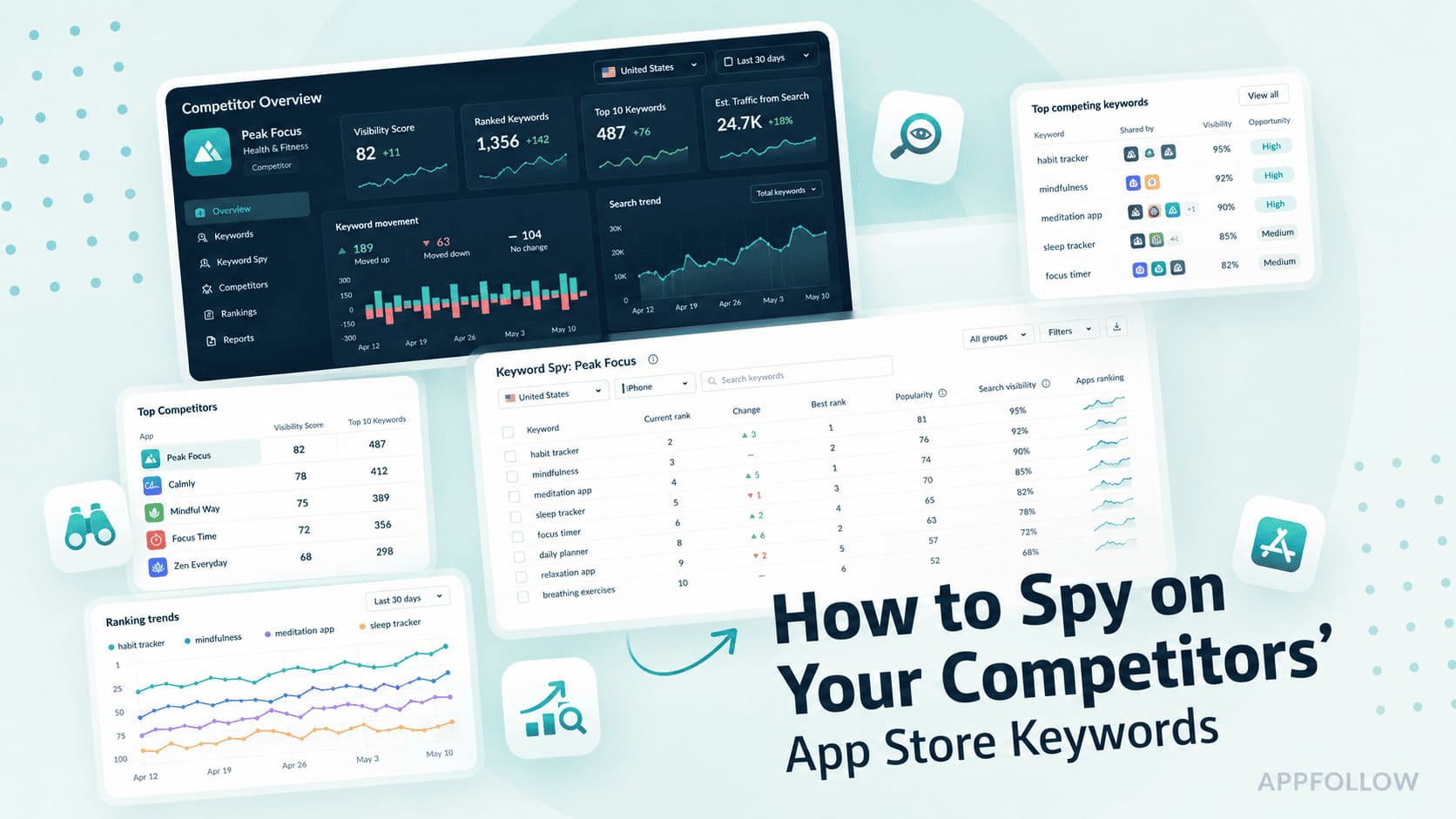
If your first ASO question is "What are my competitors doing?" MobileAction is worth a look. Much of the platform is built around that idea. Keyword Spy, Top Charts, and Apple Search Ads Intelligence make it easier to see where competitors are gaining visibility and which search terms may be contributing to that growth.
One thing MobileAction does well is connect paid and organic search data. That context can be useful when a ranking shift doesn't tell the whole story. Market-trend reporting, custom exports, and automation tools for Apple Search Ads add another layer for teams that actively manage acquisition campaigns.
Localization is available, though it isn't the platform's main focus. Teams running large international ASO programs will generally find deeper localization workflows elsewhere. For competitor research and Apple Search Ads analysis, though, MobileAction has carved out a clear niche.
Features
- Keyword Spy for tracking competitor rankings and keyword coverage
- Apple Search Ads Intelligence and campaign insights
- Top Charts monitoring and category trend analysis
- Scheduled reports and custom data exports
- Automation rules for bids, budgets, and paid keywords
Pricing
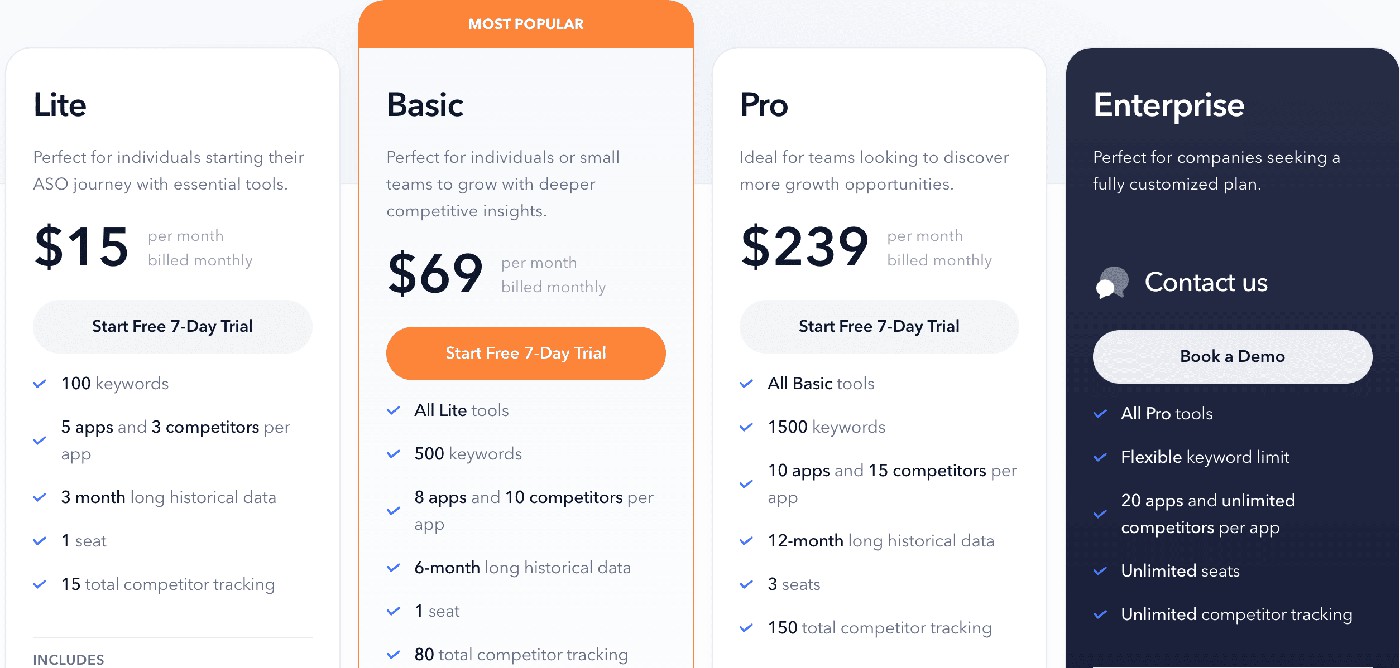
IMAGE
MobileAction uses tiered pricing based on the number of apps you manage and the features you need. Plans start with a Free tier, while larger teams can upgrade to Pro or request Enterprise pricing.
A 7-day free trial gives you enough time to explore the core workflow. The bigger question is whether its competitor-first approach matches the way your team works.
Pros & Cons
Pros
- Strong ASO + ASA keyword workflow in one platform: “The reviewer says MobileAction saves time because AdsManager and ASO tools sit together, making it seamless to switch between paid and organic work.” – G2, review “Perfect for managing both ASA and ASO in one place”, 8/7/2025 (G2)
- Helpful keyword research, visibility score, and competitor tracking: “The reviewer says they rely heavily on MobileAction for keyword research, visibility score, competitor tracking, and keyword suggestions to find high-potential terms.” – G2, review “Perfect for managing both ASA and ASO in one place”, 8/7/2025 (G2)
Cons
- Some internal metrics may not make sense: “The reviewer says certain MobileAction-developed metrics inside Ads Manager sometimes do not make sense, separate from imported Apple Ads data.” – G2, review “efficient and rewarding partnership”, 8/8/2025 (G2)
- Limited drill-down for segments and custom reports: “The reviewer says the interface can feel limited when drilling into specific segments or custom reports.” – G2, review “Practical Tool for Smarter Campaign Decisions”, 8/8/2025 (G2)
Asodesk
G2 rating: 4.6/5
Capterra rating: 4.8/5
Best for: ASO and review workflow automation: keyword research, metadata management, visibility analysis, and app store review operations.
Free trial: 7 days
Starting price: $79/month
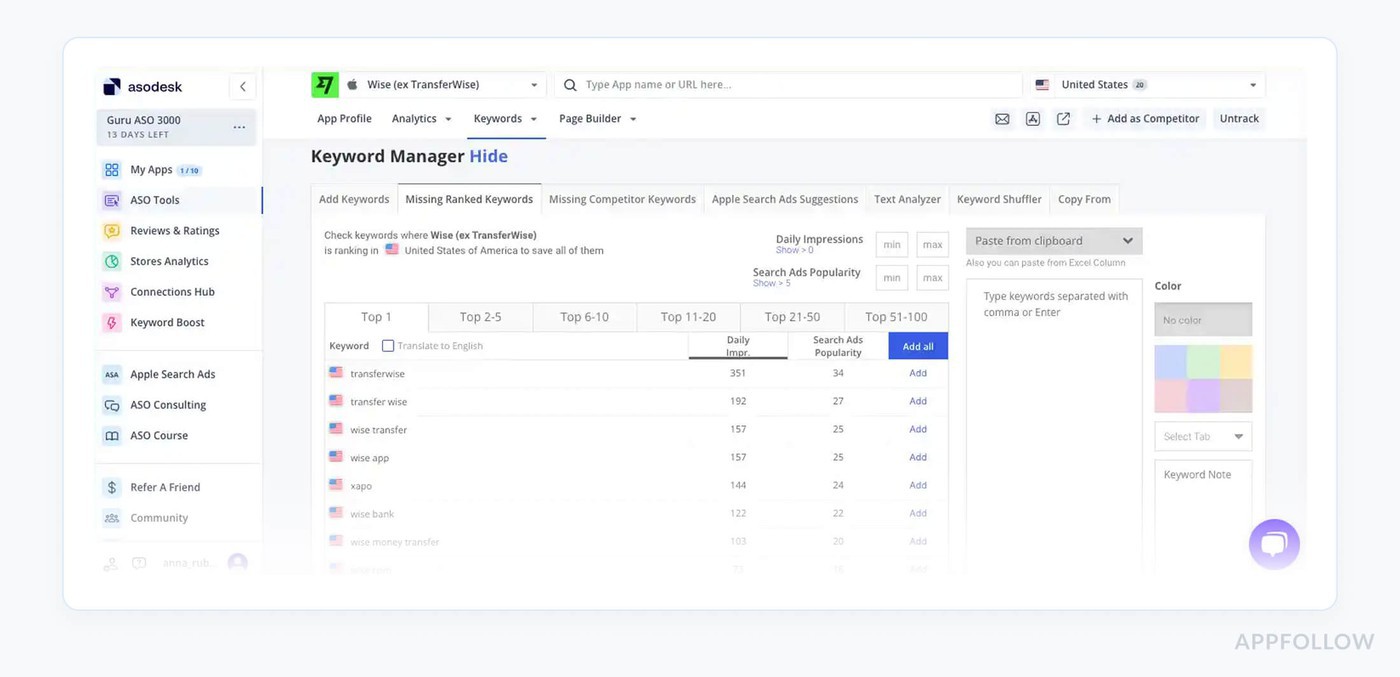
Image source: Asodesk
Asodesk is one of those platforms that focuses on the day-to-day work of ASO rather than high-level market intelligence. Keyword research, rank tracking, and review management sit close together, which makes it easier to move from spotting a ranking change to understanding what users are saying about it.
Review workflows are a big part of the appeal. Teams dealing with a steady stream of user feedback can automate replies and keep conversations organized without switching between multiple tools. The pricing structure is also easier to understand than many enterprise-focused alternatives.
The trade-off shows up in market coverage. If you're working in smaller countries or need deep historical datasets, larger platforms generally have an advantage. For teams that care most about rankings, alerts, and review operations, Asodesk covers the essentials without adding much complexity.
Features
- Keyword Auto-Suggestions for discovering new search opportunities
- Real-Time Rank Tracker
- Automated workflows for review replies
- Apple Search Ads campaign builder
- Localization and multilingual keyword research
Pricing
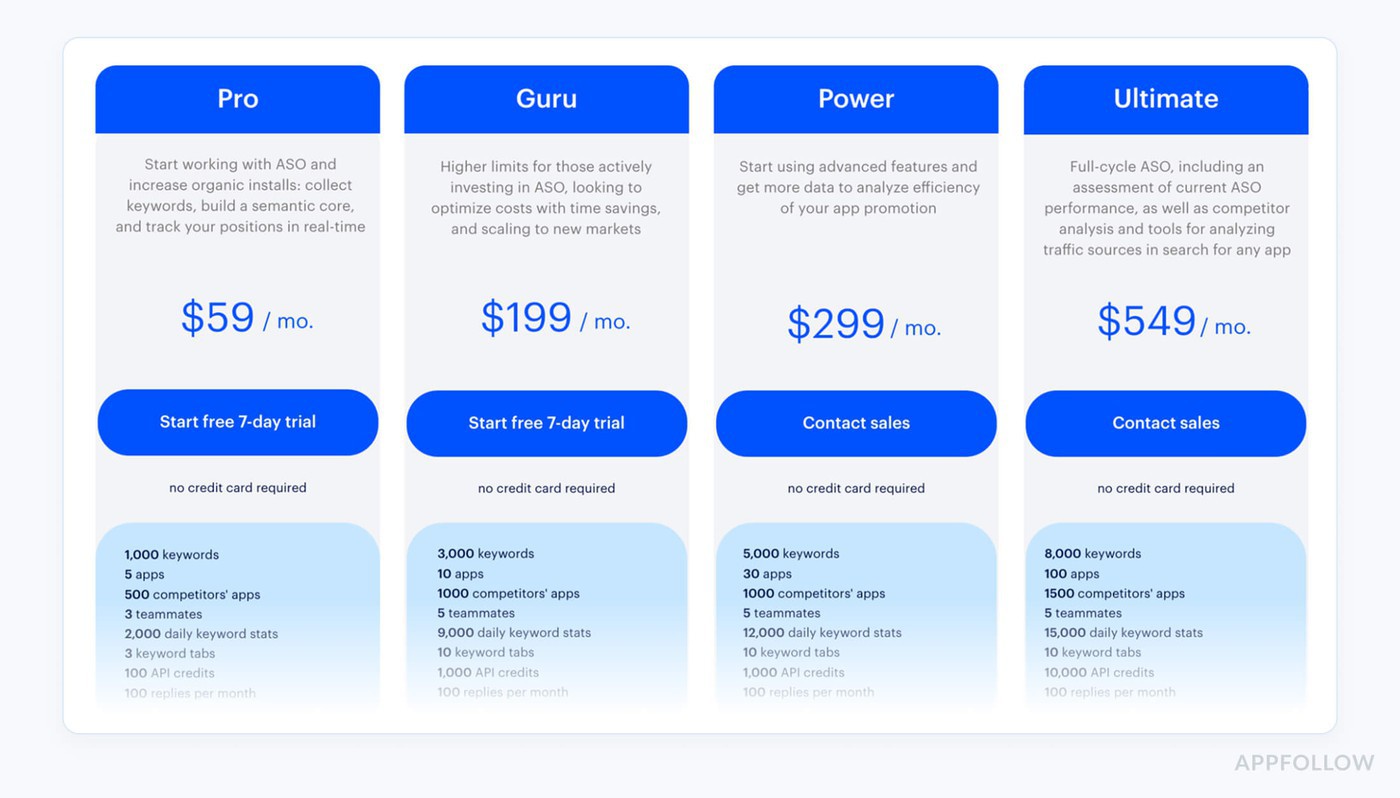
Asodesk offers tiered plans with limits based on the number of apps you manage. Pricing starts with a Free plan, followed by Personal, Startup, Pro, and Enterprise tiers.
A 7-day free trial is available, giving teams enough time to test the core features before deciding if the workflow is the right fit.
Pros & Cons
Pros
- Full ASO workflow from keywords to tracking: “Exact excerpt: ‘keyword research and tracking.’ Review meaning: the reviewer says Asodesk covers keyword research, tracking, competitor analysis, and performance monitoring in one ASO workflow.” – G2 review, “Thanks to asodesk for the best experience in using ASO tools,” 4/8/2023. (G2)
- Automatic keyword suggestions and organic install estimates: “Exact excerpt: ‘best variations of keywords.’ Review meaning: the reviewer says Asodesk suggests keyword variations, analyzes competitors’ ASO, and shows estimated installs competitors receive from each keyword.” – G2 review, “Best service for ASO,” 4/7/2023. (G2)
Cons
- Some keyword popularity data can be outdated: “Exact excerpt: ‘outdated ASO popularity numbers.’ Review meaning: the reviewer says old popularity values can lead ASO managers to make wrong keyword decisions.” – G2 review, “Good tool for app store optimization and mobile analytics,” 3/16/2021. (G2)
- Exact keyword volume can be inaccurate: “Exact excerpt: ‘data is not accurate regarding keyword research.’ Review meaning: the reviewer says they sometimes cannot find the exact keyword volume, which makes planning keyword targets harder.” – G2 review, “Really love the Daily ASO report,” 3/22/2021. (G2)
App Radar
G2 rating: 4.3/5
Capterra rating: 3.9/5
Best for: App growth teams that need ASO tools, review management, and agency support for organic and paid install growth.
Free trial: 14 days
Starting price: ≈ $80/month
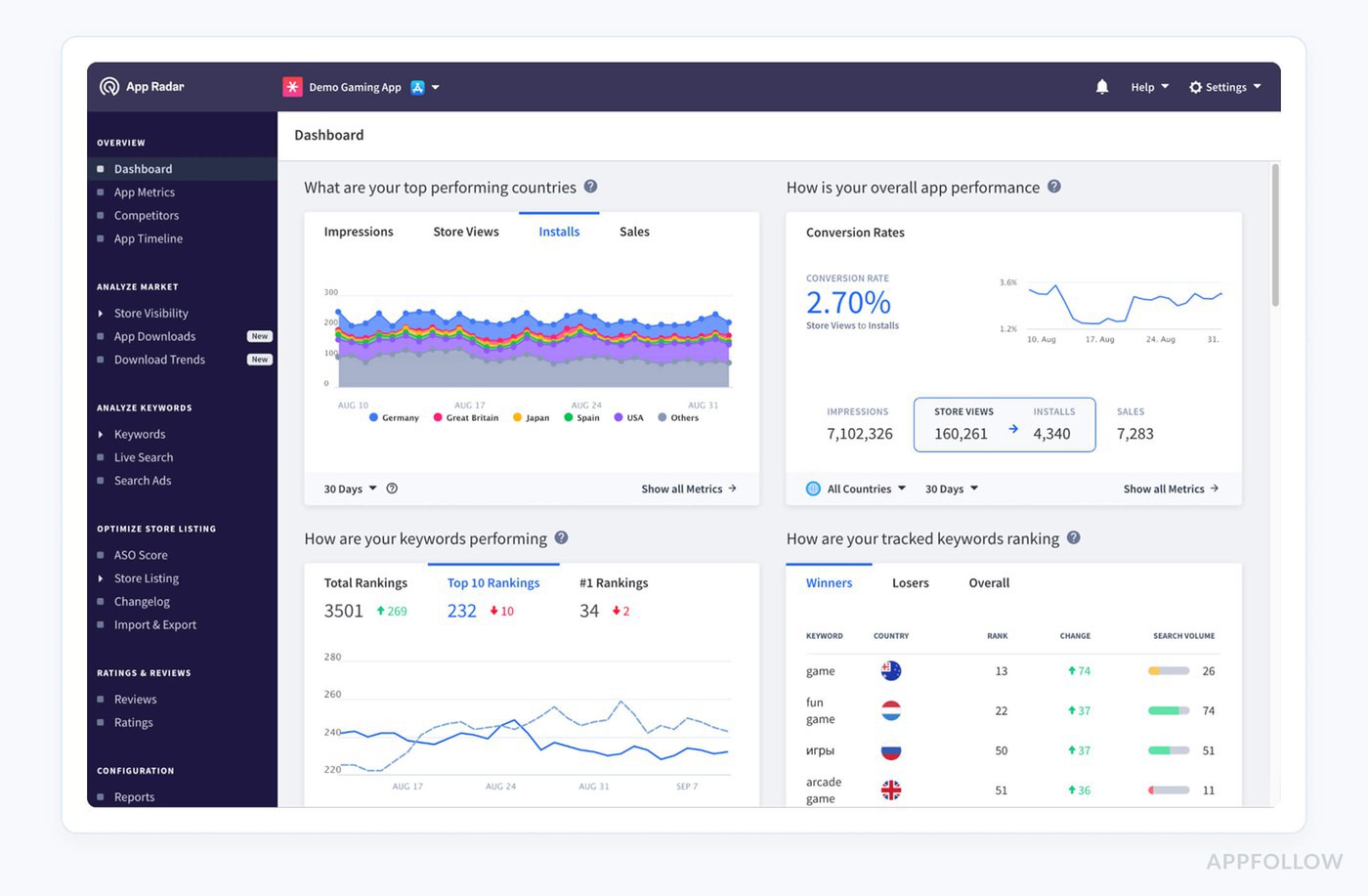
Image source: App Radar
AI sits at the center of App Radar's workflow. Instead of starting every project with a blank spreadsheet, you can generate keyword ideas, draft metadata, and uncover Apple Search Ads opportunities within a few minutes. That makes the early stages of ASO much faster, especially when you're testing several directions at once.
I wouldn't publish AI-generated metadata without editing it first, but that's true of almost every AI tool I've tried. Where App Radar saves time is by cutting down the repetitive work that comes before the real decisions. Rank tracking, competitor insights, and agency dashboards are already part of the platform, so you don't have to stitch together several tools.
If your team wants AI to speed up research rather than replace it, App Radar strikes a sensible balance.
Features
- AI-assisted keyword discovery
- Metadata generation for titles, subtitles, and descriptions
- Apple Search Ads recommendations
- Rank tracking and competitor monitoring
- Agency dashboards and reporting tools
Pricing
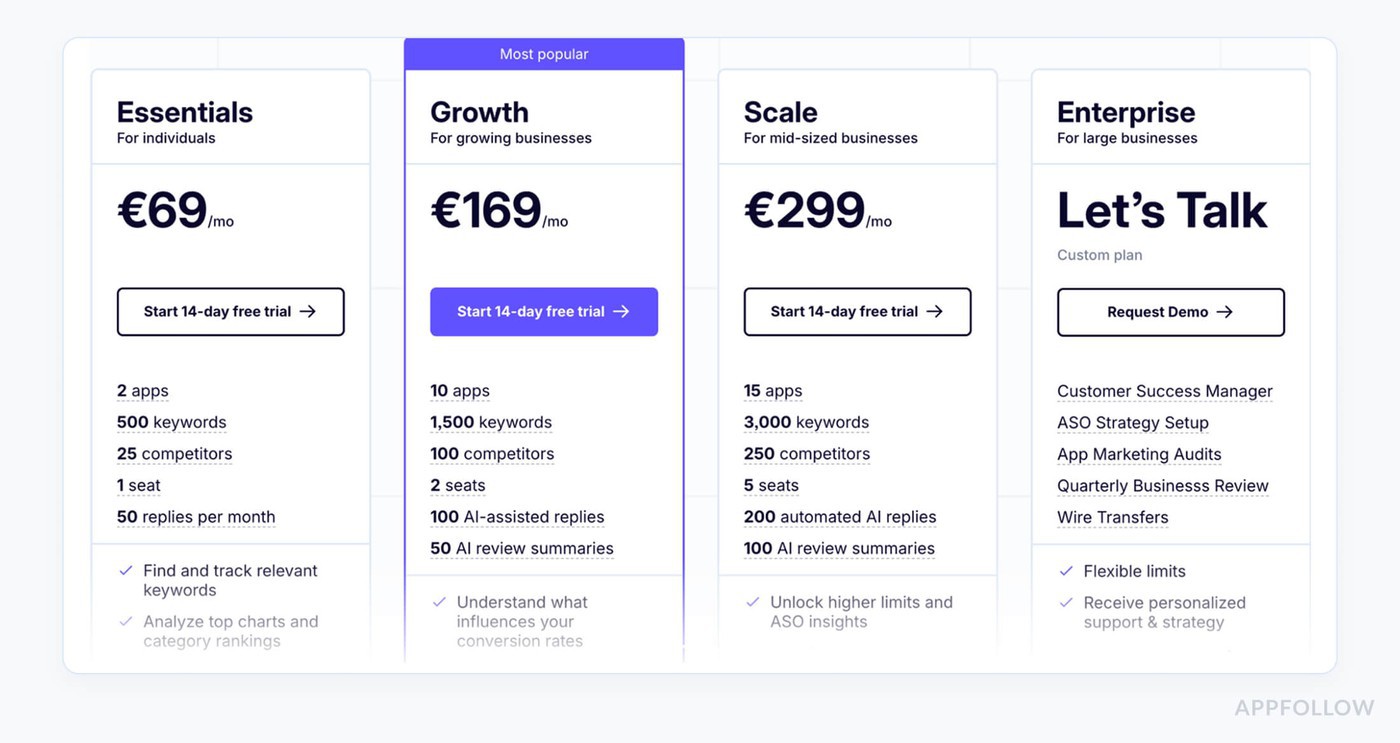
App Radar uses tiered SaaS pricing, with plans ranging from Starter to Pro, while larger organizations can request Custom pricing.
A 14-day free trial gives you time to explore the AI features before committing. From there, it comes down to whether the workflow delivers enough value for your team.
Pros & Cons
Pros
- Easy keyword tracking and competitor insights: “The reviewer says the dashboard is clean, the tools are straightforward, and App Radar makes keyword tracking, competitor insights, and app updates easier.” – G2, review “Effortless App Management with Intuitive Tools”, 12/2/2025 (G2)
- Strong keyword database and competitor analysis: “The reviewer says App Radar helped them make significant progress in competitor and keyword analysis, clearly see effective keywords, and use an extensive keyword database.” – G2, review “APP Radar is a Best Tool for ASO”, 2/6/2025 (G2)
Cons
- Price may feel steep: “The reviewer says the only drawback they found is the price, which seems a little steep.” – G2, review “Effortless App Management with Intuitive Tools”, 12/2/2025 (G2)
- Minor glitches and slower support: “The reviewer says they noticed occasional minor glitches and sometimes slower response times from support.” – G2, review “Effortless App Management with Intuitive Tools”, 12/2/2025 (G2)
- Product development may feel stagnant: “The reviewer says App Radar seemed to have stagnated in development and innovation, and the offering had not changed much during their team’s usage.” – G2, review “AppRadar a tool for ASO”, 9/18/2025 (G2)
Appfigures — ASO Keyword Planner for Indie Devs
G2 rating: 4.2/5
Capterra rating: 4.5/5
Best for: Affordable app analytics: tracking revenue, downloads, reviews, rankings, store reports, and competitor performance.
Free trial: Free Explorer available
Starting price: $9.99/month
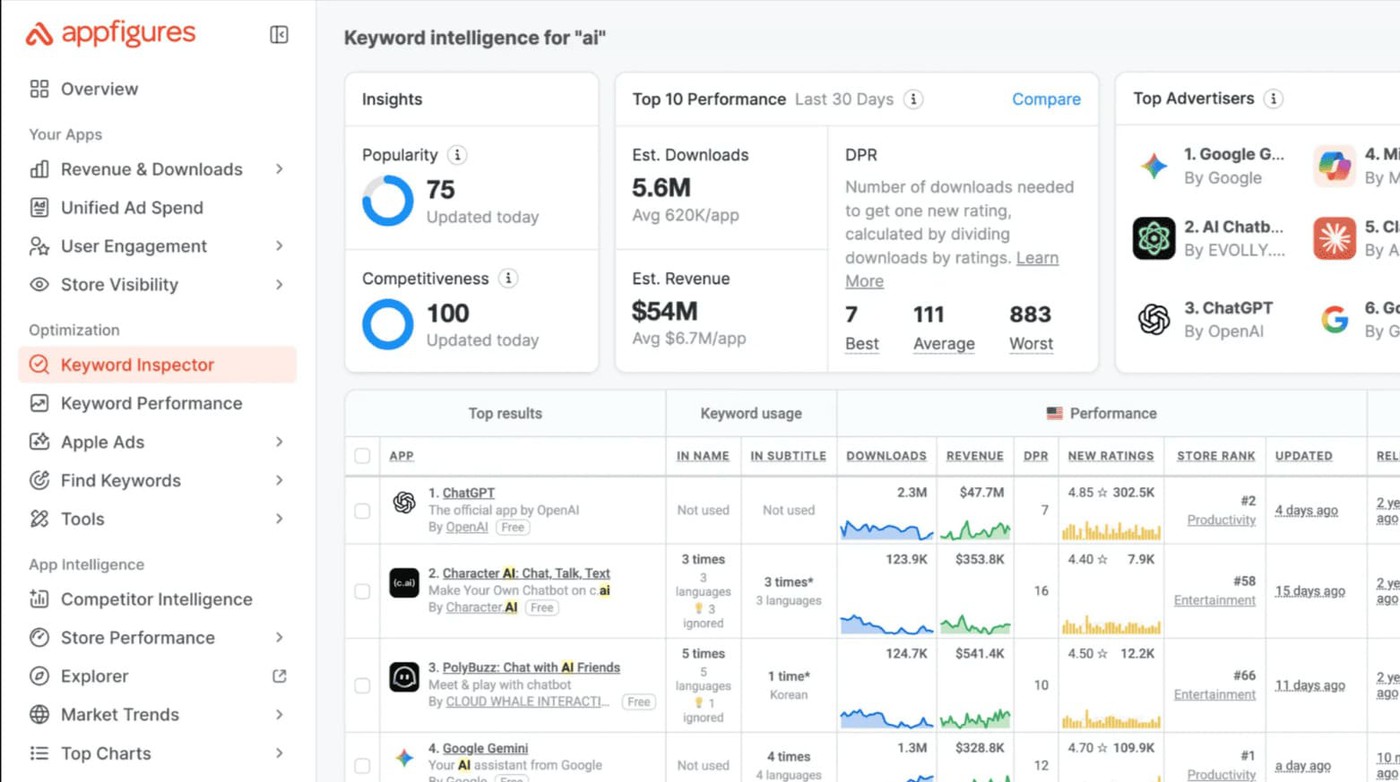
Image source: Appfigures
Appfigures has been popular with indie developers for years, and it's easy to see why. You can start using Keyword Explorer without pulling out a credit card, which lowers the barrier to experimenting with ASO. For smaller teams, that's often more valuable than an enterprise feature set they'll never touch.
Most of the essentials are here. Rank tracking covers more than 100 countries, reviews and sales data are easy to access, and custom alerts help you keep an eye on important changes without checking dashboards all day. The interface is also refreshingly straightforward. I rarely hear people complain that Appfigures is difficult to learn.
The trade-off shows up as your ASO program becomes more sophisticated. Competitor research, localization workflows, and reporting capabilities don't go as deep as they do on larger platforms. For solo developers and small publishers, though, Appfigures is often where the ASO journey starts.
Features
- Free access to Keyword Explorer
- Daily rank tracking across 100+ countries
- Reviews and sales-performance reporting
- Custom alerts for keyword movements
- Public API for reporting and integrations
Pricing
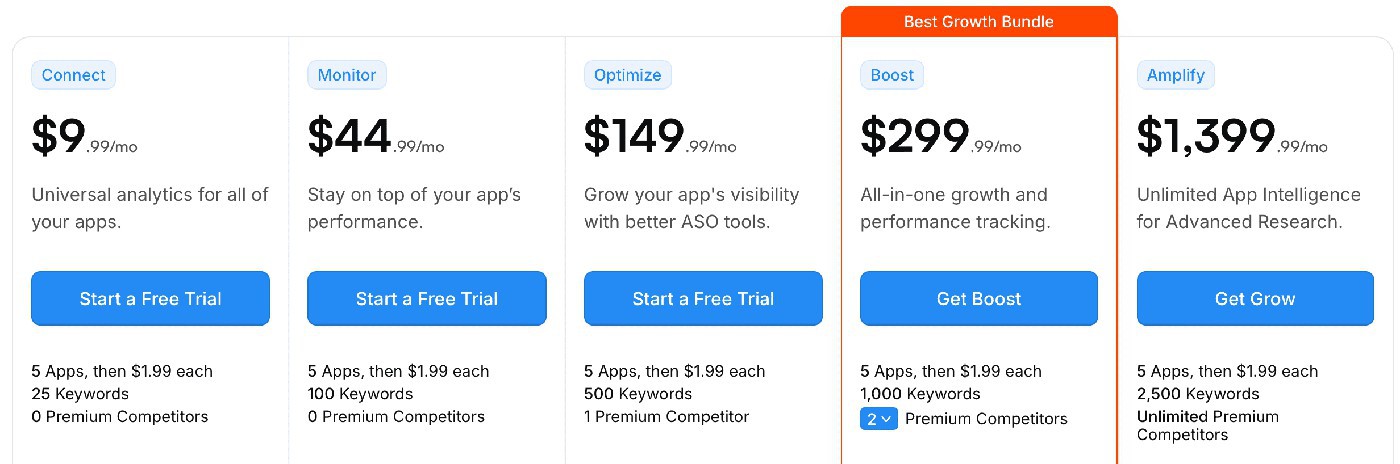
Appfigures uses tiered SaaS pricing, letting teams start with a Free plan before upgrading to Premium or Enterprise as their needs grow. Keyword Explorer is available on the free plan, so you can try core ASO features without a time limit.
That low barrier to entry is one of the platform's biggest advantages, but it's worth weighing against its limitations as your app scales.
Pros & Cons
Pros
- Live App Store search ranking for keyword work: “Exact excerpt: ‘live App Store search ranking.’ Review meaning: the reviewer says Appfigures brings live search ranking data and uses it to look for new keywords and improve visibility.” – G2 review, “A money-hungry company, stay away,” 7/28/2025. (G2)
- Keyword research plus download tracking at lower cost: “Exact excerpt: ‘more keyword research and download tracks.’ Review meaning: the reviewer says Appfigures helped analyze game presence, track downloads, and work on keyword ranking and competitor analysis.” – G2 review, “One of the best tool for app intelligence,” 4/28/2023. (G2)
Cons
- Free plan does not include keyword tracking: “Exact excerpt: ‘no keywords tracking.’ Review meaning: the reviewer says the basic free account limits users to five apps and does not include keyword tracking.” – G2 review, “One of the best tool for app intelligence,” 4/28/2023. (G2)
- Pricing/billing complaint from a 2025 user: “Exact excerpt: ‘zero regard for customer satisfaction.’ Review meaning: the reviewer says they spent over $3K and had a bad billing/support experience around extra usage and renewal.” – G2 review, “A money-hungry company, stay away,” 7/28/2025. (G2)
ASOMobile
G2 rating: 4.4/5
Capterra rating: 5/5
Best for: Budget-friendly ASO: keyword research, rank tracking, competitor monitoring, and metadata generation.
Free trial: Freemium plan available
Starting price: $59/month
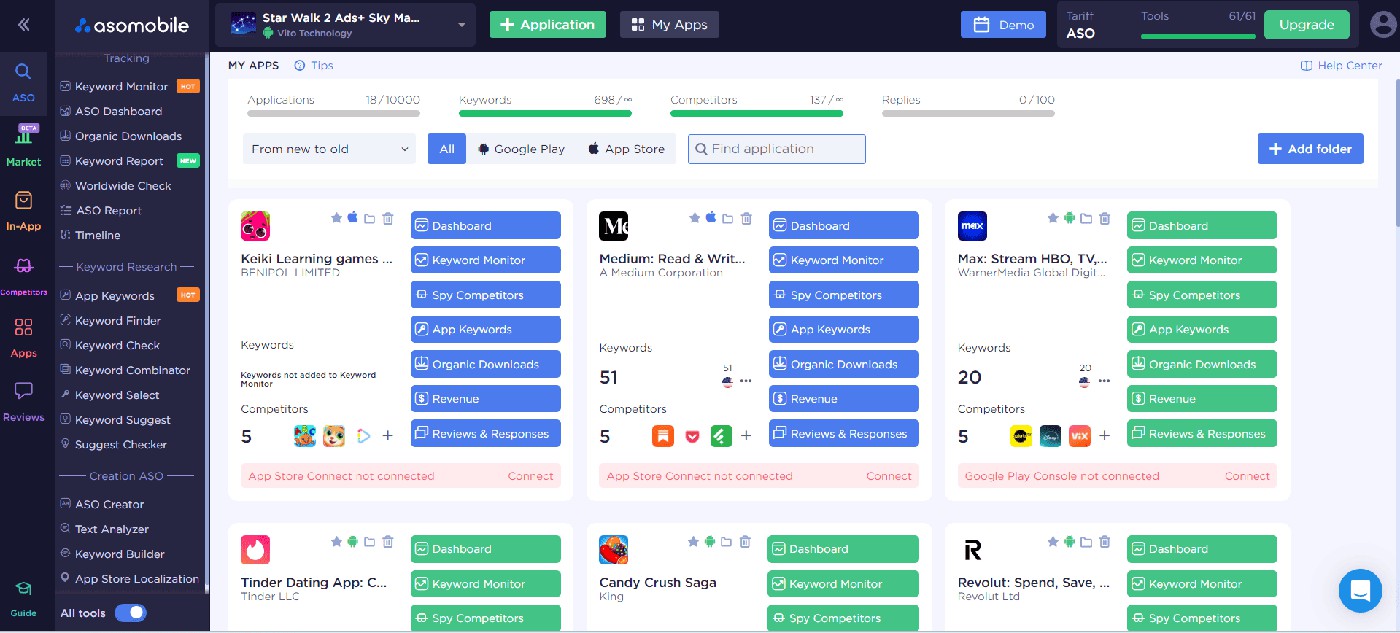
Image source: ASOMobile
One reason ASOMobile keeps showing up on ASO tool lists is that you can get meaningful data without paying upfront. A surprising number of platforms put keyword research behind a paywall. ASOMobile lets you explore rankings, competitors, and keyword opportunities before making that commitment.
Most of the core ASO features are covered. You can check keyword volume and difficulty estimates, follow ranking history, monitor reviews, and pull in Search Ads data for additional context. The learning curve is fairly gentle, which makes the platform approachable for developers who are new to ASO.
Larger teams will eventually run into the limits of the free offering. Historical datasets, localization support, and broader market coverage become more important as an app grows. For validating ideas and getting comfortable with ASO fundamentals, though, ASOMobile punches above its weight.
Features
- Keyword volume and difficulty estimates
- Ranking history with competitor tracking
- Review monitoring tools
- Search Ads data integration
- In-app purchase and monetization analytics
Pricing
ASOMobile offers tiered pricing with optional upgrades as your ASO needs grow. You can start with the Free plan, then move to Plus, Premium, or Enterprise for additional data and features.
The freemium plan has no time limit, so you can explore the platform before deciding whether a paid upgrade makes sense.
Pros & Cons
Pros
- Keyword traffic indicators and simple ASO workflow: “Exact excerpt: ‘accurate traffic indicators by keyword.’ Review meaning: the reviewer says ASOMobile gives useful keyword traffic insights, an intuitive interface, video guides, fast support, and affordable pricing.” – G2 review, “Practical All-in-One Solution,” 12/5/2023. (G2)
- Keyword coverage for app text optimization: “Exact excerpt: ‘comprehensive coverage of keywords.’ Review meaning: the reviewer says ASOMobile simplifies app text optimization, covers keywords, and helps increase visibility.” – G2 review, “Time saving solution,” 1/24/2024. (G2)
Cons
- Review-reply integration and support issues: “Exact excerpt: ‘doesn’t work as it should.’ Review meaning: the 2026 reviewer says review-reply integration broke repeatedly, support communication was inconsistent, and the bug lasted more than three weeks.” – G2 review, “Frustrating Integration, Poor Support,” 2/27/2026. (G2)
- Limited language support: “Exact excerpt: ‘limited language support.’ Review meaning: the reviewer says non-English speakers may struggle and that they had to communicate through a translator.” – G2 review, “Practical All-in-One Solution,” 12/5/2023. (G2)
SplitMetrics Acquire
G2 rating: 4.2/5
Capterra rating: 4/5
Best for: Apple Search Ads automation and A/B testing: bid, budget, and rule-based campaign management focused on improving ROI.
Free trial: No
Starting price: Custom pricing
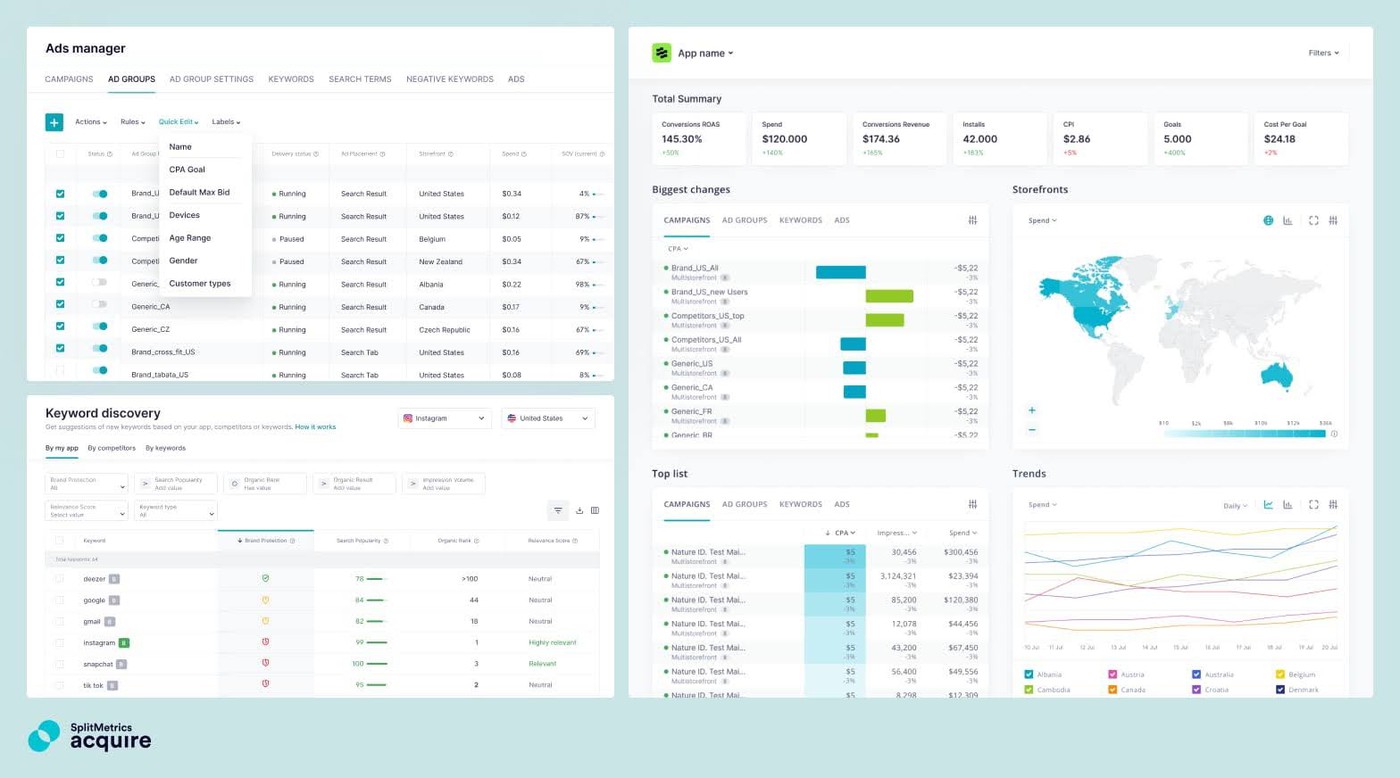
Image source: SplitMetrics
If Apple Search Ads accounts for a meaningful share of your acquisition budget, SplitMetrics Acquire deserves attention. The platform is designed around ASA workflows, from keyword discovery and bid management to campaign automation and performance analysis.
What tends to keep teams on the platform is the automation layer. Instead of manually adjusting bids and budgets every day, you can build rules that react to performance changes automatically. Custom dashboards make it easier to monitor campaigns, and integrations with Adjust, AppsFlyer, and Branch help connect advertising data with downstream results. Teams already using SplitMetrics Optimize can also tie creative testing into the same workflow.
The trade-off is focus. SplitMetrics isn't trying to be an all-in-one ASO platform. Organic keyword research, localization, and rank tracking generally require additional tools. For teams heavily invested in Apple Search Ads, though, that specialization is often exactly the point.
Features
- Keyword discovery and expansion for Apple Search Ads
- Automated rules for bids, budgets, and keyword management
- Creative testing through SplitMetrics Optimize
- Integrations with Adjust, AppsFlyer, and Branch
- Custom dashboards and performance reporting
Pricing
SplitMetrics Acquire uses custom pricing, typically based on ad spend or a negotiated enterprise agreement. There are no fixed self-serve plans, since pricing reflects campaign scale and required features. Teams usually start with a demo or pilot program before committing. If Apple Search Ads is central to your acquisition strategy, that pricing model can make sense. The next step is weighing the platform's biggest strengths against its trade-offs.
Pros & Cons
Pros
- Useful competitor insights for Apple Ads keyword work: “The reviewer says SplitMetrics gives more data for Apple Ads management, automated bidding saves significant time, and competitor insights are hard to find elsewhere.” – G2, review “SplitMetrics is a great platform to manage your Apple Ads campaigns.”, 9/25/2025 (G2)
Cons
- Keyword Discovery may return weak keyword ideas: “The reviewer says Keyword Discovery often shows irrelevant or very low-volume keywords and can miss strategic mid- or high-volume keywords.” – G2, review “All-in-One Apple Ads Tool”, 9/30/2025 (G2)
- Bid strategies may exceed set bid limits: “The reviewer says bid strategies need improvement so they do not exceed the upper limit of a set bid, which affects budget control.” – G2, review “Intuitive and Effective with Robust Keyword Control”, 10/14/2025 (G2)
How to choose the best keywords tools for ASO
Most teams don't need the most powerful platform. They need the one that matches the decisions they're trying to make.
Step 1: Start with your growth stage
If you're a solo developer or running a pre-seed app, begin with Appfigures or ASOMobile. An ASO keyword planner and a strong freemium tool will usually give you enough keyword data, ranking history, and validation opportunities before you need a larger platform.
Step 2: Decide whether localization drives growth
Once localization starts driving a meaningful share of your organic downloads, it's worth looking beyond basic keyword research. AppTweak is often the first stop for teams expanding into new markets. AppFollow takes a broader approach by connecting keyword research with rank tracking, reviews, and reporting, which can be useful once ASO becomes part of a larger workflow.
Step 3: Determine how much market intelligence you need
Not every team is trying to squeeze a few more positions out of a keyword. Sometimes the bigger question is where a category is heading or how competitors are growing over time. If those conversations come up regularly with leadership, a market intelligence platform such as Sensor Tower or 42matters will usually provide more value than a traditional ASO tool.
Step 4: Consider the role of paid acquisition
Apple Search Ads can change what you expect from an ASO platform. Teams investing heavily in ASA often need more than keyword research. SplitMetrics Acquire focuses on campaign automation, bid optimization, and keyword discovery, making it a natural choice when paid acquisition is a core growth channel.
Step 5: Decide whether competitor research is your advantage
Some teams begin every ASO project by looking at their competitors. If that sounds familiar, MobileAction is worth exploring. It makes it easy to compare keyword coverage, monitor visibility, and understand how competitors approach Apple Search Ads.
Step 6: Check for these must-have capabilities
The best keywords tools for ASO have a few things in common. Before choosing a platform, check whether it offers:
- Daily keyword volume updates across multiple countries
- Support for both iOS and Google Play
- Localization workflows with native-speaker validation
- Keyword opportunity scoring that combines volume, difficulty, and ranking potential
- Rank tracking with Slack, email, or webhook alerts
- API access and BI integrations
- Reviews and replies connected to keyword insights
A good tool is only part of the process. Strong keyword research still depends on following proven ASO search best practices and maintaining a consistent optimization workflow.
cta_get_started_purple