How to read your app’s keyword ranking report in 15 minutes

Table of Content:
- Key insights
- Find the gap between tracked and ranked keywords
- How to read your keyword ranking report in 15 minutes
- Three patterns in your ranked keywords worth investigating this week
- Build an ASO reporting cadence around decisions
- Turn report findings into a monitored shortlist in AppFollow
- Frequently asked questions about keyword ranking reports
A keyword ranking report shows the search terms an app is observed ranking for in a particular store and country. Your tracked list may contain 40 chosen terms while the wider inventory reveals hundreds of others. Those ranked keywords are candidates to assess, rather than a ready-made optimization backlog.
Use this 15-minute review to find coverage gaps, separate brand demand, and choose one investigation with an owner and a follow-up date. Fifteen minutes covers the first pass; it does not replace a ranking diagnosis.
Need to build the initial list? Start with how to research and choose ASO keywords. Here, the job is to read the evidence after your app starts ranking.
Key insights
Keep these checks beside the report before turning a movement into a task.
- Audit the coverage gap. A tracked list records team choices; an observed inventory can reveal relevant terms nobody selected. Record the store, country, device, and dates before comparing them.
- Separate acquisition from position. Apple’s analytics dimensions describe acquisition sources. Google Play includes search-term reporting, but neither console supplies an organic position history for each keyword.
- Respect the measurement limits. AppFollow documents up to position 100 on iOS and 30 on Android. A larger iOS inventory does not establish better performance.
- Check the denominator. A keyword rankings and visibility report needs absolute search downloads alongside share where available. Falling share can accompany unchanged downloads; it does not establish a conversion problem.
- Finish with a decision. Pick a small watchlist, name the next check, and keep a fixed keyword cohort for comparisons. Discovery growth and ranking improvement belong on separate lines.
Find the gap between tracked and ranked keywords
The useful distinction is between the terms your team chose to monitor and those the data provider has observed returning your app. The first list explains the plan; the second can expose omissions. Neither explains why the store ranked the app.
Treat the inventory as bounded coverage. Its size depends on the provider’s keyword database, position depth, selected market, device, and observation date. “All ranked keywords” is an interface label, not proof that every possible query has been captured.
Compare your tracked list with observed search coverage
Open both lists for the same app, store, country, device, and date. Match keyword strings before calculating the gap: some tracked terms may be unranked, and some phrases may be duplicates or spelling variants.
Illustrative calculation: 40 tracked terms overlap an inventory of 600 unique observed terms. Tracking covers 40 ÷ 600 = 6.7% of that inventory. It does not cover 6.7% of search demand or installs; the selected 40 could still generate most downloads.
AppFollow’s Keyword Tracking puts My tracked keywords beside All ranked keywords, so the ASO manager can review omissions and add relevant candidates to monitoring.
Reporting question | Tracked keywords | Observed ranked keywords |
How the list is built | Terms your team selects | Terms observed in store results |
Main reporting job | Follow chosen ASO keyword ranks | Audit observed coverage |
Main blind spot | Relevant terms never added | Business intent and uncovered queries |
Next action | Investigate changes in the fixed cohort | Assess candidates before adding them |
A keyword position ranking report attaches positions and movement to the terms being monitored. Keep that role separate from discovery: adding 80 newly found terms makes a list larger without improving the rank of a single existing keyword.
The store consoles answer a different question. Apple’s Source Type dimension describes where customers came from. Google Play’s Search term dimension can identify queries preceding a listing visit, but it is not an organic rank tracker. Current Play listing reports emphasize clicks and click-through rate; completed acquisitions are reported separately.
Check 5 fields before choosing a keyword to investigate
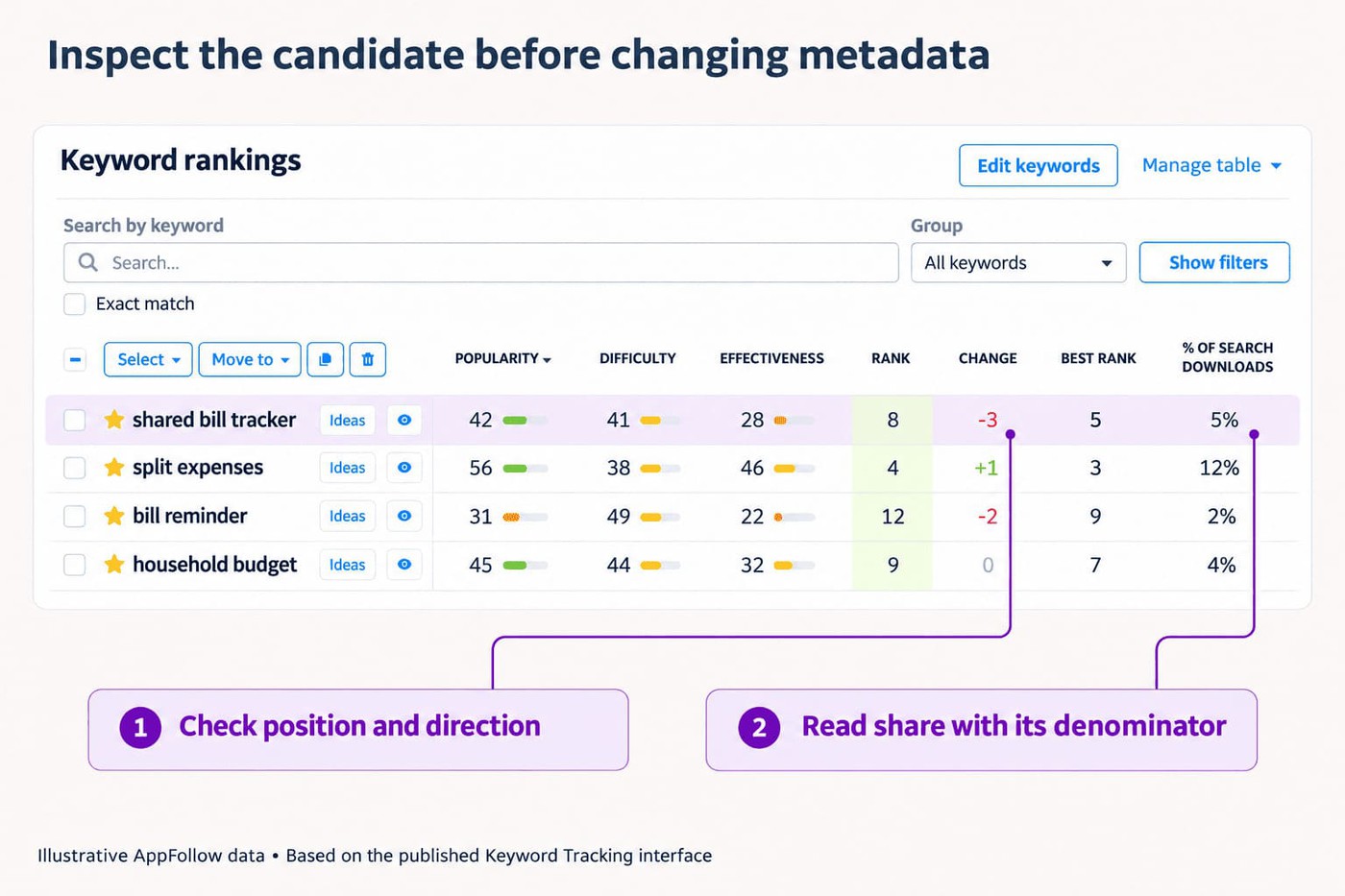
Shortlist a relevant term from the inventory, then add it to My tracked keywords to inspect its position. Rank, Change, and Best Rank become available there; do not expect those fields on every untracked row.
- Rank and Change: what moved? Check the selected comparison dates before calling a move an improvement. A rank of 7 is useful context, not a verdict on the term’s business value.
- Best Rank: what happened before? Use the historical peak to frame a recovery question. It is not a forecast: today’s competitors, metadata, and demand may differ.
- Search-download share: how much of the measured total comes from this term? Inspect absolute downloads where access and the store connection allow it. A percentage alone cannot tell you whether the term lost downloads.
- Popularity: is there relative demand? AppFollow’s Popularity score is a relative indicator, not a monthly search count. Compare relevant candidates in the same market.
- Difficulty and effectiveness: is this worth a closer look? The keyword difficulty score concerns Top-10 competition. AppFollow’s Keyword Effectiveness Index combines demand, competition, and app performance; its above-20 guidance is a screening cue, not an instruction to displace a proven title term.
Find the shortlisted row in My tracked keywords, then read across its position and demand fields.
cta_get_started_purple
Two date traps can change the decision. On All ranked keywords, Search Downloads refers to the last selected date; Downloads by Keywords reports the selected period. Do not compare a daily row with a monthly total.
Difficulty and KEI are calculated in real time, without historical scores in those views. Moving the date filter backward does not recreate last month’s assessment. Save a dated export or note when shortlisting a term so the team knows which score informed the decision.
How to read your keyword ranking report in 15 minutes
Time-box the review around three outputs: a comparable cohort, a clean demand split, and one documented hypothesis. Keep the release log open beside AppFollow. If download attribution is unavailable, complete the visibility checks and mark the acquisition question unresolved.
- Minutes 0–5: compare bucket counts and identify candidate terms.
- Minutes 5–9: separate your brand, competitor brands, and generic demand.
- Minutes 9–15: inspect one tracked term’s history against your release log and record the next check.
This is a triage routine. A five-minute bucket review should narrow the investigation, rather than produce a ticket for every row.
Find movement within a fixed set of keywords
Start with the rank groups: Top-1, 2–5, 6–10, 11–20, and 21–50. Choose a response according to relevance and value: defend useful strong positions, inspect terms near the Top 10, and leave low-value coverage as context.
For app store keywords ranking near a bucket boundary, inspect the actual term before escalating. A move from 10 to 11 changes two bucket totals even though the rank changed by one.
Illustrative check: Top 6–10 falls from 40 terms to 30, while Top 11–20 rises from 60 to 70. Ten terms might have slipped, but those totals do not prove it; newly discovered terms and missing observations can produce the same shape.
Compare dated exports using app ID + store + country + device + keyword as the match key. Count movements only among terms observed in both snapshots, and report newly observed or missing terms separately.
Keep unranked or out-of-range terms in a separate status rather than assigning a made-up position. Otherwise, an average rank can improve simply because the worst rows disappeared.
The documented depth is up to 100 on iOS and 30 on Android. The 21–50 label therefore does not imply Android data through position 50. Record the view’s actual coverage, and compare each store with its own baseline.
A keyword position ranking report becomes comparable when the cohort and measurement rules stay fixed. New discoveries remain useful; give them their own count.
In the capture below, check the selected market and bucket labels before reading the totals.
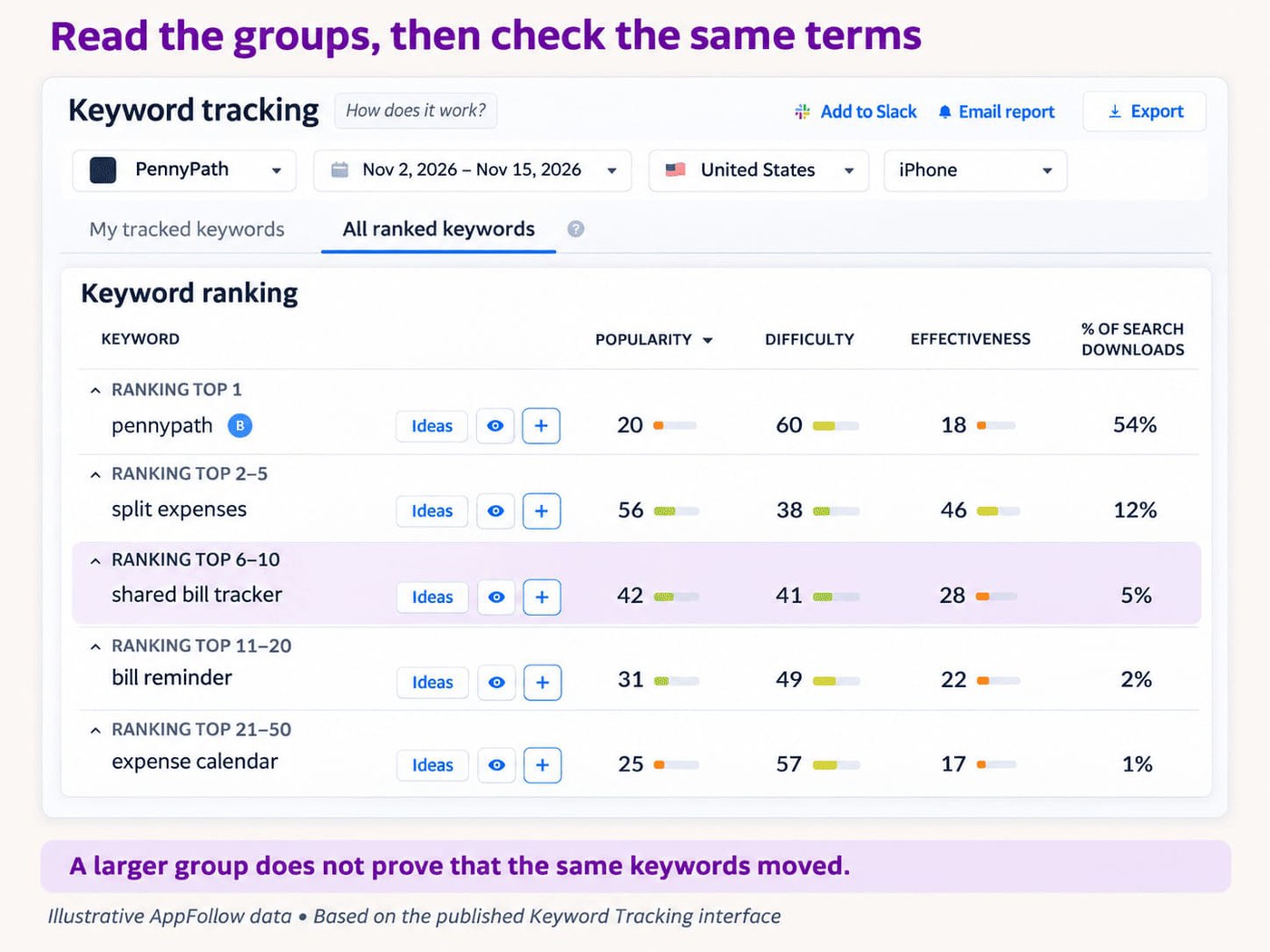
Before moving on, write down one term to inspect and whether it is a continuing observation, a new discovery, or missing from the current snapshot. Those are different reporting events.
Separate your brand, competitors, and generic demand
Imagine a campaign lifts searches for your app’s name while generic terms lose positions. A combined visibility total can hide that split. Compare keyword types before crediting a metadata release.
Keep three groups:
- your brand,
- competitor brands,
- and generic terms with no brand name.
In AppFollow, the bold B marker identifies the selected app’s brand; the grey B marks other apps’ brands. A competitor name is not generic demand for your category.
For a fictional budgeting app, “PennyPath” belongs to its own-brand group, “YNAB alternative” contains a competitor brand, and “shared bill tracker” is generic. Manually check ambiguous phrases before adding them to a group.
On a small watchlist, compare the same generic terms week over week and inspect relevant competitor keyword overlap. Keep a campaign annotation beside own-brand changes so stakeholders can see the context.
Leave the split with a question: did the terms tied to the app’s use cases gain ground, or did more people search for a name they already knew?
cta_get_started_purple
Use release dates to test a ranking-loss hypothesis
A release date is a place to investigate, not proof of a cause. Open Rank History for the tracked term and compare it with the actual store-live date and the changed metadata fields in your external release log. If no usable history is available for a newly tracked term, save today’s baseline and set a follow-up date; do not reconstruct earlier positions.
Try this on one term before widening the diagnosis. Each check should be able to weaken your first explanation.
- Drop after a release: did that version remove relevant wording, change a localization, or alter the listing promise? Compare the submitted fields with the previous version.
- Several terms fall without a release: check whether the same terms moved for competitors and whether the data is complete before attributing the loss to a store-wide change.
- One term drifts while reference terms hold: inspect the current Top 10 and record competing apps or listing changes. Do not label the cause “competition” until there is something specific to compare.
Keep the store-live date and the chart’s observation date visible when comparing them.
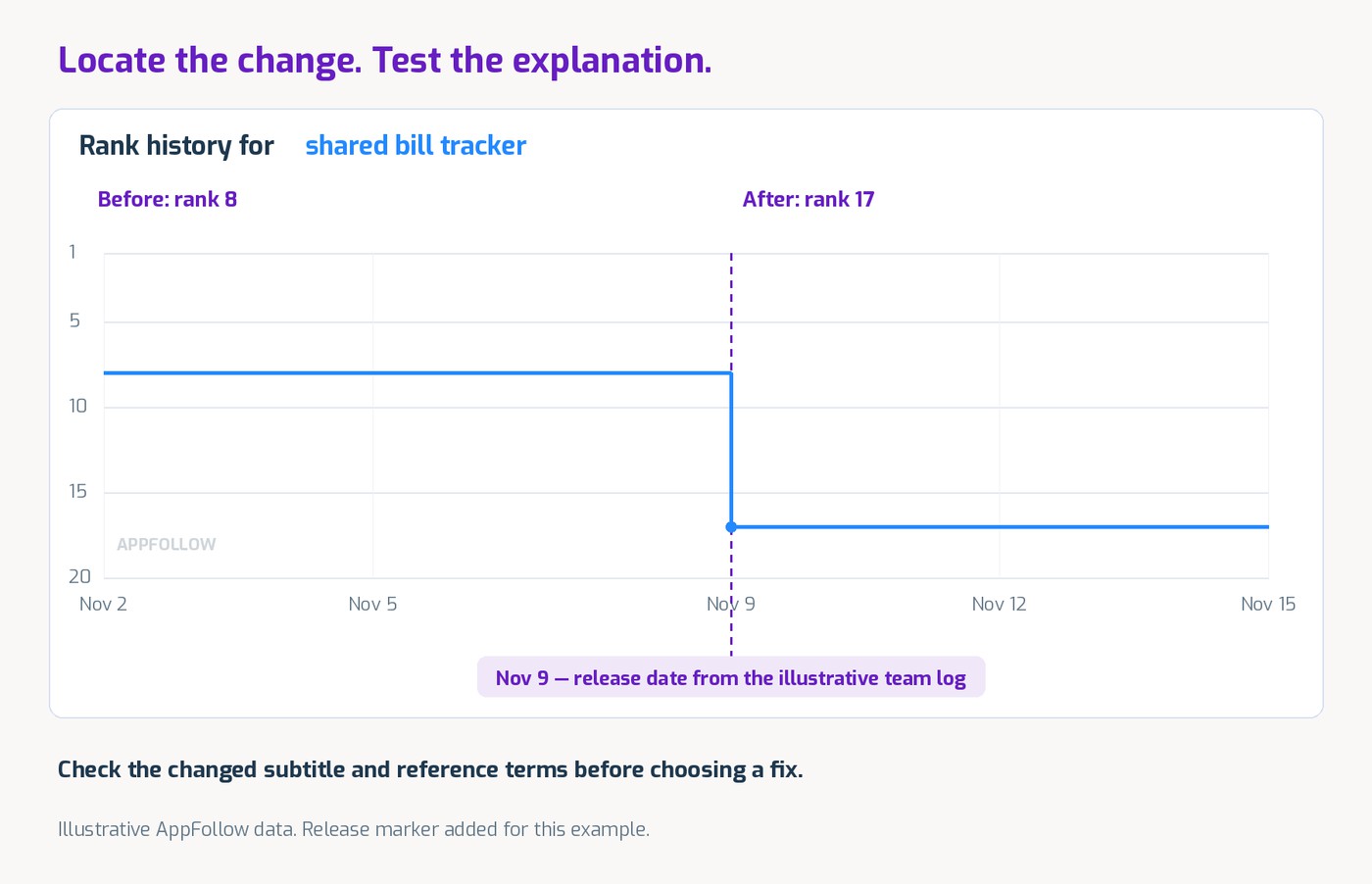
Illustrative investigation: “shared bill tracker” falls from 8 to 17 after a release. The title stayed the same, but the subtitle lost “shared bills.” Keep two unchanged relevant terms as references, inspect the released localization, and record competing results. The missing phrase is now a testable explanation, rather than an automatic rollback instruction.
Use app ranking analytics for the deeper diagnosis and the ASO ranking factors guide to check which mechanism the evidence supports. Record the suspected change, the competing explanation, the owner, and a date to recheck.
cta_get_started_yellow
Three patterns in your ranked keywords worth investigating this week
The report earns its place when it changes the next investigation. These three patterns lead to different work: a metadata decision, an acquisition check, and a market assessment.
All numbers and app names in these examples are illustrative. They demonstrate the checks; they are not customer results or predictions of ranking gains.
A top-10 term your metadata plan missed
A fictional shared-expense app appears at position 8 for “shared bill tracker,” yet the term is absent from the team’s keyword map. In AppFollow, the ASO manager adds it to tracking, checks demand and the current Top 10, and finds that those apps solve the same problem.
That ASO keyword ranking makes the term worth assessing. It does not reveal how the store established relevance. Inspect the live metadata and applicable localizations before calling the ranking accidental; the words may already appear across fields or another indexed listing.
Decision note: the app supports shared bill records, the phrase fits the intended audience, and illustrative KEI is 28. Keep it on the shortlist. Before editing, compare the value of the term it would replace and check field constraints for iOS metadata or Google Play wording. A score alone does not justify sacrificing a term that already works.
“I would rather see one high-fit term in a clean title than three keywords squeezed in for the sake of coverage.”
— Yaroslav Rudnitskiy, Senior Professional Services Manager, AppFollow, in the published ASO keywords guide.
A download-share drop with no ranking loss
Position 7 has held, but the term’s search-download share has halved. Before assigning a creative test, check the absolute count and the total used to calculate that share.
Illustrative example: the term contributes 100 of 1,000 measured search downloads in the first window: 10%. In the second, it still contributes 100, while the total reaches 2,000: 5%. The term lost share without losing a download. Neither number tells you its conversion rate.
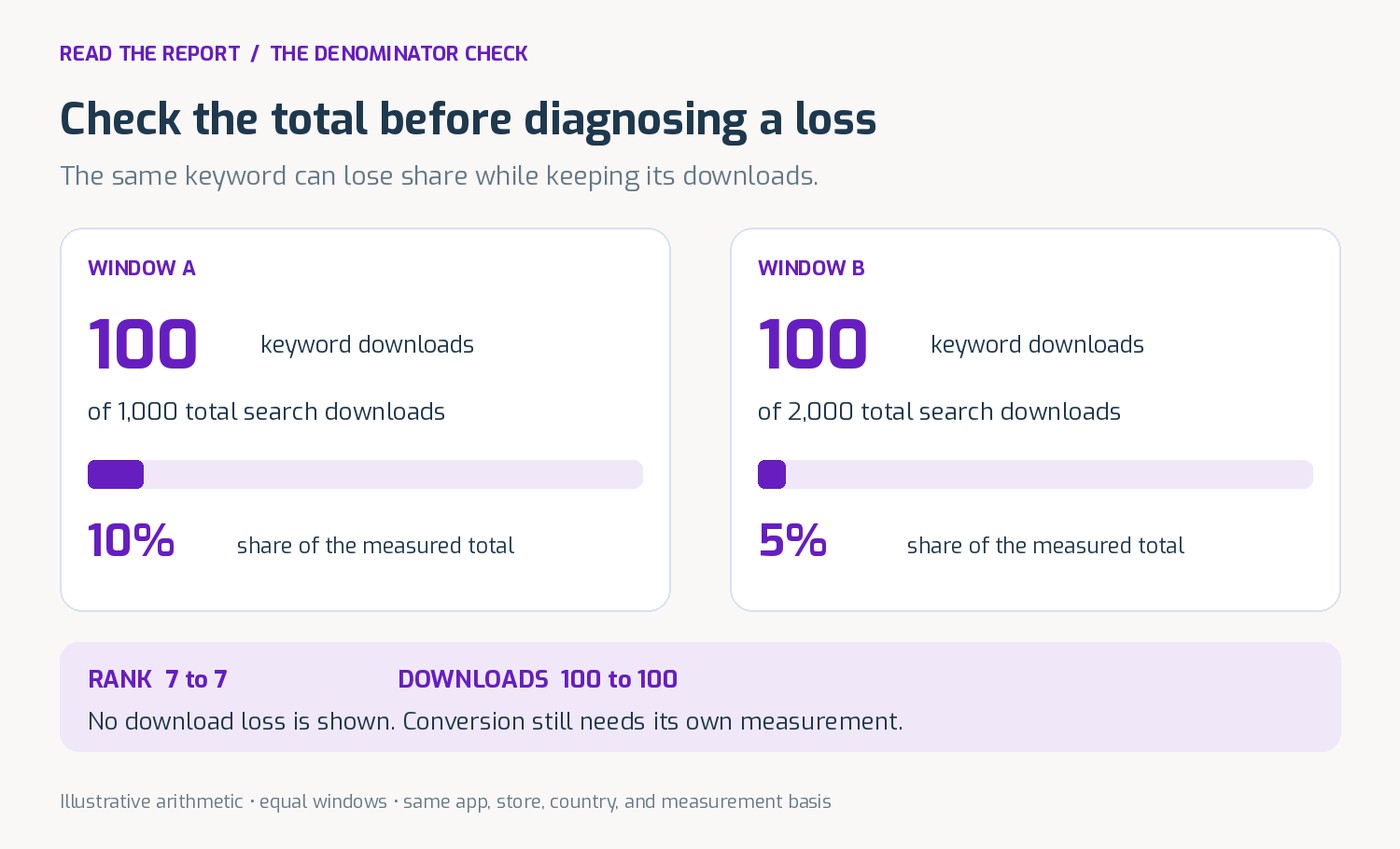
Compare equal windows in Downloads by Keywords with the same app and country, rather than adding daily snapshots from All ranked keywords. If the absolute count also fell, inspect demand, attribution scope, and competing results before testing a listing change.
Use these checks to decide who needs to investigate. A signal becomes a task only after its measurement basis is clear.
Observed signal | What is still unknown | Next check |
Relevant Top-10 term absent from the plan | Whether it adds value over current targets | Inspect live metadata, demand, and the term displaced |
Stable rank, smaller download share | Whether absolute downloads or conversion fell | Compare the term count and total over equal windows |
Ranks in a market without a local listing | Local demand, listing language, and product fit | Review a local query cluster and product readiness |
If conversion is the next question, use the right metric. Google Play’s current listing CTR measures button clicks, not completed installs. Keep that rate separate from downloads and from any differently defined AppFollow conversion metric.
cta_get_started_purple
A market with rankings but no local listing
A country filter is not a listing-language filter. Finding a Spanish phrase in one storefront does not establish demand across Spanish-speaking markets, or prove that the app has no indexed localization supporting it.
For a fictional recipe app assessing Mexico, the useful output is a small market brief. Review a cluster such as “menú semanal” and “planificador de comidas” in that storefront, then check whether the leading apps serve the same cooking and planning needs.
The ASO lead records local demand indicators and competing results. Product confirms recipe availability, units, and any region-specific restrictions; support confirms the languages it can handle. These checks can stop a listing translation from attracting users the product cannot serve.
Only then map the proposed listing to the localizations indexed by that storefront. AppFollow’s Show translation option helps read a keyword; it does not demonstrate that the app or listing is localized.
- Proceed when: several relevant queries show a plausible opportunity and the product can support the audience.
- Hold when: the case rests on one unfamiliar term or missing language assumptions. The next deliverable is a scoped localization test with an owner and baseline.
If two apps in your portfolio appear for the same term, use the separate keyword cannibalization review before changing either listing.
Build an ASO reporting cadence around decisions
Use a weekly operating review and a monthly stakeholder summary as a starting routine, then reopen the affected cohort after a meaningful release or loss. These are suggested working intervals, not a store requirement or a guarantee that seven days will reveal an effect.
Reserve day-to-day attention for terms with a clear consequence if they move. AppFollow supports email or Slack notifications for tracked keyword changes; an alert should open an investigation, not trigger an automatic metadata rewrite.
“Review rankings, conversion, and feedback weekly, but update metadata only when evidence identifies a specific problem.”
— Ilya Kataev, Professional Services Team Lead, AppFollow, in the published ASO checklist.
For stakeholders, make the keyword rankings and visibility report a short decision record. Give the comparison scope first, then explain what changed and what the team will do. The following is a copyable template, with illustrative values:
- Scope: one app, iOS, US, iPhone; equal comparison windows; 120 continuing generic terms. New discoveries are counted separately.
- Change: 8 continuing terms entered the Top 10; 3 left it. Attach the matched term list rather than presenting net +5 as the whole story.
- Visibility context: record the Search Visibility Score, its source view, and filters. Keep the fixed generic cohort beside it; a combined score cannot explain the brand split.
- Acquisition check: record absolute search downloads and share on the same basis, or mark attribution unavailable. Name each metric instead of calling every result “conversion.”
- Decision: investigate “shared bill tracker”; the ASO lead checks the removed subtitle phrase and current results by Friday, then proposes whether a metadata test is warranted.
This gives the reader a scope, a result, and an accountable next step. Use the ASO metrics guide when agreeing which acquisition measures belong beside visibility.
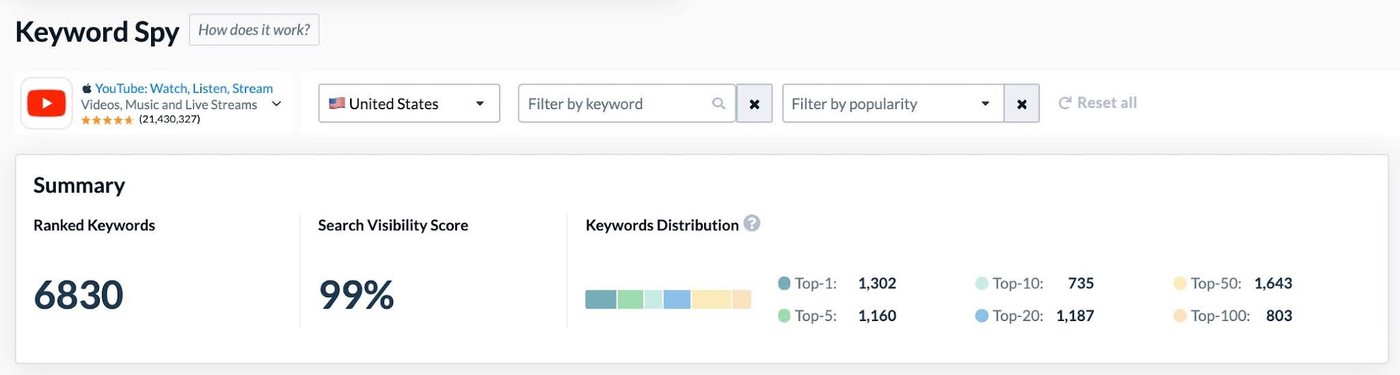
Keyword Spy supplies a summary of ranked terms, Search Visibility Score, and position distribution. Its documented summary excludes keywords with Popularity 5, so do not expect its count to equal an unfiltered inventory export.
cta_get_started_yellow
Check the export before reusing it. AppFollow’s tracking documentation gives conflicting statements about whether interface filters carry into exports. Its separate Export Keywords guide describes a standard template. Verify the file’s contents before treating it as the cohort you selected.
After exporting CSV or XLS, check the app, country, dates, row count, and keyword membership against the intended cohort. Reapply filters in your reporting sheet when needed, retain the raw file, and record the extraction date. That check is safer than assuming the on-screen subset survived the export.
For recurring ASO reporting, save one rule with each priority term: the change that warrants review, who checks it, and what evidence could justify a listing test. Choose thresholds from the term’s value and baseline; a one-position wobble need not interrupt the team.
Want to see this with your own markets? Request a demo from the keyword rankings page and bring a tracked list plus the report you send stakeholders.
Turn report findings into a monitored shortlist in AppFollow
Start with one app and market. In All ranked keywords, assess omissions from the team’s plan; add relevant candidates to My tracked keywords, then use their positions and history to maintain a focused watchlist.
The two tabs below show the handoff from discovery to monitoring.
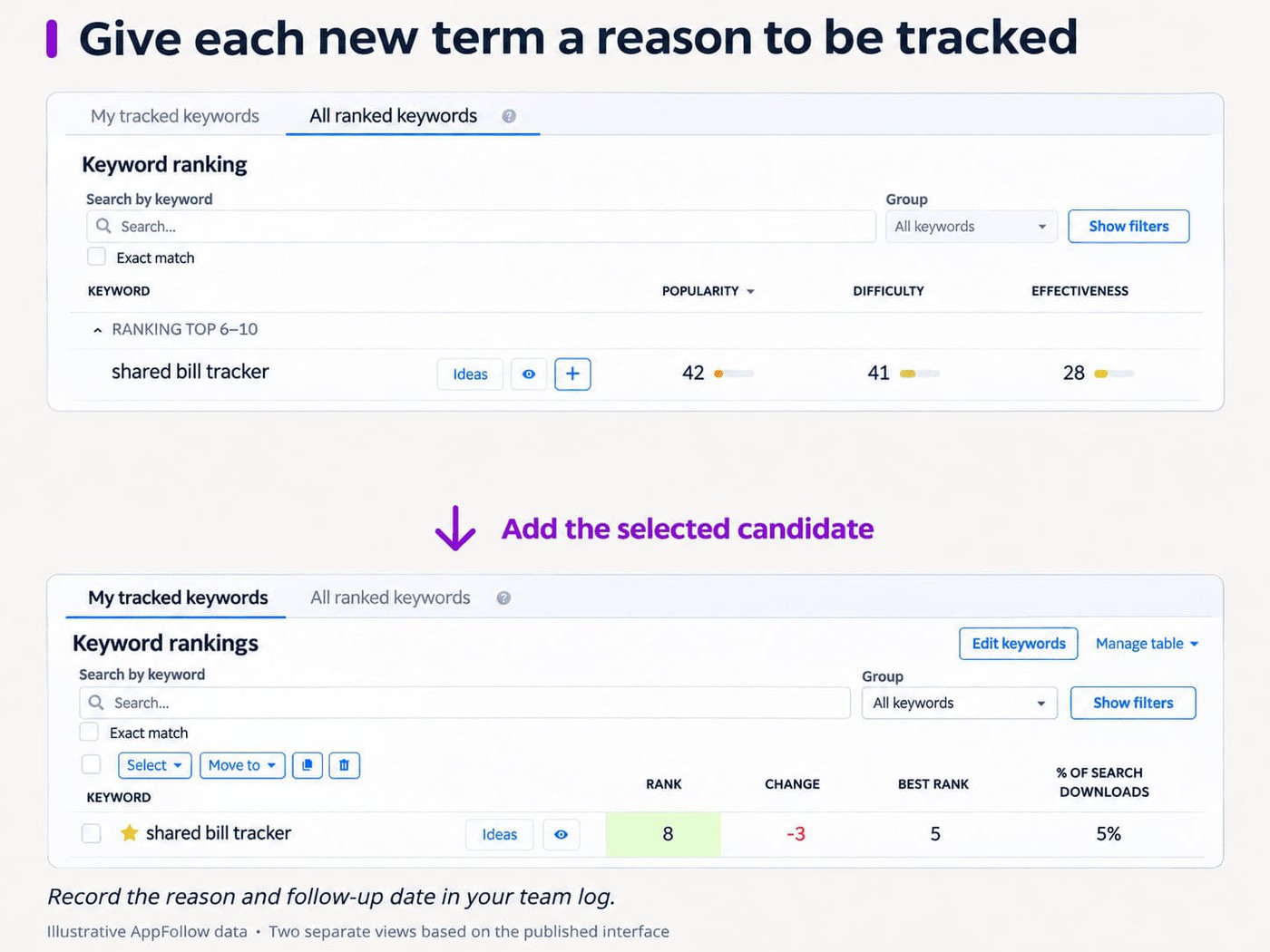
The benefit is continuity: a term found during the weekly audit becomes a monitored item with a recorded reason, instead of disappearing into a one-off spreadsheet.
Keep the shortlist usable between reviews:
- Group by the next decision. Separate terms to defend, metadata candidates, and market investigations in My tracked keywords. The ASO manager should be able to tell why each term is there.
- Use history for follow-up. Reopen a term after its review date and compare the same market and device. Put release details in the team log rather than assuming the chart explains the cause.
- Send exceptions to an owner. Configure available tracked-keyword notifications, then document which changes merit action. Confirm plan access and delivery before relying on them.
The ASO keyword tracker supports monitoring; the team still decides whether to change metadata, test creative, or investigate product fit. Your keyword ranking report is useful when the next owner can reproduce the observation and understand that decision.
cta_get_started_purple
Frequently asked questions about keyword ranking reports
Use these answers to distinguish rank monitoring from acquisition reporting.
What is a keyword ranking report for a mobile app?
For a mobile app, a keyword ranking report records observed search visibility in a specified store, country, device, and date window. It can combine an inventory of discovered queries with positions and history for tracked terms. It is bounded by provider coverage, rather than a complete record of every possible query.
Can I see keyword rankings in App Store Connect or Google Play Console?
Neither console provides an organic keyword position history. Apple’s analytics report acquisition dimensions such as Source Type. Google Play reports search terms alongside listing performance, which differs from showing where the app ranked. Use an ASO platform or a keyword ranking app to monitor positions.
How many keyword positions can you actually see for an app?
AppFollow documents coverage up to position 100 for iOS and 30 for Android. These are observation limits, not the number of keywords an app can rank for. Check the store, country, device, and source view before comparing totals; queries outside provider coverage may be missing.
How often should I pull a keyword ranking report?
Start with a weekly operating review and a monthly stakeholder summary. Revisit affected terms after a significant release or an important loss. A useful ASO keyword ranking check ends with a named investigation and follow-up date; it does not require changing metadata every week.
What is the difference between tracked keywords and ranked keywords?
Tracked keywords are selected by the team for ongoing monitoring. Ranked keywords are queries the provider has observed returning the app. A keyword position ranking report follows a fixed tracked cohort; the wider inventory helps find omissions. A newly discovered query does not establish that an existing term improved.
Is there a free way to see the keywords my app ranks for?
AppFollow’s free ASO tools support individual keyword checks, and its product page offers a free starting point. Check current plan access for inventory, keyword limits, history, and attribution. A point-in-time lookup is not the same as a continuing report.