SEO for apps: how to get found outside the app stores

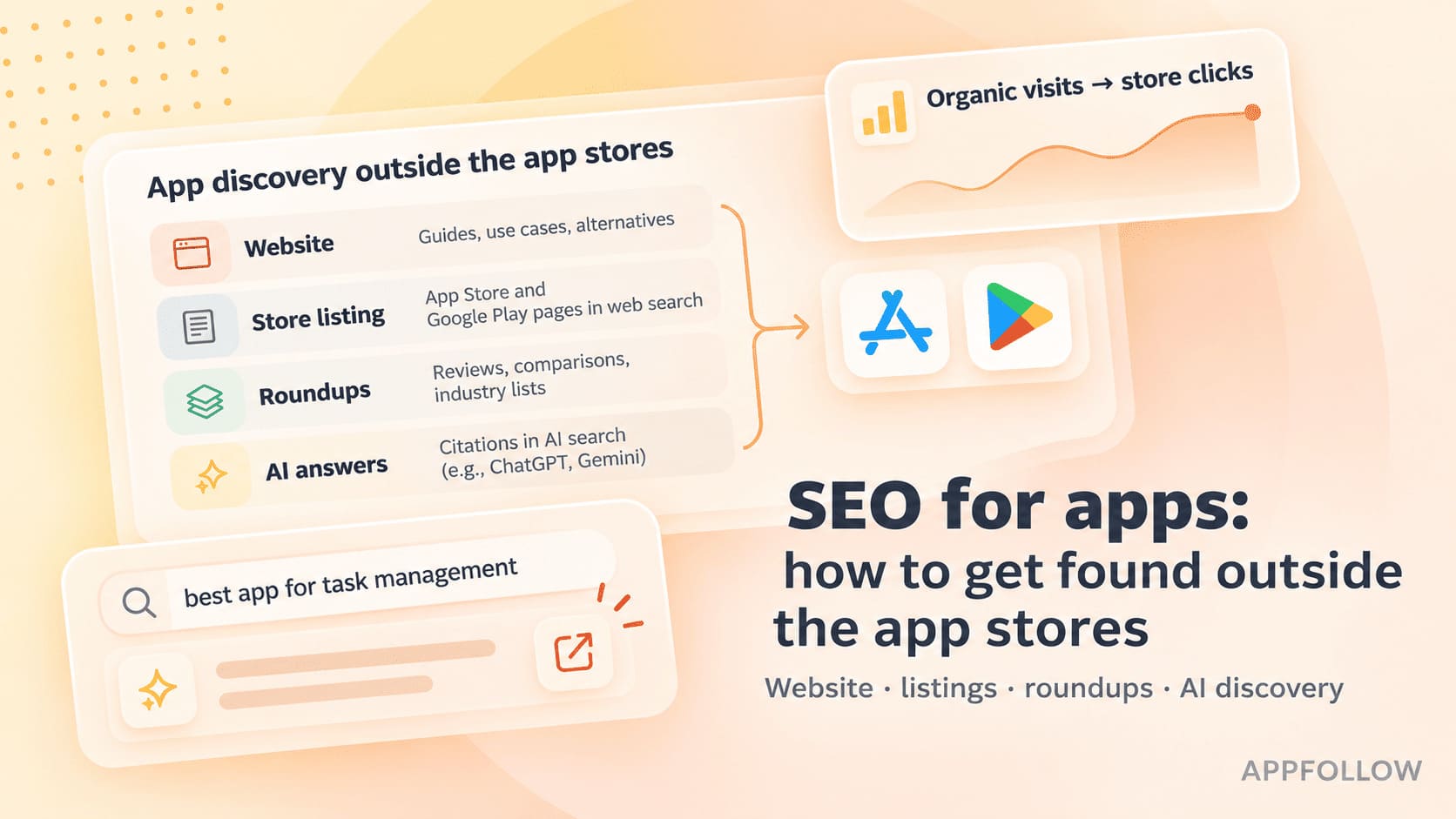
Table of Content:
- Key insights
- What SEO for apps actually covers
- Your app’s website: the page that has to rank and convert
- Your store listing is a web page
- The pages that rank instead of you
- How to improve app discovery in AI answers
- How to measure app SEO without overstating attribution
- Three app SEO mistakes that lead to the wrong fix
- Track store rankings and referral activity with AppFollow
- SEO for apps FAQ
SEO for apps helps people discover your app through your website, public store listings, third-party coverage, and AI answers. It complements the work you do inside each store; our ASO vs SEO guide explains that channel boundary.
A listing can convert store visitors well while your website attracts only people who already know your brand. App SEO addresses the questions people ask before they choose an app.
This mobile app SEO workflow connects those questions to useful pages, working links, and store-side measurement. Start with the sources you control, earn relevant coverage, then check whether discovery reaches your listing.
Key insights
Start with three actions.
- Check whether your website earns relevant non-branded impressions.
- Review the listing description against the task those searchers want to complete, preserving useful store terms.
- Then record the available referral and acquisition baseline under each store’s current definitions. Those records give the next quarter’s work a starting point you can revisit.
Check your store keyword visibility with free ASO tools.
What SEO for apps actually covers
SEO for apps spans four discovery surfaces outside store search. Use the table to choose an owner and an observable result for each; the review intervals are planning checkpoints, not promised ranking timelines.
The four surfaces outside the store
Surface | What it needs from you | First review | What to measure |
Website or landing page | A useful indexable answer and a tested route to the store or installed app | After recrawling; review monthly | Organic visits and store-link clicks; store outcomes separately |
Store listing in Google web search | Accurate public metadata and an explanatory description | After publication and recrawling | Branded listing searches and available store referrer reports |
Roundups, review sites, and community threads | A reason for inclusion and accurate information worth quoting | After placement; review monthly | Referral visits and store-link clicks from each placement |
AI answers | Consistent information across the pages answer engines read | Repeated checks after source updates | Sampled recommendations, citations, and identifiable referrals |
Begin with your website and listing: you can change their content and test the links. They also give publishers a reliable place to verify your app’s audience, features, and limitations.
Third-party coverage depends on an editor or community finding your contribution useful. AI answers may draw on those pages, your own content, or model knowledge. Consistent descriptions reduce conflicting evidence, but publication alone cannot secure a recommendation.
Use the metrics to locate the next problem. If relevant website visits produce few store-link clicks, inspect the page’s promise and CTA. If store visitors rarely proceed, investigate the listing, audience fit, and download path before publishing more pages.
Keep web and store keyword decisions separate
The same phrase can represent different choices on the web and inside a store. A strong store ranking does not establish that your website answers the corresponding web query.
For example, “expense tracker” may lead store users straight to an app, while a web searcher wants a comparison, a spreadsheet, or help recording expenses. Inspect the actual web results before assigning a page.
Keep a separate brief for each channel: target audience, intent, existing asset, and desired next action. A use-case page can explain the task in depth and send suitable readers to a listing that preserves the same promise.
Use the channel distinction when assigning ownership. Web and store teams can pursue the same relevant concept while serving different search results and user needs.
The website is where you can demonstrate that fit in the most detail.
Your app’s website: the page that has to rank and convert
A hero image, two screenshots, and store badges may be enough for someone who already knows your app. A non-branded searcher needs evidence that it solves their particular problem.
Mobile app SEO starts with pages built around that question. Each page then needs a direct route into the app.
Match each app page to a specific search job
Build around three search jobs. A category page can explain why your product fits “expense tracker app.” A use-case page can answer “how to split bills with roommates.” Check whether a “best budgeting apps” result set expects a multi-product comparison before targeting it with a single-product page.
A comparison page should explain when your app fits better than a named alternative, and when it does not. Use the same criteria for both: supported tasks, platforms, limitations, and a source for each material claim.
Answer the query early, then demonstrate the workflow with an actual screen or a clearly labeled example. Include limitations and a store link at the point where a reader can judge fit. That gives SEO for mobile apps a useful destination beyond a branded product brochure.
For links in Google’s AI features, a page must be indexed and eligible for a snippet. Google specifies no additional technical requirements or special schema for inclusion. Check the URL in Search Console rather than assuming that a live page is indexed.
Set up deep links and test the fallback
Some app SEO advice still points to Firebase App Indexing. Its documentation now redirects to the Firebase FAQ, and the release notes list version 20.0.0 in May 2021. Use the current platform instructions for the link behavior you need.
Use the current mechanisms instead:
- Android App Links: Configure verified HTTPS links with android:autoVerify="true" and a matching /.well-known/assetlinks.json file. Android’s verification guide explains testing and caching; on Android 15+, association-file changes can take up to seven days to reach devices.
- Apple Universal Links: Configure the app’s associated-domains entitlement and serve apple-app-site-association over HTTPS at /.well-known/, without redirects. Allow for Apple’s CDN and device refresh cycle when testing changes.
- Smart App Banner: In Safari, use Apple’s apple-itunes-app meta tag with your app ID and, where relevant, an app-argument URL. The banner can open an installed app or lead to its App Store page.
Android also documents website association for searchable app content. Association verifies the relationship; your app must still handle the destination. Test representative links with the app installed and uninstalled, and keep a useful web or store fallback. App Links and Universal Links alone do not preserve a destination through a new installation.
Add structured data that matches the visible page
Google supports SoftwareApplication structured data for software app rich results. Include name, offers.price, and either aggregateRating or review; applicationCategory and operatingSystem provide additional context.
Illustrative JSON-LD for a fictional expense-sharing app follows. In HTML, place this object inside a script element with type="application/ld+json":
{
"@context": "https://schema.org",
"@type": "SoftwareApplication",
"name": "SplitMate",
"operatingSystem": "iOS, Android",
"applicationCategory": "FinanceApplication",
"aggregateRating": {
"@type": "AggregateRating",
"ratingValue": "4.6",
"ratingCount": "1280"
},
"offers": {
"@type": "Offer",
"price": "0",
"priceCurrency": "USD"
}
}
Replace every fictional value before publishing and check the code with Google’s Rich Results Test. Use a genuine rating that is visible on the page and satisfies Google’s review-snippet rules; do not copy another site’s aggregate rating into your markup.
Valid markup creates eligibility for a rich result, not a guarantee. For the store-side factors behind the rating you display, see what actually moves your rating and rank.
Your store listing gives search engines another public source about the same app.
Your store listing is a web page
Public store listings can appear in web search. Google Play’s robots.txt leaves /store/apps/details crawlable and lists sitemaps; Apple’s robots.txt also leaves public app pages open.
That permits access without guaranteeing that every listing or field is indexed.
SEO for apps in Google Play therefore includes the listing as a public web page. The store still controls its template and publishing behavior.
What public store listings expose to crawlers
Google Play | Apple App Store |
Title, developer, category | App name, subtitle, developer, category |
Rating, review count, install count | Rating, rating count, chart position |
Short and full descriptions | Description and “What’s New” |
Updates, reviews, data-safety summary | Reviews, privacy labels, system requirements |
— | The private 100-byte keyword field is not public listing copy |
The full description is a substantial public explanation of your app. On Google Play, preserve relevant descriptive terms while following the store’s metadata rules; repeating them mechanically weakens the explanation.
Apple’s search guidance names the title, subtitle, keywords, and primary category as text-relevance inputs. Treat the description as an explanation for prospective users and a public source for web discovery, rather than a place to repeat App Store search terms.
Write a description readers can follow
Explain who the app serves, which problem it solves, and how the workflow works. Be clear about account requirements, supported platforms, and paid features where relevant. Google Play’s policy warns against repeated words, misleading claims, and unattributed endorsements.
For an expense-sharing app, “Split household costs with roommates and keep a shared record of who owes what” gives readers a task to recognize. “Budget, budgeting, budget tracker, best budget app” gives them a keyword list.
Illustrative description opening: “SplitMate helps roommates record shared expenses and see outstanding balances. Add a bill, choose who shares it, and record repayments in one place.” Follow with actual supported features and limitations. This is sample copy for a fictional app, not a customer quote.
Apply the same check to each localization. Google Play’s metadata policies cover translations too. Verify the published page in the target language rather than assuming that translated fields produce a separately indexed document.
Before rewriting a Play description, record the relevant terms it already ranks for. AppFollow’s Keyword Tracking shows rank and rank history by country, so the ASO owner can preserve useful wording and check movement after publication.
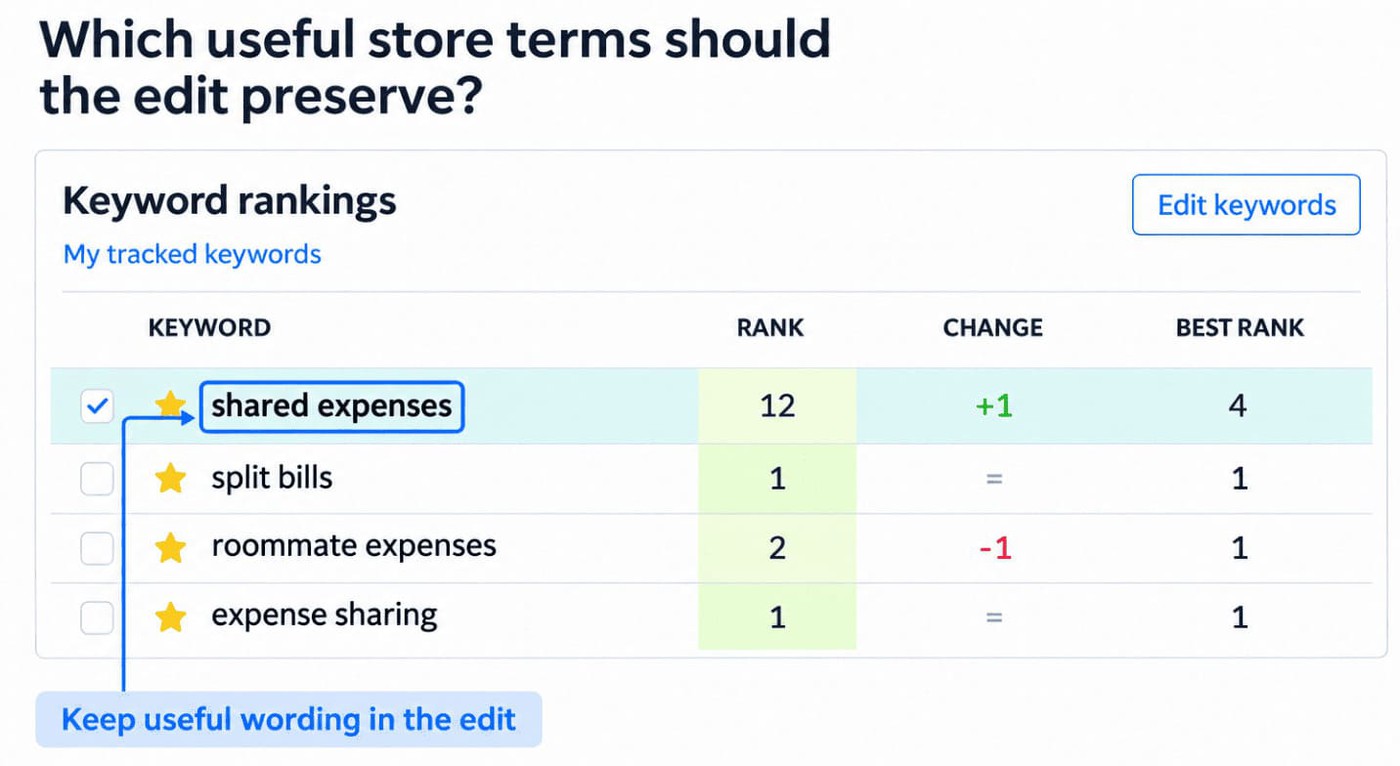
Illustrative decision: keep a relevant phrase such as “shared expenses” in the revised description, then inspect its rank history after the release. Research the web query separately before choosing a use-case page. A top-five store position neither removes the web opportunity nor predicts Google visibility.
AppFollow’s keyword rank tracking measures store search. Its documentation lists depth up to the top 100 for iOS and top 30 for Android; a blank rank does not prove zero demand.
Once your own pages explain the app accurately, give relevant publishers a reason to include it.
cta_get_started_yellow
The pages that rank instead of you
Search your category’s commercial queries and inspect the result types. When roundups, review sites, videos, or forum threads rank, an owned product page is only one route to discovery.
Those pages can introduce your app to people who have not reached a store yet. Prioritize placements that serve your actual audience and explain a use case you can demonstrate.
Get into the roundups that already rank
A publisher needs a reason to change a recommendation. Before looking for an email address, check the selection criteria on pages ranking for your commercial queries. An expense app that only captures receipts will struggle to earn a place in a guide that requires invoicing and tax filing.
For each candidate, complete the three checks below. Save the exact passage you could improve; it gives the editor something more useful than another request for a backlink.
Check | Evidence to collect | Decision |
Audience fit | Query, intended user, required platforms, and the guide’s selection criteria | Skip a page whose essential criteria your app cannot meet. |
A useful gap | An omitted workflow, outdated feature claim, or comparison readers cannot verify | Name the exact paragraph your contribution would improve. |
A viable review route | Recent substantive edits, working source links, and a stated contact or submission route | Pitch an editor who can evaluate the evidence; keep paid listings separate. |
Suppose a freelancer guide covers bank-connected tools but says little about recording expenses without a connection. For a fictional app that supports offline receipt capture and CSV export, the pitch can be this specific:
Illustrative pitch — fictional app, not a sent email
Subject: An offline receipt-capture option for your freelancer guide
Hi [Name], your guide compares expense tools for freelancers, but the travel example assumes a connection. ReceiptTrail lets users capture receipts offline and export the records as CSV once they reconnect. It does not create invoices or file taxes, so it would fit an offline-capture use case rather than the all-in-one category.
If that gap belongs in your next update, I can send an annotated screen, the workflow documentation, and test access. Would those materials cover your review criteria?
The limitation earns its place in the email: it lets the writer judge fit before spending time on a trial. Back the proposed paragraph with a current screenshot, a reproducible task, and a public source for each feature. Ask for an assessment; inclusion and wording remain the publisher’s decision.
After publication, log the article URL, exact placement, destination, date, and identifiable referral visits. Keep paid placements out of the earned-coverage total; Google asks publishers to qualify advertising links with rel="sponsored". A mention, a referral visit, and an install are different outcomes.
Join communities by resolving a specific app-selection problem
A useful community reply begins with the constraint in the question: offline access, an export format, accessibility, or a task the current tool cannot complete. Answer that constraint in the thread before deciding whether your product belongs in the answer. Read the local rules first; disclosure does not override a ban on promotion.
Reddit’s spam policy draws a clear line:
“Do not use Reddit for repeated or unsolicited mass engagement.” — Reddit Help, Spam policy
Worked example: a workout-log question
Illustrative question: “I train somewhere with no signal. Which app lets me log sets offline and keep a spreadsheet copy of my history?”
For a fictional workout app that logs offline but only exports after reconnecting, a useful affiliated reply would acknowledge both requirements:
“I work on the app team. You can record sets and reps in airplane mode, then export your history as CSV after reconnecting. If you need the export itself to work offline, our app will not meet that requirement. Before committing, try logging one session offline, reconnect, and check the exported columns against your spreadsheet.”
That answer gives the reader a test and a reason to rule the app out. Add a direct help-page link only if the community permits it and the page proves the capability being discussed. Repeating the same reply across unrelated threads would remove the context that makes the contribution useful.
Use the decision path below when a question mentions a job your app might solve. Its stopping points are part of the workflow: sometimes the right contribution contains no recommendation or product link.
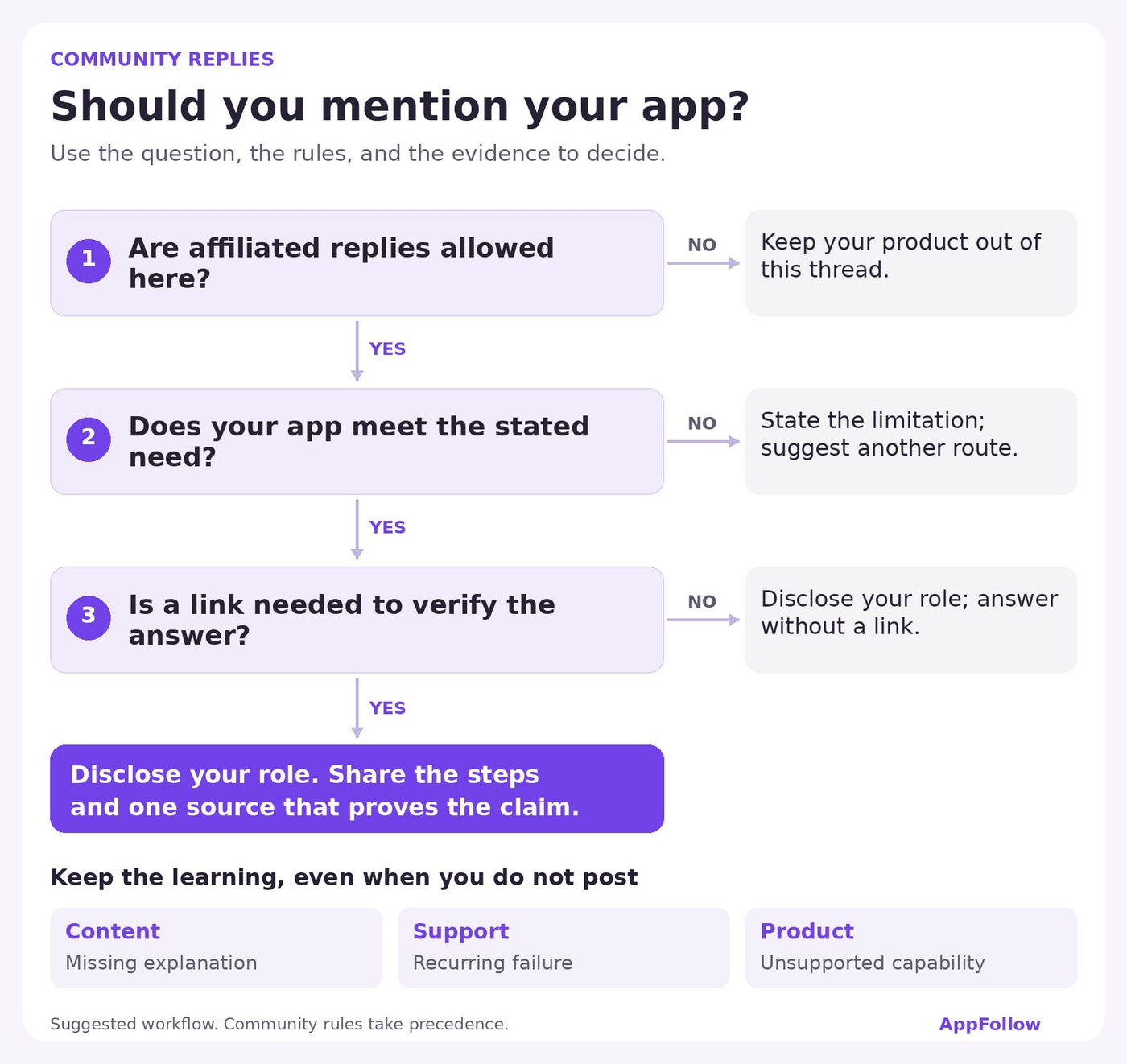
A suggested workflow for deciding whether an affiliated community reply needs a product mention or link. Community rules take precedence; this is an editorial method, not a platform ranking model.
Make the question useful internally too. For the workout example, record the thread URL and exact requirement, assign a help-page check to support, and ask product to confirm the offline-export limitation. If the documentation changes, return to the original thread only when the update resolves its question and the rules allow it.
Count qualified replies and unresolved questions alongside identifiable referrals; do not treat an upvote or a mention as an install. The same feedback loop sits behind AppFollow’s argument that your reviews are everywhere: off-store questions can reveal a missing explanation long before they reach a store review.
Published comparisons and useful discussions add public evidence about an app. The next section examines what AI recommendation systems may retrieve from it.
How to improve app discovery in AI answers
An AI answer may name an app without linking it, or cite a comparison page rather than the app’s website. Check the source behind the recommendation before deciding what to change.
GEO for apps applies generative engine optimization to public listings, websites, and relevant third-party pages. The research below covers ChatGPT; Google supplies the technical guidance for its own AI features.
What the ChatGPT citation study actually shows
AppTweak’s May 2026 analysis covered 125,000+ ChatGPT responses to 9,489 US app prompts. It reported a 47.5% combined citation share for store listings, making them the largest source group in that dataset.
AppTweak also reports 37.6% for App Store pages, 9.5% for Google Play, 27% for the open web, and 22.6% with no source. Its store subtotals do not match the stated combined share. Read these as publisher-reported figures, not a reconciled market estimate.
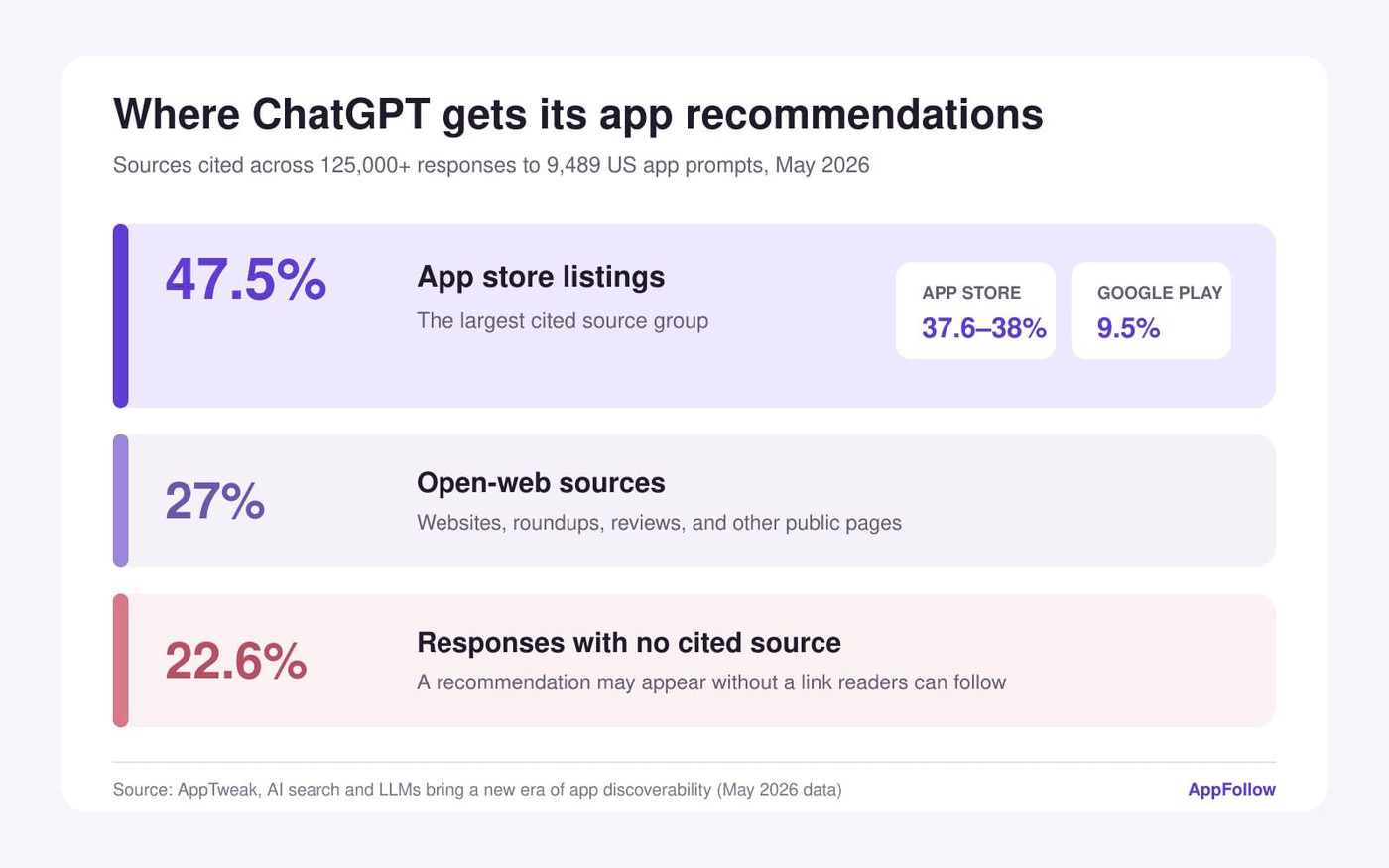
Figure 1. AppTweak’s reported source figures, May 2026. “No source” measures responses without citations and is not a share of cited URLs; the cards do not form a 100% distribution.
Review your listing alongside your website. The study does not identify which description sentence caused a citation.
This evidence covers ChatGPT in one market and period. It does not establish the source mix for Gemini, Perplexity, or Claude, or prove that store search rank determines AI recommendations.
If an answer describes your app incorrectly, inspect any cited pages and compare the disputed feature with your current listing and website. Correct the source you control or ask the publisher to fix the error, then repeat the check. An uncited answer leaves less evidence about where the error originated.
Why citation presence matters alongside recommendation position
In the same AppTweak dataset, recommendations in positions 1–4 had sources in about 80–85% of cases, falling to 68% at position 5 and below 50% by position 7.
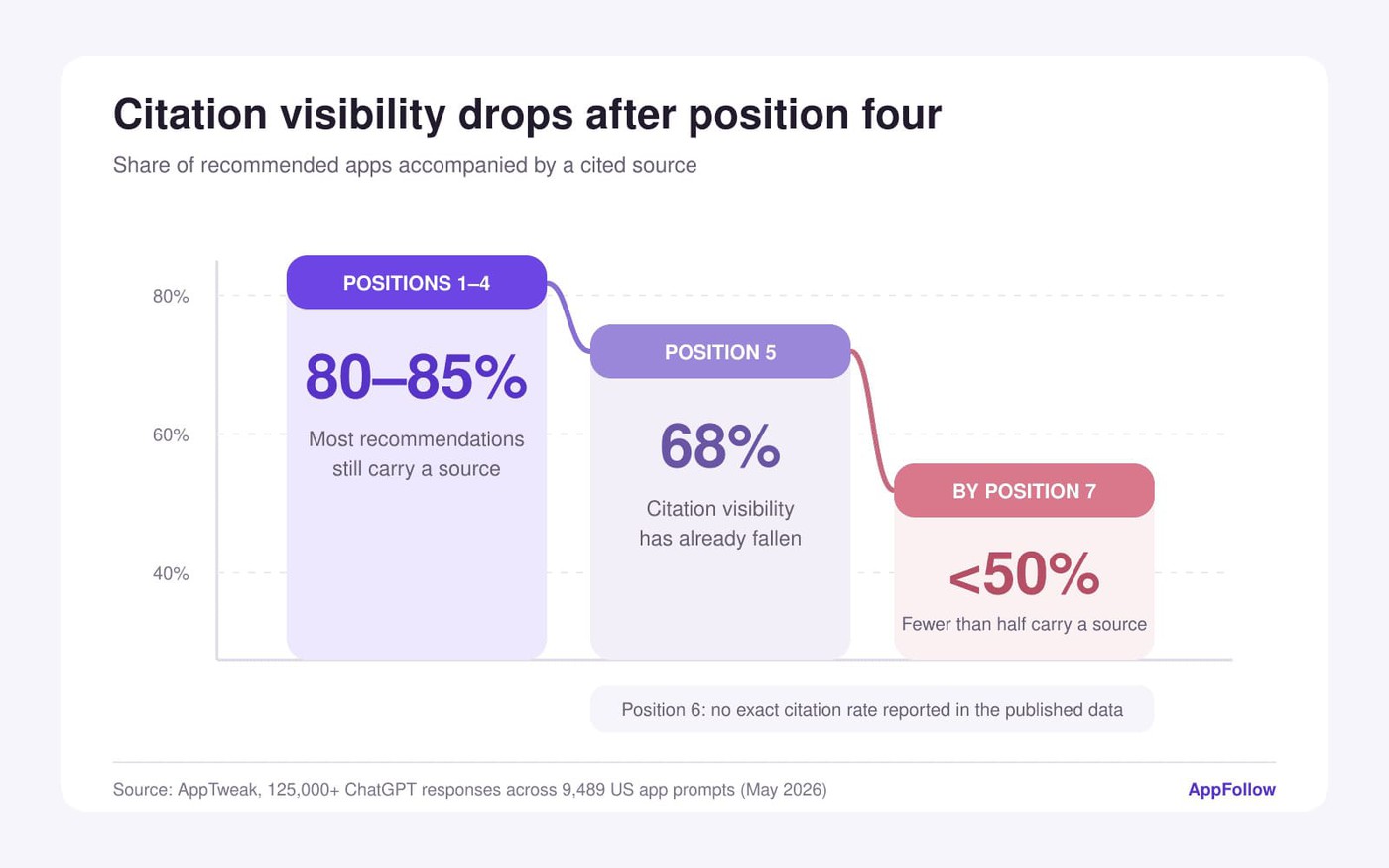
Figure 2. Reported source-backing rates by recommendation position. No exact position-6 rate is supplied. The graphic summarizes selected points; it does not measure attention, clicks, or installs.
A later unlinked recommendation can still influence someone who searches for the app afterward. What it lacks is a direct citation link you can attribute as a referral.
For LLM SEO for apps, group checks by a commercial task, then vary realistic constraints: “budgeting for freelancers” and “expense tracking with tax categories,” for example. Check the same model, market, search mode, and date range before comparing observations.
Keep a record of the prompt, app position, citation URL, and factual errors. Repeat the sample after a source update. Treat the result as a diagnostic sample; it cannot represent every user’s wording or personalized answer.
What to change on the pages these systems read
Improve the sources an answer engine retrieves before trying to influence its output. Four changes cover the highest-value gaps:
- Update the long description. Explain the audience, task, supported workflow, and material limitations in language a prospective user can verify.
- Publish useful comparisons and use-case pages. Demonstrate a task, cite current product details, and name the constraint that makes one app a better fit.
- Check Google eligibility. Keep intended sources indexed and snippet-eligible. nosnippet limits text previews; data-nosnippet excludes the marked passages rather than the entire page. No special AI schema is required.
- Separate crawler purposes. OAI-SearchBot covers ChatGPT search, GPTBot concerns training, and ChatGPT-User handles certain user-initiated visits. Google-Extended does not control AI Overviews or AI Mode.
Check the rendered text, indexing status, preview directives, and relevant crawler rules after publishing. Generative SEO for apps improves the available source material; selection and wording remain under each provider’s control.
cta_get_started_purple
Watch new app-discovery surfaces without confusing their roles
Google’s May 19, 2026 announcement introduced Ask Play for conversational discovery and described app discovery in Gemini. It also announced deep links into entertainment content; that does not establish support for every app or content type.
OpenAI opened ChatGPT app submissions on December 17, 2025. Those are integrations built for ChatGPT, with their own review process; an existing mobile-store listing is not automatically a ChatGPT app.
Treat these announcements as separate product opportunities to evaluate. Neither announcement gives a complete ranking formula for placing an ordinary mobile app in recommendations. Game teams can use our ASO for games guide for the store-specific workflow.
To inspect the store side of a target intent, use AppFollow’s Keyword Live Ranking. For a fitness app targeting “home workout,” select the device and country, then inspect the returned listings to compare their public positioning.
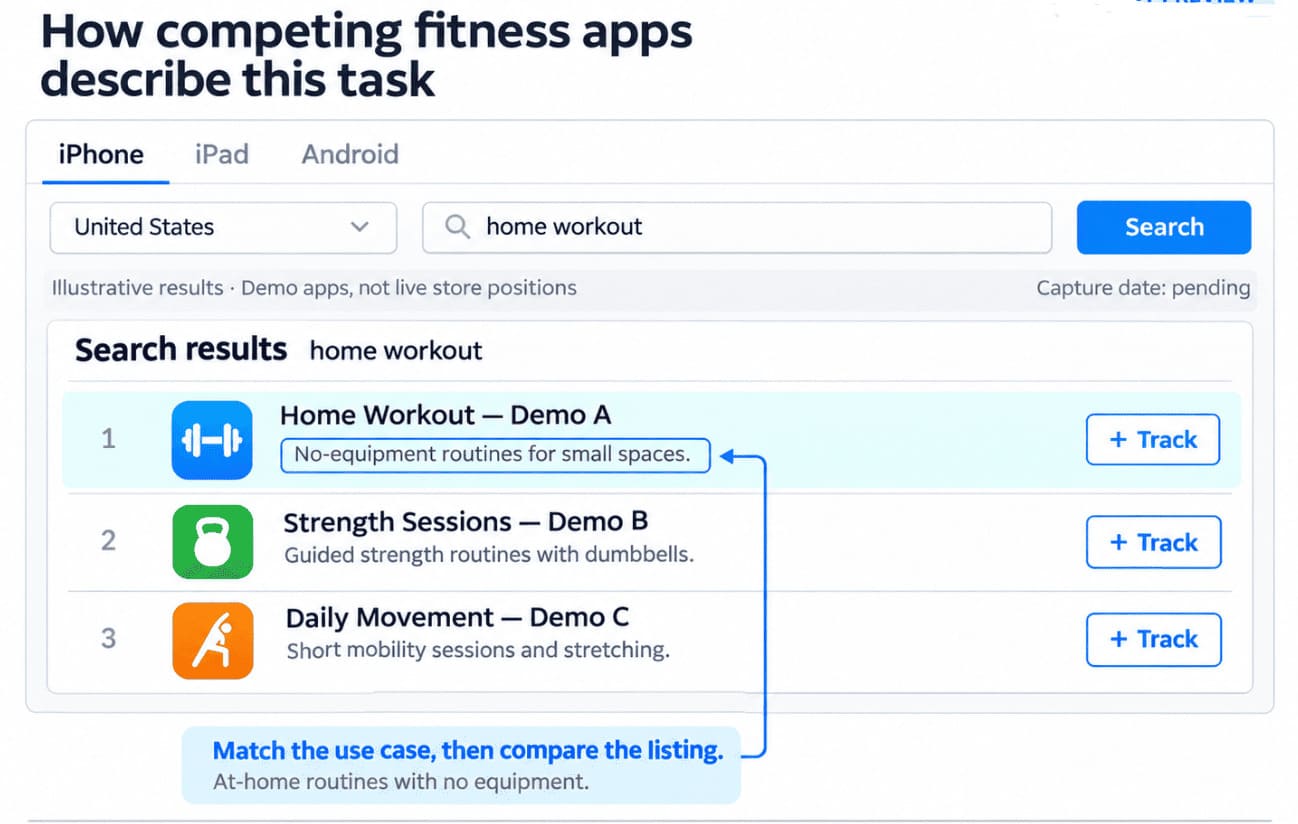
Inspect the matched listings for audience, supported tasks, and limitations, then use those criteria in your comparison brief. Verify web competitors and AI citations separately.
The tool documents up to 100 App Store results and 49 Google Play results. It is a live store-search view, not a Google ranking report or an AI recommendation forecast.
cta_get_started_yellow
The remaining question is which part of the journey each report can actually verify.
How to measure app SEO without overstating attribution
Mobile app SEO measurement spans several systems. Website analytics records visits and clicks on store links; store reports expose a later stage under their own definitions.
Record the change date, app, store, country, channel, and metric definition before comparing periods. Separate an install-button click from a completed acquisition.
What each console actually reports
Console | What it shows | Honest limitation |
Website clicks, impressions, and position, including activity from AI Overviews and AI Mode. | The main Performance report combines this activity with other web-search results; links in one AI Overview share its position. | |
Impressions for links shown in AI Overviews and AI Mode. | Google says rollout completed August 31, 2026. The report covers impressions, not separate click or position metrics, and may be absent when exposure is insufficient. | |
Citations, cited pages, and sampled grounding queries across supported Microsoft AI experiences. | Introduced as a public preview on February 10, 2026. Citation counts do not measure referral clicks or recommendation position. | |
Play Console: store listing performance | Listing visitors, install/open/pre-register clicks, CTR, and traffic-source or UTM breakdowns. | The 2026 reports focus on clicks. Completed acquisitions are available separately in Grow users, Statistics, and exports; ads and referrals can be grouped. |
App Store Connect: Analytics | Acquisition sources including Web Referrers, with views and downloads under Apple’s definitions. | Privacy thresholds hide some sources. On iOS, non-Safari website visits can appear as App Referrers instead. |
Website analytics | Identifiable referral visits, campaign tags, and recorded clicks on store links. | Referrers or tags may be absent. A website visit or store-link click does not prove an installation. |
These reports do not capture every unlinked recommendation that influenced a later store visit. A sampled AI answer, a website session, and a store download are separate observations unless a supported attribution method connects them.
Use AI checks to diagnose source quality, web analytics to inspect referral traffic, and store reports to verify their own acquisition metrics. A rise after an edit is an observation; it does not isolate the edit’s effect from campaigns, seasonality, or other changes.
Use Channel Analytics to inspect the store-side outcome
Once a landing-page or roundup update is live, check whether store-side referral activity changes. AppFollow’s Channel Analytics brings imported store data into a channel view, with country and period filters.
Illustrative review: a recipe-app team compares equal 30-day windows for the same country and store, noting paid campaigns and releases. It checks referral volume alongside conversion, then reviews the landing page and listing together if visitors arrive but few download.
Start with Apple’s Web Referrer channel; on Google Play, inspect the documented Third-party referrals channel. Keep the store views separate: their labels and definitions are not interchangeable.
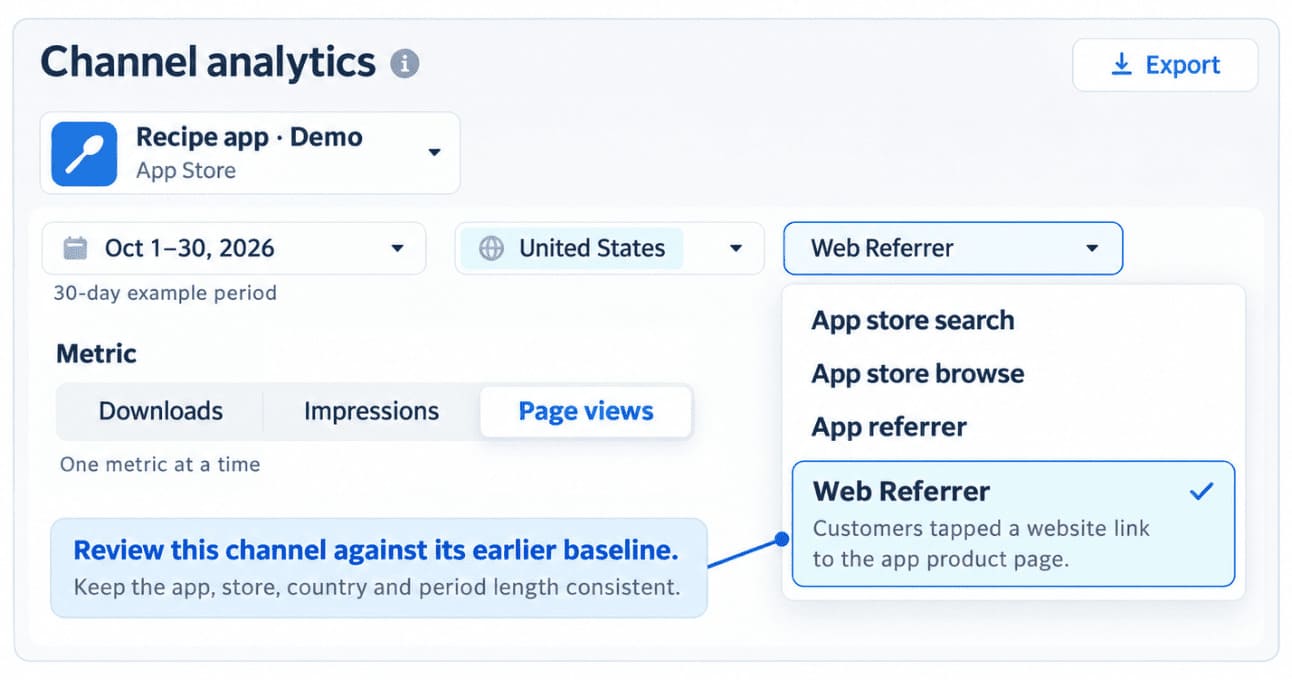
Compare referral volume with its own earlier baseline before comparing it with browse traffic. Different intent, devices, or campaigns can explain a conversion gap; use the gap to choose an investigation rather than declare a cause.
The documentation says recent download data is re-collected for 12 days on Google Play and 18 days on the App Store. Recheck recent periods before reporting them as final.
An ASO Report connection is required. Confirm that the imported metric represents downloads rather than install clicks before using it as an installation result.
cta_get_started_yellow
Three app SEO mistakes that lead to the wrong fix
Branded traffic, a link that opens in the browser, and a changed AI citation can each have several explanations. Check the cause before assigning a new page, an engineering fix, or another content rewrite.
Treating the branded traffic share as a content brief
A brand-heavy query report describes the traffic mix, not the task your website fails to serve. A campaign can increase branded searches while non-branded clicks stay flat.
Illustrative comparison: two equal 28-day query exports
Branded clicks: 400 → 900. Non-branded clicks: 100 → 100.
The branded share rises from 80% to 90% in these disclosed query rows, without any loss of non-branded clicks. Investigate the underlying search opportunity before assigning new content.
Hold country, device, and search type constant in Search Console; exclude known brand spellings with Doesn’t match regex. Pick a relevant query cluster and inspect its Pages tab. If a suitable page already receives impressions, compare its promise with the current results. Build a new brief when the intended task has no suitable page.
Query filtering omits anonymized queries and can change report totals, Google notes. Keep disclosed-query comparisons separate from sitewide totals.
Approving a deep link after one successful tap
A link opened from a message can reach the app while the CTA on your landing page stays in Safari. That difference can follow platform behavior rather than a broken association. Apple documents this exception when someone already browsing a site taps a Universal Link on the same domain:
“the system opens that link in Safari, respecting the user’s most likely intent to continue within the browser. — Apple Developer Documentation, Allowing apps and websites to link to your content
Give engineering a test record that distinguishes an expected browser journey from a failed handoff:
Test context | What to verify before closing the ticket |
Safari; link stays on the same domain | Remaining in the browser can be expected. If the CTA must open the app, evaluate a properly associated alternate-subdomain route. |
Android; production app installed from Google Play | Check assetlinks.json against the Play App Signing certificate. A passing debug build does not verify the certificate used on users’ devices. |
App not installed | Check the web fallback and store route. Do not assume an installation will restore the originally requested destination. |
App installed; session expired | Complete sign-in and check whether the requested screen returns. Opening the home screen alone does not complete the user’s task. |
Android’s association guide explains the production-certificate distinction. Attach the URL, OS and app versions, browser, install state, login state, and observed destination to the ticket. Engineering should retest the failing context after the change; a second successful tap in a different context leaves the original problem unresolved.
Rewriting a page because one AI answer changed
A citation change is a reason to inspect the evidence before editing it. In a study published December 10, 2025, Semrush tracked 81 FAQ-style pages published on its own blog that September, using related queries and its Enterprise AIO tool over 30 days. Google AI Mode cited 48 of those pages at the peak and 21 on day 30.
That is a single publisher’s experiment on SEO and AI topics, not a mobile-app benchmark. It shows that citation coverage changed during the observation window; it does not establish why any individual page gained or lost a citation.
Before changing the copy, run a small diagnostic sample
- Capture the observation. Save the prompt, date, model, search mode, market, account/session context, full answer, and cited URLs. Keep recommendation presence, recommendation position, and citation presence as separate fields.
- Identify a fixable source problem. Compare the answer with the cited page. An outdated feature claim calls for a factual correction; a competing page that answers an overlooked constraint suggests an evidence or coverage gap. Save the current page version and the specific change you propose.
- Repeat before judging the result. As a practical starting sample, run five realistic prompt variants three times each under the same settings. Repeat that sample after the source update is accessible. Compare factual accuracy and cited sources; fifteen responses are a diagnostic sample, not a measure of total AI exposure or proof that the edit caused an uplift.
Keep the query comparison, link-test record, and AI response sample with the change request. For the store-side review, carry over the same app, country, and period so the next report answers the issue you actually diagnosed.
Track store rankings and referral activity with AppFollow
Most app SEO work happens outside AppFollow. Its role here is to help the ASO owner preserve store visibility and inspect the acquisition data available from connected stores.
What AppFollow does not cover. The tools discussed here do not measure backlinks, Google web rankings, or AI mentions. Keep those checks in web-search and AI-visibility reports; store keyword rank answers a different question.
What it adds to this workflow. Before changing a description, record relevant store ranks; after publication, inspect movement by country. Keyword Tracking provides that baseline, while Keyword Live Ranking helps select competing listings for a focused comparison.
Then use Channel Analytics to examine referral activity under the imported store definitions. This helps you decide whether to investigate the route to the listing, its conversion, or the audience arriving there.
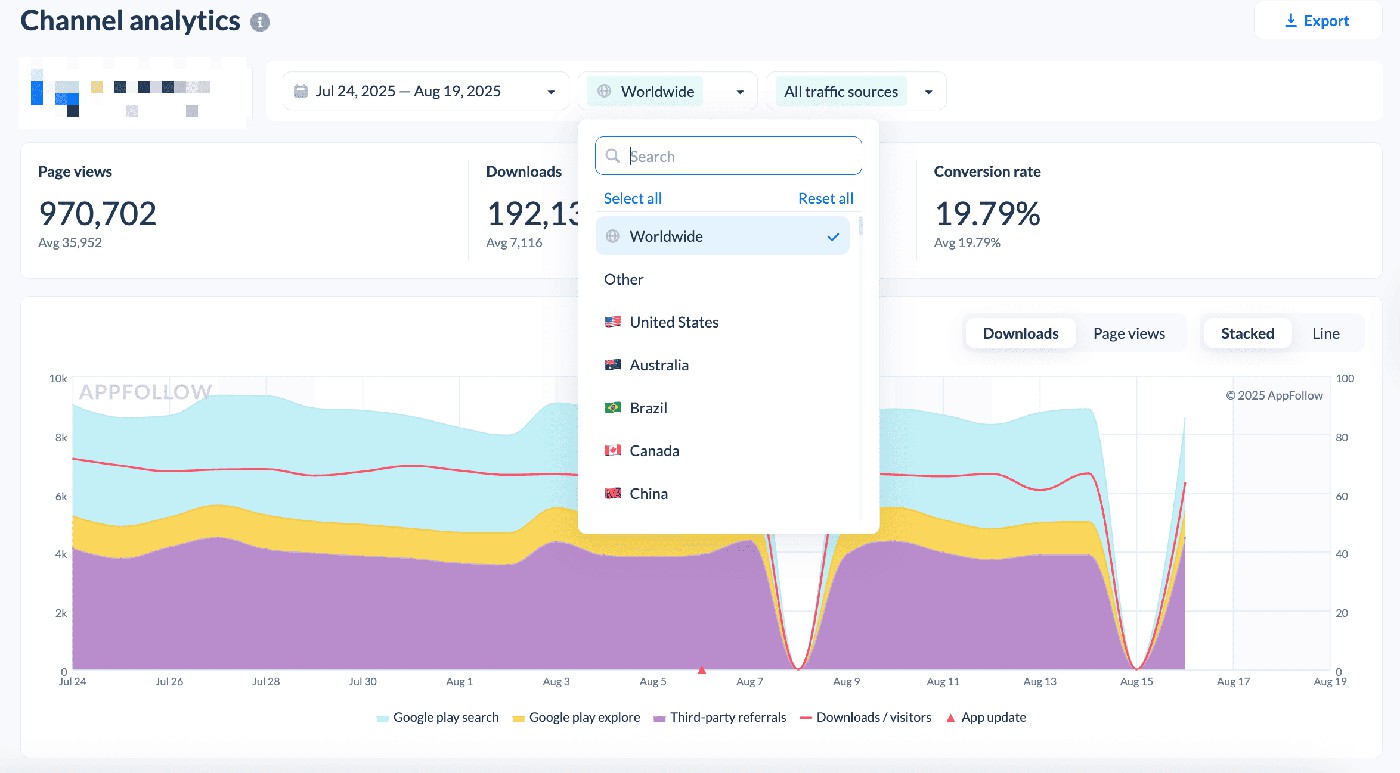
For teams managing dozens of apps, use the same app, country, and period checklist for each review. Marketing teams can combine the store-side findings with web reports when reviewing acquisition, while keeping unlike metric definitions separate.
What to connect and verify. Channel Analytics requires an ASO Report connection. Confirm feature access for your plan and the metric definitions used by each store before interpreting the comparison.
Popularity is a relative store-search score, not a monthly search-volume estimate. Use relevance and observed rankings alongside the score when deciding which wording to preserve.
Trial access also varies by plan. AppFollow’s Trial Plans documentation offers a 10-day trial on Essential, Team, and Enterprise; the standalone ASO plan has no trial.
Explore AppFollow’s ASO tools to plan the store-side checks for your next update.
cta_get_started_purple
SEO for apps FAQ
These answers address the remaining scope and measurement questions.
How do I do SEO for my app?
SEO for apps starts with pages answering questions people ask before choosing an app. Make the listing explanatory, then add deep links and structured data.
Begin with use-case and comparison pages. Pursue relevant roundups after your owned sources are ready.
Does SEO work for apps?
Yes. SEO for apps can bring people to app-related pages and onward to a store. Measure relevant website visits and store-link clicks, then inspect the store’s available acquisition data.
App Store Connect exposes referral sources. Current Play listing reports focus on visitors and button clicks, with completed acquisitions reported separately. Do not count an install click as a download.
Is SEO dead now that AI answers exist?
No. Google’s AI features still require eligible web sources, and conventional search remains another route to the same pages.
Check that your useful pages are indexed and snippet-eligible, then measure the available traffic and source data. Eligibility does not guarantee either a ranking or an AI citation.
What is SEO for apps in Google Play?
It optimizes public listing text for people arriving through Google Search. Focus on the title, short description, and full description.
Those fields appear on the crawlable listing page. Write around the searcher’s problem instead of assembling a keyword list.
What is LLM or generative SEO for apps?
LLM SEO for apps improves the public sources an assistant may use to describe or recommend an app. Keep the audience, supported tasks, and limitations accurate across listings, use-case pages, and comparisons.
Generative SEO for apps applies that work to generated answers. Monitor sampled recommendations and their sources; a clearer page does not guarantee that a model retrieves or cites it.
How long does app SEO take to show results?
There is no fixed timeline for app SEO. Indexing, competition, site history, publishing schedules, and the type of change all affect when you can observe a result.
Use a 30-day checkpoint to inspect indexing, relevant impressions, and store-link clicks. That is a review schedule, not a promise that a new page will rank within a month.
Keep the launch date and baseline so later comparisons use the same app, market, and metric definition.