AppFollow vs. DIY: how do game publishers manage reviews across multiple games and stores?

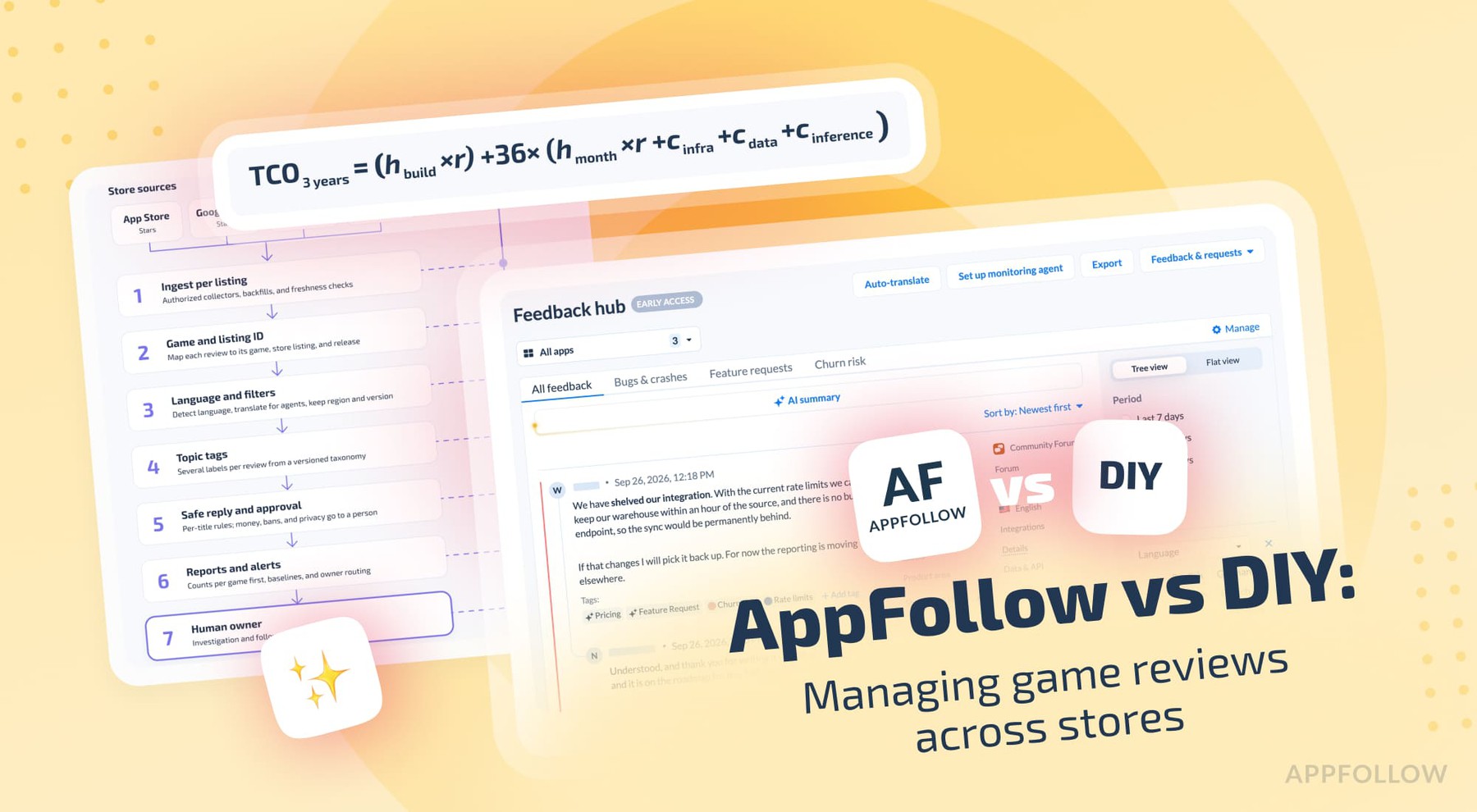
Table of Content:
With one game, the review queue has one owner and two sources. Game A, a made-up puzzle RPG, runs on the App Store and Google Play. One support lead answers reviews in the consoles, ChatGPT handles the odd translation, and bugs go into a spreadsheet.
Then Game B launches in three countries, and Game A gets a Steam version. Patch 2.4 brings 1-star reviews on Google Play, Game B collects 5-star reviews on the App Store, and Discord complaints about an expansion arrive in the same Slack channel. Your producer asks before standup: do the "can't log in" complaints belong to Game A's 2.4 patch, Game B's regional rollout, or the Steam account link? An AI dashboard can't answer that until every review carries its game, store listing, and release.
Let’s map what changes as a portfolio grows, model three years of DIY costs, and show the evidence from published publisher cases.
How do game publishers manage reviews across multiple games and stores?
What works is one process, with clear owners, across all your game and store listings. You collect reviews, keep the source and release context, send each issue to the right title and team, translate and triage, automate the safe replies, and report trends per game before any portfolio total. AI can help you build it, and every new listing and language adds work to run it. We work out the three-year cost later in this article.
What changes between managing 1 game, 5 games, and a 100-game portfolio?
Your work grows with every store listing, language, and team. Collecting reviews stays easy, it’s routing them that gets hard.
One game, two stores: DIY often makes sense
One game on the App Store and Google Play is two source listings, even under one brand. You deal with different ratings, sales countries, moderation, and reply rules on each store. If your volume is modest and one person owns support, the official consoles, a shared spreadsheet, and an LLM for drafts can be enough. You approve every reply by hand, and a weekly export covers reporting.
Five games: routing and consistency become the bottleneck
Five games on both stores make 10 source listings. That's still only two platform adapters, and each listing needs its own permissions, ID mapping, and queue owner. Now you need one queue you can filter by game, store, country, rating, and version, plus saved views, reply styles per title, escalation paths, automated tagging, and reports by title and region (with the portfolio total last). The typical Monday question sounds like this: which of our five games had the biggest jump in payment complaints this week, and whose queue owns it?
Fifteen games, DLC, and extra storefronts: operations become a platform
Fifteen titles on two stores make 30 listings, and Steam, Microsoft Store, Samsung, or Huawei add more wherever you ship and connect them. Now you track product IDs, live-service versions, staged rollouts, regional markets, languages, and who can see what. A global dashboard with no per-listing slices can hide a serious problem in one of your small, profitable games.
A 100-game portfolio is a real use case
Ofer Regev, Product Manager at Supersonic (Unity), writes on AppFollow's review management page that his team is "managing over 100 games across app stores" and that AppFollow "has changed the way we engage with our players." That's a customer's own description, and it comes with no hours-saved figure. Azur Games has released more than 150 games, and its published automation numbers cover a hyper-casual subset (more on that in the cases section).
The counts in this table are example store listings, with no link to plan app limits. A DLC counts as an extra listing only when the store gives it separate reviews.
Portfolio | Listing count example | Main workflow problem | Fit to evaluate |
|---|---|---|---|
1 title × 2 stores | 2 | Basic collection and human replies | Store consoles, a narrow DIY setup, or a free trial |
5 titles × 2 stores | 10 | Assignment, consistent languages, several agents | A multi-source feed with supported automation |
15 titles × 2 stores | 30 | Roles, analytics, governance, and release attribution | A multi-team setup quoted for the right listing count |
100 titles × 2 stores | 200 | Portfolio operations, access control, and thousands of reviews | A custom Enterprise quote, an existing platform, or a hybrid |
Huuuge Games gives a narrower, measured example: across its two flagship titles, Huuuge Casino and Billionaire Casino, it answers 45 to 50% of reviews automatically and auto-tags about 80%. AppFollow's own 2026 gaming research found a 52.4% reply rate among client apps against 24.8% across all gaming apps in the sample. That's vendor research comparing two different groups of apps, so read it as context.
Which game stores can you monitor and reply to?
Each store gives you different data, reply rights, and plan conditions, so you can't use one connector design for all of them.
App Store and Google Play
You'll spend most of your time on these two. AppFollow's Reviews feed lets you select several sources at once, all sources in a workspace, or a custom source group (manual groups need 3 or more sources). To reply, you need a store connection: an App Store Connect invite, or the Google Play Reply to Reviews data connection. Collection runs on store-specific schedules, from every 1 to 3 hours for the App Store to every 10 to 15 minutes for Google Play with a console connection, per AppFollow's collection docs. Store processing can add up to 36 hours of delay, so don't expect real time.
Secondary storefronts work differently
Here's what AppFollow's public docs say for each store:
Store | Reviews in AppFollow | Replies from AppFollow | Plan or status |
|---|---|---|---|
App Store | Yes | Yes, with an App Store Connect invite | All plans, within plan limits |
Google Play | Yes; country data needs a separate connection | Yes, with the Reply to Reviews data connection | All plans; Google Play countries is a Team add-on |
Steam | Yes, reviews in open beta | Yes, through a Steamworks invite; add each DLC App ID | Beta; discussions are a closed beta on request |
Microsoft Store and Xbox | Yes, with tags, translation, semantic tags, and export | Not supported for now, per AppFollow's docs | Team plan and higher |
Samsung Galaxy Store | Yes, collected several times an hour | Yes, published within minutes (beta) | Enterprise plan |
Huawei AppGallery | Yes, through an AppGallery Connect API client | Yes; Huawei bans links to non-Huawei channels | Enterprise plan |
Amazon Appstore | Top reviews | Not listed in the docs | Confirm with sales |
AppFollow's Microsoft Store and Xbox docs say replies aren't supported for those stores right now, so you can collect, tag, translate, and analyze those reviews, with replies handled elsewhere. Huawei keeps only the last two years of comments by default, caps them at 800 characters, and doesn't allow comments or replies that send players to non-Huawei channels. Samsung replies publish within minutes. Steam rates games with a Recommended or Not Recommended vote, with no stars.
Steam reviews are in open beta, and Steam discussions are in closed beta
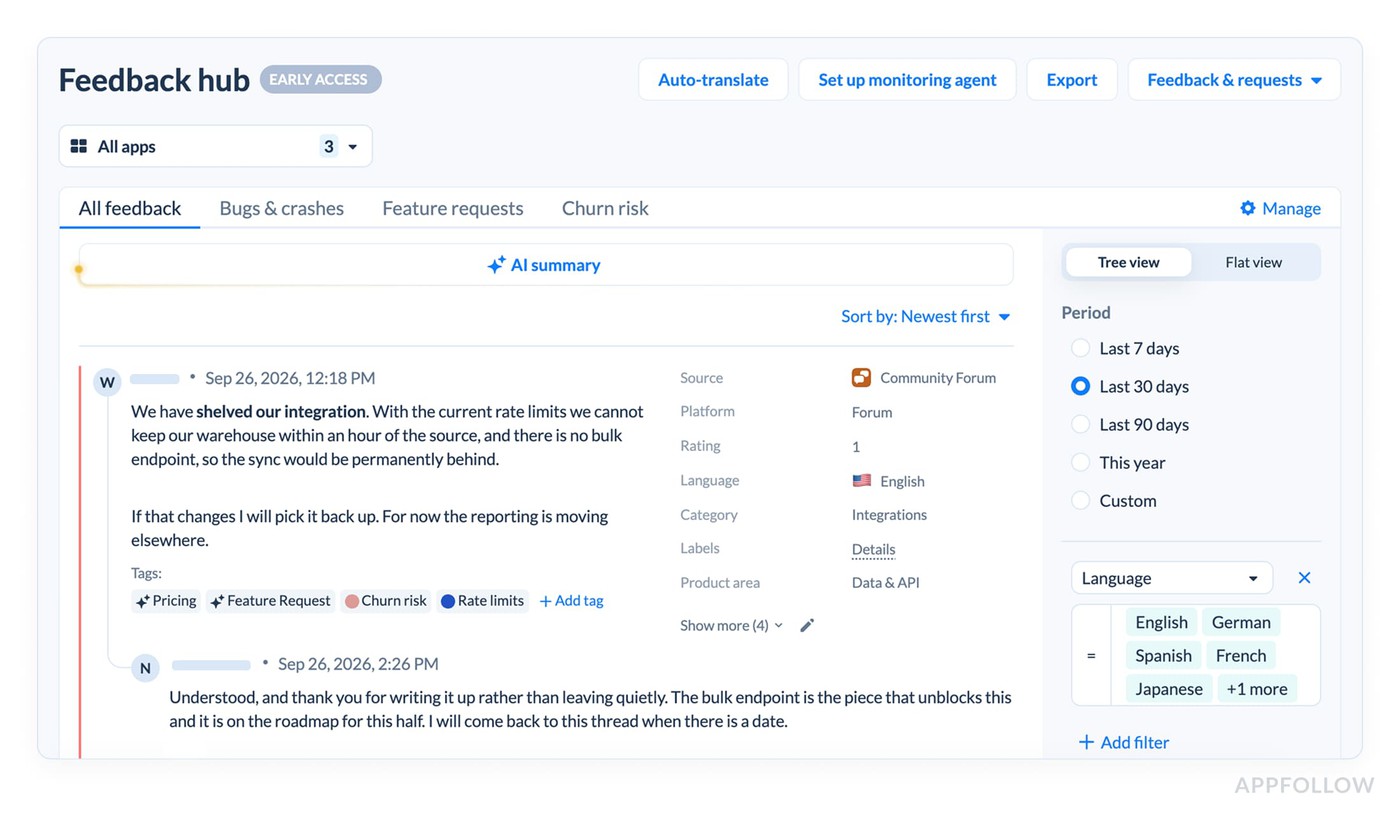
AppFollow's Steam integration docs list Steam reviews in open beta for all customers, with filtering, translation, tagging, sentiment, AI summaries, and replies. Steam discussions are a closed beta on request. You reply through a Steamworks invite, and Feedback Hub, still in early access, shows Steam reviews and discussions together.
How should publishers handle editions, DLC, sequels, and live-service updates?
Treat every store listing with reviews as its own source. Tie anything else (an edition, a DLC mention, a patch number) to a review only when the data supports it.
A DLC can have its own reviews, and players still complain in the base game
On Steam, each DLC gets its own App ID. Steam also treats owned DLC as part of the base game. AppFollow's Steam reply setup asks you to add every DLC and expansion App ID to your Steamworks group, or you can't reply to that DLC's reviews. So on Steam, a DLC can carry a review stream of its own. Players also mention the expansion in the base game's reviews and in community threads, and those mentions carry no DLC field.
Keep four cases apart:
- A sequel or separate listing has its own reviews.
- A deluxe edition sold under the same listing usually shares that listing's reviews.
- A DLC or expansion may have its own reviews (on Steam) and still gets mentioned in base-game reviews.
- A patch number in review text ("since 2.4") isn't proof the review came from 2.4. Use version metadata where the store provides it.
Use an explicit source map
Map every listing before you count anything. These fields cover most portfolios: publisher, franchise, game_id, platform, store_listing_id, region, language, app_version_if_available, edition_if_evidenced, dlc_reference_if_explicit, created_at, observed_at, reply_status, topic_tags, and owner_team.
If the store doesn't show which expansion a player owns, mark DLC attribution as "unknown." Fill it in only when the player names it or a permitted first-party system provides it.
Keep game-level and portfolio-level denominators
Here's a synthetic two-week example for two games. In week 1, Game A has 600 reviews with 60 crash complaints (10%), and Game B has 400 with 80 (20%). The portfolio shows 140 of 1,000, or 14%. In week 2, Game B gets featured and its volume doubles: Game A has 200 reviews with 20 crash complaints (10%), and Game B has 800 with 160 (20%). The portfolio now shows 180 of 1,000, or 18%.
Neither game's crash rate changed at all. The 4-point jump comes from Game B's bigger share of reviews, so check each title before anyone calls it a regression.
How do game studios reply in multiple languages and keep the brand voice?
Split the job into steps with owners, and keep money, bans, lost progress, and privacy complaints with people. Each new language multiplies QA and policy work, and the store connectors stay the same.
Translation and posting are separate jobs
Each reply in another language needs these steps:
- Detect the review language and the store market.
- Translate it when the agent doesn't read that language.
- Classify the issue in one taxonomy across languages.
- Draft the reply in the player's language and the title's tone.
- Apply that title's promises, refund rules, and escalation channels.
- Check it before posting, so no reply promises an unapproved fix or compensation.
- Track edits, reply states, and the results after publication.
What breaks with one shared AI prompt
Say a player writes in Japanese about lost in-game currency after patch 2.4. A shared prompt answers with Game B's support email and promises a refund without the studio's approval. A generic thank-you for a 5-star review is safe to automate under approved rules. Anything about money, bans, lost progress, or privacy goes to a person.
Mytona's published numbers
Mytona runs reviews for titles like Seekers Notes and Cooking Diary across the App Store, Google Play, Microsoft Store, Galaxy Store, and Huawei Store. The case reports a 100% reply rate reached within one year, 100% of reviews auto-tagged, replies in 10 languages, 100 automation rules per game, and about 3,000 replies a month. Agents get reviews assigned evenly, and they approve automatic responses for suitable reviews.
Here's what that volume means in hours. At a hypothetical 2 minutes to draft and check each reply, 3,000 replies take 100 agent hours a month, and at 4 minutes, 200 hours. That's an illustrative workload with no measured Mytona baseline, so don't read it as a time saving.
AppFollow's reply tools
AI Reply Styles replace prompt writing with selectors: tone, greeting, empathy, emojis, brand voice, escalation policy, a confidence setting for promises and commitments, reply language, words to avoid, and a signature. Free and Essential plans get 1 style. Team and Enterprise get unlimited styles plus a custom text field, the place for per-title rules like "never promise compensation."
Since September 2026, automation rules run as agents: an AI Support agent replies, a Categorization agent tags, and a Rating protection agent reports harmful reviews to the stores. Draft mode holds AI replies for a person to check before they go out. Auto-translation and a knowledge base for AI replies round it out. Check what your plan includes before you roll this out across titles.
What should a publisher analyze when Discord and Reddit generate thousands of posts?
Analyze threads by game, channel, and topic, with permission to collect them in the first place. A community message isn't a review, a player, or a complaint.
A review and a community post are different records
With a store review, you get a listing, a rating or recommendation, and a reply flow. On Discord and Reddit, you get posts, replies, bots, reactions, memes, and threads. One message can be a joke, a repeat, or one of twenty replies to the same bug.
Here's a hypothetical workload, and it uses no community benchmark or AppFollow data. A game community posts 2,000 messages a day, or 60,000 a month. If 15% look actionable on a first pass, 9,000 messages still need triage and deduplication.
Your pipeline needs this order: map each channel to a game, check permissions per channel, group messages into threads and remove duplicates, detect language, assign categories, escalate safety and abuse, count with the right denominators, and only then write a summary for people.
Discord and Reddit have real access rules
On Discord, message content is a privileged intent. Under Discord's current rules, your app can switch it on below 10,000 users. At 10,000 users, you have 90 days to apply for review, and you reapply every year.
Reddit's Data API terms already set the rules for commercial use. On September 30, 2026, Reddit announced that it will close the remaining public Data API access in March 2027. It stopped taking new public access requests on October 31, and bots and tools are moving to its Developer Platform or to written agreements.
What AppFollow covers today
AppFollow's Feedback Hub lists Reddit and Discord among its source options, with Steam as the first supported source, and the whole hub is in early access. So treat store reviews, Steam (beta), and your community workflow as three separate scopes, and ask for a demo on your own channels before you plan around community coverage.
How do publishers summarize big portfolios without losing small-game problems?
Count per game first, and let the LLM write about counts and evidence. Pasting every review into one prompt hides the small titles.
One giant prompt favors the biggest game
Say you have 10 titles on two stores with 100 reviews per listing a week. That's 2,000 reviews. At an assumed 150 tokens per review, the prompt holds 300,000 tokens of review text before metadata and instructions (simple arithmetic, using no measured review length). A summary of that pile tends to overweight the busiest game, the newest reviews, and the longest complaints, so the summary can miss an account-security issue in a small title.
Prevalence and severity are different things, too. A 1% share of account-loss reports needs action sooner than a 25% share of cosmetic complaints.
A game-first, topic-first workflow
- Ingest reviews per listing.
- Tie each review to its game, store, and listing.
- Remove duplicates and split by release.
- Assign several topic labels per review.
- Count per game, store, and language.
- Flag changes against a baseline.
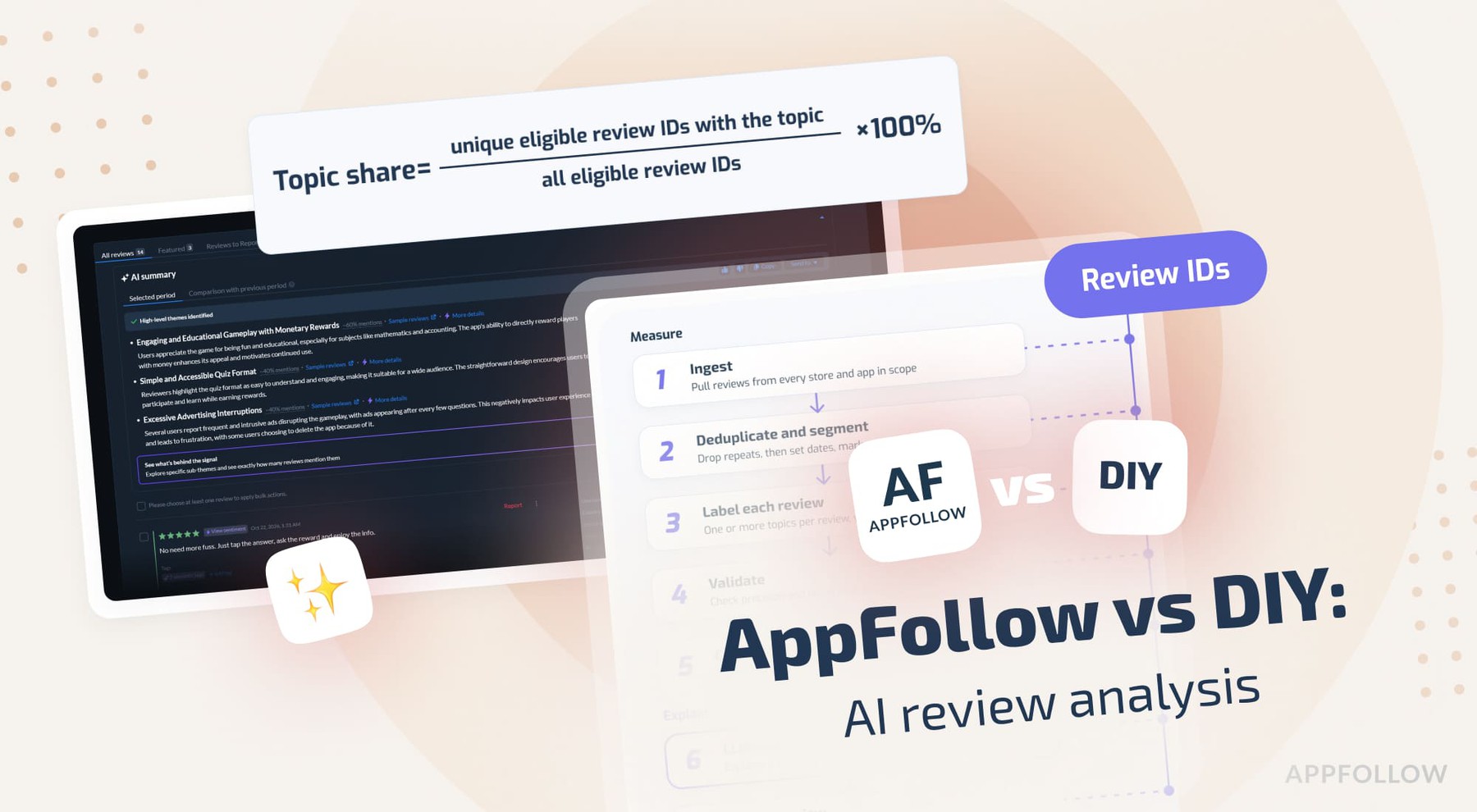
- Let the LLM summarize those counts, with review IDs as evidence.
- Hand the findings to a person for investigation.
AppFollow's summary features
The AI Summary works on whatever sources you select in the Reviews feed, so filter to one game and one language before you compare titles. AI Summary Comparison compares two periods: Free and Essential cover only the Ongoing Issues category, and Team and higher cover all categories.
DIY game review management: what's on the engineering list?
You're signing up for a dozen moving parts, and every one needs an owner after launch. If you add 10 games to the same store, you add listings, permissions, and data work. If you add a new storefront, you add a whole new adapter and contract.
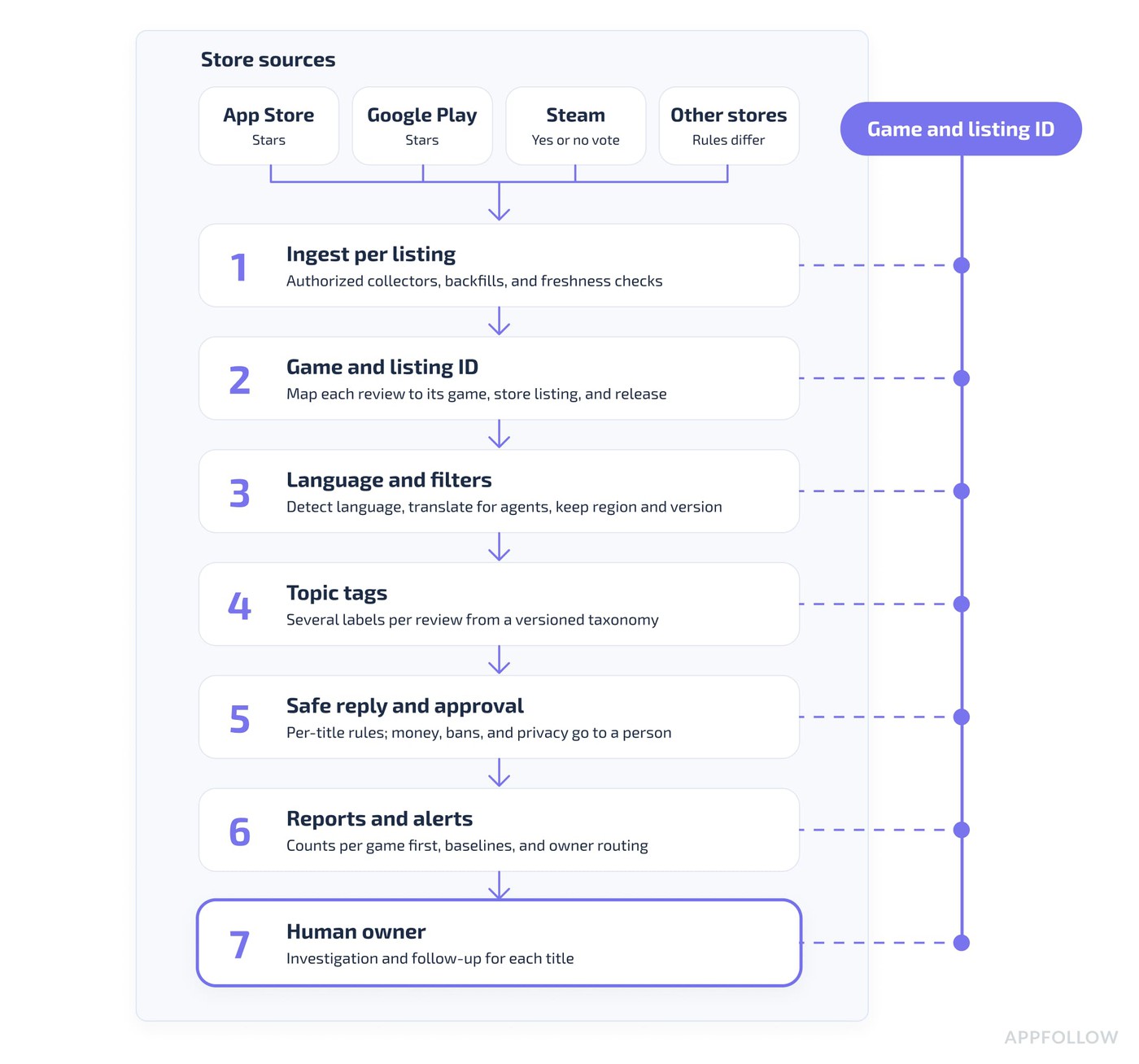
The game and listing ID stays on every record, from ingestion to the person who owns the follow-up.
Here's the ownership checklist:
- Authorized collectors per platform (App Store, Google Play, Steam, and others only with permission).
- ID mapping per listing, across brands, titles, and store accounts.
- Backfills, edits, deletions, and freshness checks within each platform's limits.
- Store-specific reply handling: pending and published states, retries, and duplicate protection.
- Routing and roles per game for community, live ops, support, producers, and localization.
- Reply styles, knowledge bases, and approval rules per language.
- Topic tags, sentiment checks, and a versioned taxonomy per title and source.
- Thresholds, spike monitoring, deduplication, and escalation to owners.
- Reports by game, store, locale, version, and period, with cross-title numbers only next to their denominators.
- Security, privacy, API credentials, and third-party data rights.
- Exports, BI feeds, and optional MCP adapters.
- Uptime, quality checks, and one engineer who owns it all.
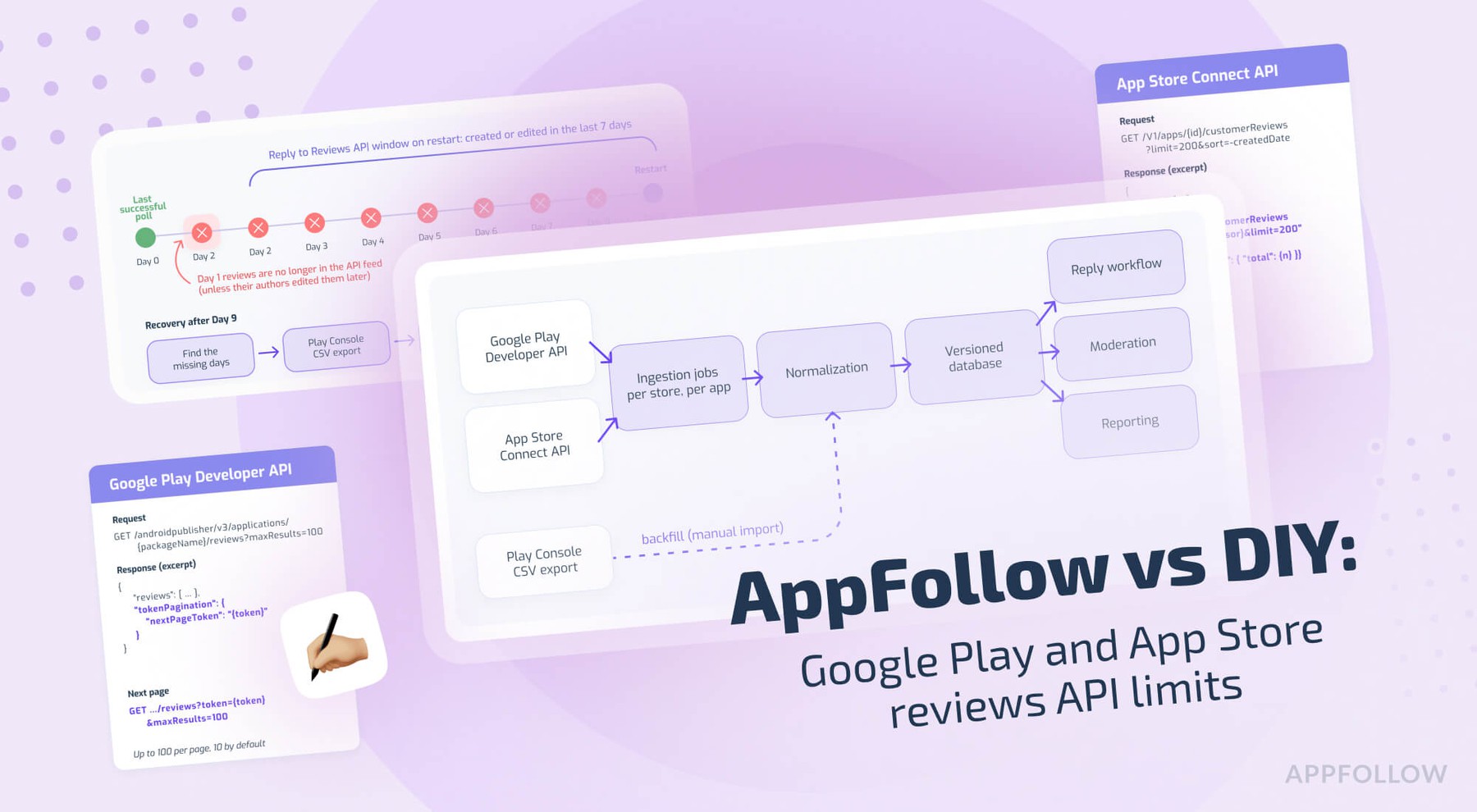
The store APIs alone carry plenty of fine print. Our breakdown of Google Play and App Store review API limits covers it.
Is it cheaper for game publishers to build their own review management tool?
Sometimes, for one narrow workflow. Past that, the answer depends on your listing count, stores, QA, upkeep, and a real vendor quote for the same scope.
First, define the costs in the comparison
Here's the DIY side:
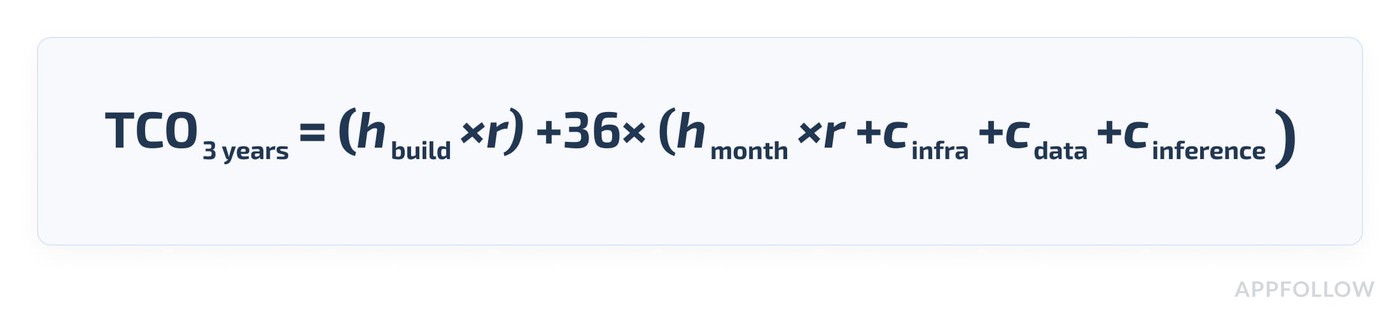
In it, h(build) is build hours, r is the hourly labor rate, h(month) is monthly upkeep hours, and the c terms are monthly costs for infrastructure, data licensing, and inference. Put setup per listing, QA, and security work inside the build estimate, so you don't count labor twice.
On the vendor side, you pay 36 times the contracted monthly subscription and add-ons, plus internal setup, plus any pipeline you still run yourself (a Discord collector, for example). A vendor plan without Steam discussions or Reddit processing isn't the same scope as a DIY system with them.
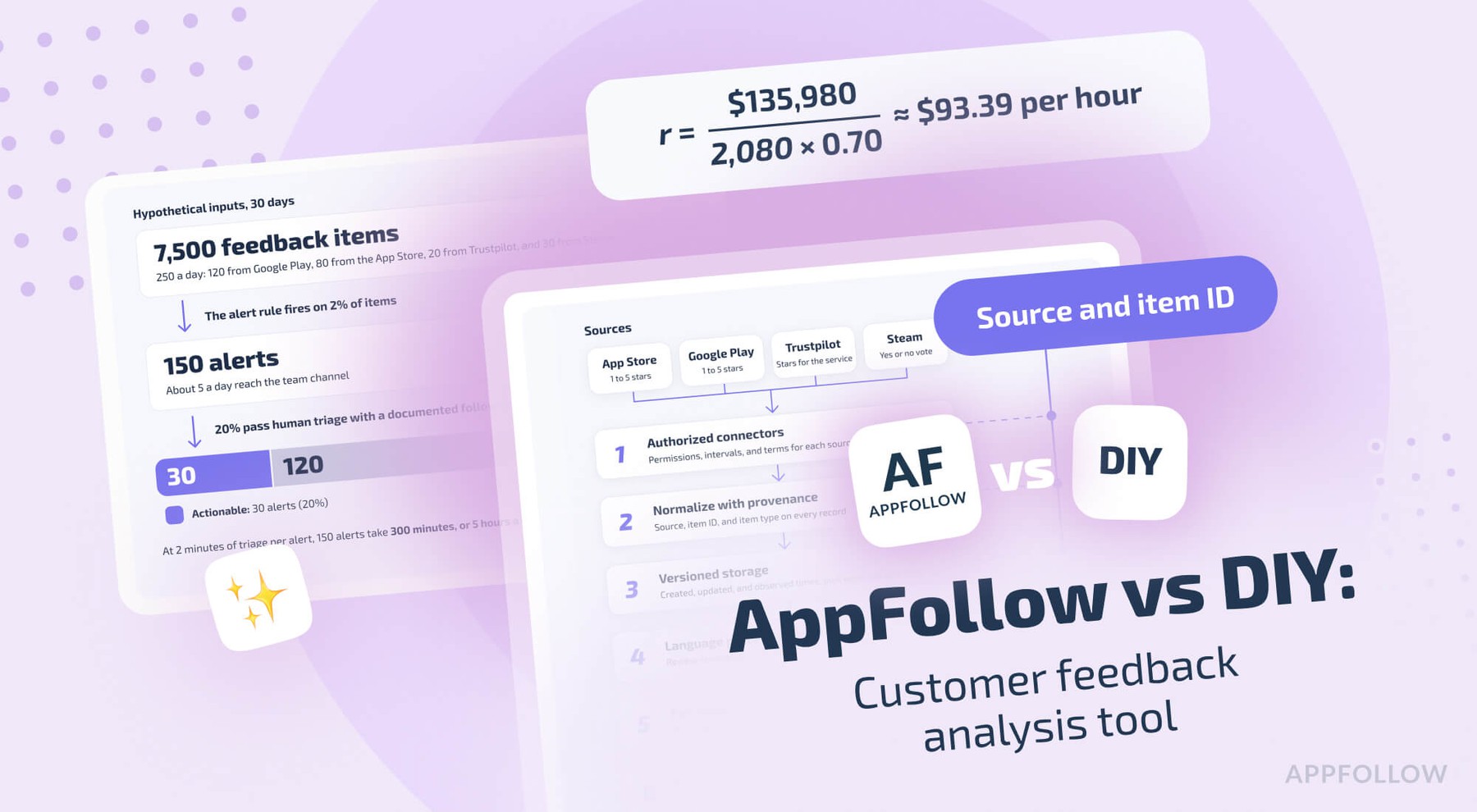
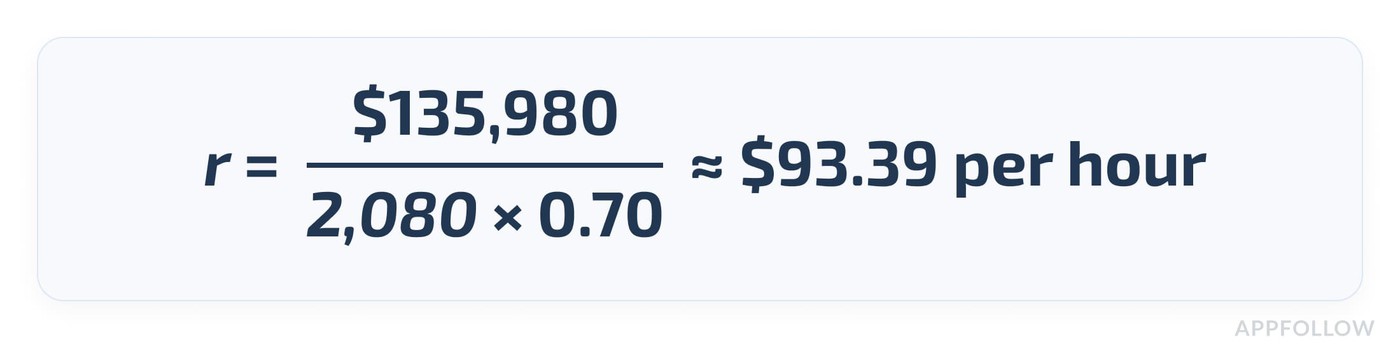
For the labor rate, we start from the Bureau of Labor Statistics. The median software developer wage was $135,980 in May 2025. In June 2026, wages made up 70.0% of private-industry employer compensation costs. Over 2,080 working hours, that gives a planning rate of about $93.39 per fully loaded hour:
The 32, 200, and 800 build hours, by component
These are editorial scenario hours, and no measured engineering data supports them. Ask a senior engineer to check them against your own architecture.
Component | 1 game, 2 listings | 5 games, 10 listings | 15 games, 30 listings |
|---|---|---|---|
Platform adapters, credentials, and store connection tests | 10 | 40 | 160 |
Game and listing ID map, normalization, and permissions | 4 | 30 | 100 |
History, deduplication, retries, gap detection, and monitoring | 5 | 30 | 130 |
Reply states, approval, localization, and owner routing | 5 | 40 | 160 |
Topic tags, reports, QA, and alert rules | 4 | 35 | 145 |
User interface, roles, testing, and deployment | 4 | 25 | 105 |
Total hypothetical initial build | 32 | 200 | 800 |
The hours grow with the scope. The one-game column buys you a narrow prototype with light controls. The 15-game column adds governance, roles, and reliability work to the adapters.
Three-year cost: 1 vs 5 vs 15 games
Assumptions: $93.39 an hour for 36 months, no inflation, infrastructure at $30, $60, and $300 a month, and upkeep at 2, 12, and 24 hours a month. Paid data access, translation, inference, community sources, SSO and compliance audits, and the agents answering reviews are left out.
Scenario | Build hours | Upkeep hours a month | Infra a month | Build cost | 3-year upkeep labor | 3-year hosting | 3-year DIY total |
|---|---|---|---|---|---|---|---|
One game, two listings, prototype | 32 | 2 | $30 | $2,988 | $6,724 | $1,080 | $10,793 |
Five games, ten listings, operational | 200 | 12 | $60 | $18,678 | $40,344 | $2,160 | $61,182 |
Fifteen games, thirty listings, production | 800 | 24 | $300 | $74,712 | $80,689 | $10,800 | $166,201 |
A founder building in spare time spends less cash and still pays the opportunity cost. A platform team with existing pipelines may spend less per extra feature. None of these totals is a market price for building such a system.
Break-even, and a fair vendor comparison
Divide each DIY total by 36. Under this model, a vendor plan with the same functions and no extra integration costs comes out cheaper below about $300 a month for one game, $1,700 for five, and $4,617 for fifteen. Those are thresholds from the model, and they aren't AppFollow prices. AppFollow's pricing page lists no Enterprise price, and Enterprise goes through sales.
Before you compare, list the scope on one page: unique reviewable listings, review volume, monthly manual and AI replies, languages and reply styles, roles and approvals, teams, history needed, Slack and helpdesk integrations, Steam beta access, export, API, and MCP credits, and any community, data residency, or SLA needs. Then sort each line into what the plan covers, what a paid add-on covers, and what stays with your team. Compare DIY costs only against covered functions, and add the leftover engineering and support time to the vendor side.
Review volume isn't the only cost driver
Another title adds ID mapping, policies, release checks, teams, and reports. Another store adds an adapter and a permission model. Another language adds translation and QA rules. Another community adds its own terms and threads. And a new DLC may add no separate review stream at all, depending on the store.
cta_get_started_purple
Real gaming publishers: measured AppFollow outcomes, with scope
Read each number in this section with its scope. None of them proves cross-source accuracy, community coverage, or a DIY cost comparison.
Azur Games: automation across a hyper-casual subset
Azur Games has released more than 150 games. Its case reports 88% of review responses automated, covering 175,000 reviews for hyper-casual games, and 2,700 spam reviews reported and deleted automatically in 2024 (the stores make the removal call). The page gives no time window for the 88%, and it reports the 175,000 as a total with no monthly rate.
Kolibri Games: less time in the queue
Kolibri Games gets about 900 new reviews a day. Its case reports an 88% cut in response time, a 75% increase in response rate, and a Reply Effect of +0.72 for Idle Miner Tycoon. Reply Effect measures whether players updated their review after a developer reply, so it doesn't describe the rating of every player. The case's chart for Idle Factory Tycoon shows average response time falling from 17 days in 2021 to 2 days in 2022.
Here's the compact proof table, with the scope for each number:
Publisher | Published result | Scope to keep in mind |
|---|---|---|
Supersonic (Unity) | "Managing over 100 games across app stores" (Ofer Regev, Product Manager) | A customer quote, with no measured savings |
Azur Games | 88% of review responses automated, covering 175K reviews; 2.7K spam reviews reported and deleted in 2024 | Hyper-casual games; no time window for the 88% |
Mytona | 100% reply rate within a year, 100% auto-tagged, 10 languages, about 3K replies a month | Five stores; the case gives no start date |
Kolibri Games | Response time down 88%, response rate up 75%, Reply Effect +0.72 | The Reply Effect figure is for Idle Miner Tycoon |
Huuuge Games | 45 to 50% of reviews answered automatically, about 80% auto-tagged | Two titles, Huuuge Casino and Billionaire Casino; no AI replies yet |
Vizor | 92% reply rate on main titles, 25% lower average reply time, about 300 spam reviews auto-reported | Main titles only; AI replies still in testing |
Industry benchmark: context, with no ROI claim
AppFollow's 2026 gaming reply rate study covers 51.5 million reviews and 561,000+ developer replies across 22,800+ gaming apps on the App Store and Google Play, from January 1, 2025 to January 1, 2026. The average reply rate was 24.8% overall and 52.4% among more than 1,000 client apps using AppFollow's review management and AI reply tools. And 29% of gaming apps never replied to a review.
Observational vendor research. Client apps and the wider market are different groups, so the gap isn't an AppFollow treatment effect.
Studios that buy review tooling may have cared more about replies to begin with, so read the gap as a description of two groups.
AppFollow vs. DIY vs. hybrid: who owns what?
AppFollow maintains the supported store integrations and the review workflow for those stores. Your team keeps anything outside that scope, plus its own taxonomy, policies, and owners.
Capability | Store consoles + DIY AI | AppFollow, per public docs | Caution |
|---|---|---|---|
App Store and Google Play across titles | Build collectors, a queue, and a UI | Multiple source selection and custom source groups in the Reviews feed | Bulk actions work on one selected source |
Steam reviews | Steam collection, reply rules, and Steamworks access | Reviews in open beta, with replies through a Steamworks invite | Steam discussions are a closed beta on request |
Microsoft Store and Xbox | A separate connector | Reviews, tags, translation, semantic tags, and export | No replies for now |
Samsung, Huawei, and Amazon | Separate connectors and contracts | Samsung and Huawei replies; Amazon top reviews | Enterprise plan; check each store |
Language and tone | Your own translation, prompts, and rules | Auto-translation, AI Reply Styles, a knowledge base, and automation agents | 1 reply style on Free and Essential |
Routing and approvals | Build roles, a queue, and an audit trail | Tags, filters, Draft mode, and helpdesk integrations | Review statuses are an Enterprise add-on |
Portfolio trends | Build a taxonomy and dashboards | Reviews analysis, AI Summary, and AI Summary Comparison | Full comparison needs Team or higher |
Game and DLC attribution | Build a catalog map | Each listing keeps its own context; Steam DLC App IDs connect separately | No DLC ownership inference |
Discord and Reddit | Your own permissions, terms, and thread data | Listed as Feedback Hub source options in early access | No documented full support today |
AI assistant access | Build your own tools | AppFollow MCP and AI Toolkit | Role, plan, and API credits apply |
Security and SSO | Internal work | SSO on Enterprise; add-on on Essential and Team | Check against your security review |
AppFollow's bulk actions work only on one selected source. You can view several games and stores in one feed, and you still reply in bulk one listing at a time.
The hybrid option: AppFollow handles supported review data, you bring your own AI
This fits you if you want conversational analysis or custom reports, with AppFollow maintaining the review data.
The workflow
- Use the Reviews feed with saved filters, monitoring agents, and automation in Draft mode for anything risky.
- Send AppFollow data to your support CRM or BI dashboard through the API or exports, where your plan includes them.
- Connect the AppFollow MCP server to Claude, ChatGPT, Codex, Cursor, or another compatible assistant, and add the open-source AI Toolkit for its /feedback-analysis workflow.
Your AppFollow role sets MCP access: Owners and Admins get read and write access, and other roles get read-only access. Setup calls cost nothing. Data reads and AI analysis spend API credits, and the methods you get depend on your plan.
A prompt to start with
Try this on an account that has several connected games:
"Across my tracked game-store listings, compare the last 30 days of 1-star feedback by game and language. Highlight changes in crash, login, and purchase complaints, give counts and denominators where available, and list the source reviews behind each finding. Flag sources or methods unavailable in my current AppFollow plan."
Read the answer against the Reviews feed for at least one game before you share it.
Should a publisher build, buy, or combine the two?
Count your listings, languages, contracts, planned launches, and technical owners first. No single game count settles it.
Situation | Likely route | Reason |
|---|---|---|
One game, two stores, few reviews | Store consoles plus AI-assisted manual replies | Small scope |
Five titles, mixed languages, one shared support team | Evaluate AppFollow Team or a matching quote | Source groups, automation, and consistent QA |
Fifteen titles, several teams, secondary storefronts | A custom Enterprise quote or a capable internal platform | Governance, store coverage, and service |
100+ titles and complex publisher operations | Enterprise, partner, or hybrid evaluation | Portfolio ownership and operating breadth |
A strong warehouse and your own player taxonomy | Build the analysis layer, possibly on vendor data | Your extra engineering cost may be lower |
Steam discussions needed right away | Ask about the closed beta or another source solution | No general availability yet |
Large Reddit or Discord coverage | A separate, approved community collector | AppFollow's docs don't list it as a shipped feature |
Strict security or data residency rules | Procurement review plus an internal build assessment | Fit depends on the vendor's security terms |
Final verdict: who owns the plumbing after the demo?
A script can pull one game's reviews into a dashboard. A portfolio needs people who know which title, build, store, and language each complaint belongs to, plus the status of every reply. You can build that infrastructure, and someone has to run it every release after the demo. Start with the consoles if your workflow is small.
Keep proprietary analytics where they set you apart. For supported stores and repeatable multi-title workflows, put the maintenance commitment next to a properly scoped AppFollow plan and a real Enterprise quote. Request a publisher demo with your actual titles and storefronts.
cta_get_started_yellow
FAQ
How do game publishers manage reviews for several games?
Map every review to its game, store listing, and release, then run one workflow with language-aware routing, approved automation, and reports per title. A portfolio total without a per-game breakdown can hide a regression in a small game, as our 14% to 18% example shows.
Is it cheaper for game publishers to build their own review management tool?
It depends on listing count, stores, QA, upkeep, and a real vendor quote for the same scope. Our three-year model runs from about $10,800 for one game to about $166,200 for fifteen, and the hour estimates still need an engineering review.
Can AI manage thousands of game reviews automatically?
AI can draft, classify, and summarize supported reviews at that volume. Production workflows still need approval paths, source coverage, and quality checks, especially for money, bans, lost progress, and privacy complaints. Draft modes and per-title reply rules keep people in charge of those.
Do Steam DLC and editions have separate reviews?
On Steam, each DLC has its own App ID and can have its own reviews, and players still discuss DLC in base-game reviews. Editions sold under one listing usually share its reviews. Check each store's listing setup, and attribute DLC only when the data says so.
Can AppFollow manage Steam, Xbox, and mobile app reviews in one place?
Yes, with limits per source. App Store and Google Play are core, Steam reviews are in open beta, and Steam discussions are a closed beta. Microsoft Store and Xbox reviews come in without replies, per AppFollow's docs. The store table in this article lists each source.
Can AppFollow monitor Discord and Reddit game communities?
Feedback Hub lists Discord and Reddit as source options in early access, with Steam as its first supported source. That listing doesn't promise sentiment, replies, or full thread depth. Access rules are separate too: Discord's privileged intents and Reddit's API changes apply to any collector.
Can game publishers use AppFollow through an AI assistant?
Yes. The AppFollow MCP server connects review and report data to Claude, ChatGPT, Codex, Cursor, and other assistants, within your role, plan, methods, and API credits. Test a prompt on one game and check it against the Reviews feed before you rely on it.