App maintenance guide: costs, SLAs, and support agreements

Table of Content:
- Key insights
- What mobile app maintenance includes
- What a mobile app maintenance agreement should include
- How to compare mobile app maintenance SLAs
- How SLA requirements differ by app category
- How mobile app maintenance is priced
- Questions to ask a maintenance provider before you sign
- Check whether a fix held, without waiting for the provider's report
- FAQ
Mobile app maintenance is the ongoing work that keeps a live app running, secure, and accepted by the App Store and Google Play. It covers bug fixes, security patches, OS and SDK updates, testing, and the backend the app depends on.
The stores set the pace. Since 28 April 2026, Apple only accepts builds made with Xcode 26 and an iOS 26 SDK. From 31 August 2026, Google Play rejects new apps and updates that don't target API level 36. An app nobody touches drifts out of compliance within a year.
Most owners hand this work to a provider and sign the SLA attached to the proposal. That SLA usually promises a quick reply and very little after it. Below are the clauses an application maintenance and support agreement needs and what published SLAs really commit to. Then: how the bar moves by app category, and what it all costs.
Key insights
- A response time is a promise to acknowledge the ticket. It says nothing about when the app works again. Ask for a restoration target too.
- Most published SLAs cover business hours only. Of the providers we reviewed, the strongest published agreement offers 24/7 cover only on a premium plan.
- Only 2 of 10 providers we checked publish an actual agreement. The rest describe their SLA on a service page, often without numbers.
- Store review sits outside every provider's control. Apple aims to review 90% of submissions within 48 hours, so build that window into your restoration targets.
- The "15–20% of build cost per year" rule is widely repeated. We found no published data behind it. Budget from hours and infrastructure instead.
What mobile app maintenance includes
Mobile app maintenance includes six kinds of work. A proposal that names only "bug fixes and updates" usually leaves at least two of them unpriced.
Work type | What it covers | What happens if nobody does it |
|---|---|---|
Bug fixes | Crashes, broken flows, data errors reported by users or monitoring | Ratings drop, and support tickets pile up |
Security patches | Fixing vulnerabilities in your code and in libraries you ship | Exposure to known exploits; compliance findings |
OS compatibility | Testing and fixing for each new iOS and Android release | Features break on new devices first, often on launch day |
SDK and dependency updates | Payment, analytics, ads, login, and push SDKs; build tools | Store rejections when a minimum SDK becomes mandatory |
Regression testing | Re-testing core flows before every release | Fixes that break something else |
Backend upkeep | Servers, databases, APIs, certificates, backups, monitoring | Outages that no app update can fix |
Software engineering groups the same work into four types. Corrective maintenance fixes faults. Adaptive maintenance keeps the app working as platforms change. Perfective maintenance improves what already works. Preventive maintenance reduces future failures through refactoring and monitoring. Agreements usually cover corrective and adaptive work and price the other two as extra hours.
The 2026 platform deadlines that force adaptive work
Adaptive work is the least optional part of mobile app maintenance, because the stores set the deadlines. These are the ones in force this year:
Store | Requirement | Date |
|---|---|---|
App Store | New uploads must be built with Xcode 26 or later, using an iOS 26 SDK | 28 April 2026 |
App Store | iOS and iPadOS apps must target iOS 13 or later | 9 September 2026 |
Google Play | New apps and updates must target API level 36 (Android 16); extension to 1 November 2026 on request | 31 August 2026 |
Google Play | Existing apps below API level 35 stop showing to new users on newer Android versions | In force |
A retainer that excludes "major upgrades" may exclude exactly this work. Ask your provider which of these deadlines the monthly fee covers.
What a mobile app maintenance agreement should include
A maintenance agreement should say what is covered, who does what, when support is available, and what happens when things go wrong. Most generic software maintenance agreement templates cover the legal shell. They miss the parts specific to apps: store accounts, OS deadlines, and review queues.
Read the proposal against these nine clauses. The last column is the wording that should make you push back:
Clause | What it should state | Red flag |
|---|---|---|
Covered platforms | iOS, Android, backend, admin panel; minimum OS versions supported | "The app" with no platform list |
Responsibilities | Who monitors, who triages, who releases, who talks to the stores | Monitoring left implicit |
Support hours | Days, hours, and time zone; how to reach someone after hours | Hours stated without a time zone |
Included work | Work types from the table above, with a monthly hour cap | "Minor fixes" with no definition |
Exclusions | What triggers extra billing | A list long enough to cover any incident |
SLA | Severity levels, response and restoration targets, escalation path | Response targets only |
Reporting | Monthly incidents, time to restore, releases shipped, hours used | Hours used is the only metric |
Access and ownership | Repositories, store accounts, signing keys, cloud accounts in your name | Provider-owned developer accounts |
Exit and handover | Notice period, documentation, a parallel-run period with the next team | No exit clause |
The handover row matters more than it looks. The UK agency Arch recommends a 30-day parallel run with the outgoing team (Arch, 2026). That only works if your developer accounts and signing keys were never in the provider's name.
Exclusions that are fair, and exclusions that aren't
Some exclusions are reasonable because no provider controls them. The published Sigosoft agreement excludes third-party outages, unauthorized changes, hardware and ISP issues, new features, and major upgrades (Sigosoft SLA).
Mobile apps add one more: store review. Apple's stated goal is to review 50% of submissions in under 24 hours and 90% in under 48 hours. You can request expedited review for a critical bug fix, but Apple grants it "as allowed by availability and demand." A fair agreement stops the restoration clock while a fix waits in review. It also commits the provider to submit the fix, and to request expedited review, within a set time.
Push back on exclusions that move ordinary risk to you. "Issues caused by OS updates" is the obvious one. OS updates are the main reason maintenance exists.
How to compare mobile app maintenance SLAs
Compare app maintenance SLAs on five points: how severity is defined, three separate time targets, coverage hours, escalation, and who detects the incident. Two proposals that both say "critical issues: 2 hours" can mean very different things.
Severity levels with app examples
Every SLA sorts incidents into levels, usually Sev1 to Sev4 or P1 to P4. The labels matter less than the examples. Ask the provider to attach one to each level, written for your app:
- Sev1, critical: the app crashes on launch for most users, login fails, or payments stop.
- Sev2, high: a core feature fails for a segment, such as one OS version, one country, or one device family.
- Sev3, medium: a feature misbehaves, but a workaround exists.
- Sev4, low: cosmetic issues, copy errors, minor layout bugs.
If the agreement lets the provider set the severity alone, a launch-day crash on one popular Android model can be logged as Sev3.
First response, restoration, and permanent fix
An SLA can promise three different clocks, and most proposals quote only the first one:
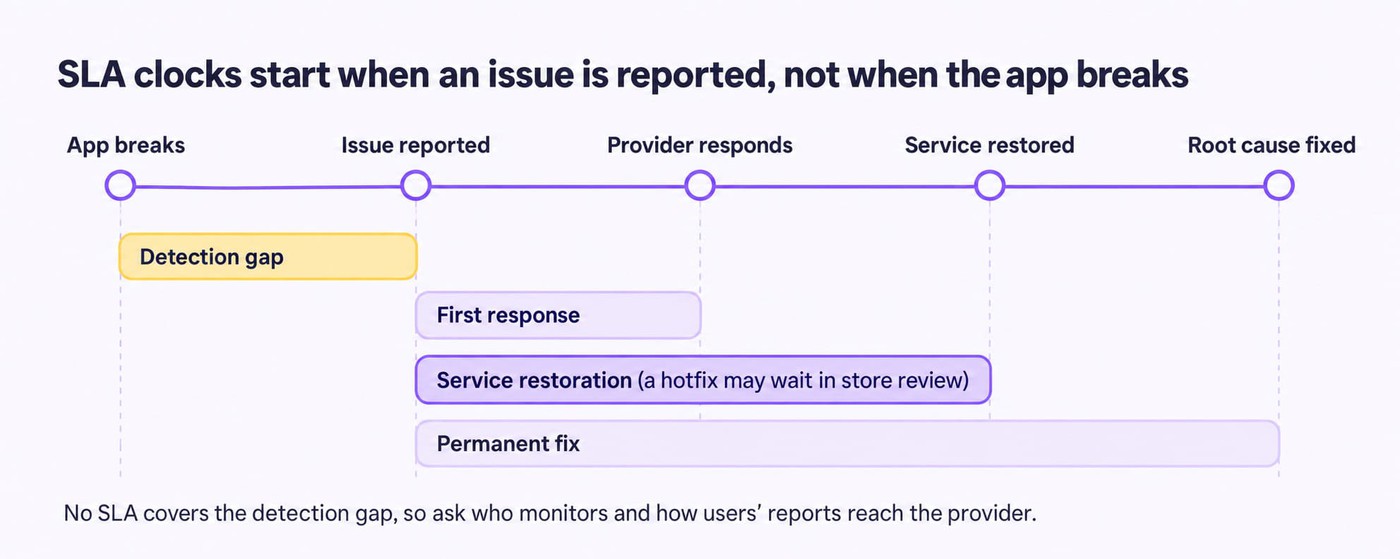
SLA response time is how fast someone acknowledges the issue and starts work. Restoration is when users can use the app again, often through a hotfix, a backend rollback, or a feature flag. Permanent fix is when the root cause is resolved.
Ask for all three, in writing. Even published agreements hedge them: Sigosoft calls its times "targets, not guarantees", and AWS describes its support response times as "reasonable effort" targets.
cta_free_trial_yellow
Coverage hours and escalation
Check the coverage hours against your traffic peaks. A provider working 9:00–18:00 IST is offline during the US evening, which is when many consumer apps peak. If you need nights and weekends, price the 24/7 add-on before you compare monthly fees.
Escalation should name roles, because "the account team" is nobody in particular: who takes over if the first engineer can't restore service, and when. Sigosoft's agreement, for example, escalates from support engineer to tech lead or project manager, then to the delivery manager.
Routing by issue type helps too. Payment and login failures need a different owner from cosmetic bugs.
"Answer routine feedback quickly, but route payment, account-access, and detailed bug reports to a named owner with the relevant context attached."
Lucija Knezic, Senior CSM & Product Strategy Manager at AppFollow
Who detects the incident
The diagram's first bar is where most agreements go quiet. The SLA clock starts when someone reports the problem, but users usually notice first. A login failure on one Android version can fill your reviews with 1-star ratings hours before anyone files a ticket.
Write detection into the agreement: what the provider monitors (crash reporting, uptime, API errors) and how user reports from reviews and support reach them.
The review side is the part you can wire up yourself. In AppFollow, it takes three steps:
- Put both stores in one feed. Connect your App Store and Google Play apps. Every review then lands in the same Reviews feed, with its app version and country.
- Alert on spikes, not on single reviews. Set an alert for a jump in 1-star reviews and send it to the Slack or Microsoft Teams channel your provider watches.
- Hand over evidence with the ticket. When the alert fires, filter the feed to the Bug tag for the last 7 days. Send those reviews to the provider through the Zendesk or Freshdesk integration, or use the AppFollow MCP to draft a bug ticket from review text.
The alert also gives you a timestamp. If the provider logs the issue at 11:00 and your alert fired at 07:30, you know where the first hours went.
What published agreements actually commit to
We looked for providers that publish their SLA terms. Of 10 app maintenance providers, only 2 publish an actual agreement. The rest state terms on service or FAQ pages. All pages were checked on 29–30 October 2026.
Provider | Document type | Critical (Sev1) response | Restoration or resolution | Coverage |
|---|---|---|---|---|
Sigosoft (India) | Published SLA document | 1 hour | 8 hours (Sev2: 4h response, 24h resolution) | Mon–Fri 9:00–18:00 IST; 24/7 on a premium plan |
mTrip (travel apps) | Published SLA page | 2 hours | Not stated | 9:00–17:00 EST, business days |
Advisory Apps (Malaysia) | FAQ page | 2 hours | Not stated | Mon–Fri 9:00–18:00 MYT; out-of-hours line for retainer clients |
Foresight Mobile (UK) | Service page | 2 hours | "Attempt a fix the same day" | UK office hours; emergency cover on the top plan |
Leanware (US) | Service page | 1 business hour | Not committed | US business hours; on-call costs extra |
NineTwoThree (US) | Service page | 4–8 hours | Significant issues: 1–2 days | Not stated |
Two patterns stand out. Critical response targets cluster between 1 and 8 hours. Only three state any restoration or resolution time, and only Sigosoft puts response and resolution targets in an agreement document. None of the six states 24/7 cover as standard.
For comparison, infrastructure vendors publish faster numbers. AWS targets under 1 hour for a "production system down" case on all its current support plans. Google Cloud's Premium support targets 15 minutes for P1 (AWS, Google Cloud). Those are response targets too.
How SLA requirements differ by app category
SLA requirements differ by what a critical failure costs and who sets the deadline. For utility apps, the stores set it. Ecommerce apps answer to the sales calendar and games to live events and Google Play's crash thresholds. Fintech apps answer to PCI DSS, and healthcare apps to HIPAA.
No provider we reviewed publishes SLAs by category, so there is no benchmark to quote. The table turns those constraints into illustrative targets, set within the 1–8 hour Sev1 range that published agreements use.
Illustrative SLA targets by app category (examples to negotiate from, not industry benchmarks)
App category | Critical incidents | Coverage | Response and restoration (illustrative) | Typical exclusions |
|---|---|---|---|---|
Utility (scanner, notes, VPN) | Crash on launch after an OS update; sync stops for all users | Business hours, on-call for Sev1 | Sev1: response within 2–4 business hours; restore within 1 business day | Store review time; issues on OS betas |
Ecommerce | Checkout or payment fails; campaign deep links break | 24/7 during sale events; business hours otherwise | Sev1: response within 1 hour; workaround within 4 hours during peaks | Payment gateway and carrier outages |
Gaming | Live event won't start; purchases not delivered; crash spike on one device model | 24/7 during live events | Sev1: response within 30–60 minutes during events | Platform and ad-network outages |
Fintech | Login or transfers fail; a critical vulnerability is disclosed | 24/7 | Sev1: response within 1 hour; restore within 4–8 hours; critical security patches within 30 days | Bank, card network, and identity-verification vendor outages |
Healthcare | Patient records or bookings unavailable; data exposure | 24/7 for Sev1 | Sev1: response within 1 hour; plan to restore relevant systems within 72 hours | EHR and telehealth vendor outages |
Response and restoration figures are illustrative examples, not published benchmarks. Regulatory and platform constraints are cited to their sources; check them before you sign.
Utility apps can live with business hours. Their worst week is usually the one after a major iOS or Android release. Ask the provider to test on the OS betas each summer, so the fix ships before users update.
Ecommerce apps need cover when their customers shop. A checkout failure at 9 pm on Black Friday is a Sev1 for every minute it lasts. A business-hours SLA would start the clock the next morning, so buy event cover for named dates.
Games are judged in public. Past Google Play's crash-rate thresholds, a game becomes less discoverable, and a warning may appear on its store listing. Live events run on fixed dates, so put on-call cover on each one. For an event fix, you can ask Apple for expedited review, though it isn't guaranteed.
Fintech apps carry two clocks. One is the outage clock; the other is the patching clock set by PCI DSS for card data. Make sure the retainer covers security patches; billing them as change requests slows them down.
Healthcare apps should plan to the proposed rule now. HHS's December 2024 proposal would require restoring relevant systems within 72 hours. HHS also says the current Security Rule stays in effect until a final rule is published. A contingency plan with no time target is legal today, but it will be hard to defend in a renewal.
cta_get_started_yellow
How mobile app maintenance is priced
Mobile app maintenance is priced in five ways, and most agreements combine two or three. The headline monthly fee rarely includes everything an app needs.
Pricing model | How it works | Best for | Watch for |
|---|---|---|---|
Monthly retainer | Fixed fee for a block of hours and an SLA | Apps with steady releases | Unused hours that expire; work outside the block billed at a higher rate |
Hourly (time and materials) | You pay for hours used | Stable apps with few changes | No SLA, or an SLA without commitments |
Dedicated team | Named engineers for a fixed monthly cost | Apps that ship weekly | Paying for capacity in quiet months |
Emergency and after-hours fees | Surcharge per incident or a monthly on-call fee | Apps with evening or weekend peaks | Fees quoted only after the incident |
Infrastructure | Hosting, databases, third-party SDKs and APIs, monitoring tools | Every app | Billed separately from the retainer |
What published plans cost
Few providers publish prices. These are the ones we found, checked on 29–30 October 2026:
Provider | Region | Published price | What's included |
|---|---|---|---|
UK | £675, £995, or £1,495 per month | Three tiers; emergency incident response only in the top tier | |
US | From $1,682 per month | 42 hours, roughly $40 an hour | |
US | From $2,500 per month | AI/ML apps from $4,000 for 40 hours |
None of them publishes an emergency or after-hours rate. Leanware says it prices the surcharge before you sign, which is the right moment to ask for it. Directory data is wide: Clutch lists an average of 25–49 an hour for mobile developers, but doesn't state the sample (Clutch). US agencies such as Simpalm quote 60–150 an hour for support (Simpalm).
The "15–20% of build cost" rule
Ask how much it costs to maintain an app and you'll hear the same rule: 15–20% of the original build cost per year. Chop Dawg, CatDoes, and CMARIX all repeat it, some stretching it to 25%. None of them shows the data behind it.
The rule also measures the wrong thing. Maintenance effort depends on how many platforms you ship, how many SDKs you depend on, and how often the stores change requirements. It has little to do with what the first version cost.
A more useful app maintenance cost estimate takes three steps:
- Estimate monthly hours per work type. Use the six work types above. Ask your provider for its last 12 months of hours on a comparable app.
- Add the fixed adaptive work. Budget one platform-upgrade project per store per year, sized to that year's iOS and Android requirements.
- Add infrastructure and cover. Hosting, paid SDKs, monitoring, plus any 24/7 or event cover your category row needs.
Illustrative example. A two-platform ecommerce app needs about 30 hours a month of routine work. At $50 an hour, that's $1,500. Two upgrade projects of 60 hours add $6,000 a year, or $500 a month. Hosting and SDKs add $800, and event cover for four sale weekends adds $300 a month spread over the year. The total is about $3,100 a month. All figures are illustrative.
Questions to ask a maintenance provider before you sign
Proposals from different app maintenance services look alike until something breaks. These six questions show how a provider behaves at 2 am. Ask them in writing, and attach the answers to the agreement.
- Who handles a Sev1 at 2 am on a Saturday? Ask for a role, a channel, and a phone number. Ask whether on-call is included or billed per incident, and at what rate.
- What happens outside support hours? Find out whether the clock pauses at 6 pm or keeps running. A 4-hour response target in business hours can mean 16 real hours on a Friday evening.
- How is a fix verified? "Deployed" and "fixed" are different statuses. Agree on the evidence in advance: the crash-free rate back to its baseline, no repeat tickets, and complaints in app reviews dropping on the new version. You can check the last one yourself; the next section shows how.
- What do monthly reports include? Ask for incidents by severity, time to restore against target, releases shipped, and hours used by work type. Hours alone only show what you paid for.
- What happens when an SLA is missed? Look for service credits, an escalation path, and a right to exit after repeated misses. Sigosoft's agreement, for example, offers credits only "where expressly agreed", so negotiate them before signing.
- How does handover work? Confirm that store accounts, signing keys, repositories, and cloud accounts are in your name. Ask for runbooks, and agree on a parallel-run period with the next provider.
If a provider can't answer the first three clearly, its SLA numbers don't matter much.
Check whether a fix held, without waiting for the provider's report
Your maintenance provider measures its own SLA. It logs when a ticket arrived, when someone answered, and when the fix shipped. What it can't easily show is what users saw: whether the crash stopped on the new version, in every country, on every store.
AppFollow gives you that view from the review side. Reviews from the App Store and Google Play land in one feed, tagged by topic, with the app version and country on each one. You can see a problem appear before a ticket exists, and see it fade once the fix is live.
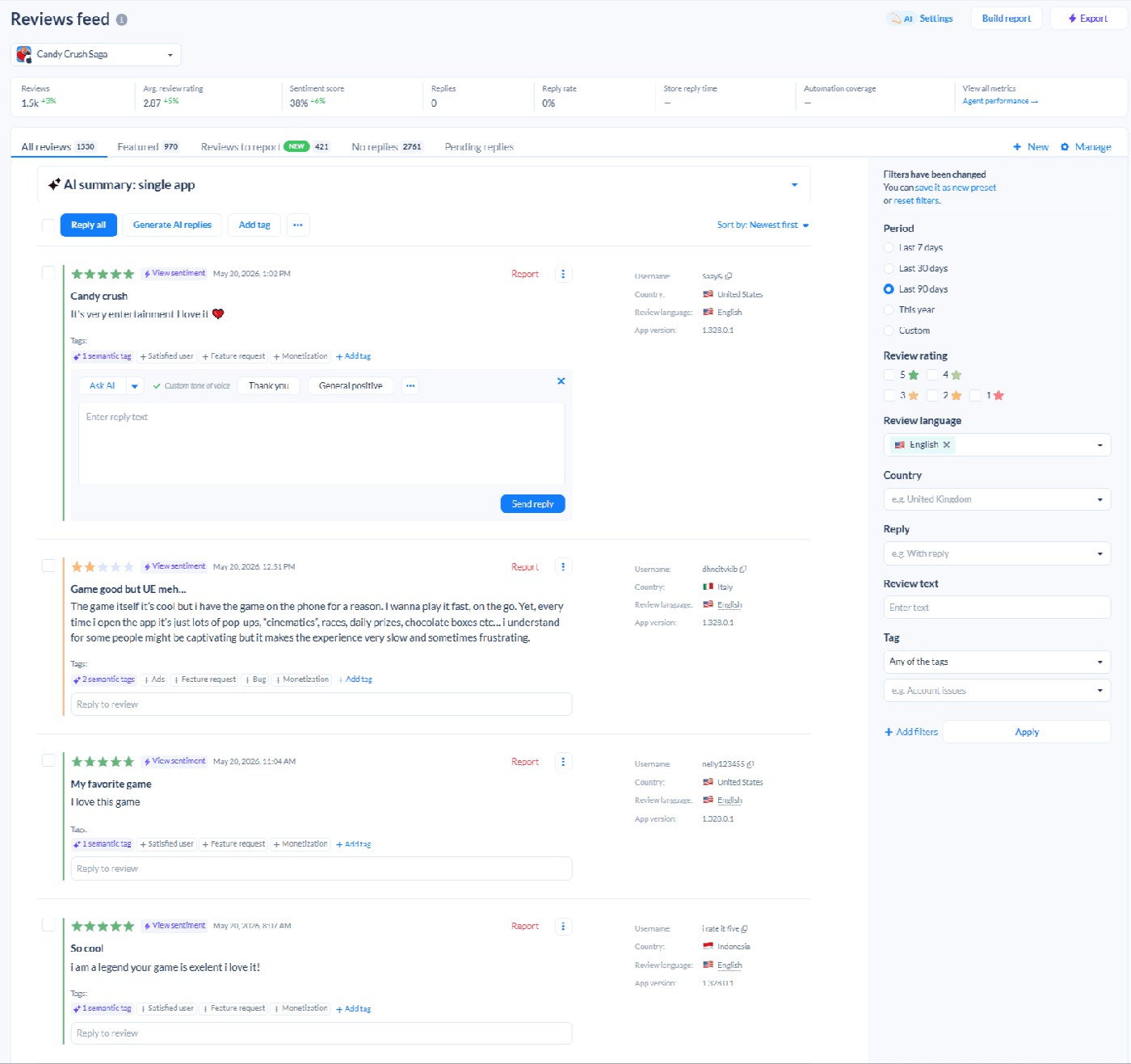
AppFollow Reviews feed, shown on a public app. Each review carries semantic tags, its app version, and country; filters sit on the right.
Here is how the check works on this screen:
- Filter to the Bug tag. Use the tag filter on the right. The second review here is a good example: a 2-star complaint about pop-ups slowing the app down, tagged Bug and Monetization, on version 1.328.0.1.
- Read the version on each review. Complaints clustered on one version are your Sev2 evidence. Attach them to the ticket.
- Run the same filter after the release. If Bug-tagged reviews keep arriving on the fixed version, the fix didn't hold, whatever the provider's report says.
Three features do most of the work when you manage a provider this way:
- Semantic tags such as Bug and Monetization are applied automatically. Add custom tags for login or payment failures, so nobody has to read every review to find incident reports.
- Alerts on 1-star spikes go to Slack or Microsoft Teams, so the SLA clock can start when users notice the problem.
- Ticket hand-offs run through the Zendesk, Freshdesk, or Intercom integrations, or through the AppFollow MCP, with the source reviews attached.
Every paid plan starts with a 10-day free trial.
cta_get_started_purple
FAQ
What does mobile app maintenance include?
Mobile app maintenance includes bug fixes, security patches, OS compatibility updates, SDK and dependency updates, regression testing, and backend upkeep. Most agreements cover fixing faults and keeping up with platform changes. Improvements to working features are usually billed as extra hours, so check which category each request falls into.
What is a good SLA response time for a mobile app?
Published agreements put critical response between 1 and 8 hours. Sigosoft commits to 1 hour for Sev1 and mTrip to 2 hours. Response only means someone acknowledges the issue, so also ask for a restoration target and check whether the clock runs outside business hours.
What's the difference between response time and resolution time?
Response time is how fast the provider acknowledges an incident and starts work. Resolution, or restoration, is when the app works again for users. Sigosoft's agreement shows the gap: 1 hour to respond to a Sev1, 8 hours to resolve it.
How much does mobile app maintenance cost per month?
Published plans start at £675 a month in the UK (Foresight Mobile) and $1,682 to $2,500 a month in the US (Leanware, NineTwoThree). Infrastructure, after-hours cover, and platform-upgrade projects usually come on top. Estimate from hours per work type, not from a percentage of build cost.
Are App Store and Google Play review delays covered by an SLA?
Usually not, because no provider controls store review. Apple aims to review 90% of submissions within 48 hours. A fair agreement pauses the restoration clock during review, but commits the provider to submit fixes, and to request expedited review, within a set time.
What should happen when a maintenance provider misses its SLA?
The agreement should spell out service credits, an escalation path, and your right to exit after repeated misses. Many providers call their targets goals rather than guarantees, and offer credits only if agreed in writing. Negotiate these terms before signing, not after the first outage.
How often should an app get maintenance updates?
Plan routine fix releases monthly, plus one platform-upgrade project per store each year. In 2026 those deadlines were 28 April for Apple's SDK minimum and 31 August for Google Play's API level 36. Apps with weekly releases need regression testing on every build.
Next step: take the proposal you have now and check it against three rows of this guide: the agreement checklist, the published SLA terms, and your category's row. The gaps you find are your negotiation list.
cta_get_started_purple