ASO Keyword Cannibalization: How to Stop Your Own Apps from Stealing Each Other’s Installs

Table of Content:
- Key insights
- What is ASO keyword cannibalization?
- Why cannibalization quietly kills your ASO performance
- The 5 types of ASO keyword cannibalization
- How to detect ASO keyword cannibalization
- How to fix ASO keyword cannibalization: the 6-step playbook
- Prevention: building a cannibalization-proof ASO workflow
- Stop portfolio cannibalization before it steals the next install
ASO keyword cannibalization usually looks harmless at first. You open your portfolio dashboard, see two apps competing for the same high-volume query, and think: great, twice the ranking power. Then, installs flatten. One app jumps from position #4 to #2. The other slides from #2 to #5. A week later, they switch again. Search visibility looks active, but growth goes nowhere.
That’s the trap.
You are not beating competitors. You are trading positions with yourself. Call it self-cannibalization, keyword overlap, or portfolio chaos. The result stays the same. Your own apps compete for the same user intent and split install velocity across the portfolio. The problem gets bigger as publishers scale app store optimization across multiple products and markets.
At AppFollow, we’ve seen this pattern in portfolios from indie publishers to category leaders like gaming studios managing dozens of titles. It often hides in plain sight. One app gains visibility while another quietly loses it.
This guide breaks down ASO keyword cannibalization (also spelled "ASO keyword cannibalisation"), the five types I see most often, how to detect them early, a six-step fix process, prevention systems, and the tooling that helps you protect installs before keyword overlap starts eating into growth.
Key insights
If you only remember a handful of things from this article, make them these. I’ve found that keyword cannibalization rarely starts with a big mistake. More often, it grows from small decisions repeated across apps, locales, and release cycles. Watch for these patterns, and you catch the problem before installs start leaking.
- ASO keyword cannibalization is the visibility tax of portfolio ASO. The same publisher targets the same keyword across multiple listings or metadata surfaces, then splits install signals instead of strengthening them. One app gains visibility. Another loses it. Net growth barely moves.
- Not all cannibalization looks the same. I see five recurring patterns: intra-portfolio overlap, internal metadata duplication, localization conflicts, short versus long description overlap on Google Play, and organic versus paid competition through Apple Search Ads.
- Three signals usually appear before install loss becomes obvious. Watch for two apps ranking in the top 30 for the same query. Look for rank oscillation where positions trade week to week. Pay attention when Search Visibility Score climbs while installs stay flat.
- The fix works best as a system, not a one-off metadata edit. Run the six-step loop: build your keyword universe, map ownership, pick a winner, replace duplicates with semantic variants, ship changes, then monitor with alerts.
- Prevention beats cleanup. Keyword governance matters. Locale-first planning matters too. AI-assisted ASO helps break repetition and creates keyword diversification before overlap becomes a portfolio problem.
- Tools only help when they support the workflow already happening. AppFollow’s Keyword Live Ranking surfaces overlap. AI suggestions accelerate semantic replacement. Competitor Intelligence helps distinguish self-inflicted ranking pressure from real market competition.
What is ASO keyword cannibalization?
ASO keyword cannibalization occurs when two or more app store listings owned by the same publisher, or two metadata fields within the same listing, compete for the same keyword, fragmenting visibility, installs, and ranking signals.
The tricky part is that dashboards can still look healthy. Rankings move. SOV shifts. Yet install growth stalls because the app store algorithm spreads ranking signals across overlapping assets instead of compounding them.
Dictionary version: ASO keyword cannibalization is a form of intra-portfolio competition where keyword overlap weakens search ranking and indexation signals across app listings or metadata fields.
I’ve seen ASO managers mistake movement for growth. Ranking activity feels good. Momentum is something else.
How it differs from SEO cannibalization
If you come from web SEO, the concept already sounds familiar. SEO keyword cannibalization happens when multiple pages compete for the same search intent and dilute authority. Industry sources like Ahrefs describe it as pages from the same site competing for overlapping terms instead of reinforcing a stronger asset.
App stores play by different rules. Metadata fields have strict character limits. Keyword indexation happens at the locale level. Apple gives you a separate keywords field. No canonical tags exist to consolidate signals. Ranking factors lean heavily on install velocity and conversion rate loops.
That changes the cost of overlap. In SEO, two pages competing can create inefficiency. In ASO, two apps targeting the same query can actively split install momentum and weaken ranking signals.
Yaroslav Rudnitskiy, Senior Professional Services Manager at AppFollow, sees this happen most often in multi-app portfolios:
Cannibalization is the quietest leak in any portfolio. Two apps moving up the same query feels like a win on a dashboard. It isn’t. You’re paying for the same install twice in keyword work, and the algorithm is splitting your ranking signal between two listings instead of compounding it into one.
Web SEO | ASO | |
Consolidation fix | Canonical tags | No canonicals |
Ranking inputs | Backlinks, authority | Install velocity, conversion rate |
Content space | Unlimited pages | Tight metadata fields |
Structure | URLs and pages | Store listings and metadata |
If you want the broader context, our ASO vs. SEO guide naturally expands on how search behavior, ranking factors, and optimization workflows diverge.
Where cannibalization shows up on iOS vs. Google Play
The risk map changes by store because indexation surfaces are different.
On iOS, keyword overlap can happen across
| Google Play ranking spreads risk across
|
Same problem. Different surfaces. One fragmented ranking signal.
Why cannibalization quietly kills your ASO performance
ASO keyword cannibalization rarely fails all at once. That would be easier to catch. Instead, it leaks performance through smaller signals. Search visibility score drifts. SOV softens. Install velocity spreads across multiple listings. Teams keep optimizing while wondering why organic uplift never arrives.
I’ve seen portfolios celebrate ranking movement while losing ground underneath. The problem is not visibility alone. It is visibility distributed in the wrong place.
Lost installs and wasted metadata real estate
Metadata space is expensive. Treat every character like paid inventory.
On iOS, you get 30 characters in the app title, 30 in the subtitle, and 100 in the keywords field. Duplicate terms eat into limited space and reduce room for unique, high-intent keywords with stronger semantic fit. Google Play creates the same pressure with its 30/80/4000 structure across title, short description, and long description.
Read more: App Store Optimization Title - The 2026 Playbook for iOS & Google Play
The install math adds up quickly. Imagine a keyword generating 100,000 monthly impressions. Two apps each sit at position #6, where CTR averages around 5%. Each app captures roughly 5,000 visits. Consolidate authority into one stronger listing that climbs to #2 with a 12% CTR, and traffic jumps to 12,000 visits. Same keyword work. Very different outcome.
Ranking instability and algorithm confusion
Keyword overlap creates ranking volatility because install signals stop concentrating around a single listing.
Two apps targeting identical intent often trade positions back and forth. One rises. The other falls. A week later, they switch. Neither builds enough install velocity to establish ranking stability. Apple and Google relevance systems reward concentrated algorithm signals. Distributed signals weaken organic discovery.
You want one clear winner per query, not siblings fighting for the same seat.
Organic + paid cannibalization (Apple Search Ads & UAC)
The problem gets more expensive when paid enters the picture.
Say you bid through Apple Search Ads while two organic listings rank for the same term. Paid spend starts supporting traffic you might have captured organically anyway. Worse, the wrong app can absorb the click. That creates ASA cannibalization and muddies incrementality analysis.
Cross-reference Apple Search Ads keyword data against organic reports. Watch blended CPI, organic uplift, and keyword-level performance together. Paid search should amplify growth, not referee a fight inside your own portfolio.
The 5 types of ASO keyword cannibalization
Most teams look for one version of self-cannibalization and stop there. That misses the real problem. I’ve seen keyword overlap happen across sibling apps, metadata fields, localization setups, and even paid campaigns. The mechanics change. The outcome stays the same. Visibility fragments and install momentum weakens.
Type 1: Intra-portfolio cannibalization
Yaroslav Rudnitskiy, Senior Professional Services Manager at AppFollow, once described this to me as the easiest ASO problem to create accidentally:
“A publisher launches a second app because the first one performs well. Then both listings end up targeting the same commercial terms. Suddenly, ‘Habit Tracker’ and ‘Habit Tracker Pro’ compete for identical queries, split installs, and weaken each other’s ranking momentum. I see this constantly with sibling apps and white-label portfolios. Teams think they expanded visibility when they actually duplicated it.”
This is the classic version and still the most common among the types of ASO keyword cannibalization. Two apps from the same publisher target overlapping queries while serving similar intent.
A meditation publisher might run separate apps for sleep, focus, and habits. All three target “daily routine app.” Two reach the top 30. Neither converts strongly because the install signal keeps splitting between them.
Diagnostic: Two sibling apps rank top 30 for the same keyword, and one of them was never intended to.
This flows much more naturally because the quote sets up the scenario instead of interrupting it.
Type 2: Internal metadata cannibalization (iOS title vs. subtitle vs. keywords field)
This one hides inside a single listing. Apple treats the title, subtitle, and iOS keywords field as a deduplicated set. Repeat the same word across fields, and you waste valuable metadata space.
The same logic applies to repeated in-app purchase keywords. Example: title: "Habit Tracker", subtitle: "Daily Habit Tracker", keywords field: "habit, tracker, daily."
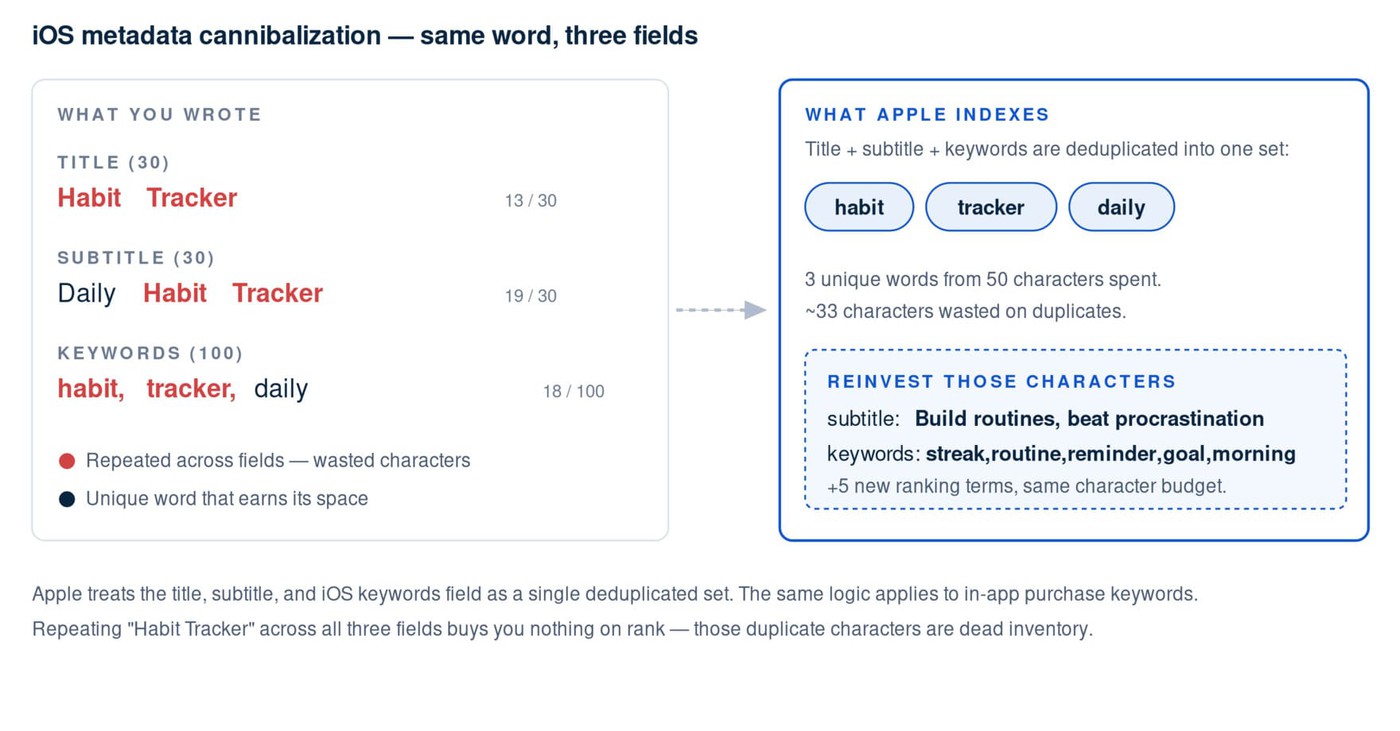
You spent extra characters and gained little.
Diagnostic: The same head term appears repeatedly across app title, subtitle, keywords field, or in-app purchase names.
Type 3: Localization cannibalization
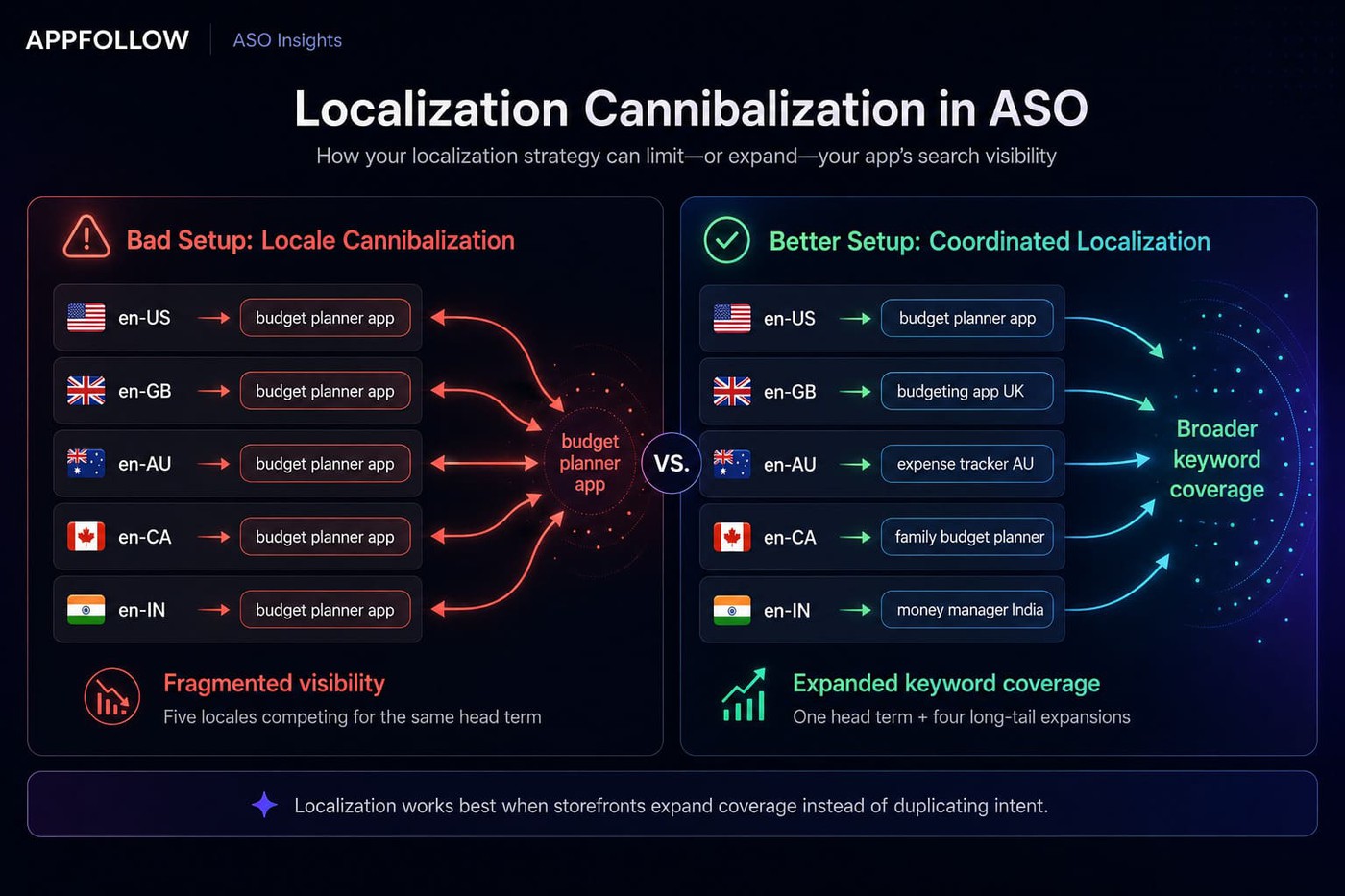
This version gets overlooked because localization often sits in separate workflows. iOS lets you target en-US, en-GB, en-AU, en-CA, and en-IN independently. Many publishers copy identical metadata across all of them. Then, locale spillover creates competition across Apple's global index.
Example: every English storefront targets "budget planner app." Five locales chase the same head term instead of expanding reach with regional keywords.
Result:
Bad setup → five locales compete for one head term.
Better setup → one head term + four long-tail expansions increase total keyword coverage.
Dzianis Shalkou, Senior Professional Services Manager at AppFollow, sees this pattern constantly:
“The single most under-diagnosed form of cannibalization is locale spillover. Publishers run identical English metadata across en-US, en-GB, en-AU, and en-CA; then wonder why none of those storefronts dominate their region. Treat each locale as its own keyword universe, give the strongest locale your head terms, and use the others to hunt long-tail you’d otherwise leave on the table.”
Diagnostic: Multiple English locales target identical head terms despite different regional intent.
Type 4: Short description vs. long description (Google Play)
Google Play indexes both the short description and long description heavily. Repeating the same head term in both fields narrows semantic reach and hurts discoverability.
Example: "fitness app" appears aggressively in both fields, while adjacent semantic variants like "home workouts" and "strength plans" never appear.
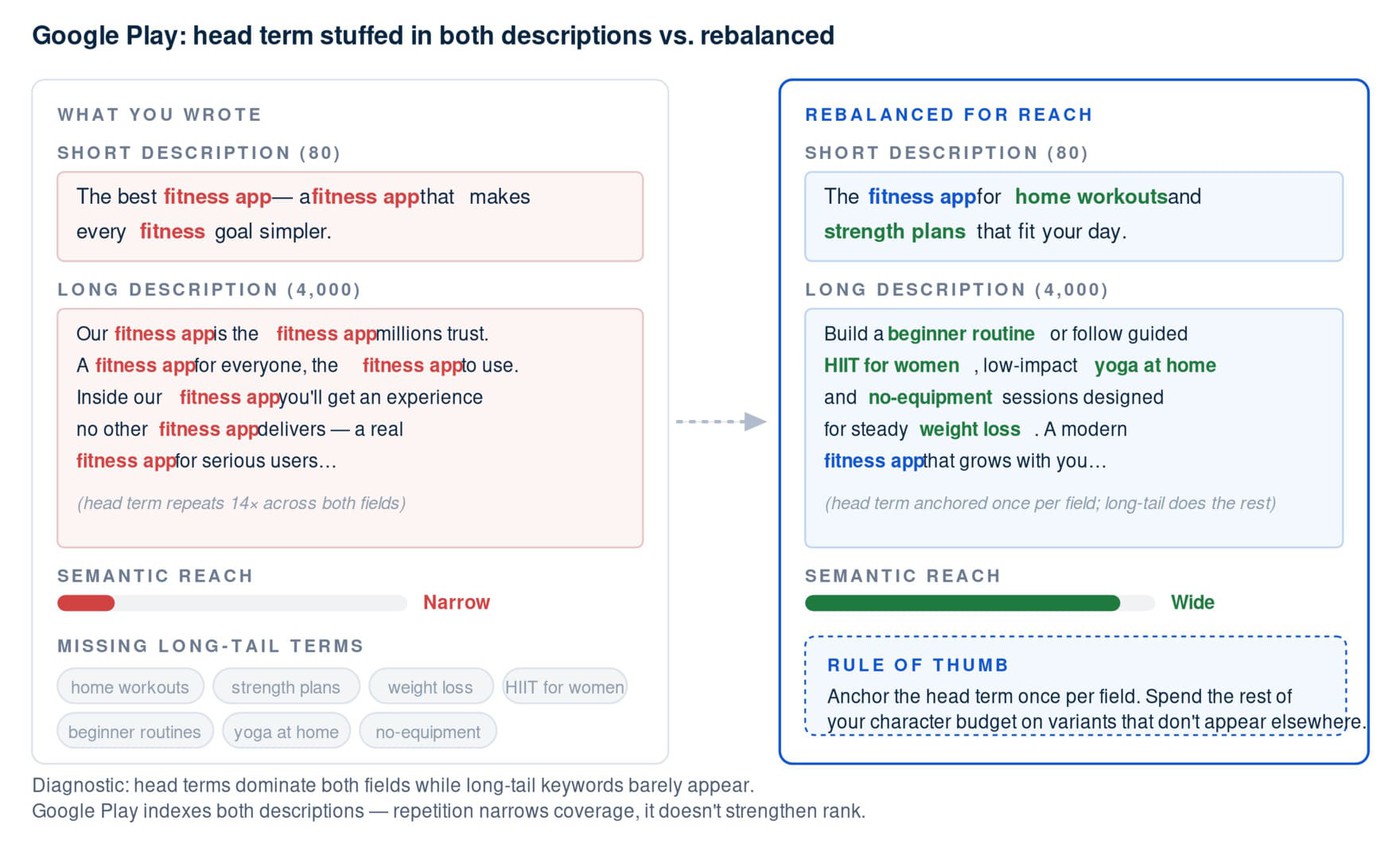
Diagnostic: Head terms dominate both metadata fields while long-tail keywords barely appear.
Type 5: Organic + paid cannibalization (Apple Search Ads)
Apple Search Ads introduces another layer of conflict. Apple Search Ads cannibalization happens when ASA overlap supports keywords where your app already ranks highly, especially if multiple listings from the same portfolio appear.
Example: two apps rank top five for "period tracker" while ASA campaigns bid on the same term. Paid search props up traffic that organic visibility may already capture.
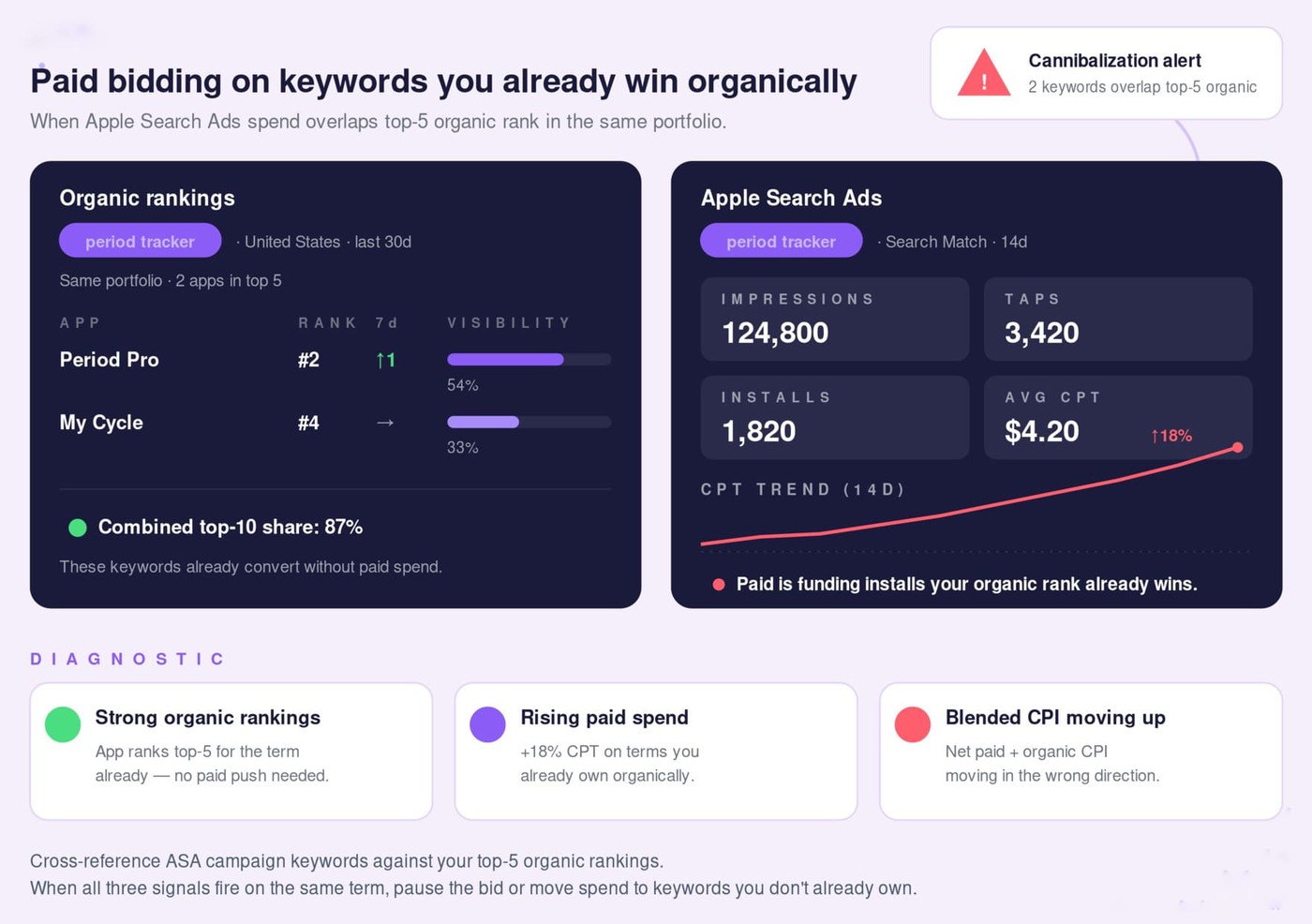
Teams often spot this by comparing Apple Search Ads performance with organic keyword overlap data tracked inside AppFollow.
Diagnostic: Strong ASO organic rankings, rising paid spend, and blended CPI moving in the wrong direction.
How to detect ASO keyword cannibalization
ASO keyword cannibalization rarely announces itself. You usually see symptoms first. Rankings wobble. Search Visibility Score climbs while installs stay flat. SOV expands without meaningful growth. I’ve found that the fastest keyword audit starts by mapping your keyword universe across the whole portfolio instead of reviewing apps one by one.
Three signals tend to show up before the damage becomes obvious.
Signal 1: Two of your apps ranking top 30 for the same keyword
This is the easiest tell and the one I check first.
If two of your apps appear in the top 30 for the same query and at least one listing serves a different audience or product intent, you are likely cannibalizing. Pull a portfolio report, export every ranking keyword, then sort by apps-per-keyword ≥2. A keyword overlap matrix makes the pattern obvious fast.
Watch for: one keyword showing multiple portfolio listings with competing ranking positions.
Signal 2: Rank oscillation — positions trading week to week
Ranking stability matters more than movement. App A at #4 and App B at #11 can look healthy until they switch places next week. Then it happens again.
That kind of rank volatility usually means Apple or Google cannot decide which listing deserves the slot because install signals are split across both assets. Neither app accumulates enough momentum to lock position.
In AppFollow, the Keyword Live Ranking view and Compare Discovery surface this overlap in a single matrix.
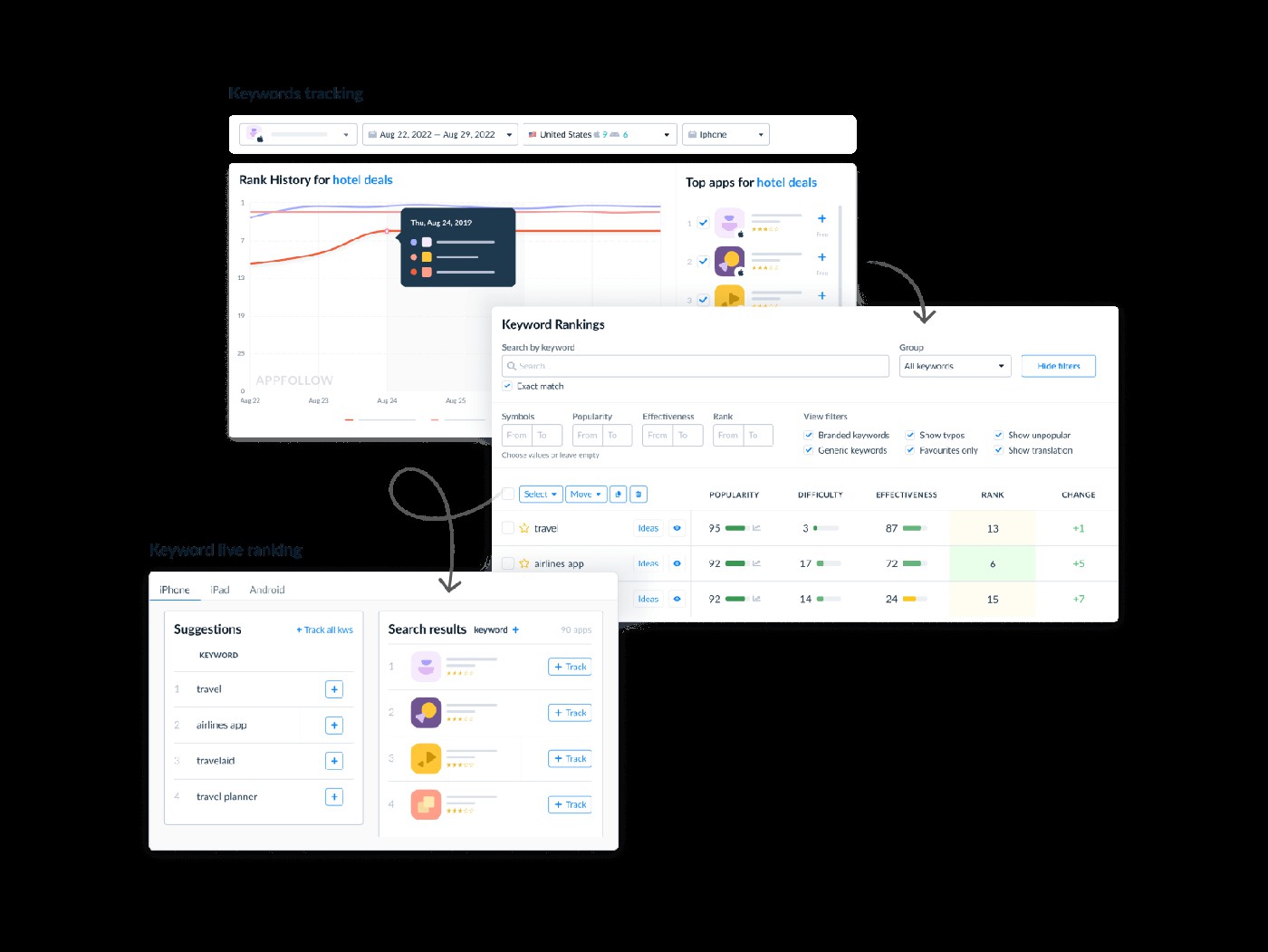
Ilia Kukharev, Product Manager at AppFollow, explained why this workflow exists:
“When we built Keyword Live Ranking, the goal wasn’t a prettier dashboard. It was to put portfolio overlap in front of the ASO manager before they ever notice the install loss. Surfacing which of your apps already owns a query is the difference between a 30-minute audit and a quarter-long mystery.”
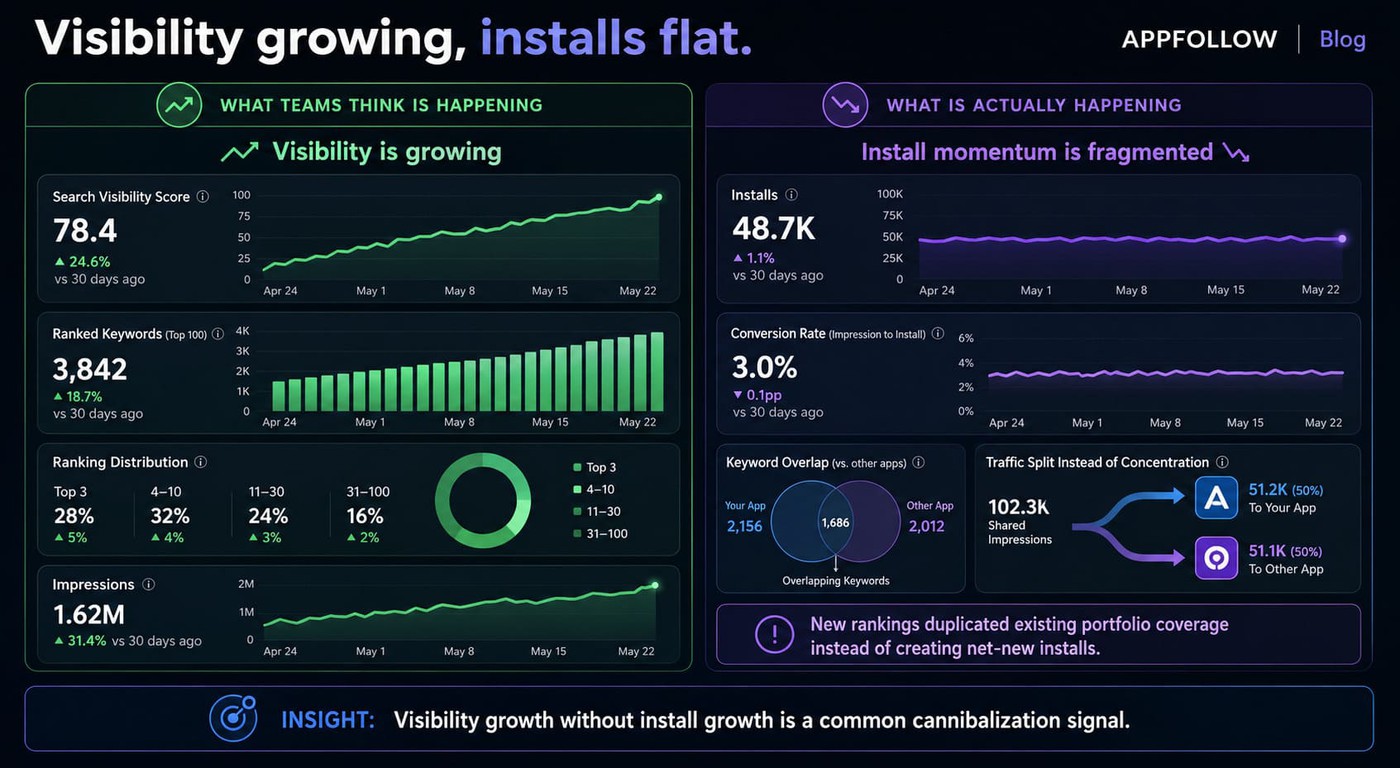
Signal 3: Visibility growing, installs flat
This one catches experienced teams because the metrics look positive at first glance.
Search Visibility Score increases. Coverage expands. Yet install velocity and conversion rate stay flat. New keyword gains often duplicate reach already owned by another app or metadata field instead of creating net-new organic installs.
The structured cannibalization audit (15-min workflow)
Run this workflow before every major metadata update to catch overlap early and keep your portfolio strategy aligned.
- Use AppFollow’s Keyword Tracking to pull all keywords each app ranks for in the Top 50.
- Compare rankings across apps and flag keywords where multiple apps appear for the same search intent.
- Tag overlaps as either intentional portfolio coverage or potential cannibalization.
- Use AppFollow performance metrics — including installs, conversion rate (CVR), and visibility trends — to identify the strongest listing for each keyword cluster.
- Plan metadata updates accordingly and set rank tracking alerts to monitor movement after changes go live.
With a structured audit process and portfolio-level visibility in AppFollow, teams can uncover overlapping keyword strategies quickly, often in less than fifteen minutes.
How to fix ASO keyword cannibalization: the 6-step playbook
You don't fix ASO keyword cannibalization by deleting a keyword and hoping rankings settle down. I've seen teams do exactly that. The overlap disappears for a release cycle, then comes back through localization updates, new in-app purchase names, or a product manager squeezing fresh keywords into metadata two months later.
This works better as a system than as a cleanup exercise. Treat it like portfolio hygiene. Run the loop, measure the outcome, repeat.
Step 1 — Build your portfolio keyword universe
Start with a complete source of truth.
For each app in your portfolio, pull every keyword it ranks for plus every keyword you want to rank for over the next quarter — broken out by locale.
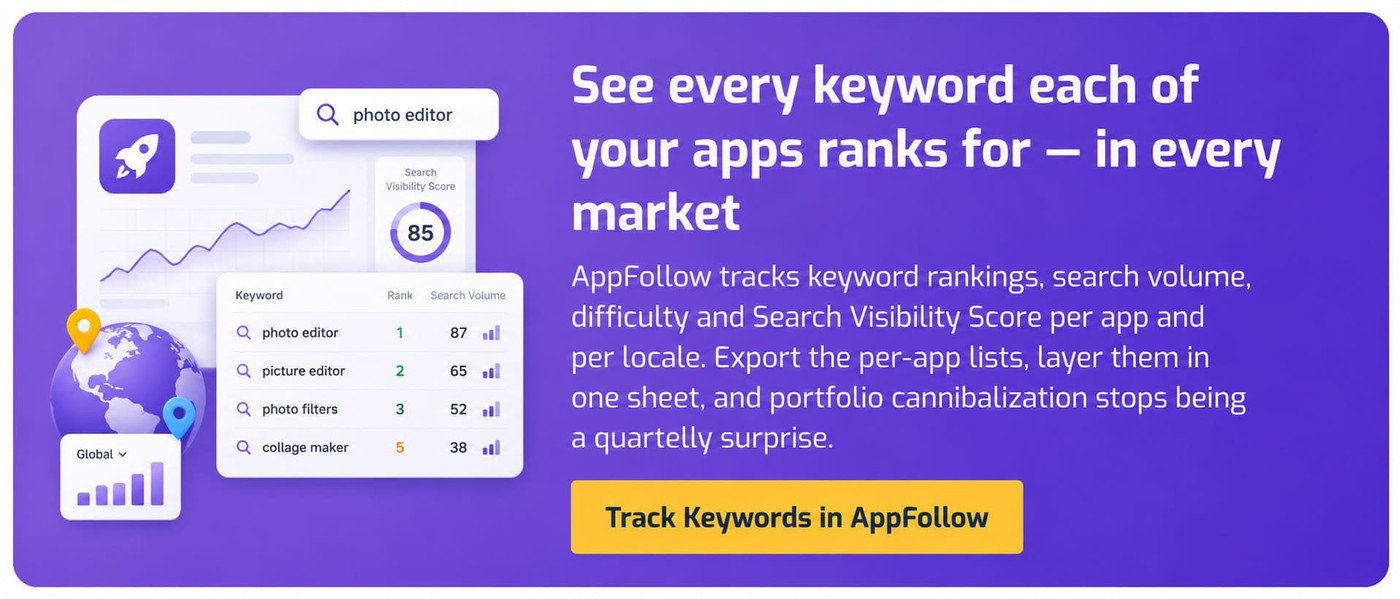
AppFollow tracks rankings, search volume, difficulty and Search Visibility Score for each app individually, so the per-app list is one click (or one API call) away.
Export each app's keyword list to a spreadsheet and stack them into one portfolio sheet. Include branded terms, category terms, competitor targets, long-tail opportunities, and phrases users actually leave in your reviews.
That sheet should answer one question instantly: which app owns which intent?
Skip this step and every future decision becomes guesswork.
Step 2 — Map keywords to apps, locales, and metadata fields
Now build a keyword ownership matrix in the same sheet.
Rows become keywords. Columns become apps, locales, titles, subtitles, iOS keyword fields, short descriptions, long descriptions, and in-app purchase names.
Pull the current metadata for each app from AppFollow's ASO view and mark where each keyword appears today.
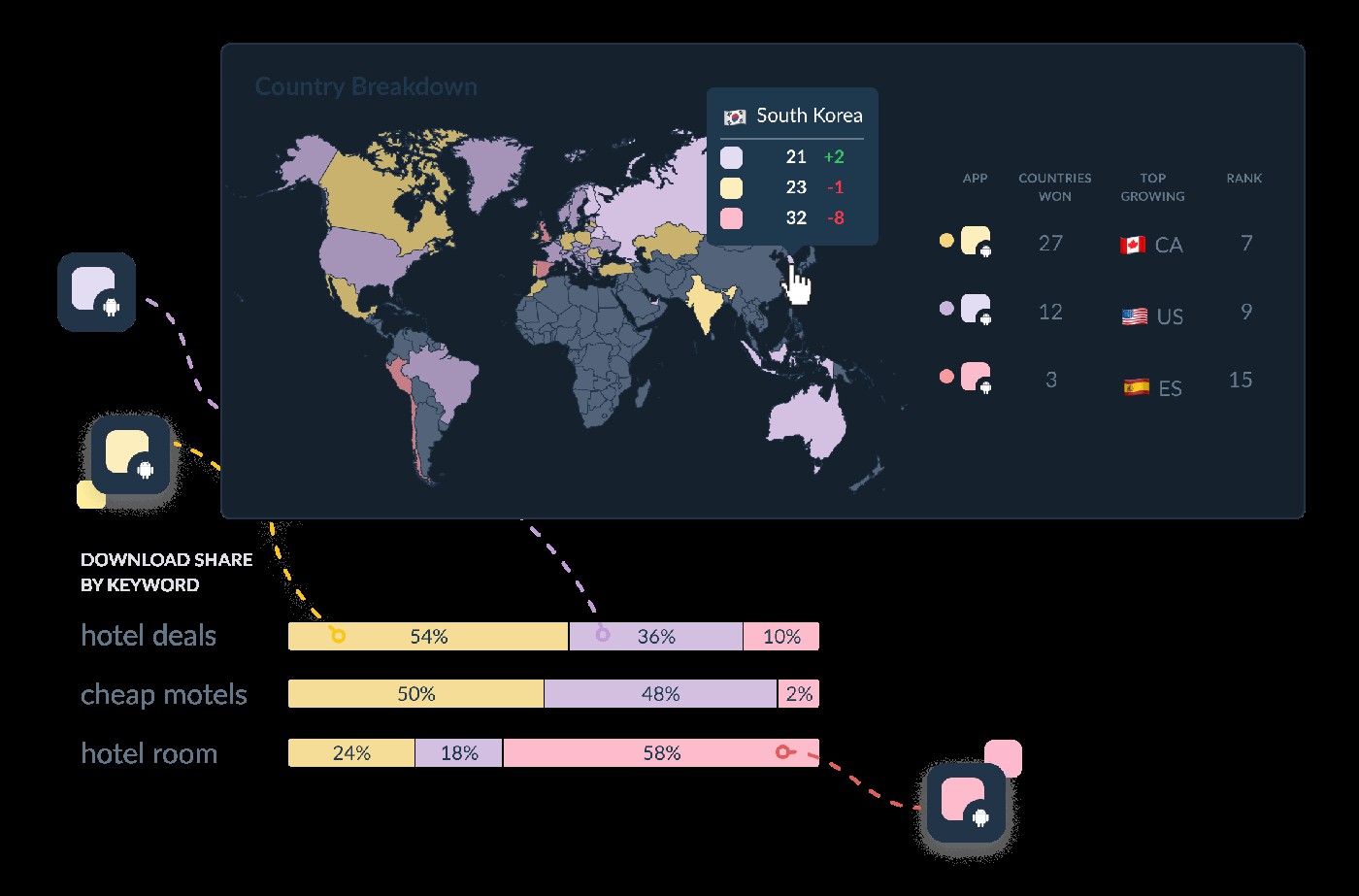
Once the matrix is populated, the overlap is obvious — and so is the assignment. One app owns "habit tracker." Another goes after "routine planner." A third targets "daily goals app."
Without ownership rules, keyword strategy quietly becomes keyword collision.
Step 3 — Pick the winning listing per keyword
Not every app deserves every query.
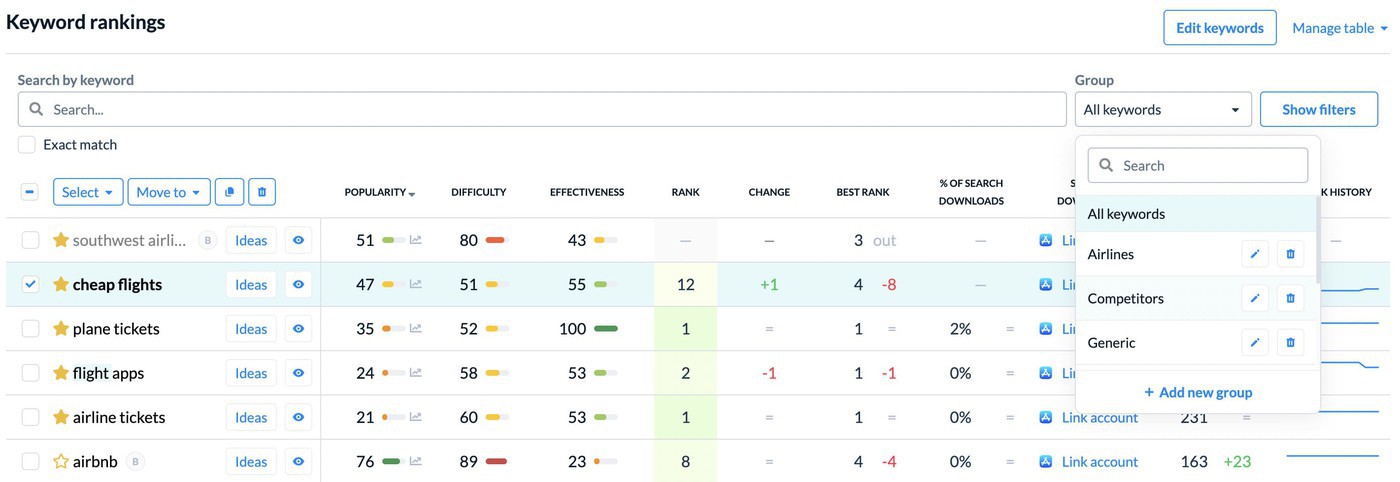
Look at installs, conversion rate, and competitive position before choosing a winner. I usually default toward the listing already converting best — install behavior often reveals stronger semantic fit than rank alone. A listing at #7 with strong conversion frequently beats a listing sitting at #4 with weak install performance.
AppFollow's Search Visibility Score, paired with App Store Connect and Play Console install data, lets you make this call on evidence rather than gut feel.
Step 4 — Replace duplicates with semantic alternatives
Now reclaim the wasted space. Remove duplicate head terms from the losing listings and replace them with semantic variants, competitor-gap terms, or long-tail opportunities that expand reach without creating new overlap.
Instead of two apps fighting over "meal planner," you might uncover "macro tracker," "weekly meal prep," or "family nutrition planner."
AppFollow's AI keyword suggestions surface non-cannibalizing alternatives from real store search and review language in seconds, instead of days of manual research.
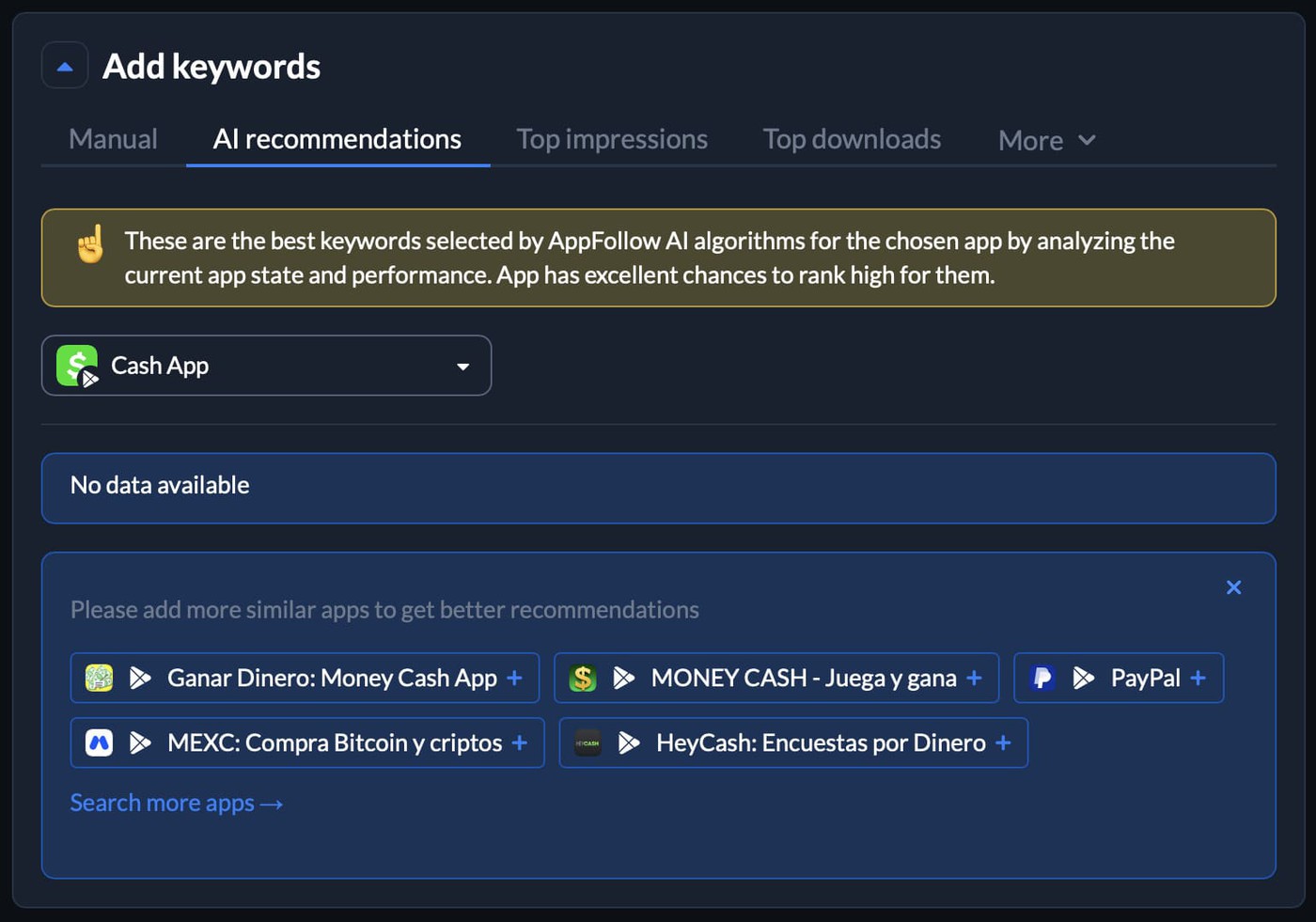
This stage often uncovers demand your portfolio has never tried to capture.
Step 5 — Ship changes and measure
Coordinate metadata changes with your next release cycle and resist the urge to judge performance immediately.
Track rank movement, Search Visibility Score shifts, install delta, and store-listing test performance over the next 14 to 28 days. Install velocity needs time. Algorithms reward accumulation.
Teams get impatient here. Four days pass, rankings wobble, panic sets in, and someone wants to revert everything.
Don't.
Step 6 — Set up alerts and a quarterly re-audit
Cannibalization almost always returns.
Keywords trend. Competitors refresh metadata. Product teams launch features and introduce fresh IAP names. Overlap slips back into the portfolio quietly.
Ilya Kataev, Professional Services Team Lead at AppFollow, sees the strongest teams treat this as recurring process work:
"Most teams treat a keyword fix as a one-off ticket. The teams that actually compound visibility treat it like a quarterly hygiene loop: universe refresh, overlap audit, winner assignment, semantic replacement, ship, measure, alert. Without the loop, every release reintroduces cannibalization that the previous release just removed."
Set rank-movement alerts in AppFollow on the keywords each app targets, then route them to Slack.
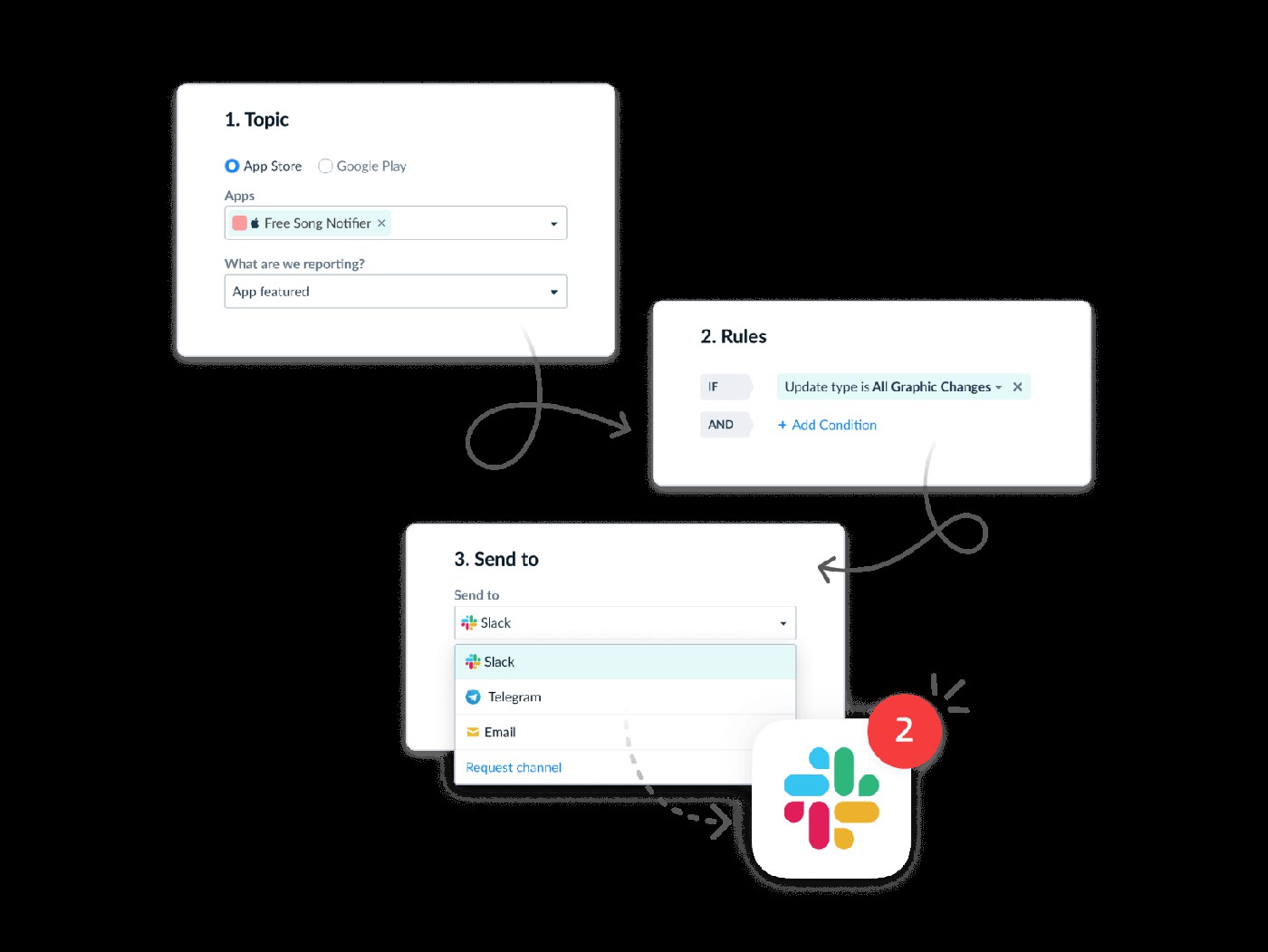
When two of your apps both land in the top 10 for the same term, you get two alerts on the same keyword — and the quarter-long mystery becomes a five-minute fix.
Prevention: building a cannibalization-proof ASO workflow
Fixing overlap matters. Preventing it matters more. Most teams clean up cannibalization after installs drop. Then the next release ships, someone updates an in-app purchase name, a new locale launches, and the same conflict quietly returns. I’ve learned that portfolio growth depends less on occasional fixes and more on building systems that make overlap harder to create in the first place.
- Keyword governance for portfolio. Assign every commercial keyword a single owner listing and document it.
Do not leave ownership living in someone’s memory or buried in a spreadsheet tab no one opens. Turn your keyword universe into a versioned asset. Track changes. Record why App A owns "budget planner" while App B owns "expense tracker." - Localization-first metadata planning. Treat localization as a coordinated portfolio decision rather than isolated store work. Give your strongest locale the head terms. Let secondary locales hunt long-tail opportunities and regional phrasing. I still see publishers duplicate metadata across en-US, en-GB, and en-AU because it feels efficient. The result usually looks efficient too, right up until visibility fragments.
- AI-assisted keyword diversification. People naturally repeat what worked before. Teams do the same thing. A keyword wins once, and suddenly it appears in every app title, metadata draft, and release request. Familiar phrasing becomes habit. Habit becomes repetition.

Stop portfolio cannibalization before it steals the next install
AppFollow is the ASO workspace I’d want open before touching a portfolio metadata refresh. It helps app developers, publishers, and mobile marketers see which apps rank for which keywords, where overlap starts, and whether visibility is creating new installs or just moving traffic between sibling listings.
That matters because ASO keyword cannibalization rarely screams. It whispers. Two apps rank top 30 for the same query. Search Visibility Score climbs. Installs stay annoyingly flat. By the time the team notices, the portfolio has spent a quarter optimizing against itself.
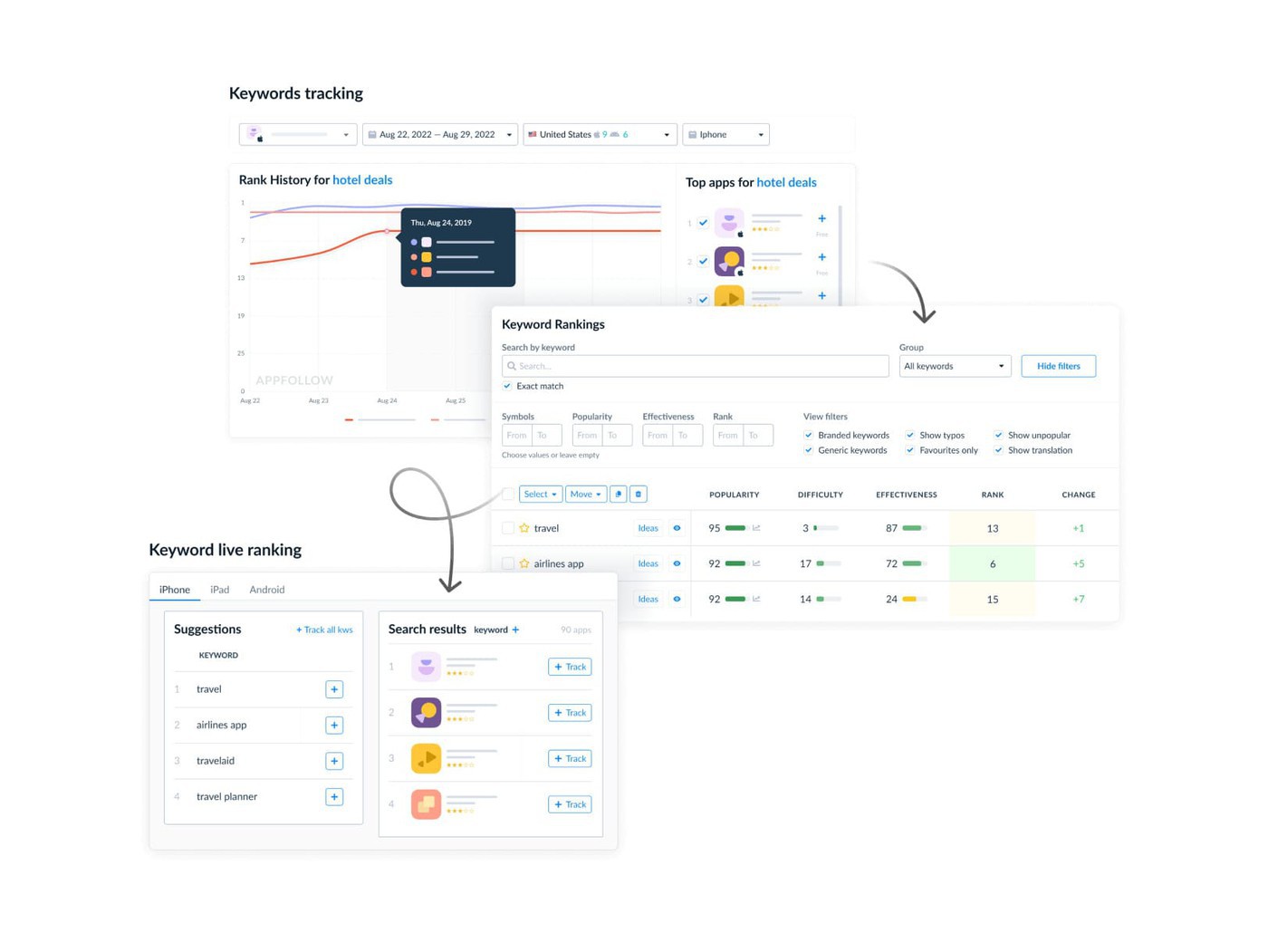
With AppFollow ASO Tools, you can audit the whole keyword map instead of opening every store console like it’s 2018.
Relevant features for this workflow:
- Keyword Tracking: pull the keywords each app ranks for, then compare positions by country, store, and device. This is where keyword overlap becomes visible.
- Keyword Live Ranking: check exact ranking positions in live search results and see when two apps compete for the same query.
- Search Visibility Score: spot the ugly pattern this article talks about, visibility growing while installs stay flat.
- Keyword Popularity and Keyword Difficulty: decide which app should own a term, and which sibling app should move to a smarter variant.
- Keyword Spy and Competitor Apps: separate self-cannibalization from real competitive pressure before you rewrite metadata.
- Export Keywords: export rankings into CSV or XLS, layer per-app lists in one sheet, and turn portfolio ASO into a clean ownership map.
- Alerts & Reports: get notified when rankings, ratings, reviews, or metadata shift, so keyword cannibalisation does not wait for the quarterly audit.
The win is simple: one app owns one intent. The rest of the portfolio expands into adjacent demand instead of fighting over the same install.
cta_get_started_purple