How many app stores are there? A developer’s guide

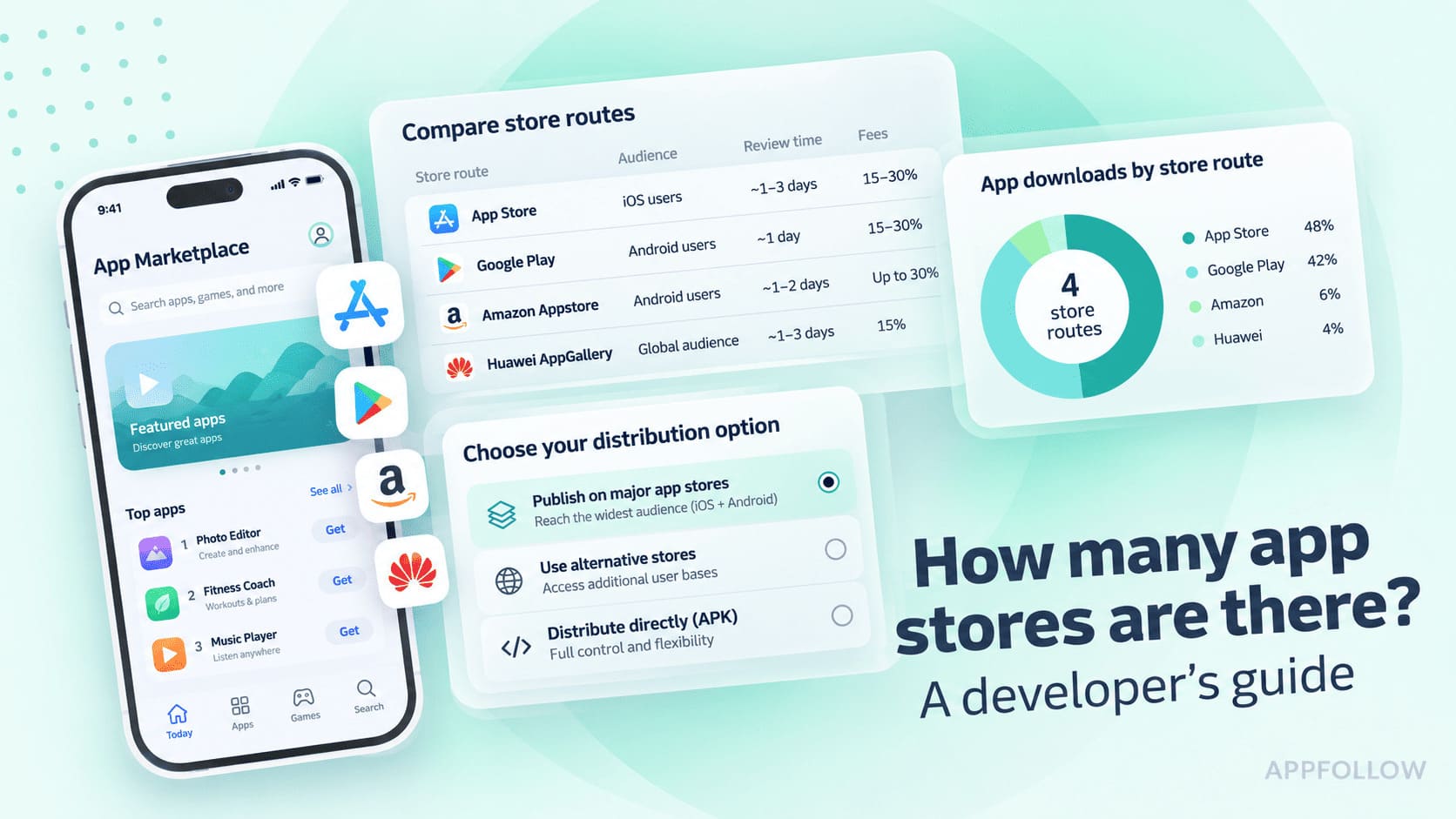
Table of Content:
Copper Horse’s June 2026 app-store inventory contains 161 entries, covering mobile, gaming, desktop and other categories, including stores that have closed. It classifies 65 primarily as mobile app stores. Those figures describe a research inventory, not a count of active publishing options.
Before you add another store to your launch plan, check whether it accepts your app and how you’ll keep that version current. Different billing requirements or a separate release process can turn an extra listing into recurring work.
Use the comparison below to identify viable publishing routes, then build your shortlist with the selection worksheet.
Key insights
These nine app stores serve different publishing needs. They are the channels covered in this guide, not an exhaustive worldwide list.
- Apple App Store — the main publishing route for apps built for iPhone and iPad.
- Google Play — a starting point for Android distribution, managed through Play Console.
- Samsung Galaxy Store — a channel to evaluate when Samsung Galaxy users matter to your app.
- Huawei AppGallery — a Huawei ecosystem route where the target platform and service dependencies need careful checking.
- Aptoide — an independent Android distribution option through Aptoide Connect.
- F-Droid — a main repository for eligible free and open-source Android builds.
- Amazon Appstore for Fire devices — a device-specific opportunity for Fire tablets and compatible Fire TV products.
- AltStore PAL — an alternative iOS marketplace with regional eligibility and developer-hosted app sources.
- Epic Games Store on mobile — a game-focused route that requires checking the current mobile publishing program.
How many app stores are there worldwide?
Copper Horse’s June 2026 App Stores of the World inventory records 161 entries across mobile, gaming, desktop and other categories. The UK government commissioned the research. Its primary categories include Mobile Apps and Closed Down Store.
Those entries are not interchangeable publishing opportunities. The figures below explain what the inventory includes; none is a verified total of active mobile stores accepting new apps.
What the inventory figures measure
Figure | Source scope | How to read it |
|---|---|---|
161 | All store records | Includes six AI Integration entries and historical stores. |
155 | Records excluding AI Integration | Still covers several platforms and closed stores. |
65 | Primary category: Mobile Apps | A category label; not a verified active mobile-store total. |
26 | Primary category: Closed Down Store | Historical entries, not current publishing candidates. |
The category figures sit within the headline total; do not add them together. Mobile distribution can also appear under Gaming, as Epic’s mobile store does. The 65 Mobile Apps records therefore do not capture every mobile publishing route.
Count distinct submission routes when building your own shortlist. Apple’s regional storefronts are not separate publishing platforms, and Aurora Store is a client for accessing Google Play’s catalog, rather than another independent submission destination.
Methodology: The count includes each object with an App Store field in the published JSON, excluding the introductory disclaimer. The source’s primary-category labels are preserved. Store profiles use owner documentation checked on 28 October 2026; no apps were installed or submitted. This is a dated inventory review, not an audit of every store’s current eligibility.
Which app stores can developers distribute through?
Use the comparison to rule out unsuitable channels, then read the profiles for the ones that fit your app. These are nine selected publishing routes. Their audiences, technical requirements and commercial arrangements differ; none guarantees incremental users.
For a publisher, agree with the app owner which entity holds the seller account, distribution rights and signing/update responsibilities before comparing fees. The profiles identify public requirements and the inputs that still need an app-specific agreement. A lower headline commission is useful only if the app can qualify, run and be maintained.
App-store comparison: platform, developer fit and first constraint
Store | Developer fit | Entry cost / publishing gate |
|---|---|---|
Public distribution for an iPhone or iPad app. | US$99/year; eligible seller and App Review. | |
An Android launch managed through Play Console. | US$25 once; verified account and applicable testing. | |
An app with a specific Samsung-device opportunity. | No signup/annual fee; commercial seller status. | |
An app serving the relevant Huawei devices and market. | Verified developer; monetized products need Merchant Service terms. | |
Independent Android distribution through Aptoide Connect. | Free eligible automated route; manual/IAP review needs US$69 or €69/year. | |
An eligible free and open-source build. | Eligible FOSS source, dependencies and build process. | |
A product built for a supported Fire-device use case. | Free developer account; exact Fire-device/runtime fit. | |
An app suited to developer-hosted alternative distribution. | Apple membership plus hosting/payment costs and regional terms. | |
A mobile game evaluating another publishing route. | Mobile onboarding first; published store baseline is not acceptance. |
Apple App Store
For an iPhone or iPad product, the App Store is a primary route to market. It offers discovery and distribution inside Apple’s ecosystem, but choosing it also commits the team to an Apple-platform build, review requirements and an ongoing release process. A publisher with only an Android binary needs a porting budget before a submission budget.
Account and publishing rights. Individuals can enroll; organizations need a legal entity, signing authority and normally a D-U-N-S number. The organization’s legal name becomes its seller name. Apple’s intellectual-property rules require the submitting person or entity to own or license the relevant rights, so a publisher needs more than access to a client’s build.
Costs and monetization. Separate the annual membership from transaction charges:
- Membership: US$99 per year; Apple shows applicable local pricing during enrollment.
- Small Business Program: qualifying participants receive a 15% commission rate on paid apps and Apple IAP under the program’s terms. The US$1 million proceeds test includes associated developer accounts; a publisher cannot assess eligibility app by app.
- Standard Schedule 2 baseline: 30%, with 15% for qualifying subscription renewals after more than a year of paid service. Program and regional terms override the applicable baseline; the EU example below illustrates why the market matters.
- EU example, effective 1 October 2026: Apple lists 26% for standard Apple-IAP transactions and 15% for the specified reduced-rate cases. Alternative in-app payment processing has separate 20%/10% rates. Use the EU schedule only for its stated scope, rather than applying one percentage worldwide.
What the launch involves. Prepare the App Store Connect record, signed build, screenshots, privacy information and review access. If sign-in is required, provide usable reviewer access and keep the backend available. Allow someone to answer review questions and ship a corrected build. Approval and discovery are separate problems; the listing still needs a relevant message and a user-acquisition plan.
Consider it if: you can serve a defined iPhone/iPad audience, maintain the platform build and support the applicable payment model.
Defer or skip it if: the iOS port has no owner or budget, the submitting entity lacks the necessary rights, or a core feature conflicts with the review rules. Resolve those gates before commissioning listing assets.
cta_get_started_yellow
Google Play
Google Play suits an Android product that needs a mainstream store presence and a managed testing and release workflow. The first decision is the publishing account, especially for a company managing several apps. Google distinguishes personal accounts from organization accounts; businesses should use the relevant organization route, which requires a D-U-N-S number.
Entry cost: US$25 once for Play Console registration. This is separate from transaction fees, verification and testing. New personal accounts created after 13 November 2023 must run a closed test with at least 12 testers continuously opted in for 14 days before applying for production access. Meeting the test threshold allows the application for access; it does not itself publish the app.
Transaction fees depend on market, product, payment route and program:
- In the EEA, UK, US, Australia and Japan, standard rates are 10% for auto-renewing subscriptions, 20% for other new-install transactions and 25% for other existing-install transactions. Add the 5% billing fee when Play Billing applies. The qualifying first-US$1-million branch is 10%, plus that billing fee where applicable.
- For remaining markets pending rollout, enrolled developers have a 15% tier on their first US$1 million of annual earnings and 30% above it; automatically renewing subscriptions are listed at 15%.
The updated-market rules classify users by their first install or first Play update relative to regional cutoffs: 30 June 2026 in the EEA, UK and US, and 30 September 2026 in Australia and Japan. An app’s launch date alone does not define the category.
Use the correct market/payment row and portfolio-level program eligibility when modelling margin. Keep the verified payout profile with the account’s operating records.
Before submission, settle the package identity and signing/update path, complete the required listing and policy declarations, and run the critical purchase and account flows. A publisher also needs a clear agreement with the app owner about who controls signing credentials, the store account and future transfers. Keep that operational responsibility explicit even when another team prepares the listing.
Consider it if: your target audience uses supported Android devices and you can maintain the required account, release and monetization setup.
Defer it if: a launch date assumes that paying US$25 creates immediate production access, required verification/testing is unfinished, or the publisher cannot reliably deliver the next signed update.
Samsung Galaxy Store
Galaxy Store deserves a test when you have a specific Samsung-device opportunity: relevant existing users, a compatible product or a channel plan aimed at that audience. Another listing does not automatically mean another audience; the pilot needs a reason users would discover and choose this version.
Publishing facts. Samsung requires a Samsung account, Seller Portal registration and commercial seller status for free and paid apps. Seller identity and financial details must meet its verification requirements. For a publisher, the seller account and delegated manager access are different roles; give the actual release team appropriate access rather than sharing the seller login.
Store costs. Samsung lists no sign-up or annual publishing fee. Under the standard Samsung Checkout model, developers/publishers receive 80% of net sales proceeds for paid apps and in-app items, and 85% for subscriptions. Taxes and other contractual deductions affect the net amount; custom agreements can differ.
The build decision is more important than the upload. If your Galaxy version uses Samsung IAP or other channel-specific features, decide how to prevent another store’s update from overwriting it. Samsung recommends a distinct package name for that case. Its guidance notes that two packages can coexist and that package-dependent integrations need retesting.
For a monetized variant, include purchase fulfillment, restoration and entitlement handling in QA. Keep its product configuration and rollout record separate. Use Samsung’s attribution resources and your app analytics to evaluate the pilot rather than counting every Galaxy Store install as incremental.
Consider it if: you can name the Samsung audience you are testing and maintain any separate package, billing and support work.
Defer it if: the only business case is a lower headline commission, or the team has not resolved cross-store updates and purchase behavior. No annual store fee does not make a separate build free to operate.
Huawei AppGallery
Start an AppGallery assessment by naming the target: an Android build for particular Huawei devices, or a HarmonyOS product. Huawei documents different formats and release paths. Those are separate engineering estimates, even when the consumer-facing product has the same name.
Access and accounts. Creating a HUAWEI ID is free; publishing also requires developer identity verification. Huawei supports individual and enterprise developer accounts, with different service access. Paid-app and IAP revenue sharing requires Merchant Service activation and the relevant merchant agreement.
Commercial terms. The current Merchant Service Agreement does not establish one universal revenue-share percentage: it says the share is specified in the related agreement for the particular paid product. Its settlement model also includes taxes, refunds and payment-channel charges. A historical headline split is therefore insufficient for a current forecast.
For a monetized launch, obtain the product agreement through the Merchant Service workflow in AppGallery Connect. Record the applicable share, payment-channel deductions, supported sales territories and settlement conditions before approving the business case. These are app/account-specific inputs, not missing numbers that can safely be filled with an industry average.
The technical work depends on the target:
- Android: map required services such as account sign-in, notifications, maps and purchases to the intended devices. Huawei provides integrations such as Account Kit and Push Kit; introducing them adds configuration, backend and QA work rather than automatically making every dependency compatible.
- HarmonyOS: scope the supported app package, runtime, certificates and release process separately. Do not equate an uploaded APK with a native HarmonyOS launch.
Then prepare the localized listing, privacy-policy URL, distribution settings and reviewable package in AppGallery Connect. A publisher needs the app owner involved in platform and signing decisions, not just a marketing handoff.
Consider it if: the Huawei-device audience is relevant to the product and the required platform build and services are funded.
Defer it if: core journeys still depend on unavailable services, or the paid-product agreement is unresolved. A working free-app pilot may establish technical fit; it cannot establish the economics of a later paid launch.
Aptoide
Aptoide’s Android route has two materially different starting points. A free app already on Google Play, without IAP, can use the documented automated-distribution route. A manually submitted or IAP-enabled app adds a subscription, ownership review and, where relevant, billing integration. Choose the route before estimating effort.
Entry and revenue share:
- Manual submissions and ownership requests require an active Aptoide Connect subscription: US$69 or €69 per year, automatically renewing. Eligible automated distribution of Play-listed apps without IAP is free.
- For Android installs from Aptoide and its partner stores, the published base developer share is 75% of net IAP sales, defined as gross IAP sales minus sales taxes. Revenue Boost can increase the effective share, but its advertised “up to 93%” depends on player bonus spending; use the base in a conservative forecast.
- The 90% direct-to-consumer Android model and 80% Aptoide iOS-store model are different routes. Do not substitute either percentage into an Android partner-store calculation.
Publisher access has a concrete dependency: ownership verification. For a Play-listed app, Aptoide uses its Google Play support email. If the Connect account email differs, verification goes to that support address. For an app not on Play, submit the ownership request with app and company/person details; its review requires the paid subscription.
For IAP, implement Aptoide’s Android Billing SDK, configure the products and purchase-verification key, and test the complete flow in its sandbox. The manual review covers installation, sign-in, purchases, content and listing consistency. Aptoide describes 7–10 business days as typical review time, not a guaranteed launch SLA.
Open Add App in Aptoide Connect with the package name or Google Play link. For a publisher, establish control of the verification email and release artifacts with the app owner before paying for a manual submission.
Consider it if: you have a credible Android acquisition hypothesis and can support the applicable billing/review route.
Defer it if: ownership cannot be verified, the app’s economy assumes a higher guaranteed share, or nobody can maintain the billing integration and reconcile its purchases. Assess the separate iOS offering under Apple’s applicable distribution conditions.
F-Droid
F-Droid’s main repository is a candidate for an open-source Android product whose maintainers want an additional distribution channel. It has an immediate exclusion rule: the submitted app, dependencies and build tooling must meet the repository’s free/open-source requirements. A proprietary product with irremovable proprietary SDKs does not fit.
What a developer or publisher must supply. The quick-start guide requires current public source code, a FOSS licence, eligible dependencies, usable build information and listing metadata. If you are not the author, it instructs you to notify the author and confirm that they do not oppose inclusion. A publishing relationship does not replace that step.
The cost is the variant you maintain. F-Droid names Firebase and Google Mobile Services as non-FOSS dependencies that are not accepted in its main repository. Removing them may change the product. Decide which functionality remains, document any difference for users and own the resulting build and support work.
A concrete example appears in the repository’s Meteocool listing: it says rain alerts require Google’s push service and are only in the Google Play version. This is a published feature distinction, not a result of testing performed for this article.
Prepare release tags and metadata for the eligible build, then follow the submission guide. The source-build and inclusion review are different from uploading a signed binary to a conventional store. Treat this route as distribution of a freely obtainable build, rather than a paid-download checkout.
Consider it if: an eligible FOSS release already fits the product and someone can keep its source, metadata and updates current.
Skip the main repository if: the product must remain proprietary or removing disallowed components would break its core value. Defer if the FOSS variant is feasible but unfunded; an extra listing is not a reason to leave users with an abandoned build.
cta_get_started_purple
Amazon Appstore for Fire devices
Amazon belongs on a Fire-device distribution plan. Its general Android-phone Appstore service ended on 20 August 2025; the continuing offering covers Fire tablets, Fire TV and Fire TV built-in products. A publisher seeking another Android-phone listing should exclude that discontinued route immediately.
Choose the device and runtime before estimating the port. Selected Fire devices use Android-based Fire OS, while newer Fire TV hardware can use Vega OS and its separate development tools. An APK porting estimate cannot stand in for a Vega estimate.
Costs and publisher requirements:
- Registration: Amazon advertises a free developer account. Its submission process requires the app, promotional assets and compliance with the content/review requirements.
- Royalties: the standard baseline is 70% to the developer. Eligible new/small developers can receive 80% through the Small Business Accelerator Program. Its published test includes less than US$1 million of Amazon Appstore revenue in the prior calendar year, with program conditions and custom-agreement exclusions.
- AWS credits: the program’s additional benefit equivalent to 10% of app revenue is a credit benefit, not another 10% cash royalty. Do not forecast an automatic 90% cash payout.
For Fire OS, Amazon explicitly says Google Play services are unsupported and provides porting alternatives. Inspect the particular Firebase libraries and APIs your app uses; some work without Play services and others need replacement. On TV, also budget for remote navigation and the screen experience.
A publisher using third-party IP must be ready to provide Amazon with a signed rights-holder letter or licence agreement as a PDF; a screenshot of an agreement is not accepted documentation. Keep that material with the app’s release record.
Consider it if: Fire tablet or TV use is part of the product, the target runtime is supported, and the port and review work have owners.
Skip the discontinued phone route. Defer the Fire launch if the app relies on unsupported services, lacks usable TV controls where required, or its margin model assumes benefits for which the developer is not eligible.
AltStore PAL
AltStore PAL fits an iOS product that benefits from alternative distribution and can support a developer-hosted release model. Its developer site lists the EU, Japan and Brazil. For users, Apple separately requires an eligible account region and physical presence, with device/software differences. A global iPhone audience is not the reachable audience for this route.
You are publishing an app through PAL, not applying to operate a new marketplace. Keep those two roles separate when reading Apple’s eligibility requirements. The app still needs the relevant Apple Developer account and alternative-distribution setup.
The release workflow creates four concrete responsibilities:
- Submit the app through App Store Connect for notarization. This is different from full App Store review.
- Retrieve and host the alternative distribution package.
- Create and maintain the source that supplies the app’s metadata.
- Make that source discoverable and keep its app/version information and download path working for updates.
The money is split between different services. AltStore advertises 0% marketplace commission, and Apple Developer membership still costs US$99 per year, with local pricing during enrollment. Budget for package hosting, your payment provider and purchase-support processes. For EU alternative distribution, Apple’s terms effective 1 October 2026 impose a 5% Core Technology Commission on covered digital transactions, including the specified linked-out sales. That EU rate is not a statement of Japan’s or Brazil’s terms.
For a publisher, assign the Apple-account relationship, hosting credentials, release metadata and payment support before onboarding a client app. Promote the source through a channel you can actually use; the presence of a source is not evidence that users will find it.
Consider it if: there is a specific distribution or commerce reason to use PAL, your intended users qualify, and the team can operate the hosting and update path.
Defer or skip it if: most intended users are outside the supported footprint, the team needs Apple’s App Store checkout workflow, or no one owns the alternative release infrastructure. Start with the PAL developer guide and Apple’s terms for the exact territory; use those to cost the implementation before setting a launch date.
Epic Games Store on mobile
The first gate for Epic is mobile publishing access. Epic’s current Web Shops FAQ directs developers launching on its mobile store through the self-publishing tooling to the Mobile Early Adopter program, via an account manager or the Leads Intake form. That is a concrete intake route; creating an ordinary developer account is not itself confirmation of mobile-store acceptance.
For a publisher, send the intake request for the actual game and intended platforms/markets, then obtain confirmation of the applicable mobile onboarding path and agreement. Epic’s standard organization workflow uses business, tax and payout information and distribution agreements. Keep its general self-service guidance distinct from mobile program acceptance.
Published commercial baseline. Epic currently advertises 100% of the first US$1 million in net revenue per product, per year, followed by an 88% developer / 12% Epic split. Its standard publishing FAQ also lists a recoupable US$100 submission fee per game. Establish their application to the accepted mobile product in its agreement before relying on them in a forecast.
Do not treat a Web Shop as the same distribution channel. Epic says the Web Shop and listed product share the first-US$1-million revenue threshold; a Web Shop can sell consumables even without the base game being distributed on Epic. Web-shop access therefore does not establish a mobile-store launch.
Device access is another filter. Epic documents Android availability worldwide and regional Apple-device availability. Its current mobile requirements distinguish the EU, Japan and Brazil and include iPad limitations. Use the supported device/OS/territory combination for the game, rather than Epic’s total PC-and-mobile audience.
After acceptance, cost the mobile build, applicable store/payment integration, player accounts, purchases and updates. Platform charges such as Apple’s applicable alternative-distribution commission are separate from Epic’s advertised share. Budget an acquisition plan for the game; placement or promotional participation should not be assumed.
Consider it if: you have a suitable mobile game, confirmed publishing access and a supported player market, with enough capacity to maintain another release channel.
Defer it if: acceptance or mobile terms are still unresolved, your intended devices are unsupported, or the business case depends on automatically reaching Epic’s entire audience. Use the intake route to resolve the program gate before commissioning store assets.
For app stores in China and other regional markets, check the specific operator’s publishing path and supported devices. An operator’s headquarters or total-user figure does not establish a viable route for your app.
Watch for outdated store lists: Setapp Mobile closed on 16 February 2026. The broader Setapp subscription service is separate, so a page about that service does not establish that the former mobile marketplace accepts apps.
How to choose app stores for your app
Put eligibility ahead of scoring. Comparing app distribution platforms is useful only after you know which ones can accept your app, run it correctly and support the way your business gets paid.
Filter by eligibility and technical fit first
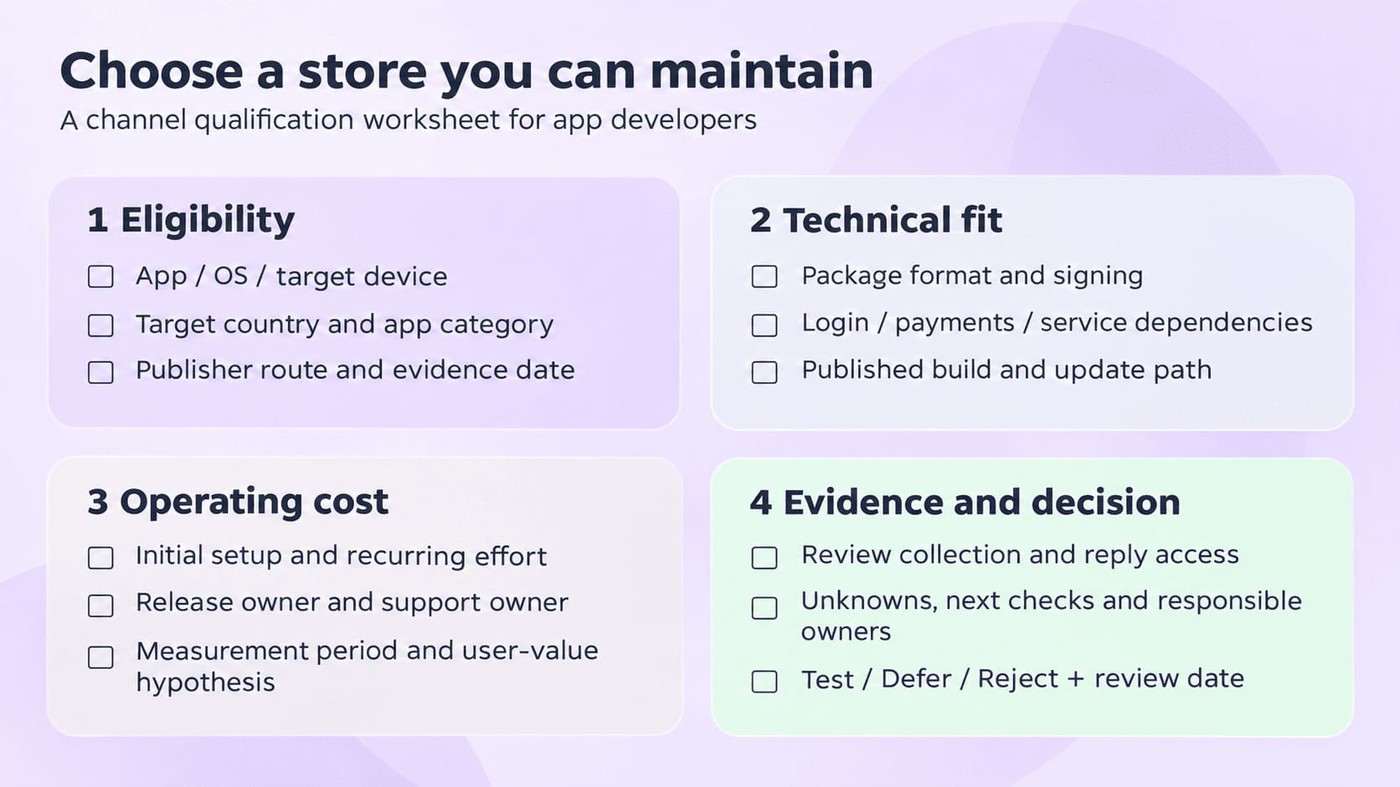
Ask the release engineer to check the candidate with whoever owns the target market. Keep the evidence link and date beside each answer:
- Publisher and market: Can your entity distribute this app category to the intended users, countries and devices?
- Build and updates: Are the package format, signing arrangement and update path supported? Can existing users receive the next release?
- Dependencies: Do login, maps, push notifications, analytics and required platform services work on the target devices?
- Payments and support: Can purchases and subscriptions work under the applicable terms, and can the team support users in the launch languages?
Test the critical journeys on the intended device before declaring a channel ready. A successful install tells you little about a broken purchase or sign-in flow.
One current check: Android developer-verification protections began on 30 September 2026 for participating stores in Brazil, Indonesia, Singapore and Thailand. Google’s FAQ distinguishes that initial rollout from other stores and direct sideloading; verify the applicable route rather than assuming one global rule.
Include market-specific app localization in this assessment, before promising a launch date.
Compare incremental reach with the cost to maintain it
A large store audience makes an opportunity worth investigating. It does not tell you how many people will discover your app there, or how many could already get it through your existing channel.
Separate the questions. Store-console data can show downloads; your app analytics can show activation and retention. Attribution and a pilot design are needed to judge incremental value. Reviews help identify friction, but they cannot establish channel profitability.
Then price the recurring app distribution work. Here is an illustrative planning example: eight release and QA hours plus four support hours each month gives you 12 hours of maintenance. At an assumed internal cost of €40 an hour, that is €480 a month before translation, platform fees or unexpected SDK work.
Replace every assumption with your own numbers. Compare a conservative estimate of the channel’s incremental contribution with that ongoing cost, as well as the initial setup effort.
Agree on the evaluation period and continue/change/stop conditions before launch. A pilot can justify further investigation even while attribution remains uncertain; its download total alone cannot settle the investment decision.
Choose a focused launch portfolio
There is no store quota to fill. The following hypothetical examples show how the same checks lead different developers toward different next steps:
Illustrative distribution decisions
App | Plausible next step | Evidence needed |
|---|---|---|
Proprietary Android utility already on Google Play | Evaluate Galaxy Store; defer F-Droid’s main repository for the proprietary build. | Samsung audience fit, seller eligibility, working build and a maintenance owner. |
Free/open-source Android project | Evaluate F-Droid inclusion. | Public source/licence, eligible dependencies, build instructions and an owned update process. |
Mobile game considering another iOS channel | Evaluate Epic’s current mobile program for the exact territory. | Program and app eligibility, device support, terms, release capacity and user support. |
For each candidate, record the app/platform, target market, eligibility result, build dependencies, payment route, update path, review access, recurring effort and evidence date. Add a release owner, support owner and decision: Test, Defer or Reject. Unknown is a useful answer when it has an owner and a next check.
Keep the first pilot narrow enough to learn from. Set a review date, capture its operating costs, and check whether users reach the intended activation step. If another channel looks promising but nobody can maintain it, Defer is a sound decision.
cta_get_started_purple
What changes when you publish to multiple app stores?
Once a channel passes the selection checks, add it to the release and support routine. The work starts with knowing exactly what users can download there.
Maintain listings and releases by store
Keep a release record for each store: published build, package identity, signing arrangement, required services, listing assets/locales, review status, rollout owner and console link. Update it whenever a release or store requirement changes.
In an illustrative example, your login fix ships as version 1.8 on Google Play while another store still offers 1.7. A complaint from that second channel does not establish that the fix failed. Check its published build and reproduce the problem on the relevant device.
After a rollout, the release owner should verify that the intended package is available and that existing users can update. Record rejected submissions or delayed rollouts with a named next action; do not leave a pending version buried in a console.
Listing work needs the same discipline. Keep the store’s metadata and creative requirements alongside the app store optimization workflow, so a copied description or outdated screenshot does not become the next release task.
Keep ratings and support evidence separate by source
For feedback, preserve the source from the moment a review enters the workflow. Keep its date, language, rating, issue tag, owner and reply status, plus version/device context when the source provides it. A missing field stays missing.
Put the number of reviews and the date range next to any average you report. A review-star average for a selected period and a store’s displayed rating answer different questions. Combining store ratings into one figure can hide which channel needs attention.
Useful review analysis leads to a handoff: support identifies a recurring issue, engineering checks the evidence, and the release owner confirms the affected build. The response should reflect what the team has actually verified. A promise to investigate and confirmation that a fix is available are different messages.
Available context also varies by connection. AppFollow’s Reviews Feed documentation, for example, says Google Play review-country data requires a Country Data Connection. Keep that dependency visible when comparing markets; missing country data is not evidence that a market has no complaints.
Someone must now inspect and act on several feedback queues while keeping their source context. A shared review-management workflow can help organize that work.
How AppFollow can help manage supported app stores
Use AppFollow to bring supported review sources into a common workflow, then keep the store-specific context attached to each decision. Start by checking what your connections actually support.
Confirm source and capability coverage first
Build a coverage check alongside your store shortlist. For each source, establish what data AppFollow can collect, what the configured connection lets your team do, and who can complete the setup. Supported review work and ASO data have different requirements.
Selected AppFollow connections: review work and setup requirements
Source / connection | Review work | Setup and boundary |
|---|---|---|
Receive and respond to reviews. | Owner access and API-key setup. ASO data and reporting concerns need the Invite User connection. | |
Monitor and reply to reviews; apply manual and semantic tags. | Required Samsung Connect setup, including the invitation workflow. | |
Reply to reviews and edit responses. | AppGallery Connect Client ID and Key are required. | |
Add review-country data for market analysis. | A Country Data Connection is required. Missing country data does not establish an absence of complaints. |
Use this as a starting check for the named sources, not a complete integration catalog. For another store on your shortlist, confirm the source, permissions and available features before assigning its review queue.
The ASO Dashboard is separately scoped to App Store and Google Play. Review support for an alternative marketplace does not establish that the same ASO metrics are available.
Triage feedback and decide what to fix next
Here is a documented workflow you can adapt to a release. It is an illustrative operating example, rather than a customer result:
- Add the relevant app sources and configure their required review connections. Verify collection and reply access before assigning the queue.
- Inspect feedback over the same release window, retaining each source. Record any gaps in collection or available context.
- Apply a consistent issue tag where supported. For login complaints, keep the original review and available version details attached to the issue.
- Have engineering verify the affected build and investigate. After the status is confirmed, support can reply through the permitted source connection.
- Review later complaints using the same source and period definitions. Check new issues as well as reply coverage; a quiet queue needs a data-coverage check before it becomes a success story.
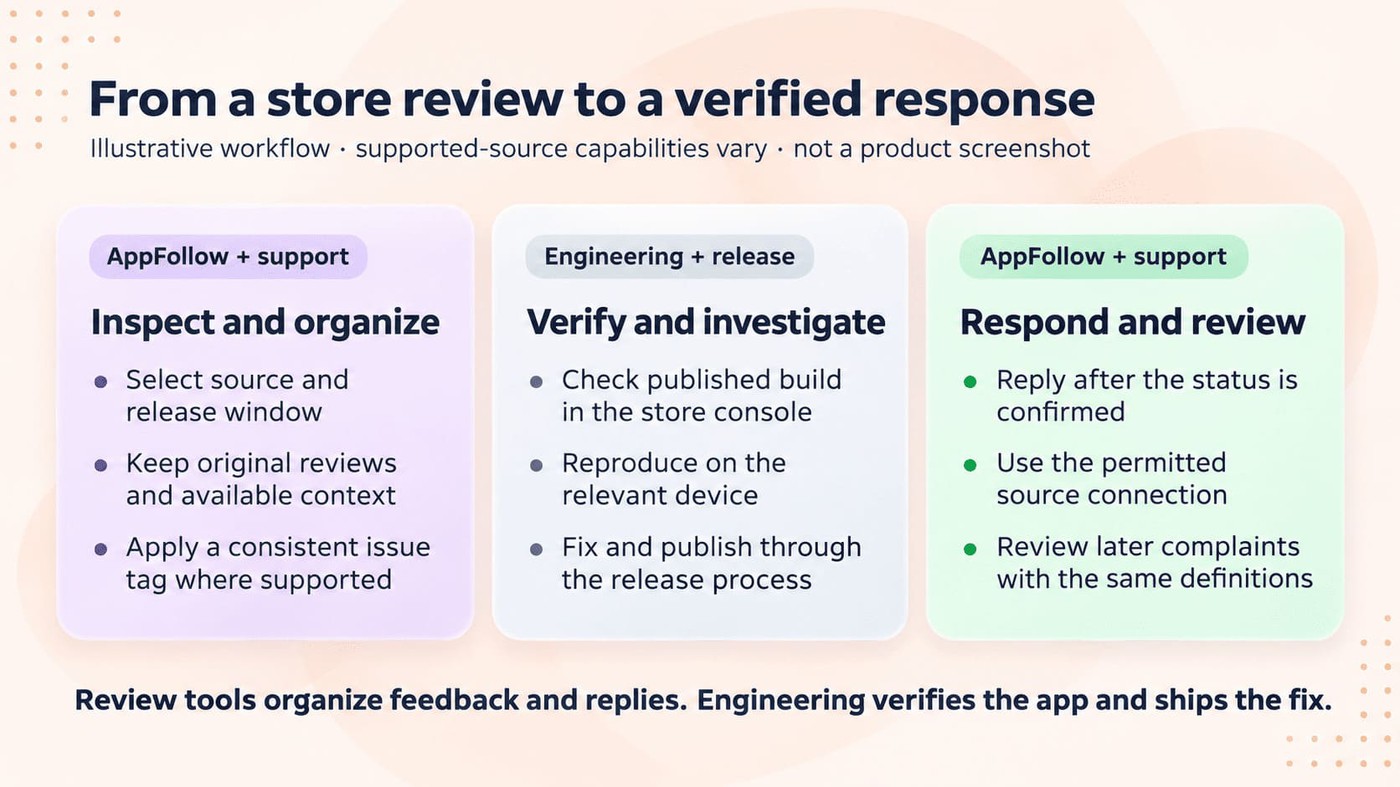
This gives the team an issue to investigate and a reply to verify. Measure installs, activation and channel economics in the relevant consoles and app analytics.
cta_get_started_yellow
FAQs
What are the two main app stores?
Google Play is the mainstream Android marketplace, and Apple’s App Store is the principal route for Apple’s mobile ecosystem. They are the usual starting point for a mobile distribution plan, but additional routes include OEM stores, independent marketplaces and region-specific iOS alternatives. Your app’s platform, target users and eligibility determine which of those belongs in the plan; a familiar store name is not enough.
How many Android app stores are there?
This research does not establish an exhaustive count of active Android stores. The ecosystem includes Google Play, manufacturer marketplaces, independent stores and repositories with different acceptance rules. Directory totals may also include closed services or clients for another store’s catalog. To build a publishing shortlist, count distinct operating submission routes that accept your app, then check each one against its owner’s current documentation.
How many iOS app stores are there?
There is no verified worldwide active total in this guide. Apple’s App Store remains the principal route, while alternative marketplace availability depends on territory, device, OS and operator. Apple currently permits alternative distribution in Brazil, Japan and the EU, with regional differences. A marketplace still needs to operate in the relevant location and accept your app; platform permission alone does not establish its availability.
Can I publish the same app in several stores?
Yes, where the relevant platform and store rules allow it. Android explicitly supports distribution through multiple marketplaces. The same product may still need a different package or changes to billing, services and signing, and each route needs a working update process. For iOS, check the applicable Apple and marketplace eligibility. Keep one release record per channel so that version and support responsibilities remain clear.
Are alternative app stores safe?
Safety depends on the operator, how apps are sourced and reviewed, and how updates reach users. Assess those practices alongside publisher identity and the documented support path. OEM, third-party or open-source status alone does not establish that every app is safe. On iOS, notarization provides a baseline platform-integrity check; it is different from the full App Store review, so keep that distinction in your assessment.