ASO Keywords: How to Find, Prioritize, and Track App Store Keywords

Table of Content:
- Key insights — the state of Google Play keywords in 2026
- What are ASO keywords?
- How to choose ASO keywords that can actually rank
- How to do Google Play keyword research
- Where to place Google Play ASO keywords (with examples)
- Localising Google Play ASO keywords across 50+ markets
- Test your Google Play keywords with store listing experiments
- How to measure and track Google Play keyword performance
- Find Google Play Keywords Faster with AppFollow
As of July 2026, ASO keywords are the search terms people use to find apps in the App Store and Google Play. They matter because Apple search drives discovery, Google Play reads description metadata to understand relevance, and your job is practical: find the right terms, place them in the right fields, and track what moves.
Search is where app discovery gets real. Apple says 70% of App Store visitors use search, and nearly 65% of downloads happen right after it. On Google Play, keyword work behaves differently because the title, short description, full description, and category all help the store understand what your app is about.
That is why ASO keyword research cannot stop at “high-volume terms.” A keyword only matters when it matches the user’s intent, fits the product, and gives the store enough context to rank your app for the right searches.
This guide shows how to search keywords for app store optimization, sort the terms worth keeping, place them where they matter, and track what actually moves across iOS and Google Play.
It pulls together fresh insight from Ilia Kukharev, Product Manager, Yaroslav Rudnitskiy, Senior Professional Services Manager, Karen Taborda, Customer Growth Team Lead, plus lessons from Miro’s cross-device product team and Vizor’s player feedback workflows.
Use it to answer four practical questions:
- Which ASO search terms bring installs, not just impressions?
- Where should your strongest keywords live on iOS and Google Play?
- How do you spot lower-volume phrases with sharper intent?
- When rankings move, what should you track before touching metadata?
Key insights — the state of Google Play keywords in 2026
Google Play ASO keywords now influence far more than search visibility alone. The strongest Android growth teams treat keyword optimization as one component of a broader acquisition and retention system.
- Ranking on Google Play means competing with roughly 2.8 million other apps, many of them targeting the same search terms.
- Search remains one of the most valuable discovery channels available to app marketers because users arrive with clear intent.
- Google doesn't give you a hidden keyword field. Instead, it looks at the visible text throughout your store listing to understand what your app is about.
- The available metadata space is still limited to 30 characters in the title, 80 in the short description, and 4,000 in the long description.
- Repeating a keyword ten times won't produce ten times the ranking benefit. Relevance comes from the overall context of the listing and how well it matches the user's query.
- Google Play supports more than 50 locales with independent metadata. Localization often creates faster growth opportunities than further optimization in a saturated primary market.
- Install velocity, retention, ratings velocity, review recency, and Android Vitals all contribute to ranking performance. Keywords alone rarely sustain top positions.
- Store listing experiments remain one of the most underused growth levers despite being built directly into Google Play Console.
"Google Play gives you more keyword surface area than Apple: three indexed text fields, 50-plus locales, and an algorithm that rewards engagement alongside relevance. Most teams treat the long description as filler. We treat it as a strategic asset because that's where semantic coverage, localization, and organic growth start to compound."
— Yaroslav Rudnitskiy, Senior Professional Services Manager, AppFollow
What are ASO keywords?
ASO keywords are the words and phrases users type into app store search when they want to solve a problem, find a category, or compare apps. Stores use them to understand relevance, match your app to intent, and decide whether your listing deserves visibility.
Put simply: ASO keywords connect what users search for with what your app actually does. On the App Store, they influence fields like the app name, subtitle, and keyword field. On Google Play, they also matter across the title, short description, and full description.
A good ASO keyword is not just a popular phrase. It is a phrase your app can honestly satisfy. “Money app” may bring broad traffic. “Weekly budget planner” brings a user with a clearer need, which usually makes the keyword easier to support with metadata, screenshots, and conversion-focused copy.
Concrete examples by category:
| Category | Broad keyword | Sharper ASO keyword | Why it works better |
|---|---|---|---|
| Finance | money app | weekly budget planner | The user is not just browsing finance apps. They want a budgeting workflow. |
| Game | puzzle game | offline match 3 puzzle game | The phrase adds genre, play mode, and intent. Better fit for users who know what they want. |
| Health & fitness | fitness app | home workout tracker | The term points to a specific use case, not the whole fitness category. |
This is the practical center of ASO keyword optimization: find the terms your users actually type, place them where each store can read them, and track whether rankings, visibility, product page views, and installs improve after the update.
What are Google Play ASO keywords?
Google Play ASO keywords are the search terms an Android app targets across its title, short description, and long description to rank higher in Play Store search and category browse.
When someone searches the Play Store, Google needs to decide whether your app is a good match for that query. Keywords help make that connection. The challenge is that most of the signal comes from just three metadata fields: your title, short description, and long description.
The goal is to rank for the terms your ideal users actually type into the Play Store.
Why Google Play indexes keywords differently from Apple
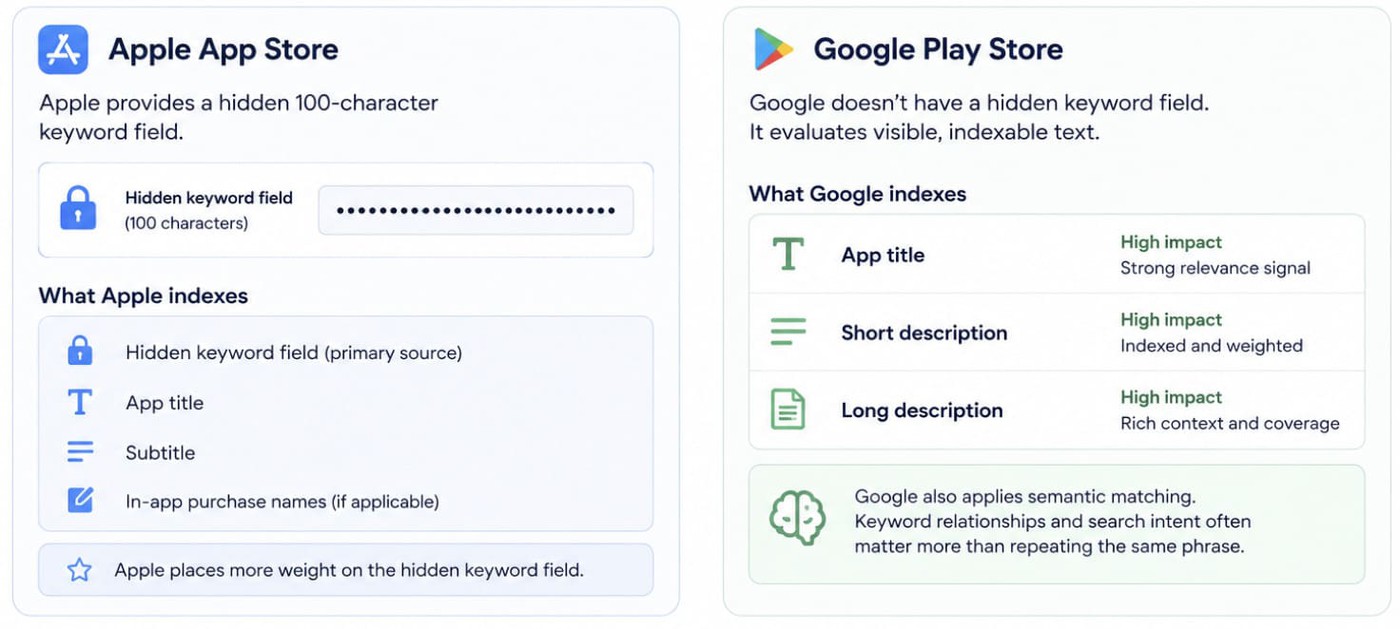
Apple gives developers a hidden 100-character keyword field. Google doesn't.
Instead, Google Play evaluates visible, indexable text across the app title, short description, and long description. Those fields become the primary source of keyword relevance. Google also applies semantic matching, which means keyword relationships and search intent often matter more than repeating the same phrase several times.
That's why successful Google Play SEO focuses on coverage, relevance, and context rather than stuffing exact-match terms into every field. The best-performing Google Play Store keywords are usually woven naturally into metadata that reads well for users.
How to choose ASO keywords that can actually rank
Most keyword lists fail before the app store ever sees them.
Not because the team picked “bad” words. Because they picked words in the wrong order. Volume first. Relevance later. Difficulty when someone finally asks, “Can we even rank for this?”
Flip it.
- Start with fit. If the keyword does not describe the app honestly, cut it. A meditation app can chase “sleep tracker” because the volume looks good, but if the product does not track sleep, the listing will leak trust fast. The user taps, sees the mismatch, leaves, and the store gets the signal.
- Then check demand. A keyword needs enough search activity to be worth a metadata slot. Not huge. Useful. “Budget app” may look attractive, but “weekly budget planner” may bring a user who is much closer to installing.
- After that, check difficulty. This is where ASO gets less romantic and more operational. If the top results are category leaders with stronger ratings, stronger install velocity, and years of keyword history, your brand-new app probably should not spend its best title slot there yet. Put the reach term in the long-term plan. Use the metadata for the term you can enter now.
- Finally, check current traction. If your app already ranks #18 for a relevant phrase, that keyword is not cold. The store already sees a connection. Improving from #18 to #8 is often easier than trying to make a brand-new keyword appear from nothing.
A practical scoring model:
- Relevance: Does the phrase describe what the app actually does?
- Popularity: Do enough people search it to matter?
- Difficulty: Can this app realistically compete in the current results?
- Install intent: Does the searcher sound ready to download an app like this?
- Current rank: Is there already evidence that the store connects your app to the query?
The best ASO keywords usually sit where those five signals overlap. Not the biggest term. Not the easiest term. The term your app can win and hold.
Example: for a finance app, “money app” may be too broad. “Budget planner” is clearer. “Weekly budget planner” is sharper. “Couples budget planner” is smaller, but the intent is obvious. If the app really supports shared budgets, that last phrase may be the better first bet.
That is the job of ASO keyword research: not collecting every possible search term, but choosing the few that deserve real metadata space.
How to do Google Play keyword research
When I review app listings, I rarely see a keyword problem. I usually see a research problem.
Teams gather a list once, add a few terms to the metadata, then move on. A month later, competitors have changed their listings, search behavior has shifted, and the keyword set is already stale.
The teams that keep growing revisit the process regularly. They look for new opportunities, test assumptions, and keep pruning keywords that no longer pull their weight.
Each research method reveals a different part of the market. Used together, they create a much clearer picture than any single approach. Below, we walk through each method, using the four research approaches built into AppFollow.
Method 1: Manual search (when you don't have an ASO platform)
The most underrated source of keyword ideas is still your own product knowledge.
Start with a 30-minute session involving product, marketing, and customer-facing teams. Build a list of 20–30 candidate terms across four buckets:
- what the app does,
- when people use it,
- key features,
- and category-defining competitors.
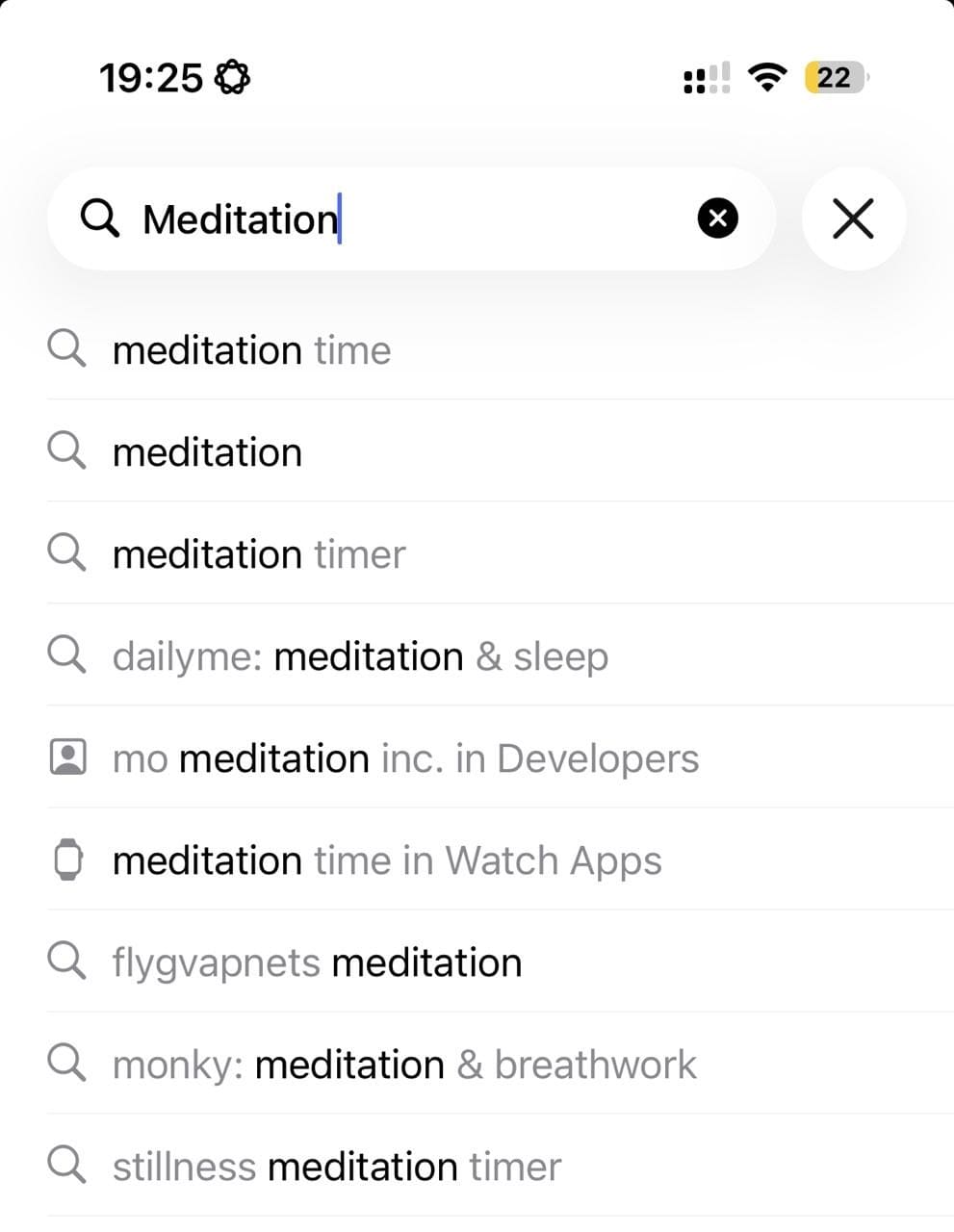
| When I do this exercise, I don't worry about being right on the first pass. For a meditation app, I'd throw in meditation, mindfulness, sleep sounds, anxiety relief, and a handful of related ideas. Then I'd head straight to the Play Store search bar. The autocomplete suggestions usually tell me more about real demand than my initial brainstorm ever does. |
Next, validate those assumptions inside the Play Store itself. Type each term into the search bar on a real Android device and study the autocomplete results. Those search suggestions reflect actual user behaviour and often reveal long-tail opportunities that never emerge in brainstorming sessions.
Repeat the process on desktop and across different devices if possible. Autosuggest results can vary by region, language, and user profile.
If you want faster results with the same level of controll try Appfollow manual research where you as well type a keyword and get a list of relevant ideas to shortlist.
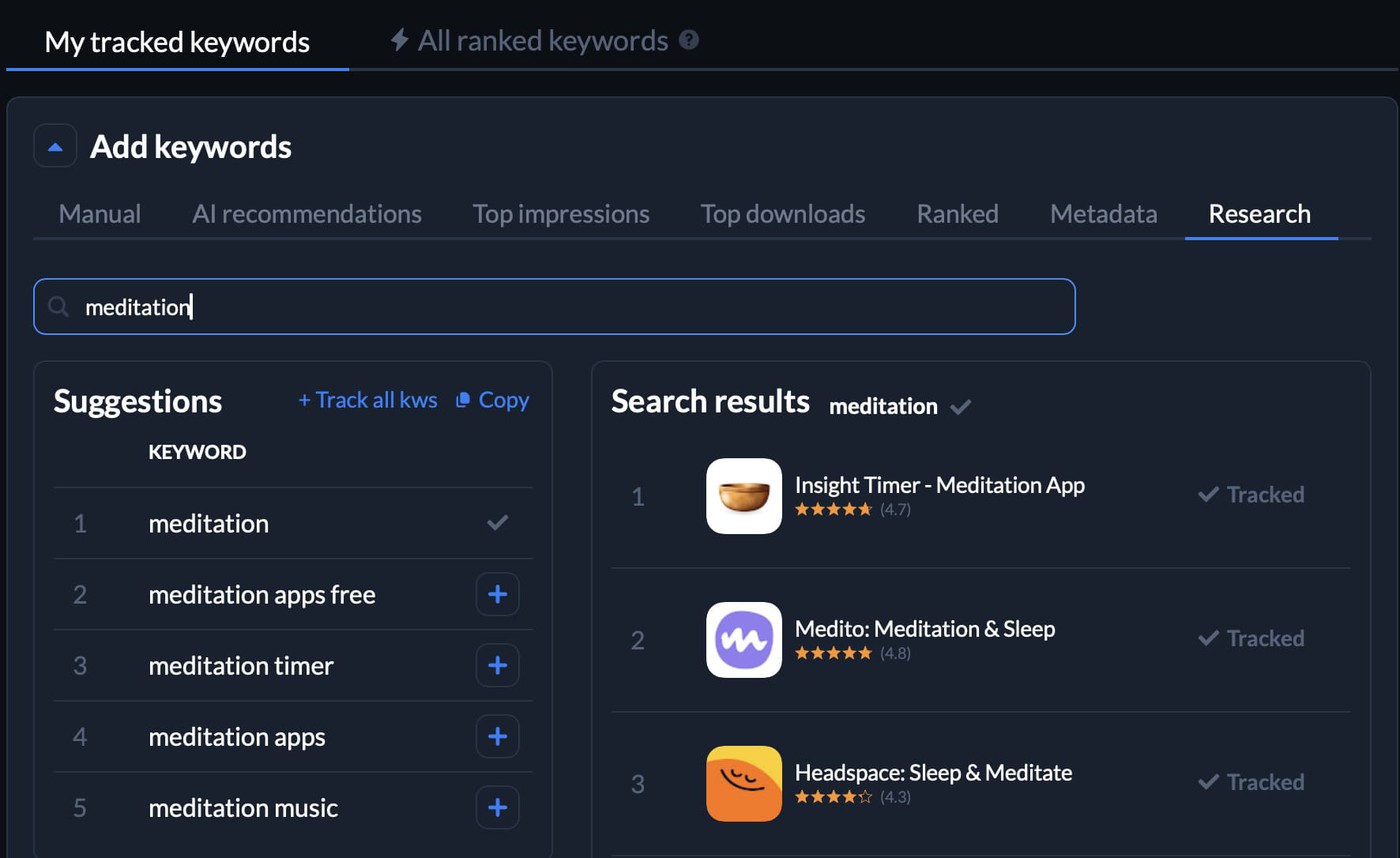
Check how it works during a free trial.
Method 2: Competitor research (the keywords your rivals already rank for)
If I had to choose only one research method, competitor analysis would probably be it.
Every keyword a competitor ranks for represents validated demand. Someone is searching for it. The question is whether you should be visible for it too.
- Start by identifying three to five direct competitors in your primary market. Focus on apps solving the same problem for a similar audience. The biggest app in the category isn't always your closest competitor.
- Review their titles, short descriptions, long descriptions, and screenshot captions. Patterns emerge quickly. Certain Google Play Store keywords appear repeatedly because they drive visibility and installs.
- From there, build a competitive gap list. These are keywords competitors rank for that your app doesn't currently target. Gap analysis often uncovers opportunities that keyword brainstorming misses entirely.
Or let AppFollow do it for you. Choose your competitor's app and surface every keyword each tracked competitor ranks for alongside your own coverage. Let's say Headspace is your competitor:
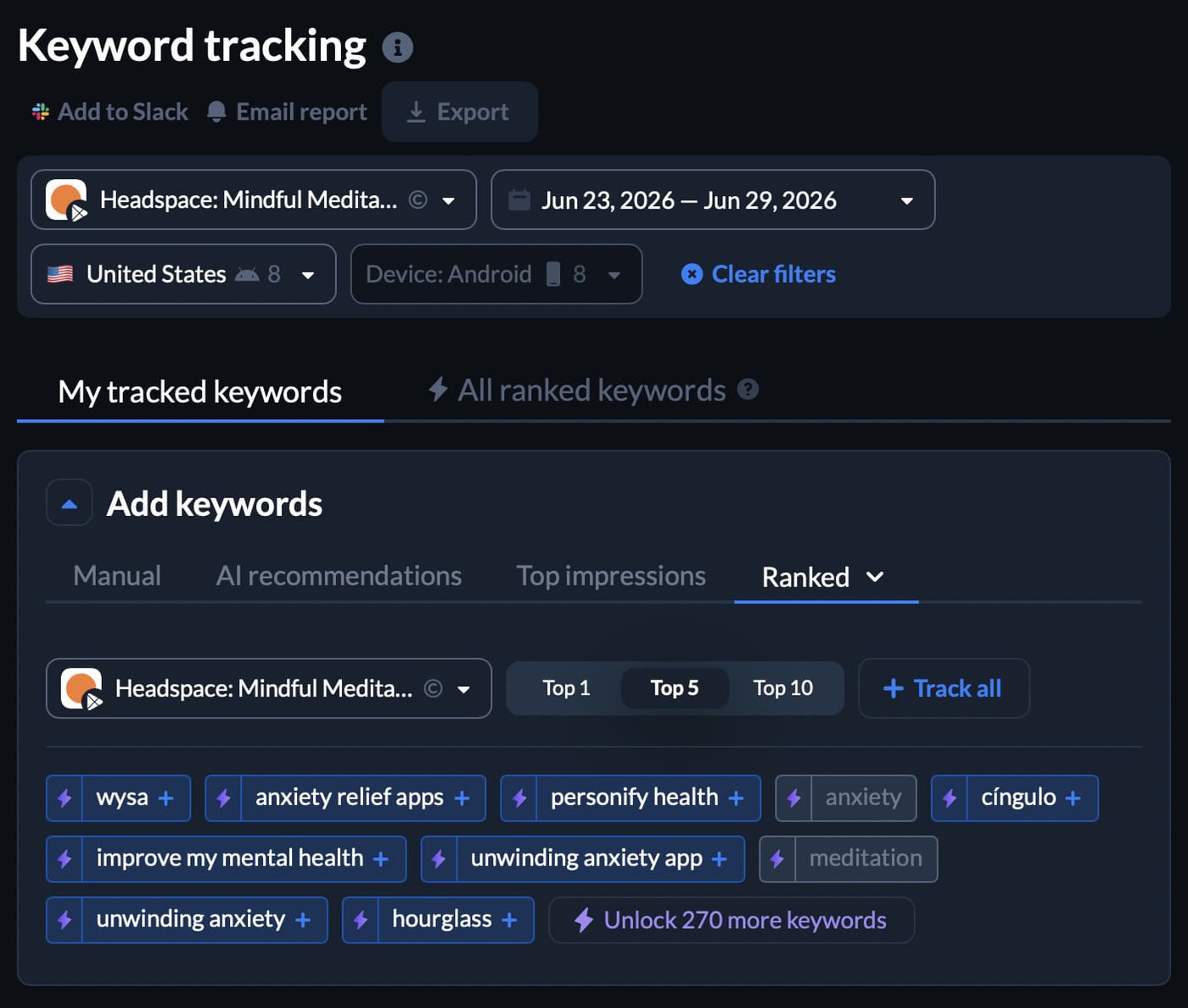
You can see what keywords it already ranks for, its metadata, top downloads, ai recommendations, ranking history data. Use a free trial to check your competitors.
Smart tip: Never place a competitor's brand name in your own metadata. Both app stores prohibit the practice, and Google Play regularly removes listings that attempt it.
Method 3: AI recommendation (let the model find what humans miss)
Manual research and competitor analysis tend to uncover the keywords your category already understands. AppFollow AI recommendation is useful for finding adjacent demand that nobody has explicitly targeted yet.
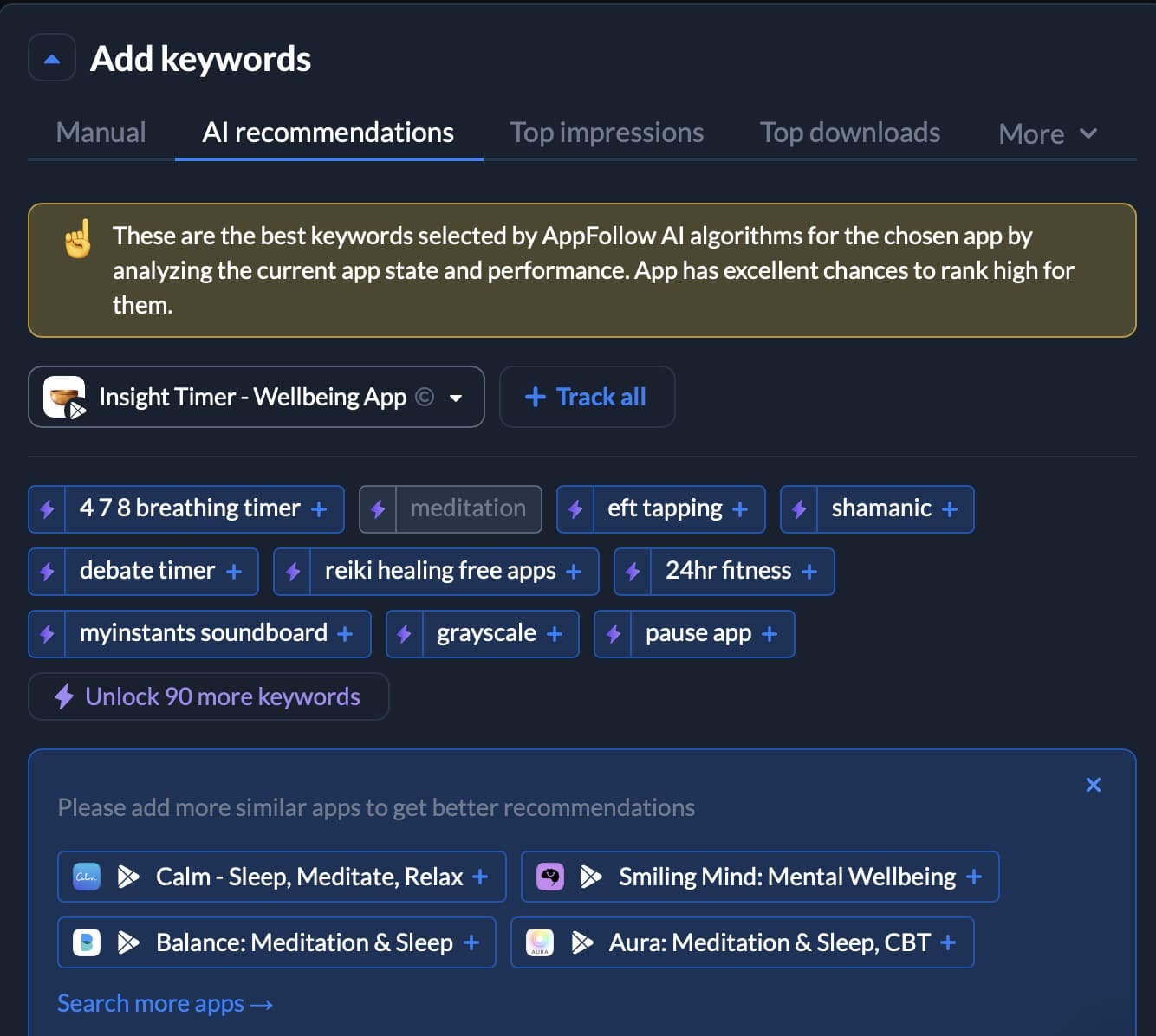
AI suggestions of keywords in AppFollow become especially useful when your category is changing faster than keyword data can keep up.
Take a meditation app that recently added AI-powered stress check-ins or personalized breathing plans. Most keyword research tools will keep pointing you toward familiar terms like meditation app, sleep sounds, mindfulness, and breathing exercises. An AI model may connect the app to searches around anxiety relief, stress management, emotional balance, focus support, or daily calm, revealing opportunities that are not obvious from competitor listings alone.
Treat AI keyword suggestions as inputs, not answers. Every recommendation still needs a relevance check before it reaches your keyword backlog.
cta_get_started_purple
Method 4: Auto recommendation from your app metadata
Sometimes the fastest wins are already hiding inside your existing listing.
Auto recommendation starts with the app metadata you already have. By analysing your title, short description, long description, category, and existing keyword footprint, AppFollow identifies terms you're already close to ranking for.
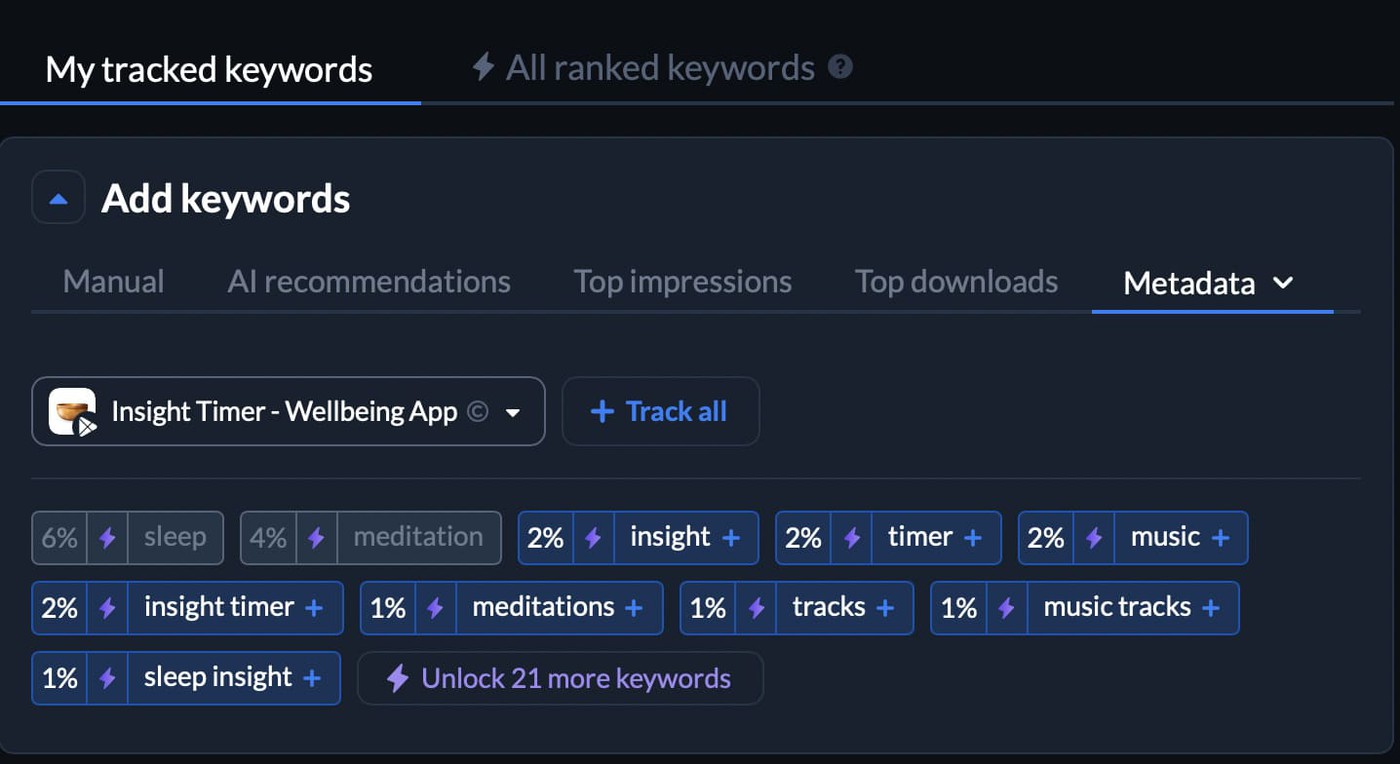
This approach is especially useful when onboarding a new app, entering a new market, or working with a small ASO team where research time is limited.
The goal isn't discovery from scratch, but identifying low-effort opportunities. A small adjustment to existing metadata may be enough to improve visibility for a keyword that's already within reach.
Score every keyword on three axes
A keyword from competitor research shouldn't get special treatment. Neither should one suggested by AI.
Before anything makes it into the listing, I put it through the same three checks:
1. Search volume measures how often users search for a term. Google doesn't publish exact numbers, so ASO platforms estimate demand. AppFollow exposes a normalized keyword popularity aka search volume score for every supported locale.
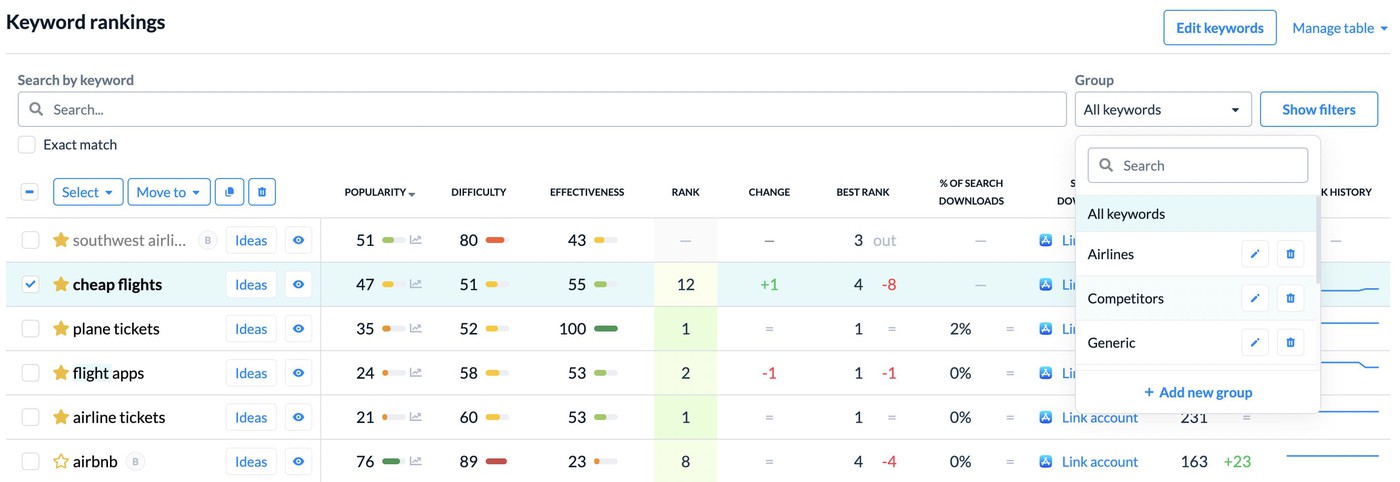
Not every high-volume keyword deserves a place in your metadata.
2. First, ask a simple question: if someone searches for this term and lands on your listing, will they feel they've found the right app? That's relevance, and it's usually more important than volume. A keyword that generates thousands of impressions but very few installs often becomes a ranking problem rather than a growth opportunity.
3. Difficulty matters too. Some terms are dominated by category leaders with years of accumulated visibility, ratings, and brand recognition. Breaking into those results can take far more effort than targeting a slightly smaller query with less competition.
To compare opportunities consistently, many ASO practitioners use a simple prioritization model:
Search Term Score = Polurity × Relevance ÷ Difficulty
I wouldn't treat the formula as a scientific truth. Think of it as a way to compare options when your backlog starts getting crowded.
Once you've collected ideas from competitor research, autocomplete, AI suggestions, and metadata recommendations, the system will put them in a single keywords tracking list to prioritize. For most markets, ten carefully chosen keywords will outperform a much longer list that nobody can realistically optimize around.
Shortlist 10 keywords per locale
Bring all four discovery methods together into a single keyword backlog, then narrow the list to roughly 10 priority targets for each market.
A practical mix looks like this:
- 1–2 branded keywords
- 3–4 generic high-intent keywords
- 4–6 long-tail keywords
For a finance app, that could mean a branded app name, generic terms such as budget planner or expense tracker, and longer phrases like weekly budget planner app or expense tracker with bill reminders.
Long-tail Google Play Store keywords are often the best entry point for smaller apps because competition is lower and user intent is clearer.
Most teams pick one research method and stop.
- Manual research alone gives you the keywords you already think are relevant.
- Competitor research alone gives you a copy of the market.
- AI and auto recommendations alone miss the human nuance.
The strongest rankings usually come from combining all four approaches, then evaluating every candidate with the same scoring framework.
The process doesn't end with the shortlist. Every keyword needs to be validated within a specific market, which is why the next step is localization.
Where to place Google Play ASO keywords (with examples)
Finding the right Google Play ASO keywords is only half the job. The other half is placement. Google Play indexes several metadata fields, but each field contributes differently to ranking, relevance, and conversion. Effective Play Store app search optimization comes from putting the right keyword in the right place instead of repeating the same phrase everywhere.
Field | Character limit | Indexed? | Strategic role |
App title | 30 | Yes | Primary ranking signal |
Short description | 80 | Yes | Relevance + conversion |
Long description | 4,000 | Yes | Semantic coverage |
Screenshots & visuals | N/A | No | Conversion support |
App title (30 characters): Your highest-weight field
Your title carries more ranking weight than any other metadata field.
Lead with your most important keyword whenever possible. Position matters. Users see only a handful of words before deciding whether to tap your listing. Google sees them too.
That's why title placement matters. If your primary keyword appears at the beginning of the title, both users and the algorithm can understand the app faster. Most apps only have space for one core keyword and maybe a supporting term, so it's worth being selective.
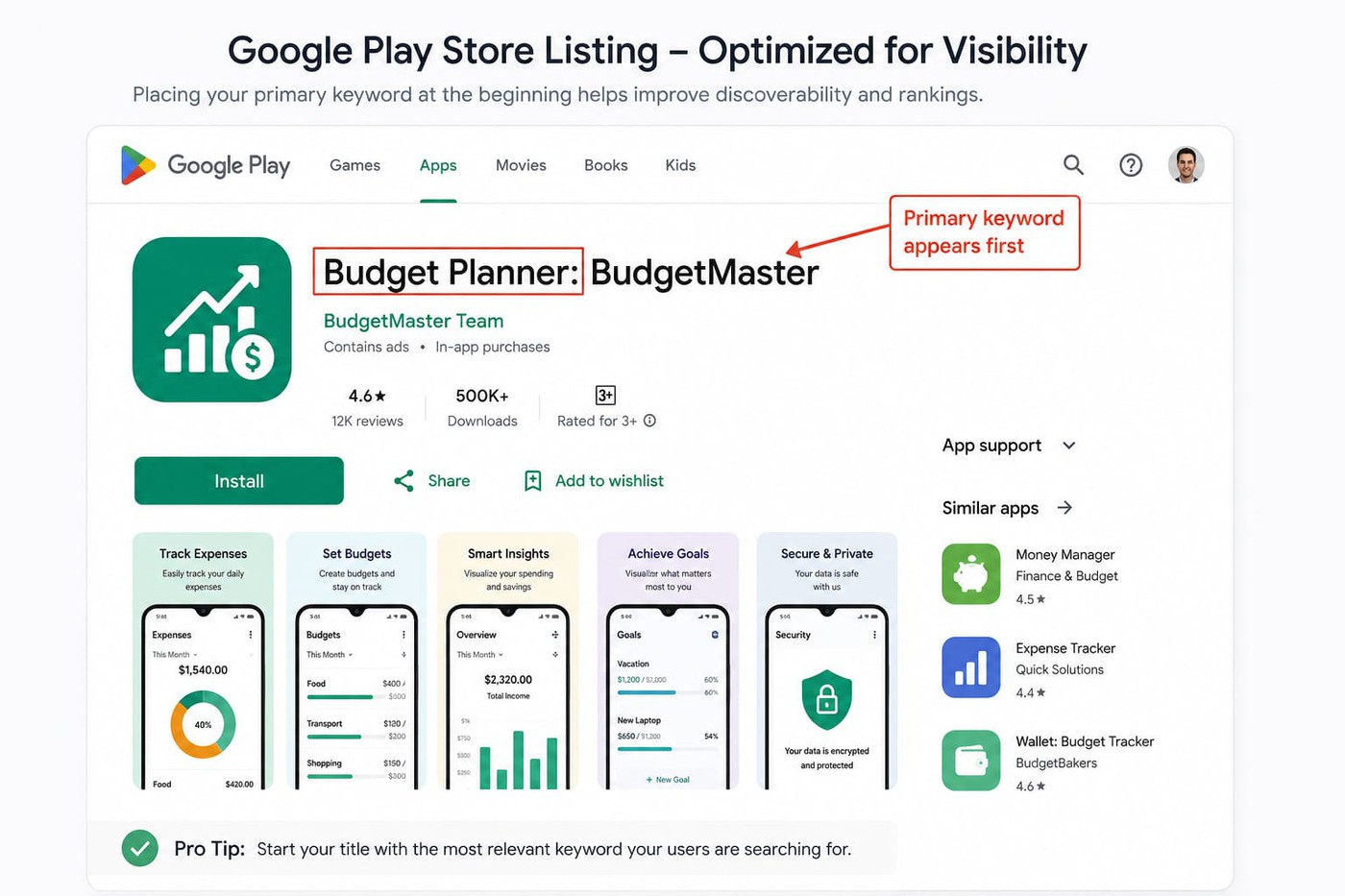
I also recommend resisting the urge to turn the title into an advertisement. Phrases like "Best," "#1," or "Top Rated" rarely add useful information. The same goes for emojis. They take up space that could be used to describe what the app actually does.
Bad example BudgetMaster: Best Finance App Problems
| Good example Budget Planner: BudgetMaster Why it works
|
Short description (80 characters): High impact on both ranking and conversion
Titles get most of the attention, but I often find bigger opportunities in the short description.
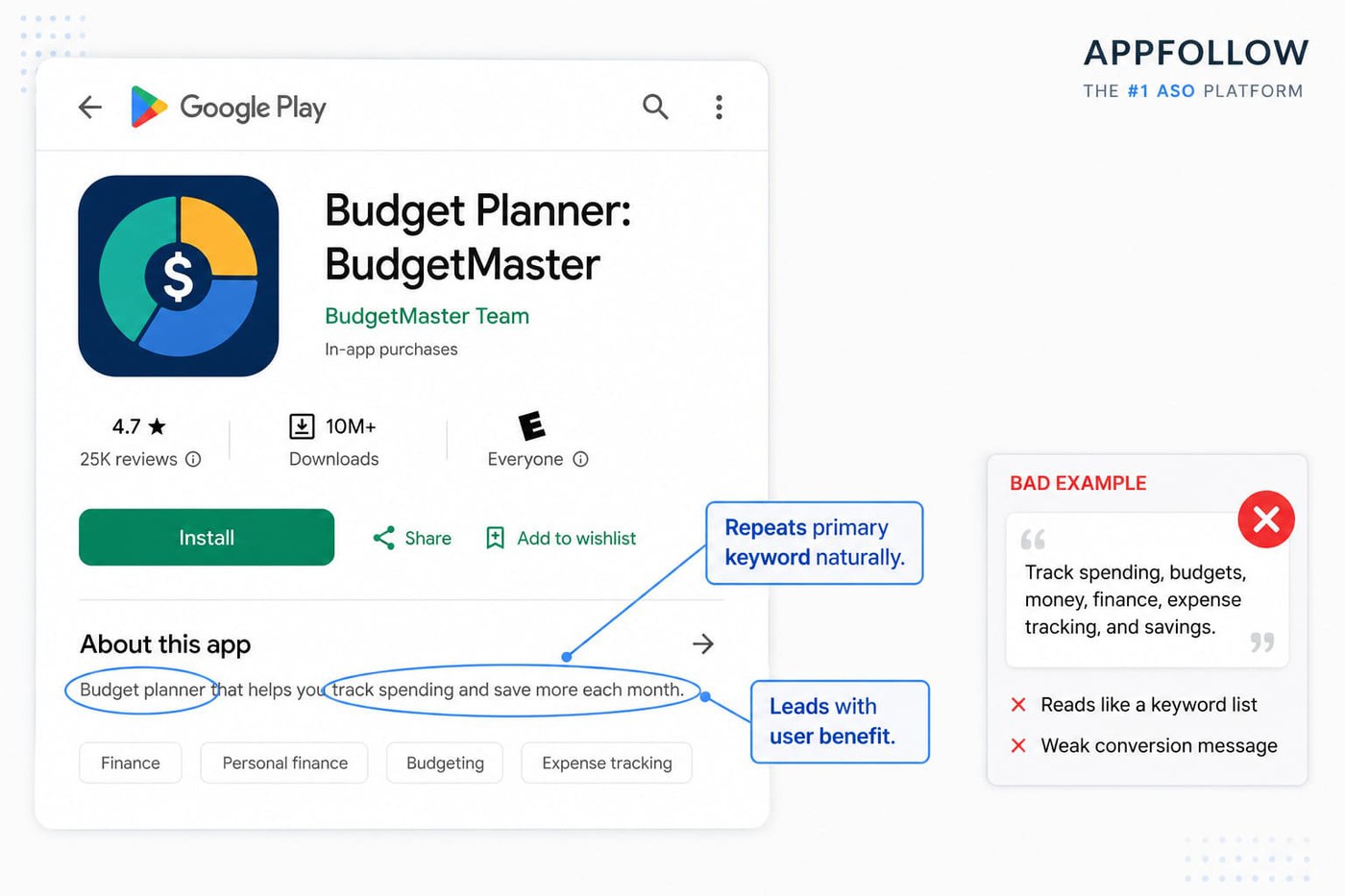
Many apps either repeat the title word-for-word or fill the space with feature lists. Neither approach does much to persuade a user to install. A stronger short description reinforces the main keyword while giving people a reason to care.
Lead with the outcome, not the feature. Users rarely install an app because it has a long list of features. They install it because they can see the outcome.
Bad example Track spending, budgets, money, finance, expense tracking, and savings. Problems
| Good example Budget planner that helps you track spending and save more each month. Why it works
|
Long description (4,000 characters): Depth, density, and structure
I still see teams treat the long description as an afterthought. That's a missed opportunity.
Google reads far more than your title and short description. The long description helps it understand the broader topic of your app and the relationship between the features you mention.
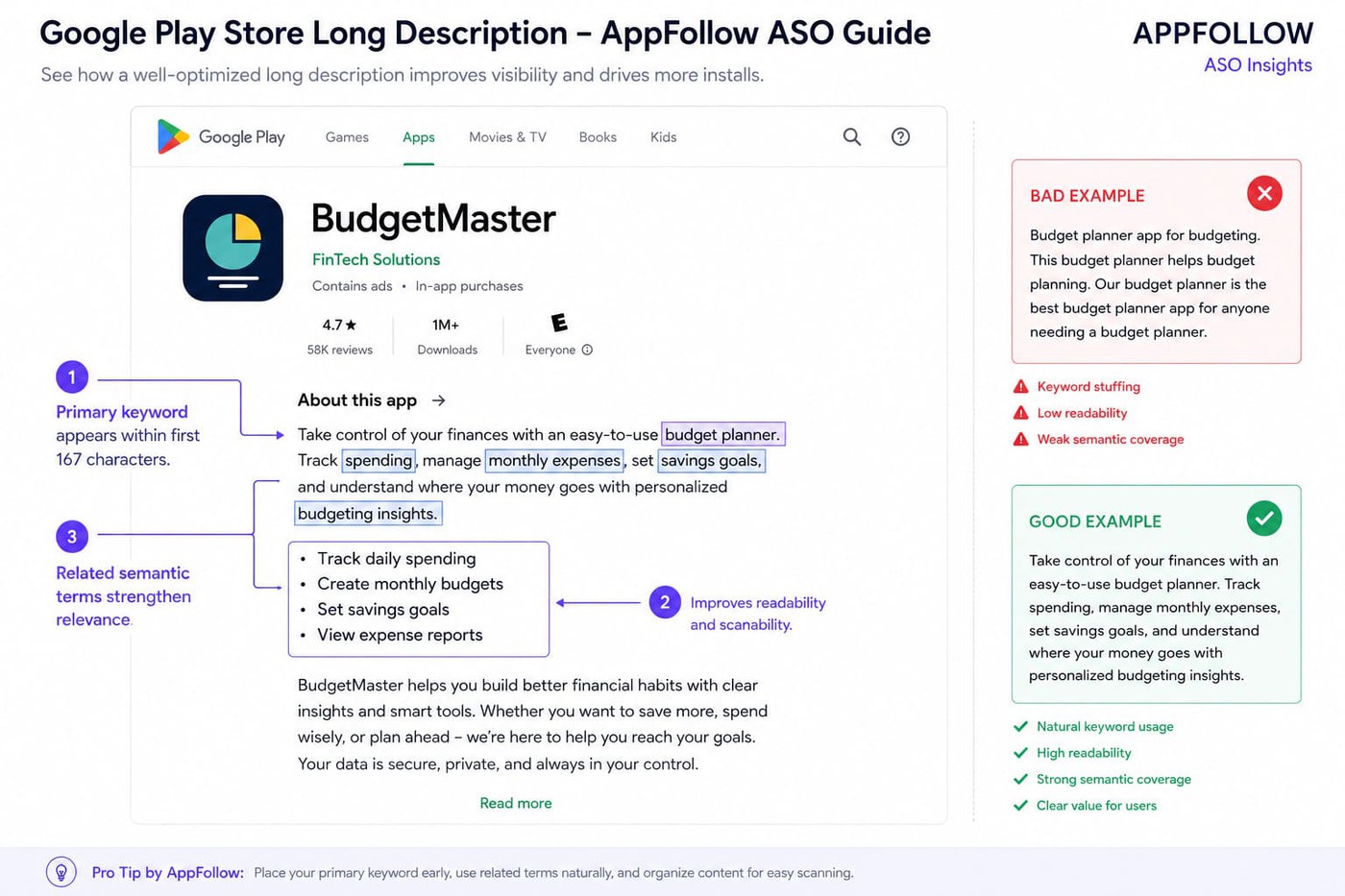
A budgeting app, for example, shouldn't only talk about budgets. It will naturally mention expenses, savings goals, spending habits, reports, and financial planning. That surrounding language helps reinforce relevance in a way that repeating the same keyword over and over never will.
For most apps, a target keyword density of roughly 2–3% across the top two or three keywords is a reasonable starting point.
Structure matters almost as much as keyword usage. Break text into short sections. Use bullet points. Keep paragraphs readable. Primary keywords should appear within the first 167 characters because that section is visible before users expand the description.
Avoid keyword stuffing. Repeating the same phrase twenty times does not create twenty times the relevance.
Bad example Budget planner app for budgeting. This budget planner helps budget planning. Our budget planner is the best budget planner app for anyone needing a budget planner. Problems
| Good example Take control of your finances with an easy-to-use budget planner. Track spending, manage monthly expenses, set savings goals, and understand where your money goes with personalized budgeting insights. Why it works
|
Visual keyword recognition: Screenshots, feature graphic, video
Google doesn't read screenshots the way it reads metadata. People do.
Imagine someone searching for "habit tracker." They land on your listing, and the first screenshot says "Build Better Habits." A few seconds later, they see "Habit Tracker With Reminders." The language feels familiar because it matches what they were already looking for.
That moment of recognition can have a surprisingly large effect on conversion.
I usually recommend keeping screenshot captions aligned with the language already used in the title and short description. Not identical, just consistent. The first screenshot deserves the most attention because it's the one most users see before deciding whether to keep scrolling.
Feature graphics and preview videos work a little differently. Rather than cramming them with keywords, use them to reinforce the core promise of the app.
Localising Google Play ASO keywords across 50+ markets
Most Android-only teams under-localise. Google Play supports more than 50 locales with independent metadata, yet many apps still rely on a single English listing and hope it performs everywhere. In practice, localising even five to ten markets often drives more incremental growth than squeezing a few extra positions from an already-optimized primary market. That's because Google Play ASO keywords behave differently across languages, cultures, and search habits.
Locale-level keyword research
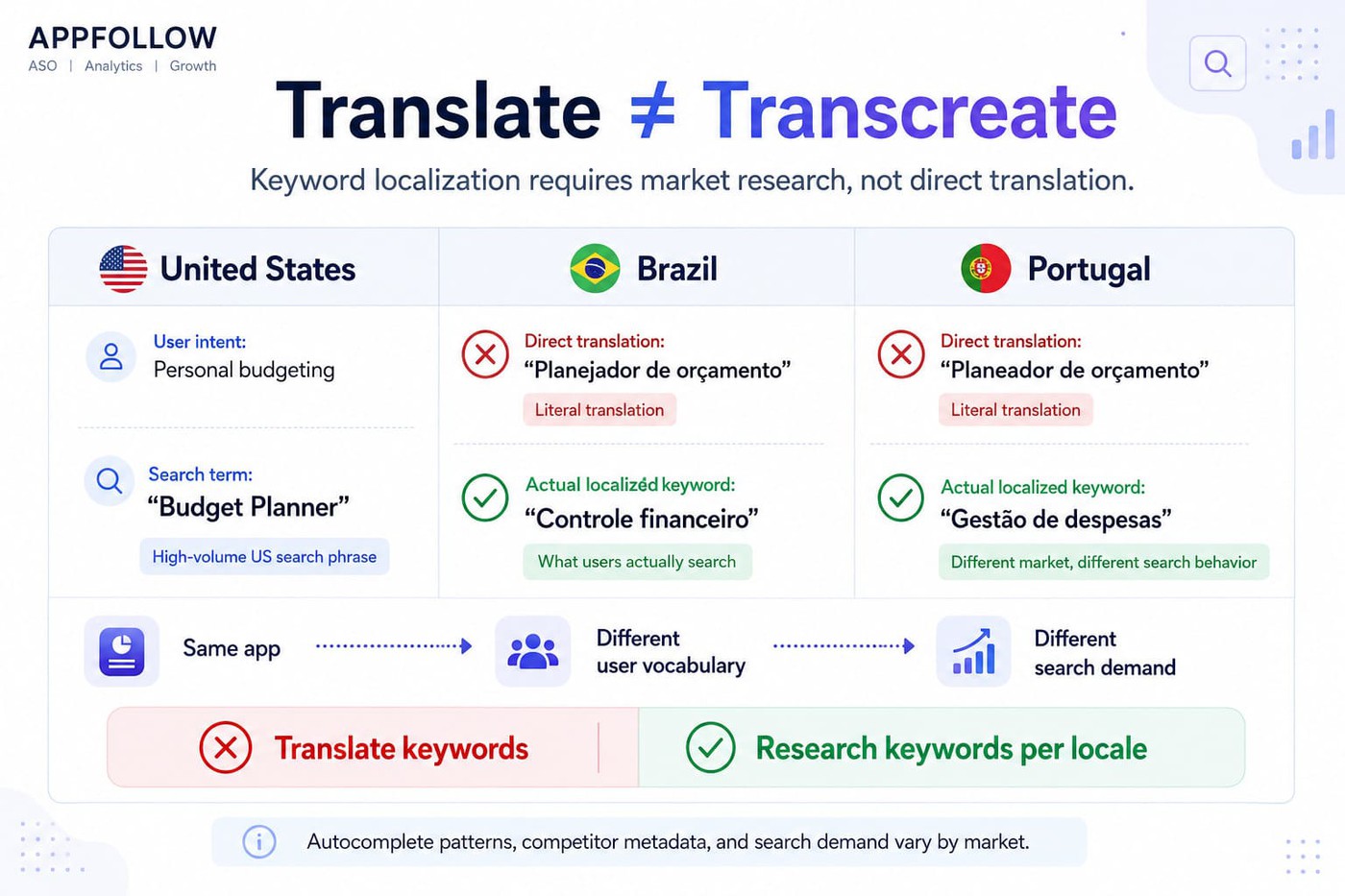
The biggest mistake is treating localisation as translation.
Keywords should be transcreated, not translated. Users in different countries often describe the same problem using completely different language. A fitness app targeting "workout planner" in the US may discover that the highest-volume search behaviour in Brazil revolves around different phrases entirely. Even countries sharing the same language can behave differently. What ranks in Portugal is not necessarily the phrase users search for in Brazil.
Start every locale with fresh keyword research. Check local autocomplete patterns, competitor metadata, and country-specific search behaviour before touching translated metadata.
This is where country-level tracking becomes essential. AppFollow allows teams to monitor rankings, search visibility, and share of voice per market rather than relying on assumptions from a single locale.
Prioritise locales by opportunity, not just population
Large markets attract attention, but they don't always create the fastest growth.
A simple prioritisation framework works well:
Install volume potential × competition × product-market fit
The US, UK, Germany, France, Brazil, Mexico, Japan, Korea, and India are common starting points because they combine scale with established app-store demand. That doesn't automatically make them the right markets for your app.
Some categories perform exceptionally well in smaller regions where competition is lighter and user intent is stronger. Market entry decisions should be driven by opportunity, not population alone.
Manage 50 locales without manual chaos
Launching five localized listings is the easy part.
Six months later, somebody has updated the US metadata, rankings have shifted in Germany, Brazil is using outdated keywords, and nobody remembers which spreadsheet contains the latest version. That's where most localization programs start to break down.
As the number of markets grows, keyword spreadsheets quickly become unmanageable. Teams need a centralized keyword backlog, ownership by locale, automated rank tracking, and a structured process for running custom store listing experiments in each market.
A practical workflow usually includes one source of truth for keywords, consistent naming conventions, and reporting segmented by country rather than aggregated globally.
Google Play store SEO becomes much easier when every locale follows the same process while still adapting to local search behaviour. The goal is to achieve a scalable Play Store optimization that reflects how users actually search in each market.
"The highest-growth keyword is often hiding in a market you're not tracking. Teams spend months optimizing their primary locale while completely missing demand patterns in regions where competition is lower, and visibility is easier to win."
—Yaroslav Rudnitskiy, Senior Professional Services Manager at AppFollow
Test your Google Play keywords with store listing experiments
Optimization without testing is guesswork.
Many ASO teams spend weeks researching keywords, updating metadata, and monitoring rankings, yet never verify whether a change actually improved performance.
That's where Google Play's native experimentation framework becomes valuable. Store listing experiments are built directly into the Play Console, are free to use, and are still surprisingly underused. If keyword research tells you what might work, experiments tell you what actually works. For teams focused on Play Store app search optimization, that distinction matters.
What you can and can't test in Google Play Console
Google Play supports experiments across both text and creative assets.
You can test:
Element | Testable |
App title | Yes |
Short description | Yes |
Long description | Yes |
Screenshots | Yes |
Feature graphic | Yes |
App icon | Yes |
Experiments can run against your default store listing or against localized and country-specific listings. Most apps can run up to five experiments simultaneously, although meaningful results still depend on traffic volume. Low-traffic apps often need longer test durations before reaching statistical significance.
How to set up a keyword experiment
A good A/B test starts with a single hypothesis.
Follow a simple process:
- Define one hypothesis.
- Change one variable only, usually a target keyword in the short description.
- Create a variant and split traffic between the baseline and the new version.
- Run the experiment for at least 7–14 days, longer if traffic is limited.
- Evaluate results only after reaching a minimum confidence level of 90%.
The goal here is to learn which metadata change produces measurable conversion lift.
cta_get_started_yellow
How to measure and track Google Play keyword performance
A ranking increase looks great in a report. It matters a lot less if it never turns into installs.
That's why I don't look at keyword positions in isolation. A keyword can climb ten places, generate a spike in visibility, and still contribute very little to growth. What matters is what happens after someone finds your listing.
The four metrics that matter most for Google Play keywords
There are dozens of ASO metrics you could track. Most teams only need a handful to understand whether a keyword strategy is working.
Metric | Why it matters |
Google Play keyword ranking | Measures visibility for each target keyword and locale |
Store listing visitors from search | Shows how much search traffic your metadata generates |
Install conversion rate | Reveals how effectively the listing converts visitors into users |
Retained installs | Connects keyword acquisition to long-term user value |
I tend to read these metrics as a sequence rather than four separate numbers.
Rankings tell you whether people can find the app. Store listing visitors show whether those rankings are producing traffic. Conversion rate answers a more important question: do users actually want what they're seeing? Retained installs complete the picture by showing whether the users acquired through those keywords stick around after the download.
A keyword that performs well across all four measures is usually worth defending. One that only performs well in rankings often isn't.
Read also: App Store Optimization Metrics - The Complete 2026 Guide to ASO Tracking
How often to track each metric
Different metrics move at different speeds.
Metric | Recommended cadence |
Keyword rankings | Daily |
Store listing visitors | Weekly |
Conversion rate | Weekly |
Retained installs | Weekly to monthly by cohort |
Keyword positions can change overnight. Retention trends usually take weeks to emerge. Matching your reporting cadence to metric volatility prevents overreacting to noise while still catching meaningful shifts early.
Turn metrics into actions
I've seen teams build beautiful dashboards and never act on them.
A ranking drop isn't useful information by itself. What matters is having a response ready before the drop starts affecting installs.
Trigger | Action |
Target keyword drops >5 positions | Review competitor metadata and consider a store listing experiment |
Conversion rate declines | Audit screenshots, short description, and positioning |
Retained installs fall | Investigate onboarding, product experience, and user quality |
Share of voice decreases | Expand competitor monitoring and keyword coverage |
Find Google Play Keywords Faster with AppFollow
Google Play keyword work gets messy fast. One spreadsheet for research. Another tool for rankings. Play Console for experiments. Reviews in a separate workflow. Competitor changes somewhere else.
AppFollow brings the core Google Play ASO workflow into one place, so Android teams can find keyword opportunities, track visibility, and act faster.
With AppFollow, you can:
- Find keyword ideas across Google Play locales. Discover keywords from competitor metadata, Play Store autocomplete, user reviews, and market-specific search patterns.
- Validate keywords before adding them to metadata. Compare keyword volume, difficulty, and competitive context before updating your title, short description, or long description.
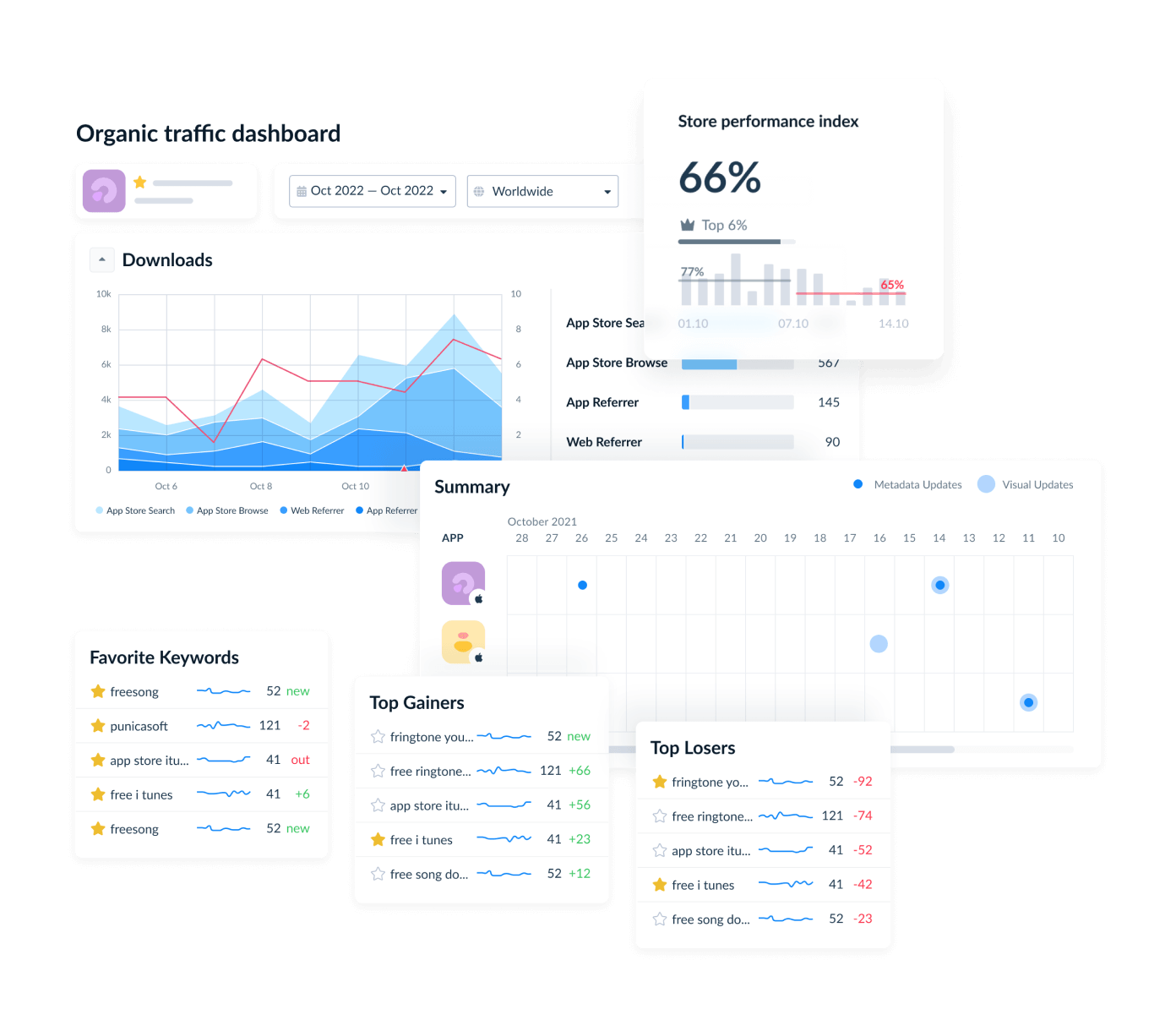
- Track daily rankings by country and language. See how your Google Play keywords move over time across every target locale.
- Monitor competitor visibility. Spot which apps are gaining rankings, where your visibility is slipping, and which keyword clusters are becoming more competitive.
- Connect keyword changes to store performance. Track metadata updates, listing experiments, rankings, reviews, and visibility signals in one workflow.
- Automate reporting for ASO teams. Use dashboards, scheduled reports, Slack alerts, Looker, and the AppFollow API to keep teams aligned without manual reporting.
The goal is simple: less time collecting keyword data, more time improving Google Play visibility.
cta_get_started_purple