AppFollow vs. DIY: should you build a customer feedback analysis tool with AI or buy one?

So, you've got feedback for your app, let’s call it Tidecraft, in four places: Google Play, the App Store, Trustpilot, and Steam. So you ask an AI coding agent to pull all of it into one dashboard. A weekend and a few rounds of fixes later, you have four feeds, a sentiment chart, and a list of top complaints.
Then on Monday, your product lead asks whether sign-in complaints went up after release 2.4. The dashboard says yes, by half. The same week as the release, your billing team started emailing Trustpilot review invitations after every web-shop purchase. And in your data, Trustpilot reviewers bring up account access three times as often as mobile players.
Before engineering reshuffles the sprint, you need a better answer than "the AI said so." We'll go through the pipeline you need, the math that breaks cross-source percentages, the work it takes to make alerts useful, and AppFollow's part in all of it.
Should you build your own customer feedback analysis tool with AI?
Yes, for a narrow scope. An AI coding agent will merge review exports, label issues, and draw a dashboard fast. An operational feedback tool needs more. Someone has to maintain the connectors, and you need a known history for each source. You also need categories that mean the same thing everywhere, plus alerts that can tell a real change from a change in source mix. Whether building pays off depends on your sources, your data stack, and who owns the pipeline. We work through a source-mix calculation and a three-year cost model next.
What can you build quickly with AI, and what turns it into a product?
You can build a working prototype quickly, as long as data access is already sorted out. The product part starts with the first request for repeatable numbers.
A credible weekend prototype
Say an engineer on your team has API access and a manageable review volume. In a weekend (an illustrative scope, with no engineering estimate to support it), they could ship a prototype with these parts:
- App Store reviews from the App Store Connect API.
- Google Play reviews from the Play Developer API, plus the Play Console CSV export for anything older than a week.
- Trustpilot reviews from Trustpilot's API, if your Business plan includes API access.
- Steam reviews from Valve's public review endpoint.
- One table, normalized enough to filter by source, date, and product.
- LLM labels for five or six fixed categories, plus a short summary.
- A small dashboard with period, source, and product filters.
- A CSV export and a Slack message when something looks off.
The first product request changes the job
Then your PM asks for a few more things:
- Daily ingestion with no gaps.
- Topic shares you can repeat across every channel.
- Comparisons from one quarter to the next.
- One issue view with a drill-down for each source.
- Slack alerts with few false alarms.
- The same reporting across countries and store versions.
Every item on that list is data work: source contracts, integration, data quality, and taxonomy rules. Your dashboard can't answer any of it until you can say which reviews it covers, per source and per day.
One dashboard doesn't give you one clean feedback dataset
Merging four feeds gives you four kinds of records that look alike in a table. Each platform has its own fields, rating system, permissions, and history, and the differences matter as soon as you count anything.
Google Play, the App Store, Trustpilot, and Steam describe different things
Here's what you get from one record on each platform:
Source | One record is | Rating format | Watch out for |
|---|---|---|---|
App Store | A review of one app, from one country's storefront | 1 to 5 stars | Apple moderates reviews before they go public, usually within 8 to 12 hours |
Google Play | A review of one app, with the reviewer's language | 1 to 5 stars | The API returns only the last week of reviews; device, OS, and app version need Play Console access, and the review data has no country field |
Trustpilot | A review of the company or service, often about billing, delivery, or support | 1 to 5 stars; TrustScore uses its own calculation | No app version, and one review can cover the whole service |
Steam | A review of one game, and each DLC has its own review page | Recommended or Not Recommended | Playtime at review time; keep the vote as it is |
Community threads (Steam discussions, Reddit, Discord) | A post plus its replies | None | Thread depth, edits, deletions, and data rights differ by platform; Valve documents no public API for Steam discussions |
So keep Steam's Recommended and Not Recommended as they are, with no conversion to stars, and keep Steam discussion posts out of your app-store review counts. Each type gets its own denominator.
The minimum unified record for every item
A shared table works if every record carries enough to trace it to its source. Here's a compact model (an illustration for a DIY build, and different from AppFollow's internal schema):
Field group | Fields | Why you need them |
|---|---|---|
Identity | source, source_item_id, product_id, review_or_thread_id, item_type | Trace every count to its records, and keep reviews apart from threads |
Time | created_at, updated_at, observed_at | Tell "written on Monday" from "collected on Wednesday" |
Content | text, original_language, original_rating | Keep the original before any translation or rating mapping |
Analysis | normalized_issue_tags | Labels you can version and run again |
Context | version_if_available, source_url | Release comparisons, plus a link a reviewer can open |
Quality | collection_status | Know which days and sources came in complete |
When a source doesn't provide a field, store "not available." A guessed value or a blank you later read as "not relevant" will skew every chart that uses it.
You need all three timestamps because a review can arrive days after someone wrote it. AppFollow's collection docs put numbers on it. App Store moderation usually takes 8 to 12 hours, and sometimes up to 3 days. Google Play's takes up to 24 hours. Once a review passes, it carries the time the user submitted it, so it can look older than the moment it reached you. If your chart counts a Monday review as "new on Wednesday," write that rule down.
History means backfill, edits, and gaps
A one-time import gives you a snapshot. History takes a collection start date for each source, a record of edits and deletions, stable IDs, deduplication, and months of collection with no breaks.
Google adds a catch of its own. The Play Developer API returns only reviews created or edited in the last week, so anything older has to come from the Play Console CSV export. Miss a week of collection, and the gap gets filled from those CSV files. Our breakdown of Google Play and App Store review API limits covers the rest of those gaps.
Per its docs, AppFollow collects new and past App Store and Google Play reviews within 2 hours of adding an app. Apps with more than 4,000 reviews can take up to 2 days. The App Store refreshes every 1 to 3 hours. Google Play refreshes every 1 to 3 hours without a console connection and every 10 to 15 minutes with one. Store processing can add delays of up to 36 hours.
Those numbers cover the App Store and Google Play only. Trustpilot and Steam follow their own collection rules, so check the date range for each source before you compare quarters.
Before you build any cross-channel chart, write a source inventory: what you collected, from which date, how complete it is, and the meaning of one record.
The cross-source math trap: did complaints increase, or did the source mix change?
When the share of feedback from each channel shifts, the combined percentage can move with every channel flat. A merged dashboard shows that move with no warning.
A synthetic two-period example with full counts
Take login complaints for Tidecraft across two sources, in the 30 days before release 2.4 and the 30 days after it. Illustrative constructed dataset, with no AppFollow customer data or measured product performance:
Source | Before 2.4 (complaints/total) | Before 2.4 share | After 2.4 (complaints/total) | After 2.4 share |
|---|---|---|---|---|
App stores | 540/5,400 | 10% | 540/5,400 | 10% |
Trustpilot | 180/600 | 30% | 1,080/3,600 | 30% |
All sources (naive) | 720/6,000 | 12% | 1,620/9,000 | 18% |
The pooled login share went from 12% to 18%. That's 6 percentage points, or a 50% jump in relative terms, and it's the number your dashboard shows. Inside each source, nothing moved: app stores sat at 10% and Trustpilot at 30% in both periods. Trustpilot volume grew sixfold with the invitation emails. Its slice of your feedback went from 10% to 40%, and that shift produced the whole rise.
Statisticians call this a composition effect. It's related to Simpson's paradox, minus the reversal: the per-source trends here stay flat, and the only change is in the mix.
So when your chart says login complaints rose 50%, ask the next question first. Did the login problem grow, or did Trustpilot take a bigger share of your feed?
Report shares per source, next to the source mix
A rising cross-channel complaint share can come entirely from a change in where your feedback came from. A few rules keep the pooled number honest:
- Show counts and shares within each source first.
- Define the population for each source and time window.
- Show any overall total next to the source mix it came from.
- If you standardize with fixed source weights, publish the weights and the method.
- Treat each record as a piece of feedback, with no assumption of one unique customer per record. People post on several platforms, and you often can't match their identities across them (sometimes it isn't appropriate, either).
Rating scales don't line up either
A 1-star mobile review, a Steam Not Recommended, and an angry Discord post carry different information. If you want one sentiment view across them, you need a disclosed, validated mapping. Most of the time, separate views per source are safer.
cta_get_started_yellow
One taxonomy across sources takes more than five LLM labels
A shared taxonomy works when you keep a small set of stable parent topics, allow several labels per item, and keep the source on every record. The hard part is keeping the definitions identical month after month and platform after platform.
"Crash" means different things on different platforms
Here's one week of Tidecraft feedback (invented examples):
- Google Play: "Game crashes when I open the market screen."
- App Store: "Face ID login is stuck on the loading screen."
- Trustpilot: "Support never fixed my failed season pass payment."
- Steam: "Crashes after the latest GPU driver update."
The Google Play and Steam reviews both mention a crash, and the causes have nothing in common: one is an in-game screen, the other a PC driver. The Trustpilot review is about billing and support, with no product bug at all. A flat list of labels hides those differences, so give each item a few separate dimensions:
Dimension | Example values | Rule |
|---|---|---|
Product area | Auth, Payments, Reliability, UX, Feature requests, Support | One or more per item |
Issue type | Crash, Failure, Missing capability, Incorrect charge, Other | One for each product area the item mentions |
Severity | Low, medium, high, critical | Your team defines it, and a person checks it |
Source | App Store, Google Play, Trustpilot, Steam | Never drop it |
Sentiment | Positive, negative, mixed | Only where the source supports it |
Product, version, and locale | Tidecraft for Android, 2.4, Portuguese | "Not available" when the source lacks the field |
With these dimensions, the Google Play and Steam reviews share Reliability and Crash with different causes recorded, the App Store review gets Auth and Failure, and the Trustpilot one gets Payments and Support. These are example dimensions for a made-up game, and they aren't AppFollow's default taxonomy.
Multi-label counts and category rules
One review can complain about billing and praise the art in the same breath. Count each topic against unique eligible records within each source, with the denominator stated, and expect some overlap between topic shares.
Some sources also need extra subcategories of their own. Keep the rules written down:
- Define each category, with include and exclude examples.
- Map aliases ("can't sign in," "account locked") to one stable parent topic.
- Give each version of the taxonomy a number.
- Run QA in every language you report on.
- Send ambiguous cases to a person.
- Keep the source on every trend line.
What AppFollow covers today
Here's what AppFollow's public docs list for each source:
- Trustpilot: AI summaries, AI Semantic Analysis, semantic tags, Tags analysis, Reviews analysis across sources and timeframes, plus manual tags and automation rules.
- The Reviews feed: custom source groups that combine an App Store app, a Google Play app, a Trustpilot page, and other supported sources.
- Steam (beta): manual tags, auto-tagging, Tags Analysis, semantic tags, sentiment analysis, AI Topics, and AI Summary for Steam reviews.
- Feedback Hub (early access): feedback categories, an AI summary, AI-suggested and manual tags, filters, and thread views, with Steam as the first supported source.
Some of this depends on your plan. On Essential, you see review sentiment in the Reviews feed, and Team adds semantic tags, per the Semantic Tags article. The full Semantic Analysis page comes with Enterprise, or as a paid add-on for Team, per the add-on list. It covers 20 languages in three language packs. Custom Semantic Tags are a premium add-on. Manual tags and Feedback Hub categories are separate features from all three.
A tag with the same name in two sources still needs its own check: the same rule, the same denominator, and the same QA.
Why alert noise gets expensive at higher feedback volume
A rule that fires on a small share of a big stream still sends a lot of messages, and most of them need no action from anyone.
A simple alert-volume model
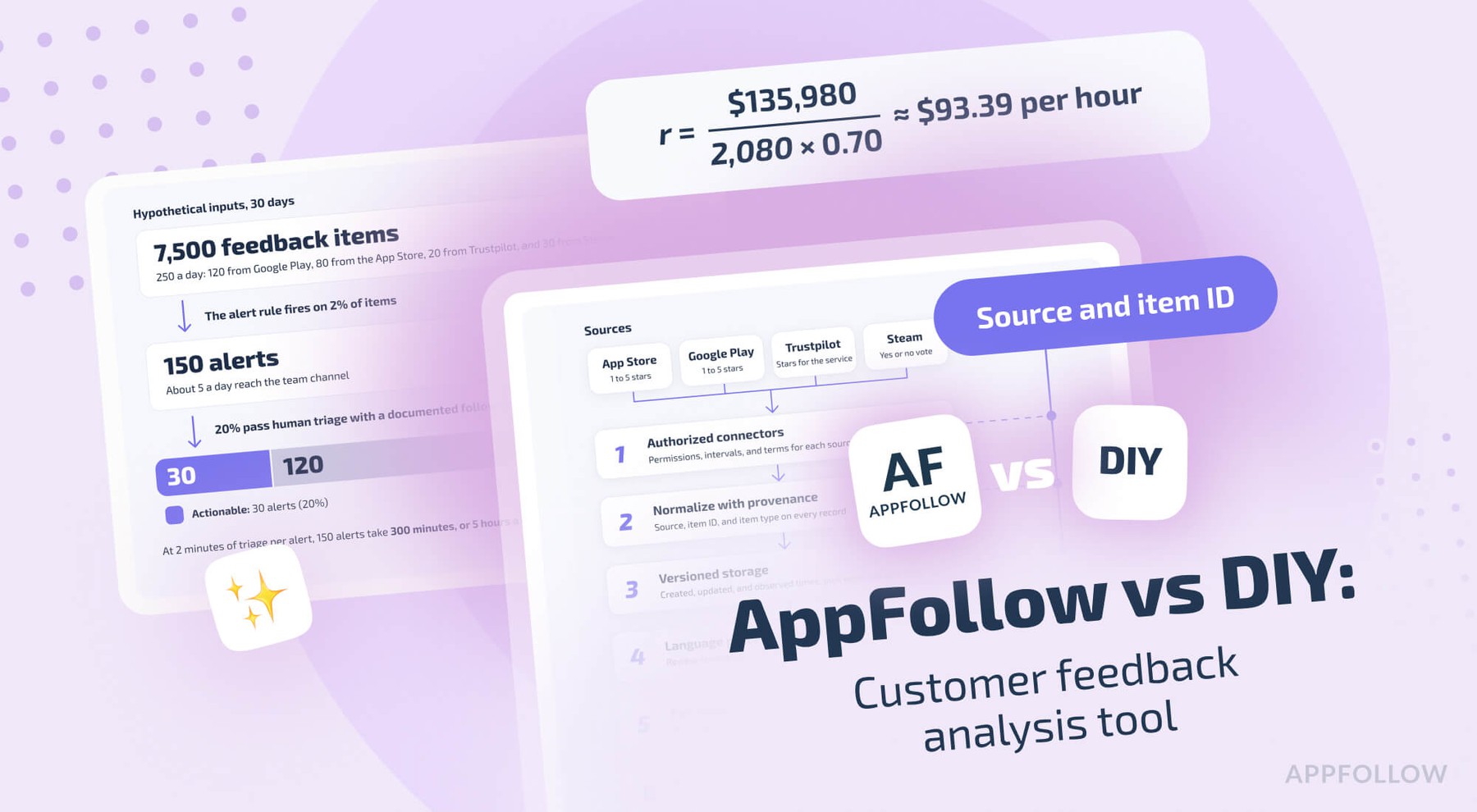
Here's a hypothetical setup, with no AppFollow data or industry averages in it. In a normal month before the Trustpilot invitations, Tidecraft gets 120 Google Play items a day, 60 from the App Store, 20 from Trustpilot, and 50 from Steam. That's 250 a day, or 7,500 in 30 days.
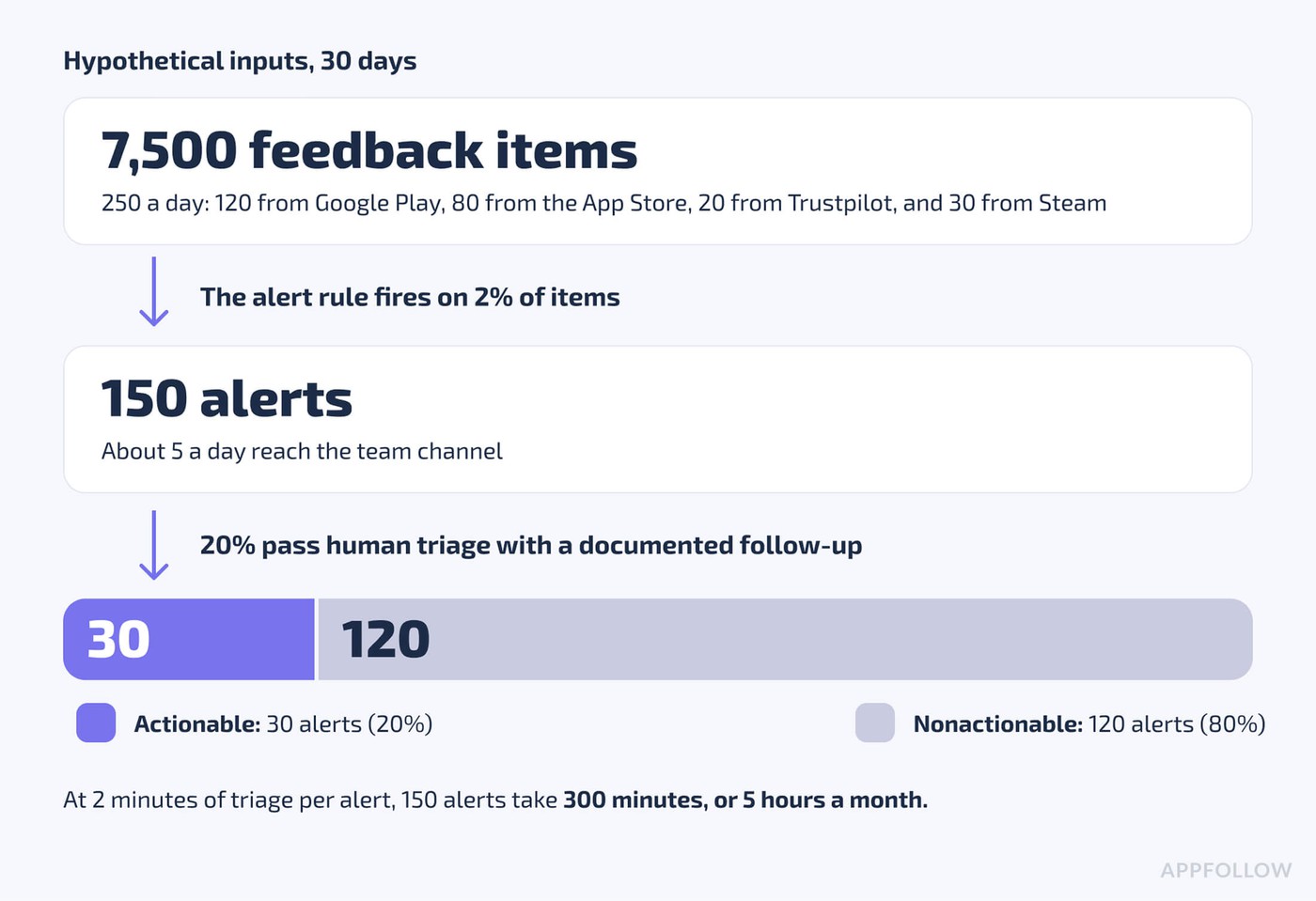
Hypothetical inputs: 250 items a day, a 2% alert rule, and 20% of alerts passing triage.
Say a naive rule sends an alert for 2% of incoming items. That's 5 alerts a day, or 150 a month. Now say 20% of those pass human triage with a documented follow-up, which is our definition of actionable here. Your team gets 30 useful alerts and 120 others, so 80% of the month's alerts are noise under these assumptions. At 2 minutes of triage per alert (also an assumption), 150 alerts cost 300 minutes, or 5 hours a month, before anyone starts an investigation.
The 2% is a rule setting, with no connection to a measured false-positive rate. Plug in your own numbers.
What goes into a useful alert
Noise drops when alerts carry baselines, routing, and owners. A plain "negative review detected" message helps no one at 250 items a day. A useful alert has these parts:
- The topic, plus the rule or threshold that triggered it.
- The source, app, locale, and release.
- The observed count and its denominator.
- A baseline or a comparable earlier period.
- A few linked evidence records.
- The QA status of the AI labels.
- An owner and a clear next step.
- A cooldown, so one incident sends one message.
Here's a sample alert built from synthetic data (no AppFollow screen produces this exact layout):
Field | Sample value (synthetic) |
|---|---|
Topic and rule | Payments, failure (purchase not delivered); fires when the share passes twice the 28-day baseline |
Source and context | Google Play, Tidecraft for Android, Portuguese-language reviews, version 2.4.1 |
Observed | 31 of 210 Portuguese-language reviews in the last 7 days (14.8%) |
Baseline | 6.1% over the previous 28 days |
Evidence | Links to three reviews that match the rule |
Label QA | AI label, reviewed in last month's QA sample |
Owner and next step | Payments team: check the 2.4.1 store purchase flow |
Cooldown | No repeat alert for this topic, source, and language for 24 hours |
What AppFollow supports now
AppFollow's monitoring agents send alerts by email, Slack, Telegram, and other channels. Four of them matter for review alerts:
- New Reviews Spike works on App Store and Google Play apps and needs no console connection. You set a review-count threshold and a timeframe, and filter by country, language, rating, review length, tags, and app version.
- Tagged Reviews alerts you when reviews get the tags you pick, past a review-count threshold of your choice. It's a premium feature.
- Feedback Summary sends a weekly digest every Monday morning or a monthly one on the 1st, by Slack, Microsoft Teams, or email.
- Review Anomaly flags topics that spike past their normal pattern, with zero filters or conditions in the setup. It's in beta, by invitation only. It also isn't real time, because of store moderation: expect about 24 hours of delay for Google Play and 48 to 72 hours for the App Store.
What goes into a production-ready DIY customer feedback analysis pipeline
You need authorized connectors, provenance on every record, versioned storage and labels, per-source denominators, and alert rules with owners. Here's the reference architecture:
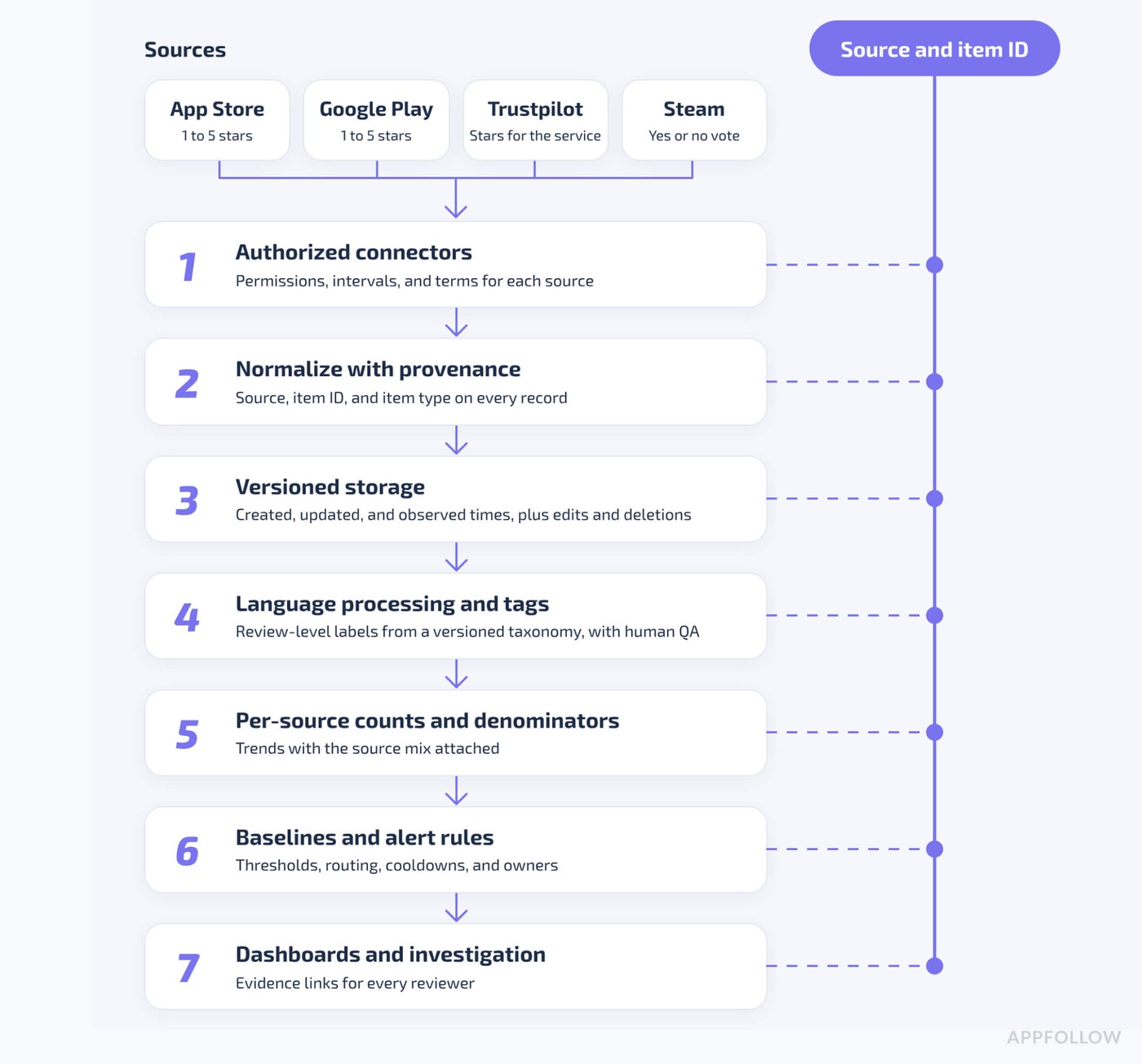
Every step keeps the source and the item ID, so each count traces to its records.
And here's the checklist that goes with it:
- Inventory each source (App Store, Google Play, Trustpilot, Steam, and any manual or community imports): permissions, fields, collection intervals, retention, and terms.
- Store the source, the item ID, the created, updated, and observed timestamps, and the item type.
- Catch duplicates, edits, and deletions, with no invented identity links between channels.
- Keep a stable parent taxonomy plus source-specific subcategories, versioned over time.
- Validate labels by language, severity, and source, with human QA on rare incidents.
- Build trends from counts, denominators, and channel mix, with no naive global percentages.
- Give each source its own alert thresholds, rate limits, routing, deduplication, and cooldowns.
- Protect user data, respect licensing and consent, and set retention and deletion rules.
- Monitor failures, coverage, freshness, and owner response times.
- Keep a reporting workflow with links to the source evidence for every reviewer.
A weekend prototype covers maybe two of these. So when Trustpilot changes a field, or your Steam connection pauses, whose calendar gets the incident? Our build vs buy breakdown for review management tools models that ownership by team size.
What does DIY cost in engineering hours and money?
You've connected the first source. Now somebody owns the other connectors, schema changes, tag definitions, backfills, and alerts. Before you call building cheaper, put engineering hours next to those jobs.
An illustrative engineering breakdown for three sources
Illustrative editorial planning scenario, with no measured engineering hours and no AppFollow customer deployment as a source. Validate the build effort with your team. The scope is App Store, Google Play, and Trustpilot. Steam and community sources need a separate estimate, because their access terms and feature coverage are different.
Component | Illustrative initial engineering hours | Ongoing responsibility |
|---|---|---|
Three source collectors and permissions | 72 (24 each) | Authentication, updates, and ingestion failures |
Record normalization, deduplication, and data QA | 24 | Mapping source IDs, timestamps, and missing fields |
Historical storage and backfills | 24 | New and edited reviews, plus completeness checks |
Topic classification and validation | 32 | Taxonomy updates, multilingual QA, and reclassification |
Alerts and routing rules | 20 | Threshold tuning, deduplication, suppression, and owners |
Dashboard, access control, testing, and deployment | 20 | Exports, reporting, role access, and monitoring |
Total editorial build assumption | 192 | No claim that every team needs exactly 192 hours |
A warehouse and working integrations you already own can cut these hours a lot. Extra languages, sources, and security requirements push them up.
Model three years of ownership
Price the ownership, and leave the AI subscription out of it. Here's the formula:
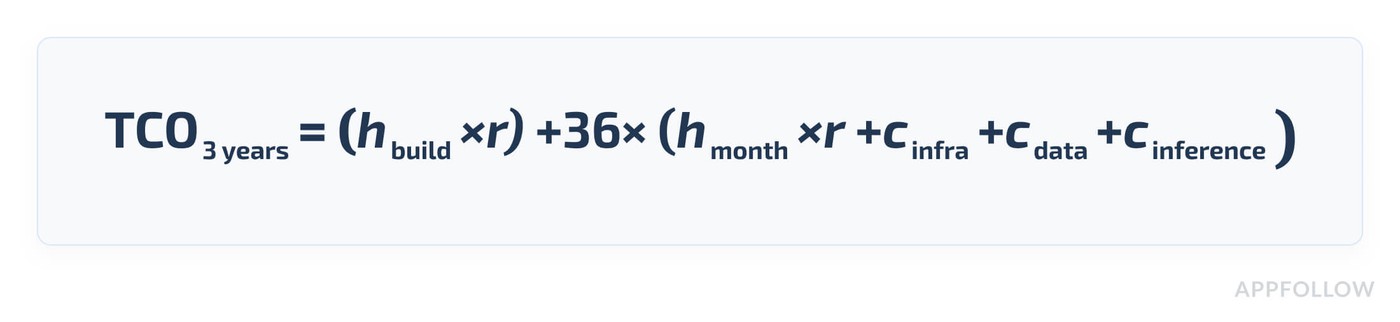
In it, h(build) is build hours, r is the hourly labor rate, h(month) is monthly upkeep hours, and the c terms are monthly costs for infrastructure, data licensing, and inference.
Our base model assumes 192 hours for the initial build. Upkeep takes 8 hours a month: 3 for source connectors, 2 for tagging and QA, 2 for alert and report changes, and 1 in reserve for incidents. Infrastructure is $60 a month. Data licensing, extra API access, security review, and model inference are left out.
For the labor rate, we start from the Bureau of Labor Statistics. The median software developer wage was $135,980 in May 2025. In June 2026, wages made up 70.0% of private-industry employer compensation costs. That gives a planning rate of about $93.39 per fully loaded hour:
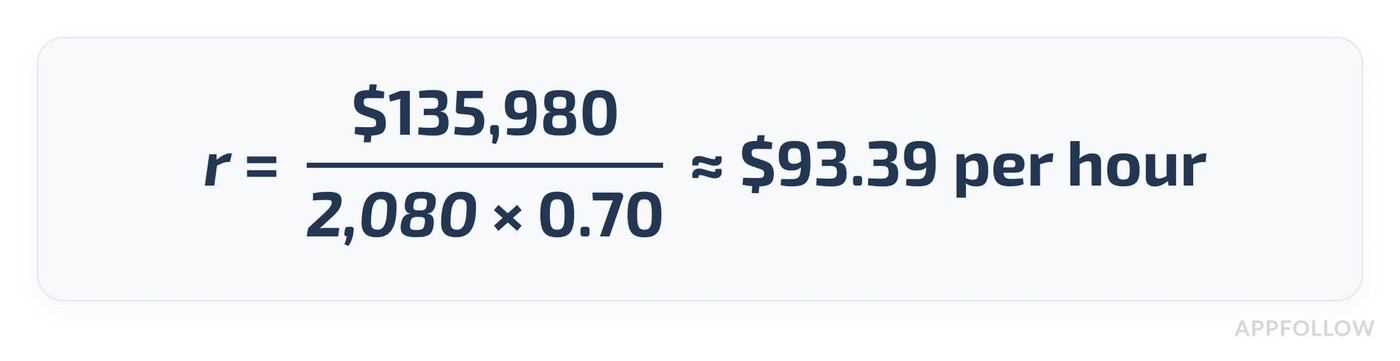
It's a planning figure for salaried US staff, so the table also shows two lower hypothetical rates. Keep salaried time and agency invoices in separate models.
Labor rate | Build (192 hours) | Upkeep (8 hours × 36 months) | Infrastructure ($60 × 36) | Three-year total |
|---|---|---|---|---|
$25 an hour (hypothetical contract rate) | $4,800 | $7,200 | $2,160 | $14,160 |
$50 an hour (hypothetical) | $9,600 | $14,400 | $2,160 | $26,160 |
$93.39 an hour (BLS-based model) | About $17,930 | About $26,900 | $2,160 | About $46,990 |
Each extra hour of monthly upkeep adds about $3,362 over three years at $93.39 an hour. That's arithmetic under the model, with no measured AppFollow saving in it. Before you compare them with AppFollow, price the same three sources and alerts on the same feature basis. For a broader model with more rates and team sizes, see the build vs buy review management cost breakdown.
AppFollow vs. DIY: what's already built, and what stays with your team
AppFollow covers App Store, Google Play, and Trustpilot reviews as shipped features. Steam is in beta, and Feedback Hub, where other community sources connect, is in early access. Here's the split by capability, using AppFollow's public docs:
Capability | DIY AI tool | AppFollow, per public docs | Caveat |
|---|---|---|---|
App Store and Google Play reviews | Build collectors and history | Reviews feed with several apps at once | Google Play country, device, and version data need extra connections |
Trustpilot reviews | Separate collection, data model, and reply flow | Trustpilot connection with AI summaries and semantic tags | Replies need a connected Trustpilot Business account; the API route needs a paid Trustpilot plan with API access and AppFollow Team or higher |
Steam reviews | Separate Steam integration | Open beta, in the Reviews feed and Feedback Hub | Beta; Steam discussions are a closed beta on request |
Cross-source view | Build normalization and the UI | Custom source groups with App Store, Google Play, and Trustpilot | Manual groups need 3 or more sources in the workspace; confirm which other sources a group can include |
Historical trends | Store and maintain each source's history | Reviews analysis, with history that depends on the source | History depth depends on source and plan; longer history is an add-on on the ASO and Essential plans |
Semantic tags | Build a classifier and a taxonomy | Semantic tags on Team and higher; Semantic Analysis on Enterprise or as a Team add-on | Semantic Analysis covers 20 languages in three add-on language packs |
Custom classification | Flexible, and engineering owns the evaluation | Manual tags, auto-tags, and premium Custom Semantic Tags | Custom Semantic Tags need a separate add-on |
Alerts | Build source-specific rules, deduplication, and delivery | Monitoring agents such as New Reviews Spike and Feedback Summary | New Reviews Spike covers App Store and Google Play; Tagged Reviews is premium; Review Anomaly is an invite-only beta |
AI assistant access | Build the data layer and custom tools | AppFollow MCP and AI Toolkit | Reads and AI analysis spend API credits; methods depend on plan |
Reddit and community threads | New ingestion, permissions, and terms | Listed as Feedback Hub source options in early access | Confirm sentiment, replies, history, and thread depth for each source |
Read the caveat column before the feature column, since beta scope and plan limits change the answer for your account.
Pick an architecture for your scope
- Option A, DIY, fits a narrow, permitted scope where your team already runs the data pipelines. You get full control over the taxonomy and the models, and you keep every maintenance job.
- Option B, AppFollow's ready-made review analysis, fits teams whose sources are the ones AppFollow ships today: the app stores and Trustpilot, plus Steam in beta. AppFollow maintains the collection and the shipped analysis, and your team still owns the tags, alert rules, and thresholds.
- Option C, a hybrid, pairs AppFollow with your own BI or AI layer. AppFollow handles collection and the shipped analysis, and your team builds the reports or agents that set your product apart. Check each API or MCP method in your plan before you depend on it.
AppFollow's practical route: Reviews feed, Feedback Hub, then AI workflows
Start with the sources AppFollow supports, analyze each one separately, route alerts by source, and connect your own AI assistant through MCP.
Step 1: get the supported sources into one feed
For App Store, Google Play, and Trustpilot, the Reviews feed lets you pick several sources at once or build a custom source group. AppFollow's own example groups an App Store app, a Google Play app, and a Trustpilot page to analyze one product in one feed. Manual source groups need 3 or more sources in the workspace.
For Steam, reviews are in open beta for all customers, and Steam discussions are in closed beta on request. Feedback Hub is in early access with Steam as its first supported source. Your Steam reviews still appear in the Reviews feed too. History differs by source, so check the date range for each one in your account before you promise anyone a full-history comparison.
Step 2: analyze by source first, then compare issues
Say "account access" shows up in both Tidecraft's mobile reviews and its Trustpilot reviews. Filter to one source, read the AI Summary and the reviews it summarizes, and note the count and the denominator. Repeat for the next source. Then compare the two shares side by side, with each source's volume shown next to it.
Step 3: route alerts by source
Set up New Reviews Spike for your App Store and Google Play apps with a source-specific threshold, or a weekly Feedback Summary for the team. When an alert happens, the owner opens the matching reviews and decides on the next step.
Step 4: keep your AI workflow with AppFollow MCP
The AppFollow MCP server connects your AppFollow data to Claude, ChatGPT, Codex, Cursor, and other MCP-compatible assistants. Your AppFollow role sets the access: Owners and Admins get read and write access, and other roles get read-only access. Setup calls cost nothing. Data reads and AI analysis spend API credits, and the tools you get depend on your plan. The open-source AI Toolkit adds a /feedback-analysis workflow for reviews, ratings, sentiment trends, feature requests, and reported issues. Here's a prompt to try first:
"Summarize the main product complaints from my connected review data over the last 30 days. Separate results by source and show review counts and supporting examples where available. Flag missing sources, unavailable methods, and any comparisons with different coverage."
cta_get_started_purple
What customer stories show so far
TechStyle published its story in 2021. The team already handled customer conversations across channels in Zendesk, and with AppFollow's Zendesk app, it set up review management for multiple apps with what the case study calls minimal development effort. The story gives no engineering hours, and it covers app reviews only.
Vizor reports a 92% average reply rate on its main titles and a 25% cut in average reply time. The team names auto-tagging and Custom Semantic Tags among its key features, and it's still testing AI-written replies. Those are review-management results. Neither story measures cross-source analysis accuracy or anything about Trustpilot or Steam.
What about Reddit, Discord, and the rest of your community?
Community feedback is a different data class. Posts, comments, replies, thread depth, and consent rules all need their own collection and context handling. Intent differs too: a Discord thread about a raid bug and a Trustpilot review about a refund need different owners, different response times, and often their own subcategories in your taxonomy.
AppFollow's Feedback Hub docs list Reddit, Discord, YouTube, G2, Capterra, the Shopify App Store, and the Chrome Web Store among its source options, and they name Steam as the first supported source. A source in a picker tells you nothing about sentiment analysis, replies, history, or thread depth for that source, so ask for a demo on your own data first.
For Reddit, the Data API terms set the rules. Reddit started charging for API use above its free limits on July 1, 2023, at $0.24 per 1,000 calls, so budget for that and read the terms before you build a collector. Scraping doesn't come with free or automatic permission.
Should you build, buy, or combine both?
It depends on your data coverage, how consistent your numbers need to be, who owns the integrations, and what each vendor ships today. Pick the row that matches your setup, then check the reason column against your own constraints:
Scenario | Starting approach | Why |
|---|---|---|
One app, with feedback exported by hand once a month | DIY spreadsheet plus an LLM, with human review | Narrow scope and little upkeep |
Several mobile apps plus Trustpilot | Evaluate AppFollow Reviews feed groups | Supported sources in one workspace |
A Steam-heavy game with active community threads | Test AppFollow's Steam beta and Feedback Hub | Early-access features need a check on your own data |
An existing data warehouse and your own taxonomy | DIY or hybrid | You keep the internal analysis that sets you apart |
Scheduled digests or spike alerts for App Store and Google Play | AppFollow monitoring agents | Maintained workflows for those sources |
Reddit or Discord depth and replies needed today | A separate product and terms review | AppFollow's docs don't list these as shipped features |
An AI assistant on real review data | AppFollow MCP, if its methods and permissions cover your needs | No rebuild of the data connection |
Strict enterprise governance requirements | DIY or hybrid, plus a vendor entitlement review | The requirements may justify owning the stack |
Your team may fit more than one row. A studio with mobile apps, a Trustpilot page, and a Steam title could group the stores and Trustpilot in the Reviews feed, test the Steam beta on its own, and keep its warehouse for the finance data it joins with reviews.
Final verdict: the dashboard is the cheap part
Back to Tidecraft. One dashboard with no per-source denominators, no stable categories, and no alert rules with owners can get your roadmap priorities wrong. The real test comes the first time your team has to explain whether a rise in sign-in complaints is real or a side effect of the source mix.
AI can assemble the dashboard in a weekend. So decide what deserves your engineers' time. Keep custom analysis where it sets your product apart. For the app-store and review-platform workflows AppFollow supports, you get a maintained starting point, with MCP for your own AI assistant. Start an AppFollow trial and run your first cross-source comparison with the source filters on.
FAQs
Can I build a customer feedback analysis tool with ChatGPT or Claude?
Yes, if your reviews are accessible and the scope is narrow. A prototype comes together fast. Production coverage also needs maintained collection, history for each source, consistent labels, and quality checks. The checklist in this article lists the ten pieces a production pipeline needs.
How do I combine App Store, Google Play, Trustpilot, and Steam feedback?
Use connectors you trust, keep each source's IDs and record types, and normalize only the fields with a true match across sources. Keep Steam's Recommended votes apart from star ratings, with no averaging. Our capability matrix shows which layers you'd build and what AppFollow supports today.
How do I avoid misleading cross-channel sentiment or complaint trends?
Report counts and topic shares per source, and track how the source mix shifts over time. A combined percentage can rise even when every channel's rate stays flat. Our worked example shows a pooled share going from 12% to 18% with unchanged per-source rates.
What's the difference between a feedback analysis tool and a feedback management tool?
An analysis tool finds themes, severity, trends, and evidence. A management tool adds assignments, replies, escalation, monitoring, and follow-through. One platform can cover both, and the scope varies a lot between vendors, so compare features against your own workflow first.
Can AppFollow analyze Trustpilot and Steam reviews?
Yes, with different levels of maturity. AppFollow's docs list Trustpilot collection, AI summaries, semantic tags, and analysis as supported features. Steam reviews are in open beta, and Steam discussions in closed beta. Plan and setup affect what you get, so test the coverage for each source first.
Does AppFollow support Reddit sentiment and replies?
Not as a documented feature yet. Feedback Hub's source picker lists Reddit, and Feedback Hub is in early access with Steam as its first supported source. Ask AppFollow to confirm Reddit sentiment, replies, history, and thread depth for your account before you plan around them.