How to Analyze App Store Reviews Automatically: The 2026 Methodology Guide

Table of Content:
- TL;DR
- Step 1: Ingest, or the plumbing nobody puts in a demo
- Step 2: Clean, the setting most teams flip on wrong
- Step 3: Classify, two tagging systems layered on top of each other
- Step 4: Extract, the sentiment score that's honest about being a little dumb
- Step 5: Route, turning tags into replies without a human relay
- Then: proving the routing actually worked
- What it looks like when the five steps actually run together
- So if I were setting this up today
- FAQs
“Just have someone read the reviews.” Nobody who has ever managed a live-service game has said that sentence and meant it. Not once a title clears a few hundred reviews a week across six stores and four languages.
Yet plenty of studios still run exactly that setup: a community manager with fifteen browser tabs open, a spreadsheet nobody trusts, and a Slack channel that fills up with screenshots of one-star reviews someone found by accident. It isn't a discipline problem. It's a volume problem, and volume doesn't respond to discipline.
So the actual question isn't whether to automate this. Most teams past a few hundred reviews a month have already answered that one. It's whether the automation you set up is doing what you think it's doing, and that turns out to be a much harder question than it sounds.
I spent a week finding out, on one platform specifically: AppFollow, since it publishes enough documentation and customer data to actually check claims against reality instead of trusting a features page. Four things stood out enough that I'd bet money most teams running this tool today don't know them.
TL;DR
Automating app store review analysis means running five things in sequence: pull reviews in from every store, clean out spam and duplicates, classify by topic and severity, score sentiment and surface trending phrases, then route the result to whoever owns the fix. Skip a step and everything after it inherits the gap. Here's that sequence in one place:
- Ingest. Pull reviews from every store you ship on. This is the step teams underinvest in, and it's where most “missing review” complaints actually originate.
- Clean. Strip spam, deduplicate brigaded reviews, and translate incoming text to one working language before anything downstream touches it.
- Classify. Tag by topic and severity, using a pre-built model for common categories and your own rules for anything genre-specific.
- Extract. Score sentiment and surface trending phrases, ideally per topic, not as one flat number for the whole review.
- Route. Send the result to Slack, a help desk, or a product tracker automatically, so analysis turns into action without a human relay.
And four things I found that most teams get wrong
- Two dashboards report two different “Reply Effect” scores for the same team on the same day, and that's by design, not a bug.
- Translation runs on one language for the entire account, not per market, which explains a support ticket you may have already filed and forgotten about.
- A wrongly tagged review can sit uncorrected for a full financial quarter, because the model behind it only retrains four times a year.
- The feature most likely to catch a problem before it shows up in a dashboard isn't sentiment scoring. It's a phrase-frequency table most people skip past.
Step 1: Ingest, or the plumbing nobody puts in a demo
Before any of the clever parts (tagging, sentiment, AI-drafted replies) can run, reviews have to actually arrive. This sounds trivial until you've watched a team lose an afternoon to a “missing review” investigation that turned out to be Apple's fault, not the tool's.
“The unglamorous part of review analysis is the plumbing: 25 API integrations, language detection, deduplication, brigading defense, backfill after a store outage. It's what nobody blogs about and what every studio underestimates when they consider building this in-house.”
— Ilia Kukharev, Product Manager at AppFollow
Here's what that plumbing looks like in practice. A new app added to a workspace starts pulling reviews within 2 hours. If it's carrying more than 4,000 historical reviews, that first backfill stretches to 2 days, because it's a genuinely bigger job than a routine sync.
From there, delays of up to 36 hours are still possible, and the cause almost always sits with Apple or Google, not the platform pulling the data.
Both stores throttle how fast public review data becomes available to anyone reading it through an API.
Moderation adds its own tax on top. Google Play sits on new reviews for up to 24 hours. Apple typically takes 8 to 12 hours, and occasionally up to 3 days. There's one lever worth knowing about: connecting Google Play through a Service Account, instead of the standard Invitation method, skips that 24-hour wait entirely. Reviews show up the moment a player posts them.
None of this timing is arbitrary, either. Both stores have been pushing developers to reply faster for years now, not just as a courtesy, since low reply rates factor into how Apple and Google nudge app companies to respond to reviews in the first place.
Step 2: Clean, the setting most teams flip on wrong
A review arriving in six languages and getting reported as spam by a bot farm isn't ready for tagging yet. Two jobs happen here, and neither one is as invisible as it should be.
1. Translation is the one that trips people up. Turn it on per Appfollow from the Reviews Feed settings and every new review gets translated automatically from that point forward.
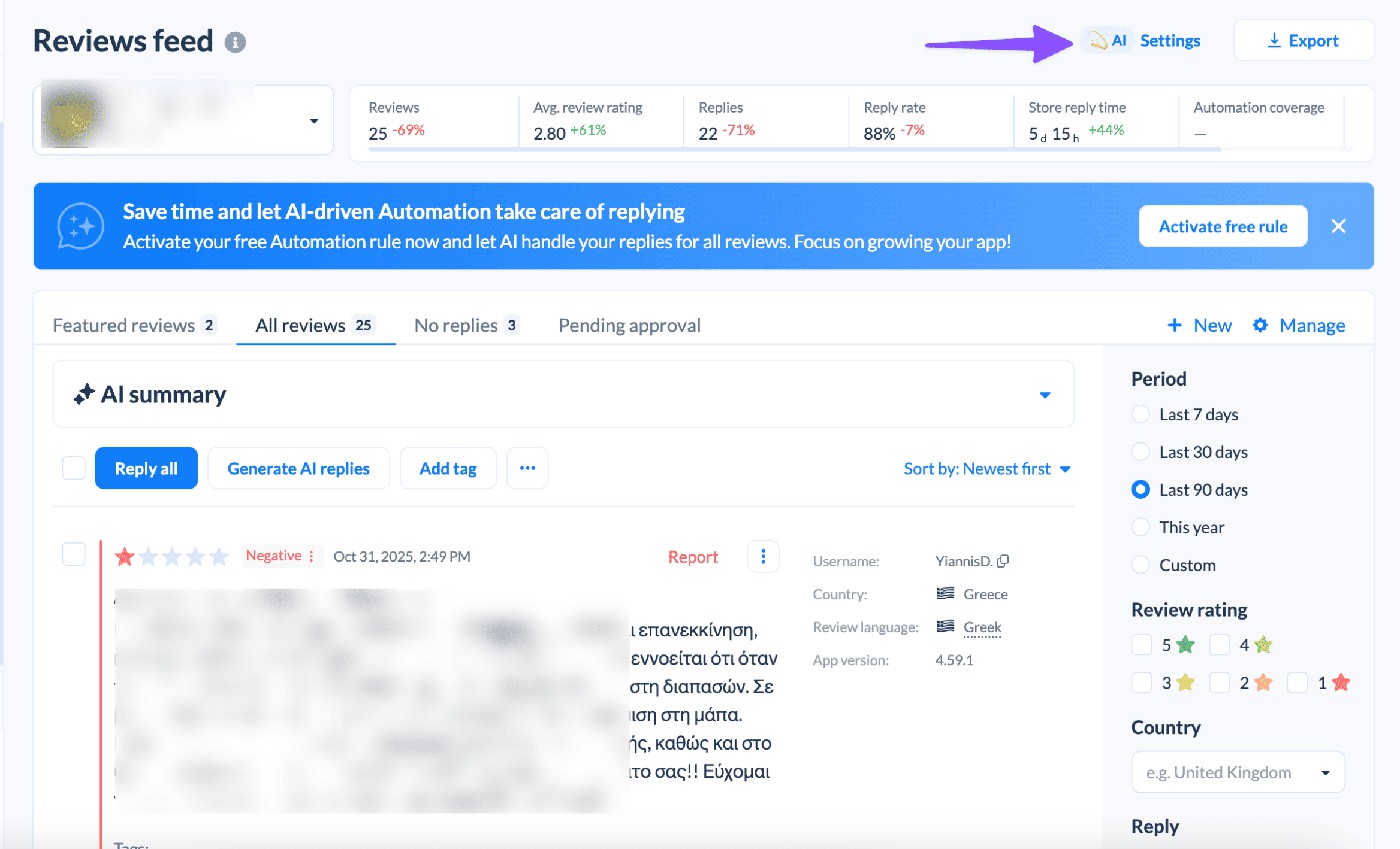
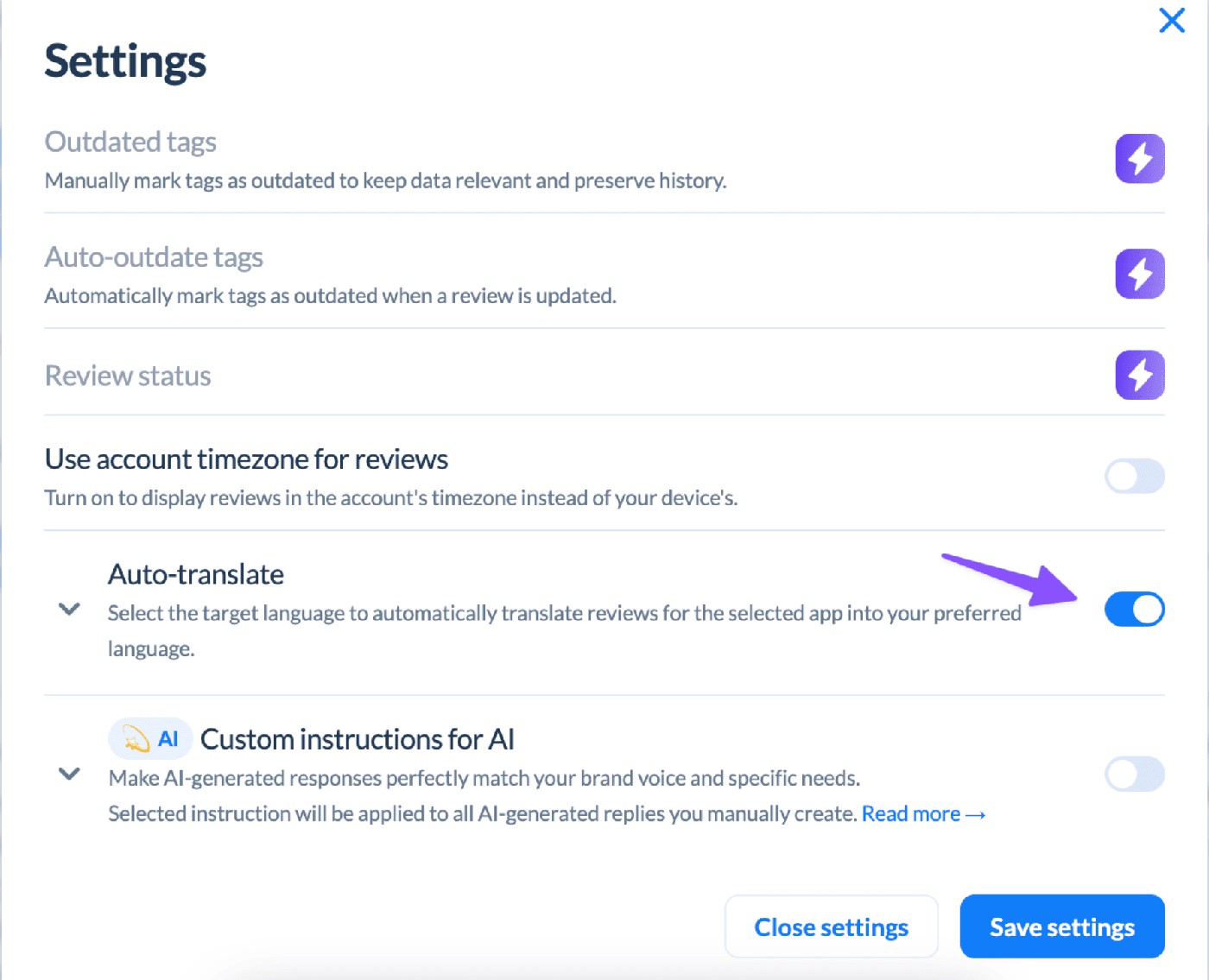
Sounds simple, and it is, until a team assumes it works like a per-market router. It doesn't. The target language is a single, account-wide setting. Change it while testing one workspace and it changes for every workspace on the account, including the one your Brazil team relies on. Past reviews stay untranslated too, unless someone on the support team backfills them by request.
2. Spam and abuse get handled differently than most people assume. There's no silent filter quietly deleting suspicious reviews before they reach your dashboard. Instead, a Report a Concern rule flags anything matching spam, offensive, or nonsense conditions and files a takedown request with the store itself.
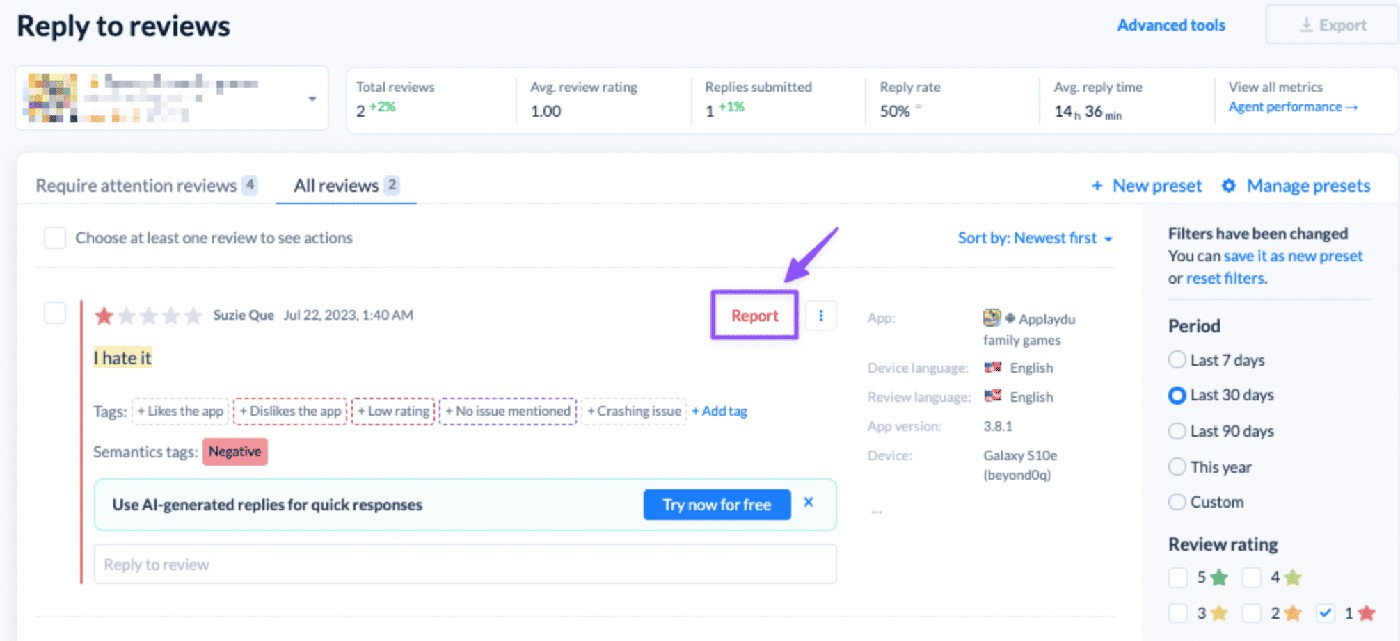
That's a meaningful distinction if you're evaluating any review tool, not just this one: ask whether a flagged review disappears from your feed or gets reported to the platform that published it. Those are two very different products.
Step 3: Classify, two tagging systems layered on top of each other
Ask five product managers what “automated tagging” means and you'll get five different answers, mostly wrong, because most tools only give you half the picture. AppFollow's AI-powered review management runs on two separate layers, and treating them as one is the single most common setup mistake I ran into researching this.
The first layer arrives pre-built. A machine-learning model, trained specifically on app reviews rather than adapted from a generic sentiment classifier, reads incoming text and sorts it into four fixed categories:
Category | What lands here |
|---|---|
Bug | Crash, App Freeze, Connection Issues, Device Issues, Battery, Login & Access, Geo Issues, UI Issues, Slow Performance, Payment Issues |
Monetization | Ads, Refund Request, Subscription, Pricing |
User Feedback | App Update, Feature Request, Design, Complicated, Fraud, Security, Imbalance (Imba), Thank You, Customer Service, Use Case, Established User, Notifications, Promo Code |
Report a Concern | Spam, Offensive, No Sense |
One review can land in more than one bucket at once, which matters more than it sounds. A player writing “I love the art but the new pass is a scam” gets tagged into both User Feedback and Monetization instead of getting averaged into a flat, meaningless middle score.
That model only retrains quarterly, based on precision and recall against reviews people have manually flagged as “incorrect.” Report a bad tag today and the fix might not land for months.
Most teams either don't know this or find out the hard way, watching the same mistake repeat for a full season before it quietly resolves itself. Report it anyway, the day you see it. An unreported mistake never gets fixed at all, correction cycle or not.
The second layer is yours to build: custom Tags, assigned by hand or by an Auto-tag rule scanning incoming reviews every 10 minutes. This is where genre-specific language lives, the vocabulary a generic model will never learn on its own. A gacha game needs a tag for “pity system.” A battler needs one for “matchmaking.” Nobody is shipping that in a quarterly retrain cycle built for the whole industry.
Step 4: Extract, the sentiment score that's honest about being a little dumb
“The move from whole-review sentiment to aspect-based sentiment is the single biggest quality improvement most studios can make to their review analysis. A player who says ‘love the game, hate the monetization’ is telling you exactly which lever to move, but only if your pipeline can see the two clauses as different sentiments.”
— Yaroslav Rudnitskiy, Senior Professional Services Manager at AppFollow
That's the theory, and it's correct. In practice, most commercially available sentiment tools, this one included, don't parse a sentence clause by clause the way an academic ABSA model does in a research paper (see Pontiki et al.'s SemEval-2014 Task 4 if you want the strict definition). What they do instead is close enough for almost every operating decision: since a review can carry multiple Semantic Tags, that same mixed review about art and monetization gets scored in both places rather than flattened into one number that satisfies nobody.
Sentiment Score itself is a percentage built from the correlation between positive and negative reviews, viewable overall or broken down per category.
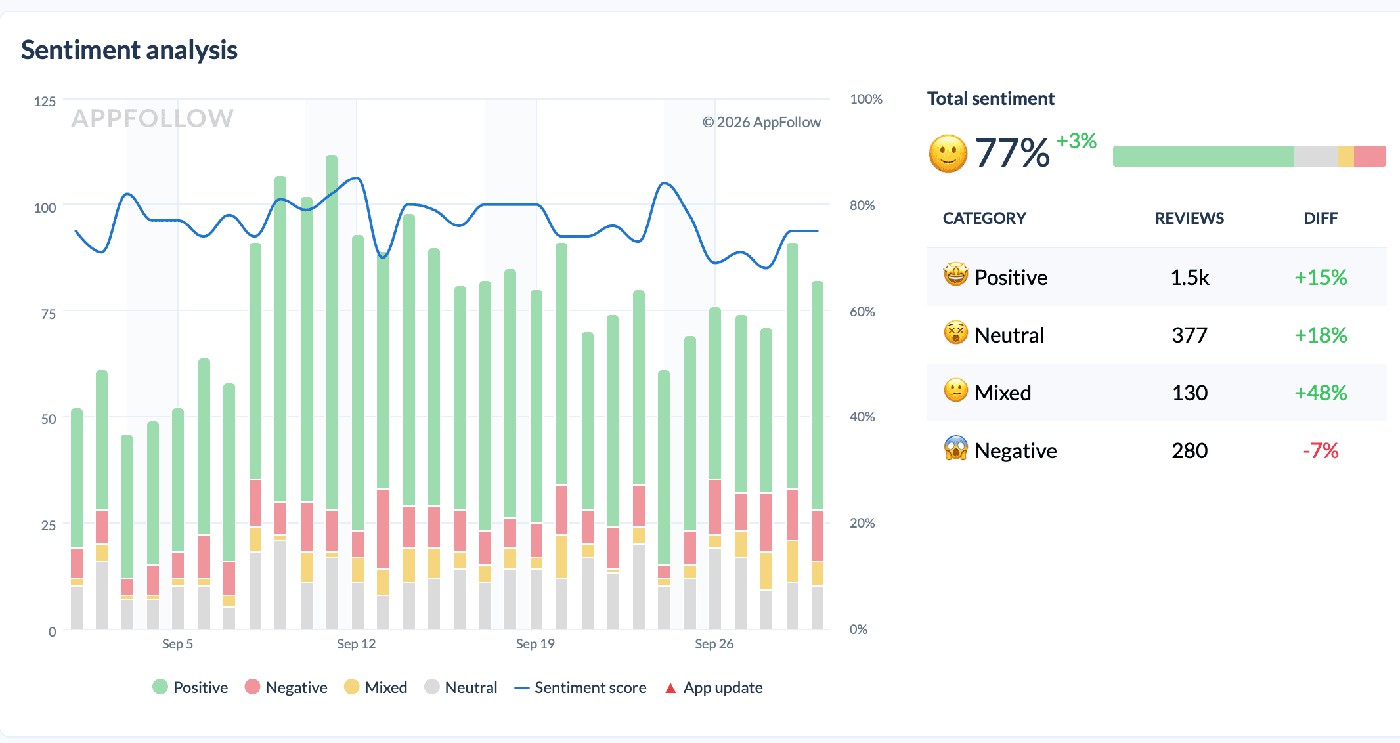
Layer Demographic Analysis on top and you get the same score cut by country, language, or region, which is the only way you'll ever catch a refund spike that's severe in Brazil and invisible everywhere else.
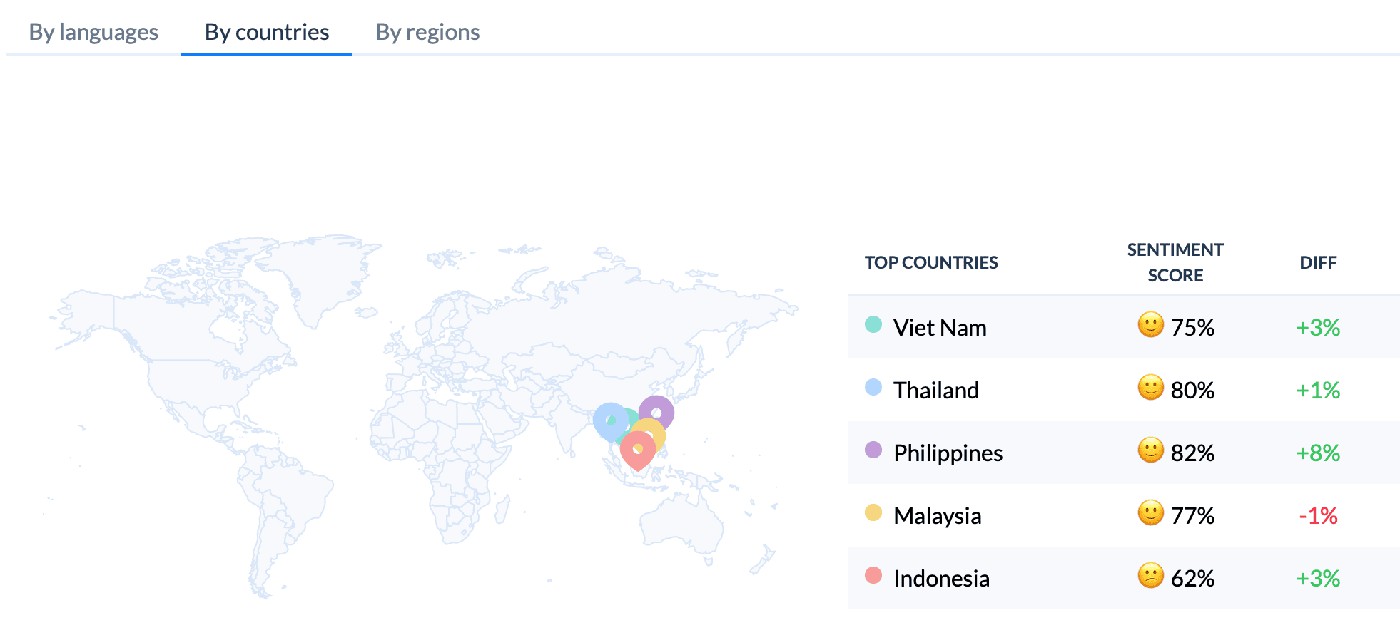
None of this ships free, by the way. It's a paid add-on, and full language coverage (20 languages across three tiers) costs more on top of the base tier. Worth confirming on the pricing page before you promise a client global coverage you haven't actually bought yet.
This piece stays focused on where sentiment fits inside the bigger pipeline, not on how to build the score itself. For that, how to measure customer sentiment walks through the actual metrics, and customer sentiment analysis goes deep on the methods, including the manual and rule-based approaches worth running before you trust an automated score blindly.
The table almost nobody opens
Phrase Analysis is the closest thing on the platform to genuine review mining: a running list of the most common one-to-four-word phrases across your reviews, each with its own rating average, sentiment split, and trend line.
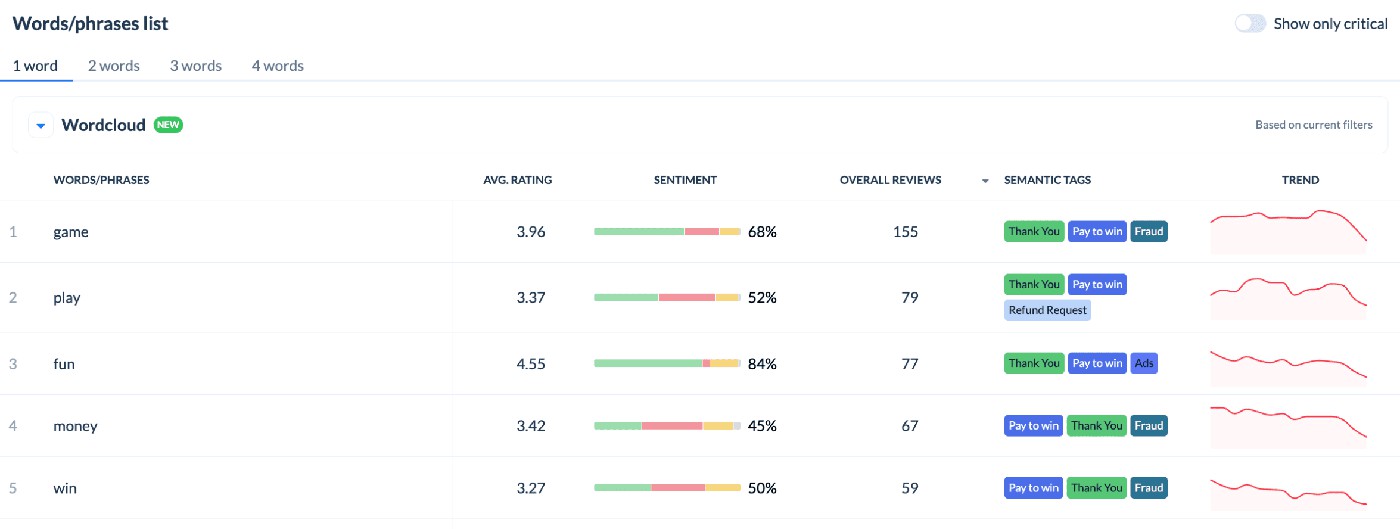
Flip on Show only critical and it narrows to phrases sitting under 4 stars, under 60% sentiment, and trending downward. That's a working early-warning list, sitting one click away, and in my experience it's the feature most teams open once during onboarding and never touch again. It deserves a spot on someone's Monday routine.
cta_free_trial_purple
Step 5: Route, turning tags into replies without a human relay
Everything above (ingesting, cleaning, classifying, scoring) only pays off if the result lands somewhere a human or a system can act on it. That's Automation Hub: an IF/THEN rule builder that re-scans unreplied reviews from the last 14 days every 10 minutes. Conditions trigger on keyword, rating, language, sentiment, or store.
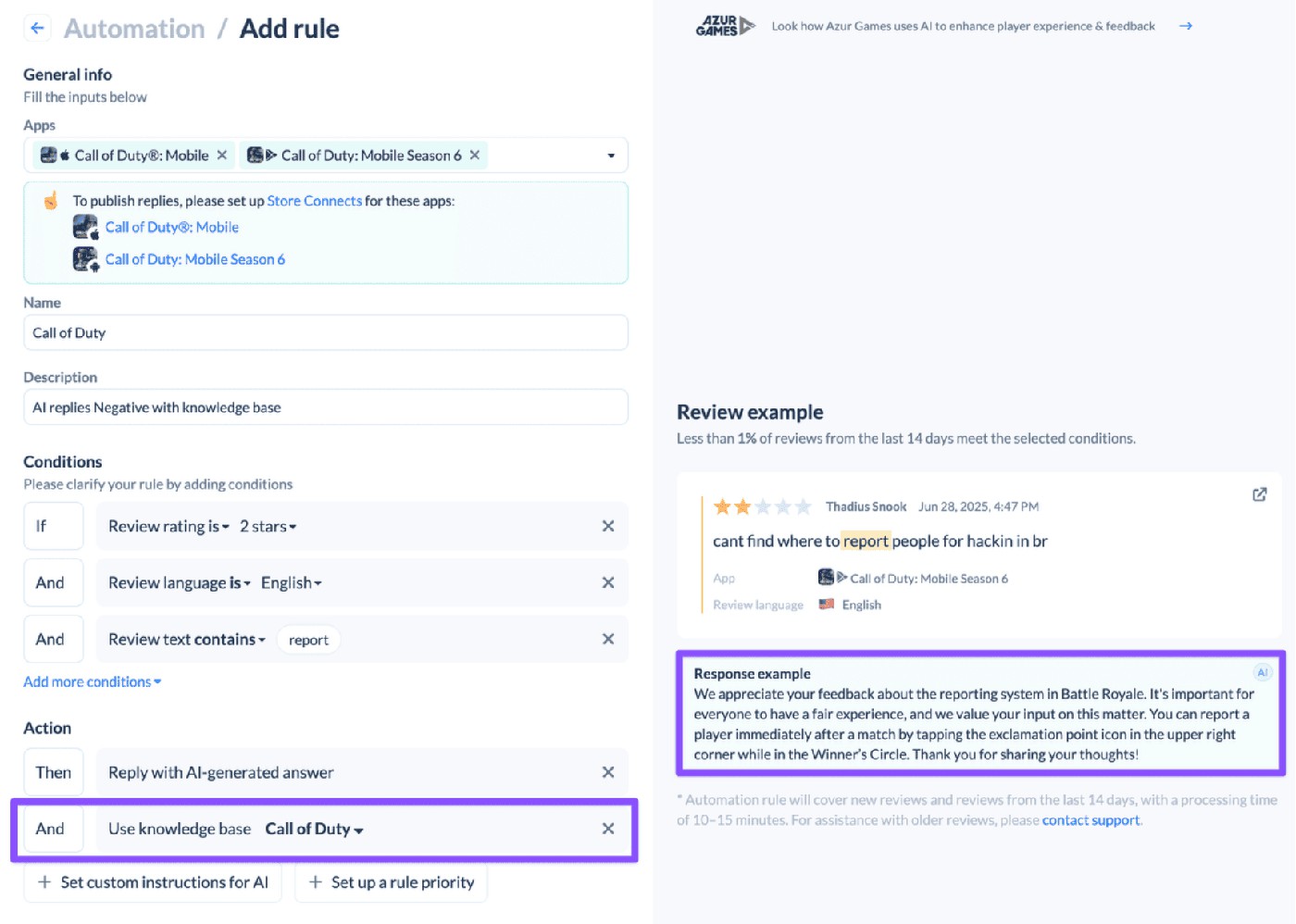
Four things can happen once a rule matches:
- A specific template goes out, sent to every review meeting the rule.
- A random template from a folder goes out instead, so five reviews about the same bug don't read like a form letter copied five times.
- An AI-drafted reply gets generated from scratch, written from the review's content and intent rather than filled into a template.
- A takedown request gets filed, for anything matching spam, offensive, or nonsense conditions from Step 2.
“The old debate, should we read the reviews or should we automate, is finished. At every scale that matters, you have to automate. The interesting question is what you automate first. Get ingestion and classification right and everything else lines up. Skip either step and the rest of the pipeline is a very expensive dashboard.”
— Anatoly Sharifulin, Founder, AppFollow
Then: proving the routing actually worked
A reply count tells you activity. It says nothing about whether the reply changed anything. AppFollow's answer to that gap is Reply Effect: a score for whether a review's rating or text changed after a developer reply, and how quickly.
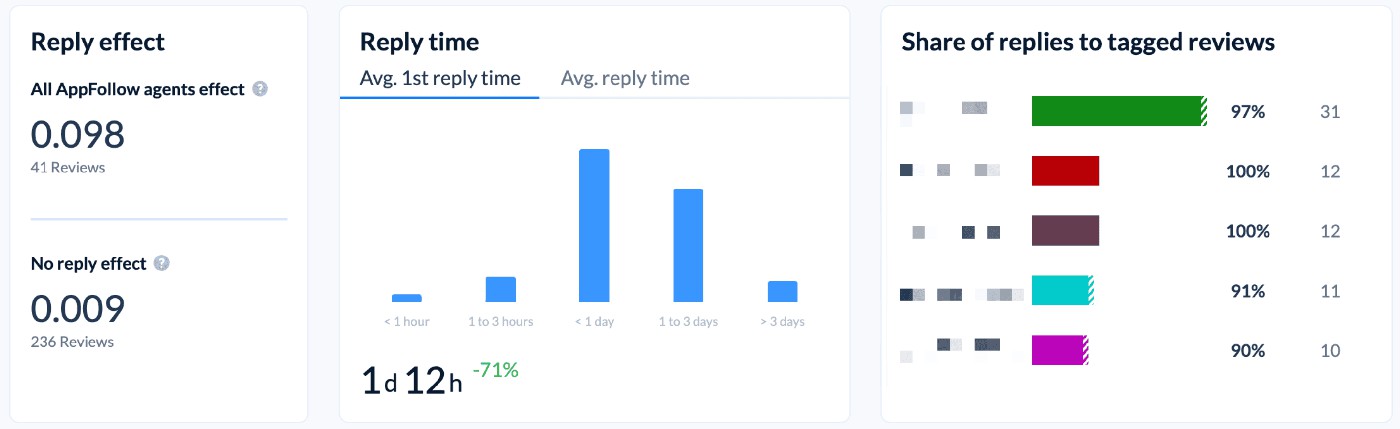
Two conditions decide whether an update counts. It has to happen after the reply, and within 30 days of it. A text-only edit with no rating change still counts, as long as the timing lines up. An update from 45 days out doesn't count at all, even if it's obviously connected. Review history survives even if the original gets deleted later, so the math holds up under that edge case too.
That logic produces four distinct outcomes, and mixing them up is an easy way to misread your own team's performance:
Filter | What it actually means |
|---|---|
With reply + Updated | Has a published reply and was updated at some point, not necessarily because of that reply. |
Reply effect | Was updated (rating and/or text) within 30 days after receiving a reply. |
No reply + Updated | Never had a published reply, but changed anyway. |
No reply effect | Never had a reply, or the update came too late, or nothing changed after the reply at all. |
Here's the finding that made me sit up. Two separate dashboards report Reply Effect, and they will not agree, on purpose.
Reviews Analysis counts only the final outcome of a conversation.
Agent Performance counts every single exchange inside it: an agent who replies to the same review five times, with the user updating it after each one, generates five separate Reply Effect calculations there, because it's measuring effort across a whole conversation instead of just where it landed.
- Reviews Analysis also folds in replies posted straight from the app store console;
- Agent Performance only counts replies sent through the platform itself.
Neither number is wrong. They're answering two different questions, and I'd guess most support leads pulling both into a monthly deck have never been told that, which sets up an uncomfortable conversation the first time someone notices the mismatch.
What it looks like when the five steps actually run together
Numbers from a help doc are one thing. Numbers from a team that shipped this and measured the outcome are worth more.
“Since implementing automation tools, we can now tackle 35% to 50% of reviews. And our response time has decreased by more than 10 times.”
— Rebecca Kish, Reviews Specialist, ROKU
Kolibri Games ran the cleanest version of this experiment I've come across. During a high-volume holiday stretch on Idle Miner Tycoon, they let automation answer 100% of incoming reviews, then compared outcomes.
Reviews that got an automated reply carried a Reply Effect of +0.2.
Reviews left untouched sat at -0.5.
Their published case study also reports an 88% reduction in average response time, a 75% increase in response rate, and a 4% lift in Sentiment Score for the month automation ran at full volume.
“AppFollow automatically organizes actionable insights for us right away, with little time or resources on our side needed.”
— Lauren Wade, Head of Community Management, Kolibri Games
Kolibri isn't the outlier either. Toca Boca ran a similar playbook and landed at a 75% review reply rate after automating what used to be a manual queue. Two different studios, two different genres, the same lever pulled.
cta_free_trial_yellow
So if I were setting this up today
Three things, in order.
- I'd fix ingestion before I touched a single tag. None of the tagging or sentiment work matters if reviews are arriving late or incomplete. Connect Google Play through a Service Account, confirm every store your app ships on is actually integrated, and stop treating a “missing review” complaint as a mystery. Nine times out of ten it's a moderation delay, not a bug.
- I'd build my own tag layer before I trusted the built-in one completely. The pre-trained categories cover the common ground well. They will never learn your game's slang on their own, and waiting for a quarterly retrain to fix a wrong tag is not a plan. Report mistakes the day you see them and layer custom Auto-tags on top for anything genre-specific.
- I'd pick one Reply Effect dashboard and tell my team which one is the source of truth. Reviews Analysis for the headline number in a board deck. Agent Performance for coaching individual replies. Using both without explaining the difference is how a perfectly good automation program ends up looking like it's underperforming in a meeting where nobody asked the right question first.
Do those three things and the rest, the AI-drafted replies, the Slack alerts, the phrase-trend tables, mostly take care of themselves. They're built to run on top of a foundation that's already solid. They can't fix one that isn't.
The cheat sheet, since you'll want to reference this later
Mechanic | The actual number |
|---|---|
New app, initial review collection | Within 2 hours (up to 2 days if 4,000+ historical reviews) |
Possible ongoing sync delay | Up to 36 hours, store-side |
Google Play moderation lag | Up to 24 hours (skipped via Service Account connection) |
App Store moderation lag | Typically 8-12 hours, occasionally up to 3 days |
Auto-tag / Auto-reply rule re-scan | Every 10 minutes, over the last 14 days |
Reply Effect eligibility window | 30 days after the reply |
Semantic Tags model retrain | Quarterly |
Semantic Analysis language coverage | 20 languages across 3 add-on tiers |
None of this required guessing. Every number above came from the product's own documentation or from a customer who published real results, which is the only kind of practitioner detail worth building a workflow around.
FAQs
How do I analyze app store reviews automatically?
Run a five-step pipeline: pull reviews from every store you ship on, strip spam and duplicates, classify each by topic and severity, score sentiment and extract trending phrases, then route the flagged ones into Slack, a help desk, or a product tracker. See the TL;DR above for the one-line version of each step.
How long does it take for a new review to show up after someone posts it?
Usually within 2 hours once an app is added to a workspace. Store-side moderation adds its own delay before a review is even public: up to 24 hours on Google Play, typically 8 to 12 hours on the App Store, occasionally up to 3 days.
How accurate is automated review analysis?
High at the aggregate level (sentiment trends, topic distribution, anomaly detection). Individual review classification is looser, since sarcasm and one-word reviews still trip up every model on the market, this one included.
Do I need to pay extra for sentiment analysis?
In AppFollow's case, yes. Sentiment scoring, demographic breakdowns, and phrase-level trend data all sit behind a paid add-on, and full language coverage costs more on top of the base tier.
Can AI write the replies, not just tag the reviews?
Yes. Automation rules can trigger an AI-drafted reply written from the review's content and intent rather than a fixed template, alongside options to send a set template or file a takedown request for spam.
What's the difference between sentiment analysis and topic classification?
Sentiment tells you whether a reviewer is happy or angry. Topic classification tells you what they're happy or angry about. A pipeline missing either one is only telling half the story.
How often should a review taxonomy get refreshed?
Quarterly at minimum, matching the cadence most vendor-side classification models retrain on. Your own custom tags have no fixed schedule, so update those the moment you notice a gap, not on a calendar.
cta_get_started_purple
Read also:
How HyperHug Used AppFollow to Reconnect with 50,000 Players Through a Mass Reactivation Campaign
How Earth Hero Uses ASO Data to Shape Their Climate Action App