Customer Sentiment Analysis: How To Turn Reviews Into Decisions

Table of Content:
You’re here because the numbers no longer make sense. Downloads look fine, ratings are there, conversion on the store page dips after an update, and reviews feel… contradictory. Some users say they love the app, yet installs slow down.
That’s usually the moment teams start asking what is consumer sentiment, and realize star ratings alone aren’t enough.
So we put this guide together with our ASO experts, the people who help apps grow downloads and visibility on app stores by reading thousands of real reviews and mapping words to performance shifts. This is customer sentiment analysis as it’s used in app growth.
- How does sentiment get extracted from messy, emotional reviews?
- Which sentiment types exist?
- How do you analyze it at scale without losing nuance?
And at the end, a bonus - a solution that brings your customer sentiment insights to the team processes level.
But first, let’s check if we are on the same page about basics.
What is consumer sentiment?
Customer sentiment is the emotional “vote” users leave behind in their words. Not the star rating. The feeling inside the review text that tells you if people are delighted, annoyed, stuck, or quietly ready to churn.
“Great app, but login loops every morning” is positive on the surface, with a very specific frustration hiding in plain sight.
What is customer sentiment analysis?
Customer sentiment analysis is about turning messy review language into structured signals you can measure and act on. You classify tone (positive, negative, neutral), then go one level deeper into themes like crashes, paywall confusion, onboarding, speed, pricing, and support.
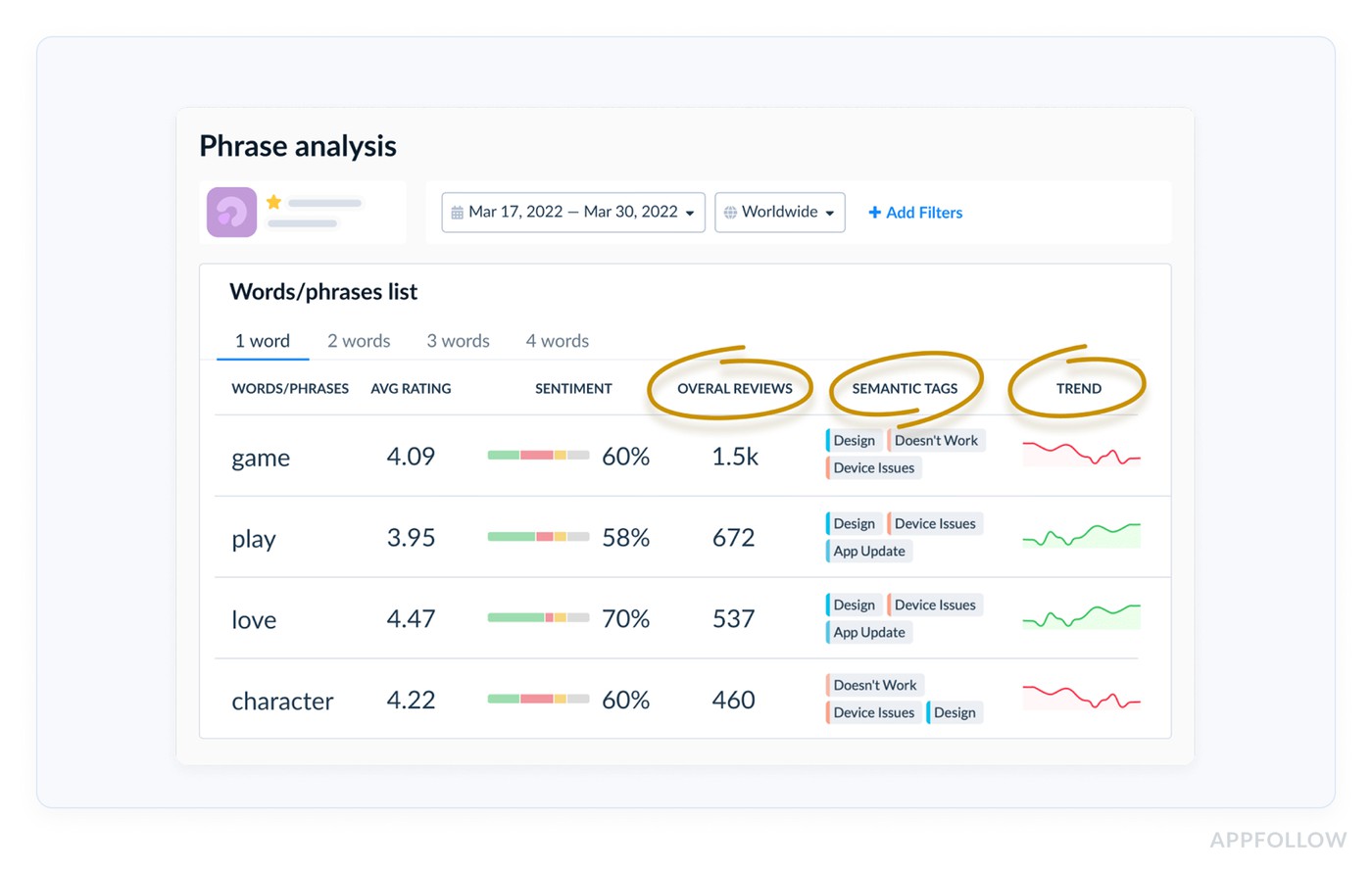
Reviews sentiment analysis by phrases in AppFollow. Check how it works live
Then analyze it on more general performance level like:
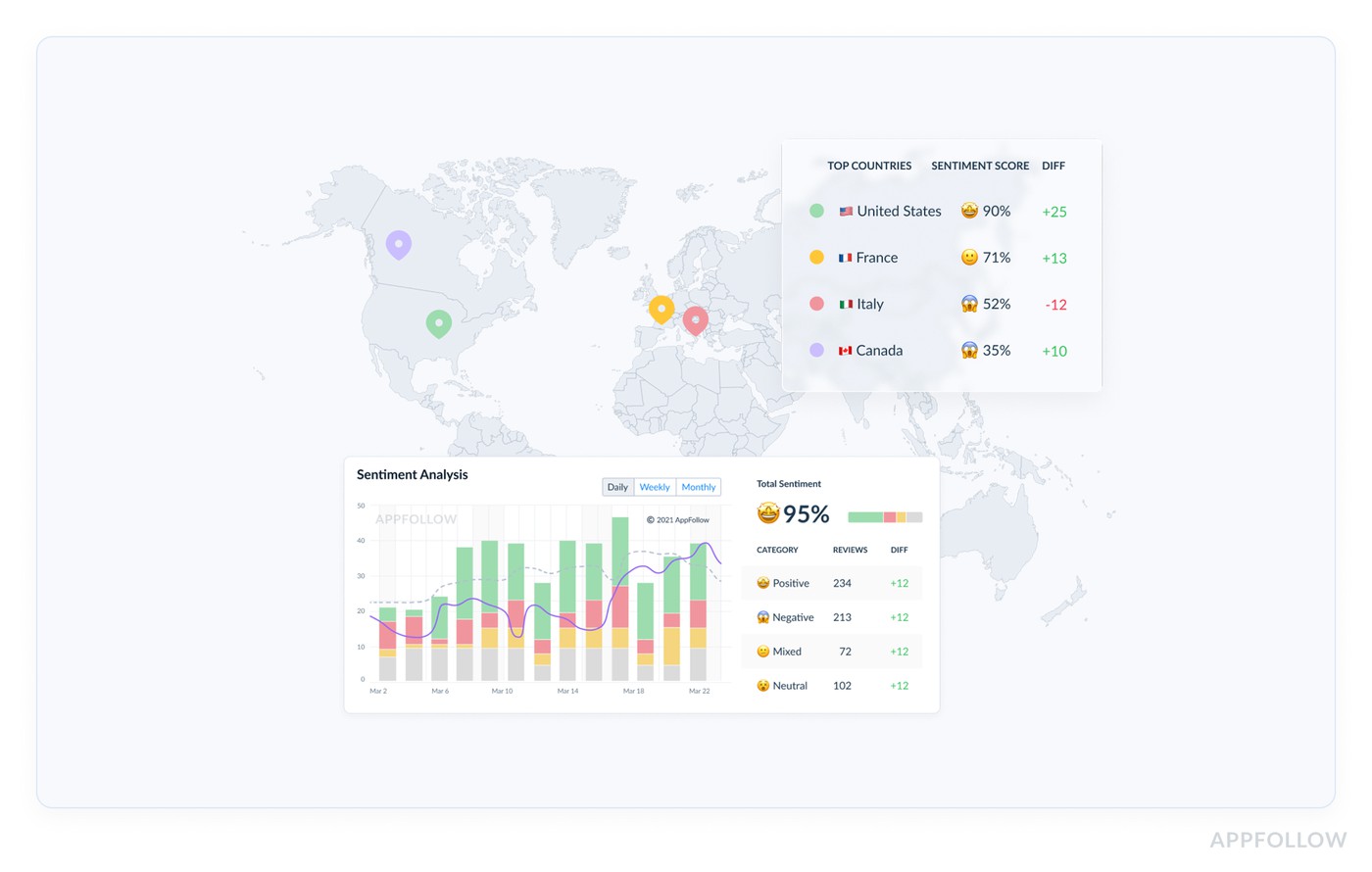
App sentiment analysis dashboard in AppFollow. Check how it works live
In ASO work, teams use it when conversion dips after a release, when a new feature triggers backlash, or when they need to prioritize fixes that will move store performance.
What you get out of it, in real numbers:
- Faster diagnosis when installs drop. In H1 2024, average US store page conversion hovered around 25% on the App Store and 27.3% on Google Play, so small shifts matter. (Source)
- A clearer lever for store growth: App Store “impression to install” averages sit around 3.8%, which means you’re fighting for what happens after the tap.
- More confident decisions because reviews influence behavior. One industry stat says 99.9% of consumers read reviews at least occasionally, and that habit spills into app downloads.
And this is just a small part of how customer sentiment analysis can be used to improve customer experience.
How does it work?
When reviews hit the platform like AppFollow, the system breaks each review into meaningful units. A single sentence like “Love the redesign, but login keeps failing after the update” gets split, because the emotion is mixed. That matters for customer sentiment accuracy.
Next comes classification. Using NLP models trained on app-store language, reviews are mapped to Semantic Tags such as Login, Crashes, Performance, Paywall, UX, Updates, Support.
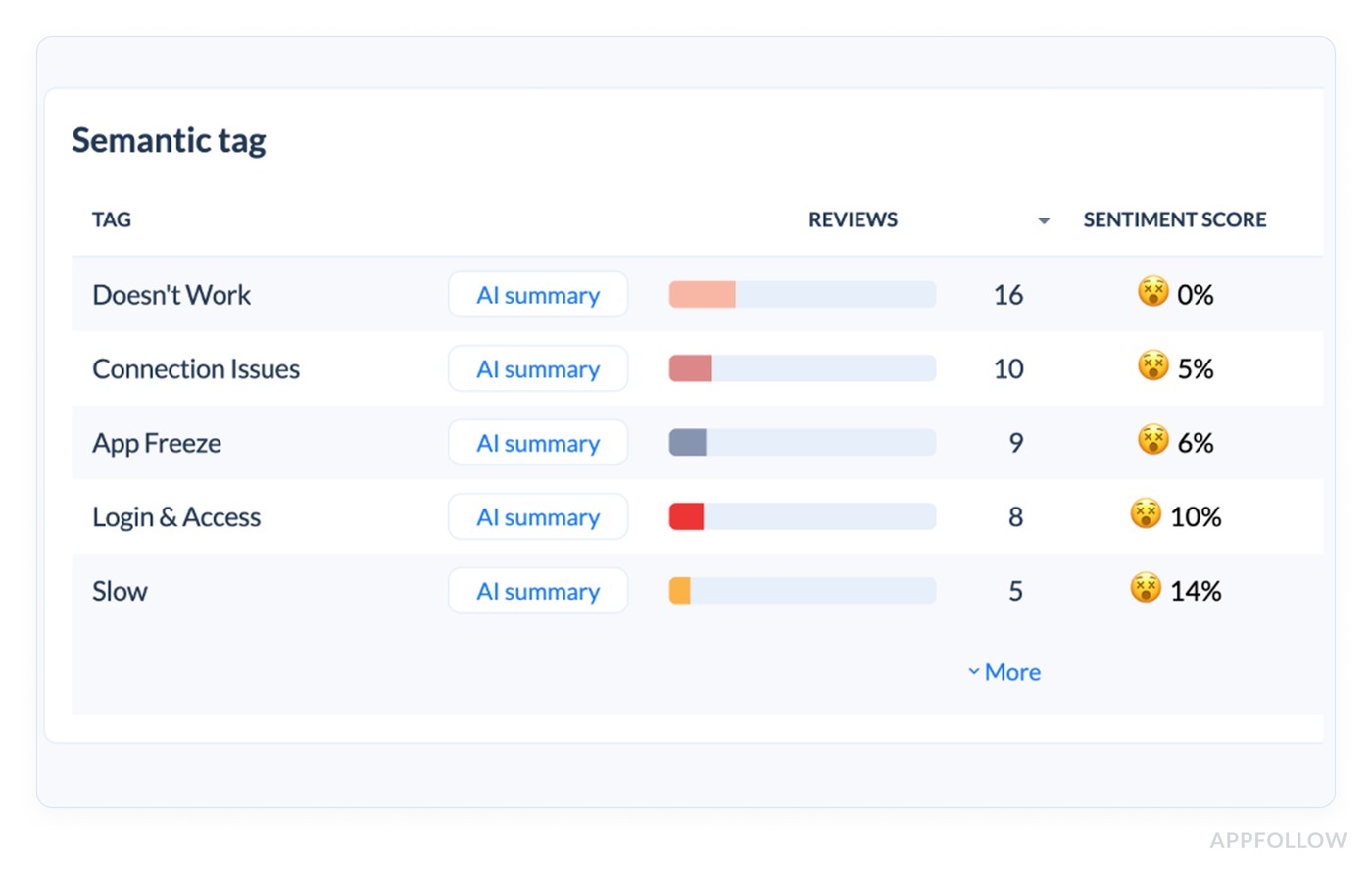
Sentiment tags in AppFollow. Check how it works live
“Can’t get in,” “stuck on auth,” and “sign-in loop” all land in the same bucket, which is how customer review sentiment analysis avoids false trends.
Then sentiment is calculated inside each tag. That’s the key step. Instead of one average score, you see sentiment by topic, by version, by country.
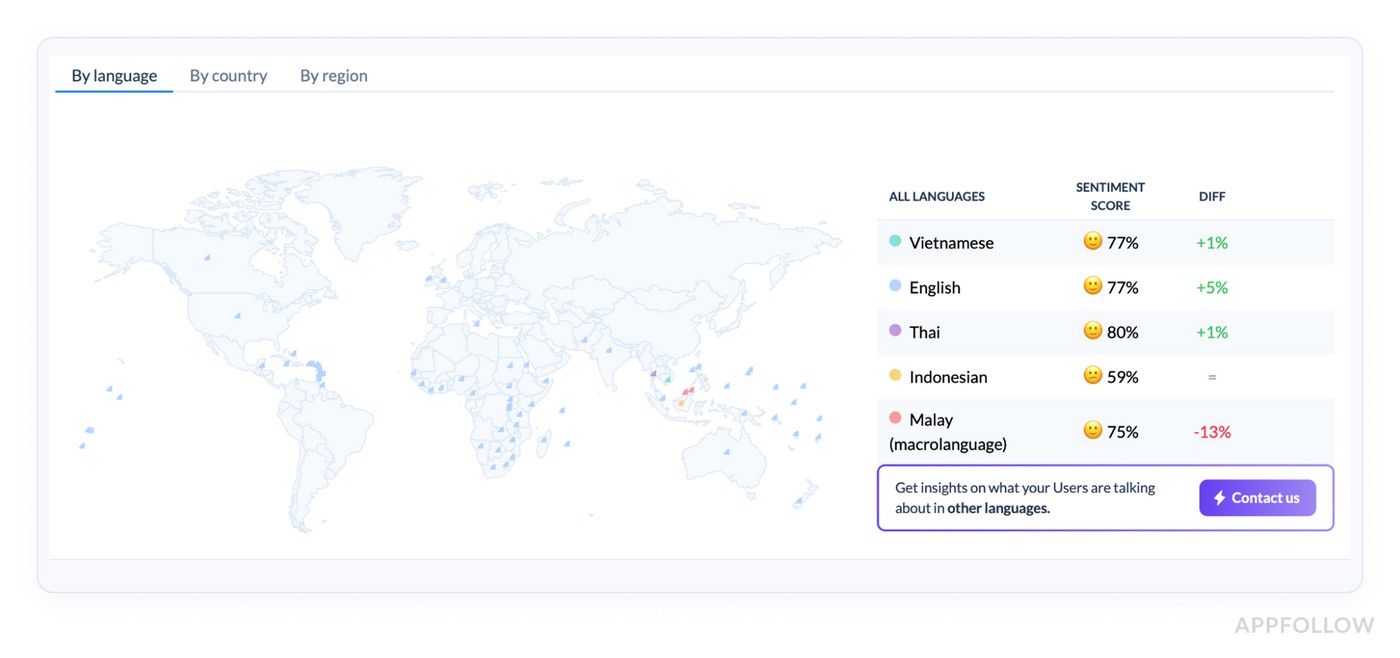
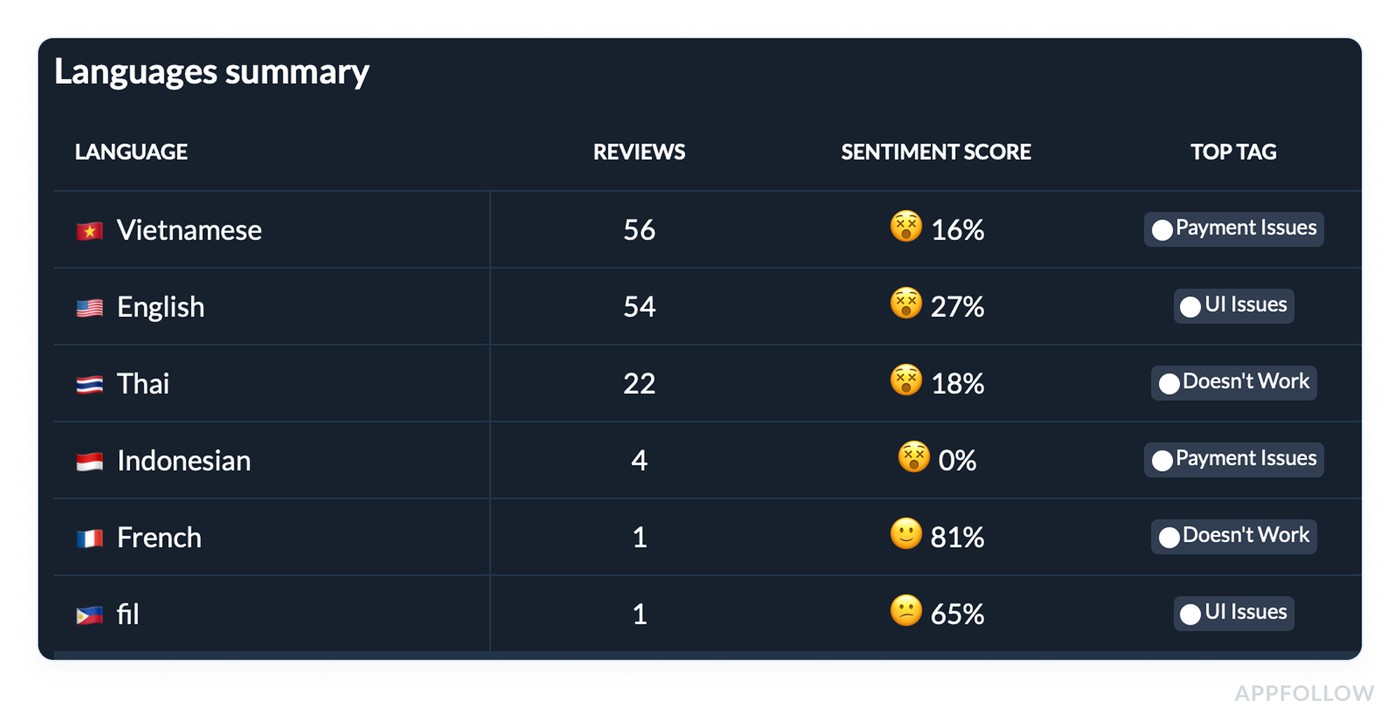
This is where customer sentiment analysis becomes actionable, because you can say “16% payment issues in Vietnam" not “reviews got worse.”
Finally, teams use the customer sentiment data operationally:
- Product fixes the tag driving damage.
- ASO updates screenshots or copy if confusion spikes.
- Support gets routed the right cases.
Replies get templated with context. That’s how review noise turns into decisions that move app performance.
Read also: 50 positive review response examples [+15 negative cases]
What customer sentiment tells you
You know that moment when everyone has a different theory for the same drop in performance? customer sentiments ends the debate, because it points to the why behind the stars. You stop reading reviews like a novel and start reading them like a dashboard: which topic is spiking, how fast it’s spreading, and whether it’s isolated to one version, OS, device family, or market.
- For developers, sentiment analysis for customer feedback is basically early-warning telemetry from humans. You watch negative volume and velocity by tag (Crash, Login, Payment), then slice it by app version and date of release. A real signal looks like this: “Login tag mentions jumped from 6% of daily reviews to 28% within 48 hours after v6.2, mostly on iOS 17.” That’s a reproducible bug report in plain language, with impact attached.
- Marketing and ASO teams get conversion context. If “too expensive” or “confusing onboarding” sentiment rises, it’s store messaging misalignment. You turn it into actions: rewrite the first two screenshots, adjust feature callouts, update release notes, and watch if the negative-to-positive ratio in that tag softens over the next week.
- Customer support gets the triage map. Sentiment analysis customer feedback tells you which issues deserve macros, which need escalation, and which are just noise. You can track response backlog against “hot tags,” see if reply rate is keeping up, and measure whether sentiment rebounds after you ship a fix or publish a workaround.
What is the role of sentiment analysis in customer service
You open reviews, and it’s a blur. Then you click one tag: “Payment.” It’s 12% of all reviews this week, sentiment is sharply negative, and most complaints mention renewal or refunds. Suddenly you know exactly which team owns the next hour.That’s only one of examples when sentiment analysis in customer support analytic turns “review feed” into a system you can run daily.
- It separates incidents from noise. One angry review is a complaint. One angry theme that accelerates is an incident. AppFollow’s Semantic Tags cluster phrasing into the same issue bucket (login loop, stuck on auth, can’t sign in), then you track volume and velocity by app version, country, and OS.
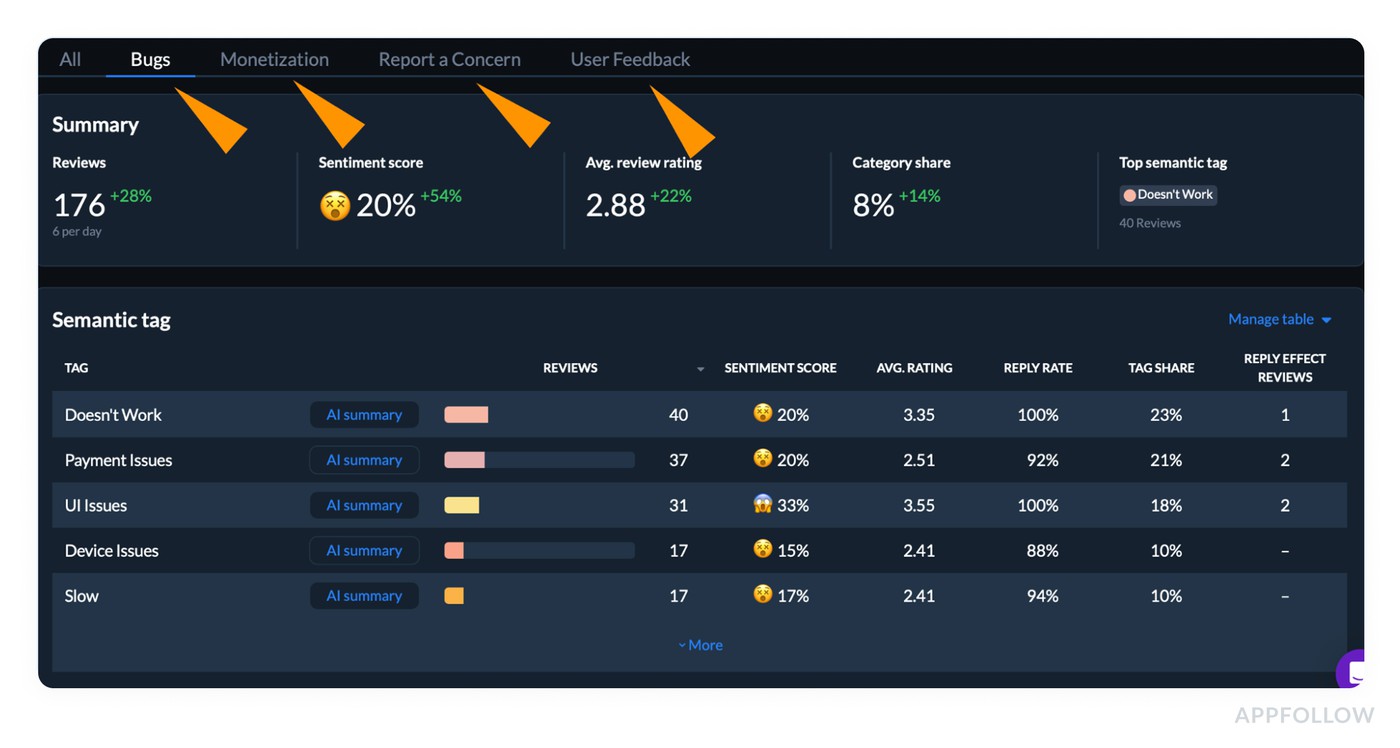
-
When a tag’s share of reviews jumps right after a release, you’ve got a clean, time-stamped signal that’s easier to reproduce than a random ticket. - It routes work to the right owner with evidence. “Payment is broken” and “I hate the paywall” are different problems with different fixes. Customer service complaint sentiment analysis keeps you honest by splitting negativity by root cause, so support doesn’t become a human load balancer. Engineering gets crash patterns and device context. Billing gets subscription confusion language. Product gets UX friction themes. That’s how you shorten escalation loops.
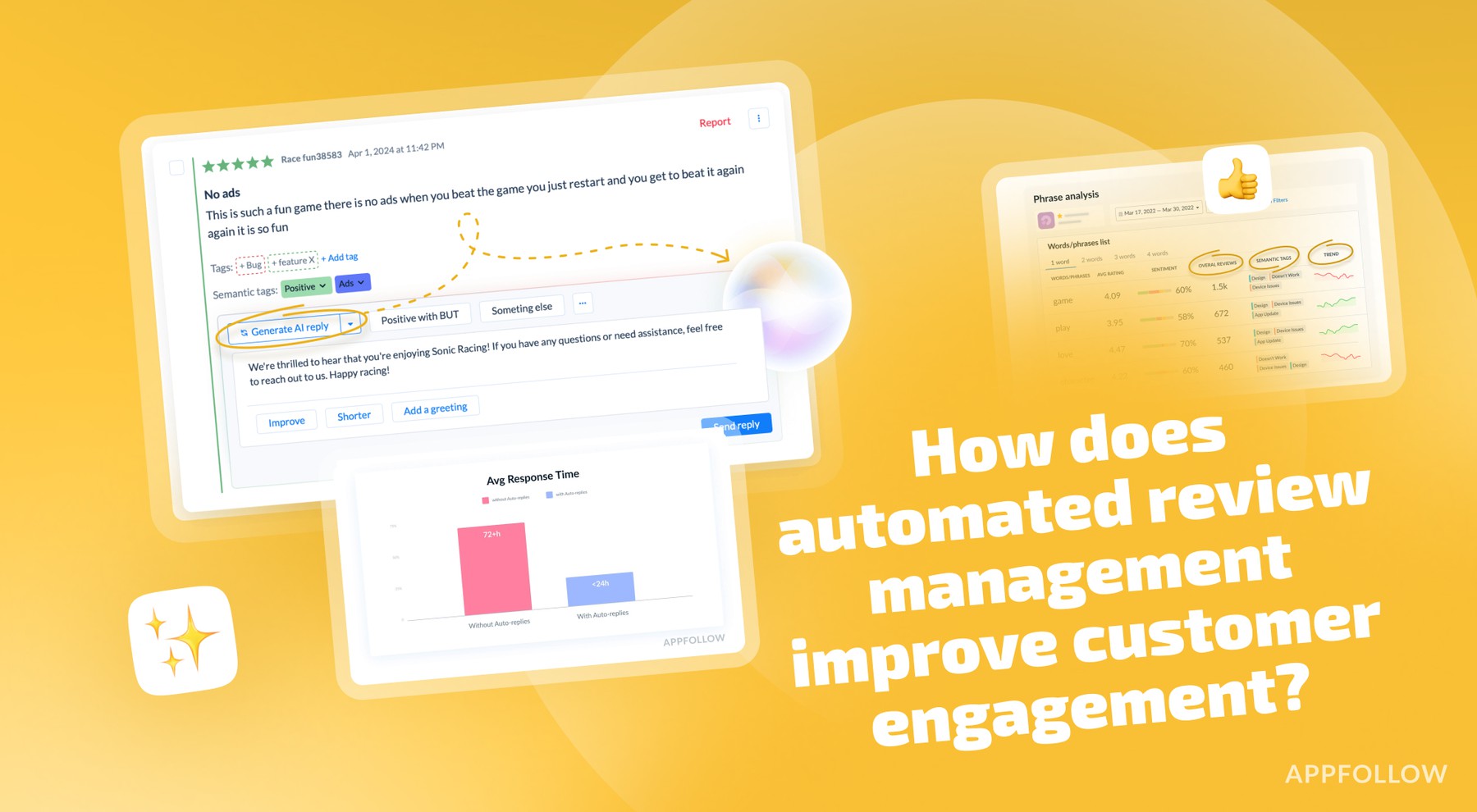
- It proves whether your responses and fixes are working. Support metrics only matter if they change outcomes. You watch reply rate, time-to-first-response on reviews, and sentiment lift inside the same tag after you respond or ship a fix. That’s sentiment analysis customer experience with a before/after story. AppFollow’s benchmarks also put the gap in perspective: on average, only 1 in 10 Google Play reviews gets a response, and about 2 in 10 on the App Store, so teams that respond consistently can stand out fast.
- It catches tone issues before they become reputation issues. Sometimes the fix isn’t technical. A blunt template can read dismissive in a 1★ thread and trigger pile-ons. Customer service greeting sentiment analysis helps you see when your opening line is escalating tension instead of lowering it.
That’s sentiment analysis for customer feedback used like an ops system, not a report. And here are how companies usually collect this data.
Read also: 12 Best Review Management Software - Features, Price, Cons
Top 6 customer sentiment analysis methods
Some methods work when the volume is low. Others break the moment reviews spike or languages multiply. The difference between “we noticed a pattern” and “we fixed the right thing” usually comes down to which customer sentiment analysis techniques you’re using and when.
Here are the most popular methods used by companies:
1. Manual review tagging
Start here when you’re early-stage, or when you’re investigating a sudden spike after a release. You read a sample of reviews, tag them into a tight taxonomy (Login, Crashes, Subscription, Ads, UX), then calculate simple ratios like “tag share” and “negative share” per tag. It’s slow, but it’s the fastest way to learn how your users talk about problems and to design labels your team will trust.
This is one of the core customer sentiment analysis techniques because it teaches your model and your humans the same language.
2. Support-led complaint coding
This one lives inside your support process. You classify reviews the same way you classify tickets, then connect them to outcomes: escalated, resolved, refunded, reopened. Done right, customer service complaint sentiment analysis tells you which issues create the most heat, not just the most mentions.
It’s great for prioritization because a small volume of high-anger complaints can do more damage than a big pile of mild annoyance.
3. Survey + NPS verbatims
App store reviews skew negative and moment-driven. Surveys help you balance that; pull verbatims from NPS, in-app prompts, and churn surveys, then compare themes against reviews. If “too expensive” shows up everywhere, that’s a positioning problem. If reviews scream “crash” but surveys don’t, you might have a version-specific regression.
4. Rule-based keyword + pattern matching
Useful when you need speed, and you have obvious phrases: “won’t open,” “stuck,” “refund,” “scam.” You build rules, include misspellings, then monitor trendlines. Sarcasm, localization, and vague language will fool it. Still, it’s a decent first pass for alerts on high-severity topics.
5. Topic-level sentiment
This is where it starts to feel like product work. Instead of one sentiment score for the whole app, you score sentiment inside each theme and slice it by version, country, and OS. That’s customer experience sentiment analysis in practice, because you can tie “Paywall sentiment tanked in v6.2” to store conversion and retention decisions.
6. Automated NLP at scale
When review volume spikes or you support multiple locales, manual tagging collapses. Automated customer sentiment analysis uses NLP models to classify sentiment and group reviews into semantic topics so “can’t sign in” and “login loop” land together, even when the wording changes.
This is the method we’ll break down next, step by step, so you can run it without losing context or trusting a black box.
How to do customer sentiment analysis in AppFollow
Start by connecting your apps so reviews stream in continuously, not as a one-time export. AppFollow pulls reviews into a single feed, which is the raw material for voice of customer sentiment analysis when you’re operating across multiple countries, languages, and versions.
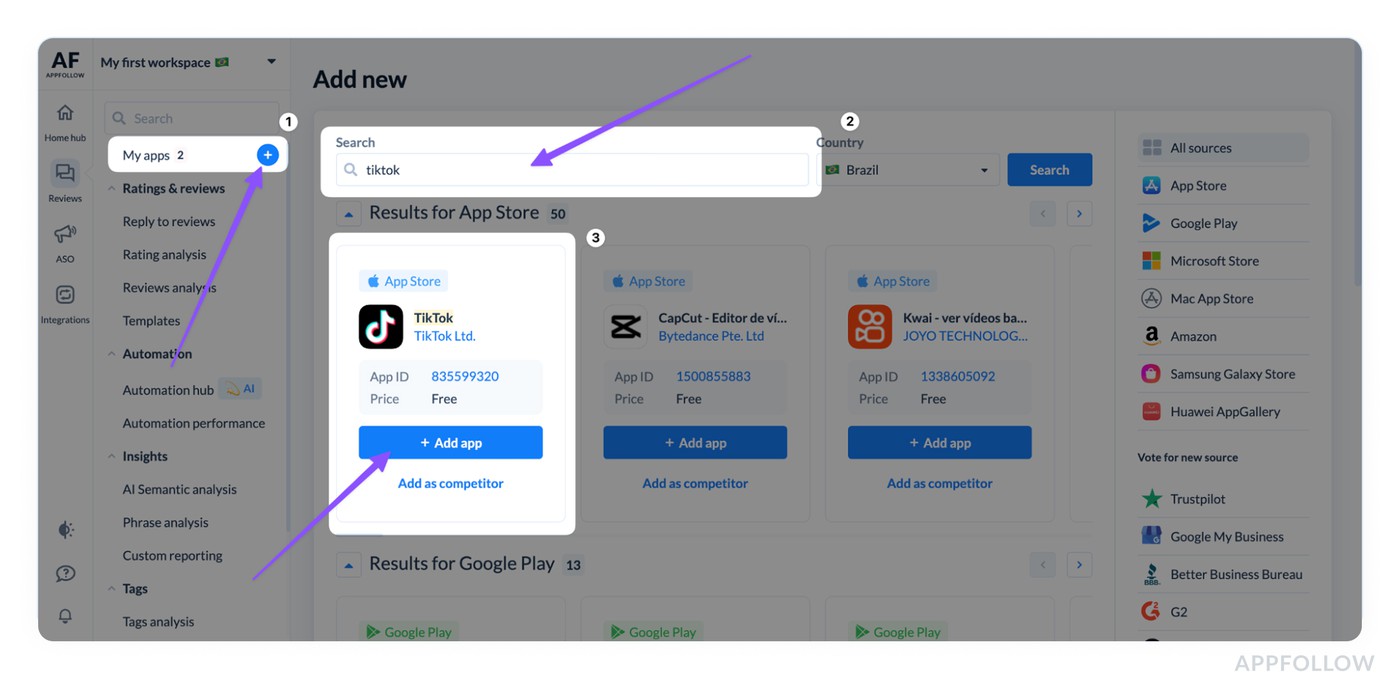
Adding your app to AppFollow
Next, let the platform organize the chaos for you. Semantic Tags use machine learning to tag reviews the way users talk, so “stuck on auth,” “login loop,” and “can’t sign in” land in one cluster without you babysitting keywords.
This is the foundation of customer sentiment analysis, because sentiment becomes useful only after feedback is grouped into real topics.
Then you switch from reading reviews to reading patterns. Open Semantic Analysis to see which topics are driving dissatisfaction, rating drops, and potential uninstalls. Slice by country, tag, and time window, and use AI Summary to get a tight explanation of what changed in that slice without losing the context inside the text.
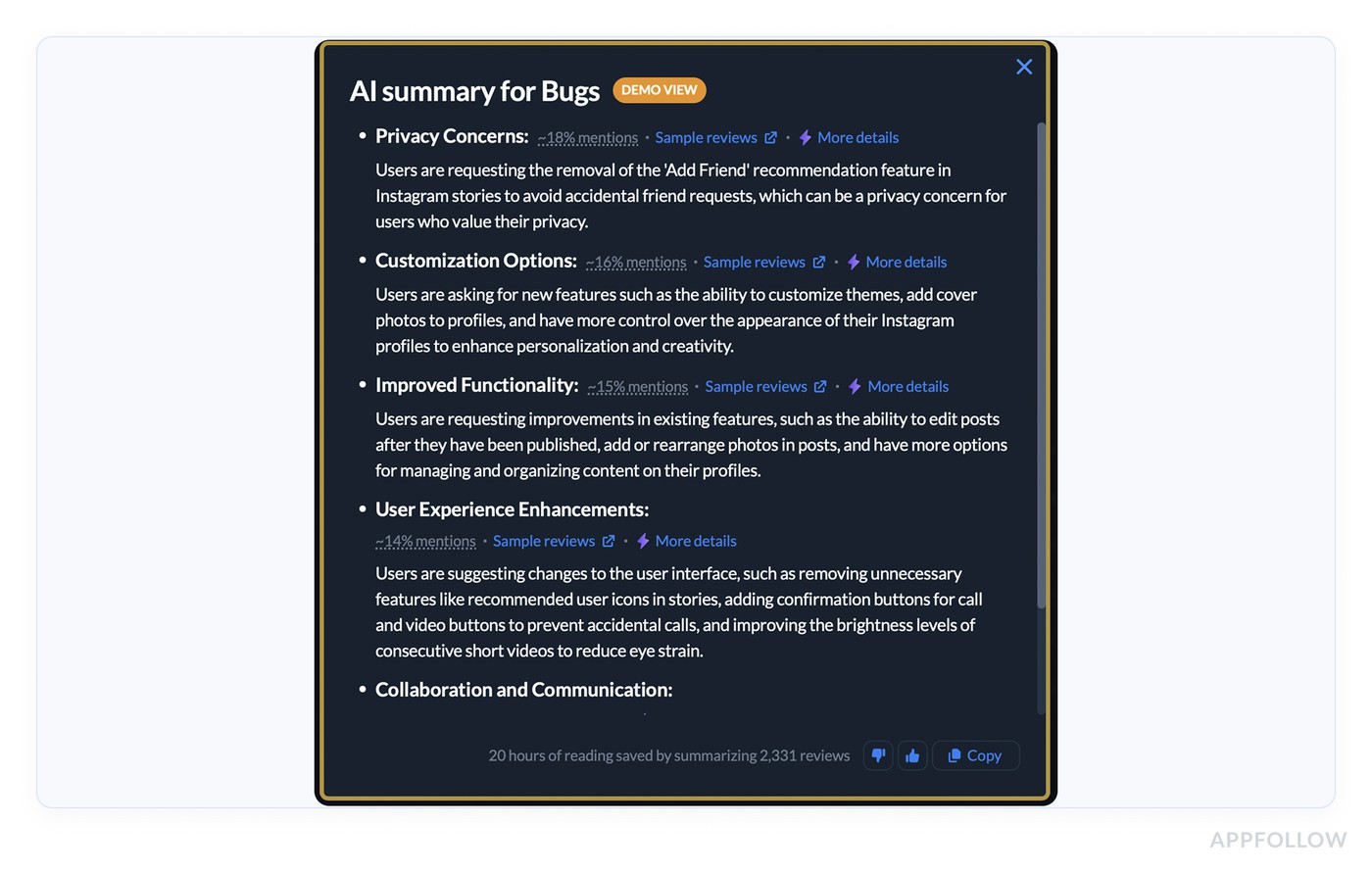
That’s sentiment analysis customer experience done like an operator.
Finally, operationalize it in the workflow support teams run. Automation Hub lets you create rules that auto-tag and auto-reply based on conditions like Semantic Tags and sentiment, so urgent themes get routed, templated, or escalated fast.
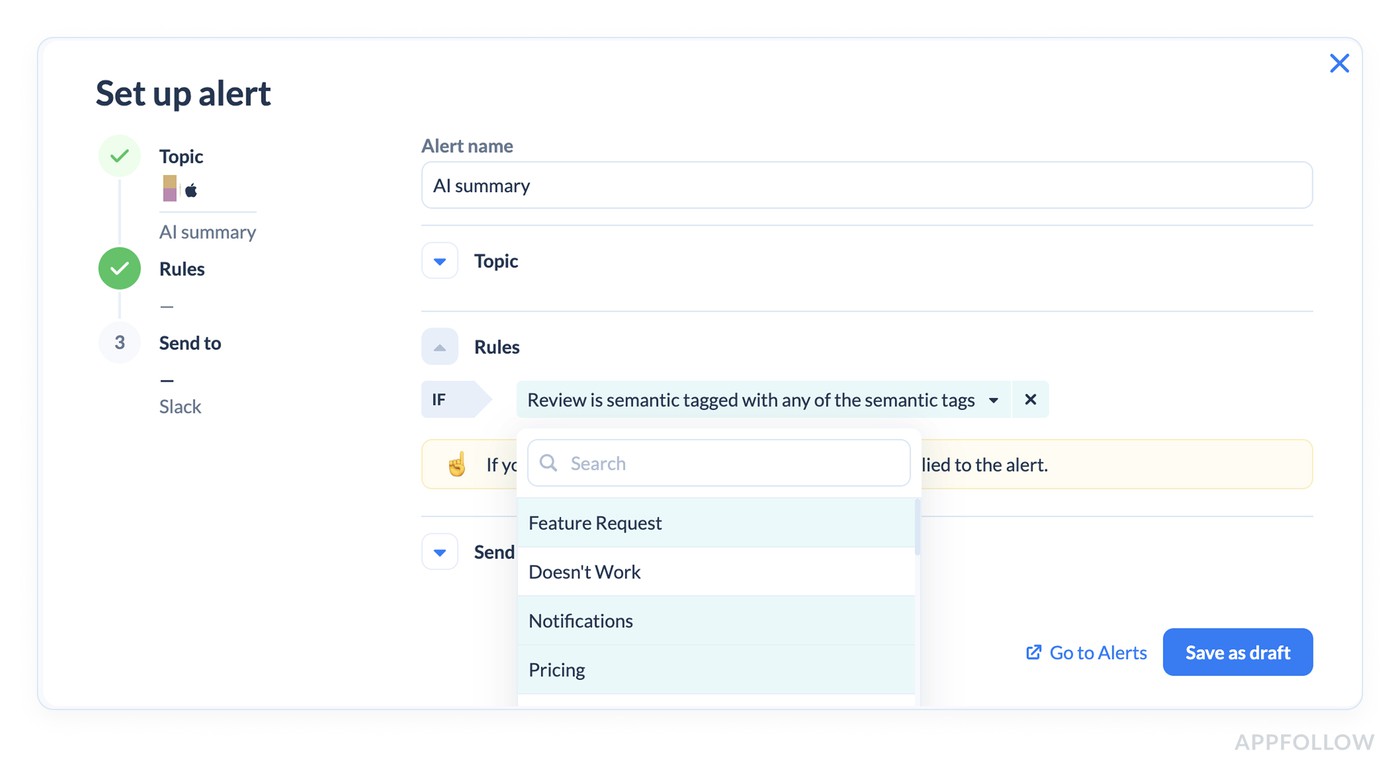
Those auto-tag rules can run frequently, which matters when sentiment flips right after a release.
Track sentiment shifts with AppFollow
Auto-tag reviews with Semantic Tags, summarize what changed, and route the right issues to the right team.
cta_free_trial_purple
FAQs
What is customer sentiment? (customer sentiment definition)
Customer sentiment is the emotion customers attach to their experience with you, expressed in their words. It’s the difference between “works” and “works, finally.” You’ll usually measure it through customer sentiment analytics, which summarizes tone across reviews, tickets, chats, and surveys so you can spot patterns, not anecdotes.
What does sentiment mean?
Sentiment is the feeling behind the message. Someone can say “fine” and mean “I’m one more bug away from uninstalling.” That’s why teams use sentiment analysis for customer feedback to separate literal text from emotional intent.
What is client sentiment?
Client sentiment is the same idea, just in an account or B2B context. It’s the overall attitude of a customer toward value, trust, and future renewal. Teams track it using customer sentiment data from QBR notes, support history, product usage dips, and escalations.
What is an example of a sentiment?
“Love the app, but the latest update broke login” is mixed sentiment. Positive about the product, negative about a specific experience. Good analysis keeps both truths, which is what customer feedback sentiment analysis is built to do.
How to describe customer sentiment?
Use two layers: the emotion and the driver. Example: “Negative sentiment is concentrated in Login after v6.2, mostly iOS.” That’s clearer than “users are unhappy,” and it’s closer to how customer sentiment meaning becomes useful in real decisions.
What is meant by sentiment?
Sentiment is how a message lands emotionally. It includes frustration, relief, trust, doubt, and urgency. In support work, it’s tied to escalation risk, which is why customer service sentiment analysis looks at tone plus theme, not just star ratings.
What is a synonym for customer sentiment?
Customer attitude, customer perception, brand sentiment, customer opinion, customer mood. If you’re writing for execs, “customer perception” is usually the cleanest synonym.
What does sentiment mean in marketing?
In marketing, sentiment is brand trust in motion. It tells you if your promise matches the experience. When sentiment drops around “pricing” or “paywall,” that’s often positioning friction, not a product bug.
Is higher consumer sentiment good?
Generally, yes. Higher sentiment usually signals lower resistance to conversion and more positive word of mouth. The catch is distribution: one “happy” theme doesn’t cancel out a high-severity negative one. That’s where customer service complaint sentiment analysis is handy because it highlights the issues that create damage fast.
What's the difference between consumer sentiment and consumer confidence?
Consumer sentiment is how people feel about the economy right now. Consumer confidence is how optimistic they are about the future economy and their personal finances, often tied to spending expectations. Both are macro indicators, not product-specific.