LiveOps for Mobile Games: Managing Player Feedback at Scale (2026)

Table of Content:
- Key insights — why feedback is the LiveOps job at scale
- The three-phase LiveOps feedback lifecycle
- Push notifications and in-game messaging as feedback channels
- In-game polls and event surveys
- KPIs of feedback at scale during LiveOps
- Automate the LiveOps feedback loop management with AppFollow
- Frequently asked questions
The hardest part of running live ops games is not shipping another event. It is recognizing what players are telling you while there is still time to respond.
Most live operations dashboards are excellent at participation, conversion, revenue, and retention. They show what players did. They are less useful when the team needs to understand why a reward track feels unfair, why progression suddenly feels slow, or whether a wave of complaints is one loud player or a pattern across stores and countries.
That context lives across several channels: in-game polls, support conversations, Discord, App Store reviews, and Google Play reviews. The job is to connect those signals to a specific event window, separate product issues from general noise, and get the pattern to the people who can act on it.
This guide covers the feedback loop around a LiveOps event: what to inspect before launch, what to monitor while the event is active, and what to preserve for the post-mortem. It also explains where push and in-game messaging help, where they do not, and how AppFollow’s app performance monitoring supports the public-review side of the workflow.
Key insights — why feedback is the LiveOps job at scale
- Treat reviews as diagnostic evidence, not a crystal ball. Gameplay data shows the behavior; review text can explain the friction behind it.
- Separate App Store and Google Play baselines. In AppFollow’s 2026 gaming dataset, average sentiment was 65.5 on Google Play and 46.4 on the App Store. Compare each store with its own pre-event baseline instead of blending them into one number. See the sentiment benchmark methodology.
- Speed matters most when the event is still active. AppFollow’s market-wide research found an average manual gaming reply time of 299.3 hours, compared with 24.8 hours for AI-powered replies through AppFollow. That is not an event-retention claim, but it shows how easily manual queues can outlast a short event. Review the reply-time data.
- Coverage is still low across the market. The average mobile game replied to 24.8% of reviews in the 2026 dataset, while AppFollow clients averaged 52.4%. Use those figures as market context, not as an event SLA. See the reply-rate benchmark.
- Read the text behind the chart. Phrase Analysis surfaces recurring words, ratings, sentiment, and trends; Semantic Analysis groups reviews by meaning and topic.
- Build an event archive. A consistent event tag, date window, app version, and short post-mortem note turn each launch into usable research for the next one.
Use each channel for the job it does best: previous reviews and community conversations for pre-launch risk discovery; fresh store reviews and alerts for public during-event signals; tagged review summaries for the post-mortem; and the App Update Timeline for competitor event and metadata context.
The three-phase LiveOps feedback lifecycle
Strong LiveOps strategies for F2P games make feedback part of the event plan, with an owner, a monitoring window, and a decision path before launch.
Before the event: Listening before you ship
The two weeks before launch may be the most underused feedback period in LiveOps. Players are already telling you what they care about, but most teams simply aren't collecting those signals in a structured way.
- Start by mining reviews, Discord conversations, and support tickets from the previous three to five events that resemble the one you're preparing. The same complaints tend to reappear unless something changes. If players disliked reward distribution, event pacing, progression bottlenecks, or difficulty spikes last season, those themes deserve attention before launch day arrives.
- Early teasing is equally valuable. Many teams use Apple In-App Events to preview upcoming content and measure player interest before launch. Pay attention to how players respond to the premise. Excitement is useful data, but so is hesitation. If sentiment trends negatively before the event goes live, the launch plan may need adjustments before players ever enter the event.
- Support preparation rounds out the process. Align the team around the five most likely complaint categories and prepare response templates ahead of launch. Faster replies improve consistency when review volume increases.
Before launch, I also recommend revisiting feedback from the previous event inside AppFollow Reviews & Ratings. Filtering reviews by date range, sentiment, or keywords makes it much easier to identify recurring complaint themes without manually reading thousands of reviews. If players repeatedly mention rewards, matchmaking, progression, or technical issues, those patterns become obvious long before the next event goes live.
Bringing those insights into planning helps teams prioritize fixes, prepare support responses, and reduce avoidable surprises during launch.
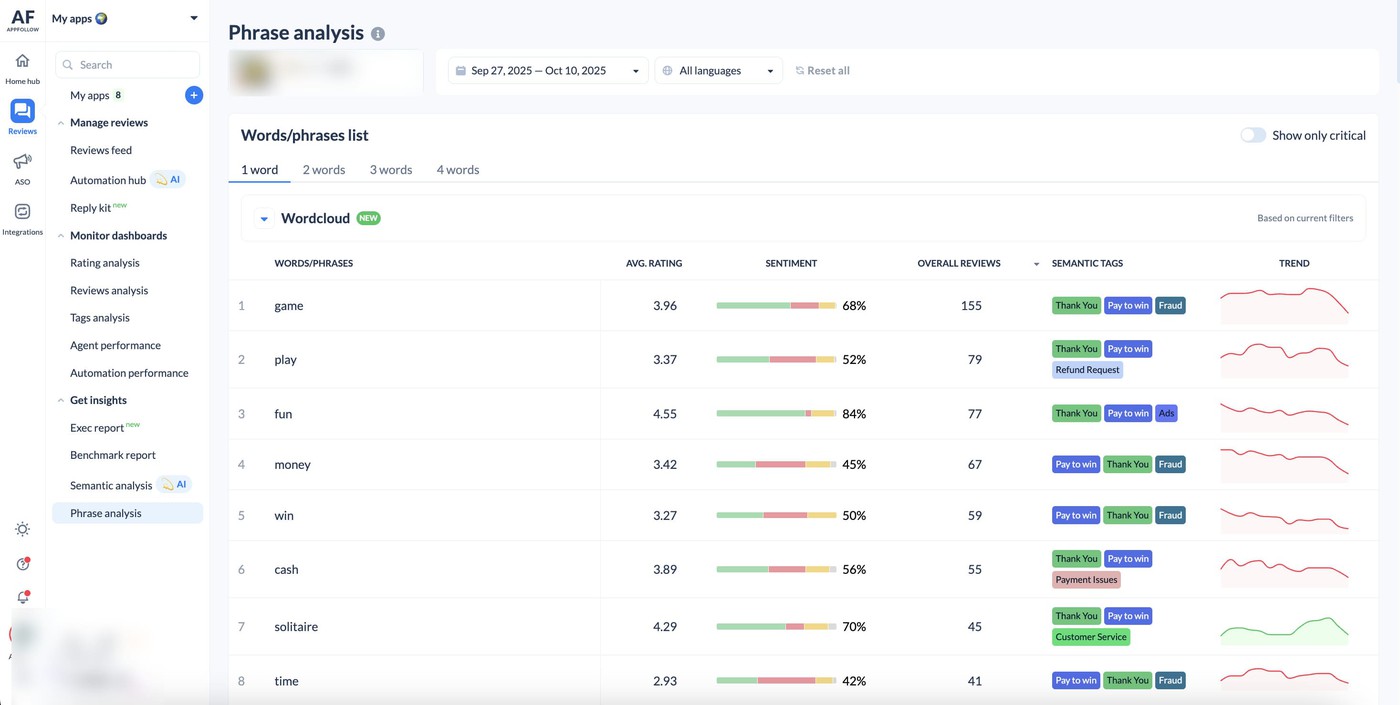
This review history becomes part of the planning process rather than something the team revisits after launch. Over time, every event leaves behind a searchable record that helps improve the next one.
During the event: Real-time sentiment as the leading indicator
The event window usually lasts between three and fourteen days. It also generates the highest concentration of player feedback you'll see during the entire lifecycle. More importantly, it is the only phase where feedback can still change the outcome.
Begin with a practical safeguard. Set up a sentiment alert before launch. Many teams define an internal threshold for unexpected sentiment changes, then route those alerts into Slack so product and community teams can investigate while players are still experiencing the event.
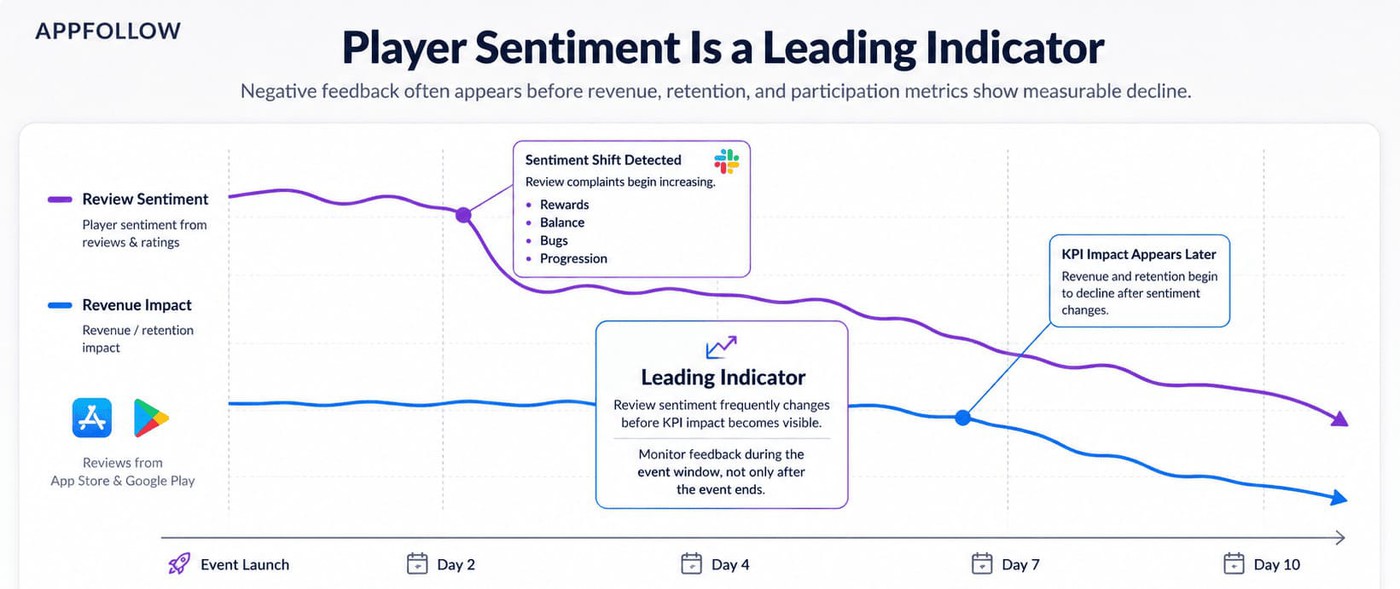
Dashboards are useful for spotting trends, but I wouldn't stop there. During an active event, it's worth reading a handful of fresh reviews every day. That's where players describe what actually happened, often in much more detail than a chart ever can.
Those details can also explain a growing gaming store review-rating gap between player sentiment and overall star ratings. Reviews complaining about rewards may really be pointing to progression that feels too slow. A sudden wave of comments about difficulty might suggest the latest balance changes missed the mark. If several players mention crashes or the same unexpected behavior, you may be looking at a bug that deserves immediate attention.
The way you respond matters, too. Rather than trying to answer every review, focus first on a representative sample of recent 1-star and 2-star feedback. Players are far more likely to appreciate a timely, specific reply while the event is still running than a generic response after it has already ended. Specific communication is usually more helpful than generic apologies. Players want to know whether the issue has been acknowledged and what comes next.
This is where in-game events player feedback becomes operational intelligence. Some players are naturally more vocal during live events. That's useful. They often identify problems before the broader audience notices them.
"Aggregated dashboards help you understand trends, but individual reviews explain what's driving them. During a LiveOps event, a single complaint rarely matters. Hundreds of players describing the same frustration in slightly different words is where the signal lives.
Teams that read those reviews during the event window can still change the outcome. Teams that wait for the final report usually discover the problem after players already have."
— Anatoly Sharifulin, CEO & Founder at AppFollow
After the event: The post-mortem feedback loop
The week after an event ends is when many teams move on to the next launch. The teams that steadily improve retention take a different approach. They pause long enough to understand what happened and why.
Start by tagging every review generated during the event window with the event name in AppFollow Reviews & Ratings. Over time, those tags become a searchable archive that connects sentiment trends to specific content, mechanics, rewards, and communications.
A single post-event review may not tell you much, but hundreds of tagged reviews usually reveal patterns.
- Try to schedule the post-mortem while the event is still fresh in everyone's mind, ideally within five days of it ending. Invite people from product, marketing, support, and community, then look at the numbers alongside what players were actually saying. Participation, retention, revenue, and other mobile game KPIs explain the outcome. Reviews and sentiment often explain how you got there.
- Before everyone moves on to the next event, take a few minutes to write down the lessons worth keeping. Which communication landed well? Were the rewards motivating enough? Did a balance adjustment or quick fix calm player concerns? Capture those observations while they're still easy to recall. That document will be far more useful when planning the next event than trying to reconstruct the discussion weeks later.
Without that discipline, the same event returns next quarter with the same flaws. Effective teams treat every event as research for the next one. That's the tracking half of how you plan track events mobile games, and it's what turns isolated launches into a system that improves over time.cta_free_trial_yellow
Push notifications and in-game messaging as feedback channels
Most teams think about push notification strategy games through an acquisition or re-engagement lens. The same channels can do something equally valuable during a LiveOps event: collect feedback while players are actively experiencing the content.
Push notifications, in-app messages, and event prompts create a direct line to player sentiment. The key is treating those touchpoints as listening opportunities. A LiveOps team that only broadcasts messages learns far less than one that asks timely questions and measures the response.
When push doubles as feedback solicitation
A typical push campaign announces an event launch, reminds players to return, and tries to drive participation. Useful, but incomplete.
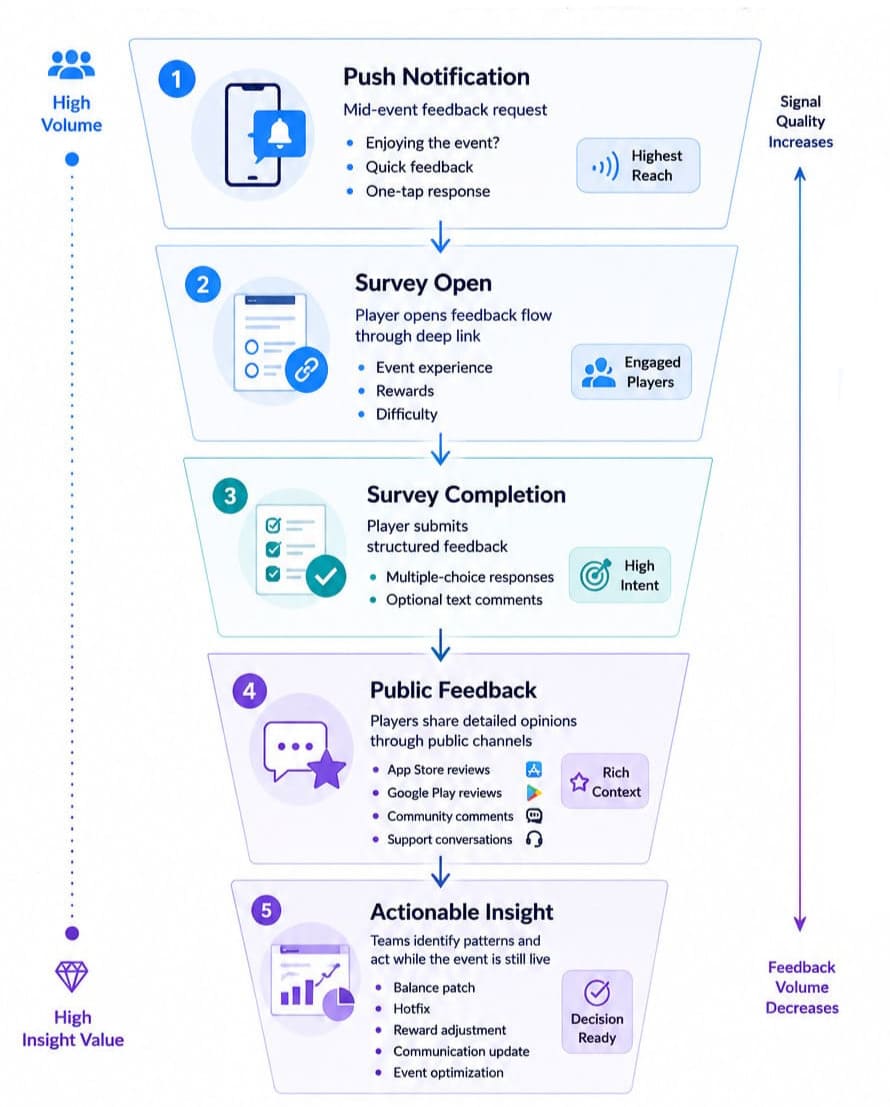
The strongest event teams add a feedback checkpoint in the middle of the event. A simple push such as “Enjoying the _____?” with a thumbs-up or thumbs-down reaction can route players through a deep link to a short in-game survey. I usually recommend a lightweight cadence: one launch push, one mid-event feedback push, and one reminder during the final 12 hours.
That schedule gathers useful input without creating notification fatigue. In many cases, the opt-out rate remains below 1% because players receive only a small number of highly relevant messages.
David Xicota, former Studio Director at GSN Games, makes a simple point in GameAnalytics' guide to push notifications:
Players don't mind being interrupted when the message is genuinely useful. The goal is to make every notification feel relevant to the player's current situation.
Timing matters. A player who is currently participating in the event is far more likely to respond than someone who receives a survey several days later.
- Mid-event feedback prompts often generate a 5% to 10% completion rate.
- Post-event surveys frequently struggle to reach 1%.
Good game notifications do more than bring players back into the app. They reveal how players feel while the event is still unfolding, giving teams time to react before the event ends.
LiveOps feedback collection process
In-game polls and event surveys
Ask when the player has enough context and reaches a natural pause: after a match, after claiming a reward, or between event stages. Keep the first interaction to one focused question. Use three to five answer options when the team needs a distribution, and offer an optional text field when the reason matters more than the score.
Match the question to the decision. “How satisfied are you?” is easy to answer but hard to act on. “Did the reward feel worth the time required?” can inform economy changes. “Which step was unclear?” can expose onboarding friction. A/B test wording only when the sample size and decision justify it; otherwise the variants create more analysis than insight.
Survey responses are solicited and may overrepresent engaged players. Store reviews are public and may overrepresent strong opinions. Community posts have their own selection bias. Report the channels side by side rather than blending them into a single “player sentiment” score.
KPIs of feedback at scale during LiveOps
In-game KPIs (see mobile game KPIs) and portfolio-level review management KPIs both apply. The five below are the ones that matter most during a live event window.
When teams run live ops games, feedback metrics shift from monthly reporting to operational monitoring. A reply that arrives three days late may still count in a dashboard, yet it has little value when players are actively discussing a seasonal event, balance update, or monetization change. During live operations, speed and timing matter almost as much as volume.
- Event-window reply rate tells you whether your team is keeping up with player conversations while the event is still live. Instead of looking at replies across the entire month, focus only on reviews posted during the event itself and ask a simple question: Did we respond before the event ended? If that percentage starts slipping, players are waiting too long for answers when they're most engaged.
- Time to first reply is one of the most closely watched gaming reply time benchmarks because it shows how quickly a review receives its first response. Many studios aim to answer within a day under normal conditions, but LiveOps events usually require a faster pace because sentiment can shift quickly. The sooner community managers acknowledge a problem, the better the chance of addressing concerns while players are still actively participating.
- Sentiment delta in the event window builds on gaming sentiment score benchmarks by comparing rolling sentiment before and during the event. A common benchmark is T-7 versus the event midpoint. When sentiment drops by more than 15%, teams usually trigger an alert and review incoming feedback for recurring issues.
- Event-specific review volume counts reviews that mention the event by name. Tagging these reviews inside AppFollow Reviews & Ratings creates a clean dataset for post-event analysis. I find this metric especially useful when the overall review volume remains stable but discussion around a specific feature suddenly spikes.
- Event retention uplift from feedback response looks at the 30-day return rate of players who received a reply during the event compared with similar players who did not. Many teams report a 20% to 30% lift. Results below 10% often suggest a reply-quality issue rather than a response-speed issue.
Viewed together, these KPIs reveal whether your SLA targets, reply rate, and response quality are helping players stay engaged or simply generating activity in a dashboard.
Automate the LiveOps feedback loop management with AppFollow
Game analytics platforms tell you what happened inside the event. AppFollow helps the team inspect what players said publicly about it and turn a high-volume review stream into a workable event dataset.
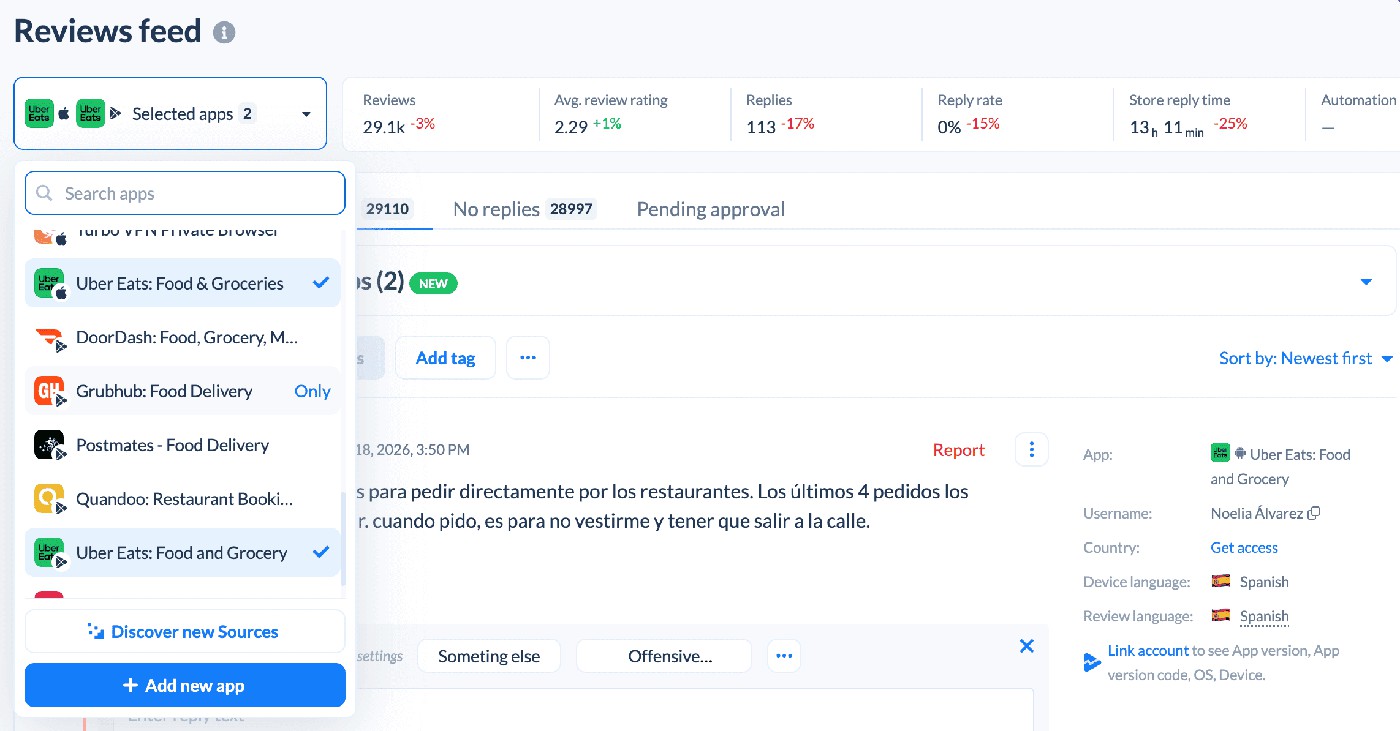
- Start in the Reviews Feed. Its summary includes review volume, average review rating, sentiment score, replies, reply rate, and response time for the visible dataset. Use filters to isolate the event window by date, store, country, rating, release version, sentiment, semantic tag, or custom tag where available. That gives the LiveOps team a reproducible view instead of a hand-picked set of screenshots.
- For topic analysis, Phrase Analysis shows recurring words and phrases with rating, sentiment, review volume, tags, and trend direction. Semantic Analysis, a paid add-on, analyzes reviews by meaning across supported languages. AI Summary can summarize selected semantic categories or custom topics and send alerts to Slack.
- Use Reviews Feed alerts to surface new reviews matching the launch watchlist. Alerts support email, Slack, and Telegram; the advanced Slack flow can also support replying from the channel. This is the operational bridge between a public review and the team responsible for investigation.
- Competitor context belongs in the App Update Timeline. It records metadata and visual changes, versions, In-App Events, and Google Play featuring for selected own and competitor apps. That helps the team compare timing and store activity without claiming to see a competitor’s private LiveOps calendar. AppFollow began collecting In-App Event history in Q3 2025, so label any historical analysis accordingly.
ASO tools can provide additional store-performance context during event promotion, but keep that topic brief here and link to the dedicated AppFollow ASO platform page. The centre of this article is the review-feedback workflow.
cta_free_trial_yellow
Frequently asked questions
What is LiveOps in mobile games?
LiveOps, or live operations, is the ongoing work that happens after launch to keep a game active and growing. Teams run events, release content, adjust balance, and test offers throughout the year. In successful live ops games, managing player feedback during each event cycle takes as much attention as designing and shipping the event itself.
How do I collect player feedback during a live event?
Don't rely on a single channel. A quick in-game survey while players are actively participating usually generates more responses than one sent after the event has finished. Push notifications can encourage players to share immediate reactions, while review monitoring helps teams spot emerging issues and changing sentiment throughout the event window.
How do I track player feedback at scale across many events?
One habit makes a big difference: tag reviews as each event begins. Over time, those tags become a searchable archive that lets you compare player reactions across seasons, campaigns, and recurring events. AppFollow Reviews & Ratings supports this workflow, making it easier to prepare post-mortems and plan future launches. For a broader workflow, see our portfolio review management guide.
What's the best push notification strategy for LiveOps?
Think of push notifications as conversations rather than reminders. A launch announcement, a mid-event feedback request, and a final reminder are often enough for a typical event. If players start opting out more frequently, it's usually a sign to revisit the timing, audience, or message instead of simply sending fewer notifications.
How fast should I respond to negative reviews during a live event?
Earlier is almost always better. Players appreciate knowing their feedback has been seen while the event is still running, especially when you're investigating a bug or preparing a fix. If review volume spikes, sentiment alerts can help community managers focus first on the conversations that need immediate attention.