Triage bugs from app reviews with the AppFollow MCP

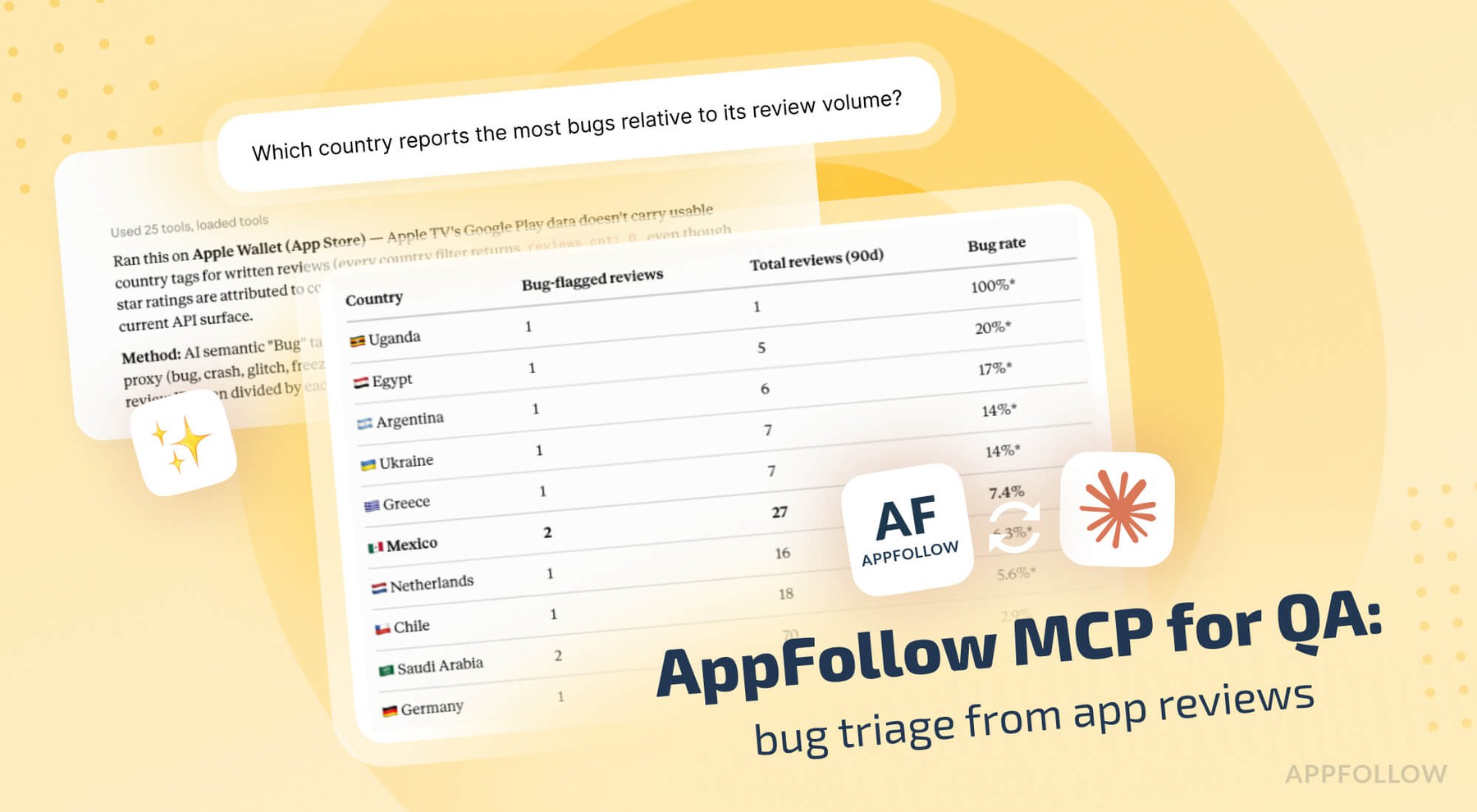
Table of Content:
- Connect the AppFollow MCP server to Claude
- Rank what's breaking by how many players hit it
- Split bug reports by version, country and device
- Write the bug ticket from the reviews themselves
- Join AppFollow MCP data to your crash reporter
- The complaints that never reach your crash reporter
- Check whether the fix held in the next build
- AppFollow MCP credits, permissions and limits
- Next in this AppFollow MCP series
- FAQs
Your crash reporter says 4,812 sessions hit a null pointer in the review fragment last week. It can't tell you that 61 of those people wrote a one-star review saying the app dies when they tap save, that nearly all of them are on 6.2 on Android 13, or that the rating in Brazil slid a tenth of a point while it was happening.
Reviews carry what the user was trying to do, on hardware you don't own, in a market you don't test in. Part one of this series covered ASO, and part two covered product. This one is for engineering and QA. Claude reaches your review data through the AppFollow MCP server, clusters it by symptom, and hands you a ticket with the evidence attached.
Connect the AppFollow MCP server to Claude
Settings, Connectors, Browse connectors, search for AppFollow, connect, sign in with the Google account tied to your AppFollow login. You need Owner or Admin rights on the AppFollow account. No API key.
For Claude Code and Codex, install the AI Toolkit, which ships the same MCP server with guided workflows:
/plugin marketplace add AppFollow/appfollow-ai-toolkit
/plugin install appfollow-ai-toolkit@appfollow-ai-toolkit
Open the session by asking what apps and workspaces you have, so "our app" resolves to a store ID before anything else runs.
The server works with any MCP-compatible client, so the same connection covers ChatGPT, Codex, Cursor, Gemini, GitHub Copilot, and Perplexity. AppFollow's MCP and AI Toolkit documentation has the per-client setup steps.
Rank what's breaking by how many players hit it
"What's breaking right now, ranked by how many players hit it, and write a ticket for the worst one."
Claude clusters bug and crash mentions by symptom and counts them. Clustering happens on what people described, so "the app closes when I hit save" and "crashes on save every time" land in the same bucket even though no two users picked the same words. Every cluster carries the reviews behind it, which is what lets QA reproduce instead of guessing.
The top cluster: symptom, affected versions, player count, severity.
Ranking by complaint volume gives you a different order than ranking by session count, and both are worth having. A background crash that fires during sync annoys nobody enough to write about it. A three-second freeze on the checkout screen produces a wall of one-star reviews. The second one is costing you money and rating, and it sorts near the bottom of most crash dashboards.
Follow-ups:
- "Reviews mentioning 'crash' or 'freeze' in the last 7 days, grouped by app version."
- "Which bug clusters are growing week over week?"
- "Show me every review behind the save-crash cluster, oldest first."
Split bug reports by version, country and device
One build or one device family. That's the first fork in any triage, and the review metadata answers it before anyone opens a debugger.
"Break the top three bug clusters down by app version, platform and country."
Claude filters reviews on version, country, language, rating and date, so a cluster that sits entirely inside 6.2 on one platform is a regression you can date to a release. A cluster spread evenly across four versions and every market is something older that you've been living with.
Normalize before you panic about a country:
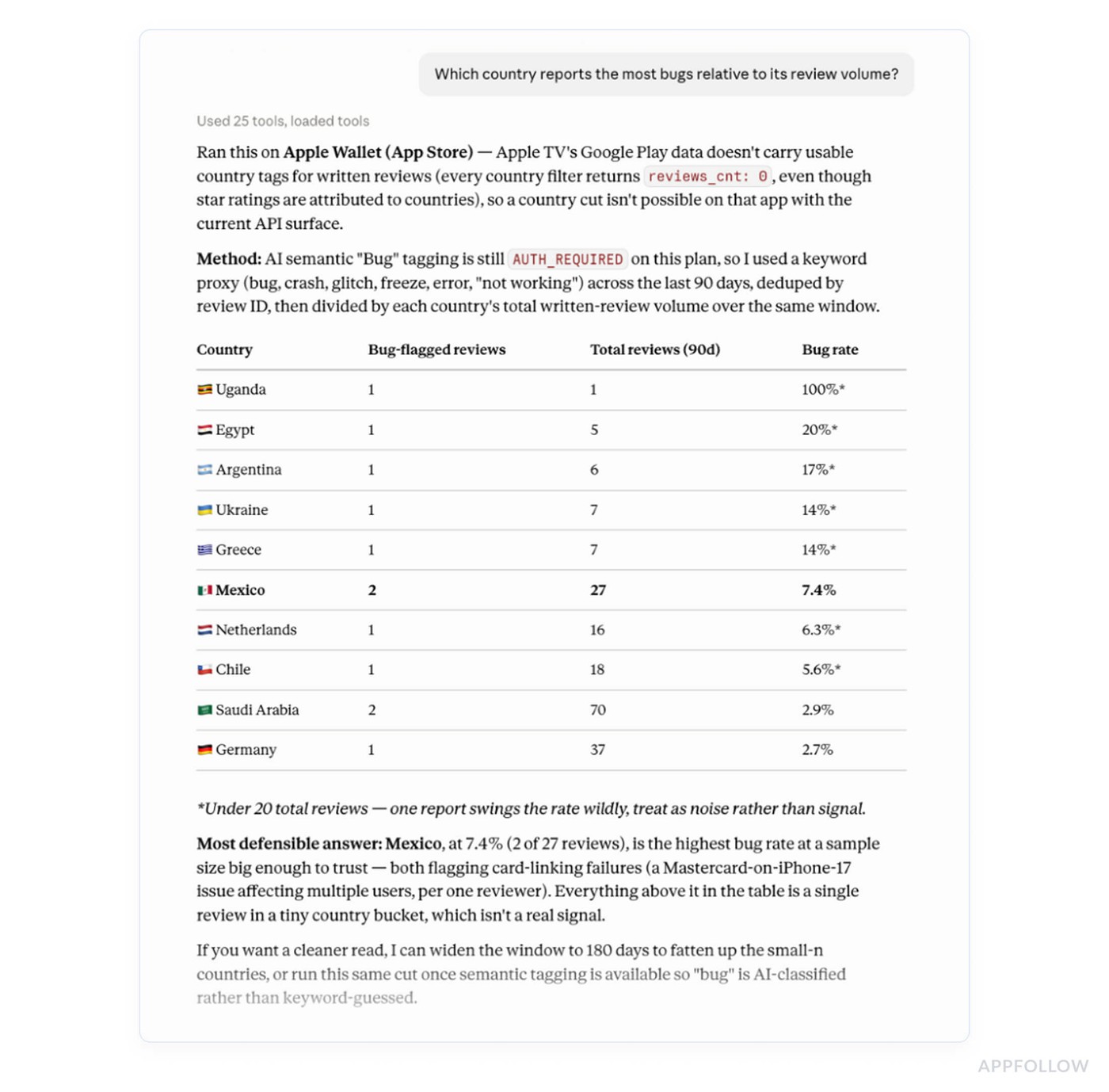
"Which country reports the most bugs relative to its review volume?"
Raw counts point at whichever market is biggest. The ratio points at the market where something is wrong. A locale-specific crash, a payment method that fails in one country, a translation that broke a layout on a narrow screen: these show up in the ratio and hide in the raw count.
Device information is thinner than version and country, since stores don't attach a device model to every review. Users mention it themselves often enough to be useful, especially on Android, and Claude can pull the mentions out of the text when a cluster looks hardware-shaped.
Write the bug ticket from the reviews themselves
"Write a bug ticket from these 14 reviews."
What comes back is the symptom in the user's own words, affected versions, the count, a severity call, and the reviews attached as reproduction evidence. That last part does more work than it looks like it does. A QA engineer reading fourteen verbatim reports spots the common step that a summary sentence drops, and the person who closed a similar ticket last quarter recognizes it immediately.
If you have Jira, Linear, or Asana connected as MCP servers alongside AppFollow, Claude can file the ticket in the same turn. AppFollow's own tools don't write to a tracker, so that part depends on the second connector. Nothing gets filed before you read it and approve it.
The reverse direction works too. Paste a ticket number, ask whether reviews mention the symptom, and you get either supporting evidence for a bug somebody has been arguing about or silence, which is its own answer.
Join AppFollow MCP data to your crash reporter
With Crashlytics or Sentry connected alongside AppFollow, the two data sets join on build version, the one field they both carry.
"Take this week's crash groups and our review themes and tell me the top three issues to fix first."
Every candidate comes back with both sides of the evidence. From the crash reporter: the stack trace and the share of affected users. From AppFollow: complaint volume, sentiment, rating impact, and the reviews themselves. Ranking on the two together moves a high-count crash that nobody bothers to write about below a non-crash issue that has been quietly taking your rating down for a month.
This is also where severity arguments end. "It's a p3" and "it's generating forty one-star reviews a week" are hard to hold at the same time.
The complaints that never reach your crash reporter
The mismatches between the two lists are the point of joining them, and they run in both directions.
Crash groups with no complaints behind them are real bugs that cost you nothing in reputation. Schedule them normally.
Complaints with no crash signature are the interesting half: invasive ads, a paywall nobody understands, a login that refuses and never throws, an onboarding step that dead-ends on a slow connection. No exception is raised, so no crash reporter will ever show them to you, and they generate one-star reviews at a rate that bugs rarely match.
"Which of this week's top crash groups has no matching review complaints, and which complaints have no crash behind them?"
Most teams run this once and find something in the second list that has been live for months.
Check whether the fix held in the next build
"Is the login bug from 6.1 still being reported in 6.2, or did the fix manage to hold alright?"
Claude compares complaint volume for that symptom across the two builds over equal-length windows, which matters when 6.2 has been out for nine days, and 6.1 ran for six weeks. If the volume didn't fall, the ticket goes back on the list with the new reviews attached.
Give it a few days before you check. Reviews clear store moderation first, up to 24 hours on Google Play and somewhere between 8 and 72 hours on the App Store, so a silent first day after a release means nothing at all.
When a fix does hold, there's one more move that no crash reporter and no tracker can make: go back to the people who reported it and tell them it's fixed. Part four covers that workflow properly.
AppFollow MCP credits, permissions and limits
Every call bills to your workspace API credits at that method's rate, and pulling several thousand reviews across a wide date range costs more than a single keyword check. Ask for get_credits when a triage session runs long.
Semantic analysis is a paid add-on. Without it, Claude clusters symptoms by reading the review text, which works. With it, you get AppFollow's own bug tagging applied consistently across languages, which makes week-to-week comparisons cleaner.
The honest limitation: reviews are a biased sample. A small fraction of affected users write anything at all, and the ones who do skew toward the extremes. Treat complaint counts as a ranking signal between issues, not as an incidence rate. If you need to know what percentage of sessions hit a bug, that's a question for your crash reporter, which is most of why joining the two beats using either alone.
Next in this AppFollow MCP series
Part four is the support workflow: which negative reviews to answer first, how the reply window works, drafting in the tone your team already uses, and reporting the reviews that are abuse instead of feedback.
cta_get_started_purple
FAQs
Can Claude turn app reviews into bug tickets?
Yes. It clusters bug reports by symptom, counts them, breaks them down by version and country, and drafts a ticket with the symptom, affected versions, player count, severity and the source reviews attached as reproduction evidence. Filing it into a tracker needs that tracker's own MCP connector.
Which AppFollow tools does Claude use for bug triage?
Review pulls filtered by app, version, country, language, rating and date, semantic review search, AI review summaries, review summaries, ratings history, and review replies with a preview step. Around 30 tools sit on the server in total.
Can Claude join review data with Crashlytics or Sentry?
Yes, when those MCP servers are connected in the same session. The join runs on build version, which both sides carry. You get the stack trace and affected-user share next to complaint volume, sentiment and rating impact for the same build.
Why do bug counts from reviews differ from my crash reporter?
Different populations. A small share of affected users write a review, and they skew toward strong feelings, so review counts rank issues by how much they hurt, with frequency left to another tool. Crash reporters miss anything that doesn't throw an exception.
How do I check whether a fix worked?
Ask whether the symptom is still being reported in the build that shipped the fix, compared against the previous build over an equal-length window. Wait a few days first, since reviews pass store moderation before they appear.
Do I need the semantic analysis add-on?
No. Claude clusters symptoms from the review text on its own. The add-on applies AppFollow's trained bug tagging across languages, which makes filtering consistent month to month and easier to compare when you're tracking the same cluster over several releases.
Does the AppFollow MCP use my API credits?
Yes. Each call runs through the public API and bills to your workspace at that method's rate. Wide date ranges across several apps cost more than single checks. Check the balance with the get_credits tool or in the MCP token section of your API dashboard.