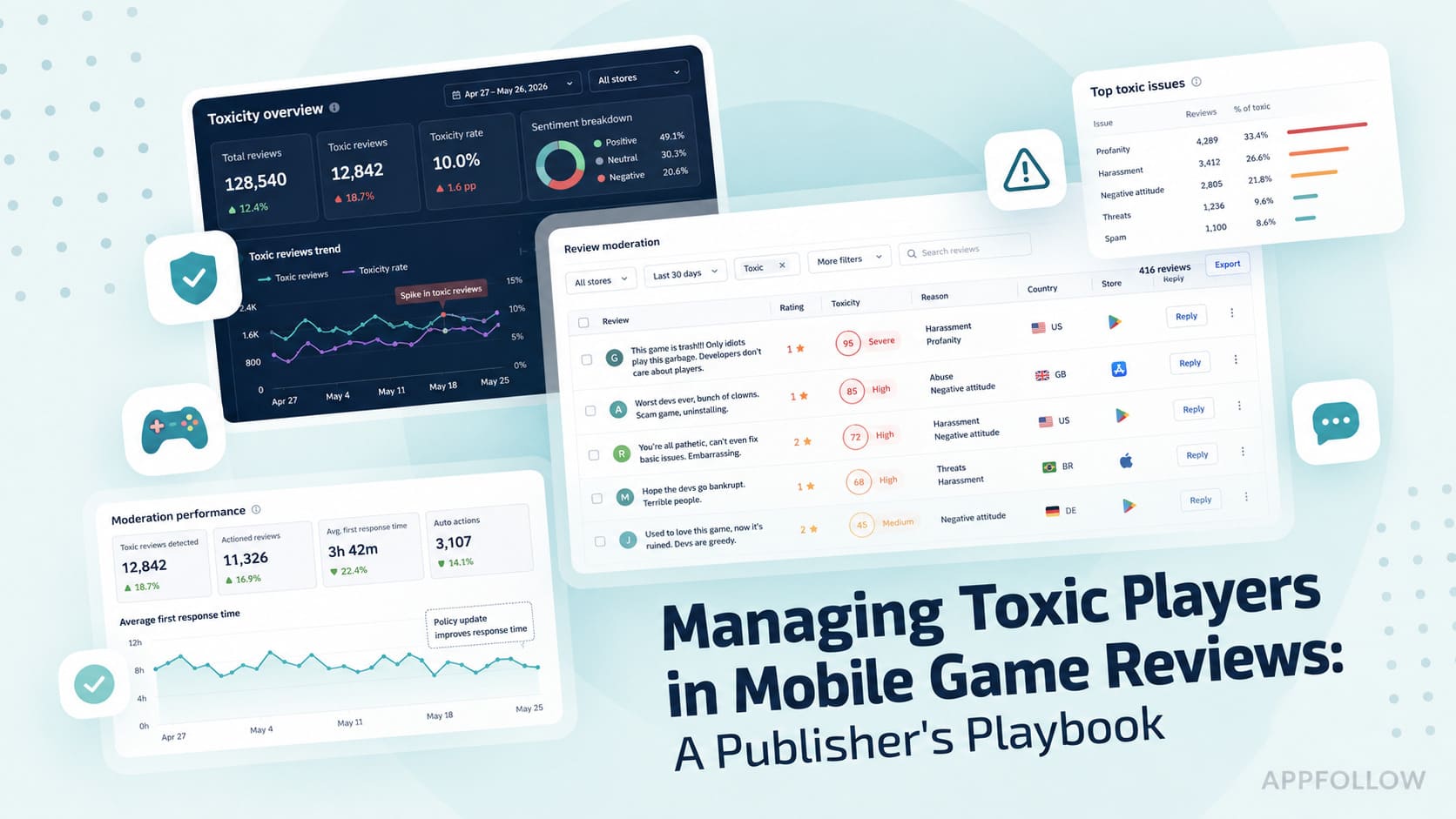
Managing Toxic Players in Mobile Game Reviews: A Publisher's Playbook

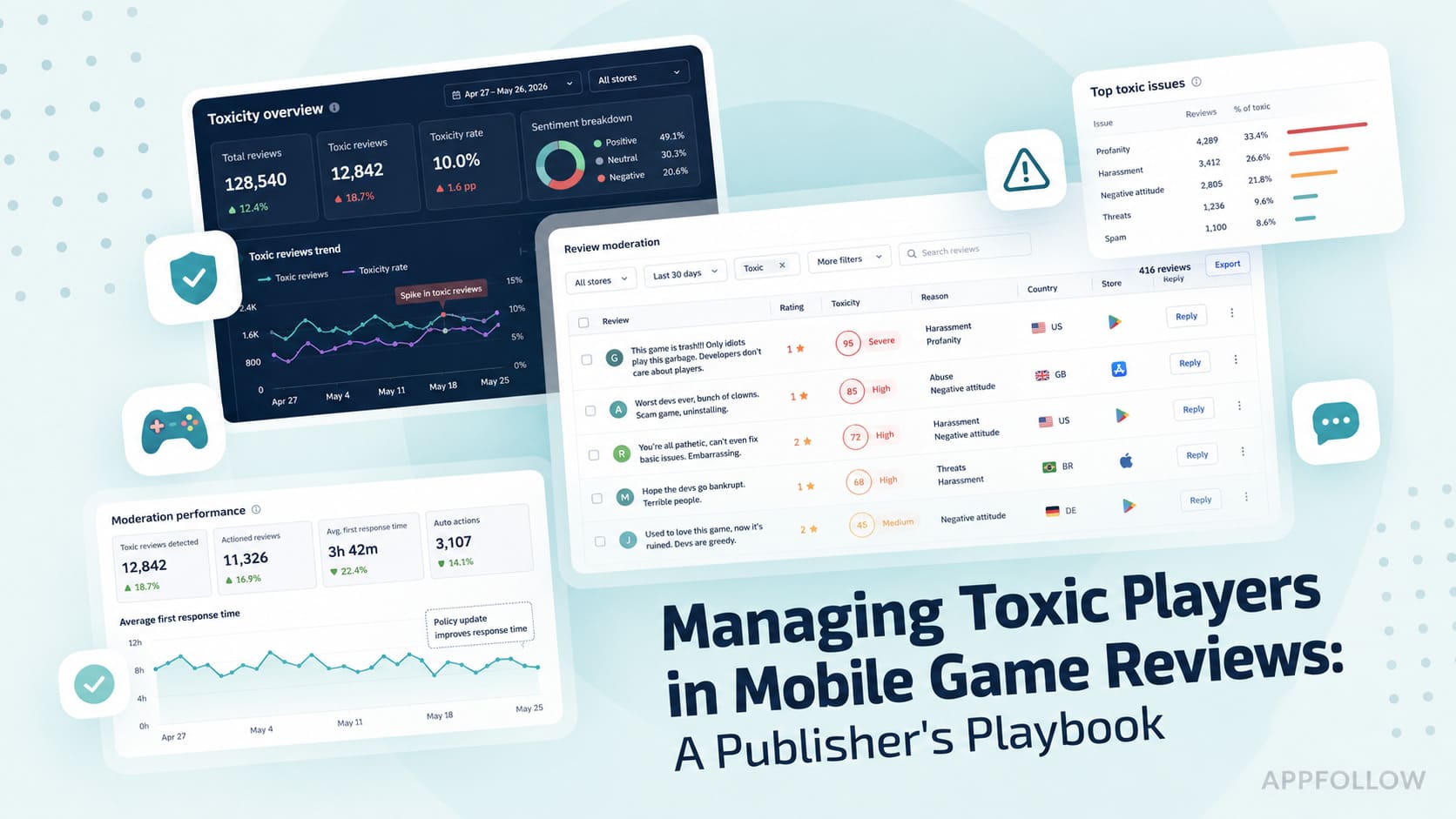
Table of Content:
- TL;DR: Seven things I wish every studio knew before the next wave hits
- What counts as a toxic review on the App Store and Google Play?
- Why toxic reviews matter
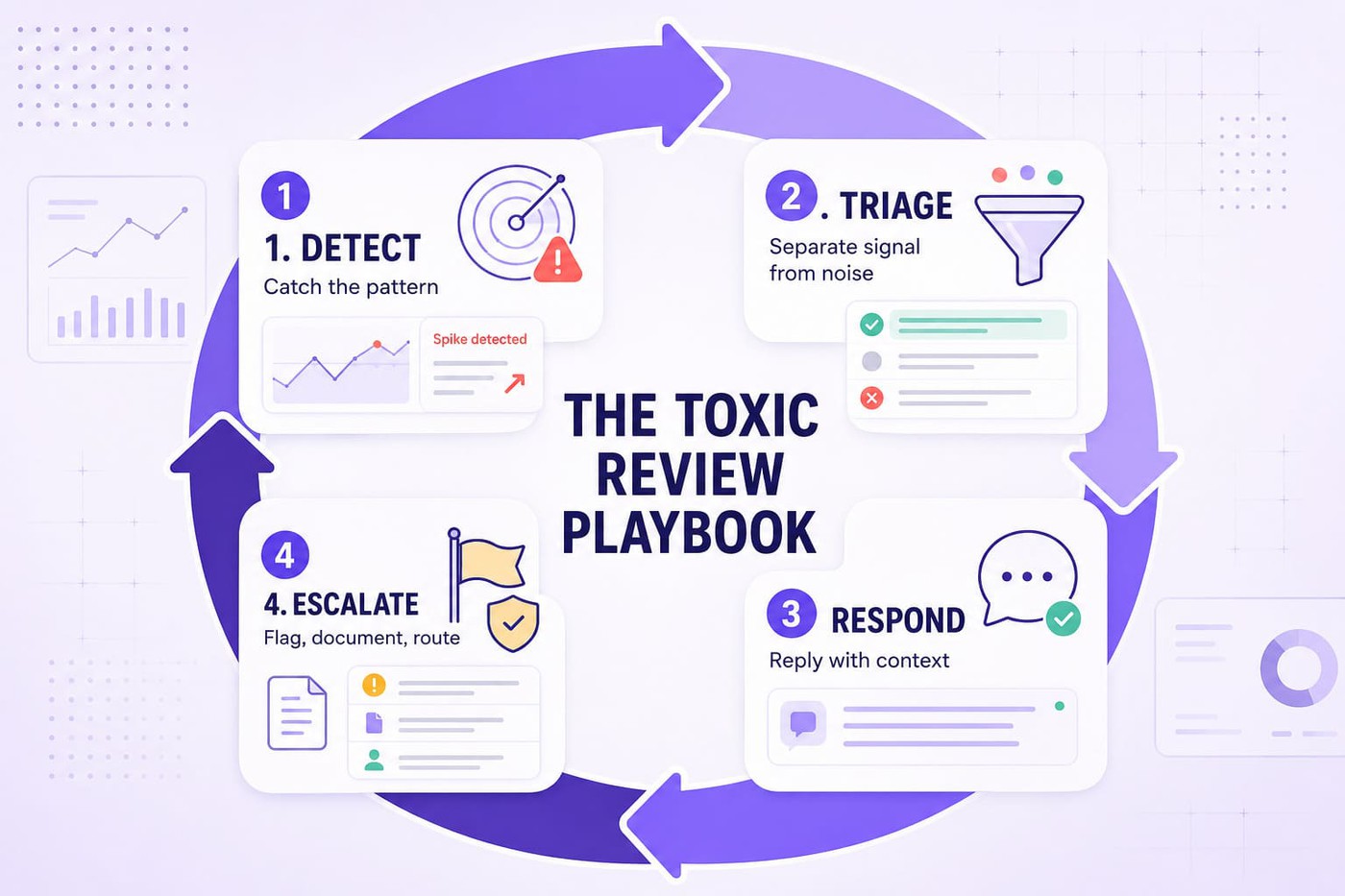
- The four-step playbook for managing toxic reviews
- From review spike to routed response: the AppFollow workflow
- 6 reply templates for toxic players in mobile game reviews
- Should you reply to toxic reviews, or ignore them?
- Detecting review bombing before it kills your rating
- Running the whole playbook in AppFollow
- FAQ
Toxic reviews are not the same as ordinary one-stars, and they hurt mobile games harder than any other app category because players are emotionally and financially invested. Run one repeatable loop on every wave: detect, triage, respond, escalate. AppFollow's AI tagging, real-time alerts, and reply automation compress a six-hour firefight into roughly 15 minutes.
Every mobile game collects negative reviews. You already know that, and you've made your peace with it.
Toxicity is a different animal. Coordinated review bombs, copy-paste outrage, personal attacks that name your developers, all of it landing fast enough to drag your rating, your store conversion, and your team's morale inside a single weekend.
I've spent years inside ASO and review operations, and I keep watching the same scene play out at studio after studio. So we pulled together what actually works, drawing on AppFollow's gaming, customer success, product, and AI teams plus a stack of live-ops crews running high-volume titles. Below is the version I'd hand a teammate on day one. No theory padding, no fluff.
Let's get into it.
TL;DR: Seven things I wish every studio knew before the next wave hits
- A toxic review and a negative review are not the same thing. Some of your sharpest product feedback arrives as a furious one-star. The skill is sorting which rage is useful and which is just noise.
- Review bombing rarely opens with a rating drop. Volume spikes first. Repeated phrases follow. Sentiment shifts before the average score moves at all. Teams that read those signals early protect both the rating and conversion.
- A 0.1-star slip can raise your acquisition cost. That makes toxic reviews an ASO and growth problem, not only a community one.
- Stop reading reviews one by one once volume surges. Group them by topic instead. Matchmaking complaints, monetization backlash, crash reports, and abuse each belong in their own lane.
- Most replies get written for the wrong reader. Your original reviewer may never look again. The next 5,000 players evaluating your listing almost certainly will.
- During a crisis, resist answering everything. Follow the loop: spot the pattern, triage, respond where it counts, escalate when policy is crossed.
- The strongest studios treat toxicity as a data problem. Organize sentiment, trends, and feedback properly and the real issue usually surfaces in minutes.
What counts as a toxic review on the App Store and Google Play?
A toxic review is any review that shifts from product feedback into abuse, harassment, manipulation, or a coordinated effort to damage your game's reputation. That single distinction trips up more teams than anything else on this list.
Picture three reviews landing on the same afternoon.
A player loses progress during an update and leaves one star. Frustrating for them, painful for you, still legitimate feedback.
Right behind it: "Your dev team is incompetent. Fire everyone." Different problem entirely, and nothing in it you can act on.
Then the wall arrives. Hundreds of one-star ratings inside a few hours of a balance patch, most repeating the same complaint, a few citing features that haven't changed in months, several from players who clearly haven't opened the game in weeks. Now you're looking at toxicity.
Why the difference matters so much: legitimate criticism can lift retention, abuse burns support hours, and coordinated bombing distorts your trend data badly enough that teams start shipping product decisions based on noise. Smart studios want the criticism. The job is separating the useful signal from everything piled on top of it.
When does frustration turn into toxicity?
Most toxic reviews don't start that way. A server outage runs long. A battle pass launches with rewards nobody asked for. A patch nerfs the community's favorite character. Players get angry, which is normal and human.
Gaming creates an emotional pull few app categories can match. Someone spent six months building an account, grinding ranked, hunting a rare cosmetic. When that breaks, the feelings hit reviews within minutes. If you want a framework for reading the emotion behind the words, our guide to measuring customer sentiment walks through it.
Across the titles I've worked with, reviews tend to settle into four buckets:
Bucket | What it sounds like | Your move |
|---|---|---|
Constructive criticism | "The latest update crashes every time I open the guild screen." | Investigate and reply. Often your best product insight. |
Emotional but useful | "This update ruined matchmaking. I keep getting paired against players twice my level." | Worth engaging. Real problem under the heat. |
Abusive | "Your developers are idiots." | Nothing actionable. Sometimes a policy violation worth flagging. |
Coordinated attack | Hundreds of near-identical low ratings traced to a Reddit thread, Discord raid, or creator video. | Document and escalate. The rating itself is now the weapon. |
Why mobile games attract more toxic reviews than most apps
Nobody review-bombs a calculator app over a balance patch. Games run hotter because competition, scarcity, and time investment all amplify emotion at once.
One controversial monetization change can light up four channels in an afternoon. Players vent on Discord, a streamer picks up the story, Reddit piles in, and the reviews follow. What shows up in your store listing is usually the final stage of a much larger community event.
Experienced community managers rarely stare at the rating alone. They track review velocity, watch sentiment trends, and follow recurring topics. A sudden burst of "pay to win," "cash grab," or "worst update ever" tells a very different story than a slow climb in bug reports. Once reviews get grouped by theme, patterns surface fast. A wave that looked toxic sometimes turns out to be a genuine product issue, and an apparent product issue sometimes turns out to be coordinated backlash. You can't see that from a single review. You can see it instantly across hundreds.
Why toxic reviews matter
A toxic review rarely hurts you alone. A toxic wave hits acquisition, store conversion, community operations, and product decisions at the same time, and most of that damage happens before anyone installs the game.
Picture a player browsing the App Store after work. They find your title. Screenshots look sharp, art style fits exactly what they wanted. Then they hit the rating.
4.6 stars last week. 4.2 stars today. A few recent reviews mention "cash grab." Another reads "developers don't care." Someone calls the game unplayable. This player has no idea a balance patch triggered the backlash or that a Discord server coordinated it. They won't check whether the complaints are representative. They just keep scrolling.
Ratings don't live in isolation
Your ASO team spends months nudging conversion up a couple of points. A review spike can erase that gain over one weekend. Even a small slide carries outsized weight: a drop of 0.1 stars has been associated with measurable increases in user acquisition cost, because fewer store visitors convert into installs.
That's why sharp growth teams watch the rating almost like a live KPI. The number itself isn't the threat. What it does to player perception is, and for most users a store rating is both the first product review they read and the last thing they check before installing.
The real danger hides in the noise
Different scenario. A major update ships Thursday. By Saturday morning your dashboard shows 1,500 fresh reviews, sentiment has fallen off a cliff, and one-star ratings dominate the feed. At a glance, everything looks broken.
Look closer. Roughly 900 reviews complain about monetization. Another 400 mention the same balance change. Fifty report crashes. Those fifty crash reports matter most, and they're also the easiest to lose under the pile. Toxicity creates a visibility problem: the more noise enters the system, the harder it gets to spot the signals that deserve action. Mature teams don't read one at a time. They group, they tag, they cluster, and a pattern usually appears within minutes. Our nine customer-sentiment examples show what those clusters look like in practice.
Team burnout starts quietly
Nobody joins a games company excited to read abuse all day, yet that's the shift during a major review event. The queue swells, response times slip, and community managers move from helping players to filtering insults while support drowns in duplicate complaints.
A week later everyone is still catching up. None of it shows on the store page. All of it shows internally, as less time investigating bugs, less time talking to players, less time making the game better.
Toxic reviews push teams toward bad calls
Here's where it gets expensive. Say a mid-core RPG loses 0.4 stars within 72 hours of a controversial balance update. Leadership sees the drop, pressure builds, meetings multiply, and suddenly the loudest complaints get the most airtime. Trouble is, the loudest players aren't always the majority.
Healthy teams separate volume from evidence before touching the roadmap. They read review trends next to retention, engagement, support tickets, and behavior data, because a thousand angry reviews can tell two completely different stories. One points to a real product problem. The other points to a passing wave of outrage. Knowing which one you're holding is what protects both your rating and your roadmap.
The four-step playbook for managing toxic reviews
A toxic review turns dangerous when nobody catches the pattern, not simply because it exists. One angry player is feedback. Five hundred one-stars in six hours is an event. That's why experienced teams answer four questions before anyone types a reply:
- What exactly is happening?
- Real player feedback, or coordinated noise?
- Which reviews actually deserve a response?
- Does this need to escalate?
Everything else fits inside those four decisions. Here's the loop, with the AppFollow setup that runs each step.
Step 1. Detect: catch the pattern before the rating drops
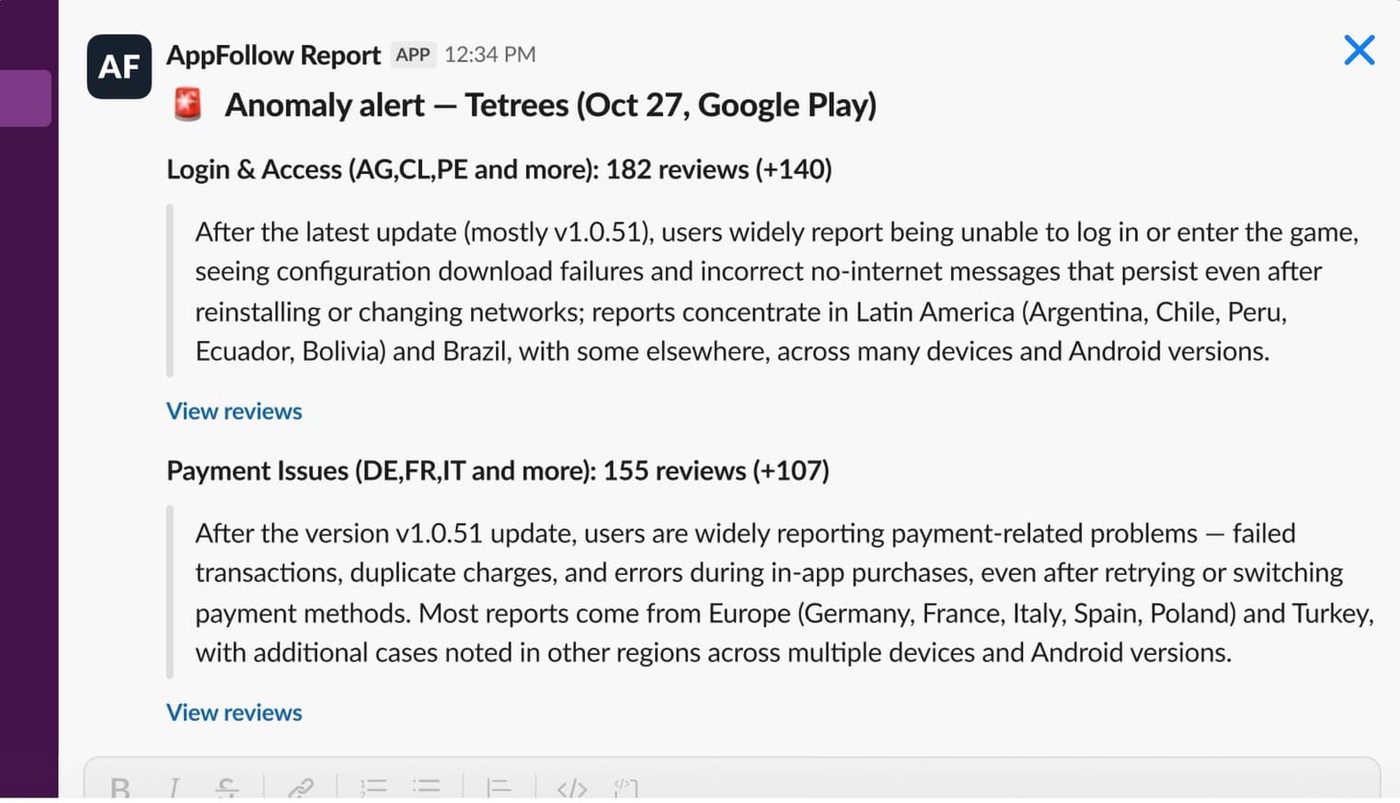
To detect toxic reviews early, watch leading indicators rather than the average rating. Most crises announce themselves through volume well before the score moves. A stable game suddenly pulls three times its usual review count. Mentions of "pay to win" jump overnight. Negative sentiment climbs hour by hour after a patch.
Set real-time alerts so a toxic review reaches the team within minutes, not the next morning.
Pipe them into Slack and email, and let AI sentiment tagging auto-classify each review as negative, abusive, offensive, or bug-report. Layer custom tags on top for game-specific triggers like monetization, balance, bug-crash, server, and account-lost.
Keep an eye on:
- unusual review velocity
- spikes in one-star ratings
- sudden sentiment shifts
- repeated keywords
- new topics appearing right after an update
Say a game normally takes 80 reviews a day and today it's at 600. You don't need to read all 600 to know something moved. Open the dashboard, group by topic, look at the biggest cluster. Nine times out of ten the story reveals itself: players hate a new monetization mechanic, matchmaking broke, or a streamer told an audience to leave one star. The faster you name the source, the less damage reaches your listing.
Step 2. Triage: separate signal from noise
Plenty of teams burn hours here by dropping every review into one queue and treating each as equally urgent. Real player problems then get buried under outrage. Build three lanes instead, and route each one to the right owner.
Lane | What it usually contains | Owner |
|---|---|---|
Legitimate complaint | Bugs, crashes, balance issues, account or purchase problems | Support agents |
Low-effort rage | Heated language, exaggerated criticism, no clear ask | Community manager |
Policy-violating abuse | Insults, harassment, spam, review bombing | Escalation lead |
Tagging makes the lanes real. A wall of 1,000 reviews feels impossible. A dashboard that reads 540 monetization complaints, 280 balance complaints, 110 crash reports, and 70 abusive reviews feels like a Tuesday. Now you know where the real problem lives, and where it doesn't.
This is also where you spot bombing. Watch for spike detection, duplicate-phrase clustering, and country or IP anomalies that AppFollow surfaces automatically. When duplicates dominate, you're probably looking at a campaign, not a thousand independent opinions.
If you suspect manufactured ratings, our breakdown of how fake app reviews tank your rating covers what to look for.
Step 3. Respond: reply at scale without sounding canned
The best reply to a toxic review is written for the next player, not the angry one. Your reviewer has usually made up their mind. The player discovering your game next week hasn't. They'll open the reviews, read the complaint, then read your response, and that exchange becomes part of the product experience.
A strong reply does three things: acknowledges the issue, adds useful context, and shows somebody is paying attention. Skip the corporate language, skip the copy-pasted apology, and never argue. One thoughtful response can soften a negative review. One defensive line can become a Reddit screenshot inside an hour.
At volume, lean on AI-assisted drafts. Prompt the model with your brand voice and get a starting draft in seconds, in any of 50-plus languages, then let a human do the final pass.
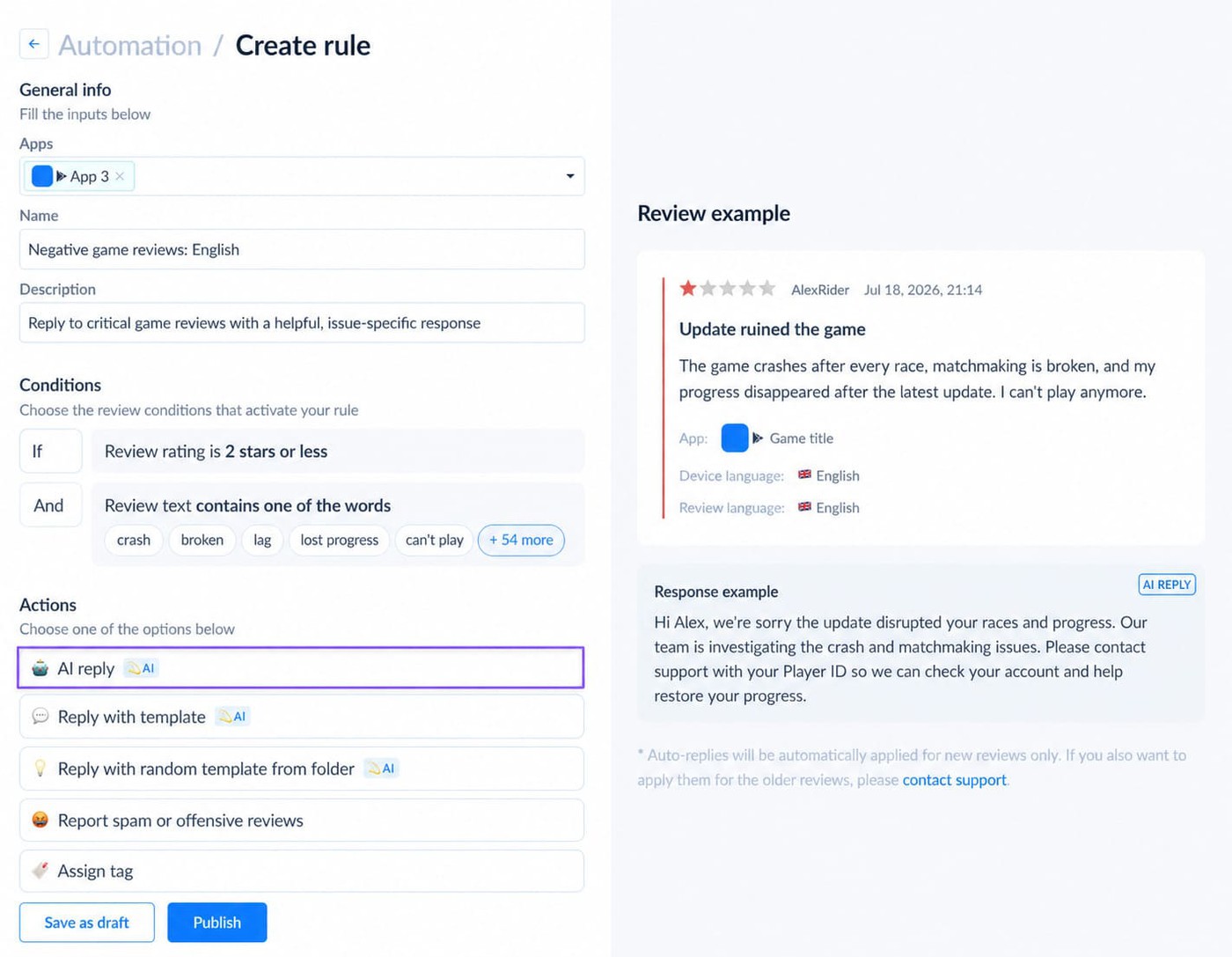
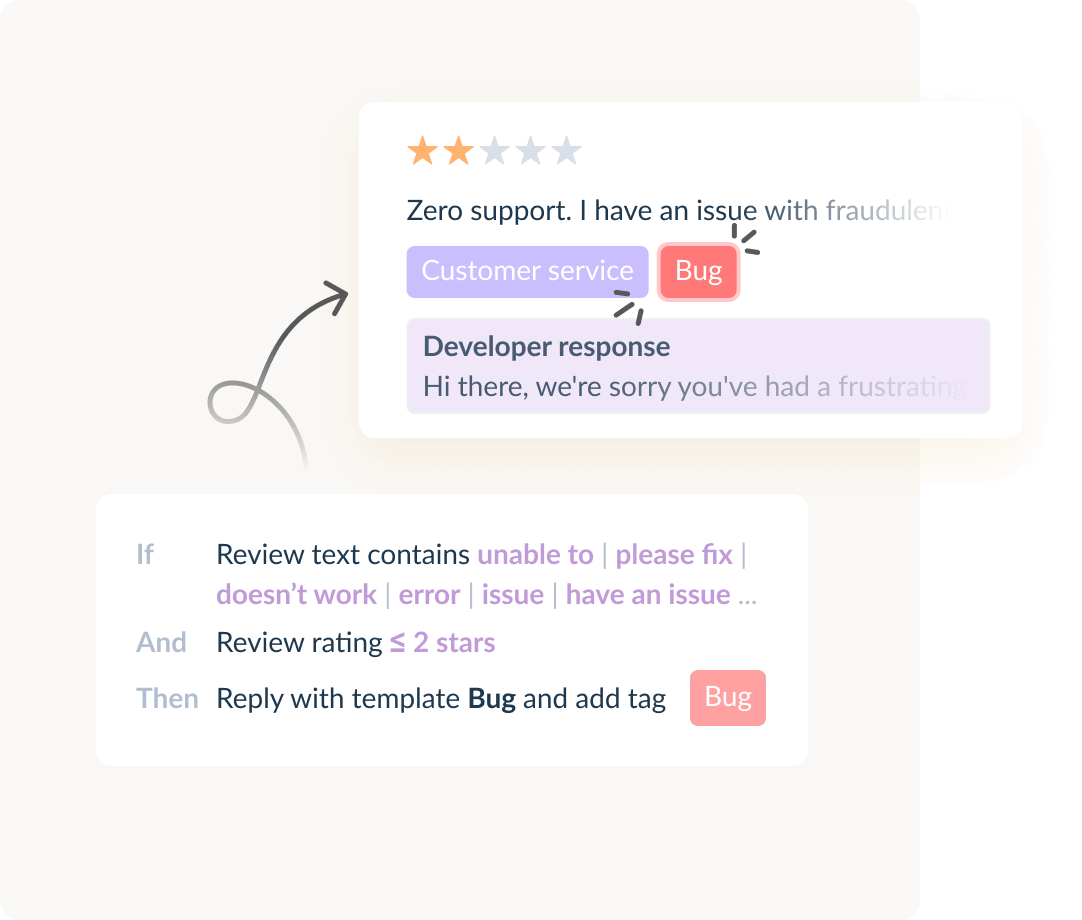
Add auto-reply rules for the predictable patterns: a "5-star, no text" review earns a thank-you, a crash report gets a "report a bug" link, and abuse gets nothing or a flag.
The point of automation isn't replacing judgment. It's keeping judgment from being spent on the 200th identical complaint. We dug into that mechanic in how automation turns review insights into hotfixes within 24 hours.
Step 4. Escalate: know when to flag, remove, or stay silent
Some reviews aren't feedback at all. They're policy violations, and others are symptoms of something bigger. Maybe hundreds carry identical language, personal attacks are climbing, or the wave started the second a Discord campaign kicked off. At that point a reply isn't the highest-value move.
Document what you're seeing. Capture timelines, track duplicate language, and collect evidence before you file. Apple removes reviews that cross into harassment, hate speech, threats, or spam under the App Store Review Guidelines, and Google applies similar standards in the Google Play Developer Policy Center. Negative feedback on its own is never grounds for removal. Players are allowed to hate your monetization.
AppFollow's sort-and-report workflow lets you file offensive reviews in bulk rather than one tab at a time.
The goal here isn't scrubbing criticism. Legitimate criticism stays in the conversation. The goal is stopping abuse and manipulation from distorting player sentiment, team priorities, and store performance. By the time a wave is obvious to everyone, you're already reacting. The strongest teams spotted it hours earlier.
cta_get_started_purple
From review spike to routed response: the AppFollow workflow
Here's how the bad version goes. A balance patch ships at noon.
By 2 p.m. the community team notices grumbling on Discord.
Around 4 p.m. one-star reviews start hitting Google Play.
By dinner, someone drops a screenshot in Slack of the rating trending down.
Two paths open up: start reading reviews one by one, or start hunting for patterns. The second scales. The first burns people out.
Read trends before you read reviews
One review tells you what a player thinks. Five hundred tell you what's happening. Open a dashboard after a major update and you'll often see something like this:
Topic | Share of negative reviews |
|---|---|
Matchmaking | 41% |
Monetization | 24% |
Crashes | 18% |
Server issues | 9% |
Other | 8% |
Suddenly the situation reframes itself. Your challenge isn't "hundreds of angry players." It's "matchmaking is driving nearly half the negative sentiment," and that's something you can act on. AI sentiment analysis and topic tagging surface those patterns automatically, so you see what actually changed after the update instead of hand-sorting hundreds of comments.
For the wider case, here are the benefits of AI-powered review management.
Speed beats polish during a live event
A review crisis almost never opens with the rating drop. The drop comes later. What moves first is the spike: volume jumps, sentiment falls, and certain phrases repeat. Maybe it's "pay to win," "broken update," "matchmaking," or "can't login."
A real-time alert catches that movement long before the average score shifts enough for leadership to notice, which matters most during live-service events when every hour counts.
By the time someone asks why the rating fell from 4.6 to 4.3, the wave is already well underway.
Automation removes the repetitive work, not the human
Nobody becomes a community manager to type the same response 200 times, yet that's exactly the job during a server outage or an account-loss incident. The wording changes, the issue doesn't. Workflow Automation handles the grind: a crash report gets tagged on arrival, a server issue routes to the right queue, a lost-progress review lands with support.
Teams spend less time sorting and more time solving. The best automation protects human judgment by keeping it off the repetitive tasks.
Good responses start with context
Open a review that just says "Worst update ever" and you've got nothing. See that same line grouped with 300 others naming the same balance change and you've got a story.
Context improves every response, which is why many teams use AI-assisted drafts as a starting point during spikes. The aim isn't automating empathy. It's keeping the brand voice consistent across hundreds of conversations while community managers skip the blank page.
When reviews are really support tickets
Some reviews don't belong in the review queue at all. A player loses progress, an account gets locked, a purchase never appears. Those need real follow-up, which is where Zendesk and Helpshift integrations earn their keep.
Instead of copying details between systems, you push the serious cases into established support workflows and keep a record. The player gets help faster, support gets context immediately, and nobody re-enters the same information twice.
What the strongest studios do differently
They don't wait for a bombing event to build a process. Alerts already exist. Tagging rules already exist. Workflows already exist. When the surge lands, the team isn't deciding what to do. They're following a system they built on a calm Tuesday. That's usually the difference between a temporary dip and a week-long firefight across both stores.
6 reply templates for toxic players in mobile game reviews
Start with the mistake that shows up in nearly every crisis: teams assume they're replying to the player who wrote the review. Usually they're not. They're replying to the next player who lands on the listing, scrolls the reviews, and decides whether your game is worth a download.
Great replies don't try to win the argument. They reduce uncertainty, show somebody is paying attention, and keep a heated thread from getting bigger. Here are six situations you'll hit again and again, with copy you can adapt and the AppFollow Auto-Reply rule that catches each one.
1. The balance patch that breaks the community's favorite strategy
Every live-ops team eventually ships an update players hate. A weapon gets nerfed, a hero loses power, matchmaking shifts, and within hours the reviews fill with "ruined forever." Most of those players aren't after a design essay. They want evidence their feedback registered.
Reply template
We understand this update has been frustrating for some players. The changes were made to improve long-term game balance, and we're actively reviewing player feedback alongside gameplay data. Thanks for taking the time to share your experience. We'll keep monitoring how these changes affect the community.
Skip this: Explaining why players are wrong. Nothing escalates a review thread faster.
Auto-Reply rule: tag reviews mentioning nerf, buff, balance, matchmaking, overpowered, update ruined.
2. The "pay-to-win" backlash
Few phrases travel faster in gaming than "cash grab." Sometimes the criticism is fair. Sometimes it's a reflex to a new battle pass or premium currency players haven't explored yet. Either way, arguing rarely helps.
Reply template
Thanks for sharing your perspective. We know progression, rewards, and monetization are important topics for players. Your feedback has gone to the team, and we're continuing to evaluate player sentiment as we plan future updates.
Skip this: Phrases like "purchases are optional." Technically accurate, almost guaranteed to irritate.
Auto-Reply rule: tag reviews mentioning pay to win, p2w, greedy, cash grab, battle pass, overpriced.
3. The server outage at exactly the wrong moment
Funny how outages never land on a quiet Tuesday. They hit during tournaments, weekend events, and new-season launches. Players can't log in, reviews appear within minutes, and speed matters more than wording. A fast response often stops frustration from curdling into hostility.
Reply template
Sorry you've run into connection issues. The team is actively investigating reports related to stability and server performance. If you're still affected, please contact support with your device details so we can look into your specific case.
Skip this: Suggesting the problem is on the player's side. You might be right. It still reads as dismissive.
Auto-Reply rule: tag reviews mentioning can't login, disconnected, lag, server down, connection error. During major incidents, consistency beats creativity.
4. The player who lost progress, purchases, or an account
These arrive angry, emotional, and often completely justified. Someone may have poured hundreds of hours into the game. Treating that like a routine ticket is a mistake.
Reply template
We're sorry to hear about the account issue. For security reasons we can't investigate account details through reviews. Please contact our support team with your player ID if you have it, and we'll work with you to resolve this as quickly as possible.
Skip this: Asking for personal information inside a public review thread.
Auto-Reply rule: tag reviews mentioning lost account, progress gone, missing purchases, save deleted, account recovery, then route straight to support.
5. Personal attacks aimed at developers
This one's deceptively hard. Community managers naturally want to defend their team. Don't. Future players reading the exchange won't remember who was right. They'll remember who stayed professional.
Reply template
We welcome feedback about the game and appreciate hearing different perspectives. We won't engage with personal attacks, but we're always listening to constructive feedback on gameplay, performance, and player experience.
Skip this: Sarcasm, defensiveness, point-scoring. All three become screenshots.
Auto-Reply rule: many teams choose not to auto-reply here at all. Route reviews with abusive language straight to moderation review.
6. The review-bombing event
A streamer criticizes the game. A controversial update goes live. A Reddit thread gains traction. Suddenly hundreds of reviews arrive saying nearly the same thing. You're no longer handling individual reviews. You're managing an event.
Reply template
We understand players have strong opinions about the recent changes. We're actively reviewing feedback across our community channels and weighing the concerns being raised. We remain committed to improving the player experience and will share updates as decisions are made.
Skip this: Accusing players of organizing an attack, even when that's exactly what's happening. Public arguments never improve a bombing.
Monitor for: unusual review volume, duplicate phrases, sudden one-star surges, and recurring topics tied to a specific update or event.
cta_free_trial_yellow
One rule before you hit reply
Ask a single question of every response: if a potential player reads this exchange six months from now, does it raise trust or lower it? That's the standard worth optimizing for. Not the current reviewer, not the loudest critic, but the thousands of future players quietly reading your reviews before they decide to install.
Should you reply to toxic reviews, or ignore them?
Reply to a toxic review only when the response adds value for the next player who reads it. A surprising number of replies make things worse, and not because they're rude. They simply never needed to exist.
Picture this. A player leaves one star after a balance update. A community manager spends fifteen minutes crafting a thoughtful reply. That player never returns, never changes the rating, never reads it. Three weeks later, dozens of prospective players read the same exchange while deciding whether to install. That second group is the audience that matters, which is why the real test is whether a reply creates more trust than silence would.
Sometimes a reply protects your rating
Take "Matchmaking is completely broken. Worst update ever." Harsh, sure. Toxic, maybe not. Buried in the frustration is something useful, and future players can see it too. Ignoring a review like this leaves a gap. Responding gives you a chance to add context, not excuses or patch notes, just context.
A short, professional line tells everyone reading that the team knows about the issue and is paying attention. App reviews don't only shape sentiment, they shape conversion, and plenty of install decisions happen after a glance at a handful of recent reviews. One calm response offsets a surprising amount of uncertainty.
Other reviews deserve exactly zero engagement
Now take "The developers are idiots." That's the whole review. No bug, no gameplay note, no actionable detail, just an insult. A response accomplishes nothing here. The player gets no help, future players learn nothing, and the thread grows longer without getting better.
Some reviews are feedback. Others are bait.
Telling them apart is one of the most valuable instincts a community manager can build, because a good reply adds information and a weak one only adds emotion.
A decision matrix you can pin above your desk
Review type | Reply? | Why |
|---|---|---|
Bug or crash report | Yes | Useful info for you and reassurance for future players. |
Matchmaking or balance gripe | Yes | Context offsets uncertainty even when the tone is hot. |
Monetization complaint | Usually | Acknowledge, redirect, never argue the price. |
Account or purchase loss | Yes, then route | Move to support; never request personal data in public. |
Pure insult, no content | No | Nothing to resolve, nothing for others to learn. |
Hate speech, threats, harassment | No, escalate | Document and report under store policy. |
Coordinated review bombing | One holding statement | Manage the event, don't argue with the crowd. |
The reviews worth answering tend to include a bug or crash report, matchmaking concerns, server issues, monetization complaints, account problems, or criticism tied to a recent update.
The tone can be furious. The information is still gold, and some of the best product insight you'll ever get arrives wrapped inside a one-star.
The reviews worth escalating instead, personal attacks, hate speech, threats, harassment, coordinated bombing, and spam, rarely improve with a response. Documentation and escalation do. Many teams track those patterns separately inside their dashboards so moderation issues don't contaminate product-feedback analysis.
Before you tap reply, run the one-line test: will a future player learn something useful from this response? Yes, reply. No, move on.
Detecting review bombing before it kills your rating
Review bombing is detected through sudden one-star spikes, duplicated review language, unusually high volume, and sharp sentiment shifts, usually before the average rating moves at all.
Friday afternoon. A new update has been live six hours. The rating still looks healthy. Then someone notices the game, which normally takes around 120 reviews a day, already sitting at 400. Most are one star. A surprising number repeat the exact same phrase.
Now you've got a call to make: treat it as a normal spike, or investigate before it reaches your store ratings. Strong teams pick the second option every time.
What bombing actually looks like
Many developers imagine thousands of players arriving at once. Sometimes that happens. More often it starts quietly. A Reddit thread gains traction, a creator publishes a critical video, players sour on a monetization update, or a balance patch lands badly.
The reviews follow shortly after, not because everyone independently discovered the same flaw, but because they're all reacting to one event. That's why bombing leaves fingerprints. Open a dashboard and you'll usually spot them fast:
- review volume jumps dramatically
- one-star ratings dominate recent activity
- identical phrases repeat across reviews
- complaints turn unusually broad or emotional
- reviews discuss community drama more than gameplay
One signal means little. Four showing up together tell a clear story. The rating drop is the result. The review pattern is the cause.
Where teams get the first hour wrong
They start replying. Immediately. Every review gets attention, support gets pulled in, Slack fills with screenshots, and meanwhile nobody answers the only question that matters: what triggered the spike? Without that answer you're treating symptoms. So before you respond, investigate. Start with the data.
- Review velocity. How unusual is the volume? A game that normally takes 80 a day and suddenly takes 500 isn't behaving normally.
- Topic concentration. Are reviews clustering on one issue, like matchmaking, progression, or battle-pass pricing? A single dominant topic often names the source.
- Language duplication. Repeated wording is one of the strongest signs of coordination, and clustering tools spot it far faster than manual reading.
- Sentiment shift. A game rarely flips from mostly positive to overwhelmingly negative without a catalyst. Find the catalyst.
Not every backlash is bombing
This distinction matters more than most teams realize. Sometimes players are simply right. A broken update can generate thousands of legitimate negative reviews. A major outage creates real frustration. Calling every surge "review bombing" is how teams miss important feedback.
Look at the distribution. If reviews describe different experiences in different words, you're probably reading genuine sentiment. If hundreds repeat the same message, the situation deserves a closer look.
Your 60-minute response protocol
When a wave starts, the rating is one of the last metrics worth checking, because by the time the average falls the event already has momentum. Watch volume, sentiment trends, recurring topics, duplicate phrases, and one-star share instead.
Those move first, and they buy you the one thing every team wishes they had more of during a bombing. Time. In the first hour, confirm the spike against your baseline, identify the dominant topic and trigger event, capture timelines and duplicate language for evidence, decide reply versus flag versus hold, and post one calm holding statement if the wave is coordinated.
Running the whole playbook in AppFollow
Everything above works without a tool. It just stops scaling the second a wave pushes past a few hundred reviews a day, when manual triage turns from a workflow into a staffing problem. AppFollow keeps the loop running at that volume, and most of what you've just read maps to one specific capability. Here's the short version, step by step.
AppFollow capability | What it does for your team |
|---|---|
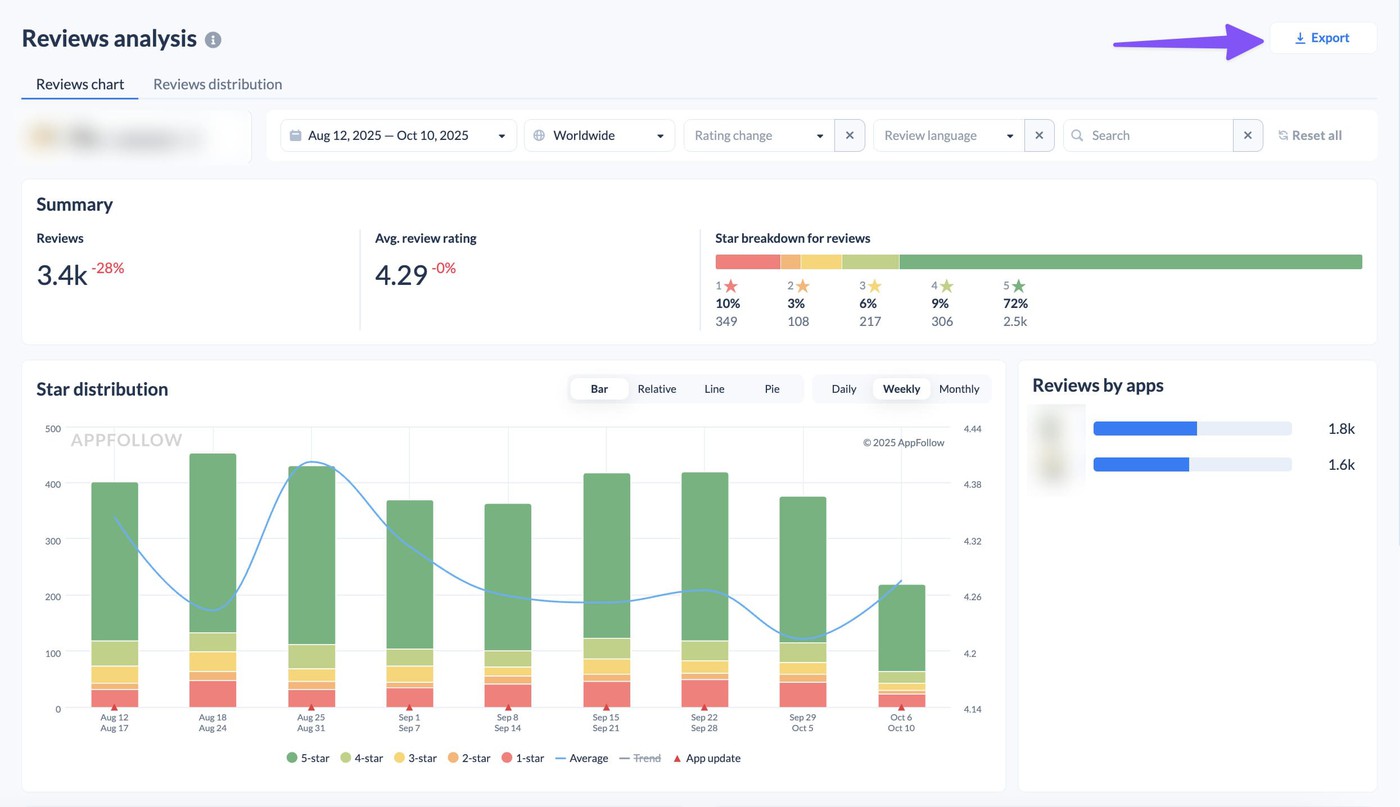
Real-time alerts plus AI sentiment tagging | Slack and email pings land within minutes, and every review arrives pre-classified as negative, abusive, offensive, or bug-report. A spike never waits for the morning standup. |
Topic tagging, review clustering, anomaly detection | A thousand reviews collapse into monetization, balance, crash, and abuse buckets, with duplicate-phrase and country spikes flagged as early bombing signals. |
AI-assisted drafts in 50+ languages plus Auto-Reply rules | On-brand drafts appear in seconds, predictable patterns reply themselves, and a human still signs off on anything that carries weight. |
Sort-and-report workflow plus support integrations | Offensive reviews get filed for removal in bulk, and account or purchase issues move into Zendesk or Helpshift tickets with full context attached. |
Weekly toxic-review dashboard | A leadership-ready view of sentiment, volume, and topic trends, so the rating conversation runs on data instead of the loudest thread. |
The pieces that matter most for toxic reviews
- AI sentiment and topic tagging. Reviews get read and sorted as they arrive, so you open a feed that already knows what's a bug report and what's abuse. This is the engine behind the triage table above.
- Real-time Slack and email alerts. The thing that buys you the hours you read about in the detection step. You hear about a spike while it's still 200 reviews, not after it has reshaped your average.
- Workflow Automation. A rules engine for auto-tag, auto-assign, and auto-reply. Set the offensive-review-to-auto-flag rule once, and it runs through every wave after that. Full detail lives in Workflow Automation.
- AI-assisted replies in 50+ languages. Drafts in the reviewer's language with your brand voice already applied, which closes the localization gap that quietly costs studios goodwill in Brazil, Mexico, and beyond.
- Support-platform integrations. Reviews that are really tickets get the follow-up they need through Zendesk and Helpshift, with nothing re-typed between systems.
- Reporting for leadership. A weekly dashboard you can forward up the chain, so the people asking about the rating see the trend, the cause, and the response in one place.
What that looks like in practice
Toca Boca runs this kind of automated setup across its catalog and reached a 75% review reply rate, coverage no team hits by hand once volume climbs. The full breakdown sits in our Toca Boca case study.
None of it replaces a community manager's judgment. It removes the parts of the job that burn that judgment out: the sorting, the duplicate typing, the 6 a.m. scramble to work out what changed overnight. If you run a live game, the gaming solution bundles the whole loop in one place.
cta_free_trial_purple
FAQ
How do I handle toxic or abusive reviews on my mobile game?
The most effective approach is to detect toxic reviews early, separate legitimate feedback from abuse, respond selectively, and escalate anything that violates platform policy. Not every negative review is toxic. A player angry about a balance patch can still hand you valuable feedback, while personal attacks, harassment, and coordinated bombing call for a different track. The job is sorting which reviews carry real player insight and which only add noise to your data.
Should you reply to toxic reviews or ignore them?
Reply only when a response adds value for future players reading the review. Most replies aren't really for the reviewer. They're for prospective players evaluating your game. A legitimate complaint answered well builds trust. A review made entirely of insults usually gains attention without gaining understanding when you engage it.
How do I detect review bombing on my game?
Review bombing typically shows up as sudden one-star spikes, repeated review language, unusually high volume, and sharp sentiment shifts. Most events begin before the rating drop becomes visible. A game that normally takes 100 reviews a day might suddenly take 500. Clustering reveals identical complaints, duplicate phrases, or reactions tied to a specific update, creator controversy, or community event. Reading patterns across reviews beats reading them one at a time.
Can you automate replies to negative app store reviews?
Yes. Studios can automate review tagging, sentiment analysis, routing, and draft generation for common review types. Automation works best when it removes repetitive work rather than replacing judgment. Crash reports get tagged automatically, account-loss issues route to support, and draft replies generate for server outages or known issues, while a community manager still approves the final response before it publishes.
What's a good template for replying to an angry player on Google Play?
A good reply acknowledges the frustration, adds context where it helps, and avoids defensiveness. For example: "We understand your frustration and appreciate you sharing your experience. The team is reviewing feedback related to this issue and monitoring its impact on players." The aim isn't winning an argument. It's showing future players that the team listens, investigates, and communicates professionally.
How do you flag offensive reviews for removal on the App Store and Google Play?
Reviews can be reported when they contain harassment, hate speech, threats, spam, or other content that breaks platform guidelines. Negative feedback alone is never grounds for removal. Players are free to criticize gameplay, monetization, bugs, or updates. Reviews that cross into abuse or violate store policy should be documented and reported through the proper moderation channels, which AppFollow can file in bulk.
Does responding to negative reviews improve app ratings?
It can, when the response helps resolve a player's problem or shows active engagement from the team. Not every player updates a rating, and many won't. The bigger payoff usually comes from building trust with future players reading the review page, since a thoughtful reply reduces uncertainty and adds context during a crisis.
What's the best tool to manage negative reviews for a mobile game?
The best tools help gaming teams monitor sentiment, spot review trends, automate repetitive workflows, and respond at scale. Look for sentiment analysis, topic tagging, review clustering, workflow automation, real-time alerts, and support-platform integrations. Together those features help teams detect bombing, manage toxic reviews, and catch product issues before they reach ratings and store conversion.
Should you reply to toxic reviews or stay silent during a review-bombing wave?
During a coordinated wave, post one calm holding statement and stop arguing with individual reviews. Replying to each bomb feeds the event and produces screenshots. Document the timeline, track duplicate language, escalate policy violations, and let your trend data, not the loudest thread, guide the product response.