App review management at portfolio scale: brand voice across 10+ games

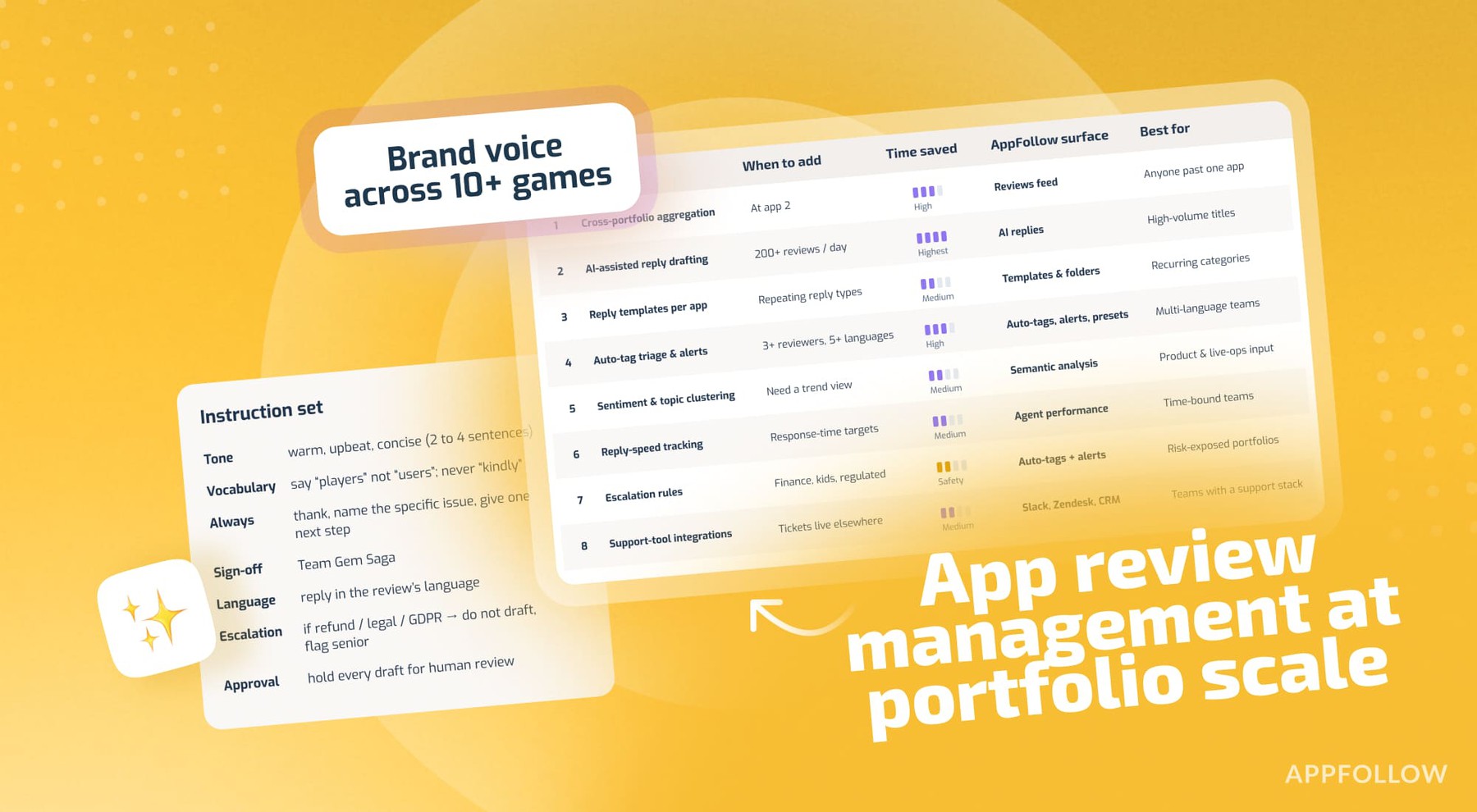
Table of Content:
- Key insights: what review management looks like at portfolio scale
- Why brand voice at portfolio scale is the operator problem
- How to choose the right review-management approach for your portfolio
- All eight review-management workflow patterns at a glance
- Top 8 workflow patterns for portfolio review management
- How to define and enforce brand voice at portfolio scale
- Review management KPIs that prove it is working
- How AppFollow handles portfolio review management end-to-end
- Conclusion
- Frequently asked questions about portfolio review management
Every portfolio publisher knows app review management matters, and that brand voice matters most of all. Almost none of them keep that voice steady past the third app. That is the operator paradox at the center of this work, and the cause is scale. The moment you are trying to manage app reviews at scale across 10 or 12 titles, in eight or ten languages, with thousands of reviews landing per day, the voice you wrote so carefully for one game starts to blur across the rest.
This is a practitioner playbook for the teams living in that exact spot. It gives you eight workflow patterns for portfolio review management, an operational definition of brand voice when there are thousands of replies going out, the AppFollow stack that makes it hold together, and the five KPIs that tell you it is working.
Key insights: what review management looks like at portfolio scale
Portfolio app review management is the work of reading, tagging, and replying to user reviews across a publisher's whole set of apps while keeping a distinct voice per title. At the portfolio scale, the bottleneck moves to routing, triage, and consistency. Here is roughly where teams land by size, plus the review reply rate benchmark numbers worth keeping in front of you.
Best for, by portfolio size:
- Managing one app: a saved reply template library plus native console replies.
- 2 to 5 apps: a unified inbox, per-app reply templates, and work split by app.
- 5 to 10 apps: the above plus AI-assisted reply drafting and sentiment tagging.
- 10+ apps: the above plus auto-tagging by language and topic, escalation rules, and integrations into your support tooling.
- Enterprise, 50+ apps: the above plus a per-app voice guide loaded into the AI, custom analytics, and reply-speed discipline backed by reporting.
The numbers (verify against the latest source before publish):
- AppFollow's managed clients average 4.30 stars against a global gaming-market average of 3.48, a gap of +0.82, measured across 51.5 million reviews and 22,800+ apps from January 2025 to January 2026 (AppFollow, 2026).
- Apps that reply to 30 to 50% of their reviews carry a 3.77 average store rating. Apps replying to under 1% sit at 3.25. That is roughly half a star, same store algorithm (AppFollow, 2026).
- Google's own data shows apps that respond to reviews see an average rise of about 0.7 stars on Google Play (Google Play, via BrandBastion, 2026).
- About 70% of users who get a response will update their rating (Alchemer); AppFollow puts the share who revise a review after a developer reply at 38% (AppFollow, 2026).
"Teams hitting 60% reply rates have split the work up. AI drafts, a human approves, automation decides who handles what. The 20% teams are still typing every reply by hand in the developer console. The volume is the same for both. One group just built a system for it."
- Ilia Kukharev, Product Manager at AppFollow
Why brand voice at portfolio scale is the operator problem
Portfolio review management is the practice of reading, categorizing, and responding to user reviews across a publisher's full set of mobile apps, usually 10 or more, while keeping a distinct brand voice per app and consistent quality across thousands of reviews a day.
Managing one app's reviews (that is, a smaller, less popular app) is a writing problem. You sit down, you read, you reply, the voice is whatever your voice is. The shift happens somewhere around five to eight apps. That is where voice drift becomes visible to players, where sentiment alerts start arriving faster than a human can read them, and where the job quietly changes from writing replies to running a reply system. Multi-app review management is that second job.
Each app in the portfolio has its own voice, too: Candy Crush does not reply the way Empires & Puzzles does, and players can feel the difference when it slips. Keeping that distinctness alive while the volume climbs is the practical test brand voice review responses have to pass. A generic "thanks for your feedback, we'll look into it" fails on every title at once, even though it’s better than nothing most of the time.
Then language adds a second axis, like a 10-game portfolio across 10 languages is 100 voice-and-language combinations. By hand, that math does not work, and the teams who try it tend to burn out a community manager in a year. The tool-switching tax between App Store Connect and Google Play Console, per app, per locale, is its own slow drain on top of that.
How to choose the right review-management approach for your portfolio
Not every team needs every pattern.
To manage app reviews at scale, pick by portfolio size, daily review volume, supported languages, and team headcount. The patterns stack, so the sane move is to start with the basics and add complexity only when scale forces your hand. App review management gets heavier in steps, not all at once, and thank goodness for that. So:
- By portfolio size. 1 to 5 apps: aggregation plus templates. 5 to 10 apps: add AI reply drafting and sentiment tagging. 10+: add auto-tagging, alerts, and escalation rules. 50+: add per-app voice guides and custom analytics.
- By daily review volume. Under 200 a day: human-first. 200 to 2,000 a day: AI-assisted, human-reviewed. Over 2,000 a day: AI-first with a human approval queue.
- By language coverage. Single language: skip the triage rules. 5+ languages: auto-translation and tag-based triage stop being optional. 10+: native-speaker reviewers become a hiring line, not a nice-to-have.
- By team headcount. Solo community manager: AI assist is the single biggest win you can turn on. Team of three or more: shared filters and auto-tagging pay back fastest. Team of 10+: analytics and reply-speed reporting start to matter as much as the replies.
All eight review-management workflow patterns at a glance
Before the deep-dives, the full map. Most portfolio teams run four to six of these at once, layered by portfolio size.
# | Pattern | When to add it | Rough time saved | AppFollow surface | Best for |
1 | Cross-portfolio aggregation | At app 2 | High | Reviews feed | Anyone past one app |
2 | AI-assisted reply drafting | 200+ reviews/day | Highest | AI replies | High-volume titles |
3 | Reply templates, per-app voice | Repeating reply types | Medium | Templates and folders | Recurring categories |
4 | Auto-tag triage and alerts | 3+ reviewers, 5+ languages | High | Auto-tags, alerts, presets | Multi-language teams |
5 | Sentiment tagging, topic clusters | Need trend view | Medium | Semantic analysis | Product and LiveOps input |
6 | Reply-speed tracking | SLA commitments | Medium | Agent performance, filters | Time-bound teams |
7 | Escalation rules | Finance, kids, regulated | Safety, not time | Auto-tags plus alerts | Risk-exposed portfolios |
8 | Support-tool integrations | Tickets live elsewhere | Medium | Slack, Zendesk, Salesforce | Teams with a support stack |
Top 8 workflow patterns for portfolio review management
The eight patterns below stack, each one building on the last. If your real question is how to reply to thousands of app reviews without the voice falling apart, this is the section that answers it. Use the schema to scan, compare, and adopt at your portfolio's pace. The "how AppFollow does it" line names the exact surface, so the pattern moves from idea to setup in one read.
1. Cross-portfolio review aggregation
Best for: teams managing 2+ apps who are tired of switching between App Store Connect and Google Play Console.
What it is: one inbox pulling reviews from every app in the portfolio, across both stores and every locale, close to real time.
How AppFollow does it: the Reviews feed auto-collects reviews from every app you connect, every store, every language, and lets you filter by app, sentiment, rating, language, keyword, reply status, and more. You can save a filter combination as a preset and share it with the team, so each reviewer opens straight into their own slice.
Setup checklist: connect each App Store Connect account; connect each Google Play account; turn on translation for the languages you do not staff; build and share a saved preset per reviewer.
Pitfalls: alert overload if thresholds are not tuned per app's review velocity. Also reviews can take up to two hours to start collecting on a new app, and store moderation adds a delay (up to 24 hours on Google Play, 8 to 72 on the App Store), so the feed is fast but not instant.
Pros and cons: foundational, everything else builds on it. On its own it only surfaces the work for the other patterns to handle.
2. AI-assisted reply drafting
Best for: teams with 200+ daily reviews, where typing every reply by hand has stopped being realistic.
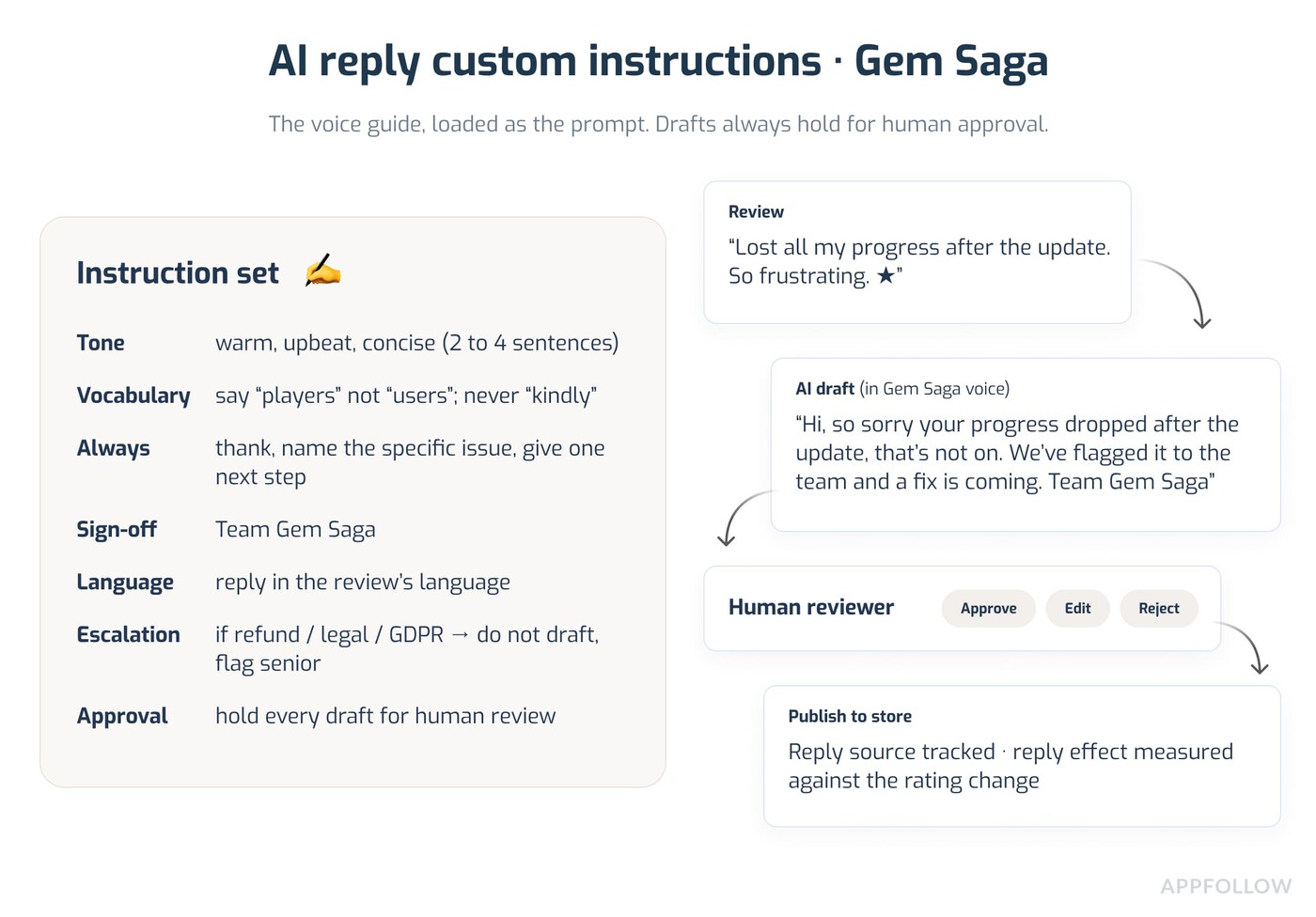
What it is: the AI drafts a reply per review in the target app's voice, and a human approves, edits, or rejects it. Think of it as an AI review reply assistant that does the first pass.
How AppFollow does it: AI replies draft a response with one click. You can make it longer, shorter, or "improve" it, generate alternatives, and edit before sending. Custom instructions set tone, signature, and style, and bulk AI replies can be held in an approval queue rather than auto-posted. This is the review reply automation most portfolio teams start with.
Setup checklist: write a voice instruction set per app (tone, vocabulary, sign-off, escalation phrasing); test it against 20 sample reviews; refine; switch it on in production with the approval queue active.
Pitfalls: a weak prompt produces generic replies that hurt the voice more than silence would. Treat the instruction set as a living document.
Pros and cons: the biggest time-saver in the playbook. It needs upfront voice work, and quality tracks the prompt almost exactly.
3. Reply templates with per-app voice
Best for: recurring review categories (bug reports, balance complaints, refund requests) that get near-identical replies.
What it is: saved templates per app, per category, with variables for things like reviewer name and app name.
How AppFollow does it: templates live in folders and can be app-specific or workspace-wide, with variables pulling in dynamic content and an option to auto-apply a tag when a template is used. You write each app's templates in that title's voice, so the "thanks for the bug report" reply reads like Candy Crush in one folder and Empires & Puzzles in another.
Setup checklist: audit the last 90 days of replies; pull the 10 most-repeated reply shapes; turn them into templates; add variables; pilot for two weeks.
Pitfalls: lean on templates too hard and replies start sounding like a vending machine. Use them as a starting point, not the finished reply.
Pros and cons: pairs well with AI assist, which can personalize the template per review. Templates need a quarterly refresh as the games change.
4. Auto-tag triage and alerting
Best for: teams with three or more reviewers and reviews across five or more languages.
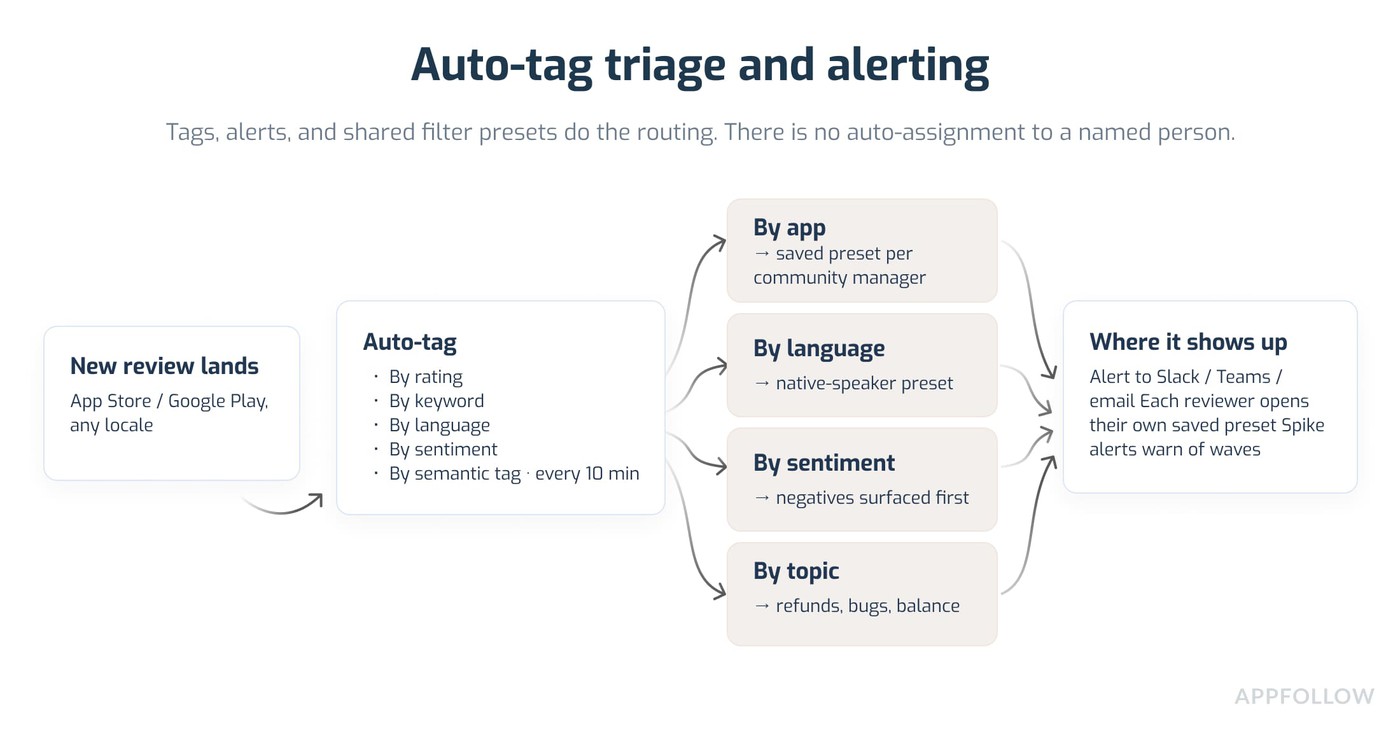
What it is: rules that tag each review the moment it lands (by app, language, sentiment, topic) and push the ones that matter to the right place.
How AppFollow does it: auto-tags apply tags based on text, rating, length, language, sentiment, and semantic tags, running every 10 minutes. From there, alerts (to Slack, Microsoft Teams, or email) flag the categories you care about, and shared filter presets give each reviewer their own queue to work. So the "who picks this up" question gets answered by the tag and the preset, not by someone re-reading the whole feed.
Setup checklist: map who covers which app, language, and topic; build three to five auto-tag rules; set alerts on the tags that need eyes fast; build a saved preset per reviewer.
Pitfalls: over-built tagging slows everyone down. Start with a handful of rules and add more only when a gap shows.
Pros and cons: it removes the "who replies to this?" dead time that wrecks response speed, and needs a clear coverage map first.
5. Sentiment tagging and topic clustering
Best for: portfolio teams who need to see issue trends across apps.
What it is: every review sorted by sentiment and by topic, so themes surface on their own.
How AppFollow does it: semantic analysis (a paid add-on, covering 20 languages) auto-categorizes reviews into Bugs, Monetization, User Feedback, and Report a Concern, each with specific tags, and phrase analysis surfaces the most common phrases per app. Weekly or monthly feedback summaries and AI summary alerts drop the top themes per app into a Slack or email digest, which is the input your live-ops and roadmap sessions should open with. Review velocity also spikes around live events, so read these themes against your event calendar.
Setup checklist: check the default model fits your genre; add custom semantic tags for genre-specific issues; schedule the weekly digest into your product and LiveOps channels.
Pitfalls: a generic taxonomy misses genre-specific complaints (gacha pity, battle-pass economy). Customize it.
Pros and cons: turns reviews into roadmap input. It needs occasional taxonomy upkeep, and the deeper analysis is an add-on.
6. Reply-speed tracking and queue discipline
Best for: teams committed to a response-time target (say, 12 hours for paying users, 48 for free).
What it is: a clear, measured view of how fast you reply, with the oldest unanswered reviews surfaced first.
How AppFollow does it: there is no literal SLA timer in the product, so the honest version is this. Agent performance tracks agent reply time (inside AppFollow) and store reply time (end to end, including store moderation), so you can see who is fast and who isn’t. A saved preset filtering for "no reply" and sorting oldest-first gives you a working queue, and spike alerts warn you when a wave is about to bury the team. Pair it with the auto-tag triage from pattern 4 so the right person sees the right review before it goes stale.
Setup checklist: write down your target times by review category; build a "no reply, oldest first" preset per reviewer; turn on new-reviews spike alerts; review agent reply-time weekly.
Pitfalls: aggressive targets without the staffing to hit them just produce rushed, low-quality replies. Match the target to real capacity.
Pros and cons: it takes prioritization out of the reviewer's head. The targets only hold if management actually looks at the numbers; without that they decay inside a quarter.
7. Escalation rules for refunds, regulatory, and PR risk
Best for: any portfolio touching finance, kids, or regulated markets.
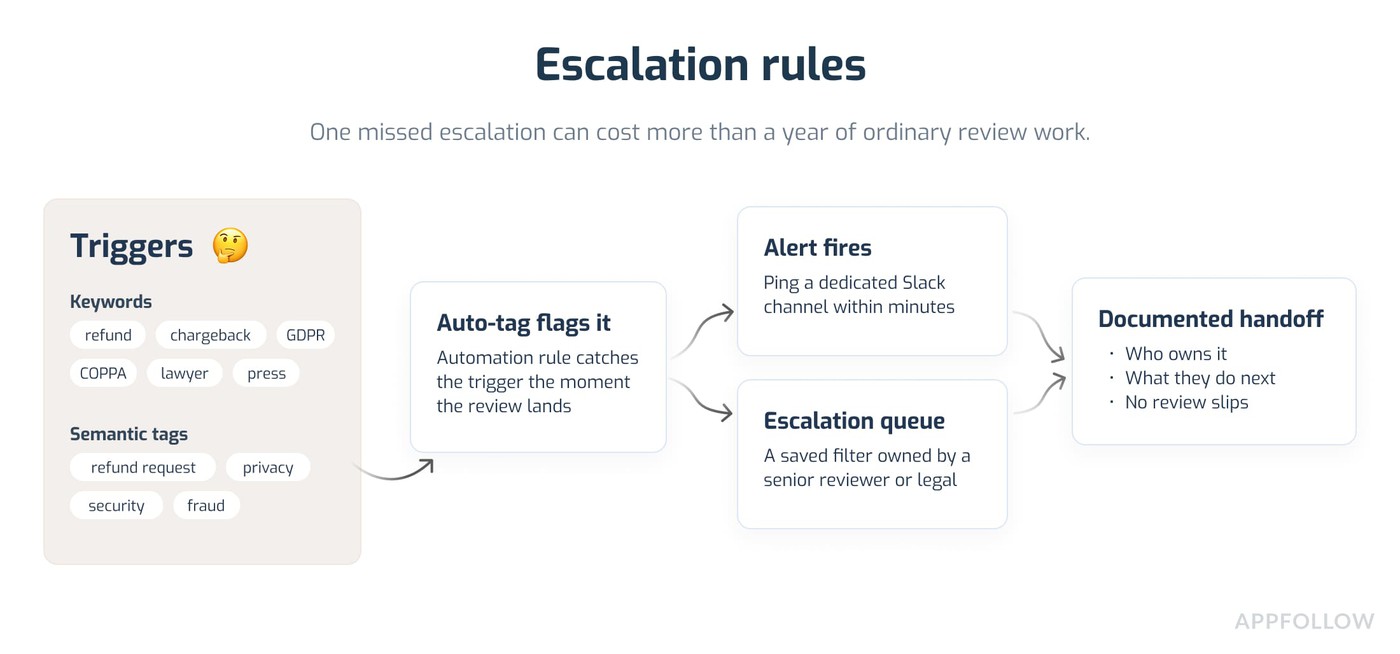
What it is: automatic flagging of reviews that mention refunds, legal threats, regulatory concerns, child safety, or PR risk. It is the one review escalation workflow you do not want to run by eyeballing the feed.
How AppFollow does it: auto-tags and automation rules catch keywords like "refund", "GDPR", "COPPA", "lawyer", or "press", and the semantic tags already cover refund request, security, privacy, and fraud. A tagged-review alert pings a dedicated Slack channel the moment one lands, and a saved filter owned by a senior reviewer or your legal contact becomes the escalation queue. Report a Concern can also be automated to flag spam and abuse straight to the store.
Setup checklist: list the escalation keywords per market and category; build the auto-tag and alert rules; point the alert at a senior reviewer or legal; write down the handoff so it is clear who owns what.
Pitfalls: too narrow a keyword list misses real escalations, too broad a list turns the alert channel into noise. Tune it monthly.
Pros and cons: one missed escalation can cost more than a year of ordinary review work, so the safety upside is large, as this one needs a real owner on the receiving end.
8. Integrations to Slack, Zendesk, and others
Best for: teams whose support tickets already live in a dedicated system.
What it is: routing review signals into the tools the team already works in, so reviews do not sit in a silo.
How AppFollow does it: native integrations cover Slack (alerts, digests, and a reply bot), Zendesk (deep, with per-agent tracking when you add the API key), plus Helpshift, Freshdesk, Intercom, Help Scout, Microsoft Teams, a Telegram reply bot, a generic webhook, and Tableau for data. So a refund review can become a Zendesk ticket, a sentiment spike can be relayed to a Slack channel, and your analysts can pull review data into Tableau.
Setup checklist: pick the integrations that match your stack; configure which review patterns become tickets and which become pings; run a seven-day pilot; widen it out.
Pitfalls: integration fatigue. Too many real-time pings will be ignored; it’s just the way it is. Default to digests, and save the instant pings for escalations.
Pros and cons: it ends the review-versus-ticket double-tracking that quietly eats team time. Each integration is a small ongoing upkeep cost.
"AI reply assist takes the worst hour off a community manager's day, the one where they type the same five answers to the same five complaints. Hand that hour back and they spend it on the reviews that need a person. That was the whole point of building it."
- Ilia Kukharev, Product Manager, AppFollow
cta_get_started_purple
How to define and enforce brand voice at portfolio scale
Brand voice in review responses is the consistent personality, tone, and vocabulary an app uses when it replies to users, kept distinct per app in a portfolio and steady across thousands of replies. Strong brand voice review responses come from three steps, and none of them are complicated, they just have to happen.
Step 1: document each app's voice in a one-page guide
One page per app, no more, or nobody reads it.
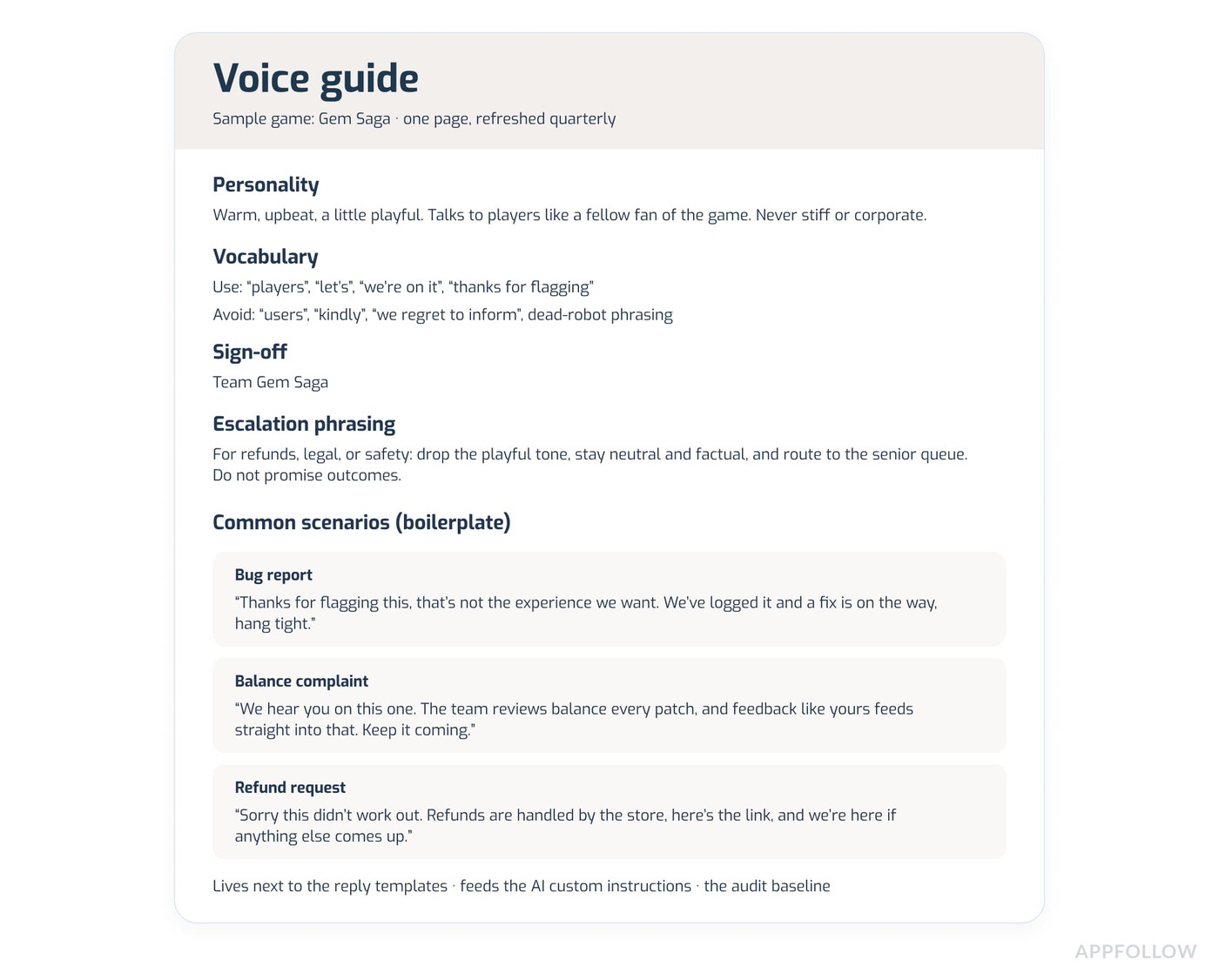
Cover personality (warm, formal, playful), vocabulary (the words you use and the ones you do not), the preferred sign-off, your escalation phrasing, and boilerplate for the common scenarios (refund request, bug report, balance complaint). Keep it living next to the reply templates, and refresh it quarterly. This one page is the input that feeds everything else in this article, the AI instructions, the templates, and the onboarding for new reviewers, so it is worth the hour it takes.
Step 2: train the team, and the AI, on the voice
Three concrete moves:
- New reviewers shadow a senior reviewer for about 50 reviews per app before they reply solo.
- The AI gets the voice guide loaded as its custom instructions, and you refresh those instructions every time the guide changes.
- You hold a short calibration meeting where the team blind-reads a handful of recent replies and rates how well each one fits.
The humans and the AI drift in the same way and on the same cadence, so you can recalibrate them together.
Step 3: audit voice quality every month
Pull 25-or-so reviews per app each month and blind-rate the replies against the voice guide on three axes: personality fit (0 to 5), vocabulary fit (0 to 5), and whether the reply addressed the substance of the review (0 to 5).
Track the rolling score per app. Voice drift shows up as a slow decline in that number well before players notice it out loud. AppFollow surfaces the underlying replies for the audit, but the rating itself stays human work, because no model grades voice fit reliably yet.
When you make your audit, aim for something like this:
"Voice drift is slow. Nobody decides to sound generic. It creeps in one rushed reply at a time, and you only catch it when you pull a month of replies and read them side by side against the guide. That monthly read is the cheapest insurance you've got."
Janire Indias, Head of Customer Success and Professional Services, AppFollow
Review management KPIs that prove it is working
These are operational review KPIs. To manage app reviews at scale, five numbers are enough, and more than five just dilutes the focus.
- Reply rate. Share of reviews that get a response. Top-quartile teams sit at 90%+ (AppFollow, 2025); 60% is a solid floor for a portfolio.
- Reply time. Within 24 hours is the standard target, ideally inside four or much sooner than that if AI replies or templates are used.
- Reply effect. AppFollow's own metric: did the user change their rating after your reply, counted within three months. It splits into ratings that went up, went down, or stayed. Anything positive is good!
- Rating uplift versus a no-reply cohort. The quasi-experimental read. Apps replying to 30 to 50% of reviews average 3.77 stars against 3.25 for near-silent apps (AppFollow, 2026).
- Automation share. What portion of replies the automation handles, which tells you whether the team's time is going to the reviews that need a person.
How AppFollow handles portfolio review management end-to-end
For a portfolio team, the value is having one workspace where the reviews land, get tagged, get drafted, get approved, and get pushed back to the store, without anyone opening a single developer console. The whole point is to manage app reviews at scale without the coordination tax, and the product is built around removing exactly that.
Here is how the pieces fit, including where review reply automation is and should be at all times.
The Reviews feed and AI replies
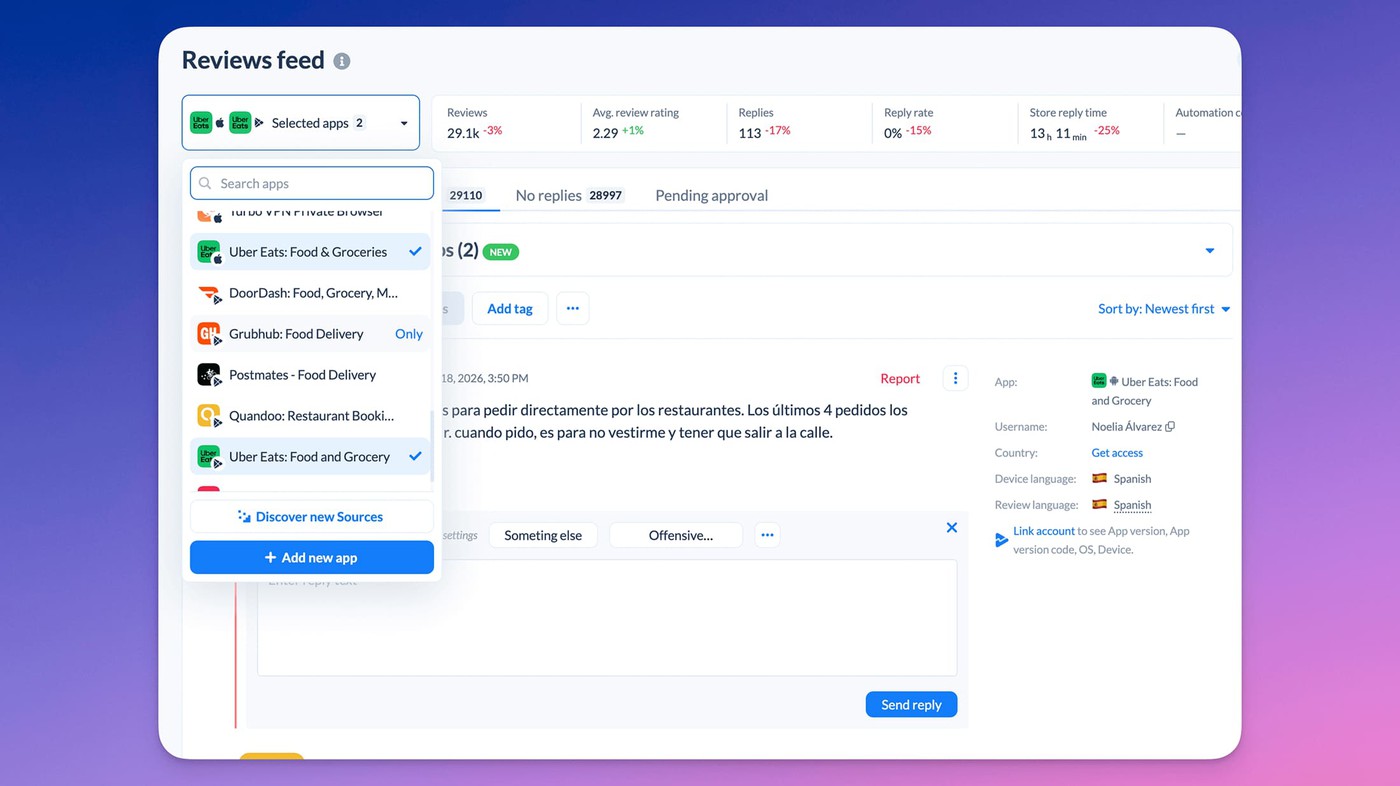
The Reviews feed aggregates every connected app across the App Store, Google Play, and other stores, with filtering, saved presets, and auto-translation. On top of it, AI replies draft a response per review, you refine and approve, and the reply publishes to the store with the source tracked.
For higher volumes, AI auto-replies and bulk AI replies can run with an approval queue, which is the honest shape of review reply automation: the machine drafts, a person signs off.
Auto-tags, semantic analysis, alerts, and integrations
Underneath, auto-tags and the semantic analysis add-on categorize everything by sentiment and topic, alerts push spikes and escalations into Slack or Microsoft Teams, and the help-desk and CRM integrations (Zendesk, Helpshift, and the rest) carry review signals into the tools the team already uses. Agent performance and reply-effect reporting then tell you whether any of it is moving the rating.
cta_get_started_purple
Conclusion
Eight workflow patterns, three brand-voice steps, the AppFollow surfaces that run them, and five KPIs. That is the portfolio review management playbook on a single page. Most teams adopt four to six of the patterns and layer the rest as they grow.
The thing to hold onto: brand voice is the deliverable, and the tooling is only what lets that voice survive contact with scale. App review management gets hard for one reason, which is volume across many titles and many languages, and that is a problem you solve with systems like review reply automation and triage. Typing faster will not get you there.
Frequently asked questions about portfolio review management
How do I maintain brand voice across multiple apps' reviews?
Write a one-page voice guide per app covering personality, vocabulary, sign-off, and escalation phrasing. Use it as the custom instruction for AI replies and as the calibration baseline for human reviewers, then audit monthly with a 25-review-per-app blind rating. That is the whole loop for brand voice review responses at portfolio scale.
How do I manage reviews for 10+ mobile games?
Run an aggregated inbox (such as the AppFollow Reviews feed), AI-assisted reply drafting, auto-tag triage by app, language, and sentiment, the semantic analysis add-on for trend-spotting, and reply-speed tracking for response times. Most portfolio teams need all five once they cross the 10-app line, which is the heart of multi-app review management.
Should I reply to every app store review?
No. Reply to all negatives, every review naming a specific issue you can fix, and a sample of positives (10 to 20% is plenty for the ranking signal). Replying to literally every review burns reviewers out without a matching lift in rating or retention.
How fast should I reply to app reviews?
Top teams reply within 24 hours, and ideally inside 12 for paying users and 48 for free ones (ReplyOnTheFly, 2026). Going faster than 12 hours rarely improves the outcome. Going slower than about a week tracks with rating decline, especially after a bad update.
Can AI write app review replies?
Yes, paired with a per-app voice instruction set and a human approval queue. That is the safe shape of review reply automation: the AI handles the drafting and a person handles the sign-off. Freshworks measured AI cutting first-response time from over six hours to under four minutes (Freshworks, 2025). Unsupervised AI replies, though, damage brand voice faster than no reply at all.
How do I measure review reply success?
Track five things: reply rate (90%+ is top-tier), time to first reply (under 24 hours), reply effect (rating change after a reply), rating uplift against a no-reply cohort, and automation share. This is operational app review management measurement, separate from in-game KPIs.