How to prioritize which game needs attention first

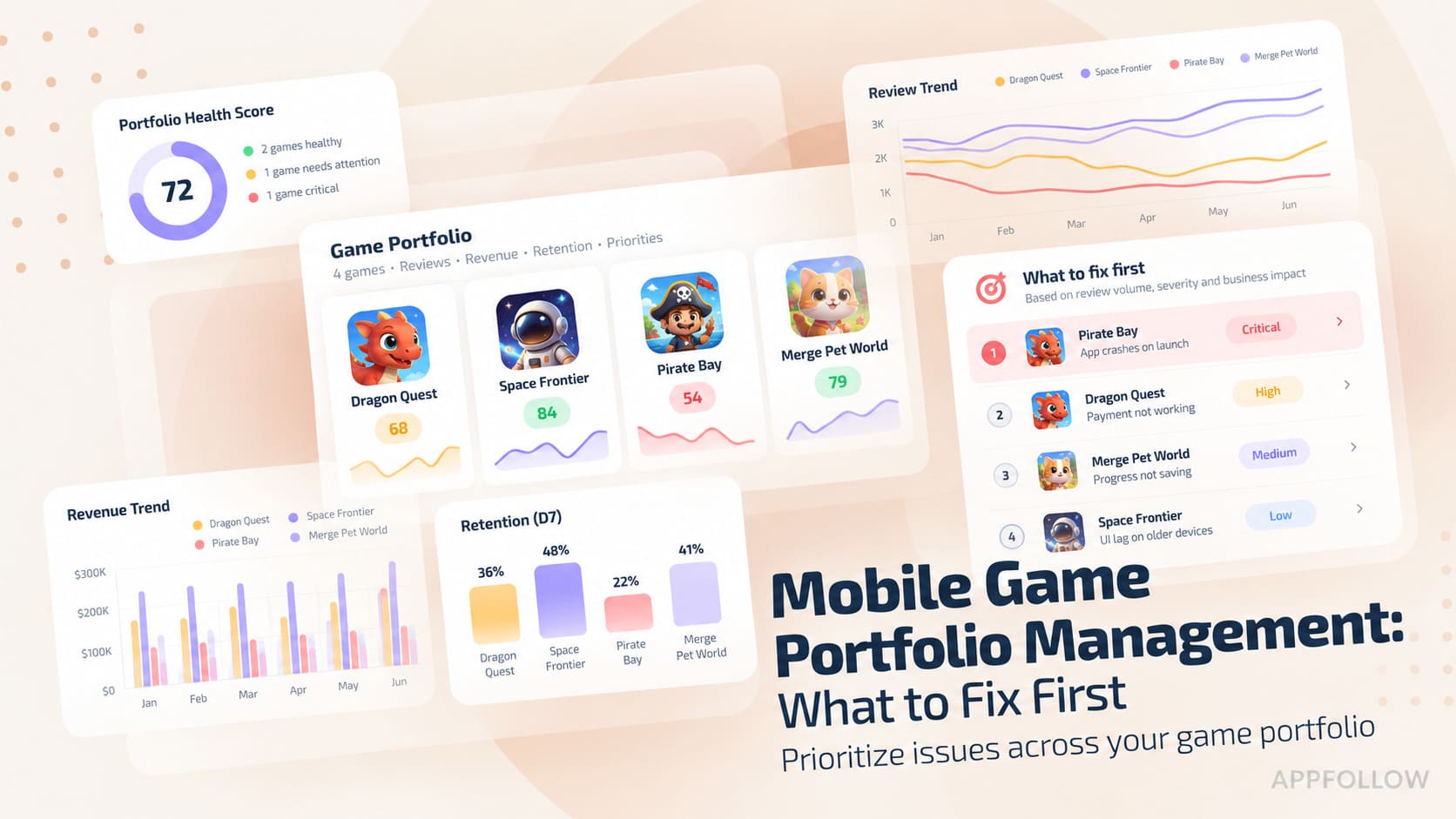
Table of Content:
- Key insights: how to choose the first priority
- Compare changes against each title’s baseline
- Run a 15-minute portfolio triage before anyone starts fixing
- Diagnose 5 patterns before assigning the team
- Build the portfolio-prioritization workflow in AppFollow
- FAQ
- Choose the next investigation and assign it
Monday’s portfolio review opens with eight games, three red dashboards, and one team. Which game needs attention first? The lowest rating looks obvious. It may still be the wrong place to start.
In mobile game portfolio management, start with the title showing the fastest harmful change across the most valuable exposure. Require several store-side signals pointing toward a cause the team can act on. Broken purchases, blocked account access, or another severe incident overrides that comparison and goes first.
Check six evidence lanes: visibility, rankings, ratings, reviews, downloads, and release impact. Compare each change with its baseline before comparing genres, stores, countries, or lifecycle stages. This mobile game portfolio analysis produces the defensible shortlist used to prioritize mobile games. Store signals show where to investigate. Other analytics then help explain what likely changed across retention, crashes, economy, revenue, and lifetime value.
Key insights: how to choose the first priority
Use these rules to turn the initial scan into a shortlist:
- The worst absolute metric is not automatically the most urgent. For example, a 3.9 rating unchanged for months may wait. A 4.7 rating falling sharply after yesterday’s release enters game portfolio triage first. Direction and change velocity reveal urgency that the latest value hides.
- Compare every title with its own baseline before comparing games. A new RPG and a mature puzzle game naturally follow different download patterns. Seasonal events, different stores, countries, genres, and lifecycle stages can also distort raw comparisons. Start with recent history, then use a matched benchmark for context.
- Require two corroborating store-side signals for non-incidents. A one-day category-rank dip alone may be noise. Falling visibility alongside declining keyword positions supports a stronger diagnosis. When signals conflict, lower confidence and investigate before assigning expensive work.
- Release-linked rating and review shocks outrank slow, low-exposure declines. A sudden low-star surge naming login or purchase failures warrants immediate incident checks. Confirm its timing, affected market, app version, and topic cluster. Then route the evidence to product, engineering, or LiveOps.
- Every priority needs an owner and another measurement. Record what changed, why it matters, who acts next, and when the team checks again. Without that handoff, the priority remains a concern instead of becoming scheduled work.
cta_get_started_purple
Compare changes against each title’s baseline
The weakest absolute number does not automatically identify the most urgent mobile game performance problem. Prioritize movement instead: compare every title with its own recent baseline, then add matched market context. A stable 3.9 rating may wait behind a 4.7 rating that started falling immediately after a release.
Rank change velocity before absolute score
Change velocity describes the direction and pace of movement, not the latest value alone. It helps separate long-standing weakness from a problem that is accelerating now.
For example, Game A has held a displayed rating of 3.9 for 28 days. Game B’s displayed rating falls from 4.7 to 4.5 during the week after a release in the same store and country. Investigate Game B’s change first, then check rating counts and review topics before deciding how much work to allocate.
- Start with a seven-day period against the previous seven days.
- Then check the 28-day view to see whether that movement breaks the title’s normal range.
- Apply the same logic to downloads, keyword visibility, category rank, and review volume.
These mobile game KPIs supply evidence, but none creates the priority alone.
Keep the rating type and source consistent across both windows: displayed rating, new ratings, and review ratings answer different questions. Record the count behind a change as well as its size. A 0.1-star movement based on a handful of responses needs a different level of confidence from a shift across thousands.
Normalize by store, country, genre, and lifecycle
Raw comparisons between unlike games manufacture urgency. Before ranking two titles, check that four conditions are reasonably matched:
- Store: Keep App Store and Google Play trends separate because their audiences, rating behavior, and reporting differ.
- Country: Prioritize movement in markets with meaningful downloads or strategic value instead of relying on a global average.
- Genre: Compare puzzle games with relevant puzzle competitors, not launch-week RPGs with different acquisition and engagement patterns.
- Lifecycle: Separate new releases, mature titles, and LiveOps peaks because their expected downloads and review velocity differ.
A matched comparison does not need a perfect twin. It needs enough shared context to show whether the movement belongs to one title or its market. Compare Discovery can add category and competitor context, although it compares up to five apps at once. For larger portfolios, review matched cohorts separately.
For market context, use the mobile game genre breakdown alongside your own history. Genre-level figures do not establish an intervention threshold for an individual title.
Run a 15-minute portfolio triage before anyone starts fixing
This initial pass turns mobile game portfolio management into four decisions: detect, classify, score, and assign. Game portfolio triage produces a defensible shortlist, not a finished diagnosis. Move quickly through the scan, then validate the leading hypothesis with the responsible specialist.
Step 1: scan changes across the portfolio
Compare the latest seven days with the previous seven, then open the 28-day trend for context. Shortlist material movement across two evidence lanes. A severe incident, including failed purchases or blocked account access, enters immediately.
Use App Reputation Index to locate titles worth a closer look, then inspect its underlying signals. Keep Search Visibility Score, keyword positions, ratings, reviews, and connected downloads separate in your notes so a composite score does not count as another independent confirmation.
Title | Health | Visibility and rank | Ratings and reviews | Downloads |
Puzzle Port, puzzle | 82 to 75 | Visibility down; rank 8 to 15 | Rating stable | -18% |
Kingdom Line, strategy | 78 to 62 | Stable | Rating down 0.3; crash reviews rising | -9% |
Lucky Harbor, casino | 69 to 68 | Rank 22 to 24 | Stable | -2% |
Rune Frontier, RPG | 74 to 80 | Visibility and rank rising | Sentiment stable | +21% |
Illustrative cross-genre triage worksheet, assembled from several sources. Each change is measured against that title’s own baseline; the rows are not a like-for-like ranking of game performance.
Kingdom Line needs incident assessment because crash complaints coincide with a release and a rating decline. Puzzle Port needs a separate discovery investigation. Lucky Harbor stays on the watchlist until the rank change has stronger support. Rune Frontier’s improvement is worth checking for a useful release or featuring pattern.
Monitor winners too. A positive move can reveal a useful release, featuring event, or market pattern.
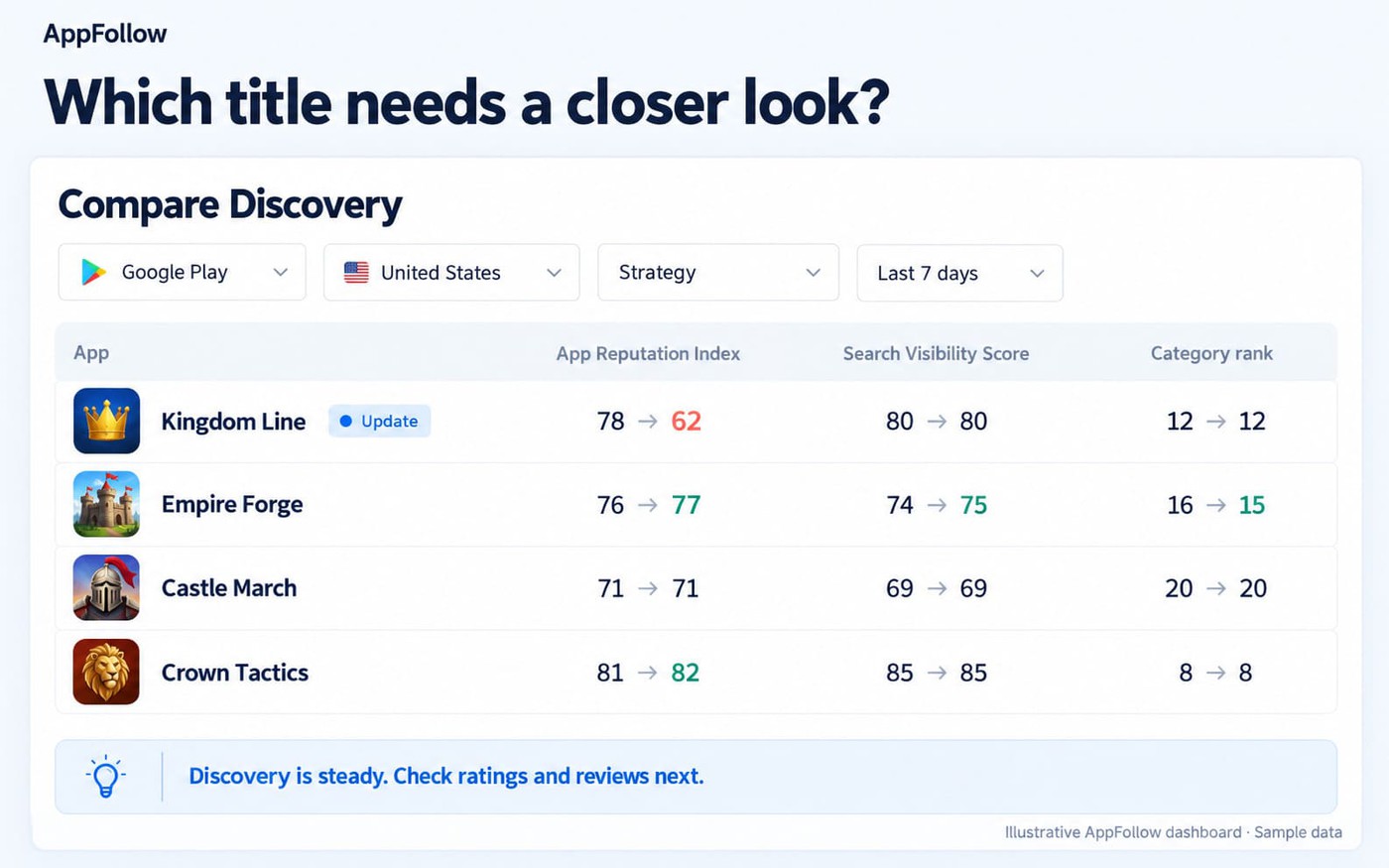
The shortlist is the output. Do not change metadata, creatives, or release plans until the movement has a working classification.
Step 2: classify each outlier into one of five patterns
Assign one primary pattern to each shortlisted title. Shared labels keep a visibility loss from being routed like a product incident. Use combinations, because one metric rarely identifies the problem alone.
Pattern | Early signal | Confirming signal | First owner |
Release shock | Rating drop or review spike follows a change | Topics, version data, and release impact point toward the same build | Product, engineering, or LiveOps |
Visibility loss | Search visibility, keywords, or category rank declines | Ratings and review sentiment remain stable | ASO or growth |
Demand or conversion loss | Download decline while visibility holds | Source or conversion data isolates the weaker stage | ASO, creative, or UA |
Reputation debt | Negative topics, unanswered reviews, or reply times worsen | Important markets show persistent low-star themes without one incident | Support, community, and product |
Competitor opportunity | A matched competitor loses visibility or rank | Your title remains stable in a valuable market | ASO or growth |
Treat each label as a working hypothesis. If visibility declines while review sentiment worsens, the title may contain two problems. Mark it “Needs diagnosis,” record both explanations, and reduce confidence until another check separates them.
The primary pattern determines where investigation starts. Later evidence may move a release shock from LiveOps to engineering. Keep the handoff visible instead of protecting the original label.
Step 3: score urgency, exposure, confidence, and actionability
When two shortlisted titles show real problems, score four factors from 1 to 3 and attach the evidence. The 4-to-12 total structures judgment; it does not replace diagnosis.
Factor | 1 point | 2 points | 3 points |
Urgency | Stable movement | Sustained decline | Fast deterioration or severe impact |
Business exposure | Low-volume title or market | Moderate downloads or strategic value | High downloads or priority market |
Signal confidence | One conflicting signal | Two signals, with a shared cause still possible | Different sources support the same hypothesis |
Actionability | No clear cause or owner | Testable hypothesis | Clear owner and immediate check |
Add the four values to create the article’s game priority score. This practitioner framework is not a native AppFollow metric. Record the dashboard, period, market, release marker, and topic evidence beside every number.
The fictional Kingdom Line produces this completed scorecard:
Factor | Score | Evidence |
Urgency | 3 | Rating fell 0.3 within seven days |
Business exposure | 3 | Decline affects its highest-download market |
Signal confidence | 3 | Rating, crash reviews, downloads, and release timing align |
Actionability | 3 | Engineering can inspect crash logs for build 6.4 |
Total | 12 | Escalate for incident assessment |
Kingdom Line’s score puts it near the top of the investigation queue. It does not establish that build 6.4 caused the problem or that the incident is P0; engineering must assess affected players and severity.
Override the score for a P0 incident, including an unplayable build, purchase failure, account loss, or widespread access problem. Otherwise, compare totals beside their evidence. A precise-looking 10 built on assumptions should not outrank an evidence-backed 8.
After scoring, assign one operating owner and one next check. Record both beside the score so the queue ends in work, not debate.
cta_get_started_purple
Diagnose 5 patterns before assigning the team
Use the five patterns to choose the next check and the first owner. A pattern is a hypothesis: record what would support it and what would rule it out before selecting a fix.
Release shock: ratings and review topics change after a build
A release shock becomes plausible when ratings and negative review velocity worsen after a build, metadata change, or LiveOps event. Repeated topics should describe the same failure. Timing strengthens the hypothesis, but it cannot establish causation alone.
Compare the seven days after the change with the preceding seven, then inspect the daily trend. Preserve the rating type, number of new ratings, relevant review text, available version and device details, market, and release timestamp. Repeated crash, login, or purchase complaints help identify what engineering should test.
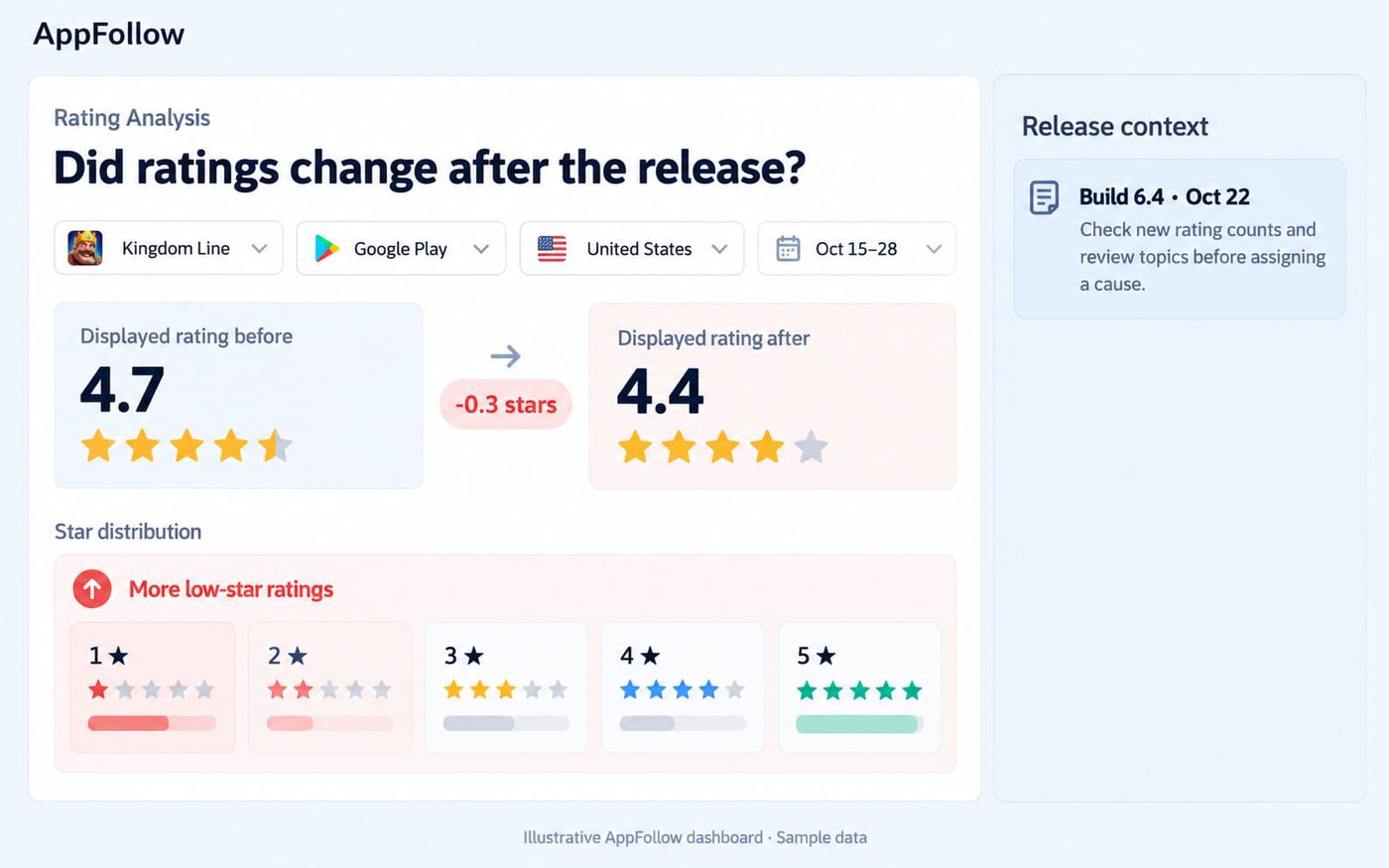
Match the change with a release, metadata update, or event in Update Timeline. In-app event history starts in Q3 2025; this limit does not apply to all release and metadata history. Check the event’s active countries as well as its date.
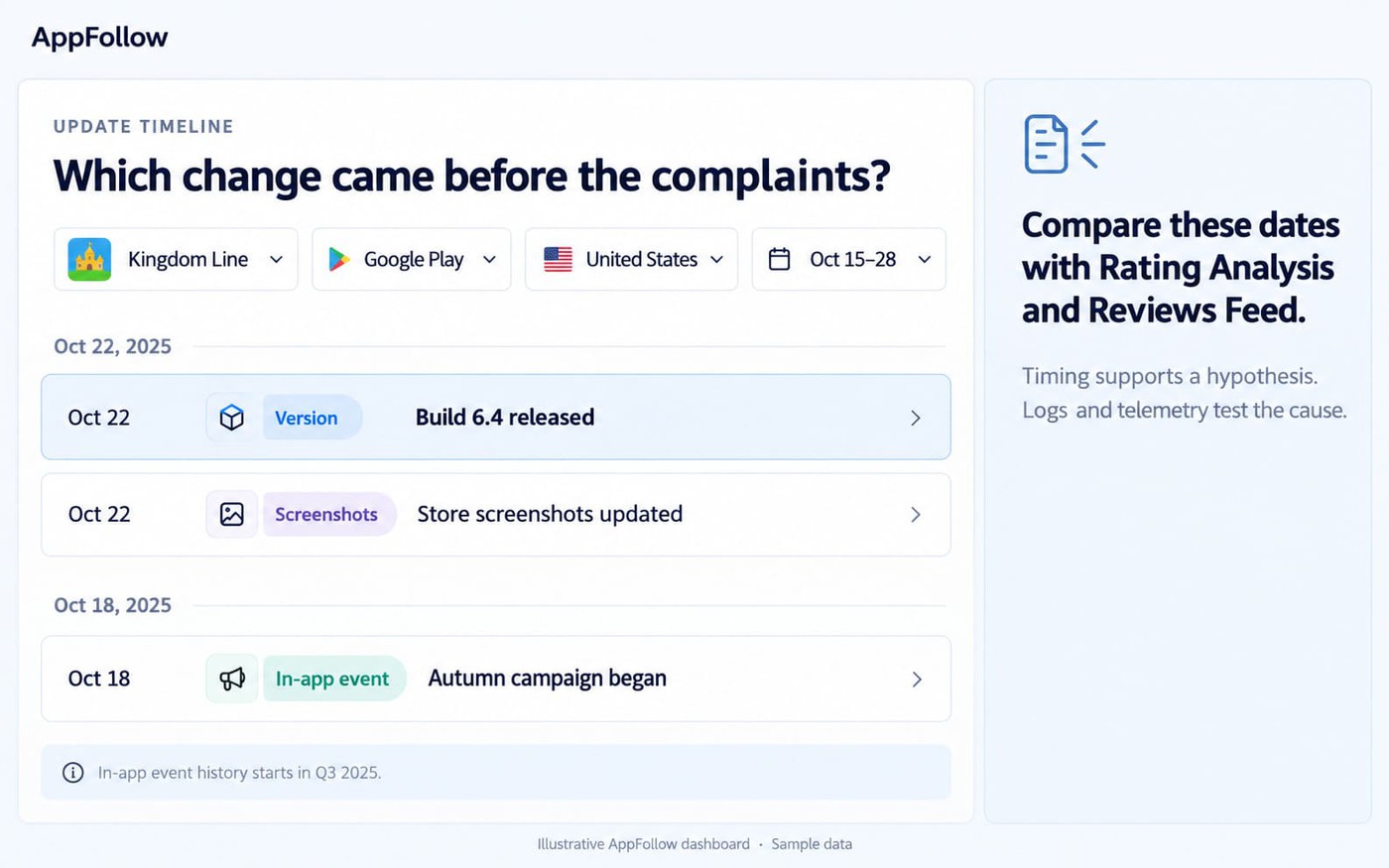
Next, filter Reviews Feed by the affected period, rating, version, and repeated topics. A negative review spike naming one login screen supports the hypothesis. Complaints that predate the build or span unaffected versions lower confidence.
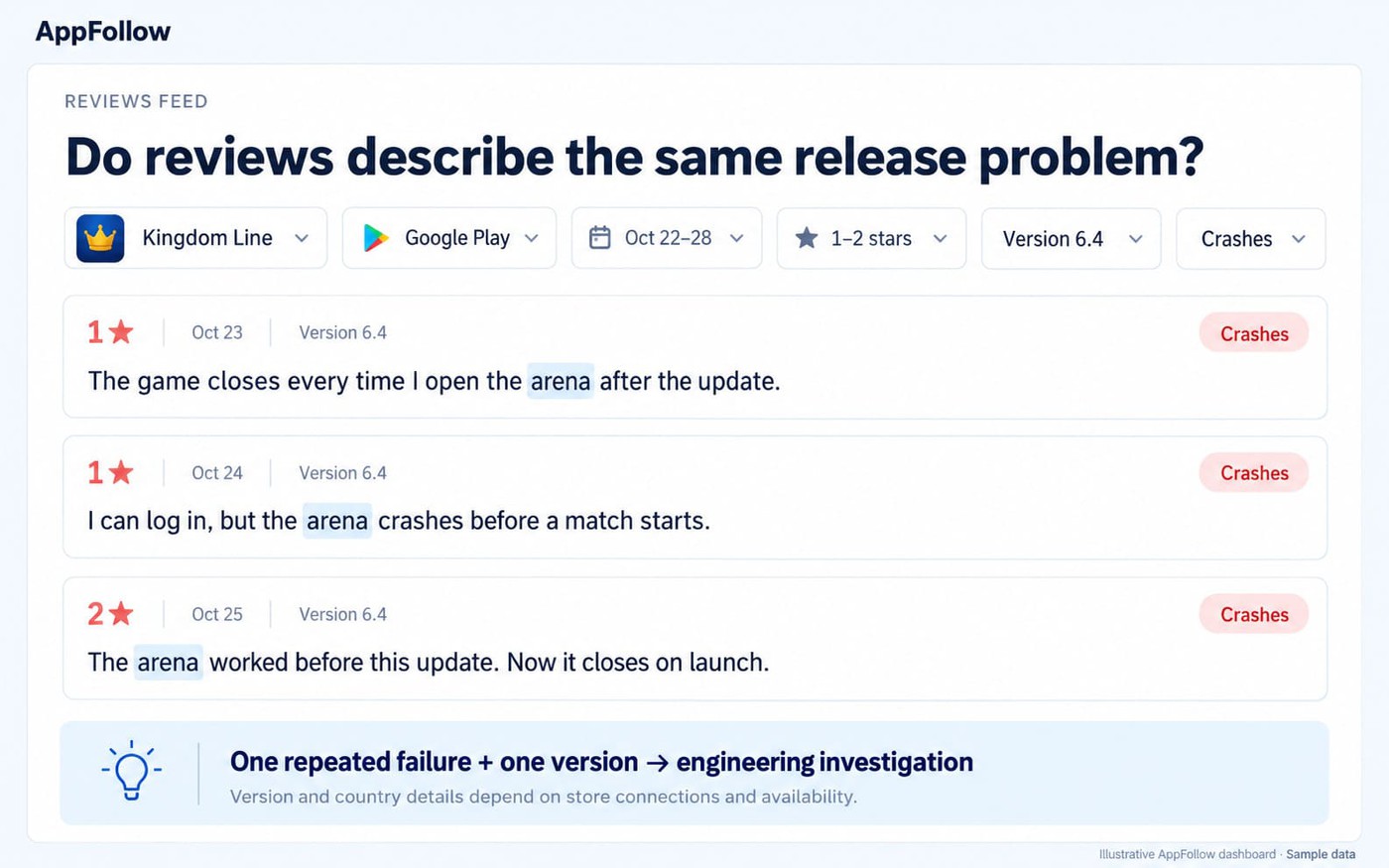
Check whether the decline concentrates in one country, device group, or store. That scope can change both the owner and response. Route crash, access, or purchase evidence to product and engineering. Send balance or event complaints to LiveOps, while support handles recoverable reviews.
After diagnosis, use the bad mobile game update workflow for remediation. Verify the hypothesis through crash reporting, purchase logs, server records, or in-game telemetry before blaming the build.
Visibility loss: rankings fall while feedback stays stable
Treat the decline as a visibility loss when Search Visibility Score, keyword rankings, or category ranking falls while feedback remains stable. This pattern suggests discovery weakened without clear evidence of a new product or reputation incident.
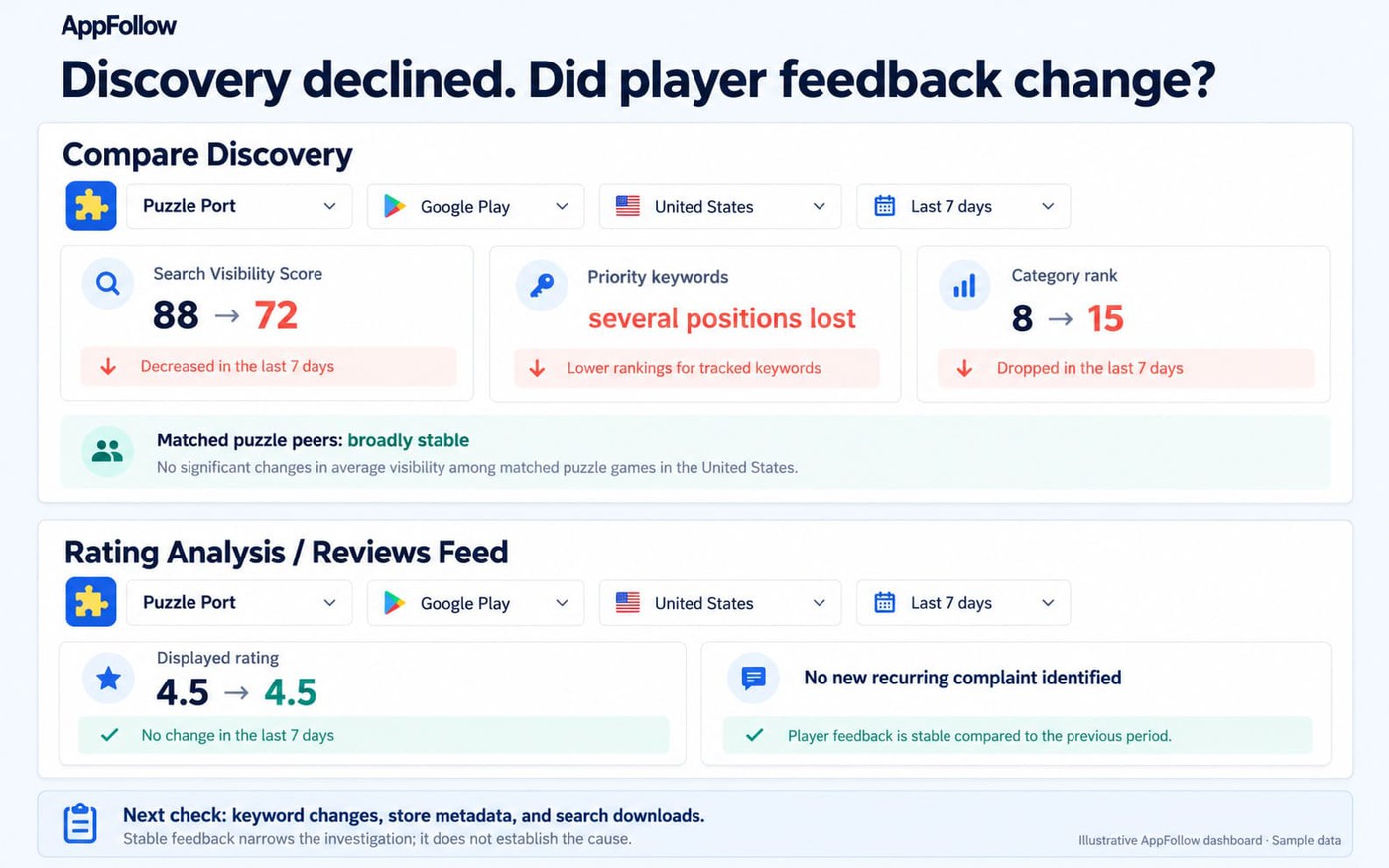
Compare matched periods before deciding where discovery weakened:
Signal | Before | After | Interpretation |
Search Visibility Score | Stable 28-day range | Sustained decline | The title appears across fewer or lower-ranked search results |
Keyword rankings | Priority terms hold | Several terms lose position | Search discovery has weakened |
Category ranking | Stable against peers | Title falls while peers hold | Browse visibility may also be declining |
Ratings and sentiment | Normal range | Remain stable | A release or reputation incident becomes less likely |
Check App Update Timeline for metadata, creative, price, event, or featuring changes. Then inspect matched competitors for their own changes. Competitor movement supplies context, but it cannot explain your title’s decline by itself.
For connected owned data, use Organic Dashboard to test whether lower store visibility coincides with fewer search downloads. Keep store, country, and comparison periods consistent. A global average can hide losses inside one valuable market.
Route the pattern to ASO or growth, preserving the keyword and category baseline before changing anything. Use the ASO for games workflow and ASO keyword research for remediation. If ratings or negative topics also worsen, return the title to diagnosis instead of treating it as clean discovery loss.
Demand or conversion loss: downloads fall while visibility holds
When downloads fall while tracked search visibility holds, separate lower traffic from weaker conversion. Check impressions or visitors by channel, then compare conversion within the affected store and country. Stable search visibility alone does not establish that traffic held.
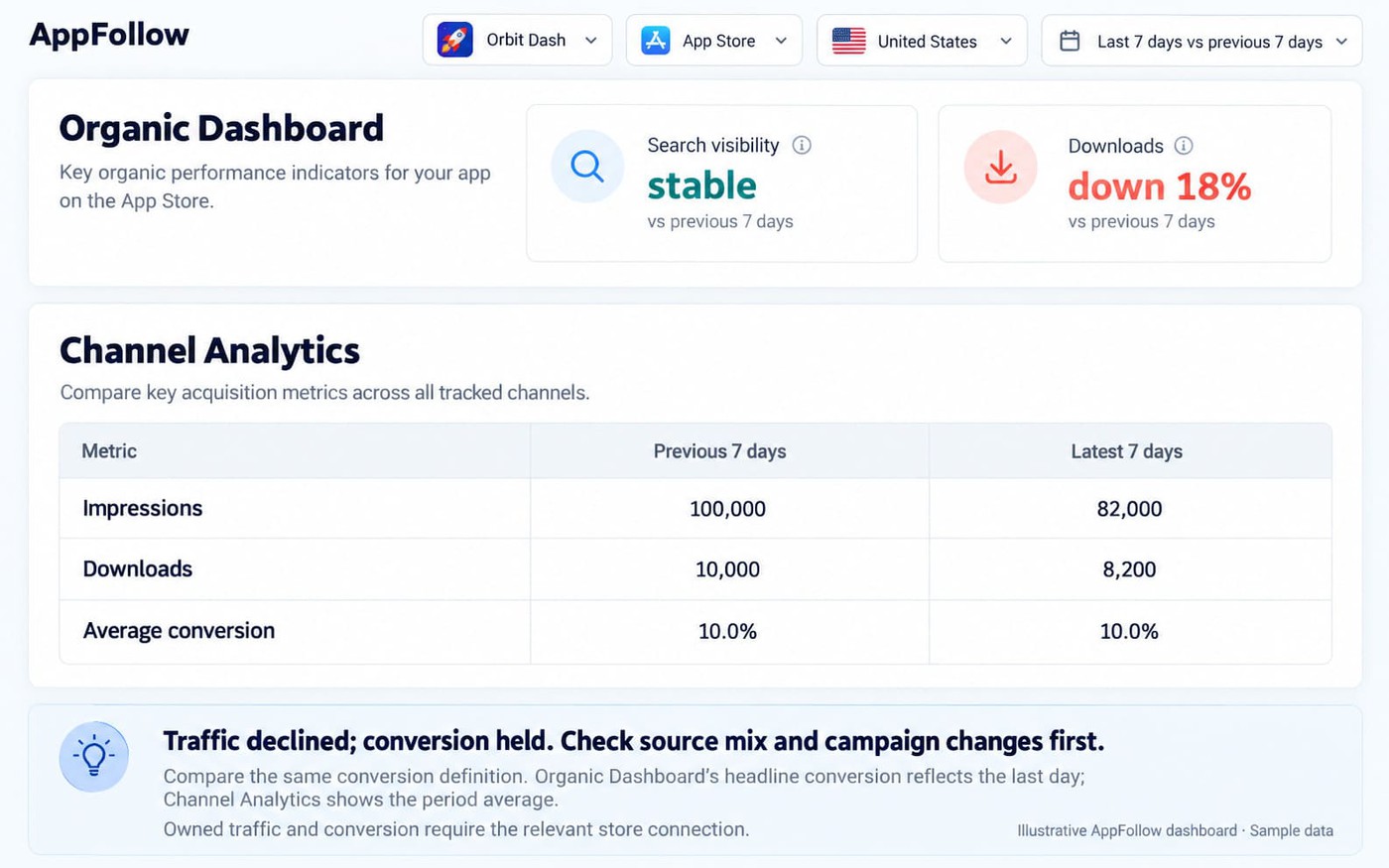
Use Organic Dashboard to locate the change, then check Channel Analytics for channel-level traffic and conversion across matched periods. Organic Dashboard’s headline conversion value reflects the last day of the selected period; Channel Analytics reports an average for the period. Keep the conversion definition and denominator consistent.
- Traffic declined. If impressions or visitors fall while conversion stays near baseline, check the affected sources and countries. Compare UA spend, attribution, campaign timing, and seasonality before changing the listing. UA or growth owns the first investigation.
- Conversion declined. If traffic holds but fewer users download, inspect creatives, metadata, price, events, and audience mix. Compare the same conversion measure across periods and check markets where it held. ASO or creative owns the first test.
Competitor indicators cannot reveal another title’s private downloads or conversion data. They provide context, not a substitute for connected owned data.
Neither branch explains what happens after installation. Use campaign data and in-game telemetry to test retention, onboarding, crashes, or economy changes. Stable app-store performance does not rule out an in-game problem.
Preserve the original period, country, source, and creative set before testing. Verify recovery within the affected source, market, or comparable listing audience.
cta_get_started_yellow
Reputation debt: recurring complaints and unanswered reviews accumulate
Reputation debt grows without one clear incident. Negative topics persist, low-star share rises, or unanswered reviews accumulate across important markets. Urgency increases when severity and business exposure rise together, even when review volume appears ordinary.
Do not rank topics by count alone. Use this topic-impact matrix:
Check | Lower impact | Higher impact |
Severity | General dislike or feature request | Purchase failure, account loss, access problem, or recurring crash |
Exposure | Low-volume market or older version | Priority market, current version, or high-value player journey |
Trend | Stable or declining topic share | Topic share or negative sentiment is increasing |
Response debt | Most answerable reviews handled | Reply rate falls, backlog grows, or reply time lengthens |
For example, ten detailed account-loss reviews may justify investigation before hundreds of general complaints. Read the reports for severity, affected version, and player impact. If they indicate an active access failure, use the incident process rather than leaving the issue in the routine support backlog.
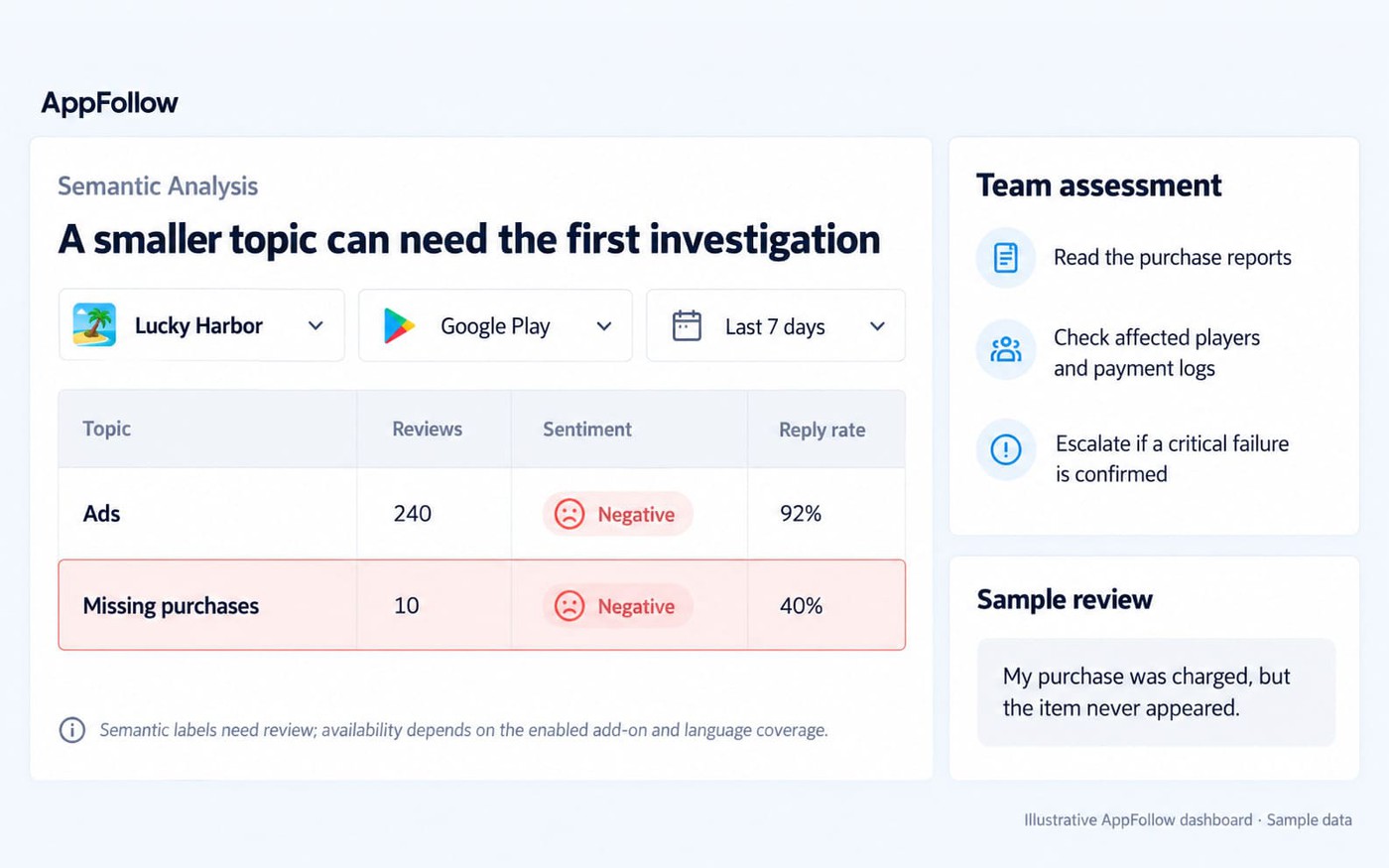
Route the work along two paths. Product investigates recurring bugs, monetization, access, or UX themes. Support or community handles unanswered reviews, prioritizing severe and recoverable cases in meaningful markets. Use review management at portfolio scale for the reply workflow.
Check the product and support outcomes separately. Track the topic’s count and share within the same review cohort, then check reply rate or response time. A smaller topic share can result from more unrelated reviews; read new reports before concluding the underlying problem improved.
Competitor opportunity: a matched title loses ground
A healthy title may deserve attention when a matched competitor loses visibility, keyword share, category ranking, or top chart rankings. This opportunity remains below P0 and P1 incidents. However, it can outrank a chronic problem with little business exposure.
Start competitor analysis with the same store, country, genre, and lifecycle stage. Confirm your title remains stable while the competitor declines across several relevant discovery signals. The affected keywords or market must also overlap with your growth priorities.
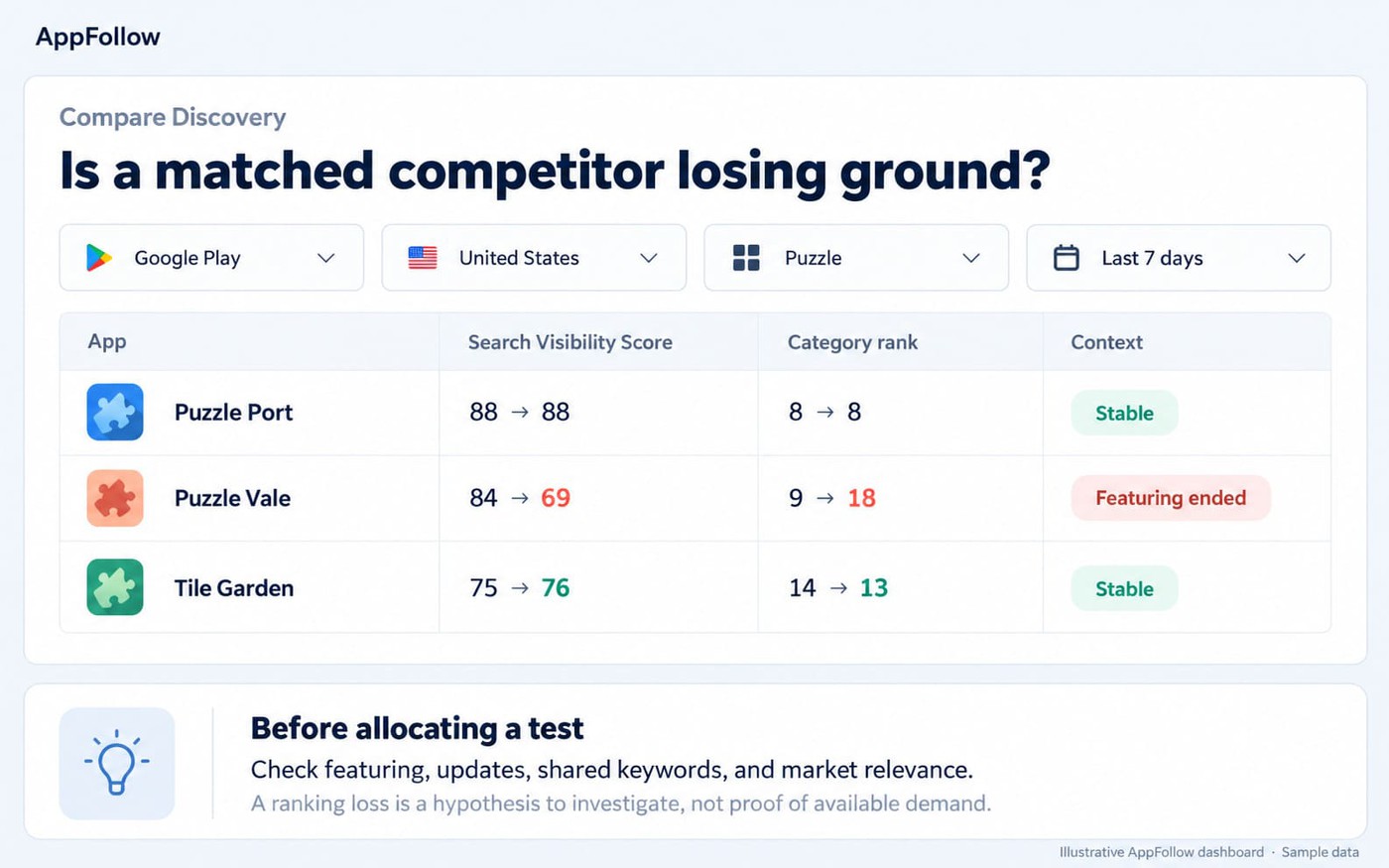
Before recommending action, check App Update Timeline for both titles. Metadata, creatives, price, events, releases, or featuring may explain the movement. Public indicators cannot reveal private downloads, conversion, campaign spend, or strategy.
Use this decision card:
- Act: Your title is stable, the competitor loses several relevant signals, and the market carries meaningful exposure. Route a time-boxed metadata, keyword, event, or creative test to ASO or growth.
- Watch: Movement affects one signal, a secondary country, or a partly matched competitor. Set the next measurement before allocating work.
- Ignore: The decline falls outside priority markets, follows temporary featuring, or involves different lifecycle economics.
Measure the test against your title’s baseline. If visibility or rank improves, record that movement without claiming the competitor’s decline caused it.
cta_get_started_purple
Keep one row per issue, scoped to a title, store, and market. Record the evidence, priority, accountable owner, next action, and check date. Separate rows are useful when one game has unrelated problems or the affected markets need different responses.
Use P0–P3 so every team hears urgency the same way
Use your incident policy to assign P0–P3, then use the four-factor score to compare noncritical work within a level. There is no automatic mapping from a total of 4–12 to a priority level.
Level | Use when | Example response |
P0 | Play, purchases, accounts, or widespread access are broken | Act immediately |
P1 | A high-exposure title shows accelerating loss across corroborating signals | Escalate within the same business day |
P2 | Sustained decline or reputation debt requires planned intervention | Review within 72 hours or the next planning cycle |
P3 | An opportunity or weak-confidence anomaly needs watching or testing | Add it to the watchlist |
These escalation windows are illustrative, not universal AppFollow guidance. Calibrate them against release cadence, staffing, support coverage, and existing incident policy. A small studio and a global publisher should not inherit the same response times.
Build the queue with one row for each affected title, store, and market:
Field | Value |
|---|---|
Title and scope | Kingdom Line, Google Play, US |
Pattern | Release shock |
Score | 12 |
Evidence | Rating trend, crash-topic reviews, build 6.4 |
Level | P1 |
Owner | Engineering |
Next action | Inspect build 6.4 crash logs and affected-player scope |
Due | Now |
Next check | Crash rate and new crash reports after mitigation |
Illustrative priority-queue row. The score, title, release, and evidence are fictional. P1 is provisional: escalate to P0 if incident assessment confirms a critical failure. For publication, present this wide queue as a horizontally scrollable table with readable column widths.
The evidence column should link to the saved dashboard view, review cohort, release marker, or connected internal record. One title may require separate rows when the issue affects only one store or country.
Close an issue when the agreed check confirms recovery, rules out the hypothesis, or transfers the investigation to a named owner. Record the reason so the same unresolved signal does not return as a new task next week.
Route the signal and set the next measurement
Owner routing starts with the diagnosed pattern. Assign one leading indicator showing whether the intervention happened, then one outcome metric showing whether the portfolio signal improved.
Pattern | First owner | Leading indicator | Outcome metric |
Release shock | Product, engineering, or LiveOps | Fix deployed or event adjusted | Crash topic, rating trend, or affected downloads recover |
Visibility loss | ASO or growth | Metadata or discovery test launched | Search visibility or priority keyword positions improve |
Demand or conversion loss | ASO, creative, or UA | Source or listing test begins | Conversion or qualified downloads improve |
Reputation debt | Support and product | Severe backlog routed or answered | Topic share, reply rate, or response time improves |
Competitor opportunity | ASO or growth | Time-boxed test launches | Relevant visibility or category position changes |
Do not use “monitor results” as the next check. Name the metric, store, country, comparison window, and person responsible for reading it.
Configure monitoring alerts only after the baseline and owner are agreed. Monitoring Agents can route selected changes through email, Slack, Telegram, or webhook. Create each agent for the relevant app or topic, then route its output to the queue owner.
Selected agents, including New Reviews Spike and Total Rating Change, support configurable thresholds. Threshold controls vary by agent, so do not assume every alert can use the same rule.
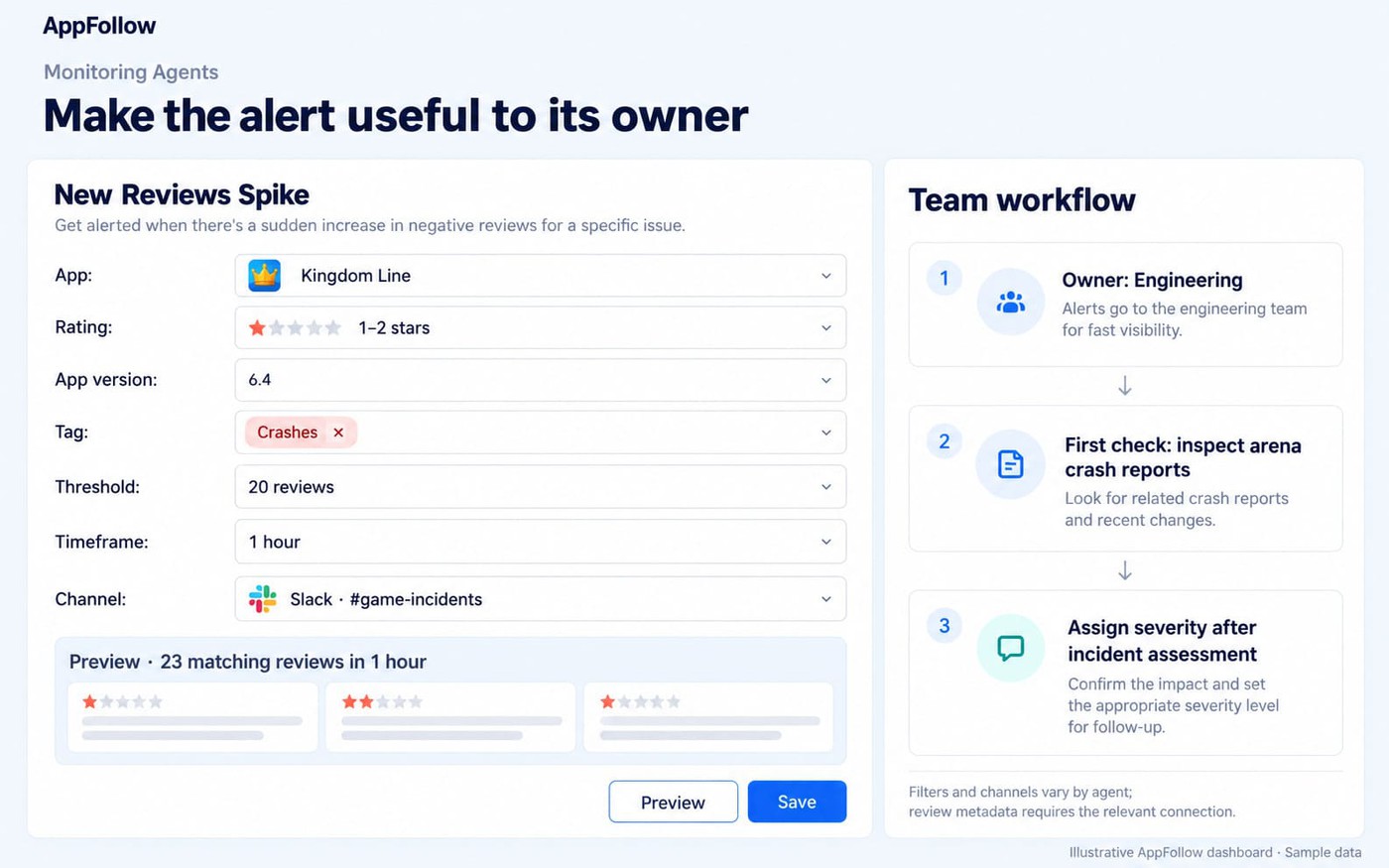
Use store alerts to flag changes for assessment. They may arrive after the underlying failure, so retain engineering incident monitoring for play, purchases, and account access. Review lower-priority anomalies on a schedule that fits the team’s coverage.
Build the portfolio-prioritization workflow in AppFollow
Use AppFollow for discovery, ratings, reviews, release context, and connected store analytics. Keep the cross-title scorecard and priority queue in a shared worksheet or task system; the framework does not require a single AppFollow screen containing every field.
App Reputation Index and Search Visibility Score offer directional health and discovery signals, not the article’s priority score. Semantic analysis can surface topics where available, but it remains model output and requires the relevant plan. Reliable app-store performance monitoring still depends on matched cohorts, store connections, and usable baselines.
Start with matched cohorts and connected data
Structure the game portfolio dashboard around comparable titles. Use this three-step setup:
- Group titles by context. Separate App Store and Google Play, then cohort games by country, genre, and lifecycle. A mature puzzle title should not share a baseline with a new RPG. Compare Discovery supports up to five apps, so divide larger portfolios into matched groups.
- Connect owned stores. Connect App Store Connect and Google Play Console when decisions require downloads or conversion. Confirm country coverage and available history for each title. Public competitor indicators provide directional visibility and ranking context, not another publisher’s private console data.
- Document the baseline. Record the previous 28 days for ratings, reviews, visibility, rankings, downloads, conversion, and releases. Add a business-exposure proxy, such as download volume or market priority. That record gives later movement a defensible comparison point.
Confirm that each cohort has enough comparable history before enabling alerts. Record unavailable data explicitly; an empty chart should not be read as a stable trend.
Test each alert before relying on it
Create one agent for a known signal and check its preview before saving. Confirm the app, filters, threshold where supported, frequency, and delivery channel; assign responsibility for reading the notification in your team’s queue.
Selected agents, including New Reviews Spike and Total Rating Change, support thresholds. The available filters and channels vary, so configure the actual agent rather than copying one rule across every signal.
Keep notification rules separate from escalation rules:
- Rating-change notification: The owner checks the affected market and rating volume before assigning severity.
- Review-spike notification: The owner reads the reports and sends a suspected technical failure to incident assessment.
- Routine review: Keep sustained noncritical changes in the team’s agreed planning queue.
- Watchlist review: Revisit weak signals and competitor opportunities at a scheduled portfolio check.
Use topic or tag filters where the selected agent supports them. Periodically compare notifications with issues the team actually investigated, then adjust noisy thresholds and check for missed signals.
Know what this workflow cannot conclude alone
AppFollow can show which title changed, where it moved, and which store-side signals support a diagnosis. It cannot establish the in-game cause by itself. Use this workflow beside mobile game analytics, not instead of them.
This workflow does | It does not replace |
Track visibility, keywords, categories, ratings, reviews, and classified review topics | Retention, economy, ARPU, or LTV analysis |
Compare releases with ratings, reviews, connected downloads, and conversion | Crash reports, purchase logs, server records, or device diagnostics |
Monitor public competitor rankings, visibility, updates, and featuring | Private downloads, conversion, revenue, UA spend, or product roadmaps |
Use crash tools and server logs for suspected technical failures, attribution and campaign data for acquisition changes, and in-game analytics for retention, onboarding, monetization, and economy effects.
The dashboard supports a cause hypothesis; it does not prove causality. Public competitor indicators remain directional. Owned downloads and conversion require the relevant App Store Connect or Google Play Console connection.
cta_get_started_yellow
Most game portfolio triage mistakes come from three shortcuts. Teams sort by the worst number, react to one-day noise, or trust store data completely. Before you prioritize mobile games, replace those shortcuts with rules covering movement, exposure, corroboration, and system boundaries.
Check 1: Avoid counting the same signal twice
App Reputation Index includes discovery and feedback inputs, while Search Visibility Score reflects keyword rankings. A falling index, visibility score, and keyword position can therefore describe overlapping evidence.
Consider an illustrative comparison. A stable 3.9 rating can wait behind a 4.7 rating falling after a high-exposure release. The second title is deteriorating faster across more valuable exposure today.
If all the evidence comes from related ranking measures, keep confidence provisional and give ASO a focused investigation.
Check 2: Distinguish stable data from missing data
A flat chart can reflect limited history, unavailable fields, or collection delays. Before calling feedback stable, confirm the expected data arrived for the affected app, market, and period.
Replacement rule: Compare the latest seven days with the previous seven, then inspect the 28-day context. Require two corroborating store-side signals for non-incidents. Keep the single-signal override for P0 failures involving play, purchases, accounts, or widespread access.
If coverage is incomplete, assign a data check and preserve the suspected issue on the shortlist. Absence of new reports does not establish recovery.
Check 3: Give uncertain, high-impact problems an investigation owner
Ratings, reviews, visibility, rankings, downloads, and release timing can support a cause hypothesis. They cannot prove that a build caused a crash or an economy change reduced retention.
Assign a short investigation to establish affected scope, reproduce the failure, or inspect the relevant logs. Then update confidence and priority using the result.
Keep the investigation deadline visible. Easy fixes should not displace a difficult check that could uncover a critical failure.
cta_get_started_purple
FAQ
Which game in a portfolio needs attention first?
Start with the title deteriorating fastest in a valuable market when the evidence supports a specific next investigation. Escalate suspected failures involving play, purchases, or accounts through the incident process immediately. For other work, compare urgency, business exposure, confidence, and actionability, then record the owner and next check.
What should a mobile game portfolio dashboard include?
Include visibility, rankings, ratings, reviews, connected downloads, and release context, with each change scoped by title, store, country, and period. Add priority, owner, next action, and check date in a shared scorecard. AppFollow supplies several evidence views; the combined queue is the team’s working artifact. Use in-game analytics for retention, LTV, economy, and technical failures.
How often should publishers review game performance?
Start with a weekly portfolio review and a monthly check of alert thresholds. Increase scrutiny around releases, LiveOps events, and major campaigns. Suspected failures involving play, purchases, or account access need immediate incident assessment; they should not wait for the scheduled review.
Is a rating drop more urgent than a downloads decline?
Compare severity, affected market, pace of decline, and evidence rather than ranking metric types. A rating drop accompanied by purchase-failure reports can take precedence over a gradual decline in a secondary market. A large, unexplained download loss in the main market may deserve the next investigation. Use the game rating drop recovery guide when ratings become the priority.
How do you measure a mobile game update’s impact?
Compare matched periods before and after the release, keeping the store, country, metric type, and source consistent. Use available version-linked reviews to isolate reported failures, then inspect crash data, purchase logs, or in-game telemetry. Account for overlapping campaigns, featuring, and LiveOps changes. Store-wide visibility and download metrics are not automatically attributable to one build.
Can AppFollow prioritize games automatically?
AppFollow provides evidence and selected alerts, but the four-factor priority score in this article is a manual framework. The team scores each issue, applies its incident policy, assigns an owner, and verifies the outcome. Monitoring Agents notify configured channels; they do not automatically turn this score into a P0–P3 decision.
Does a small studio need portfolio triage?
Use a simplified version when several live games, stores, or markets compete for the same team. Keep one weekly shortlist, one owner per issue, and one scheduled next check. A studio running a single game can use the same approach across stores and countries without building a larger scoring process.
Choose the next investigation and assign it
At the next portfolio review, compare meaningful changes against each title’s baseline. Check the affected market, seek corroborating evidence, and use the four-factor score to make competing priorities easier to discuss.
Give the leading issue an owner, a specific next action, and a time to review the result. That record is the useful output of the initial scan.