Game rating dropped after an update? The mobile game publisher's triage and recovery playbook

Table of Content:
- What just happened to your rating (the algorithm math)
- Diagnose the cause in 10 minutes (the review-text method)
- The 7 causes of mobile game rating drops after an update
- The 30-day recovery playbook
- Ranking impact and recovery (why ranking drops, how to restore top chart position)
- Review bombing: detection, removal policies, and how to report
- How AppFollow is built for exactly this crisis
- Frequently asked questions
If you're reading this mid-crisis, do these 5 things in the next 60 minutes:
- Open AppFollow Alerts (or whatever monitoring you have) and confirm the rating delta, the volume spike, and the country breakdown. Get the numbers up before you do anything else.
- Read the last 50 reviews in the worst-hit country. Look for a phrase that keeps showing up. That phrase is your root cause about 90% of the time.
- Say something publicly. Discord, an in-game banner, the store description, socials. One sentence will do: "we see the issue, we're working on it, fix incoming."
- Reply directly to the 10 to 20 most recent 1-star reviewers with that same acknowledgment plus a rough fix timeline.
- Decide whether you can ship a server-side fix in hours, or whether you need a client patch and a review submission. Plan the next 24 hours around that one answer.
So, your game's rating slid from 4.5 to 4.1 overnight after an update, and you found out from an angry Discord thread instead of a dashboard. That's the situation this runbook is for, on the Apple App Store and Google Play both. We've watched many studios run more or less this exact sequence, and the thing that separates a clean recovery from a slow bleed comes down mostly to moving fast and keeping a cool head.
Before you do anything dramatic, two things:
- A 0.4-point drop looks worse than it usually is, and I'll show you the math in a second so you stop catastrophizing.
- Ranking damage and top chart position tend to follow the rating rather than show up on their own, so there's usually a single cause to chase here.
The recovery timeline is further down if you want to skip ahead to the 30-day playbook.
What just happened to your rating (the algorithm math)
A rating drop from 4.5 to 4.1 overnight on a mobile game points to a recent 1-star spike big enough to outweigh your historic positive reviews under how Apple and Google both average things. The cause is almost always your most recent update. To stabilize it, pull the regression out of the review text from the last 48 hours, ship a server-side or client hotfix, and reply publicly to recent 1-star reviewers within 24 hours.
How App Store and Google Play rating math differs
Apple shows a weighted average where recent ratings on the current version carry more weight than old ones. So new 1-stars on the latest build hit harder than the raw count suggests.
Google Play switched to a recent-weighted rating back in 2019, and it leans even harder on the last 12 months. Which means a drop on Play tends to move faster and is a bit more stubborn to walk back than the same drop on Apple. (Worth knowing before you assume the two stores will behave the same way.)
The math of an overnight 0.4-point drop
Say you've got 100,000 historical ratings sitting at 4.5. For the displayed number to fall to 4.1 in a night, you're looking at roughly 2,000 to 4,000 net new 1-star ratings on the affected version once the weighting does its thing.
The exact figure depends on how aggressively each store weights recency, so treat that as a ballpark and not gospel. The point of running the arithmetic is just to see the scale of what hit you, which is usually smaller than the panic suggests.
Why the drop feels worse than it is
A 4.1 still installs fine. Conversion doesn't really fall off a cliff until you're down around 3.5, so you're not in that territory yet. If you ship the fix and work the recovery, 2 to 6 weeks is a reasonable window to climb back.
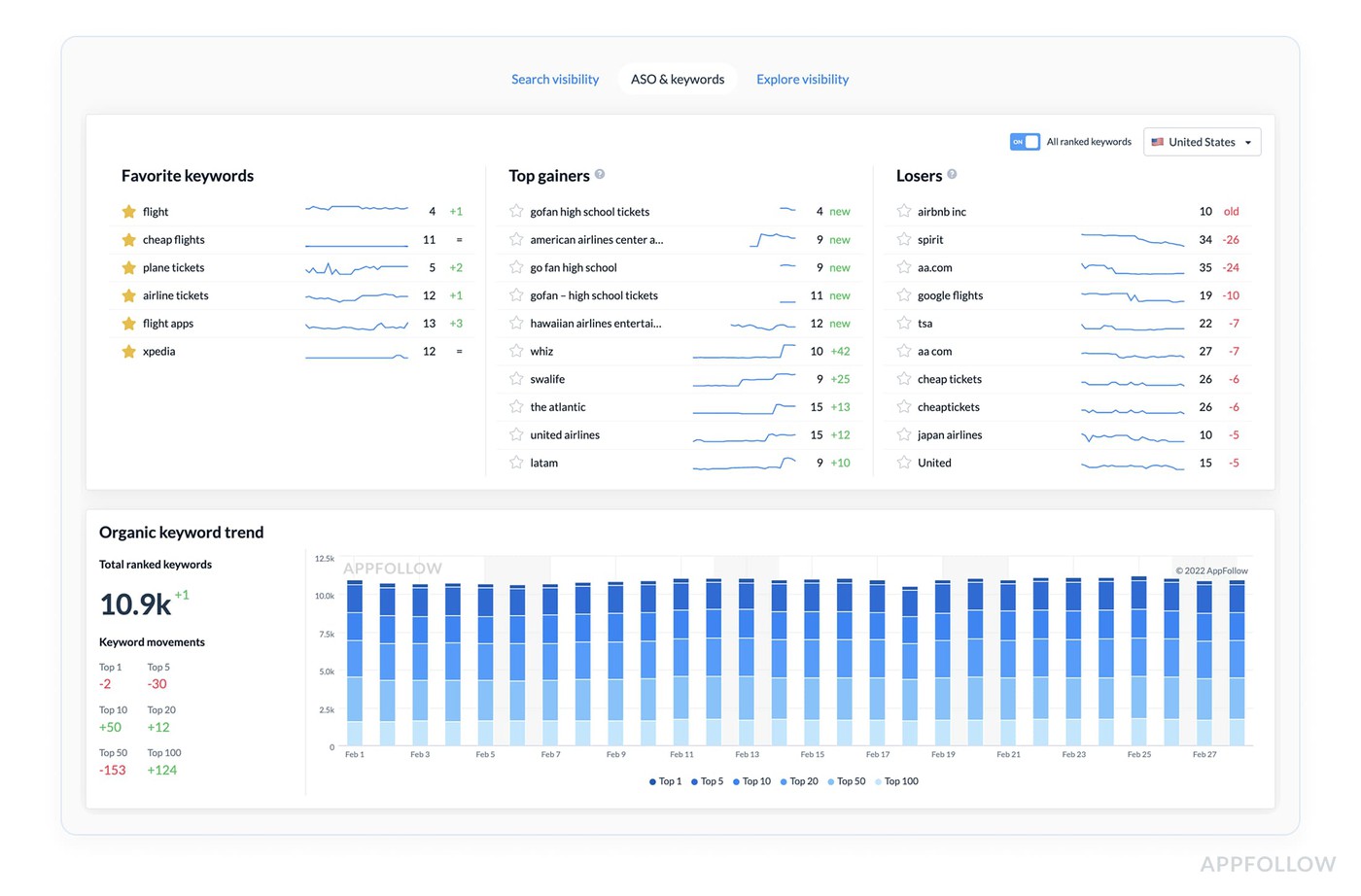
AppFollow's rating dashboard surfaces the recent-versus-all-time delta for you, so you can see the gap between your current-version number and your lifetime number without doing the sums by hand.
More on the AppFollow ASO Tools if that's useful (and it might be).
Diagnose the cause in 10 minutes (the review-text method)
This is the most useful 10 minutes you'll spend today, and you don't need a tool to do it (though one helps a lot). Don't boil the ocean here. You're not auditing every review you've ever gotten; you're finding the one phrase that keeps repeating.
- Filter to the last 48 hours, 1-star and 2-star, worst-affected country. If the drop is global, start with the US. Largest volume, fastest signal. If it's concentrated somewhere specific, go straight to that country.
- Look for the recurring phrase. Most post-update drops trace back to one phrase showing up over and over. “Crash on Galaxy S22.” “You removed [feature].” “Gem price went up.” “Server lag.” The phrase is the cause, more or less every time.
- Сross-check the timing. If the phrase appeared the day the update shipped, the update did it. If it showed up 24 to 48 hours later, you're probably looking at a server-side change or a bug players took a day to find.
- Сonfirm with crash and engagement reports. App Store Connect crash reports broken out by device class, plus retention dips and uninstall spikes, should line up with what the review text is telling you. The reviews give you the hypothesis, and the console data confirms it.
App Monitor does this categorization automatically through AI Semantic tags, tagging every incoming review and surfacing the top phrases from the last 24 hours per country. AI Summary then digests the feed into a rough three-sentence cause hypothesis. The manual version of this takes a person maybe 30 minutes of reading. With the tooling, it's basically instant.
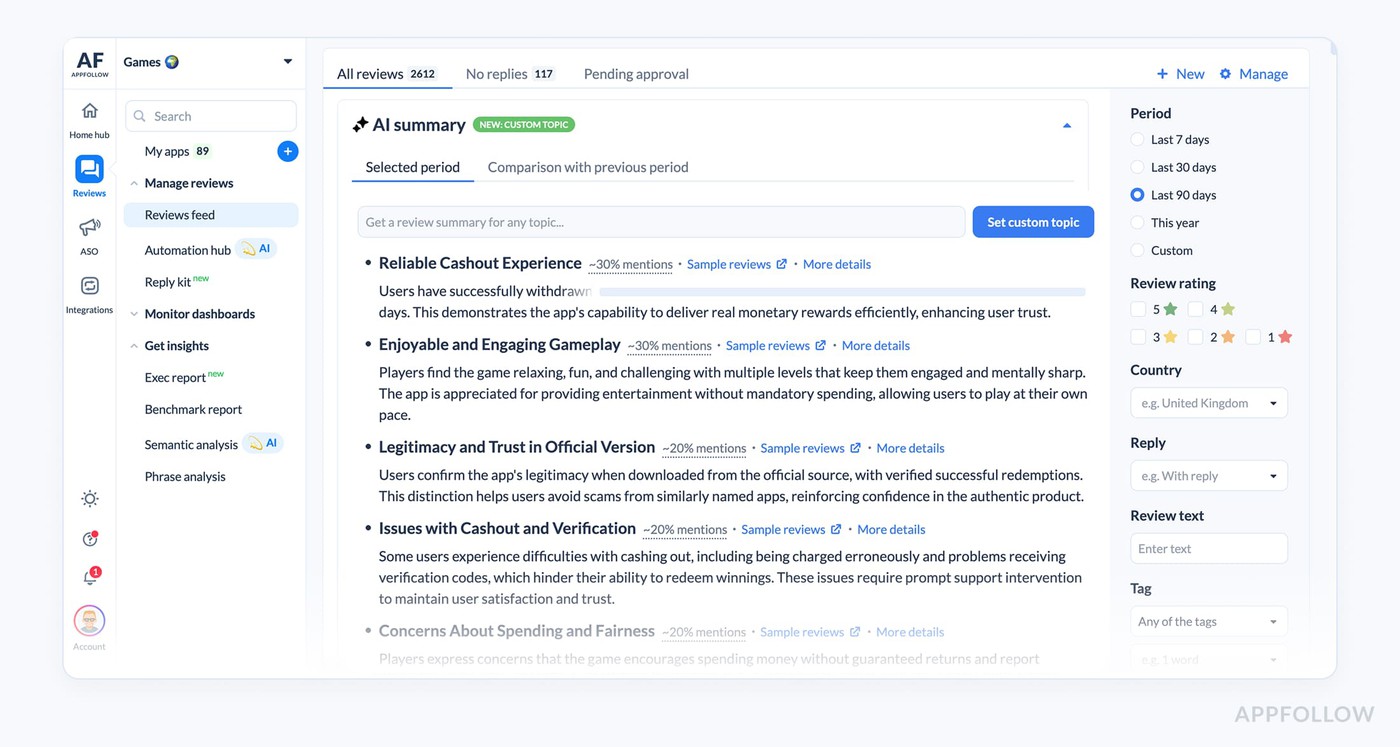
See App Monitor and AI Review Management for more info on how they work.
The 7 causes of mobile game rating drops after an update
A game rating that drops suddenly after an update is almost always one of five things: a build crash or performance regression on widely-used devices, a monetization change players read as predatory (gacha rate, paywall, price), a server or always-online issue, a balance change that wrecked competitive PvP, or a removed feature. To triage, read the last 48 hours of 1-star review text for a recurring phrase. That phrase is your root cause.
Here are the seven I see most, with the review signal that points at each one.
Cause 1: build crashes and performance regressions
Review signal: "crashes," "freezes," "laggy after update," and specific device names. It tends to land hardest on older or less-tested hardware.
Action: pull App Store Connect crash reports filtered by version and find the device cluster.
Cause 2: monetization changes (gacha rate cuts, paywalls, price increases)
Review signal: "greed," "predatory," "P2W," specific currency or pack names. This is the most volatile one in gaming, because gacha communities organize fast, and they organize loud.
Action: clarify the change in public, and seriously consider a reversal or some compensation.
Cause 3: server outages, lag, always-online instability
Review signal: "can't connect," "server," "unplayable." Brutal for PvP and live-service titles.
Action: status page update, in-game banner, and compensation if downtime ran past a few hours.
Cause 4: balance changes that disrupted competitive PvP
Review signal: specific character or unit names, "nerf," "unfair," "broken."
Action: explain the design intent and signal that tuning is coming.
Cause 5: removed or decommissioned content
Review signal: "bring back [X]," "you removed [Y]."
Action: don't pretend it didn't happen. Acknowledge it directly and give some roadmap context.
Cause 6: live ops event bugs (broken holiday event, rewards not distributed)
Review signal: specific event names, "rewards not received," "event broken." This one carries the most emotional heat because players sank time into it (or were about to do that).
Action: distribute the owed rewards retroactively and communicate the make-good in public.
Cause 7: privacy and permission changes (iOS ATT, Android privacy upgrades)
Review signal: "asking for tracking," "privacy," "stopped working without [permission]."
Action: explain why the prompt exists and offer a no-tracking path through the game.
The 30-day recovery playbook
To recover from a mobile game rating drop on the App Store or Google Play, work a 30-day playbook. Here’s how it’s supposed to be in short:
Window | Goal | Key actions |
|---|---|---|
0 to 24h | Triage and acknowledge | Diagnose cause from review text, acknowledge publicly, server-side fix if possible, direct reply to recent 1-stars, escalate to partner manager if severe |
Days 2 to 7 | Stabilize and ship the fix | Client hotfix submitted, expedited review, store description notes the resolution, in-game banner, reply campaign in affected countries' languages |
Days 8 to 30 | Restore rating average | In-app rating prompts after positive moments, content drop, positive review velocity push, featuring reconsideration, competitor sentiment monitoring |
Day 31+ | Prevent recurrence | Soft-launch testing for the next update, expanded beta program, pre-update sentiment baseline, documented incident review |
And here’s how it should be in detail:
Hour 0 to 24: triage, acknowledge, server-side fix
Confirm the data first. Don't act on a guess. Pull rating-by-day, by country, by device. If your alerts were set up, they've already fired and you're ahead of this.
Then, acknowledge in three places: Discord or Reddit, an in-game banner, and the store description. One sentence each, something like “we see [issue], working on it, ETA [timeframe].”
Reply to the 10 to 20 most recent 1-star reviews directly, because Apple and Google both surface developer responses to other people browsing the page, so each reply quietly limits the damage.
Needless to say, AppFollow's AI Review Management drafts these in your brand voice across 35+ languages in seconds.
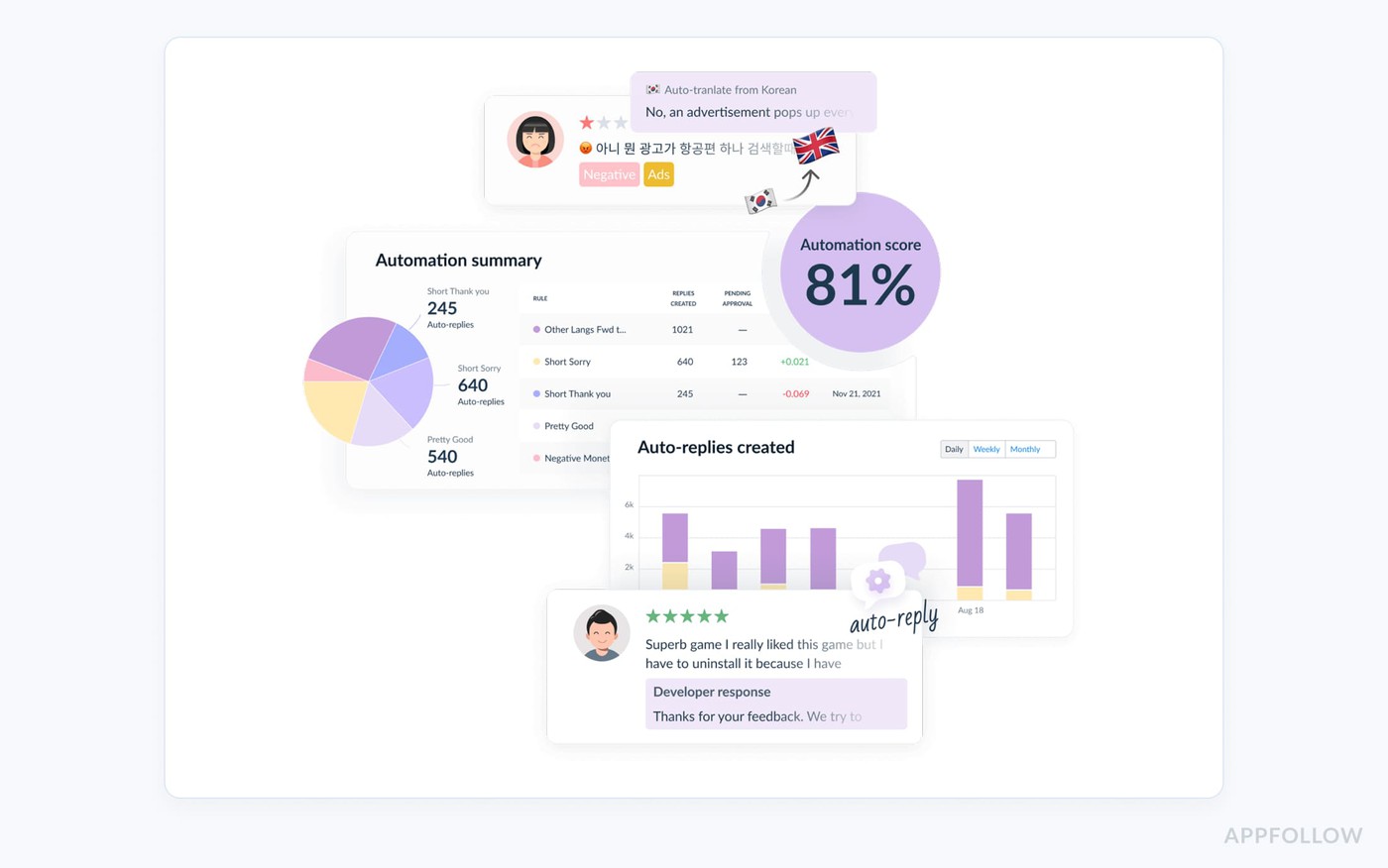
Ship a server-side fix if the cause allows it, otherwise submit an expedited client patch (most expedited reviews for crash fixes clear in 1 to 8 hours, in my experience), and escalate to your Apple or Google partner manager if the drop is bad.
"Monthly reporting is for pattern recognition, not first discovery. If a rating drop is the first time your team learns something went wrong, the loss has already had time to spread through rankings, ratings, and conversion. The more mature setup uses alerts as an operating layer."
Dzianis Shalkou, Senior Professional Services Manager
That last line in this quote is the whole point of this article, honestly. Alerts as an operating layer is the discipline that turns a 24-hour scramble into a four-hour controlled response.
Days 2 to 7: ship the fix, run the reply campaign, monitor sentiment
Ship the client hotfix and write patch notes that name the fix out loud, no vague "bug fixes and improvements" if the bug was the whole story. Add a one-line acknowledgment to the store description.
Then, run a reply campaign in the languages of the countries that got hit. AppFollow's AI Review Management auto-translates incoming reviews into your team's working language and translates your replies back out, which is how Toca Boca got to 498% more reviews replied to year over year (the numbers are in the full Toca Boca case study).
While that runs, watch sentiment per country in App Monitor for two things: residual complaints in markets that updated late, and false positives where your shiny new patch broke something different (it happens more than you'd think).
“Teams lose speed when they spread effort across visibility, conversion, and reputation at the same time. The better approach is to identify which layer is underperforming enough to hold back the others. In AppFollow, teams usually validate that by comparing visibility, traffic, downloads, and conversion rate side by side, then filtering by country, store, and channel.”
Ilia Kukharev, Product Manager, AppFollow
Days 8 to 30: restore the rating average
Now you ask for new ratings, and not a minute before. In-app rating prompts after a positive moment, a level completion, a match win, a meaningful reward. Never after a loss, and never while the bug is still live. iOS SKStoreReviewController caps you at 3 prompts per app per 365 days, and Google's In-App Review API dampens similarly, so spend those prompts carefully.
Drop some content in days 8 to 14 to wake up dormant players and nudge the algorithm to re-evaluate you. You can also run a positive review velocity push too, a Discord pin, a Reddit AMA, an email to your most-engaged segment, asking for honest reviews (honest ones, since asking specifically for 5 stars is a policy violation). Request a reconsideration if the drop cost you a placement, and keep an eye on competitors while you're weak, because that's exactly when they'll push.
AppFollow's Compare Feedback tracks competitor review activity per country in real time, so it’ll come in handy if you’re not already using it.
Day 31+: prevent the next drop
This is the eat-your-greens part of the process, and it's the part everyone skips until they've been burned twice.
Soft-launch your next major update in 3 to 5 secondary markets for a week or two before the global push. Expand the beta program (TestFlight, a Closed Track), because beta players give you better signal than internal QA ever will. Snapshot your rating, top semantic tags, and competitor sentiment 48 hours before every major release, then compare after, and then write the incident up: cause, time-to-signal, time-to-response, time-to-stabilization, time-to-recovery.
The next one costs half as much when the playbook is already written down instead of living in someone's head. Ta-daaa!
cta_get_started_purple
Ranking impact and recovery (why ranking drops, how to restore top chart position)
A game ranking drop after an update is usually a downstream effect of the rating drop or an engagement collapse, not a separate event. Apple's and Google's category rankings weight downloads, ratings, and engagement signals like session length and retention.
When a buggy update causes uninstalls, refunds, or a rating spike, the algorithm cuts your visibility within 24 to 72 hours. Recovery follows rating recovery: fix the cause, ratings stabilize, ranking comes back over 1 to 4 weeks.
So you're not hunting two problems. The rating drop hurts your rating directly; it drags conversion down because a 4.1 page converts worse than a 4.5 page, and if the bug caused uninstalls, then retention sinks and the engagement signal goes with it. The ranking move lags the rating move by a day to three days because the stores don't re-rank in real time.
Sometimes, though, the ranking dropped for a reason that has nothing to do with your rating: a competitor launched and ate the category's attention, a featuring placement ended, or an Apple Search Ads spend shift moved you.
AppFollow's Compare Discovery Category Ranking timeline plots competitor moves next to yours so you can tell which one it was.
And how do we restore the top chart position? Like so:
A mobile game that lost its top chart position after an update needs to rebuild both the ranking signal (downloads, ratings, engagement) and the algorithmic confidence that you've stopped regressing. Ship the hotfix that addresses the cause, run a coordinated re-engagement push to your existing players, raise Apple Search Ads spend on your branded and category keywords for 7 to 14 days, and ask for featuring reconsideration through your Apple or Google partner manager if the drop was severe.
A returning lapsed player is a stronger engagement signal than a fresh paid install, so the push notification and the in-game event are doing real work here, this isn't a vanity move. The short Apple Search Ads burst (somewhere in the $10K to $50K range depending on your scale) rebuilds the download velocity the algorithm wants to see.
If you're a portfolio publisher (the Game Insight, AppQuantum, Playflock model), cross-promote from your other titles; single-title studios lean on partner cross-promo networks instead. The reviews velocity boost from those in-app prompts pulls double duty, Toca Boca added 26,700 stars to ratings in H2 2025 working this way.
When you go back to your partner manager for featuring, bring data, because making the case is easier when the rating's already stabilizing.
Review bombing: detection, removal policies, and how to report
Three signals together usually mean a brigade.
- A volume spike that's way out of proportion to your install base.
- Repeated phrasing across a lot of reviews.
- Off-topic content, complaints about company politics or real-world events or a competitor narrative, not the game itself.
Any one signal on its own is probably just organic anger. All three at once are coordinated malice. Shame when that happens!
Apple and Google removal policies, and how to report
Both the Apple App Store Review Guidelines and Google Play's policies ban fake, coordinated, off-topic, and manipulative reviews. Both stores will pull reviews that match, but it doesn't happen on its own, you have to report them.
- On Apple, that's App Store Connect's Report a Concern flow, with pattern evidence (screenshots, dates, the repeated phrasing).
- On Google, it's Play Console's Comment Reporting tool with the same kind of evidence. Your partner manager speeds both up. Apple removals can take days, Google's tend to land in 24 to 72 hours.
What to do while reviews are pending removal
Don't engage with the brigade in public, because that just feeds it. Keep replying genuinely to the genuine complaints mixed in. Hold the line on your normal community comms. Most bombing campaigns burn themselves out in 5 to 10 days if nobody pokes them.
How AppFollow is built for exactly this crisis
You've made it this far, so here's the part where I tell you what we sell, mapped to the moments in the playbook above.
Alerts: the operating layer that catches the drop before you do
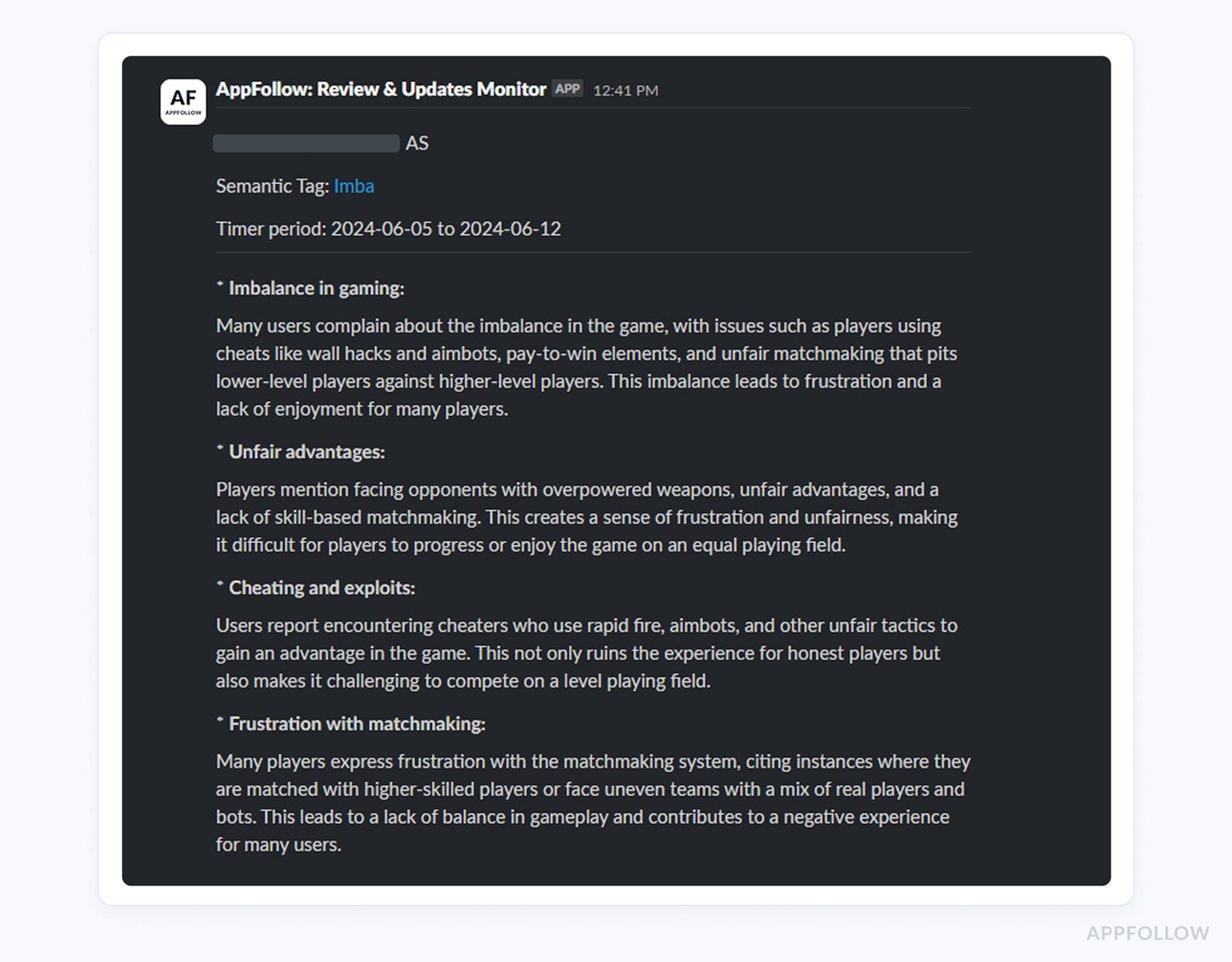
Rating change alerts, review anomaly alerts, ranking drop alerts, with thresholds you set, per country and per store, firing to Slack, email, or a webhook. This is the thing that finds out for you, so you don't find out from Discord. The free plan covers basic alerts, the Pro tier adds custom thresholds and Workflow Automation, and Enterprise layers on custom escalation paths and a dedicated CSM.
AI Review Management: reply to every affected reviewer in their language
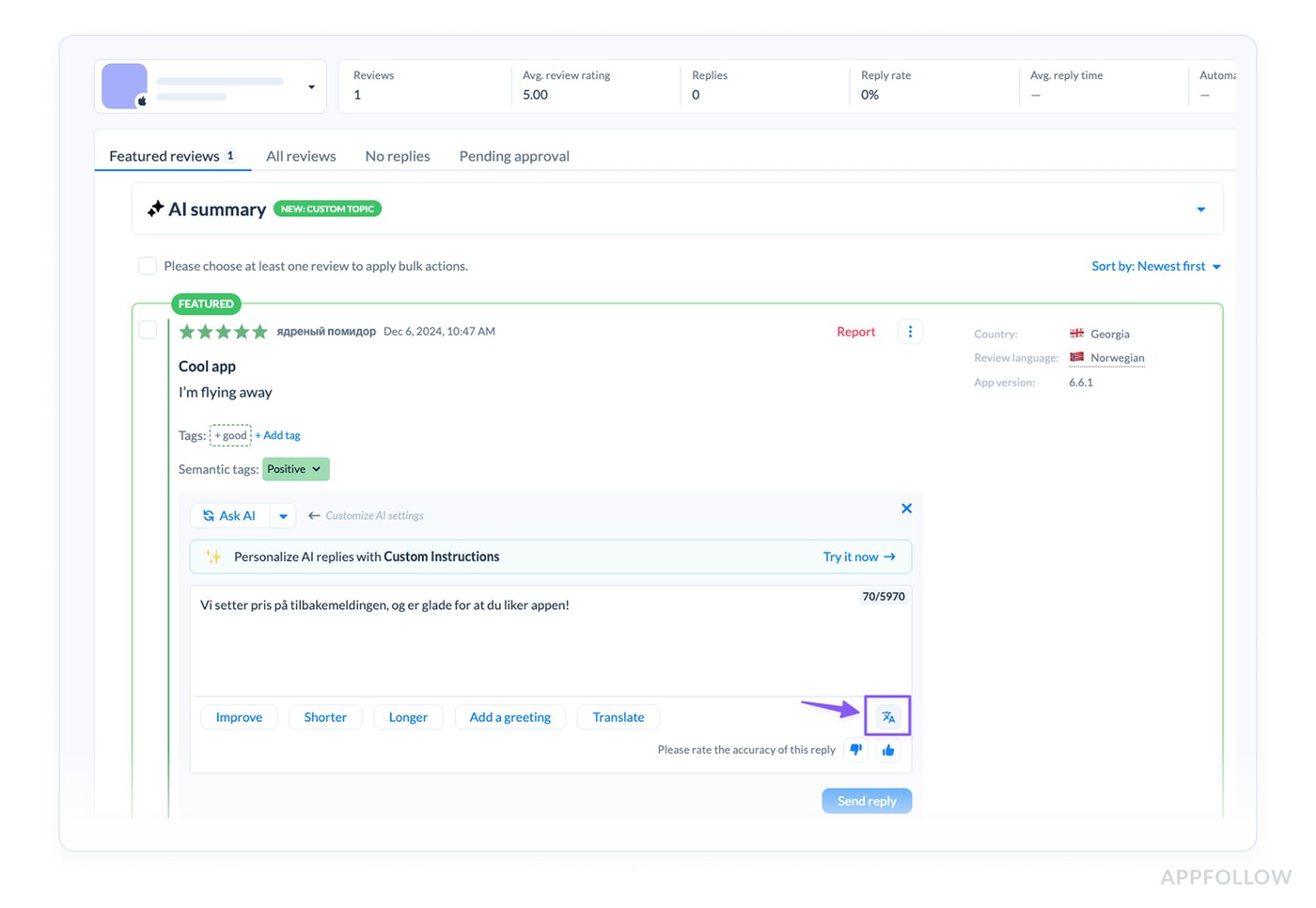
Auto-translation across 35+ languages on the way in, brand-voice AI replies translated back to the reviewer's language on the way out. Toca Boca scaled to 498% more reviews replied to year over year on this workflow. During a crisis every reply slows the bleed a little, and this is what makes the reply rate scale from one reviewer to a few thousand without you hiring a translation team.
App Monitor: the diagnostic in 10 minutes
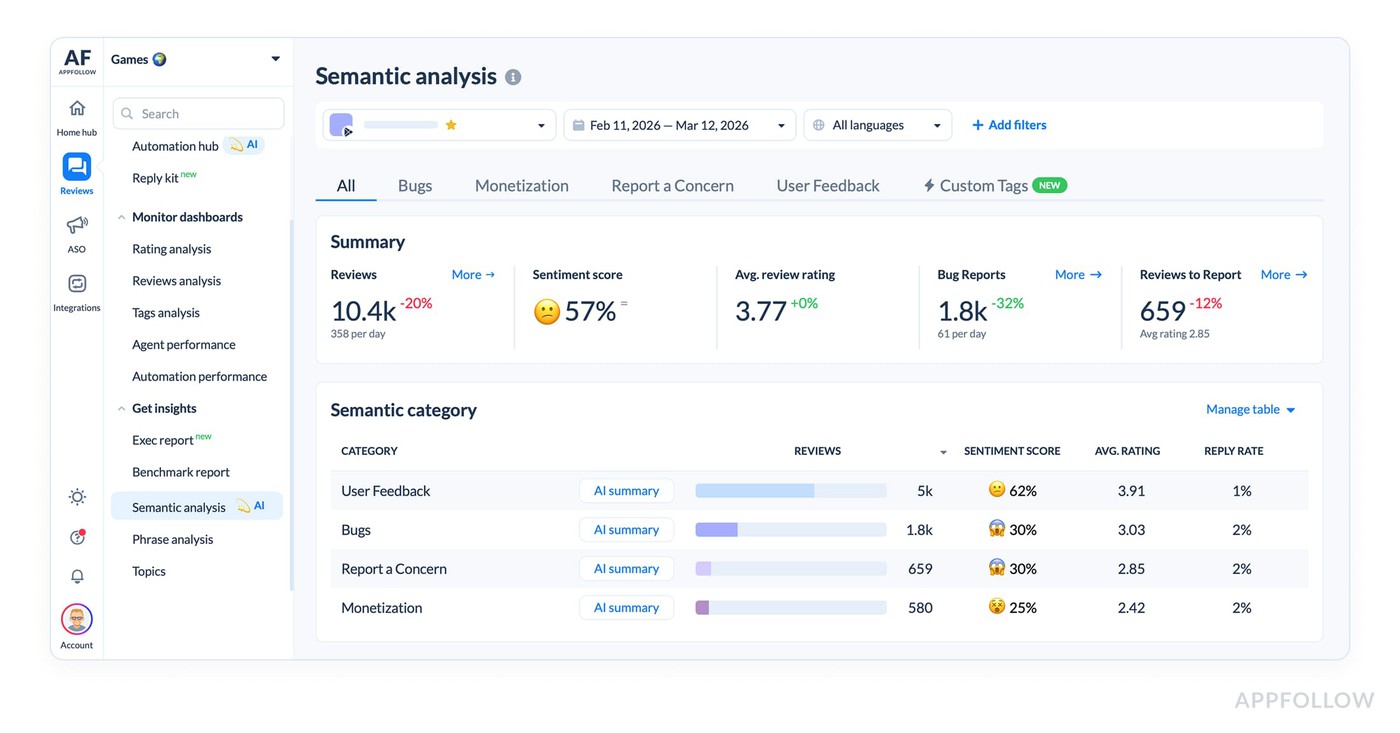
AI Semantic tags categorize every incoming review, surface the top phrases from the last 24 hours per country, and AI Summary boils the feed down to a three-sentence cause hypothesis. That whole diagnostic section near the top of this article runs in about 10 minutes with App Monitor and closer to 3 hours without it.
Compare Feedback and Workflow Automation: watch competitors, route the right people
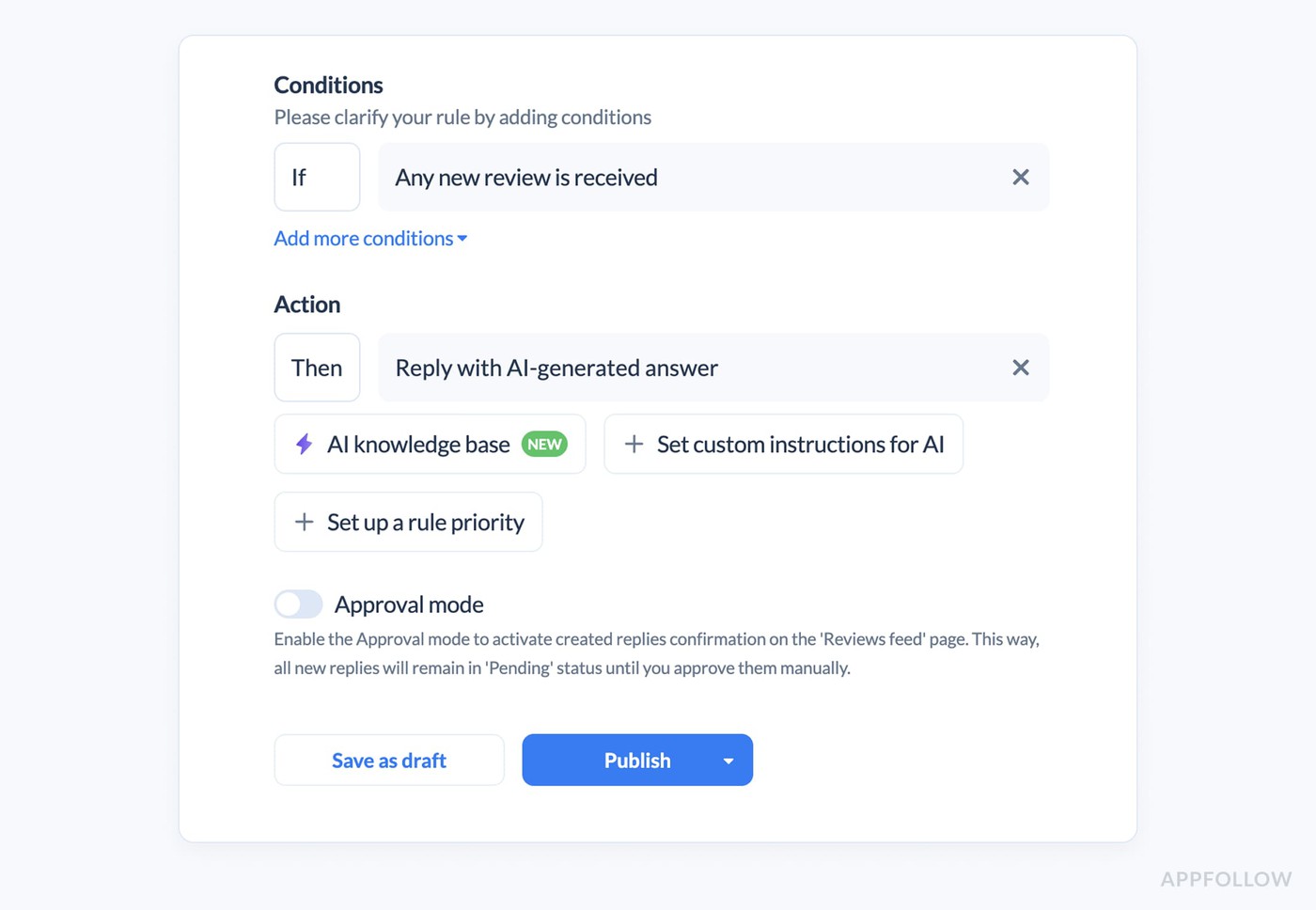
Compare Feedback watches competitor review activity in real time per country (Pro tier, Semantic Insights at Enterprise). Workflow Automation routes critical reviews to the on-call community manager in Slack, escalates severity-1 issues up to support leadership, and kicks off reply campaigns in the affected countries automatically.
Verified customer outcomes during rating crisis recovery
- Toca Boca (Feb 2026): 109% reply rate increase, 498% more reviews replied to year over year, 26,700 stars added to ratings in H2 2025, App Store rating 3.9 to 4.1, Google Play 4.2 to 4.3.
- Audiomack's 501% ROI case shows a 501% return within three months from review automation. G5 Entertainment: 24% reduction in time spent on repetitive review tasks. So the product's been through this fire a few times.
"We've seen a 109% increase in reply rate and +.45 increase in reply effect. 498% increase in total reviews replied to year over year. 26.7K stars added to ratings after a review reply in H2. Keyword and sentiment tracking gives clarity to the noise, which unlocks automation."
Jonny Hair, Senior Customer Experience Manager
If you'd rather hand the whole thing to someone, AppFollow Growth Consulting is the done-for-you version, ASO plus crisis support. When you've got a rating bleeding out in five markets at once is not the moment to learn this on the job. See AppFollow pricing if you want to size it up first.
Ready to stop finding out from Discord? Set up AppFollow Alerts on a 10-day premium trial, no credit card. Or book a Growth Consulting call if you want a hand running this.
Frequently asked questions
Game rating suddenly dropped after update, what's the cause?
A game rating that drops suddenly after an update is almost always one of five things: a build crash or performance regression on widely-used devices, a monetization change players read as predatory (gacha rate, paywall, price), a server or always-online issue, a balance change that wrecked competitive PvP, or a removed feature. To triage, read the last 48 hours of 1-star review text for a recurring phrase. That phrase is your root cause.
Rating dropped from 4.5 to 4.1 overnight, what does that mean?
A rating drop from 4.5 to 4.1 overnight on a mobile game points to a recent 1-star spike big enough to outweigh your historic positive reviews under how Apple and Google both average things. The cause is almost always your most recent update. To stabilize it, pull the regression out of the review text from the last 48 hours, ship a server-side or client hotfix, and reply publicly to recent 1-star reviewers inside 24 hours.
How do I recover from a rating drop in App Store or Google Play?
To recover from a mobile game rating drop on the App Store or Google Play, work a 30-day playbook. In hour 0 to 24, identify the cause from review text, acknowledge publicly, and ship a server-side fix where you can. In days 2 to 7, release a client hotfix, update the store description to note the resolution, and reply to recent 1-star reviewers in their language. In days 8 to 30, use in-app rating prompts after a positive moment to pull your rating average back up.
Why did my game ranking drop after the latest update?
A game ranking drop after an update is usually a downstream effect of the rating drop or an engagement collapse, not a separate event. Apple's and Google's category rankings weight downloads, ratings, and engagement signals like session length and retention. When a buggy update causes uninstalls, refunds, or a rating spike, the algorithm cuts your visibility within 24 to 72 hours. Recovery follows rating recovery: fix the cause, ratings stabilize, ranking comes back over 1 to 4 weeks.
Lost top chart position after an update, what to do?
A mobile game that lost its top chart position after an update needs to rebuild both the ranking signal (downloads, ratings, engagement) and the algorithmic confidence that you've stopped regressing. Ship the hotfix that addresses the cause, run a coordinated re-engagement push to your existing players, raise Apple Search Ads spend on your branded and category keywords for 7 to 14 days, and ask for featuring reconsideration through your Apple or Google partner manager if the drop was severe.
How do I detect review bombing on my game?
Detect review bombing on a mobile game by looking for three signals together: a 1-star review spike out of proportion to your install base, repeated phrasing across a lot of reviews, and off-topic content unrelated to gameplay. One signal on its own is usually organic backlash. All three at once point to a coordinated brigade. Apple and Google both remove reviews matching these criteria when you report them through their developer console flows.
Will Apple or Google remove negative reviews after an update bug?
Apple and Google don't remove negative reviews just for being negative, even after an update bug. Both stores will remove reviews that are fake, coordinated, off-topic, or in breach of their review guidelines. To request removal of qualifying reviews, file through App Store Connect's Report a Concern flow or Google Play Console's Comment Reporting tool with pattern evidence.
How long does it take to recover a game rating?
A mobile game rating usually takes 4 to 8 weeks to climb back to baseline after a 0.4-point overnight drop, assuming you fix the underlying cause inside 48 hours and run a reply campaign alongside it. Recovery is a bit faster on Google Play (around 3 to 6 weeks) than on the Apple App Store (around 4 to 8 weeks) because Play's algorithm weights recent activity more aggressively. In-app rating prompts after positive moments speed it up noticeably.
What's the difference between a rating drop and a ranking drop?
A rating drop is the change in your displayed star rating on the App Store or Google Play. A ranking drop is the change in your position in category top charts or keyword search results. They're usually linked: a rating drop after an update lowers conversion, which lowers download velocity, which lowers ranking. The rating moves within hours. The ranking impact tends to show up over 24 to 72 hours.
Does Apple weigh new reviews more than old ones?
Yes. Apple's App Store shows a weighted average that prioritizes ratings on the current version of the app. New 1-star reviews on the latest version affect what users see more than older reviews on prior versions do. Google Play moved to a similar recent-weighted model in 2019, so both stores now weight the last 12 months more heavily than older history.
How do I respond to 1-star reviews during a game crisis?
During a game crisis, reply to recent 1-star reviewers within 24 hours, in the reviewer's language, with three things: acknowledgment of the issue by name, a clear fix timeline, and an apology. Apple and Google both surface developer responses to other people browsing the page, so each reply chips away at the conversion damage that review is doing. AppFollow's AI Review Management drafts these in brand voice across 35+ languages.
Should I push a fix and ask for new ratings, or wait?
Ship the fix first and let it stabilize for 5 to 7 days, then start in-app rating prompts after positive moments. Not before. Prompting for new ratings while the issue is still live just produces more negative reviews from players who recently hit the bug. The store APIs throttle prompts anyway (iOS SKStoreReviewController caps you at 3 per app per 365 days), so save them for when players are happy.