Mobile Game Retention: How to Keep Players Coming Back in 2026

Table of Content:
- Key insights for improving mobile game retention
- What mobile game retention actually means
- Mobile game retention benchmarks for 2026
- Step 1. Use reviews to diagnose why players churn
- Step 2. Fix onboarding and FTUE before optimizing late-game retention
- Step 3. Keep repeat sessions alive with LiveOps, rewards, economy, and difficulty
- Step 4. Protect retention during updates, store-page changes, and reputation swings
- Step 5. Use competitor reviews to understand what keeps players elsewhere
- Build a weekly mobile game retention dashboard
- Turn player reviews into retention decisions with AppFollow
- FAQs about mobile game retention
Every mobile game team watches D1, D7, and D30. You compare cohorts, check the latest update, and confirm that player retention has dropped. The chart tells you when players left. It doesn't tell you why.
That answer often appears somewhere else first. A spike in reviews after a release. Complaints about crashes on specific devices. Players calling out an unfair economy, repetitive LiveOps events, frustrating matchmaking, or paywalls that arrived too early. Those patterns usually surface before a dashboard gives you enough context to act.
The best game retention teams treat the App Store and Google Play as continuous player research, not just distribution channels. Ratings, reviews, and version-specific feedback reveal where friction starts and which issues deserve immediate attention.
This guide shows how to combine retention metrics with app store signals to build a practical mobile game retention workflow that helps you diagnose churn earlier, prioritize fixes, and improve retention across the App Store and Google Play. You can run that workflow manually or centralize it in a tool like AppFollow.
Key insights for improving mobile game retention
- Reviews reveal churn patterns before dashboards explain them. One angry review isn't a trend. Fifty players mentioning crashes, matchmaking, repetitive events, or reward frustration after the same release usually point to a retention issue that deserves immediate investigation.
- Onboarding and the first-time user experience (FTUE) shape D1 retention. Players who hit technical issues, confusing tutorials, or difficulty spikes in their first session often never return. Pair onboarding metrics with early review themes to understand where new players drop off.
- Progression, rewards, and game economy drive long-term engagement. Effective game retention strategies keep players working toward meaningful goals without making progression feel slow or monetization feel mandatory. Economy changes and balance tweaks often surface in player feedback before they affect D7 and D30 cohorts.
- Every update resets player expectations. LiveOps events can increase engagement, while buggy releases or unpopular balance changes can quickly erode trust. Monitor ratings movement and sentiment by app version to separate isolated issues from broader problems.
- Competitor reviews are an overlooked source of retention insight. They reveal what players praise, tolerate, and abandon in similar games, giving you practical benchmarks before you invest in new features or event design.
- Fast communication helps contain preventable churn. When complaints are fixable, prompt responses reassure players that the team is listening and buying time until a patch arrives.
- Strong mobile game retention comes from connecting metrics with player feedback. Track player retention alongside churn signals, review themes, and ratings movement. Tag feedback by version, country, and store so you can trace retention changes back to specific releases instead of relying on assumptions.
What mobile game retention actually means
Mobile game retention is the share of players who come back to your game a set number of days after installing it.
Teams report it as D1, D7, and D30: the percentage of an install cohort that opens the game on day one, day seven, and day thirty. Session frequency, uninstall rate, and cohort analysis sit alongside those three, but retention is the number everyone argues about.
Retention rate (day N) = players from the cohort who opened the game on day N ÷ total players in that install cohort × 100
One detail trips teams up constantly. Classic retention counts only players active on exactly that day. Rolling retention counts anyone active on that day or later, so it always reads higher. Two studios quoting "D7 retention" at each other can be describing different things, which is the main reason benchmark comparisons go sideways.
None of these numbers are a scoreboard. They tell you where players lose interest, hit friction, or decide another session is not worth it. Everything useful happens after that.
Most teams track this through D1 retention, D7 retention, and D30 retention, then combine those numbers with session frequency, uninstall rates, and cohort analysis. Those are essential mobile game retention metrics, but they're only useful if they lead to better product decisions. Retention isn't a scoreboard. It's a way to understand where players lose interest, hit friction, or decide the experience isn't worth another session.
D1, D7, and D30 are outcomes, not explanations
D1, D7, and D30 show when players stop returning. They don't explain what pushed them away.
- A drop in D1 might point to onboarding issues or technical problems.
- Weak D7 performance often follows progression bottlenecks, an unbalanced economy, or repetitive gameplay.
- By D30, event cadence, long-term goals, and content freshness usually matter more.
This is why mobile game retention benchmarks should never be viewed in isolation. Cohort data identifies where to investigate.
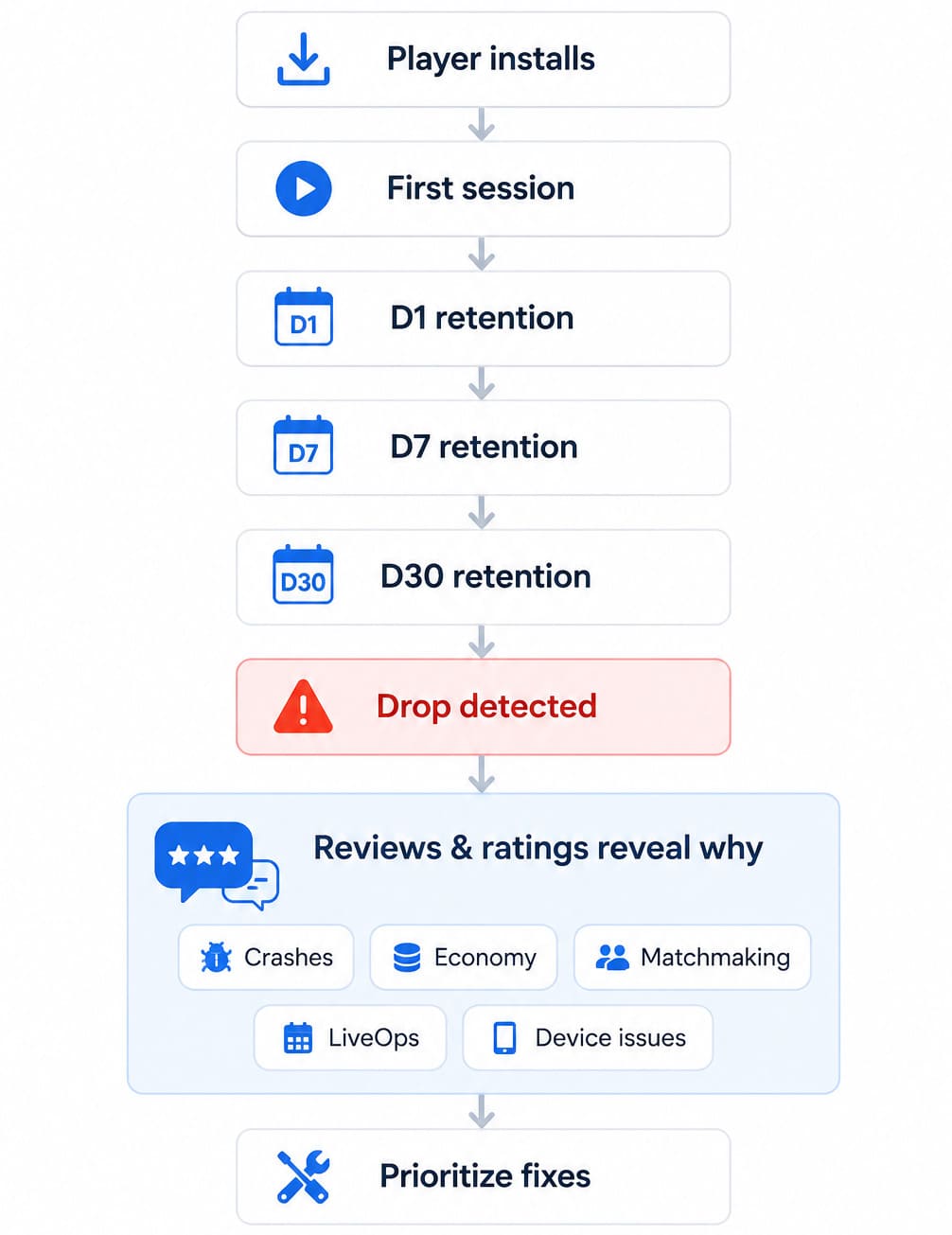
Reviews, ratings, and player feedback help you understand what actually happened. Teams that combine both can decide whether the next priority is fixing stability, rebalancing rewards, adjusting store messaging, or improving the first-time experience.
Retention affects LTV, but don't reduce retention to revenue
Higher retention naturally creates more opportunities to increase player LTV gaming, improve payback, and generate additional sessions. Just as important, satisfied players are more likely to leave positive reviews, recommend the game, and strengthen its store reputation.
Revenue matters, but lasting game retention starts with consistently giving players a reason to come back.
Mobile game retention benchmarks for 2026
Benchmarks are context, not a target. The gap between a median game and a top-tier game is wide enough that any single industry average will mislead you, so read the column that matches your situation.
Metric | All games, median | Marketed titles, average | Marketed titles, top tier |
D1 retention | ~22% | 25% to 30% | 45%+ |
D7 retention | ~4% | 10% to 15% | 25%+ |
D30 retention | under 1% | 3% to 6% | 12%+ |
The two middle columns look like they disagree. They do not. GameAnalytics measures every game on the platform, including indie and unmarketed titles that never bought an install. The marketed-title figures describe games with a UA budget and a studio behind them. If you are running paid acquisition, the second column is your bar.
Genre moves the numbers as much as scale does. Sensor Tower figures compiled by AppAgent put hypercasual D1 around 38% to 40%, and then it falls off a cliff, because the loop was never built to hold anyone for a month. Mid-core and RPG titles start lower on day one but hold 20% to 21% at D7 and 11% to 12% at D30, since the meta gives players a reason to come back.
Platform matters too, and this one catches teams out. Among top-quartile games, GameAnalytics puts D1 at 31% to 33% on iOS against 25% to 27% on Android. Run a single global benchmark across both stores and you will read your Android numbers as broken when they are simply normal. Split your targets by store before you split your roadmap.
Step 1. Use reviews to diagnose why players churn
How to improve retention in a mobile game: Group negative reviews by churn reason, connect each group to the app version, release date, country, and store, then assign every issue to the right owner. Product tackles design problems, QA fixes technical issues, LiveOps adjusts events, Support communicates updates, and ASO tracks the impact on ratings and visibility.
Read negative reviews as churn interviews
Every negative review is a player telling you why they almost left or already did. Read enough of them together and patterns emerge. One player writes, "Too many ads." Another says, "Crashes after the update." Soon you see "Matchmaking is unfair," "Impossible level," or "This has become pay-to-win." Those aren't isolated complaints.
They're early indicators of mobile game churn.
Ilya Kataev, who runs professional services at AppFollow, rarely starts with the dashboard. He starts with review clusters. Cohorts show where player retention drops. Reviews explain what players experienced just before that happened. The faster you connect those two signals, the faster you move from guessing to fixing.
Separate bug churn from design churn
Not every churn problem belongs to the same team.
Bug churn usually includes crashes, login failures, lag, battery drain, and device-specific issues. Design churn looks different. Players complain about rewards that feel unrewarding, an economy that pushes purchases too early, LiveOps events that start feeling repetitive, unfair matchmaking, or a difficulty curve that suddenly spikes.
Recent community discussions around Brawl Stars have highlighted balance concerns after updates, while PUBG Mobile players frequently report performance issues when new versions roll out. Different symptoms, different owners, different fixes. Treating every complaint as a support ticket hides the real cause of mobile game churn.
"Retention work starts when you stop arguing about averages and start classifying causes. A one-star review about crashes, a complaint about nerfed rewards, and feedback about unfair matchmaking all hurt retention, but they don't have the same owner or the same fix. The first step is routing each signal to the right team."
— Ilia Kukharev, Product Manager at Appfollow
Prioritize by volume, rating impact, version, and recency
Once you've grouped review topics, decide what deserves attention first.
Ask yourself:
- Which topic appears most often?
- Did ratings fall after the latest version?
- Are players mentioning uninstalling or never coming back?
- Is the issue limited to one country, device, or store?
- Has the conversation changed during the last few days?
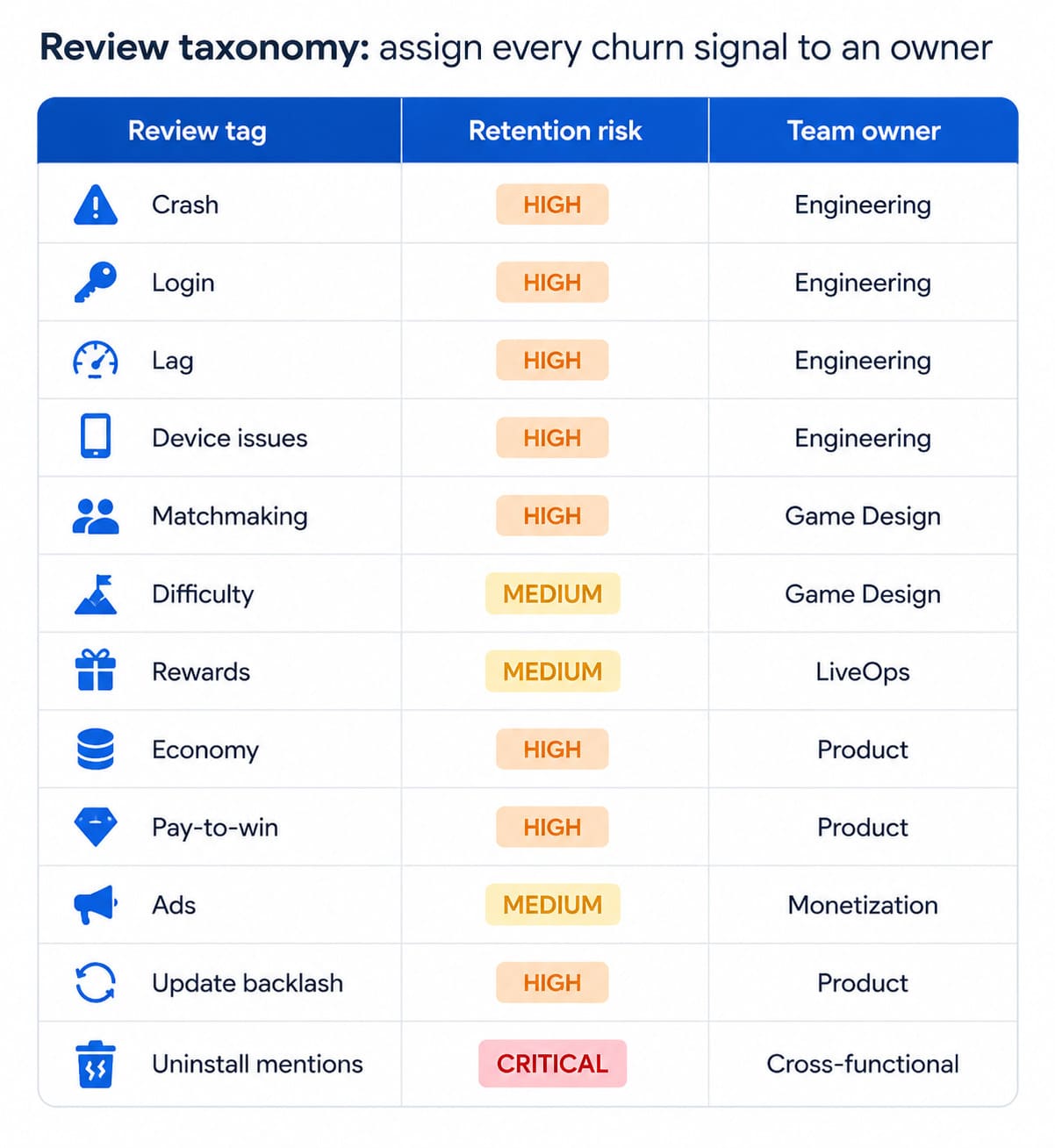
In AppFollow, create review tags for Crash, Login, Lag, Difficulty, Economy, Pay-to-win, Ads, Rewards, Matchmaking, Update backlash, and Uninstall.
Tag | Review language it catches | Churn type | Owner |
|---|---|---|---|
Crash | "crashes after update", "closes on startup" | Bug | QA |
Login | "can't log in", "lost my account" | Bug | Backend, QA |
Lag | "laggy", "stutters", "unplayable on my phone" | Bug | Engineering |
Ads | "ads after every level", "forced ads" | Design | Monetization |
Economy | "upgrades cost too much", "rewards got nerfed" | Design | LiveOps, product |
Pay-to-win | "impossible without paying" | Design | Product |
Difficulty | "impossible level", "sudden difficulty jump" | Design | Game design |
Matchmaking | "matchmaking is unfair", "always face maxed players" | Design | Game design |
Event fatigue | "same event again", "nothing new to do" | Design | LiveOps |
Update backlash | "worse after the update", "bring back the old version" | Either | Product, support |
Uninstall intent | "uninstalling", "done with this game" | Severity flag | Escalate immediately |
Then add alerts whenever one of those review topics spikes after a release. It's one of the fastest ways to spot churn risks before they become long-term retention problems.
Reply templates that do not sound like a bot
Generic replies are worse than silence, because they prove nobody read the review. These five cover most of what lands in a game inbox. Keep the specifics, change the voice to yours.
Crash after a release
"This one's on us. The crash on [version] is confirmed and the fix ships in [version], due [timeframe]. If it's still happening after you update, send your device model to [support link] and we'll chase it directly."
Economy or reward change
"Fair point about [currency or reward]. We changed [what] in [version] because [reason], and we're reading feedback like yours ahead of the next balance pass. If the grind feels worse than before, tell us which part and it goes straight to the design team."
Balance backlash after a nerf
"We nerfed [character or card] because [reason] at high ranks. We know that stings if it was your main. The next balance notes go up on [date] and we'll say plainly whether we're adjusting again."
Event fatigue
"You're right that [event] has come round several times now. The next season adds [content] in [month]. If there's a mode you want brought back, name it here and we'll count it."
Login failure or lost progress
"Losing progress is the worst version of this. Send your player ID and the date it happened to [support link] and we can restore from backup. Don't reinstall before you do, it makes recovery harder."
Step 2. Fix onboarding and FTUE before optimizing late-game retention
Fix onboarding before you touch anything in the late game. D1 is the ceiling every later cohort sits under, and a player who quits in session one never reaches your battle pass. Hunt for crashes, login failures, tutorial confusion, and early difficulty spikes, then compare review themes by app version to confirm which build introduced them.
Find onboarding friction in reviews
Players are remarkably specific when something goes wrong during onboarding. Look for phrases such as "can't log in," "confusing tutorial," "too many pop-ups," "forced ads," "slow loading," "no progress," or "lost my account." Individually, those reviews sound like support requests. Together, they often explain why D1 retention declined after a release.
Games like Brawl Stars introduce core mechanics quickly while gradually adding depth, making the early experience easier to understand without sacrificing long-term mastery. That balance didn't happen by accident. Supercell's long-standing soft-launch process has focused on refining the early player experience before global release, making onboarding a core design decision rather than an afterthought.
Match review evidence with store conversion promises
Your store page sets expectations before the install. If screenshots promise fast-paced competition, satisfying puzzle solving, or instant action, the tutorial, first battle, and even the first loss should reinforce that promise. Otherwise, you risk increasing installs while reducing retention.
The same applies to practical friction. Lengthy account creation, repeated permission prompts, or high cognitive load can quickly outweigh the excitement that convinced someone to download the game in the first place. Reviews often reveal that disconnect long before analytics explain it.
Test one onboarding change at a time
Avoid changing several onboarding elements in the same release. If you redesign the tutorial, adjust early rewards, simplify login, and rebalance the opening progression simultaneously, it becomes difficult to identify what improved or hurt your player retention strategies.
Instead, ship one meaningful change, then compare review patterns before and after the release.
In AppFollow, filter reviews by app version, store, language, rating, and custom tags to see whether FTUE complaints concentrate around a specific build or market.
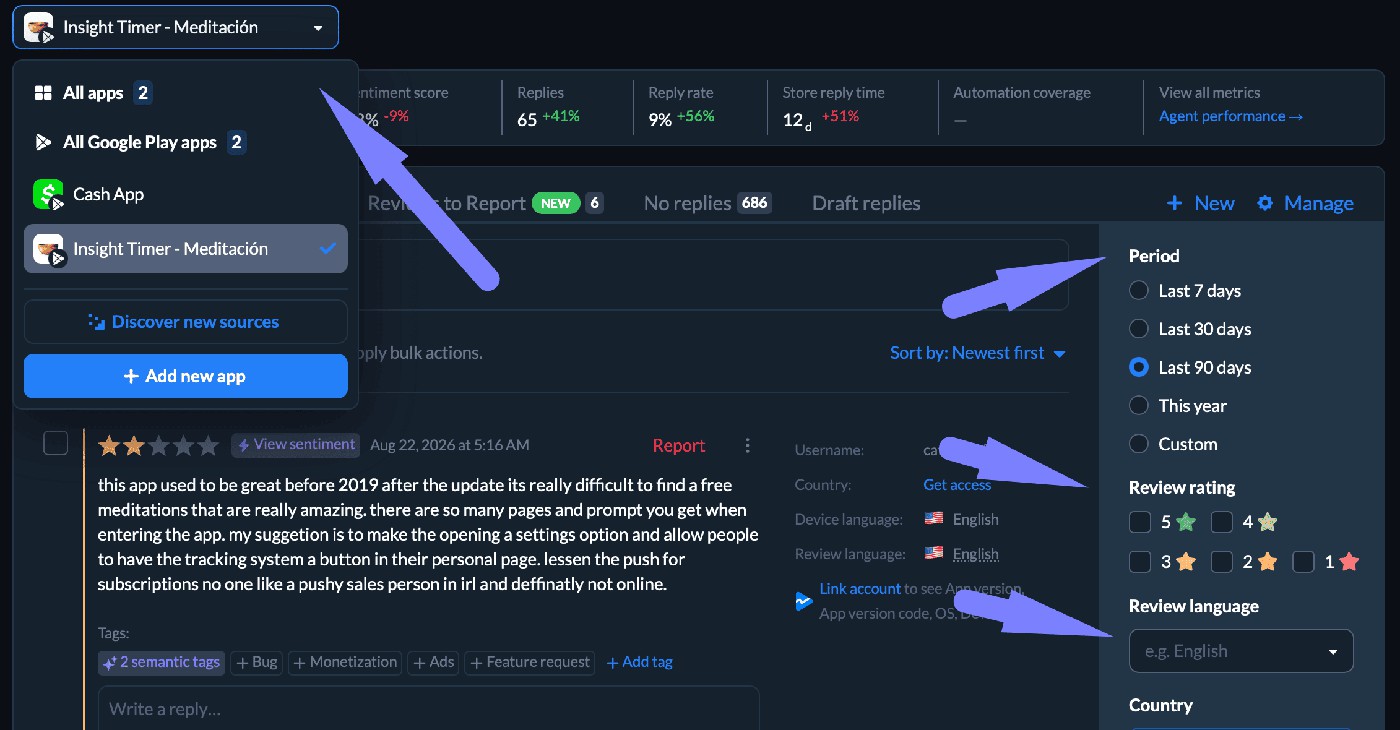
That makes it much easier to separate genuine onboarding improvements from unrelated issues introduced in the same update.
Step 3. Keep repeat sessions alive with LiveOps, rewards, economy, and difficulty
Repeat sessions come from progression that feels fair and content that keeps arriving. D7 and D30 move when rewards stay worth the time, difficulty reads as earned rather than random, and events change often enough to matter. Players name each of those failures in plain language weeks before the cohort curve shows the decline.
Use event feedback to spot content fatigue
Players don't usually write, "Your content cadence needs work." They write, "Same event again," "Nothing new," "Too grindy," or "Rewards aren't worth it anymore." Those comments often arrive before engagement metrics decline.
Games such as Genshin Impact use regular version updates and limited-time events to keep players returning between major content releases. Whatever your genre, watch for review clusters mentioning boredom, repetitive events, or unfair rewards.
Those are often early signs that repeat sessions are becoming a habit instead of a choice.
Watch economy complaints before they become churn
Economy discussions rarely stay confined to monetization. They quickly become retention problems.
Review themes such as "pay-to-win," "impossible without paying," "rewards got nerfed," "ads after every level," or "upgrades cost too much" usually reflect frustration rather than spending resistance. Balance changes in games like Clash Royale and Brawl Stars frequently spark community discussion because even small adjustments can alter how rewarding progression feels.
Strong game retention strategies monitor those conversations after every economy update instead of waiting for retention curves to flatten.
"Players usually tell you when the retention loop breaks. They may not talk about economy design or LiveOps fatigue, but they'll say an event feels repetitive, the rewards aren't worth the effort, or the game became frustrating after an update. That's operational data if you know how to read it."
— Ilya Kataev, Professional Services Team Lead at AppFollow
Event-driven economies concentrate the risk. Games built around recurring events, Monopoly GO! among them, generate a praise and fatigue cycle you can read almost in real time: reward generosity earns five stars during a strong event and one star the moment the next one feels stingier.
Reading that cycle per event, rather than per month, is what makes the signal actionable.
Balance challenge and frustration
Long-running puzzle games are the clearest study here. Candy Crush Saga and Royal Match both pace difficulty across thousands of levels, and both draw the same complaint when a level reads as a paywall rather than a puzzle: players do not say "the difficulty curve is miscalibrated," they say "this level is impossible without boosters." That distinction between hard and rigged is the one worth tracking.
Treat hybrid-casual retention as promise alignment
Successful hybrid-casual games depend on matching acquisition with experience. A creative that promises quick, accessible gameplay should naturally lead into a deeper progression system, not overwhelm players with complexity after a few sessions.
Games like Stumble Guys illustrate that progression. The core loop stays approachable while seasonal content, cosmetics, and social competition encourage repeat play. When reviews mention "nothing to do after level 20" or "this isn't the game from the ad," expectations and reality have drifted apart.
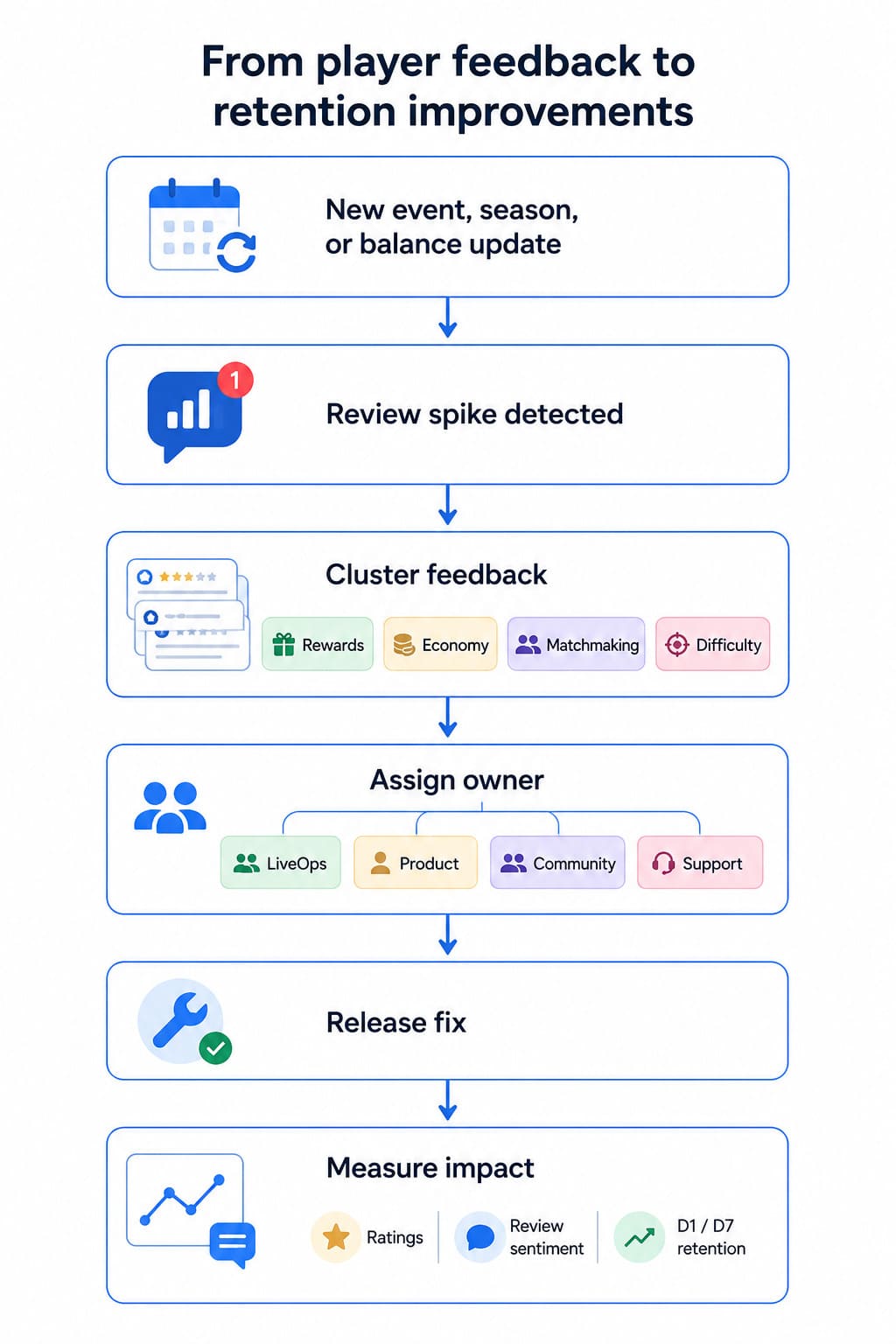
Track sentiment and review tags around every event, season, reward adjustment, economy change, nerf, and major update.
In AppFollow, route economy complaints to Product or LiveOps, while reviews that need immediate follow-up can be assigned to Support or Community teams before frustration turns into churn.
Step 4. Protect retention during updates, store-page changes, and reputation swings
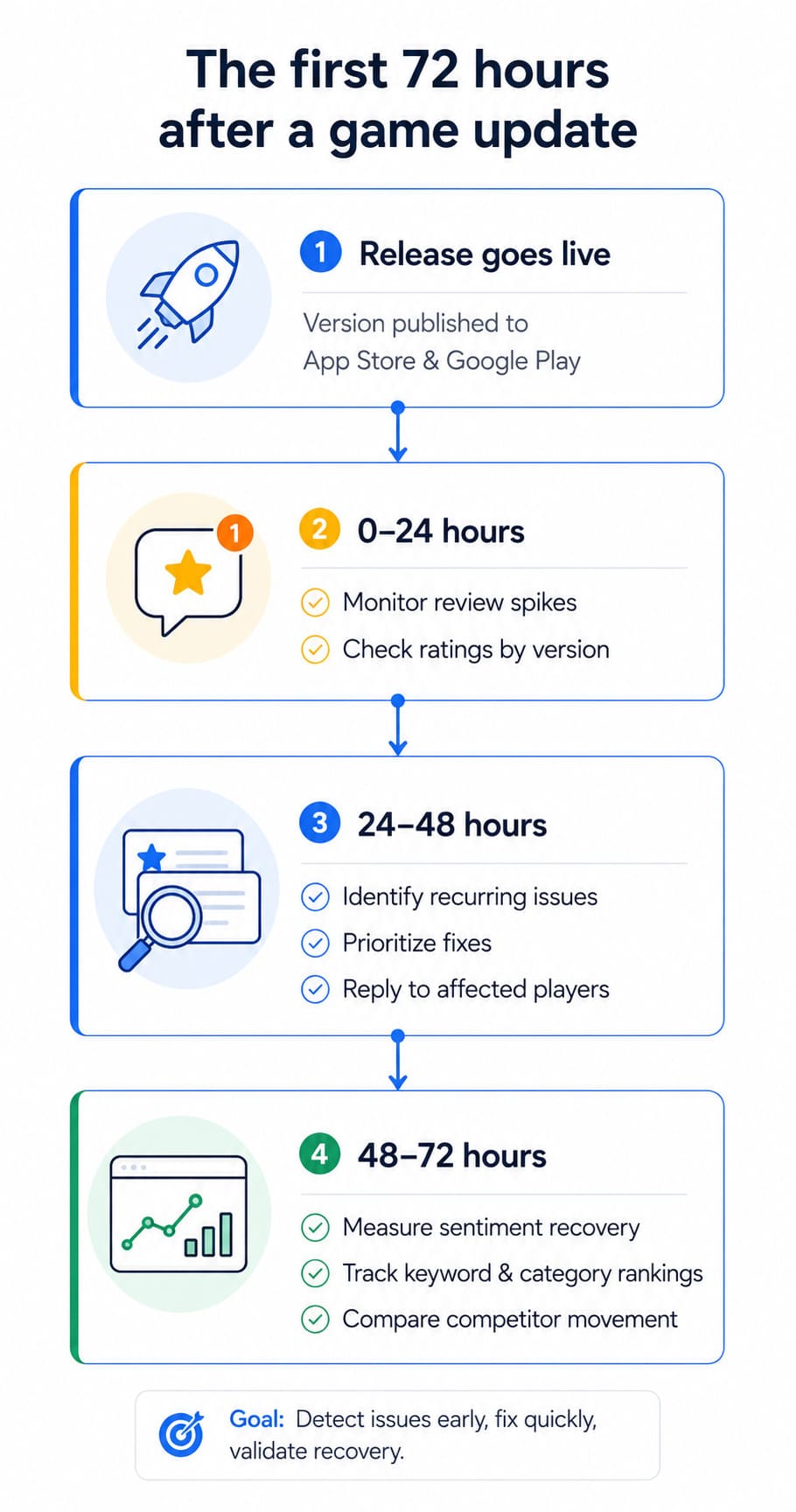
Treat the first 24 to 72 hours after every release as a retention risk window. New builds introduce crashes, broken progression, and balance backlash, and players report all three in the stores before your analytics stack confirms any of it. Track rating and review themes by app version, device, and market rather than watching your overall store rating.
Every update creates a retention risk window
The first reviews after a release tell you whether players are experiencing the game you intended to ship. Look for spikes around login issues, broken progression, economy complaints, or unexpected balance changes. A sudden rating drop is rarely just a ratings problem. It usually points to something players encounter during their first session after updating.
Don't look at App Store reviews and Google Play reviews in isolation. Compare review themes by app version, device, market, and release timeline. That context helps separate widespread issues from problems affecting only part of your audience.
"A retention problem often becomes visible in the store before it becomes obvious in a monthly report. Ratings begin to slip, new reviews repeat the same concerns, keyword rankings soften, and store conversion becomes less efficient. ASO teams should treat those signals as part of the retention feedback loop, not as a separate marketing problem."
— Yaroslav Rudnitskiy, Senior Professional Services Manager at AppFollow
Align store promises with the current game experience
Your store page shouldn't describe yesterday's game.
If screenshots, preview videos, or metadata highlight features that players now criticize, you're setting the wrong expectations before they even install. Strong retention mobile games don't just update gameplay. They keep creative assets, version notes, and release notes aligned with the current experience.
The same applies to visibility. A release can improve store conversion while quietly hurting retention if new players discover something different from what the store page promised.
Reply where the fix is real
Replies don't repair broken features. They do reduce uncertainty when a solution already exists.
When responding to reviews, mention the affected version, confirm that the issue is known, share a workaround if one is available, or point players toward the patch that resolves it. Vague responses rarely rebuild trust. Specific responses sometimes do.
In AppFollow, monitor ratings, review sentiment, app version, deleted reviews, the update timeline, keyword rankings, category rankings, top-chart movement, and competitor changes after every release. Looking at those signals together makes it much easier to understand whether an update improved the player experience or simply shifted where players express their frustration.
Step 5. Use competitor reviews to understand what keeps players elsewhere
Your reviews explain why players leave. Competitor monitoring explain what keeps them somewhere else. Read the five-star reviews of category leaders to find the hooks players actively value: generous rewards, fair matchmaking, event variety, stable performance. Then decide whether players now expect the same from your game before you commit a sprint to it.
Compare praise, not only complaints
Most teams search competitor reviews for bugs. Dzianis Shalkou starts with the five-star ones.
That's where players explain what keeps them coming back: generous rewards, fair matchmaking, engaging events, satisfying progression, active clans, smooth performance, or regular updates. Those themes reveal the retention hooks players genuinely value.
Games like Roblox are often praised for the variety of player-created experiences, while PUBG Mobile encourages repeat sessions through seasonal progression and competitive play. Different mechanics, same outcome: players have a reason to return.
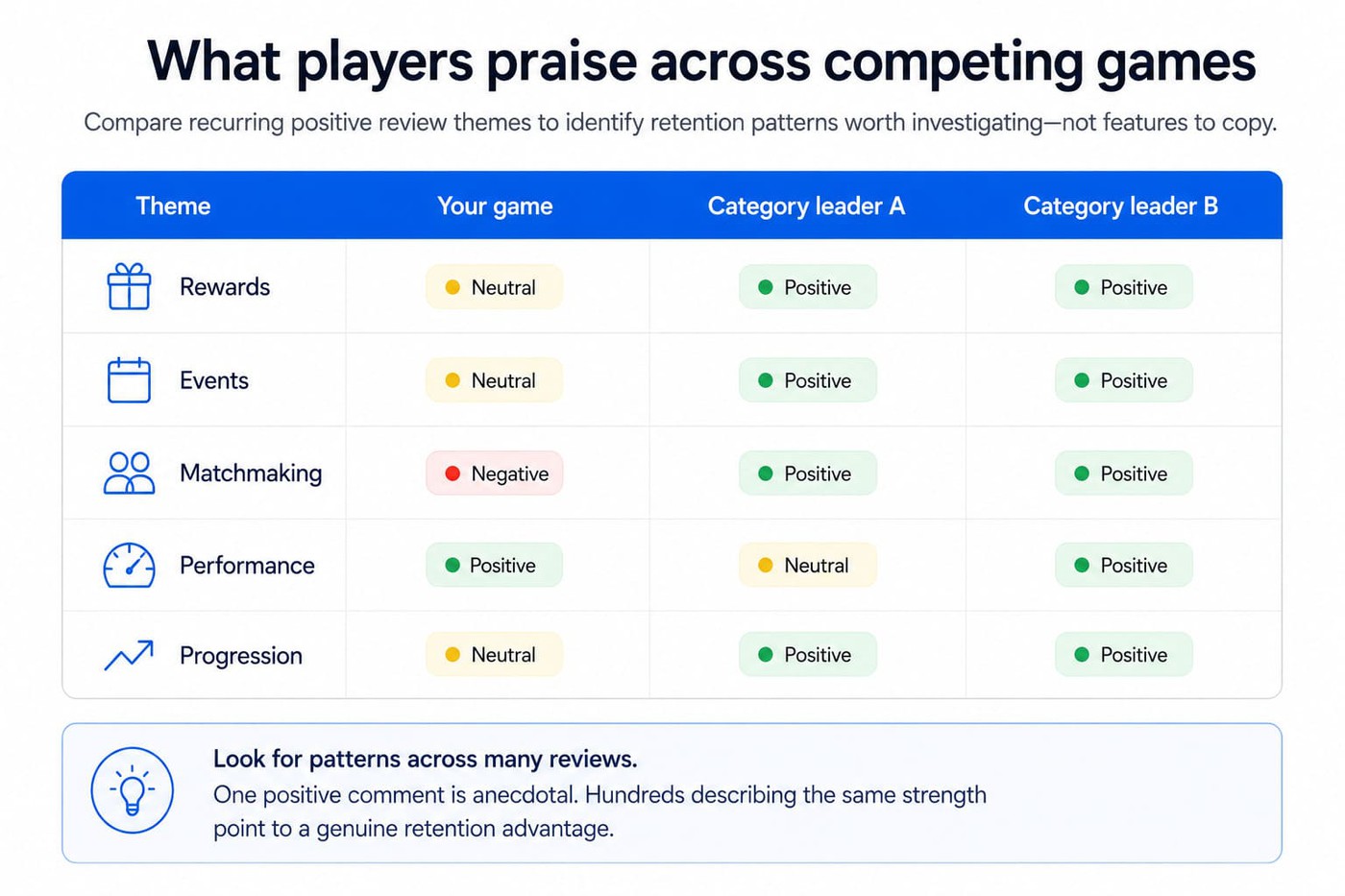
"Competitor reviews are one of the fastest ways to see how player expectations are changing. You shouldn't copy another game's roadmap, but you can quickly spot what players across the category now consider fair, generous, frustrating, or outdated."
— Dzianis Shalkou, Senior Professional Services Manager at AppFollow
Watch competitor update language
Release notes deserve the same attention as reviews.
When a competitor introduces a feature, changes its economy, or adjusts game balance, player reactions become free market research. Positive feedback highlights what resonated. Negative feedback can help you avoid repeating the same mistake.
Review those conversations alongside metadata, creative assets, and update cadence. Together, they provide context that individual reviews rarely offer.
Benchmark category and top-chart movement
Strong mobile game player retention improves more than in-game metrics. It also influences ratings, visibility, and long-term store performance.
Track review sentiment alongside top charts, category rankings, rating trends, and keyword rankings. When several competitors move in the same direction after a major update, there's usually a broader category trend behind it.
In AppFollow, combine competitor reviews, category rankings, top-chart movement, metadata changes, and review sentiment to identify retention patterns across your market. Those insights support smarter player retention strategies because they're built on recurring player behavior, not isolated opinions.
cta_get_started_yellow
Build a weekly mobile game retention dashboard
A useful retention dashboard answers three questions every week: what changed, why it changed, and who owns the next action. Pair D1, D7, and D30 from your analytics stack with store-side signals: review volume, negative sentiment, churn tags, rating by app version, category and keyword movement. Every row needs a named owner and a trigger.
A useful dashboard should tell you three things: what changed, why it changed, and who owns the next action. That's where mobile game retention metrics become operational instead of informational.
The retention dashboard App Store and Google Play teams should check
A useful retention dashboard isn't a collection of charts. It's an action plan. Every signal should have an owner, a trigger, and a next step. Use the framework below as your starting point.
Signal | What to watch | Owner | Trigger | Next action |
D1 / D7 / D30 retention | Cohort changes | Product | Unexpected drop | Review onboarding, progression, or LiveOps changes |
Review volume | Sudden spike | Support | 2× normal volume | Investigate release impact |
Negative sentiment | Theme clusters | Community | Sentiment decline | Identify recurring complaints |
Churn tags | Crash, economy, uninstall, matchmaking | Product / QA / LiveOps | Tag spike | Prioritize fixes |
Rating by version | Rating changes after release | Product | Version-specific drop | Compare update timeline |
Reply effect | Resolved vs unresolved reviews | Support | No improvement after replies | Review response quality |
Category rankings & top charts | Visibility changes | ASO | Position loss | Investigate product and store changes |
Keyword movement | Ranking volatility | ASO | Significant movement | Review metadata and release impact |
Competitor review spike | Emerging themes | Product | Sudden praise or complaints | Benchmark before planning changes |
"Teams that get the most value from reviews don't wait for a monthly sentiment report. They track review volume, sentiment shifts, version changes, and rating movement as part of their weekly routine. When Product, Support, LiveOps, and ASO work from the same signals, retention conversations become much more practical."
— Lucija Knezic, Senior CSM & Product Strategy Manager at AppFollow
Do not wait for monthly reports
A retention problem can become a reputation problem in just a few days. A buggy release, an unpopular balance change, or an underwhelming event quickly affects ratings, review volume, and store visibility.
Review your dashboard every week, then increase the cadence after every release.
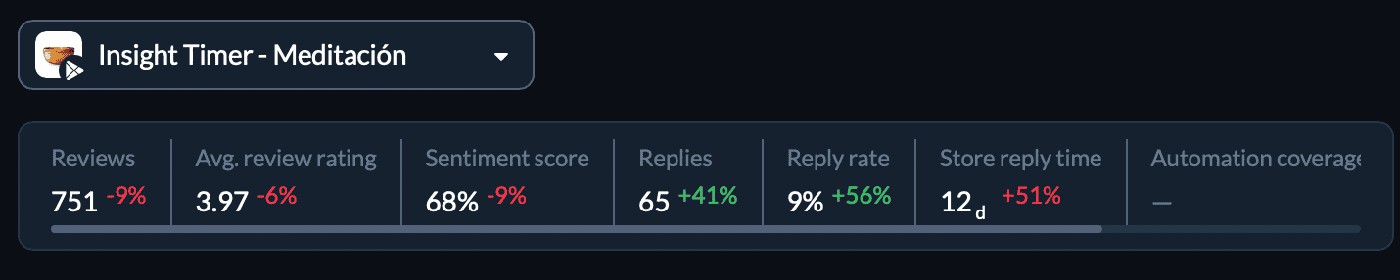
In AppFollow, custom reports, automated alerts, App Monitor, and integrations with Slack, Zendesk, and Salesforce help turn this workflow into an operational process instead of another spreadsheet. Mobile game retention benchmarks become far more useful when they're paired with review sentiment, category rankings, top charts, and keyword movement while there's still time to act.
Turn player reviews into retention decisions with AppFollow
AppFollow keeps this workflow running across every release, market, and store without anyone collecting data by hand. Reviews from the App Store and Google Play arrive in one place, sentiment and custom tags group them by churn reason, alerts fire when a theme spikes after a build, and reports route the signal to product, LiveOps, support, or ASO.
Centralize mobile game retention signals in AppFollow and you stop collecting them by hand. Every review from the App Store and Google Play lands in one place, sentiment and custom tags group them by churn reason, alerts fire when a theme spikes after a build, and each signal reaches the team that owns the fix.
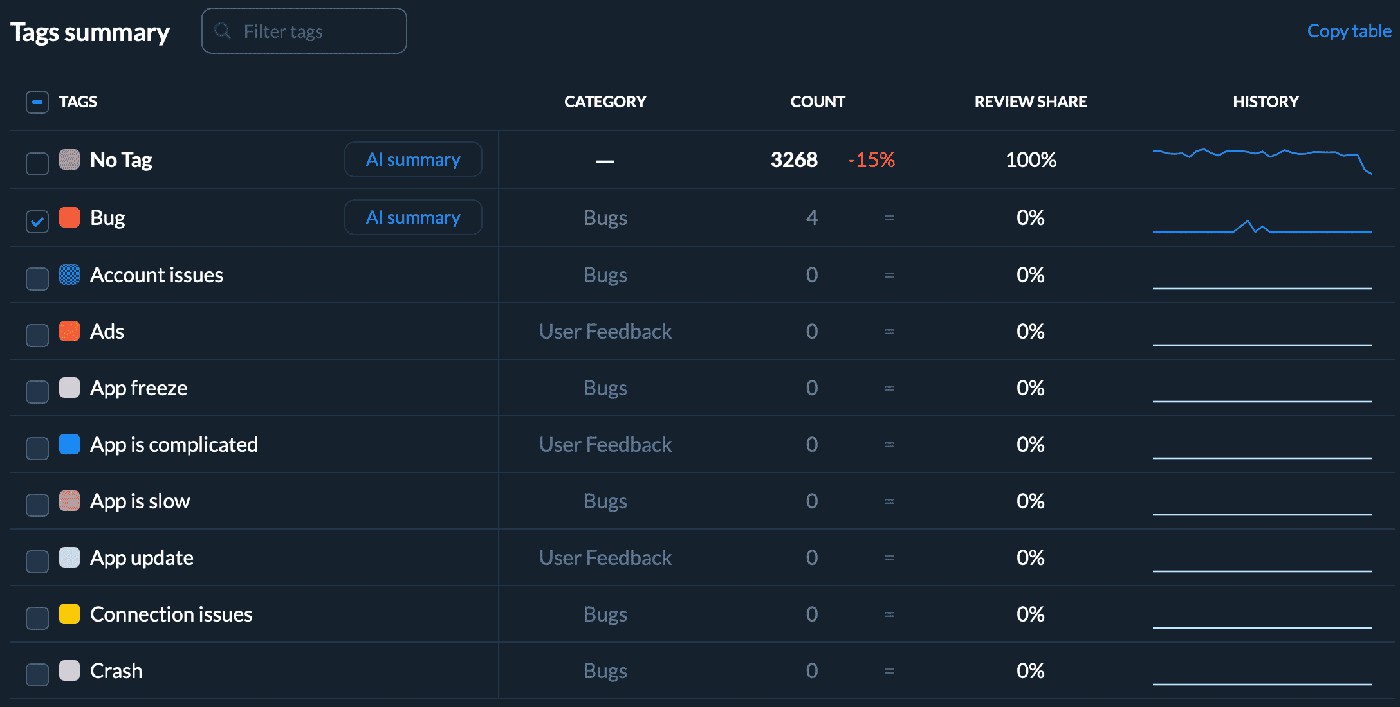
- Find churn themes in reviews. Collecting reviews is the easy part. The pattern underneath them is what you are after. Pull feedback from both stores into one feed, then let sentiment scoring and custom tags cluster the recurring complaints: crashes, matchmaking, rewards, economy, update backlash. You read a ranked list of churn reasons instead of working through every complaint one at a time, and you can answer the fixable ones the same day with the app review management tool.
- Track whether fixes change store-side behavior. Shipping the fix is half the job. You still need to know whether players noticed. Watch rating by app version, review topics, reply effectiveness, category rankings, top charts, and keyword movement after every release, and you get a genuine before-and-after on the signals players generate themselves. Pair that with the ASO platform and you can see whether a stability fix also recovered the visibility the bad build cost you.
- Route retention signals to the teams who can act. Retention is never one team's problem. Product, LiveOps, support, community, and ASO all need the same signal at the same time, and none of them will go hunting for it in a dashboard. Set alerts and scheduled reports, wire up integrations for Slack, Zendesk, and Salesforce, and the churn theme you tagged this morning appears in the channel where the person who owns it already works.
- Compare against competitors. The best game retention strategies do not stop at your own reviews. Track competitor ratings, review sentiment, metadata changes, keyword rankings, and category movement through app competitor analysis, and you learn which updates players celebrate, which features they reject, and what the category now treats as table stakes before you commit a sprint to matching it.
cta_get_started_purple
FAQs about mobile game retention
What is mobile game retention?
Mobile game retention is the share of players who return to your game a set number of days after installing. Teams track D1, D7, and D30: the percentage of an install cohort that opens the game on that day. The metrics show when players leave. Reviews and ratings explain why.
How do you calculate retention rate for a game?
Divide the players from an install cohort who opened the game on day N by the total size of that cohort, then multiply by 100. Classic retention counts only players active on that exact day. Rolling retention counts anyone active on that day or later, so it always reads higher. Say which one you use.
What is a good retention rate for a mobile game?
It depends on genre and whether you run paid UA. Across 16,262 games, GameAnalytics puts median D1 near 22% and median D30 below 1%. Commercially marketed titles average 25% to 30% on D1 and 3% to 6% on D30. Benchmark inside your genre and watch the trend line, not the gap to an average.
What increases day 7 retention in a mobile game?
D7 depends on whether progression still feels worth the time. Goals that stay reachable, rewards that scale with effort, difficulty that reads as earned, and a concrete reason to log in tomorrow all lift it. Reviews mentioning grind, repetitive events, or nerfed rewards usually appear before D7 declines.
How do reviews affect player retention?
Reviews explain the experiences behind the metrics. Complaints about crashes, unfair matchmaking, repetitive events, or early paywalls often name the exact reason players stopped returning. Replying does not fix the underlying problem, but it limits trust loss, confirms known issues, and gives players a reason to come back after a patch.
How do you improve game retention?
Start with stability and onboarding, since D1 caps every later cohort. Then group negative reviews by churn reason and give each group an owner. Rebalance rewards and difficulty wherever players name unfairness rather than challenge. Watch rating by app version after each release. Check competitor reviews for hooks your category now expects.
What tools help improve player retention in games?
Three layers, and most teams are missing one. An analytics tool for cohort retention, GameAnalytics or your own BI. A store feedback tool for reviews, ratings, sentiment, and tags across the App Store and Google Play. An alerting path into Slack or Zendesk so signals reach an owner. AppFollow covers the second and third.