


App Store and Google Play
ASO dashboard for visibility, keywords and downloads
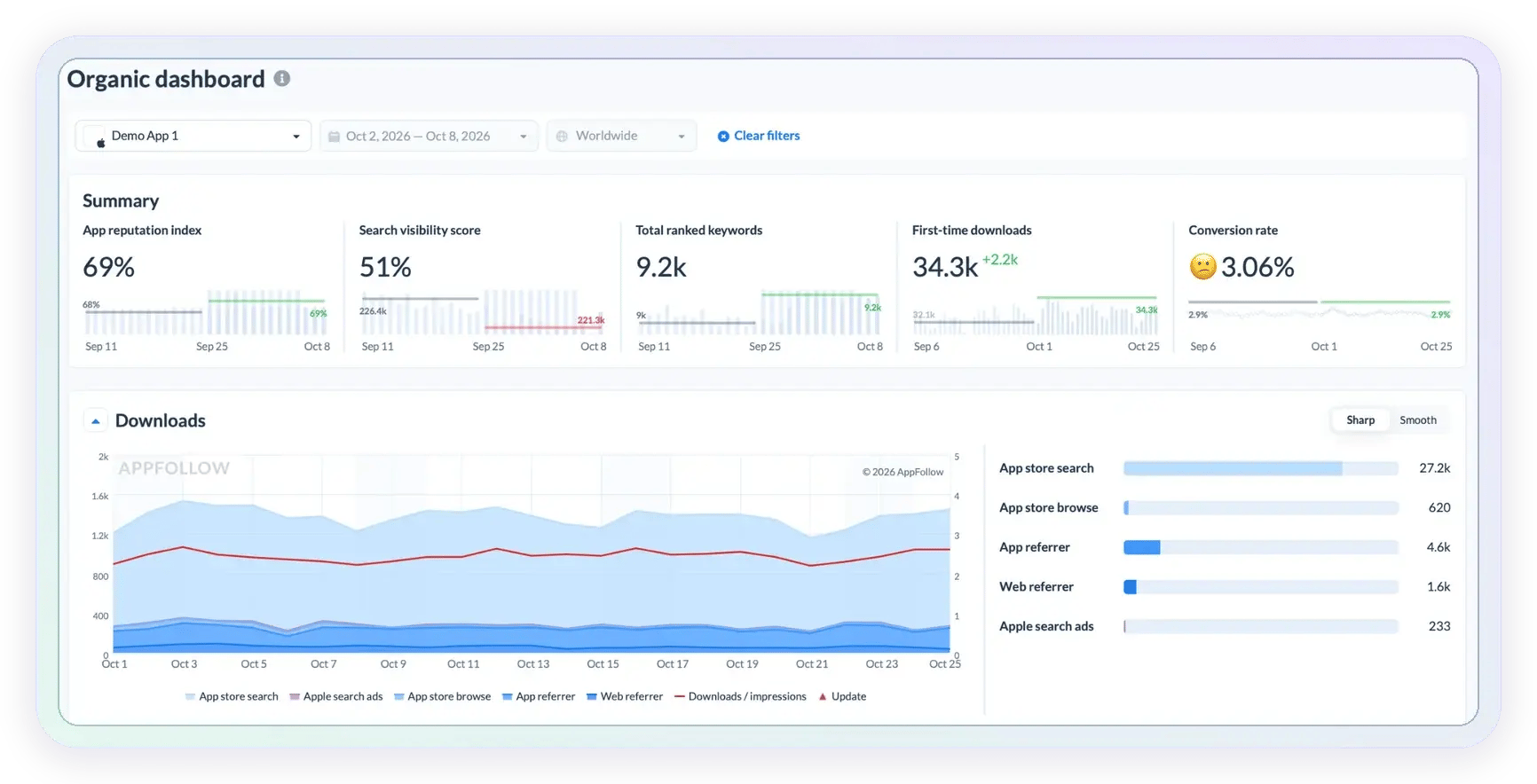
See how your app is performing in store search. AppFollow brings keyword rankings, search visibility, downloads and conversion into its Organic Dashboard. Filter by country, compare periods and spot what to fix first.

Check your key ASO metrics at a glance
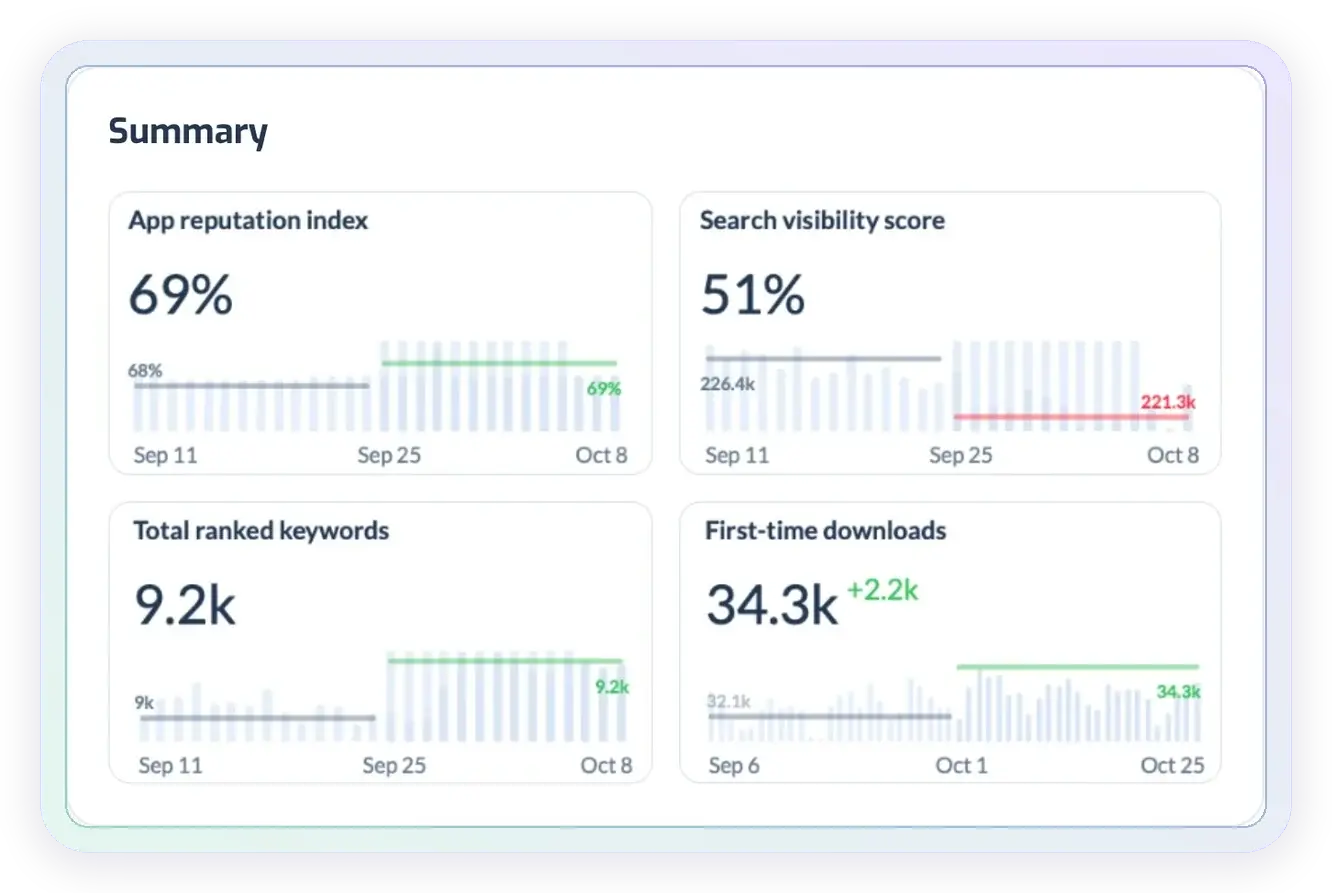
The Summary panel puts four ASO metrics side by side for the app, market and period you choose, each with the change against the previous period and a trend line.
• App Reputation Index: your store reputation, not just the average rating.
• Search visibility score: how visible your app is in store search.
• Total ranked keywords: how many search terms your app ranks for.
• First-time downloads: new installs from your connected store account.
See which keywords bring search downloads
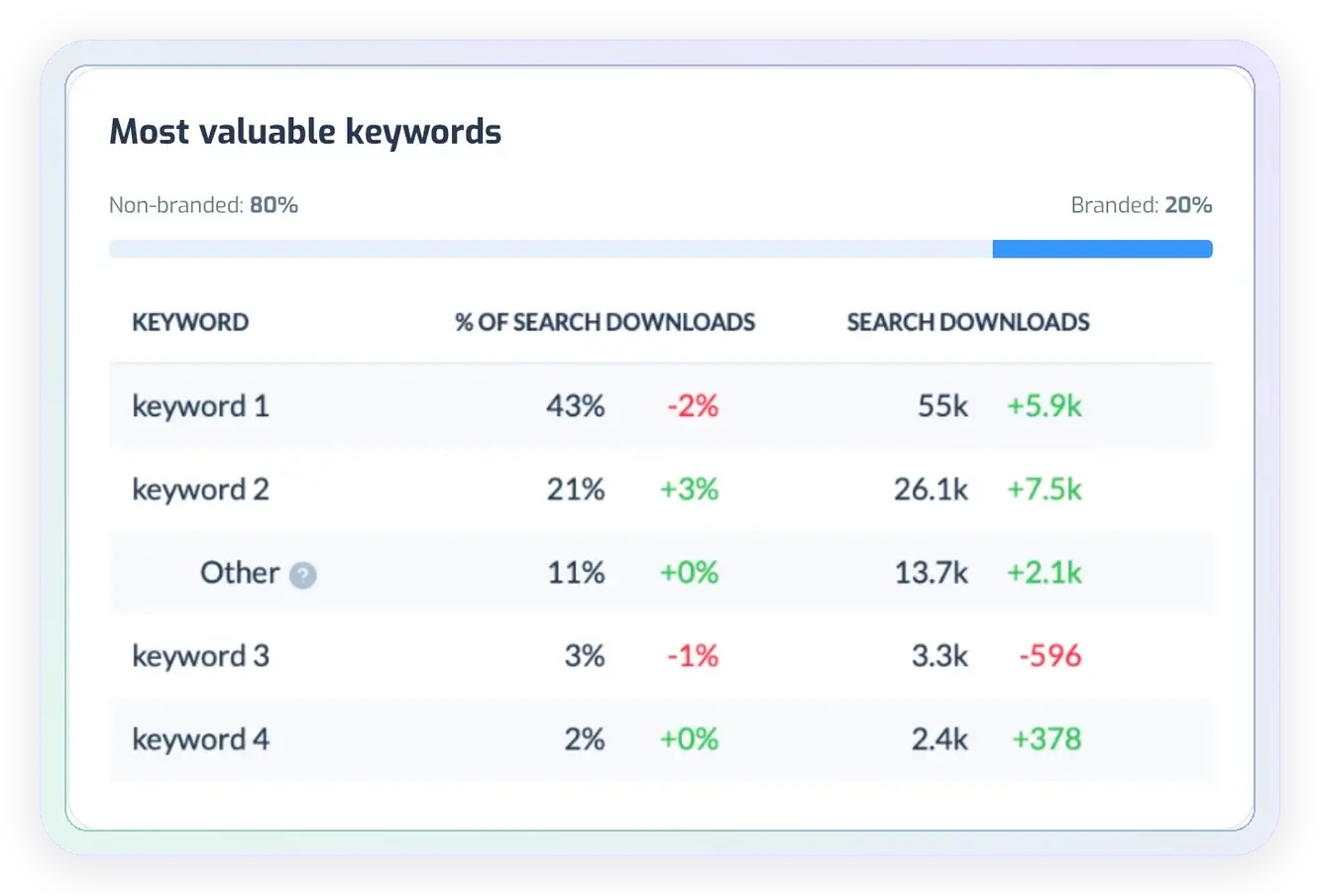
Your most valuable keywords show which searches are already bringing users to your app. Check each term’s download count, share of search downloads and change over the selected period.
The branded and non-branded split adds context: how much of your search acquisition comes from people looking for your name? Use it to assess performance beyond branded searches.
Catch gains and drops in keyword rankings
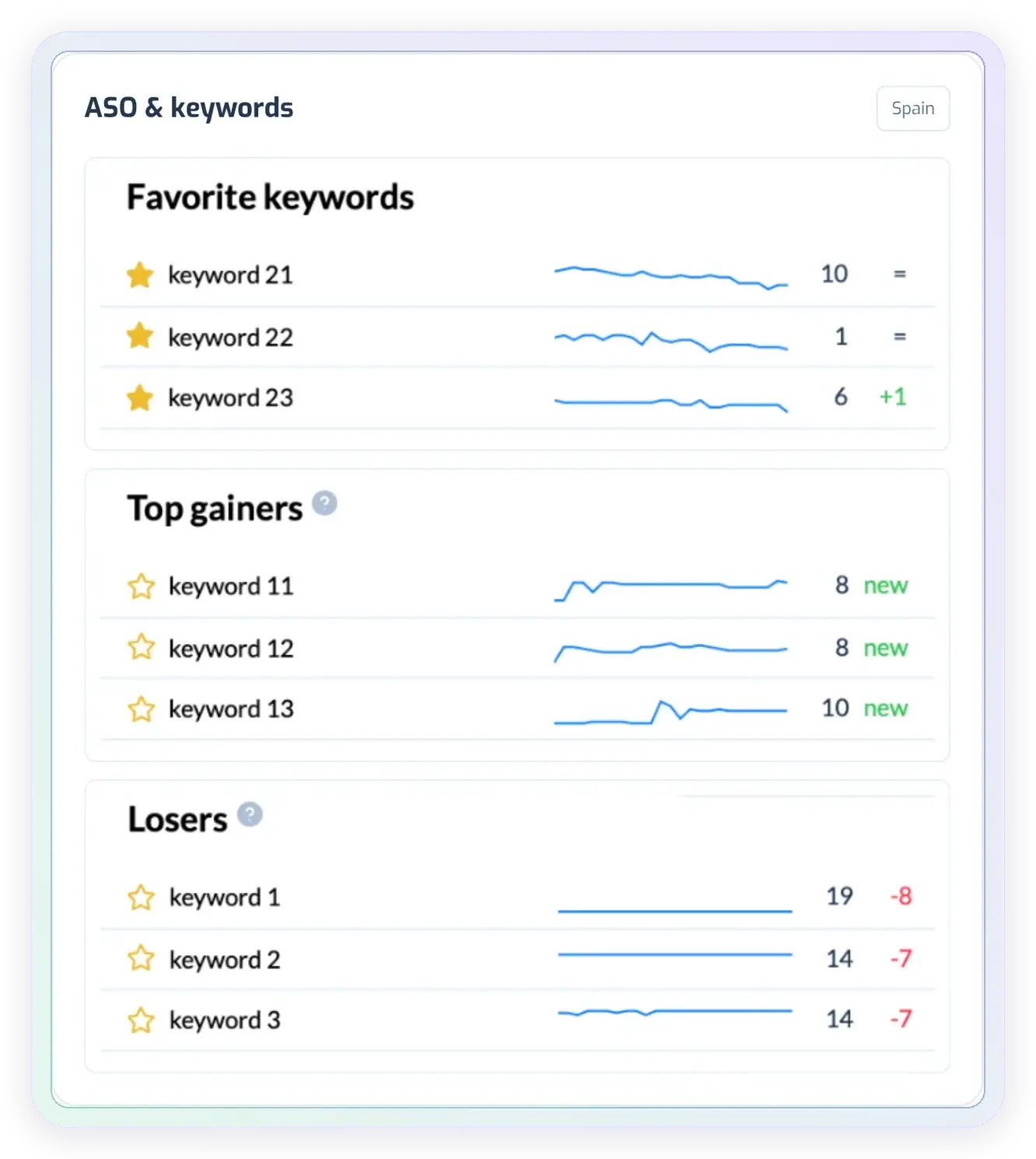
A change in an important keyword can get buried in a long tracking list. The ASO & keywords tab brings your favorites, top gainers and declining terms together, with position changes and trend lines.
Choose a country to check the market you are working on. Then review the terms that need attention and continue in Keyword Tracking for a closer look.
Explore keyword tracking →
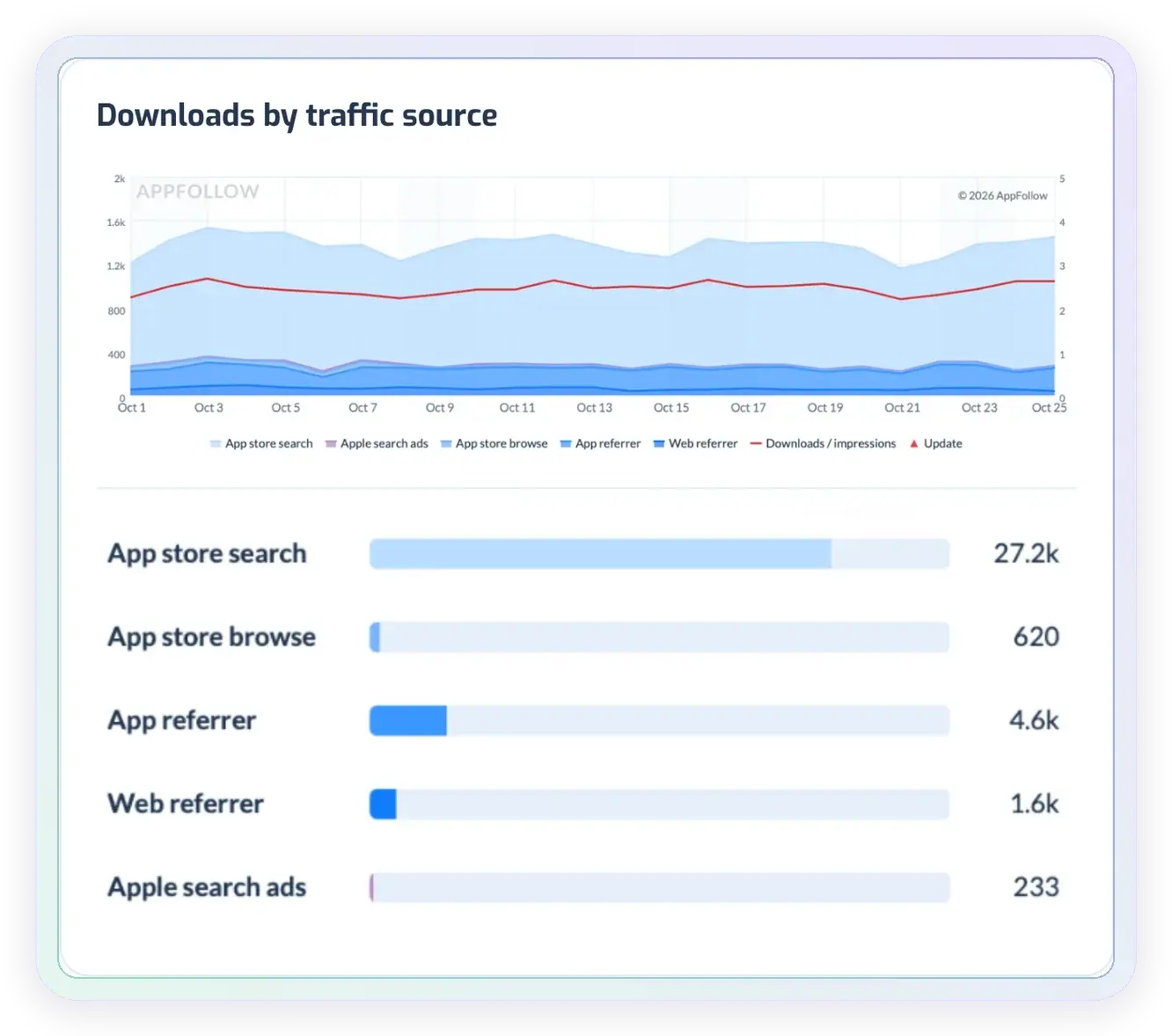
Understand where your downloads come from
The Downloads chart breaks acquisition down by traffic source over time. For App Store apps, that includes Search, Browse, App Referrer, Web Referrer and Apple Search Ads.
Check the channel behind a change in total downloads before choosing your next action. A shift in store search calls for a different investigation from a change in referral traffic.
For a broader view of what moves your downloads, see app performance monitoring →
Turn insights into action
Find your next ASO growth opportunity
See which keywords bring downloads, where rankings are slipping and which markets deserve a closer look. Bring your app’s performance into one ASO dashboard.
The ASO dashboard is included in the Free plan.
Find the markets driving your search performance
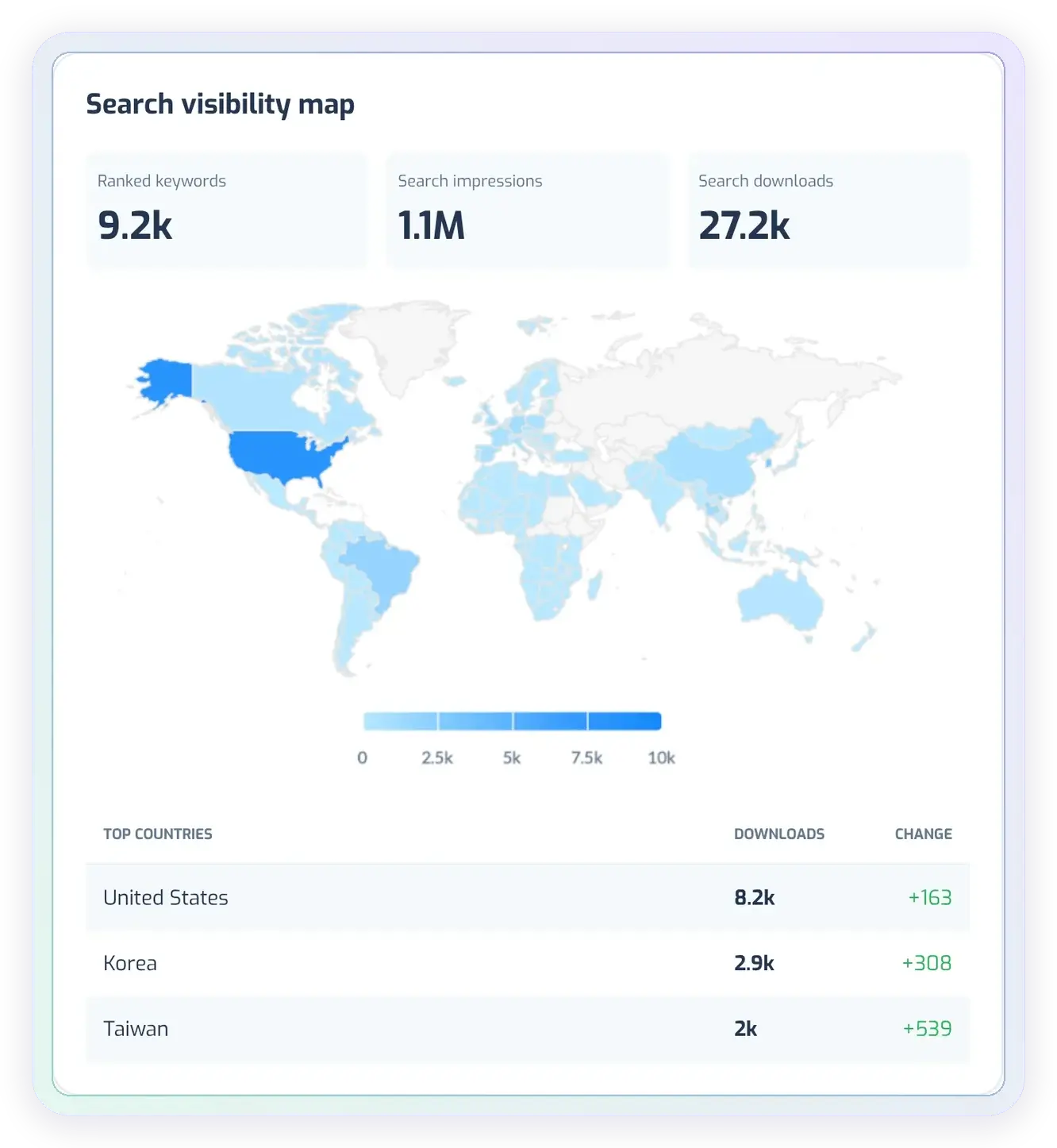
Worldwide totals can hide a change in one market. The search visibility map lets you explore search downloads and visibility by country, while Keywords by country shows where your app ranks for the most terms.
Read search impressions and search downloads alongside keyword coverage. This helps you choose which markets to investigate before planning a localization update.
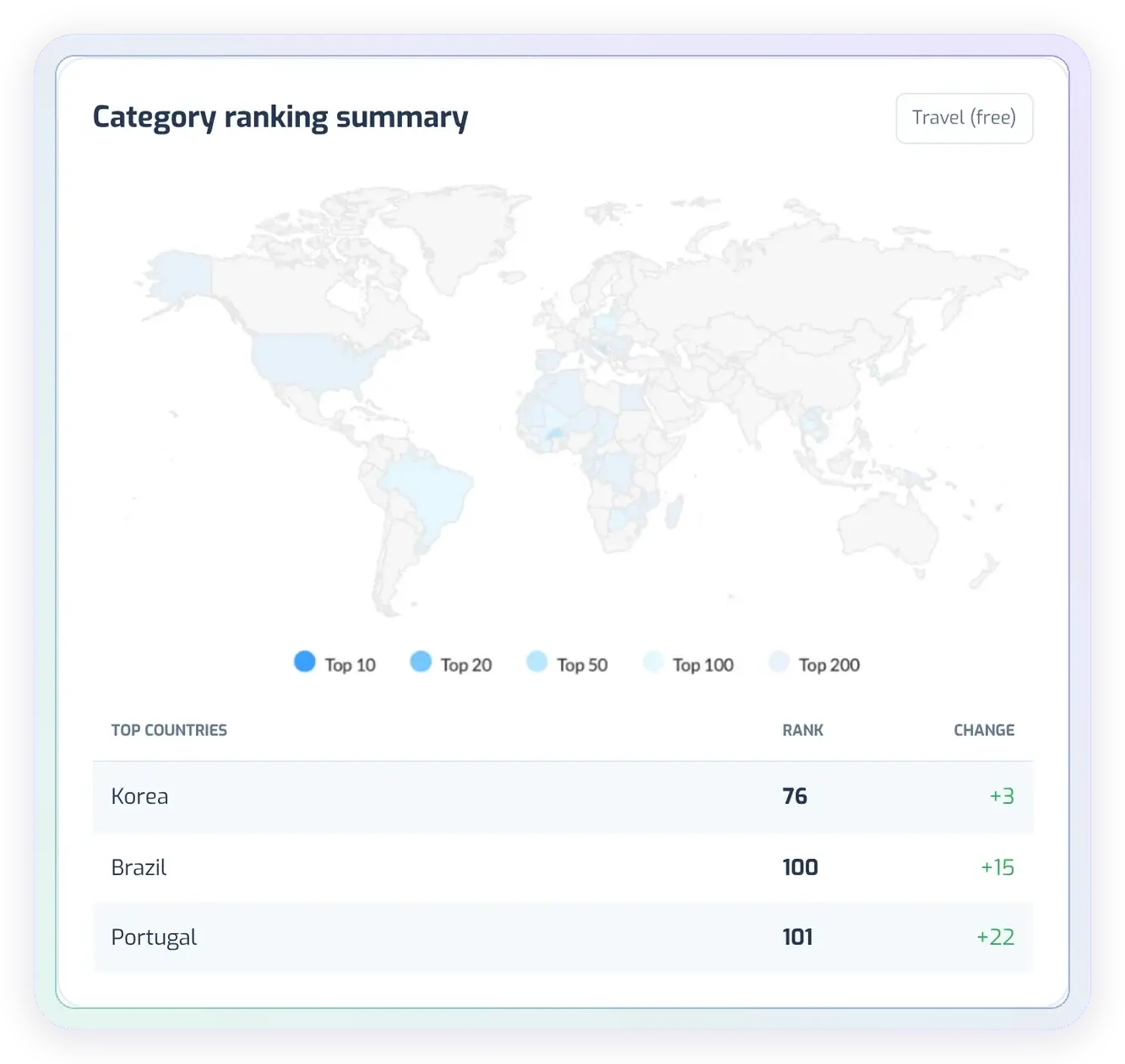
Follow your app’s category rankings across countries
Category rankings show another part of your app’s store presence. Select a category and review the countries where your app ranks, together with position changes.
Use this view to identify markets worth a closer look during your regular ASO review. Need daily chart positions and alerts for a specific market? Try the App Store rank tracker →
Customer stories
ASO insights teams put to work
Teams use AppFollow to track keyword positions, investigate search traffic and evaluate changes to their store listings. Here’s what that looks like in practice.
+23.4%
Android search downloads over 1.5 months
“ASO Dashboard can provide very useful and quick information. We are now able to quickly iterate with our app metadata…”
Estevao Siqueira, James Delivery
55+
Search downloads from unexpected keywords
“AppFollow is giving us plenty of signals so we can improve not only our positioning in the app stores, but the app too.”
Gregory Cox, Earth Hero
3×
Top-10 keyword coverage on the App Store
“The new preview video worked out unbelievably well. However, we couldn’t have gone this far without our previous work with keywords.”
Catherine Sibirko, Social Quantum
Start using your ASO dashboard for free
The Organic Dashboard is included in AppFollow’s Free plan. Some views work from public store data straight away; connect your store account to add your own downloads and conversion.
Add your app
Choose the App Store or Google Play app you want to analyze. Ranked keywords and category rankings come from public store data.
Connect your store account
Set up an ASO Report connection with App Store Connect or Google Play Console to bring in downloads, traffic sources and conversion.
Choose a market and period
Review the overview, then open the keyword and country views that matter to your next update.
ASO dashboard FAQs
What is an ASO dashboard?
An ASO dashboard brings app store optimization metrics together so you can review search visibility, keyword positions and acquisition performance. AppFollow’s Organic Dashboard combines these views with country filters and comparisons against previous periods.
Is AppFollow’s ASO dashboard free?
Yes. The Organic Dashboard is included in AppFollow’s Free plan. Ranked keywords and category rankings work from public store data; connect App Store Connect or Google Play Console to add your own downloads, traffic sources and conversion.
Which ASO metrics does the dashboard show?
The Summary shows the App Reputation Index, search visibility score, total ranked keywords, first-time downloads and conversion rate. The App Reputation Index is a composite score of your store reputation rather than an average star rating, and the search visibility score reflects how visible your app is in store search. Below the Summary you’ll find downloads by traffic source, your most valuable keywords, ranking gains and drops, country maps and category rankings.
Can I use the ASO dashboard for ASO reporting?
Yes. Choose the app, market and period, and the dashboard compares them with the previous period. Reviewing the same overview each week or month gives you a consistent ASO report: which metrics moved, which keywords and channels caused it and which markets need attention.
How do I choose the best ASO dashboard for mobile apps?
Start with the decisions your team needs to make. Check whether the dashboard covers your stores and markets, connects to your own performance data, shows keyword movements and makes period comparisons clear. Confirm which metrics require a store connection and whether your plan includes them.
Can I use AppFollow as an ASO keyword research dashboard?
The Organic Dashboard helps you analyze keywords your app already ranks for: position changes, top gainers, declining terms and keywords bringing search downloads. For finding and evaluating new keywords, use AppFollow’s separate keyword research tools, then follow their performance in the dashboard.
Does the ASO dashboard work for Google Play apps?
Yes. You can add App Store and Google Play apps. Traffic-source labels and available metrics depend on the store and the data you connect.
Do I need to connect my store account?
Not to get started. Ranked keywords and category rankings come from public store data. To see your own downloads, traffic sources and conversion, set up an ASO Report connection with App Store Connect or Google Play Console.
Can I compare performance by country and period?
Yes. Choose an app, country and date range, or use Worldwide for an overview. The dashboard compares the selected period with the previous period, while the maps and country lists help you explore market-level differences.