AppFollow vs. DIY: Google Play and App Store reviews API limits you hit when building your own tool

Imagine this: your first Google Play reviews API call returns clean JSON, the latest written reviews show up in an internal dashboard, and the reply button posts to the store on the first try. App Store Connect costs an afternoon of JWT signing and then returns reviews as well. Then, someone from support asks whether this can replace the review platform.
What you get is a few questions: last year's feedback for a churn analysis, proof that the cron job that died last week lost nothing, and a way to flag abusive reviews without opening two consoles. None of those is a dashboard component…Each one depends on how a store's API treats history, edits, replies, and moderation, and Google and Apple have very different rules on all four.
Can you build a review management tool with the official store APIs?
Yes. Google Play and App Store Connect both let an authorized developer read written reviews and publish replies through documented endpoints. The hard part starts once that script has to keep complete history, survive an outage, track edited replies and support moderation for both stores, and the two API contracts disagree on most of those points. Next come the API-by-API breakdown, an eight-day outage scenario, and a build checklist. Oh well!
Google Play reviews API: what can you access?
The Google Play Developer Reply to Reviews API reads recent written reviews for the production apps in your developer account, and it posts or updates developer replies. That is the whole reviews resource: list, get, and reply methods.
Getting reviews: reviews.list, reviews.get, and pagination
Per Google's Reply to Reviews guide, authorization uses an OAuth client or a service account, and a service account needs the Reply to reviews permission enabled in Play Console. The reviews.list reference names androidpublisher as the required OAuth scope. A basic list call looks like this:
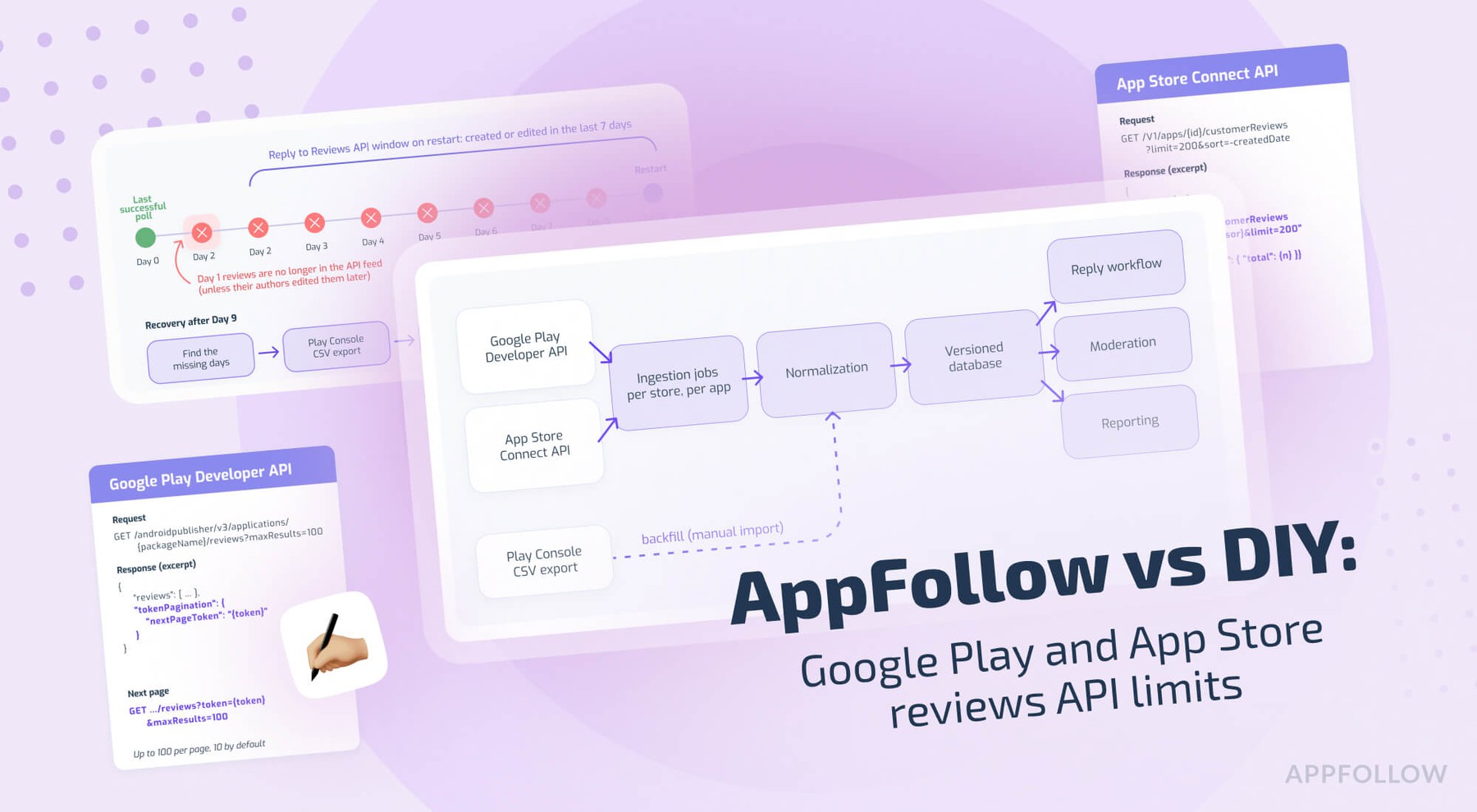
GET /androidpublisher/v3/applications/{packageName}/reviews?maxResults=100
Host: androidpublisher.googleapis.com
Authorization: Bearer {access_token}
Results come newest first, ordered by the latest creation or edit time of each comment. A page holds 10 reviews by default and up to 100 with maxResults, and the response includes tokenPagination.nextPageToken as long as there's another page. Send that value back as the token parameter for the next page, and use reviews.get with a reviewId to re-read a single review right before a reply.
Add translationLanguage=en to get the translation in text and the original in originalText, handy when the support team reads English and little else.
The seven-day window: what happens to older reviews?
Google's guide is direct about it: you can retrieve only reviews that users created or modified within the last week. For anything older, Google's answer is the CSV review export in Play Console.
The window applies to the API feed only. Play Console keeps the app's full review history and exports it, and any system that stored reviews during the window keeps its own copy with no expiry.
The eight-day outage is such a classic failure. Say the ingestion job dies on a Friday at 6 p.m., and nobody notices for eight days. On restart, reviews.list returns what users created or edited in the last seven days, so reviews from the first day of the outage no longer appear in the API unless their authors edited them later in the week. A review edited during the outage arrives in its latest form, and the earlier text never reaches your system through this feed.
Retries can't recover that day. Recovery is a separate procedure:
- Compare the last successful checkpoint with the restart time and log the missing interval as an incident.
- Pull the Play Console CSV export for the months that contain the missing days.
- Import the rows with the same normalization as API records, then dedupe against API data, checking which identifiers the export carries before you choose a match key.
- Verify per-day counts against the export, and treat matching daily totals as the condition for closing the incident.
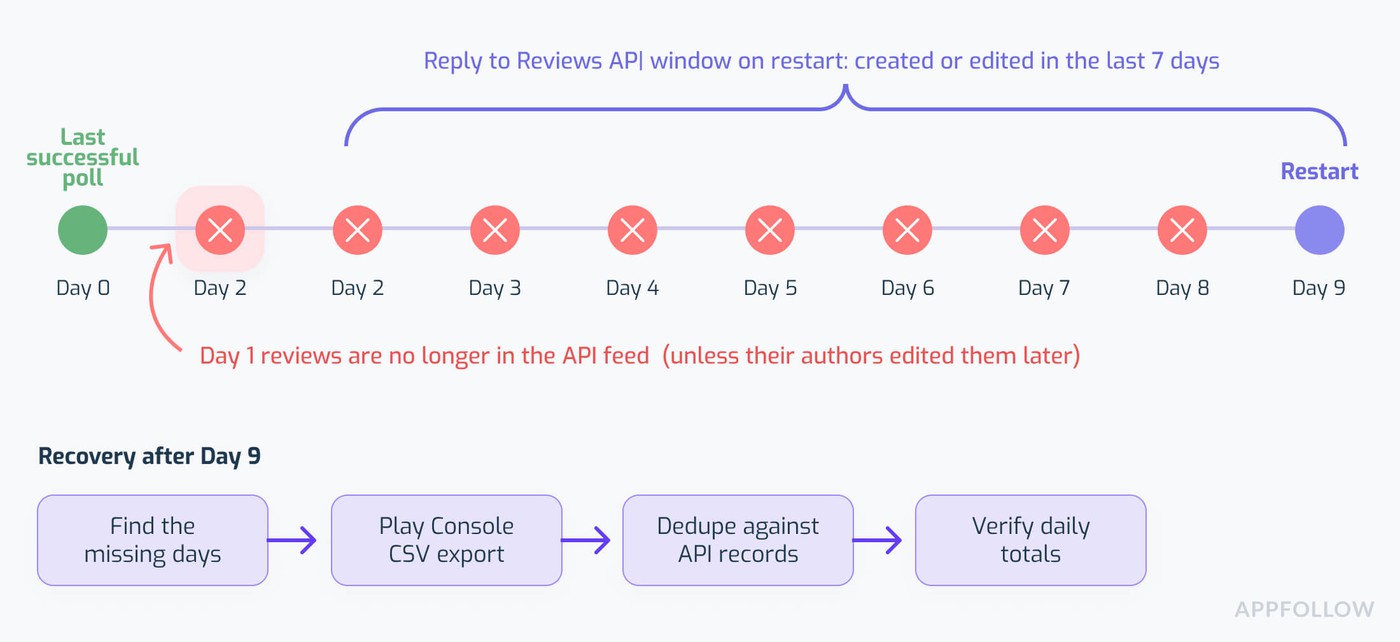
A long outage leaves days recoverable only through the Play Console CSV export.
Star-only ratings never reach the Reply to Reviews API
Google states two coverage rules plainly. The API serves feedback for production versions only, with alpha and beta feedback left to Play Console, and a rating without a comment is not accessible through it at all.
So a dashboard built from reviews.list is a list of written reviews, and its average star value describes people who wrote something. Rating totals, trends and per-country rating history need their own source, such as Play Console rating reports or a provider with console access. Label any chart built on this feed as written reviews, so nobody in a meeting reads it as the app rating.
Replies, character limits and quotas
The reply call is one POST per review, documented in the reviews.reply reference:
POST /androidpublisher/v3/applications/{packageName}/reviews/{reviewId}:reply
Host: androidpublisher.googleapis.com
Content-Type: application/json
{"replyText": "Thanks for the report. Version 5.2.1 fixes the login crash."}
The replyText field allows at most 350 characters, and a longer reply returns 400 Bad Reply Request. Google strips well-formed HTML tags and leaves them out of the count, and plain text is the safe bet anyway. The quotas apply per app: 200 GET requests an hour and 2,000 POST requests a day, with a form for an increase.
Those quotas are request budgets for calls. How many reviews you can see comes from the seven-day window, which is a separate rule.
Google notifies the user after your first reply to a new or edited review. If you update that reply later, the user gets no new notification unless they edited their review in the meantime. Google's guide also discourages automated replies posted with the plan of fixing them by hand later, and the notification rule explains why: the auto-draft is the version that pinged the user.
Run a fresh reviews.get right before the POST and check length and review state against it, so the reply answers the current version of the review.
App Store reviews API: different authentication, pagination and reply behavior
App Store Connect exposes customer reviews and developer responses for the apps in your App Store Connect team, and its tokens, paging, and response lifecycle each work differently from Google Play.
Authentication: short-lived JWTs signed with ES256
Every request carries a JWT you sign yourself with ES256, using the private key you downloaded from App Store Connect. According to Apple's token guide, team keys put the issuer ID in iss, individual keys use sub set to user with no iss, and both need kid in the header and aud set to appstoreconnect-v1.
Apple rejects most tokens with a lifetime over 20 minutes. Scoped, GET-only tokens can last up to six months for a short list of resources, and customer reviews aren't on that list, so a review collector signs a fresh token at least every 20 minutes.
The engineering cost here is small and permanent: a .p8 key in a secrets manager, a token cache that renews before expiry, revocation when someone leaves (ask anyone who rotated a key the week after its only admin left the company), a key role that permits responses (Admin or Customer Support), and separate handling for 401 and 403 errors so an expired token and a missing permission don't look like the same outage.
Reading customer reviews: limit=200 and cursor links
The list all customer reviews for an app endpoint looks like this:
GET /v1/apps/{id}/customerReviews?limit=200&sort=-createdDate
Host: api.appstoreconnect.apple.com
Authorization: Bearer {signed_jwt}
Each review carries rating, title, body, reviewerNickname, createdDate and territory, plus a relationship link to your response. Filters exist for territory and rating, sorting works on createdDate and rating, and exists[publishedResponse]=false returns the unanswered queue directly. A second endpoint, /v1/appStoreVersions/{id}/customerReviews, scopes the list to one app version, which helps with release-level triage.
Pagination follows links.next, a full URL with a cursor, until a page comes back without one. That makes two pagination adapters and two checkpoint formats in one codebase. Apple's example response also includes meta.paging.total (4,326 reviews for the sample app), which gives a collector a cheap completeness check.
Apple documents no seven-day window for this endpoint, so Apple recovery after an outage is usually a cursor re-crawl with no CSV step.
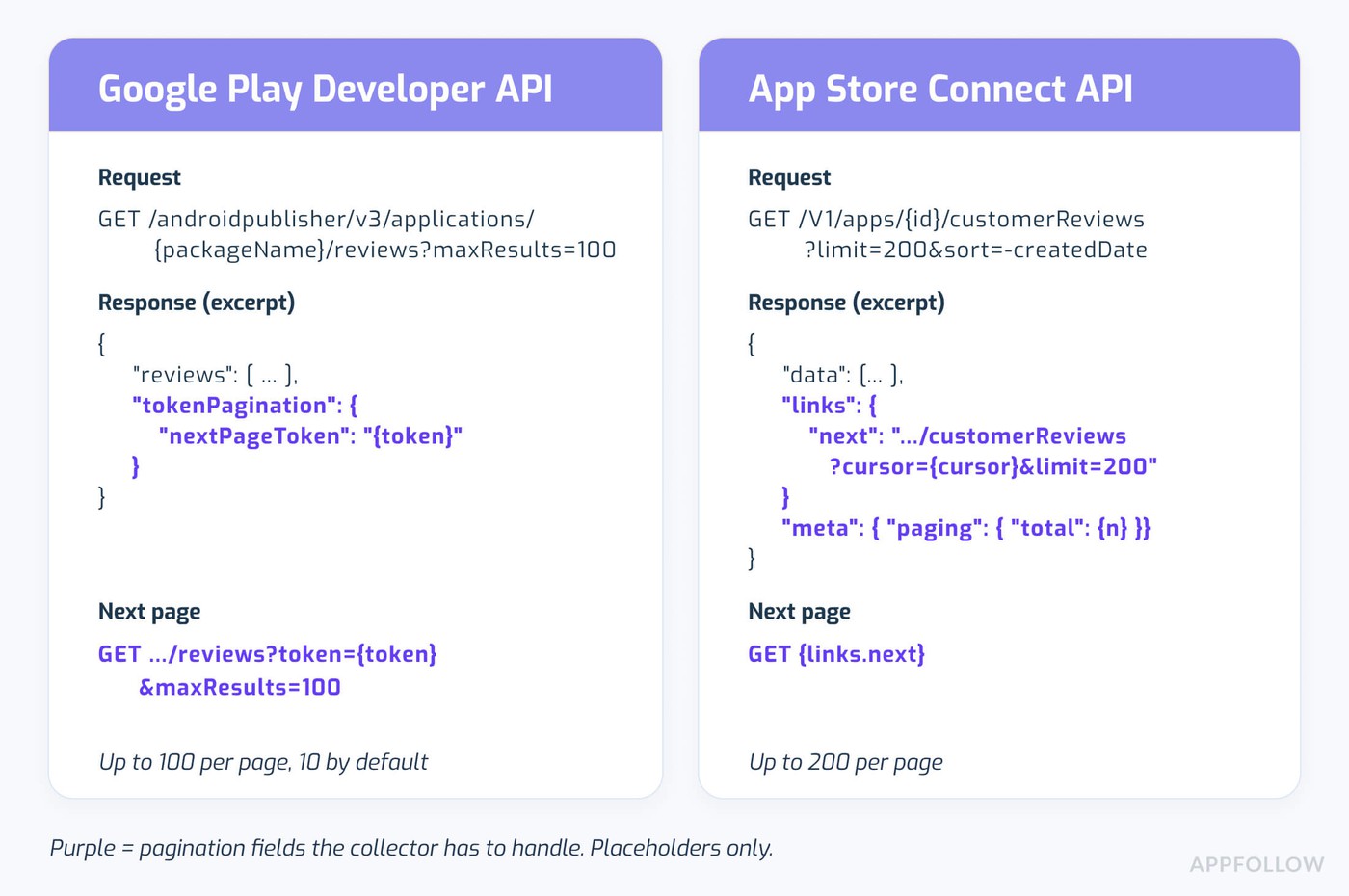
Two pagination contracts mean two checkpoint formats in one collector.
Each App Store review holds one public developer response
Apple allows at most one response per customer review. In the customer review responses API, POST /v1/customerReviewResponses creates a response or replaces the existing one, a DELETE removes it, and the response object carries its own state. App Store Connect help adds a detail that matters for teams: edit rights come from the role, regardless of who wrote the original response.
Picture two agents and a retrying worker on the same one-star review. Agent A publishes a careful reply at 10:02 a.m. A worker retry queued at 10:01 a.m. fires at 10:03 a.m. with an older draft, and that draft becomes the public response, since each POST replaces the previous response.
Read the current response before every POST, compare it with what your system last stored, and refuse the write on a mismatch. Keep drafts in your own database, limit publish rights to named people and services, and log who published what and when, because App Store Connect shows the current text and an edited notation and very little history.
Accepted, pending, and public are three different reply states
Apple's Respond to reviews help page says responses can take up to 24 hours to appear on the App Store and show as pending in App Store Connect until then. A system that marks a reply as done on the API acknowledgment will overstate reply coverage for up to a day. Track three states per response (accepted, pending, publicly visible), re-read the state on a schedule, and count a reply as done only in the last state.
Google Play vs. App Store reviews API: the differences your code must handle
Contracts differ on nearly every point that matters to a collector. This table pairs each difference with its consequence for a DIY project.
Dimension | Google Play Developer API | App Store Connect API | DIY implementation consequence |
Authorization | OAuth client or service account with the Reply to reviews permission | JWT signed with ES256, 20-minute maximum lifetime for review requests | Two credential lifecycles and two renewal paths |
Review endpoint | reviews.list and reviews.get, keyed by package name | customerReviews list, keyed by Apple app ID | Two collectors or adapters |
Page traversal | nextPageToken sent back as token; 10 per page by default, 100 max | links.next cursor URL; limit up to 200 | Two checkpoint formats |
Historical access | Reviews created or modified in the last week; Play Console CSV export for older history | No documented one-week window on this endpoint | Separate backfill strategy per store |
Coverage | Written reviews on production versions; no star-only ratings | Customer reviews for apps in your team | Rating history needs a separate source |
Reply changes | Reply can be updated any number of times | One response per review; each POST replaces it | Versioning and an audit trail |
Reply publication | User notified on the first reply to a new or edited review | Public display can take up to 24 hours | Publish state and notification logic |
Abuse reporting | No Report a Concern method in the reviews resource | No Report a Concern method in the customer review endpoints | Separate moderation workflow |
Competitor reviews | Only apps in your own account | Only apps in your own team | Separate public or licensed source, subject to terms |
A missing method in this table means the documented review endpoints lack it, and the store consoles or other sources may still offer an option. If you wrap both stores in one internal interface, test the reply rows first, since reply bugs are the public ones.
Five production problems after the first API integration
A custom review integration in production tends to fail in five predictable places, and the API call itself is rarely one of them.
Polling needs completeness checks and a backfill path
Back to the eight-day outage for a second. Hourly retries and a full error log did nothing for the missing day, because Google had dropped it from the API feed by then.
Completeness needs its own metric: received reviews per app per day against a rolling baseline, an alert when the last successful checkpoint is more than 48 hours old (less than a third of Google's window), and a written runbook for the CSV path. Give that metric an owner and a dashboard of its own, separate from job success.
Reviews and replies change after ingestion
Google keeps one reviewId per user per app, so an edited review arrives under the same ID with new text, a new rating, and a new lastModified timestamp. The API returns the current snapshot, and the earlier text exists only in your own records, if you kept a copy. Apple's response model has the same issue for replies: each new response replaces the visible one.
Any analysis of rating changes after a reply, or of who told a user what, depends on versioned records. A minimal normalized record might look like this (our suggested internal design; neither store publishes this schema):
review_snapshot
store google_play | app_store
app_id package name or Apple app ID
review_id store review ID
observed_at when your collector saw this version
review_updated_at store timestamp for this version
review_text, rating
reply_text, reply_status, reply_updated_at
ingestion_status api | csv_backfill | manual
Write a new row whenever review_updated_at or reply_updated_at changes, and never update rows in place.
Blind auto-replies are a brand risk
An AI draft can include a wrong version number, a refund promise nobody approved, or the user's email address copied from the review text. On Google Play, the first published reply to that review version triggers the notification, so a bad auto-reply is the one the user reads, even if a human fixes it ten minutes later.
Neither store's API docs ban AI-written replies. The risk is quality and privacy, plus a published state and a notification with no undo.
The guardrails are dull and necessary: an approval step for anything under four stars, length and PII checks before the POST, a per-app daily cap set lower than the store quota, a lock per review ID so two writers can't race, logs of every draft and publish, and a rollback plan. On Google Play that plan means posting corrected text, since the reviews API has no delete method.
Support needs an owner for every review
Two agents and one automation see the same edited one-star review at 9 a.m. Who owns it, which draft is current, what stops a double reply, and how does anyone confirm the response went live? JSON from two stores answers none of those questions.
The feature list for support is long and boring: assignment, tags, language routing, helpdesk handoff to Zendesk or Salesforce, priority queues, templates, statuses, staff permissions, audit logs and reporting. It's also the feature list of most review management software, and each item is a small product with its own data model and maintainer.
Analytics need stable history and fixed definitions
Release-level trends, reply time, response coverage, issue taxonomies, and the effect of a reply on ratings all depend on consistent history and fixed definitions. If the Google history starts on the day the collector shipped and the Apple history goes back years, a cross-store chart compares two different things.
Reply effect needs a stated window and a rule for rating edits that happen without any reply. AppFollow's version, as one reference, counts only rating updates that follow a developer reply within three months. Write your definitions down before the first dashboard, and version them like code.
What's missing from the official reviews APIs
Three review-management jobs have no method in either store's documented review endpoints. Each still has another option in a store console or another data source.
Reporting spam: no Report a Concern endpoint in the review APIs
Google's reviews resource has list, get and reply. Apple's customer review responses cover get, create or update, and delete. Neither family has a Report a Concern operation.
Both stores still take reports through their own consoles, so this is an API limitation only, and abuse reporting in a DIY build means a person working two consoles or a separate integration.
This is one job where a maintained platform covers something with no public endpoint. AppFollow's Report a Concern sends reports to App Store and Google Play from the Reviews Feed and tracks each one through pending, submitted, declined (Google Play only), satisfied and deleted statuses. It needs a data connection per store, and AppFollow submits at most 15 reports per app per day, queuing the rest for the next day, because the stores block heavy reporting without publishing their thresholds. The store still makes every removal decision.
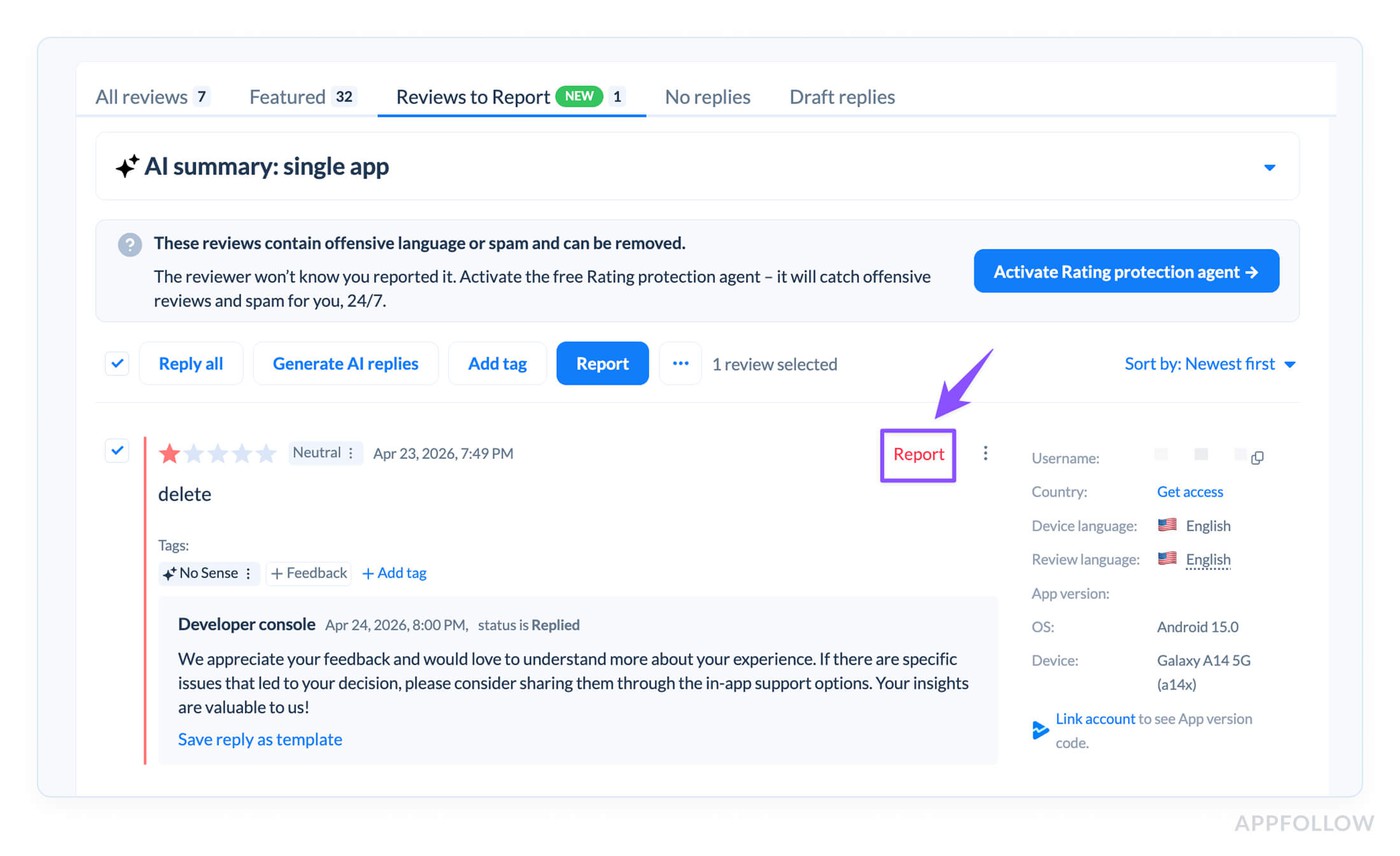
Owner-authorized store APIs return no competitor reviews
The Google Play Developer API and App Store Connect API return reviews for apps in your own account, with no parameter for someone else's app. Public reviews for other apps can sometimes come from public pages, feeds or licensed data providers, each with its own availability and terms, so a legal check comes before any ingestion code.
For competitor apps, AppFollow tracks ratings today, and the competitor Reviews Feed is in closed beta, available on request.
Cross-store history, tagging, and support workflows are separate software
Consistent multi-store reporting, auto-tagging, alerts, and historical analysis need design work of their own, or a tool that ships them. Each store console covers parts of this for its own store. The review endpoints alone provide raw records and replies for one store at a time.
Checklist for a production-ready DIY review pipeline
This is the minimum for a two-store pipeline with daily support use, in rough build order:
- Keep each store's credentials in a secrets manager, with the narrowest role and a tested routine for rotation and revocation.
- Schedule collection per app, with independent page cursors and a persisted checkpoint after every page.
- Write immutable snapshots for every review edit and reply change, keyed by store, app and review ID.
- Detect missing intervals automatically and keep a documented CSV backfill path for Google Play.
- Validate every outgoing reply for length, language, formatting and personal data, with idempotency keys, a fresh state check and human approval before the POST.
- Route abuse reports through a moderation workflow, and give the team assignment, permissions, an audit trail and a helpdesk handoff.
- Monitor retries, failures, timestamps and quota use, and QA generated reports against the stores' own numbers once a month.
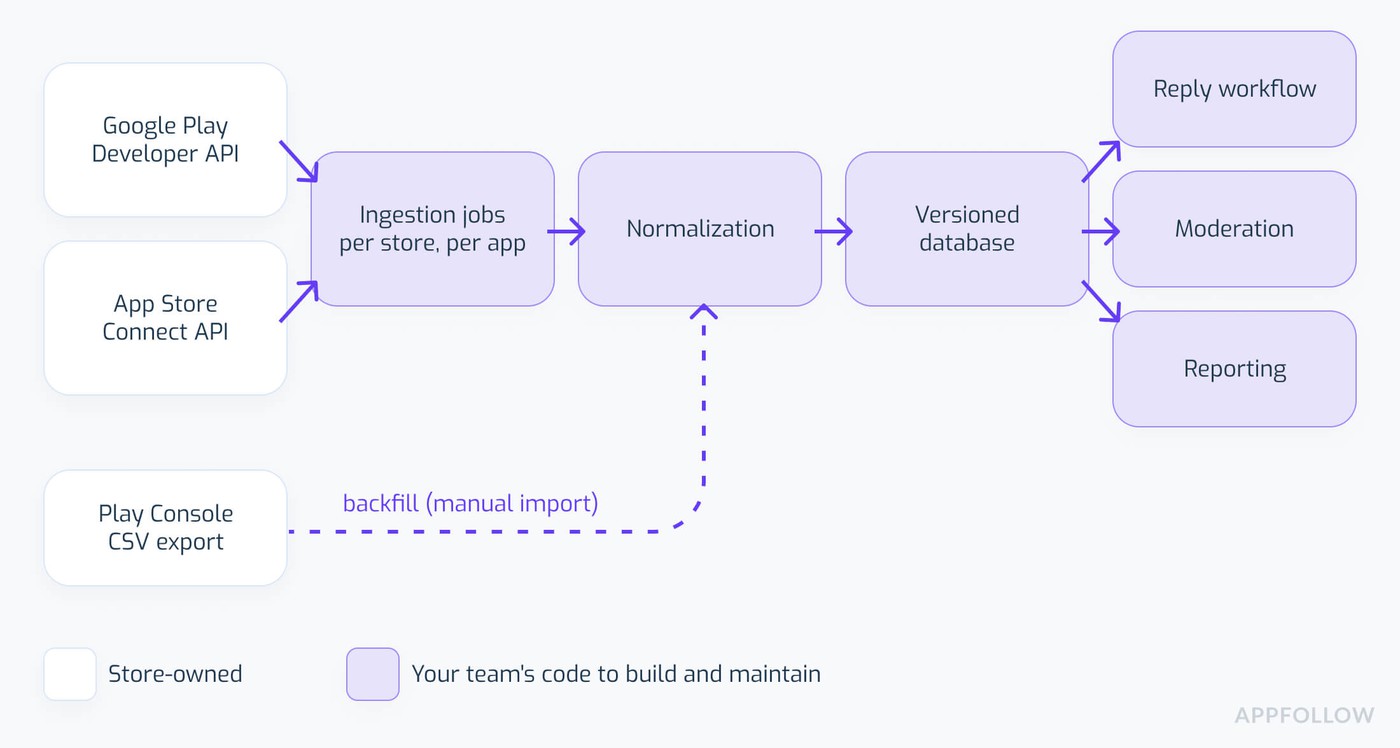
Every box after the store APIs is your team's code.
You can build all seven. The useful question is whether your team wants to own this pipeline as a product, with on-call duty and a roadmap.
DIY store APIs vs. AppFollow API: which parts should you build yourself?
The first question is ownership: does your team want to own the store connectors and history, or just the interface and business rules? For a small script on one app, the official APIs may cover everything.
Option 1: use the official APIs directly
Best fit: one store, narrow internal use, a named engineer as owner, and modest needs for history and reporting. You get full control of the implementation, along with the maintenance, the data limits from earlier sections, and every future store change.
Option 2: keep your product and use AppFollow API for data
AppFollow API v2 exposes reviews, ratings history, Google Play Console ratings, replies, tags, reply statistics and, as an Advanced API method, Report a Concern, all through one authenticated API at api.appfollow.io. The API overview documents rate limits of 1,000 requests per hour per token and 10,000 per hour per account. API credits reset on the 1st of each month, and method availability depends on the subscription.
The two calls a review integration needs most are short:
GET /api/v2/reviews?ext_id={ext_id}&page=2
Host: api.appfollow.io
POST /api/v2/reviews/reply
Host: api.appfollow.io
{"ext_id": "{ext_id}", "review_id": "{review_id}", "answer_text": "..."}
Per the Reviews method reference, a query by ext_id has no cap on the number of reviews and supports pagination at 100 reviews per page, and the Review Reply reference lists ext_id, review_id and answer_text as the required fields. Each of the two calls costs 10 credits. History depth for a newly added app depends on the plan's backfill, so check that number before you retire your own collector.
A realistic setup: AppFollow API feeds your internal dashboard or CRM, your rules or your own model draft the replies, a human approves each one, and the Review Reply method publishes the approved text.
The API doesn't mirror every web UI feature, and the Google and Apple reply rules from earlier sections stay in force.
Option 3: use the AppFollow Reviews Feed or MCP and skip the custom UI
The ready-made workspace suits teams that want a reviews feed with replies, templates, tags, filters, integrations and Report a Concern on supported plans. AI-first teams have a third option in AppFollow MCP, which connects Claude, ChatGPT, Gemini, Codex and other MCP clients to the same reviews, ratings and ASO data as the dashboard and API.
Setup uses Google OAuth or SSO with no API keys, MCP calls bill to workspace API credits, and replies post only after your approval. The walkthrough on how to reply to app reviews at scale with the AppFollow MCP shows the full flow. Preferring an API to a dashboard is a reasonable engineering call, and AppFollow supports both options.
cta_get_started_purple
Which starting point fits your use case?
Match your use case to a row in this table.
Use case | Better starting point | Why |
Prototype for one app with the latest written reviews | Official store API | Narrow, achievable scope |
Google Play feedback older than one week | Play Console CSV export, or a maintained provider | Seven-day API retrieval window |
Two stores with shared reply workflows and audit logs | AppFollow, or a proper internal platform with an owner | Different auth, paging and reply semantics |
Internal CRM already built, missing connectors and history | AppFollow API | Keeps your own UI and logic |
Competitor feedback tracking | Assessment of public, licensed or provider data | Owner-authorized endpoints exclude competitor apps |
AI-first support operations | AppFollow MCP, subject to methods and permissions | AI works with a maintained data source |
Proprietary requirements and a strong data engineering team | DIY or hybrid | Existing capability lowers the marginal cost |
Feature requests tend to turn a first-row project into a third-row project, one request at a time. The usual trigger for a rethink is the first incident where nobody can say whether reviews went missing, or the first public reply someone has to explain to legal. Cost crossover values are left out of this table on purpose; developer hours and three-year totals depend on team size, and our build vs buy app review management tool breakdown models them separately.
Final verdict: the store APIs give you data, and the system is your job
Use the official APIs when the scope is small and a named engineer owns the collector. They can power a useful internal tool. Once the team needs uninterrupted ingestion, preserved history, safe replies from several people, and a moderation process, the script has grown into a product with its own backlog.
Preservation, gap recovery, reply safety, moderation, and the support operation are decisions your team makes, with or without a vendor. Before you build every connector yourself, compare that ownership commitment with two alternatives: your own workflow with AppFollow API for collection and history, or the work run in AppFollow directly.
The AppFollow API overview lists the v2 methods with links to their credit costs, and a free AppFollow trial works with your own apps.
FAQ
Can I retrieve all Google Play reviews through the API?
No. The Reply to Reviews API returns written reviews that users created or modified in the last week. Older history comes from the CSV review export in Play Console, and a DIY pipeline needs a documented backfill path for it (see the eight-day outage example in the Google section).
Does the Google Play reviews API return ratings without written reviews?
No. Google states that a rating without a comment is not accessible through the Reply to Reviews API. A dashboard built on that feed describes written reviews only, so overall rating totals and trends need Play Console reporting or a provider that imports console data.
How do I authenticate to the App Store reviews API?
Sign a JWT with ES256 using an App Store Connect API key, with kid in the header and iss (or sub for individual keys), iat, exp and aud set to appstoreconnect-v1 in the payload. Apple rejects review requests whose token lifetime exceeds 20 minutes, so long jobs renew tokens on a schedule.
Can I reply to App Store and Google Play reviews automatically?
Both APIs have reply operations, and neither documentation bans automation. Google notifies the user only on the first reply to a new or edited review and discourages auto-replies meant for later manual fixes. Apple responses replace each other and can take up to 24 hours to appear, so keep human approval and state checks.
Can I report fake reviews through the Google Play or App Store review APIs?
Not through the documented review endpoint families, which have no Report a Concern method. Both stores accept reports through their consoles, and platforms such as AppFollow submit reports from a shared reviews feed and track the status, with removal decisions left to the store.
Do the official store APIs provide competitor reviews?
No. The Google Play Developer API and App Store Connect API return reviews for apps in your own account. Competitor reviews need a public or licensed source with terms that allow your use case, and AppFollow's competitor Reviews Feed is in closed beta as of October 20, 2026.