Mobile Game Review Management: The Complete 2026 Guide

Table of Content:
- TL;DR: the gaming review-management lifecycle
- Key insights: what makes gaming reviews different
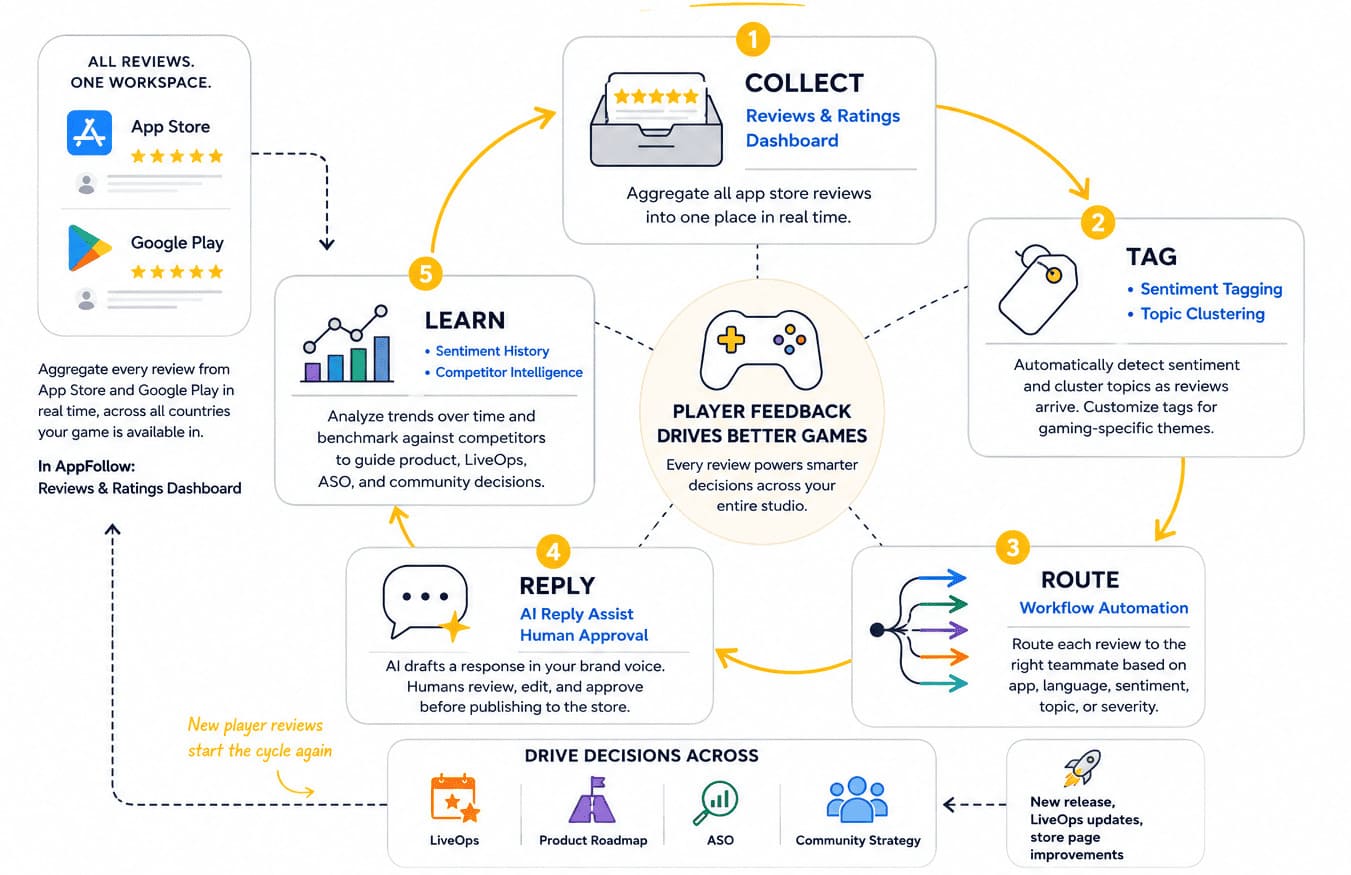
- The mobile game review management lifecycle in five steps
- The 8 mobile game review types and how to respond to game reviews
- Handling gaming fraud reviews and chargeback aftermath
- Review automation for mobile games: what to automate and what not to
- How to improve app store rating game by game
- Turn thousands of game reviews into a queue the right team can act on
- Frequently asked questions about mobile game review management
If you run community management, growth, or ASO for a live game, mobile game review management is already part of your daily rhythm, whether or not anyone calls it that. Open the app store reviews for games after a major update and the pattern repeats itself. Two studios ship a similar patch. One claws its rating back within days while the other spends three weeks digging out, and the difference is rarely the patch itself. It comes down to how each team works its reviews once the ratings start sliding.
Reviews stop being "support tickets" the moment you read them as a stream instead of a queue. They are often the first place players tell you matchmaking feels rigged, an economy change missed, ads got too aggressive, or the new event finally landed. Catch those signals early and your community manager becomes an extension of LiveOps and product. Miss them, and your App Store or Google Play rating starts reflecting the problem long before your retention dashboard does.
This guide is the review management framework our team uses when onboarding mobile game studios to AppFollow, shaped by real release cycles and high-volume player reviews. We will walk through the five-step lifecycle, eight response templates, how to respond to game reviews without sounding scripted, and the fraud and chargeback cases that need a workflow of their own.
TL;DR: the gaming review-management lifecycle
Every dependable mobile game review management process runs on the same five steps. Skip one and the system stalls: collect without tagging and trends vanish into noise; reply without routing and specialists burn time on the wrong issues. Treat it as a repeatable game feedback management workflow, not a queue to clear before lunch.
- Collect. Pull every App Store and Google Play review into one workspace so nothing slips between stores or regions.
- Tag. Sort each review by sentiment and topic (bug, balance, monetization, fraud, praise, feature request) so patterns surface early.
- Route. Send each review to the right owner by app, language, severity, or topic instead of triaging by hand.
- Reply. Draft, review, and publish, with AI-assisted drafts and human approval before anything goes live.
- Learn. Feed sentiment history and competitor signals back into product, LiveOps, and ASO decisions.
The rest of this article is the runbook for executing all five steps for a mobile game.
Key insights: what makes gaming reviews different
Most review advice treats a game like any other app. That assumption breaks the moment a balance patch or a limited-time event lands, because you are reading a live community, not a static customer base.
Gaming review streams behave differently in ways that change the workflow. Volume climbs fast around launches and events, often far above what a comparable non-gaming app sees per active user.
A single economy tweak can flip sentiment before revenue or retention reports notice anything. And players organize: they arrive in waves, quote each other, and sometimes coordinate.
The fastest teams do not read one review at a time. They spot the cluster, separate signal from noise, and route each issue to the team that can fix it.
Here is what experienced game teams look at first, and why each pattern matters.
Watch for | Why it matters |
Gameplay complaints as data | Keyword clusters show where players actually get stuck, from onboarding to matchmaking to late-game progression. |
Monetization backlash | Sentiment around gacha, ads, or Battle Pass pricing usually shifts before revenue does. |
Fraud and coordinated bursts | Repeated wording, "account hacked" reports, and chargeback claims arriving together signal something other than ordinary churn. |
Positive praise | Replying to standout 4- and 5-star app store reviews for games is the cheapest community-loyalty lever most teams ignore. |
Feature requests | Tracked over months, they turn reviews into an always-on player research panel. |
The proof that this loop pays off is measurable. Toca Boca, the studio behind Toca Boca World, lifted its reply rate from 36.77% to 71.76% and added 26.7K stars to its ratings after replies in a single half-year, moving its App Store rating from 3.9 to 4.1 while replying to 498% more reviews year over year, according to AppFollow's Toca Boca case study.
None of that is busywork. Reply coverage behaves like a rating lever you can watch move in the dashboard from one half-year to the next.
"We work with hundreds of gaming customers, and the pattern is remarkably consistent. Game reviews are louder, faster, and far more community-driven than reviews for most other app categories. A balance update can reshape sentiment overnight. That's why gaming teams need workflows built around player behavior, not generic customer-support playbooks."
Yaroslav Rudnitskiy, Senior Professional Services Manager (ASO) at AppFollow
The mobile game review management lifecycle in five steps
Every mobile game review management workflow reduces to the same five steps. The dashboards and tools change, the shape does not. Get the cycle right and game feedback management becomes a repeatable operating system instead of an endless queue.
Step 1: collect every review in one place
Collection is the step everything else depends on. Pull every review from the App Store and Google Play into one workspace, across every country where the game ships.
AppFollow's Reviews and Ratings dashboard becomes the collection layer after a one-time connection to App Store Connect and Google Play Console, so new reviews land in a single queue instead of dozens of native consoles. If you manage ten or more titles, this is where hours are either lost or reclaimed: jumping between store consoles taxes every step that follows.
Step 2: tag by sentiment and topic
A review without context is hard to act on. Automatic sentiment tagging sorts feedback into positive, neutral, and negative, while topic clustering groups reviews around recurring themes such as bugs, balance, monetization, feature requests, praise, or fraud. Teams can extend that taxonomy with game-specific labels like Battle Pass value, gacha rates, PvP balance, or matchmaking.
Those tags do more than tidy the inbox. They decide who receives each review next, and they build the historical dataset you will lean on months later to tell a trend from a one-off.
Step 3: route to the right owner
Not every review belongs with the same person. A hacked-account complaint should not sit in the product backlog, and balance feedback should not wait in the billing queue.
Workflow automation routes reviews by app, language, sentiment, topic, or severity. A review mentioning "account hacked" can go straight to a fraud specialist, a balance-patch thread reaches the community manager, and positive reviews enter a sampled engagement queue instead of competing with urgent issues.
Good routing keeps specialists on the feedback they can actually resolve.
Step 4: reply with drafts and human approval
Once a review reaches the right owner, it is time to respond. AppFollow's AI reply assistant drafts a response in your game's brand voice, then hands it to the community manager to edit and approve before it publishes.
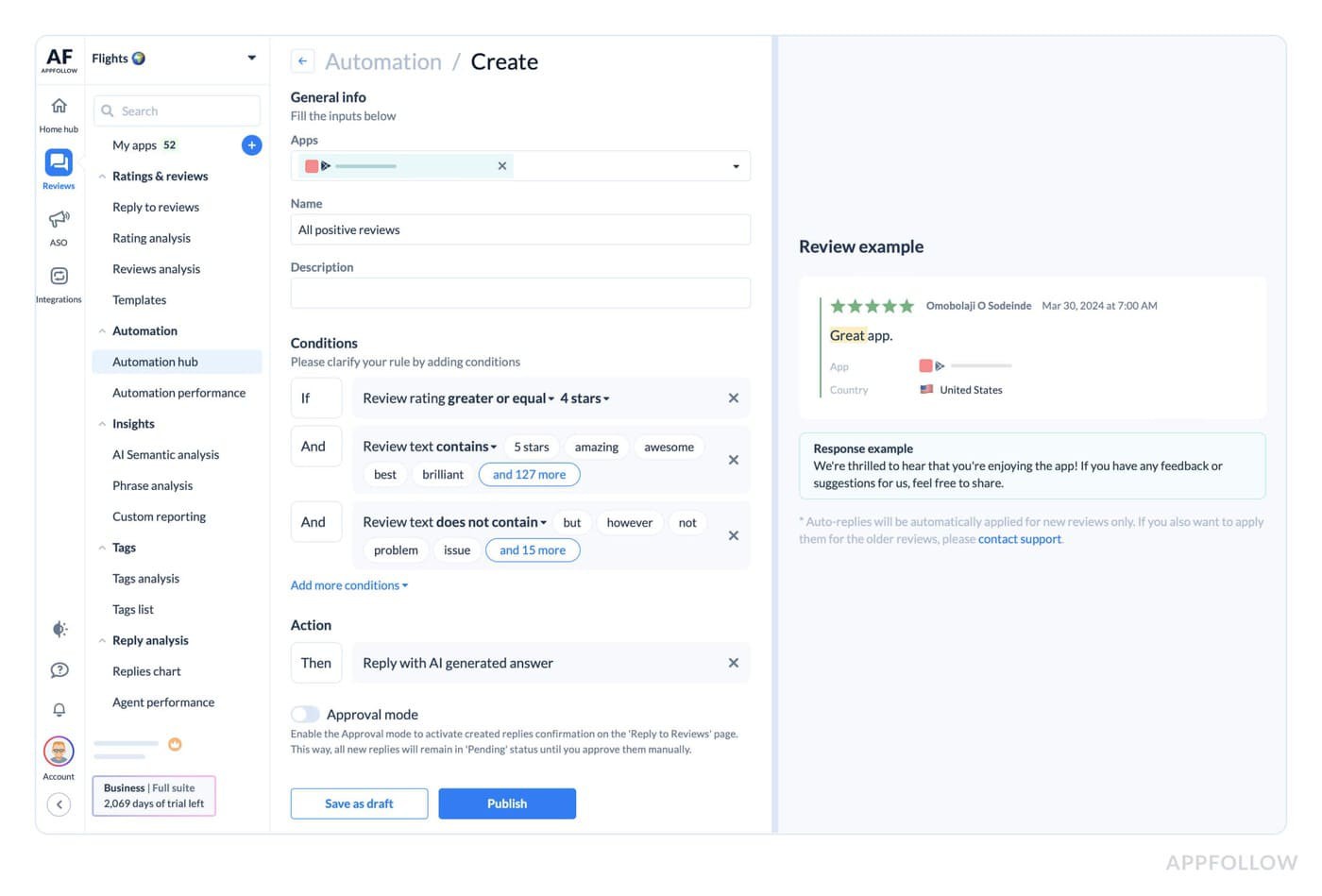
The split is deliberate: the model absorbs the repetitive drafting so a team can hold reply coverage through a busy release window, and the human catch protects tone and accuracy before anything reaches a public listing. Joyteractive, a mobile game developer, reached a 91% reply rate and cut typical reply time to about 55 minutes while removing roughly 35 hours of manual work a month, per AppFollow's Joyteractive case study.
The template library also covers the eight review scenarios in the next section, giving every writer the same starting point without turning replies into copy-paste support.
Step 5: learn from the sentiment archive
The final step is where the workflow starts paying dividends. Over time, sentiment history and topic clusters reveal which themes fade after a fix, which complaints keep returning, and what players praise after an update.
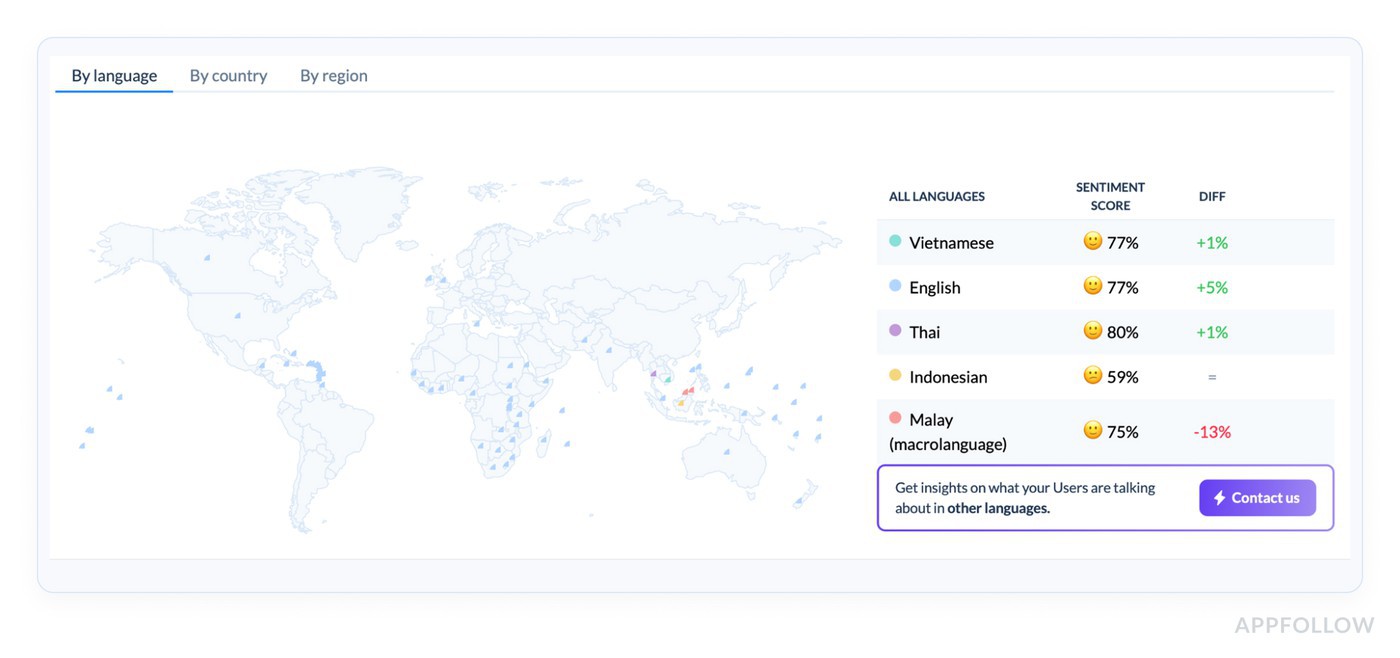
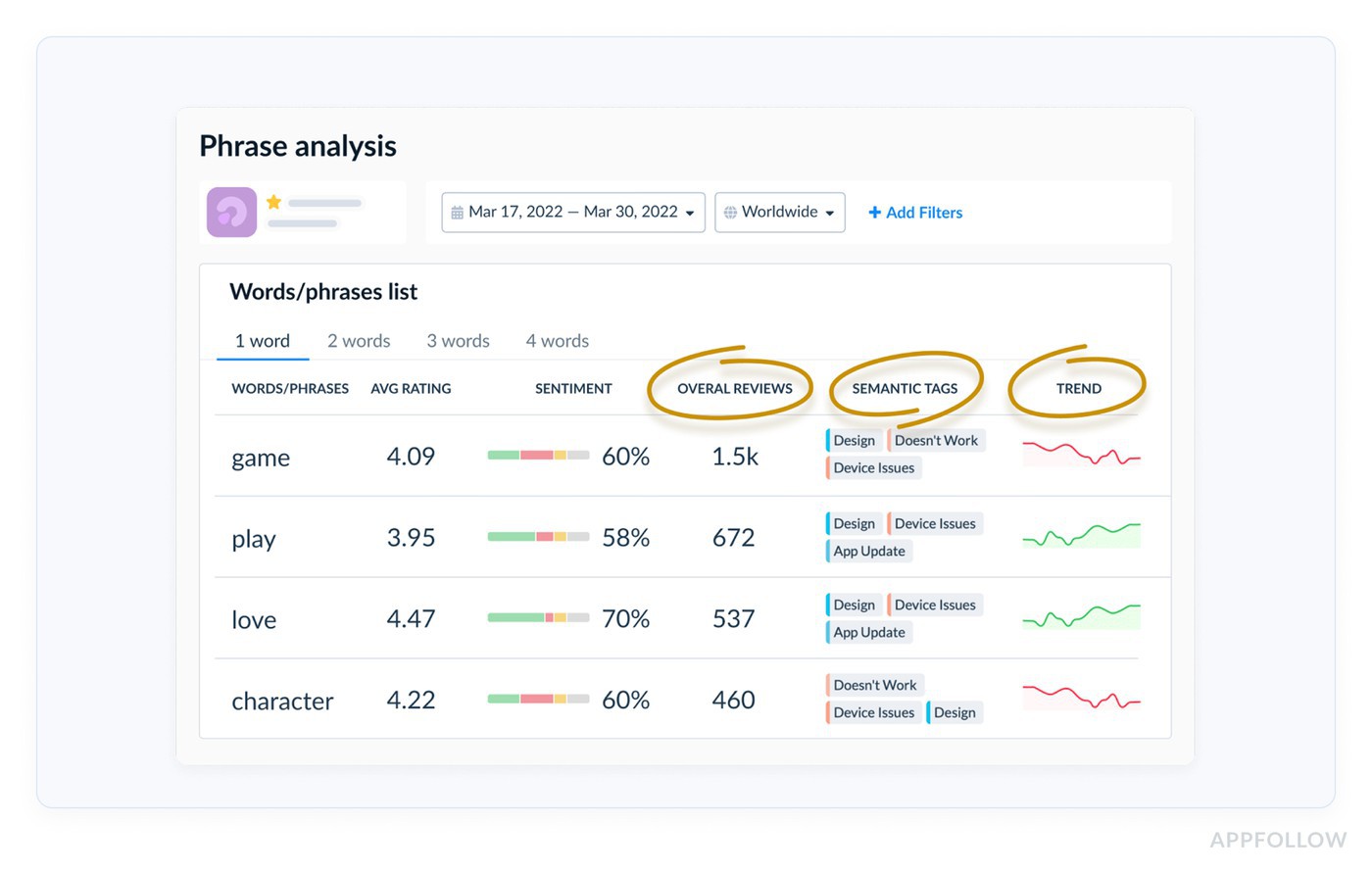
App store reviews for games become an ongoing source of player research instead of a record of old conversations.
Add Competitor Intelligence and you can compare those trends against rival titles fielding the same questions from their own communities. Handled this way, the archive stops being a record of old conversations and starts feeding the next roadmap review.
The 8 mobile game review types and how to respond to game reviews
If you have managed reviews for any live game, most feedback falls into familiar shapes. Crashes. Balance complaints. Feature requests. Praise after a strong event. The wording changes, the underlying issue rarely does.
The eight types below cover roughly nine in ten app store reviews for games on the App Store and Google Play. Each card uses the same six fields: how to identify it, common player wording, the AppFollow tag to apply, a copy-ready template, common mistakes, and a real-game example. If you are working out how to respond to game reviews consistently across thousands of ratings, this is the framework that gives every community manager the same playbook. Nailing negative review response gaming is mostly consistency, not cleverness.
Every template follows one sequence: acknowledge, explain, compensate when appropriate, give a timeline, and sign with a real name. Adjust the wording to your brand voice, keep the structure. It works whether you write the reply yourself or review an AI draft. When a review signals a wider crisis rather than an individual issue, that is the moment to step past a standard reply and publish a public dev letter instead.
Here is the short version before we break each scenario down.
Review type | Common wording | AppFollow tag | Response strategy |
Positive praise | "Love this game." "Best RPG I've played." | Positive, Praise | Thank the player, name the feature they enjoyed, invite them into the community, sign with a real name. |
Gameplay complaint | "Controls don't work." "This boss is impossible." | Negative, Gameplay | Acknowledge the mechanic, explain the next step, give a timeline, offer support or a small reward if it fits. |
Balance patch complaint | "The nerf ruined the game." "[Character] is useless now." | Negative, Balance | Explain the reasoning, link to patch notes, avoid debating the design decision. |
IAP / monetization | "Pay-to-win." "Battle Pass isn't worth it." | Negative, Monetization | Recognize the concern, split pricing feedback from purchase issues, send billing problems to support. |
Bug report | "Game crashes." "Lost my progress." | Negative, Bug | Confirm the report, request device and version, share the target fix version, follow up after release. |
Server outage | "Can't log in." "Disconnected every match." | Negative, Outage | Explain what happened, give the outage window, outline compensation, link the status page. |
Feature request | "Please add controller support." "Needs PvP mode." | Neutral/Positive, Feature request | Thank the player, log the request, avoid promising delivery, point to dev updates. |
Fraud / chargeback | "Account hacked." "Charged twice." "Banned unfairly." | Negative, Fraud | Move to a secure support channel, keep account details private, escalate to the fraud team. |
1. Positive praise
Negative reviews demand attention because they point at problems. Positive reviews are easy to postpone, which is exactly why so many studios skip them and quietly leave value on the table. Players who write a detailed 4- or 5-star review are often your most loyal audience, and a specific reply reinforces that relationship instead of letting it cool.
The best responses do not try to be clever. They prove someone read the review. Name the character the player praised, reference the event they enjoyed, acknowledge the exact improvement they called out. Those details also flag the features worth highlighting in future LiveOps campaigns and store creatives.
Field | Guidance |
How to identify | A 4- or 5-star review naming a specific character, mechanic, event, chapter, soundtrack, or feature the player enjoyed. |
Common wording | "Love this game." "Best strategy game I've played." "The new guild event is fantastic." "Two years in and it keeps getting better." |
AppFollow tag | Sentiment: Positive. Topic: Praise. Optional: character, LiveOps event, progression, PvP, onboarding, art, soundtrack. |
Common mistakes | Ignoring praise because support is buried in complaints. Posting a generic "Thanks for your review!" with no specifics. Sounding corporate. Offering in-game credit publicly when no policy exists. |
Genshin Impact community managers routinely reference the reviewer's favorite character, event, or questline instead of generic appreciation, which keeps players engaged with future updates.
Copy-ready response template:
Thanks so much for the kind words, Alex. I'm really glad the Dragon Arena event landed well. I'll pass your feedback to the team that built it. If you'd like an early look at what's next, we share previews in our Discord: [link]. See you in the next event.
Emma Carter, Community Manager
2. Gameplay complaint
Gameplay complaints deserve quick attention because they usually come from players who still want to enjoy the game. They are frustrated, not gone. A player who says a boss feels unfair or controls are unresponsive is often asking whether anyone is listening. Answer well and you have a real chance of winning them back. Turn it into a debate about design and you will almost always lose.
Two things separate a reply that lands from one that does not: specificity and momentum. Acknowledge the exact mechanic, explain what is happening if you can, and give a realistic timeline when a fix is already planned. If the issue genuinely spoiled the session, a small goodwill gesture often does more than another paragraph of explanation. This is the everyday core of negative review response gaming teams either handle well or fumble in public.
Field | Guidance |
How to identify | A 2- or 3-star review describing a specific gameplay problem: a difficulty spike, unresponsive controls, a confusing mechanic, broken progression, or an unbeatable level. |
Common wording | "Controls don't work." "This boss is impossible." "The mechanic is broken." "I can't get past level 83." |
AF tag | Sentiment: Negative. Topic: Gameplay. Optional: difficulty, controls, boss fight, matchmaking, progression, tutorial. |
Common mistakes | Defending the design instead of acknowledging the frustration. "We'll look into it" with no timeline. Skipping a goodwill gesture when the issue clearly hurt the session. |
For example, Homescapes regularly acknowledges the exact level a player names and pairs the reply with a small reward, a pattern that brings frustrated players back.
Copy-ready response template:
Thanks for flagging this, Jordan. We hear you on the controls during the Frost Fortress boss fight. The team is already investigating, and we're aiming to include adjustments in Update 4.8, planned for next week. Send your player ID here and we'll add a small in-game reward for the trouble: [support link].
Emma Carter, Community Manager
3. Balance patch complaint
Balance updates always create winners and losers. Even a patch that improves long-term health will anger players who watched their favorite character or strategy get weakened. A spike in low ratings after patch day does not mean the update failed. It means players are adjusting and want to understand why.
This is one of the few review types where transparency beats apology. If the change was intentional and backed by data, explain the reasoning. Players may still disagree, but they accept a change far more readily when they see it was not arbitrary. A short explanation linked to patch notes or a dev blog builds credibility without turning the reply into a design argument.
Field | Guidance |
How to identify | A sudden cluster of 1- to 3-star reviews right after a patch, naming specific characters, weapons, maps, or modes and tying the frustration to the update. |
Common wording | "[Character] is trash now." "The nerf ruined the game." "Why did you touch ranked?" "Unplayable after the patch." |
AppFollow tag | Sentiment: Negative. Topic: Balance. Optional: character balance, weapon tuning, ranked, PvP, meta shift, patch feedback. |
Common mistakes | Apologizing for a change the team still believes is right. Refusing to explain the reasoning. Claiming the team is "just experimenting" when the change was clearly data-driven. |
League of Legends, for instance: Wild Rift and Teamfight Tactics link players to detailed patch notes explaining why a champion or trait was adjusted, acknowledging frustration while showing the decision was guided by data.
Copy-ready response template:
Thanks for the direct feedback, Chris. The changes to Shadow Ranger were based on win-rate data from last season, where the character sat well above our balance targets. We'll keep watching performance this week before deciding on further adjustments.
You can read the reasoning here: [dev blog link].
Emma Carter, Community Manager
4. IAP and monetization grievance
Players rarely complain about spending money. They complain when the value feels off. Reviews about pricing, gacha rates, or Battle Pass rewards usually reflect a broken expectation rather than the purchase itself. Some expected faster progression, others thought the advertised odds would feel different in practice. Your reply should acknowledge that perception without promising changes the team has not approved.
Separate product feedback from support issues. If the review questions pricing, point players to more information and confirm the feedback reached the team. If it describes a failed purchase, missing currency, or a billing error, move it to support fast. Those are two different workflows and deserve two different replies.
Field | Guidance |
How to identify | A 1- to 3-star review about pricing, bundles, gacha rates, Battle Pass rewards, subscriptions, or other purchases. The player usually questions value, not gameplay. |
Common wording | "Pay-to-win." "This game is too greedy." "The gacha is a scam." "Battle Pass isn't worth it." |
AppFollow tag | Sentiment: Negative. Topic: Monetization. Optional: gacha, Battle Pass, premium bundle, subscription, store pricing, purchase issue. |
Common mistakes | Falling back on "We take your feedback seriously." Promising price cuts before approval. Mixing general pricing feedback with individual billing problems. |
HoYoverse points players to published gacha probability and banner details when answering monetization concerns, shifting the conversation from speculation to documented data.
Copy-ready response template:
Sorry the current pricing doesn't feel fair, Taylor. We're reviewing feedback on the Epic Starter Bundle and similar offers, and we'll share any updates in our next developer letter: [link]. If this is about a specific purchase or billing problem, contact us here so we can check your account directly: [support link].
Emma Carter, Community Manager
5. Bug report
Bug reports are among the highest-value reviews you will get because they often carry exactly what QA needs: the level where the crash happened, the device, the update that introduced it. A good reply acknowledges the report, gathers the missing details, and shows a clear path to a fix. Even before the issue is resolved, players value knowing someone is on it.
One habit makes a visible difference: close the loop. When the fix ships, return to the review if the store allows it, or follow up through the support ticket. Few studios do this consistently, and it is one of the simplest ways to rebuild trust after a technical failure.
Field | Guidance |
How to identify | A 1- to 3-star review describing a reproducible technical problem, often with device model, OS, game version, or the exact spot it happens. |
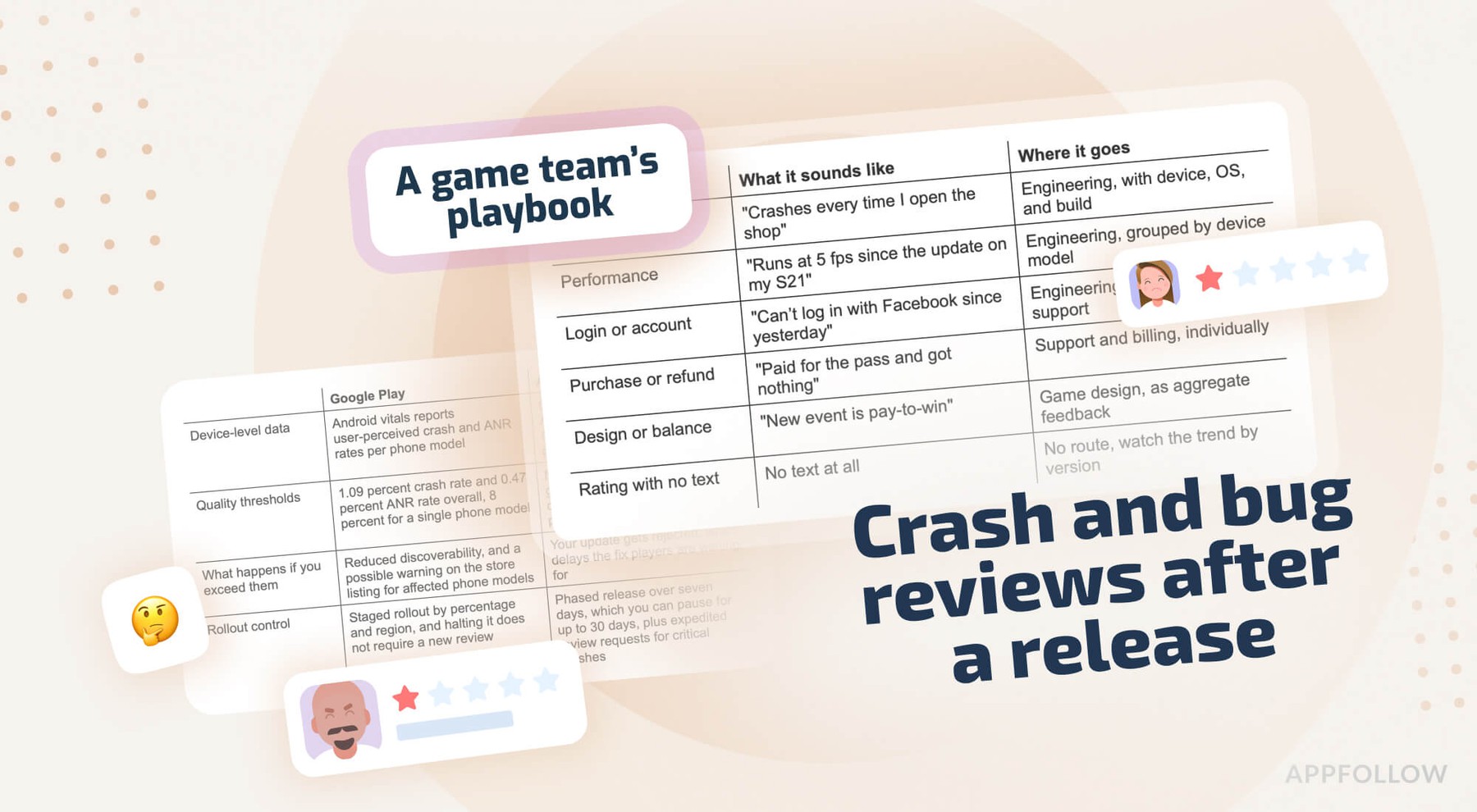
Common wording | "Crashes every time I open the shop." "Black screen after the update." "Can't log in anymore." "Lost all my progress." |
AppFollow tag | Sentiment: Negative. Topic: Bug. Optional: crash, login, performance, missing progress, device compatibility, network. |
Common mistakes | "We're looking into it" and nothing more. Not asking for device or version. No target release or ticket reference. Forgetting to tell affected players when the fix ships. |
Take for example, Supercell support - they assign bug reports a ticket, requests device details early, and returns once the fix lands, which is part of why players keep reporting instead of churning.
Copy-ready response template:
Thanks for the detailed report, Jamie. This gives the team a solid starting point. We're already investigating and expect a fix in Version 6.3, planned for next week. Could you send your device model, OS, and game version here so we can prioritize your case and keep you posted: [support link].
Emma Carter, Community Manager
"The strongest gaming replies we see in AppFollow share three things. They name the player's issue in the player's own words, they're signed by a real person, and they end with a clear next step. Templates make that repeatable. Human editing keeps it authentic. AI is at its best when it drafts the structure and lets the community manager shape the final voice."
Veronika Bocharova, Customer Success Manager at AppFollow
6. Server outage and connectivity
Server outages create a different kind of spike. Players are not criticizing your design. They simply cannot play. So the reply has one job: reduce uncertainty. Tell players what happened, who was affected, when service came back, and how they will be compensated. The faster you communicate those details, the fewer duplicate reviews and tickets you field.
One mistake repeats across teams: treating each outage as an isolated support issue. During an incident, your store replies, status page, social channels, and in-game messages should all tell the same story. Consistency beats polish. Players forgive downtime far more readily than they forgive silence or conflicting updates.
Field | Guidance |
How to identify | A sudden cluster of 1- to 3-star reviews in a short window about login failures, disconnects, server instability, or progress lost after an outage. |
Common wording | "Can't log in." "Servers are down." "Disconnected every match." "Network error every launch." |
AppFollow tag | Sentiment: Negative. Topic: Outage. Optional: login, server maintenance, matchmaking, connectivity, lost progress, regional outage. |
Common mistakes | Vague timing like "earlier today." No explanation of what comes next. Promising compensation without saying what or when. A final apology posted while the outage is still live. |
For example, Free Fire and Mobile Legends: Bang Bang pair outage notices with regional status updates and in-game compensation, and their store replies point players to those official updates.
Copy-ready response template:
Sorry about the disruption on July 18, Morgan. Our servers were hit by a database issue between 14:10 and 15:35 UTC, and service is restored. Everyone who logged in during that window will receive 500 Gems by in-game mail within 24 hours. You can follow future updates here: [status page link].
Emma Carter, Community Manager
7. Feature request
Feature requests are easy to mishandle. Players often sound excited rather than angry, which tempts teams to promise more than the roadmap can deliver. Resist it. Your job in the reply is narrower than it feels: show the idea was heard and routed to the right team, without hinting at a ship date the roadmap has not committed to. Keep expectations honest and the player keeps talking.
These reviews get far more valuable when you tag them consistently. After a few months, repeated requests tell a clearer story than any single review. If hundreds of players independently ask for controller support or a new PvP mode, you have found demand worth investigating, which is why feature requests belong in the same tagged workflow as bugs and balance feedback rather than in a separate "nice to have" pile everyone forgets.
Field | Guidance |
How to identify | Usually a 3- or 4-star review proposing a new character, mode, quality-of-life change, customization, or social feature. The tone is constructive. |
Common wording | "Please add controller support." "The game needs a guild mode." "More character customization, please." "Why isn't cross-play available?" |
AppFollow tag | Sentiment: Neutral or Positive. Topic: Feature request. Optional: new mode, character, social, accessibility, customization, cross-play. |
Common mistakes | Promising features that are not approved. Replying "Coming soon!" to keep players happy. Leaving no path for discussion. Treating every request as a one-off instead of tracking themes. |
Roblox community managers acknowledge feature requests and point players to official feedback channels, linking requests to tracked discussions so recurring ideas are easy to follow.
Copy-ready response template:
Great suggestion, Taylor, and thanks for taking the time. We've logged your request for controller support and passed it to the design team for roadmap consideration. We preview upcoming features in our developer updates, which you can follow here: [subscribe link]. Keep the ideas coming.
Emma Carter, Community Manager
8. Fraud, chargeback, and account issues
Fraud-related reviews differ from every other type here because they rarely belong in a public thread. Whether the player reports a hacked account, a duplicate charge, a missing purchase, or an unfair ban, the review reply is not where you solve it. Its job is to move the case into a secure support channel fast. The longer sensitive account details sit in public, the greater the privacy risk for the player and your team.
One review is not always one review, either. When dozens of near-identical complaints appear within hours, you may be looking at coordinated activity rather than isolated incidents. So these reviews earn their own tag and escalation path: the investigation runs privately, while the public reply does one narrow job, pointing the player to the right channel.
| Field | Guidance |
| How to identify | A 1-star review about a hacked account, duplicate payment, missing purchase, chargeback, refund denial, or unfair ban, or wording repeated across several reviews in a short period. |
| Common wording | "My account was hacked." "I was charged twice." "Didn't receive my purchase." "Chargeback denied." "Banned for no reason." |
| AppFollow tag | Sentiment: Negative. Topic: Fraud. Optional: account security, payment issue, chargeback, refund, ban appeal, missing purchase. |
| Common mistakes | Discussing account details in public. Generic PR language instead of a direct support path. Asking players to post payment details in the review. Ignoring coordinated patterns that point to a wider issue. |
Many mid-core RPGs and gacha games route fraud, payment, and account-security cases straight to dedicated support, using the store reply as an escalation point rather than a place to investigate. The scaled workflow is in the next section.
Copy-ready response template:
I'm sorry this happened, Jordan. Account and payment issues need to go through our security team directly, since they involve personal account information. Please contact us here and include your player ID, and we'll investigate and keep you updated privately: [security support link].
Emma Carter, Community Manager
Handling gaming fraud reviews and chargeback aftermath
Fraud and chargeback reviews are a distinctly gaming problem. High-value free-to-play titles attract them by design, and public review threads are almost never the right place to resolve them. Good mobile game review management separates genuine player frustration from security incidents, then routes each case to the people equipped to investigate it.
Spotting gaming fraud reviews
Not every 1-star review about a missing purchase or a banned account is fraudulent. Some describe legitimate issues after an update or a failed transaction. Others arrive in waves, using near-identical wording like "account hacked," "IAP not received," or "chargeback denied." Those clusters are often the first sign of coordinated activity or a broader security incident.
Sentiment tagging and topic clustering make gaming fraud reviews far easier to spot, because near-identical reviews surface together instead of scattering through a general queue.
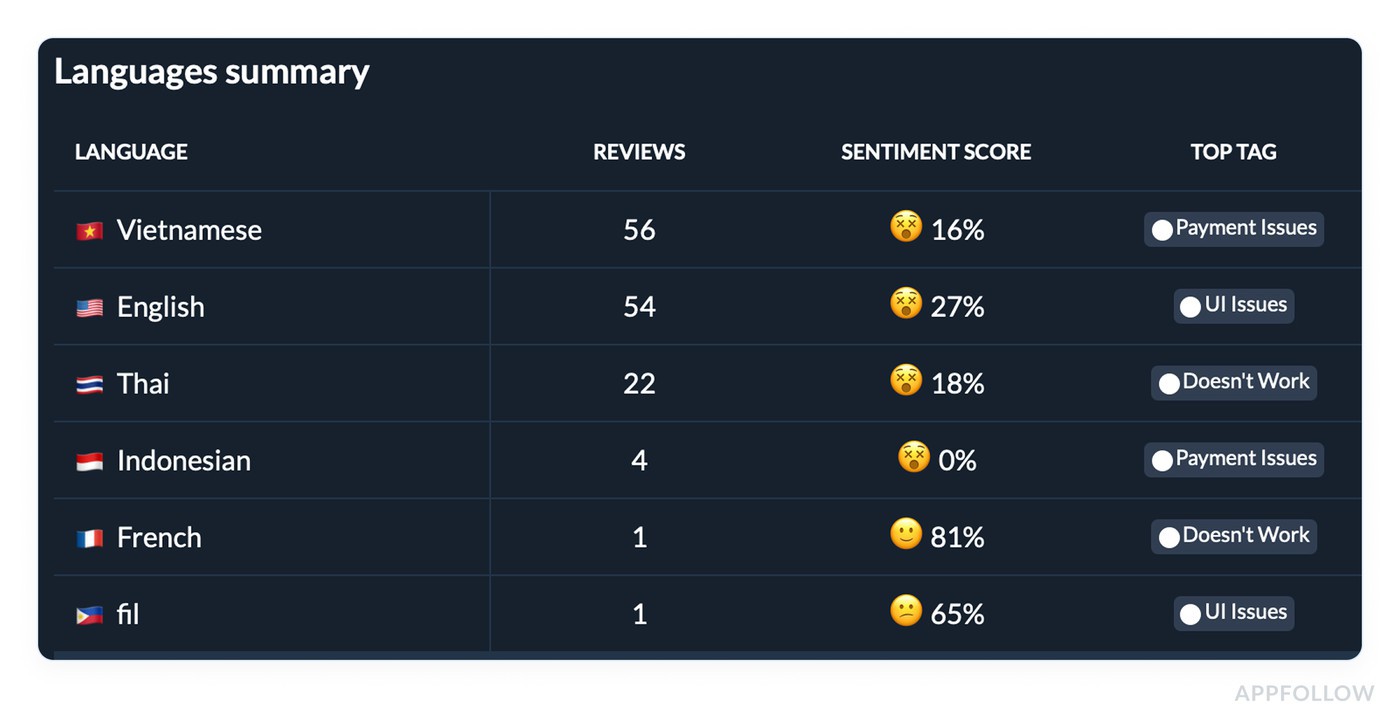
A working rule of thumb: when the same phrase shows up in more reviews in one day than you would usually see in a week, stop replying one by one and check timestamps, wording, and account age first. That check tells you which of two paths to take.
Coordinated gaming fraud reviews tied to review bombing should go through the platform's own reporting flow: Apple's "Report a Concern" option in App Store Connect, described in Apple's ratings and reviews guidance, and Google's report path in the Google Play reviews documentation.
A genuine security incident, such as an in-app purchase hack affecting many players at once, is an operational problem for the fraud team, not a community-management one. If an attack has already dented your rating, our guide to reputation management strategy covers how review bombing decays and when it is worth intervening.
What happens after a chargeback
Chargebacks in gaming are a predictable part of running any free-to-play title with in-app purchases. A player disputes a transaction through Apple, Google, or their card provider. The platform processes the refund, and the game removes the purchased items or restricts the account under its payment policy. From the player's side, they paid for content and then lost access to it.
So handle these with care. Acknowledge the frustration, explain that account-specific issues cannot be resolved in public, and direct the player to security support. Do not debate transaction history or refund decisions in the thread. Beyond the privacy risk, public negotiation teaches players that a 1-star review is the fastest route to special treatment, which is the opposite of what you want to reinforce.
Route first, investigate second
The costly mistake here is rarely a clumsy reply. It is routing the case to the wrong desk, so a community manager ends up adjudicating a payment dispute they cannot even see the transaction record for. Community managers should not investigate payments, and fraud analysts should not spend their day clearing routine review replies.
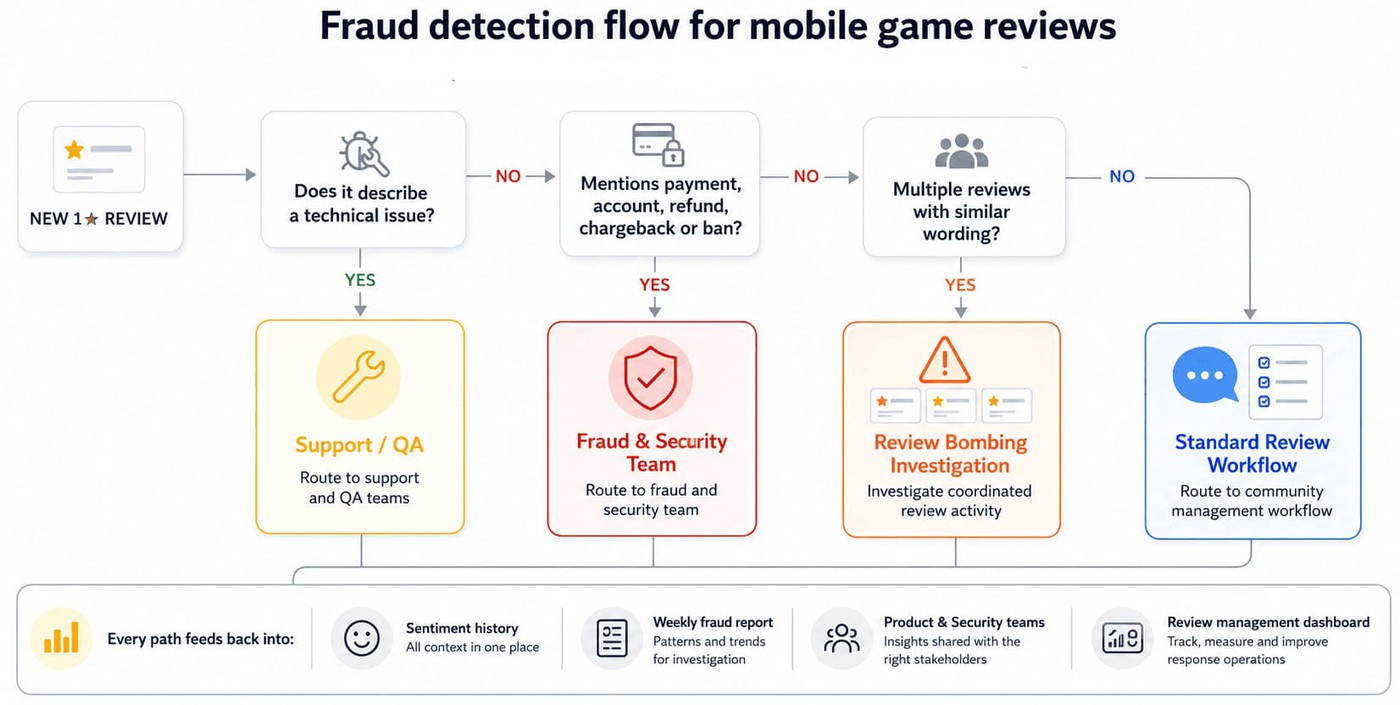
Workflow automation can route any review tagged fraud or chargeback straight into a security queue in Zendesk or Helpshift instead of the community inbox, while the review stays linked to the same sentiment history and reporting.
A weekly fraud report helps the security team catch recurring patterns that would otherwise slip by. That coordination pulls the highest-risk category out of the public support queue while making sure every case reaches the right people. If you run several titles or regional teams, consistent routing rules matter even more as volume climbs.
Review automation for mobile games: what to automate and what not to
Review automation is a spectrum, not a switch. What you automate depends on what stays true to the game's voice at scale. The point of automating mobile game review management is not to take people out of it, but to strip out the repetitive work so community managers spend their judgment where it changes the outcome.
Good automation absorbs volume in the background, while people step in wherever empathy, context, or product knowledge decide the reply. Handled that way, consistency and authenticity stop pulling against each other.
What to automate: the AppFollow stack
Good review automation mobile games teams rely on starts with the tasks that follow predictable rules. Every new review can be tagged automatically by sentiment and topic, then routed by language, severity, or a custom label like gameplay, fraud, or feature request. Once the rules are set, the system scales without adding manual work.
Drafting sits on top of that. AppFollow's AI Reply Assist generates a first draft in the game's tone and terminology, ready for a community manager to review.
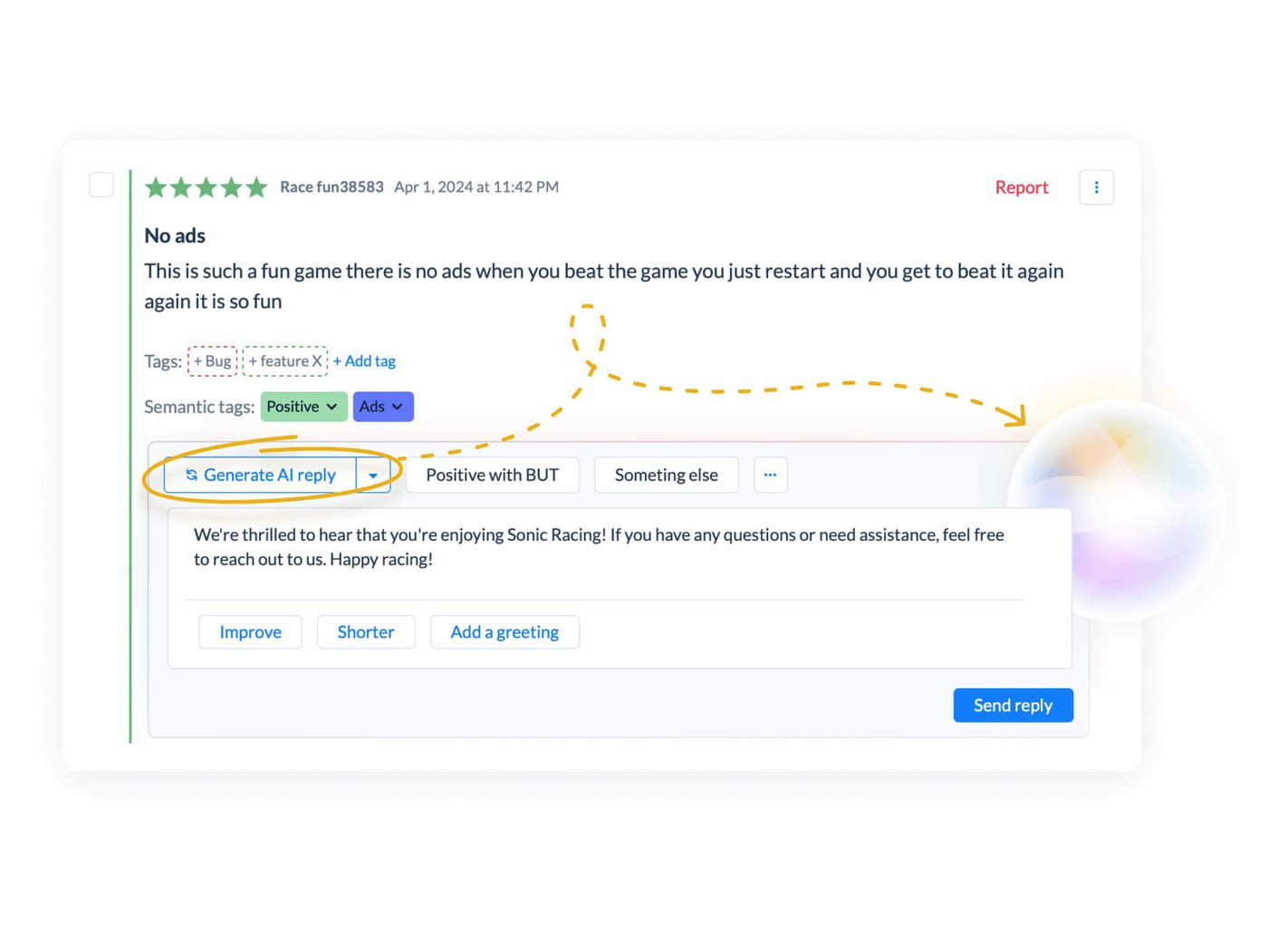
Alongside it, workflow automation can fire Slack alerts when sentiment drops or terms like "crash" or "can't log in" spike, and route weekly reports into Zendesk, Helpshift, or Salesforce so every team works from the same data. Together, these workflows let a team handle thousands of reviews without scaling headcount at the same pace.
"We built AI Reply Assist as an assistant, not a replacement. The AI drafts the structure; the community manager reviews the wording, adds context, and approves the final reply. Teams that try fully automated responses quickly discover the same thing: players recognize generic corporate language immediately. Automation should save time, not replace authentic conversations."
Ilia Kukharev, Product Manager at AppFollow
What not to automate: the human-only zone
Some replies should never publish without human review. Balance-patch discussions need nuance, because every word can move community sentiment. Fraud and account complaints involve privacy and security. Public developer statements during a crisis deserve careful review before they hit a store page that thousands of prospective players will read.
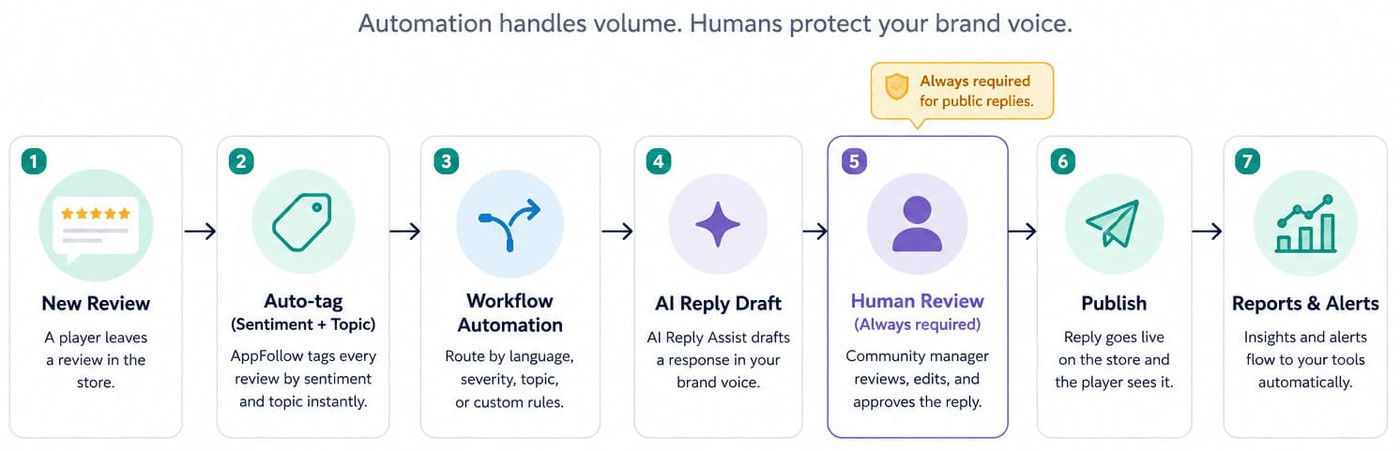
The same holds for voice. AI can speed up drafting, but it cannot judge whether a joke lands, whether an apology feels sincere, or whether a frustrated player needs a more personal reply. That is why human approval stays at the center of the workflow, and why a durable reputation management strategy still depends on people making the final call.
How to improve app store rating game by game
There is no single trick to how to improve app store rating game studios can pull once and forget. It is four habits that reinforce each other over time. Mobile game review management is one of them, and it works best alongside well-timed prompts, regular updates, and steady engagement with app store reviews for games.
- Ask for ratings when players already feel successful. Timing matters more than wording. The best prompts appear after a satisfying moment: a hard level cleared, a raid won, a new character unlocked, a first purchase completed. Avoid prompting after a defeat, mid-session, or in the first few sessions. Apple's SKStoreReviewController limits prompts to three per user per year, and Google Play's In-App Review API applies its own quota, so you get a limited number of asks. Spend them on your best moments.
- Ship meaningful updates instead of waiting for a major overhaul. Recent reviews carry more weight than older ones, especially on Google Play, which has recalculated the displayed rating to favor recent reviews since an August 2019 change. Apple also favors recent reviews, if less aggressively. Regular releases create fresh chances for satisfied players to leave updated ratings. If a release fixes a major complaint, say so plainly in the release notes.
- Hold a reply rate above 60% on 1- and 2-star reviews. Every reply is a chance for the reviewer to update their rating, especially when the response is timely and specific. Generic acknowledgements rarely move anyone. Consistency beats intensity: studios that answer low-rated reviews week after week recover faster than those that only wake up during a crisis. Toca Boca's climb to a 71.76% reply rate and a higher store rating is that habit compounding.
- Don't ignore your happiest players. Most studios pour everything into complaints and miss an easy loyalty lever. Replying to even a sample of positive reviews, say 15 to 20%, shows players that thoughtful feedback is valued whatever the star count. Those players often become advocates who recommend the game and keep leaving useful feedback after each update.
Turn thousands of game reviews into a queue the right team can act on
Every feature named in the five-step lifecycle and the eight templates above lives in a specific AppFollow view. This section maps the playbook onto the product surface, from collection to reporting, so mobile game review management becomes a daily rhythm rather than a pile of disconnected tasks.
It starts in the Reviews and Ratings dashboard, where reviews from the App Store and Google Play flow into one queue across every country, language, and title in your portfolio. New reviews are tagged automatically by sentiment and topic, and topic clustering surfaces recurring themes before they show up in a monthly report.
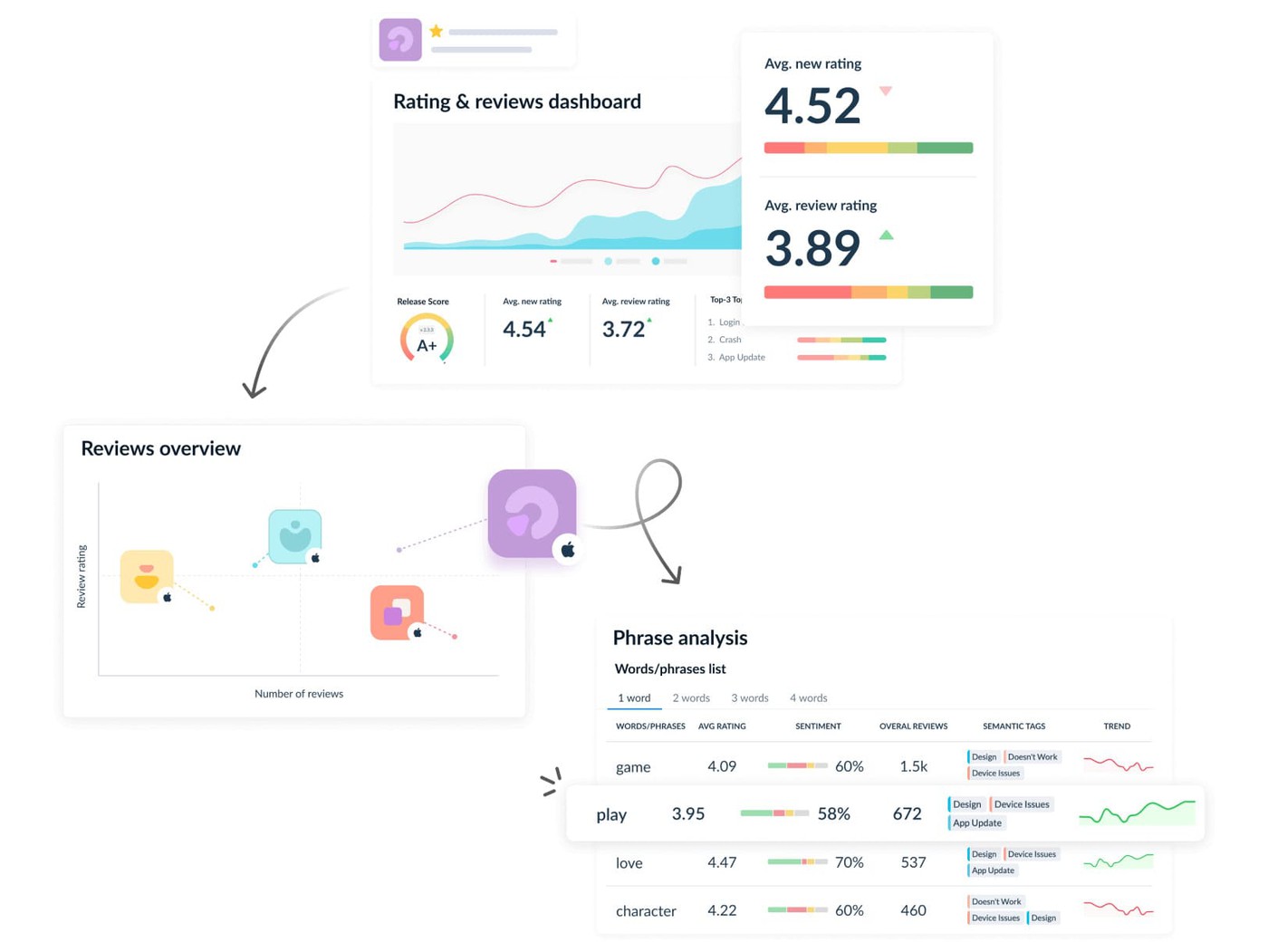
Gaming teams can add custom taxonomies for gacha rates, Battle Pass value, PvP balance, or seasonal events, and filter by store, language, app, or rating to focus on what matters first. For many community managers, this is the first tab they open each morning.
Routing and drafting sit on top of collection. Rules send reviews by app, language, sentiment, topic, or severity, so gameplay complaints reach community managers, fraud reports reach security specialists, and positive reviews enter a sampled engagement queue.
This is where review automation mobile games teams get the biggest operational gain: AI Reply Assist drafts in the game's voice while community managers review and approve every reply. Paired with a template library built around the eight review types in this guide, teams cut repetitive drafting while keeping every public response consistent.
Reporting closes the loop. Slack alerts notify the right people when sentiment shifts or volume spikes, and integrations with Zendesk, Helpshift, and Salesforce route reviews into existing support workflows instead of spawning another queue.
Competitor Intelligence adds an external benchmark by tracking how rival games are reviewed during launches, balance patches, and recovery windows. Together, these workflows replace reactive handling with a predictable rhythm, so teams spend less time asking how to respond to game reviews and more time acting on what players tell them.
cta_get_started_purple
Frequently asked questions about mobile game review management
How do I respond to negative game reviews?
The reliable answer to how to respond to game reviews follows one structure: acknowledge the specific issue in the player's own words, explain what is happening, offer a concrete next step such as compensation or a fix timeline, commit to a version or date when you can, and sign with a real name and role. Reply within 24 hours whenever possible. AI can draft the response, but a human should always approve it.
What's the best way to manage mobile game reviews at scale?
Effective mobile game review management runs on five steps: collect reviews in one workspace, tag by sentiment and topic, route to the right owner, reply with approved templates and human review, then feed insights back into product decisions. Run it as one game feedback management system rather than five disconnected inboxes. Once you manage several titles or regions, consistent routing rules become essential to keep quality steady as volume grows.
How do I identify fake or fraud reviews on my mobile game?
Most gaming fraud reviews share recognizable patterns. Reviews mentioning "account hacked," "IAP not received," "chargeback denied," or a suspected in-app purchase hack tend to appear in clusters over a short window. Legitimate complaints usually describe a specific gameplay or technical issue instead. Sentiment tagging and topic clustering make those clusters far easier to catch before they grow into a rating problem.
Can I automate replies to app store reviews?
Partially. Review automation mobile games works best when automation handles tagging, routing, alerts, and reporting across your app store reviews for games, while AI drafts the first version of each reply. The final response should always be reviewed by a community manager. Fully automated public replies tend to read as generic, and players notice that fast.
How do I handle chargeback reviews on my mobile game?
Chargebacks in gaming usually follow one sequence: a player disputes a purchase, the platform refunds it, the game removes the items or restricts the account, and a 1-star review follows. Acknowledge the frustration, direct the player to your security support team, and avoid discussing account details publicly. Route these reviews straight to fraud specialists rather than the community queue.
How does responding to reviews affect app store ranking?
Responding does not change ranking directly, but it lifts ratings over time, and higher ratings plus stronger rating momentum support store visibility and conversion from page view to install. A timely, specific reply gives players a reason to update a low rating, which feeds the loop. This is a core reason negative review response gaming teams prioritize speed and specificity.
Should I reply to positive game reviews?
Yes. Most studios answer complaints and ignore praise. Replying to even 15 to 20% of positive reviews shows players that every kind of feedback matters, which is a large part of how to improve app store rating game teams see loyalty translate into advocacy. Those small interactions turn satisfied players into long-term supporters after future updates.