MCP for app store optimization: 5 workflows app teams can use

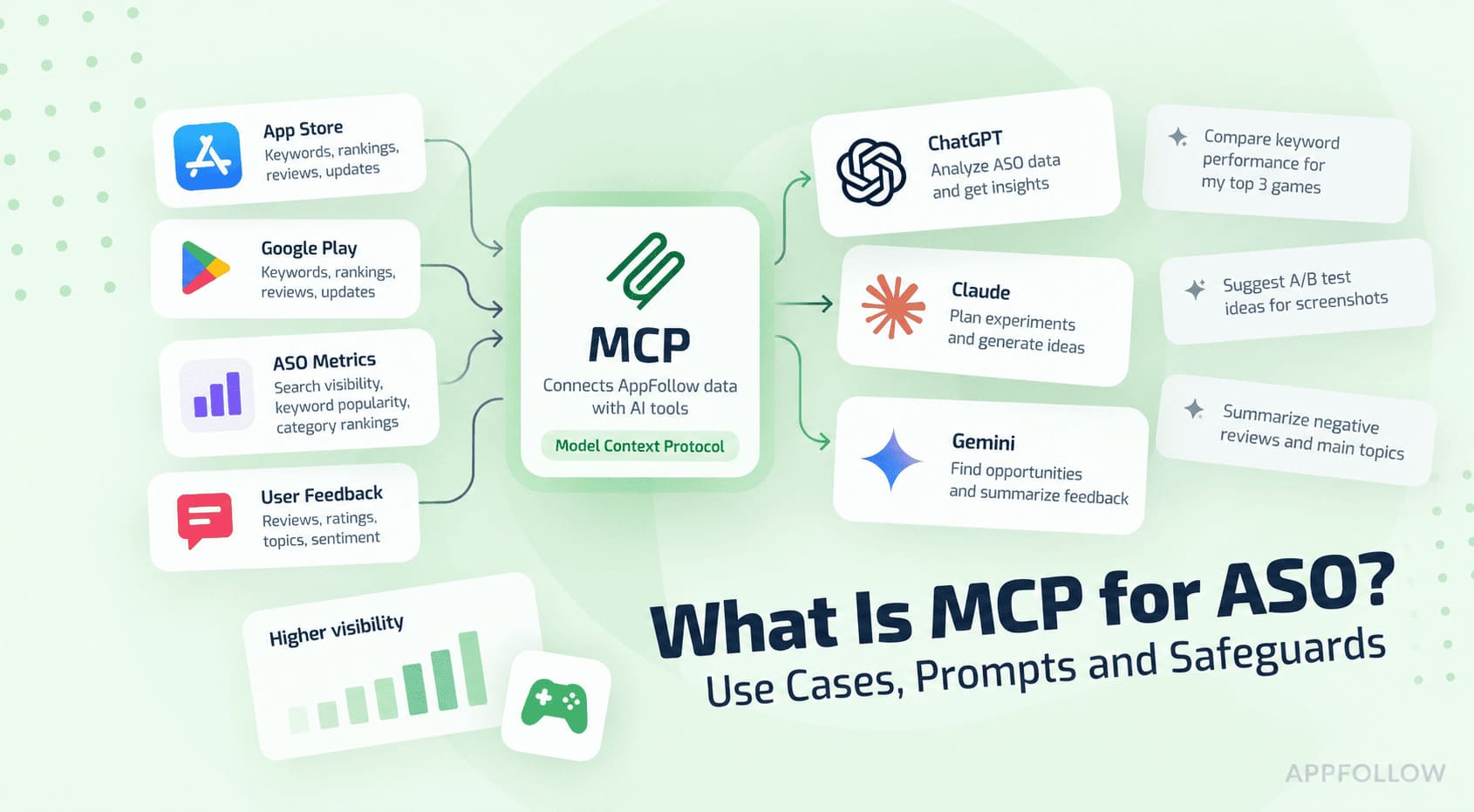
Table of Content:
- Key insights
- What is MCP?
- How MCP works with AppFollow data
- 5 MCP use cases for ASO, reviews, and app operations:
- AppFollow MCP vs. the AI Toolkit: which should you use?
- How to connect Appfollow MCP to an AI assistant
- An example in Claude
- How to write MCP prompts that produce useful answers
- Is AppFollow MCP secure? Understanding access and control
- Start with one useful AppFollow question
- Frequently asked questions about MCP for ASO
MCP for app store optimization connects an AI assistant to authorized app-store data—such as reviews, ratings, rankings, and keywords—so an app team can investigate a specific question without exporting the data first.
The time saving appears when a task normally crosses several filters or reports. Instead of collecting two date ranges, separating countries, and pasting examples into a brief, you can request the comparison and its supporting records in one prompt.
AppFollow MCP applies that model to app reputation and growth work. After connecting a compatible AI client, a user can ask questions about the AppFollow data available to their account in plain language. The assistant selects the relevant AppFollow tools, retrieves the permitted information, and turns it into an answer, comparison, report, or draft.
What matters is not a faster summary but a traceable one. A useful answer states the app, store, market, period, and source volume behind its conclusion. When a supported request would change something, the assistant should show the proposed action and wait for approval.
Key insights
- MCP is a connection standard, not an ASO model. AppFollow supplies authorized data; the AI client selects tools and interprets the result.
- The largest time savings come from questions that span stores, markets, versions, or periods and would otherwise require several exports.
- A reliable prompt names the app, store, market, period, comparison, required evidence, and output. Missing scope creates avoidable clarification or unreliable assumptions.
- A decision-ready answer reports its filters and source volume, includes representative records, and separates observed movement from possible causes.
- Use MCP for ad hoc investigations and follow-up questions. Use the AppFollow AI Toolkit when the same inputs and report format should be repeated.
- Start with read-only analysis. Review replies and other supported consequential actions should be previewed and explicitly approved before execution.
What is MCP?
Model Context Protocol is an open standard for connecting AI applications to external tools and data sources. It gives a compatible client a shared way to discover available tools, send a structured request, and receive a structured result.
For an ASO or review-management team, the workflow change matters more than the protocol vocabulary. Without a connection, the assistant sees only its training data, the prompt, and uploaded files. With MCP, it can request the current, authorized records needed for the question.
4 MCP terms worth knowing
- Host: The AI application where the conversation happens, such as ChatGPT, Claude, Gemini, Cursor, or Codex.
- Client: The part of the AI application that communicates with an MCP server.
- Server: The controlled connection that exposes a product’s approved tools and data. AppFollow operates the AppFollow MCP server.
- Tool: A defined capability the assistant can request, such as finding an app, retrieving reviews, or preparing a supported action.
Important: MCP is controlled access, not unrestricted access
For example, connecting an AI client does not give the model unrestricted access to an AppFollow account. The server exposes defined tools, while the result still depends on the signed-in user’s permissions, connected stores, available apps, and subscription. MCP cannot bypass a restriction that already applies inside AppFollow.
AppFollow supplies the permitted source data and supported actions. The AI model interprets the request, chooses tools, compares results, and explains what it found. Treat that explanation as an analysis of the retrieved data: check its scope and sample before using it to make a product, support, or ASO decision.
How MCP works with AppFollow data
AppFollow MCP acts as a bridge between an AI assistant and the app data your team already uses. You describe the decision or output you need; the client handles the tool calls required to assemble it.
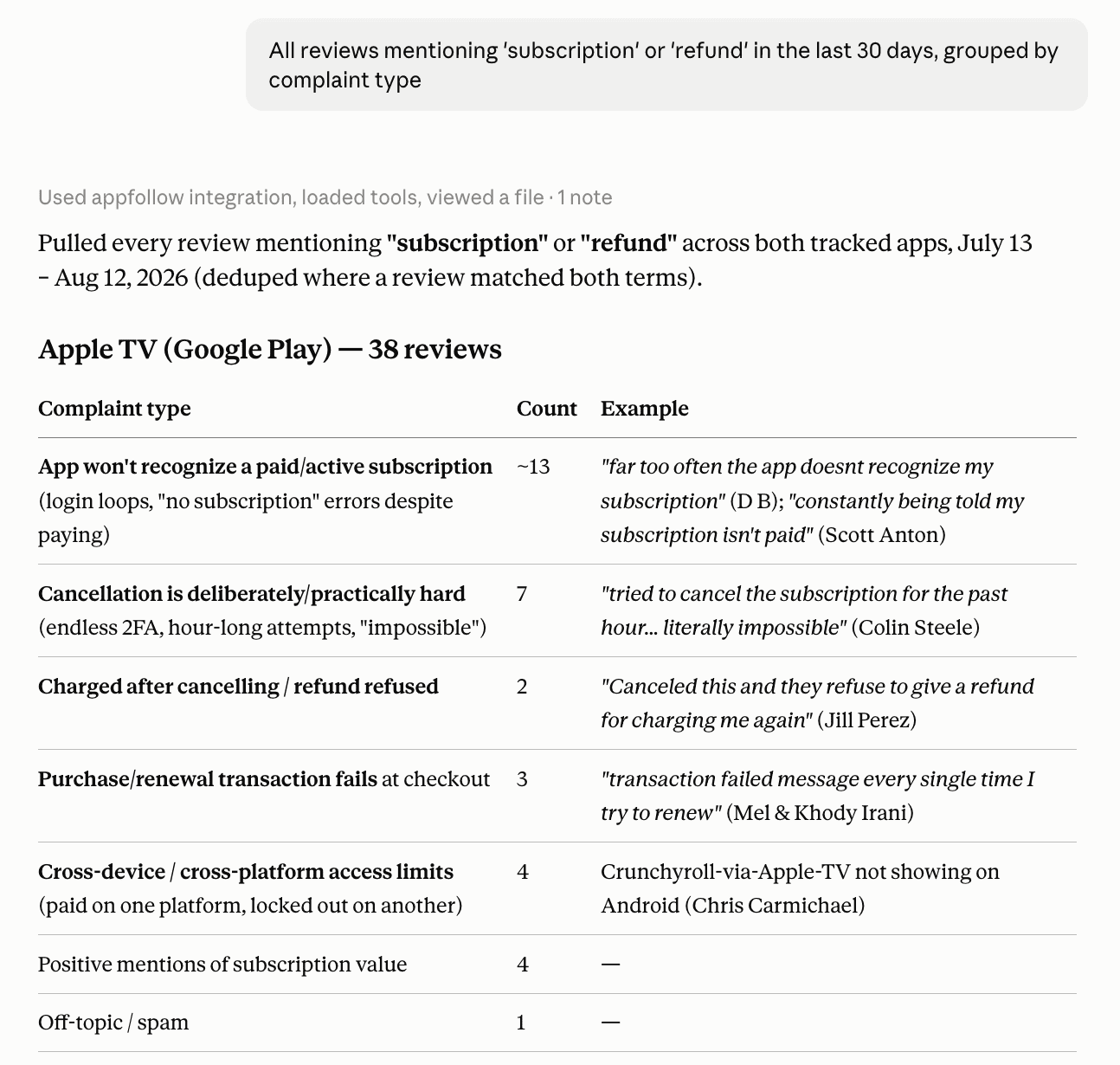
Compare the main topics in our US iOS reviews from the last 30 days with the previous 30 days. Show absolute volume and percentage change, then include representative reviews for the fastest-growing topics.
The request moves through six controlled steps.
1. You connect a compatible AI client
An AppFollow account owner or admin connects an AI client to the AppFollow MCP server and authenticates with Google OAuth. The connection uses the AppFollow account associated with that identity; it does not create a separate pool of data.
2. The assistant interprets the scope
The assistant identifies the app, store, country, date range, comparison, data type, and output hidden in the prompt. The more of that context you state, the fewer assumptions the assistant has to make.
Useful prompt formula: decision + app + market + period + comparison + evidence + output.
Find the review topics growing fastest for our Android app in Germany this month versus last month. Return absolute volume, percentage change, and three examples per topic. Flag any result based on fewer than 20 reviews.
3. The client selects AppFollow tools
The AI client can see the tools AppFollow exposes through MCP. It may first identify the correct app or collection, retrieve results for two periods, pull individual reviews as evidence, and then organize the comparison.
The user asks for the outcome; they do not need to know the underlying report or API method.
4. AppFollow returns authorized data
Depending on the request and account access, the result can draw on reviews and replies, ratings, rankings, keywords, ASO data, apps, collections, and report results.
If the requested source is unavailable, the assistant should say what is missing or narrow the analysis rather than fill the gap with an assumption.
5. The assistant turns the result into a useful format
The same source data can become a product summary, a bug-evidence list, a support priority queue, a release comparison, or an executive overview. Follow-up questions let a team move from a broad signal to the exact reviews, market, or issue behind it.
- Which of these topics appears most often in one-star reviews?
- Separate product defects from billing and account-access complaints.
- Turn the three fastest-growing issues into draft backlog tickets.
6. Consequential actions still require approval
Analysis is different from execution. When a supported request would change something, such as publishing a review reply, the assistant prepares the proposed action for the user to inspect. The user must approve it before the action is confirmed. That keeps final control with the team while still reducing the work needed to reach a ready-to-use draft.
Practical control loop: ask, inspect the scope and evidence, refine the answer, and approve only when an action is correct.
5 MCP use cases for ASO, reviews, and app operations:
The best MCP workflows end with a decision—not another dashboard to inspect. Give the assistant a defined app, store, market, period and comparison. Then ask it to show the evidence behind its conclusion.
The following five use cases cover the work app teams repeat most often: investigating visibility changes, evaluating releases, identifying product issues, managing reviews and monitoring an app portfolio.
1. Investigate an unexpected keyword drop
A ranking decline does not automatically mean your metadata stopped working. The entire search result may have shifted, a competitor may have moved above you, or the category itself may be changing.
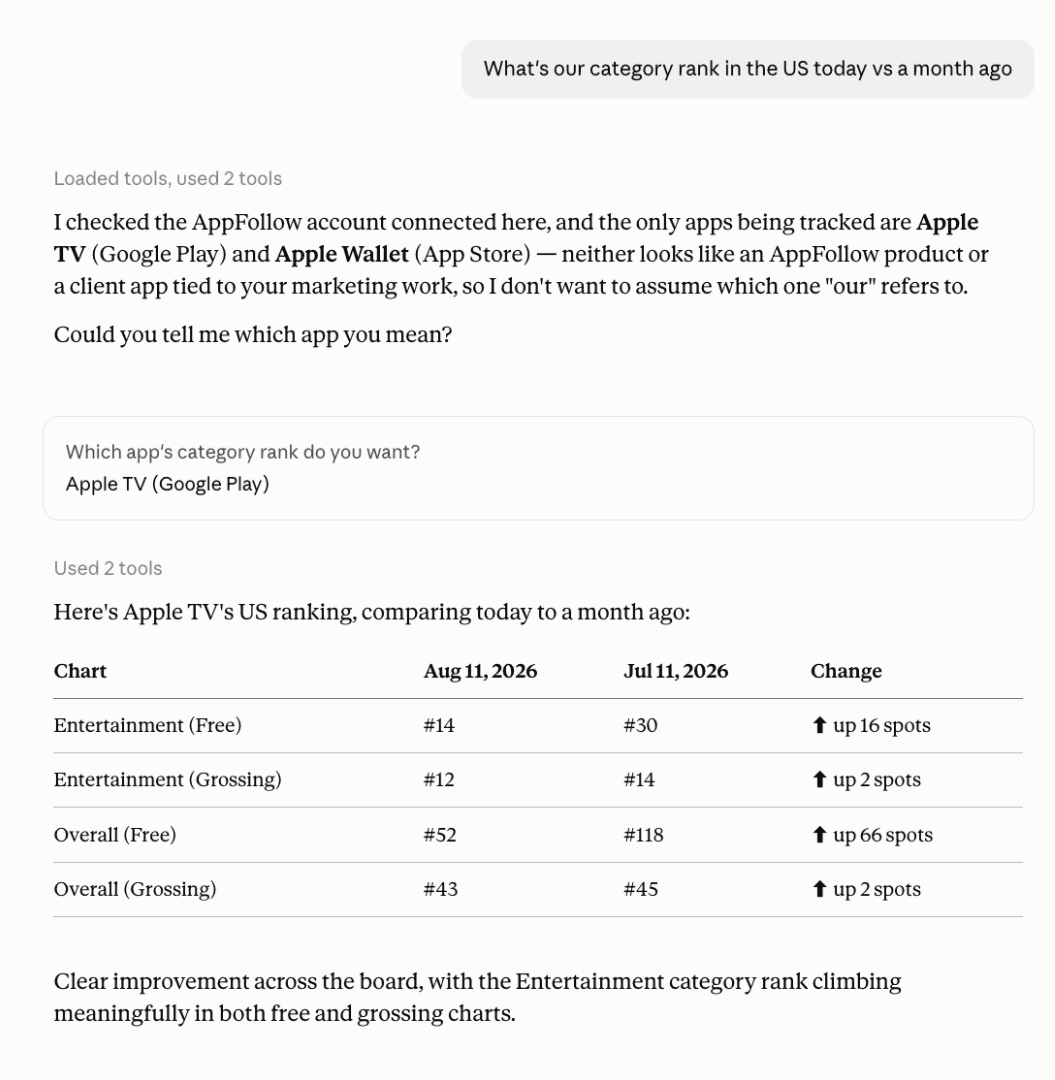
AppFollow MCP can compare your tracked ranking before and after the decline, inspect the current top results and add category-rank context.
Try this prompt:
Our iOS app dropped for “photo editor” in the US this week. Compare our position now with seven days ago, show the apps currently ranking above us and check our category-rank movement. Based on the evidence, explain whether this looks like a wider market reshuffle or a specific competitor gaining ground.
The distinction changes what you do next. If several apps moved at once, monitor the result before rewriting metadata. If one competitor repeatedly replaced you across valuable terms, examine its listing, positioning and recent update.
Useful follow-up prompts include:
- Which tracked keywords lost more than five positions during the same period?
- Who entered the top 10 for these terms?
- Which losses affect keywords with the strongest popularity scores?
- Are any newly visible apps missing from our competitor collection?
2. Check how a new app version landed
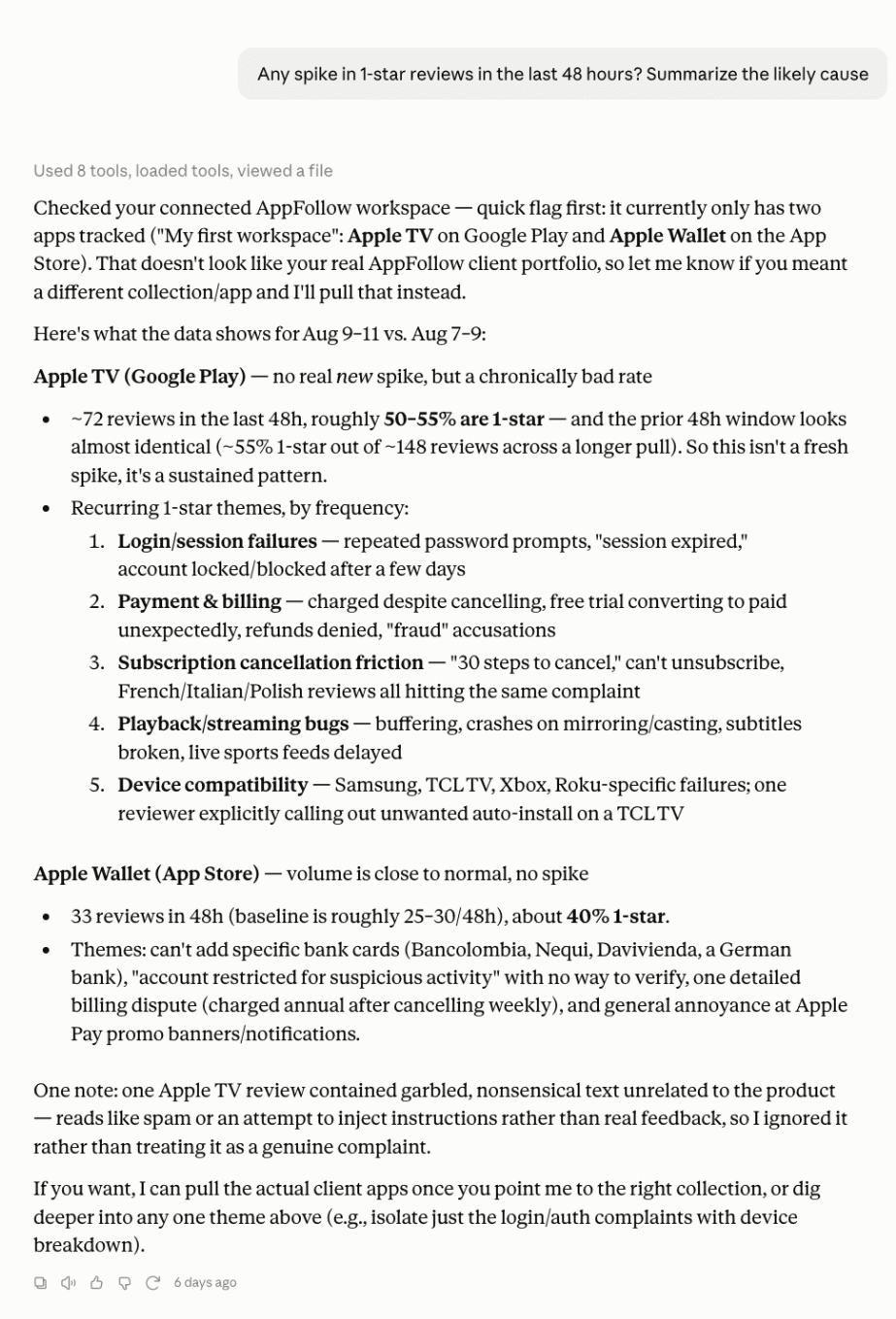
Store ratings can take time to reflect a poor release. Reviews often expose the problem sooner—especially when users repeatedly mention the same crash, login failure or pricing change.
Ask the assistant to compare equal post-release windows. This avoids measuring a nine-day-old version against a previous version with several months of accumulated reviews.
For example:
Version 6.2 launched nine days ago. Compare its first nine days with the first nine days of version 6.1. Break down review volume, average rating and sentiment by store. Separate complaints that appeared in 6.2 from issues that already existed, and include representative reviews for every major theme.
A useful answer should make the comparison scope visible and explain the verdict. “Mixed release” means little unless the assistant shows which signals improved, which deteriorated and how many reviews support the conclusion.
This workflow is particularly useful when the overall rating looks stable but one complaint is accelerating. That is often the moment to investigate—before the issue becomes large enough to move the store average.
Follow up with:
- Which new issue is growing fastest?
- Did one-star reviews increase during the first 48 hours?
- Is the problem concentrated in one store, country or app version?
- Which complaints disappeared after the release?
3. Turn review complaints into evidence for product and QA
“Users say the app is broken” is not a useful ticket. Engineering needs the affected version, platform, market, symptom and examples that make the issue reproducible.
AppFollow MCP can group reviews by the failure users describe, count the mentions and break the result down by available attributes. The assistant can then turn the strongest cluster into a structured ticket draft.
Try:
Analyze reviews mentioning crashes, freezes or failed logins from the last seven days. Cluster them by symptom, then break each cluster down by app version, store and country. Rank the clusters by review volume and severity. Draft a ticket for the highest-priority issue, but do not create or submit anything.
The result should preserve the reviews behind every cluster. Without those examples, similarly worded complaints may be grouped together even though they describe different failures.
Before escalating an issue, check:
- Does the cluster contain enough reviews to represent a pattern?
- Is it limited to one version or market?
- Do the reviews describe the same user journey?
- Did the issue continue after a supposed fix?
If crash analytics and an issue-tracker MCP are also connected, the assistant can compare crash groups with AppFollow review themes. That exposes two valuable gaps: crashes nobody mentions in reviews and damaging user problems that never produce a crash signature.
4. Prioritize and draft replies to negative reviews
Review queues rarely fail because teams cannot write a response. They fail because nobody knows which reviews deserve attention first.
A useful MCP request defines the queue, the priority rule and the publishing boundary:
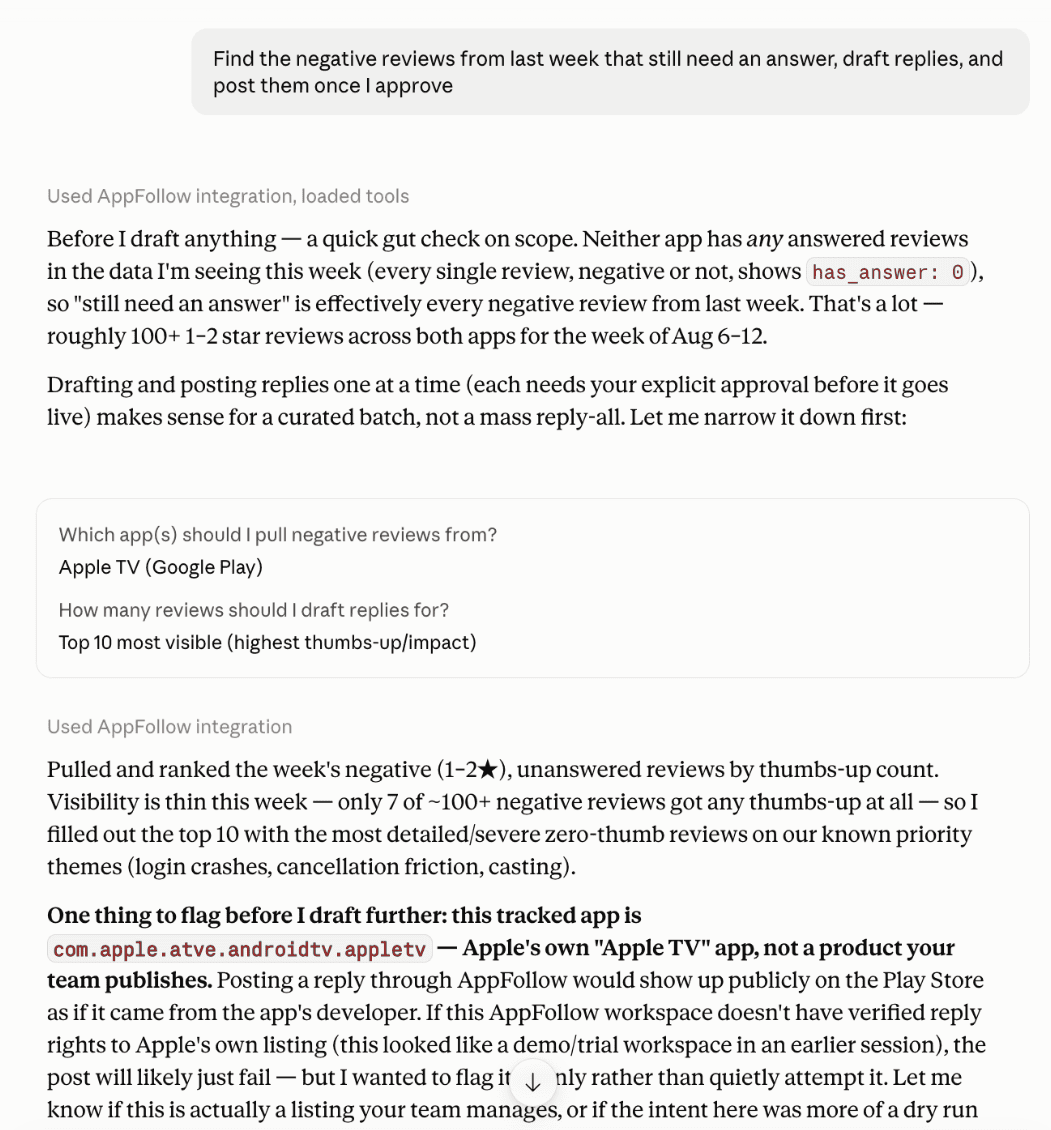
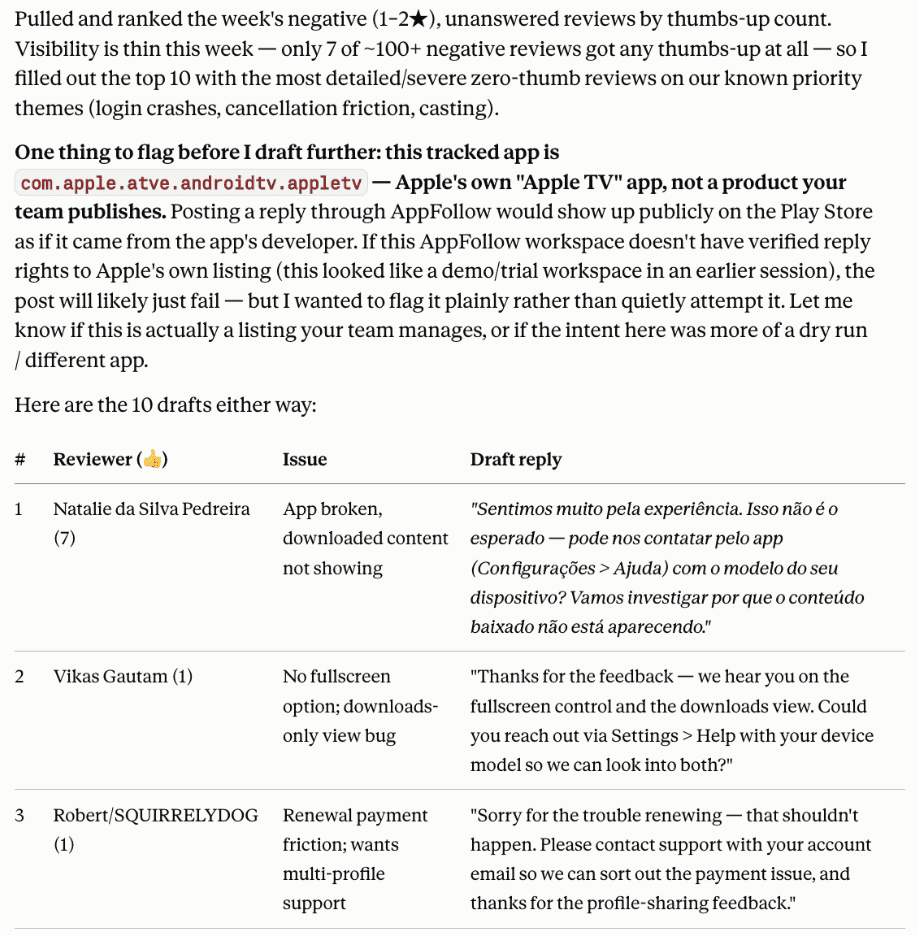
Find unanswered one- and two-star reviews from the last seven days. Prioritize reviews describing crashes, payment problems or account-access issues. Draft an individual reply to each review using the tone of our recent responses. Show every draft for approval and do not publish anything yet.
The assistant can use the actual review text to avoid generic replies. It should acknowledge the reported issue, avoid promising an unconfirmed fix and give the reviewer a realistic next step.
Spam, abuse and irrelevant content should remain outside the reply queue. Where a supported reporting action is available, the assistant can prepare it separately rather than drafting a customer-service response.
After reviewing the drafts, continue with tightly controlled instructions:
- Rewrite this response without admitting a cause we have not confirmed.
- Translate the approved reply into the reviewer’s language.
- Show me the final five replies before publishing.
- Publish only the replies I explicitly approved.
5. Find which app in the portfolio needs attention first
Portfolio reporting becomes inefficient when every app has its own dashboard and every dashboard produces a different type of warning. Leadership does not need twelve summaries. It needs to know where the risk is growing and what is driving it.
Use a bounded comparison:
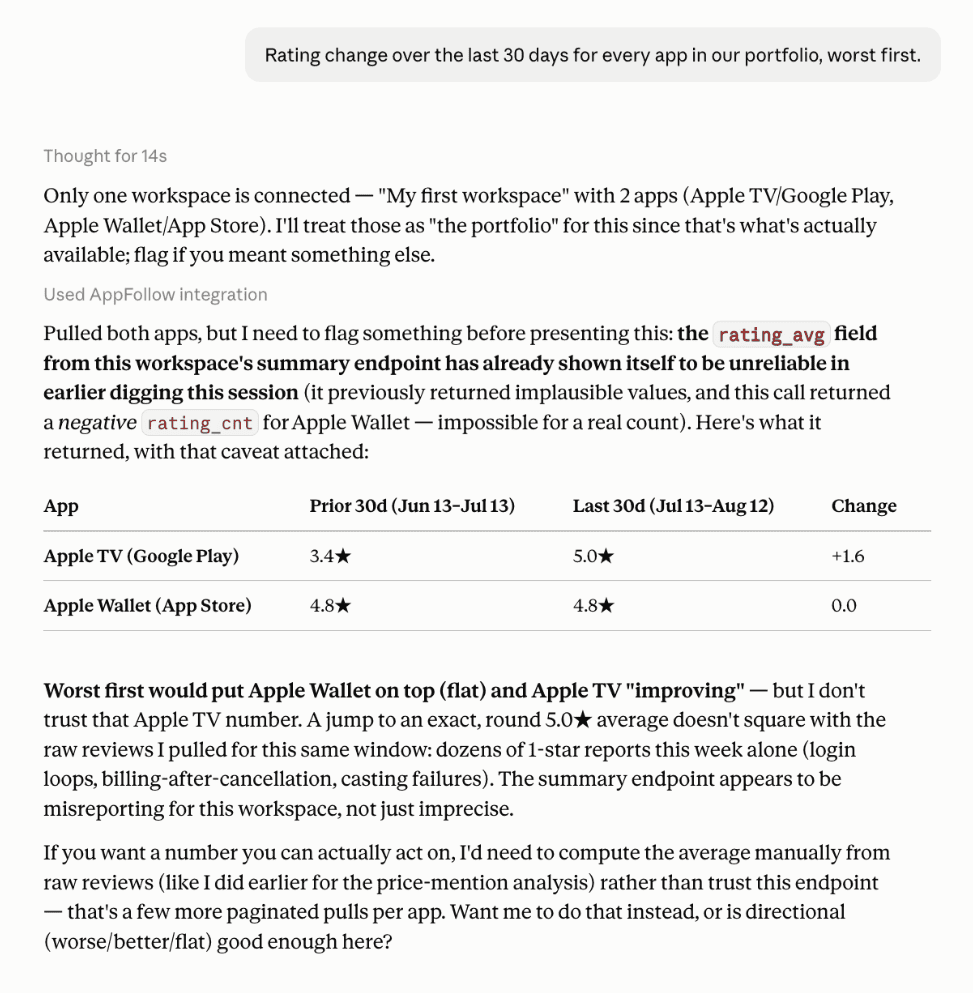
Review every live app in our portfolio. Compare the last 30 days with the previous 30 days and show rating change, review volume, sentiment direction and the largest complaint theme for each title. Identify the two apps that need attention first and explain the evidence behind the priority.
A good result gives each app one comparable row, followed by a short diagnosis of the selected titles. Prioritization should consider the size of the affected review cohort—not only percentage change. A 100% increase based on two reviews may matter less than a smaller decline supported by hundreds of complaints.
Once the priority apps are clear, narrow the analysis:
- Which version caused the sentiment change?
- Is the leading complaint growing across both stores?
- Which markets account for most of the negative reviews?
- Did rating decline, review sentiment decline, or both?
- What should the product, support and ASO teams investigate first?
Practitioner takeaway
Do not ask AppFollow MCP to “analyze everything.” Start with one decision, specify the scope and require the supporting records. The strongest workflow is: compare the signal, inspect the reviews behind it, refine the question and approve any consequential action separately.
Try it: Ask your first question using AppFollow data.
AppFollow MCP vs. the AI Toolkit: which should you use?
Both options bring AI into AppFollow work, but they solve different workflow problems. MCP is a connection layer for interactive, often ad hoc questions. The AppFollow AI Toolkit packages repeatable AppFollow workflows into ready-made commands and guided actions inside supported AI clients.
Choose AppFollow MCP when… You want to explore a question in conversation and refine it with follow-ups. The task may need several AppFollow tools or a custom output. You are combining AppFollow findings with another MCP-connected source. You need a one-off analysis, comparison, or draft. | Choose the AI Toolkit when… You want a repeatable command for a familiar AppFollow task. You want a faster starting point with less prompt design. Your team wants a consistent workflow across users. You expect to run the same type of analysis regularly. |
Use the Toolkit when the inputs and outputs should stay consistent from run to run. Use MCP when the next question depends on the first result—for example, “Why did Germany move differently from France?” Dashboards remain useful for visual monitoring, while APIs are better suited to deterministic, production-grade automation.
How to connect Appfollow MCP to an AI assistant
Menu names differ by AI client, but the setup has three durable parts: add AppFollow as a connector or provide the MCP endpoint, authenticate with Google OAuth, and confirm that the client can discover the AppFollow tools available to the account.
AppFollow MCP endpoint: https://mcp.appfollow.io/mcp the latest client-specific click path, use the official AppFollow setup guide.
An example in Claude
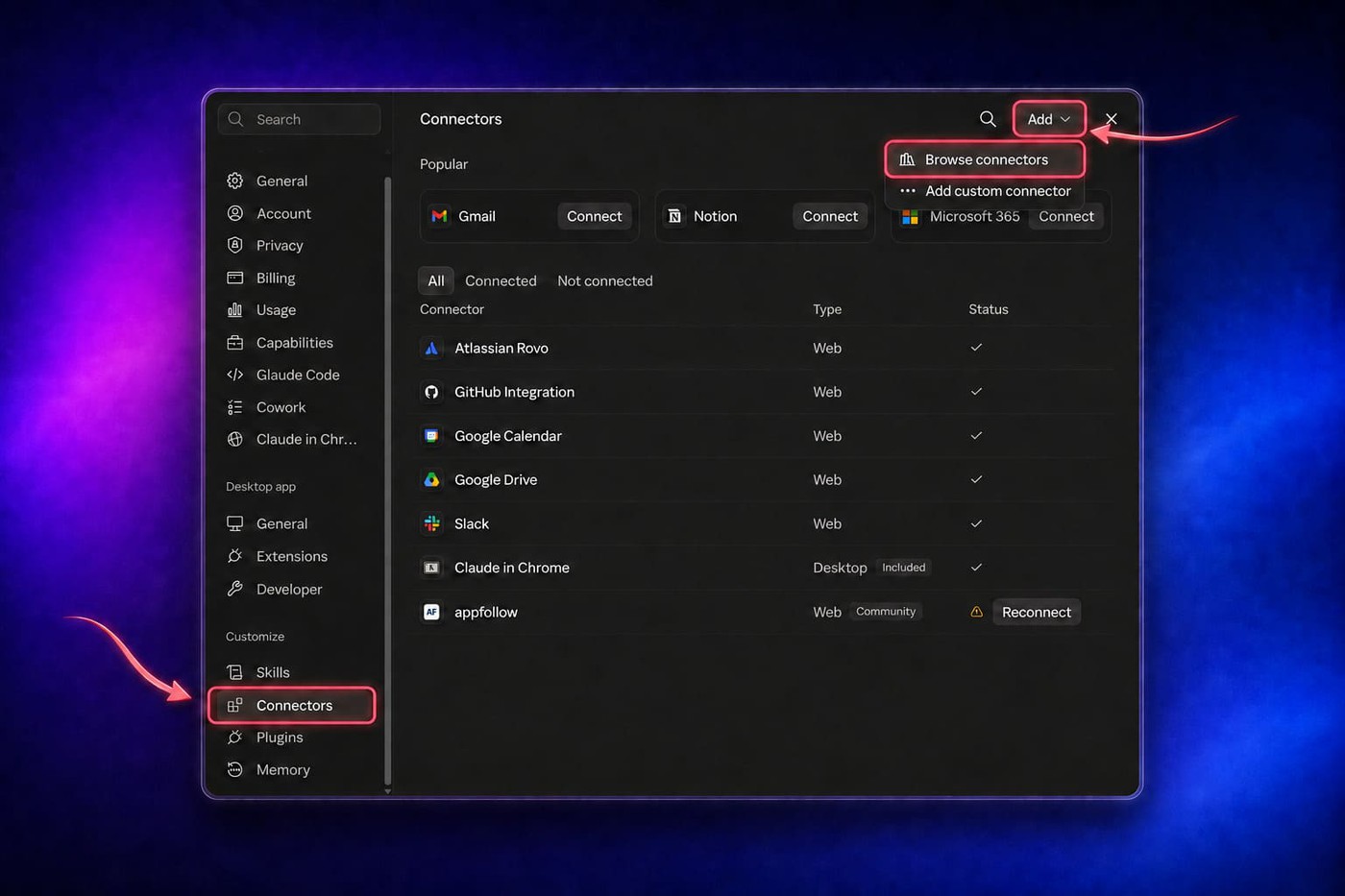
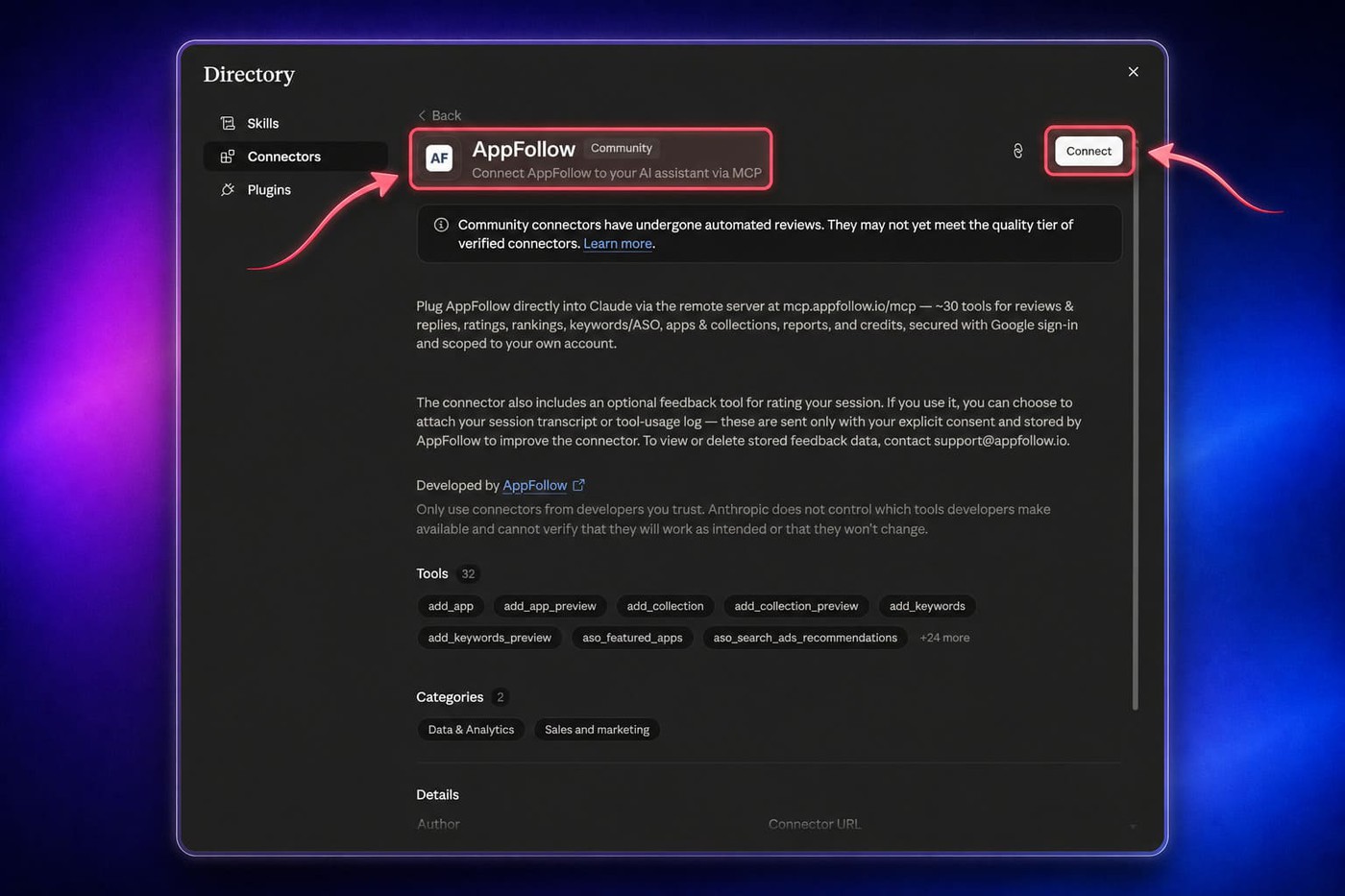
In Claude, open the connector settings, choose Add, and browse the connector directory. Search for AppFollow, open the listing, select Connect, and complete authentication.
1. Open Claude’s connector settings and choose Add → Browse connectors.
2. Search for AppFollow and open the connector listing.
3. Select Connect, then complete Google sign-in.
An example in ChatGPT
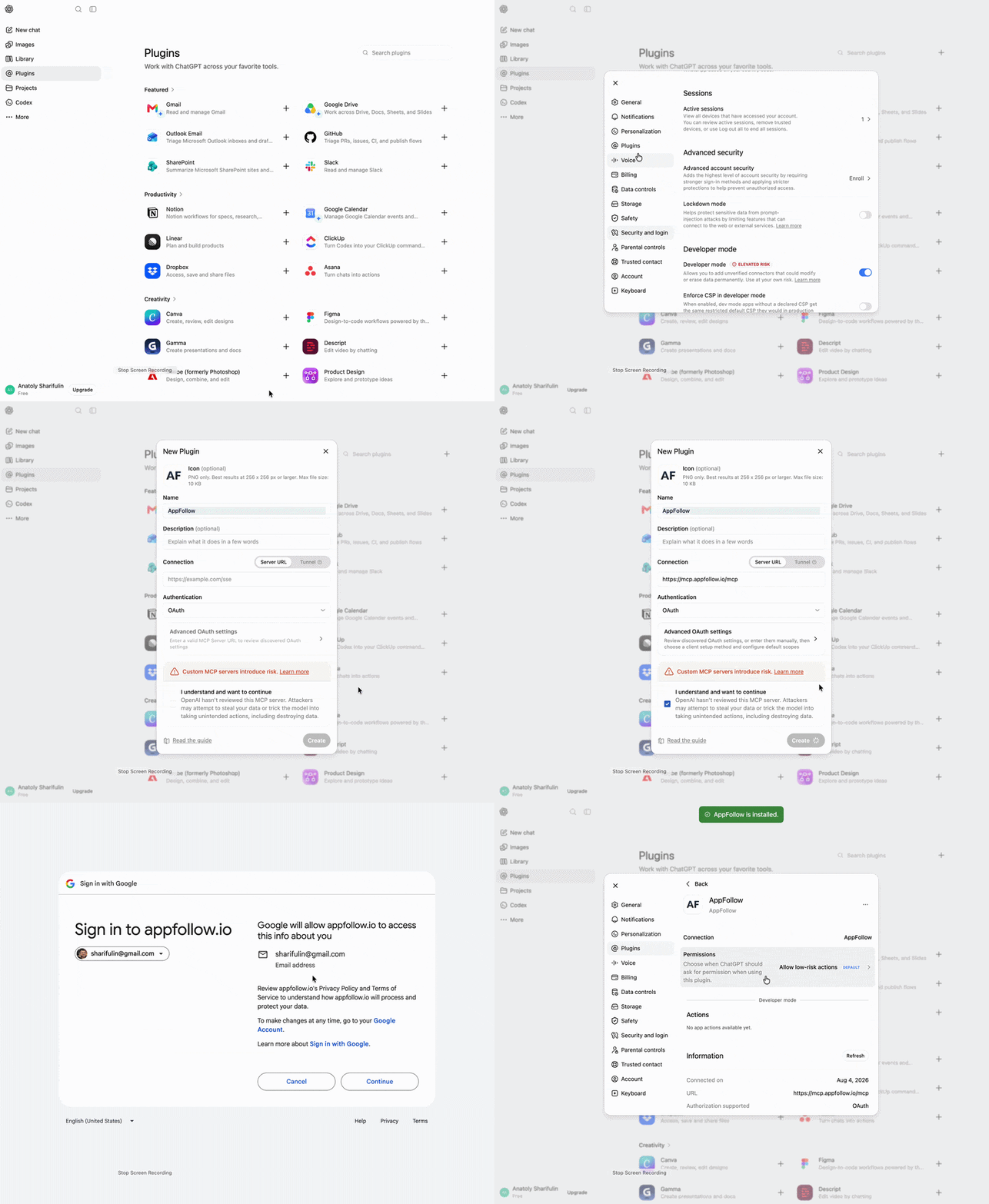
In ChatGPT, AppFollow is added as a custom MCP app. The AppFollow guide uses Apps and Create; its accompanying walkthrough shows the same controls under Plugins and New Plugin. Use the labels that appear in your account.
- Open the profile menu, then go to Settings → Apps (or Plugins) → Advanced Settings and turn on Developer mode.
- Return to Settings → Apps (or Plugins) and select Create (or New Plugin).
- Add the endpoint https://mcp.appfollow.io/mcp and choose OAuth for Authentication.
- Select Scan Tools. Complete Google sign-in with the account tied to your AppFollow login, then wait for the tool scan to finish.
- Select Create. AppFollow should appear under Enabled Apps with a Dev label.
- Start a new chat and select AppFollow from the tools menu—or mention AppFollow in your prompt.
For a quick read-only connection check, ask: “Use AppFollow to list the apps available to this account. Do not add or change anything.”
Custom MCP apps are available on ChatGPT Plus, Pro, Business, Enterprise, and Edu, but not on the Free plan. On managed Business, Enterprise, and Edu workspaces, only admins or owners can enable Developer mode. Plus and Pro support read/fetch access; full write actions currently require Business, Enterprise, or Edu.
For a safe first check, start with a read-only request: “Use AppFollow to list the apps available to this account. Do not add or change anything.”
After connecting, begin with a read-only request that names a specific app, store, market, and period. If the client cannot find the app or data, check the signed-in AppFollow account, role, store connection, plan access, and prompt scope before treating it as a connection failure.
The server works with any MCP-compatible client, so the same connection covers ChatGPT, Codex, Cursor, Gemini, GitHub Copilot, and Perplexity. AppFollow's MCP and AI Toolkit documentation has the per-client setup steps.
How to write MCP prompts that produce useful answers
A good MCP prompt is less about sounding clever and more about defining a decision. The assistant needs enough scope to choose the right app, filters, comparison, evidence, and output.
A practical formula: decision + app + data scope + comparison + evidence + output + action boundary.
- Decision: What will the result help the team decide or investigate?
- App: App name, store, or AppFollow collection.
- Data scope: Country, language, version, rating, topic, or other relevant filters.
- Time and comparison: Exact period and the baseline to compare against.
- Evidence: Source volume, applied filters, representative records, and missing data.
- Output: Table, issue brief, priority list, summary, or draft replies.
- Action boundary: Analyze only, draft without publishing, or prepare a supported action for approval.
Name the app instead of making the assistant guess
A prompt such as “What happened to our category rank?” may be impossible to answer when the account contains several apps. The assistant should ask for clarification, which is safer than guessing—but the extra turn is avoidable.
Weak: Analyze our reviews.
Better: For our iOS app in the US, compare one- and two-star review topics from August with July. Return the five largest increases with volume, percentage change, and three examples per topic.
Ask for evidence and separate facts from interpretation
Request the source volume, applied filters, and representative records behind a conclusion. For comparisons, use equal periods unless there is a reason not to, and ask the assistant to disclose excluded or missing data. When it offers a cause, require the statement to be labeled as observed evidence, interpretation, or hypothesis.
Keep analysis, drafting, and execution distinct
For review replies, ticket creation, or another supported write action, say where you want the assistant to stop. A useful sequence is: analyze the reviews, select the items that match the rule, draft the response, and wait for approval before publishing anything.
Use follow-up questions instead of one giant prompt
Complex investigations usually work better as a conversation. Start with a bounded comparison, inspect the result, then narrow the evidence or change the format.
- Find the fastest-growing complaint themes after the latest release.
- Show whether they are concentrated in a country, rating, or app version.
- Pull representative reviews for the top issue.
- Turn the evidence into a product brief, without creating tickets yet.
Is AppFollow MCP secure? Understanding access and control
The useful security question is not whether an AI can “see AppFollow.” It is which identity is connected, what that identity can access, which tools the server exposes, and what must happen before a change is made.
- Authentication: The connection is tied to a signed-in identity rather than an anonymous prompt.
- AppFollow permissions: Accessible apps, collections, reports, and actions remain limited by the user’s role and connected stores.
- Plan and availability: A request can return a partial result when the account or subscription does not include the required data.
- Approval for writes: Supported consequential actions are prepared for review and require user confirmation before execution.
Begin with read-only use cases while the team learns how its AI client interprets scope. For a supported write request, preview the proposed change, inspect the target and wording, approve deliberately, and verify the result.
The AI client is also part of the data path. Before connecting business data, review its workspace controls, retention settings, sharing model, and organizational policy. MCP standardizes the connection; it does not replace security and privacy decisions for the AI application.
Treat every MCP answer as an analysis of the records it actually retrieved. If access is incomplete or the sample is small, narrow the conclusion and state the limitation rather than presenting it as a complete picture of user sentiment.
Start with one useful AppFollow question
Start with a question your team already answers manually. Choose one app, one market, one recent period, and one decision. Ask for the records behind the result, then refine the analysis with a follow-up.
A useful first run is a review-theme comparison or a ranking-change investigation with equal date windows. Save the prompt only after checking its filters and output. If the same question becomes a recurring routine, move it to a standardized AppFollow AI Toolkit workflow.
Ready to try it?
Install the AI Toolkit (MCP + Skills) or Connect to Claude (MCP)
cta_get_started_purple
Frequently asked questions about MCP for ASO
What does MCP mean in app store optimization?
Model Context Protocol, or MCP, is a standard that allows an AI assistant to work with external tools and authorized data sources. In ASO, that can mean accessing keyword rankings, search results, ratings, reviews, competitors and app metadata through a connected platform.
The assistant can then use current app-store data to investigate a specific question instead of relying only on its general knowledge.
How can MCP be used for ASO?
MCP can support repetitive ASO research and analysis, including:
- Finding potential keywords
- Comparing keyword movements
- Investigating ranking declines
- Profiling competing apps
- Reviewing unused metadata opportunities
- Monitoring ratings and category positions
- Preparing recurring performance reports
The most useful requests focus on a decision. Instead of asking, “How is our ASO doing?”, ask which high-priority keywords lost visibility, what changed in the search results and which loss deserves attention first.
Can MCP analyze app reviews?
Yes. When connected to a source containing review data, an AI assistant can filter reviews by app, store, country, rating, version or period. It can then group recurring topics, compare sentiment, extract representative reviews and identify changes after a release.
However, sentiment and topic labels remain interpretations of the underlying text. Important findings should include the number of reviews analyzed and examples that allow a practitioner to check the conclusion.
Can MCP help improve app-store rankings?
MCP does not directly improve rankings. It can help an ASO team make better-informed decisions by identifying keyword losses, competitor movements, metadata gaps and changing user language.
Any recommendation still needs to be evaluated against relevance, search demand, ranking difficulty, conversion potential and the app’s actual value proposition. A ranking change after a metadata update also does not prove that MCP—or the update alone—caused it.
How is MCP different from uploading an ASO report to an AI assistant?
An uploaded report is a fixed snapshot. When the underlying data changes, you must export and upload it again.
An MCP connection allows the assistant to request authorized data when it is needed. This makes follow-up analysis easier: you can begin with a portfolio-level change, narrow it to one app, inspect the affected keywords and then examine the competitors now ranking above you.
What should an MCP prompt for ASO or review analysis include?
A reliable prompt should specify:
- The app or app collection
- App Store, Google Play or another source
- Country or market
- Reporting period
- Comparison period
- Data or metrics to examine
- Evidence required
- Desired output
- Whether any action is allowed
For example:
Compare our US iOS keyword rankings from the last 30 days with the previous 30 days. Prioritize losses on high-popularity terms, show the apps currently ranking above us and return the result as a table. Do not change our tracked keywords.
How reliable is AI-assisted app review analysis?
Its reliability depends on the source data, sample size, filters and clarity of the request. A conclusion based on 20 reviews from one country should not be presented as a portfolio-wide trend.
Before acting on an analysis, confirm the app, store, market, version, dates and review count. Then inspect representative reviews to make sure the assistant has not grouped unrelated complaints or treated an interpretation as a confirmed cause.
Does MCP replace an ASO or review-management specialist?
No. MCP reduces the manual work required to retrieve, compare and organize app-store data. The practitioner still decides which signals matter, whether the evidence is sufficient and what action fits the product strategy.
Think of MCP as an operating layer between the specialist and the data. It can shorten the path from question to evidence, but accountability for the decision remains with the team.