The AppFollow AI Toolkit: analyst workflows for Claude Code and Codex

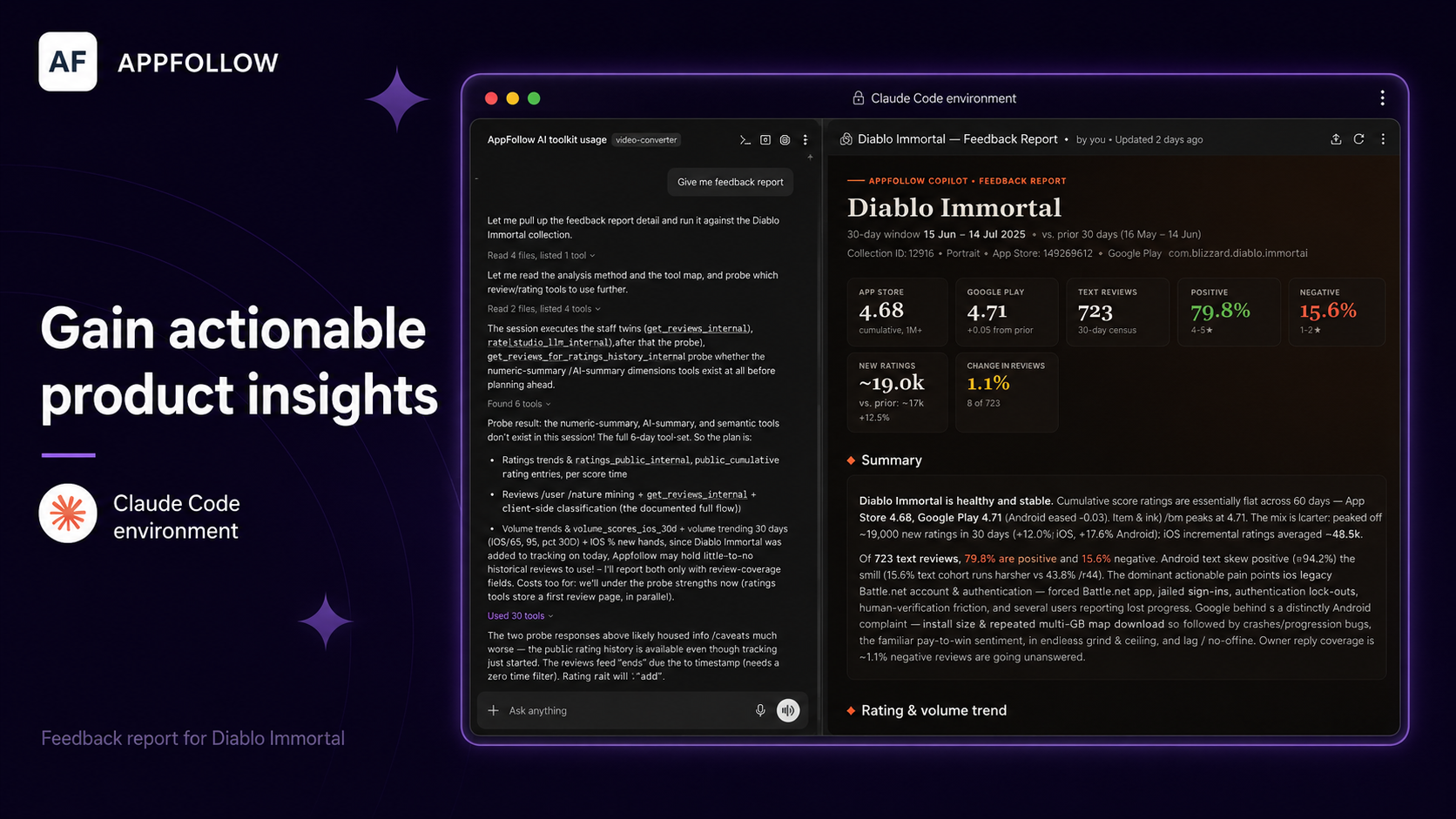
Table of Content:
Most teams that work with AppFollow spend part of every week on the same small set of chores. Pull the latest reviews for an app, read through them to spot the complaints, check whether the rating is in turmoil or not. None of this is complicated. It just eats hours, and it comes out slightly different every time depending on who ran it and how they framed their questions.
The AppFollow AI Toolkit hands that work to an AI agent. It's an open-source plugin for Claude Code and Codex that connects to your AppFollow account and runs guided workflows for app store research and review analysis. You ask for what you want, in plain language or with a slash command, and the agent runs the workflow and gives you a report. No dashboard to build first, no query to write, no copying and pasting between tabs.
For context, AppFollow has been doing app reputation, review response, and ASO since 2014, and it covers the App Store, Google Play, the Mac App Store, Microsoft Store, HUAWEI AppGallery, Samsung Galaxy Store, Steam, and Trustpilot. The toolkit is a way to reach that data from inside the AI tools your team already has open.
Here’s how it works!
Why put an agent on this job
Agents like Claude and the ones inside Codex are good at a specific kind of task.
Take a fuzzy request ("what are people complaining about in our app lately"), break it into steps, call the right tools, and turn the raw output into something a person can read. That describes most of what review analysis and ASO checks are. The hard part was always the plumbing: knowing which data to pull, in what order, and how to summarize it once you have it. An agent that has been taught the steps handles that part for you.
There's also the consistency problem. When five people on a team each write their own prompt to analyze feedback, you get five different reports, and none of them line up month to month. A workflow fixes that. Everyone runs the same steps, the output has the same shape every time, and you can compare this week to last week without squinting.
The MCP server underneath
The toolkit talks to your data through the AppFollow MCP server, which we run at https://mcp.appfollow.io/mcp. MCP (Model Context Protocol) is the standard that lets an AI client use outside tools, and our server exposes around 30 of them: reviews and replies, ratings, rankings, keywords and ASO data, apps and collections, reports, and API credit info.
You sign in with the Google account tied to your AppFollow login. There are no API keys to copy around and no custom integration to stand up. Everything the agent can see is scoped to your own account and your existing permissions, and every call runs through the public API with normal credit accounting.
If you just want the raw tools, the MCP server works on its own with Claude, ChatGPT, Codex, Cursor, or any other MCP-capable client. The toolkit is the layer that turns those raw tools into finished workflows, and for now it targets Claude Code and Codex.
What you can do with it
Finding and tracking an app is the simple one. Ask the agent to find your app (or a competitor's) on the App Store or Google Play. It searches, checks the result against what you already track so you don't end up with duplicates, and, when your plan allows, writes it to AppFollow in a couple of turns. No manual search and paste.
The feedback report is the one most teams will reach for: point it at a single app, a whole collection, or a handful of apps you pick out of a collection. You get back KPIs with period-over-period deltas, rating and sentiment trends, callouts for anything that looks anomalous, and a ranked list of the top bugs and feature requests that users are mentioning. The idea is to see what people are unhappy about without reading every review yourself, which stops being realistic somewhere north of a few hundred reviews a week.
The ASO report covers the other side of the work. Ask for it and you get current positions for your tracked keywords (with trends and category-rank movement where there's enough history), keywords sorted by AppFollow's effectiveness score into ones worth chasing and ones to skip, an interactive loop to add the keywords you pick, and honest metadata suggestions for your title, subtitle, and keyword field that you can take straight into App Store Connect or Play Console. Keyword opportunities and ranking risk surface without the usual manual spreadsheet pass.
Every report comes out two way:
There's a self-contained HTML file you can open in a browser and share with whoever needs it, and there's a structured findings file. If you have another agent connected to Jira or Asana, it can read the findings and file the bugs and feature requests as issues, so the loop from "users are complaining about X" to "there's a ticket for X" can happen without anyone retyping anything.
What's in the skill pack
The toolkit is a small set of skills plus the connection glue, and it lives on GitHub under an Apache 2.0 license at https://github.com/AppFollow/appfollow-ai-toolkit. You can read every line, fork it, and open a pull request if you want to change how a workflow behaves.
Inside you'll find:
- using-appfollow, the shared discipline every other skill reads first. It handles session setup, keeps an eye on credit spend, runs the preview then approve then confirm ritual before anything writes data, and gives the others a common way to talk about errors. You never call it directly.
- search, which finds an app and starts tracking it.
- feedback-analysis, the feedback report described above.
- aso-analysis, the ASO report described above.
- Thin slash commands (/search, /feedback-analysis, /aso-analysis) that point at the matching skill, and one shared .mcp.json that both Claude Code and Codex use to reach the MCP server.
Worth saying plainly: the toolkit ships no bundled API client and no secrets. Every tool call goes through the MCP server using your own OAuth session, gets billed to your own workspace credits, and only ever references public MCP tools. Nothing about your data is hidden away inside the plugin.
How to install it
The toolkit lives on GitHub, and both hosts pull it from there. If you just want the raw AppFollow tools without the guided workflows, the MCP server also works directly with Claude and ChatGPT — see below.
Claude Code
1. Add the marketplace:
/plugin marketplace add AppFollow/appfollow-ai-toolkit2. Install the plugin:
/plugin install appfollow-ai-toolkit@appfollow-ai-toolkit3. Activate it:
/reload-pluginsThe plugin brings its skills and the .mcp.json connection with it, so Claude Code picks up the MCP server automatically — nothing else to configure.
Prefer just the raw MCP server, without the toolkit's guided workflows? Skip the steps above and run:
claude mcp add --transport http appfollow https://mcp.appfollow.io/mcpThen run /mcp and sign in with Google when prompted.
Codex
Prerequisite: you need the Codex CLI installed. If codex isn't a recognized command yet:
curl -fsSL https://chatgpt.com/codex/install.sh | shRun codex once and sign in with your ChatGPT account (Plus, Pro, Business, Edu, and Enterprise plans all include Codex).
1. Add the marketplace:
codex plugin marketplace add AppFollow/appfollow-ai-toolkit2. Install the plugin: run /plugins inside Codex, find AppFollow AI Toolkit under the marketplace tab, and install it. Start a new session afterward.
Prefer just the raw MCP server, without the toolkit's guided workflows? Skip the steps above and run:
codex mcp add appfollow --url https://mcp.appfollow.io/mcp
codex mcp login appfollow
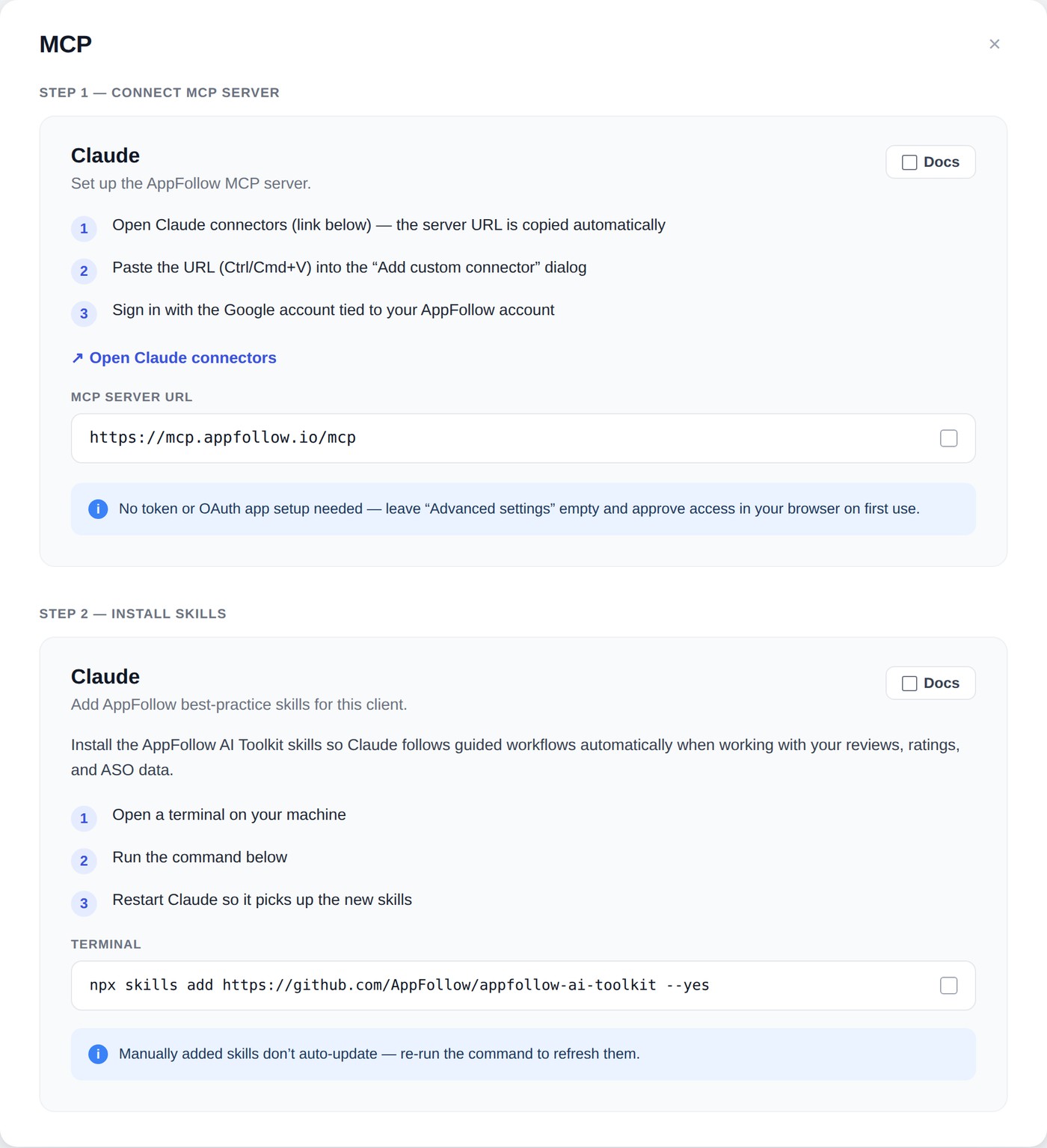
Connect to Claude
Works with Claude.ai and Claude Cowork (no toolkit workflows here — just the raw MCP tools).
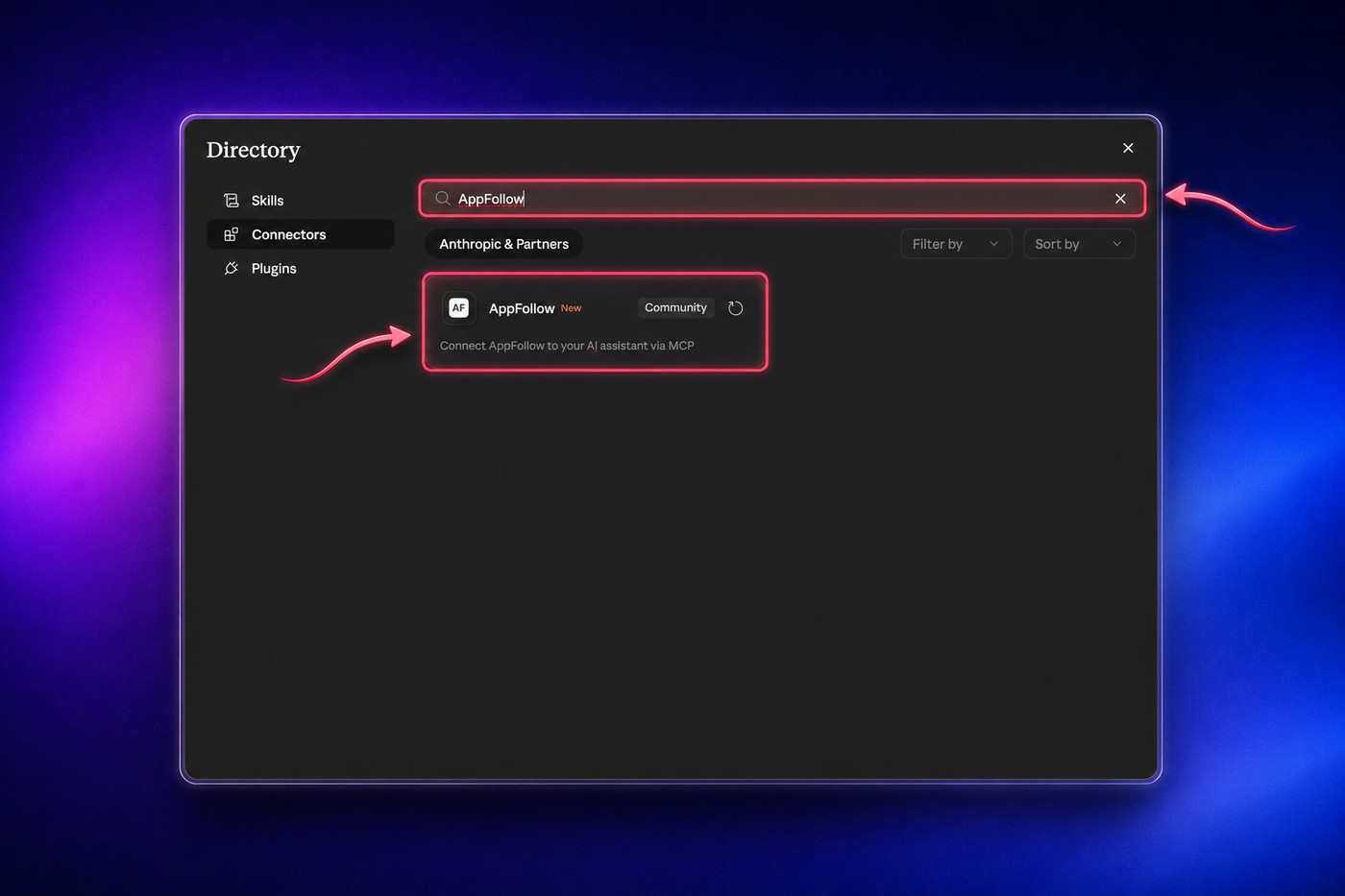
1. Open Settings → Connectors.
2. Search "AppFollow".
3. Connect.
4. Sign in with the Google account tied to your AppFollow account.
Connect to ChatGPT
Custom MCP connectors need ChatGPT Plus, Pro, Business, or Enterprise/Edu — this option isn't available on the Free plan.
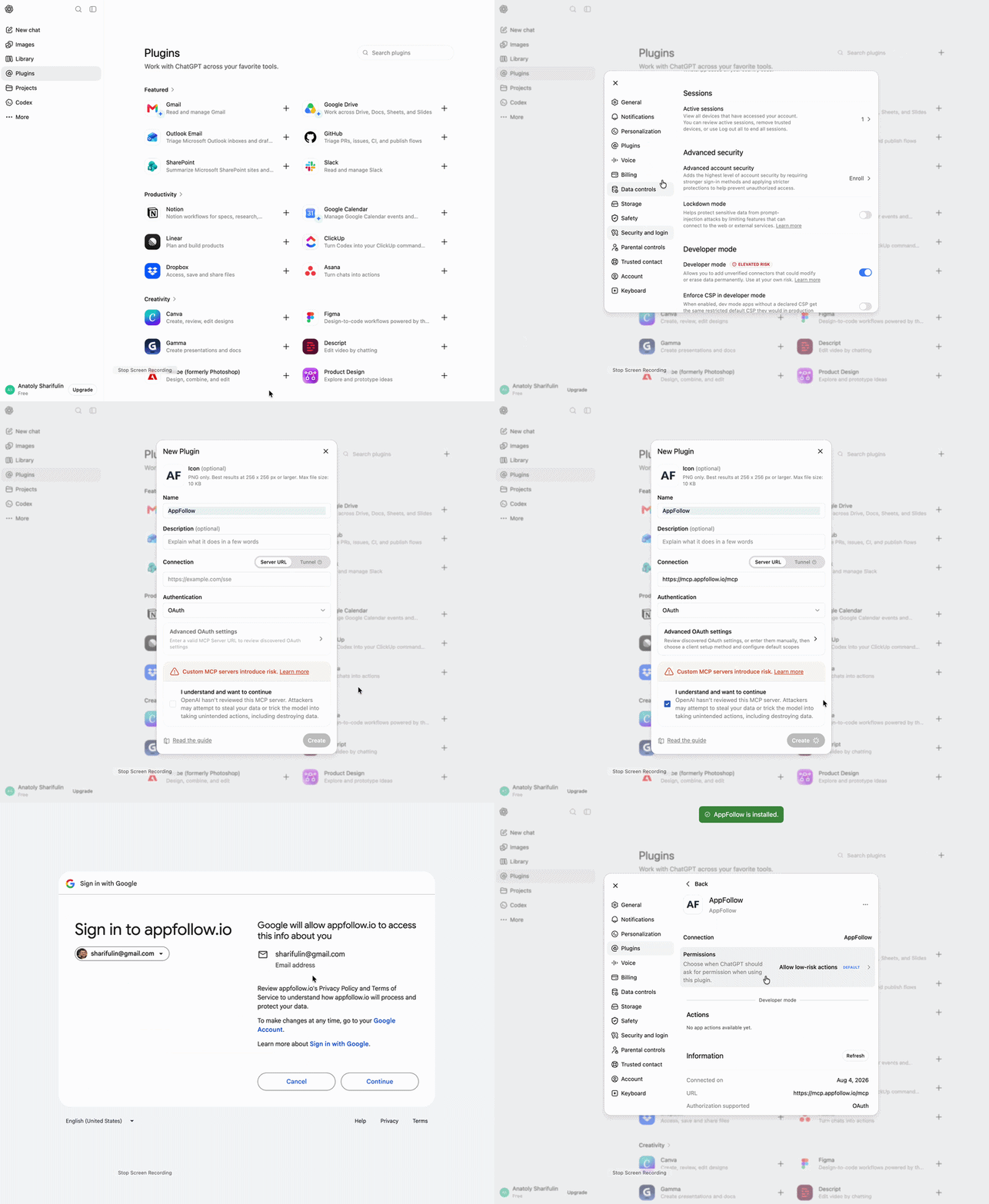
1. Open the profile menu → Settings → Apps → Advanced Settings, and toggle on Developer mode.
(On a Business/Enterprise/Edu workspace, only admins/owners can enable this.)
2. Go to Settings → Apps → Create.
3. Fill in the app details:
- Endpoint:
https://mcp.appfollow.io/mcp - Authentication: OAuth
4. Click Scan Tools. This opens the Google sign-in prompt — complete it, then wait for the tool scan to finish.
5. Click Create. The app now appears under Settings → Apps → Enabled Apps, labeled Dev.
6. Start a new chat and select the AppFollow app from the tools menu (or mention it in your prompt) to use it.
On Plus/Pro, custom MCP connectors are read/fetch only — plenty for reviews, ratings, and ASO data. Full write actions currently require Business/Enterprise/Edu.
Add the skill pack on top of a connector (advanced)
Already connected via Claude.ai, Cowork, or another MCP client above, but want the toolkit's guided workflows and slash commands too — not just the raw MCP tools? Install the skill pack separately with:
npx skills add https://github.com/AppFollow/appfollow-ai-toolkit --yesThis works with the official Claude connector and other MCP-compatible clients that support skills. It needs Node.js and npx on your machine, so it's a more technical route — most people are better off with the Claude Code / Codex plugin install or the connector setup above.
Sign in
The first AppFollow tool call opens a Google sign-in. Use the Google account tied to your AppFollow login. After that, every request runs under your own account — there's nothing else to configure.
Run a workflow
Ask in plain language or use a slash command:
- "Find our app on the App Store and start tracking it", or
/search <app name> - "Build a feedback report for the last 30 days", or
/feedback-analysis <app or collection> - "Run an ASO report and suggest keywords to add", or
/aso-analysis <app or collection>
If something's missing or broken, or there's a tool you wish existed, tell us. The MCP server has a built-in submit_feedback tool, so you can send a note to our engineering team from inside the same conversation. This is the first version, and the plan is to keep growing both the toolkit and the public API behind it. The feedback we get now is what shapes the next release.
FAQ
What is the AppFollow AI Toolkit?
It's an open source plugin for Claude Code and Codex that connects to your AppFollow account and runs guided workflows for app store research and review analysis. You ask for a report in plain language or with a slash command, and the agent runs the steps and hands back the result. It sits on top of the AppFollow MCP server, which exposes around 30 AppFollow tools to AI clients.
How do I connect AppFollow to Claude Code or Codex?
Add the plugin from the GitHub repository. In Claude Code you add it as a plugin marketplace source and install appfollow-ai-toolkit. In Codex you add it through the same repository using Codex's plugin config. Then make your first request. The first tool call opens a Google sign-in, and after that every request runs under your own AppFollow account.
Do I need an API key to use the AppFollow MCP server?
No. The server uses Google OAuth. You sign in with the Google account tied to your AppFollow login, and access is scoped to your account and your existing permissions. There are no keys to copy around and no custom integration to build.
What workflows does the toolkit include?
Three today. Finding and tracking an app on the App Store or Google Play. A feedback report with KPIs, period-over-period deltas, rating and sentiment trends, anomaly callouts, and a ranked list of the top bugs and feature requests. An ASO report with tracked-keyword positions, keywords tiered by effectiveness score, an add-keyword loop, and metadata suggestions. Each report comes out as an HTML file plus a structured findings file.
Does the toolkit use my AppFollow credits?
Yes. There's no separate charge for the toolkit itself, and it's available on every AppFollow plan. Each tool call runs through the AppFollow MCP server on the public API and is billed to your workspace credits, the same as any other API usage — but the cost isn't flat, since every method has a different credit cost. You can see the exact cost per method, and check your remaining balance, from the MCP token section of your API dashboard.