How to choose the right AppFollow plan

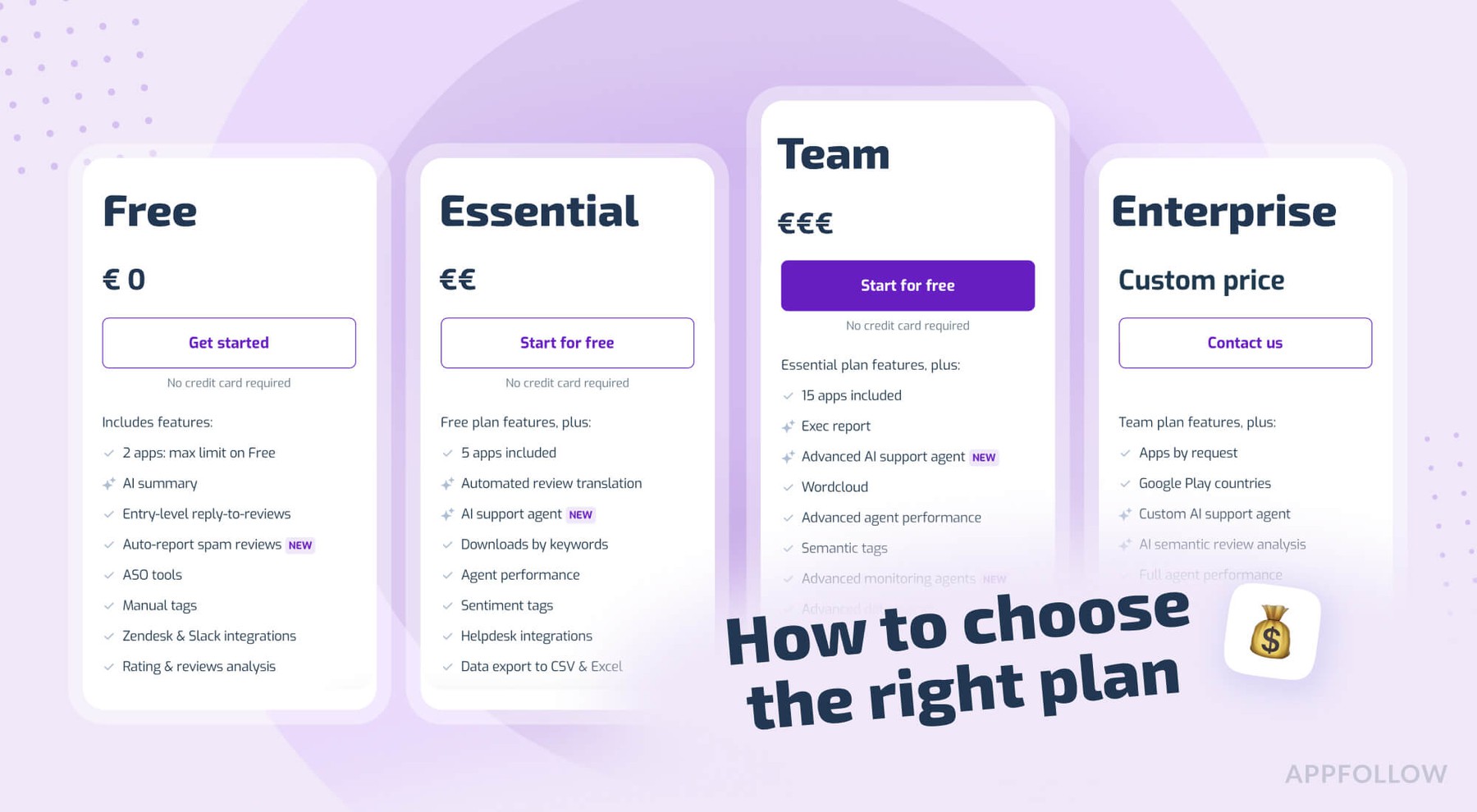
Table of Content:
AppFollow has a handful of plans, and it is not always obvious which one you need. This short article walks through what each plan covers, and then the more useful part: which one fits based on what your team spends its time on.
Prices below are from the current pricing page. They exclude VAT and apply to new users, so glance at the pricing page before you commit.
The plans, in short
There are five to pick from right now. Monthly prices first, with the billed-yearly price in brackets where it is cheaper.
- Free. $0, up to 2 apps. Keyword tracking, competitor monitoring (10), review replies (100 manual a month), auto-report spam, basic automation, and the integrations (Slack, Zendesk, MS Teams, Telegram, email). Historical data goes back 7 days. Good for trying things out.
- ASO (as an add-on). From $19 a month, billed yearly, 2 apps. This one is new. Built for people who live in search rankings and metadata. Advanced ASO tools, all ranked keywords, keyword difficulty and popularity history, AI keyword recommendations, keyword spy, an organic traffic dashboard, and 30 competitors. 500 keywords included.
- Essential. $179 a month ($129 billed yearly), 5 apps. Adds AI replies and auto-replies, automated review translation, sentiment tags, helpdesk integrations, downloads by keyword, CSV and Excel export, and 365 days of history. 3000 keywords, 100 competitors.
- Team. $599 a month ($425 billed yearly), 15 apps. Adds executive reports, advanced AI auto-replies, semantic tags, wordcloud, advanced alerts, agent performance, extra store coverage (Microsoft, Xbox, Amazon), and full history. 9000 keywords, 250 competitors.
- Enterprise. Custom price. Apps by request, full AI workflows and auto-tagging, AI semantic review analysis, advanced Zendesk and Salesforce, anomaly detection, SSO, a dedicated success manager, and a guaranteed SLA.
Two things worth knowing before you compare: every plan includes unlimited users, so the bill scales with the number of apps and features, and adding people costs nothing. Billing yearly knocks a decent chunk off, up to about 29%. There is a 10-day free trial too if you want to look around first.
Pick by what your team does
The plan names help a little, but it is easier to work backwards from the job.
For ASO specialists
If your day is keywords, rankings, metadata, and watching what competitors are doing, the new ASO plan is the one to look at first. It is cheap for what you get, $19 a month billed yearly. You get all ranked keywords, keyword difficulty and popularity history, AI keyword recommendations, keyword spy on competitors, and the organic traffic dashboard.
It comes with 500 keywords and room for 30 competitors on 2 apps. If you are optimizing across a lot of locales that keyword pool fills up, so if you are pushing positions worldwide, you will probably outgrow it and want Essential (3000 keywords) or Team (9000).
The organic traffic dashboard is the bit most people end up living in. It shows search visibility and where your installs are coming from, which makes it a lot harder to optimize blind.
For product managers and owners
You want the full picture. Reviews, ratings, competitor movement, and what users keep asking for. Essential covers most of this, and Team is where you land once you need semantic tags, executive reports, and more apps (Team jumps to 15).
If you are tracking several competitors or market leaders, watch the competitor limit. Essential gives you 100, Team 250. Semantic analysis is worth turning on here too, it is the quickest way to see what users are complaining about without reading every review yourself.
For marketers
Add review replies so a bad rating streak does not sneak up on you after a rough release. Auto-translation helps when complaints come in languages nobody on the team reads.
Essential is usually the right starting point for marketing teams, since it has the AI replies, translation, and sentiment tags. Semantic review analysis and the deeper reports sit on Team and Enterprise, which is where you go when you want to understand user mood at scale and find weak spots fast.
For customer support
Support teams working across countries can split reviews by language and route them to different tools. Spanish-speaking agents get reviews in a Slack channel, English speakers reply from Zendesk, that kind of setup. Helpdesk integrations (Zendesk, Freshdesk, Intercom, Help Scout, and so on) show up on Essential, and agent performance tracking (who replied to what, how fast) is on Essential too, with the advanced version on Team. If you are in Gaming or a high-traffic app, you might definitely need more than just Team.
For indie and solo devs
Start on Free or the ASO plan. If you are mostly doing store optimization on one or two apps, the ASO plan at $19 a month billed yearly gives you real tools without the bigger monthly commitment. You can always move up later once review volume or app count grows.
Still not sure?
It is easy to grab a bigger plan than you use, or to go too small and hit a limit mid-quarter. Rough rule: pick based on the one job you do most, start a size down from where you think you should be, and upgrade once you feel the ceiling. The limits that bite first are usually apps, keywords, and reply count, so check those three against the comparison table.
The ASO plan, one more time
If ASO is the reason you are here, the ASO plan is the cheapest useful way in. All ranked keywords, AI keyword recommendations, competitor keyword spy, and the organic dashboard, for $19 a month billed yearly on 2 apps. For a solo optimizer or a small growth team the price is tough to argue with.
FAQ
How much does AppFollow cost?
AppFollow has a free plan at $0, an ASO plan from $19 a month billed yearly, Essential at $179 a month ($129 billed yearly), Team at $599 a month ($425 billed yearly), and custom Enterprise pricing. Prices exclude VAT and apply to new users. Billing yearly saves up to about 29%.
Is there a free AppFollow plan?
Yes. The Free plan covers up to 2 apps with keyword tracking, competitor monitoring, review replies, spam reporting, and integrations, with 7 days of historical data and unlimited users. No card needed to start.
What is the AppFollow ASO plan?
It is a newer plan built for app store optimization. From $19 a month billed yearly you get advanced ASO tools, all ranked keywords, keyword difficulty and popularity history, AI keyword recommendations, competitor keyword spy, and an organic traffic dashboard, with 30 days of history on 2 apps.
Does AppFollow charge per user or per seat?
No. A major difference from many other similar platforms. Every plan includes unlimited users, so product, growth, support, and marketing can all get in. The bill is based on apps and features, and headcount does not change it.
Can I try AppFollow before paying?
Yes. There is a 10-day free trial, and the Free plan sticks around with no time limit if you want to keep using the basics. At the end of a trial your account just downgrades to Free if you do not subscribe.
Which AppFollow plan is best for a small ASO team?
The ASO plan is usually the right fit for small teams and solo optimizers, since it has the core keyword and ranking tools for $19 a month billed yearly. If you also need review management, translation, and automation, Essential is the next step up.
Read also:
How HyperHug brought 'NDA keyword' back and lifted Oxide installs by 34% in the US App Store
How HyperHug Used AppFollow to Reconnect with 50,000 Players Through a Mass Reactivation Campaign
How Earth Hero Uses ASO Data to Shape Their Climate Action App