What Are the Key Features of Effective App Store Optimization Tools?

Table of Content:
- Keyword research that powers your entire strategy
- Ranking and performance tracking that shows what's working
- Review and rating management that scales
- Competitive intelligence that keeps you ahead
- A/B testing capabilities that remove guesswork
- Localization management that scales
- Reporting and collaboration features that get your team aligned
- Summary checklist of criteria to check for your next ASO tool
- How to evaluate ASO tools
- FAQs
- Read also
You're staring at your app's dashboard. Downloads are plateauing, your keyword rankings are dropping, and your competitor just launched a new feature, and their installs are spiking. Oh bother!
Sound familiar?
There are over 4.2 million apps competing for attention across the App Store and Google Play. And with 65% of all downloads happening directly after a search, your visibility in those search results is everything.
You already know you need an ASO tool. The question that matters is: which features separate tools that give you busy work from tools that move the needle on your KPIs?
Quick answer:
- Keyword research
- Ranking and performance tracking
- Review and rating management
- Competitive intelligence
- A/B testing
- Reporting and collaboration features that get your team aligned
- Localization management
This is a clear picture of what matters when you're in the trenches trying to grow an app in 2026.
To get this data, I started by sitting down with Yaroslav Rudnitskiy, AppFollow's ASO expert. Then I watched 30 AppFollow customer demo calls, listening to real app developers and marketers explain their pain points, their workflows, and what they desperately needed from an ASO platform.
Sure thing, the quick list is not enough to answer your question, so let's break down exactly what to look for when you're evaluating ASO platforms.
1. Keyword research that powers your entire strategy
You can't optimize for keywords you don't know exist. When you're evaluating ASO tools, keyword research should be your first checkpoint, but not all keyword features are created equal. Here's what you need:
- Search volume data with historical trends. You need to know that "AI photo editor" gets 50K monthly searches and has grown 200% this year, while "photo filters" is declining. This isn't academic; it determines where you invest your optimization efforts.
- Keyword difficulty scoring. Sure, "fitness app" has massive volume. But if you're a bootstrapped startup, can you realistically rank for it against Nike and Peloton? Tools that show you difficulty metrics help you identify winnable battles. Look for tools that show you both volume and competition level so you can find that sweet spot: high intent, reasonable competition.
Example of how keyword research results may look like: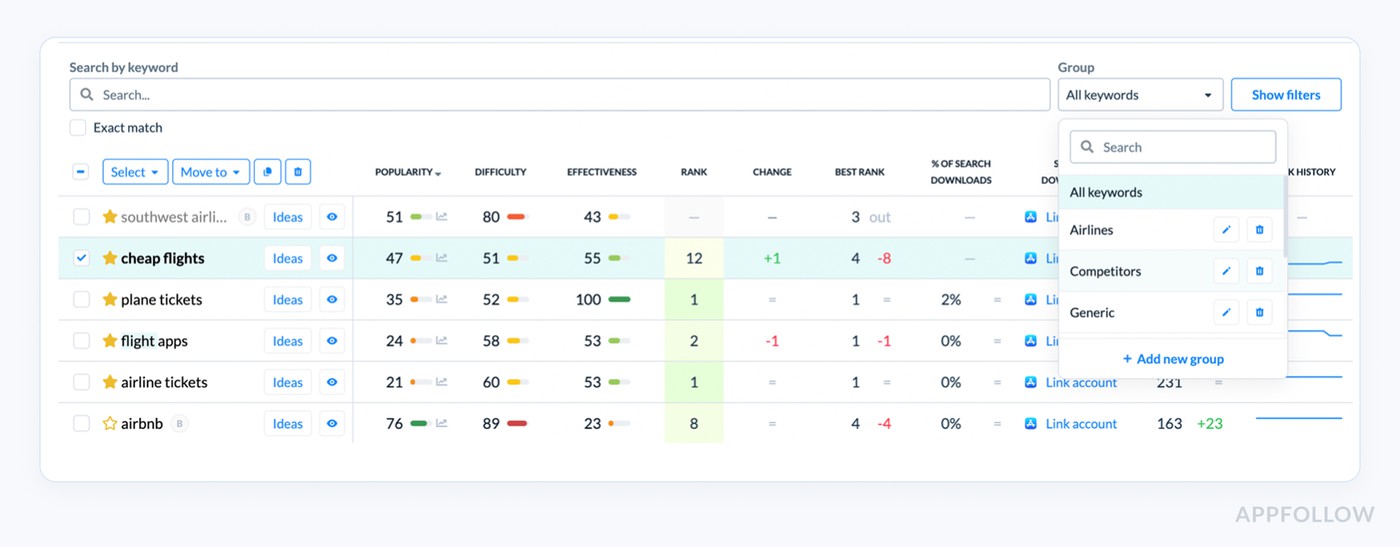
- Competitor keyword gap analysis. This is where things get tactical. When competitors app ranks for 1,247 keywords, and your app ranks for 83, you need to see what those 1,164 missing opportunities are. The right tool shows you this in minutes, not hours of manual research.
- Localization support for keyword research. If you're targeting multiple markets (and you should be), you need localized keyword data. "Football" means soccer in the UK and American football in the US. "Handy" means mobile phone in German. Tools that provide region-specific search volumes and suggestions prevent costly localization mistakes.
- Keyword suggestion engine. Your tool should surface related keywords you haven't thought of. Long-tail variations, semantic alternatives, and trending searches in your category. The best tools use machine learning to recommend keywords based on your app's category and existing metadata.
Example of how keyword suggestion engine works in AppFollow: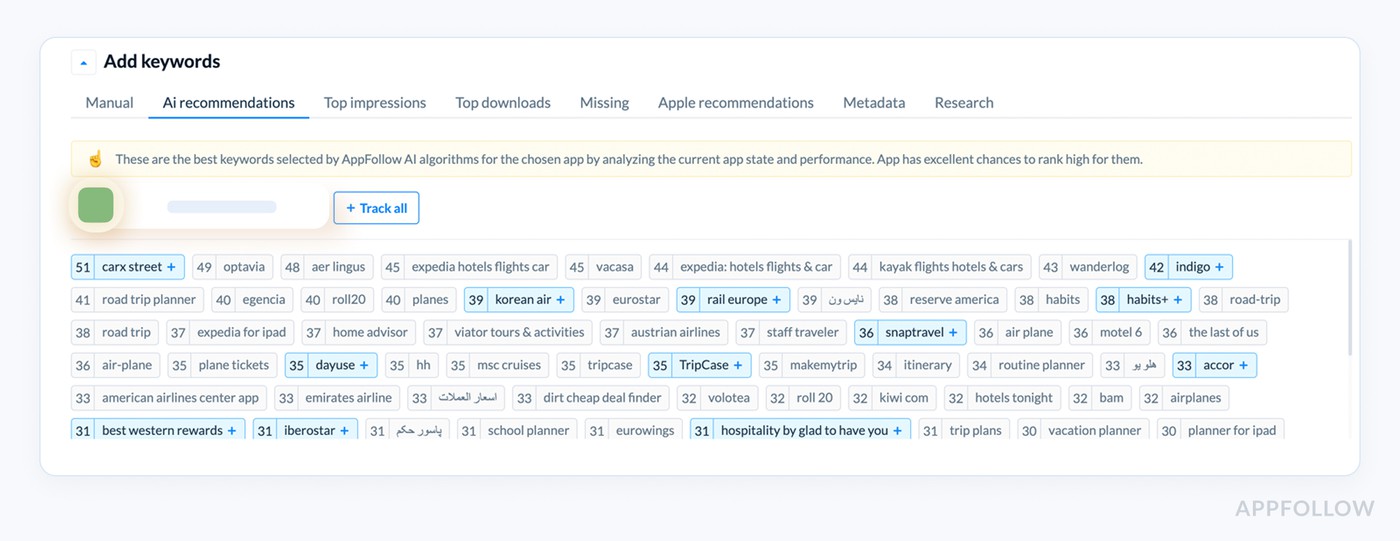
When evaluating tools, ask: Can I discover new keyword opportunities quickly? Can I track my rankings against competitors? Can I localize effectively? If the answer to any of these is no, keep looking.
2. Ranking and performance tracking that shows what's working
Typical problem app developers and marketers meet: installs dip… and suddenly everyone turns to you like, “So. What happened?”
If your ASO tool can’t answer that fast, you’re guessing. So here are the features your ASO tool should have to answer this question:
- Real-time keyword rank tracking. When you drop from position 3 to position 15 for your main keyword, every day you don't know about it costs you installs. Look for tools that track daily, or even multiple times per day, for critical keywords.
Here is what it looks like in AppFollow: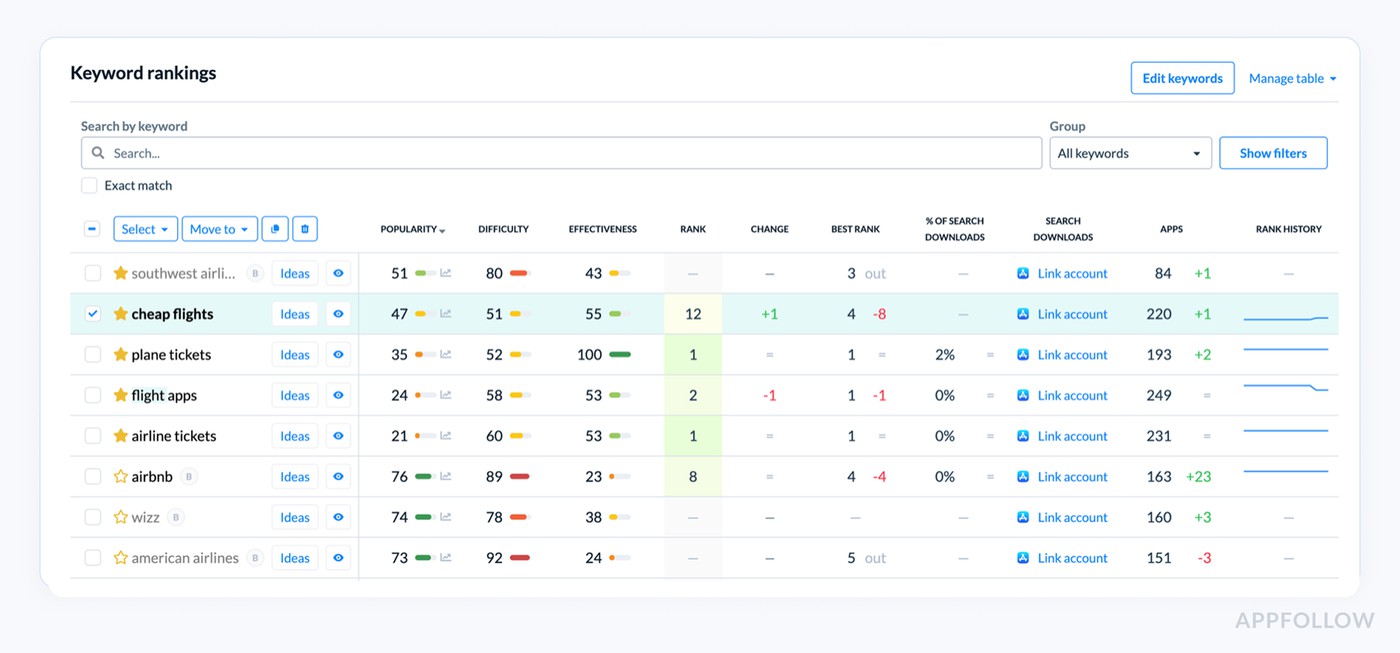
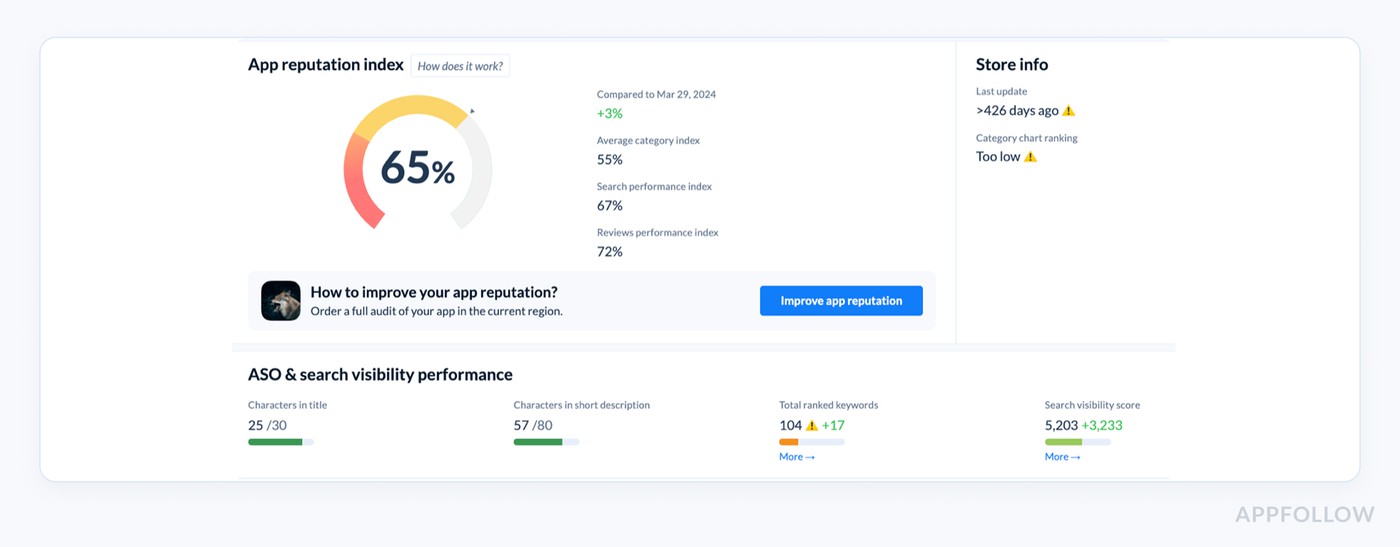
- Visibility score metrics. Some tools aggregate your rankings into a single visibility score. This is useful for executive reporting and trend analysis. You can see at a glance: "Our visibility increased 23% this month." But make sure you can also drill down into individual keyword performance. For example:
- Conversion rate tracking. Your tool should show you impressions-to-downloads conversion rates. Industry benchmarks are around 25% for iOS and 27.3% for Google Play. If you're at 12%, you have a conversion problem, not a visibility problem. That means fixing your creative assets, not your keywords.
- Top charts monitoring. Track your position in category rankings and top charts. Many developers overlook this, but chart positions can drive substantial organic traffic. Tools should alert you when you're close to breaking into a top chart so you can plan promotional pushes.
- Feature tracking. Can you see when Apple or Google features your app? Featured placements can 10x your daily installs. Your tool should record these events so you can correlate them with download spikes.
Here is how it looks like in AppFollow: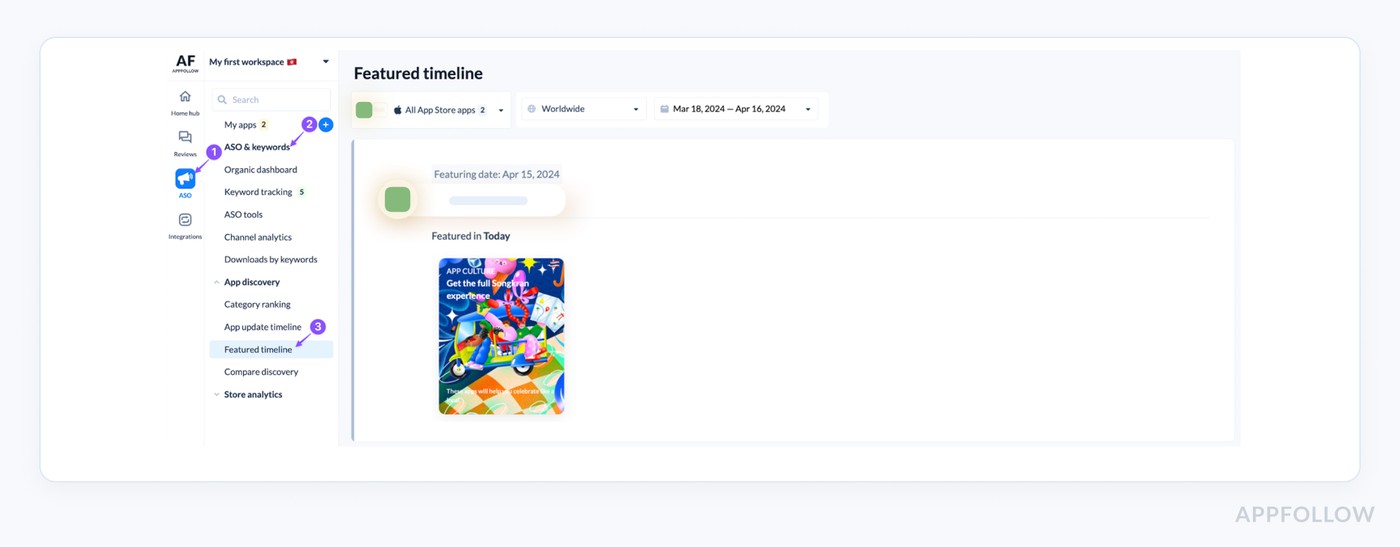
- Competitor benchmarking. You need to track 5-10 key competitors continuously. When their rankings jump, you should know immediately. When they update their metadata, you should be able to see exactly what changed.
The evaluation question during a tool’s demo: Does this tool tell me not just what's happening, but help me understand why? Can I connect ranking changes to specific actions I took?
Read also: Top 5 Review Management Software for Apple App Store
3. Review and rating management that scales
Let's talk about the reality of managing reviews at scale.
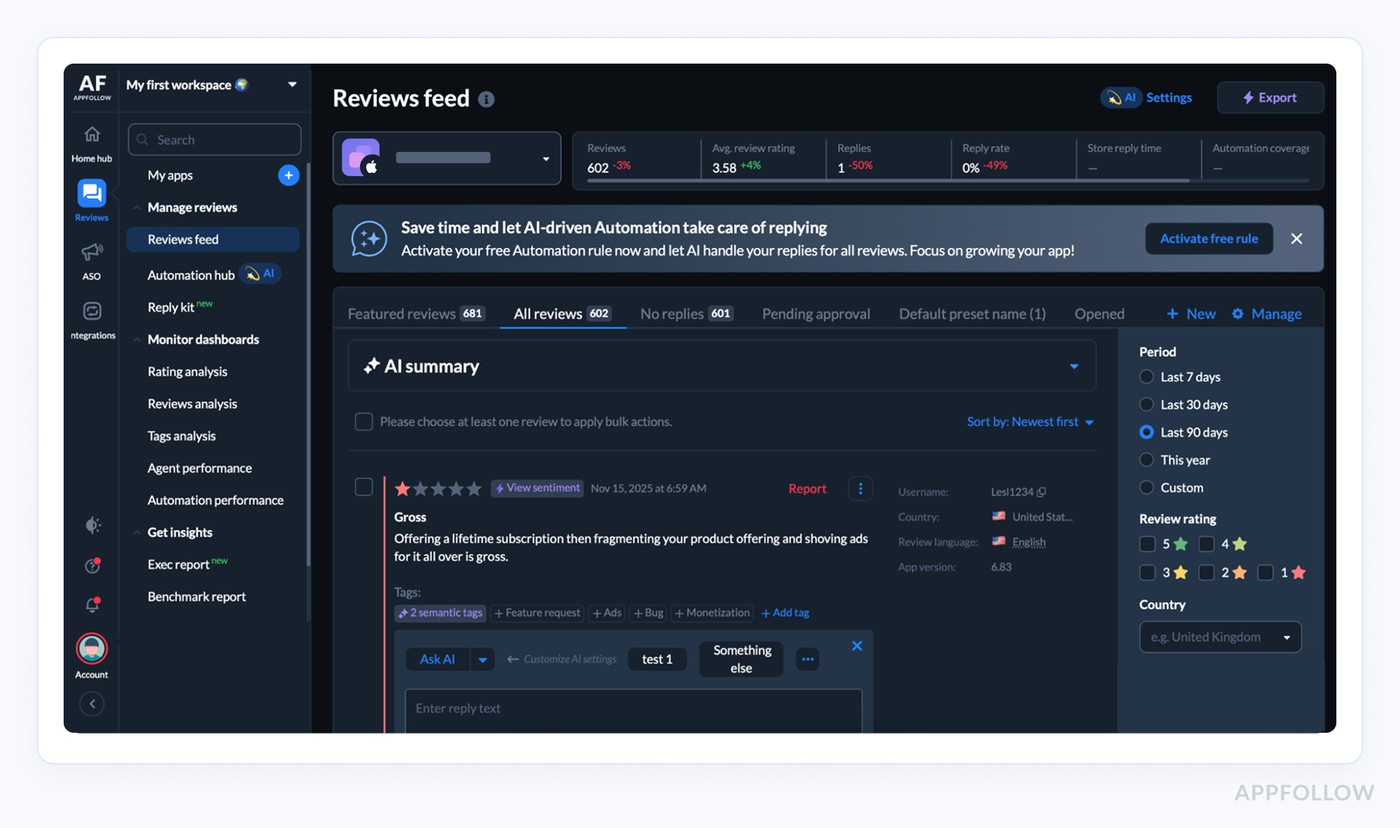
If you're operating in 30+ countries across iOS and Android, you're potentially monitoring reviews in 15+ languages across two platforms. Without proper tooling, you're either missing critical feedback or spending hours every day just reading reviews.
- Centralized review monitoring. Your tool must aggregate all reviews into a single dashboard. Every country. Every platform. Every language. This is how it should look ideally:
- Sentiment analysis and categorization. The best tools use NLP to automatically categorize reviews by topic (bugs, feature requests, pricing complaints) and sentiment. This lets you quickly identify: "We got 47 reviews mentioning 'crashes' this week, up from 12 last week."
- Translation capabilities. Built-in translation means you can read and respond to that detailed Japanese review about a payment flow issue without copying text into Google Translate. Apps that respond fast see better ratings.
- Response management. You need to track which reviews you've responded to, set up response templates for common issues, and assign reviews to team members. Look for tools that let you respond directly from the platform to both App Store and Play Store.
- Alert systems. Get notified immediately when you receive 1-star reviews or when reviews mention specific keywords like "crash," "refund," or "scam." Speed matters when you're doing damage control.
Example of an alert about a new review on Telegram: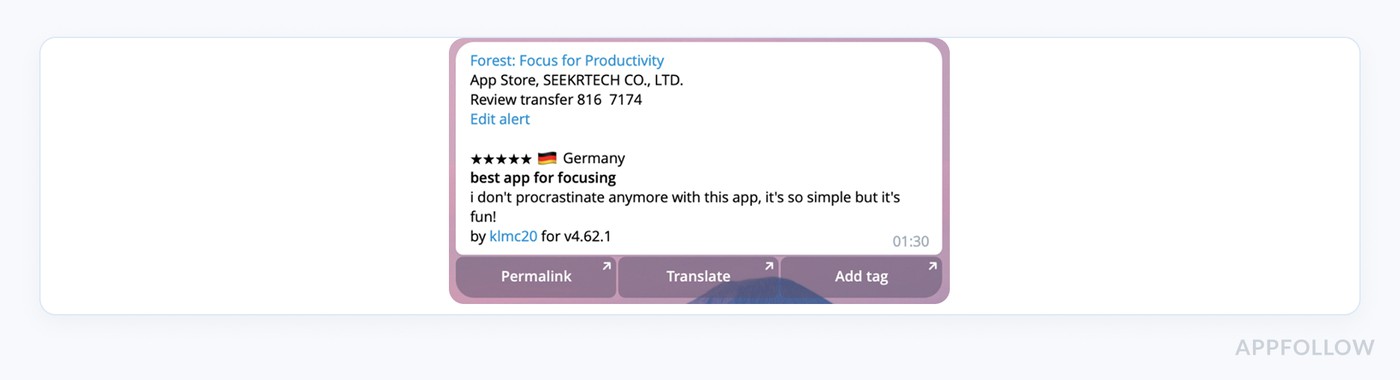
- Impact metrics. Responding to reviews can increase your rating by an average of 0.5 stars and lift user satisfaction by roughly 30%. Your tool should show you response rates, response times, and the correlation with rating changes.
Evaluation criteria during a tool’s demo: Can I manage 1000+ reviews per month without drowning? Can I respond in multiple languages? Can I identify patterns in user feedback quickly?
4. Competitive intelligence that keeps you ahead
Your competitors are your best source of market intelligence. They're running experiments, testing creative, adjusting pricing, and launching features. You should know about all of it. Here is how:
- Metadata monitoring. When a competitor changes their app title, subtitle, keywords, or description, you should get an alert. Why? Because if they're suddenly targeting "budgeting app" when they used to focus on "expense tracker," they've identified an opportunity. You need to evaluate whether you should compete for that same space.
- Creative tracking. Screenshot changes, icon updates, video previews, all of this should be archived so you can see the evolution of their store presence. Some tools even estimate the impact of creative changes on competitor conversion rates.
- Update frequency and changelog monitoring. How often do competitors ship updates? What features are they adding? Apps that update frequently often rank better and retain users longer. Your tool should track update history so you can benchmark your release cadence.
- Pricing and monetization changes. When a competitor drops their subscription price by 30% or introduces a new pricing tier, you need to know. This affects your positioning and potentially your revenue.
- Ad intelligence. Some advanced tools show you what keywords competitors are bidding on in Apple Search Ads. This reveals their acquisition strategy and identifies high-value keywords they're willing to pay for.
- Download and revenue estimates. While not perfectly accurate, estimated download volumes help you size up the competition. If a competitor suddenly jumps from 10K to 100K monthly downloads, something changed in their strategy.
Ask during a tool’s demo: Can I monitor 5-10 competitors effortlessly? Will I know about their strategic moves before my users start asking, "why doesn't our app have that feature?"
5. A/B testing capabilities that remove guesswork
Opinions don't matter (not always, anyway). Data does.
Should your icon be blue or orange? Should your first screenshot show features or benefits? Should you lead with "free trial" or "trusted by millions"? You can debate these questions internally for weeks, or you can test them with real users in days.
- Icon and screenshot testing. Both Apple and Google offer native A/B testing, but third-party tools often provide more granular analytics and faster results. Look for tools that let you test multiple variants simultaneously and show you conversion rate differences with statistical significance.
- Metadata experimentation. Some tools let you test app names, subtitles, and descriptions (where platform policies allow). Even small copy changes can impact conversion rates meaningfully.
- Statistical significance calculation. A tool showing you "variant B is winning with 100 installs vs 95" is useless. You need to know when results are statistically significant, usually requiring thousands of impressions per variant.
- Test history and insights library. The best tools archive all your tests so you can build institutional knowledge. "We tested red vs blue icons last year and red won by 18%" informs future decisions.
- Multi-variate testing. Advanced tools let you test multiple elements simultaneously. Icon A with Screenshot Set 1 vs Icon B with Screenshot Set 2. This speeds up optimization but requires larger sample sizes.
Evaluation question during a tool’s demo: Does this tool help me test scientifically? Can I reach statistical significance quickly? Will it integrate with my existing workflow?
Read also: Top 7 Best Appstore Review Management Software - Features & Price
6. Localization management that scales
Localization is where most teams struggle.
- Multi-language keyword optimization. Your tool needs to provide keyword research for every target market. What ranks in English rarely translates directly. Germans search for "Handy Apps," not "mobile apps." Japanese users search in completely different patterns than English speakers.
- Translation workflow management. Look for tools that help you manage translations across all your metadata. When you update your English description, you should be able to see immediately which of your 20 other language versions need updating. Some tools integrate with translation services or track which strings are out of sync.
- Regional performance tracking. You need to see conversion rates, rankings, and downloads broken down by country. Maybe you're crushing it in Brazil, but invisible in Mexico. Why? Your tool should help you diagnose this, often it's localization quality, sometimes it's competitive landscape, occasionally it's keyword strategy.
- Cultural adaptation insights. The best tools don't just translate, they help you adapt. Colors that perform well in the US might have different connotations in Asia. Some tools provide localization best practices and cultural guidelines.
- Localized review monitoring. Reviews in different markets often reveal different issues. Maybe German users love your app, but Italian users complain about a specific feature. You need to track sentiment and issues by region.
Ask during a tool’s demo: Can I manage 10+ language versions without chaos? Will I catch localization mistakes before users do? Can I identify which markets to prioritize?
Read also: 5 Review Management Software For Google Play Store Compared
7. Reporting and collaboration features that get your team aligned
ASO doesn't happen in a vacuum. You need buy-in from developers, designers, product managers, and executives. The right reporting makes this possible.
- Customizable dashboards. Your CEO cares about download trends and revenue. Your developer cares about bugs mentioned in reviews. Your designer cares about creative performance. Everyone needs a different view of the data. Look for tools that let each team member create their own dashboard.
- Automated reporting. Weekly ASO reports that you don't have to manually compile. Schedule them for your entire team so everyone stays informed without you becoming a human data pipeline.
- Annotation and commenting. When you push a major update or change your pricing, you should be able to annotate that in your tool so you can correlate it with performance changes later. Team comments let people collaborate directly in the platform.
- API access and integrations. Can you pull ASO data into your BI tools? Can you combine keyword rankings with user acquisition costs from your ad platforms? Can you correlate ASO metrics with in-app behavior from your analytics tools? Advanced teams need this integration capability.
- Role-based access control. Your agency partner shouldn't see your revenue data. Your developer doesn't need access to competitive intelligence. Your tool should let you control who sees what.
- Export capabilities. Sometimes you just need a CSV. Or a PDF for a board meeting. Make sure you can export data in formats you use.
Evaluation criteria during a tool’s demo: Will this tool reduce reporting overhead? Can my entire team understand and use the data? Does it integrate with our existing stack?
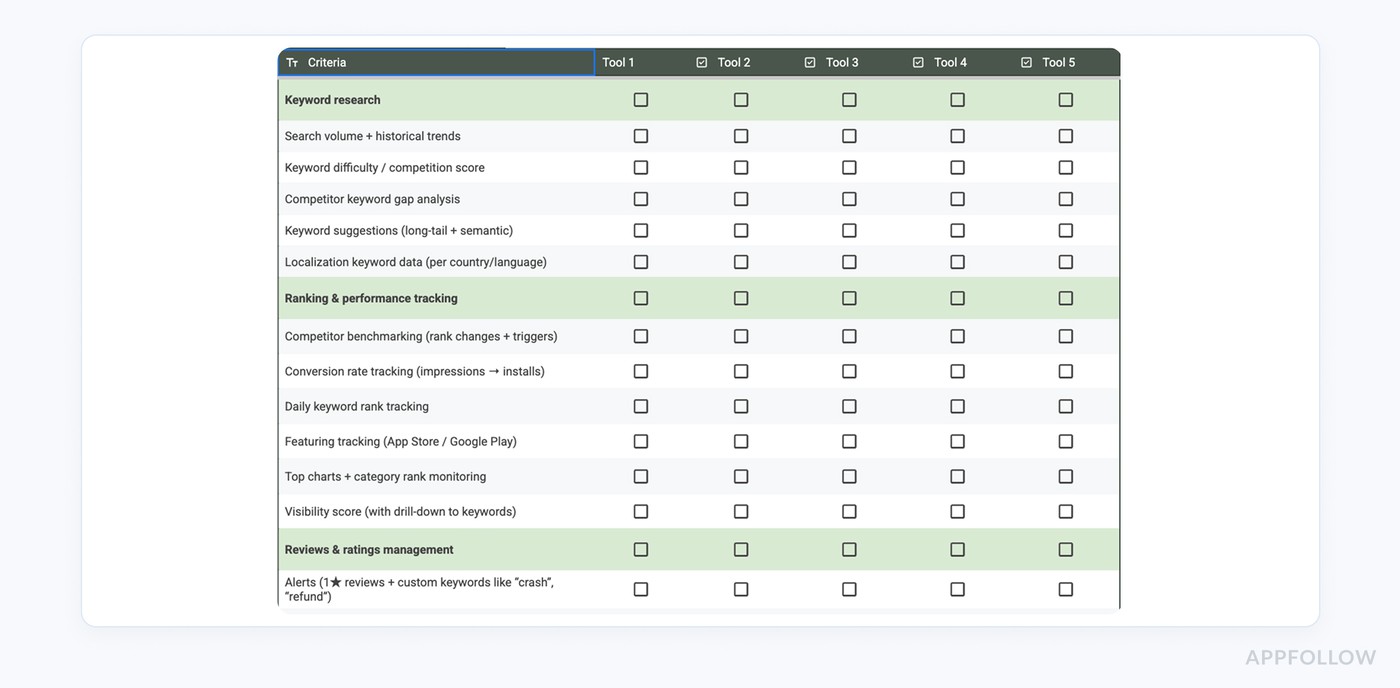
Summary checklist of criteria to check for your next ASO tool
The article is quite long, so we prepared a free ASO tools evaluation checklist. All you need to do is just make a copy of the table you’ll access by the link below.
It is totally free. No email needed.
You can use it during demo calls with experts or during trial tests of the platform.
How to evaluate ASO tools
Now that you know what features matter, here's how to approach tool selection:
- Start with a clear prioritization. If you're early-stage and single-market, you probably don't need sophisticated localization features yet. If you're an enterprise with 50M+ users globally, review management and API access become critical. List your must-haves vs nice-to-haves.
- Request demos with your app data. Generic demos are useless. You need to see how the tool performs with your specific app, in your specific category, against your specific competitors.
- Run a paid trial. Most tools offer 7-14 day trials. Use them. Do your job using the tool for a week. Does it save you time? Does it surface insights you weren't finding manually?
- Calculate ROI, not just cost. A tool that costs $500/month but helps you improve conversion rate by 3 percentage points could generate an extra 50,000 downloads per month. That's potentially $50,000+ in additional revenue (depending on your monetization). Don't just look at the price tag.
- Check integration requirements. Will this tool fit into your workflow or will it create extra work? Can it integrate with Slack for alerts? Can it push data to your data warehouse?
- Evaluate support and documentation. When something breaks or you need help, will someone respond? Is the documentation comprehensive enough that you can train new team members easily?
Try AppFollow first. Save your calendar before you book 6 more demos
Start a free AppFollow trial and run a real week of work: ranks, conversion, competitors, reviews — all in one place. You might not need the rest.
cta_demo_request_purple
FAQs
What are the must-have features in an ASO tool in 2026?
If a tool can’t do these well, it’s basically a fancy spreadsheet: keyword research, rank + visibility tracking, review and rating management, competitive intel, A/B testing support, localization workflows, and reporting/collaboration that your team will actually use. The point isn’t “more features.” The point is: can it help you spot what changed, explain why, and tell you what to do next.
How do I know if an ASO tool’s keyword data is actually useful?
Look for three things: history, context, and actionability.
History means trends, not just today’s volume. Context means difficulty/competition so you don’t waste weeks chasing “impossible” terms. Actionability means the tool can show gaps vs competitors and help you build a list of keywords you can realistically win, not a giant dump of ideas you’ll never implement.
What’s the quickest way to evaluate ASO tools without getting trapped in demo-land?
Bring your own reality. Demo the tool with your app, your category, your competitors, and a short list of keywords you care about. Then run a trial like you’re already using it: track ranks daily, check reviews, monitor a competitor change, pull a report for a teammate. If it doesn’t reduce guesswork and reporting time in the first week, it won’t magically do it in month three.
Read also
The top 10 app store optimization tools in 2026 (and when to use each)
How can sentiment analysis be used to improve customer experience?
Why app stores nudge app companies to respond to reviews
How App Store Optimization Tools Enhance App Visibility?
How does automated review management improve customer engagement?