5 reasons why sentiment analysis matters for app companies in 2026

Table of Content:
- TL;DR on why is customer sentiment important
- #1 Protect your star rating before it becomes a growth problem
- #2 Catch bad releases faster
- #3 Improve store conversion without spending more on UA
- #4 Reduce support load by routing the right issues to the right humans
- #5 Stop churn drivers earlier
- FAQs on benefits of sentiment analysis
For example, sentiment analysis automation and tagging helped Roku handle 35–50% of reviews and cut review response time by 10X. All is because tags surfaced issues that would’ve been missed manually.
To build this argument, I used two evidence streams: real AppFollow customer outcomes (what changed after teams implemented review tagging + sentiment monitoring) and external studies that quantify how responses and rating shifts impact downloads.
And here are key points from my research ⬇
TL;DR on why is customer sentiment important
Here is what you can expect after implementing sentiment analysis in your review routine:
- Protect your star rating before it becomes a growth problem: Google Play’s displayed rating is weighted toward more recent ratings, and AppFollow’s Gameloft case cut response time 30 → 3 days with 62% of ratings increasing after a response.
- Catch bad releases faster: AppFollow shared a mobile game team that used AI alerts on review feedback to fix issues proactively, cutting negative reviews by 70%, lifting retention by 45%, and growing DAU 3×.
- Turn feedback into a prioritized roadmap: AppFollow’s Semantic Analysis is built to quickly detect issues that drive dissatisfaction, lower ratings, and uninstalls, and research shows automated methods are explicitly used to prioritize informative reviews for software maintenance and evolution.
- Improve store conversion without spending more on UA: AppTweak’s 2025 benchmarks found apps improving rating from 3.6 to 4.2 saw nearly 60% higher conversion rates.
- Reduce support load and speed up handling: Roku reports that with AppFollow automation, the tags surface issues that manual analysis would miss, letting them tackle 35–50% of reviews and cut response time by 10×+.
- Stop churn drivers earlier: When the average app loses 77% of DAUs within 3 days of install, review sentiment gives you a near-real-time signal to fix “login/crash/paywall” friction before retention dashboards confirm the damage.
#1 Protect your star rating before it becomes a growth problem
A star rating slide rarely starts with “we have a rating problem.” It starts with one release. A login loop. A crash on Android 14. A checkout failed. Users don’t file tickets. They leave 1★ reviews, and your average rating starts drifting before anyone has a Jira ticket title for it.
Google literally tells you why you can’t ignore the drift: Google Play’s rating score puts more weight on your most recent ratings, so a bad week matters more than your “historically great” quarter.
This is where sentiment analysis earns its keep. As one of the main benefits of customer sentiment analysis, it turns review text into tracked signals you can act on fast: negative spike by topic or country.
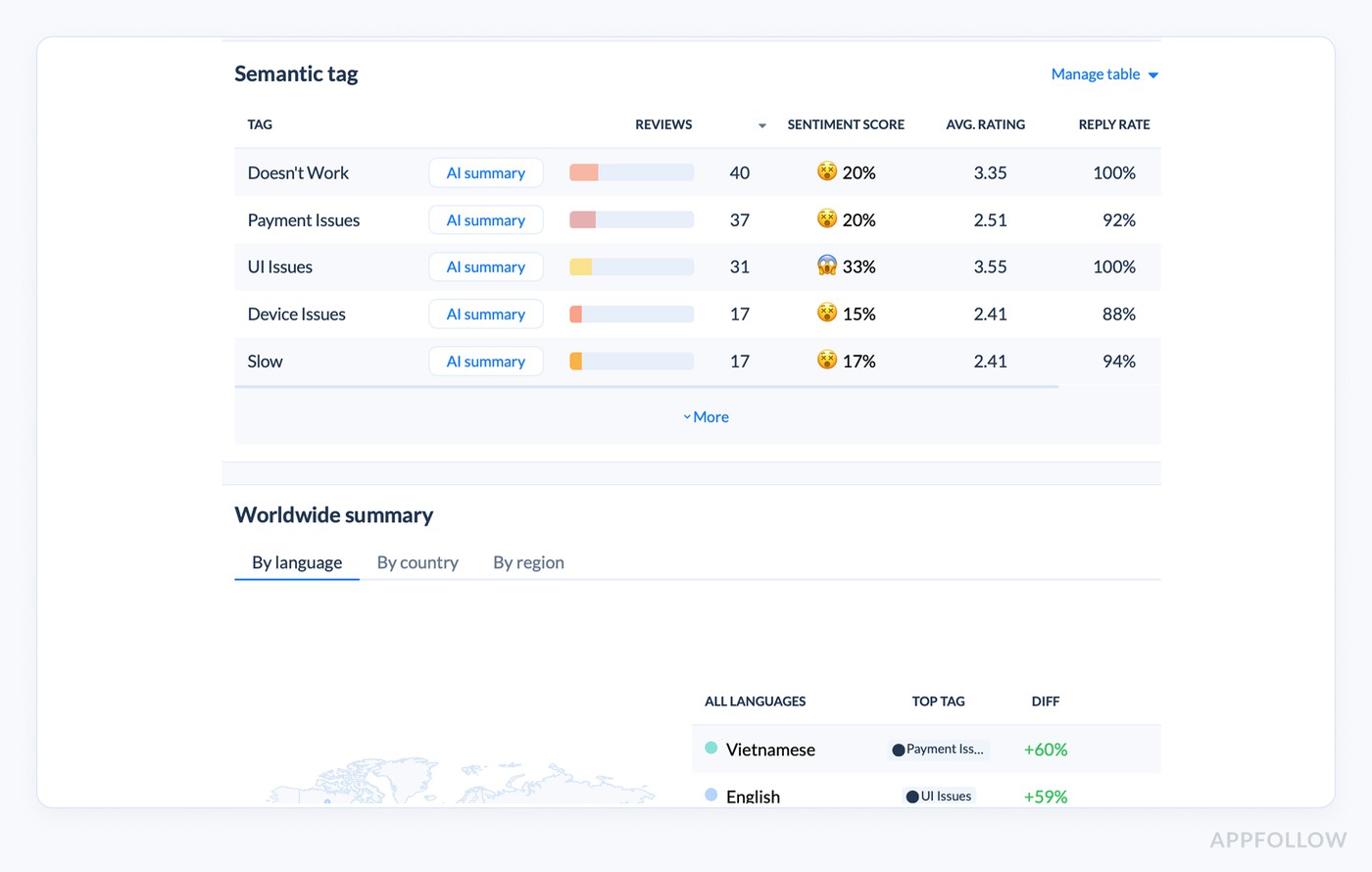
You’re not reading 2,000 reviews. You’re watching “negative” jump from 3% to 18% in 24 hours and routing it to the owner.
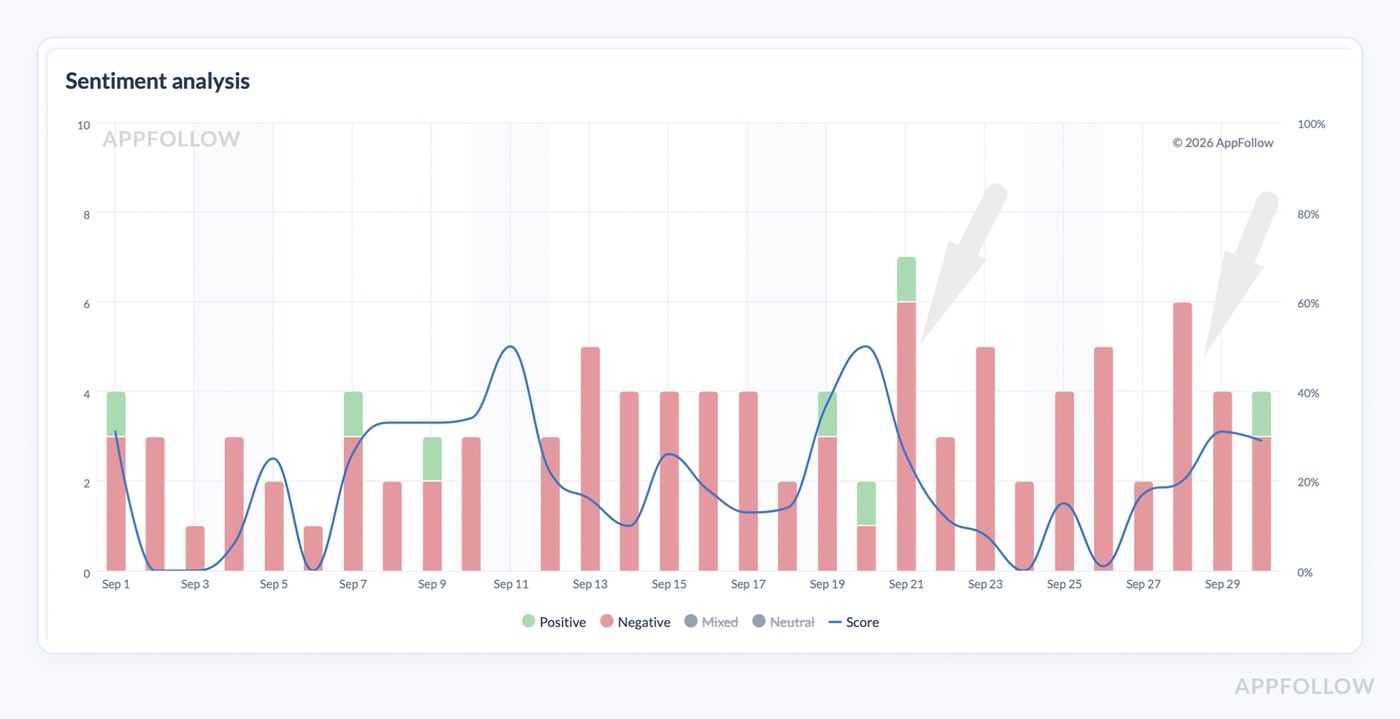
Now, the proof that speed plus focus protects the rating. Google Play reports that responding to a negative review can increase that rating by +0.7 stars on average. AppFollow customers see the operational side of that: Gameloft cut average response time from 30 days to 3 days, and 62% of ratings increased after a response for one title.
Notice the spike before it becomes a 1★ week
If you want a fast read on what users are angry about right now, talk customer sentiment with AppFollow. We’ll show the top negative themes by version and market.
cta_free_trial_purple
#2 Catch bad releases faster
You ship v7.4 on Tuesday. By Wednesday morning, your rating is wobbling, and nobody knows why. Crash dashboards might light up later, tickets trickle in even later, and meanwhile, the store is already updating what users see because Google Play’s rating is weighted toward more recent ratings.
This is why customer sentiment is important for developers.
Sentiment analysis turns the first wave of angry reviews into a readable signal. Not “lots of complaints,” but “login issue spike in Germany on v7.4,” plus the velocity.
In AppFollow you can define the release issue by a timeframe:
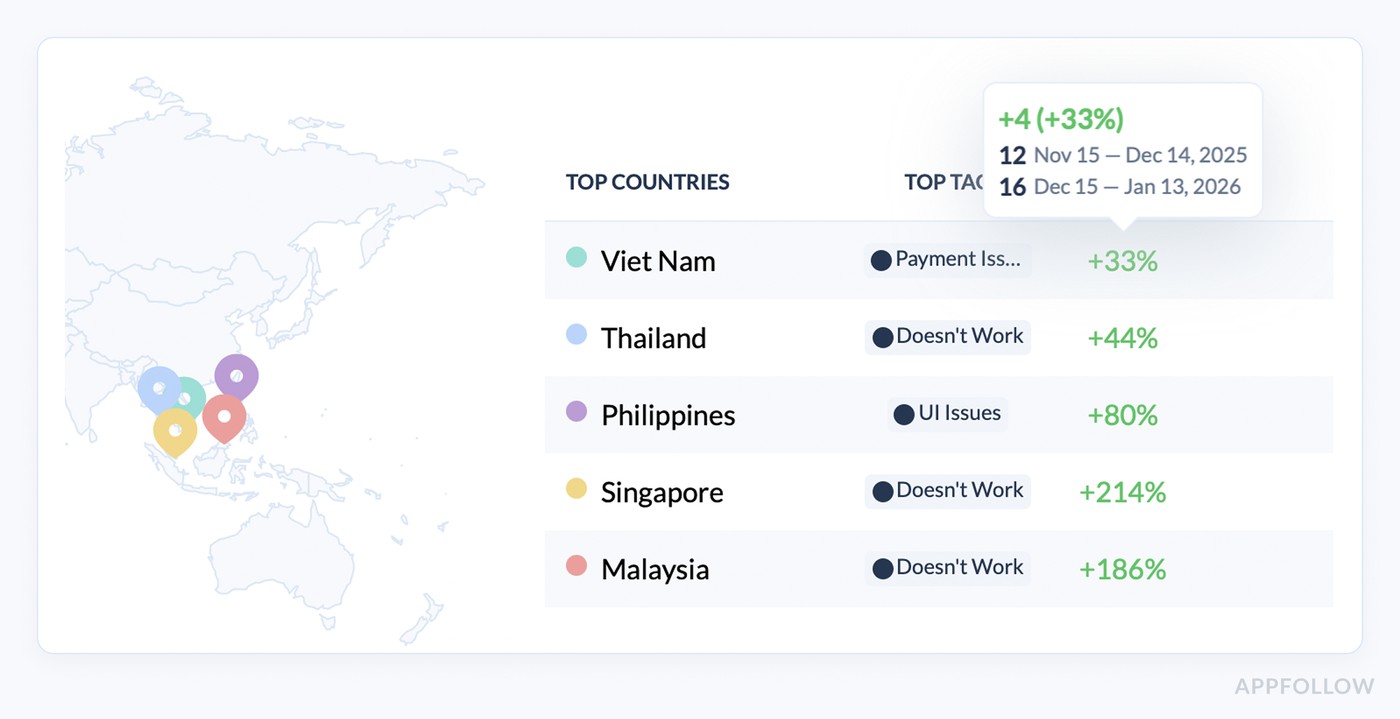
You see which topic is surging, which version it’s tied to, and which markets are most affected. Then you route it to the actual owner, set an SLA, and treat it like an incident instead of a vibes problem. AppFollow’s Semantic Tags are literally built for this kind of triage, including bug categories like account and registration issues.
The proof that this works looks like speed plus prevention. AppFollow shared an example where a mobile game team used AI alerts to catch urgent UX and bug feedback early, then fixed proactively and cut negative reviews by 70%, increased retention by 45%, and grew DAU 3x.
Read also: The top 10 app store optimization tools in 2026 (and when to use each)
#3 Turn feedback into a prioritized roadmap (not a spreadsheet graveyard)
When you run sentiment analysis on app reviews, you don’t get a wall of text. You get ranked problem signals. Themes cluster automatically, so “can’t log in,” “login broken,” “stuck at sign in” become one bucket you can track.
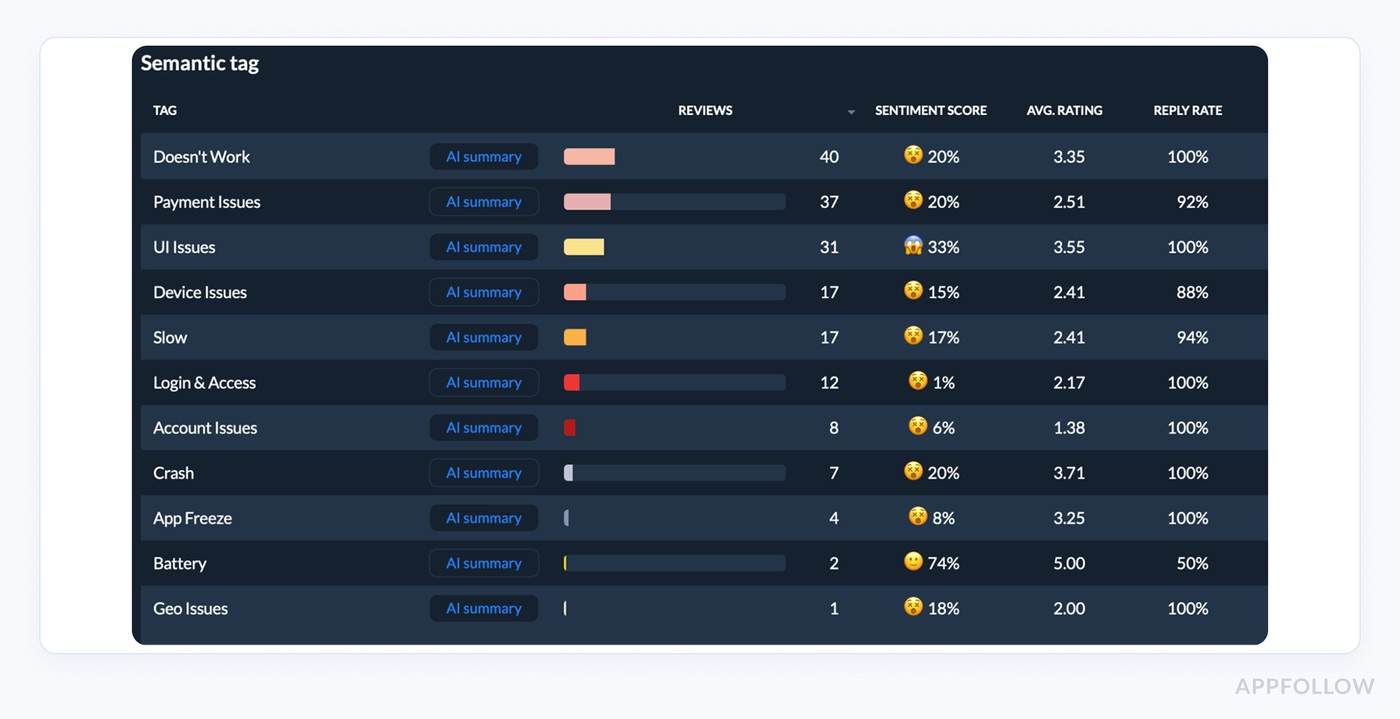
You see volume, direction, and where it’s happening. Then you can prioritize like a product team, not a comment section: fix the topic that’s growing fastest and dragging ratings down in the markets that matter.
And when you need brief leadership, you don’t paste 40 quotes. You show a topic table and the trendline. For example, AppFollow’s AI Summary is designed to compress hundreds of reviews into decision-ready takeaways so PMs can move from noise to action faster.
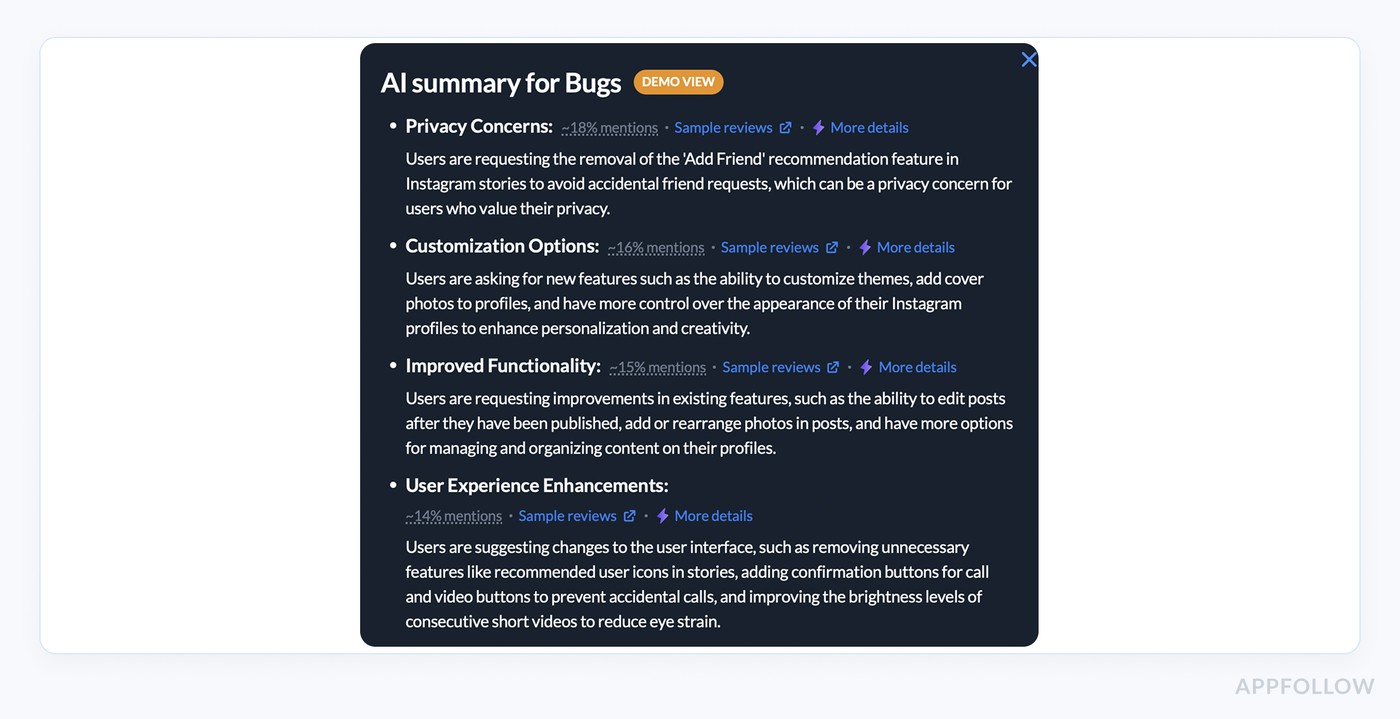
AI review analysis summary in AppFollow. Check how it works live.
#3 Improve store conversion without spending more on UA
UA buys you store visitors. Conversion decides whether those visitors turn into installs, and that’s where sentiment analysis quietly pays for itself.
In the US, average store page conversion sat around 25% on the App Store and 27.3% on Google Play in Q1 2024. So if you’re buying 100,000 page views, you’re fighting over what happens to the other 70–75k people who bounce.
Sentiment analysis helps because it tells you why they bounce. Not in a fuzzy way. In buckets, you can fix. “Crashes after update.” “Can’t create an account.” “Paywall scam.”
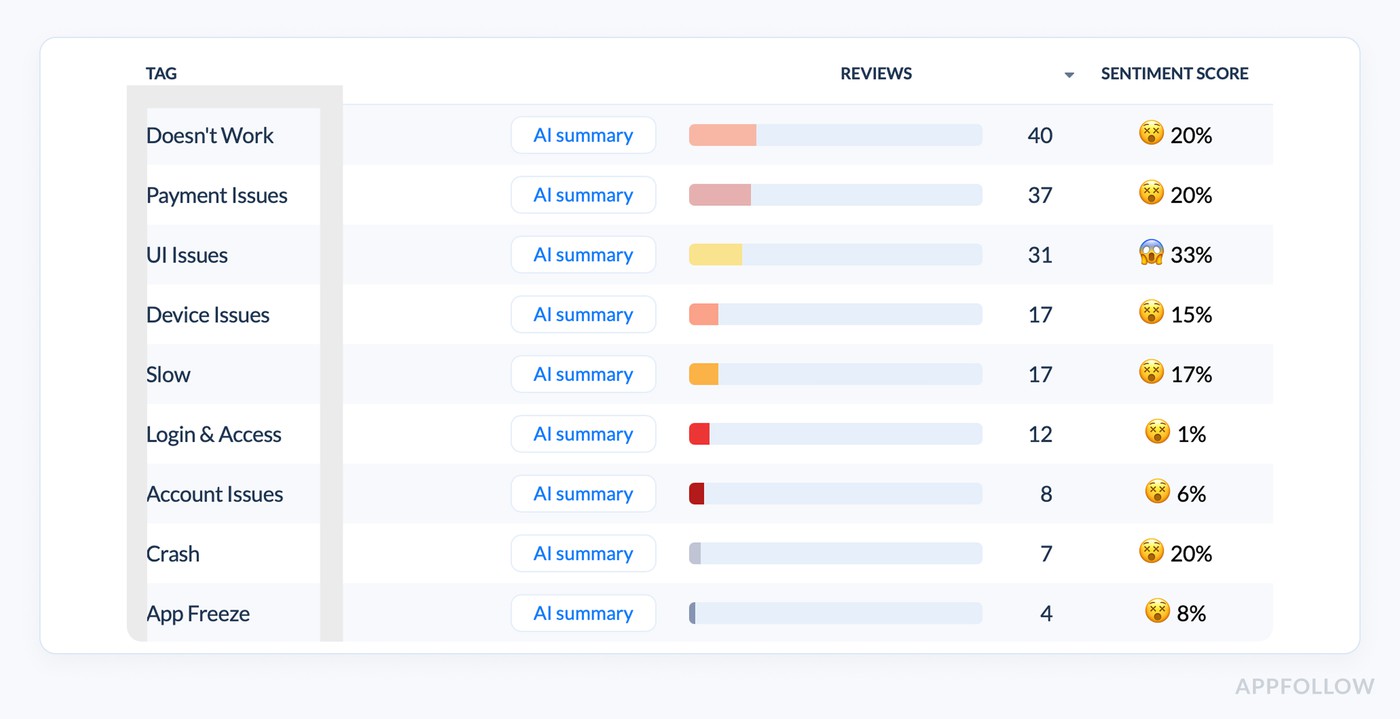
When those themes spike, you usually see it in ratings and review language first. Then the conversion follows.
Now the proof that ratings are a conversion lever, not a vanity metric. AppTweak’s ASO Trends & Benchmarks Report 2025 found that apps improving their rating from 3.6 to 4.2 saw nearly 60% higher conversion rates. The same report noted that 90% of featured apps had a rating of 4.0+, which tells you what the stores tend to surface and what users tend to trust.
Sentiment analysis is how you get there without guessing: fix the top negative theme, validate the drop, watch conversion recover.
Grow conversion with AppFollow’s review intelligence
AppFollow turns reviews into sentiment trends and issue themes, so you fix what’s driving bounce and protect ratings that influence installs.
cta_free_trial_purple
#4 Reduce support load by routing the right issues to the right humans
Support load blows up when every review looks equally urgent. A 1★ crash report sits next to a “love the app” comment, and an agent wastes time reading, tagging, figuring out who owns it, then pasting it into the right place.
Sentiment analysis fixes the bottleneck because it classifies the text first. In AppFollow, reviews can be grouped by what they are (bug, issue, feature request), the emotional impact (complaint vs compliment), and even the product team responsible for the topic.
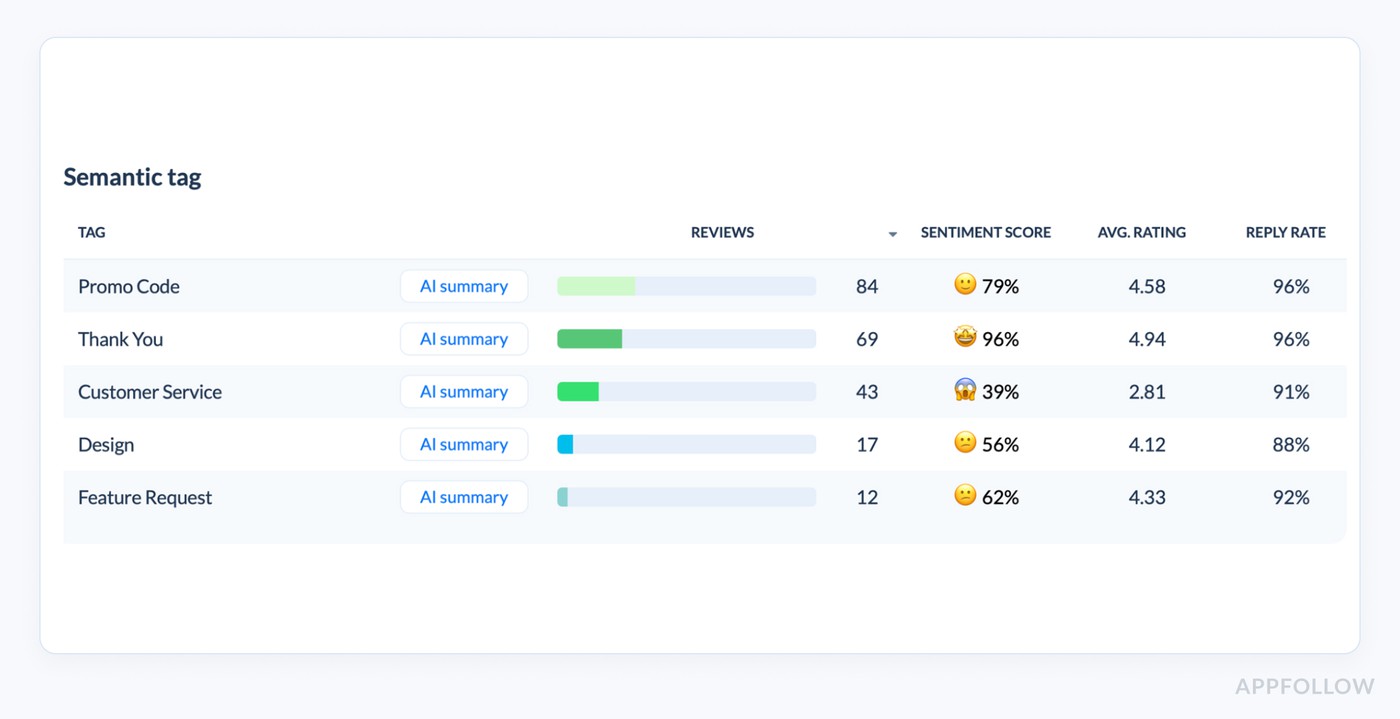
Once reviews land in those buckets, the workflow changes. Bugs get routed to engineering. Billing rage goes to payments.
Example of the tagged review alert from AppFollow:
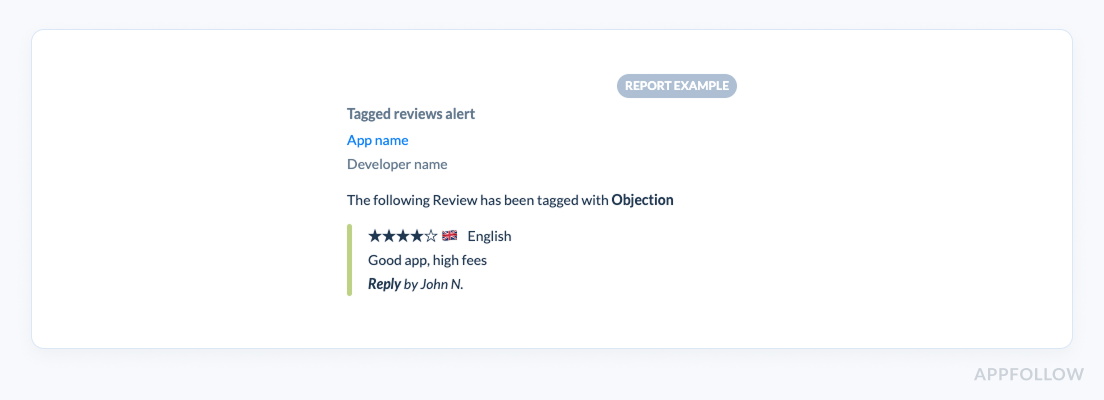
Praise can be handled with fast templates or skipped entirely.
Roku is a clean proof of what “routing + automation” does to support effort. They get about 4,000 new Google Play reviews per month. Before automation, they only replied to 2% to 6%. After implementing auto-tags and automation, they could tackle 35% to 50% of reviews. That’s not “more hustle.” That’s better sorting. Same case: their reviews specialist estimated automation saved 4–5 hours per week, totaling 112 to 140 hours over seven months.
Read also: Top 7 Best Appstore Review Management Software: Features & Price
#5 Stop churn drivers earlier
Churn usually doesn’t announce itself as “churn.” It shows up as friction. The app feels slow. Login fails once. The subscription screen looks shady. A user bails, leaves a 1★, and you only see the damage when retention reports catch up.
That delay is expensive because mobile churn is front-loaded. Business of Apps notes the average app loses 77% of daily active users within 3 days of install. If you wait for Day-7 retention to confirm a problem, you’re learning about it after the window where most people already left.
Review sentiment analysis pulls that window forward to “today.” Reviews land in real time, get grouped into themes like “login,” “crash,” “subscription,” and you can watch which theme is accelerating by version and market. That gives you hours or days of lead time to ship a hotfix, tweak a flow, or change a paywall message before the churn spike hardens.
There’s research behind this being predictive. In one AppFollow client example, a negative spike exposed a device-specific login issue within two hours, enabling a same-day fix and rating recovery over the following week.
Turn customer review sentiment into your app growth machine
AppFollow helps you track review sentiment, spot bad releases early, protect your star rating, and prioritize fixes that move installs. Get a personalized walkthrough on your app’s real reviews and see what’s driving sentiment right now.
cta_free_trial_purple
FAQs on benefits of sentiment analysis
Does sentiment analysis work if we have “not that many” reviews?
Yes, but you use it differently. With low volume, sentiment analysis is less about “trend charts” and more about structured triage: cluster feedback into themes (login, crashes, pricing, UX) and track severity (how many 1–2★ mentions per theme).
Practical rule: if you’re getting fewer than ~30–50 reviews per month per market, don’t over-read week-to-week swings. Use rolling windows (30–90 days), watch theme emergence, and pair it with release notes so you can answer: “Did v7.4 introduce a new negative theme?”
How do we avoid false positives (sarcasm, slang, mixed reviews)?
You don’t try to “solve sarcasm.” You reduce damage:
- Use aspect/topic sentiment, not just “positive/negative.” “Love the app, hate the new paywall” should become two signals.
- Add confidence thresholds: low-confidence items go to a “needs review” queue.
- Build a tiny gold set (100–300 real reviews) labeled by your team, including slang and sarcasm, and use it to QA model output monthly.
- Normalize with rules for your domain (“crash,” “stuck,” “won’t open” = high-severity negative) and treat emojis/punctuation as features, not noise.
- Track precision on critical buckets (crashes/login/payment). It’s fine if “neutral vs positive” is imperfect; it’s not fine if “crash” misroutes.
What is sentiment analysis and why is it important?
Sentiment analysis is the process of turning text feedback into measurable signals (polarity, intensity, and ideally topic-level sentiment) so teams can see what users feel at scale. It matters because raw feedback doesn’t scale, while sentiment signals let you detect issues earlier, prioritize fixes, and protect rating + conversion without relying on anecdotes.
What are the main goals of sentiment analysis?
For product and growth teams, the goals are usually:
- Early warning: detect negative spikes by theme after releases.
- Prioritization: rank themes by volume × severity × momentum.
- Impact measurement: confirm whether a fix reduced negative mentions.
- Operational routing: send the right issues to the right owner with SLAs.
- Narrative control: summarize “what changed this week” for leadership.
What is the power of sentiment analysis?
Speed and scale, with structure. It takes thousands of comments and turns them into:
- A shortlist of top issues (and where they’re happening)
- A trendline you can monitor daily
- A way to connect qualitative feedback to quantitative KPIs (ratings, conversion, retention, support load)
The real power isn’t the label “negative.” It’s the ability to say: “Payment complaints doubled on v7.4 in Spain” and act immediately.
What are the benefits of sentiment analysis?
- Spot issues early: detect negative spikes (bugs, outages, billing) before churn rises.
- Prioritize fixes: rank themes by volume + negativity so product works on what hurts most.
- Improve conversion & retention: identify the exact reasons people bounce or uninstall.
- Speed up support: auto-tag/route urgent or angry messages to the right team.
- Track impact: measure sentiment before/after releases, pricing changes, or campaigns.
- Protect reputation: catch review bombs, recurring complaints, and respond consistently.