Top 5 Review Management Software for Apple App Store


Table of Content:
Choosing Apple app store review management software shouldn’t feel like speed-dating a dozen dashboards… but here you are, with too many tabs open and no clear winner.
You’ve seen the same promises, fuzzy pricing, and “AI magic” claims, and you still don’t know which tool will help your team stay on top of reviews, ratings, and releases.
I spent five full days testing 10 platforms end-to-end, then shortlisted the 5 best review management software for Apple App Store. I pulled in real data from customer interviews, AppFollow teammates, fresh user reviews, and even Reddit/Quora threads where people vent about what really breaks at scale.
Here’s what this article will help you answer:
- Which tools truly support multi-country iOS review ops, not just basic replies?
- Where do AI replies help, and where do they hurt?
- How do pricing models behave once you add more apps, markets, and agents?
- Which platforms integrate cleanly with Zendesk, Salesforce, Slack, and your BI stack?
- What hidden limitations do real users complain about after 3–6 months in production?
But first, let’s start this comparison with the must-have criteria when you choose review management tools.
What features matter most for Apple App Store review management?
For iOS, the must-have features look like this:
- Your team should be able to pull in all Apple reviews and reply via the official API (or a one-click “reply in console”) without living inside App Store Connect.
- A strong tool shows country and language on every review and lets you filter by them, plus version, so you can see exactly which release broke login for users in Canada vs Germany.
- You want to auto-handle routine 5-star “love the app” reviews and low-value 1-star spam, while keeping hands-on control for tricky cases.
- AI should help you draft personalized replies that respect sentiment, rating, and context, especially in other languages.
- You need to know when “crashes on iOS 18” or “subscription billing” starts trending.
- Reviews should land in Slack, Zendesk, Salesforce, etc., with deep links back to the iOS review so support doesn’t miss anything.
- You need to know who owns iOS reviews, what’s waiting, and when something’s on fire in a specific country or after a specific release.
Based on those Apple-specific needs, together with a team, we defined five best iOS review management solutions:
- AppFollow
- AppTweak
- Appbot
- App Radar
- Appfigures
How?
Methodology: How we chose the tools for this list
I didn’t just Google “best tools” and call it a day.
First, I built a longlist of 10 platforms that support Apple App Store reviews — not just ASO keyword charts with a tiny reviews tab bolted on. Any tool that couldn’t reliably pull, display, and help you action iOS reviews at scale didn’t make it past this stage.
Then came the hands-on part: I took a trial of each tool, wired it to test apps, and walked through every review-related feature I could touch during those 5 days: inbox, filters, tags, AI replies, translations, bulk actions, integrations, dashboards.
To keep it honest, I layered in real-world proof:
- Recent reviews on G2, Capterra, and TrustRadius
- Feedback from AppFollow customers and CSMs
- Reddit and Quora threads where people complain about what breaks after month three
Only tools that scored well on features, data quality, pricing clarity, and iOS-focused workflows earned a place in the final five below.
AppFollow
G2: 4.6/5 (194 reviews)
Capterra: 4.6/5 (13 reviews)
TrustRadius: 8.2/10 (5 reviews)

Picture your App Store review feed going from chaotic scroll to clean, prioritized inbox. That’s what AppFollow review management platform does for teams at Disney, HubSpot, Lyft, Discord, Flo, and a long list of high-growth apps that live and die by their ratings: it turns every review into a support, product, or marketing signal you can use.
As an Apple App Store review management software, it pulls in every rating, review, and reply-ready thread from iOS, Google Play, Galaxy, Huawei, Amazon, and more, so your team works from one place.
With AI-driven sentiment, smart tags, and automations, brands ship faster replies, spot bugs early, and keep star ratings steady, and the 4.6/5 scores on G2 and Capterra plus strong TrustRadius reviews quietly back that up.
Features
- Unified inbox for Apple App Store, Google Play, Galaxy Store, Huawei Store, Amazon, and more.
- AI-powered reply suggestions and templates for faster, on-brand responses.
- Sentiment analysis and AI semantic tags to cluster issues by topic, bug, or feature request.
- Auto-tagging, SLA-based queues, and bulk reply workflows for high-volume apps.
- Alerts for rating drops, featured reviews, and new version releases.
- Native integrations with Slack, Zendesk, Salesforce, and API so reviews plug straight into your support stack.
Pricing
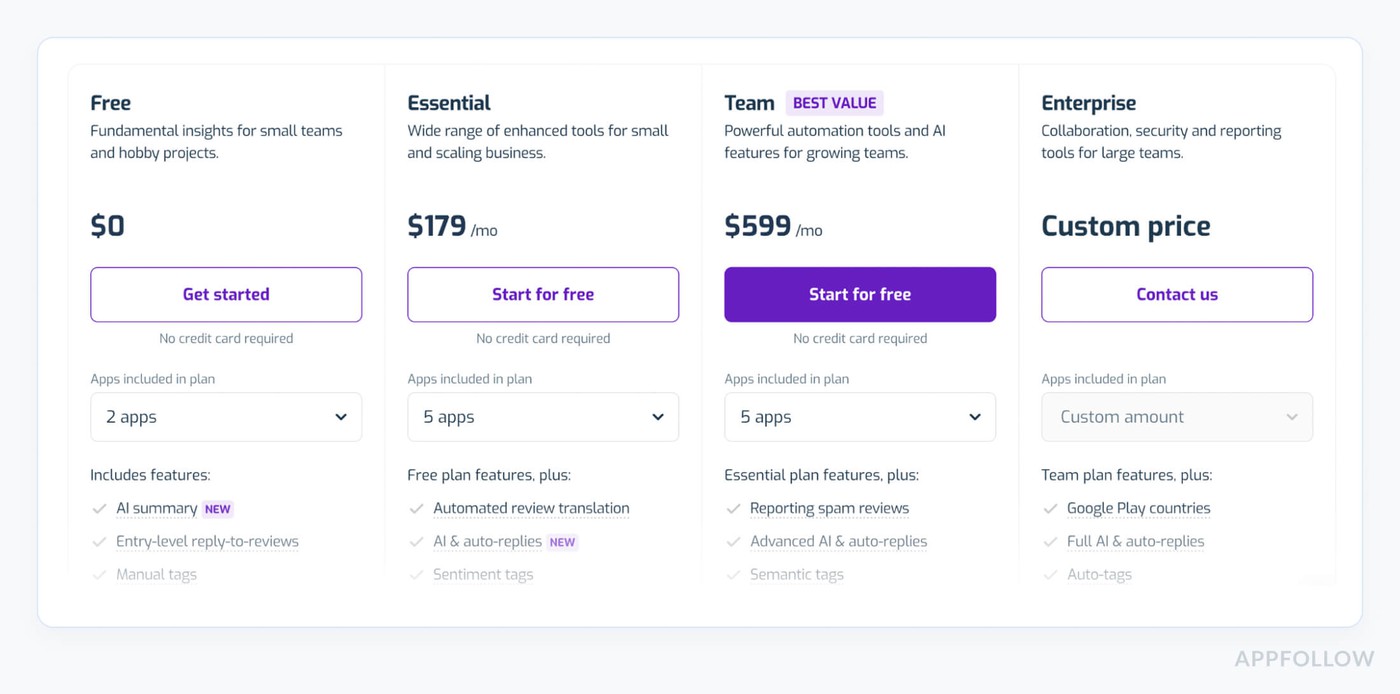
AppFollow prices work like your support backlog: the more apps, teammates, and AI automation you add, the more you pay.
Recent ranges show paid plans kicking off around $179/month and topping out near $559/month before you wander into bespoke enterprise land.
With Apple App Store connected and 1–5 support users, you’ll usually land somewhere inside that band, with a 10-day free trial to road-test this review management software for Apple App Store.
Pros from G2 and Capterra
- Centralized review replies: "I can reply to all AppStore and PlayStore reviews through one channel... The AI-generated reply feature is the best and saves me a lot of time to reply to every review."
- Real-time Slack alerts: "The integration with Slack has been invaluable for monitoring app reviews in real time and responding promptly."
- Sentiment-based templates: "We can reply to user reviews from the application, and save different response templates depending on the mood of the review... so that we can save a lot of time but still let the user know that their feedback is being considered."
Cons from G2 and Capterra
- Limited review visibility on basic plan: "Limited no. of reviews you can see on the Essential plan."
- No alerts for updated reviews: "It should send a notification if a reviewer decides to update a review so we can have a quick look instead of scrolling and looking."
- Initial integration hiccups: "Integrating with the app stores can be a slight pain, but probably this is to be expected, and AppFollow makes it as easy as possible and provides good support."
You’ve just seen what AppFollow can do on paper. Now give it your actual reviews and watch what happens.
Plug in your Apple App Store app, pull every rating and comment into one inbox, let AI draft the first pass, and use tags, filters, and automations to tame the chaos.
cta_free_trial_purple
Read also: 12 Best Customer Review Management Software We Love [Pros & Cons]
AppTweak
G2: 4.6/5 (187 reviews)
Capterra: 4.2/5 (18 reviews)
TrustRadius: 8.8/10 (6 reviews)
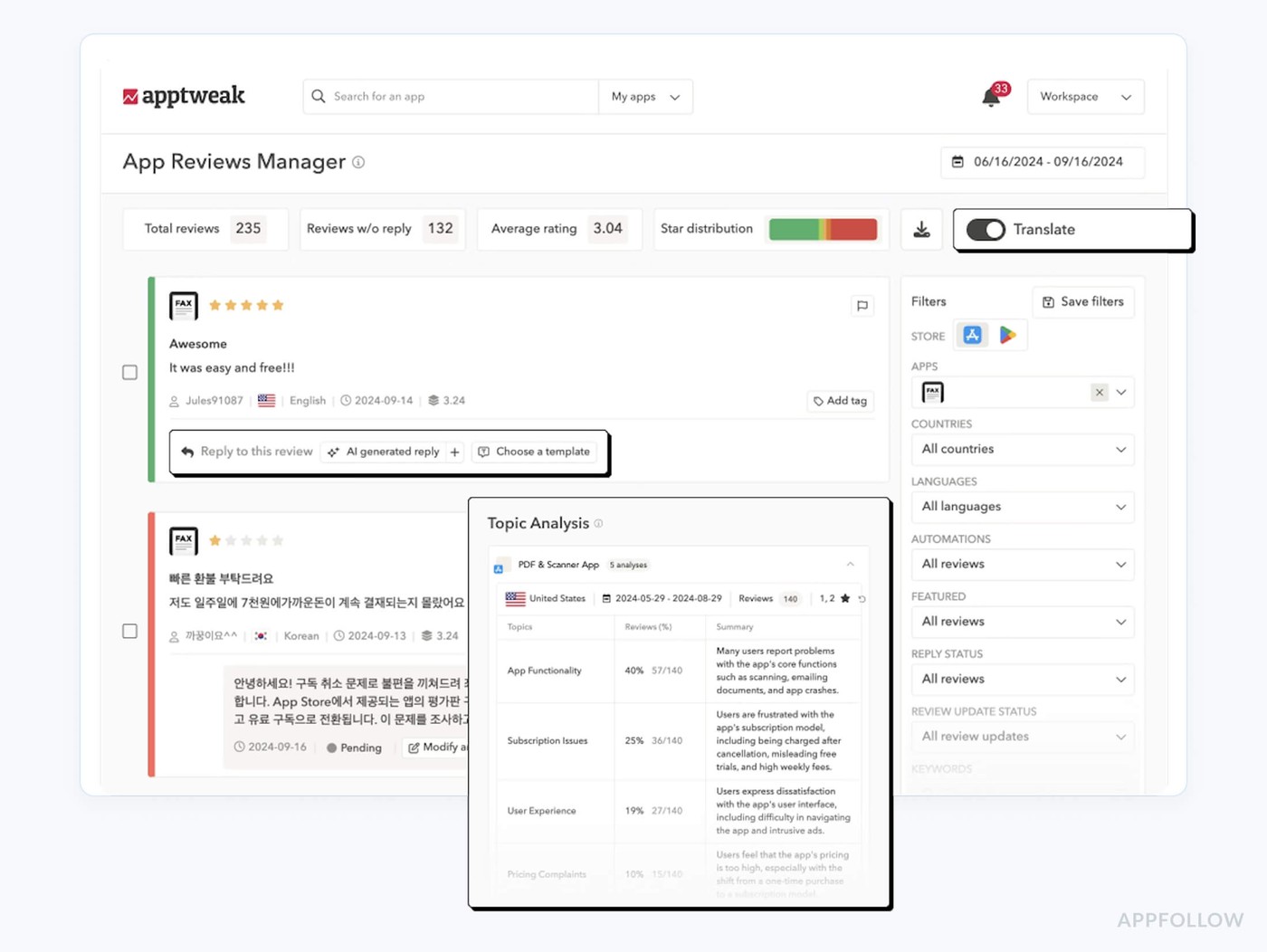
Your review inbox is full, and ASO still wants answers. That’s where AppTweak steps in. Teams like SoundCloud and Treeplla use its App Reviews Manager to pull reviews from the Apple App Store and Google Play into one workspace and reply faster with AI.
As a review management software for Apple App Store, it leans hard on data: sentiment and topic analysis, reply-impact KPIs, and automation that lets one agent handle thousands of reviews across markets.
Add “ASO Tool of the Year”, “Best App Data Platform”, and a 4.6/5 G2 rating, and it becomes a serious contender.
Features
- Centralized inbox for Apple App Store and Google Play reviews across apps, countries, and languages.
- GPT-4–powered replies and instant translation so you can answer in any language without leaving the tool.
- Automation rules, templates, tags, and bulk reply so one agent can handle thousands of reviews efficiently.
- Sentiment and topic analysis that surfaces the main themes across your review stream.
- Reply-impact metrics plus filters like “updated after reply” and “rating updated” to prove support ROI.
- Native integrations with Zendesk, Salesforce, and Slack to plug reviews into your existing support stack.
Pricing
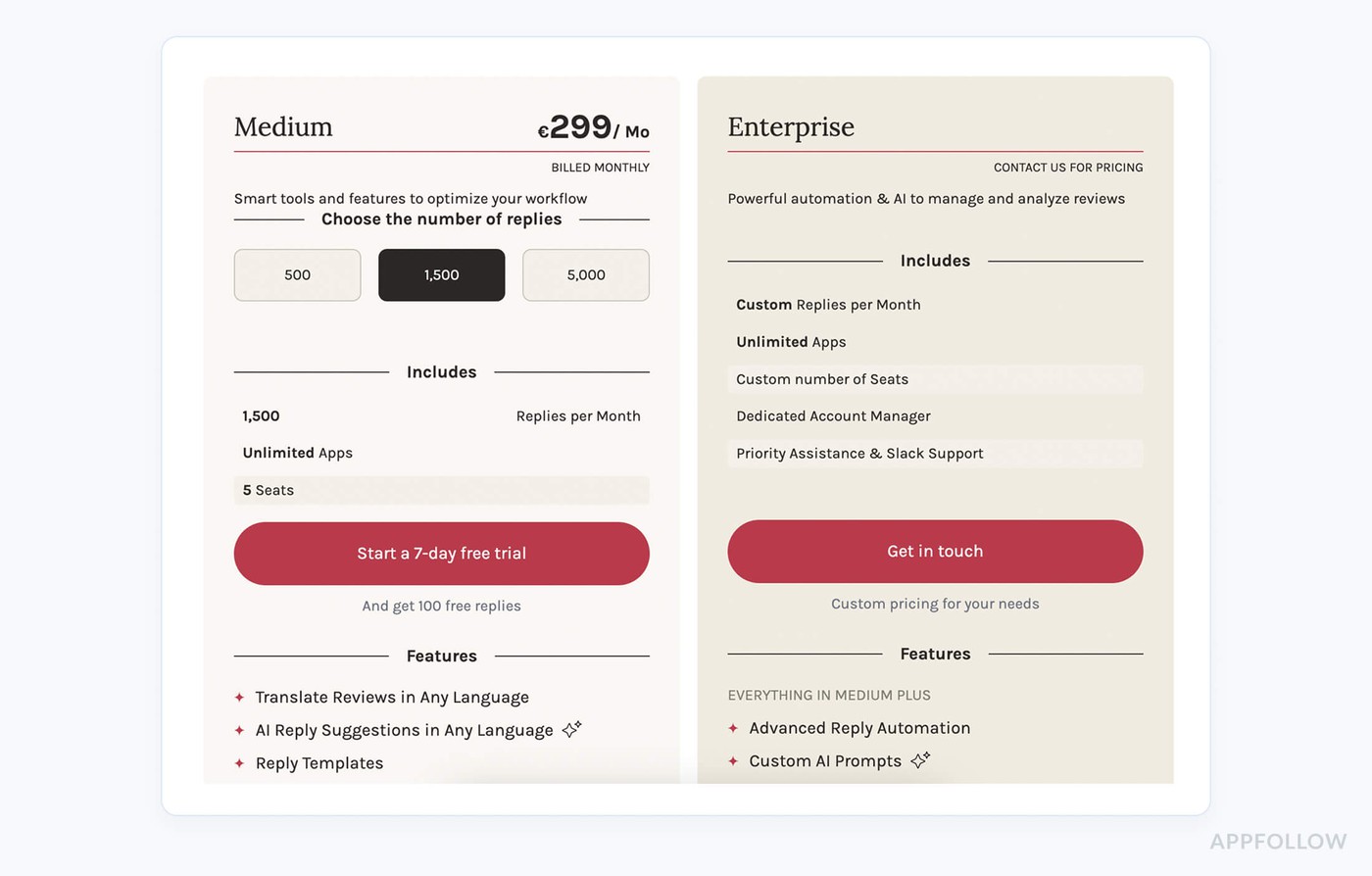
AppTweak prices its App Reviews Manager by reply volume, not by how many apps you juggle.
- Small starts at €83/month for 500 replies/month;
- Medium at €249 for 1,500/month;
- Large at €833 for 5,000/month, with Enterprise above that.
Unlimited apps and 5 seats are included, so 3 app stores and 1–5 agents cost the same per tier, and every plan starts with a 7-day free trial when you’re testing review management software for Apple App Store.
Pros and Cons from G2 and Capterra
In-dashboard review replies: "Replying to store reviews directly from the dashboard is something I had requested earlier, and they’ve now implemented it, which is great to see!"
Seamless App Store integration: "Integrating additional data sources like Apple Search Ads, App Store Connect, or Google Play data is easy to manage."
Innovative, responsive team: "They’re always adding new features that keep up with the latest ASO trends, and they’re open to creating ad hoc solutions that fit our needs."
Cumbersome review analytics UI: "In a specific app analytics page when switching between tabs like from downloads to reviews/ratings you have to change the date range each time to your stipulated date range."
Tedious country filtering: "When analyzing other countries, the search bar defaults back to the default country... you have to keep changing the filter."
Occasional data loading issues: "There were a couple of times where the results were sluggish to load, or we got a consistent error. AppTweak did fix those, and it is rare for that to happen."
Read also: 50 positive review response examples [+15 negative cases]
Appbot
G2: 4.6/5 (18 reviews)
Capterra: 4.5/5 (2 reviews)
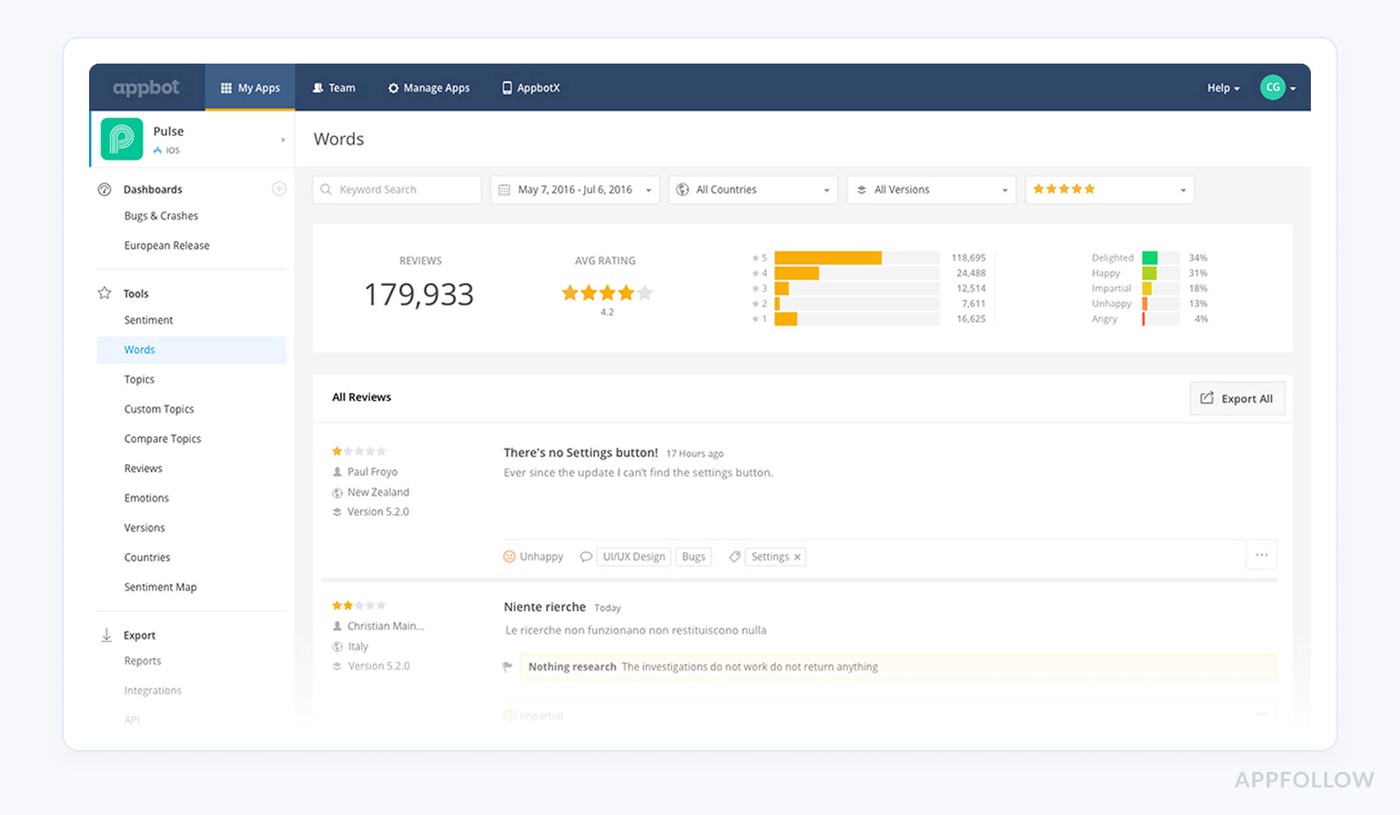
Appbot is what happens when your review firehose finally gets filtered into something you can act on. BMW, Twitter, Microsoft, and Deutsche Bank use it to watch rating swings, surface bugs, and mine feature requests across Apple, Google Play, Microsoft, and Amazon app stores, pulled in near real time.
As an Apple app store review management software, it leans on deep sentiment and topic analysis plus tight Slack, Zendesk, and Teams integrations, so support and product stare at the same truth.
A solid 4.6/5 on G2 and 4.5/5 on Capterra doesn’t hurt either.
Features
- Centralized review monitoring for iOS, Mac, Google Play, Microsoft and Amazon stores.
- World-class sentiment and text analysis to cluster complaints, bugs and feature ideas at scale.
- Integrations with Slack, Zendesk, Teams, Freshdesk, Zapier and email for review alerts and replies from your existing workflows.
Pricing

If you’re treating Appbot like your go-to Apple app store review management software, think in “seats + sources,” not per-store surcharges.
- Small starts at $49/month annually for 1 user and up to 5 sources, so one app across 3 app stores still fits that price.
- Large kicks in from $159/month annually for 7+ users, which is the first tier that comfortably covers 5 support reps.
Every plan starts with a 14-day free trial of the Large plan.
Pros from G2 users
Powerful sentiment analysis: "The sentiment analysis tool and integration with Tableau is one of the best features of tracking your app's reviews and rating."
Time-saving templates & tags: "Easy to use... you can save templates, it makes responding to reviews faster. The app has many features, like tagging the reviews, different filters, charts, etc."
Seamless integrations & filtering: "Ability to easily export data or integrate with platforms such as FreshDesk and Slack to manage poor review response is a lifesaver. Able to set sentiments and keywords to get to the reviews that matter."
Cons from G2 users
High pricing for small teams: "For a single user, Pricing vs Features is not so good... the Large plan is too expensive just to manage the reviews and ratings of their app."
Mixed sentiment accuracy: "As with most tools that feature automated sentiment analysis, we have found the quality of the analysis to be rather hit or miss. We tend to disregard most automated sentiment analysis and use our own sampling."
Imperfect auto-tagging: "I feel the tagging of reviews to words/topics can be better... tagged reviews seem not quite perfect and don't give a very clear picture of the problem at hand."
Read also: What Is Review Management: App Store Review Management In 2025
App Radar
G2: 4.3/5 (31 reviews)
Capterra: 3.9/5 (13 reviews)
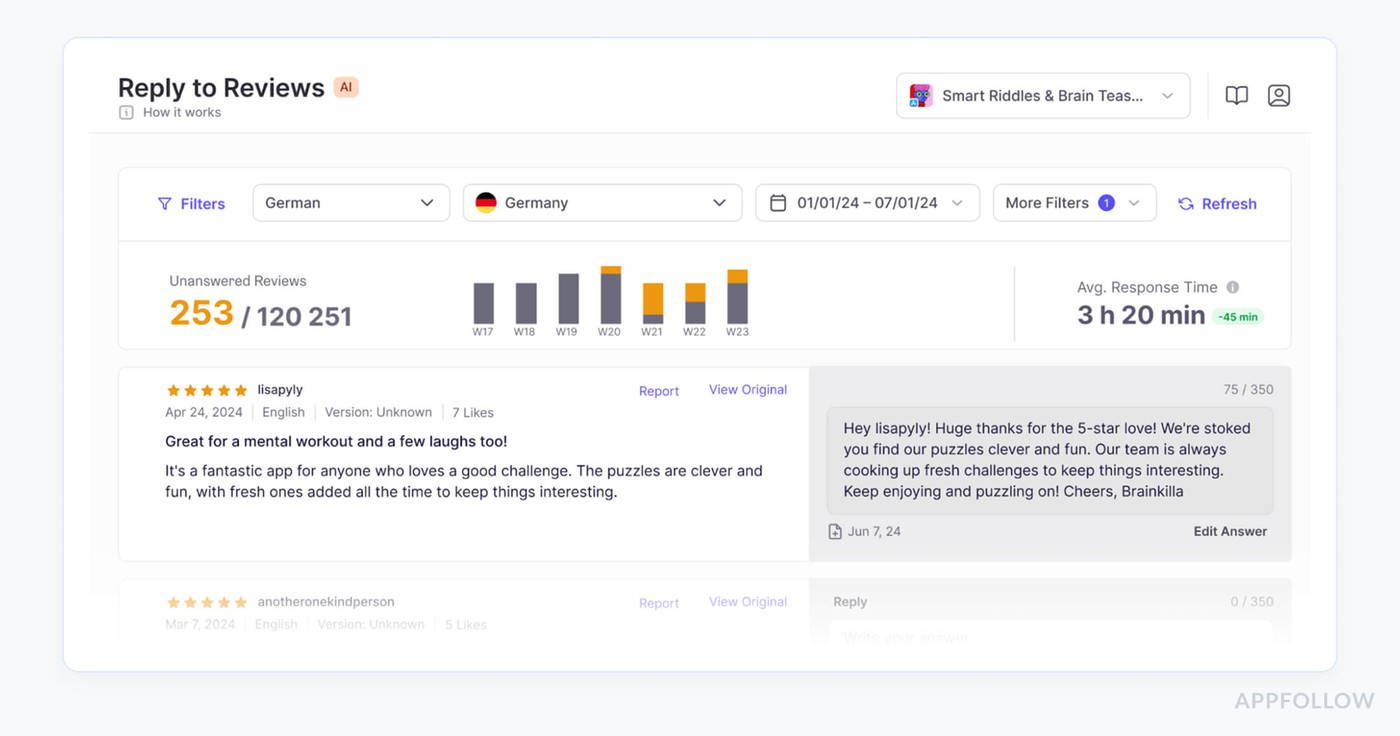
App Radar is what you grab when you want reviews and ASO sharing one brain. Teams behind Cronometer, Kingdom Rush, iTranslate, and TOGGO use it to track rating swings and reply to users faster after every release.
As an Apple app store review management analysis tool, it pulls reviews and ratings from the Apple App Store and Google Play into one workflow, then layers on AI replies, summaries, and filters so you see what matters first.
Add G2 badges, App Growth Awards nods, and deep ASO data, and you’ve got a review command center for your launch calendar.
Features
- Unified inbox for Apple App Store and Google Play reviews with tags, filters, and queues for unreplied feedback.
- AI Review Summaries that condense thousands of reviews into themes, sentiment, and priority lists per release.
- GPT-4–powered AI Review Replies to answer in the review’s original language in seconds, with no quota caps.
- Templates, bulk actions, and automation rules that make this review management software for Apple App Store handle high-volume spikes without burning the team out.
- Slack and email notifications, response-time tracking, and “unanswered” counters to keep review SLAs on track.
Pricing
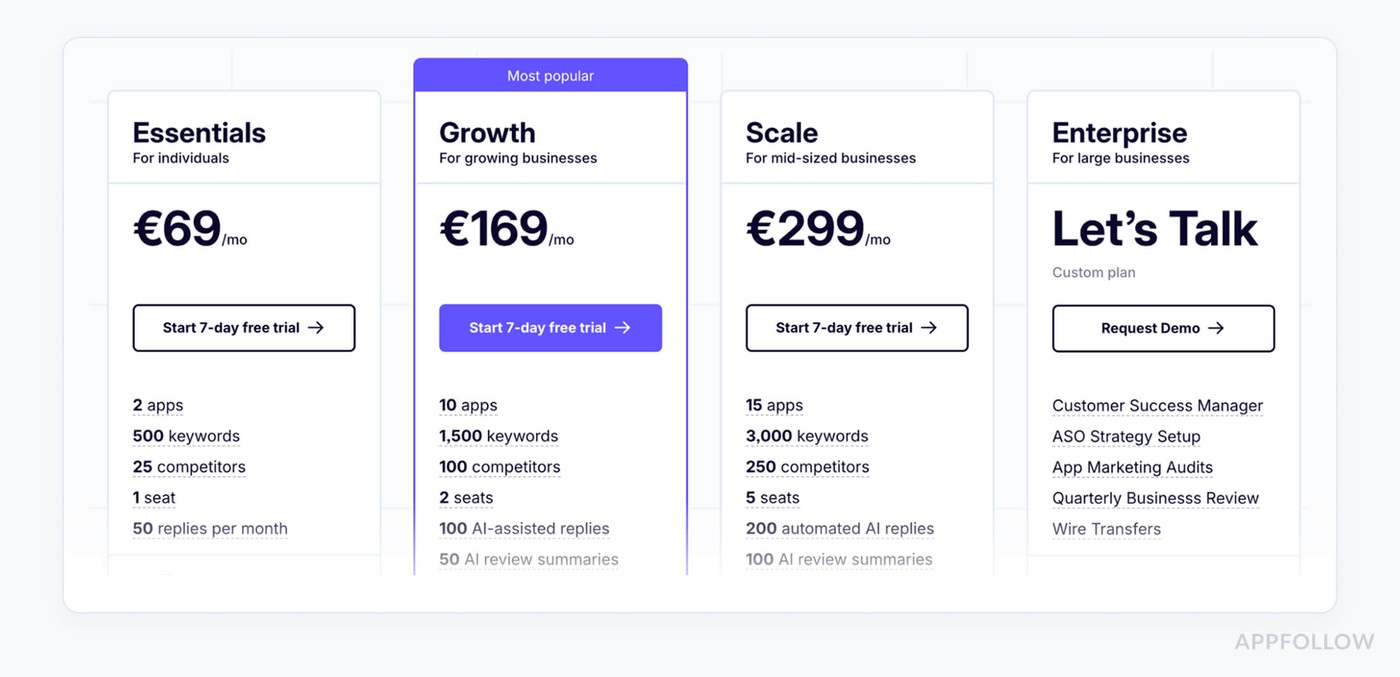
App Radar prices revolve around three levers: number of apps (per store), seats, and monthly review-reply/keyword quotas. Essentials starts at €69/mo for 2 apps, 1 seat, and 50 replies, but as soon as your app lives in 3 stores, say Google Play, the Apple App Store, and Galaxy, you’re bumped to Growth at €169/mo.
If you also want 5 support users, you’re in Scale at €299/mo. Every paid tier comes with a 7-day free trial.
Pros from G2 users
- AI-assisted replies and summaries: "The review management tools are particularly powerful because they have AI-assisted features such as automated replies, review summaries, and customizable templates."
- Unified multi-store inbox: "We find App Radar to be the most convenient tool for app review management! It allows us to manage app reviews on Google Play Store and Apple App Store in one place, use tags to save time and increase efficiency."
- Improved user satisfaction: "App Radar is a great tool that helps us to answer the reviews about our client’s app, which is important to keep their satisfaction at high levels and understand possible problems."
Cons from G2 and Capterra
- iOS auto-reply glitch: "Auto review does not work on iOS. After months of communication with support, the issue still remains. Support tells that the issue is on Apple’s side, but all other services that are connected to Apple work well, including auto replies."
- Limited review analytics: "I would also like to see better measurement for things like reviews & ratings. It would be good to see the effect of improving your rating."
- Session login interruptions: "Sometimes it doesn't load data, and you need to log in again after an hour or the next day."
Read also: 43 Examples and 10 Tips on How to Respond to Negative Reviews
AppFigures
G2: 4.2/5 (17)
Capterra: 4.5/5 (4)
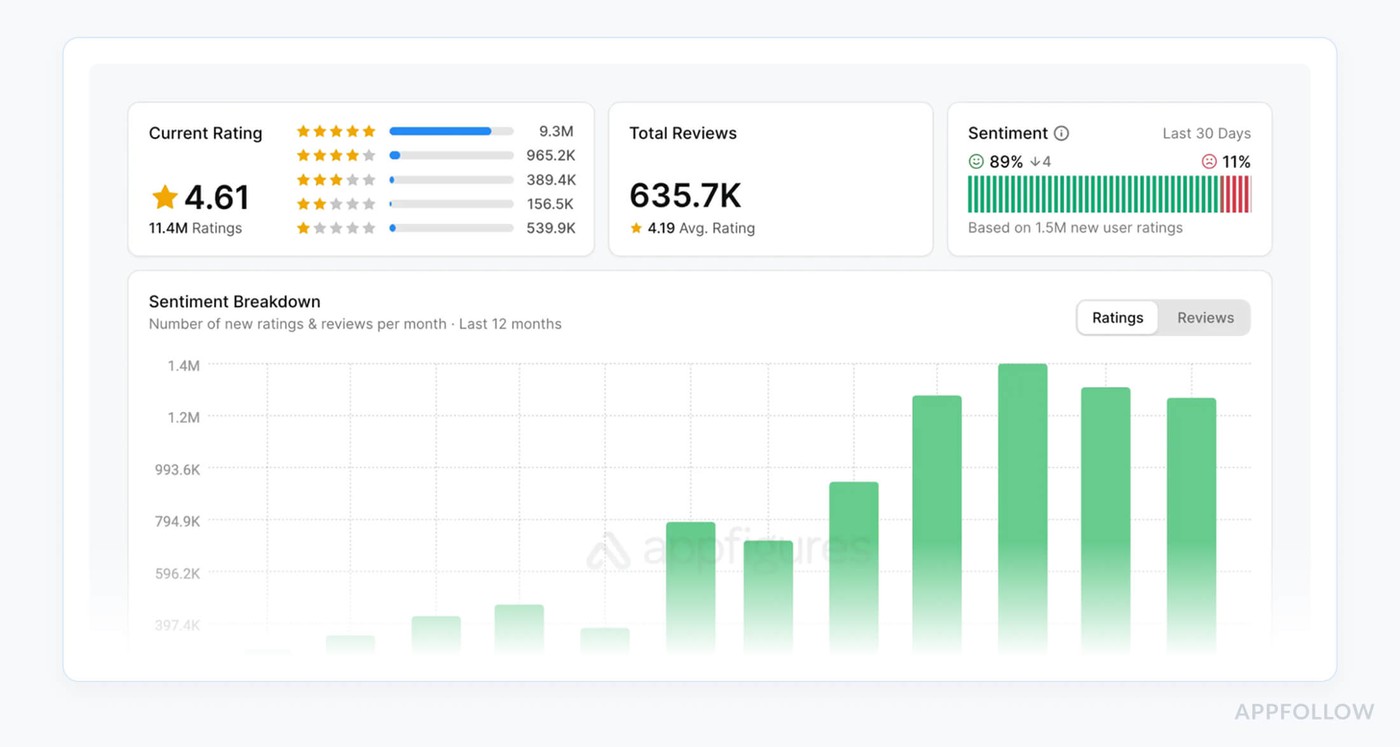
AppFigures is the quiet workhorse a lot of teams lean on when reviews run their day. They hook it up to Apple’s App Store, Google Play, Amazon Appstore, and even the Windows Store, so every rating and comment lands in one clean dashboard.
Powering growth for 300,000+ apps worldwide, it helps you catch bugs from user feedback, watch sentiment trends, and reply without jumping between consoles.
Rated 4.2 on G2 and 4.5 on Capterra, it’s earned its place in serious ASO stacks.
For many marketers, this becomes their Apple App Store app review management software that also pulls analytics and ASO into the same view.
Features
- Unified inbox for Apple, Google Play, Amazon Appstore, and more
- Real-time review alerts to email, Slack, and mobile
- Advanced filters by star rating, keyword, version, and country
- Direct reply to reviews from inside Appfigures
- Automatic translation of international reviews
- CSV and API export for BI and custom dashboards
Pricing
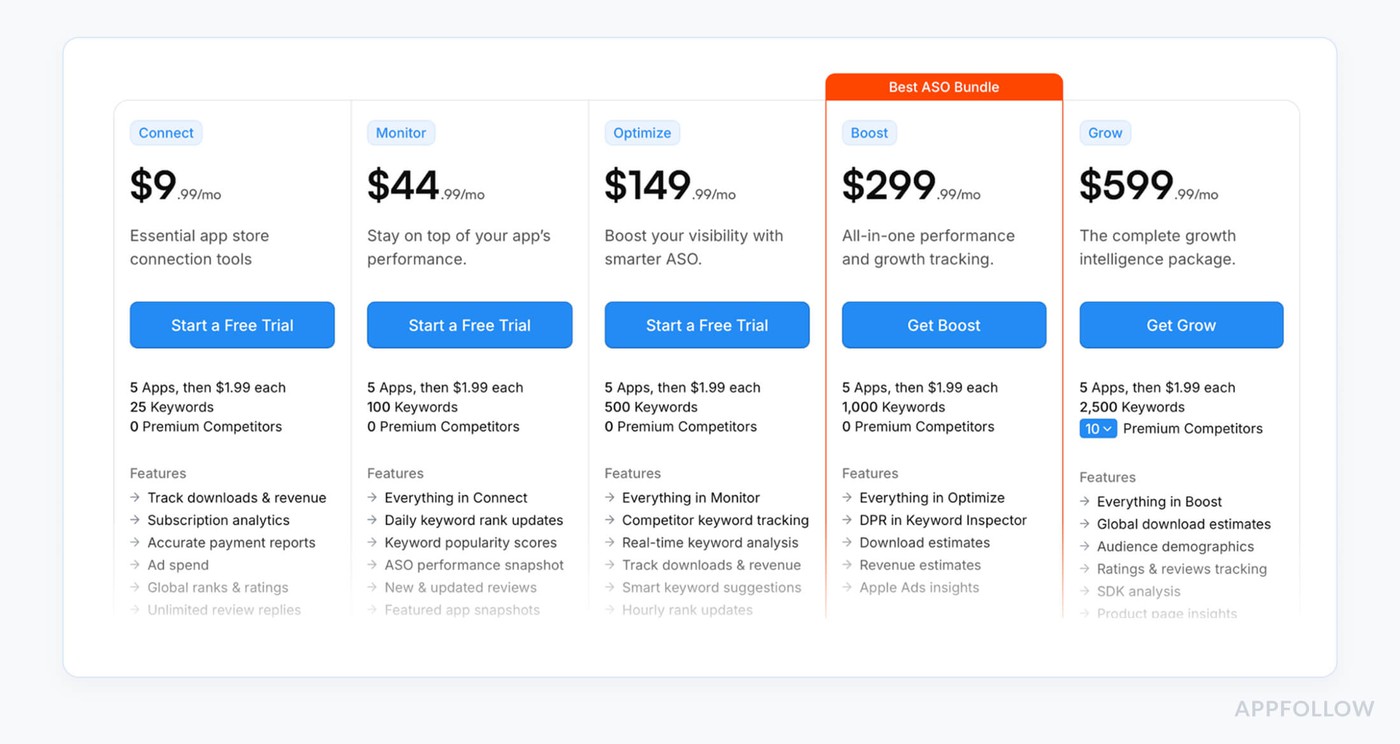
Appfigures prices around apps and add-ons, not seats. Connect starts at $9.99/month (or $7.99 with annual billing) and Grow tops out at $449.99/month, with Scout for market intel at $599.99/month on the pricing page.
Five apps are included; extra ones cost $1.99 each, so tracking one app across 3 stores sits inside that allowance. Up to five users are free on any plan, and you get a 14-day free trial to kick the tires before committing, Apple App Store included.
Pros from G2 users of Appfigures review tool
- In-app review replies: "I can also respond to app reviews in Google and App Store directly from it, and I can easily extract reports that I can use to create more customized dashboards."
- All-in-one review dashboard: "I like being able to have one consolidated place to visit to see performance across all the different app store listings... one of the most helpful tools when I want to scan recent reviews and summarize any user issues."Never miss a review: "I needed a platform where I can be sure not to miss a review to answer. This tool helped me to solve those problems."
Cons from G2 users of Appfigures review tool
- Limited custom filters: "I think I wasn’t able to filter the data according to our specific requirements. There are a lot of filters available, but I cannot find exactly what I am looking for."
- Data accuracy gaps: "Some charts are not accurate... for example, the Overview section does not accurately report the number of app downloads in the given timeframe. Also, Appfigures does not accurately pull in rating information for our Amazon Appstore listing."
- Steep learning curve: "Appfigures provides many features, which makes it a bit complicated for newbies to absorb at first go. However, if you stick with it for a few days... it will be all good."
Apple App Store review management software comparison table
Legend:
✔ = strong / built-in
▲ = available but more limited / add-on
X = the tool doesn’t support this feature
Feature (Apple App Store) | AppFollow | AppTweak | Appbot | App Radar | Appfigures |
Centralized inbox | ✔ | ✔ | ✔ | ✔ | ✔ |
Direct reply to iOS reviews | ✔ | ✔ | ✔ | ✔ | ✔ |
Sentiment analysis | ✔ | ✔ | ✔ | ✔ | X |
AI-generated review replies | ✔ | ✔ | ✔ | ✔ | X |
Tagging & categorization | ✔ | ✔ | ✔ | ✔ | X |
SLA workflows / bulk actions | ✔ | ✔ | ▲ | ▲ | X |
Auto-translation | ✔ | ✔ | X | ▲ | ✔ |
You could keep scrolling. Or — book 20 minutes with one of our ASO experts. Tell us what you're up against: too many reviews, too little time, the App Store algorithm, or all of the above. We'll walk you through the exact review management setup that fits your stack, your users, and your KPIs.
cta_demo_request_purple
FAQs
If I already have App Store Connect, do I really need a review management tool?
If you only have one app, one market, and a few reviews a week, App Store Connect is fine. When you have to deal with more than one country, product, or team member, you need centralized inboxes, SLAs, tags, AI replies, and cross-store analytics. Apple doesn't give you any of these things.
What features should I look for first when choosing a tool?
First, make sure you can directly respond to iOS reviews, have a real unified inbox, tag things, do bulk actions, and connect your helpdesk and Slack. Then add "unfair advantage" features like sentiment analysis, AI reply suggestions, auto-translation, and reports that show how replies affect ratings and churn.
Is it okay to link a third-party tool to my Apple developer account?
Good tools use Apple's official APIs, token-based authentication, and scoped permissions so that the platform can get and respond to reviews without having to deal with releases, billing, or certificates. You can still control who can use a tool through Apple roles, and you can take away a tool's credentials at any time from App Store Connect.
Will replying through a tool really help my ASO and ratings?
Yes, but only if you use it wisely. Faster, better answers keep angry users from leaving, encourage them to change their reviews, and raise your average star rating over time. This is one of the factors that affect conversion and, indirectly, keyword performance. If you have the right tool, you can reach your goal of "replying to every review" on a large scale.
What should I think about when it comes to the price and return on investment (ROI) of review management software?
Don't pay attention to lists of features that are just for show. Instead, think about how many apps and stores you have, how many replies you get each month, and how many people need access. Then think about how much a lower star rating, slower response times, or lost users would cost. Even a small increase in conversion or retention usually pays for the tool many times over.