How does automated review management improve customer engagement?


Table of Content:
- TL;DR
- Faster responses increase reply depth and follow-up
- Higher coverage means fewer users ignored
- Smarter routing gets the right reply from the right team
- Consistent tone builds trust at scale
- Early detection prevents reputation spirals
- Closed-loop reporting turns feedback into product action
- FAQs
Automated review management improves customer engagement by turning reviews into a real conversation loop, fast, consistent, and actionable.
Instead of letting feedback pile up, automation pulls reviews into one queue, tags what they’re about, routes them to the right owner, and nudges teams to respond on time. Users feel seen. More of them reply back, update ratings, and stick around after a rough moment.
On your side, patterns show up earlier: a broken checkout, a buggy release, a pricing complaint that’s spreading. Fixes ship faster, and that’s engagement too, customers re-engage when the product visibly improves.
Next, we’ll break down the exact mechanisms: speed, coverage, routing, tone, early alerts, and the feedback-to-product loop.
TL;DR
- Automation cuts response time. When people get a reply while they still care (and before they uninstall), they’re way more likely to answer back, edit the review, or give you a second chance.
- It keeps you from ghosting users at scale. More reviews get handled, fewer fall into the void, and that alone boosts trust, because silence reads like “we don’t care.”
- It routes the right problem to the right humans. Billing issues go to billing. Crashes go to product/QA. Feature requests get tagged for roadmap. Better handoffs = better outcomes.
- It catches fires early. Rating dips and review spikes after a release are early warning signs. Alerts let you react fast, fix faster, and stop a bad week from becoming a bad quarter.
- It closes the loop. You track themes → ship fixes → tell users what changed. That’s when engagement sticks, because customers can see progress, not just polite replies.
Faster responses increase reply depth and follow-up
Automated review management changes one simple thing first: how fast you show up. Reviews stream in, get tagged automatically, and land in queues with SLAs instead of sitting in app store dashboards that no one is watching.
That speed shows up in the numbers. Flo, for example, cut their average review response time by up to 35% after switching to auto-tags in AppFollow.
You see the same pattern elsewhere. Bitmango increased its response rate 2.3x in just three days with auto-replies.

Bitmango response rate growth.
And Optus pushed their reply rate from 60% to 90% while saving hours of agent time thanks to automation.
Faster workflows free teams up to answer more reviews, sooner, with more context.
Now plug that into a real scenario: a 1★ review about a login bug. With automation, it’s pulled in, tagged as “bug/login”, flagged as high priority, and answered within a few hours with a clear workaround or fix timeline.
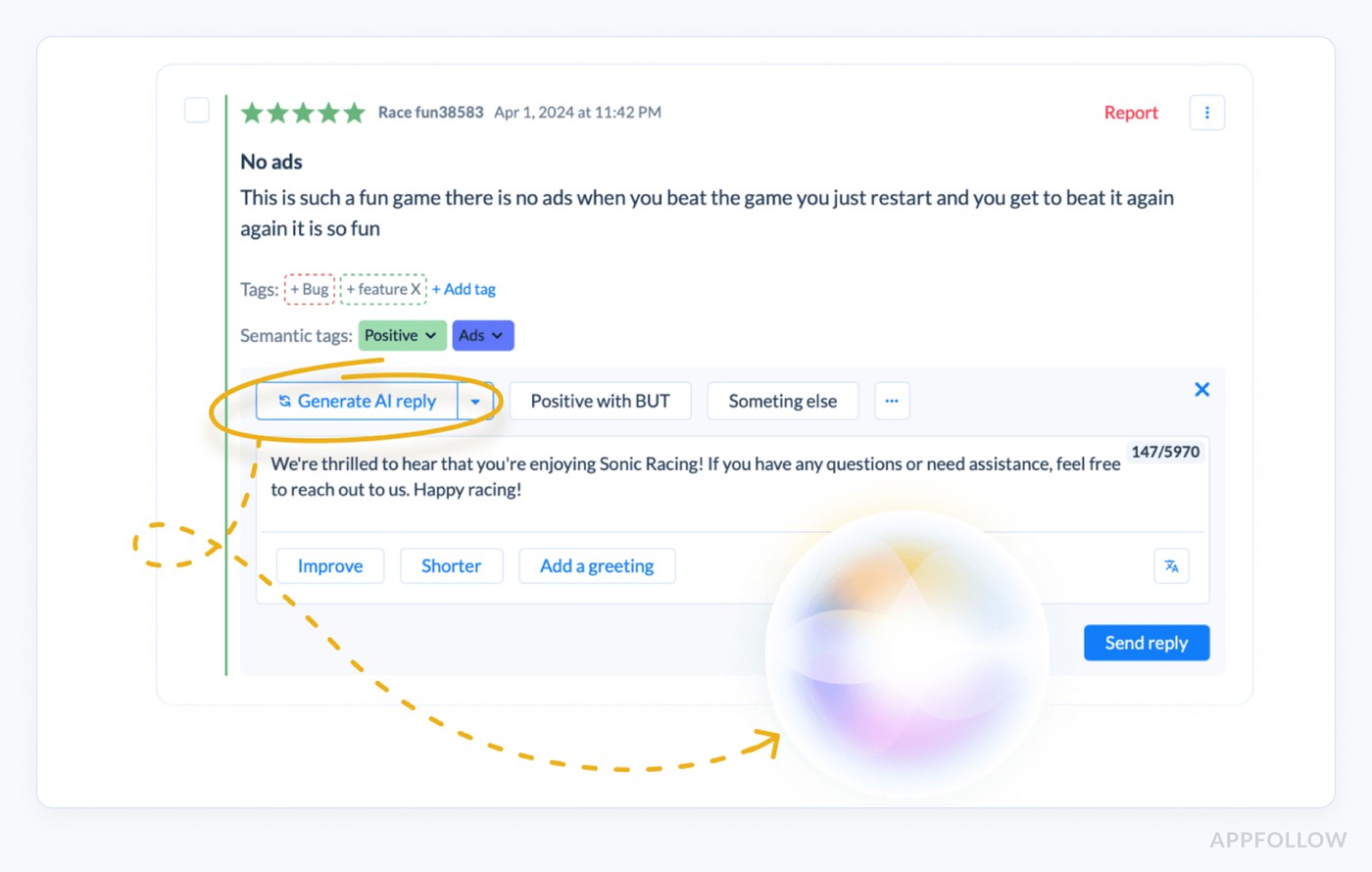
AI replies in Appfollow
The user feels seen, tries the solution, and often comes back with a follow-up or a higher rating.
Wait three days, and the same person has probably deleted the app, complained in a group chat, and mentally closed the loop. Speed here extends the life of the conversation, which is exactly where deeper engagement and edited reviews tend to happen.
Higher coverage means fewer users ignored
The other quiet superpower of automation is coverage. Not just “we replied to a few loud 1★ reviews”, but almost every review gets some kind of response.
Manually, teams answer what they see on one storefront, in one language, during office hours. Everything else becomes a silent backlog: low-star reviews from smaller countries, neutral comments that hide real bugs, old threads no one ever closed.
With automated review management tool, every review is pulled into a central queue, tagged, and prioritised. A 3★ “app is okay but crashes on my tablet” in Brazil doesn’t get buried under US 5★ praise. It’s tagged as “bug/crash”, routed, and answered.
Here is an example of how it looks like:

The effect compounds, more of them get at least a basic acknowledgement or update. Over time, that looks like higher response rates, more edited reviews, and a reputation for being there when something goes wrong.
Read also: AI Reputation Management - How to Secure Your App’s Reputation
Smarter routing gets the right reply from the right team
Automated review management gets powerful the moment routing stops being “who has time” and starts being “who can fix this”.
Behind the scenes, every review is tagged: billing, login bug, delivery delay, abuse, feature request. Then rules do the boring work:
- billing complaints go to the payments squad,
- crashes and bugs go to product/QA with OS + version attached,
- harassment or fraud flags go to moderation.
Here is an example of how such an alert may look like in Slack:
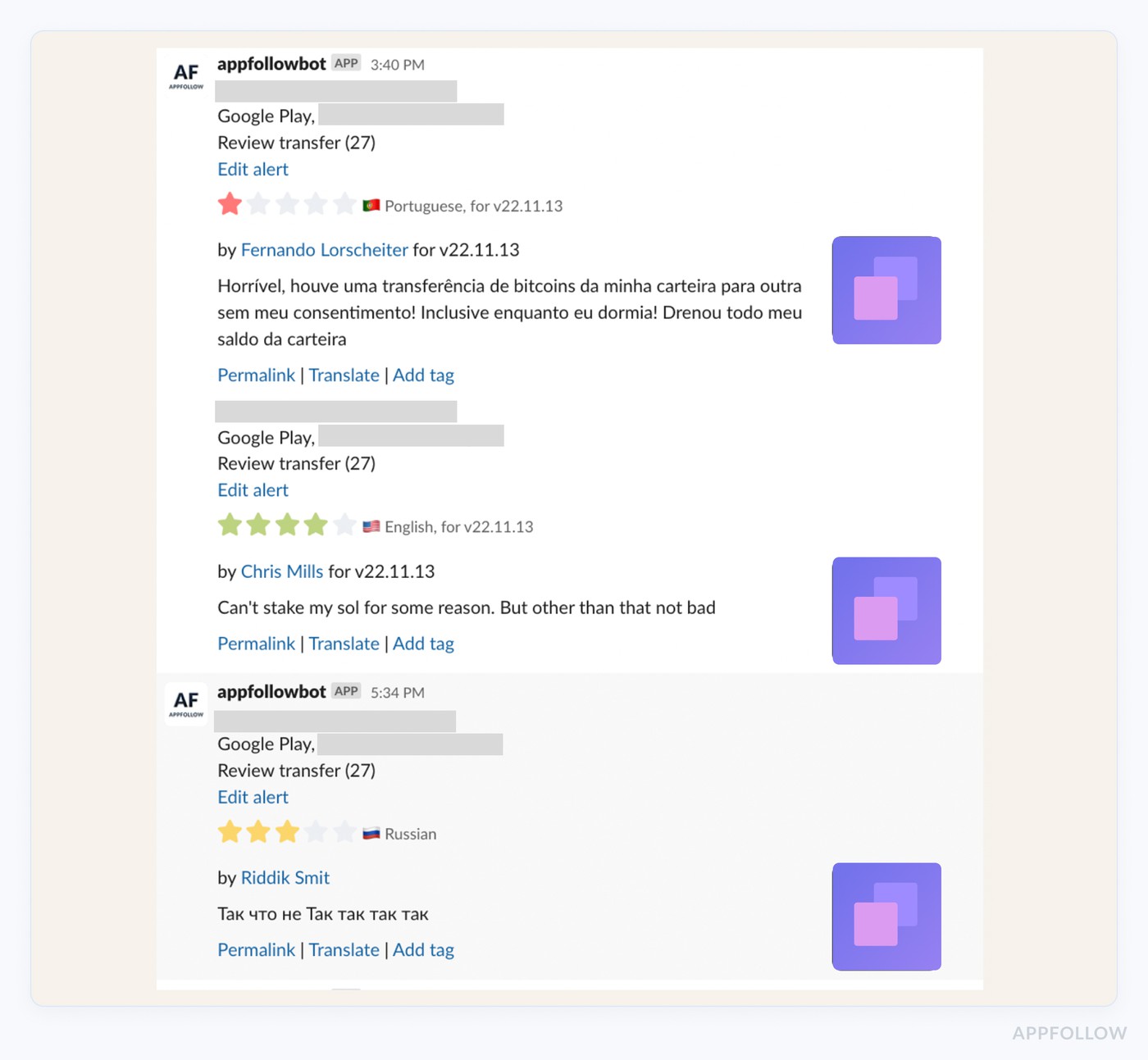
Appfollow alerts for reviews.
Take a real-world pattern: in many apps, 15–25% of low-star reviews are billing-related. When those sit in a generic queue, users get stock replies and are told to “email support”. Response rate might look fine, but resolution rate stays low.
With routing, that same 1★ “you charged me twice” review lands with someone who can look up the account, reverse the charge, and reply with a specific outcome. Those are the replies that lead to edited ratings, follow-up comments, and users staying instead of churning quietly.
Let AppFollow manage your app reputation for you
cta_free_trial_purple
Consistent tone builds trust at scale
When reviews start coming in by the hundreds, tone drift becomes a real problem. One agent sounds warm and helpful, another sounds rushed, and a third leans a little too corporate. From the outside, customers experience that as uncertainty: who am I dealing with?
Automated review management solves a big chunk of this with templates and guardrails. You set clear patterns for common situations failed payments, buggy releases, late deliveries, and missing features.
Each template keeps the backbone the same (acknowledge, explain, next step) and leaves room for specifics: order ID, device, compensation, timeline. Guardrails spell out what must appear (time frames, how to reach you, ownership) and what’s off-limits (blame-shifting, legal phrasing, sarcasm).
Think of a food delivery app with 60 similar 1★ “order never arrived” reviews in one night. With templates in place, different agents can reply quickly, add concrete details about refunds or redelivery, and still sound like the same brand.
Here is an example of how it works in Appfollow:
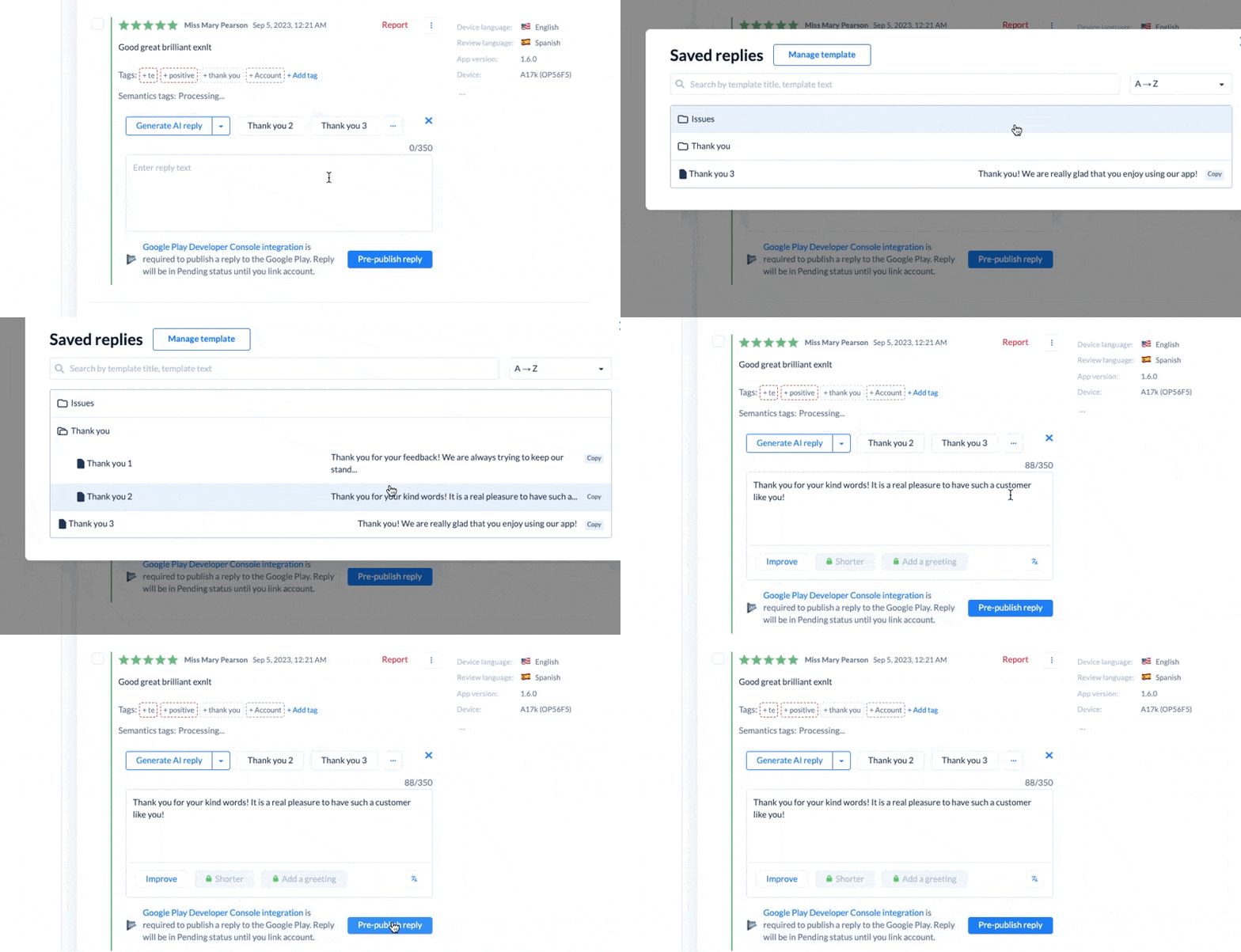
Customers get consistent, clear answers. People who read those threads later see reliability, not chaos, which makes them far more likely to reach out, respond, and keep using the product.
Read also: 50 positive review response examples [+15 negative cases]
Early detection prevents reputation spirals
Reputation rarely collapses in one day. It slips, a buggy release here, a payment issue there, and by the time anyone notices, your rating graph already looks like a ski slope.
Automated review management breaks that pattern with alerts on spikes and dips before the damage sticks.
Under the hood, the system watches a few things in real time: sudden growth in 1–2★ reviews, a drop in average rating, or a flood of mentions around the same topic (“crash”, “login”, “card declined”).
When those cross a threshold, it pings the right people instead of quietly logging the data.
Example: a new version goes live on Friday. Within three hours, alerts show a 4× spike in 1★ reviews mentioning “black screen on launch” on Android. Product pauses the rollout, ships a hotfix, support replies to the affected users with a concrete timeline, and follow-up reviews start shifting neutral or positive.
That’s the mechanism in action:
alerts → faster diagnosis → quicker fixes → fewer repeat negative reviews
Engagement improves because customers see a team that reacts while the problem is still fresh, not one that discovers the issue in next month’s report.
Closed-loop reporting turns feedback into product action
Automated review management only pays off long-term when it feeds product decisions. The value is in seeing patterns at scale instead of reacting to one loud comment.
Reviews get auto-tagged by theme: “onboarding”, “search”, “billing”, “notifications”, “feature request: dark mode”. Over a month, you stop arguing about opinions and start pointing at data:
- 11% of negative reviews mention “can’t find past orders”
- 7% of all reviews ask for “filters”
- 4–5% complain about “random logouts”
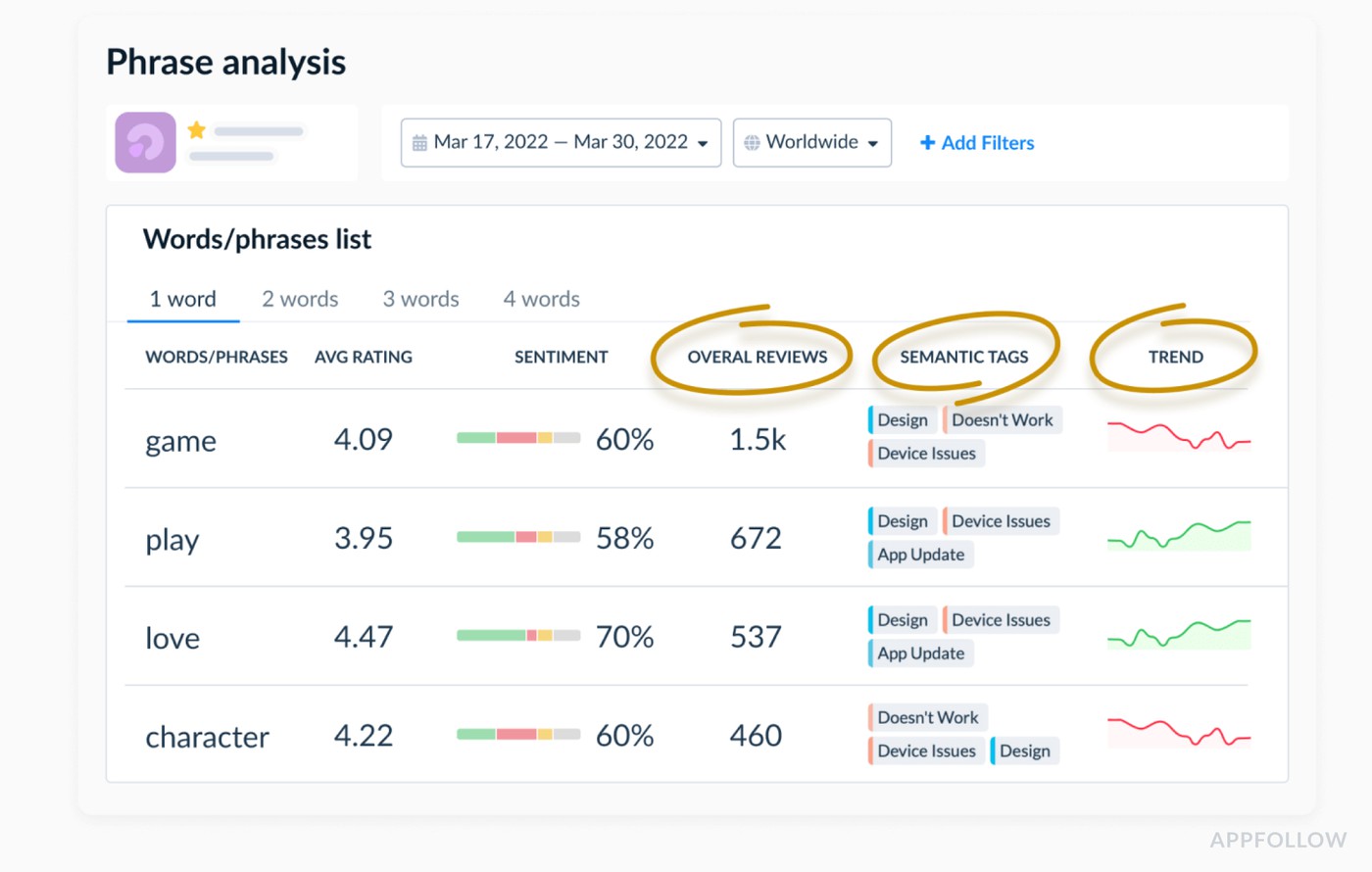
Review phrase analysis in Appfollow.
That’s enough signal to influence the roadmap. Product scopes a better order history view, adds filters, and fixes the session issue. The next release ships with clear notes, and you loop back to the users who flagged it:
“Thanks again for all the feedback about order history. In version 6.3, we’ve added filters by date and status, plus a faster search. Would love to hear how it works for you now.”
Two things happen. Some users update their rating or add a follow-up comment. Future users reading those threads see a traceable line: problem → fix → acknowledgment. That closed loop is where engagement moves from “thanks for your feedback” to “we listened and changed the product”, which is a much stronger reason to stay, respond, and keep talking to you.
Begin your journey to top app store performance. Harness the power of user feedback with AppFollow!
cta_free_trial_purple
FAQs
What does “customer engagement” mean in reviews?
In reviews, engagement is how actively customers interact with you after they hit “submit”: they read and reply to your responses, update ratings, leave follow-up comments, come back after fixes, and keep using or recommending the product.
What is automated review management?
It’s a system that collects reviews from all stores, auto-tags them by topic and sentiment, routes them to the right teams, suggests or templates replies, and tracks results without you manually digging through each storefront.
Why does manual review handling stop scaling?
Volume, languages, and platforms stack up. Teams cherry-pick a few visible reviews and the rest become silent backlog. Response times drift, tone becomes inconsistent, and critical issues hide in the noise.
How does automation improve engagement?
Automation shrinks response time, reduces ignored reviews, routes complex cases to the right owners, keeps tone consistent, flags spikes early, and feeds recurring themes back into product. Customers see faster, better answers and visible improvements, so they’re more likely to respond, revise, and stay.
What to automate first?
Start with low-risk, high-impact pieces:
- collection into one inbox,
- tagging by sentiment/topic,
- queues and SLAs,
- alerts for 1–2★ spikes.
Add reply templates and bulk actions once you have good guardrails.
Does replying to reviews increase engagement?
Yes, when the reply is timely and specific. People are far more likely to edit ratings, come back with an update, or try the app again when their review gets a useful response instead of silence.
How fast should we respond?
Aim for same day on critical reviews (billing, crashes, security), and within 24–48 hours for the rest. Beyond that, users mentally move on and engagement drops.
Can automation hurt trust?
It can if you lean on generic, copy-paste replies. Use automation for routing, prioritisation, drafts, and guardrails then keep humans in the loop for nuance, emotion, and high-stakes topics.
What should never be automated?
Refund disputes, legal or safety issues, harassment, and any case requiring personal data checks or custom judgment. Those need human review, clear ownership, and proper escalation paths.
How do we measure ROI from review automation?
Look at both ops and outcomes:
- response time and response rate,
- backlog size,
- rating and sentiment trends,
- store conversion rate before/after,
- volume of repeated complaints post-fix.
If those curves move in the right direction while headcount stays flat, the automation is paying for itself.