Best app store review management software in 2026: 9 tools compared

Table of Content:
- Key insights
- How we tested the software before listing here
- Must-have features of the good appstore review management software
- AppFollow
- AppTweak
- Appbot
- App Radar
- ReviewTrackers
- Reviewflowz
- Asodesk
- Comparison table of the application review software
- How to choose review management software for app stores, by job
- FAQs
Two hundred unanswered reviews is not a tooling problem. It starts as one, then becomes a policy problem, then a staffing one, and by the time anybody notices, the rating has moved and nobody can point at the week it happened.
Replying is the highest-leverage thing a small app team can do about ratings, and almost nobody does it properly. Apple publishes the mechanics. Google publishes different mechanics. The two stores behave differently enough that a workflow built for one quietly breaks on the other.
That’s why I blocked five days to test 23 tools hands-on. I tested every solution, talked to ASO experts like Yaroslav Rudnitskiy and Karen Taborda. I read every recent review, Reddit thread, and Quora post.
We run this workflow daily at AppFollow across App Store, Google Play, Amazon, and Microsoft Store. What follows is the operational version: what each store actually permits, what to say, what to automate, and when a tool starts paying for itself.
A note on wording, since people search this a dozen ways. App store reply to reviews, respond to app store reviews, app store review management, and app review management all describe the same job. The two app stores are also the only app review sites that matter here, because unlike Google Business Profile or Trustpilot, they hand the reply mechanism directly to the developer.
Key insights
What Apple and Google actually let you do
Most guides skip this and go straight to templates. Skipping it is how teams build a reply process that violates one store's policy without noticing.
| App Store (Apple) | Google Play | |
|---|---|---|
| Replies per review | Respond to all reviews, regardless of when they were written | One public reply per user review |
| Editing | Edit any time, only the latest version shows | Editable at any time |
| Reviewer notified? | Yes, and they can update their review | Yes, push notification and email |
| Where | App Store Connect | Play Console |
| Content rules | Respectful, no personal information, no marketing language, no spam | Clear, valuable, truthful. No abuse, no solicitations or promotions, no profanity |
| Rating prompts | Maximum three per user per 365 days | Play Console In-App Review API, no fixed public cap |
| Abusive reviews | Report a Concern in App Store Connect. The reviewer is not notified | Report through Play Console. Misuse of replies can lead to app or account suspension |
| Alerts | Email alert when a user edits a review you replied to | Notifications in Play Console |
Read straight from the source before you build anything: Apple's ratings, reviews and responses documentation and Google Play's guidance on replying to reviews.
Three consequences that catch teams out:
One reply per review on Android changes your sequencing. Since Google gives you a single public reply, firing an automated "thanks for the feedback" at a one-star review burns the only response you had. Hold Android replies until you can say something specific.
Apple's three-prompt limit is per user, per year, and it is not per-app-version. Teams that trigger a rating prompt on every release quietly exhaust it by March and wonder why review velocity dies in Q3.
Marketing language is explicitly out on both. Apple names it. Google calls it solicitations and promotions. A reply that ends with a discount code is a policy violation on Android and a suspension risk, not a growth tactic.
How we tested the software before listing here
No affiliate links, no paid placements. AppFollow makes one of the nine and loses in this comparison on multi-location coverage and on price, and the copy says so where it happens.
Nine platforms, trials or live demos on all of them, worked the same way each time: import review history where the product allowed it, filter by rating and topic, tag a batch, draft replies to twenty reviews including five one-star ones, set an automation rule, configure an alert, and export a report. Anything that made us guess got marked down.
Outside the dashboards we read comments rather than star ratings on G2, Capterra and TrustRadius, and pulled honest takes from threads like How do you manage app reviews? on r/AppStoreOptimization and What are the best app reviews tools to manage feedback more efficiently? on r/AppBusiness. When a complaint appeared three times we went back and tried to reproduce it.
We even went Reddit-deep.
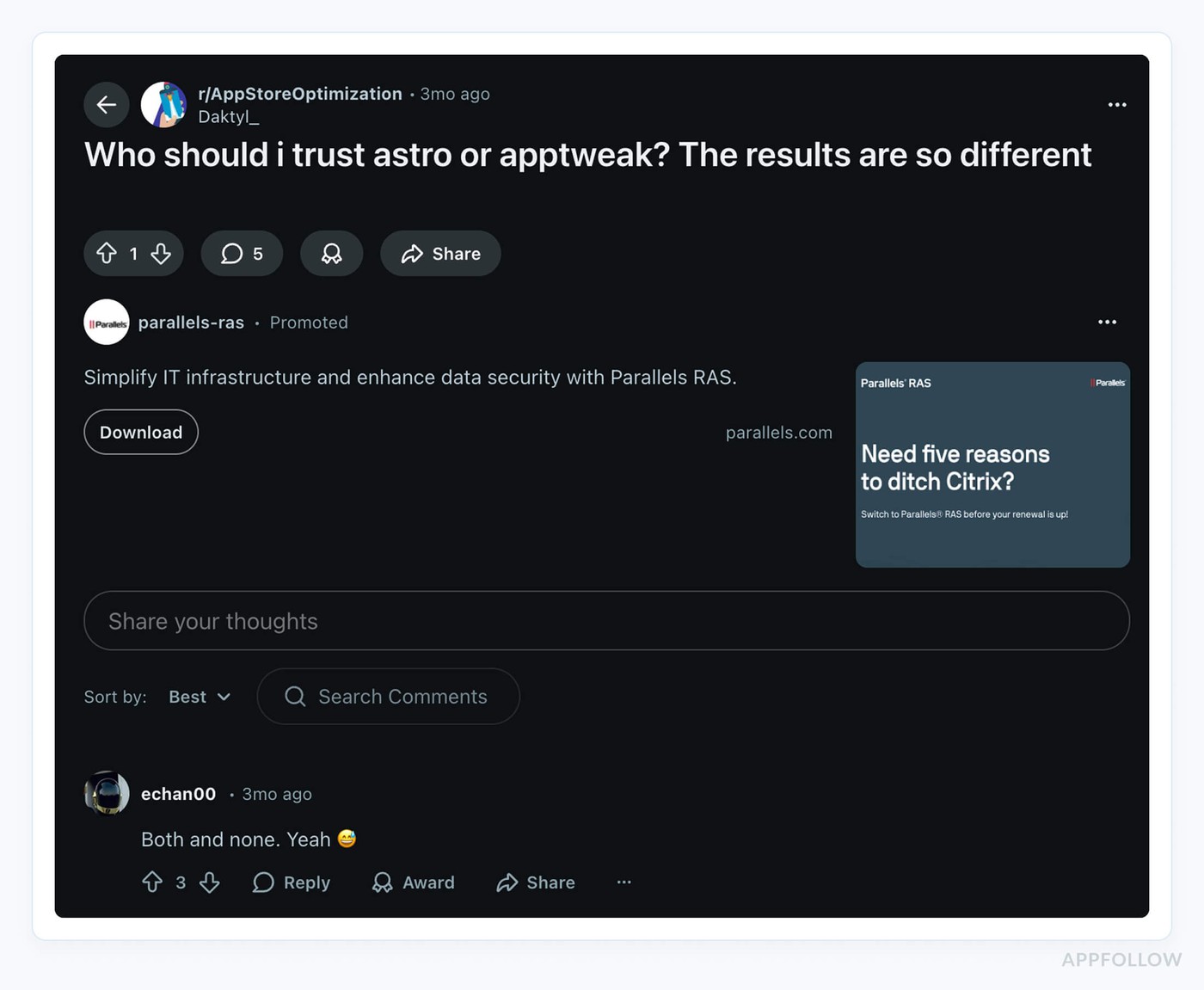
Yes, people do debate appstore review management software on /r/startups. We paid attention.
Tested and re-priced: August 2026. Prices move in this category, so we re-check quarterly.
Must-have features of the good appstore review management software
You’re picking how your team hears your users, every single day. The wrong appstore review management software? It slows you down.
The right one turns noisy feedback into the next sprint’s roadmap.
Here’s what really matters when you’re choosing:
- One inbox for all stores. You shouldn’t be bouncing between Google Play and the App Store like it’s 2014. A solid platform pulls every review, every language, and every country, into one clean dashboard. Total visibility, no tab madness.
- Reply without leaving. The tool should let you reply to reviews right there. In the same view. No clicking out to Apple. No browser gymnastics. Just: review → respond → move on.
- Bulk reply, but smart. One-size replies don’t cut it. You want to filter first. Say, all 5-star reviews mentioning “design”, then send one great response. That’s bulk action done right. Fast and personal.
- AI-crafted replies that sound human. This is where AI earns its keep. Your software should draft personalized replies that don’t feel templated. Like, “App crashes on login” turns into “So sorry to hear that, we’re on it and a fix is in v2.3.1.” It feels real, saves you hours.
- Built-in sentiment + keyword tagging. You need to know what’s heating up. Bugs? Billing issues? Rage tweets incoming? Auto-tagging by emotion and topic helps your team prioritize before things blow up.
- Plug into where your team works. Slack, Zendesk, Salesforce − whatever you use, your review tool better play nice. Reviews should show up exactly where your team will see them. No one should say “I didn’t know this was a problem.”
- See who’s doing what. Who replied? Who dropped the ball? Who’s owning Play Store reviews in France? You need clear statuses, tags, and ownership flows. Otherwise you’re double-working − or worse, ghosting your users.
- Custom alerts and reports that mean something. When “login” 1-stars spike in Brazil post-launch, you want to know now. Not during your Friday wrap. Set alerts. Get trend reports. Build slides your execs will read.
And below is the first tool that meets each of these criteria.
AppFollow
G2: 4.6/5 (194 reviews)
Capterra: 4.6/5 (13 reviews)
TrustRadius: 8.2/10 (5 reviews)
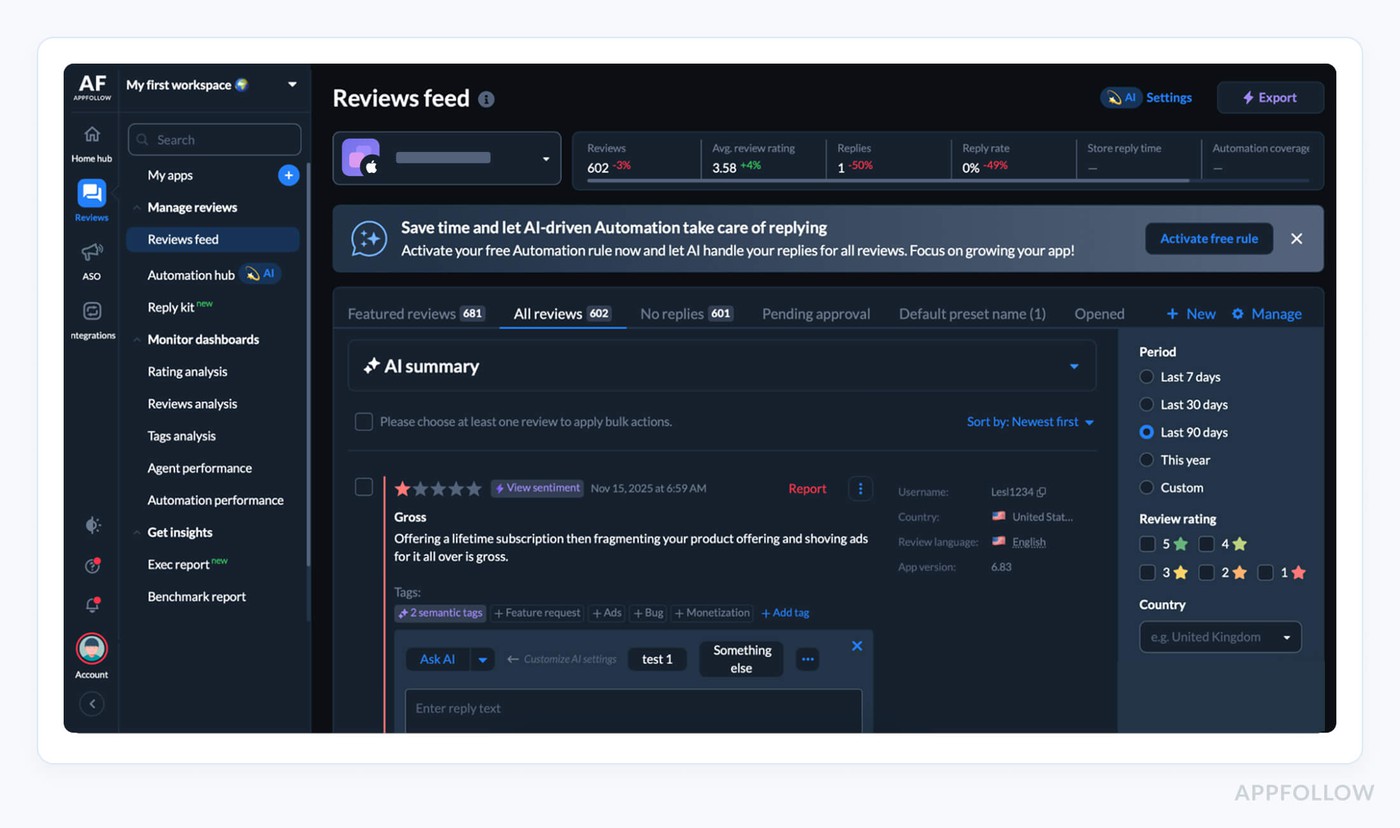
AppFollow is the app review management software teams reach for when “we’ll get to those reviews later” is no longer an option. Product-led brands like Flo, Miro, Roku, Viber, and Audiomack use it to pull every app store review into one place, auto-tag issues, route tickets, and ship faster fixes from real user feedback.
It works across all major stores, including Apple App Store, Google Play, and more, so your CX, product, and ASO teams aren’t stuck in separate consoles.
The edge? AI-powered workflows, rich semantics, and deep integrations that turn raw reviews into prioritized, actionable queues. It’s also consistently top-rated on G2 and Capterra for support and ease of use.
Features
- Unified inbox for multi-store reviews.
- AI-assisted, personalized reply suggestions.
- Auto-tags, sentiment, and topic detection.
- Integrations with Slack, Zendesk, Salesforce, and 20+ tools.
- Advanced filters by keyword, tag, star rating, country, device, app version, and even featured reviews for laser-focused queues.
- Auto-translation of every review into your chosen language, with rules that keep tags and auto-replies consistent across all locales.
- Bulk actions to handle spikes: apply templates, randomize reply variants, mark concerns, or escalate dozens of reviews in a few clicks.
- Automation Hub with rule-based auto-tags and auto-replies so high-volume queues get handled before agents even log in.
- Automation Performance dashboard to track automation coverage, success rate, and spot gaps in your review workflows.
- Competitor review tracking to compare sentiment, issues, and feature requests against apps in your category.
Pricing
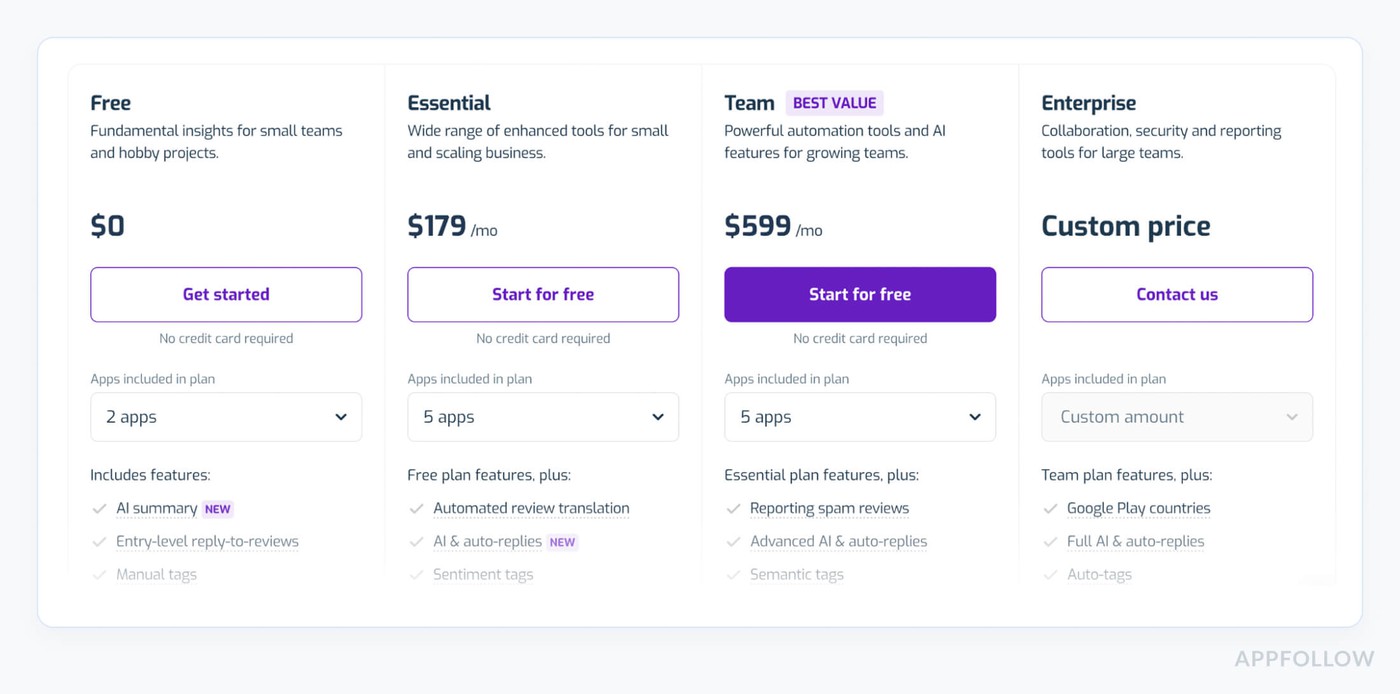
AppFollow prices scale with how many apps you track, how many teammates need seats, and how much AI and automation you turn on. Paid plans currently start around $179/month and go up to roughly $559/month+ before you hit custom enterprise land, according to AppFollow’s own.
If you’re running about 3 apps across stores with 1–5 support users, expect to live somewhere in that $179–$559/month band, after a 10-day free trial to poke at everything.
Pros
- Centralized feedback management: “AppFollow is great … it centralizes all app store optimization and user feedback management in one platform…” g2.com.
- Robust review tagging: “Their tagging system is what won me over!” g2.com.
- Unified review replies: “Being able to reply to many comments all in the same place.” g2.com.
Cons
- Limited review visibility: “Limited no. of reviews you can see on the Essential plan. … it should send a notification if a reviewer decides to update a review…” g2.com.
- Single-store querying: “Please let us select both sites (CH Play & App Store) at the same time … download all the recent comments in a single click.” g2.com.
- Cumbersome UI/Android linking: “The UI is really tricky. Connecting your app from Google Play for analytics is not easy.” capterra.com.
cta_free_trial_purple
AppTweak
G2: 4.6/5 (187 reviews)
Capterra: 4.2/5 (18 reviews)
TrustRadius: 8.8/10 (6 reviews)
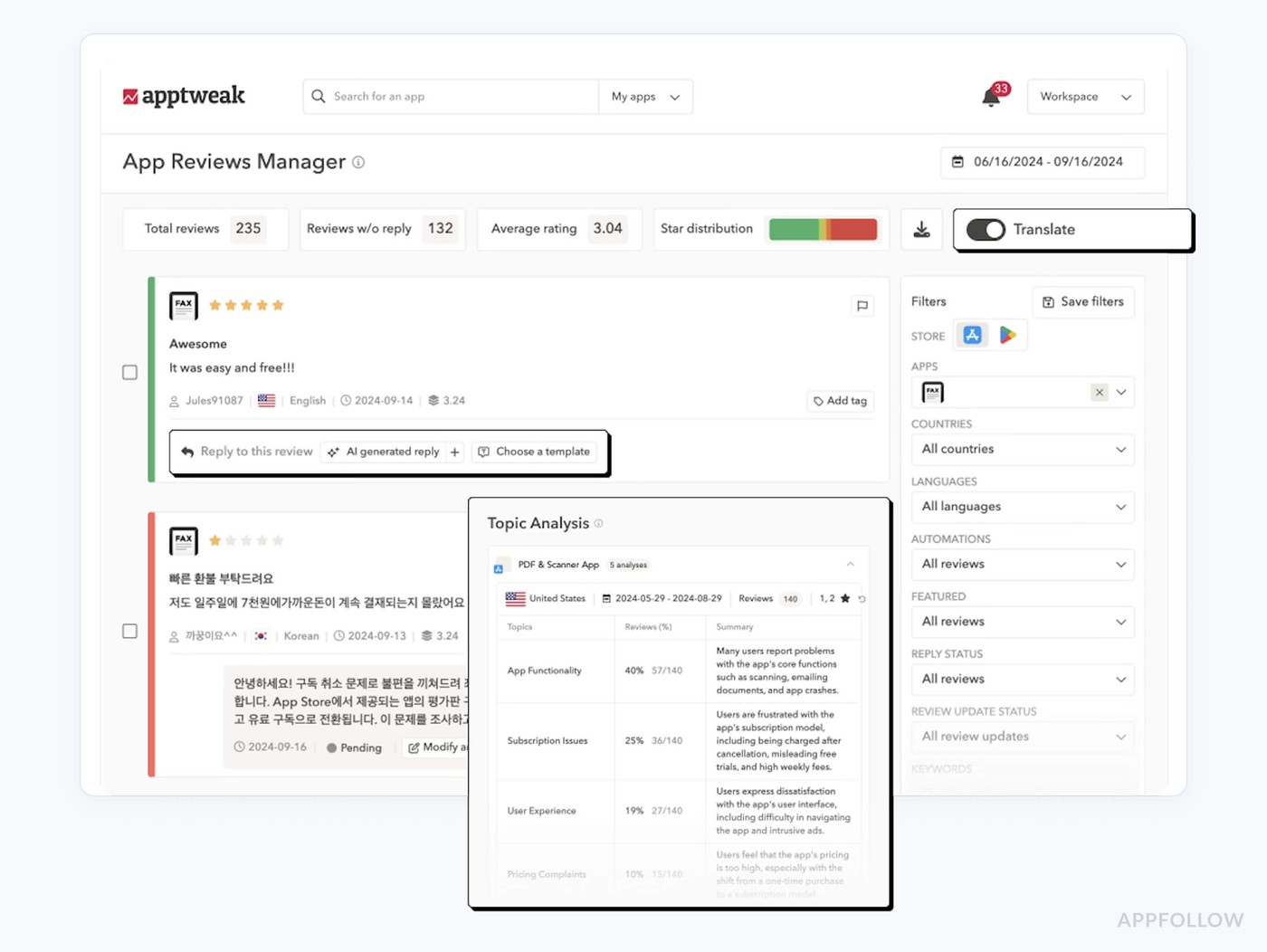
AppTweak is what happens when a serious ASO platform grows a review brain. Brands like Amazon, Uber, SoundCloud, Canva, and Binance lean on it to centralize iOS and Android reviews, spot patterns, and turn bad releases into better roadmaps.
As an app review management software layer on top of AppTweak’s Atlas AI, its App Reviews Manager uses GPT-4 to draft replies, auto-tag themes, and measure how your responses move ratings over time.
Add “G2’s highest-rated ASO tool” plus App Growth Awards for ASO Tool of the Year and App Data Platform of the Year, and you’ve got a very decorated way to protect your app’s reputation.
Features
- Unified inbox for Apple App Store and Google Play reviews across regions.
- GPT-4 reply suggestions, bulk AI replies, and automation rules for high-volume queues.
- Auto-tagging by sentiment, topic, and language with review filters and impact KPIs.
- Integrations to receive and reply to reviews from Zendesk, Salesforce, and Slack.
Pricing
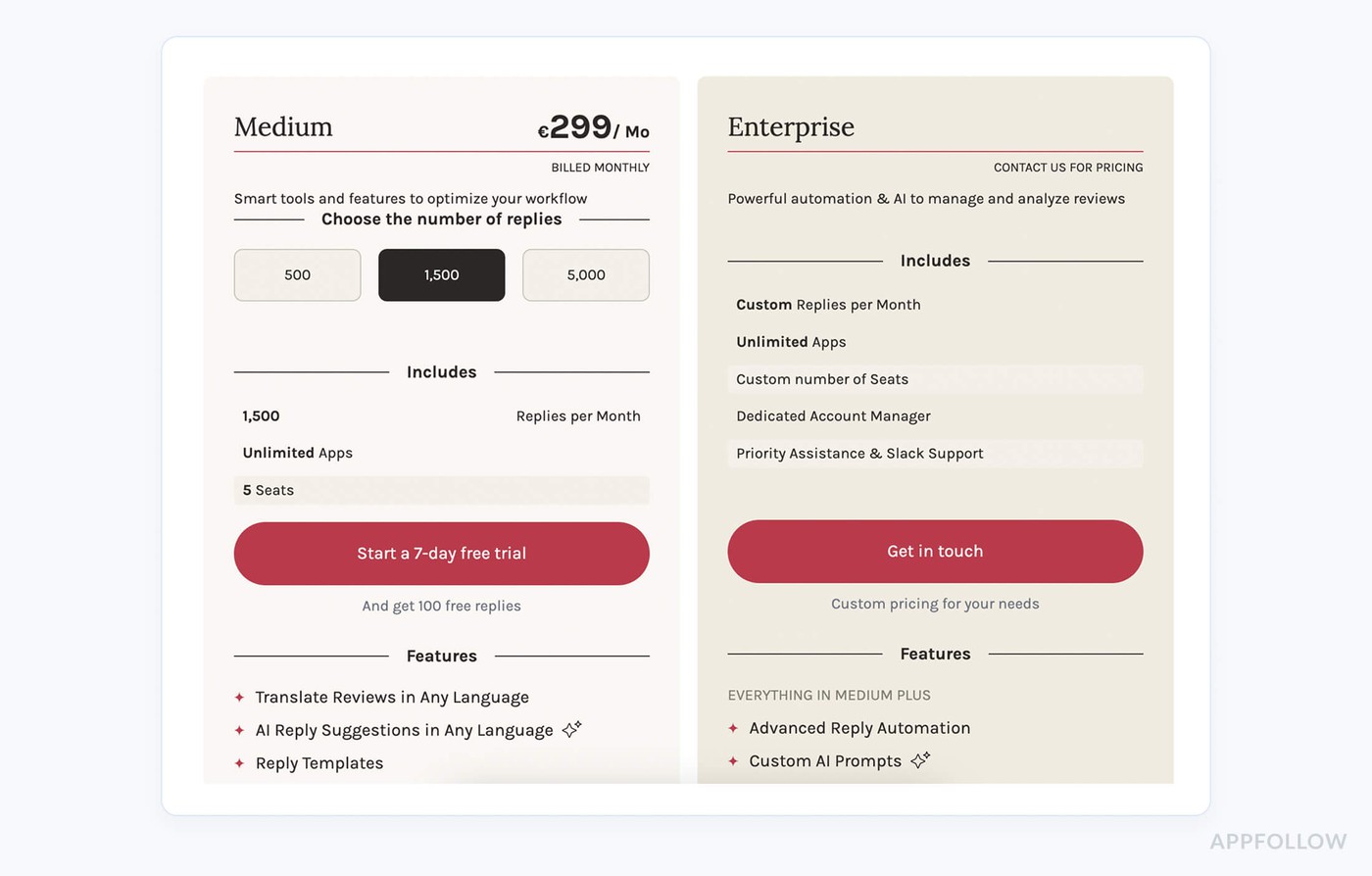
AppTweak’s review pricing now really revolves around reply volume and seats. The Medium App Reviews plan is €299/month, billed monthly, and gives you 1,500 replies, unlimited apps, and 5 seats. Pricing scales as you move reply volume between 500–5,000+ or step up to Enterprise for custom seats and heavier automation and analysis.
If you’re managing 3 apps across stores with 1–5 support users and roughly 1,500 replies/month, you’ll land on that €299 tier. You also get a 7-day free trial and 100 free replies to test it.
Pros
- In-dashboard review replies: “Replying to store reviews directly from the dashboard is something I had requested earlier, and they’ve now implemented it… shows they are actively listening to customer feedback.” g2.com.
- Active feature development: “Replying to store reviews … implemented… shows they are actively listening to customer feedback.” g2.com.
- Proactive customer support: Implied by user praise for responsiveness and feature updates (see above).
Cons
- Occasional bugs: “AppTweak … can occasionally have some bugs. The good thing is that the team behind it is super responsive and always quick to address any issues.” g2.com.
- Subscription required: “Of course, you have to buy a subscription to be comfortable, but it’s worth it.” g2.com.
- Complex data volume: “With the vast amount of data available, it can sometimes feel overwhelming. Multiple reports often aim to tell the same story…” g2.com.
Read also: The top 10 app store optimization tools in 2025 (and when to use each)
Appbot
G2: 4.6/5 (18 reviews)
Capterra: 4.5/5 (2 reviews)
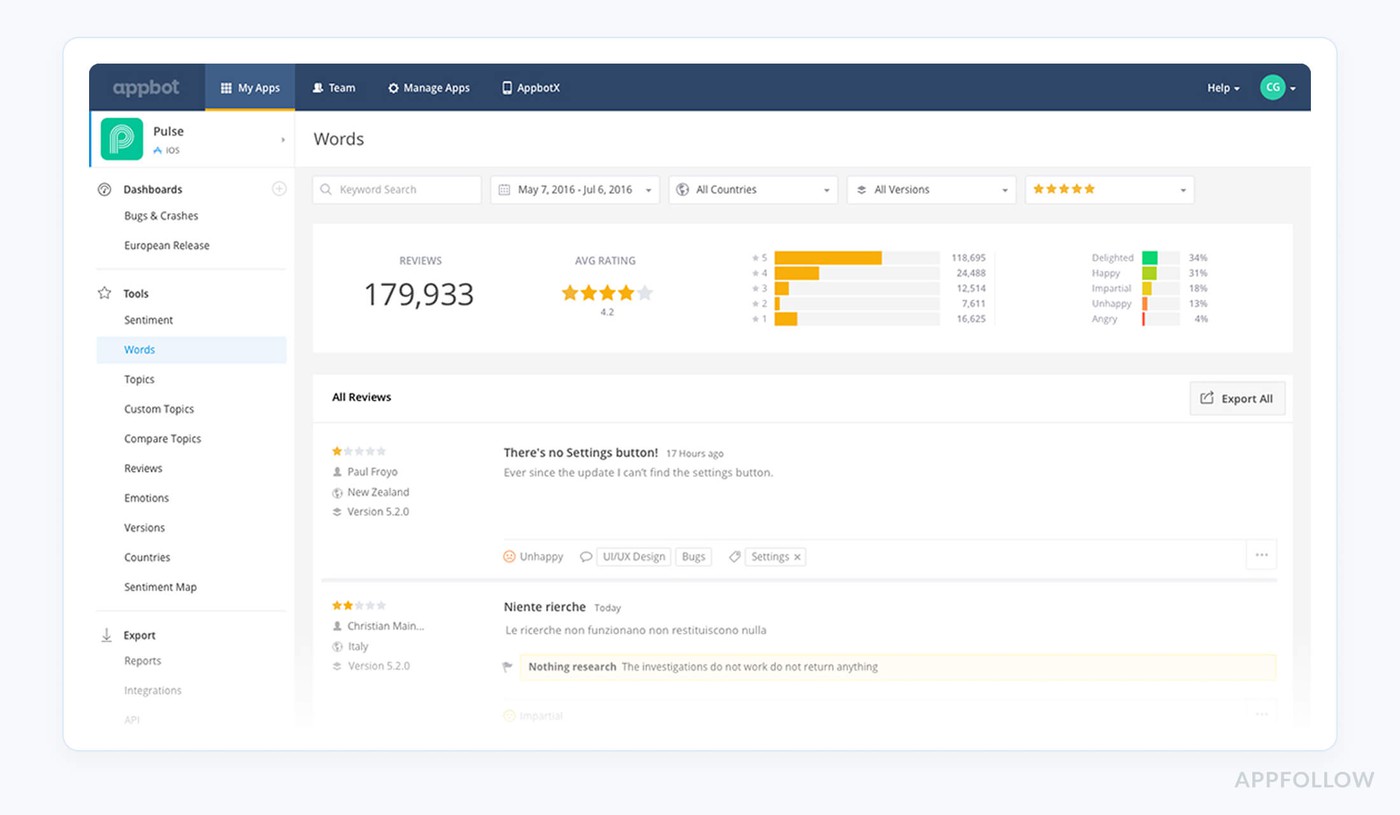
Appbot is the app review management software built for teams who care less about dashboards and more about “what are users saying today?” Over a quarter of the Fortune 100 and 35% of top-charting app developers use it to track, analyze, and act on reviews from Apple App Store, Google Play, Amazon, and Microsoft Store in one place.
Its edge is world-class sentiment and topic analysis plus deep integrations: reviews stream into Slack, Zendesk, Teams, Tableau, and more, so product and support see the same truth at the same time.
Features
- Aggregates reviews from Apple, Google Play, Amazon, and Windows stores globally.
- Machine-learning sentiment and topic analysis trained on hundreds of millions of reviews.
- Native integrations to push reviews into Slack, Zendesk, Teams, and BI tools.
- In-line replies for iOS and Google Play reviews via connected tools.
Pricing
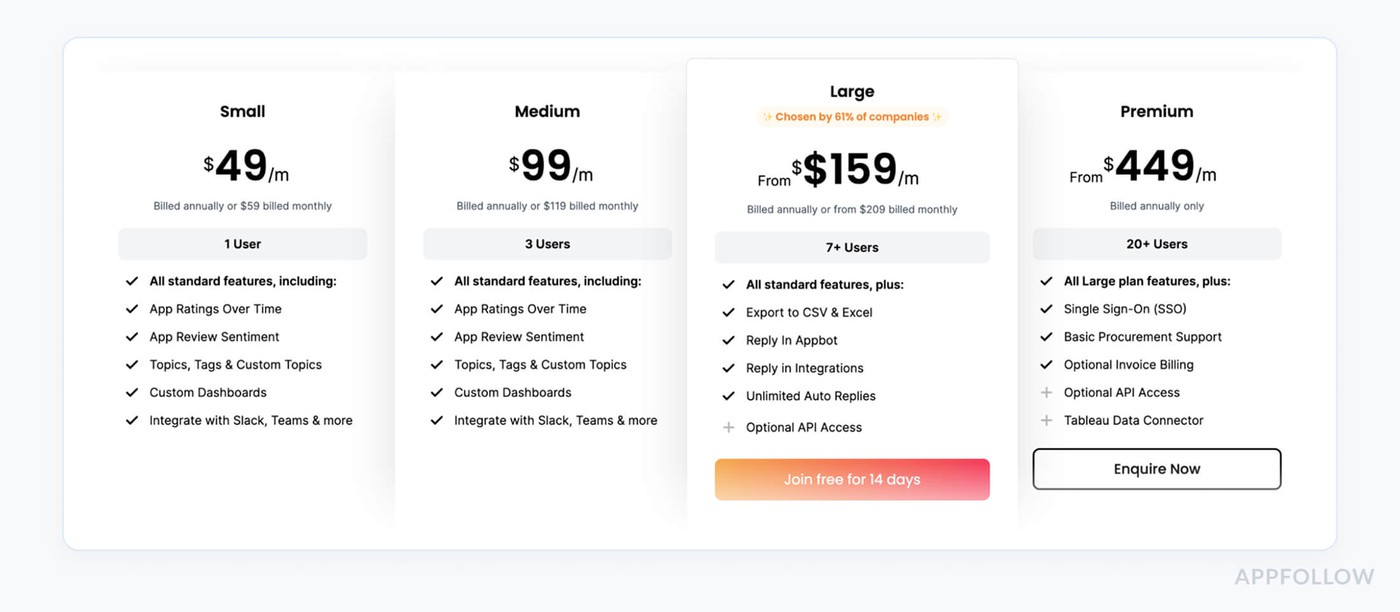
Appbot keeps pricing dead simple: you pay for seats and sources (each “source” = one app in one store). Small starts at $49/month for 1 user and 5 sources; Premium begins at $449/month for large teams.
If you’re tracking 1 app in 3 app stores with 1 support user, you’re fine on $49/month.
Need 5 individual users? You’re looking at the Large tier from $159/month. Every signup gets a 14-day free trial of Large to test the full workflow.
Pros
- Multi-platform review monitoring: “Appbot helps to monitor reviews from the App Store and Google Play… It also provides data visualizations (pie charts, word clouds) and generates regular reports summarizing app reviews.” g2.com.
- Sentiment analysis & integrations: “The sentiment analysis tool and integration with Tableau is one of the best features of tracking your app’s reviews and ratings.” g2.com.
- Flexible filtering & export: “I love how easy it is to select a time frame and see the ratings and reviews from that time. You can also export the data as an Excel sheet and create custom dashboards…” g2.com.
Cons
- High pricing: “Pricing structures might be prohibitive for specific users.” g2.com.
- Incomplete platform coverage: “It may not cover all app stores and platforms, which could limit the scope of review monitoring and analysis.” g2.com.
- Lack of daily rating detail: “I only struggle with seeing the exact number of ratings for a specific day/time frame.” g2.com.
App Radar
G2: 4.3/5 (31 reviews)
Capterra: 3.9/5 (13 reviews)
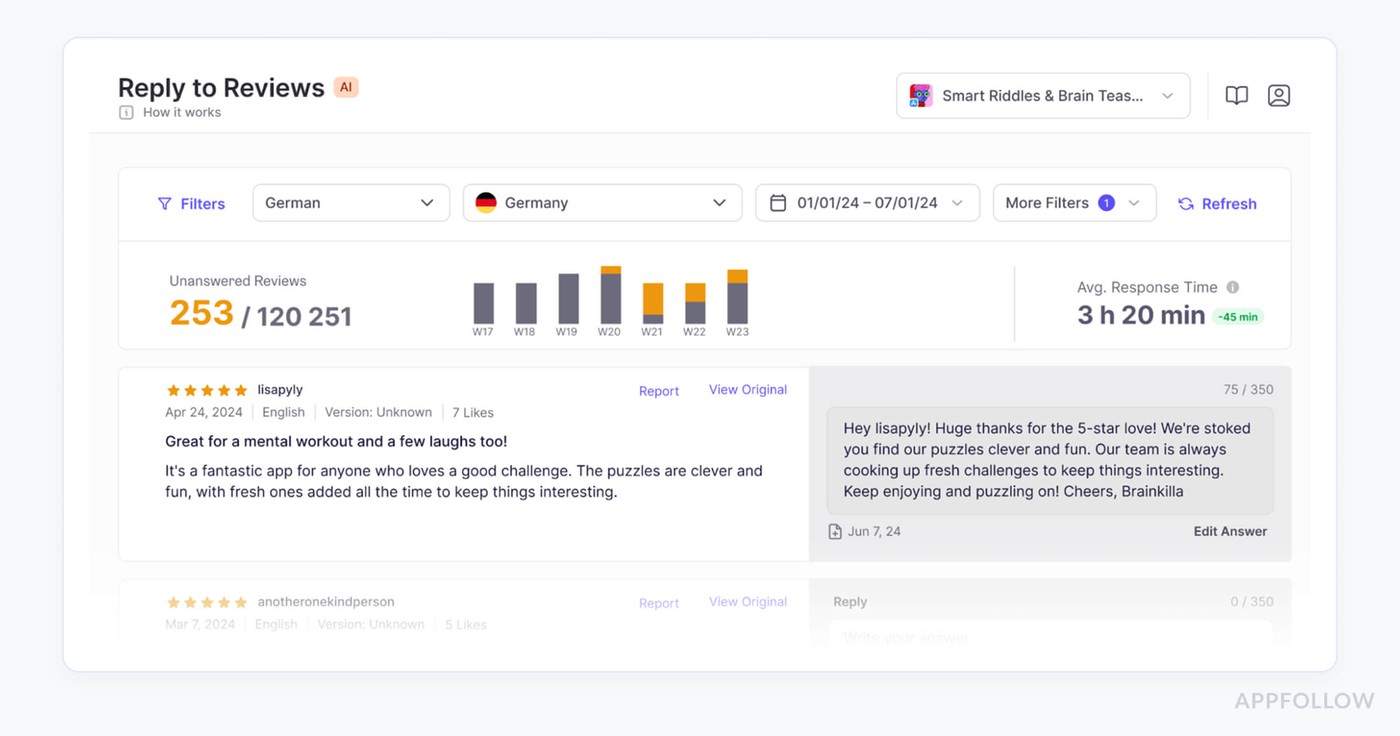
App Radar is the app store review management analysis tool you grab when you want ASO and reviews living in the same brain. Teams behind apps like Cronometer, Kingdom Rush, iTranslate, and TOGGO use it to spot review trends, reply faster, and see how ratings move after each release on the Apple App Store and Google Play.
The hook is AI: GPT-4–powered replies, summaries, and alerts that cut review handling from hours to minutes while still sounding human. Add strong scores on G2 and Capterra, plus deep ASO workflows, and you get a review engine wired straight into growth.
Features
- Unified inbox for App Store and Google Play reviews.
- AI-generated review replies and summaries in the original language.
- Slack and email alerts for new reviews and rating changes.
- Review analytics tied to ASO performance and keyword impact.
Pricing
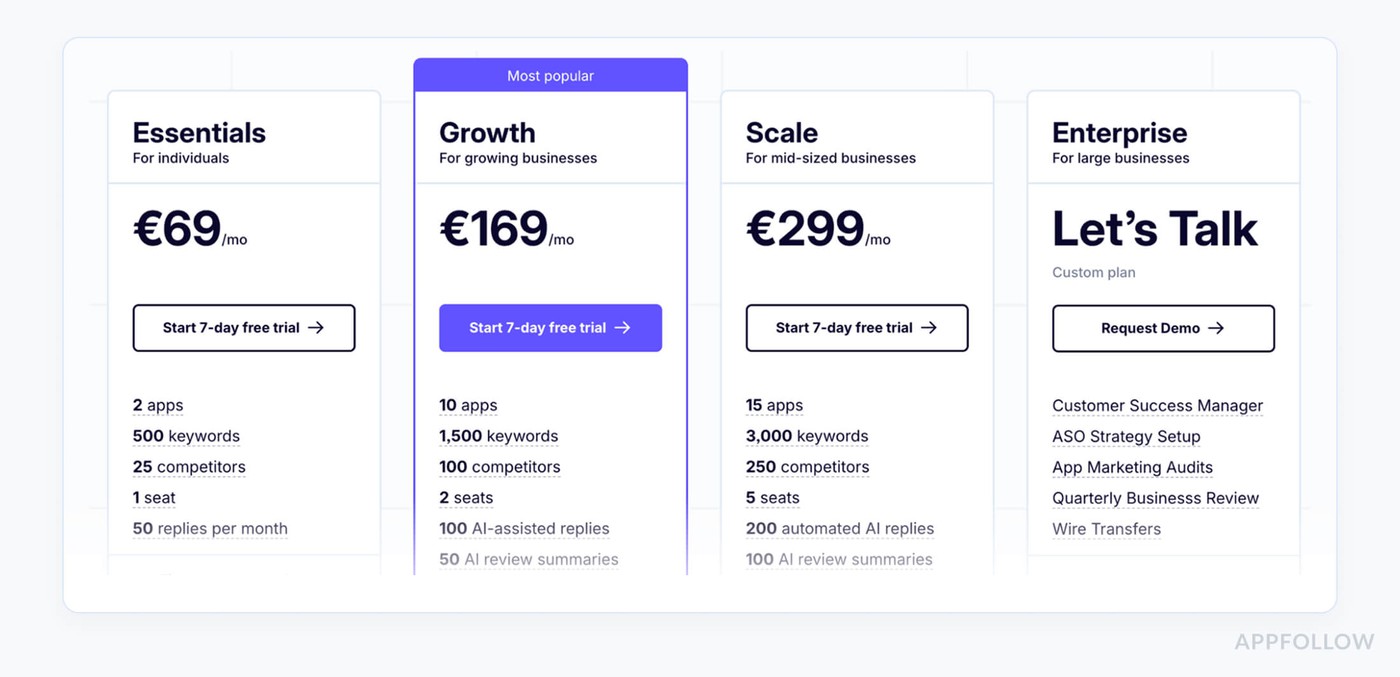
App Radar prices around how big your universe is: apps, seats, and monthly review reply/AI limits. Essentials starts at €69/month for 2 apps and 1 seat.
If you’re working with 3 appstores and 1 support user, you’d land on Growth at €169/month. With 5 support users, you’re in Scale at €299/month territory.
Every plan comes with a 7-day free trial, so you can treat it like a test drive for your appstore review management software.
Pros
- AI-powered review management: “The review management tools are particularly powerful because they have AI-assisted features such as automated replies, review summaries, and customizable templates.” g2.com.
- Efficient feedback handling: “…manage user feedback more quickly and effectively…” g2.com.
- Frequent updates & automation: “AppRadar constantly adds new features… it is easy to use, and includes many automation features.” g2.com.
Cons
- Frequent logouts: “My only suggestion for improvement would be to address the frequent logouts. Often I’m prompted to log in again.” g2.com.
- Needs reconfiguration after updates: “If major changes are made on AppRadar’s side, you may need to redo it (a few clicks).” g2.com.
Slow innovation: “AppRadar seemed to have stagnated in terms of development and innovation.” g2.com.
ReviewTrackers
G2: 4.6/5 (161 reviews)
Capterra: 4.7/5 (172 reviews)
TrustRadius: 9.9/10 (31 reviews)
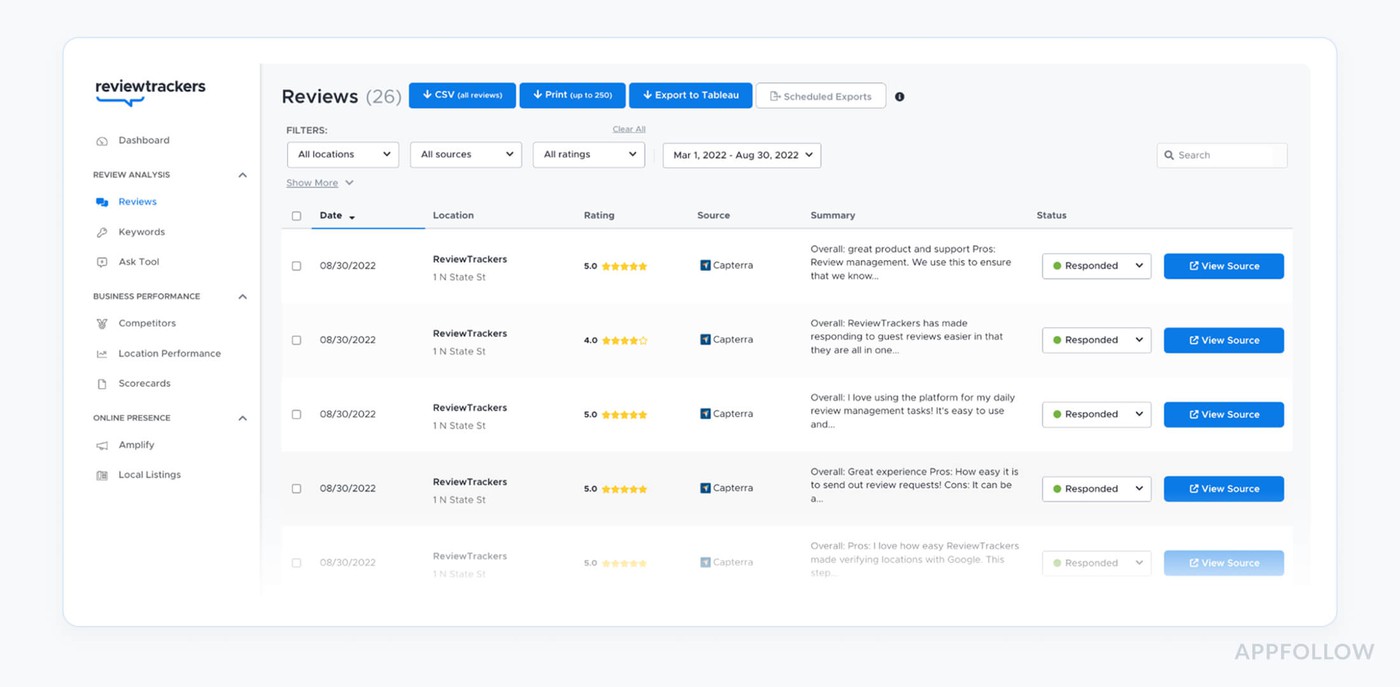
ReviewTrackers is what you plug in when you’re tired of finding out about angry users from a random App Store rant three weeks late. Brands like American Family Insurance and U.S. Banks use it to pull app reviews and ratings into one place, flag issues fast, and route them to the right team before churn kicks in.
Behind the scenes, it’s watching Apple’s App Store and Google Play Store (alongside 100+ other review sources), then surfacing the stuff that matters: broken flows, billing pain, UX wins.
It leans hard on AI-driven keyword categorization and automatic bucketing so you’re looking at themes, not raw noise.
Add in a trophy shelf of “top-rated” badges from Google, Capterra, Facebook, and G2, plus FeaturedCustomers awards, and you get a very battle-tested engine for app store reputation.
Features
- Aggregates app marketplace reviews into one dashboard.
- AI-driven keyword categorization and automatic topic grouping.
- Escalation workflows to handle compliance and high-risk feedback.
- Integrations via API and Zapier with 1,000+ apps for alerts and reporting.
Pricing
ReviewTrackers charges by location, not by seat. Their own plans page makes it clear: pricing is “per location per month” and plans include unlimited users.
Public pricing sources put paid plans roughly between $49 and $199 per location/month, with a 14-day free trial mentioned in multiple breakdowns.
So if you’re tracking 3 app stores, you’re in the ballpark of $147–$597/month, and that won’t change whether you’ve got 1 support rep or a five-person CX squad.
Pros
- Unified review aggregation: “The general notion of having a tool collecting all online reviews in one place is absolutely non-debatable and mandatory these days.” g2.com.
- Streamlined response filtering: “The ability to filter out responded and unresponded reviews makes everything so much easier & quicker to ensure that all reviews are answered in a timely manner.” g2.com.
- Time-saving response templates: “Having aggregated review data saves me a lot of time. Plus, the response generator is a big time-saver.” g2.com.
Cons
- Erratic notifications: “Notifications have been a little bit erratic… the tool would benefit from webcrawling a wider array of sources.” g2.com.
- Limited source coverage: “ReviewTrackers may only track reviews from specific sources, such as popular review sites… businesses may not be able to track all of the reviews.” g2.com.
- Manual data updates: “Sometimes I still need to enter data or update information directly in Google My Business profiles.” g2.com.
Reviewflowz
G2: 5.0/5 (4 reviews)
Capterra: 4.8/5 (25 reviews)
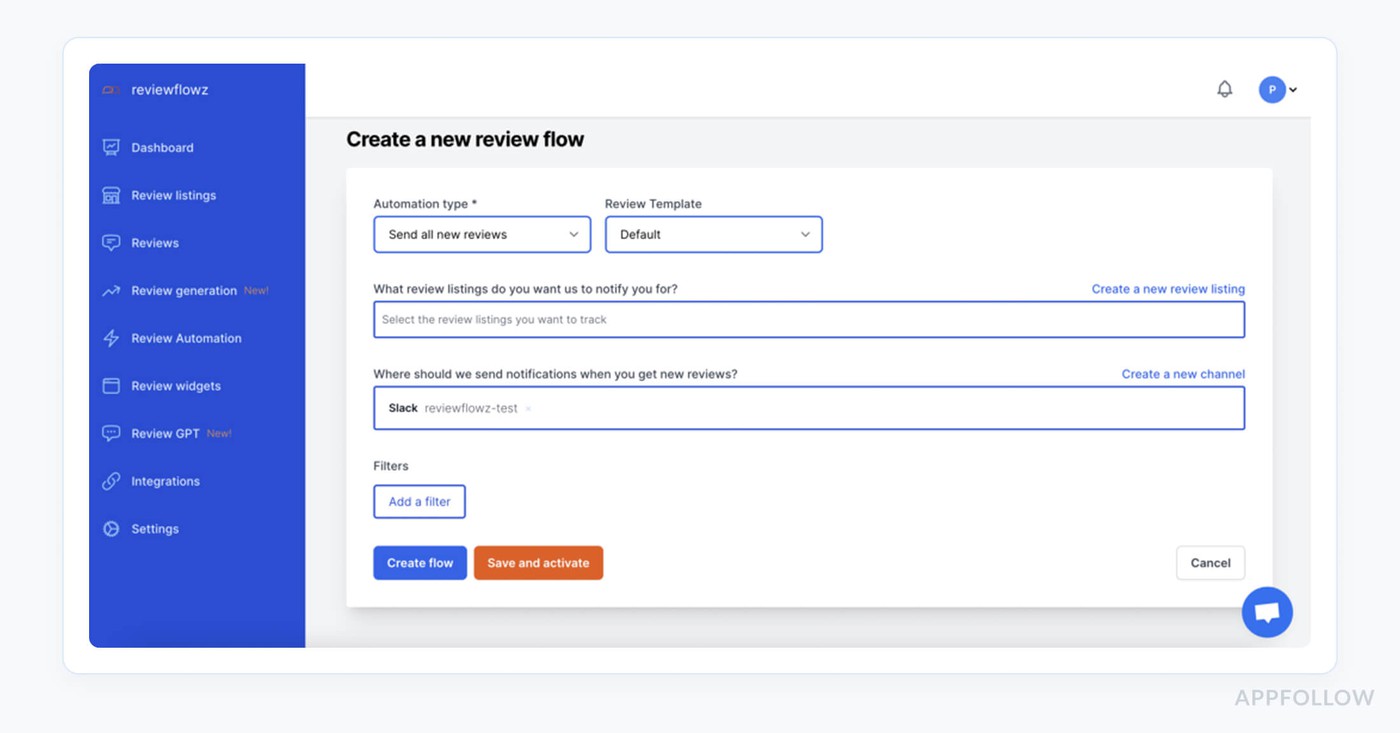
Reviewflowz is the app review management software you pick when your whole team already lives in Slack and Zendesk and you just want reviews to show up where work happens. It pulls in App Store, Google Play, and Microsoft Store reviews, then streams them into your channels with filters for rating, keywords, and region so no 1-star rant slips by unnoticed.
It’s built for fast-moving SaaS and product teams that care about reporting too: Capterra scores it 4.8/5 and G2 users give it a clean 5/5.
The edge is speed: AI suggestions, tagging, and translation happen right in your workspace, so your next reply is minutes, not days, away.
Features
- Send App Store and Google Play reviews directly to Slack or Microsoft Teams.
- Reply from Slack/Zendesk with AI-generated suggestions synced back to the stores.
- Smart filters by score, keyword, and locale plus daily/weekly performance reports.
- Unified analytics with AI topic and sentiment extraction across all review platforms.

Reviewflowz prices you on what you track: each public review page (one app in one store) is a “review profile.” LITE starts at about $45/month per profile and PREMIUM tops out around $80/month per profile, plus an optional pay-as-you-go export at $0.10 per review.
If you monitor 3 app stores, you’re looking at roughly $60–$120/month, and that’s for 1 or 5 support users alike. You also get a 14-day free trial to kick the tires.
Pros
- Real-time Slack alerts: “Reviewflowz has become an essential tool for our review management… the Slack notifications are incredibly helpful for keeping us updated in real-time.” g2.com.
- Powerful automation & reports: “The automation options, like Zapier connections, have significantly streamlined our operations, saving time and reducing manual effort. The reports are detailed and insightful…” g2.com.
- Easy Slack integration and search: “Integration with my company Slack channel … Slack integration was seamless… The reporting and search within Reviewflowz of all reviews is something I can only get in Reviewflowz… saves an incredible amount of time.” g2.com
Cons
- Early-stage bugs: “The product is still slightly a work in progress with some bugs…” capterra.com.
- Missing sources: “We just need to complete the list of review sources with more marketplaces, all the popular ones… then the tool will be perfect.” capterra.com.
- No bulk flow edits: “It could be easier to edit flows en masse.” capterra.com.
Asodesk
G2: 4.6/5 (44 reviews)
Capterra: 4.8/5 (4 reviews)
TrustRadius: 8.7/10 (2 reviews)
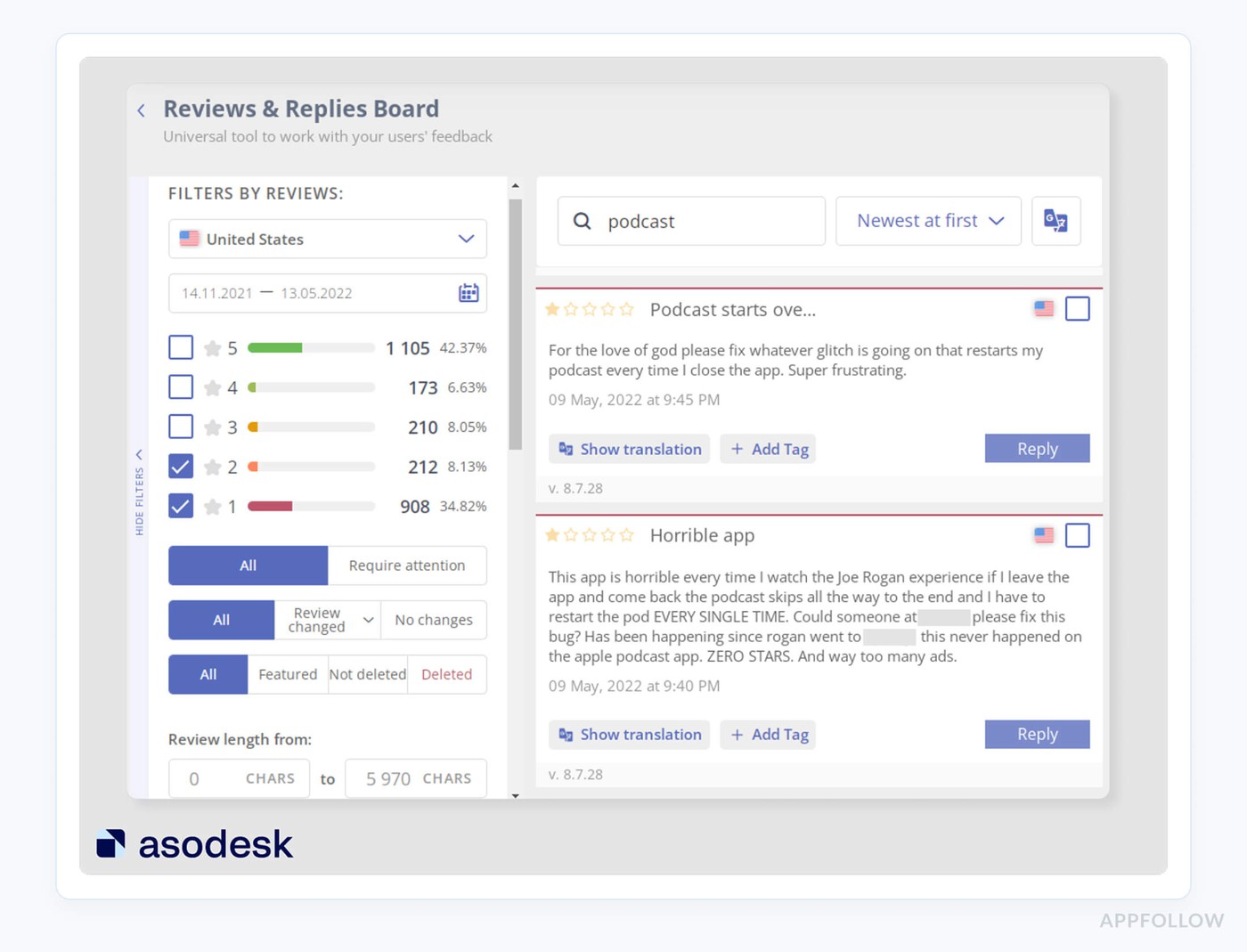
Asodesk is for when you’re done copy-pasting answers into consoles and want your reviews to move the needle. Teams at Tinkoff, Yandex, Kaspersky, and mobile publishers like DevGame use it to monitor App Store and Google Play reviews, auto-tag complaints, and reply at scale while keeping an eye on keyword rankings and conversion in the same workspace.
It works with Apple App Store, Google Play, and even RuStore as an official partner, so you’re covered across key markets.
The edge: a full-cycle ASO stack where review automation sits next to search analytics, plus G2 “High Performer” badges for mobile analytics and ASO to back it up.
For many teams, Asodesk becomes their go-to app review management software, not just “another ASO tool.”
Features
- Reply to reviews from one inbox (App Store, Google Play).
- Auto-replies, auto-tagging, and auto-translation for scale.
- Review analytics tied to ASO dashboards and versions.
- Bulk actions to handle spikes and report concerns instantly.
Pricing
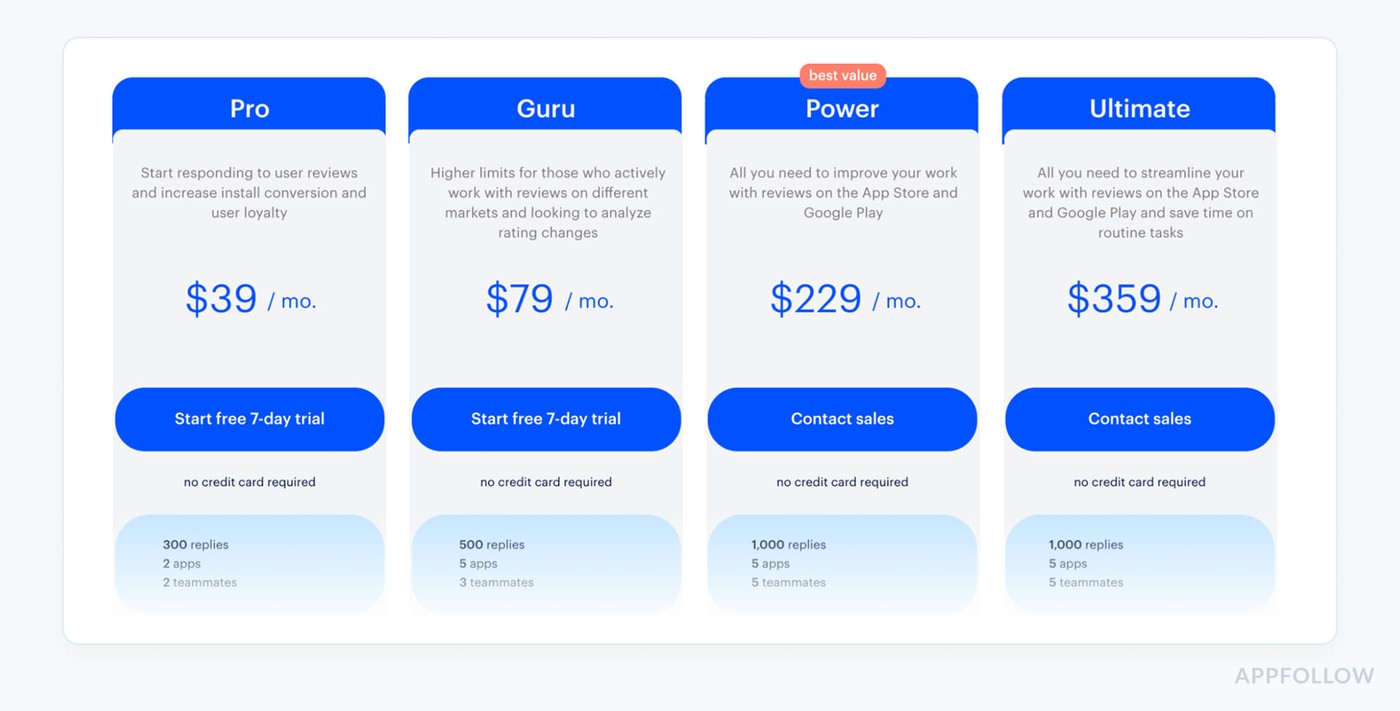
Asodesk keeps pricing pretty math-friendly: you pay for apps, teammates, keywords, replies, and API credits. The main ASO plans run from $47/month (up to 5 apps, 3 teammates) to about $439/month at the top end.
If you’re managing 3 apps across stores with 1 support user, you can live on the $47/month tier; with 5 support users, you’re realistically in $159/month territory.
Add reply-to-reviews from $24–$99/month and you get a 7-day free trial to test it.
Pros
- Direct in-app review replies: “The specialist can respond to reviews directly from the service.” g2.com.
- Time-saving review management: “Search and save time on app review management.” g2.com.
- Integrated ASO + reviews: “Asodesk provides all the necessary tools for ASO, including … review management, which has significantly reduced the time spent by our ASO specialist on these tasks…” g2.com.
Cons
- Occasional technical issues: “Some technical issues have cropped up occasionally, but managers at Asodesk have always been quick to respond and resolve the problem.” g2.com.
- Overpriced features: “Some services are overpriced in my opinion.” g2.com.
- UI/metrics issues: “UI can be improved further… Also, some keywords in the system have outdated ‘ASO popularity’ numbers, which can lead to wrong decisions.” g2.com.
Comparison table of the application review software
You’ve just read seven different pitches, all claiming to “simplify reviews” and “boost ratings.” Cute. This is where we strip the slogans away and look at what matters day to day: one inbox or ten tabs, who really has AI that helps, who plays nicely with Slack and Zendesk, and who leaves you copy-pasting.
Here’s how all seven tools stack up, feature by feature.

Prices move in this category, so we re-check quarterly.
| Tool | Entry price | Trial | Best for |
|---|---|---|---|
| AppFollow | $29 /mo | 10 days | Teams replying across more than two stores |
| Asodesk | $49/mo | 7 days | Cheapest credible paid entry, iOS-led teams |
| Appbot | $59/mo($49 annual) | 14 days | Sentiment analysis and reporting upward |
| App Radar | €69/mo(€58 annual) | 7 days | Reviews inside a metadata and ASO workflow |
| AppTweak | $79/mo($949/yr) | 7 days | Teams already running serious keyword work |
| Reviewflowz | $45 per location/mo | Yes, length not published | Teams tracking software review sites and the stores together |
| ReviewTrackers | Not published | Yes, via signup | Brands running an app alongside physical locations |
| App Store Connect | Free | Free | The baseline under ~50 reviews a month |
| Google Play Console | Free | Free | The baseline under ~50 reviews a month |
How to choose review management software for app stores, by job
Nine tools, grouped by the job they win rather than alphabetically. Two of them are free.
A note on iOS-only teams. Anyone searching specifically for apple app store review management software can skip the multi-source rows entirely. AppFollow, Asodesk, AppTweak and App Radar all cover the App Store properly, and Asodesk is the most iOS-weighted of the four. ReviewTrackers and Reviewflowz will work, though you are paying for sources you do not use.
And on what counts as an app review site. People searching app review sites usually mean one of two things: places that review apps editorially, or the stores where users leave ratings. This page covers the second. The App Store and Google Play are the only ones that matter for most teams, because they are the only ones that hand the reply mechanism directly to the developer.
Best all-in-one app store review tools
AppFollow
AppFollow is an app store review management and ASO platform used by mobile product, support and ASO teams to collect, tag, and reply to reviews across the App Store, Google Play, Amazon Appstore and Microsoft Store from one inbox. Coverage spans four stores rather than the usual two. Entry pricing sits above the app-only alert tools.
Best for: teams whose reply volume has outgrown a shared inbox and who ship to more than the two big stores.
cta_get_started_yellow
Asodesk
Asodesk is an ASO platform with built-in review management used by iOS-led app teams to automate replies, run semantic analysis on review text, and track keywords in the same workspace. Plans start at $24 a month with a 7-day trial and stretch to $439. Android coverage is thinner than iOS.
Best for: small to mid-sized teams that want reviews and keyword work in one tool and are primarily iOS.
Best app store review tools for sentiment and reporting
Appbot
Appbot is a review analytics platform used by product and support teams to break app store reviews down by sentiment, topic and tag, and turn them into reports a leadership team will actually read. From $49 a month, seat-based, 14-day trial. The reply workflow is lighter than the analysis.
Best for: teams whose main job is explaining what users are saying rather than answering them one by one.
Best app store review tools alongside ASO data
AppTweak
AppTweak is an ASO and app store intelligence platform whose App Reviews Manager handles replies at scale with AI-assisted sentiment analysis across the App Store and Google Play. Free trial runs 7 days. Pricing appears only as an image on their site, so budget a sales conversation before you budget the tool.
Best for: teams already running serious keyword work who want reviews in the same platform.
App Radar
App Radar is an ASO platform with a metadata workflow that puts ratings and review management on the same screen as store listing edits and keyword tracking. Trial runs 7 days. Pricing scales with portfolio size rather than a published flat rate.
Best for: teams editing listings often enough that they want reviews in that same window.
Best review tools when app stores are only part of the picture
ReviewTrackers
ReviewTrackers is a multi-location review management platform covering more than 100 review sources including the app stores, charged per location at roughly $49 to $199 a month with unlimited users and a 14-day trial. App store depth is shallower than the app-native tools because the stores are one source among many.
Best for: brands running an app alongside physical locations.
Reviewflowz
Reviewflowz is a B2B software review tracker built around G2, Capterra, Trustpilot and the app stores, with a Slack-first workflow. From $45 a month with a 14-day trial. Source list is the narrowest here, which is deliberate.
Best for: SaaS customer marketing teams watching software review sites and their app together.
The free baseline
App Store Connect and Google Play Console
App Store Connect and Google Play Console are the stores' own free tools for reading and replying to reviews. Both are included here because under roughly 50 reviews a month they are genuinely enough. Neither offers tagging, automation, competitor data, or a single inbox across both stores.
Best for: anyone with one app, one or two markets, and a review volume a person can still read.
Do you actually need app store review management software?
Honest answer from a company that sells one.
Under roughly 50 reviews a month across both stores, App Store Connect and Play Console will do. Two browser tabs, twenty minutes a day, no budget. Anyone telling you otherwise is selling.
Between 50 and 300 a month, tab-switching starts costing more than the software. Bulk actions, templates and tagging are what you are buying, and break-even usually lands around three saved hours a week.
Above 300 a month, or across more than two stores, manual stops working. Routing, SLA tracking and automation become the actual product, and the reply itself is the smallest part of it.
Baseline first, whatever you decide. Track average rating, reply rate and median time to reply for thirty days before you buy anything, or no change you see afterwards can be attributed to the tool.
FAQs
What is app store review management software?
Software that collects App Store and Google Play reviews into one inbox and supports tagging, replying, automation and reporting. It differs from general review software because the app stores hand the reply mechanism to the developer through their own consoles and APIs, which Trustpilot and Google Business Profile do not.
How do you manage App Store reviews?
Centralize both stores in one inbox, tag each review by rating and topic, reply within a set time, and route bugs and billing issues to the teams that own them. Apple allows a reply to every review. Google Play allows one public reply per review.
Can I reply to Google Play reviews more than once?
No. Google Play permits one public reply per user review, editable afterwards. Since the user gets both a push notification and an email, hold that single reply until you have something specific to say rather than spending it on an automated thank-you.
How much does app store review management software cost?
Entry tools start near $24 a month. Mid-market platforms run $45 to $180. Multi-location platforms charge per location, roughly $49 to $199, which climbs quickly. The store consoles are free and adequate under about 50 reviews a month.
What is the best free app store review tool?
App Store Connect and Google Play Console, without much competition. Both are free, both handle replies, and neither offers tagging, automation or a combined inbox. Paid tools earn their price on volume and cross-store workflow rather than on the reply itself.
What is the best way to monitor app reviews on the App Store and Play Store?
Alert on one and two-star reviews rather than reading everything, and push those alerts into Slack or a support queue where your team already works. A review dashboard in a separate tab gets checked for a fortnight and then forgotten.
How do you handle negative app reviews?
Reply with specifics rather than apologies. Name the version a fix shipped in, or say plainly what you know and move the conversation to support. Report abusive reviews through Apple's Report a Concern flow instead of replying, and note the reviewer is not told you reported it.
Is AppFollow worth it?
It depends on your bottleneck. AppFollow earns its price when reply volume has outgrown a shared inbox, when you ship to Amazon or Microsoft Store as well as the big two, or when someone needs rating changes tied to installs. For a single iOS app under 50 reviews a month, App Store Connect is the honest answer.
How does AppFollow compare to Appbot and Asodesk?
Appbot is stronger on sentiment analysis and stakeholder reporting, and starts cheaper at $49. Asodesk starts cheapest at $24 and suits iOS-led teams pairing reviews with keyword work. AppFollow covers four stores rather than two and leads on reply automation and routing. Volume and store count decide it.
Read also
- Your Guide to App Marketing Intelligence: Spy. Learn. Win
- 21 Mobile App Performance Metrics Behind App Store Success
- Android App Analytics Explained by Pros: 5 Lifehacks & Tools
- How to Read App Ranking Analytics and Find Growth Gaps
- Top 9 Mobile App Analytics Best Practices from Real Pros