10 Best Customer Sentiment Analysis Tools in 2026

Table of Content:
- What makes a great customer sentiment dashboard?
- Comparison table of the customer sentiment analysis tools
- Methodology: How we tested customer sentiment analysis tools
- AppFollow
- Sensor Tower
- AppTweak
- Qualtrics
- Medallia
- Appbot
- Sprinklr
- Sprout Social
- SentiSum
- App Radar
- How to choose the best sentiment analysis tool for customer reviews
- FAQs
Updated April 2026 · Tested across 35 platforms · Expert reviewed by
Yaroslav Rudnitskiy, ASO guru
Choosing the right customer sentiment analysis tools is like wandering through a maze with too many signs and no clear exit. You land on one tool's site, and suddenly you're 14 tabs deep, going through feature lists, AI buzzwords, and pricing that sounds more like a puzzle than a plan.
Been there.
To build this guide, we spent five full days testing 35 different platforms. App store tools, social listening suites, contact center analytics, support ticket classifiers — everything teams actually use to make sense of what customers say. Because whether your feedback lives in Google Play reviews, Zendesk tickets, or Twitter threads, the pain is the same: signal vs noise.
I talked to clients, team leads, and support managers. Dug through fresh reviews, Reddit threads, and buried Quora comments. From 35 platforms, I shortlisted 10 customer sentiment analysis tools that actually deliver — the ones that move from 'here's what customers said' to 'here's what to fix, and by when.'
Most of this list is built around teams where app store reviews drive the highest volume of feedback. But we've noted which tools stretch naturally into social, chat, and ticket sentiment — because the best customer sentiment software doesn't care where the feedback came from.
Here's what this guide will help you solve:
- Which customer sentiment analytics platform handles high-volume app reviews without breaking?
- Who's genuinely built for startups vs enterprise?
- Which tools do smart auto-tagging (and which just pretend to)?
- What does 'custom quote' pricing actually mean in real dollars?
- Which AI response features feel human — and which feel like a chatbot threw up on your review?
- What integrations save your CX team's sanity?
Start with the feedback you own. If most of it arrives as App Store and Google Play reviews, shortlist AppFollow and Appbot for review analysis and response work. Choose Sensor Tower, AppTweak, or App Radar when competitive store intelligence or ASO sits beside that job. Qualtrics, Medallia, and SentiSum make more sense when the same team must read tickets, surveys, and conversations as well as reviews. Sprout Social and Sprinklr enter the picture when social listening is central to the brief.
Those are different buying decisions, although they are often grouped under the same sentiment-analysis label.
Use the comparison below to narrow the field, then check one recent release and one priority market in a trial. You want to see a specific complaint travel from review to theme to the person who can investigate it. A colorful positive/negative dial will not tell you whether the payment error is confined to Android version 7.4.
What makes a great customer sentiment dashboard?
Most customer sentiment analysis tools will hand you a dashboard. Very few hand you a useful one.
There's a difference. A reporting dashboard shows you numbers. A useful customer sentiment dashboard shows you what changed, why it changed, and which team needs to know about it before 9am Monday.
Here's what to look for when evaluating the dashboard layer of any customer sentiment analytics platform:
- Time to signal. Measure how long a new review takes to appear and whether a rules-based alert reaches the owning team. “Real time” means little without a timed test. During a trial, publish or identify an eligible review, record the store timestamp, then compare it with the feed and alert timestamps. Store moderation and connector permissions can affect this result.
A complaint you can isolate. Look for theme, rating, market, language, app version, and date filters. An aggregate sentiment dip hides the release you need to debug. Illustrative example: 34 of 100 negative iOS reviews after version 7.4 mention login, versus 12 of 100 in the preceding comparable period. That is a 22 percentage-point rise in the share of negative reviews mentioning login. It is not a 22% change in the app’s overall rating, and the sample does not prove the release caused it.
An owner and a trail. Support needs the individual review and response status; product needs the recurring issue and affected cohort. Ask the vendor to show the handoff into the system your team already uses, with the review URL and relevant fields intact. A screenshot of a Slack integration does not establish what gets routed or whether replies return to the store.
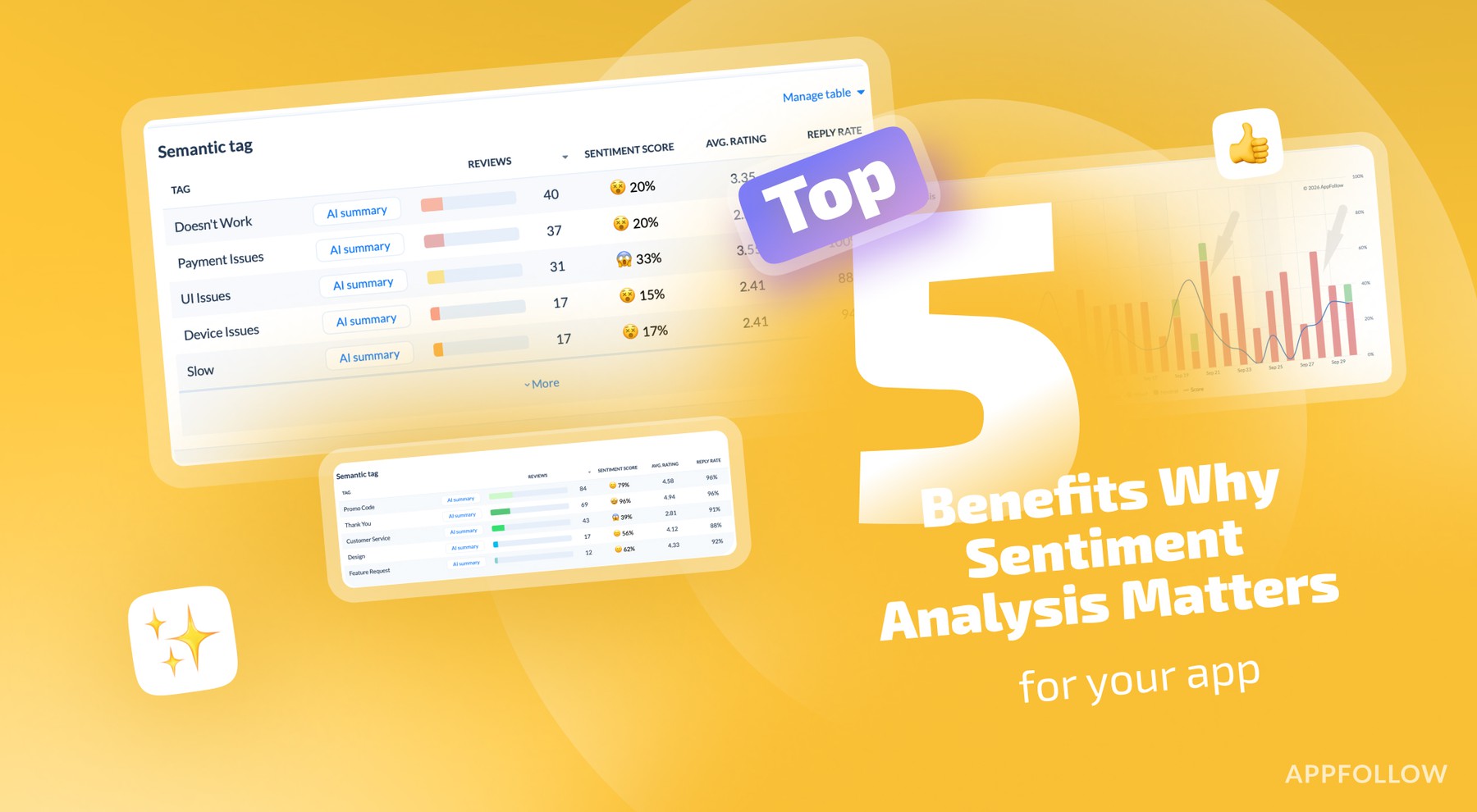
An exportable denominator. A tag count can exceed the number of reviews if one review carries several themes. Check whether a chart reports unique reviews, tag assignments, or share of all feedback. In AppFollow’s Semantic Analysis documentation, the tag table includes review count, sentiment score, average rating, reply rate, tag share and average reply time. The documentation also warns that a review can have more than one tag. That small detail changes how you report a post-release spike to engineering.
Of the tools we tested, all of their sentiment dashboards hit all four. Real-time alerts, version-level clustering, role-based views, and clean API exports. It's built specifically for app teams — which means the defaults actually make sense instead of needing 3 weeks of configuration before you see your first useful chart.
If you manage multiple apps across stores, it's probably the most opinionated (in a good way) customer sentiment dashboard on the market.
Comparison table of the customer sentiment analysis tools
Choosing between the top platforms for customer sentiment analytics can feel like comparing apples to futuristic AI-enhanced oranges. To make things easier, I broke down 10 major tools based on the must-have features that matter most for real-world review analysis, whether you're managing app feedback, product reviews, or support sentiment.
Below is a head-to-head table showing which platforms check the boxes, where they fall short, and which ones might need a little help catching up.
Here's how it works:
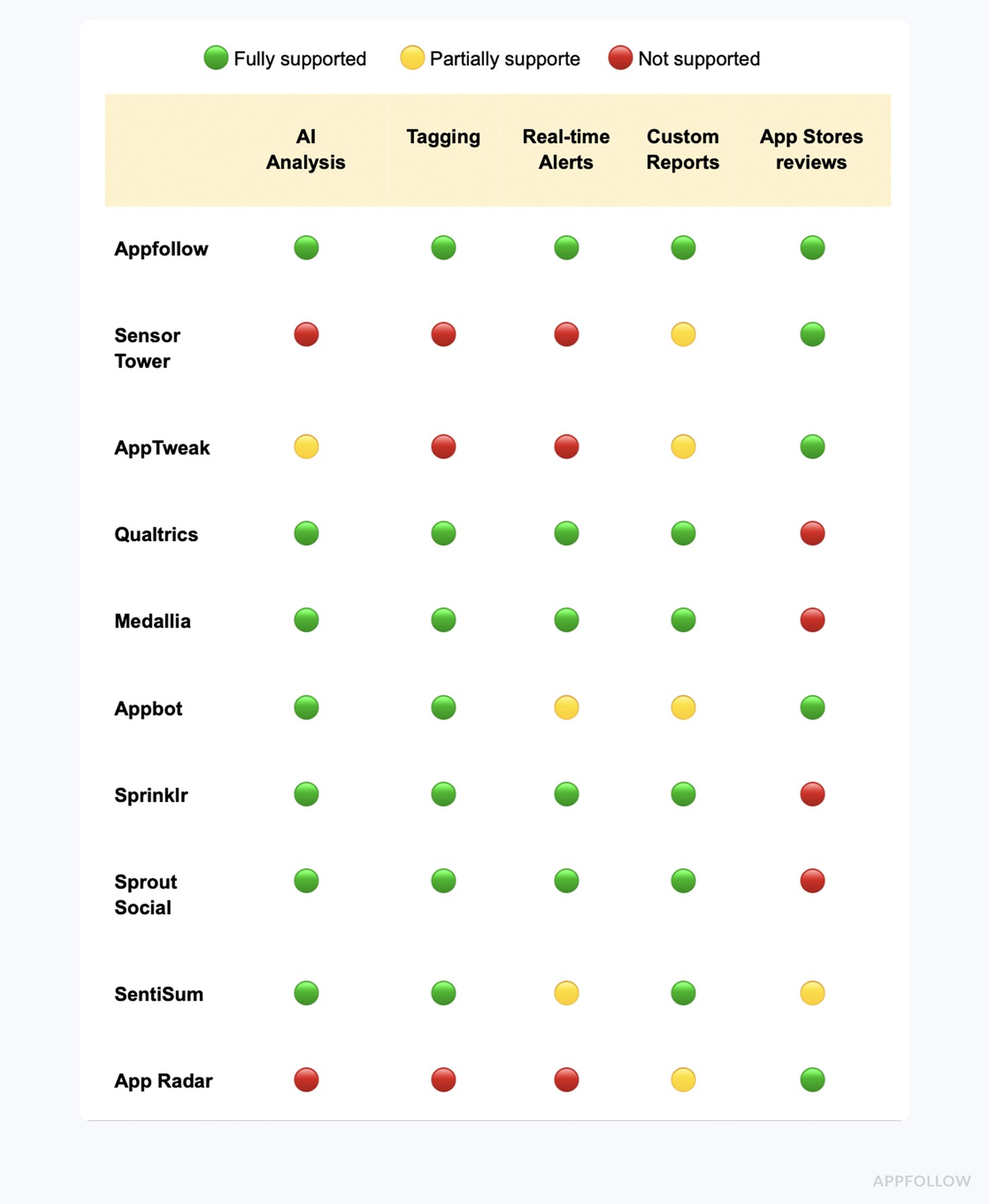
The graphic gives you the landscape. This text table adds the procurement decision it cannot show clearly: the feedback source each tool is built around, the job it is best placed to do, and the first point to test. Tool-name links lead to the vendor’s product or pricing page; plan access can change.
Tool | Best-fit decision | Trial or buying check |
App store reviews → themes, replies and ASO-adjacent monitoring. | Filter one release by country/version; verify semantic-tag access and export. | |
Competitor and market context around app ratings/reviews. | Show ratings-over-time and review detail for the exact peer set; request module quote. | |
ASO and app-review topic/keyword analysis together. | Check which review manager tier covers tags, replies and your store count. | |
Cross-channel CX feedback, including survey and service text. | Confirm licensed connectors and whether your app reviews enter the same taxonomy. | |
Enterprise text analytics in a wider experience program. | Ask for a named review ingestion route and an example theme-to-owner report. | |
Focused app-review sentiment and topic analysis. | Test source/seat limits and whether reply/export features require Large. | |
Social and consumer intelligence at enterprise scale. | Demo the specific review source, taxonomy and routing inside your purchased modules. | |
Social inbox and listening with sentiment on the appropriate plan. | Budget Advanced for sentiment in Smart Inbox/Reviews; quote Listening separately. | |
Unified conversations and CX root-cause analysis. | Use its scoped data audit to test a review-to-ticket theme; current enterprise entry is from $100k/year. | |
Store visibility and review operations in one ASO workflow. | Confirm connected app/store units, review reply allowance and the current euro tier. |
A source can be a better fit than a higher-ranked tool if it preserves the fields needed for your decision. For an app release, ask for the review text, store, market, version, theme and response state. For a CX program, add the ticket or survey context and the team that owns the issue.
Methodology: How we tested customer sentiment analysis tools
Here’s how we built the list, because let’s be real, slapping together “top 10” posts from affiliate blogs isn’t how serious teams choose customer sentiment analysis tools.
First, we shortlisted 35 tools that claimed to do sentiment analysis for either app reviews (like in the App Store and Google Play) or web feedback (think support chats, surveys, social). We signed up for every free trial we could get our hands on. For the ones that gatekept behind sales teams, yes, we sat through the demo calls. All of them.
We dissected their websites. Then we cross-checked what they said with what users said, on G2, Capterra, TrustRadius, Reddit, and Quora. One guy’s Quora comment on SentiSum’s tagging changed how we scored it.
That’s how deep we went. We even pulled up Gartner and niche market listings to catch overlooked gems.
The final list is built on usage, pain points, and signals from both web and app-focused customer sentiment analytics software.
The original shortlist records five days spent assessing 35 platforms, including trials, demonstrations, user-review sources and conversations with practitioners. This refresh checks the published claims against current product and pricing documentation. A documentation check does not turn the original trials into fresh hands-on tests, and vendor feature pages are evidence of advertised capability rather than measured performance.
To compare products on the same terms, use five fields: source coverage, theme detail, filters that isolate a release or cohort, route from insight to an owner, and the plan that actually includes those functions. We keep app-first products on the list alongside cross-channel suites because a mobile support lead and an enterprise CX analyst can both search for “sentiment analysis,” then need very different workflows. Ratings from G2 or Capterra describe reviewer experience at the time of the linked review; they are not a controlled accuracy test.
Where a price is public, we state the billing unit and the feature-bearing tier. For custom contracts, the useful comparison is a quote for the same workload: two store listings, five analysts or support users, a defined monthly review volume, the required integrations, and access to historical reviews. Get the actual quote before treating an estimate or an older screenshot as today’s offer.
AppFollow
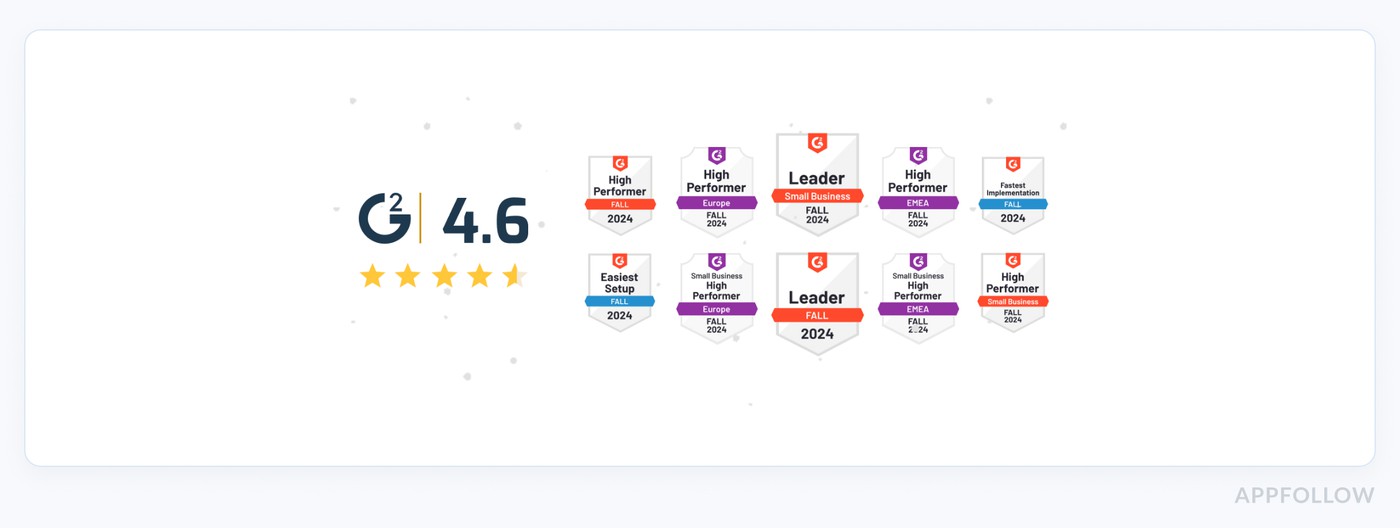
G2: 4.6/5
Trial days: 10
Best for: Mobile app teams (startups through enterprise) managing app store presence and user feedback on Google Play, Apple App Store (and other stores like Mac App Store/Trustpilot).
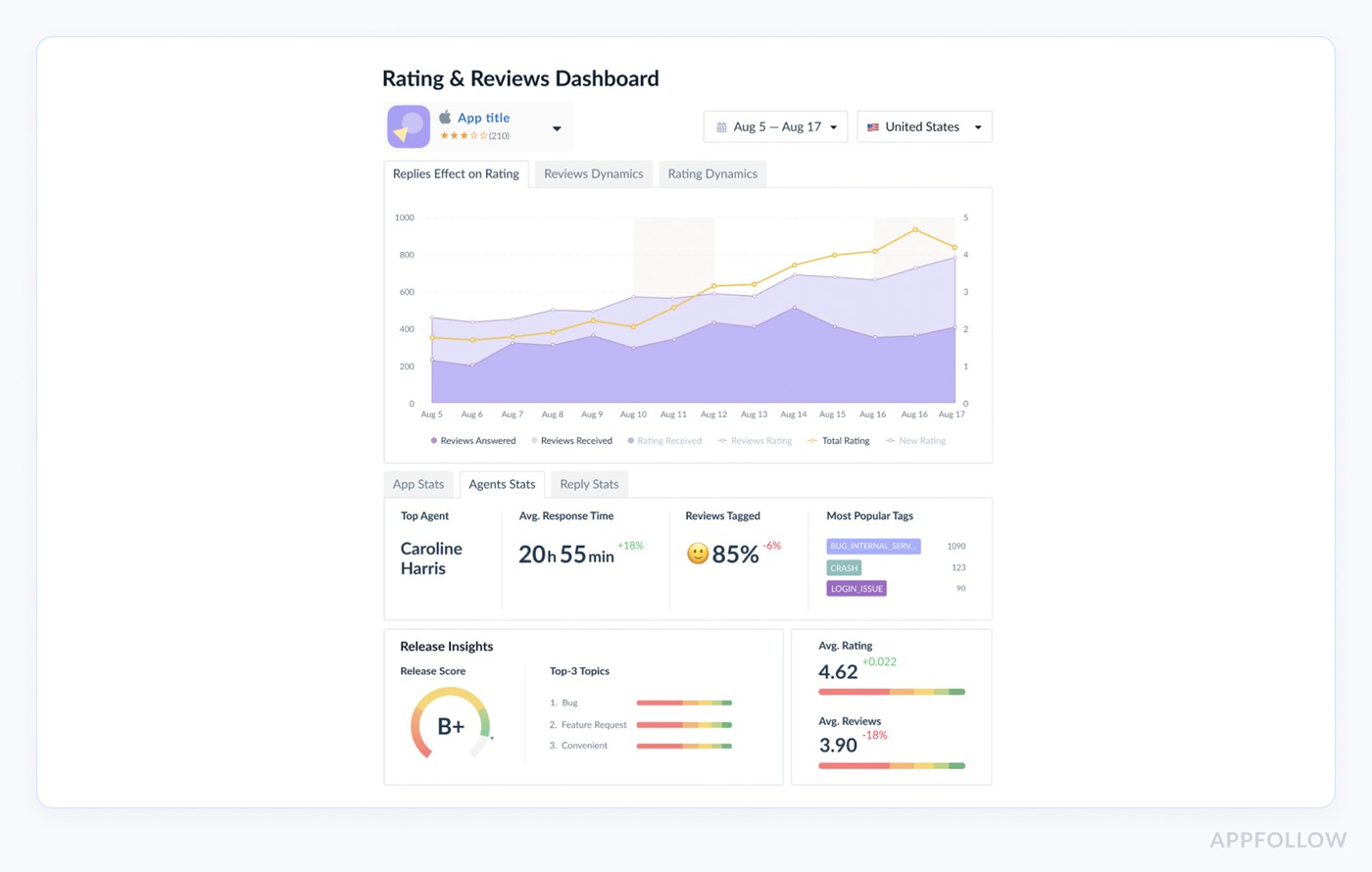
If you manage app reviews at scale, AppFollow is one of those tools that makes you wonder how you ever lived without it. Brands like Discord, Flo, and Opera lean on it to auto-tag reviews, surface sentiment trends, and respond faster, like, hours faster. It covers Apple App Store, Google Play, Amazon, and even the Mac App Store.
What makes it stand out? Speed, clarity, and AI that understands context, not just keywords.
Unlike generic customer sentiment analysis tools, AppFollow is built for app store chaos: multi-language reviews, spam filtering, even “report a concern” automations. It won G2’s Momentum Leader badge and made Capterra’s shortlist for 2024.
Features
- AI-powered auto-replies tailored by sentiment
- Review tagging with custom themes
- App performance monitoring on app stores
- Zendesk, Slack, Salesforce integrations
- Real-time alerts on negative spikes
- Multi-store inbox with smart filters
- Competitor review comparison
- ASO tools
- Sentiment dashboards built for product and support teams, easily one of the best AI tools for customer sentiment analysis in app stores.
Trace one release from reviews to a product decision
Suppose support reports a rash of “can’t log in” reviews after an iOS release. First, select the app and post-release window in AppFollow’s Semantic Analysis view. Narrow the language, country or app version if those fields are available for the connected store. Open the bug category and compare the relevant tag’s review count, sentiment score, average rating and reply rate with the preceding period. Read the underlying reviews before calling it a regression: one angry customer may mention both login and payments, so two tag assignments are still one review.
Give engineering the exact review examples, affected version and share of unique negative reviews; give support the unanswered cases. After a fix, repeat the same filters for an equal-length window and inspect both volume and sentiment. A falling tag count can reflect fewer reviews, so check the denominator before claiming the release solved it. AppFollow documents a CSV export for Sentiment Analysis and an API route for semantic tags; access to the API requires confirmation with AppFollow. Semantic Tags are a paid add-on, so verify entitlement before putting this workflow into a trial scorecard.
Pricing
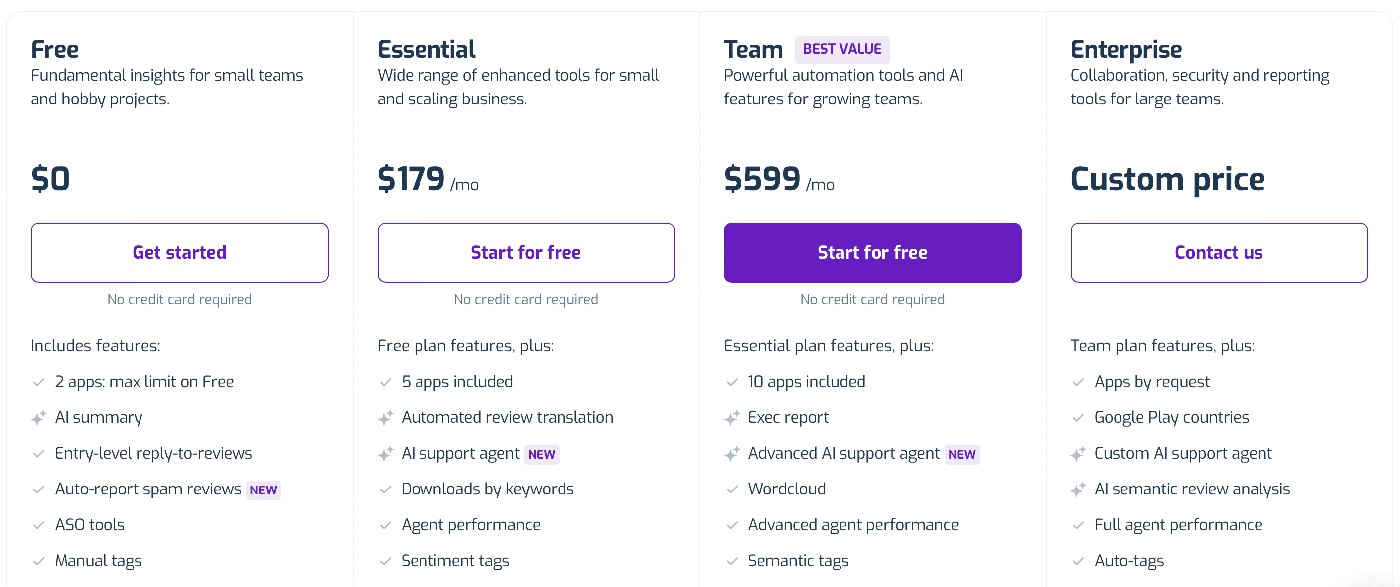
AppFollow’s current pricing route offers a free start and a sales conversation, but its public text does not expose a fixed rate for the exact mix in this comparison. The older $159, $379 and $499 figures in our previous snapshot may describe a former plan, a particular billing term or a negotiated configuration. Treat the screenshot as a dated price record until the current quote is matched to it.
For an apples-to-apples quote, specify the number of app-and-store connections, monthly review volume, support seats, Semantic Tags entitlement, automation rules and integrations. Ask separately about historical data and the API. A time-limited trial can show whether your team finds and routes a post-release issue; it cannot by itself establish the eventual invoice. The published plan and trial terms at signup should govern the buying decision.
Pros & Cons
➕ AI-Driven Responses: "The AI generated reply feature is the best and saves me a lot of time to reply to each and every review." g2.com
➕ Review Prioritization: "It shows me the featured reviews, the ones that needs attention… which makes my job easier." g2.com
➕ Review & ASO Tracking: "Really great way to track our App Store listing progress, reply to user reviews, and track the performance of keywords and user searches." capterra.com
➖ Plan Limits & Notifications: "Limited number of reviews you can see on the Essential plan… Also, it should send a notification if a reviewer decides to update a review..." g2.com
➖ Android Integration Issues: "It was difficult to connect our Android app, and some of the filtering mechanisms aren’t obvious how to use." capterra.com
➖ Support Responses: "Sometimes it shows Error While Publishing for no reason… no notification if a reviewer updates a review." g2.com
cta_free_trial_purple
Sensor Tower
G2: 4.3/5
Trial days: 14
Best for: Enterprise-level app marketers needing competitive insights and growth analytics in mobile app stores (Apple App Store and Google Play).
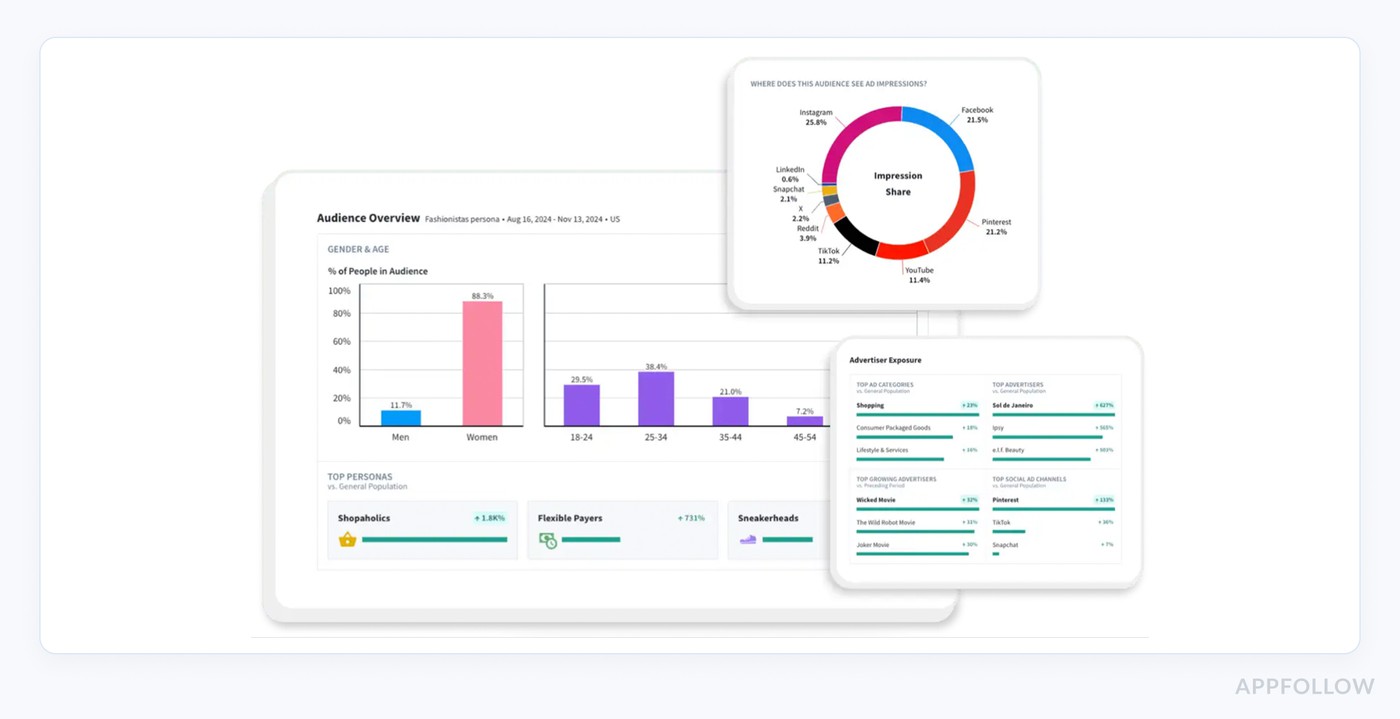
Sensor Tower is built to help you win the review game. The go-to for spying (ethically!) on how competitors are performing across Google Play and the App Store. Big players like Zynga and SEGA use it to monitor category sentiment shifts, benchmark response strategies, and track review volume trends over time.
You get historical context, not just surface numbers.
Awards? A regular on top mobile analytics lists.
Features
- Review trends across countries and categories.
- Keyword sentiment tracking tied to reviews.
- Store intelligence for review volume + ratings.
- Exportable review data to plug into internal tools.
- A useful layer of sentiment analysis for customer service strategists who want to prioritize smarter, not just faster.
Pricing
Sensor Tower doesn’t play cheap. You’re starting at around $3,000/year for basic access, yep, annual only. Need 3 app stores and just 1 user? Think closer to $10K.
Want 5 users with full review intel and exports? You’re easily sliding past $20K. No public trial, but custom demos are the norm.
Pricing scales with store count, seats, and access to modules like usage intelligence. It’s one of the best tools for customer sentiment analysis 2025, but budget for the enterprise lane.
Pros & Cons
➕ Comprehensive analytics: "It provides data and insight for analyzing the app performance, and also you can track the other competitive apps, you can check the search performance insights keyword tracking that all are best." g2.com
➕ Accurate data updates: "Data is very accurate and the team updates the tool frequently. Also it has a great support." g2.com
➕ Competitive market insights: "Play store and app store insights on competitors app and genre are simply outstanding." g2.com
➖ High cost: "Sensor Tower is a really expensive mobile growth tool… Individual and small app developers can’t afford that price after a point." capterra.com
➖ Limited for small teams: "this tool is not for small teams… Only big enterprises can afford it." capterra.com
➖ UI and data accuracy issues: "The user interface isn't that great, ... the data ... isn't that accurate." g2.com
Read also: 12 Best Customer Review Management Software We Love [Pros & Cons]
AppTweak
G2: 4.6/5
Trial days: 7
Best for: App marketing teams (SMB to enterprise) focusing on App Store Optimization (ASO) and Apple Search Ads for iOS and Google Play apps.
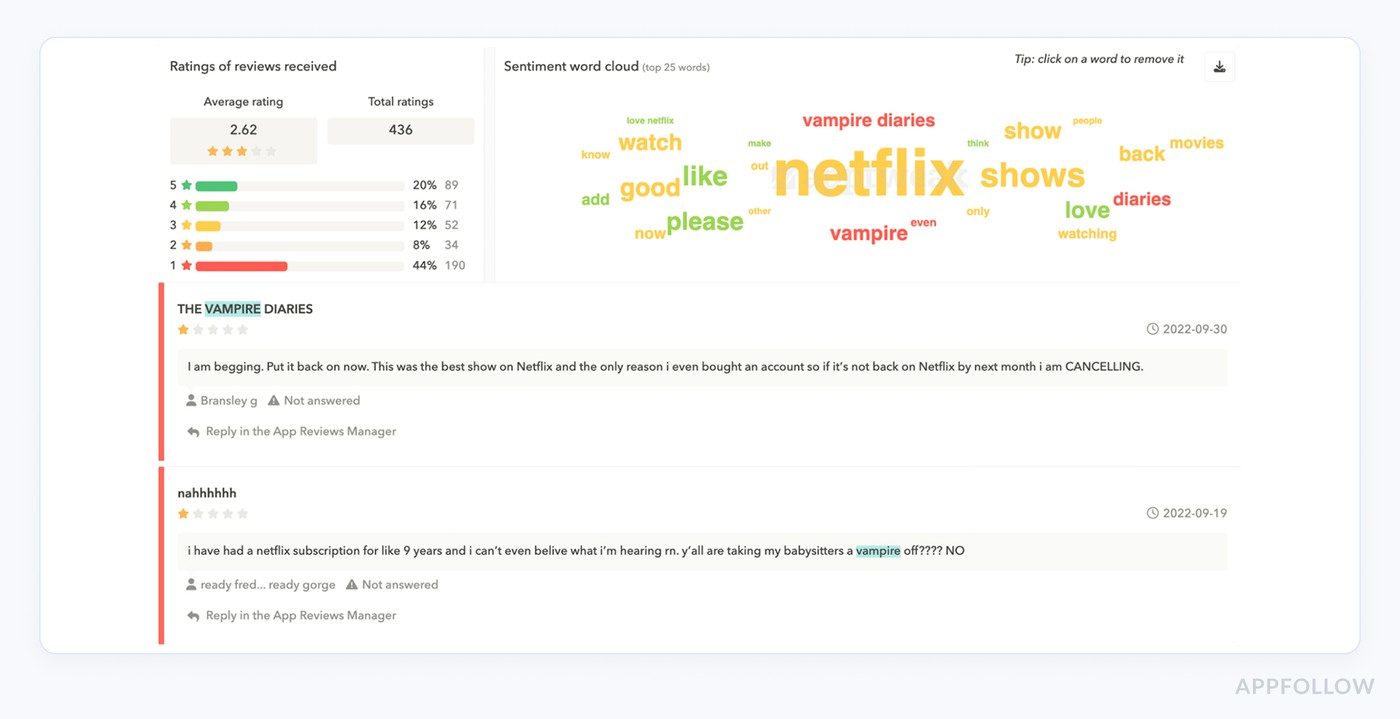
AppTweak is like the data-obsessed friend who notices patterns before anyone else does. Big names like Yelp and Gameloft use it to monitor review trends, benchmark against competitors, and extract insights from user feedback that impact keyword strategy.
It’s built for the App Store and Google Play, with a heavy lean toward ASO, but the review analysis part? Surprisingly sharp. You’ll spot rating spikes, track sentiment over time, and connect what users say with what ranks.
Its strength is marrying performance metrics with raw review data. Bonus: it was named G2’s Leader in ASO software three years running.
Features
- Review timeline overlays to spot UX-impacting bugs.
- Review volume tracking by keyword or update.
- Customizable alerts for new or spiking reviews.
- Competitive review comparison.
- A clean, visual layer of customer sentiment software baked right into your ASO workflow.
Pricing
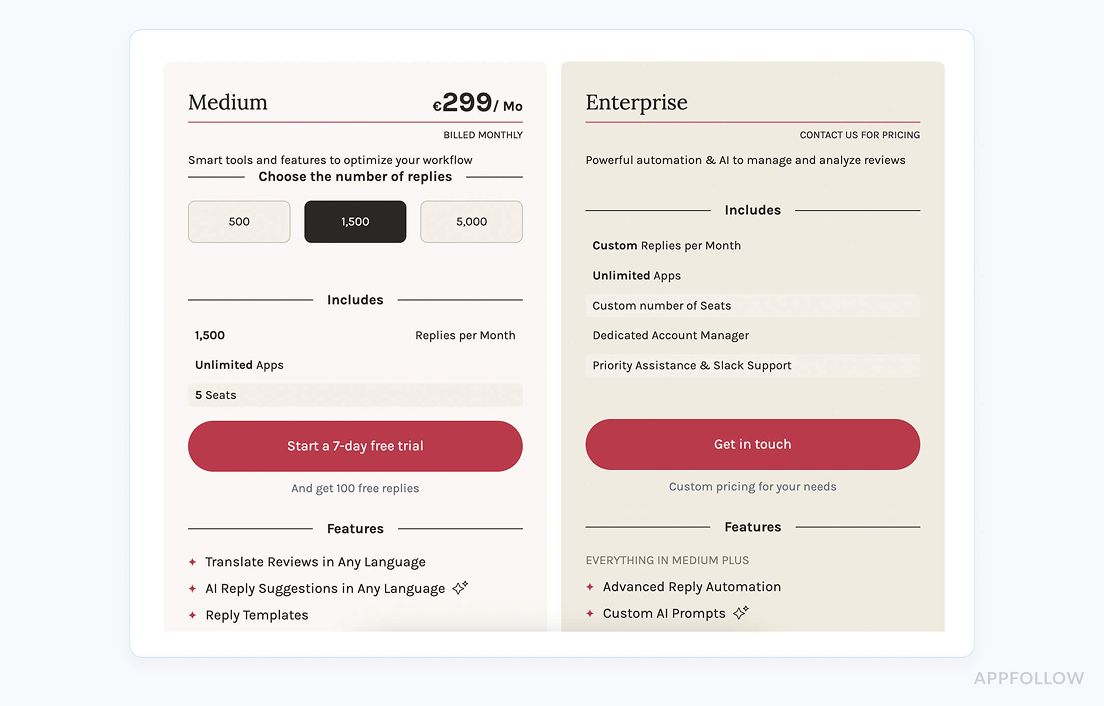
AppTweak kicks off at $79/month for one app store and one user, bare bones, clean start. Add 3 stores, and you’re nudging into the $249, $599/month tier depending on whether you want keyword-level intel or just surface metrics.
Support users aren’t charged per seat, but access to advanced features (like sentiment analysis for customer service) lives in the higher plans.
You get 7 days to poke around, no card required. It’s tidy, scalable, and refreshingly transparent for a data-first platform.
Pros & Cons
➕ Intuitive Interface: "AppTweak has an easy to understand and navigate interface. Everything is quite straightforward and easy to find. Integrating additional data sources... is easy to manage."
➕ Granular Insights: "AppTweak stands out for its robust ASO-specific features… one of the best parts is how granular the insights are... The tool’s intuitive, user-friendly interface… are always adding new features." g2.com
➕ Responsive Support: "A special mention goes to the support team, who are always very responsive and competent!" g2.com
➖ Steep Learning Curve: "It can be a little difficult at first to get used to all the different features the tool has to offer... But once you get used to it, this is no longer a problem." g2.com
➖ Occasional Bugs: "AppTweak is an incredibly valuable tool with tons of useful features, but like any complex software, it can occasionally have some bugs. The good thing is that the team behind it is super responsive..." g2.com
➖ Evolving Features: "While the core product is very strong, additional features are still in a development phase and might be slightly behind in capabilities, compared to competitors." g2.com
Read also: The top 10 app store optimization tools in 2025 (and when to use each)
Qualtrics
G2: 4.3/5
Trial days: 30
Best for: Large enterprises (including 85% of Fortune 500) managing customer and employee experience across digital channels (surveys, web, in-app, social, etc.)
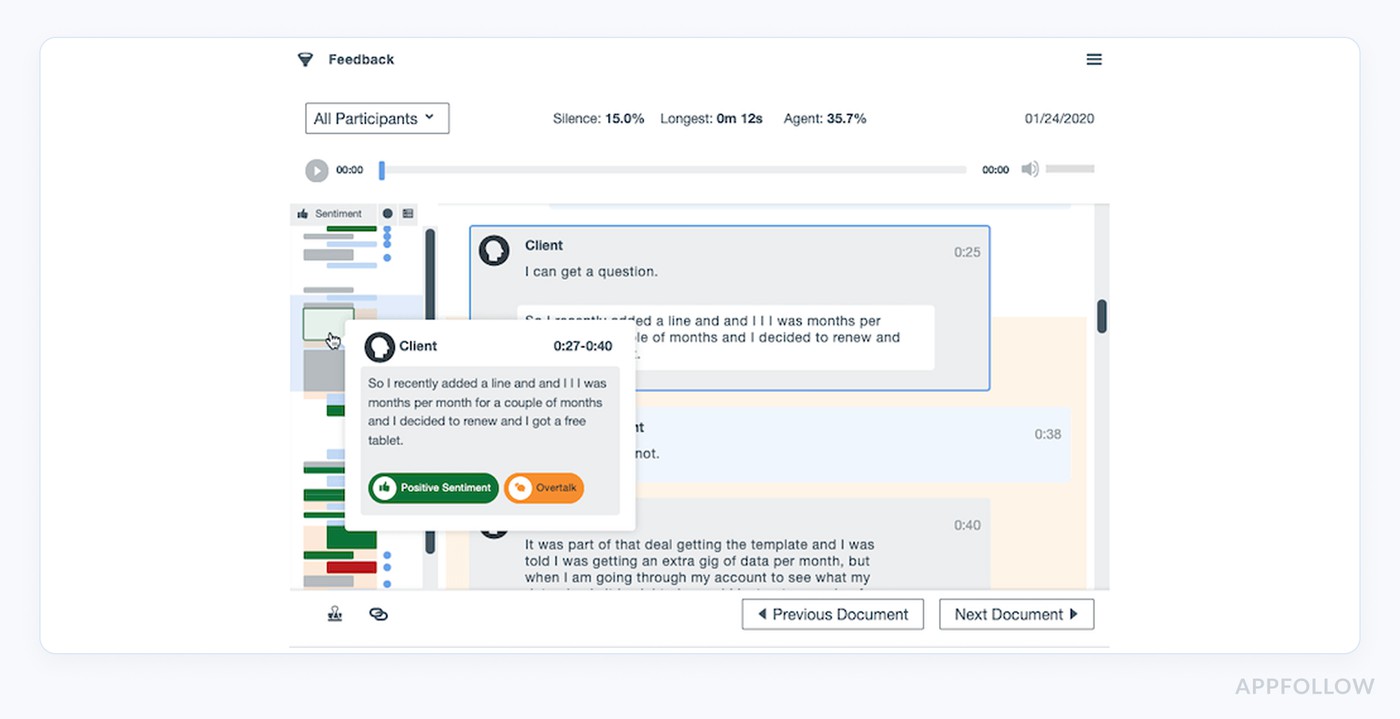
Qualtrics is the heavyweight when you need insights that move exec dashboards, not just tickets. Uber, Samsung, and GE tap it for structured feedback across touchpoints, yes, including app store reviews.
It pulls in App Store and Google Play data, pairs it with survey inputs, then surfaces themes, trends, and moments that drive churn or loyalty. What makes it click is that the machine learning engine, Text iQ, connects reviews to outcomes.
Features
- AI-powered theme extraction.
- App review management software connected with survey data.
- Real-time alerts for volatile feedback.
- Multi-language sentiment scoring.
- API access for syncing into product and support workflows.
Pricing
Okay, buckle up, Qualtrics pricing is... enter-the-chat-level enterprise. Expect to start around $1,500/year for the CoreXM base, but if you're layering in customer sentiment software features, Text iQ, and app review integrations across 3 stores? You're flirting with $12K, $25K annually.
Add 5 support users, and it climbs, since seat count + data volume shape the quote. No public price sheet, no instant calculator. You can grab a 30-day trial, but only after a demo call. Classic Fortune 500 setup, high power, high budget.
Pros & Cons
➕ Multichannel NLP & integration: "It can collect data from raw data received via Emails, surveys, SMS, websites… using NLP in real time. It can easily be integrated with tools like support tools, CRMs. Implementation is easy." g2.com
➕ Actionable analytics: "The platform makes it easy to capture feedback from multiple channels... the dashboards and reporting provide clear, actionable insights." g2.com
➕ Advanced sentiment scoring: "Features such as TextIQ for measuring the sentimental analysis score on customer reviews... statsiQ for descriptive statistics." g2.com
➖ High cost & complexity: "I dislike the cost, which can be very costly for some people. Due to its complexity it requires a deep learning curve from team members." g2.com
➖ Steep learning curve: "The platform can feel overwhelming at first... The learning curve is steep, new users often need training to get the most out of it." g2.com
➖ Rigid pricing model: "Price is not competitive unless you really use all the features in the right way… it’s not that flexible if you want to use it as a ‘proxy’ (workflows, API limitations...)." g2.com
Read also: Top 7 Best Appstore Review Management Software: Features & Price
Medallia
G2: 4.5/5
Trial days: 14 days
Best for: Large enterprises requiring a comprehensive customer experience management platform to collect and act on feedback across multiple channels (web, mobile, contact center, etc.)
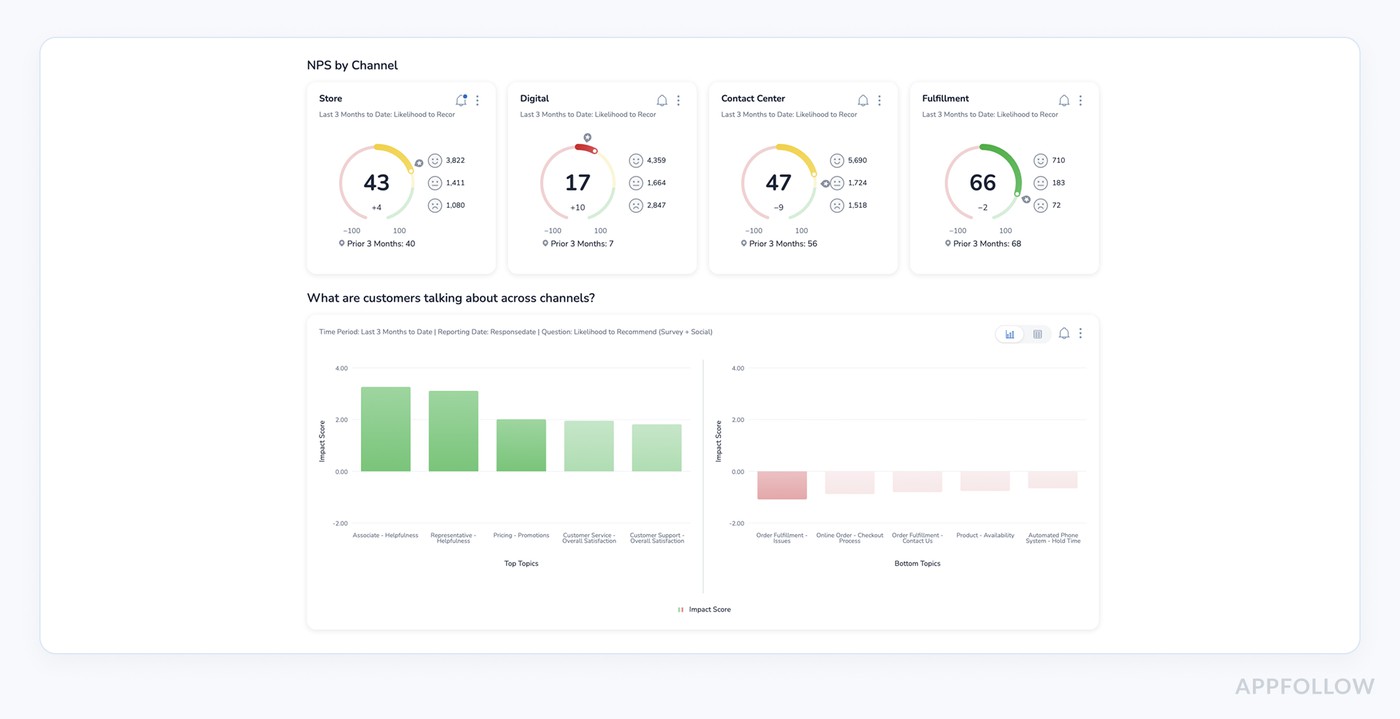
Medallia is the enterprise-grade beast brands like PayPal, Hilton, and Samsung count on to capture, decode, and act on every sliver of customer feedback, including app store reviews. It ingests reviews from Google Play and Apple’s App Store, blends them with survey and chat data, and uncovers what’s driving ratings or churn.
What makes it powerful is speed. You get alerts within minutes of a review trend shifting. And the real kicker: it links emotion to action. On top of that, the platform has been named a Forrester Wave leader in CXM for a reason.
Features
- AI-driven sentiment analysis for customer service triggers.
- Multi-source review ingestion (app stores, web, support channels).
- Experience signals linked to business KPIs.
- Alerting and workflow routing.
- NLP-trained tags that evolve with feedback themes.
Pricing
Medallia gives you zero real numbers on its site. Their pricing page says everything is built around “Experience Data Records” plus which products you turn on and how many teams need access, not per-user or per-survey pricing.
So, for 3 app stores and 1 vs 5 support users, you’re forced into a custom quote; there’s no way to calculate a concrete amount from public data. Some listings say “has free trial” but Medallia doesn’t disclose trial length anywhere; you have to request it.
Think of it as a customer sentiment analytics platform that’s fully enterprise and fully quote-based.
Pros & Cons
➕ Real-time multichannel feedback: "Medallia Customer Experience enables real time customer feedback from any channel. This allows us to capture customer sentiment immediately so we can make quick, data-backed decisions." g2.com
➕ Proactive alerts: "We can address what’s bothering the customer in real time and instantly do something about it... improve customer satisfaction with the use of real time alerts." g2.com
➕ In-depth text analytics: "We are also able to draw out more insights and drill down into areas, such as verbatim using the text analytics." g2.com
➖ Overwhelming Interface: "New users may find it overwhelming. There are many features on the platform and time is needed to become accustomed to all of them... sometimes there’s too much to sort through, which can give me information overload." g2.com
➖ Manual workflow heavy: "Feedback flows are managed manually… very heavy on manual effort to organize insights and carry them across teams. Valuable feedback can be delayed in actioning when many departments are involved." g2.com
➖ Complex backend: "The back-end is too complex, self-servicing options are very limited and every request seems to take more time compared to Medallia’s best competitors." g2.com
Read also: Top 5 Review Management Software for Apple App Store
Appbot
G2: 4.6/5
Trial days: 14
Best for: Mobile app developers of all sizes tracking and analyzing user reviews and ratings across app stores (App Store, Google Play, Amazon, etc.)
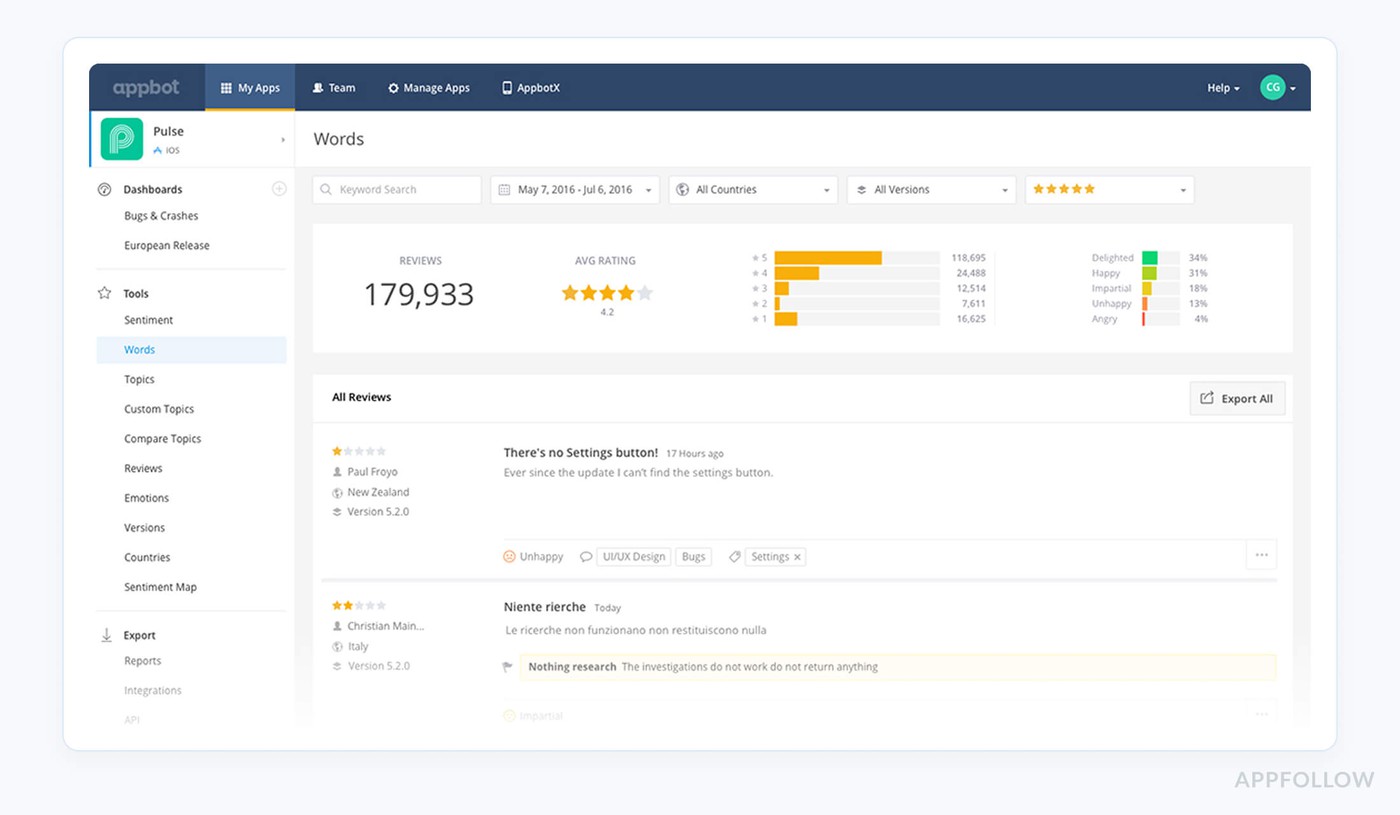
Appbot is the “read-all-the-reviews-so-you-don’t-have-to” brain for teams at BMW, Twitter, Microsoft, Deutsche Bank, and a bunch of fast-growing apps you’ve heard of. It pulls every review from Apple’s App Store, Google Play, Amazon, and Microsoft stores into one place and turns that chaos into clean themes: bugs, feature requests, love letters, rage-quits.
Appbot's advantage is focus, while many customer sentiment analysis tools try to cover everything, Appbot goes deep on app stores, with NLP built specifically for review text and a solid 4.6/5 on G2.
Features
- Automatic sentiment analysis & topic detection at scale.
- Multi-store review aggregation (App Store, Google Play, Amazon, Microsoft).
- “Words” and “Topics” views to spot patterns in feedback fast.
- Native integrations with Slack, Zendesk, Freshdesk, and more.
- 14-day free trial, no card, to test it with your real volume.
Pricing
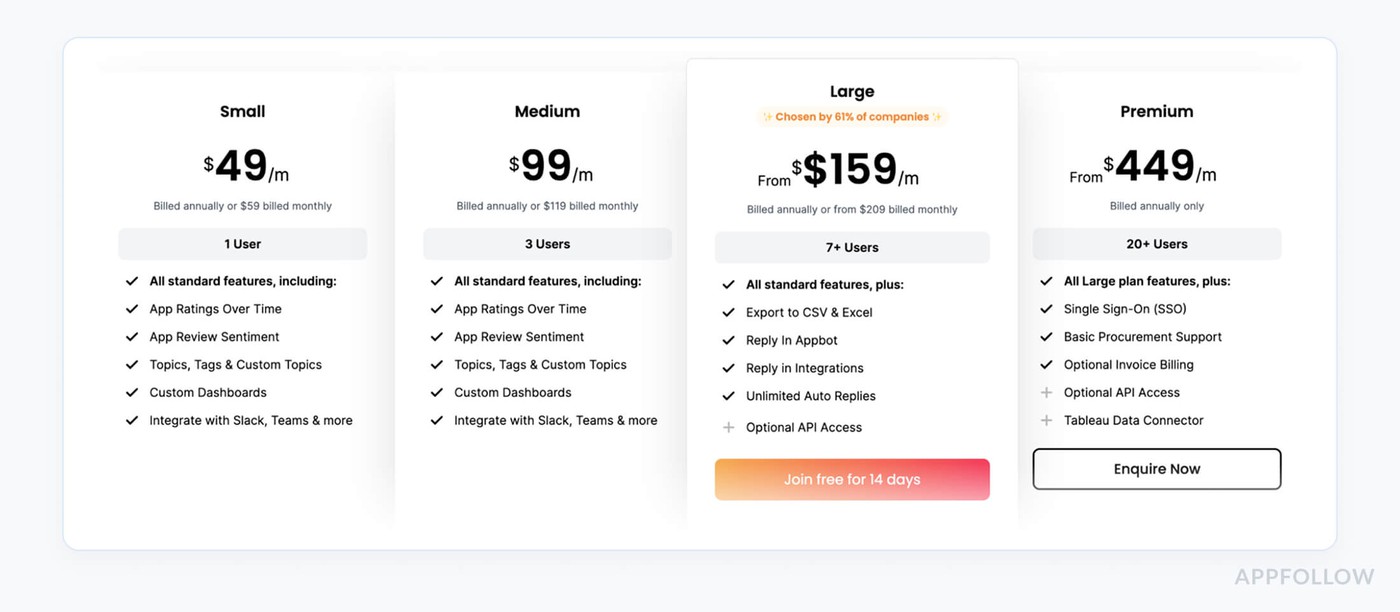
Appbot’s current plan table lists Small at $49/month with annual billing or $59 month-to-month for one user and five sources. Medium is $99/month annually or $119 monthly for three users and 40 sources. Large starts at $166/month annually or $219 monthly for seven or more users and at least 100 sources; that is the tier where the published table adds CSV/Excel exports, replies in Appbot and integrations, and unlimited auto replies. The 14-day Large trial needs no card.
That tier boundary matters more than a low starting price. A solo ASO analyst measuring review topics can evaluate Small. A five-person response team needs a Large quote, even if it only connects a few apps. Appbot states its fetching happens throughout the day, “not quite real-time,” so time an alert during the trial rather than relying on a real-time label.
Pros & Cons
➕ Sentiment analysis integration: "The sentiment analysis tool and integration with Tableau is one of the best features of tracking your app's reviews and rating." g2.com
➕ Review tagging and filtering: "Easy to use, ... it has many features, like tagging the reviews, different filters, charts, etc." g2.com
➕ Data visualization & integrations: "Appbot has useful data visualization options/templates, wonderful integrations (Zendesk, for example), and is able to digest and synthesize a huge number of reviews into meaningful insights." g2.com
➖ Tagging accuracy: "I feel the tagging of reviews to words/topics can be better. Currently, the tagged reviews seem not quite perfect..." g2.com
➖ Sentiment accuracy: "As with most tools that feature automated sentiment analysis, we have found the quality of the analysis to be rather hit or miss." g2.com
➖ Pricing issues: "For a single user, Pricing vs Features is not so good. ... Large plan is too expensive just to manage the reviews and ratings of their app." g2.com
Read also: Online Review Management Reputation Software: 15 Tools Review
Sprinklr
G2: 4.1/5
Trial days: 30
Best for: Enterprise social media and marketing teams (large organizations) managing content, engagement, and analytics across 35+ digital/social channels (Facebook, Twitter, LinkedIn, Instagram, messaging, etc.)
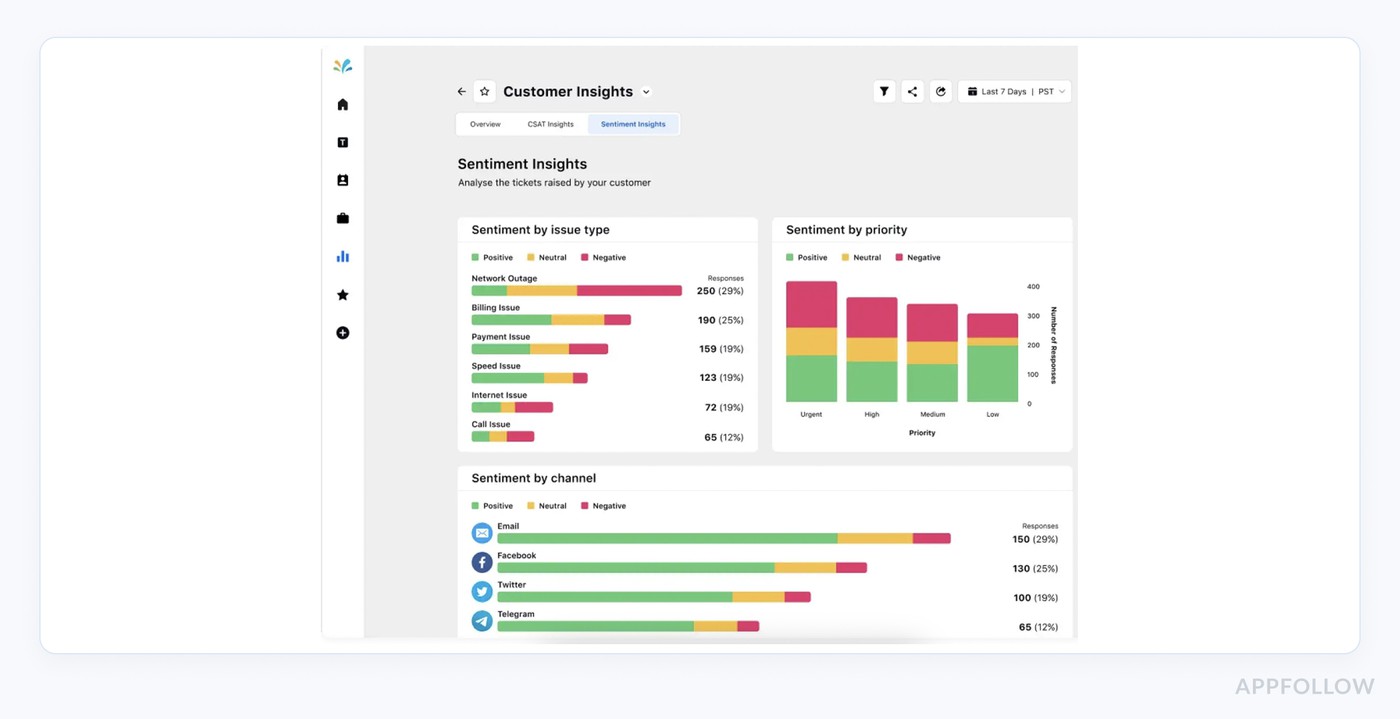
Sprinklr lives in that “big league” space where reviews are just one of many signals, but it treats them seriously. Global brands like Sonos, Marriott, HP, and SAP plug their Apple App Store and Google Play listings into Sprinklr to watch star trends, pull themes from comments, and route priority reviews straight to care teams.
On top of that, it ingests feedback from 500+ review sites, so you can see how app ratings sit next to G2, Glassdoor, and ecommerce reviews in one app review management software view.
Sprinklr edge: enterprise-grade AI and workflows, validated by being named a Leader in Forrester’s Social Suites Wave and Gartner’s Voice of Customer Magic Quadrant.
Features
- Centralized ratings & reviews from app stores and major review sites.
- AI-powered sentiment and topic detection across all feedback streams.
- Developer reply workflows with SLAs, approvals, and governance.
- Configurable customer sentiment dashboard for CX, product, and marketing.
- Deep analytics on review volume, themes, and rating shifts over time.
Pricing
Okay, so here’s the deal: Sprinklr plays full-enterprise, and their social / reviews module sits inside that big bundle. On the public site, there are no hard numbers, only “talk to sales” flows and demo forms, no pricing grid, no tiers, no per-seat math, no trial length disclosed.
That means I can’t honestly tell you “3 app stores + 1 or 5 users costs X, Y”. All of that depends on which products you bundle (social, care, analytics), data volume, and how many workspaces need that customer sentiment analysis software and customer sentiment dashboard. It’s 100% quote-only.
Pros & Cons
➕ Automation & scheduling: "The app truly shines in its primary role of automating social media scheduling and posting. It effortlessly integrates with multiple platforms... allowing us to maintain a consistent presence across all channels... The scheduling feature is both user-friendly and comprehensive... The ease of implementation and seamless integration... make it an indispensable tool." g2.com
➕ Real-Time listening & sentiment: "Sprinklr Social helps solve the challenge of managing multiple social media platforms efficiently by centralizing publishing, engagement, and reporting in one place... The real-time listening and sentiment analysis features also allow us to respond proactively to audience needs." g2.com
➖ Poor support & onboarding: "For first-time users, Sprinklr can be quite frustrating. The customer support experience has been disappointing , they often shift blame to the production team... lack of proper access sharing delays onboarding and prevents teams from working smoothly." g2.com
➖ Overwhelming Interface: "Sprinklr Social is a powerful platform... one area for improvement is its user interface, which can feel a bit complex and overwhelming for new users." g2.com
Read also: Small Business Reputation Management: Expert Guide for Your App
Sprout Social
G2: 4.4/5
Trial days: 30
Best for: Businesses of any size (SMB to enterprise) needing a user-friendly social media management suite for platforms like Twitter, Facebook, Instagram, LinkedIn, etc., to schedule content, engage audiences, and analyze performance.
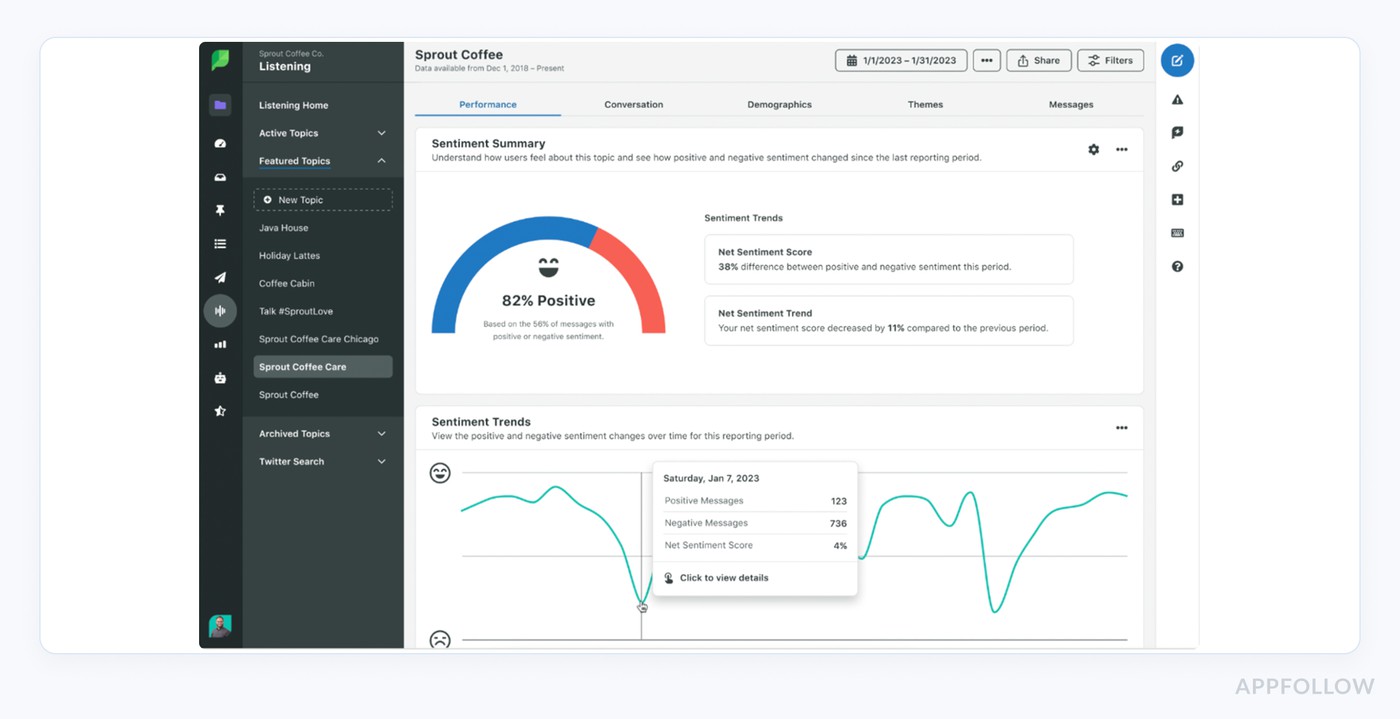
Sprout Social is where a lot of app teams quietly fight half their review war, on social, not just in the stores. Brands like Shopify, Subaru, and UNICEF lean on it to catch “your app is broken” comments on Twitter, Instagram, Facebook, and Google reviews before they snowball.
It doesn’t plug directly into Apple or Google Play reviews, but it wraps every public reaction to your app into one workflow.
The real value: fast, organized replies plus sentiment layered on top, which makes it feel like the best sentiment analysis tool for customer reviews living inside your social suite.
Features
Quietly one of the best customer sentiment analysis tools 2025 for teams whose app reputation lives on social as much as in the stores. And here are the top features why:
- Unified inbox for social and Google reviews.
- Built-in sentiment scoring and message tagging.
- Triage rules and alerts for risky feedback.
- Reporting that surfaces trends across campaigns and releases.
Pricing
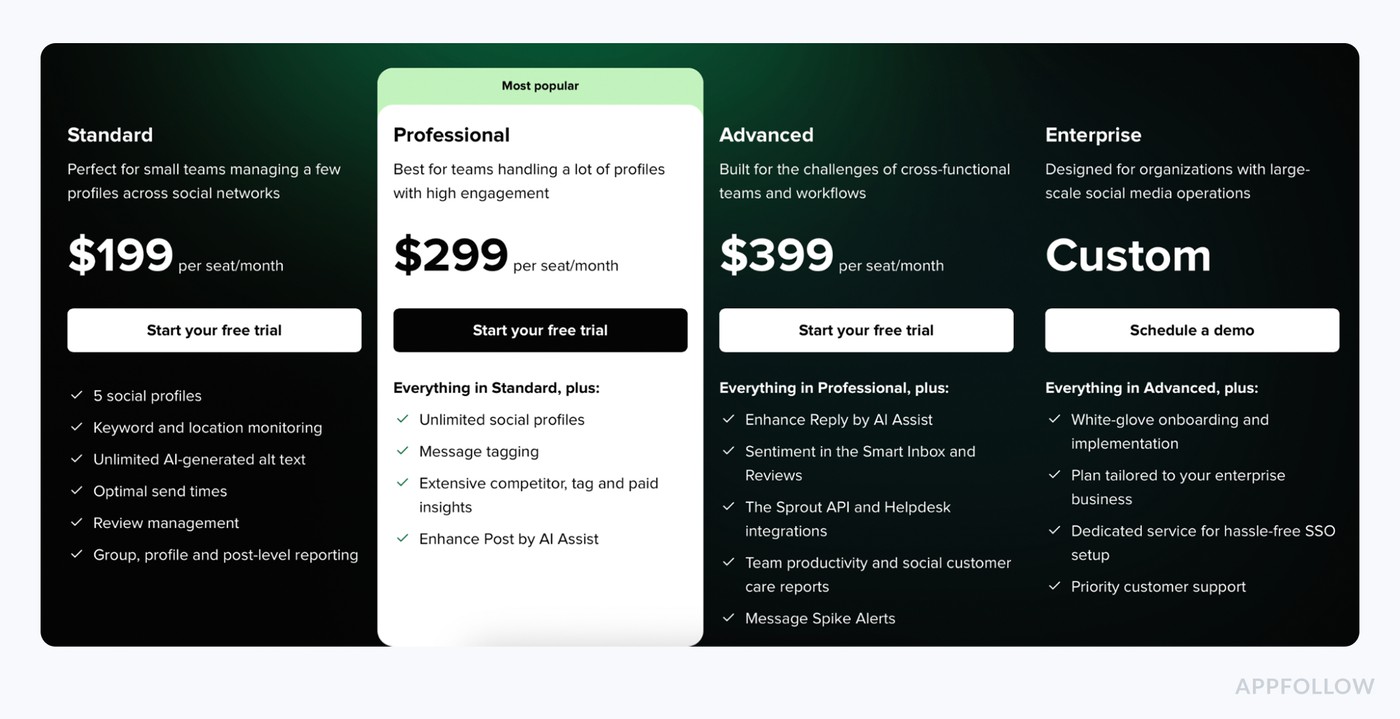
Sprout’s published annual-billing prices list Standard at $199 per seat/month, Professional at $299 and Advanced at $399. Standard covers review management. The pricing page places sentiment in the Smart Inbox and Reviews on Advanced, along with the API, helpdesk integrations and message spike alerts. Listening, including its own sentiment tracking and custom spike alerts, is a separate add-on available from Standard upward.
For five people who specifically need inbox and review sentiment, the visible Advanced list price works out to 5 × $399 = $1,995 per month on annual billing, before add-ons, taxes or an enterprise quote. The old five-seat Standard calculation of $995/month priced a different feature set. If social sentiment is your actual buying job, request an itemized Listening quote rather than assuming it is bundled.
Pros & Cons
➕ Streamlined management & tagging: "Sprout Social makes social media management organized and easy. Sprout Social helped us monitor messages, comments, and mentions across multiple platforms all in one place. The interface is clean and easy to use. Features like tagging, scheduling, and analytics made it simpler to manage high message volumes." g2.com
➕ Advanced listening & support: "I’ve grown to appreciate Social Listening on a whole other level. Also, their customer success teams and customer support are top notch." g2.com
➖ Sync Delays & cost: "There were times when the platform would take some time to sync messages or refresh the feed... the price may seem a little too high for small businesses." g2.com
➖ Limited Listening & analytics: "I wish their Social Listening could pull audio from places like Instagram and TikTok... The Reports/Analytics can get a bit clunky if you're trying to separate organic and paid metrics." g2.com
➖ Reporting visuals: "I do wish the reporting was better visually. The visuals are limiting on it, and only include line graphs, and I would prefer some other charting options." g2.com
Read also: Top 7 Reputation Monitoring Tools: Software Features And Pricing Review
SentiSum
G2: 4.8/5
Trial: 30 days
Best for: Customer experience teams (mid-market to enterprise) using AI to analyze feedback across support channels (tickets, chat logs, surveys, reviews) and surface sentiment and root causes.
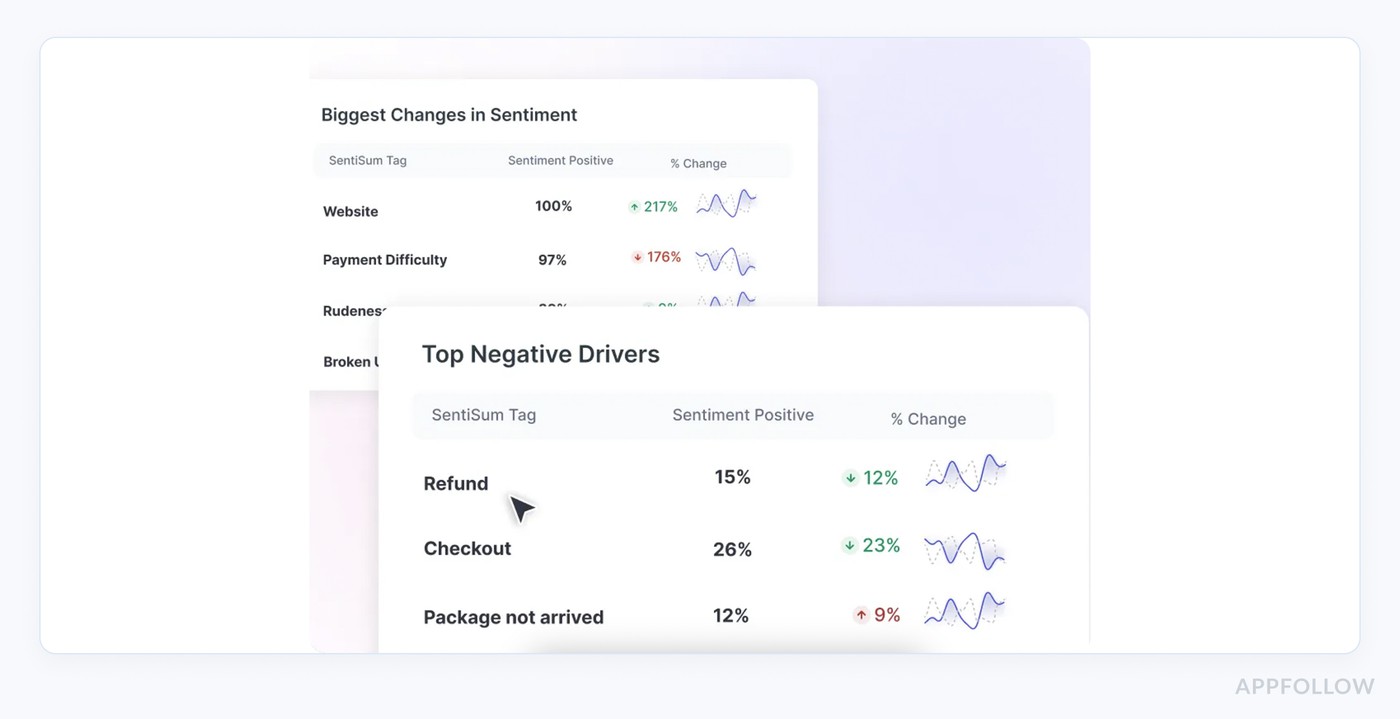
SentiSum is where support leaders go when “reading reviews” turns into “finding root causes.” Teams at Gousto, Hotjar, British Airways, Schuh, and Ticketmaster plug in support tickets, surveys, and public reviews (including app-store feedback piped in via tools like Zendesk and Trustpilot) and let the AI do the heavy lifting.
Among customer sentiment analysis tools, SentiSum stands out for how quickly it surfaces why your ratings moved, not just that they did.
Features
- Unified analysis of tickets, surveys, social, and reviews in one customer sentiment platform.
- Automated tagging + sentiment on every app-related comment.
- Early-warning alerts when negative themes spike.
- Root-cause discovery so product and CX know exactly what to fix.
- Real-time dashboards for tracking rating and topic shifts over each release.
Pricing
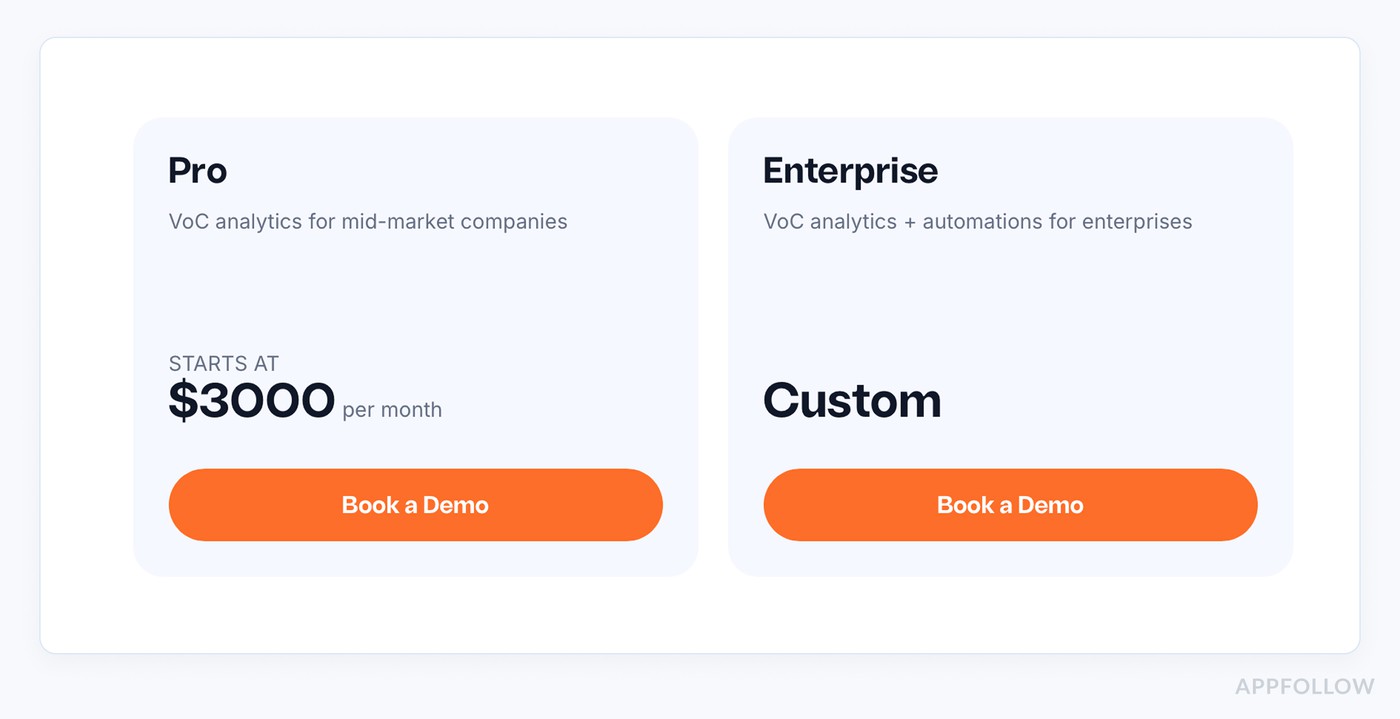
SentiSum now describes an enterprise CX Intelligence Layer starting at $100,000 a year. Its public offer covers tickets, calls, chat, surveys, reviews and bot transcripts, plus a custom taxonomy, Insights and Early Warning agents, unlimited users and integrations. The company says volume is agreed in annual bands; Quality, Automation and MCP access are separate add-ons. Its evaluation is a scoped free audit on your data, followed by a partnership with a walk-away right in the first 90 days. That is different from a blanket 14-day trial.
Our earlier $3,000/month Pro estimate may have reflected an older tier or a different contract. For a current comparison, ask SentiSum to map the same two-store, five-user workload used for other quotes, then specify whether tickets and calls are included in the data band. The $100,000 figure is a vendor-published entry point, not a quote for your organization.
Pros & Cons
➕ Customer sentiment insights: "Sentisum is a fantastic tool that has helped our team tap into customer sentiment and understand key pain points and trends within customer feedback." g2.com
➕ Trend and search customization: "SentiSum makes it easy to customize your searches and track week-over-week patterns." g2.com
➕ Automated sentiment analysis: "Automatic sentiment sorting saves a lot of time compared to doing it manually. It allows you to see at a glance what areas are doing well and what needs to be improved." g2.com
➖ AI accuracy limitations: "It still requires some manual input as the AI is not 100% accurate." g2.com
➖ Misclassification issues: "The only thing is the machine learning sometimes mis-categorises things..." g2.com
➖ Data export limits: "One of the main blockers that I experienced was the export range limits..." g2.com
Read also: The best online reputation management software - Top 10 tools review
App Radar
G2: 4.3/5
Trial days: 14
Best for: App growth and ASO teams (SMB to enterprise) focusing on optimizing keywords, visibility, and performance in the App Store and Google Play.
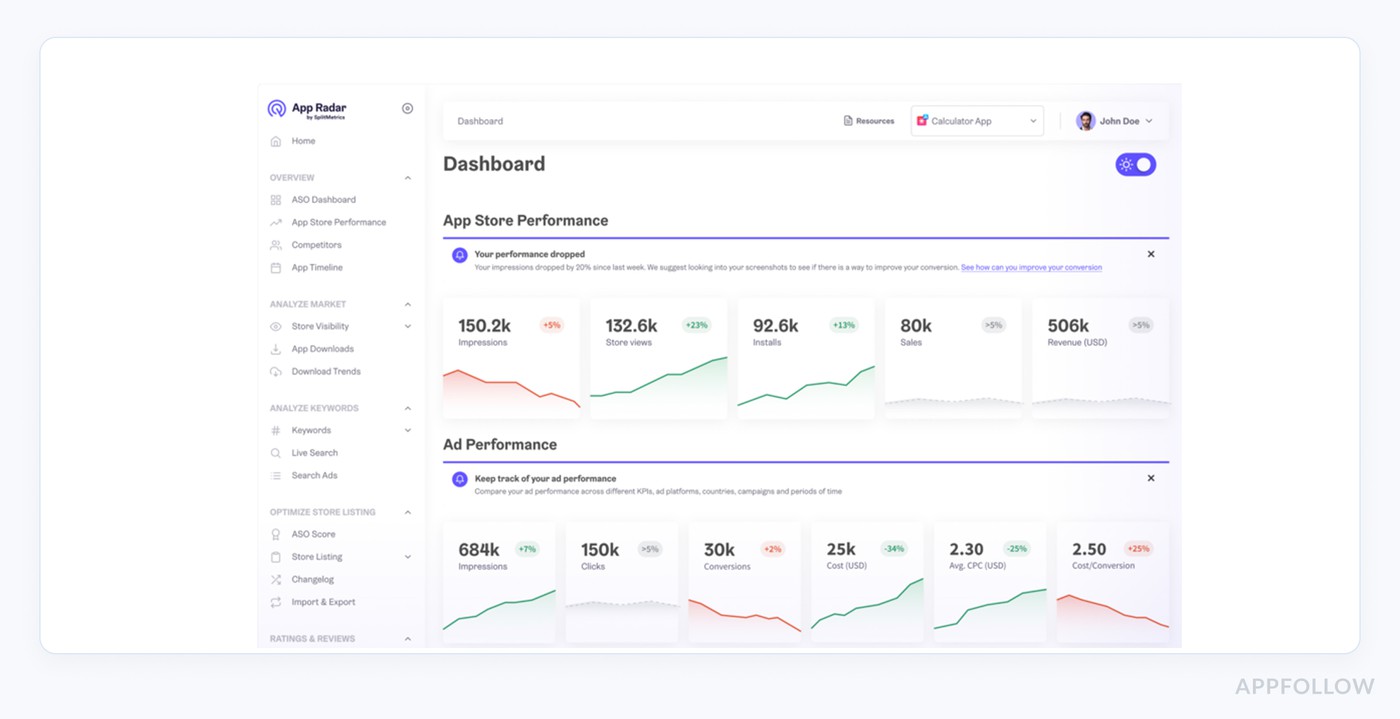
App Radar is the “growth brain” a lot of apps plug in behind the scenes. Teams like Cronometer, Monkee, and Kingdom Rush use it to watch ratings by country, catch dips after releases, and nudge more happy users into leaving reviews.
It pulls data from the App Store, Google Play, and Huawei AppGallery, then lines it up next to keywords and rankings so you can see exactly which changes moved the needle. When you want ASO, paid UA, and review intel in one place, it quietly behaves like the best sentiment analysis tool for customer reviews in the ASO crowd.
Features
- Centralized ratings & reviews for all connected app stores.
- AI-assisted review replies and translation.
- Review trends by country, keyword, and version.
- Alerts on rating drops after releases.
- Simple platform to analyze customer feedback sentiment alongside rankings and installs.
Pricing
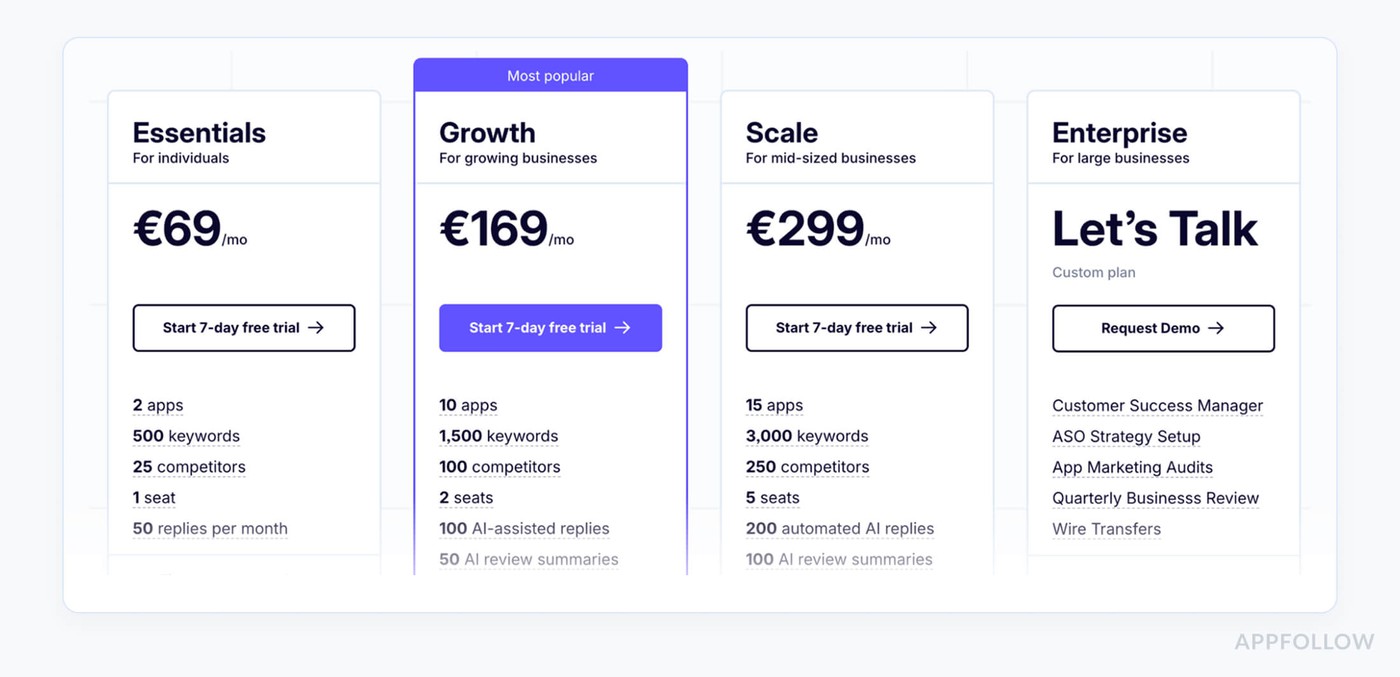
App Radar starts around €69/mo on Essentials (2 “apps” = app+store combos, 1 seat, 50 replies). For one app live in 3 stores, you’re already over that cap, so in practice, you land on Growth at ~€169/mo for 1 user.
Need a crew of five in the account? Scale runs ~€299/mo and includes 5 seats. Every paid tier comes with a 7-day free trial so you can see if this customer sentiment platform nudges your ratings up.
Pros & Cons
➕ Intuitive ASO tools: "App Radar is very easy to use. The dashboard is clean, the tools are straightforward... makes keyword tracking, competitor insights, and app updates much easier. It also helps a lot with managing reviews and optimizing listings in different countries." g2.com
➕ Powerful ASO analytics: "It helped me make significant progress in competitor and keyword analysis; now I can clearly see which keywords are most effective. The performance analytics tools helped me spot both the weak and strong points of my app. The keyword database is extensive and high-quality." g2.comg2.com
➕ Responsive support: "Customer service is extremely quick and solution-focused; whenever I have a question, I receive a fast response." g2.com
➖ High cost & glitches: "The only drawback I’ve found is the price, which seems a little steep. I’ve also noticed occasional minor glitches and sometimes slower response times from support." g2.com
➖ Stagnant development: "AppRadar seemed to have stagnated in terms of development and innovation. The offering has not changed too much across my team’s usage." g2.com
Read also: AI Reputation Management - How to Secure Your Brand’s Reputation with Ease
How to choose the best sentiment analysis tool for customer reviews
You reviewed all of the options. It’s time to choose one that won’t break your stack, your budget, or your support team’s will to live. Most customer sentiment analysis tools look similar on the surface… until you plug them into your workflow and realize half of what you need is “on the roadmap.”
Here’s the checklist I’d run through if we were screen-sharing your infra right now:
- Full app-store coverage, not just “mobile data”. You want native connections to Apple App Store, Google Play, and (if relevant) Amazon / Microsoft. All reviews in one inbox, with store, country, device, and version filters. Otherwise, you’ll miss that one region where your latest release quietly tanked ratings.
- Smart tagging that your team trusts. Tags like bug/login, payments, and onboarding friction should be automatic, editable, and reportable. Think: “Show me every 1, 3★ review tagged ‘crash’ after v7.4” in two clicks, not two hours.
- AI replies that feel human, not canned. Look for AI that drafts replies based on sentiment, language, and app context, plus lets you inject your own templates and tone rules. Example: a 1★ review about failed payment auto-routes to support with a pre-drafted apology + next steps your agent can tweak in five seconds.
- Real-time alerts hooked into your comms tools. Negative-review spikes should hit Slack, email, or your incident channel within minutes. Same with reviews from VIP segments. If your team only discovers a 1★ storm in Monday’s report, the damage is already done.
- Deep integrations with your existing tools. Reviews and their tags need to sync into Zendesk, Salesforce, Jira, whatever runs your infra. When a review mentions “can’t log in with SSO,” it should become a ticket with all metadata attached, store, OS, version, sentiment, tag, no copy-paste.
- Role-based queues and dashboards. Support shouldn’t see the same view as product or marketing. You want dedicated queues (e.g., “RU iOS bugs,” “US churn-risk reviews”) and dashboards that speak each team’s language: CS cares about response time and rating recovery; product wants themes and before/after release impact.
- Reporting that moves roadmaps, not just slides. You’ll need trendlines by tag, version, market, and channel, plus easy exports to your BI stack. “Crash-related complaints dropped 32% after hotfix” is the kind of sentence that justifies engineering time.
Once you’ve shortlisted 2, 3 platforms, run a tight trial: one release cycle, one priority market, clear success metrics (rating change, response time, % of tagged reviews actioned). The best AI tools for customer sentiment analysis won’t just show you how customers feel, they’ll plug directly into your infra so you can fix what hurts fast.
Run a small review audit before you buy
Try the same recent release in your final two tools. Export or inspect 100 reviews from one store, one market and a fixed 14-day window, including low-star and positive cases. Have a human reviewer mark which reviews actually report the release-critical bug. Then compare the software’s theme and alert output with that labeled set. This is an evaluation protocol, not a claim that the ten tools above were retested on these 100 reviews.
Illustrative scoring. In a sample of 100, a reviewer identifies 20 login failures. A tool flags 19 reviews as login issues: 16 true matches and 3 false alarms. It missed 4 of the 20. Bug recall is 16 ÷ 20 = 80%; precision is 16 ÷ 19 = 84%. If your incident queue needs at least 90% recall, this configuration fails even if its dashboard looks excellent. Check the misses before rejecting the vendor: a wrong language model, delayed ingestion or a missing synonym may be fixable, while a missing app-version field may not be.
Now hand one of those true positives to support or engineering. Record the time from store posting to usable alert, whether the review link and version survive the handoff, and whether the owner can close the loop after a fix. Repeat with the same inputs in the second product. The result is a decision your team can defend, not a screenshot contest.
cta_demo_request_purple
FAQs
What is a sentiment analysis tool?
Think of sentiment analysis as a really nerdy translator that reads what users say and tells you how they feel. So sentiment analysis tools scan reviews, tickets, socials, NPS comments, all of it, and classify each message as positive, negative, neutral, and usually why. In practice, that means you stop guessing why your rating dipped after v7.4 and see “login bug” or “price change” as real, measurable patterns across thousands of comments. That’s what good customer sentiment analysis tools do for you.
What are the best tools for analyzing customer sentiment?
Shortlist by where your feedback lives.
- Heavy on app stores? Look at tools built around ratings & reviews first.
- Support-driven org? Go for platforms that plug into Zendesk / Intercom and do sentiment analysis tools for customer reviews and tickets in one place.
- Enterprise CX? Then the big suites (Qualtrics, Medallia, Sprinklr) finally make sense.
Best = the one that covers your main feedback channels and pushes clear “fix this next” insights into your daily workflow.
What exactly is sentiment analysis, and how does it differ from brand monitoring?
Sentiment analysis reads individual pieces of content, each review, each chat, each Tweet, and scores the emotion plus the theme: “angry about pricing,” “happy about UX,” “confused by login.” You get structured data from unstructured text. Brand monitoring, on the other hand, just watches mentions: volume, sources, reach. Great for “who’s talking about us?” but weak on “what are they saying and how do we fix it?”
In a stack of customer experience tools sentiment analysis is the thing that turns raw chatter into ranked problems and roadmap input, not just pretty listening dashboards.
How accurate are customer sentiment analysis tools in 2026?
Way better than five years ago, still imperfect. For clear, non-sarcastic reviews, customer sentiment analysis software can hit 80, 90% accuracy at classifying positive/negative and high-level topics. Where it still fumbles: sarcasm, mixed emotions in one review (“love the app, hate the new paywall”), and niche domain language.
That’s why the best setups pair AI tagging with human QA: product or CX folks spot-check edge cases, tweak dictionaries, and correct tags on launch-critical releases or big UI changes. Treat accuracy as “good enough to prioritize,” not “good enough to ship blindly.”
How frequently should I run sentiment analysis reports and act on them?
For app reviews, daily monitoring and weekly action is the sweet spot.
- Daily: scan new negatives, triage bugs, and push hot issues to dev or support, this is where sentiment analysis for customer service shines with alerts and queues.
- Weekly: review tagged trends by version, country, and device; decide what gets into the next sprint.
- Monthly or quarterly: zoom out to see how releases and pricing changes moved your rating footprint. If you only look at sentiment once a quarter, you’re choosing to be surprised.
What should I look for when comparing sentiment analysis tools in 2025?
Line them up against a few non-negotiables:
- Native app store integrations (Apple, Google Play, Amazon) with full metadata.
- Smart, editable tagging (themes + bugs + features) and release/version filters.
- Tight support and BI integrations so insights don’t die in yet another dashboard.
- Speed: how quickly tags, alerts, and reports update after a new review lands.
- Control over the AI in your AI tools for analyzing customer review sentiment, can you customize dictionaries, merge topics, override wrong tags?
If a tool can’t give you “top 5 problems by impact since the last release,” keep moving.
Can sentiment analysis tools help in brand reputation crisis management?
Absolutely, and they’re often the first alarm bell. When a bad release, outage, or PR mess hits, you’ll see it in reviews and social comments long before the boardroom does. Good customer sentiment analysis tools will spike alerts on specific themes (“login,” “crash,” “billing”), show where it’s worst (region/device), and help you prioritize who to reply to first.
Pair that with fast response workflows and you can turn a potential rating meltdown into a contained incident, with a paper trail showing exactly how you fixed it.
How accurate are customer sentiment analysis tools?
Accuracy depends on the reviews, language, labels and task. A model that handles a clean positive/negative sentence may miss the bug inside “love the new design, but checkout fails every time.” Vendor accuracy figures use different samples and definitions, so an unsupported 80–90% range is a poor buying rule.
Build a small labeled set from your own recent reviews. For an urgent issue, report recall (how many true issue reports were found) and precision (how many flagged reports were really about it). Inspect errors by language, store, version and mixed-sentiment reviews; agree which misses support can tolerate before automating a queue. Keep human QA on new releases and product-language changes. The 100-review worked example above shows why an attractive overall score can conceal four missed login failures.