How can sentiment analysis be used to improve customer experience?

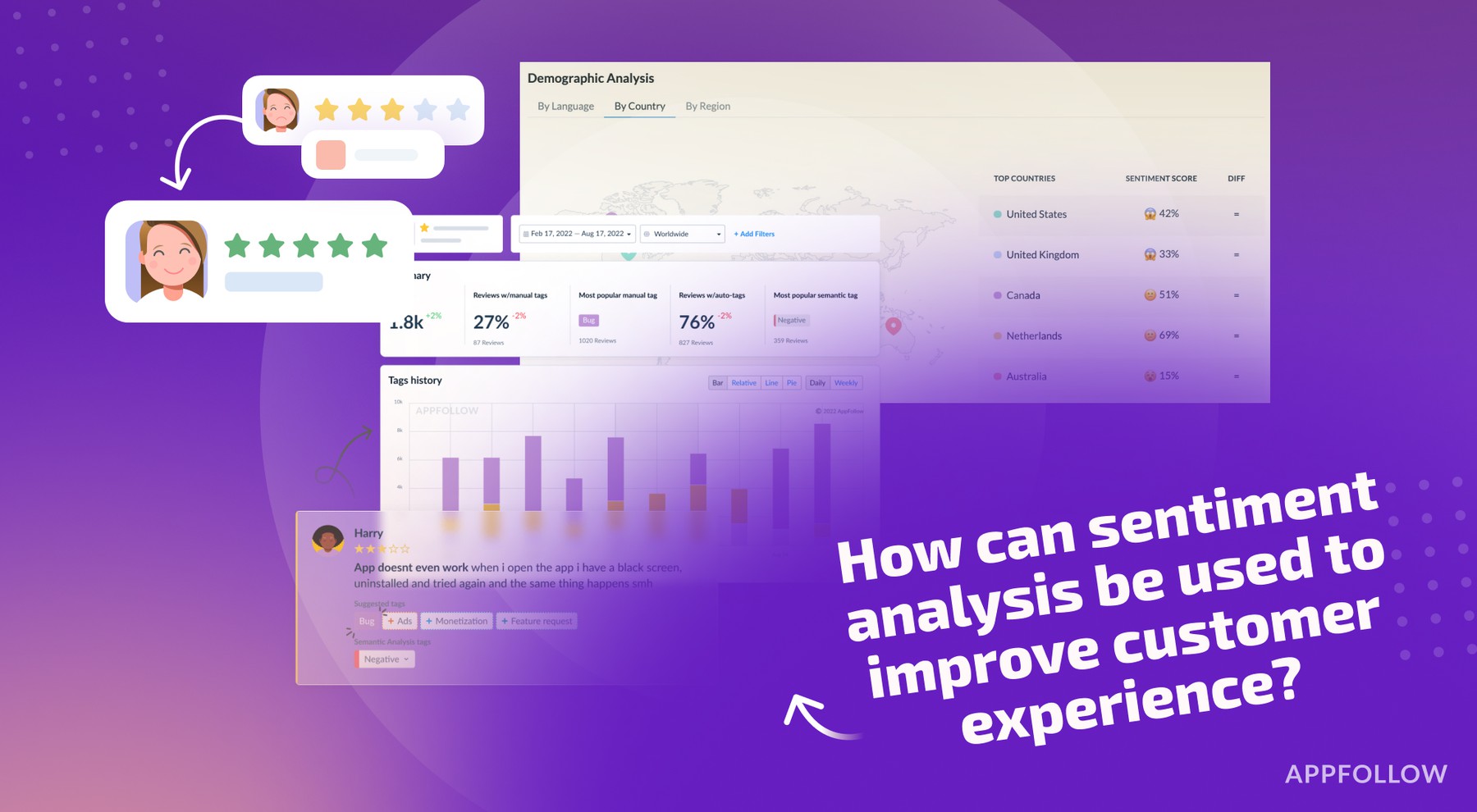
Table of Content:
- Catch a bad release before ratings slide
- Find the real top CX pain points (not the loudest ones)
- Route issues to the right team automatically (so nothing dies in a spreadsheet)
- Turn 1★ reviews into saved customers (fast response changes sentiment)
- Detect regional CX failures (payments, localization, device clusters)
- Fix expectation gaps that cause “good app, wrong promise” frustration
- Benchmark sentiment vs competitors to spot CX opportunities
- Reduce sentiment noise by removing spam/offensive reviews
- Make sentiment insights visible to the whole company (so CX changes happen)
- Improve customer experience with AppFollow AI review management
When you Google how can sentiment analysis be used to improve customer experience, you’re rarely in “academic research” mode. You’re usually staring at a wall of reviews, tickets, and survey comments thinking: “Okay, where exactly is this going wrong, and what do I fix first?” Maybe ratings slipped after the last update. Maybe support is firefighting the same issue 40 times a day. Maybe execs want proof that a redesign helped.
To move from vibes to decisions, I teamed up with Yaroslav Rudnitskiy, AppFollow Senior Professional Services Manager, who lives inside customers’ data every day. We pulled the 9 use cases that app teams rely on most:
- Catching release-breaking bugs early
- Spotting UX friction by journey step
- Prioritizing roadmap by impact, not volume
- Routing “hot” users to support faster
- Detecting churn-risk segments in time
- Proving if a fix changed sentiment
- Localizing by region-specific complaints
- Finding gaps in help content
- Benchmarking against competitor review sentiment
Let’s dive into the details of the first use case.
Catch a bad release before ratings slide
Picture a mid-size app sitting at 4.6★, pulling 400–800 reviews/day. You ship v7.4 at 10:00.
By lunch, your baseline 8–12% negative turns into 35–45% negative, and the language gets weirdly consistent: “can’t login,” “stuck,” “crash on launch,” “payment failed.” That’s your sentiment shift. A measurable spike.
Now the scary part: on Google Play, recent ratings carry more weight than older ones, so a few hours of 1★ volume can trigger a visible rating drop fast enough to hurt installs before your weekly report even exists.
Here’s what “early warning” looks like with real instrumentation: AppFollow pulls reviews from public sources every 1–3 hours (and hourly with a Google Play Console service connection).
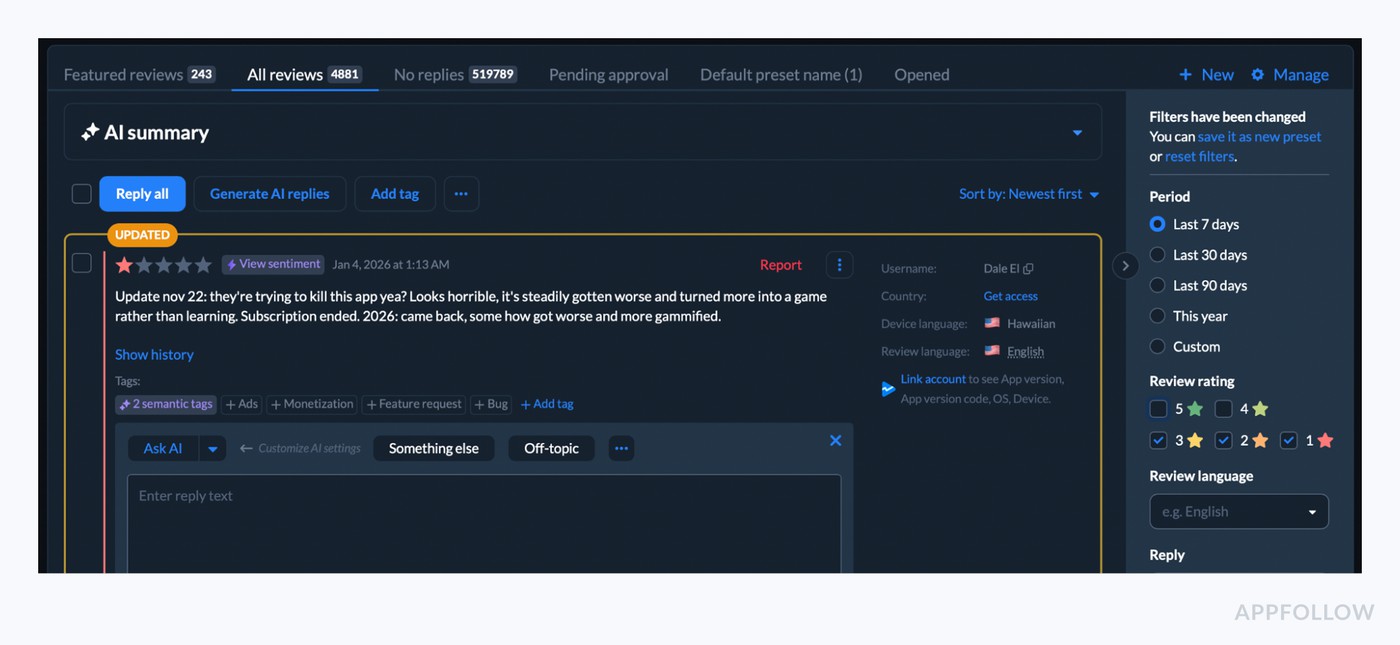
So the release impact becomes obvious the same day: negative reviews clustered to v7.4, mostly Android 14, concentrated in 2–3 countries. Problem!
Find the real top CX pain points (not the loudest ones)
When you’re listening to the voice of a customer, the biggest trap is volume without context. One dramatic 1★ essay can steal your whole morning… while a quieter, repeatable issue sits across hundreds of “meh” 3★ reviews and drags retention like a slow leak.
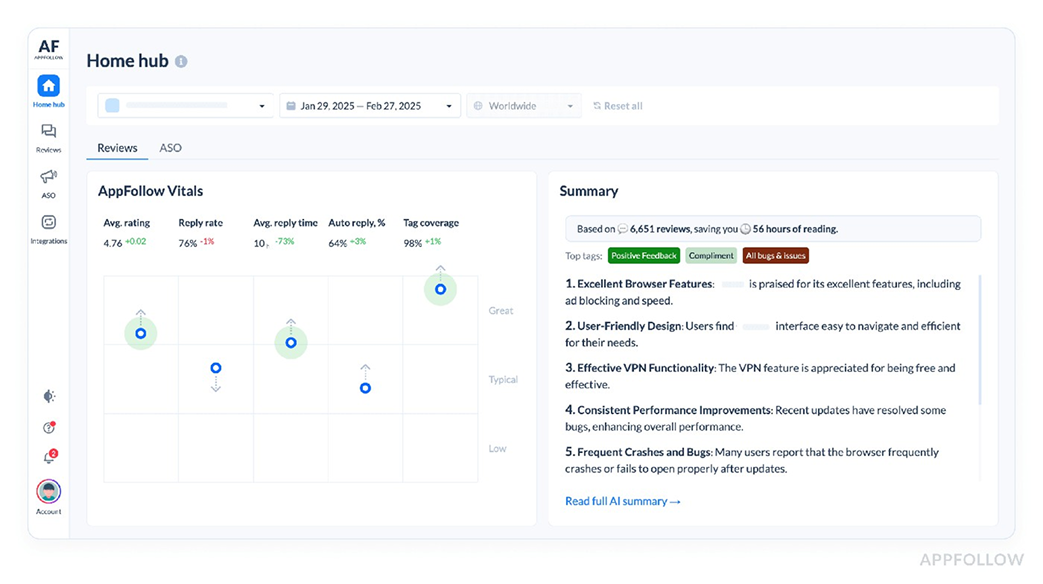
What you want is clean, countable feedback themes, the kind you can trend by version, country, device. AppFollow improved its semantic analysis so more of that signal gets captured: up to 30% more reviews tagged, with tags 10–15% more accurate, plus an expanded tag set (31 > 41) to catch more specific complaints.
That’s how you surface real customer pain points without getting hypnotized by the loudest person in the room. Example: “crash” might be loud but rare; “can’t restore purchases” might be less emotional, more common, and clustered in one market after one release, meaning it’s fixable fast and worth prioritizing.
Here is one of the reports of how it looks on AppFollow:
Route issues to the right team automatically (so nothing dies in a spreadsheet)
The spreadsheet is where issues go to “rest.” Like a cozy little graveyard for customer truth.
Because here’s what happens: someone exports reviews on Monday, pastes them into a sheet, color-codes a few rows…, and by Thursday the biggest theme has already changed. Nothing’s wrong with your team. The system is just built to drop the ball.
The fix isn’t “more process.” It’s review categorization that happens the moment a review lands, while the context is still fresh and the pattern is still forming.
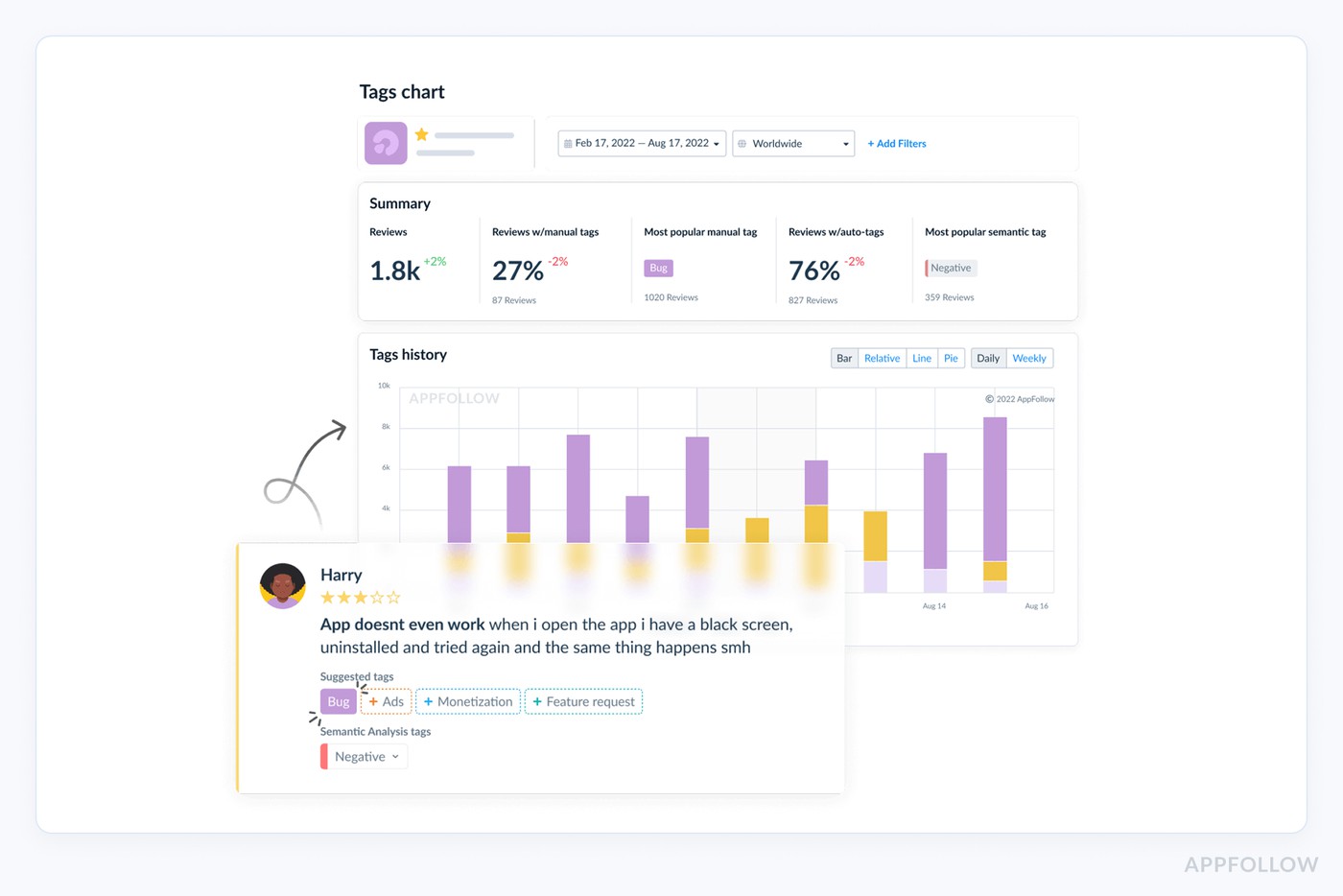
Example of how review tagging works in AppFollow.
cta_free_trial_purple
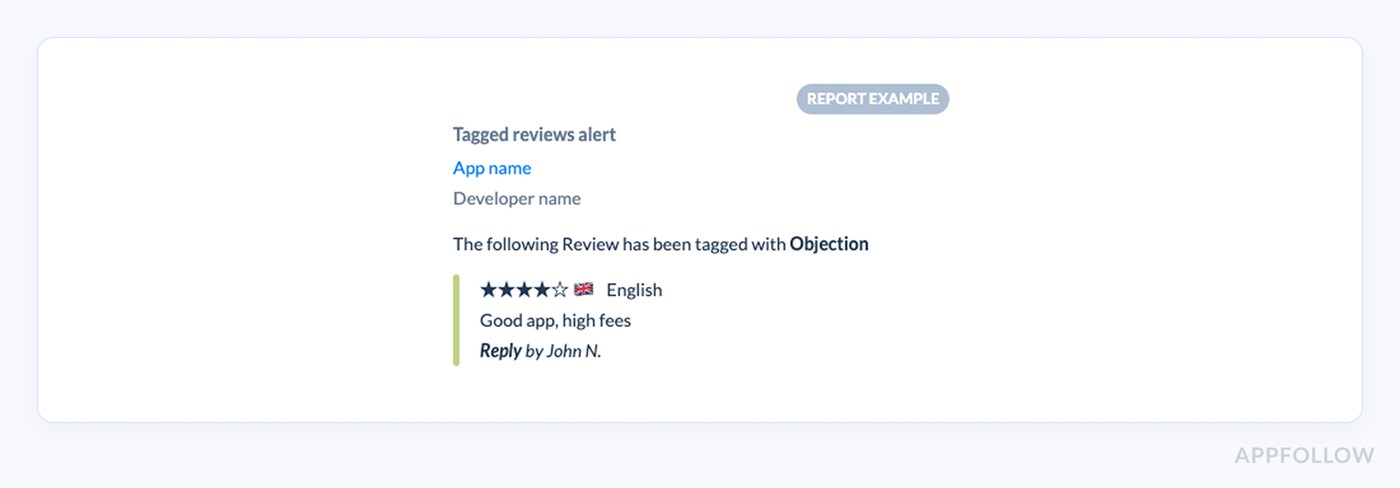
Then you add alerts that fire when a theme spikes after a release, so QA hears about “crash on launch” before it becomes your new store rating.
This is where automation starts paying rent. With workflows, “billing” goes to support, “login loop” goes to engineering, “feature request” goes to product, complete with store, country, OS, and version. No screenshots or forwarding.
Report example in Slack from AppFollow:
And the business case isn’t fluffy: teams using auto-routing have cut response time by up to 35% (Flo), and automation can save 112–140 hours per month (Roku). That’s real cross-functional collaboration, without meetings, without spreadsheets, without the slow leak.
Turn 1★ reviews into saved customers (fast response changes sentiment)
That first 1★ review is never “just one review.” If you treat it like noise, it turns into a pile-on. The lever that moves the needle fastest is review response time, Gameloft went from 30 days to 3 days on replies after switching their process.
Rating recovery is real when you show up fast and sound competent. AppFollow’s own analysis models scenarios where 30% of users update their review more positively after a reply.
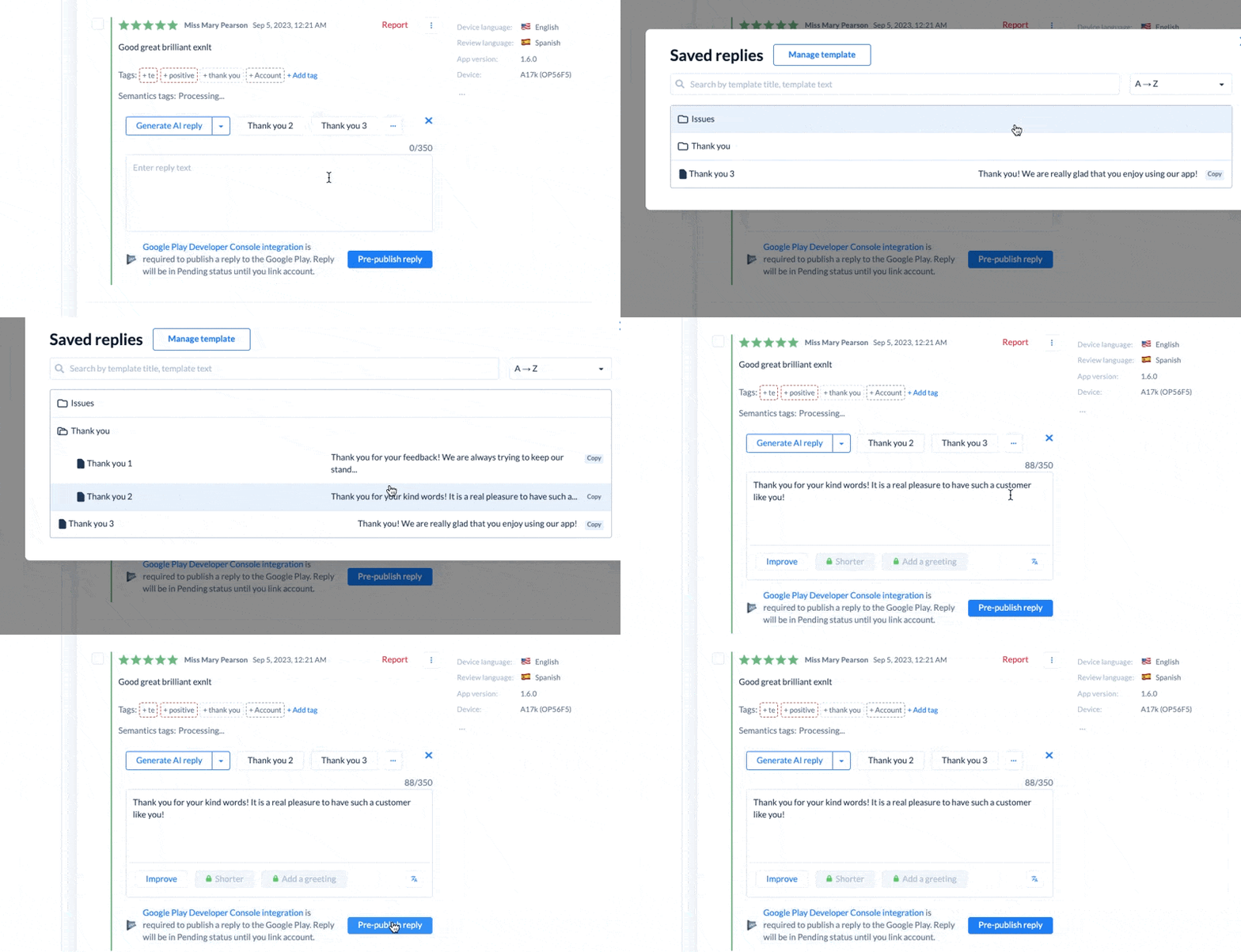
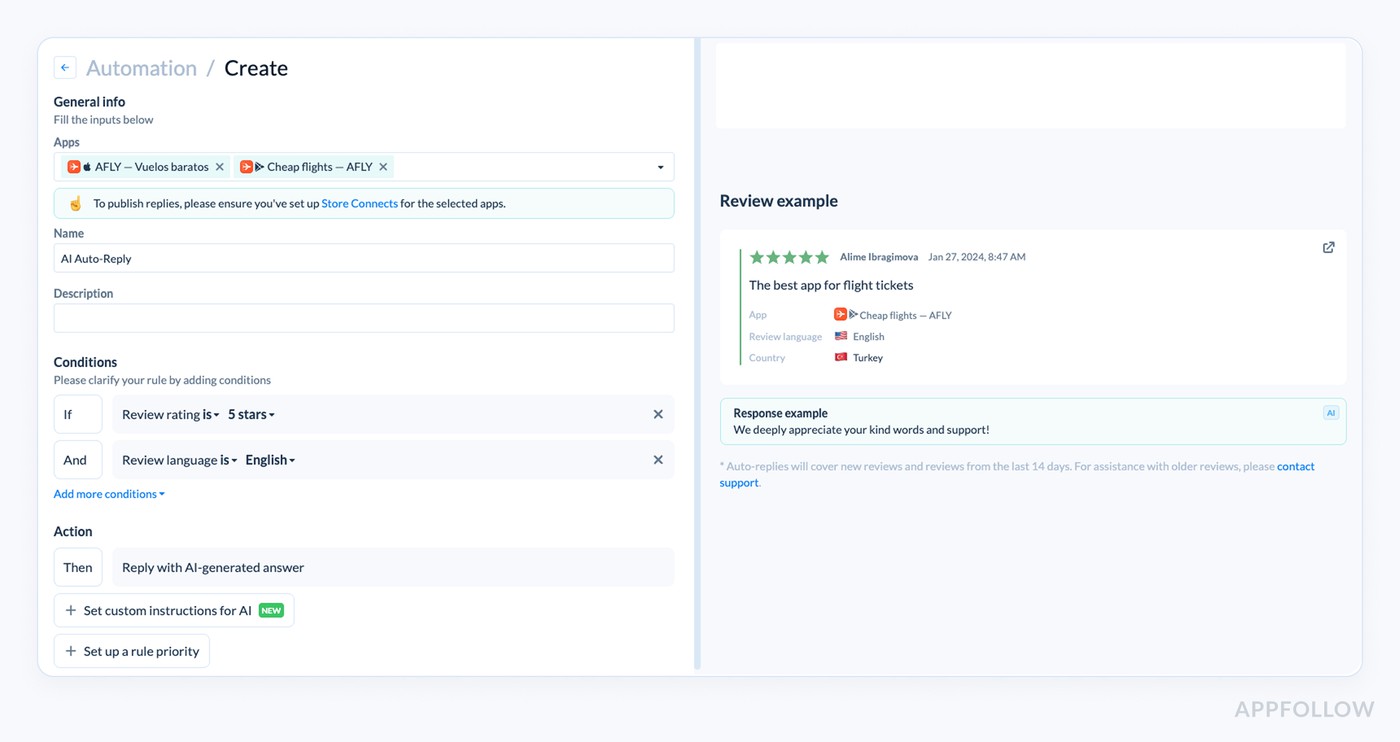
Here is how you can speed up your replies in Appfollow:
- Reply templates
- AI auto-replies
cta_free_trial_purple
This is why sharp customer support teams triage and collect OS/device/version in-thread to reply with a workaround in hours.
For example, Flo cut average response time by up to 35% once tagging routed reviews into the right queues.
Do that consistently and you’re playing churn prevention without even calling it that, because you’re catching the uninstall moment while the user is still talking to you, not after they’ve moved on.
Detect regional CX failures (payments, localization, device clusters)
A “bad CX moment” isn’t always global. Sometimes it’s a payment provider hiccup in Brazil, sometimes it’s a device cluster in India. If you only watch your overall rating, you’ll miss it, because both the App Store and Google Play ratings are regional averages.
Your review volume looks normal… but one market suddenly flips. You’ll see regional sentiment dive right after a release, while other countries stay calm. That’s your clue the problem is a specific experience in a specific place.
This is where country-level feedback stops being “nice to have” and becomes operational. AppFollow lets you slice reviews and rating dynamics by country (and tags), and it refreshes data every 1–3 hours, fast enough to catch the spike while it’s still fixable.
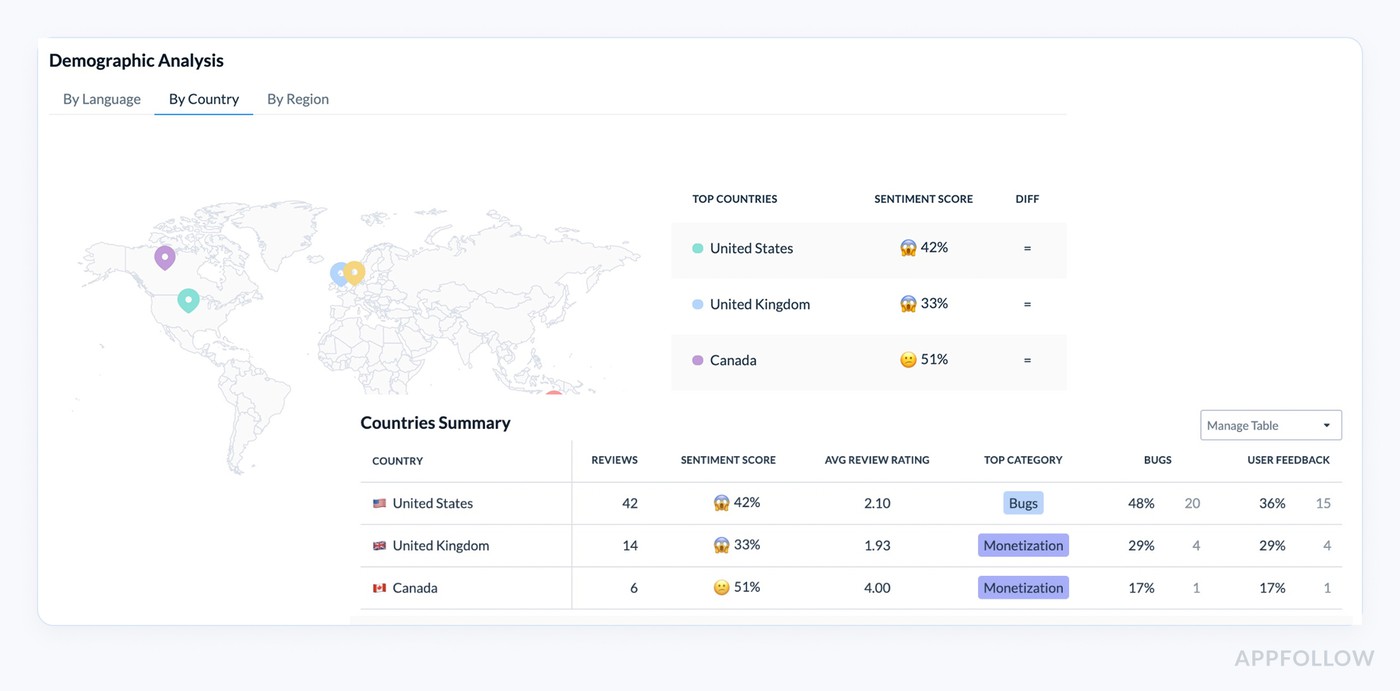
An example of sentiment analysis report by regions in AppFollow.
If 60% of new negatives in Mexico mention “card declined,” route that theme to billing. If France is screaming about “weird translations,” you’ve got localization issues, not a product meltdown, and your reply + fix plan changes.
Fix expectation gaps that cause “good app, wrong promise” frustration
You’ll see it in reviews before you see it in dashboards: “Nice app… but this isn’t what the screenshots showed,” “Thought it was free,” “Says Spanish, but it’s English,” “Where’s the feature from the promo?”
That's an expectation mismatch, and it’s brutal because the user isn’t mad at your product quality, they’re mad at the promise. Even localization mismatches alone can drag ratings when users expect a fully localized experience and don’t get it.
The fastest fix usually lives on the page, not in the code. A meditation brand was stuck at 24% page conversion. AppFollow flagged it against a 35% category benchmark. Spanish listings were still showing English screenshots. They refreshed visuals and jumped to 33% conversion in 4 weeks.
Now zoom out to the real game: conversion vs retention. Social Quantum lifted installs by 110% and boosted impression > install conversion by 82.7% after changing their preview video. Huge win, because the listing set a clearer expectation and attracted the right users.
If your listing sells the wrong story, you’ll get installs… then 1★ backlash, refunds, uninstalls. The win is alignment: promise > first session > reviews that confirm it.
Benchmark sentiment vs competitors to spot CX opportunities
You don’t win CX by staring at your own rating in isolation. You win by reading competitor reviews like they’re a free product teardown, because users will happily tell you what your rivals are getting wrong (and what they’re getting praised for), every single day.
AppFollow pulls in publicly available competitor feedback so you can see bugs, pricing complaints, feature requests, and satisfaction signals side by side.
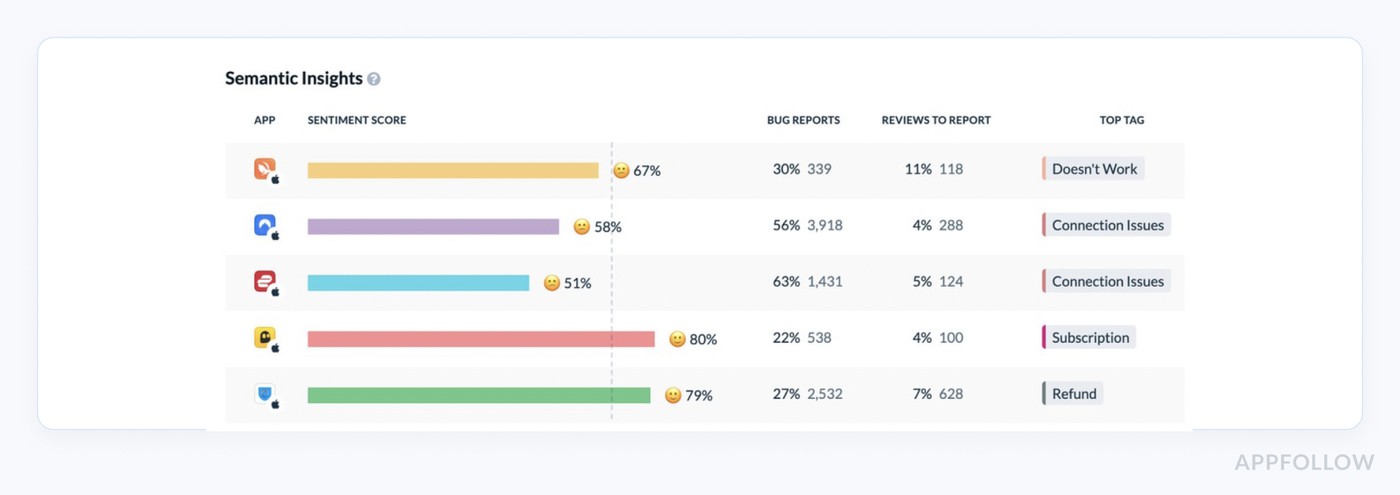
Breakdown competitor performance with a 10-day trial.
Now you’ve got competitive insights you can quantify, not “vibes.” AppFollow’s Benchmark Report breaks out sentiment score, plus the share and number of reviews tagged as “Bug” and “Report a concern” for each app, so you can spot who’s leaking trust and why.
That’s where differentiation gets obvious. If your category is drowning in “crash/login/billing” complaints, being the “stable, boring, reliable” option is a strategy, especially when you can point to a lower bug-share in review themes.
(And yes, teams report real ops impact too, G5 Entertainment cites a 24% reduction in time spent on repetitive tasks after AI-based feedback analysis.)
Finally, you start seeing market trends early, because review data updates frequently (AppFollow cites collection every 1–3 hours), and Compare Discovery is built specifically to explore markets and spot shifts before they show up in your quarterly deck.
Reduce sentiment noise by removing spam/offensive reviews
Your customer sentiment dashboard can look “healthier” overnight… and be completely wrong because of spam reviews. AppFollow’s analysis found that on the App Store, 76% of deleted spam reviews were 5★. So the noise isn’t just angry trolls dragging you down, but a fake positivity pumping your signal up until the store cleans house and your charts whiplash.
Here is how it works in AppFollow:
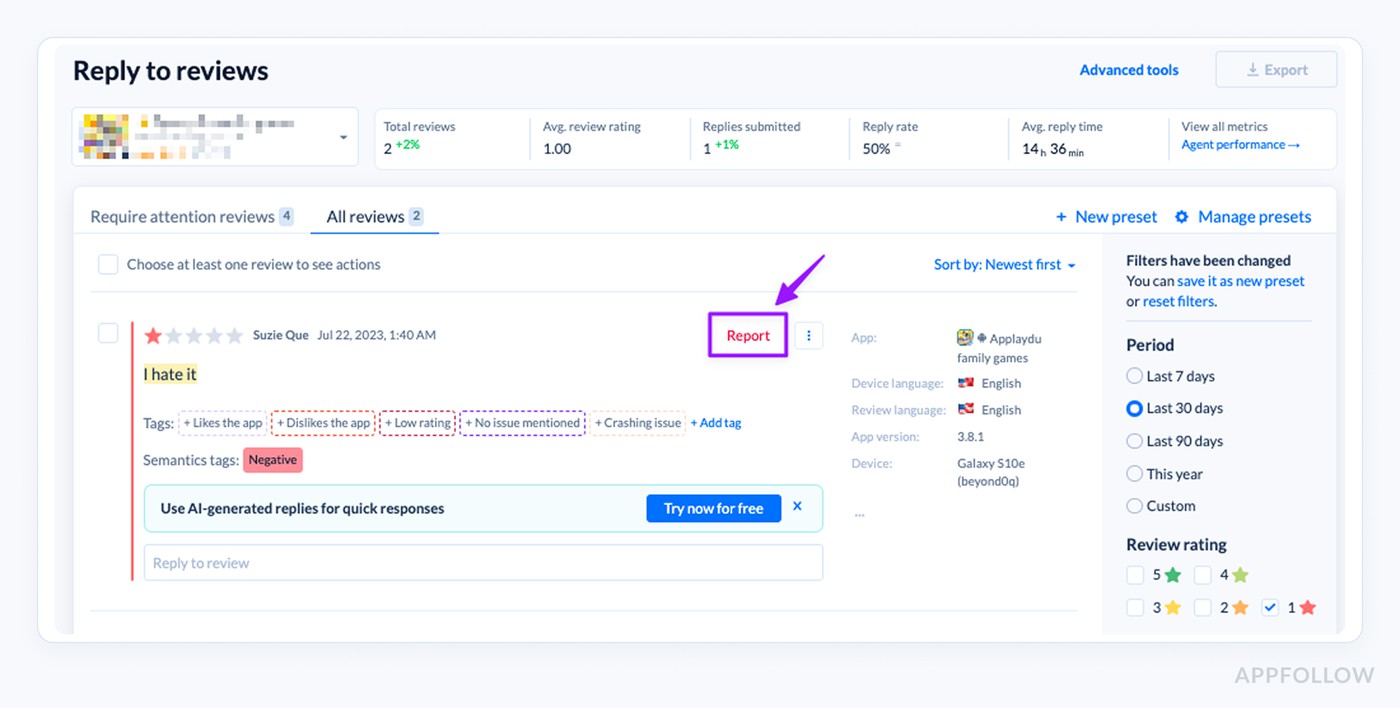
Try how it works live with a 10-day trial.
Here’s the lever teams underestimate: review moderation works when you do it consistently. AppFollow reports that the App Store removes about 80% of reviews you flag as spam, and spam removals often happen within 24 hours (other inappropriate content in 1–2 days).
And yes, this is also reputation risk control. Google Play’s overall removal rate for reported reviews is cited at around 49%vs 34% on the App Store, so your “report” habit directly affects how much toxic content stays visible to future users.
Make sentiment insights visible to the whole company (so CX changes happen)
A sentiment insight is only “useful” if the people who can fix it see it. Otherwise, it lives in a support inbox… and dies there.
- CX reporting: When your review sentiment is piped into the dashboards leadership already trusts (Tableau, BI exports, custom reports), it stops being “support noise” and becomes an operational KPI. One AppFollow customer (G5 Entertainment) reported a 24% reduction in time spent on repetitive tasks after integrating AI into their user comms + feedback analysis.
- Stakeholder alignment: The fastest way to get product, QA, and marketing on the same page is to push the same tagged spike into the same channel. AppFollow’s Slack integration + review/tag alerts do exactly that, no weekly deck required.
- Feedback loop: When teams act faster, users notice. Optus pushed reply rate from 60% to 90%, which turns “ignored” into “heard” at scale.
- Collaboration: This is where the ROI gets obvious: Roku saved 112–140 hours over 7 months, and Flo improved response time by 30% (iOS) and 35% (Android), because the right people got the right signal, automatically.
Improve customer experience with AppFollow AI review management
App reviews are your fastest CX feed… and your messiest one. AppFollow turns that chaos into a system: one inbox, AI that tags what people mean, and automations that help you respond before a small issue becomes a store-wide mood swing.
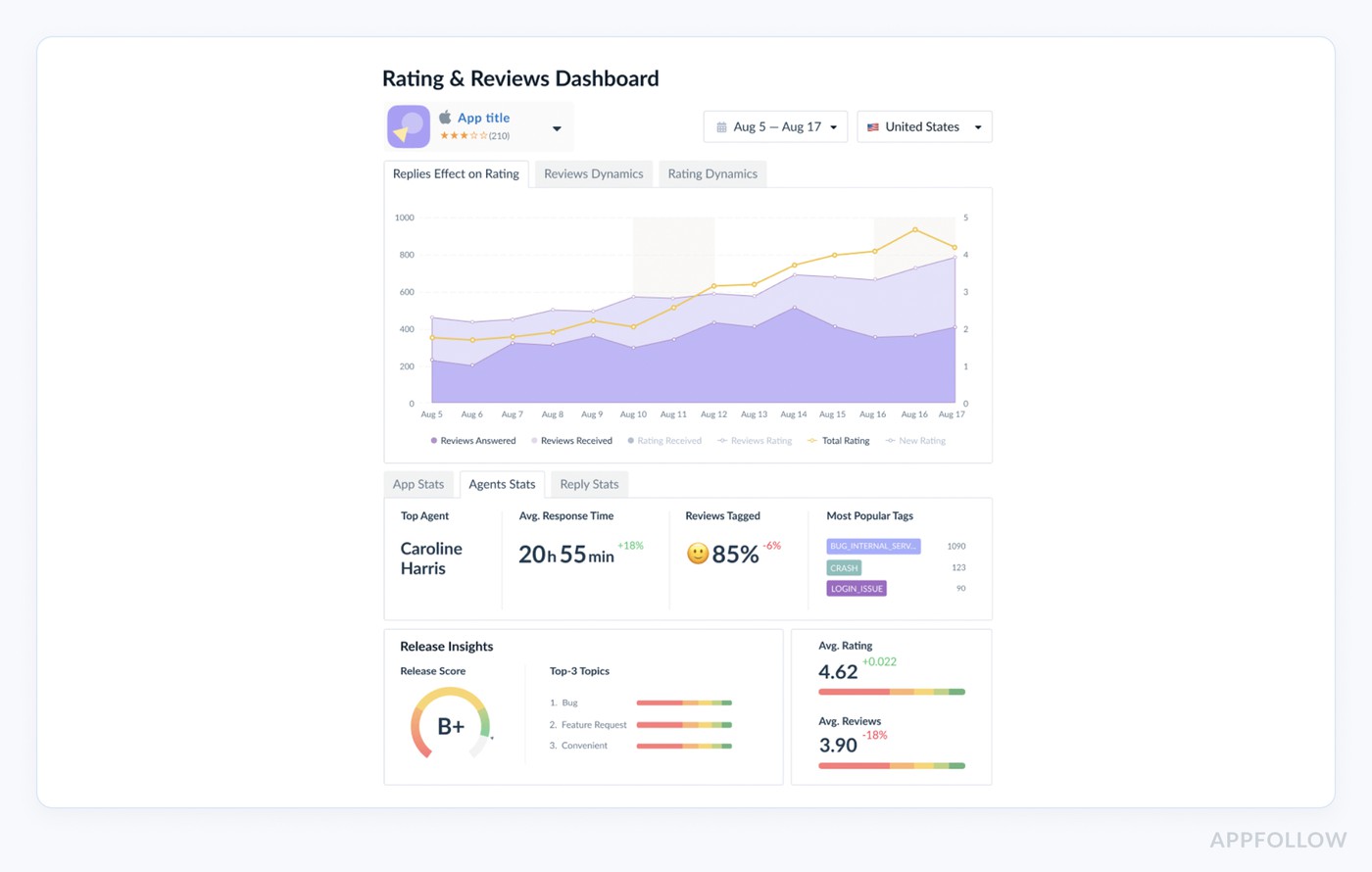
Want proof it moves real metrics (not just feelings)?
- Flo cut average review response time by 30% on iOS and 35% on Android using auto-tags.
- Roku saved 112–140 hours over 7 months with review management automation.
- Optus boosted their reply rate from 60% to 90% using automation + tagging.
Review management features you’ll use:
- Unified inbox + sentiment/semantic tagging so themes surface automatically.
- AI replies + auto-replies rules for high-volume queues.
- “Report a concern” workflows for spam/offensive reviews.
- Alerts and scheduled reporting so spikes don’t wait for Monday.
- Integrations where teams already live: Slack, Zendesk, Salesforce, Helpshift, Teams, webhooks.
Stop guessing what users feel
Let AppFollow AI tag sentiment, spot spikes, and help you reply fast, before ratings slide.cta_free_trial_purple