5 Google Play Review Management Software Tools Compared


Table of Content:
- What is Google Play review management software?
- Quick picks: which Google Play review management tool should you choose?
- Methodology: How we tested tools from this list?
- Must have features of the best Google Play Store review management software
- AppFollow
- AppTweak
- Appbot
- App Radar
- AppFigures
- Google Play Console vs review management software: when to upgrade
- Comparison table of Google play store review management software
- FAQs
Updated July 2026 after checking pricing pages, review-management workflows, Google Play use cases, and recent user-review patterns.Expert reviewed by Yaroslav Rudnitskiy, ASO guru
Google Play reviews are easy to answer when one person checks Play Console twice a week. The problem starts when reviews become a queue. A release breaks login in one country. A payment complaint repeats in three languages. A 1-star spike appears after an Android update. Support needs to reply, product needs the pattern, and ASO needs to know whether the rating drop is hurting conversion.
That is when Google Play review management software becomes useful.
This guide compares five tools for managing Google Play app reviews: AppFollow, AppTweak, Appbot, App Radar, and AppFigures. It covers reply workflows, AI assistance, filters, integrations, pricing, pros, cons, and which team each tool fits best.
Quick note: this article is about Google Play app reviews, not Google Business Profile reviews for local businesses.
What is Google Play review management software?
Google Play review management software helps app teams read, sort, analyze, and reply to Android app reviews from one workspace.
Play Console can handle basic replies. A dedicated review management tool adds the parts teams need when review volume grows: multi-app inboxes, country and language filters, app-version filters, AI-assisted replies, saved templates, approval flows, tags, alerts, helpdesk integrations, and reporting on rating changes.
The main job is simple: help support, product, ASO, and localization teams understand what users are saying, reply faster, and spot the issues that affect ratings before they turn into a trend.
Quick picks: which Google Play review management tool should you choose?
- Choose AppFollow if Google Play reviews are already part of daily operations. It fits teams that need shared queues, AI-assisted replies, review tags, sentiment analysis, rating trends, competitor context, and workflows across support, product, and ASO.
- Choose AppTweak if review management sits close to ASO work. It makes the most sense for teams already using AppTweak for keyword tracking, metadata, market intelligence, or store-growth analysis.
- Choose Appbot if the main job is listening and reporting. It is useful for sentiment, topics, dashboards, and sending review insights into Slack or helpdesk tools. Test the reply workflow before using it as your main support queue.
- Choose App Radar if your app marketing team wants review replies inside a broader ASO workflow. It is strongest when the same team manages store visibility, metadata, and review follow-up.
- Choose AppFigures if you want lightweight store analytics with reviews included. It works well for teams tracking ratings, ranks, downloads, and revenue in one reporting setup. Check filters, tags, templates, and reply limits before moving a support team onto it.
Methodology: How we tested tools from this list?
First, we built a longlist of platforms that explicitly support Google Play reviews, not generic “social listening” tools, not ASO dashboards with a token reviews tab. To make the cut, a tool had to:
- Connect directly to Google Play Console or pull reviews reliably via API
- Support replying to reviews, not just reading them
- Offer filters or tagging that make high-volume Play feedback manageable
Then we got hands-on. For each tool we:
- Used a free trial or demo environment
- Simulated daily workflows: triaging 1★ reviews, testing templates/AI replies, checking how fast new reviews appear, and trying integrations like Slack, Zendesk or email
- Checked how pricing scales once you add more apps, countries, and support seats
To keep the list balanced, we cross-checked our impressions against recent user reviews on G2, Capterra, and similar platforms, focusing on feedback from the last 12–18 months and looking for repeating patterns, not one-off rants.
Finally, we cut tools that were outdated, hard to buy (no transparent pricing), or too limited for real Google Play review ops. What’s left is this short list you can realistically choose from.
Must have features of the best Google Play Store review management software
When you’re choosing a tool for Play reviews, think less “shiny dashboard” and more “what will save my team’s sanity on a Tuesday after a bad release.” When you evaluate Google Play Store review management software, there are a few features that move from nice-to-have to non-negotiable pretty fast.
- Direct Google Play Console integration with near real-time sync. If reviews arrive in the tool hours or days late, your SLAs are done. You want a direct connection to Google Play Console, frequent sync, and no weird gaps. Otherwise, your agents are answering yesterday’s fires while today’s 1-stars pile up in the store.
- One inbox for all apps, locales, and tracks. Separate tabs for each country or app look okay in a demo… then you hit 5+ locales and two release tracks, and no one knows where to start. A single inbox that merges apps and countries, with smart filters, lets you run one queue instead of ten mini-queues.
- Filters that match how you debug problems. Star rating alone won’t help you. You need to slice by country, language, device, OS version, app version, and date. That’s how you spot “all 1-stars are on Samsung, Android 14, v7.3.1.” Without that, product and QA are guessing.
- Tags, categories, and automation rules. After a few hundred reviews a week, manual triage breaks. Tags like “billing,” “login,” “ads,” “crash,” plus rules like “auto-route 1★ + ‘crash’ to the Android squad” turn chaos into a queue your team can clear. No tags = your PMs reading random screenshots in Slack.
- Reply engine: templates, AI assist, languages, bulk. You want reusable templates with variables, optional AI suggestions, and true multilingual support. Bulk reply for repeat issues. The goal is consistent, on-brand answers in minutes, not handcrafted essays that burn an hour per 1-star.
- Integrations where your team already lives. If support works in Zendesk or Intercom and devs live in Jira, your tool has to plug into those. Think: new 1★ review → ticket with full context. If agents have to live in yet another tab all day, adoption drops, and Play reviews quietly go back to “whenever someone remembers.”
- Analytics that tie reviews to releases and replies. You should see rating trends by version, device, and country, plus basic “before/after” for campaigns and reply efforts. Otherwise, you ship a fix, send 200 replies, and have no idea whether it moved your average rating or just felt productive.
- Roles, permissions, and audit trail. Once more than two people are replying, permissions matter. You want to control who can answer, who can edit templates, and who can see what. An audit trail of “who replied what and when” saves you in those awkward moments when Legal asks, “Who approved this answer?”
If a tool nails these, you’ve got a serious contender. If any are missing, you’ll feel the pain about three weeks after you roll it out.
AppFollow
G2: 4.6/5 (194 reviews)
Capterra: 4.6/5 (13 reviews)
TrustRadius: 8.2/10 (5 reviews)
Best for: app teams that treat Google Play reviews as support, product, ASO, and reputation data.
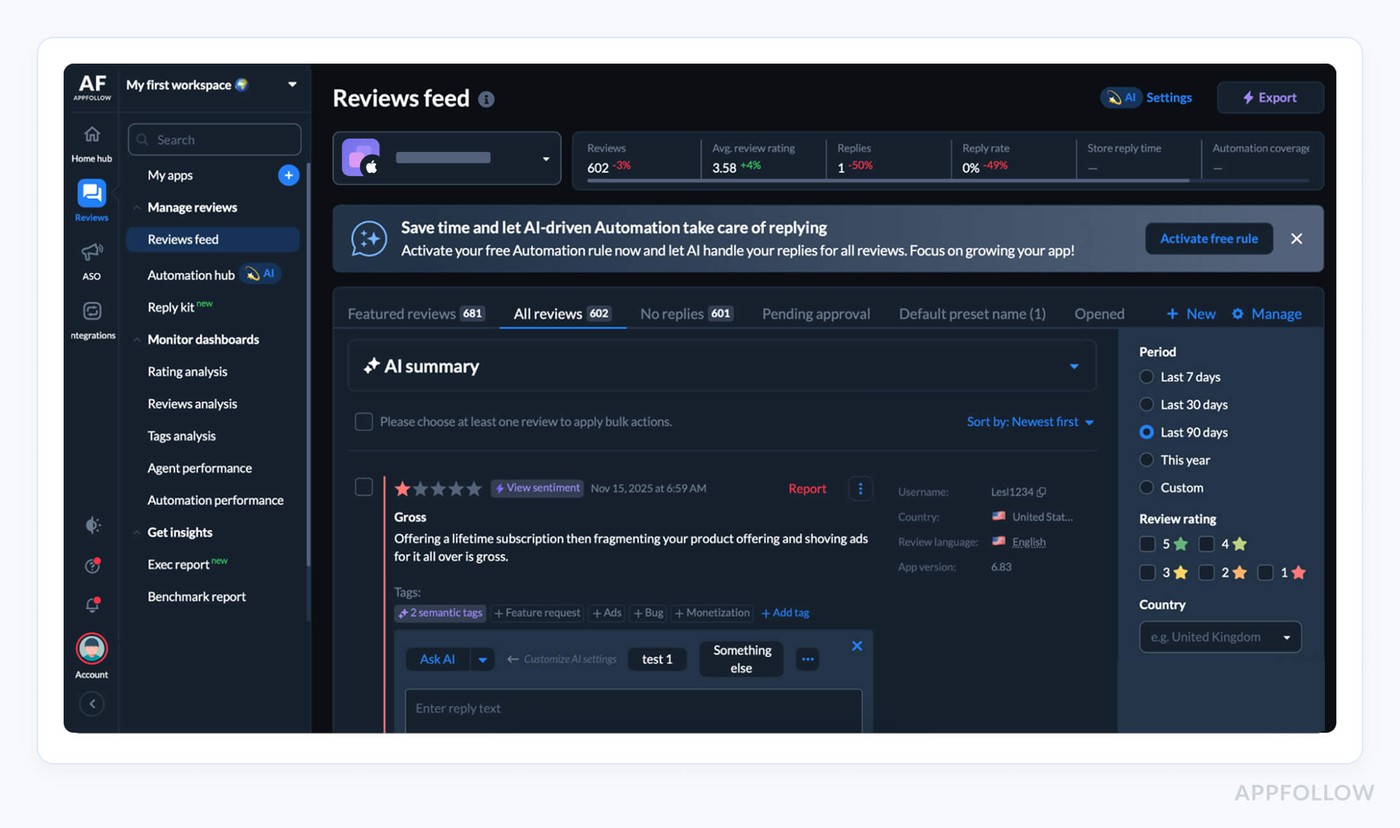
AppFollow is the strongest fit when Google Play review management is already a daily workflow.
The platform gives teams a shared inbox for reviews, AI-assisted replies, review tags, sentiment analysis, alerts, and reporting across apps, stores, countries, and versions. That matters when negative reviews are not just “feedback” anymore, but signals tied to releases, bugs, support delays, pricing changes, ads, or localization issues.
A practical workflow looks like this: support opens a saved queue for new 1- and 2-star Google Play reviews. Reviews are filtered by country, app version, language, reply status, and topic. AI drafts a reply using the team’s tone and approved templates. An agent reviews it before publishing. Product gets tagged issues like crashes, login loops, payment errors, or subscription complaints. ASO can check whether rating movement lines up with visibility, conversion, and competitor changes.
AppFollow is especially useful for teams that need review work to move across departments. Support can reply faster. Product can see recurring complaints. ASO can track rating health. Managers can monitor backlog, response speed, and sentiment without rebuilding reports in spreadsheets.
With G2 and Capterra ratings around 4.6/5 and “Leader” badges to match, its edge is enterprise-scale automation that still feels surprisingly friendly to small teams. And yes, it works across all Google Play storefronts and locales worldwide.
Features
- Unified Google Play review inbox with ratings, replies, and beta feedback in one place.
- AI-generated reply suggestions in any language, plus one-click improvements and tone control.
- Auto-tags and semantic analysis to cluster bugs, feature requests, and UX issues at scale.
- Powerful filters by stars, keywords, country, device, version, or query to prioritize queues.
- Direct reply from Slack, Zendesk, Salesforce, email, or help desks via deep integrations.
- Beta review monitor to capture and respond to testing feedback before it hits production.
- Automation rules to route complaints, flag “report a concern” cases, and track agent KPIs from Google Play reviews.
Pricing
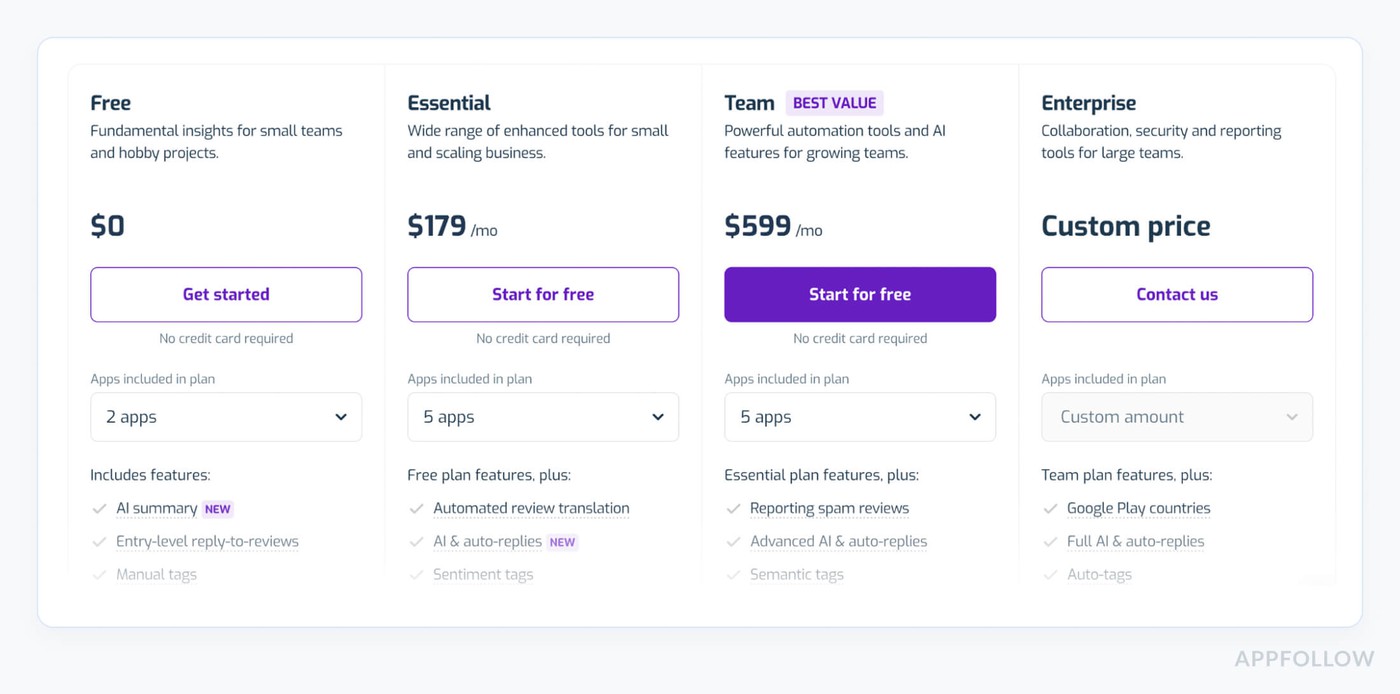
Think of AppFollow’s pricing as a slider. Plans scale with how many apps you track, seats for support, and how much AI, data history, and integrations you switch on. Paid tiers start around $179/month and top out near $599/month, plus a Free $0 tier and a 10-day trial.
For Apple App Store, which works with 1–5 support users, their own benchmarks put you in roughly the $179–$559/month band for Google Play Store review management software.
Pros from G2 and Capterra
- Centralized Feedback Hub: "Ease of use to consolidate all users' feedback about the apps on both App Store & [Google Play], get updated frequently with very little lag time (about 1 day)".
- Unified Reply & Export: "AppFollow… centralizes all app store optimization and user feedback management in one platform… Downloading and exporting the data from these different app stores, also being able to reply to the many comments, all in the same place."
- Integration with Support Tools: "AppFollow imports reviews to Zendesk. …Allows you to quickly see positive and negative reviews."
Cons from G2 and Capterra
- Difficult Android Integration: "The UI is really tricky. Connecting your app from Google Play for analytics is not easy."
- Basic Plan Limitations: "Limited number of reviews you can see on the Essential plan. Sometimes it shows errors while publishing for no reason. Also, it should send a notification if a reviewer decides to update a review."
- Pricing for Small Teams: "Pricing is a bit on the higher side, especially for smaller businesses or developers."
If AppFollow already looks like the grown-up in this lineup, give it 10 days to prove it.
Connect your Google Play and App Store apps, watch every review stream into one clean inbox, test AI replies, tags, automations, and alerts with your real volume, not demo data.
Ship faster replies. Calm 1-star storms. Show your team the before/after chart.
cta_free_trial_purple
AppTweak
G2: 4.6/5 (187 reviews)
Capterra: 4.2/5 (18 reviews)
TrustRadius: 8.8/10 (6 reviews)
Best for: ASO teams that want review management close to keyword, market, and competitor data.
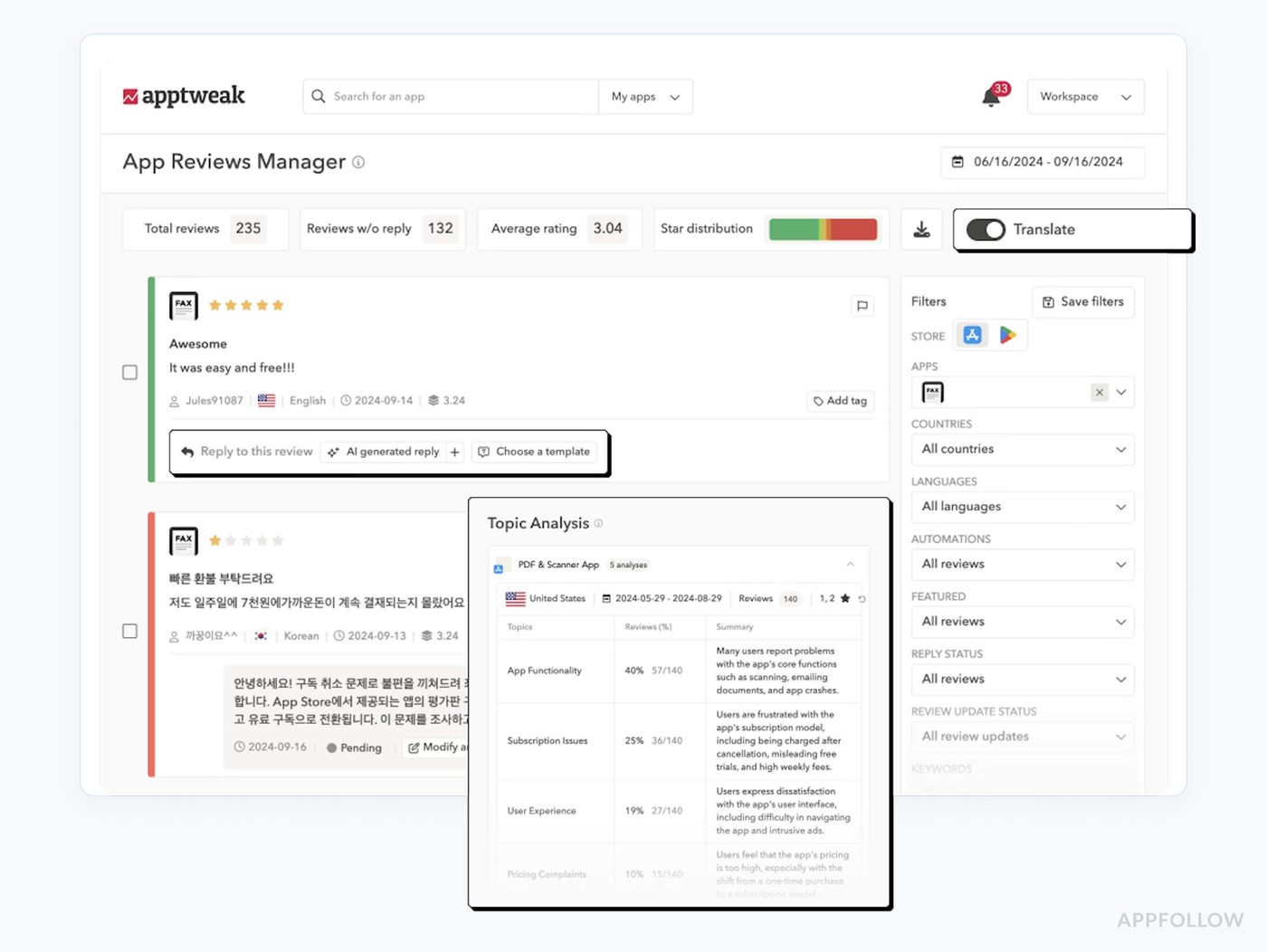
AppTweak is what you plug in when Google Play reviews start drowning your team. Brands like Amazon, EA Games, Uber, PayPal, TripAdvisor, and Adobe lean on it to track user feedback, reply fast, and spot product issues before ratings tank.
As review management software for Google Play Store teams, it pulls in reviews from 100+ country stores, enriches them with ASO data, and lets support, product, and UA look at the same truth.
Its edge: GPT-4-powered replies, automation rules, and deep sentiment/topic insights built by people who live and breathe ASO. Oh, and it’s an award-winning “ASO Tool of the Year,” so you’re not exactly betting on an unknown.
Features
- Centralized inbox for Google Play and App Store reviews across all locales and apps.
- GPT-4 review reply suggestions plus bulk and automated responses based on star rating, language, or topic.
- Sentiment and topic analysis to surface bugs, UX friction, and feature requests at scale.
- Localization workflows so local teams can reply in-language while HQ tracks global reputation.
- Integrations with Zendesk, Salesforce, and Slack, plus “reply impact” KPIs and rating-change tracking for every answer you ship.
Pricing
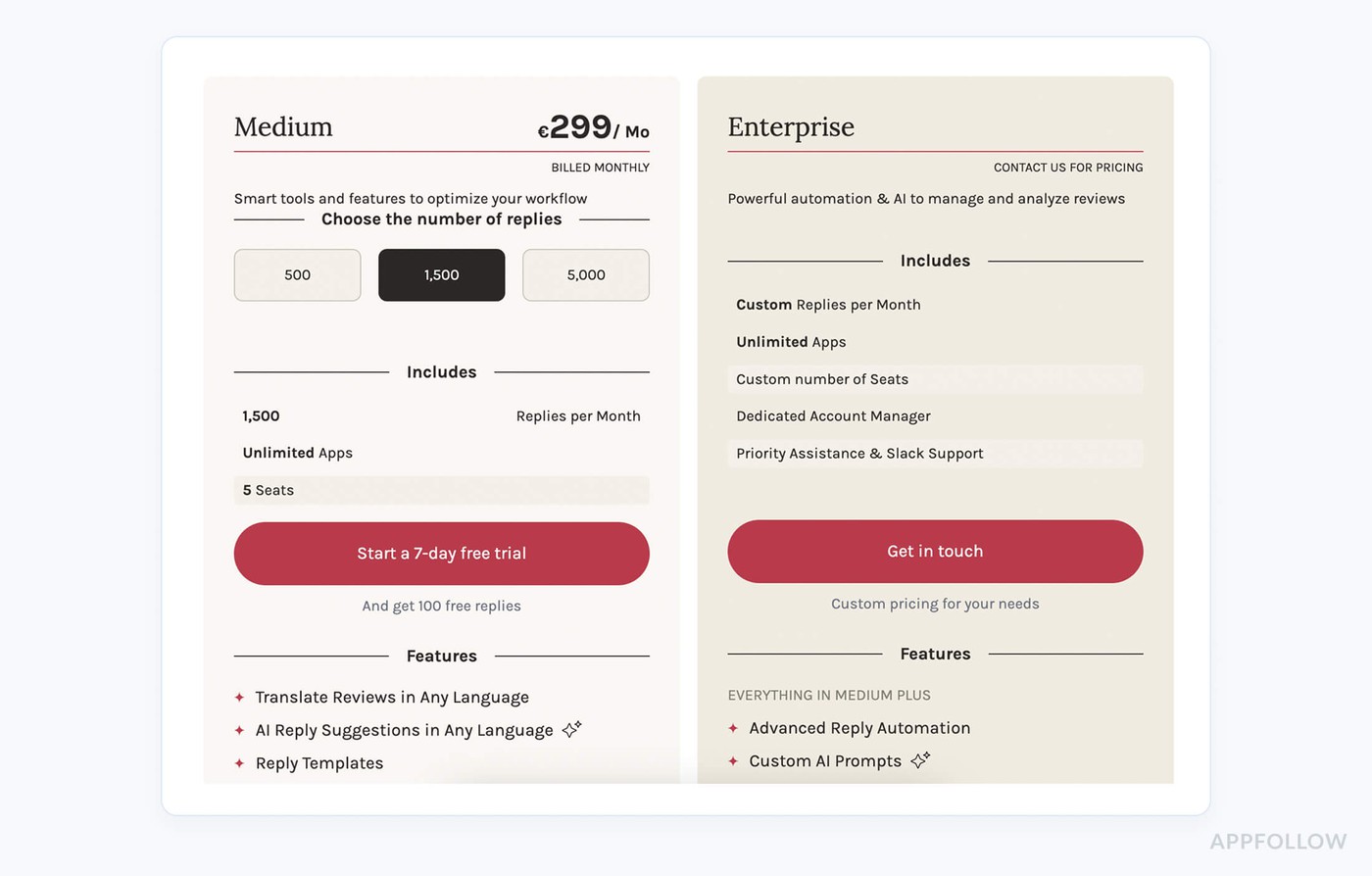
As of July 2026, AppTweak lists App Reviews Manager plans from Small at €83/month, Medium at €249/month, and Large at €833/month, with a 7-day trial.
Pros from G2 and Capterra
- Feature Gaps on Lower Tiers: "Some of the data insights can feel a bit limited unless you are on a higher tier plan."
- Onboarding Challenges: "The initial setup of AppTweak was challenging… transitioning from the trial to the paid version, during which we lost some keywords."
- Support & Policy Issues: "Support is pathetic… AppTweak team kept trying to avoid my questions… It’s as if I was downgraded while paying the same amount. AppTweak treat their customers really bad and I would never in a million years recommend them."
Cons from G2 and Capterra
- Feature Gaps on Lower Tiers: "Some of the data insights can feel a bit limited unless you are on a higher tier plan."
- Onboarding Challenges: "The initial setup of AppTweak was challenging… transitioning from the trial to the paid version, during which we lost some keywords."
- Support & Policy Issues: "Support is pathetic… The AppTweak team kept trying to avoid my questions… It’s as if I was downgraded while paying the same amount. AppTweak treat their customers really badly and I would never in a million years recommend them."
Read also: 50 positive review response examples [+15 negative cases]
Appbot
G2: 4.6/5 (18 reviews)
Capterra: 4.5/5 (2 reviews)

Appbot is that slightly obsessive teammate who reads every Google Play review so you don't have to. Brands like BMW, Twitter, Microsoft, and Deutsche Bank use it to track sentiment spikes, catch bugs early and calm 1-star storms before they tank ratings.
It pulls reviews from Google Play, the Apple App Store, Windows, and Amazon into one workspace, then runs NLP to group topics and emotions.
As a review management software for Google Play Store, its edge is deep text analysis plus Slack, Zendesk, and Freshdesk integrations, so teams reply where they already work. Awards on software review sites tell you customers stick around.
Features
- Centralized monitoring of Google Play, iOS, Windows, and Amazon reviews in one dashboard, with all countries included.
- NLP-powered sentiment, topic,s and keyword analysis tuned specifically for app reviews, so you see what drives 1- and 5-star ratings.
- Near real-time alerts and inline replies via Slack, Zendesk, and Freshdesk, so your team can respond from the tools they already use.
Pricing
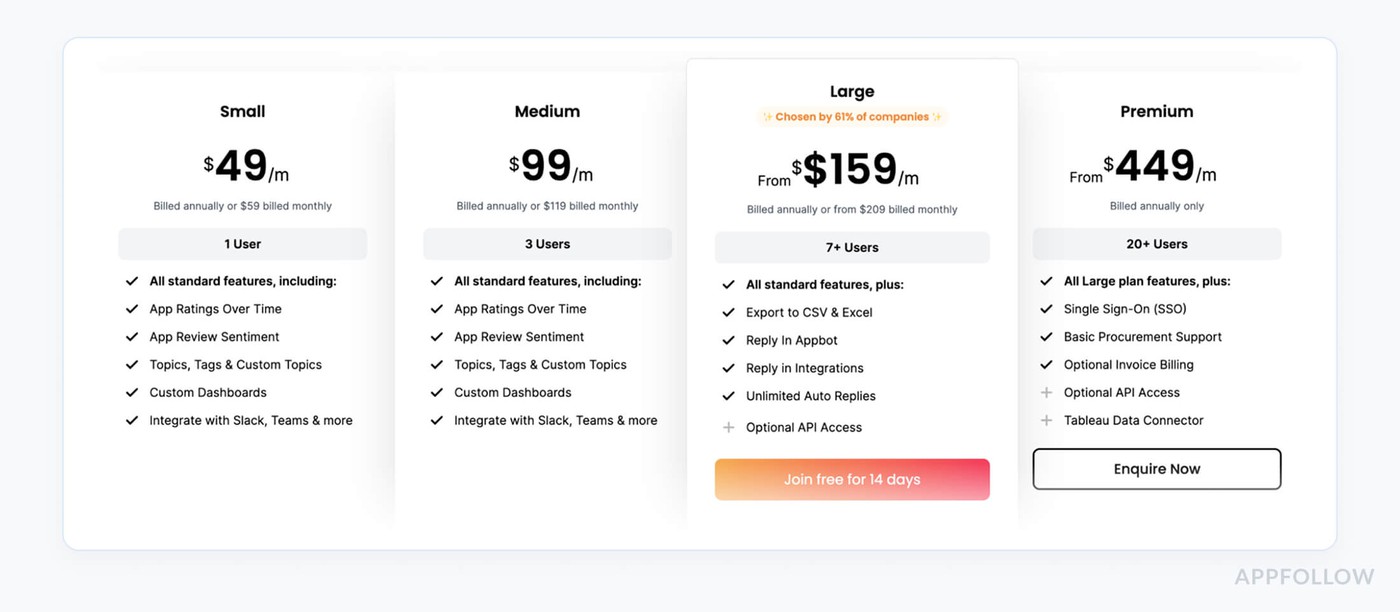
Appbot prices around three dials: users, “sources” (apps), and monthly auto-translations. Small starts at $49/month on annual billing ($59 month-to-month) for 1 user and 5 apps; Large runs from $159/month annually ($209 monthly), and Premium from $479/month for 20+ seats. With 3 app stores and a solo owner, you’re comfy at $49; a 5-person team lands you in that “from $159” band of Google Play Store review management software, after a 14-day free trial.
Pros from G2 users
- Faster Review Responses: "Easy to use… you can save templates, it makes responding to reviews faster. The app has many features, like tagging the reviews, different filters, charts, etc."
- Actionable Sentiment Insights: "Appbot is very useful for analyzing the reviews… We can see what the main pain points for users are and improve continuously... evaluate desirability of features by counting how many times it’s asked."
- Seamless Integrations: "Appbot has wonderful integrations (Zendesk, for example) and can digest and synthesize a huge number of reviews into meaningful insights. It also surprises many of our clients that they can manage their app review presence in such a comprehensive manner (as opposed to using manual interfaces within each marketplace)."
Cons from G2 users
- Imperfect Auto-Tagging: "I feel the tagging of reviews to words/topics can be better. Currently, the tagged reviews aren’t quite perfect and don't give a very clear picture of the problem at hand."
- Unreliable Sentiment Analysis: "Automated sentiment analysis… is rather hit or miss. We tend to disregard most automated sentiment analysis… If relying solely on automated analysis, we lack confidence in recommending business decisions based on the data."
- Setup Hurdles: "The initial configuration with Google Play Developer Console was pretty hectic, and we already followed the how-to, but it was managed eventually."
Read also: What Is Review Management, App Store Review Management In 2025
App Radar
G2: 4.3/5 (31 reviews)
Capterra: 3.9/5 (13 reviews)
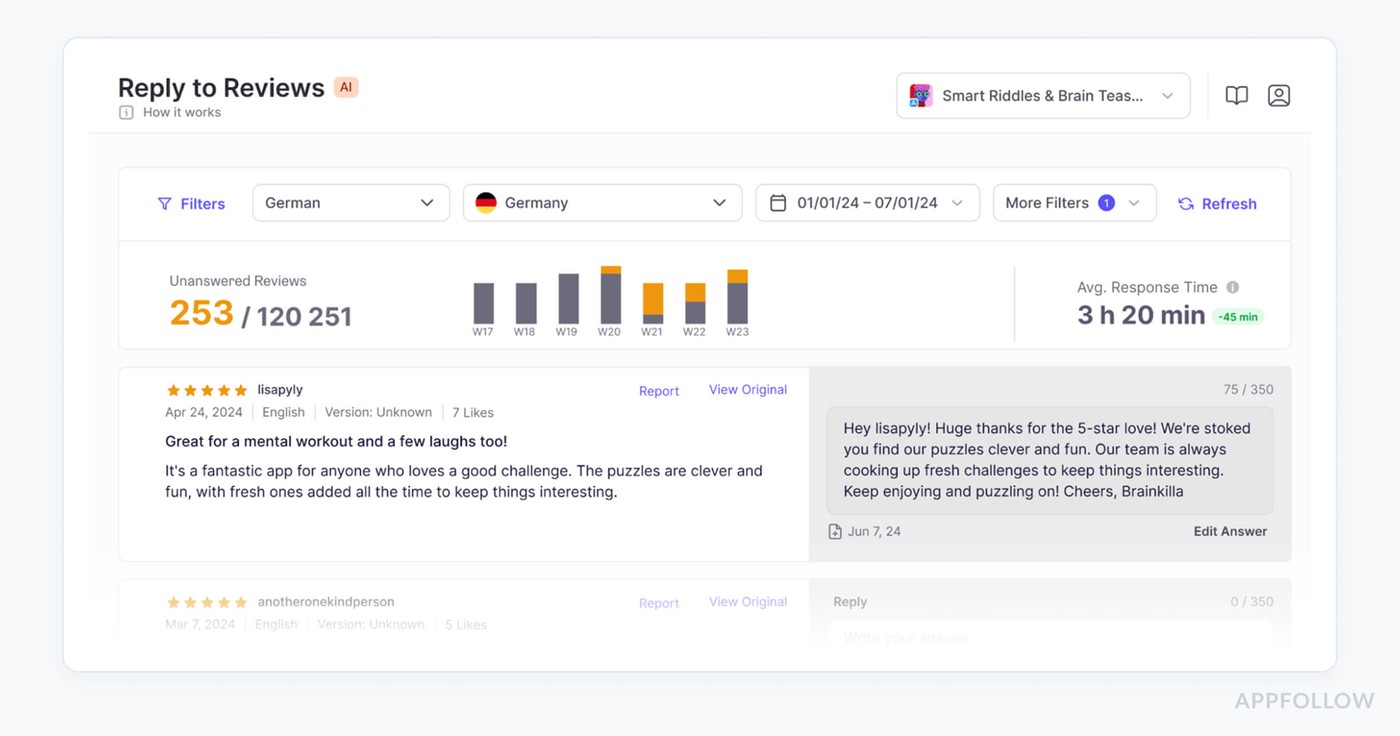
App Radar is the “ASO brain” you plug into your Google Play inbox when reviews start snowballing. Teams behind Cronometer, Kingdom Rush, iTranslate, TOGGO, and more use it to track how ratings shift after each release, reply at scale, and mine complaints for roadmap ideas on both Google Play and the Apple App Store.
It scans reviews from any Google Play country over any time frame, then turns the chaos into clean themes, and AI-written replies your support team can ship.
As review management software for Google Play Store, its edge is AI: summaries, templates, and auto-replies tuned for app marketers who live in release cycles, not spreadsheets.
Features
- AI-powered Google Play review summaries and themes.
- In-tool reply to Google Play reviews with templates.
- Bulk tagging and reporting on issues and feature requests.
- Cross-store inbox for Google Play and Apple App Store reviews.
- Localization help for replying in users’ native languages.
Pricing
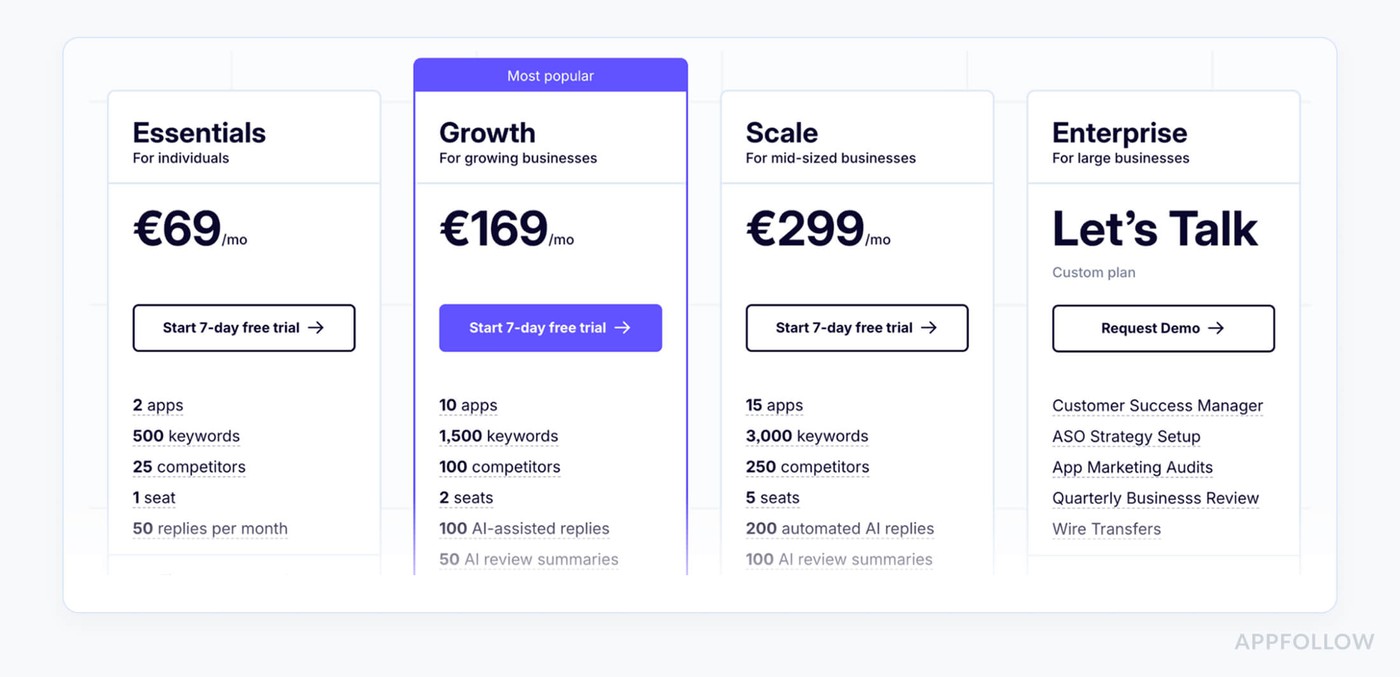
App Radar prices around footprint and volume: how many apps you track, keywords, competitors, seats, and monthly review replies. Entry tier is €69/month; the top tier is €299/month before custom enterprise deals. With 3 app-store listings and 1 support user, you’re on the €169/month middle tier; bumping to 5 users pushes you to €299/month. Tiers come with a 7-day free trial, so you can kick the tires as a Google Play Store review management software.
Pros from G2 users
- AI-Powered Review Management: "The review management tools are particularly powerful because they have AI-assisted features such as automated replies, review summaries, and customizable templates."
- Time-Saving Bulk Editor: "This tool has a wide range of features, and my favorite is the bulk editor, it saves a lot of time! …One of its biggest strengths is definitely the technical support, they always respond quickly and provide great tips."
- Continuous Improvements: "AppRadar constantly adds new features that help gain more insights… Overall, AppRadar is an excellent choice if you’re looking for an app marketing tool that’s easy to use, offers a high-quality keyword database, and includes many automation features."
Cons from G2 and Capterra
- Session Timeouts: "My only suggestion… would be to address the frequent logouts. After a short period of inactivity, I’m prompted to log in again… it would be better if the timeout were longer."
- Data Loading Glitches: "Sometimes it doesn’t load data, and you need to log in again after an hour or the next day."
- Limited Review Analytics: "I would… like to see better measurement for things like reviews & ratings… It would be good to see the effect of improving your rating."
Read also: 43 Examples and 10 Tips on How to Respond to Negative Reviews
AppFigures
G2: 4.2/5 (17)
Capterra: 4.5/5 (4)
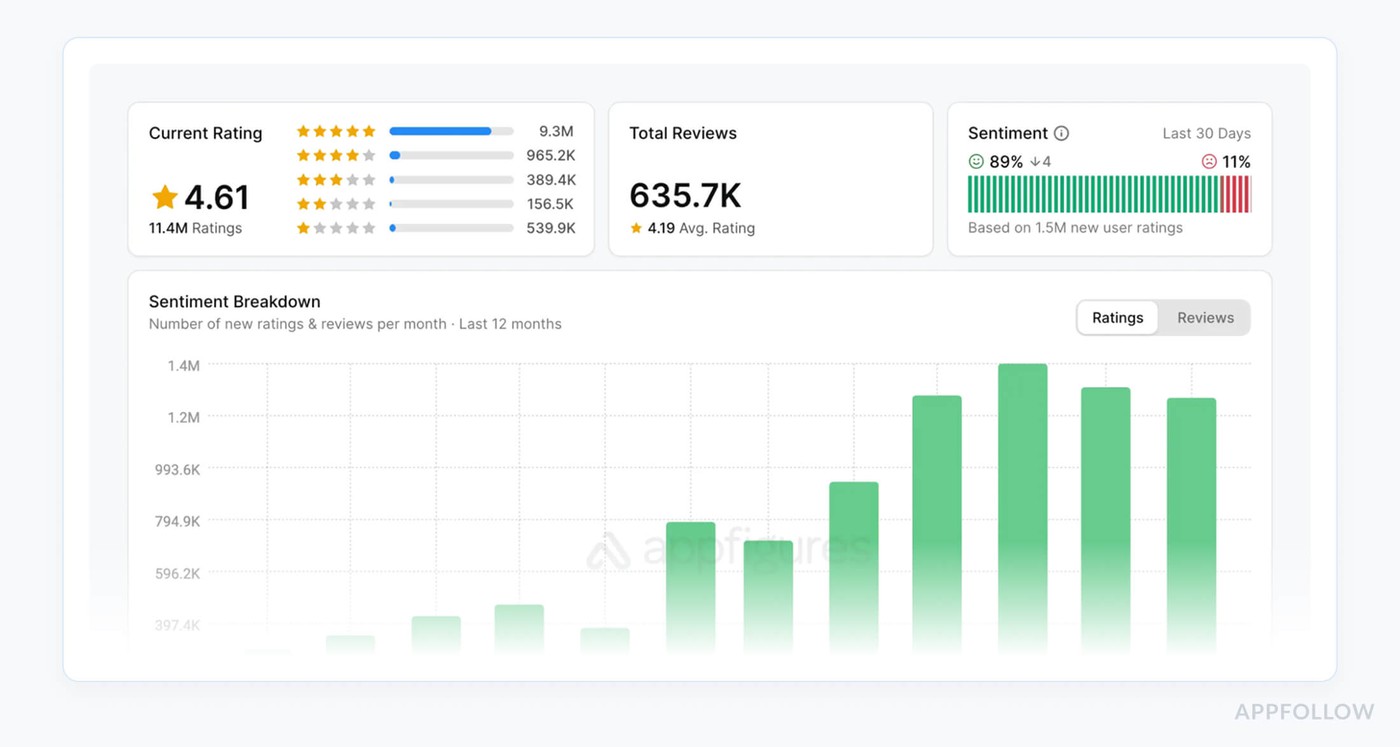
AppFigures is where your Google Play feedback lines up with your growth charts. As review management software for Google Play Store, it pulls reviews, ratings, and trends into one view so you see what users say right when installs spike or crash.
Used by 250K+ app makers, including teams behind Barclays, Trello, and Buffer, it’s where they watch Play reviews, revenue, and rankings together. It plugs into all major stores, Google Play, iOS, Amazon, Windows, Mac, and even Steam, so your Android team isn’t flying blind.
Rated 4.2/5 on G2 and 4.5/5 on Capterra, it gives you review ops plus serious market intel.
Features
- Unified inbox for Google Play, App Store, Amazon, and more, syncing reviews and ratings from all major stores with real-time filters.
- Reply to Google Play reviews directly inside AppFigures once “Reply to Reviews” is enabled in your Play Console.
- Email and Slack review alerts so your team sees new or low-star Play feedback the moment it lands.
- Competitor review monitoring to mine rival apps’ Play feedback for feature ideas, bugs, and positioning angles.
Pricing
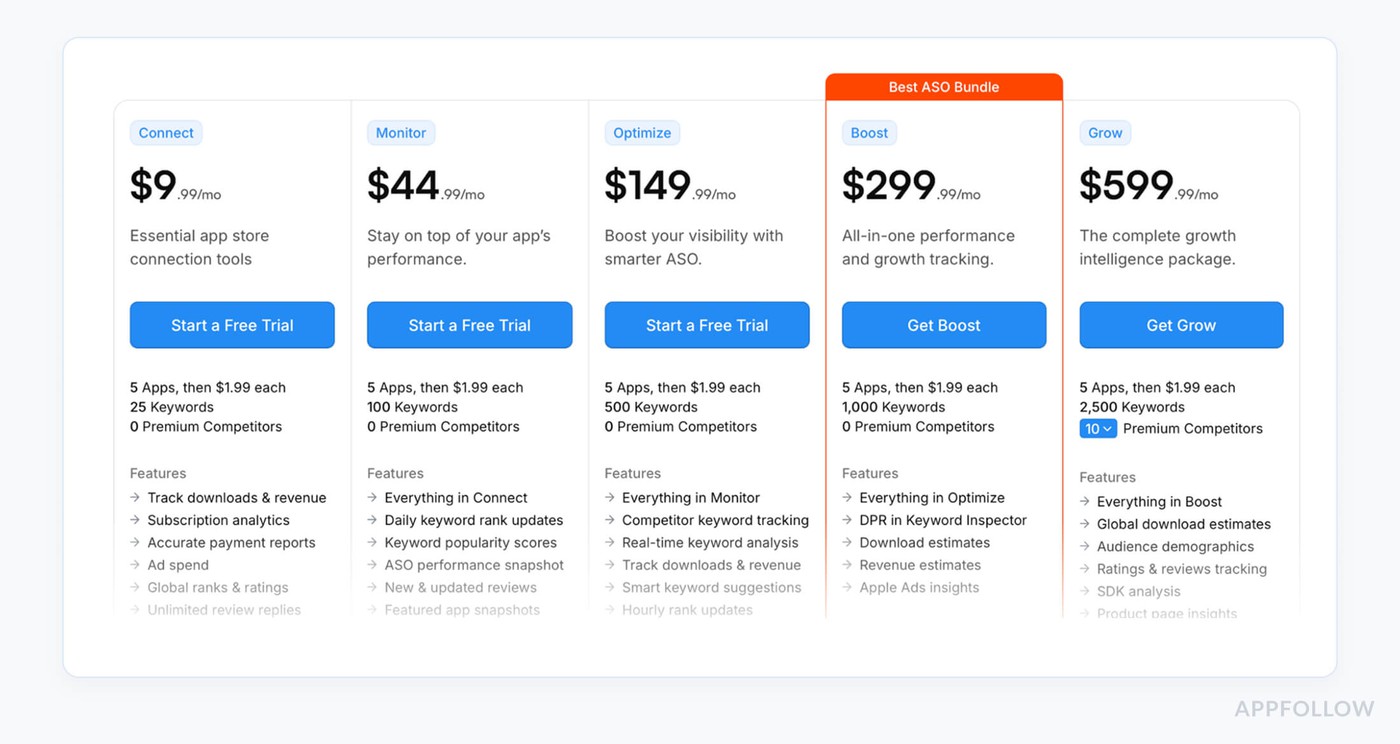
AppFigures pricing is straightforward: free Starter tier, then paid plans from $9.99/month (Connect) to $599.99/month (Grow), with 5 apps included, $1.99 per extra app, and up to 2,500 keywords.
So with 3 apps spread across stores, you’re still within the base 5-app allowance, paying $9.99 on Connect or $599.99 on Grow, whether you have 1 or 5 users.
Plus a 14-day free trial to try it as your Google Play Store review management software before you pay.
Pros from G2 users of AppFigures review tool
- Unified Dashboard: "I like being able to have one consolidated place to see performance across all the different app store listings. The UI is easy to navigate, and it’s one of the most helpful tools when I want to scan recent reviews and summarize user issues."
- Direct Review Replies: "It is very easy to navigate. I can also respond to app reviews in Google and Apple App Store directly from it, and I can easily extract reports that I can use to create more customized dashboards."
- Version-Specific Insights: "I mainly use Appfigures to look at all our app store reviews in one place… I can see what the main issues are by version number, so that our engineering team can work on the necessary fixes."
Cons from G2 users of AppFigures review tool
- Limited Filtering & Customization: "I wasn’t able to filter the data according to our specific requirements. There are a lot of filters available, but I could not find exactly what I was looking for, nor customize the dashboard display."
- Data Accuracy Issues: "Some charts are not accurate… the Overview section does not accurately report the number of app downloads in the given timeframe. Also AppFigures does not accurately pull in rating information for our Amazon Appstore listing."
- Steep Learning Curve: "Appfigures provides many features, which makes it a bit complicated for newbies to absorb at the first go. However, if you stick with it for a few days… it will be all good and pleasing!"
Read also: 12 Best Customer Review Management Software We Love [Pros & Cons]
Google Play Console vs review management software: when to upgrade
Google Play Console is enough when review work is small. One person opens reviews, replies to a few users, passes the occasional bug report to product, and moves on.
The workflow breaks when reviews become operational.
A new version gets a crash spike. Support is answering the same subscription complaint in five languages. Product wants proof that the fix worked. ASO wants to know whether rating movement came from new reviews, updated reviews, or a campaign. At that point, Play Console starts acting like a mailbox.
A review management tool should give the team more than a prettier inbox.
The useful setup looks like this: new 1- and 2-star reviews land in a shared queue. Agents filter by country, language, app version, device, rating, reply status, and keyword. AI drafts the first reply using approved tone and support links. An agent approves or edits the reply. Reviews about crashes, login, payments, ads, subscriptions, refunds, or abuse get tagged automatically. Severe issues move to Zendesk, Slack, Salesforce, Jira, or email with the full review context attached.
That context changes the conversation. One angry review is feedback. Fifty new 1-star reviews from one app version, one device family, and one country is a release issue.
Use Play Console if review volume is low and one person owns replies. Upgrade when you manage several apps, markets, languages, support agents, or response SLAs.
| Use Play Console when... | Use review management software when... |
|---|---|
| One person checks reviews manually. | Several agents need one shared queue. |
| Review volume is low. | Reviews arrive across countries, languages, versions, and devices. |
| You only need basic replies. | You need AI drafts, tags, routing, alerts, reports, and approvals. |
| Product rarely asks for review data. | Product, QA, ASO, and support all need review insights. |
Comparison table of Google play store review management software
Legend:
✔ = strong / built-in
▲ = available but more limited / add-on
X = the tool doesn’t support this feature
Feature / Tool | AppFollow | AppTweak | Appbot | App Radar | Appfigures |
Direct Google Play Console integration & in-tool replies | ✔ | ✔ | ✔ | ✔ | ✔ |
Unified inbox across apps, countries & stores | ✔ | ✔ | ✔ | ✔ | ✔ |
Granular filters (stars, country, language, device, OS, app version, date) | ✔ | ▲ | ▲ | ▲ | ▲ |
Tags & automation rules (auto-tagging, routing, priorities) | ✔ | ✔ | ▲ | ▲ | ▲ |
Reply engine (templates, AI assist, translations, bulk workflows) | ✔ | ✔ | ✔ | ✔ | ▲ |
Integrations with support/BI tools (Slack, Zendesk, Salesforce, etc.) | ✔ | ✔ | ✔ | ▲ | ▲ |
Review analytics tied to releases / versions / reply impact | ✔ | ✔ | ▲ | ✔ | ▲ |
Roles, permissions & team workflows (who can reply, audit trail, etc.) | ✔ | ▲ | ▲ | ▲ | ▲ |
Quick read on what’s going on underneath:
- AppFollow and AppTweak hit almost every checkbox for Google Play workflows: deep filters, tagging + rules, AI replies, and strong analytics around ratings and replies.
- Appbot leans hard into sentiment/topic analysis and integrations (Slack, Zendesk, Tableau), but its automation/routing and release-level analytics are a bit more lightweight.
- App Radar brings AI review replies, templates, tagging, and review analytics wired into ASO, but relies more on Slack/email alerts than full helpdesk integrations.
- Appfigures is strongest on cross-store analytics and filters (rating, version, country) with translation and direct replies, while automation, tagging, and reply tooling are more basic compared to the others.
Drowning in tools, still unsure what to pick?
Book a live session with our ASO experts, tell us your apps, markets, and review headaches, and we’ll walk you through exactly how we’d set up your stack—keywords, reviews, alerts, automation—the whole thing. No generic slide deck. Your data. Your goals. Your plan.
cta_demo_request_purple
FAQs
1. Do I really need a separate tool, or is Google Play Console enough?
Play Console is fine until volume hits. Once you juggle multiple apps, countries, and releases, you need one inbox, automation, and analytics. The tool pays off the moment you stop copy-pasting reviews into Slack and spreadsheets.
2. What are the non-negotiable features for serious Play review ops?
Direct Play integration, unified inbox, granular filters (version, device, country), tags + rules, templates/AI replies, and integrations with your helpdesk. If any of those are missing, you’ll feel it within a month.
3. How do AI reply suggestions help my team?
They turn a blank page into a first draft. Good tools adapt tone, support multiple languages, and learn from your templates. Agents still approve replies, but volume jumps without quality dropping.
4. How should I think about pricing – what really drives the cost?
Look at three levers: number of apps, number of seats, and monthly review volume or replies. Cheap plans often cap one of those. Always sanity-check pricing at your future scale, not just today’s.
5. Is it safe to let a vendor handle my reviews and data?
You want SSO, role-based permissions, audit logs, and a clear data policy. Also check who can publish replies, how access is revoked, and whether they’re using official Play APIs. Security and governance matter once more than two people are touching reviews.