ASO in Claude: keyword research with the AppFollow MCP

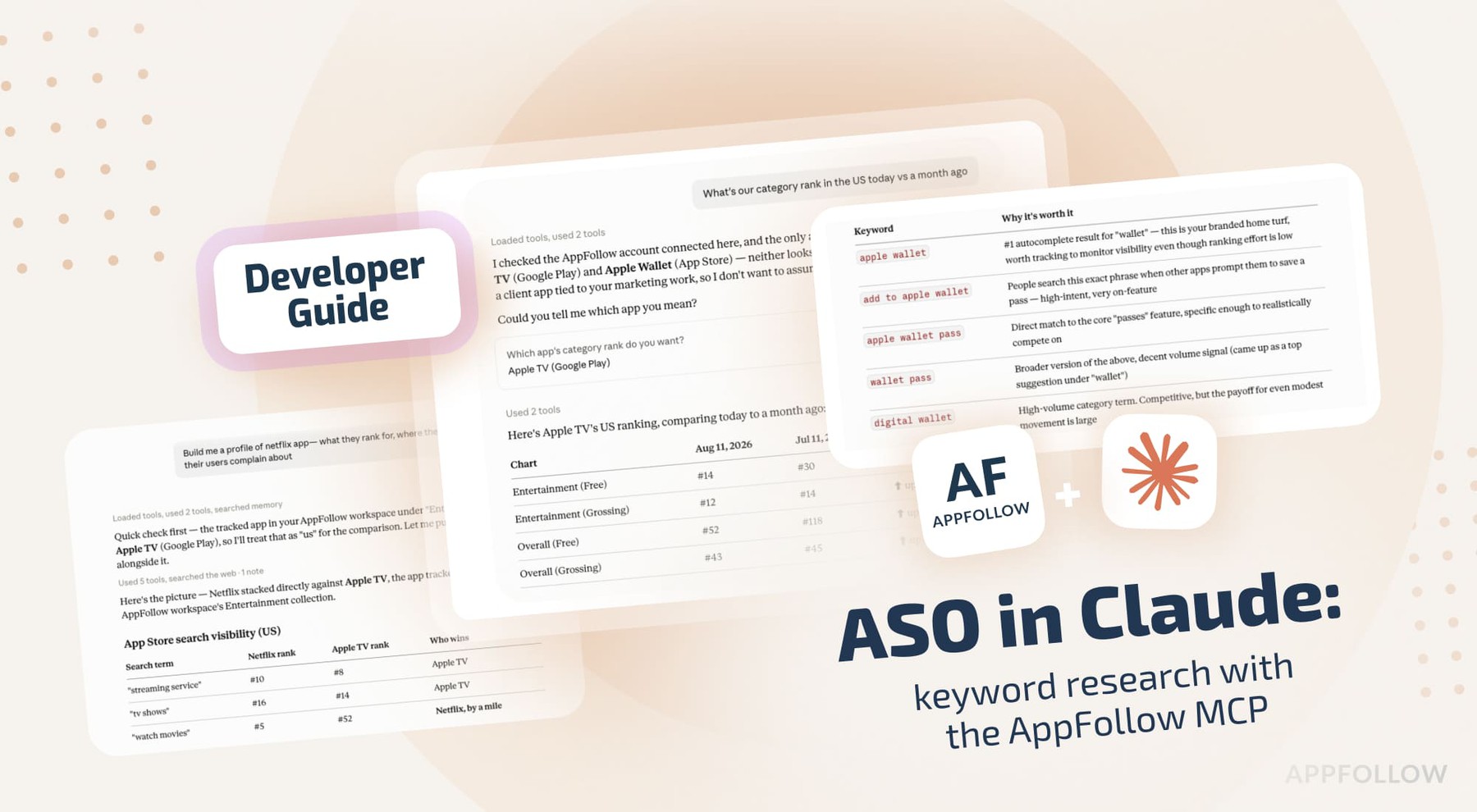
Table of Content:
- Connect the AppFollow MCP server to Claude
- Start every session by listing your apps and workspaces
- Keyword research: build a list worth tracking
- Diagnose a drop
- Rewrite the title and subtitle
- Check whether any of it moved installs
- Profile a competitor
- API credits, permissions, and limits
- Next in the series
- FAQ
Keyword research eats an afternoon and produces a spreadsheet nobody opens again. Truly a classic. Autocomplete suggestions come from one place, tracked positions from another, and then you check who's ranking above you by typing the term into a phone. By the time the list is finished, half the reason you built it has expired.
The AppFollow MCP server puts that data inside Claude. You ask in plain language, Claude calls the AppFollow API under your own login, you get the answer in the chat. Around 30 tools, covering reviews, ratings, rankings, keywords, and ASO data. This piece is about the ASO half (the other four in this series go through product, engineering, support, and portfolio work - more to come!).
Connect the AppFollow MCP server to Claude
In Claude.ai or Claude Cowork: Settings, Connectors, Browse connectors, search for AppFollow, connect, sign in with the Google account tied to your AppFollow login. You need Owner or Admin rights on the AppFollow side. There's no API key to copy anywhere.
In Claude Code:
claude mcp add --transport http appfollow <a href="<a%20href=" https:="" mcp="" mcp.appfollow.io="" target="_blank">https://mcp.appfollow.io/mcp</a>
Then" class="redactor-autoparser-object">https://mcp.appfollow.io/mcp run /mcp and finish the Google sign-in.
If you're working in Claude Code or Codex, install the AI Toolkit instead of the bare connector. Same MCP server, plus guided workflows, including an /aso-analysis command that runs the whole keyword and metadata pass and hands back an HTML report:
/plugin marketplace add AppFollow/appfollow-ai-toolkit/plugin install appfollow-ai-toolkit@appfollow-ai-toolkit
It's open source under Apache 2.0, so you can read what each workflow does before you run it.
Start every session by listing your apps and workspaces
First question of any session: "What apps and workspaces do we have?"
Every other ask starts by turning "our app" into a store ID and a country, and this is where that comes from. You get each workspace with its app count, then each app with store, store ID, country, current version, and publisher. Both calls are cheap in credits, so it beats letting Claude guess which of your six titles you meant.
While you're there, ask which of your apps are tracked on one store but not the other. Almost always an accident from whoever set the account up.
Keyword research: build a list worth tracking
"Find keywords we should be tracking for our iOS app in the US, and tell me which ones are worth the effort."
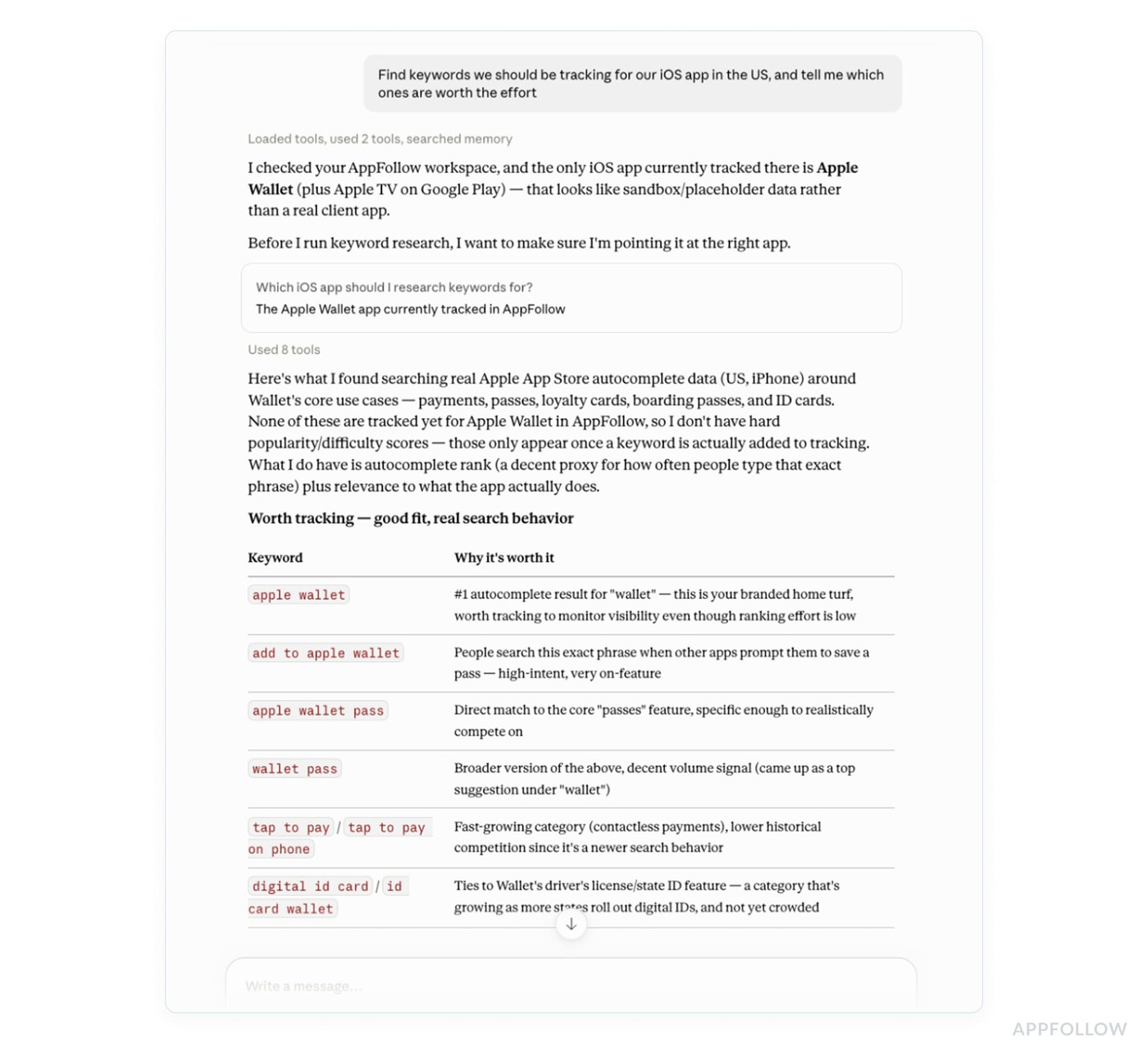
Claude pulls live App Store autocomplete around your seed terms, then the current top 10 for each suggestion so you can see who you'd be fighting. For terms already in your tracked set, it adds AppFollow's popularity, difficulty, and effectiveness scores next to your current position. What comes back is a shortlist split into three buckets: start tracking now, watch, and not at your current rank.
Approve the shortlist, and Claude writes it to tracking. Every write goes through a preview step first, so nothing lands in the account before you've read it.
Other phrasings that work:
- "What does the App Store suggest around 'budget planner' in the US and the UK?"
- "Who ranks top 10 for 'expense tracker' on iPhone in the US right now, and which of them aren't in our competitor set?"
- "Which apps ranking above us for our core terms aren't tracked as competitors yet? Add the top three."
- "Add these 12 keywords to tracking for US iPhone."
Diagnose a drop
"What's our category rank in Photo & Video in the US today vs a month ago?"
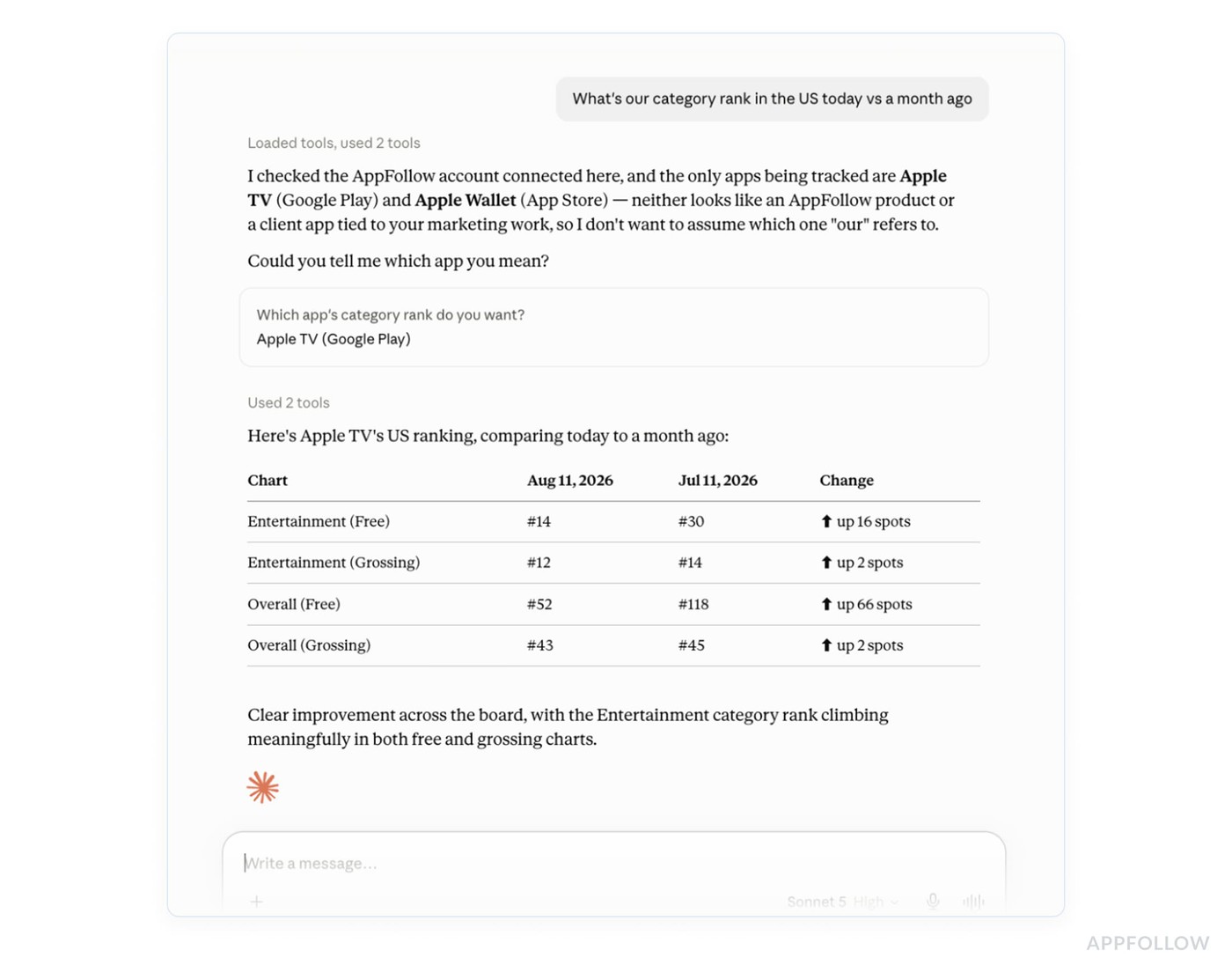
Claude compares your tracked position on the term before and now, pulls the live search results as they stand today so you can see who moved into the slots above you, and checks your category rank on both dates.
A category-wide reshuffle means you wait and watch. One competitor overtaking you means you go read what they shipped.
Follow-ups:
- "Compare tracked positions today vs 14 days ago for US iPhone, and list every keyword that lost more than 5 places."
- "Which tracked keywords gained the most this month, and which of those carry the highest popularity scores?"
- "For the five keywords we lost most on, show me who's ranking above us now."
Rewrite the title and subtitle
Paste your current metadata into the chat and ask for a rewrite.
Claude builds two or three options per field from your tracked keywords with an effectiveness score above 20, which is AppFollow's threshold for a term that earns a character slot. It de-duplicates across fields so you don't spend characters twice on the same word, counts every option against the limit, and shows the reasoning behind each pick so you can push back on it. Since it has your current metadata, it also diffs against it and names the high-effectiveness terms you're not using yet.
Claude doesn't touch your store listing. You take the winner into App Store Connect or Play Console yourself. Works the same way for a Google Play short description, or for a German keyword field built off DE autocomplete when you're opening a new market.
Check whether any of it moved installs
Positions tell you where you rank. They say nothing about whether the rank change brought anyone in.
Connect App Store Connect and Google Play Console to AppFollow, and Claude gets the two ASO report tools, get_aso_report_app_store and get_aso_report_gdc_google_play, which put first-party install data next to the ranking data. The Google Play side reads console numbers, worldwide and per country, so you're working with real installs rather than public estimates.
"Pull the ASO report for the last 30 days, split installs between search and browse, and line it up against our keyword movements."
Browse installs come from charts, featuring, and category placement. Search installs are the ones your keyword work can touch. Read them as one number, and you can't tell which of your two jobs is working.
This catches two potential failures that rank tracking hides on its own:
- Positions climbed, search installs…flat. You won terms nobody searches for, or you won them somewhere that doesn't convert. Go back to the popularity scores on the terms you gained.
- Positions held, search installs fell. That's a conversion problem. Look at screenshots, icon, and the first line of the subtitle.
The report also carries conversion rate against your category average, ranked keyword count, search impressions, and the countries where your search visibility is strongest. If downloads-by-keyword is activated on your account (an account manager turns it on), you can go one level further and ask which specific terms brought the installs, which is the only version of this question that ends an argument.
Without the console connection, everything earlier in this article runs on still. Positions, live search results, suggestions and scores all come from AppFollow's own data. The install side is the part that goes missing.
Follow-ups:
- "Which countries have the strongest search visibility for us right now, and how does each one convert against the category average?"
- "Search installs vs browse installs for the last 90 days, by month."
- "Our conversion rate vs the category average, and how it moved after shipping 6.2."
Profile a competitor
"Build me a profile of (competitor). What they rank for, where they beat us, and what their users complain about."
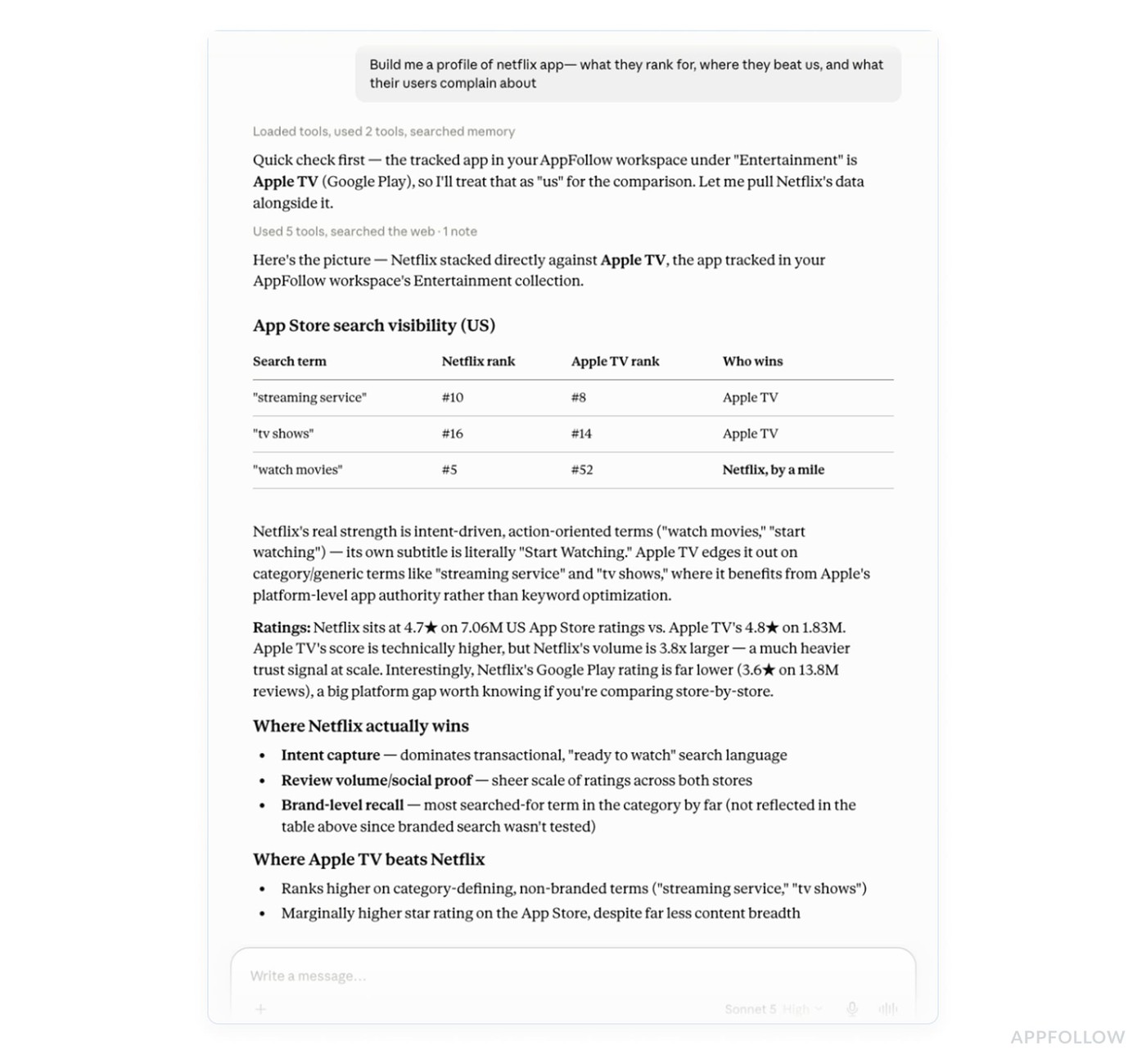
The rankings half is what you'd expect: their position on every keyword you track, scored next to yours, so the answer names the exact terms where they're ahead and by how much. Plus the live top 10 for your core terms, which usually surfaces two or three apps in your category you aren't tracking yet.
Recurring complaints in a competitor's reviews, with quotes, are a list of promises you can keep and they currently can't. That belongs in your subtitle and on your first two screenshots.
API credits, permissions, and limits
Every tool call is billed to your workspace API credits at that method's normal rate. There's no separate charge for the connector or the toolkit, and both work on any plan, though which methods you can reach depends on your subscription. Ask Claude for your balance with get_credits if you're deep into a long session.
Claude sees only what your AppFollow permissions already allow, and it publishes nothing to any store. Keyword tracking is the only ASO write, and it needs your approval.
Do note: AppFollow is listed as a community connector. It's been through automated review and it isn't verified by Anthropic, which matters if your company has a policy about that.
Next in the series
Part two goes through the product manager's version of this: release health checks, feature request mining, and pulling monetization sentiment out as its own feed.
cta_get_started_purple
FAQ
What is the AppFollow MCP server?
A remote MCP endpoint at https://mcp.appfollow.io/mcp that gives an AI client access to your AppFollow account. Around 30 tools covering reviews, replies, ratings, rankings, keywords, ASO data, apps and workspaces. It works with Claude, ChatGPT, Codex, Cursor and GitHub Copilot.
Do I need an API key?
No. Authentication is Google OAuth, using the account tied to your AppFollow login. Access is scoped to that account and to the permissions it already has.
Which ASO tools does Claude get?
Live search results and search suggestions, featured apps, search ads recommendations, tracked keyword lists and rankings, category rank, the App Store and Google Play ASO reports, and keyword adds with a preview step.
Can Claude change my App Store or Google Play listing?
No. It drafts metadata and counts characters against the limits, and you paste the result into App Store Connect or Play Console yourself. The only write it makes is adding keywords to tracking inside AppFollow, and that needs approval first.
What is the ASO report connection and do I need it?
It's the link between AppFollow and your App Store Connect and Google Play Console accounts. With it, Claude can pull first-party install data: the split between search and browse traffic, conversion rate against the category average, search impressions and ranked keyword counts by country. Without it you still get keyword positions, live search results, suggestions and effectiveness scores. You just can't see whether a ranking change moved installs.
Does it use my AppFollow credits?
Yes. Each call runs through the public API and is billed to your workspace at that method's rate. Costs vary per method. Check the balance with the get_credits tool or from the MCP token section of your API dashboard.
Do I need the AI Toolkit or just the connector?
The connector alone is enough for everything in this article. The toolkit adds guided workflows and slash commands like /aso-analysis, which produce the same report shape every time and ship as files. It runs in Claude Code and Codex.
Who can connect it?
You have to be an Owner or Admin of the AppFollow account.
Which stores does the data cover?
App Store, Google Play, Mac App Store, Microsoft Store, HUAWEI AppGallery, Samsung Galaxy Store, Steam and Trustpilot. ASO tools cover the App Store and Google Play.