21 Mobile App Performance Metrics Behind App Store Success

Table of Content:
- Mobile app performance metrics examples: what to measure first
- Application acquisition & visibility metrics
- Downloads & conversion metrics
- Reviews & ratings metrics
- Competitive intelligence performance metrics
- Which of these mobile app performance metrics are must have?
- How to start measuring app performance analytics with AppFollow
- FAQs
Your mobile app has a clean crash dashboard. No new latency alerts, no rollout failures. Still, search downloads in Spain are down for the second week running. Is it a discovery problem, a store-page conversion problem, or just a paid campaign winding down? Those are three different investigations.
Mobile app performance metrics give ASO, growth, product, and support teams a way to separate them. A ranking change tells you where visibility moved. Channel downloads tell you whether that mattered for acquisition. Recent reviews tell you what people are experiencing. None of these numbers is a diagnosis on its own.
This guide focuses on app store performance metrics for the App Store and Google Play, not engineering APM for latency, CPU, crashes, or memory. You'll find 21 application performance metrics examples, including where to check them in AppFollow, what to compare them against, and the decisions they can actually support.
Mobile app performance metrics examples: what to measure first
Before opening twenty-one charts, pin down the question. Here's the short list I'd bring to an ASO and product weekly review.
| Question | Start with | Cross-check | Decision |
|---|---|---|---|
| Why are search downloads down? | Search downloads by store and country | Keyword positions, Search Visibility Score, channel mix | Investigate discovery or conversion before touching metadata |
| Did the screenshot change help? | Product-page conversion for the same market and source | Impressions versus page views, test dates, ratings | Keep, rerun, or reverse the creative experiment |
| Did the release hurt trust? | Recent 1–2-star ratings and recurring review themes | App version, crash reports, support tickets | Give product a specific issue and an owner |
| Are our replies helping? | Reply Effect, response coverage, reply time | Updated reviews and continuing complaints | Improve macros or fix the underlying issue |
| Are competitors taking discovery? | Overlapping keyword positions | Compare Discovery, Compare Meta, localization | Prioritize an ASO test in the affected country |
One boundary matters: technical application performance monitoring answers whether the app functions reliably. App store metrics answer whether people find and install it, and what reviewers say about the experience. Put both views together for a release investigation; don't ask an ASO dashboard to diagnose server latency.
Application acquisition & visibility metrics
The first question is whether discovery changed. Check keyword search visibility, category rankings, and store featuring alongside acquisition by country. Chart positions are relative; downloads are not. Mixing them up is how teams claim an ASO win that was really paid traffic.
Category rankings show where the app sits against other apps, keyword rankings show where it appears for a query, and featuring marks exposure on a store surface. They explain different parts of the same acquisition chart.
Here is how to tell which signal is useful, and which one just looks good in a report.
Read also: How to Read App Ranking Analytics and Find Growth Gaps
Top chart rankings (free, paid, grossing, trending)
Top-chart ranks are relative positions. Around a launch, they tell you whether your app is climbing a particular category and country, but they cannot tell you how many installs that climb generated.
AppFollow tracks available Free, Paid, and Top-Grossing charts across supported stores and countries. Stores do not publish a universal chart-position-to-install formula. Treat the leaderboard as an event to investigate, not a forecast.
If the chart moved during a paid UA burst, put the dates beside channel downloads and Search Visibility Score. Don't assume higher rank means better conversion.
For example, if your game rises from #180 to #30 during an acquisition campaign, compare Search, Browse and paid activity before presenting an organic uplift number. A chart jump alone can't separate them.
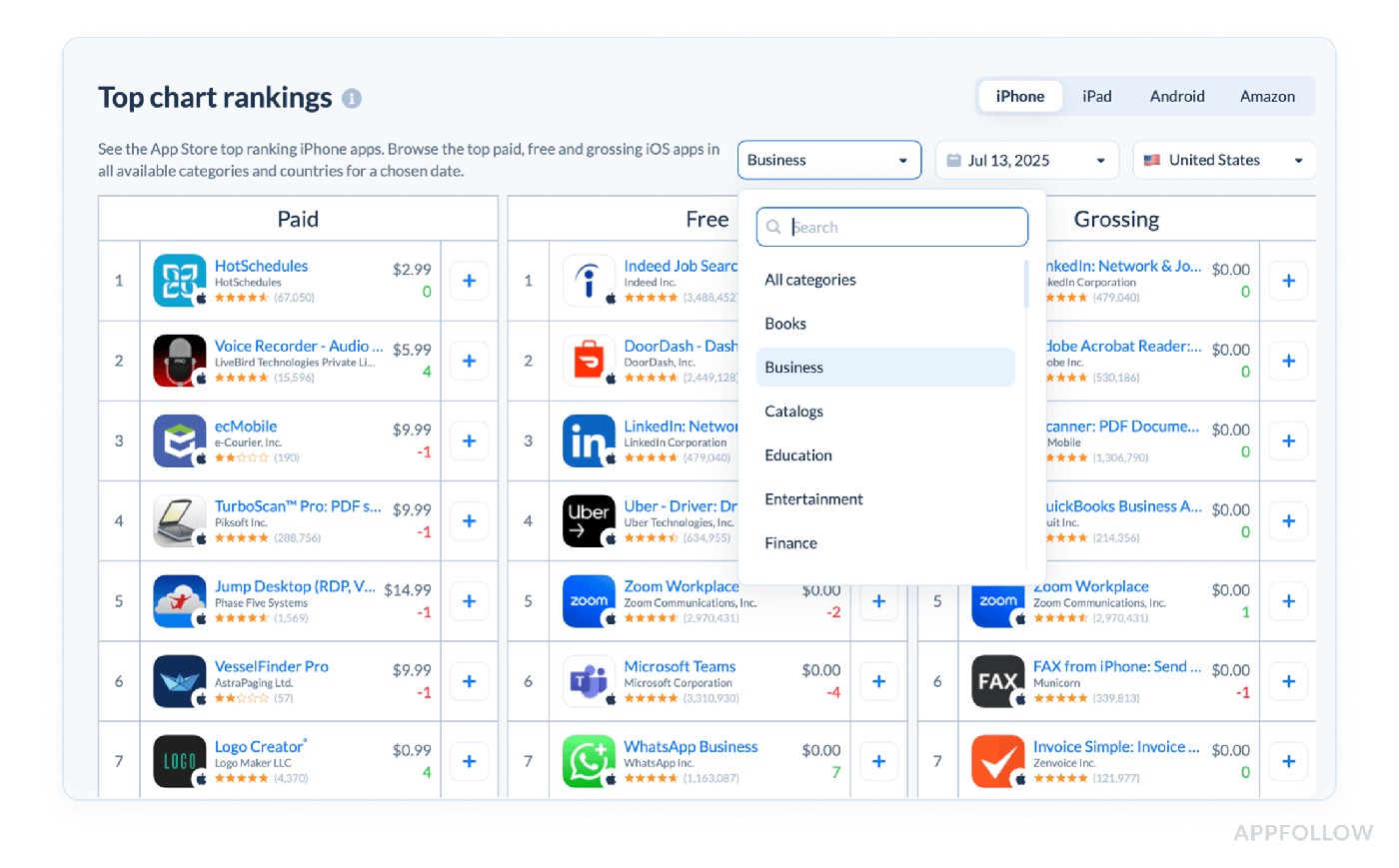
Top chart rankings in AppFollow. Test it live with a 10-day trial.
How to work it
- Fix the view. Compare the same store, category, country and dates.
- Mark campaign and featuring dates. They can explain chart movement without a metadata win.
- Split acquisition by channel. A paid spike is not the same as stronger store Search.
- Set a threshold from your baseline. A ten-position change matters differently in a volatile games category and a quiet niche.
For planning: estimate the relationship between chart rank and organic installs from your own category/country history. A top-50 rank means something different in US games than in a small niche.
Featured apps timeline (tracks if and when your app is featured)
Monday: downloads spike and the UA team credits its new campaign. Before scaling spend, check whether the app was featured in the same country on the same dates. That could explain some of the extra exposure.
A Featured Timeline gives you the date and market of a store placement. Compare the affected market with one that wasn't featured, while keeping ad spend and store acquisition channels visible.
Featuring is an exposure event, not a source-attribution report. Pair the timeline with connected store Search and Browse data before saying how many downloads the placement drove.
Record the date, collection and country, then look for changes in Browse and organic acquisition relative to similar days. One timestamp is the start of an investigation, not the conclusion.
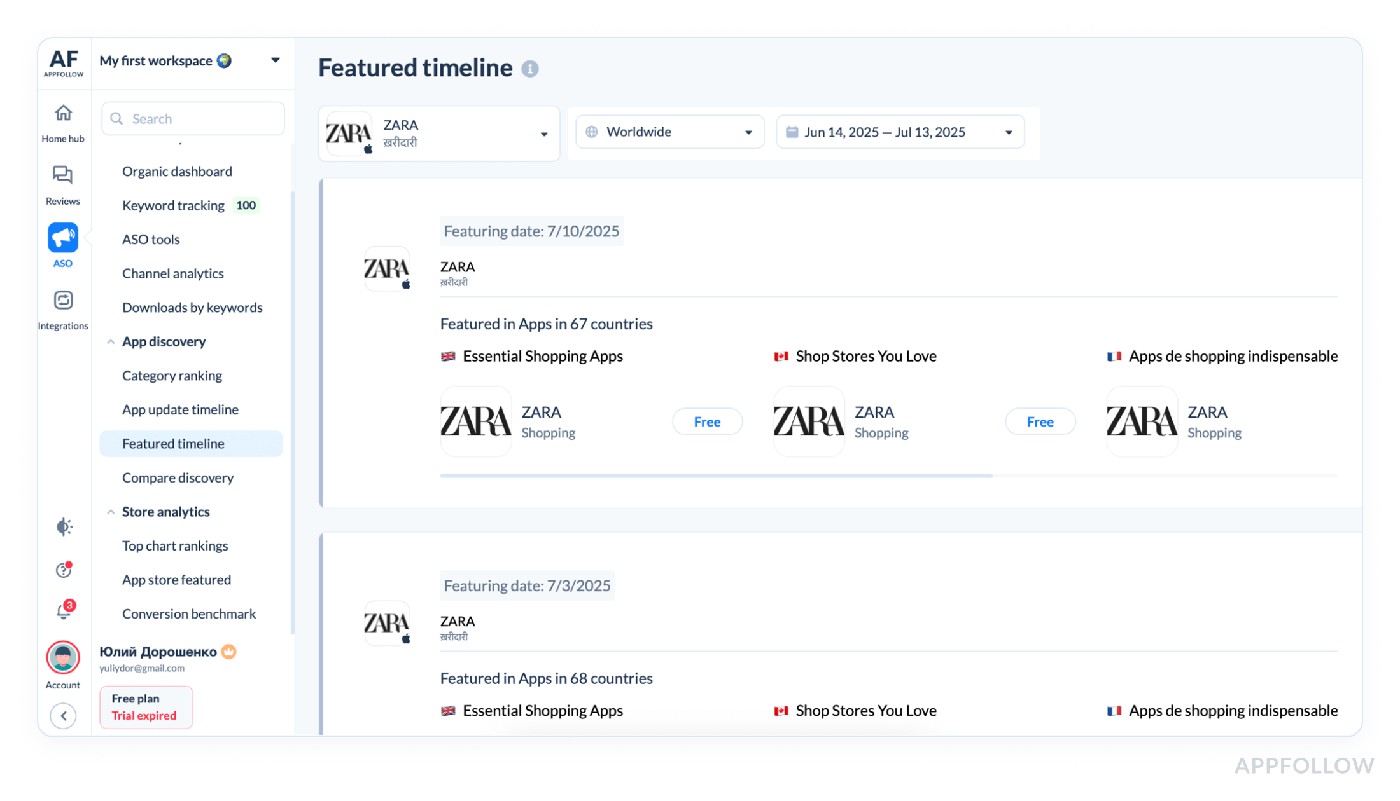
Featured timeline in AppFollow dashboard. Test it live with a 10-day trial.
That check can prevent a costly mistake: increasing paid spend because a download spike looked like campaign performance when it coincided with store featuring.
Markets also behave differently. If the UK is featured and Germany isn't, keep those download series separate rather than averaging them into one global trend.
Keep feature dates annotated on the acquisition chart so the team doesn't have to reconstruct the story after the campaign.
Keyword popularity score (search demand for a keyword)
Before changing app metadata because installs are flat, check whether the terms you're ranking for still have demand. Ranking #2 on an obscure term won't compensate for being invisible on a relevant, popular one.
A client I worked with was sweating over keywords like “mindful sleep” that sounded poetic in their ASO brainstorm. Their keyword popularity score only a measly 12 out of 100. Meanwhile, “sleep sounds” clocked in at 83. This metric captures the relative search demand for a keyword across the App Store or Google Play, distilled into a scale where higher means more users typing it in.
AppFollow reports a 0–100 Keyword Popularity Score. For supported iOS markets this draws on Apple Search Ads popularity; for Android and other markets AppFollow models search demand. It is a relative score, not a literal monthly search count. See the methodology.
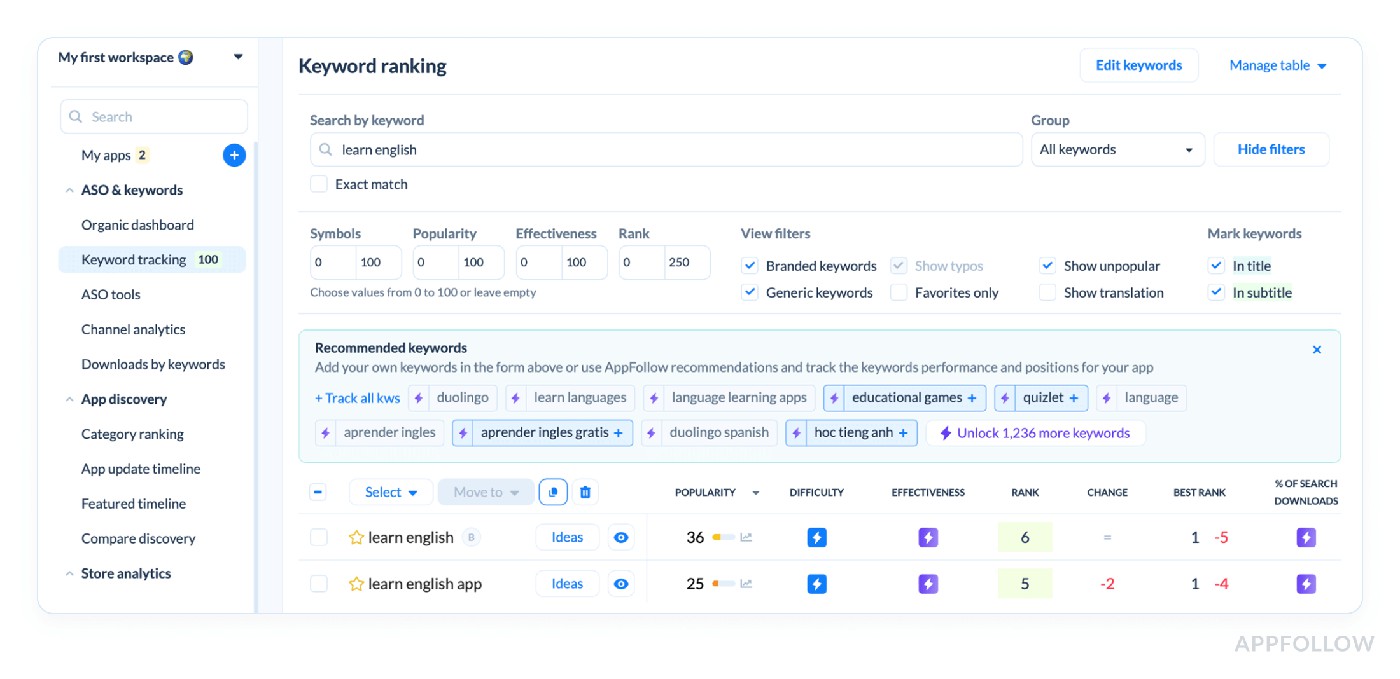
Keyword ranking, tracking & research in AppFollow. Test it live with a 10-day trial.
Pair popularity with keyword relevance, current rank, and difficulty. A keyword scoring 80 is a poor target when it describes a feature the app doesn't offer. Search demand cannot rescue a relevance mismatch.
Say “sleep sounds” scores 83 for popularity while “mindful sleep” scores 12. First check if your app actually satisfies both intents. Then compare the rank and download contribution of each term. The larger score points to stronger demand. Now test which query the app can credibly target and whether that demand becomes downloads.
This check often changes the keyword shortlist before anyone edits a subtitle: relevance first, popularity second, achievable competition third.
Use it during keyword research and after meaningful search-demand shifts, not as a reason to refresh every high-scoring phrase each week.
Ready to watch your App Store metrics talk back? Fire up a 10-day free trial of AppFollow and turn every rating, keyword, and chart jump into a growth move. Use your own store data to investigate visibility and acquisition. Start tracking your most important metrics → | 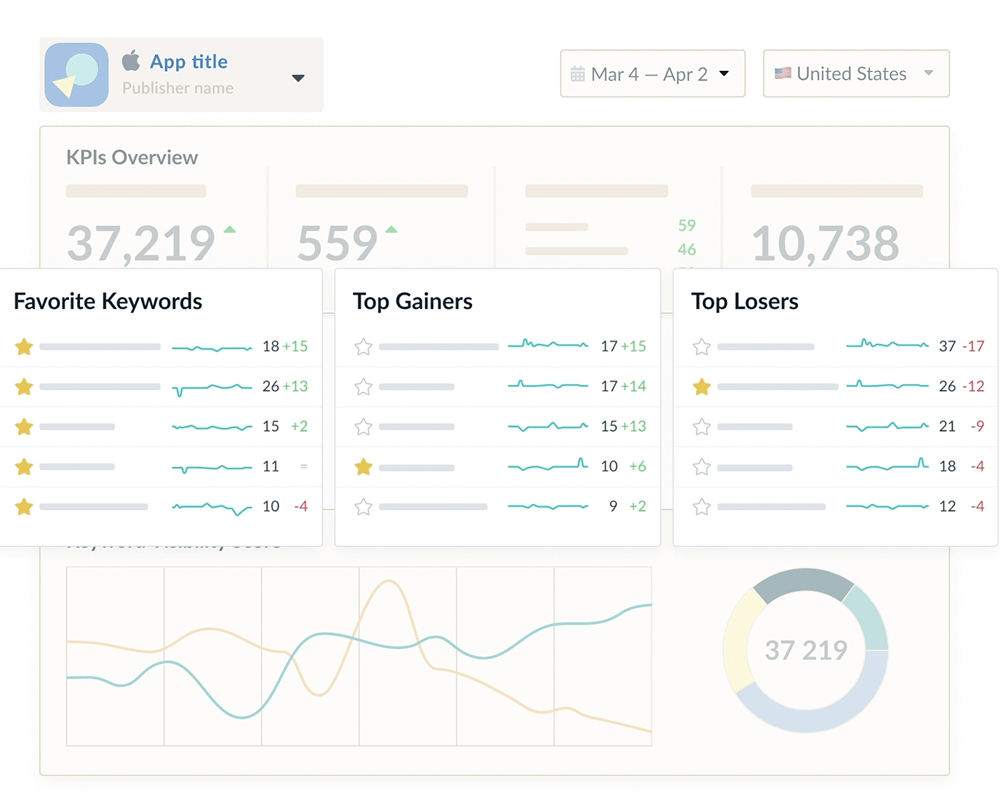 |
Keyword effectiveness index (KEI) (balance of popularity vs competition)
Keyword Effectiveness is a prioritization aid for the phrases that look attractive on popularity alone. It weighs potential against competition, so you can spend metadata space on attainable, relevant terms.
Suppose you have two sleep-app phrases: one is highly popular but fiercely contested; the other has moderate demand and a realistic path from #18 into the top ten. Compare the Effectiveness score alongside current rank and search download share before choosing. A score isn't an install prediction.
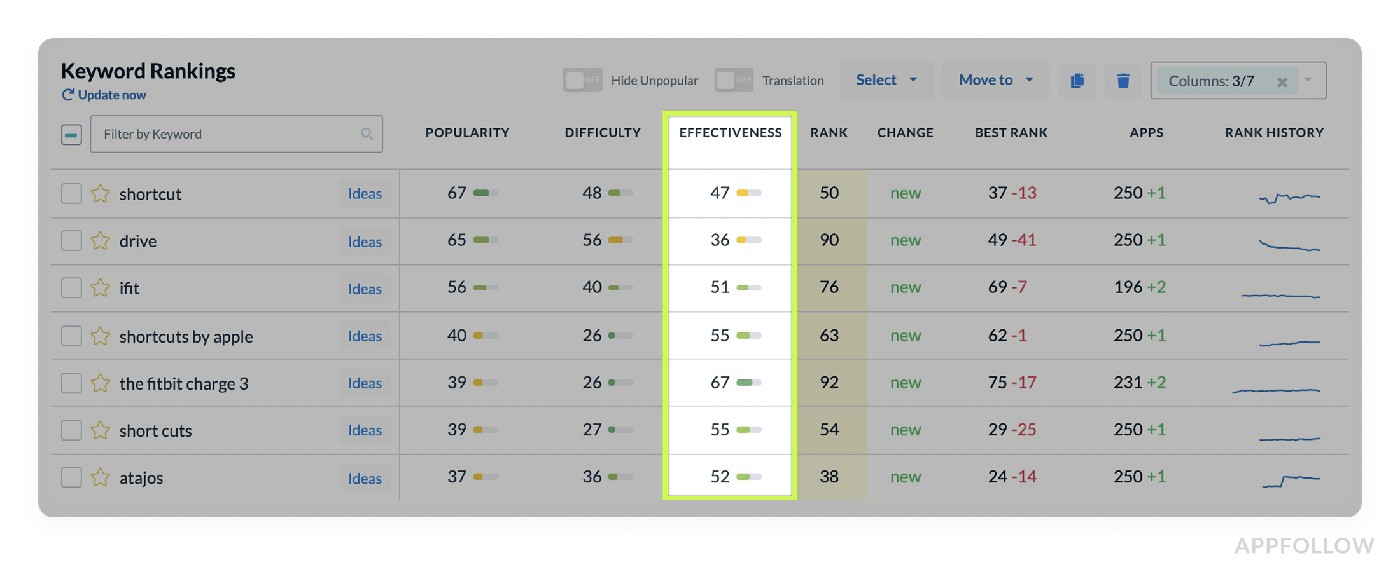
Keyword effectiveness in AppFollow. Test it live with a 10-day trial.
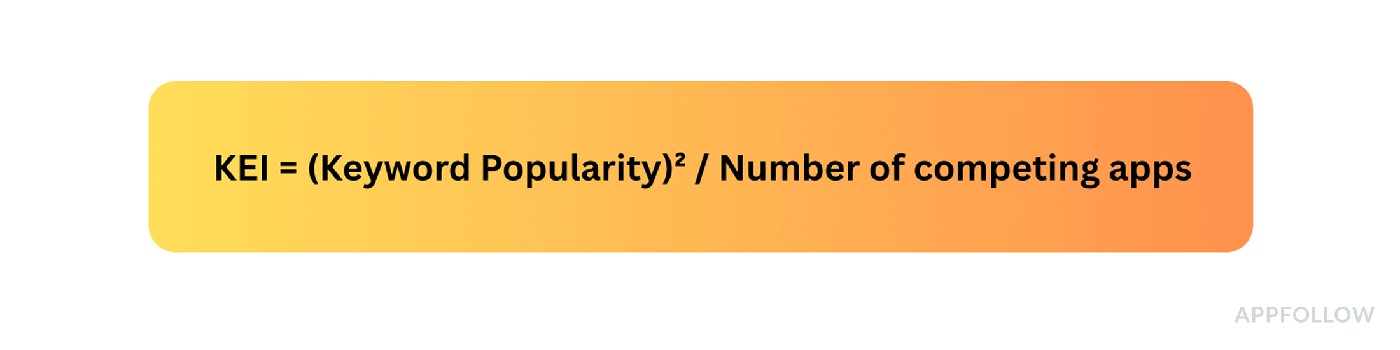
AppFollow calculates its keyword Effectiveness metric from popularity and competitive conditions. Use the metric as a relative prioritization signal, then validate the choice with ranking and search-download results.
If your first target has high popularity but low effectiveness, inspect who's ranking above you and whether your app can credibly match the query. A more attainable phrase may be the better next metadata experiment even with less total demand.
Here's the real decision: keep your most relevant high-demand phrases, then use Effectiveness to decide which additional terms deserve limited title, subtitle, or keyword-field space. Test rank and acquisition after the update; don't claim a preset uplift.
Pro tip: keep intent in the room. A high Effectiveness score for an unrelated query isn't an ASO opportunity; it's an invitation to disappoint people on the product page.
Record the baseline rank, market, and keyword contribution before each metadata test. Otherwise you won't know whether a better score translated into better discovery.
Keyword difficulty score (how hard it is to rank for a keyword)
Difficulty shows how hard the current top results may be to displace. Start with the country and the leading apps for that exact query, not a blanket rule for every score above 80.
We've all had a keyword review where the most popular term wins the argument before anyone looks at the search results. That's a quick way to spend a sprint targeting apps with far stronger relevance and visibility.
AppFollow's 0–100 Difficulty score summarizes competitive pressure around the top search results. Read it with your current position, relevance, and Popularity Score. Two keywords with equal difficulty can offer very different opportunities for your app.
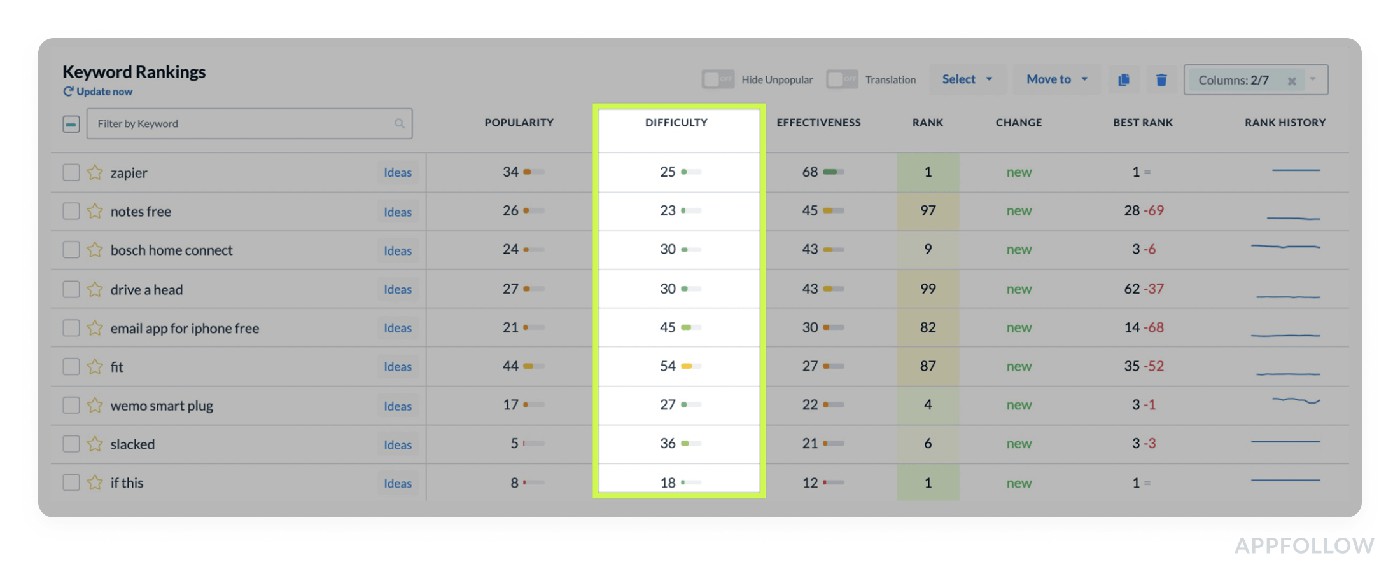
Keyword Difficulty is available on the Keyword Tracking page in AppFollow. Test it live.
For example, if “fitness tracker” is difficult and your app is #47, while “step counter goals” is less competitive and your app is already #14, compare their demand and keyword-download contribution. The second term may be a realistic test. Check whether it actually improves search visibility and downloads.
A low-difficulty keyword nobody searches for isn't useful either. Keep demand, relevance, and realistic rank movement together in the decision.
App reputation index (composite index of app health & perception)
The App Reputation Index is AppFollow's 0–100% store-performance health check. It combines ASO and search visibility with ratings and review performance, plus factors such as category ranking and updates. It is not a churn score, a fraud detector, or a prediction that a refund spike is coming. See AppFollow's definition.

Use the component breakdown rather than acting on the combined score alone. If it falls, ask whether Search Performance or Reviews Performance changed; that determines which team should investigate.
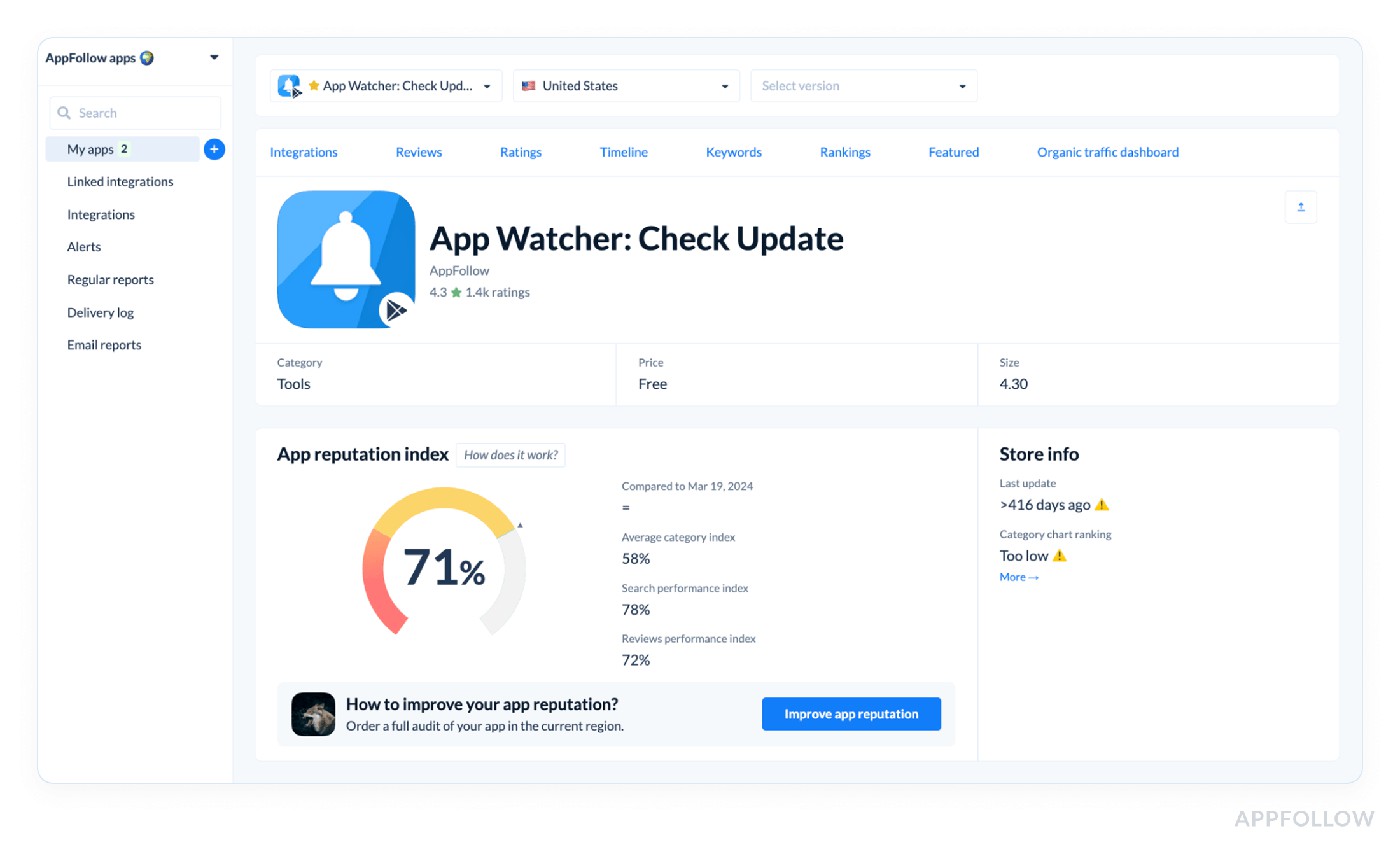
You can find an overview and a breakdown of each category on the App Page in AppFollow.
How to put the index to work
What changed | Investigate | Next action |
Index falls, Search Performance weakens | Search Visibility Score, ranked keywords, category movement | ASO checks discovery by store and market. |
Index falls, Reviews Performance weakens | Recent rating mix, complaint themes, response workflow | Support and product isolate the recurring issue. |
Index steady but search downloads fall | Connected store channels, conversion, acquisition campaigns | Growth checks demand and store-page conversion. |
Index improves but one country deteriorates | Country-level ranking and review splits | Market owner investigates locally before changing global copy. |
Cadence & tooling:
- Weekly: compare the index and its component scores with the prior comparable period.
- After a major release: review new ratings, recurring complaints, and search visibility separately.
- Monthly: use category and competitor benchmarks for context, then record what actually changed.
For executive reporting: show the component scores beside the overall index. Set thresholds from your own history, and keep retention, refunds and conversion as separate business outcomes.
If the score drops from 86 to 64, show which component moved and what happened in reviews, visibility and acquisition during the same period. Then assign the investigation to the right team.
Compare app-store visibility and reputation in one view Explore the index alongside keyword and review trends | 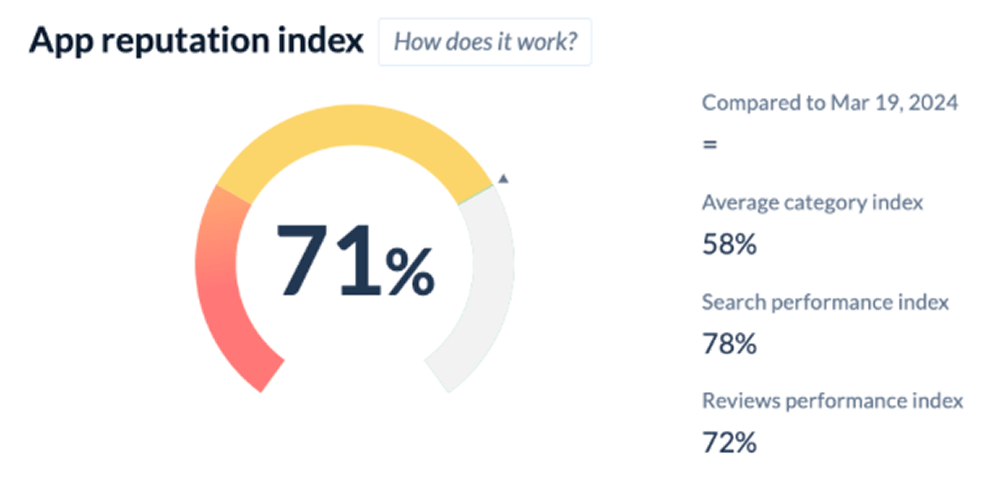 |
Compare discovery (your visibility vs competitors)
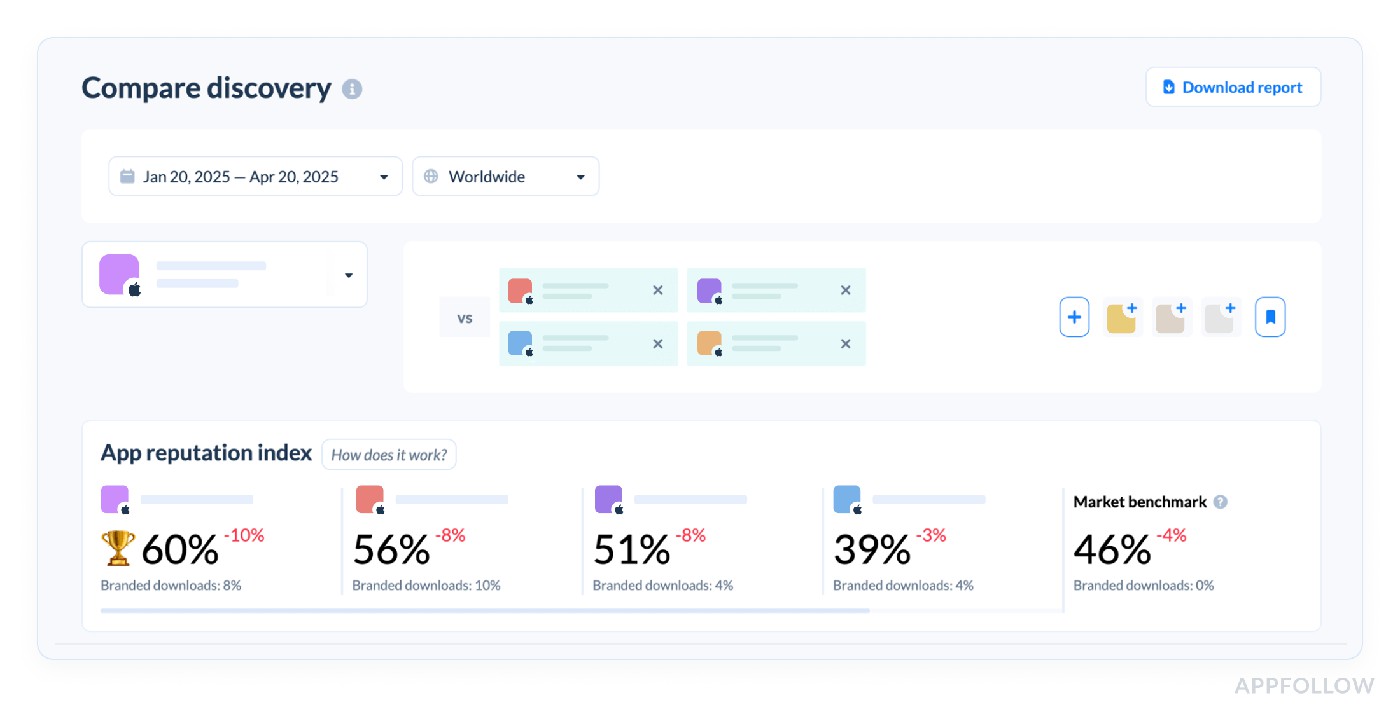
“If installs have flattened, check whether the other apps gained visibility on the same queries before you schedule another metadata rewrite.” That's the useful question behind Compare Discovery.
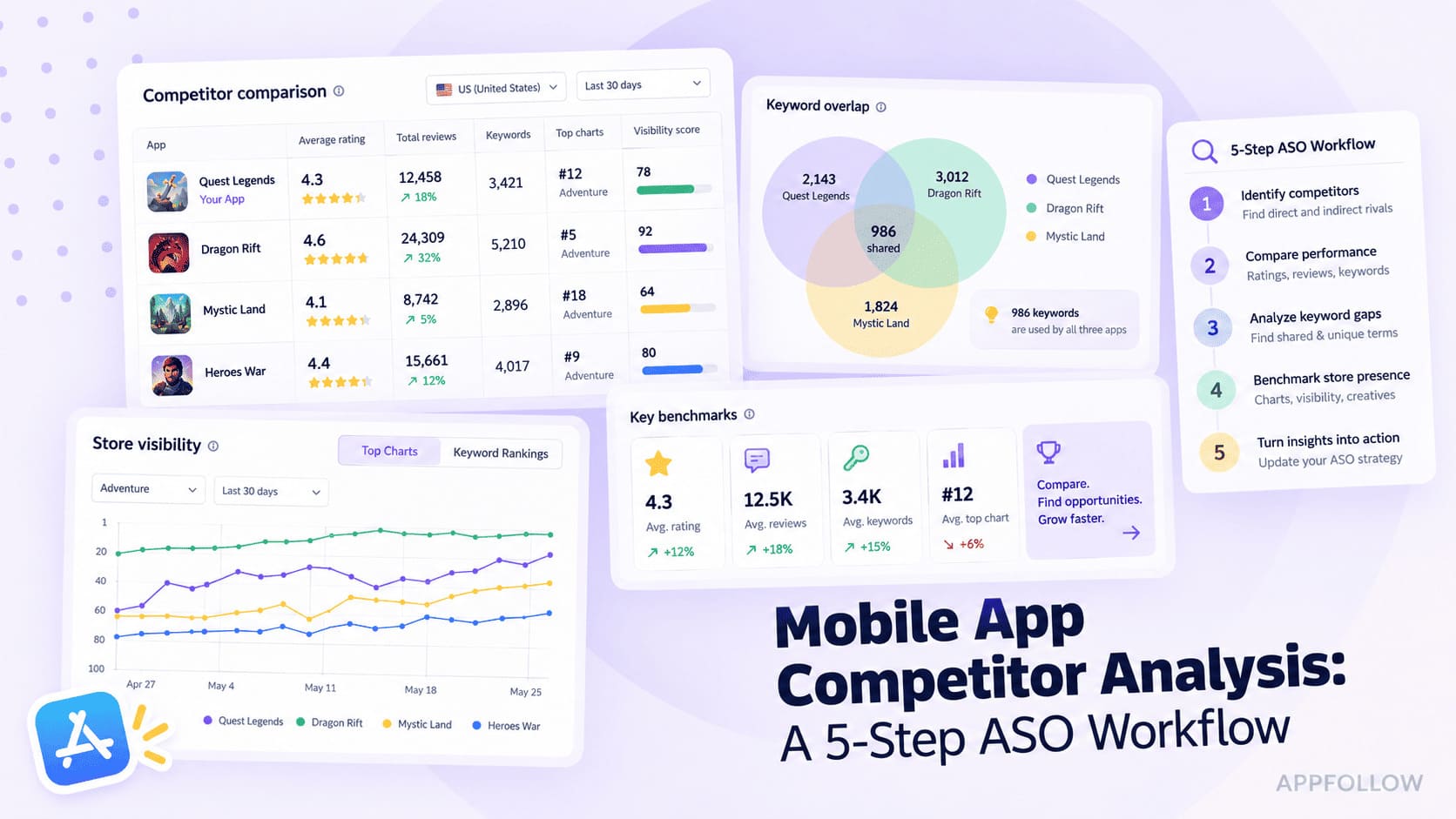
Compare Discovery puts your app next to selected competitors for visibility, ranking, and broader market signals. Compare the same store and country. A rival's better position is evidence of a gap, not evidence that its latest screenshots caused the gap.
Here is how it looks like in AppFollow:
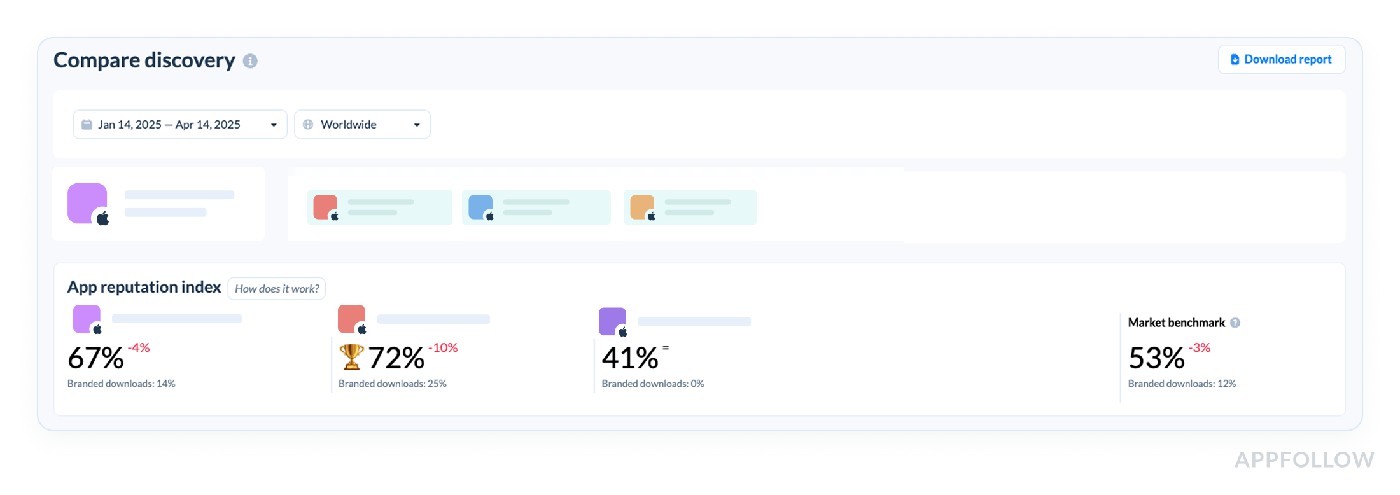
On the right side of this section, you’ll see the App Reputation Index and Brand Power benchmark for the industry. Use this benchmark to understand how the selected apps compare to the industry standards.
Suppose your fitness app ranks #7 for “HIIT workouts” while a rival is #5. That two-position gap may matter less than the rival's presence on “quick cardio” and “fat burn timer” where you're not indexed at all. Build an overlap list and prioritize relevant phrases you could realistically enter.
Do not use a universal rule that trailing by two positions means healthy acquisition. Use your own downloads and the rival's relative visibility to decide which gap matters.
This saves a sprint when the proposed fix is “change the icon” but the actual problem is missing keyword coverage in a market the team just entered.
Compare Meta (track app page metadata vs competitors)
Picture a language-learning app entering Spain. Compare Meta shows the competitor's Spanish subtitle and first screenshots answer a different question than your English-heavy listing. That is a plausible localization test, not proof that copying another app's keyword count will improve conversion.
Compare Meta organizes visible listing assets and store-specific fields side by side. Use it to spot relevant promises and localization gaps, then validate with your own app's search and conversion data.
Here is how it looks like in AppFollow:
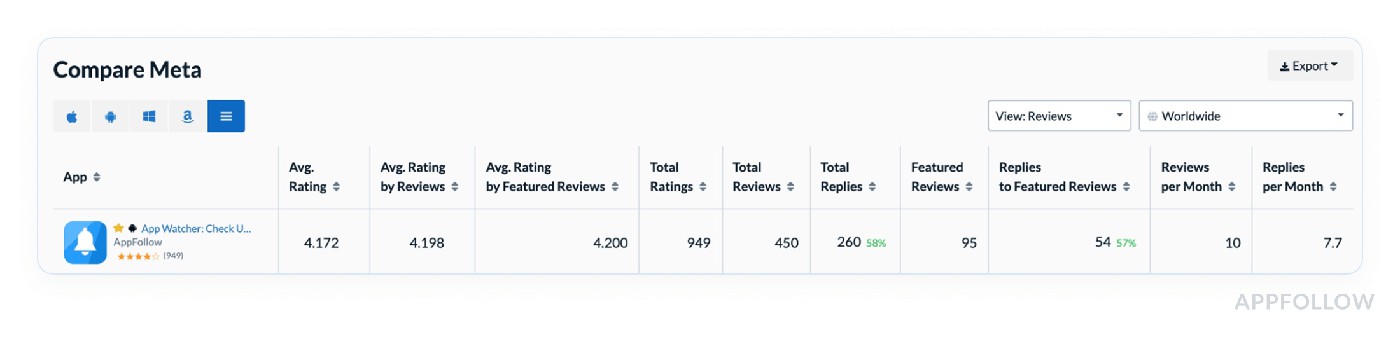
Test it live with a 10-day trial.
A close keyword rank with weaker conversion can point to the listing experience. But check acquisition-source mix and rating context before blaming the screenshots.
Run the comparison when entering a market or testing new creative. The number of localized keywords matters less than whether the listing speaks naturally to the problems users in that market want solved.
Downloads & conversion metrics
Downloads are an outcome, but the total hides where they came from. When installs move, separate search discovery from browse traffic, campaign effects, and conversion changes before assigning the win or the problem.
Start with market-level acquisition, then work down to the keywords and store channels that explain the change.
Download estimates & trends (by countries & categories)
Global totals can conceal a stalled launch in a target country. Keep the store, country, category, and date range fixed when comparing download trends.
AppFollow displays download estimates where available and, after connecting the store analytics source, actual store-reported acquisition metrics. Do not treat an estimated competitor number as the same kind of evidence as your own connected console downloads.
Estimated installs are modeled, not a transparent fixed formula you can reconstruct from category rank alone. For decisions about your own app, prioritize the actual connected store metrics.
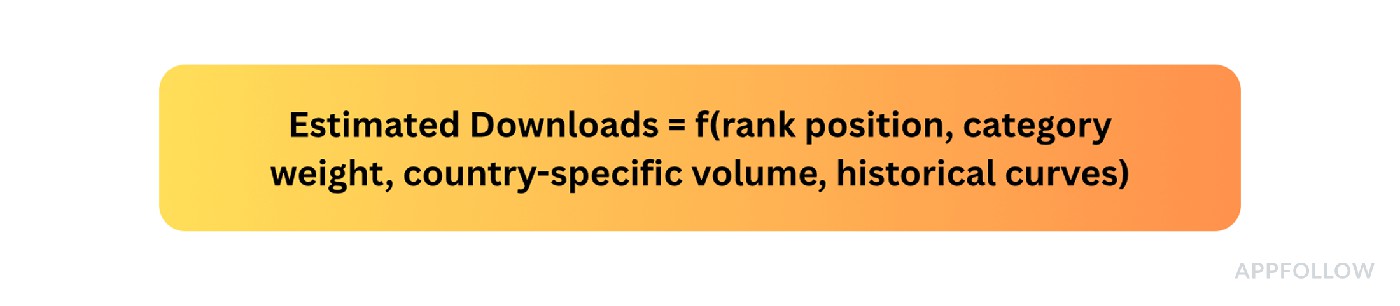
Keep estimates labeled as estimates in dashboards and forecasts, especially when comparing countries or competitors.
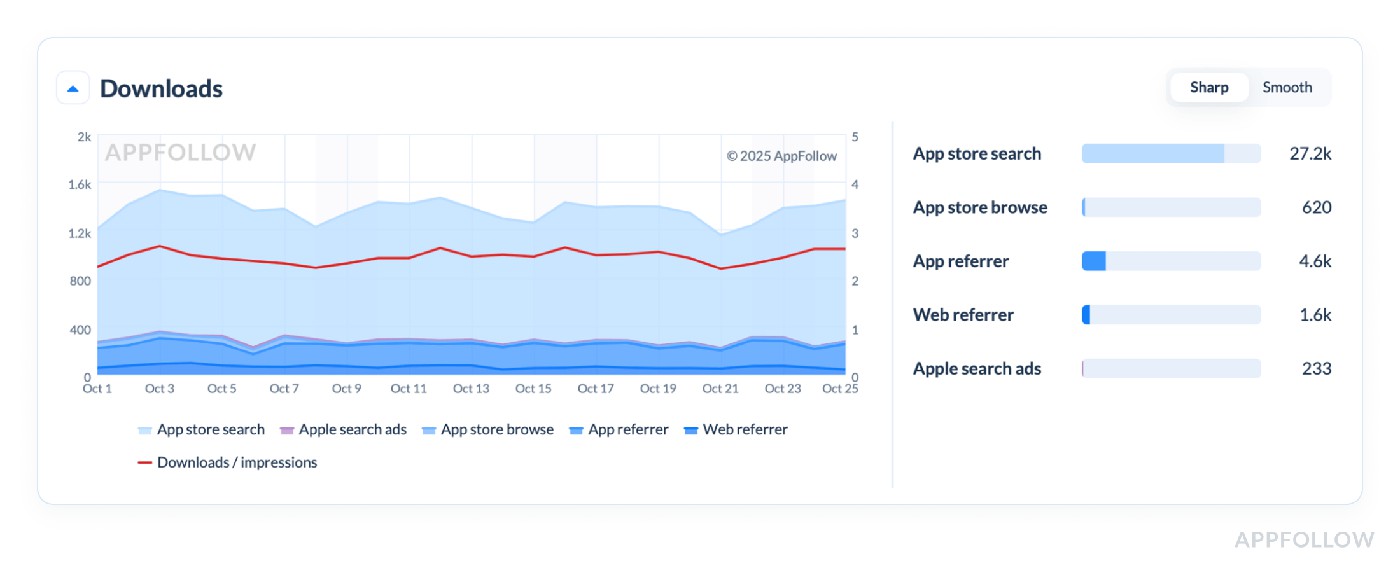
Downloads info in AppFollow. Test it live with a 10-day trial.
For instance, 3,200 global daily downloads can hide only 40 in Italy, the market you just launched. Before concluding localization failed, compare Italian Search, Browse, and paid/referral acquisition against your plan and similar launch periods.
If Mexico drives most downloads without active local campaigns, don't call that “free organic uplift” until the channel breakdown supports it. The next useful question is which keywords or browse placements drive acquisition there.
That's why global install totals are poor inputs for localization decisions. Country-level acquisition gives the team something specific to test.
cta_get_started_purple
Downloads by keyword (shows what keywords bring installs)
Downloads by Keywords connects store search demand to acquisition. It shows which queries contribute search downloads rather than simply which phrases have attractive rankings.
The dedicated Downloads by Keywords report requires an ASO Report connection. In Keyword Tracking, relative % of Search Downloads can be seen without connecting the store; absolute counts require App Store Connect or Google Play ASO integration.
Read keyword search downloads with position, popularity and market. A term that ranks #3 but contributes little acquisition is not equivalent to a term at #9 that brings high-intent users.
For the connected report, label the store and date range: iOS and Android acquisition data have different definitions and availability.
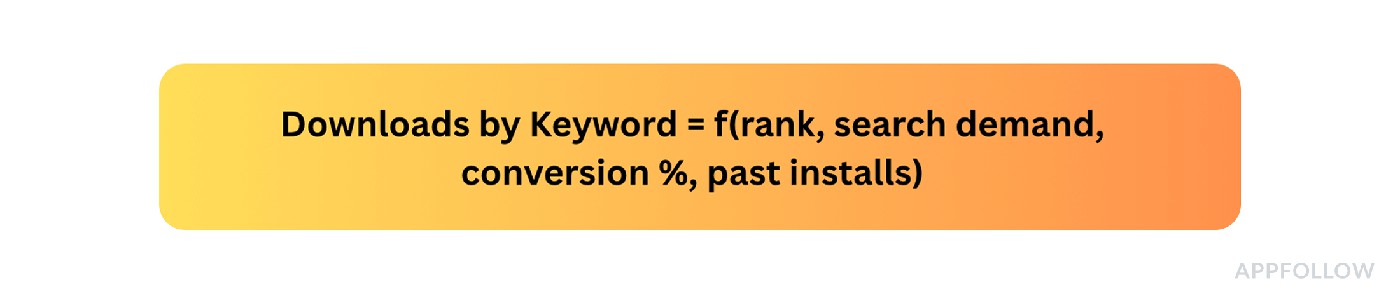
Here is an example of what this report looks like in AppFollow:
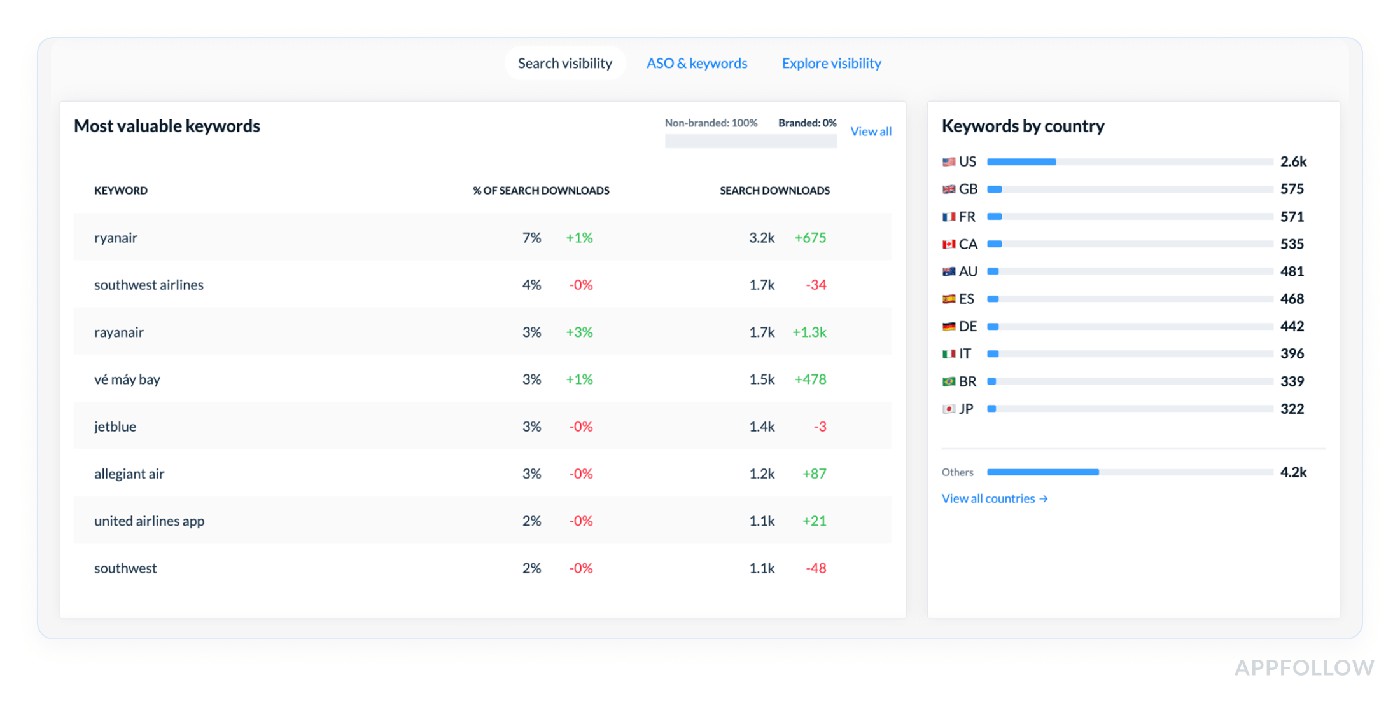
Test it live with a 10-day trial.
A useful sprint question is “which three non-branded terms are actually responsible for search acquisition?” rather than “how many keywords are we top ten for?”
Imagine “anxiety relief” brings a small share of search downloads while “calm music” accounts for much more. Check relevance and current position before moving scarce metadata space. A high share on one phrase is a prompt to test, not a license to drop all the others.
See which phrases deliver users Connect store analytics to investigate keyword download contribution | 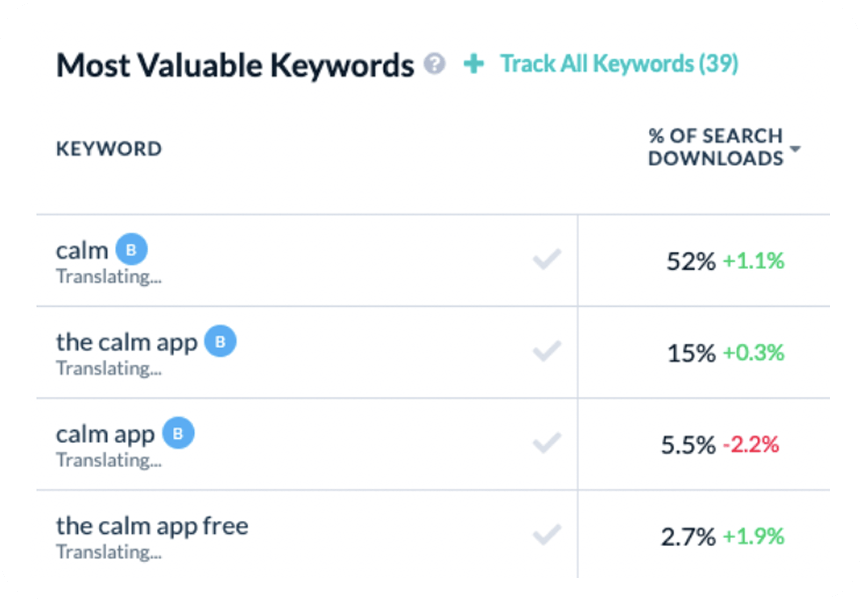 |
Conversion benchmark (industry-level or your app’s benchmark to spot if your conversion is under/over average)
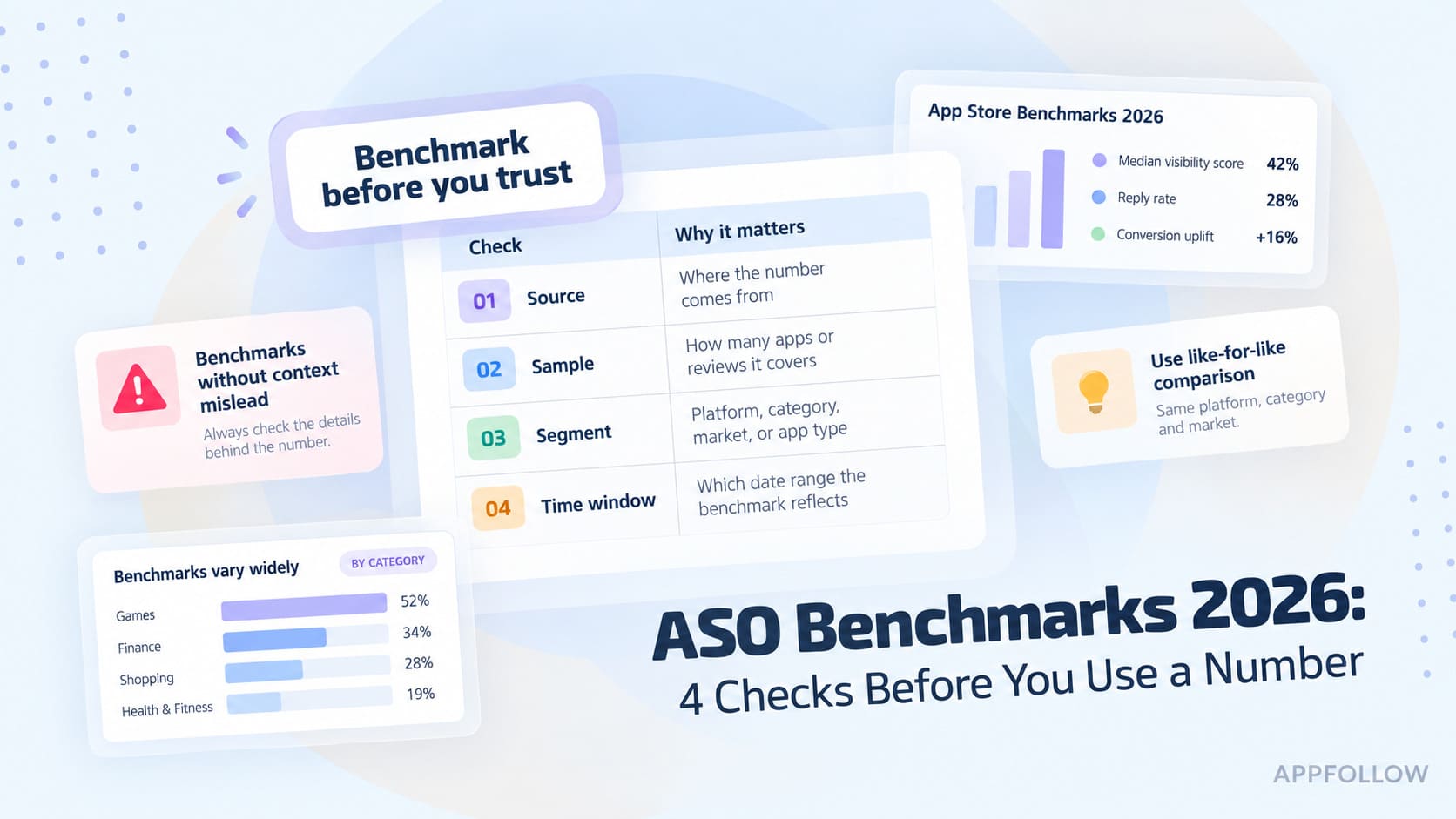
Conversion Benchmark lets you compare your app's store-page conversion with the average for the same category and country. Make sure you know whether you're comparing installs against impressions or against product-page views; those denominators answer different questions.
Example: 400 installs from 10,000 product-page views = 4% view-to-install conversion. If a benchmark uses impressions instead, you cannot compare that 4% directly with it.
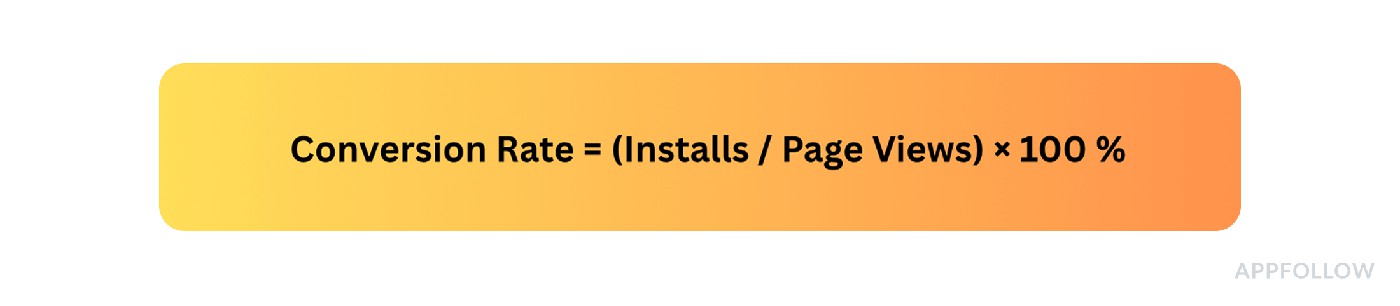
AppFollow updates country/category conversion benchmarks monthly. The relevant comparison is the benchmark shown for your category and market, rather than an old category figure taken out of context. See the benchmark definition.
Open Store Analytics → Conversion Benchmark, choose the same category and country, and confirm the conversion definition before attributing a gap to screenshots.
Here is what it looks like in AppFollow:
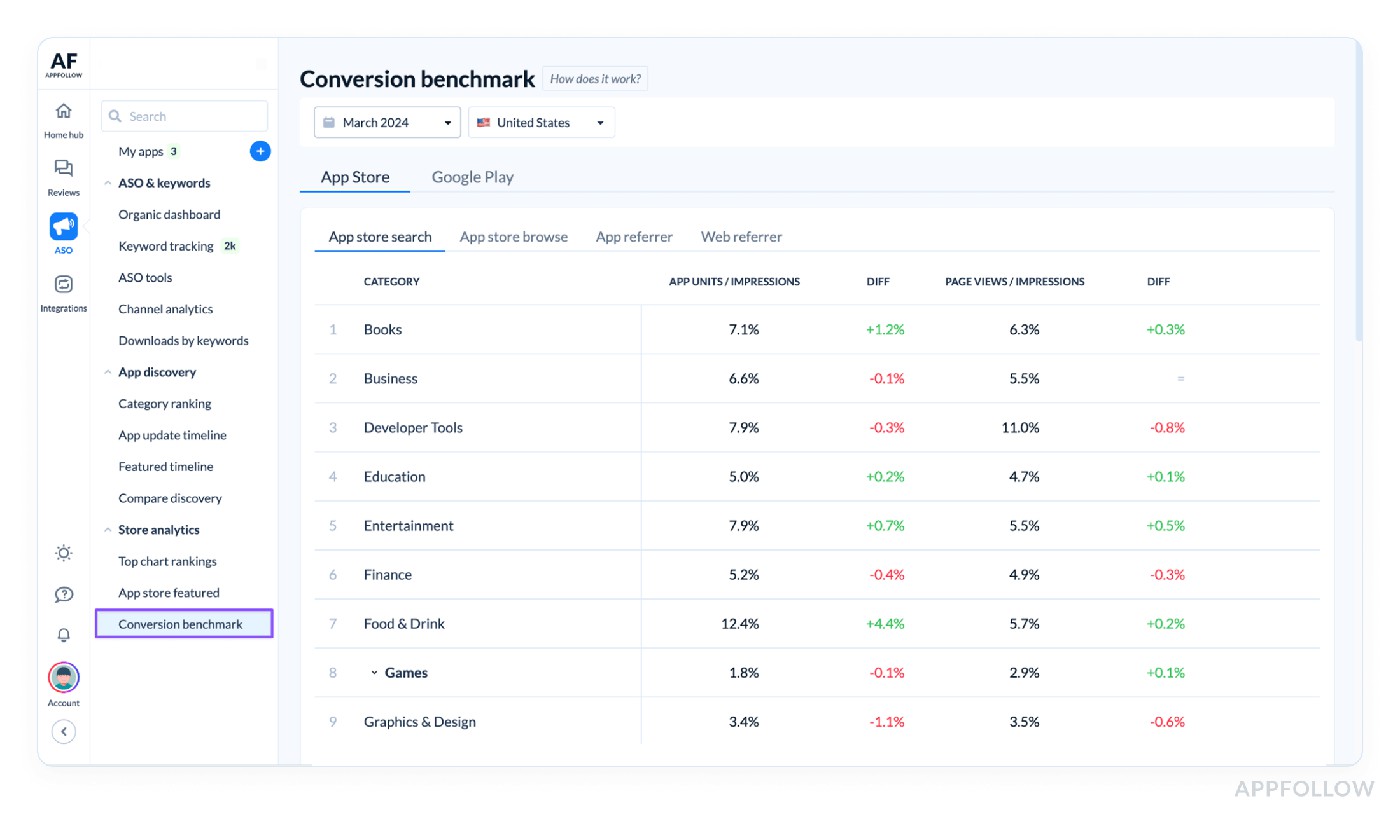
Example of the conversion benchmark in AppFollow. Test it live with a 10-day trial.
If a Spanish listing underperforms its current market benchmark while using English screenshots, localization is a sensible test. Keep traffic sources and period consistent when measuring the result; a lower benchmark alone does not prove the visuals caused the gap.
Channel analytics (analyze user acquisition by channel if linked)
Channel Analytics brings downloads, impressions and page views from App Store Connect and Google Play Console into one view once an ASO Report connection is configured. It separates store sources such as Search, Browse, App Referrer and Web Referrer. It is not a replacement for your MMP's campaign-level attribution.
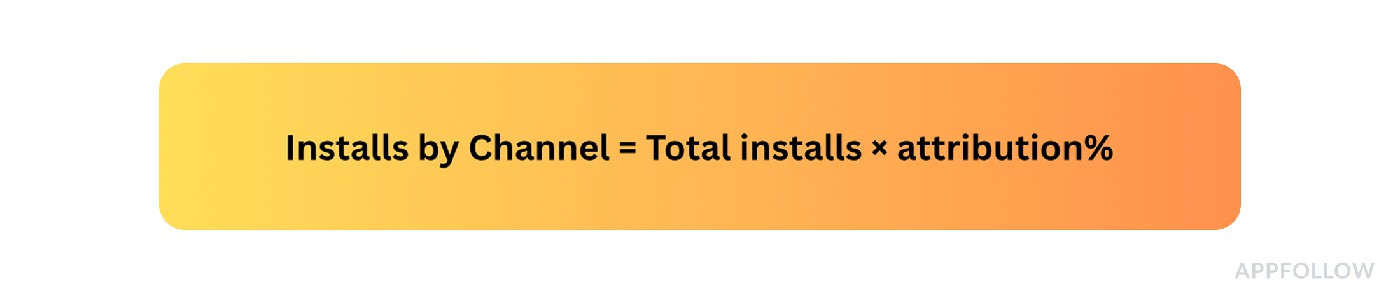
Here is what it looks like in Appfollow:
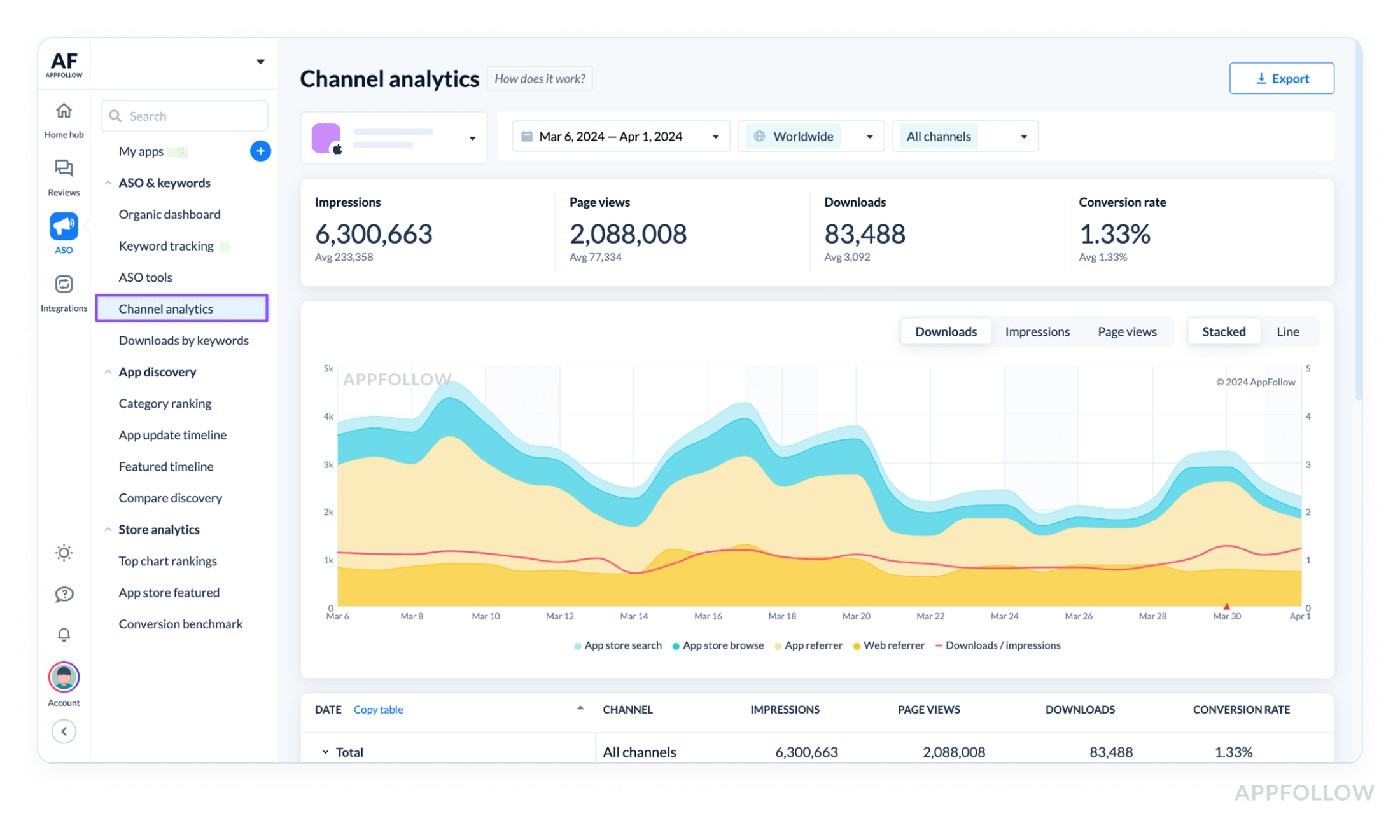
Test it live with a 10-day trial.
If installs surge during a campaign, compare the store channel mix with paid spend and your MMP reporting. On Google Play, paid Google Ads activity can be included within Search and Explore acquisition, so don't assume store Search equals non-paid acquisition. AppFollow re-collects recent store data as the platforms revise their numbers.
Reviews & ratings metrics
Ratings and reviews are your fastest public clues about product quality and user trust, especially after a release. A stable lifetime score can hide a sudden change in the latest 1-star mix.
Here are the signals that belong beside conversion and release dates: recent ratings, review counts, complaint themes, response coverage, Reply Effect and status.
Average star ratings (both incremental & total)
Separate the lifetime public star rating from the incremental rating earned over a specific recent period. The two can tell different stories when a bad release is buried under years of older feedback.
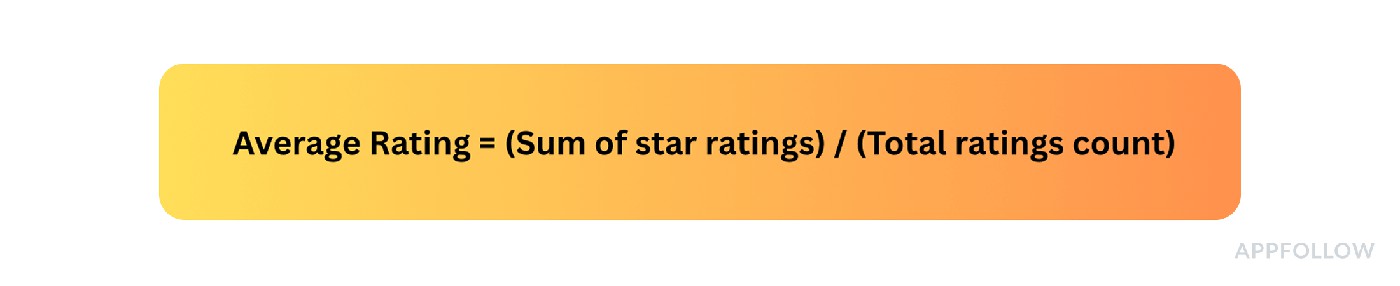
Always report the count behind the average. A recent 3.6 from twelve ratings is weaker evidence than a 3.6 from three thousand.
In Rating Analysis, compare recent periods and check whether store ratings and written reviews refer to the same population. A shift in written feedback doesn't always mean the public average changed equally.
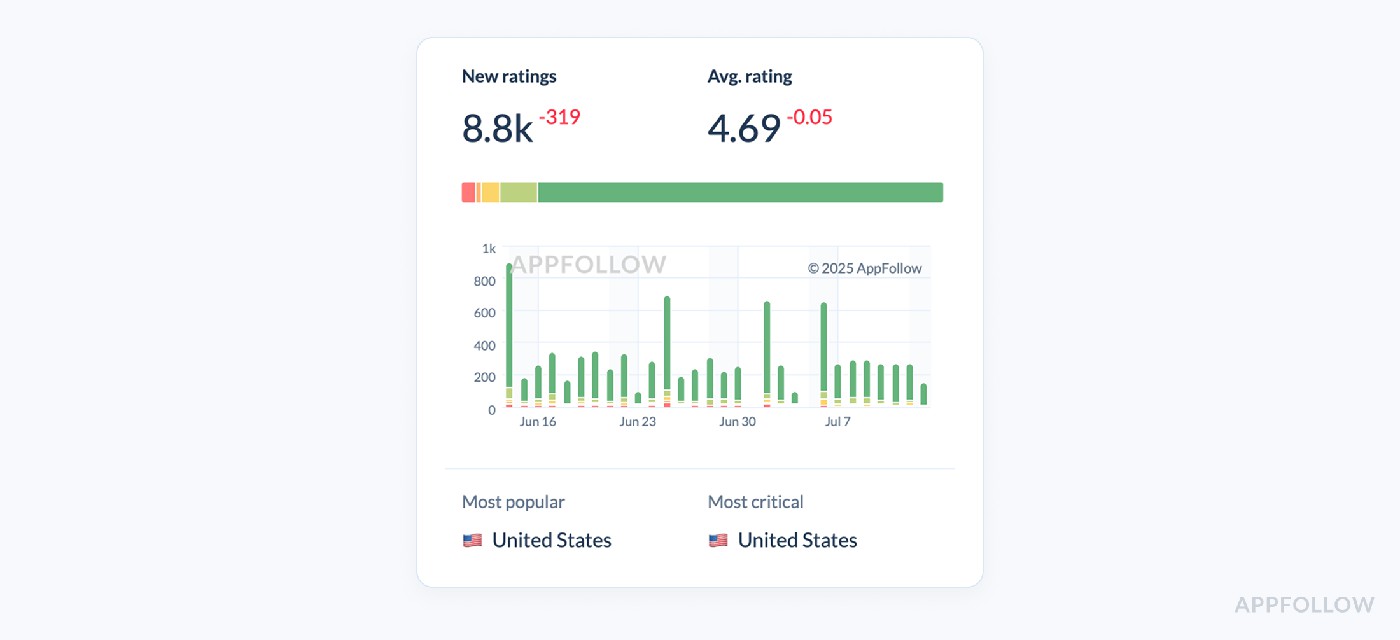
App rating dashboard in AppFollow. Test it live with a 10-day trial.
Suppose a fintech app still displays 4.2 publicly but its latest 30-day rating average falls to 3.6. Check the one-star count, app versions and common review topics before deciding whether the issue is login, payments or onboarding.
Rating analysis (breakdown by stars, trend over time)
A cumulative 4.2 is a poor incident monitor. The star-level breakdown shows whether recent ratings are shifting toward 1–2 stars, even when the public badge stays steady.
What we looked at
Navigate to Reviews → Rating Analysis (Stars) and switch the date range to “Last 90 days.” The chart stacks weekly counts of 5-, 4-, 3-, 2-, and 1-star reviews.
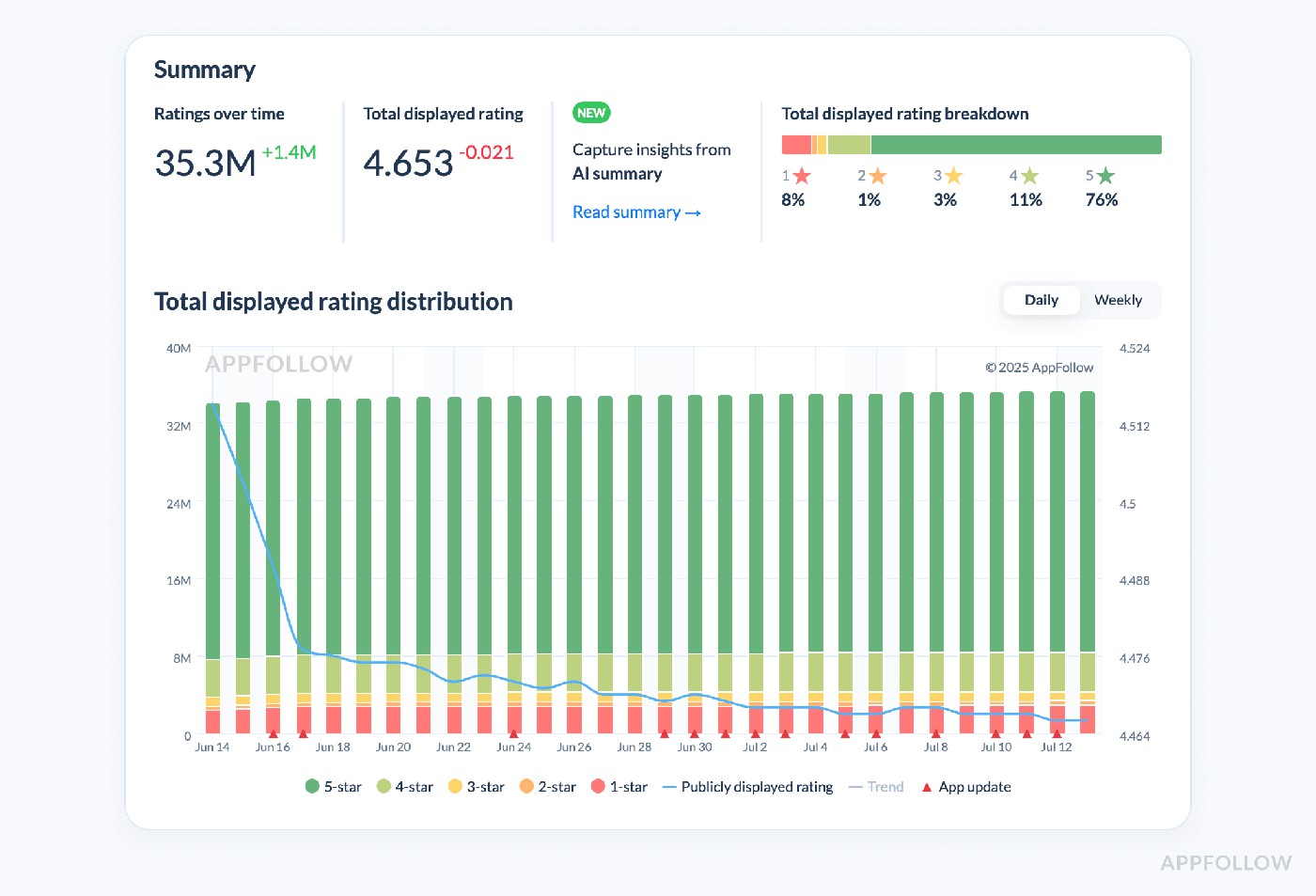
App rating dashboard in AppFollow. Test it live with a 10-day trial.
Review both absolute star counts and proportions over comparable periods. A 20% share of one-stars means little without knowing whether it came from 10 or 10,000 new ratings.
What to investigate: if the 1-star share jumps after a release, filter the written reviews by version and theme, then check product telemetry. Compare the change against the app’s own history and sample size.
Action checklist
- Compare against baseline: how many one-star ratings came in, and what share of new ratings is that?
- Group the complaints: sample the written reviews for recurring issues such as KYC failure.
- Confirm with product: correlate the timing with app version, telemetry and tickets.
- Measure the fix: track new complaints and recent ratings after the corrective release.
A healthy lifetime badge is not a pass on a release investigation. Recent stars and review themes are the faster checks.
Read also: What Is Review Management: App Store review management guide
Review volume & trends
Review volume counts written reviews arriving in the chosen period. A spike is neither automatically good nor bad: it may follow a review prompt, an acquisition campaign, or an issue that made users unusually vocal.
Check your Review Volume & Trends metric:
- After an app update or bug fix release
- When running a new paid or organic UA campaign
- Following a feature launch or UI overhaul
- If your incremental star ratings start slipping
- During competitor app analysis
- Ahead of your next sprint planning or QBR
- Before scaling ad spend in new geos
There’s no fancy formula. It’s pure # of new reviews over selected period
Compare new-review counts and 1–2-star share with the preceding comparable window, then inspect the top recurring complaints.
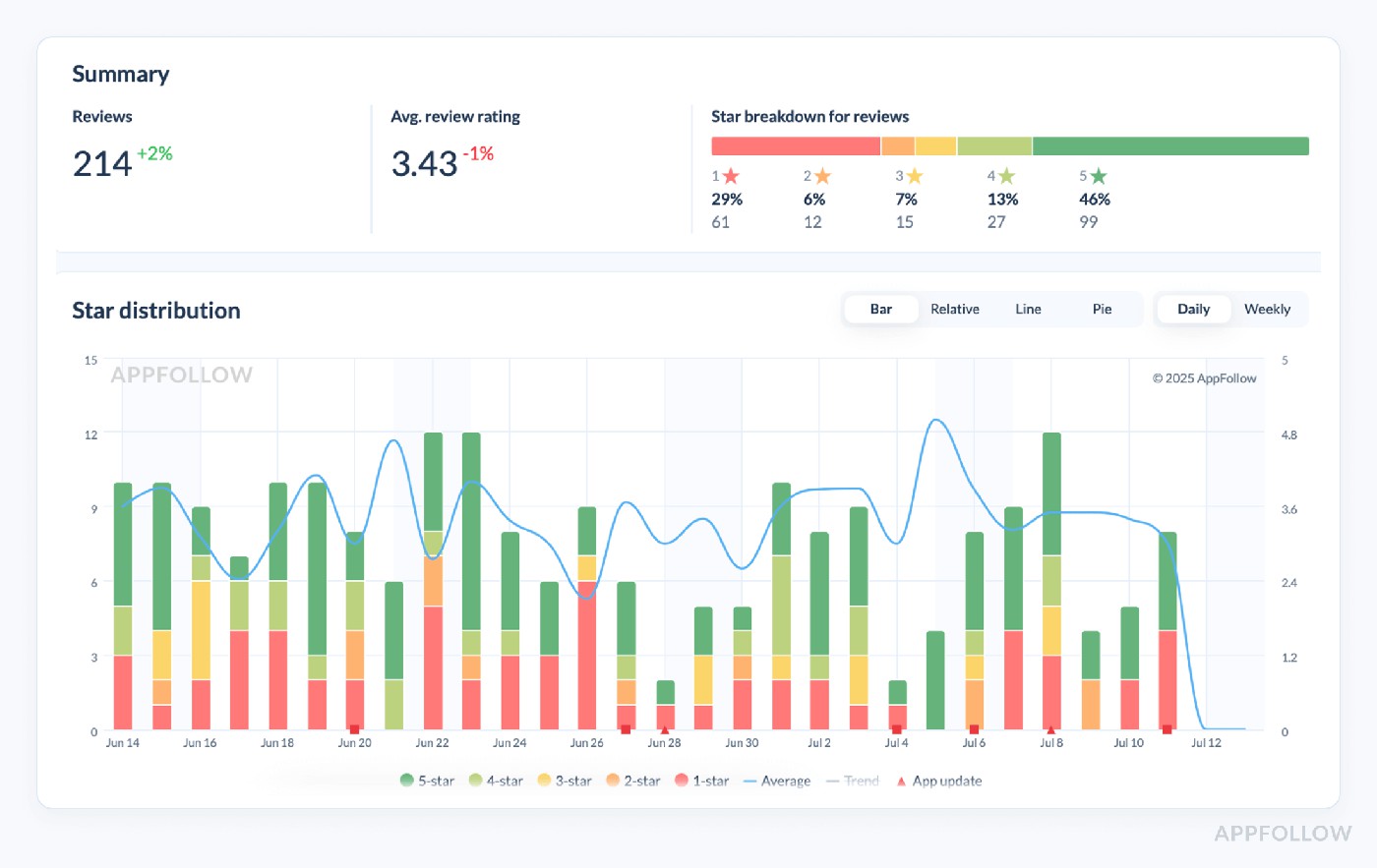
App review analysis dashboard in AppFollow. Test it live with a 10-day trial.
Standard Bank's published case shows the results of a measured review-operations change. It reports 80% of reviews answered with AI, 90% auto-tagged, and 646% growth in positive thumbs-up engagement on replies.
That is a review-operations result, not proof that the platform fixed a transfer bug. Use tags to route repeated complaints and give complex financial issues to human support.
After changing the workflow, track public reply coverage and the rate of new reviews describing the same problem. Faster answers and fewer product complaints are separate outcomes.
Read also: How to spot and report fake reviews on Google & App Store: step-by-step guide
Reply effect tracking (e.g. how many users change their rating after you reply)
Reply Effect tells you whether reviewers update their rating or text after receiving a developer reply. It is not simply a percentage of people moving from one star to four stars.
When to check reply-effect tracking
- Spike in low-star reviews or complaints
- Sudden drop in review volume
- Right after a major release or hotfix
- While auditing support impact
- Ahead of quarterly or board reviews
Those checkpoints keep cross-functional teams proactive and aligned.
AppFollow counts an update as a Reply Effect when it happens within 30 days after a reply. Read the updated text as well as the rating: a user can edit a complaint without increasing the stars. How AppFollow defines Reply Effect.
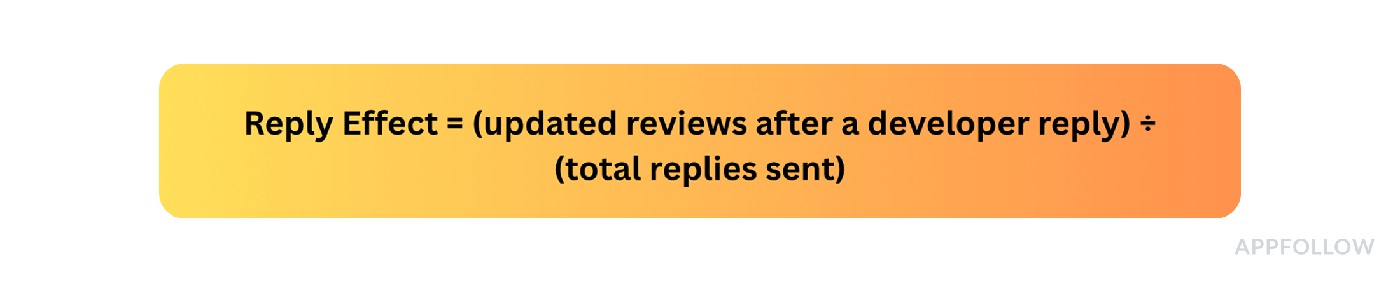
A rising Reply Effect is encouraging, but it does not by itself prove retention or product quality improved. Check response times and whether the recurring issue remains in new reviews.
Open Reviews → Agent Performance to compare reply activity and outcome, then sample updated reviews in the feed. Keep store moderation delay separate from the time your agent took to respond.
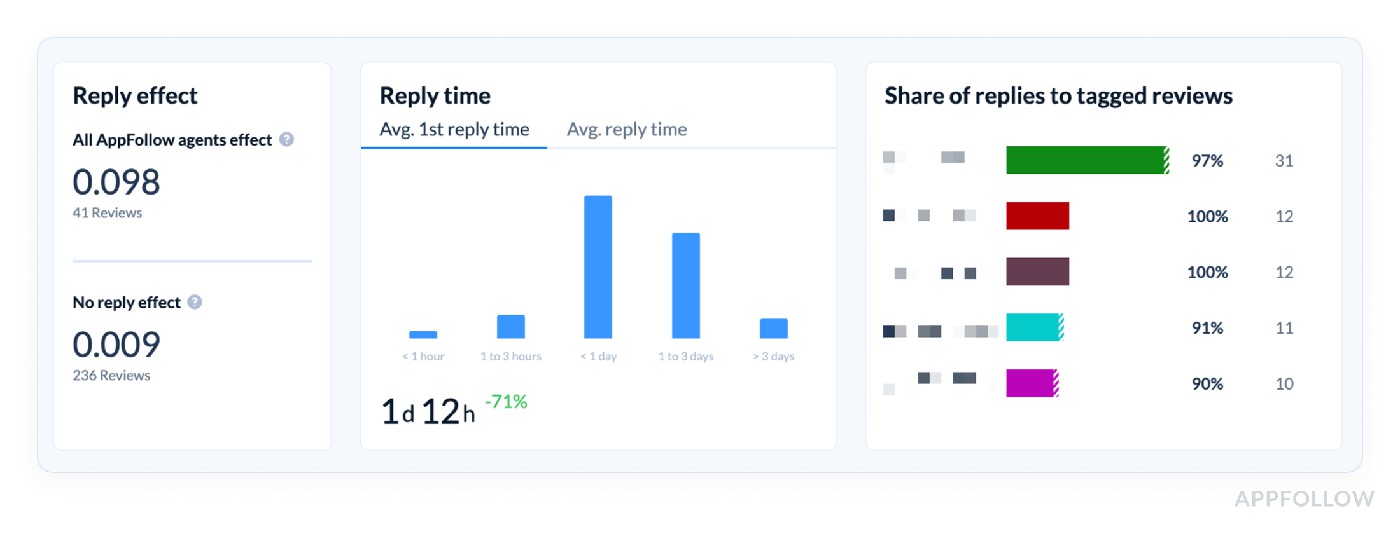
App review analysis dashboard in AppFollow. Test it live with a 10-day trial.
The right baseline depends on the app and the issues its reviewers report. Compare with the app's previous reply process and the kinds of issues support handles.
cta_get_started_yellow
Sentiment analysis & auto-tags on reviews
Sentiment and tags are most useful when the rating movement needs an explanation. A one-star review about pricing, an account lockout and a crash need three different owners.
Semantic Analysis groups reviews into issues and sentiment; auto-tags make recurring themes easier to route. Before presenting a percentage, read a sample of the underlying feedback. Mixed sentiment, sarcasm and translation can fool automatic classification.
Compare both the number and proportion of reviews about a theme. If 18 of 63 new reviews mention login instead of 2 of 70 before the release, the share climbed from about 3% to 29%. That flags an investigation; crash logs and support tickets test the hypothesis.
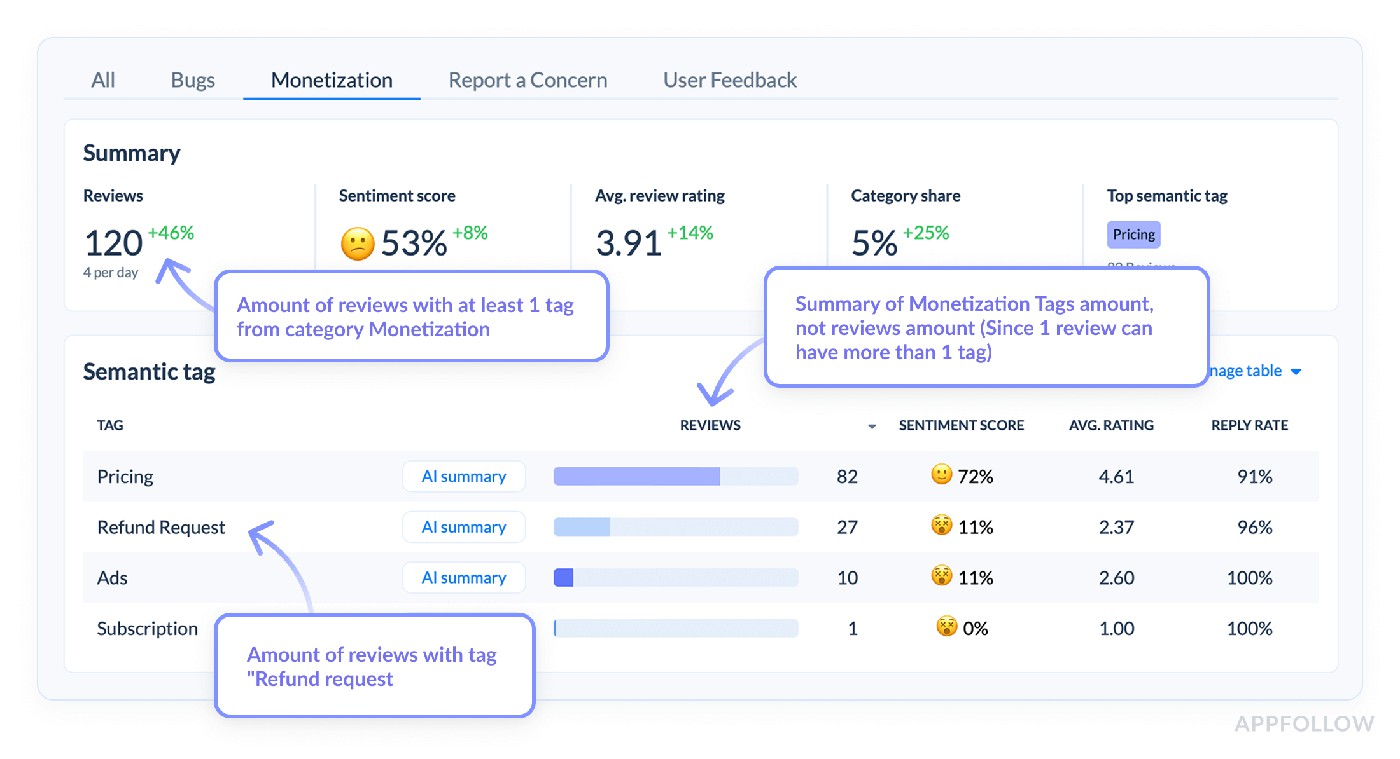
Semantic review analysis dashboard in AppFollow. Test it live with a 10-day trial.
For example, if most recent low-star feedback concerns identity verification, group it by app version and country before escalating. A substantial cluster warrants an ID verification investigation; it does not directly forecast churn.
Turn review noise into sprint-ready tags Analyze new review themes and route recurring issues | 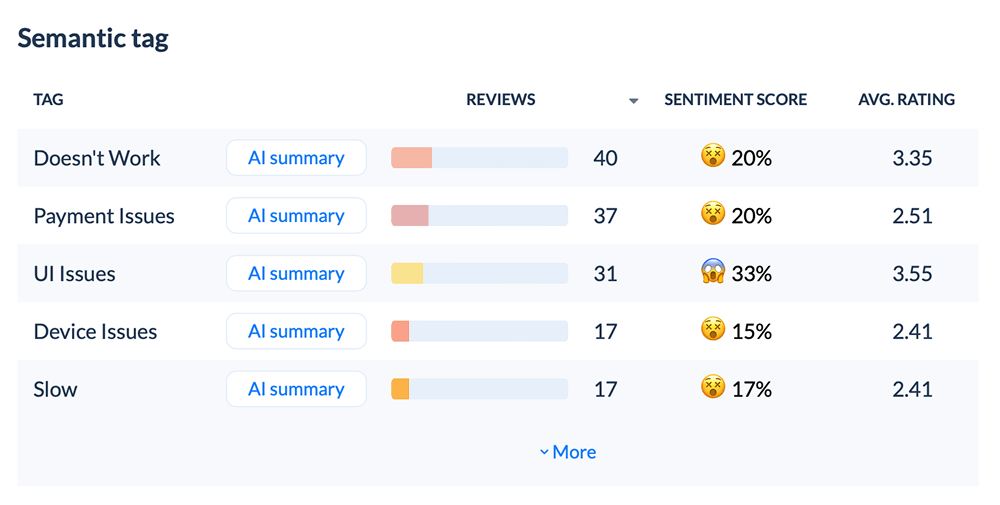 |
Review statuses & bulk actions (like tagging, closing, replying)
Status and bulk actions help support manage the queue, but closing a review is not the same as resolving a product issue. Keep recurring complaint tags visible to product even after individual replies are sent.
Use the statuses available in AppFollow, such as Open, Closed and Re-opened. Track which tagged reviews remain unanswered and which have already been escalated.
If verification complaints increase, pull a sample of relevant review links, check unanswered low-star cases and send the owner the affected version and locale where available. Don't invent a category-wide 48-hour response SLA.
Use that queue data alongside engineering tickets instead of presenting it as APM instrumentation.
Share the recurring themes and owner status through the team's established reporting or integration workflow; validate supported export and integration options in the workspace.
For leadership, keep two lines separate: complaints handled by support, and incidents actually corrected by product.
Deleted reviews tracking
AppFollow's Reviews Feed provides a Deleted filter for reviews known to have been removed after publication. The filter can show a disappeared review, but cannot tell you whether the author removed it, the store moderated it, or the reason behind the change. See the review filters.
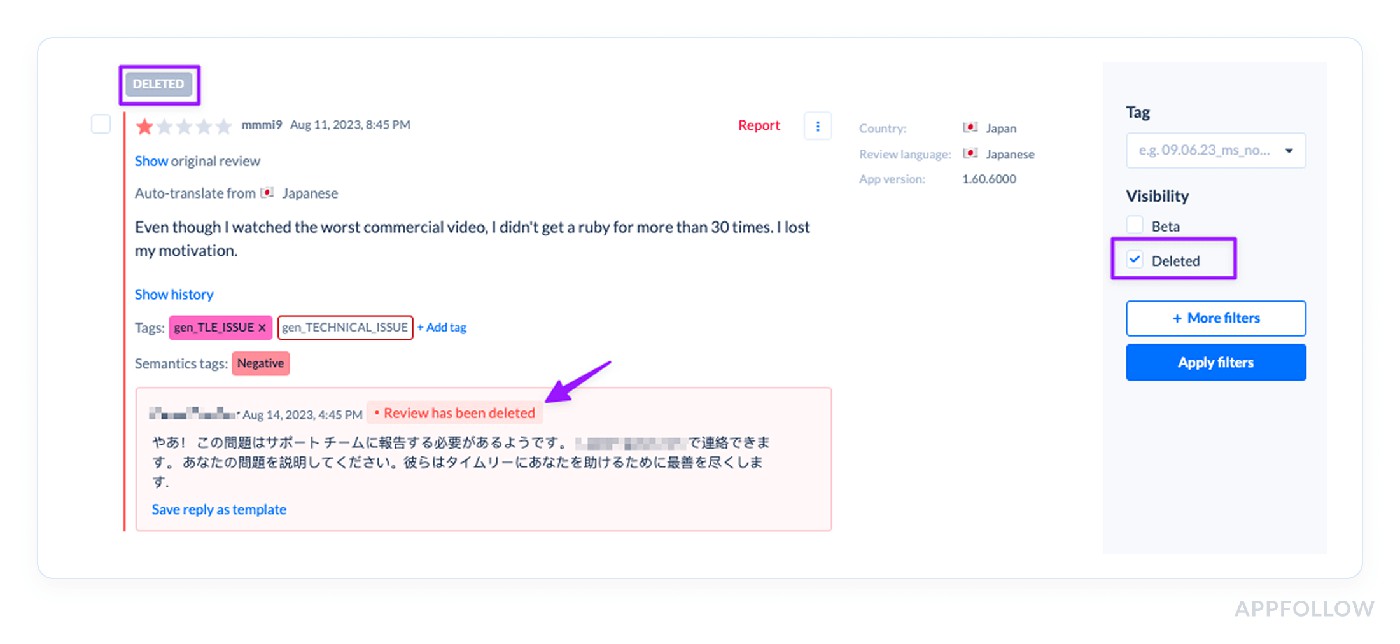
Test it live with a 10-day trial.
What to watch:
Signal | What you can infer | Next check |
More deleted reviews than usual | The visible review set has changed; the reason isn't established. | Compare rating counts and store moderation notices where available. |
Several disappeared reviews share a topic | The earlier complaint cluster may still matter even though text is no longer public. | Compare active reviews and support reports for the same issue. |
Sudden rating movement with deletions | The public signal may reflect changed review availability as well as new feedback. | Check the new rating mix and review timeline before attributing cause. |
When to check:
- Right after an update rolls out (especially if crash-rate spikes).
- The morning after a big promo or influencer push.
- Anytime you notice an unexplained swing in incremental star rating.
How to automate:
- Use the Deleted filter when reviewing unexpected rating or review-count changes.
- Preserve the prior review context in the appropriate support workflow where permitted.
- Do not interpret deletion as churn or a store penalty without independent evidence.
Review deletions are a context signal. They do not establish why an app rating, churn or store ranking changed.
Read also: Proven Tips for Improving iOS App Store & Google Play Ratings to 5 Stars
Competitive intelligence performance metrics
Once you know what changed for your own app, check whether the market changed too. Competitor monitoring helps separate a loss unique to your listing from a wider shift in search demand or store rankings.
Competitor app tracking
Competitor tracking compares store-visible category positions, search visibility, featuring, metadata and review trends. It does not reveal a rival's private conversion funnel or prove why a ranking changed.
Use the same market and dates for both apps. A rival gaining five places in Spain while your position holds is not the same as both apps falling after a category-wide shift.
Example of the competitor tracking dashboard:
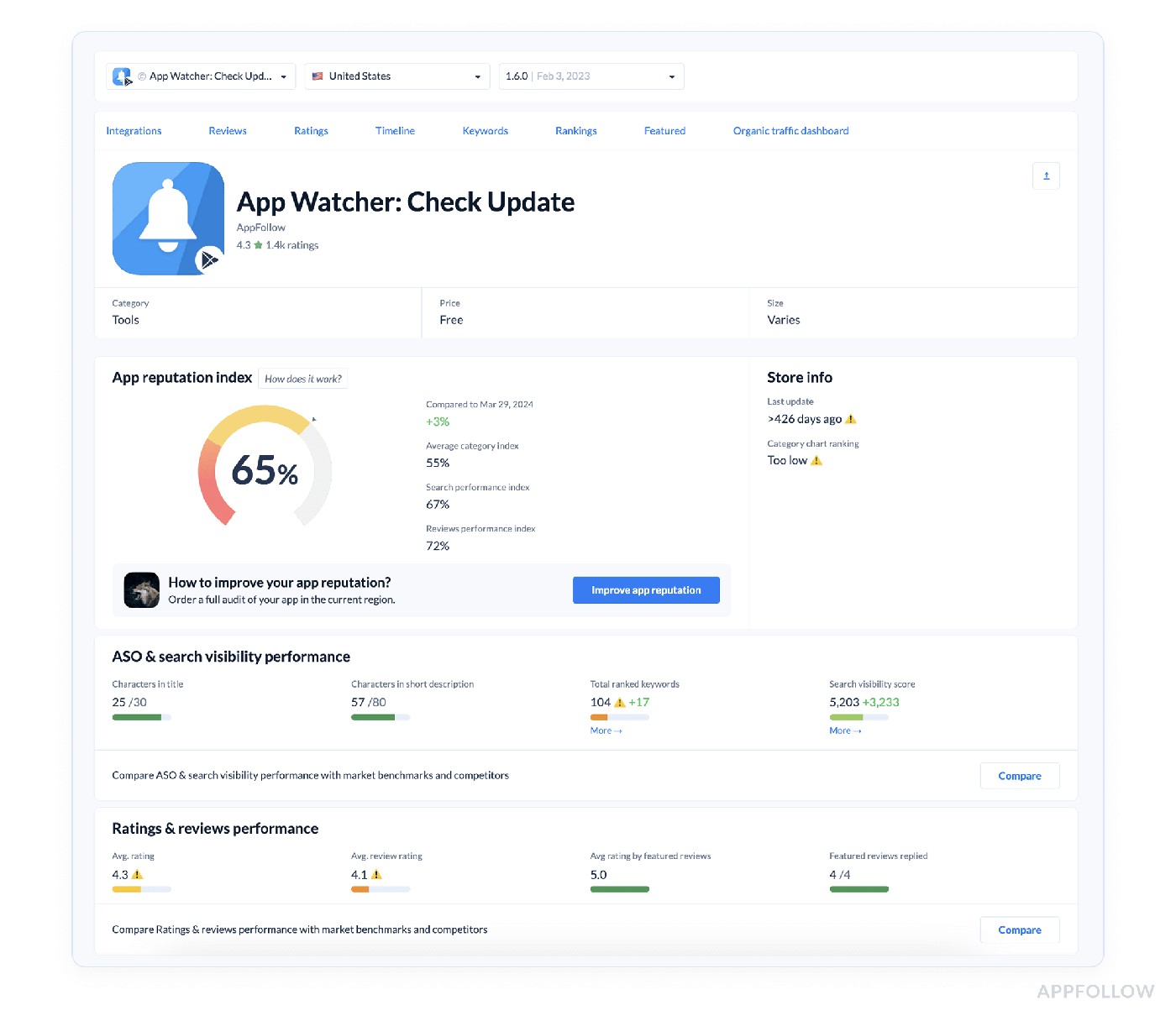
Track your competitors live in AppFollow with a 10-day trial.
If a rival jumps into the top 20 while you're stable at #37, start with its keyword coverage and visible listing changes. Focus on the store-visible evidence; a competitor’s private onboarding funnel is a separate question.
Compare discovery & compare metadata pages (head-to-head with competitors on visibility & page content)
Start with Compare Discovery for the visibility gap. Then use Compare Meta to see whether the rival's title, subtitle, screenshots or localization suggest a relevant test. Keep the store and country fixed across both views.
What you’ll see in seconds
- Compare Discovery – side-by-side keyword ranks, category positions, featured badges.
- Compare Metadata – titles, subtitles, descriptions, icons, screenshots, even local-language hooks lined up row-for-row.
How to read the evidence
Observed gap | Check | Practical next move |
Rival outranks you on the same high-value search | Rank history, relevance, Search Visibility Score | Test a more relevant keyword or better listing match; don't copy the title. |
Rival has stronger localized store messaging | Target-market screenshots, subtitle, description, reviews | Test local language and clear feature promises. |
Similar rank but weaker store conversion | Same traffic source, rating, screenshots, acquisition mix | Design a store-creative test with a defined conversion metric. |
Real-world hit
The published James Delivery case study is an evidence-backed example of repeated ASO experiments. The team tracked search visibility and keyword positions daily, changed metadata iteratively, and used results in executive reporting. The documented evidence is daily ASO measurement and iterative metadata experiments, not a universal keyword-count benchmark.
For other documented examples of ASO and review workflows, see AppFollow customer stories.
What the published case supports
- Tracked keyword rankings and Search Visibility Score regularly in the ASO Dashboard.
- Ran iterative metadata experiments and compared results.
- Used those reports to choose the next optimization and brief growth leadership.
Measured results in roughly six weeks
- Search Visibility Score: +5.6% on iOS and +5.3% on Android.
- Search downloads: +11.5% on iOS and +23.4% on Android.
Crack your rivals’ ASO playbook, free for 10 days Compare Discovery → side-by-side store visibility and market trends Compare Metadata → compare visible listing assets and localization Monitoring for relevant ranking changes and review signals Reports to give growth teams evidence for the next experiment Tap start a free trial and outmaneuver competitors before they refresh their store listings. | 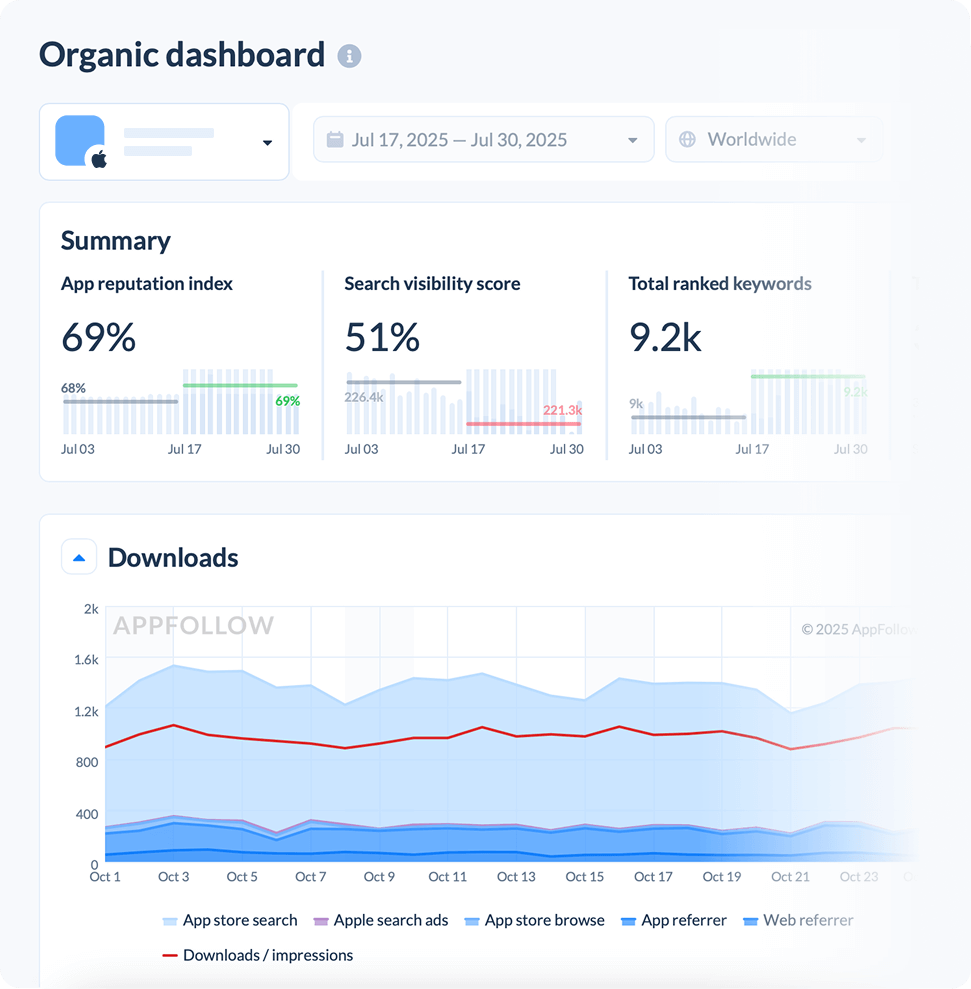 |
Which of these mobile app performance metrics are must have?
You don't need every one of the 21 metrics on one weekly dashboard. Give the team the smallest set that separates discovery, conversion, reputation and competition. Expand only when one of those changes.
Keep latency, crash rate and other engineering APM metrics in the release-health report. Bring them into this review when store reviews suggest a technical incident.
For an app-store growth meeting, I'd start with these measures:
- Category rankings & top charts
- Search visibility & keyword ranks
- Download estimates & downloads by keyword
- Conversion benchmark
- Average star ratings & rating analysis
- Review volume & trends
- Sentiment analysis & auto-tags
- Reply effect tracking
- Compare discovery & compare metadata
Then ask which signal changed versus the previous comparable period. If nothing moved in search visibility but downloads fell, look at conversion, demand and channels instead of spending another sprint on metadata.
A good dashboard is a decision queue, not a competition to display the most metrics.
Read also: AI Reputation Management: How to Secure Your Brand’s Reputation with Ease
How to start measuring app performance analytics with AppFollow
Start from the discrepancy, not from the AppFollow menu. For example, search downloads fell in Canada, rankings are largely stable, and the latest reviews complain about a new paywall. That's a conversion or product hypothesis to test before an ASO rewrite.
First, check Channel Analytics by store and market to separate Search, Browse and referrals. Next, compare Keyword Tracking and Search Visibility Score. If search discovery remains stable, review store-page conversion and rating changes for the same dates.
If recent 1-star reviews repeatedly mention the paywall, filter by version where available and send the examples to the product owner. Keep engineering telemetry and billing events separate; the review feed shows complaints, not whether payment processing failed.
What to record before the next weekly meeting
- Signal: which metric moved, by how much, for which store/country and time period.
- Evidence: visibility, downloads, conversion, reviews, and competitive context.
- Hypothesis: what could explain the change, and what would disprove it.
- Owner: ASO, growth, support, product, or engineering.
- Recheck: the metric and date that will show whether the action worked.
AppFollow connects the storefront side of this investigation. Use connected store data for actual acquisition, and your product, crash and MMP systems for anything that happens after install. The result should be a fix list, not another all-green dashboard. For deeper examples of managing acquisition and store analytics, see the mobile app analytics practices guide.
cta_demo_request_yellow
FAQs
What are mobile app performance metrics?
Mobile app performance metrics cover reliability, store discovery, acquisition, conversion and user feedback. For app-store growth, start with keyword ranks, search visibility, search downloads, listing conversion, recent ratings, review topics and competitor movement. Use engineering APM separately for latency, crashes and uptime.
How do you measure mobile app performance after a release?
Compare the same store, country and acquisition source before and after the release. Check search downloads, page conversion, recent rating distribution and repeated complaint themes. If users report a bug, investigate product telemetry too. Record a baseline, the fix owner and the date to check the outcome.
Which keyword metrics (popularity, KEI, difficulty) should top my ASO dashboard, and how often should I refresh them?
Start with relevance, popularity and your current rank. Use difficulty and effectiveness to choose attainable terms, then compare their search-download contribution. Check strategic keywords weekly; increase frequency around a live metadata test or major launch.
How do I translate my category rank jumps into a real install forecast?
A chart position is not a conversion formula. Build an empirical estimate from your own country/category history, keeping paid campaigns and store featuring visible. For a finance forecast, use connected store download data rather than chart position alone.
Can featured-placement spikes be separated from paid boosts inside AppFollow, or do I need a separate BI layer?
Use Featured Timeline to mark the placement date, country, and collection. Compare Browse and Search downloads with ad spend and a comparable baseline. AppFollow helps identify the overlap, but the placement is not proof of incremental organic downloads on its own.
What’s a healthy conversion benchmark for a freemium fitness app in the US right now?
Use the current Conversion Benchmark for your exact category and country. Check the denominator first: impression-to-install and page-view-to-install rates cannot be compared directly. If your app trails, investigate traffic mix, visuals, reviews, localization and value proposition before deciding on a creative fix.
How accurate are AppFollow’s download estimates vs. App Store Connect, and how do I explain any gaps to my CFO?
Modeled estimates can be useful for direction, but their uncertainty varies by market and volume. Use App Store Connect and Google Play Console as the source for your own store-reported download counts, and label estimates separately in finance reporting. Label both sources clearly in finance reporting.
Which downloads-by-keyword report helps me spot cannibalization between similar phrases?
Open Downloads by Keywords with an ASO Report connection, or use relative % of Search Downloads in Keyword Tracking. Compare keyword rank and contribution before replacing terms. Two synonymous phrases appearing in a report do not, by themselves, prove cannibalization.
At what point does an incremental star rating dip become a red flag for churn?
Compare the recent average and 1–2-star share with the app's historical range, including the count of new ratings. A small sample can create a dramatic-looking shift. Check written review themes and product telemetry before predicting churn.
How do I structure auto-tags so sentiment analysis feeds directly into sprint planning?
Start with a manageable hierarchy such as Login, Payments, Performance, Ads and Feature Requests, then add specific tags for actionable symptoms. Compare the count and share of new reviews for each topic, spot-check classification, and route a sample with app-version context to the right owner.
What reply-effect percentage should I target to prove our support SLA is working?
There is no universal Reply Effect target. AppFollow considers a review updated within 30 days after a reply; the update may change text, stars, or both. Compare Reply Effect with your prior baseline, reply time, and whether the underlying complaint reappears in new reviews.