AppFollow vs. DIY: how can I manage App Store, Google Play, and Steam reviews in one place?

Brasslight, a fictional tactics game, ships on the App Store, Google Play, and Steam. Three dashboards stay open all day, along with three permission systems, three review formats, and a spreadsheet with no owner. App Store ratings drop after version 3.2 on iOS. Google Play complaints about failed payments come in from several markets. On Steam, a player marks the game Not Recommended over a broken controller setup.
Your support lead wants one queue, one weekly report, and replies without three consoles. An AI coding tool builds the inbox UI in an afternoon. Then someone asks for German Google Play reviews only, a reply to the Steam player, and a report on a fake 1-star review, and each store answers with its own rules.
Can you manage App Store, Google Play, and Steam reviews in one place?
Yes. You can pull all three into one working view, either with store-specific integrations you build or with a platform like AppFollow. Collecting, replying, filtering by country, and reporting spam still follow each store's rules. In AppFollow, Steam reviews are in open beta for all customers, and Steam discussions are open to all users through Feedback Hub, which is in early access. Replies need a separate connection for each store, and Google Play country data needs a paid connection.
What does one reviews inbox need to do besides showing three feeds?
- View: one searchable feed that keeps the store, source listing, review ID, rating or recommendation, locale, and timestamps on every item. An AI coding tool can build this part in a day.
- Act: reply, assign, approve, tag, and escalate through a workflow that fits each store's rules.
- Analyze: slice by source, market or language, and period, with counts and denominators that make sense for each store.
- Govern: access rights, activity logs, error monitoring, history, and data handling.
On the App Store, a negative review is a 1-star rating with a title and text. On Google Play, it's a 1-star review. On Steam, it's a Not Recommended vote with text and no stars at all. You can't average those into one 1-to-5 score without a written mapping and its assumptions.
AppFollow's bulk actions work only when one source is selected, so each bulk reply goes to one listing at a time.
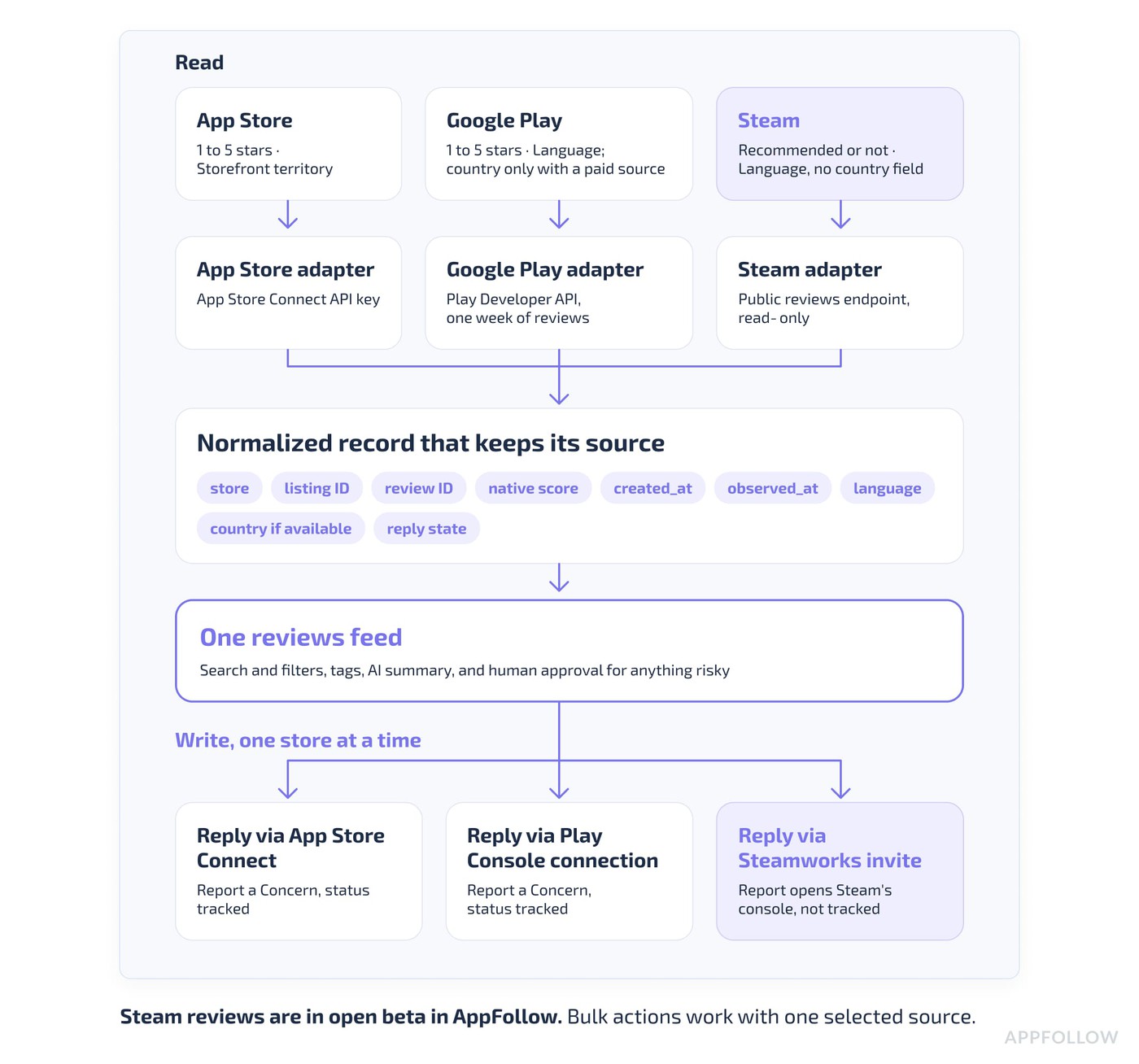
App Store vs. Google Play vs. Steam: what can you connect from each store?
You can read reviews from all three. Replies need a separate connection per store, and only the App Store puts a country on every review.
App Store: territories, written reviews, and authenticated replies
Apple's Customer Reviews API lists reviews per app or per version, filters them by territory and rating, and pairs with separate endpoints for your responses. Each review carries the storefront territory. Star-only ratings count toward the app's rating, with no text for a reply.
AppFollow collects App Store reviews retrospectively, so the history is there once you add the app, and your plan sets how far back you can see it (7 days on Free, 365 days on Essential, and full history on Team and Enterprise). Per its collection docs, new reviews arrive 4 times a day by default and every hour with an App Store Connect connection. Total and incremental ratings start on the day you add the app, with no backfill. Replies need that App Store Connect connection too.
Google Play: console replies, and country as a separate problem
Google's Reply to Reviews API returns only reviews created or modified in the last week. It allows 200 GET requests an hour and 2,000 replies a day per app, and a reply can't run past 350 characters. Review fields include reviewer language, device, and app version, and no country. The public store page shows no country either.
A Spanish review doesn't prove the player lives in Spain. AppFollow gets per-review country only through its paid Country Data connection, which runs on the Invite User connection with an extra access option. With it, country shows in the Reviews feed, filters, CSV and Excel exports, Tags Chart, Semantic Analysis, and the API. Without it, Google Play reviews carry device and review language, with no country.
Steam: recommendations, reviews, and discussions on a separate track
Steam reviews carry a Recommended or Not Recommended verdict. Valve's GetAppReviews endpoint is public and pages with a cursor. Each review carries a language code, timestamps, playtime, and purchase flags, with no country field, and that interface is read-only.
In AppFollow, Steam reviews are an open beta for all customers. You add a game yourself, then filter, export, translate, tag, auto-tag, and run sentiment, AI Topics, and AI Summary on it, with some of those features tied to your plan. Replies need a Steamworks connection: you invite AppFollow's Steamworks user, AppFollow accepts the invite by hand (up to 24 hours), and you add that user to your application group with Edit App Metadata. Every DLC App ID has to be in that group, or its reviews stay read-only. Steam discussions come in through Feedback Hub, open to all users in early access.
The store capability matrix
Labels in the cells: "documented" means AppFollow's public docs describe it, "connection" means you need a store connection or paid add-on first, "beta" means a beta feature, and "verify" means you should check with AppFollow before you rely on it.
Operation | App Store | Google Play | Steam | What it means for you |
|---|---|---|---|---|
Review item | 1 to 5 stars, title, and text | 1 to 5 stars and text | Recommended or Not Recommended, and text | Keep native scores, and map them only with written rules |
Collection | Public reviews, past reviews included (documented) | Public page by default, console data with a connection (documented) | Self-service add, no credentials needed (beta) | One feed, three collectors |
Replies | App Store Connect connection (connection) | Google Play Console connection (connection) | Steamworks invite, accepted by hand within 24 hours (beta, connection) | A source in the feed may still lack reply rights |
Freshness | 4 times a day, hourly with a connection (documented) | Up to 24 hours from the public page, 5 to 10 minutes with a Service Account (documented) | Not published (verify) | No shared clock, so don't copy mobile timings to Steam |
History | Past reviews collected, visible history set by plan; ratings start on the day you add the app (documented) | Past reviews collected, visible history set by plan; incremental ratings backfilled with Invite User (documented) | Depth not published (verify) | Ask before you promise year-over-year Steam reports |
Geography | Storefront territory on each review (documented) | Country only with Google Play countries, on Enterprise or as an add-on (connection) | Language only, no country field (verify) | Language isn't country |
Language and translation | Review language, auto-translate (documented) | Device and review language, auto-translate (documented) | Review language, auto-translate (beta) | Same translation tools in one feed |
Tags and AI Summary | Tags, auto-tags, AI Summary by plan (documented) | Tags, auto-tags, AI Summary by plan (documented) | Tags, auto-tags, sentiment, AI Topics, AI Summary, by plan (beta) | Check your plan and each source |
Report spam from AppFollow | Report a Concern with an App Store Connect connection (connection) | Report a Concern with the premium Invite User option (connection) | Report opens Steam's moderation page in a new tab (documented) | Two flows with two owners |
Report status in AppFollow | Tracked (documented) | Tracked, including Declined (documented) | Not tracked (documented) | Steam outcomes stay on Steam |
Discussions | None | None | Feedback Hub, open to all users (early access) | Separate feed, with no documented replies |
Bulk reply | One selected source per action (documented) | One selected source per action (documented) | One selected source per action (verify) | No one-click reply across stores |
Export | XLS or CSV on Essential, Team, and Enterprise (documented) | XLS or CSV on Essential, Team, and Enterprise, country column with the add-on (documented) | Export (beta) | Plan-dependent |
How AppFollow handles these three stores: a workflow to test in your own account
AppFollow can put supported App Store and Google Play reviews next to Steam reviews (open beta) in one Reviews feed, and reading, replying, country filtering, and moderation still have different prerequisites per store.
Connect the sources and check each one's permissions
Add Brasslight's three listings as sources, then select all three in the Reviews feed. The feed takes several sources at once, every source in a workspace, or a custom source group (manual groups need 3 or more sources). The source picker narrows the view back to one store whenever you need it, and the feed's AI Summary covers the sources in your selection.
Replies need three separate connections: App Store Connect, Google Play Console, and the Steamworks invite. A Steam game can show reviews in the feed for weeks with no reply connection in place.
Task | What DIY has to build and maintain | What AppFollow does | What still applies | Source |
|---|---|---|---|---|
Weekly triage and a safe reply | Three collectors, ID mapping, Steam's recommendation format kept as is, date and status normalization, a queue, drafting, and three reply connections | Select all three sources in the Reviews feed, filter, tag, draft with templates or AI, and publish through each store's connection | Bulk actions need one selected source, and replies need each store's connection | Bulk Actions with Reviews; Navigating the Reviews Feed |
German payment failures on Google Play after 3.2 | A permitted source of per-review country, language kept separate, the right denominator, and version mapping where exposed | Filter Google Play reviews by country and version with the paid Country Data connection | Without that connection you get language, and language doesn't prove Germany | Google Play: Reviews Country Data Connection |
Report a suspected fake review | Evidence storage and a handoff to each store console, since no public report endpoint exists | App Store and Google Play: submit from the feed and track the status. Steam: Report opens Steam's console in a new tab | 15 reports per source per day through AppFollow, the store decides on removal, and Steam outcomes stay untracked | Report a Concern |
Task 1 is the Monday triage, with replies sent through each store's connection. In Task 2, the Country Data connection decides the answer: without it, you get German-language reviews, a different set of players. In Task 3, a Steam report finishes on Steam.
In a DIY build, Task 2 also needs a country source, and Google's API has no such field.
Proof from the docs
AppFollow's 2026 release notes date Steam's arrival to July 28, 2026. No public AppFollow case measures time saved on this exact three-store setup yet. Kolibri Games reports an 88% cut in response time from review automation on its mobile games, and that number says nothing about Steam or Google Play country data.
cta_get_started_purple
How do you combine three stores in one inbox without breaking data integrity?
Map the game across the storefronts
Brasslight has three listing IDs: an App Store app ID, a Google Play package name, and a Steam App ID. None of the stores knows about the other two, so your own mapping table ties them together, with fields like product_id, source_type, store_listing_id, source_review_id, review_created_at, review_updated_at, review_observed_at, native_rating_or_recommendation, detected_language, source_country_if_available, review_text, reply_state, version_if_available, and collection_status.
That's an illustrative internal schema, and AppFollow's API uses its own. Don't dedupe across stores by similar text, either. Two players can write the same sentence about two different bugs.
Track timestamps and collection gaps
Keep created_at and observed_at apart. Google Play can take up to 24 hours to moderate a review, and the App Store usually 8 to 12 hours (up to 3 days), per AppFollow's receiving reviews docs. A review you saw today may be a day old. If a collector crashes or a token expires, you need to spot the gap and backfill where the store allows it, and Google's API keeps one week, so a longer gap means the Play Console CSV export.
AppFollow's own timings (in the matrix) differ by store and connection, and none of them is a real-time guarantee. Steam freshness and history depth aren't documented the same way, so test them on your own game before you set alert thresholds.
Use a denominator per store
In a constructed week with no AppFollow data, Brasslight gets 100 App Store reviews with 10 one-star complaints, 100 Google Play reviews with 30, and 100 Steam reviews with 40 Not Recommended votes. Report each store's negative share under its own definition: 10%, 30%, and 40%.
"80 one-star reviews out of 300" is wrong, since Steam has no stars. If you define "negative item" in writing, 80 of 300, or 26.7%, is a blended measure you built yourself. Label it that way on every chart, so nobody reads it as a store rating.
Why is Google Play review analysis by country hard to build yourself?
Google doesn't hand you the field: neither its review API nor the public store page shows a per-review country.
Country isn't language
Say your publisher wants every 1-star login complaint from Germany. A developer filters by review language = German. That drops English reviews written in Germany and pulls in German reviews from Austria, Switzerland, and everywhere else. An AI model that infers country from the wording is making a guess.
Why the connection type matters
AppFollow's Google Play connections page lists three setups:
- Service Account: Google's official API, with replies, faster collection, and device and version data.
- Invite User: replies, incremental worldwide ratings, app analytics, Report a Concern, and beta reviews, with reviews read from the public page.
- Invite User with Countries Connect: reviews read from the console, plus country data, as a paid option (Google Play countries come with Enterprise or as an add-on).
Report a Concern and country data are separate options, so one doesn't come with the other. Per AppFollow's countries and languages article, the Play Console has a country filter, and AppFollow built a method to collect that country for each review.
What country changes in support routing
With country data, Brasslight's German 1-star payment complaints after 3.2 go to the regional support agent, get a localized reply, and feed a release investigation. AppFollow doesn't fill in country for Google Play reviews without that connection, and it can't tell you whether a payment method works for a player in that market.
Can you report fake or offensive reviews without switching store consoles?
For the App Store and Google Play, yes, with a connection. For Steam and Trustpilot, AppFollow opens the platform's own form, and you finish the report there.
The public review APIs don't include a report method
Google's Reply to Reviews API lists, reads, and replies to reviews. Apple's Customer Reviews API reads reviews and manages your responses. Valve's GetAppReviews is read-only. None of the three documents a Report a Concern operation. Each store has its own reporting process in its console, and a DIY tool has to send people there.
Two flows in AppFollow
For the App Store and Google Play, Report a Concern runs from the Reviews feed: select a review and click Report. iOS asks for a reason and a description, and Android needs no details. The App Store side needs an active App Store Connect reply connection. Google Play needs the Invite User connection with the "Get rid of SPAM and offensive reviews" option, which AppFollow calls a premium feature. AppFollow then tracks each report's status (Pending, Error, Submitted, Declined for Google Play, Satisfied, and Deleted), checking daily for 14 days, again on day 21, and a last time on day 30.
For Steam and Trustpilot, Report opens the review in the platform's moderation console in a new browser tab. You fill in the form there, logged in with permission to report reviews. AppFollow doesn't track the outcome.
Stores don't publish their report limits, so AppFollow caps its own submissions at 15 per source per day. Extra reports wait as Pending and go out the next day. That cap covers AppFollow's queue only. The store still makes the removal call, and a submitted report guarantees nothing.
Action | App Store and Google Play | Steam and Trustpilot |
|---|---|---|
Report action in AppFollow | Submit from the Reviews feed | Opens the platform's moderation console in a new tab |
Outcome tracking in AppFollow | Yes, for reports sent through AppFollow | No |
Removal decision | The store | The platform |
AppFollow daily limit | 15 per source, with extras held as Pending | None from AppFollow, since you submit on the platform's form |
Requirements | App Store Connect connection, or the Google Play Invite User connection with the premium spam option | Platform login with permission to report reviews |
The queue math when spam spikes, and it will
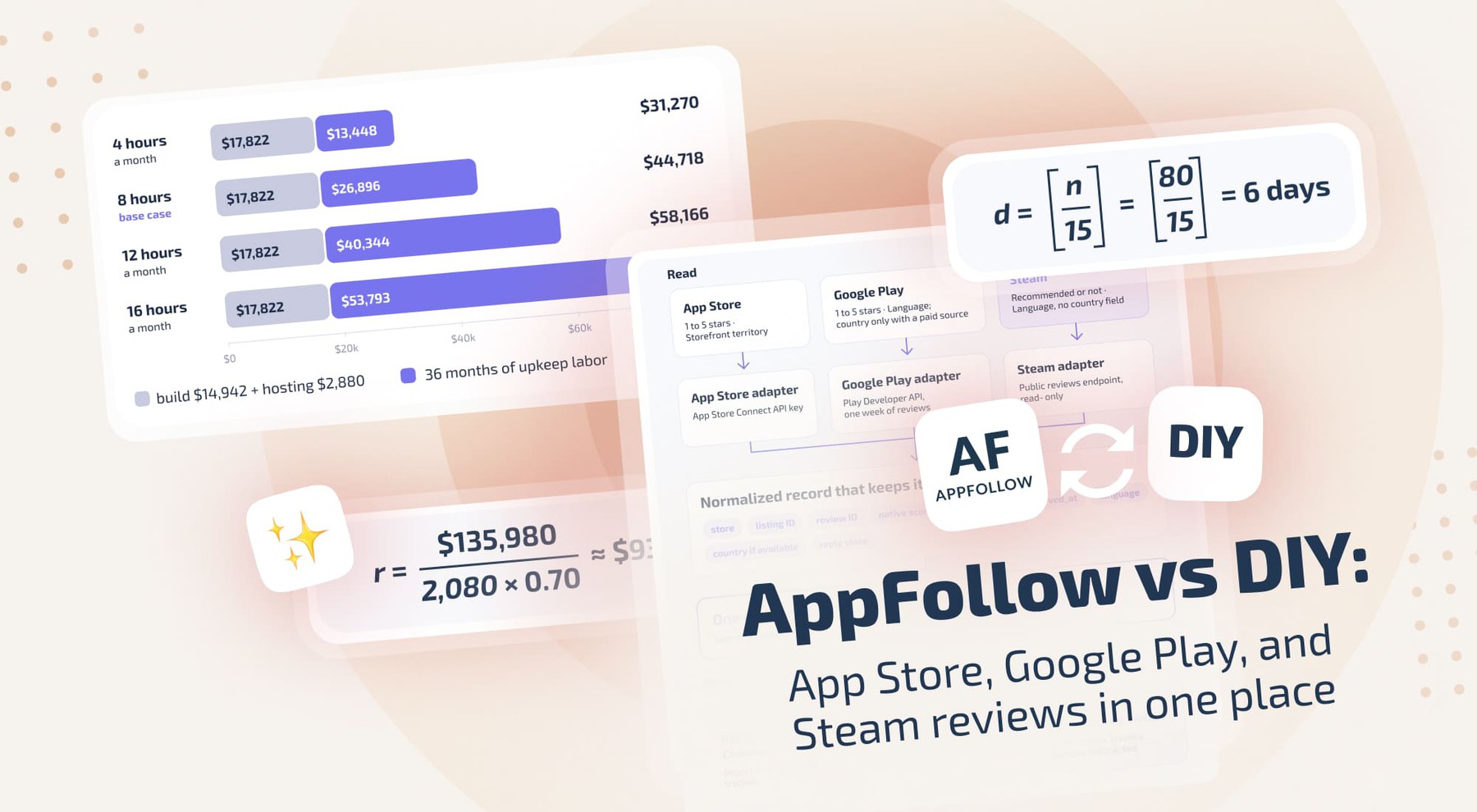
A hypothetical: Brasslight's Google Play listing gets 80 reviews that look reportable, and a person checks each one first. At 15 a day, with no other reports from that source, the queue needs 6 days to submit them all:
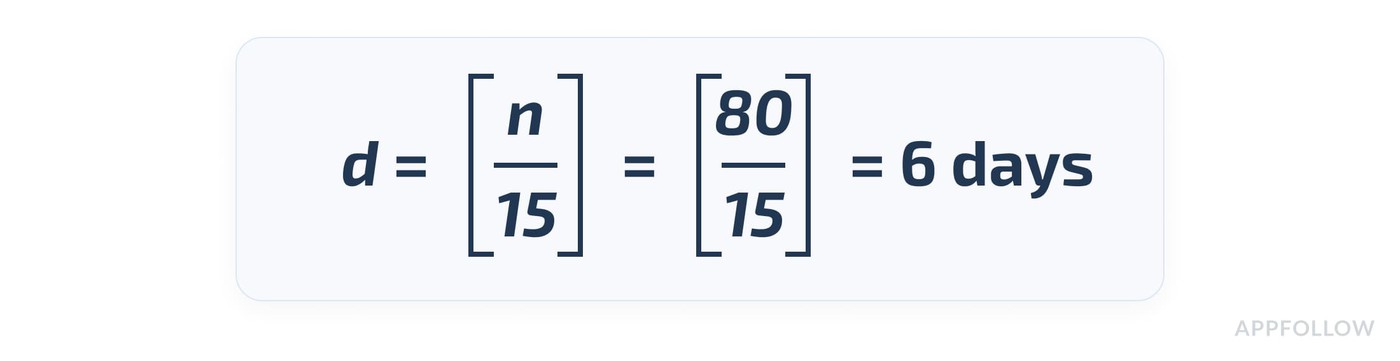
Here, n is the number of reports, and the brackets round up to a whole day.
cta_get_started_yellow
How do you reply safely across all three stores?
Each store needs its own write connection: App Store Connect, Google Play Console, and the Steamworks invite with Edit App Metadata. AppFollow's Steam setup has a manual acceptance step that can take up to 24 hours, and a Steam game in your feed proves nothing about reply rights. Keep "eligible to reply" and "reply sent" as separate states, and record the send result per store. Google caps replies at 350 characters, so a long Steam-style reply needs a shorter Google Play version.
- Safe to automate: a 5-star Brasslight thank-you on any store, from an approved template or an automation rule, where your plan supports it.
- Needs a person: a failed purchase, a lost account, or a 3.2 regression, with the game's policy, an approval, or an escalation path. AI drafts shouldn't promise refunds or patch dates.
AppFollow's bulk actions work on one selected source at a time. The Reply bulk action is switched on separately, and replies go out one by one, about 10 seconds apart. Bulk AI replies come with two modes: Approval mode saves them as pending for a person to publish, and Publish immediately sends them right away.
What about Steam discussions and Trustpilot?
Steam reviews and Steam discussions are different content
Steam reviews are an open beta in AppFollow, with reading, tags, translation, summaries, and replies after the Steamworks connection. Steam discussions are open to all users through Feedback Hub, with tree and flat thread views, filters, tags, and AI summaries for a whole feed or a single thread. AppFollow's docs describe no replies to discussion threads.
Feedback Hub also collects feedback from other sources outside the app stores, with options like Reddit and Discord. It's in early access, which means features can change, so check coverage on your own game before you count on it.
If your brand also uses Trustpilot
Trustpilot can join the same AppFollow source group as your App Store and Google Play apps. Reporting opens Trustpilot's console, and AppFollow doesn't track the outcome. Replies through the Trustpilot API connection need a paid Trustpilot plan with API access and an AppFollow Team plan or higher. Public replies appear under your company name, and the responder's name shows only inside the Trustpilot console.
What would you have to build with AI to replace the integration layer?
A collector, a normalizer, a reply path, and a moderation handoff for each store, plus everything that keeps them working after launch. A competent developer with an AI coding tool can ship a read-only version in days.
- Auth and credentials per platform, with refresh, expiry, and least privilege.
- A collector per source, with retries, quota handling, backfill where allowed, and alerts when a store changes its format.
- App and review ID mapping across stores, with each native rating or recommendation kept in its original form.
- Language on every review, and country only where a source provides it.
- Storage with history, review edits, reply states, and freshness checks.
- Reply prompts, templates, routing, approvals, and an audit record.
- Per-store reports, an optional combined AI summary, filters, tags, and data QA.
- Moderation handoffs to each store's console, plus any reporting integration a store permits.
- Alerting, incident response, monitoring dashboards, and a named owner.
- Privacy, retention, and source terms, with no unsupported scraping.
- Trustpilot and Steam discussions as separate scope items.
- An API or MCP interface, if your team wants to query reviews from an AI assistant.
One store adapter can serve 20 apps, and each of those apps still needs its own permissions, listing map, and reports. The store APIs carry plenty of fine print, and our breakdown of Google Play and App Store review API limits covers it in detail.
Is building your own App Store, Google Play, and Steam review integration cheaper?
DIY can be cheap for a narrow read-only script. A dependable setup that reads, replies, segments by country, and handles moderation carries engineering and source costs for as long as you run it.
Compare three years of ownership with three years of a subscription
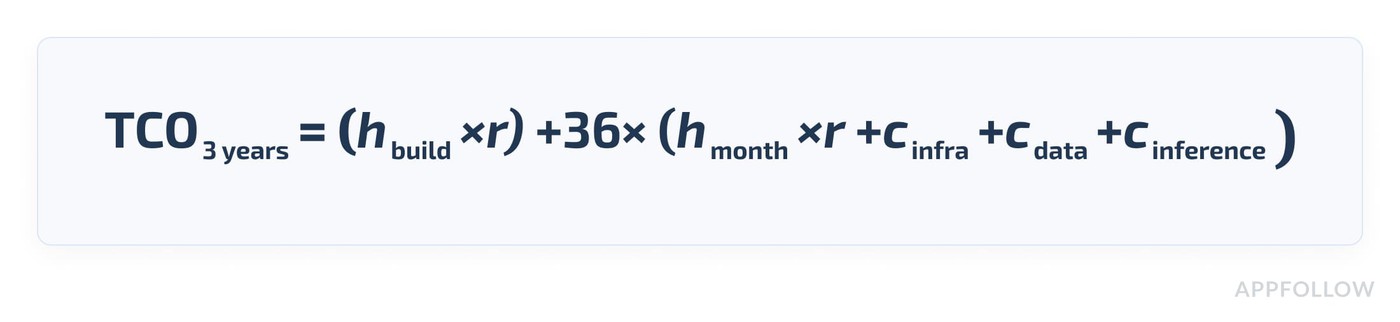
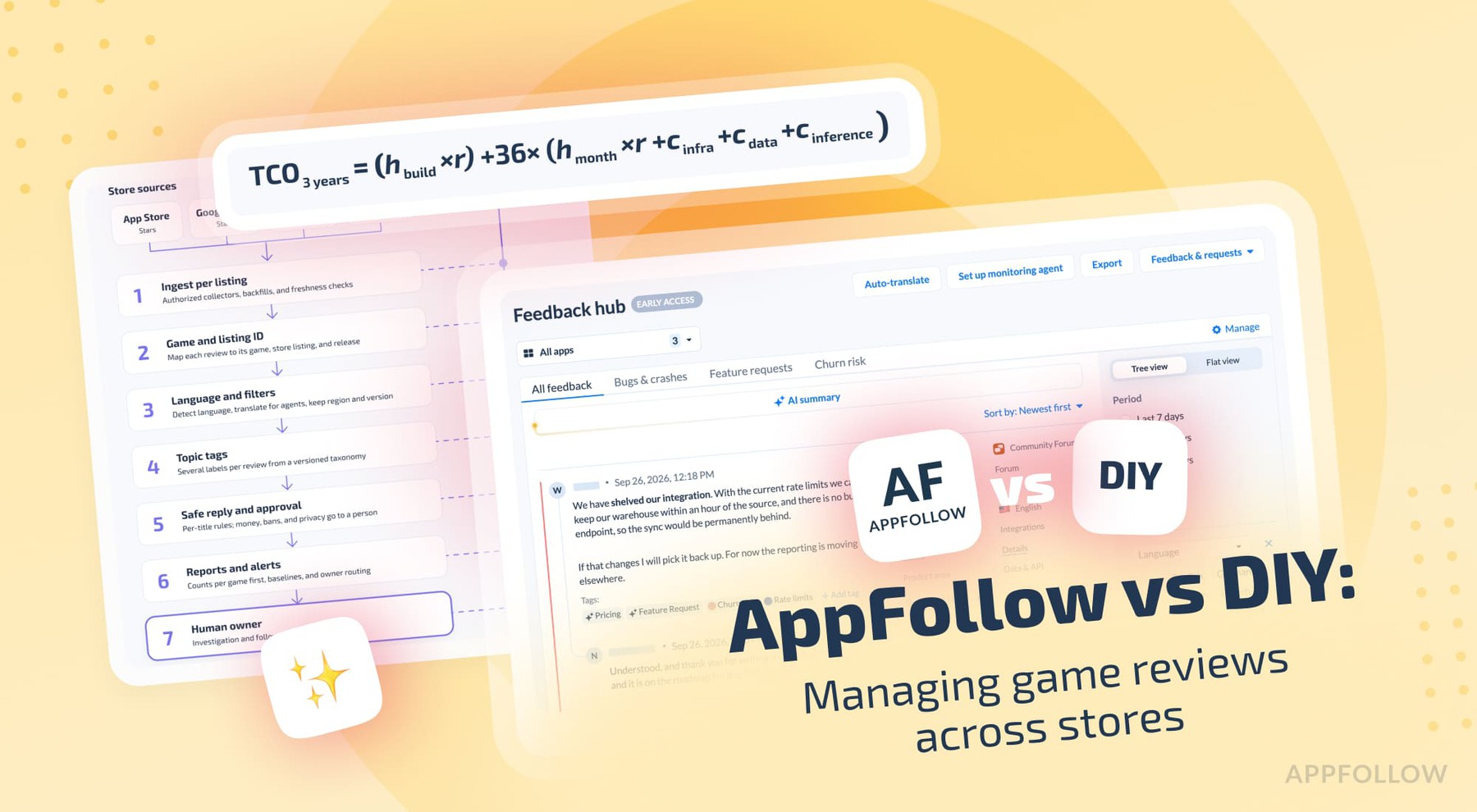
In it, h(build) is build hours, r is the hourly labor rate, h(month) is monthly upkeep hours, and the c terms are monthly costs for infrastructure, data licensing, and AI or API usage. Put onboarding, security review, approvals, and store-specific support into the build estimate. Agent time spent answering reviews belongs to both approaches, so count it on both sides or leave it off both.
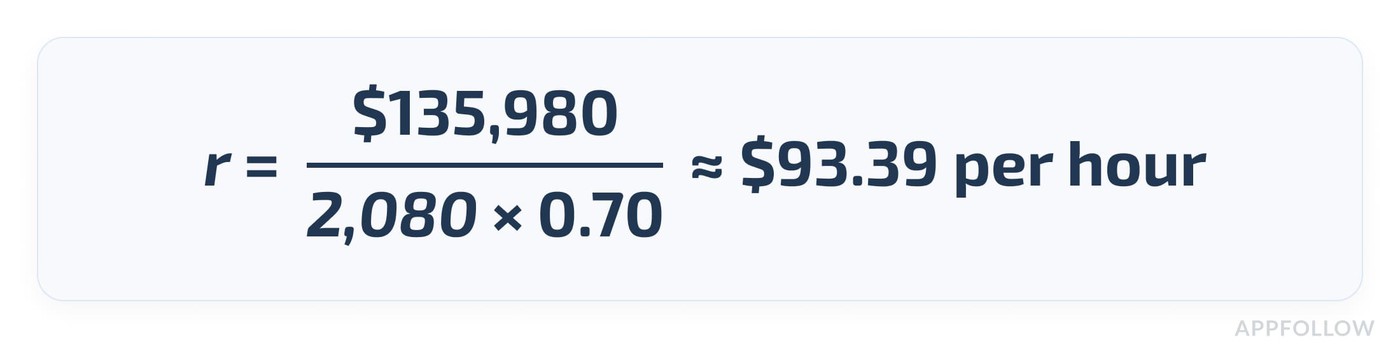
$50 an hour is a hypothetical contract rate. $93.39 an hour is a modeled fully loaded US rate. The Bureau of Labor Statistics put the median software developer wage at $135,980 in May 2025, and wages made up 70.0% of private-industry employer compensation costs in June 2026. Over 2,080 paid hours:
Build hours by component
These are editorial scenarios, with no measured implementation data and no engineering sign-off. Ask a developer who has shipped store integrations for a low, base, and high range before you use them.
Scope | Components (hours) | Build hours | Upkeep a month | Infra a month |
|---|---|---|---|---|
A: one store, read-only internal tool | Collection and credentials 12, schema and import 8, UI 8, QA and setup 12 | 40 | 4 hours | $30 |
B: App Store, Google Play, and Steam reviews, limited production | Three connectors and permissions 48, normalization and history 24, country and source handling 12, reply pipeline with approval 30, tags, filters, and reports 20, deployment, QA, and monitoring 26 | 160 | 8 hours | $80 |
C: expanded three-source platform with governance | Connectors and permissions 80, backfill, history, and data QA 52, game access and routing 48, replies, approvals, and moderation 50, reporting, analytics, and AI topic evaluation 50, deployment, security, and observability 40 | 320 | 16 hours | $150 |
Scope B leaves out Google Play country data (a paid AppFollow connection, or a source you'd have to find yourself), Steam discussions, paid AI inference, extra compliance work, and moderation tooling.
Three-year cost by scope
Scope | Build hours | Upkeep hours a month | Infra a month | Build cost | 36-month upkeep labor | 36-month hosting | 3-year total |
|---|---|---|---|---|---|---|---|
A: one store, read-only | 40 | 4 | $30 | $3,736 | $13,448 | $1,080 | $18,264 |
B: three stores, limited production | 160 | 8 | $80 | $14,942 | $26,896 | $2,880 | $44,718 |
C: expanded platform | 320 | 16 | $150 | $29,885 | $53,793 | $5,400 | $89,078 |
At a hypothetical $50 contract rate, the same scopes cost $10,280, $25,280, and $50,200. Scope A covers one store, read-only, so it doesn't compare with a three-source AppFollow setup. Scope C isn't a feature-for-feature match for any AppFollow plan either, since its discussion workflow maps to Feedback Hub, which is still in early access. All amounts are rounded to the nearest dollar.
Maintenance sensitivity: when 8 hours a month becomes 16
Scope B's 8 upkeep hours a month could split like this (a proposed allocation, with no observed work log):
- 3 hours on credentials, connector health, and store changes.
- 2 hours on ingestion QA, missing data, and history reconciliation.
- 1 hour on reply policy, templates, and moderation paths.
- 1 hour on monitoring and alerts.
- 1 hour in reserve for incidents and access checks.
At 160 build hours, $93.39 an hour, and $80 a month in hosting, Scope B costs $31,270 at 4 upkeep hours a month, $44,718 at 8, $58,166 at 12, and $71,615 at 16. Each extra monthly hour adds about $3,362 over 36 months.
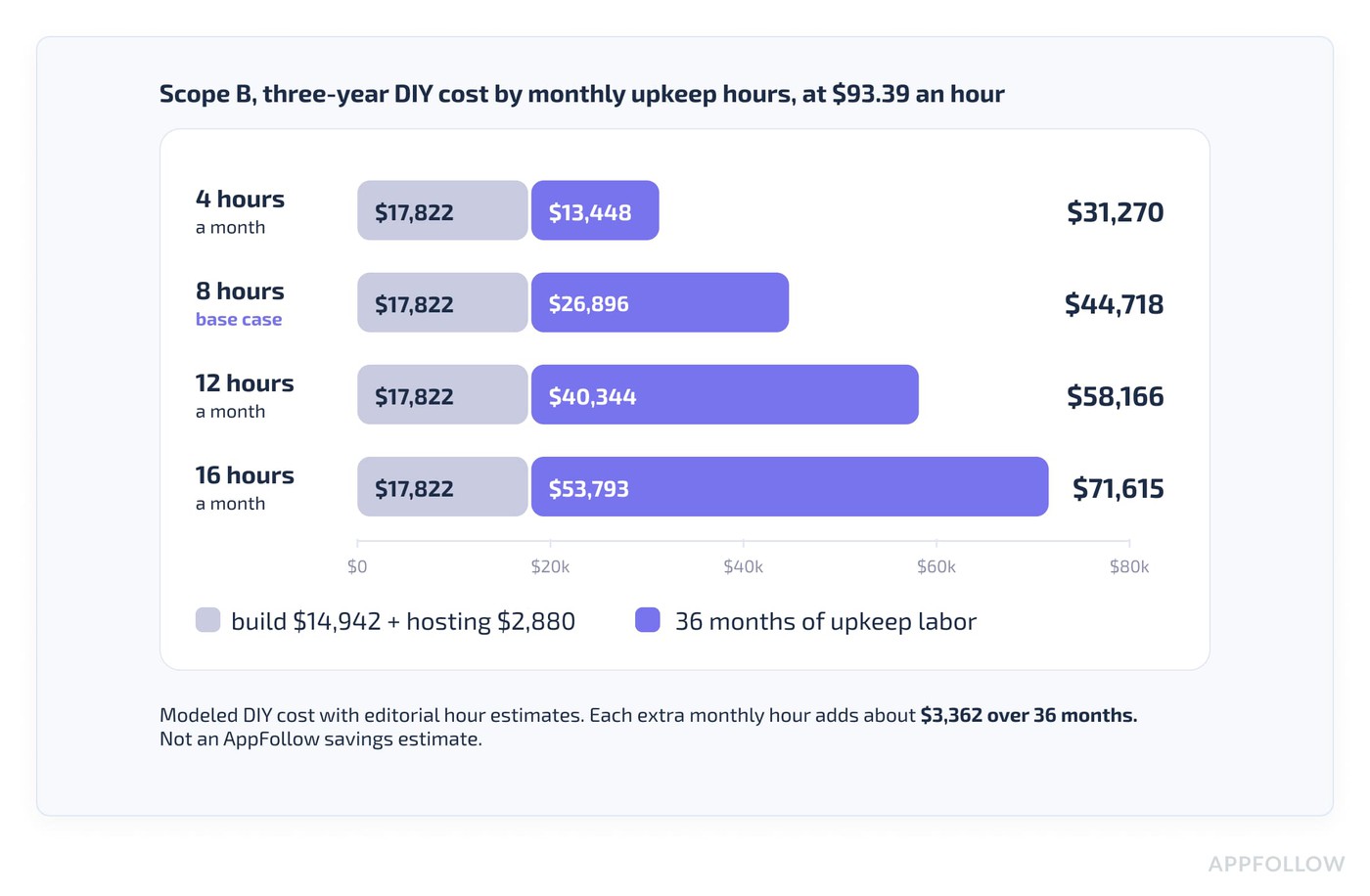
Modeled sensitivity at $93.39 an hour. These are DIY costs, with no AppFollow savings estimate.
What does AppFollow cost for the same setup?
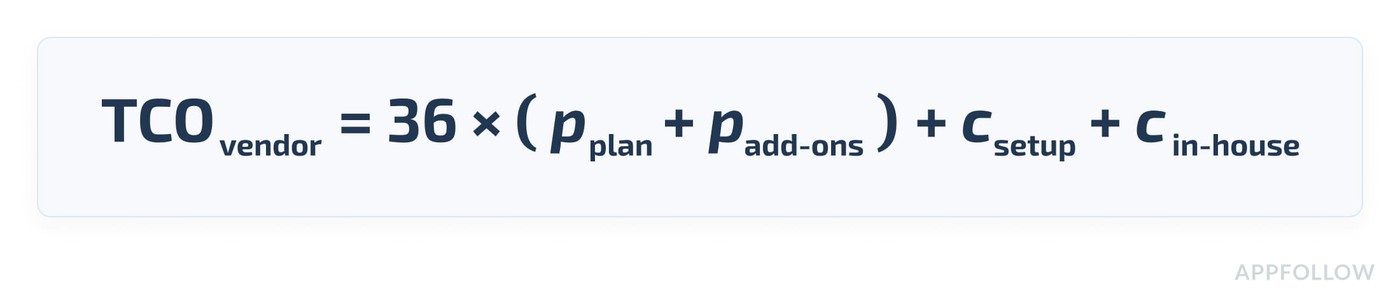
Here, p(plan) and p(add-ons) are monthly prices from a dated quote, c(setup) covers onboarding and custom integrations, and c(in-house) is the three-year cost of any work you still run yourself.
Under equal scope, Scope B's $44,718 over 36 months comes to about $1,242 a month, before add-ons, onboarding, credits, custom integrations, and leftover in-house work.
AppFollow's pricing page listed these prices on November 19, 2026, in USD for new customers and before VAT:
- Essential: $179 a month, or $129 a month billed annually, with 5 sources, 500 manual replies a month, and 365 days of history.
- Team: $599 a month, or $425 a month billed annually, with 10 sources, 1,500 manual replies a month, and full history.
- Enterprise: a custom price, with Google Play countries, auto-tags, AI Topics, and sources by request.
Brasslight's three listings fit in either self-serve plan. At the annual rate, 36 months of Essential comes to $4,644 and 36 months of Team to $15,300 at list price. Both monthly rates are lower than the $1,242 threshold, and neither includes Google Play country data, which takes Enterprise or the Google Play countries add-on. Price that add-on before you compare totals, and sort every other line into "covered by the plan," "paid add-on," or "kept in-house":
DIY cost line | Where it goes in an AppFollow quote |
|---|---|
Three store sources (App Store, Google Play, Steam) | 5 sources on Essential, 10 on Team, with Steam reviews in open beta |
Google Play country data | Included in Enterprise, or a paid add-on |
Reply connections and monthly reply volume | 500 manual replies a month on Essential and 1,500 on Team, unlimited automated replies, and the Reply bulk action switched on separately |
Report a Concern for Google Play | Spam reporting is listed on every plan, and the help center calls the Google Play connection option premium, so confirm it in the quote |
Seats, roles, and approvals | Unlimited users on every plan; custom roles on Enterprise |
History and storage | 7 days on Free, 365 days on Essential, full history on Team and Enterprise |
Reports, tags, and semantic analysis | Sentiment tags from Essential, semantic tags from Team, auto-tags on Enterprise or with the Automation add-on, and AI Topics on Enterprise |
API and MCP access | MCP connector on every plan; 1,000 API credits a month on Essential and Team |
Steam discussions | Feedback Hub in early access, with coverage and later pricing confirmed in the quote |
Onboarding, custom integrations, and contract minimums | Quote line items |
Agents answering reviews | Kept in-house either way |
AppFollow vs. DIY vs. hybrid: which layers stay with your team?
AppFollow maintains the supported store collectors, reply connections, and review workflow. Your team keeps its taxonomy, policies, owners, and anything outside AppFollow's documented scope.
Capability | DIY | AppFollow documented scope | Caveat |
|---|---|---|---|
Three-store visibility | Build every collector and the view | App Store, Google Play, and Steam reviews (beta) in one feed with several sources selected | Check the three-source view in your own account |
Reply posting | Maintain auth, state, and retries per store | Replies on connected sources | Steamworks invite with manual acceptance, plus each store's rules |
Google Play country | Find a permitted source of per-review country | Google Play countries, on Enterprise or as a paid add-on | Not part of the default public collection |
AI Summary and topics | Build and validate them | AI Summary on the selected feed, AI Topics for Steam | Depends on plan and source |
Steam discussions | Your own thread collector, with the rights to run it | Feedback Hub, open to all users in early access | Early access, with no documented replies |
Report a Concern | Console workflow or a permitted integration | Submit and track for App Store and Google Play | 15 per source per day, a connection and plan, and the store's decision |
Steam and Trustpilot reports | Link to the platform form | Opens the platform's moderation console | No status tracking |
Bulk replies | Build per store, carefully | One selected source per bulk action | No bulk publishing across stores |
History | Snapshots and change monitoring | Past App Store and Google Play reviews collected when you add the app | Steam history depth and rating history differ by source |
API and MCP | Write and maintain adapters | API and MCP tools within your plan and credits | Not every UI action or every source |
Who owns it | Engineering, security, and support | AppFollow for supported integrations, you for configuration | Confirm coverage and license terms |
No cell in that table ranks model accuracy, since nobody has run a measured head-to-head yet.
The hybrid setup: AppFollow collects, your assistant analyzes
The AppFollow MCP server connects Claude, ChatGPT, Gemini, Cursor, GitHub Copilot, and other MCP clients to your account. Owners and Admins get read and write access; other roles get read-only access. The MCP connector is on every plan, including Free. Configure calls are free, Get and Do calls spend API credits (500 a month on Free and 1,000 on Essential and Team), and the methods you get depend on your plan.
Try this prompt on an account with connections for all three stores:
"For Brasslight, compare the last 30 days of negative feedback on the App Store, Google Play, and Steam. Keep each store's own scale (stars or recommendations), give counts and denominators per store, list the review IDs for each finding, and flag any source or method missing from my plan."
Check the answer against the Reviews feed for one store before you share it.
Which approach should you choose: DIY, AppFollow, or hybrid?
Use case | Good starting point | Why |
|---|---|---|
One app on two stores, low volume, no country needs | Store consoles plus a small script | Simple to inspect |
Three sources and one read-and-reply workflow | A trial of AppFollow's Reviews feed | Documented integrations, Steam reviews in open beta, and roles |
Google Play triage by region | AppFollow with Google Play countries (Enterprise or add-on), or your own permitted country source | Language isn't country |
Steam discussions you need today | Feedback Hub, or a separate permitted collector | Early access, so features can change |
Moderation status across every platform | Split workflows | Steam and Trustpilot reporting happens on their own forms |
A strong warehouse and existing store connectors | DIY or hybrid | A UI layer adds little extra cost |
Your own BI and AI assistant | AppFollow API or MCP, where the methods cover the task | Your own analysis, with no rebuilt collection |
Security or data residency rules | A procurement and compliance review | Vendor controls need confirmation in writing |
Final verdict: who keeps three stores running after the demo?
Start with the German payment question from Task 2. If your team needs country on Google Play reviews, budget for Google Play countries in AppFollow (Enterprise or add-on) or for a country source of your own, since review language won't answer it. Then find the person who can invite a user in Steamworks, because Steam replies wait on that invite. Last, put Scope B's 8 upkeep hours a month next to a dated quote that includes the country add-on.
cta_learn_more_ai_purple
Frequently asked questions
Can I view App Store, Google Play, and Steam reviews in one inbox?
Yes, with your own integration layer or a multi-source platform. AppFollow's Reviews feed takes App Store, Google Play, and Steam sources together, with Steam reviews in open beta. Replies still depend on a separate connection for each store: App Store Connect, Google Play Console, and Steamworks.
Does AppFollow support Steam discussions as well as Steam reviews?
Steam reviews are an open beta for all customers. Steam discussions are open to all users through Feedback Hub, which is in early access, with thread views, filters, tags, and AI summaries. AppFollow replies cover Steam reviews, and the docs describe none for discussion threads.
Can I filter Google Play reviews by country?
Yes, with a source that records country. Google's review API returns language and no country. In AppFollow, the paid Country Data connection on the Invite User setup adds country to the feed, filters, exports, and API. Review language alone doesn't tell you a player's country.
Can I report fake reviews from AppFollow?
For the App Store and Google Play, yes: submit from the Reviews feed and track the status, up to 15 reports per source per day. For Steam and Trustpilot, Report opens the platform's moderation console, and AppFollow doesn't track the outcome. The store or platform decides on removal.
Is there an official API for Report a Concern?
Google's review API and Apple's customer review endpoints cover reading reviews and replying, with no documented report method. Valve's public reviews endpoint is read-only. Each store runs reporting through its own console, so a DIY tool has to route people there.
Can I bulk reply to all three stores at once?
No. AppFollow's bulk actions work when one source is selected, and the Reply bulk action is switched on separately. You can read all three stores in one feed and send bulk replies to one store at a time, each through its own connection.
Is it cheaper to build a cross-store review tool with AI?
It depends on scope, your engineering rate, and a real quote. Our model puts three years of a three-store DIY setup at about $44,718 at $93.39 an hour. AppFollow's Team plan listed at $425 a month billed annually in November 2026, before add-ons like Google Play countries and before VAT.