AI Customer Sentiment Analysis: How Teams Turn Feedback Into Action

Table of Content:
- TL;DR
- What AI customer sentiment analysis does in practice
- Why you need AI customer sentiment analysis
- AI sentiment analytics vs manual tagging
- When AI sentiment analysis is worth it, and when it’s not
- 6 ways how AI customer sentiment analysis turns reviews into actionable insights
- How to apply AI sentiment analysis to app growth
- FAQs
Reviews pour in. Ratings wobble. Support will hear the pain first, but the pattern shows up too late because nobody can read everything fast enough. That’s the real problem customer sentiment analysis AI solves: volume, slow reaction, and blind spots that quietly cost installs.
To get past the hype and into what works, I talked to an ASO guru, Yaroslav Rudnitskiy, Senior Professional Services Manager. He’s the guy teams call when “we should look into reviews” turns into “our store score is sliding.”
- What does AI customer sentiment analysis really catch that humans miss?
- How do you turn AI sentiment analysis customer feedback into a queue your team can act on today?
- Which signals matter for growth, and which ones are just pretty charts?
- And where does AI help most, versus where you still want a human in the loop?
TL;DR
- Customer sentiment analysis AI = your reviews turned into signals: mood + what’s causing it + what to fix first.
- It matters because app growth is a game of small percentages: US store page conversion averages sit around 25% (App Store) and 27.3% (Google Play), and App Store “impression → install” averages about 3.8%. A sentiment dip can cost real installs fast.
- Sentiment alone is not enough. The useful outputs are themes + intent (login, crashes, billing, subscriptions, feature requests).
- AI becomes valuable when volume spikes. For example: manually tagging 495 reviews takes ~247 minutes. Automation gives that time back.
- Here is how to implement customer sentiment AI with in AppFollow, the workflow is: connect stores → use Sentiment + Semantic Tags to group issues → use AI Summary to understand each cluster fast → set alerts/routing → track sentiment change after fixes.
- Expect process changes, not magic: fewer missed release regressions, faster triage, clearer ownership, cleaner reporting.
What AI customer sentiment analysis does in practice
AI customer sentiment analysis is a system that reads customer feedback at scale and turns it into structured signals your teams can act on without opening every review, ticket, or complaint. Its job isn’t to sound smart. Its job is to reduce reaction time and decision errors.
Before AI, most app teams do this. Reviews pile up, someone scans them once a week. Issues feel obvious only after ratings drop or support volume spikes. By the time a pattern is clear, the damage is already done.
With AI customer sentiment analysis, the workflow is improved!
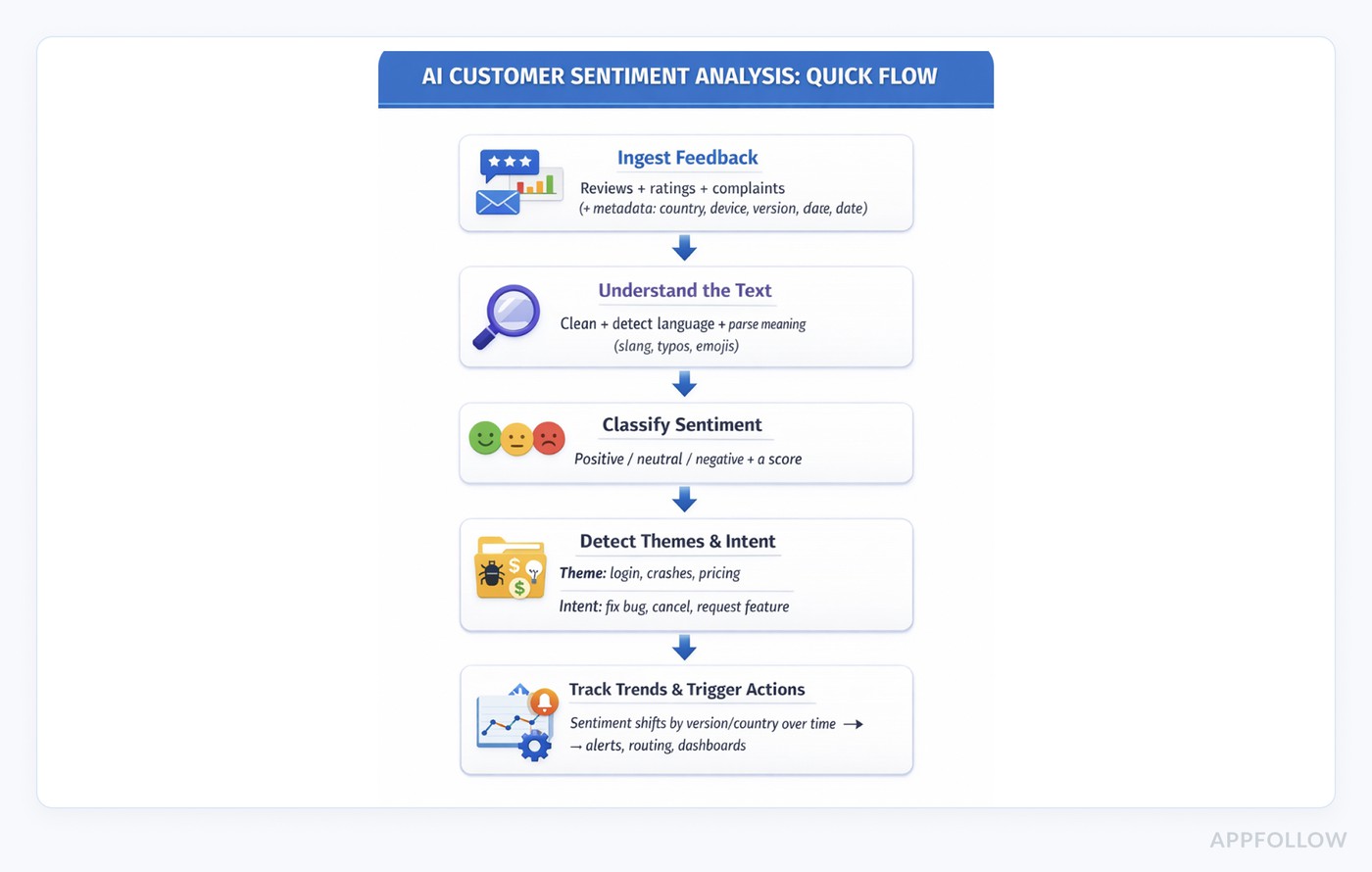
- Everything starts with ingestion. The system continuously pulls in reviews, complaints, and ratings from the places users already vent or celebrate. Nothing is “read when we have time.” That matters because early warning signals usually look small at first, then explode fast.
- Once feedback is ingested, classification kicks in; each piece of text is scored as positive, neutral, or negative using consistent logic. This is where AI-powered customer sentiment analysis quietly beats manual tagging. Two people can read the same review and disagree on tone, but the model won’t. That consistency is what lets you compare sentiment across releases and countries without arguing over what counts as “bad.”
- Sentiment alone still isn’t useful, though. A spike in negative feedback doesn’t tell you what to do next. So the system moves to theme and intent detection. Instead of you guessing, AI groups feedback by what users are reacting to: login failures, subscription confusion, and crashes after update, for instance. Or slow performance and missing features.
You learn what category of pain is growing, which team owns it, and what “fix” might mean.
And now you’re set up for the part most teams don’t realize they’re missing until they see it. Because if your current process is “read a bunch of feedback and hope you notice the pattern,” you don’t have sentiment analysis.
That’s exactly why AI-enabled customer sentiment analysis becomes less of a “nice analytics add-on” and more of an operational requirement. It changes how fast you detect problems, how cleanly you prioritize, and how confidently you decide what to fix first.
Which brings us to the real question.
Why you need AI customer sentiment analysis
1. Catch issues before ratings and installs drop
If you run an app, you already have the data. The problem is you don’t have it in a shape your team can act on before damage spreads. Customer sentiment analysis AI turns messy feedback into a daily operational signal: what’s getting worse, what’s driving it, and what needs an owner today instead of “we’ll review it next sprint.”
2. Protect conversion when every percentage point counts
The business case is painfully simple: small shifts in perception create big shifts in installs. The average US store page conversion around 25% on the App Store and 27.3% on Google Play, with an average App Store “impression-to-install” around 3.8%. That means you’re fighting for tiny percentages, not big swings. When sentiment tanks after a release, you get less visibility, fewer installs, and more paid spend to compensate.
3. Stop release chaos from turning into a support flood
Support teams feel it first, and they feel it the worst. One rough update can generate hundreds of “crash,” “can’t login,” “subscription charged” messages across stores and channels.
4. Replace “someone should look at reviews” with a real triage system
Manually, that becomes a triage mess: someone skims reviews, someone copies snippets into a doc, someone tries to guess what’s “real,” and the thread dies in Slack. With automation-style workflows, the work flips: reviews get routed, prioritized, and handled with rules instead of vibes, so response doesn’t depend on who happened to check the store that morning.
5. Prioritize by intent, not by who complains the loudest
Now layer in customer sentiment and intent prediction with AI, and you treat it like a queue with categories and outcomes:
- “This is negative sentiment about onboarding.”
- “This is churn intent because the user wants to cancel.”
- “This is a refund intent tied to pricing.”
That’s the difference between “we should look into it” and “this goes to the billing owner today, and we reply with the exact next step.” It also prevents the classic failure mode where support fixes the loudest complaints while the highest-impact issue keeps growing quietly.
6. Reduce churn risk after one bad experience
You also want this because bad experiences are expensive even when users don’t write essays about them. PwC found 32% of customers would stop doing business with a brand they loved after one bad experience. App stores compress that timeline even more, because the complaint is public and discoverable.
7. Improve ratings faster by responding faster
And yes, speed matters when you do respond. AppFollow cites Google Play guidance that replying to a negative review can lift that rating by +0.7 stars on average. In AppFollow’s customer example, Gameloft cut response time from 30 days to 3 days, and 62% of users increased their rating after getting a response.
8. Cut coordination overhead across support, product, and ASO
AI-driven customer sentiment analysis doesn’t just “analyze,” but reduces the coordination tax inside your company. Fewer standups spent arguing about what users mean, with less spreadsheet archaeology. More time spent fixing the top two issues pushing sentiment down this week.
The fastest way to see why this matters is to compare it to the old way.
Read also: How can sentiment analysis be used to improve customer experience?
AI sentiment analytics vs manual tagging
Manual tagging feels “clean” because it’s human. You read a review, you interpret nuance, you pick a label. That works until volume spikes and your labels turn into a backlog.
With customer sentiment analysis AI, the machine does the heavy lifting first, then humans step in where judgment matters.
Comparison table
Dimension | Manual tagging | AI sentiment analytics |
Speed | Tagging 495 reviews takes ~247 minutes of agent time. | 0 minutes to tag after setup; tags start appearing automatically (notably, “in 10 minutes” in their workflow example). Setup is ~5 minutes to create tags + ~20 minutes to create/test rules. |
Consistency | Two people can tag the same “doesn’t work” review differently, which causes tag drift and messy reporting over time. | AI is 11% more accurate on sentiment than manual tagging. |
Multilingual coverage | Global apps either wait for fluent agents or risk mis-tagging. Both slow you down. | AI classifies regardless of language first, then you escalate edge cases for a human pass. In practice, that means non-English spikes get seen the same day, not “when someone’s available.” |
Trend accuracy | Humans are great at reading one review deeply. They’re bad at spotting statistical shifts across versions/countries because nobody can keep that mental model. | Automated semantic analysis provides 3× faster processing and 26% more precise topic/problem detection. That’s what makes trend monitoring usable, not just “more charts.” |
Best at | Nuance, sensitive replies, one-off weird edge cases. | Scale, early warning, clean categorization, and routing issues to owners before it becomes a ratings fire. |
Manual tagging is a craft, but it’s not a system. Once you cross a few hundred reviews a week, you’re sampling. AI customer sentiment analytics is the opposite; it’s a system that keeps working when volume spikes, languages expand, and releases pile up.
And if you’re wondering whether customer sentiment AI replaces humans, it shouldn’t. The smart setup is hybrid: let AI do the sorting, then let your team do the decision-making and the replies that need judgment.
Now comes the only question that matters for implementation: do you have enough volume, languages, or release velocity to justify AI right now, or will manual tagging still do the job?
When AI sentiment analysis is worth it, and when it’s not
AI is not something you “add.” It’s something you earn once your feedback volume starts behaving like a firehose instead of a trickle. The quickest way to decide is to look at your reality, not your roadmap.
It’s worth it when
- You manage multiple apps. One app already creates a moving target across countries, devices, and versions. Add a second app and the team starts sampling feedback instead of monitoring it.
That’s where AI customer sentiment analytics pays for itself, because it gives you one consistent way to see what’s breaking and where, across everything you ship, without someone playing whack-a-mole in store dashboards. You can see how this looks in the wild in AppFollow’s own customer stories, like mobile publishers managing “100+ games,” where manual review reading just isn’t a real strategy anymore. - You ship frequent releases. Fast release cadence is great until a small regression lands and you don’t notice it for days. Appfollow Semantic Analysis is designed to detect issues that lead to dissatisfaction, lower ratings, and uninstalls before they become critical. That “before” is the whole point when releases are frequent.
And there’s a measurable upside here, too. 8 out of 10 customers say they react to critical bugs 3× faster using the automated review management. - You have a global audience. Global feedback isn’t “extra.” It’s different problems surfacing in different languages. If your team waits for the one fluent person to translate and tag, your detection loop slows down exactly where you can least afford it. CSA Research found 76% of online shoppers prefer to buy products with information in their native language, and 40% will never buy from websites in other languages.
- You’re dealing with high review volume. At high volume, manual tagging stops being “careful” and starts being “late.” We even put a number on the human cost: manual tagging 495 reviews took ~247 minutes. Now compare that to what automation is built for: AppFollow’s Automation Hub runs rules on a schedule (they note every 5 minutes for auto-tagging rules).
It’s not worth it if…
- Your feedback volume is very low. If you get a handful of reviews a day, your best tool is still a human brain reading them end-to-end. AI will produce charts, sure, but it won’t create patterns out of thin air. You’re better off focusing on reply quality and learning loops until volume makes manual work brittle.
- You don’t have a process to act on insights. This is the silent killer. If no one owns themes, if escalation is fuzzy, if product doesn’t review feedback on a schedule, you’ll collect insights like souvenirs. Even customer service complaint sentiment analysis can’t help if the organization treats complaints as “support’s problem” instead of a product signal. The tooling can surface “billing is spiking” in real time, but it can’t assign accountability for fixing billing.
If you are in the “worth it” bucket, the next step is practical.
6 ways how AI customer sentiment analysis turns reviews into actionable insights
You don’t “analyze sentiment” for fun. You do it because you want the same thing every app team wants: fewer surprises after releases, cleaner prioritization, and faster fixes. Here are the most practical ways to turn review noise into work your team can ship.
1. Auto-categorize feedback into queues your teams can own
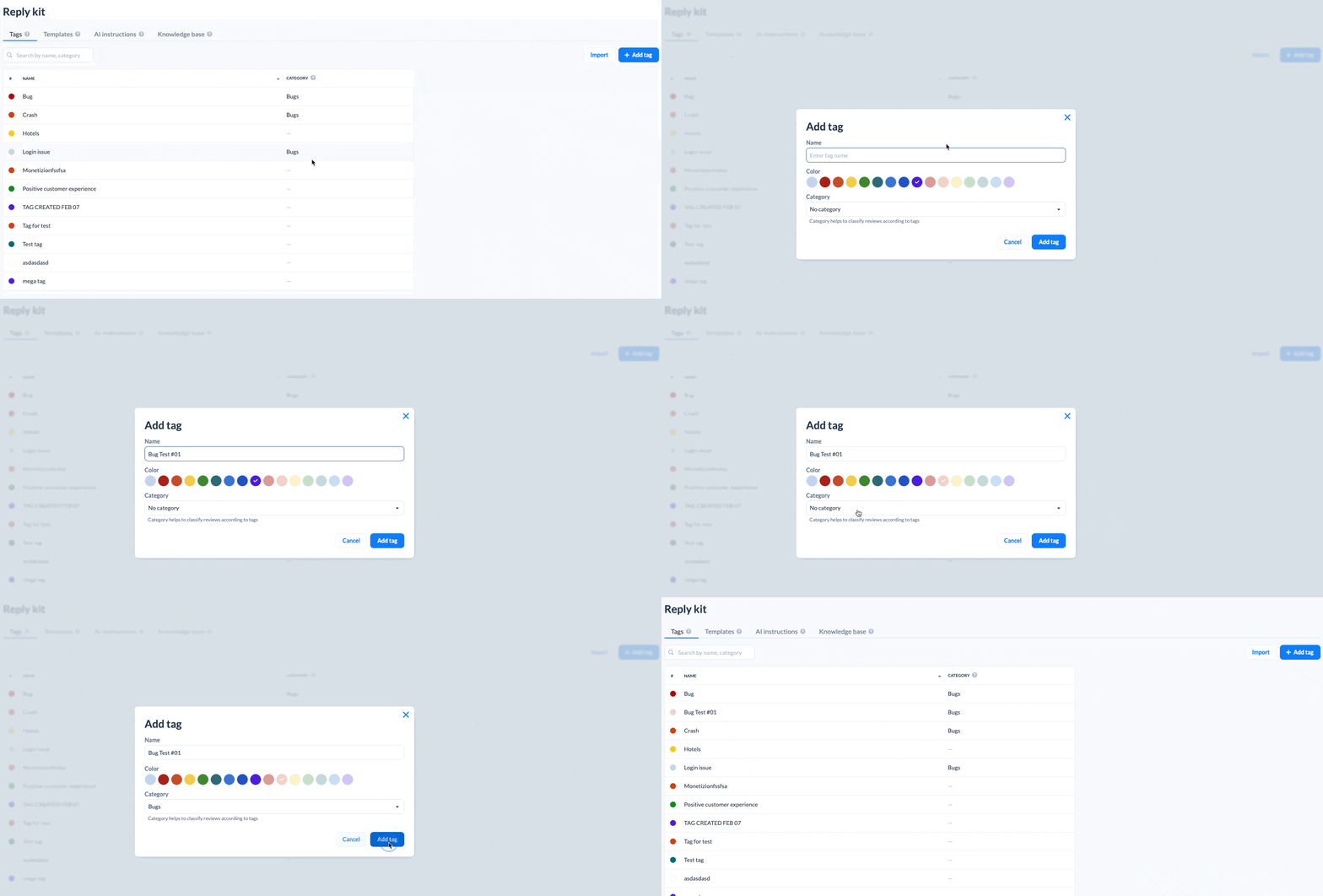
This is the simplest form of AI customer sentiment analysis that changes your daily process. Reviews come in, and instead of living in one endless stream, they get categorized into buckets like login, crashes, billing, UX, ads, feature requests.
In AppFollow, you can build rules that auto-tag reviews using filters such as sentiment, keywords, and low/high ratings, then route them to the right people with alerts
When to use it:
- You ship often and need a “what broke?” queue after every release.
- Support and product keep stepping on each other because nobody knows who owns what.
What it replaces: the weekly “let’s skim reviews and guess themes” ritual.
2. Turn themes into one-click summaries (so you stop reading 400 near-duplicates)
Once feedback is categorized, the next bottleneck is reading it all. AppFollow’s AI Review Summaries are built for exactly that: an actionable overview of large volumes of reviews, summarized by semantic category, so you can drill down only where it matters.
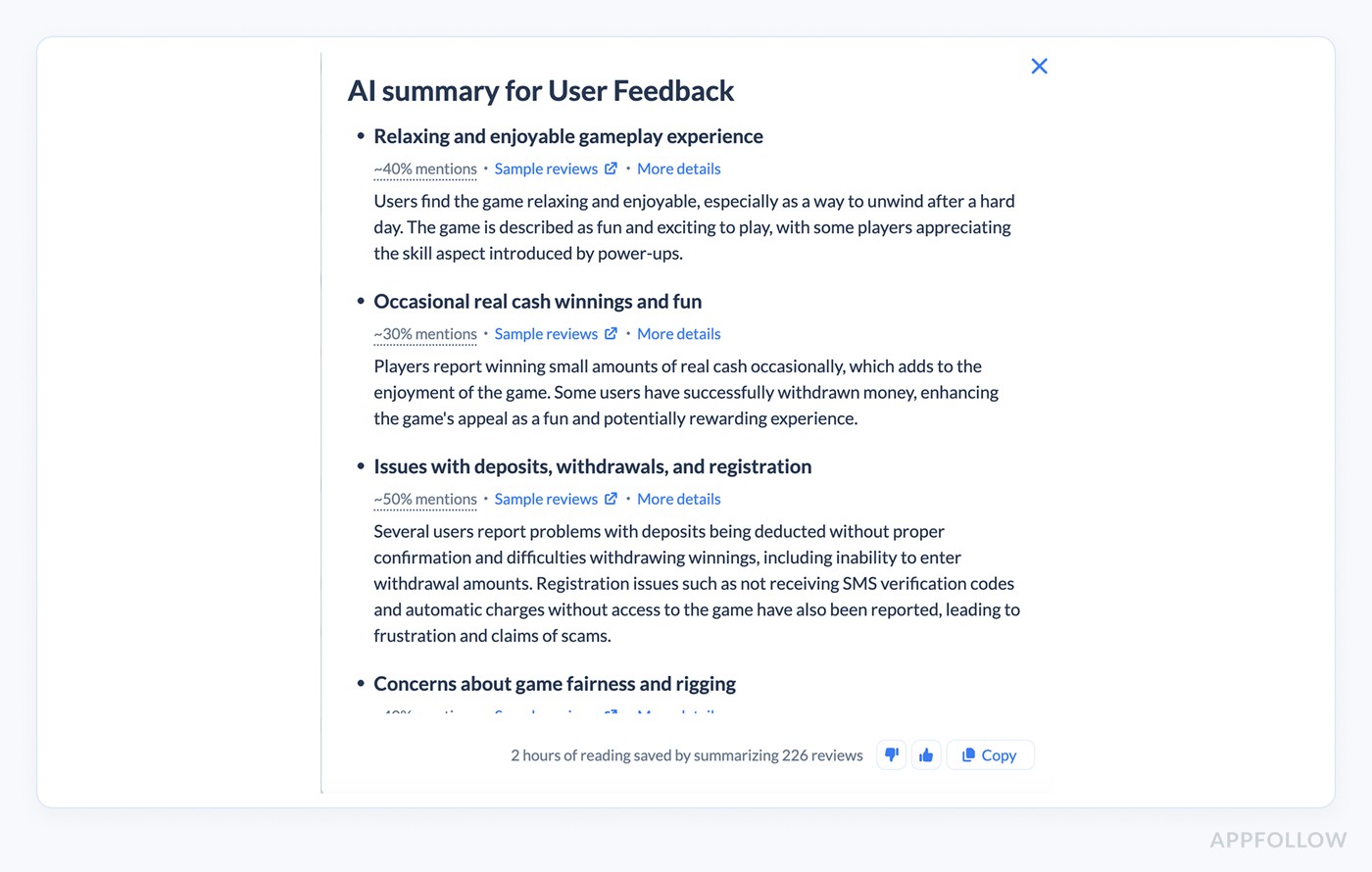
Example of AI summary for user feedback in AppFollow. Test how it works with your reviews.
When to use it:
- You have volume spikes (campaigns, outages, big feature drops).
- Product wants “what are users saying?” and you need an answer in 5 minutes, not 2 hours.
What it replaces: copy-pasting a handful of scary reviews into Slack and calling it “insights.”
3. Route the right problems to the right place automatically
Insights don’t help if they don’t land with an owner. The practical move is routing. In AppFollow, you can set alerts based on review content to notify specific teams (UX/Bugs, Marketing, Product) and keep everyone aligned through regular alerts and integrations.
Want it where your team already works? AppFollow supports workflows like receiving and replying to reviews in Slack, and pushing reviews into help desks like Zendesk and Salesforce.
When to use it:
- You’re losing time because feedback lives in one tool and the decision-makers live in another.
- The same issue keeps resurfacing because nobody “owns” the signal.
What it replaces: the “did anyone see this review?” ping that dies in a thread.
4. Monitor specific phrases so you catch trends as they start
Sometimes you don’t need broad theme detection. You need a watchlist. Phrase Analysis lets you monitor specific words or phrases in reviews so you can spot trends or issues as they appear.
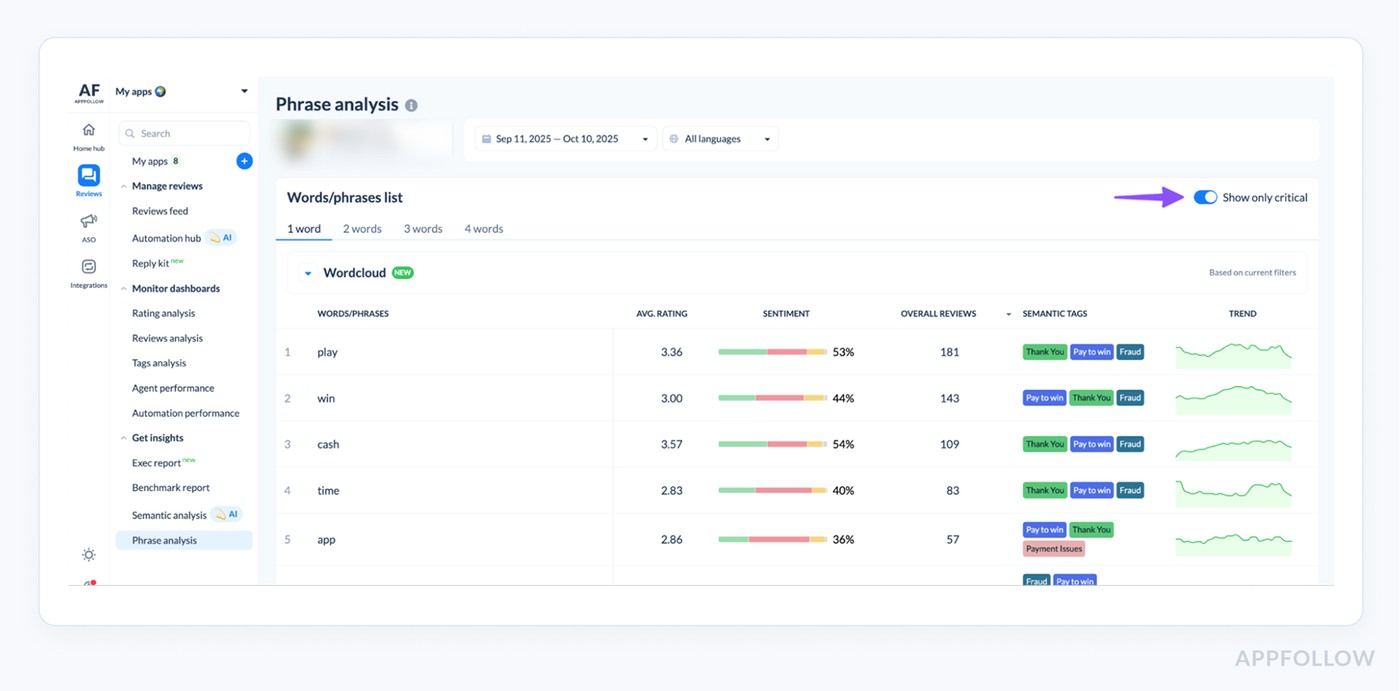
Phrase Analysis in AppFollow. Test how it works with your reviews.
When to use it:
- You shipped a risky change (pricing, login, onboarding) and want early detection.
- Legal or compliance wants visibility into specific claims or terms.
What it replaces: finding out “refund” has been spiking for three days… by accident.
5. Turn complaint sentiment into triage, not emotional whiplash
This is where customer service complaint sentiment analysis becomes operational. Instead of treating every angry review like a fire drill, you use sentiment + theme + severity to decide what gets a human response now, what gets escalated, and what gets logged as a product issue.
Automation for routine volume, humans for complex cases, plus tools for reporting spam/offensive reviews and measuring agent effectiveness.
And when automation is doing real work, you feel it in throughput. In the Roku example, team said automation helped them handle 35%–50% of reviews, while response time dropped more than 10×.
When to use it:
- Your support team is drowning after releases.
- You need consistent prioritization across shifts and languages.
6. Share insights without turning them into a reporting project
The underrated win is alignment. This is a cross-team collaboration through alerts, reports, and integrations (Slack, Tableau, API), so insights don’t get trapped inside support. This kind of setup can save teams about 2.7 hours of review analysis per day.
Use it when:
- Product asks for “top issues this month” and you keep rebuilding the same deck.
- Leadership wants trends, not anecdotes.
Now that reviews are structured, routed, and summarized, you can finally use them for growth work, not just damage control.
Read also: Top 5 Review Management Software for Apple App Store
How to apply AI sentiment analysis to app growth
Here’s how app teams typically do this in AppFollow.
First, they connect their App Store and Google Play accounts, so reviews and ratings flow into one place. Instead of jumping between store consoles, you get a single dashboard where everything lands and can be filtered, sorted, tagged, and assigned.
Then the “so what?” work happens in specialized analysis reports. That’s where you stop reading reviews one by one and start using sentiment, themes, and summaries to make growth decisions. Now let’s walk through the exact flow.
1. Check sentiment trends by country, region, and language
Start with one baseline window (last 30 days works), then split it the way your business runs: country, region, and language. You’re looking for movement.
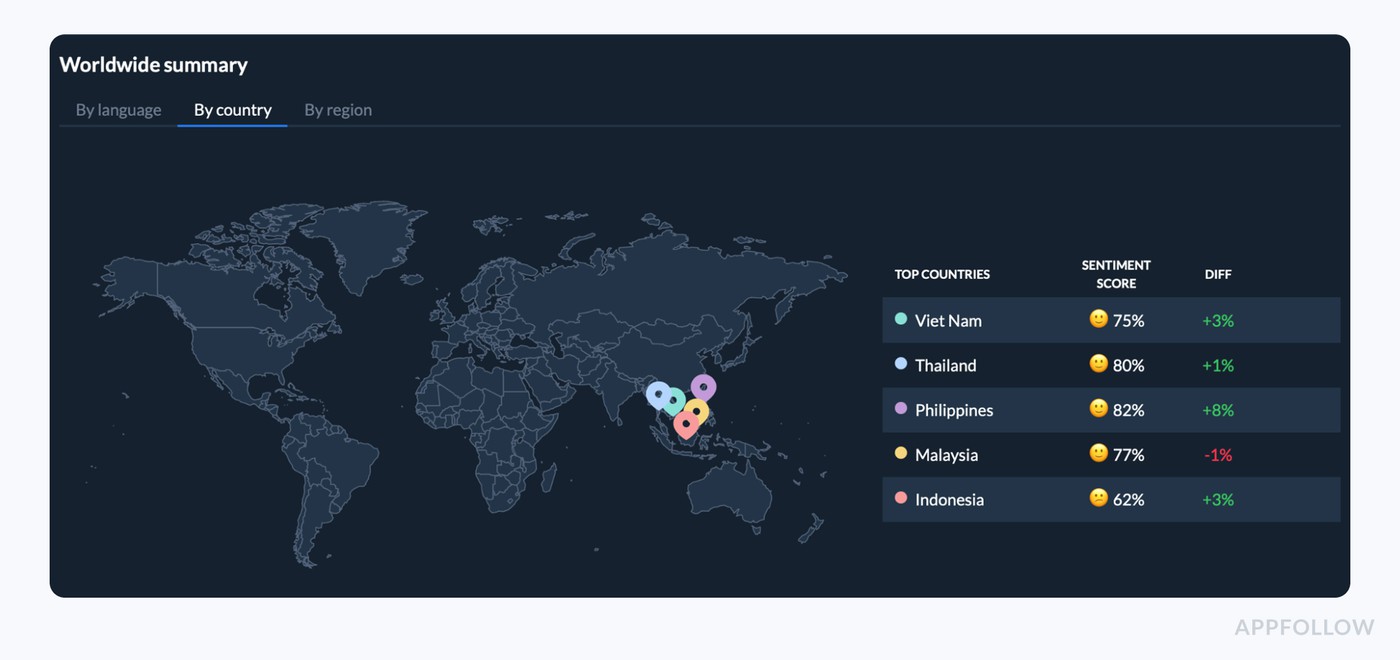
Customer sentiment by country dashboard in AppFollow. Test how it works with your reviews.
This is where customer sentiment AI becomes a growth signal:
- A single market dipping can point to payment friction, bad localization, or device-specific bugs.
- A version-driven dip often shows up in reviews before retention or conversion charts catch up.
AppFollow positions this as tracking sentiment across language, regions, and markets.
2. Identify the top reasons behind the sentiment (Semantic Tags + tagging rules)
Sentiment tells you how bad. Tags tell you why.
In AppFollow, you use AI Semantic tags to categorize feedback at scale (login, crashes, ads, subscriptions, UX), then add Auto-tags or custom rules when you want stricter routing. AppFollow describes the workflow as building rules using filters like user sentiment, keywords, and low/high ratings, and then notifying the right owners (UX/Bugs, Marketing, Product).
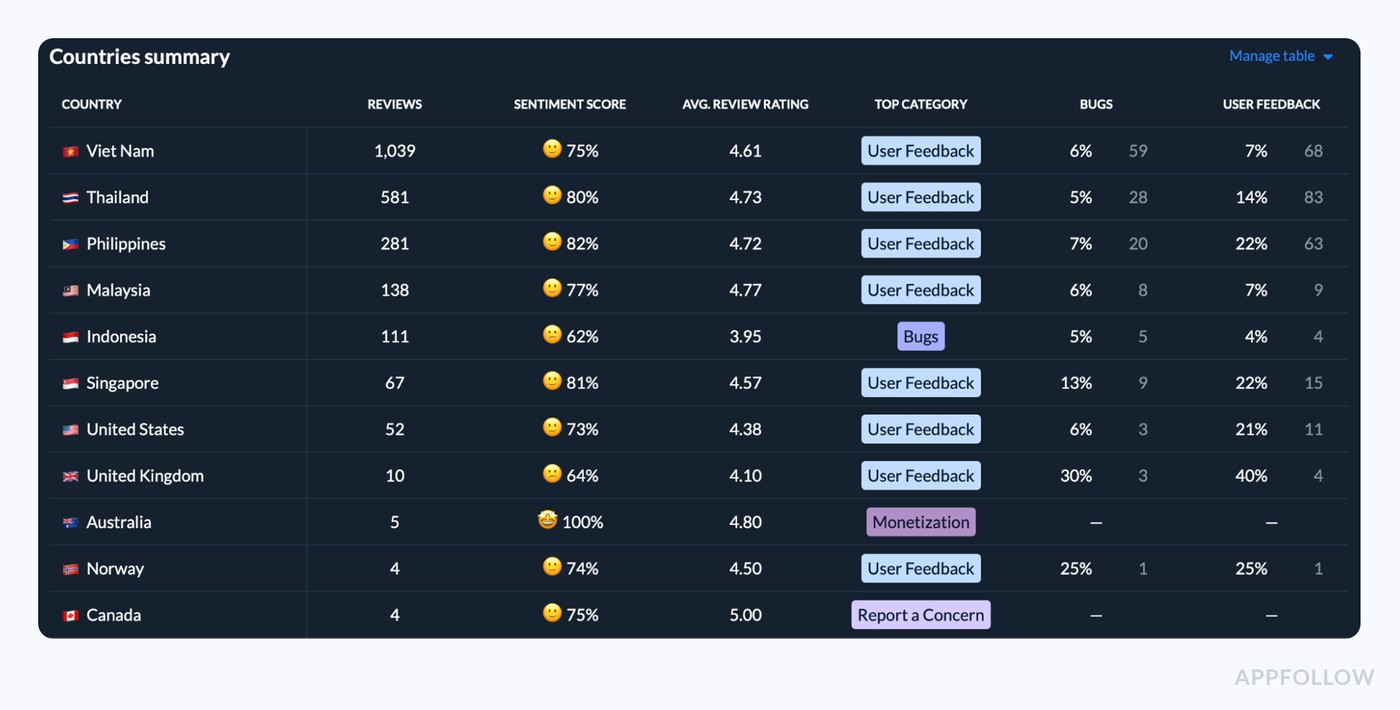
Customer sentiment by country dashboard in AppFollow. Test how it works with your reviews
This step turns AI customer sentiment analytics into work your team can ship:
- Tag clusters become queues.
- Queues get owners.
- Owners get alerts, not spreadsheets.
3. Use AI Summary to understand each theme fast
Once tags are in place, volume stops being an excuse. Nobody needs to read 300 near-duplicate reviews to confirm “login broke.”
AppFollow’s AI Review Summaries are designed to give an actionable overview of large review volumes, summarized by semantic category, so you can drill into the right slice immediately.
Example of AI summary for user feedback in AppFollow. Test how it works with your reviews.
This is the shortcut AI-powered customer sentiment analysis unlocks:
- “What’s driving negativity right now?”
- “Is this about one version, one market, or everywhere?”
- “Did our fix reduce complaints?”
4. Set alerts so the right team sees the spike immediately
Insights don’t move metrics if they stay in one tool.
AppFollow supports routing and collaboration with alerts and integrations (including Slack), plus reporting options.
Use alerts in two situations:
- After every release: “If negative sentiment spikes and tags = crashes/login, notify engineering + support.”
- In key markets: “If sentiment drops in a top country, notify localization/PMM + product.”
5. Turn insights into growth actions (fix, reply, validate)
This is where the loop closes. You take the top theme, ship a fix or adjustment, reply to the highest-impact reviews, and watch whether sentiment stabilizes.
If you want evidence this changes throughput, Roku example claims automation helped them handle 35%–50% of reviews, while response time dropped more than 10×.
Analyse customer review sentiment and turn them into growth actions with AppFollow
cta_free_trial_purple
FAQs
How accurate is AI sentiment analysis on app store reviews (with slang, emojis, sarcasm)?
Pretty accurate for what most teams need: triage and trend detection. App store feedback has its own dialect. People write in fragments, drop emojis instead of verbs, and use sarcasm when they’re annoyed. No model is perfect at “understanding humans,” but customer sentiment AI doesn’t have to win a poetry contest to be useful.
What’s the fastest way to set up sentiment + Semantic Tags in AppFollow so my team uses it?
- Connect stores and pick one “monitoring scope.” Usually last 30 days + your top 3 countries.
- Turn on Semantic Tags and choose a small set of “owners’ tags” first: login, crashes, payments, subscriptions, ads.
- Create one saved view per owner (Support, Product, Engineering). If people can’t find “their” queue in 10 seconds, they won’t use it.
- Add alerts only for spikes that require action. Example: “1★ + ‘crash’ + current version.”
- Make it a weekly ritual: 10 minutes, same day, same owners. Review top negative themes, decide who does what.
That’s how AI-enabled customer sentiment analysis becomes part of operations instead of “a tool we bought.”
How do I turn sentiment insights into growth metrics like conversion, retention, and ratings (not just “nice charts”)?
Treat sentiment like a leading indicator, then tie it to the metrics your growth team already trusts. A clean approach with AI customer sentiment analytics:
- Pick one KPI per layer.
- Store layer: rating trend, review volume, share of 1★
- Product layer: retention / churn around release dates
- Growth layer: store conversion proxy (impressions → installs, if you track it)
- Annotate releases and incidents. Sentiment without context becomes noise.
- Track “theme velocity,” not just sentiment average. If “login” complaints are accelerating, that’s more predictive than a flat average score.
- Define trigger rules. Example: “If negative sentiment for ‘payments’ grows for 3 days, rollback or hotfix priority.”
- Validate impact. After a fix, look for: theme volume down, negative share down, rating stabilization. That’s your causal chain.
How do you do sentiment analysis step by step using AI?
- Collect feedback (reviews, ratings, complaints) with metadata like country, device, app version, date.
- Clean and normalize (remove duplicates, detect language, standardize fields).
- Classify sentiment (positive/neutral/negative plus a confidence score).
- Detect themes and intent (what it’s about + what the user wants).
- Aggregate and trend (by version, country, time window).
- Trigger actions (alerts, routing, response queues, escalation).
- Close the loop (ship fix, reply to key reviews, verify sentiment + theme volume drops).
What is NLP in sentiment analysis?
NLP is the part that turns messy human language into something a machine can work with.
In plain terms, NLP helps ai-driven customer sentiment analysis do things like:
- recognize meaning even when grammar is wrecked (“crash after update pls fix ????”)
- handle typos, slang, repeated letters, and emojis
- understand that “can’t log in” and “login broken” are the same problem
- separate topic from emotion (login issue + angry tone)
What is the best AI-powered sentiment analysis tool?
“Best” depends on what you’re analyzing and what you need the output to do.
If your feedback is mostly app store reviews and you need workflows (themes, spikes, routing, reply ops), pick a tool built for app review pipelines. If your feedback is mostly tickets and complaints across support channels, you’ll care more about routing, SLAs, and escalation logic, which is where customer service complaint sentiment analysis tooling shines.