Your Guide to App Marketing Intelligence: Spy. Learn. Win

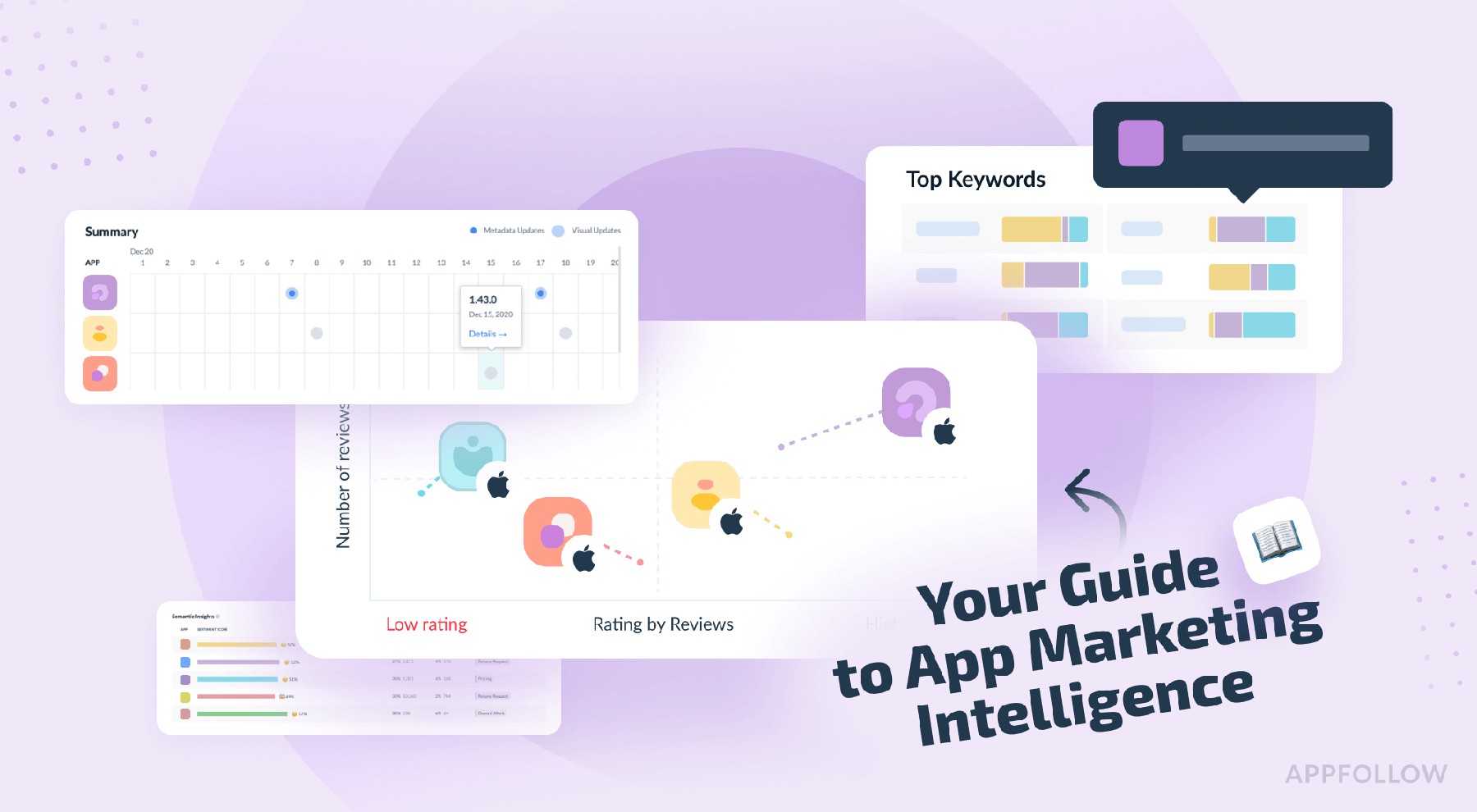
Table of Content:
- What Is App Marketing Intelligence?
- Core components of app store intelligence process
- How app store intelligence can benefit your downloads
- What aspects of competitors' apps performance to track?
- How Leading Brands Leverage Mobile App Intelligence
- What to Look for in an App Intelligence Platform
- Access all the app intelligence data in Appfollow
- FAQs
- Read also
Your rankings are dipping in Tier-1, that shiny new keyword isn’t converting, and meanwhile, your competitor just leapt ahead again. And no one knows why. Was it their new promo video? Did they tweak the title? Or get a quiet feature in Brazil?
I’ve sat in those calls, growth leads scrambling across 15 geos, product asking for proof before shifting priorities, and the ASO team stuck comparing store pages side by side like it’s CSI: App Store. You’ve got the data, sure, but not the intel.
That’s where app marketing intelligence changes the game. In this article, I’ll walk you through:
- how top teams are spotting competitor moves before they show up in the charts,
- tracking keyword territory like hawks,
- and building a system that surfaces the “why” behind every ranking shift.
We’ll get into the tech, the workflows, and the signals that help you play offense, not catch-up.
But first, let’s ensure we’re on the same page about the definition.
What Is App Marketing Intelligence?
App marketing intelligence is your control tower. It connects store performance, keyword shifts, competitor behavior, and user sentiment into one cohesive stream so your team isn’t just reacting, it’s steering. It’s the difference between guessing why installs dropped and knowing your top keyword got hijacked overnight.
How does it work?
One client I worked with, a fintech app playing in the mid-tier range, couldn’t figure out why rankings were sliding in Canada and the UK. On the surface? Everything looked polished: updated metadata, localized creatives, reply rate pushing 95%.
But once we layered in app competitor analytics, the blind spot lit up. A rival had quietly rolled out a fresh keyword cluster, timed it with a new app version, and snagged a local feature that never showed up in the public changelog.
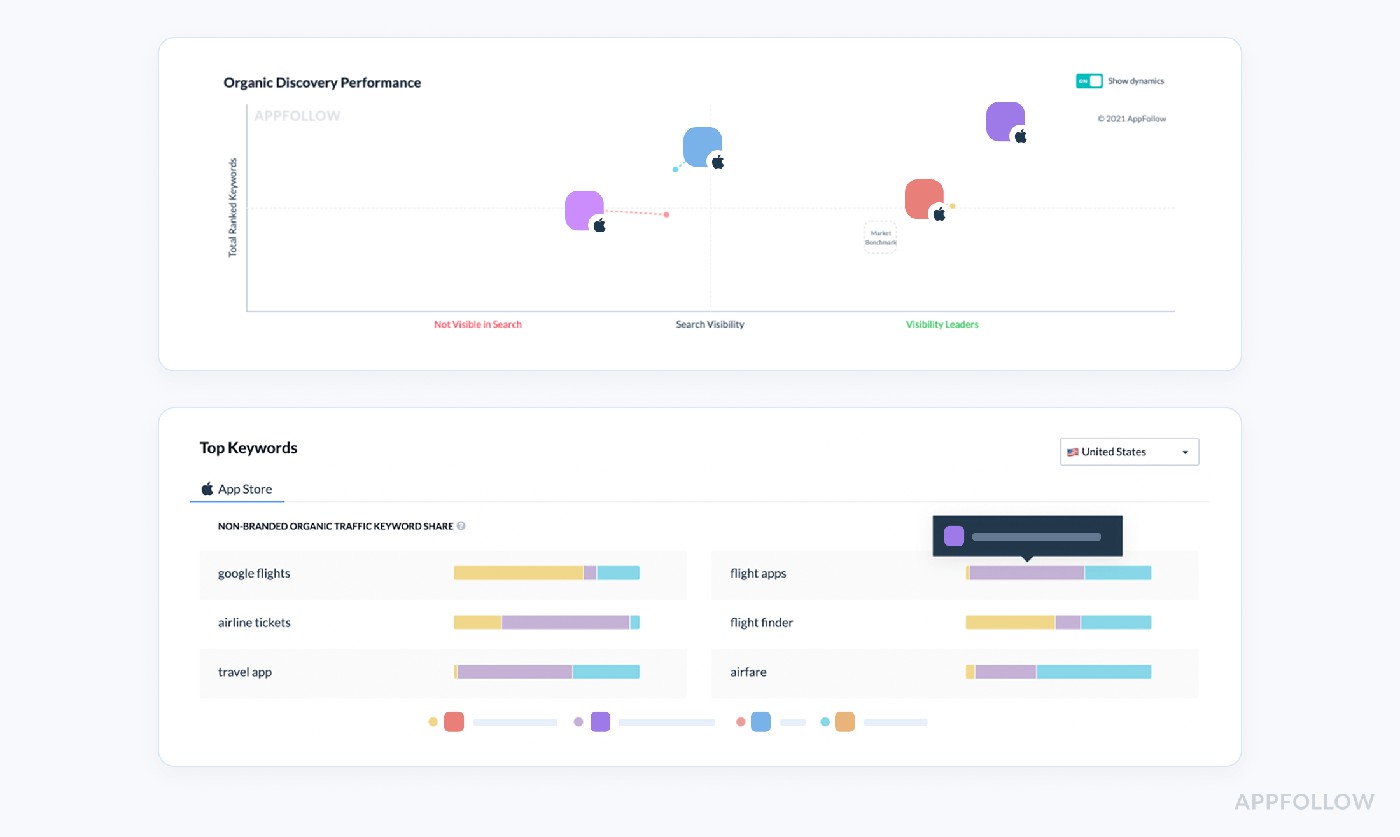
Some of the mobile market intelligence dashboards we used. Test them live with a 10-day trial.
With AppFollow, we mapped the timeline, spotted the pattern, and adjusted strategy before the churn showed up in the numbers.
Core components of app store intelligence process
Let’s talk about what really powers app marketing intelligence because if your team’s just “tracking rankings,” you’re probably missing the mechanics that move the needle.
- First up: app store analytics. This is your live data feed, real-time downloads, ratings, and review volume. But here’s the kicker: raw numbers won’t help unless you segment by version, geo, and acquisition source. I’ve worked with teams who spotted a 1.2-star drop just in Brazil post-update, turns out, a broken onboarding screen slipped into that regional build. AppFollow’s version and locale filters are lifesavers here.
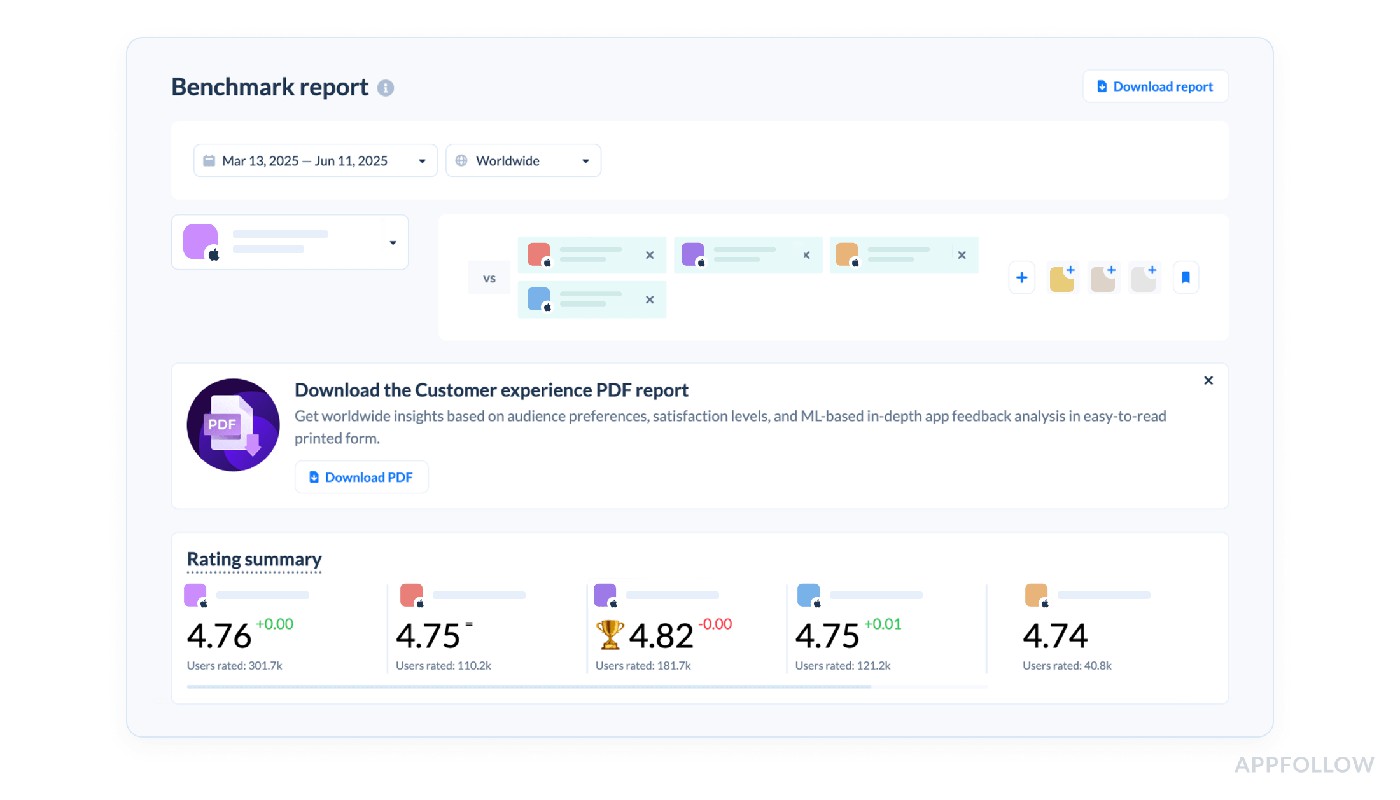
Example of the dashboard comparing your app rating with competitors. Sign up to test it.
- Next: app market data. Think keyword visibility, top chart movement, and competitor download estimates. This is your early-warning radar. One client I worked with caught a competitor climbing on a shared keyword by monitoring daily visibility shifts in AppFollow and launched a mid-sprint metadata tweak that stopped the bleed.
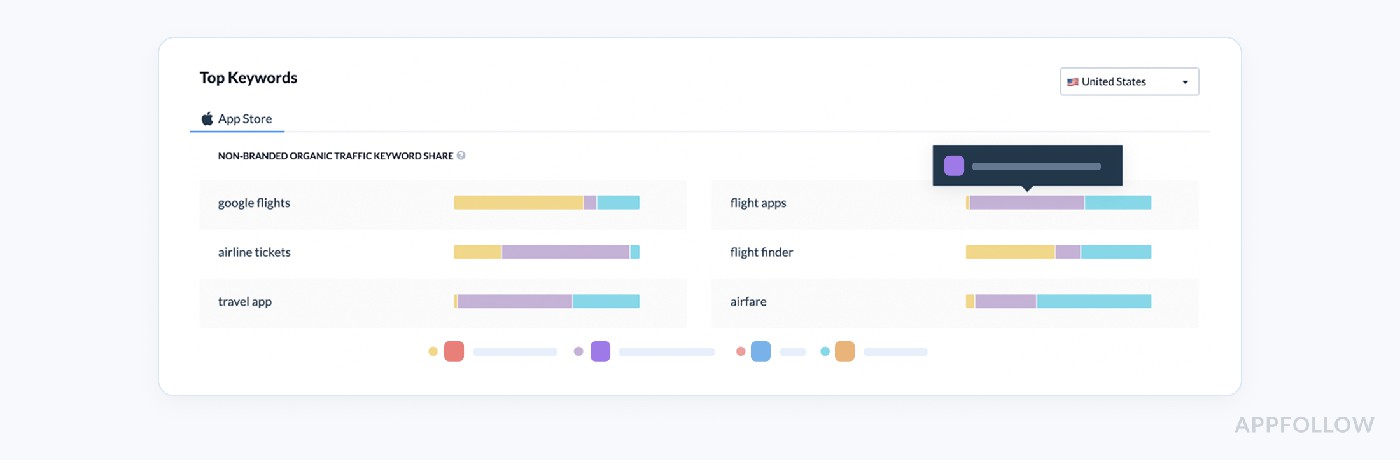 Competitors top keywords dashboard. Sign up to test it live.
 - Then comes review sentiment analysis. If you’re tagging reviews by issue type and release version “ads,” “paywall,” “login loop” you’re already ahead. But most teams miss the volume patterns. Are complaints about ads clustering around a specific update? Is a new feature confusing users in Germany? With AppFollow, we automate those tags so your product team doesn’t burn time in spreadsheets.
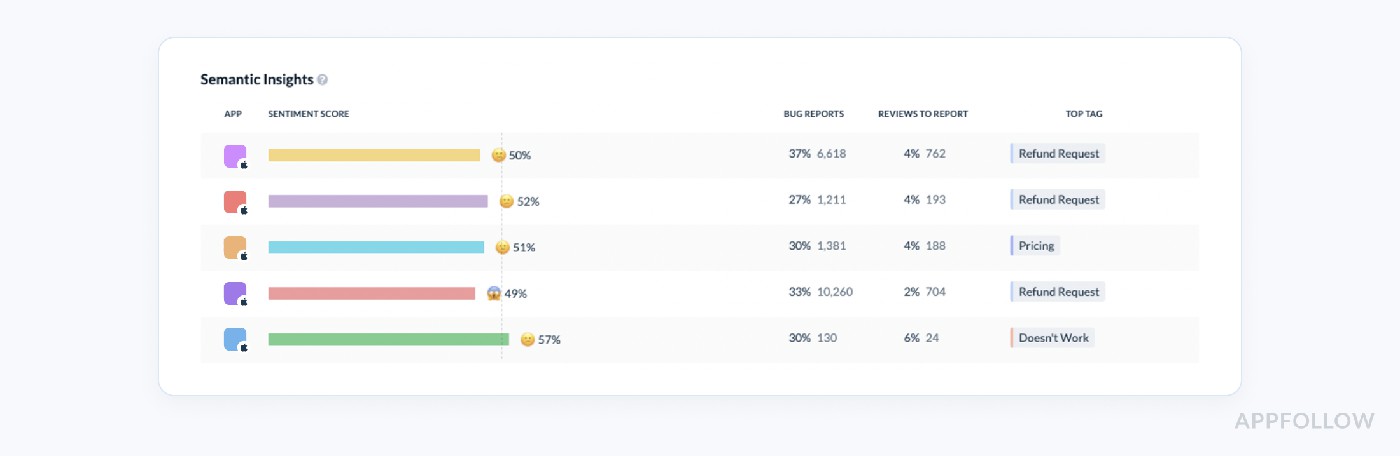 Sentiment analysis of the competitors apps. Sign up to test it live.
 - Last piece app competitor analytics. This one’s pure leverage. You track what they change: titles, icons, preview videos, and even reply strategy. One team I coached beat a bigger rival on a high-intent keyword simply by monitoring their reply delays and closing the gap in under 48 hours. AppFollow tracks every store change; you just need alerts in place.
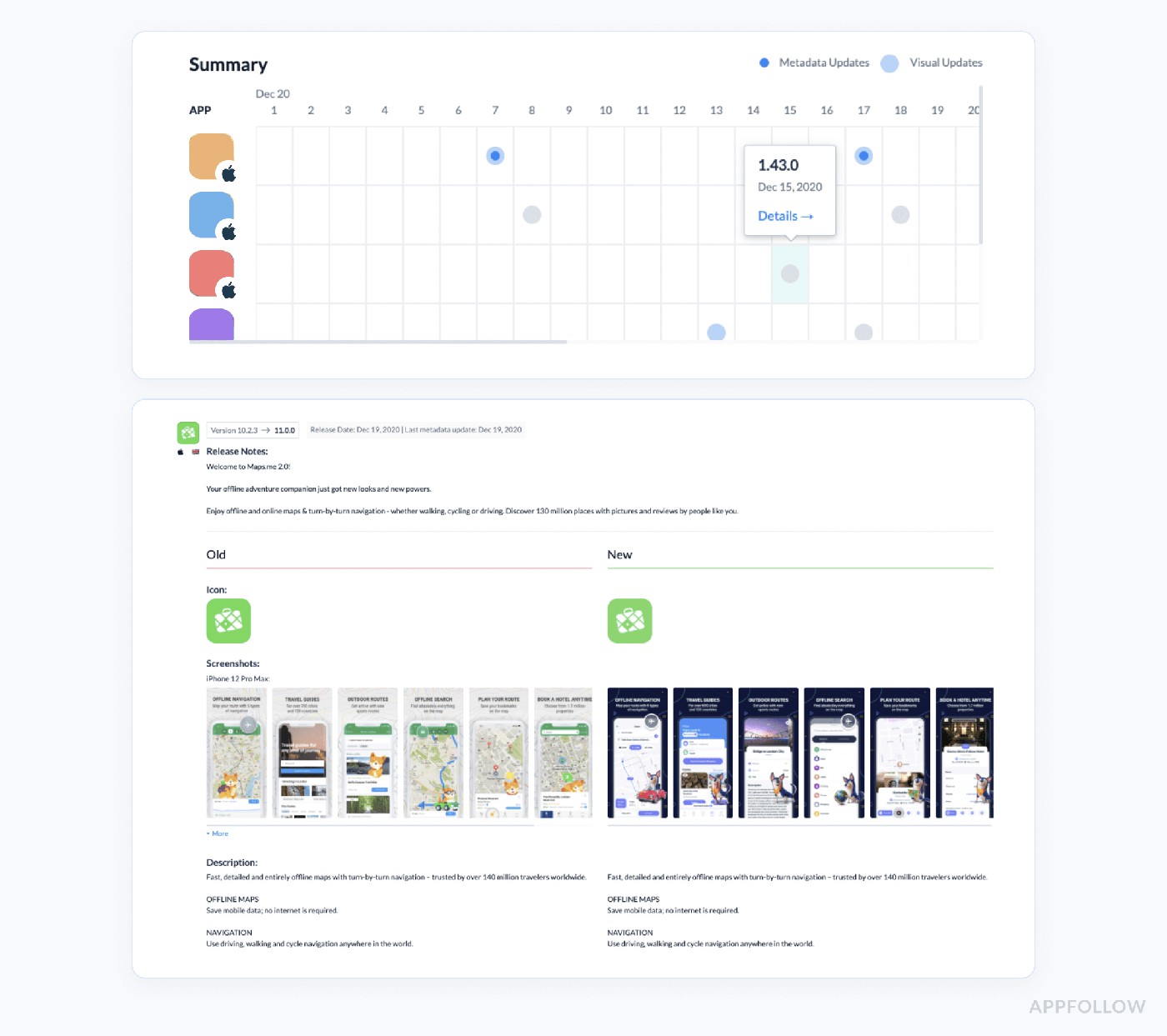
App analytics market history in AppFollow. Sign up to test it live
These aren’t vanity insights. This is the foundation for intelligent growth insights tied to timing, context, and execution. That’s app marketing intelligence done right.
How app store intelligence can benefit your downloads
You’re not losing installs. You’re leaking them silently
I was working with a mid-growth shopping app that couldn’t explain a 17% dip in installs across EMEA. No crashes, no bad reviews, UA was running fine. But something felt off. When we layered in mobile app store marketing intelligence, we saw what the dashboards had missed: a local competitor had shipped new seasonal screenshots and silently grabbed the top 5 in the same keyword cluster.
They didn’t win because their product was better; they won because they moved first.
App store intelligence gave us the data to fight back strategically, not reactively. Within 10 days of adjusting creatives and tweaking metadata, we reversed the trend.
Understand What’s Driving (or Killing) Your Downloads
App teams often obsess over install numbers, but what moves those numbers isn’t visible on the surface. With app store intelligence, you can track:
- Keyword-level install drivers
- Region-specific conversion gaps
- Store element performance (icon vs. title vs. video)
- Organic vs. paid download attribution signals
According to Business of Apps, there were over 257 billion app downloads in 2023, but only ~15% of them were driven by paid campaigns. The rest? Organic. And you don’t win organic unless your store game is tight.
AppFollow’s Organic Dashboard helps you correlate installs with keyword and metadata performance so you can double down on what’s working and kill what’s dragging conversion down.
Here is the element of this dashboard:
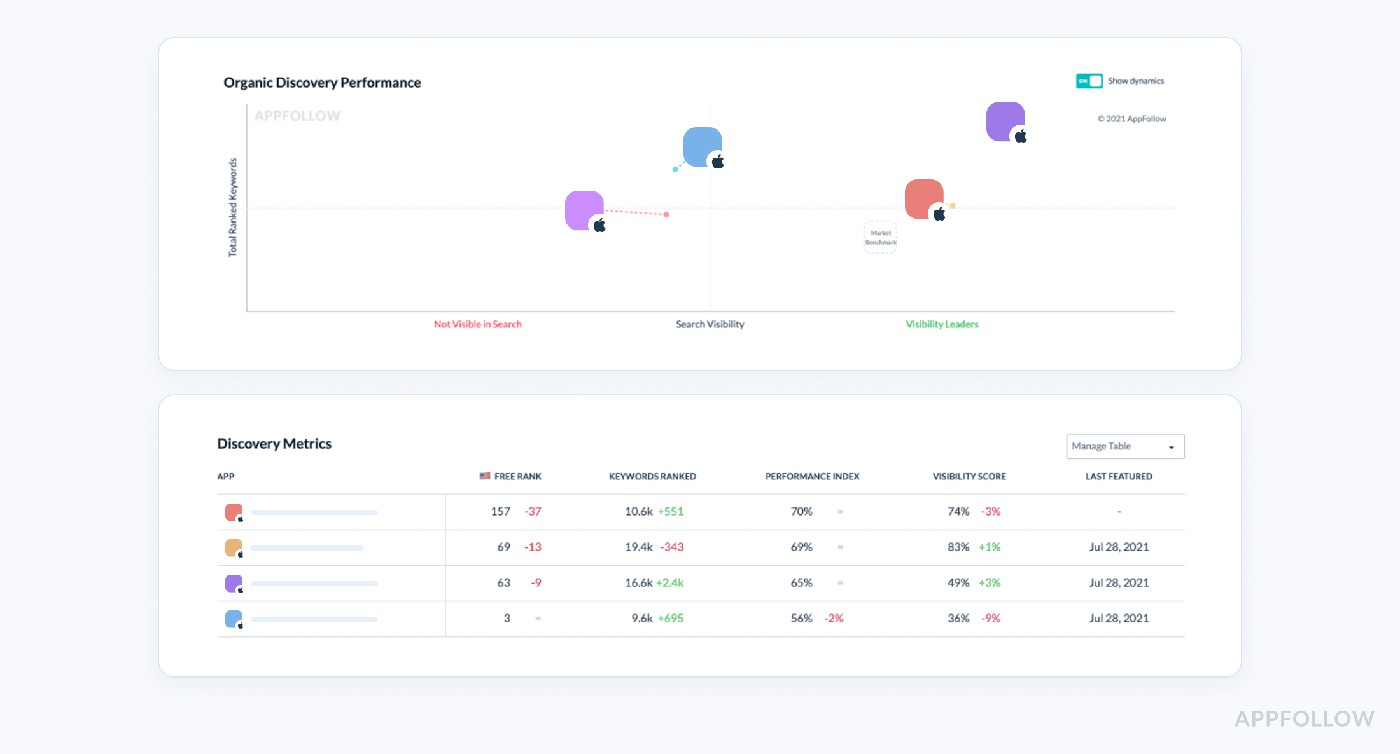
Test it live with a 10-day trial.
Spot Shifts in Ranking Before Revenue Drops
App analytics market tools are great at showing you what happened. But app store intelligence platforms like AppFollow show you why it happened and help you catch shifts early.
With real-time top chart tracking, keyword visibility scores, and region-specific alerts, you’ll know:
- When a new competitor is gaining on your core keywords
- If a drop in installs is tied to a specific country, update, or metadata change
- Whether your app store A/B test is helping or hurting rankings
A top gaming publisher using AppFollow caught a 3-point rating drop in France within 6 hours of a release and paused UA campaigns immediately, avoiding wasted budget and a nasty hit to LTV projections.
Turn Reviews Into Download Boosters
You already know ratings matter. But here’s what teams miss: how fast you reply and how relevant your responses directly impact visibility.
When you cluster negative feedback by keyword, think “crash on login” or “ads too frequent” and tie it to specific versions, you can:
- Improve conversion by showing responsiveness
- Trigger ratings recovery post-update
- Increase reply-to-review effect (we’ve seen boosts of 150%+)
Social Quantum increased organic installs by 110% just by optimizing their preview video and using review data to guide the change.
Predict Category Trends (and Move First)
In the mobile app store marketing intelligence world, timing beats effort.
Using AppFollow’s featured timeline and download estimates tools, teams can:
- Anticipate feature placements
- Track when rivals are prepping major pushes (through metadata or asset changes)
- Reallocate budget based on store momentum signals, not guesswork
When Opera used AppFollow’s intelligence tools, they didn’t just automate feedback; they tied user signals to product roadmaps and proactively caught market shifts.
TL;DR App Store Intelligence Isn’t Optional Anymore
You’re competing in a world where 60% of mobile app installs come from app store searches, and guess what? Most teams still fly blind when it comes to visibility loss, keyword drift, or sentiment trends.
App store intelligence doesn’t just show you what happened. It tells you what to fix, what to double down on, and where your growth is hiding.
What aspects of competitors' apps performance to track?
Your downloads are shaped by what your competitors ship, test, and tweak while you’re deep in sprint planning. And if you're not tracking their moves with app competitor analytics, you’re missing the full story.
Here’s what I always recommend tracking all doable inside AppFollow and exactly why each signal matters.
Keyword Visibility & Ranking Trends
You want to know which keywords your competitors are climbing for, how fast they're moving, and what countries are fueling that growth. Inside AppFollow, you can track daily movements across keyword positions and storefronts.
Here is an example of the competitor’s keywords report:
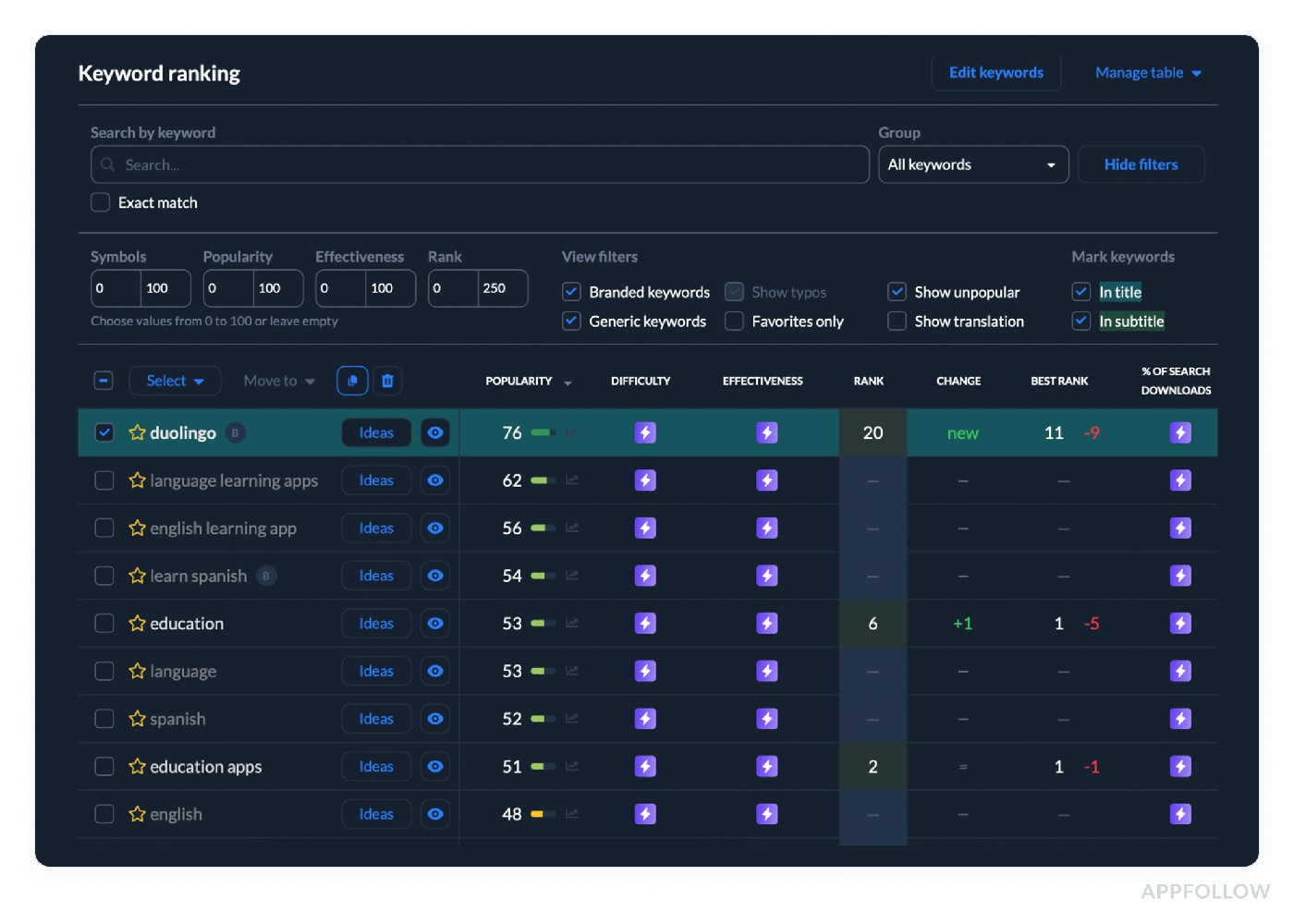
Test it live with a 10-day trial.
One of my clients noticed a rival suddenly ranking top 3 on a shared keyword in Germany turns out they added it to their subtitle and updated screenshots that week. We reacted fast, and protected our spot. That’s mobile market intelligence in action.
Top Chart & Category Rankings
It’s not just about keywords you need to watch how competitors move across top charts and category rankings. Why? Because spikes often signal a feature placement, paid campaign, or metadata shift.
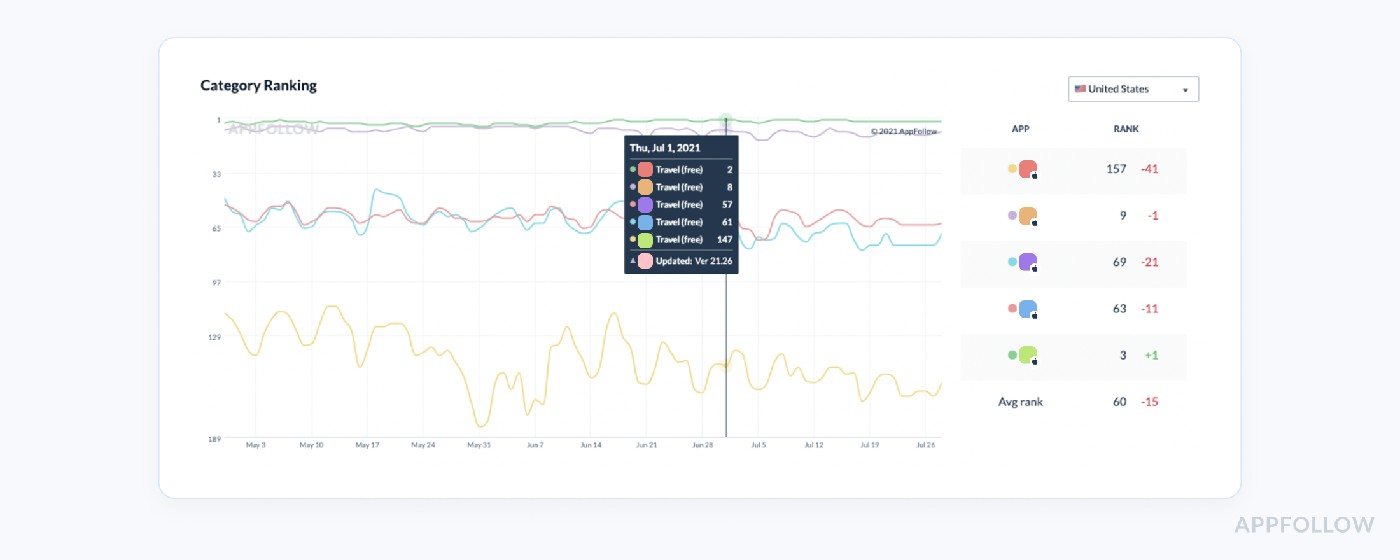
Example of the competitors ranking analytics. Test it live with a 10-day trial
AppFollow lets you monitor these chart positions by country and device type. I’ve seen teams catch stealth launches and re-prioritize creatives within 24 hours before they lost too much ground.
Metadata & Creative Changes
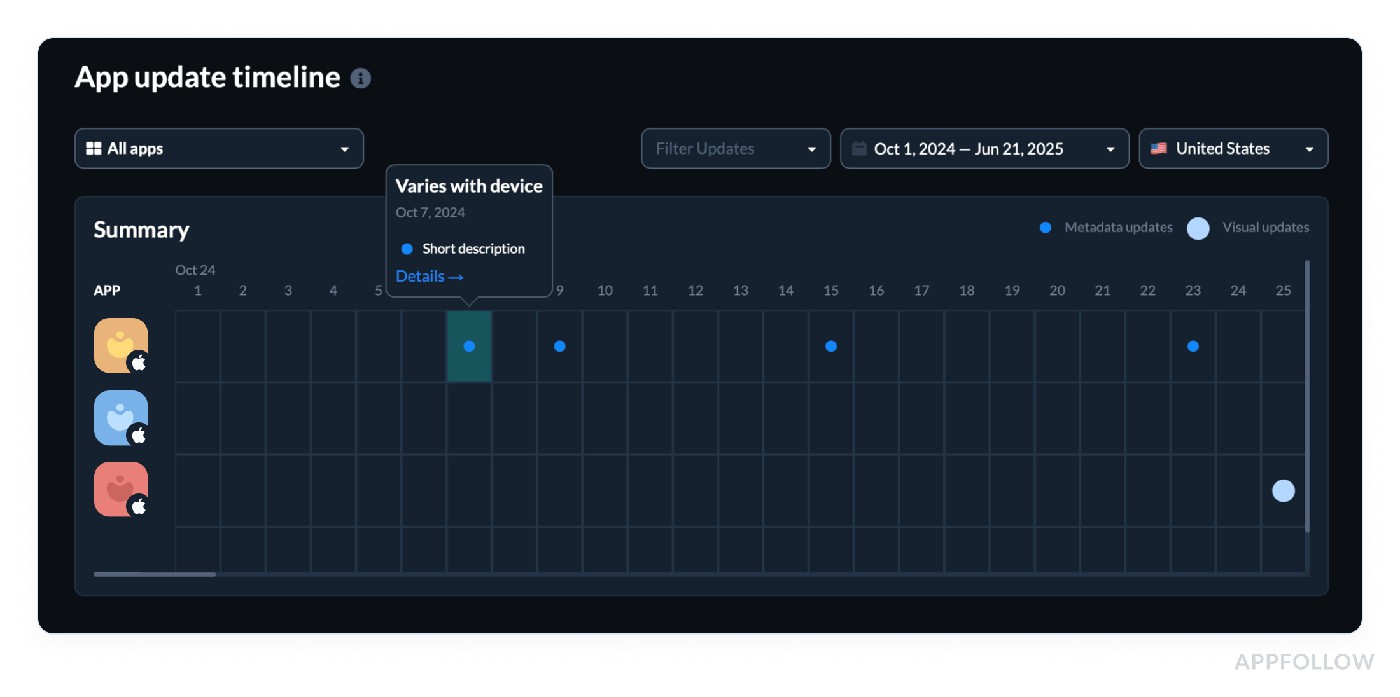
Your rival updates their app icon, preview video, or even changes the first screenshot? That’s a test. In AppFollow, every creative and metadata update gets tracked historically, so you can connect those changes with their ranking or conversion swings.
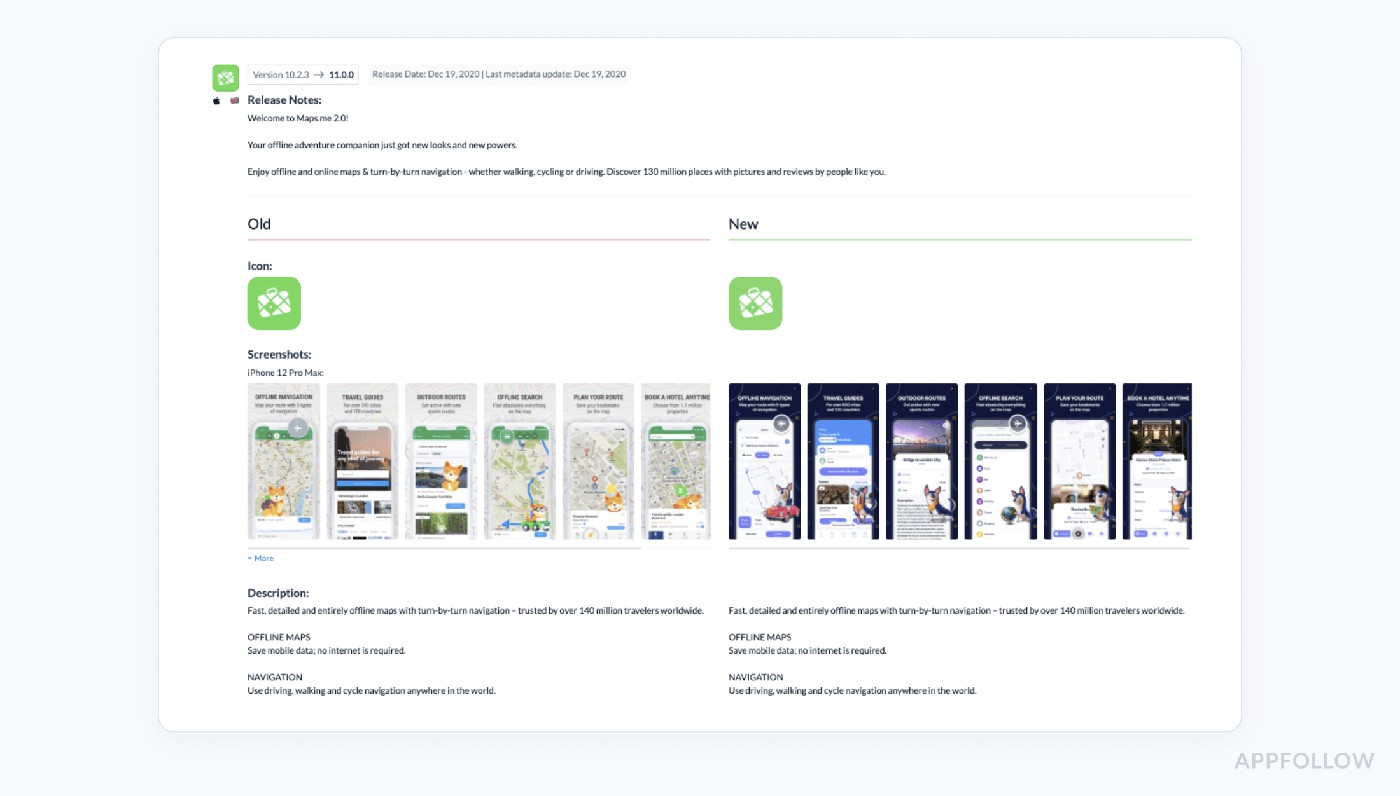
App analytics market history in AppFollow. Sign up to test it live
One team I worked with noticed a competitor dropping a 4-second gameplay loop into screenshot #1, and their conversion rates went up 12% that week. We adapted our flow in the next release.
Reviews & Sentiment Clusters
If your competitor is getting flooded with “can’t log in” or “app crashes after update” reviews, you want to know. AppFollow lets you filter and tag competitor reviews by topic, region, and rating.
Why does this matter? Because users often leave clues before their rating drops. I had a fintech team watch a competitor struggle post-update, then delay their rollout while they patched similar issues early.
Reply Time & Strategy
Your app isn’t the only one users are judging. If your competitor takes days to reply or ignores low-star feedback, that’s your edge. AppFollow shows average reply times and volume across competitors.
One client rewrote their reply strategy based on gaps they saw in a rival’s customer care and gained a 28% boost in reply effectiveness.
Version Updates & Changelog Tracking
Tracking what they say they fixed in release notes and what users report in reviews is an underrated goldmine. In AppFollow, you can follow all competitor version updates and match them with sentiment swings.
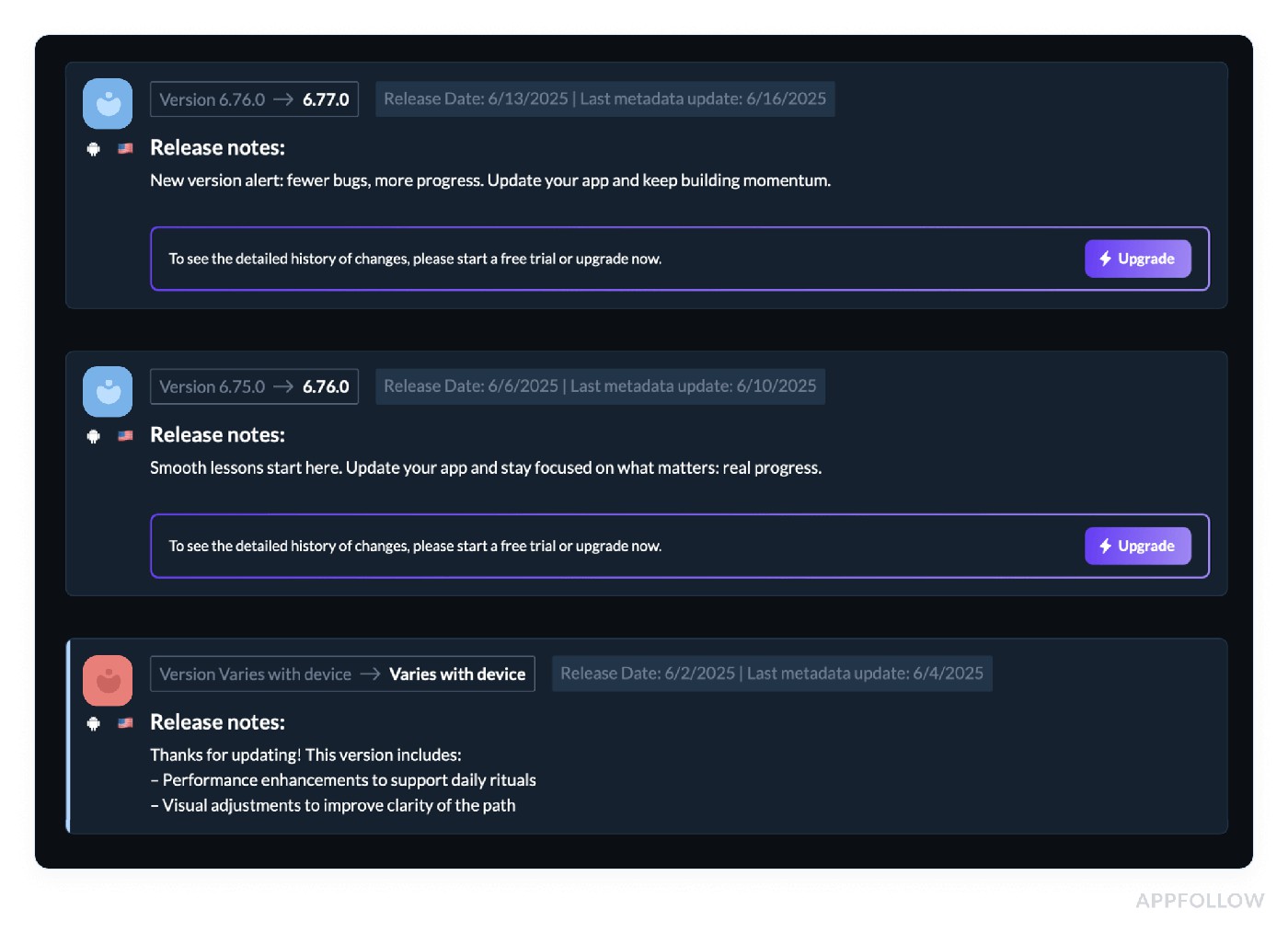
Test these dashboards live with a 10-day trial.
That’s real app market data, not lagging metrics.
You don’t need to duct-tape tools or dig through endless spreadsheets. You need clean, connected app competitor analytics that surface what matters in real time, across every storefront that matters to your team.
cta_get_started_yellow
How Leading Brands Leverage Mobile App Intelligence
Pulling stories straight from the AppFollow war room
Social Quantum: From “Nice Preview” to +110% Installs
Social Quantum, the studio behind some seriously successful mobile games, had hit a ceiling. Their store page was polished, ratings solid, and keywords in place. But something was off, growth was crawling, and they couldn’t tell why.
What they did: They used AppFollow’s keyword ranking tools to monitor visibility fluctuations on their top five acquisition phrases. What popped out? A drop in conversion was tied directly to an underperforming creative; their app preview video was tanking across Tier-1 storefronts.
How they fixed it: They rebuilt the preview video based on competitor asset changes tracked in AppFollow (hello, app competitor analytics), matched it with refreshed screenshots, and fine-tuned the first 3 seconds to feature gameplay instead of intro logos.
The result: +110% organic installs.
Turbo VPN: Multilingual Review Chaos → Automated Growth Loop
Turbo VPN’s challenge was scale. They were operating in dozens of countries with millions of users and thousands of reviews piling up daily across languages. The internal support team was buried, the product couldn’t find real user pain, and the reply rate was sinking.
What they did: They connected AppFollow’s automated tagging, language detection, and reply templates to their Zendesk pipeline. Every review was auto-tagged by language, sentiment, and topic “ads,” “disconnect,” “speed,” and routed to the right team. Replies went out within hours.
Why it mattered: The app intelligence data uncovered regional bugs (VPN login failures in Brazil after an OS update) before crash reports even came in.
The result? Increased rating, reduced churn, and faster product fixes.
Flo: Crushing Response Time with Auto-Tags
Flo yes, the women’s health app used by millions had a reputation to protect. They needed to be fast and relevant with responses, especially on sensitive issues. But manual review tagging was a nightmare.
What they did: They turned on AppFollow’s auto-tagging rules for review themes like “privacy,” “login,” and “bug after update.” Tags were linked to star ratings, locales, and app versions. This created a real-time issue heatmap across storefronts.
Why it worked: It eliminated the guesswork. Support reps had pre-filtered buckets. The product had trend visibility. And marketing has to highlight success themes in comms.
The result? Review response time dropped by 35%.
Audiomack: Turning Reviews into Revenue (+501% ROI)
Audiomack, the music app built for hip-hop heads and indie creators, didn’t just want to keep up they wanted operational excellence. They had decent reviews, but the response was slow and inconsistent, especially on Android.
What they did: They used AppFollow’s automation suite review collection, sentiment detection, auto-replies, and escalation rules across multiple countries. And yes, it all fed into their Zendesk setup and was monitored by region and language.
Why it was genius: They created a feedback loop where replies influenced ratings (boosting visibility) and sentiment data directly informed UX changes.
The ROI? +501%
TechStyle: Using Review Trends to Steer Roadmaps
TechStyle, home to brands like Fabletics and Savage X Fenty, had no shortage of feedback, the problem was finding patterns in the chaos. Reviews were scattered across 10+ apps and regions, and sentiment data was living in spreadsheets.
What they did: They deployed AppFollow’s semantic tagging system to track emerging topics in reviews e.g., “checkout issues,” “delivery delays,” “sizing confusion.” Tags were auto-applied and matched to app versions, letting the product team see which changes were landing and which were causing churn.
Why it worked: They reduced backlog noise and aligned the product with real user pain.
These are real workflows used by teams shipping weekly, managing global storefronts, and fighting for every install.
So if you’re sitting on a wall of reviews, keyword slides, or store changes with no visibility into why things are working or breaking, it’s time to plug into real app store intelligence.
Start your 10-day trial and give your growth team the radar they’ve been missing.
What to Look for in an App Intelligence Platform
I’ve watched way too many teams burn through quarters bouncing between dashboards, CSV exports, and disconnected alerts, and still not knowing why their rankings dropped in Canada last Thursday.
Here’s your no-fluff checklist of what matters when evaluating app intelligence tools, the features I’ve seen high-performing teams use to make smarter, faster decisions.
Keyword Tracking That Tells a Story
You don’t need generic keyword rankings. You need to track how your keywords move daily, by country, device, locale, and acquisition type, and match that movement to what changed: your title, your icon, or your competitor’s new subtitle.
Look for tools that offer:
- Daily keyword position history across storefronts
- Search visibility score tied to metadata
- Competitor keyword trend overlays
- Alerts for sudden ranking drops or spikes
Why? Because if your top converting keyword starts slipping in France and no one catches it, your entire funnel gets hit, and your UA team will be the last to know.
App Market Data That’s Alive
You want live context, not post-mortems. That means tracking store chart movements, download estimates, and competitor trends in your category.
Look for:
- Daily top chart rankings by device and region
- Download estimates mapped to version releases
- Detection of store feature placements and lift curves
Because when a rival app jumps 30 spots overnight, you need to know whether it was a feature slot, a promo code push, or a metadata experiment that worked, so you can decide if it’s worth countering or watching.
Review Intelligence That’s Operational
Your team’s overwhelmed by reviews, and yet product still doesn’t know what users are struggling with. Fix that with semantic review auto-tagging, star-based clustering, and version-aware sentiment filtering.
Look for:
- Auto-tagging by theme (e.g. “ads,” “login,” “bugs”)
- Sentiment trend reports by app version and locale
- Tagging across multiple languages
- Competitor review filtering with the same logic
Bonus: Enable alerts for spikes in reviews with the same tag post-release (e.g. “can’t open,” “crash on launch”) so QA can jump in before the rating tanks.
Metadata & Creative Monitoring That’s Historical
You want to know exactly when your competitor swapped their first screenshot or added a seasonal icon and how that move affected their category ranking.
Look for:
- Full metadata changelogs (titles, descriptions, subtitles, etc.)
- Screenshot and preview video change tracking
- Side-by-side version comparisons over time
- Rank and conversion correlation
Because when someone in your category bumps you off the top 10 in Spain, the “what changed?” question shouldn’t take hours to answer.
Workflow Automation That Feeds the Team
Here’s where most tools fail: they don’t speak the language of your internal workflow. You need alerts, tickets, and exports that land where your team works not just more tabs.
Look for:
- Slack alerts for custom triggers (e.g. keyword drops, 1-star review spikes)
- Zendesk or HelpShift ticket creation from tagged reviews
- Custom CSV exports by tag, country, date, or sentiment
- Weekly digest reports auto-sent to ASO, product, and CS
Example: Get a Slack ping when your visibility score drops on a core keyword in the UK, tied to a competitor's screenshot update, and decide in real time whether to A/B your own asset.
Access all the app intelligence data in Appfollow
AppFollow is an app store intelligence platform built for teams who live inside Google Play Console, App Store Connect, and Amazon App Store all day. It pulls performance, reviews, rankings, and competitor shifts into one place so you don’t have to waste hours stitching the story together.
Growth leads use it to track daily keyword rankings and catch visibility drops before install volume crashes. Product managers use it to auto-tag reviews, cluster bugs by app version, and feed that straight into sprint planning. ASO and UA folks get alerts when a competitor launches new creatives or re-optimizes metadata and can course-correct in real time.
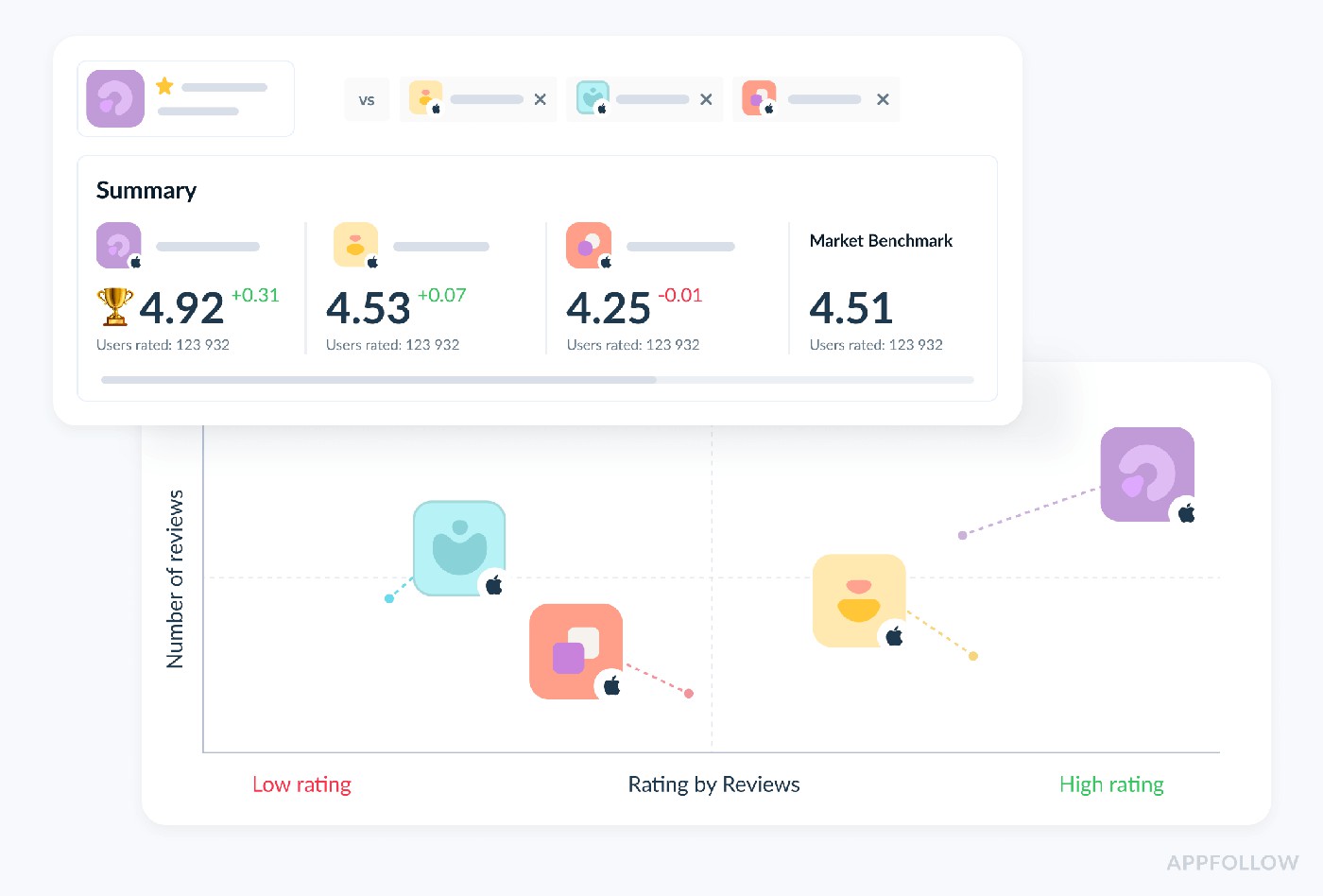
Here’s what you get:
- Real-time keyword tracking across stores, countries, and devices
- App changelog and creative monitoring for your competitors
- Sentiment-based review clustering and multilingual auto-tags
- Download estimates and top chart shifts by region and app version
- Slack, Zendesk, and HelpShift integrations for live team workflows
- Automated alerts when your ratings dip, keyword position drops, or users start complaining en masse
So if your team is tired of playing catch-up with the charts, let your store data finally work for you.
Start your free 10-day trial and let AppFollow show you what’s been happening behind the scenes of your app page this whole time.
FAQs
Can I track how my competitors are performing in search and top charts?
Yep, you can track their keyword rankings and top chart positions by country and device daily. It’s like having a radar for their ASO wins.
How do I get download estimates for competitor apps?
You’ll get store-specific estimates by country, category, and even version. Super handy when you need to reverse-engineer a sudden spike.
Is there a way to see when my competitor updates their screenshots, descriptions, or reply strategy?
Totally. You get a full changelog of visual and metadata updates title tweaks, screenshot swaps, even when they start replying to reviews.
How can I compare my app’s visibility or user sentiment against other apps in my category?
You can line up visibility scores, keyword overlaps, and sentiment trends side by side. Makes spotting gaps (and opportunities) a breeze.
Read also
- 12 Best Customer Review Management Software We Love [Pros & Cons]
- Top 9 Mobile App Analytics Best Practices from Real Pros
- Crack App Analytics: Expert Guide to Win the App Store Game in 2025
- 5 Secrets of Reputation Automation in 2025: Best Tools & Tactics
- Guide to App Store Analytics: Find the Data, Follow the Clues, Grow