12 Best App Analytics Tools in 2026: Features, Pricing & Free Tiers Compared

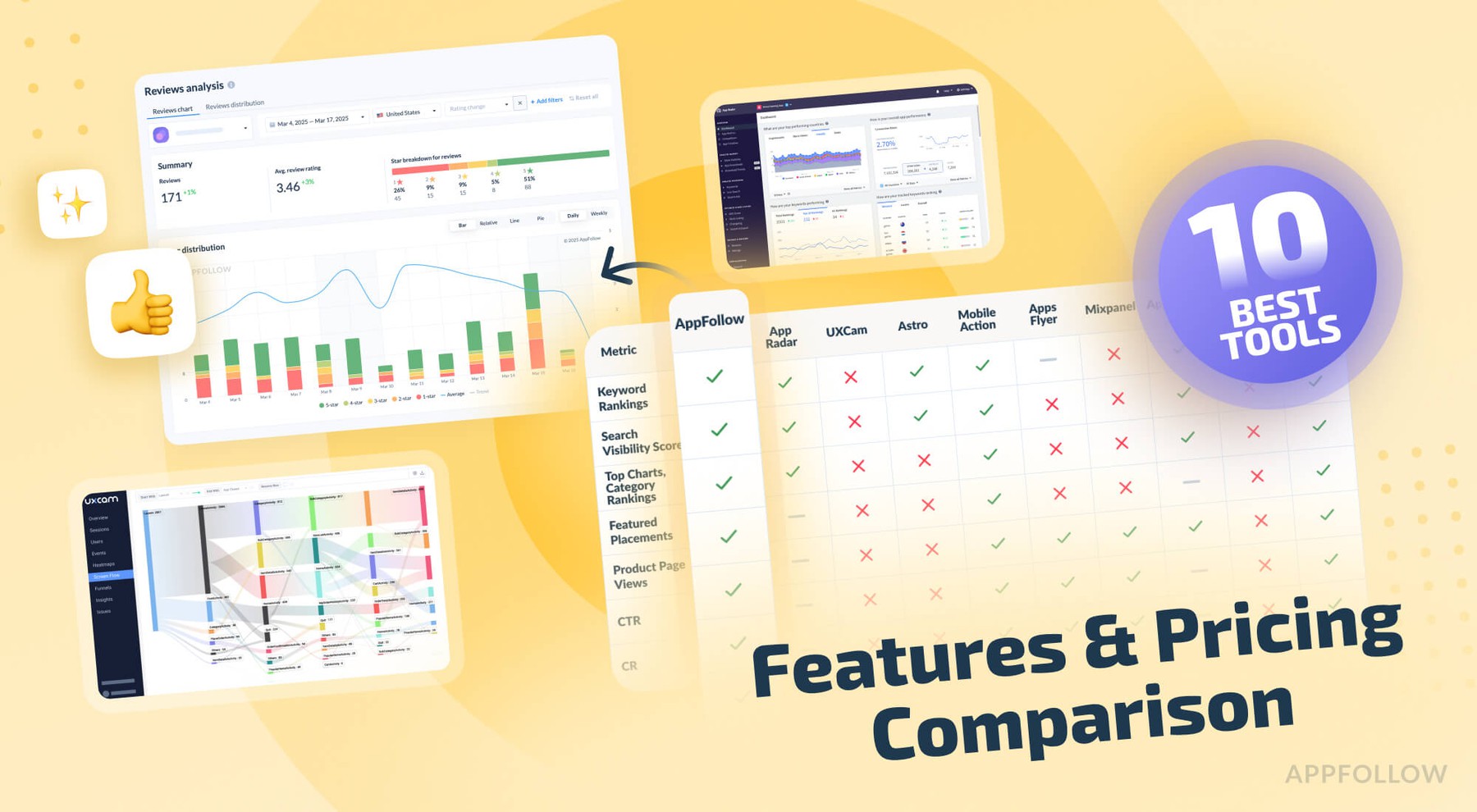
Table of Content:
- The short answer
- What is a mobile app analytics platform, and is it different from a tool?
- How we tested these mobile app analytics tools
- Comparison table of the best app analytics tools
- AppFollow
- App Radar
- UXCam
- Astro
- MobileAction
- AppsFlyer
- Mixpanel
- Appfigures
- AppBot
- AppTweak
- Firebase (Google Analytics for Firebase)
- Amplitude
- How to choose the right mobile analytics tool by job-to-be-done
- When you need an analytics solution vs. a managed analytics service
- Best free app analytics tools and their real limits
- FAQs about app analytics tools
- Read also
Last updated September 17, 2026. Pricing and free-plan limits checked July 2026. Reviewed by Yaroslav Rudnitskiy, Senior Professional Services Manager, AppFollow
App analytics tools track what happens to your app before, during, and after the install: store impressions and keyword rankings, downloads and conversion, in-app behavior and retention, revenue, crashes, ratings and review sentiment. Some live inside your app. Others live in the stores. Almost none do both well, which is why teams end up running three.
That's the part you find out the hard way. Open ten dashboards and none of them agree. App Store Connect says one thing, Google Play says another, your attribution tool swears it's a third number. Meanwhile a 1★ wave is forming, a competitor jumped two keyword spots, and you still owe someone release notes.
More dashboards won't fix that. The right one will.
We reviewed 12 app analytics tools over a two-week evaluation cycle. Nine products were available through self-serve trials; three required guided demos because no full trial was offered. We also checked the capabilities and commercial terms used in this guide against current product documentation and official pricing pages. The comparison shows what each tool covers, where its limits appear, and which team or workflow it fits.
Below: what each tool is genuinely best at, what it costs (including the free-tier ceilings nobody advertises), and the trade-offs, pulled from our testing plus verified G2, Capterra and TrustRadius reviews.
In a hurry? Jump to the comparison table. Want to choose once and not regret it in Q4? Keep reading.
The short answer
Start with the decision you need the tool to support. These are the strongest fits in this comparison.
If your job is… | Best tool | Why it wins | Starts at |
|---|---|---|---|
Grow organic store traffic (ASO) | AppFollow | Rankings, keyword downloads, conversion benchmarks, reviews and competitor updates in one workspace | Free, paid from $29/mo |
Basic app usage analytics on a zero budget | Firebase | Free with no event-volume cap, up to 500 distinct event types | $0 |
Product funnels and retention | Mixpanel | 1M events/mo free, strongest self-serve funnel builder | $0, usage-based |
Behavioral depth at scale | Amplitude | 2M events/mo plus 10,000 session replays on the free plan | $0, usage-based |
See why users drop off | UXCam | Session replay, gesture and rage-tap capture built for mobile | Free, 3,000 sessions/mo |
Prove where installs came from | AppsFlyer | SKAN, deep links, ROAS, 12K free conversions in year one | $0.07/conversion after |
Deep keyword intelligence | AppTweak / MobileAction | 12+ suggestion engines; ASA-linked keyword feedback loops | $99/mo / $15/mo |
Review and sentiment analysis | Appbot | Review NLP across Apple, Play, Microsoft, Amazon | $49/mo |
What is a mobile app analytics platform, and is it different from a tool?
A mobile app analytics platform is a multi-product system that unifies several analytics jobs (store performance, in-app behavior, attribution, reviews) under one data model, one set of permissions, and one billing relationship. A tool does one of those jobs well. The distinction is boring right up until procurement asks why you need four vendors.
Practical test: if adding a second use case means adding a second contract, you bought a tool. If it means toggling a module, you bought a platform.
Point tool | Platform | |
|---|---|---|
Scope | One job (rank tracking, replay, crash) | Several jobs, shared data model |
Typical buyer | One team | Two or more teams plus procurement |
Data joins | Manual, via export or BI | Built in |
Cost curve | Low entry, multiplies per tool | Higher entry, flattens |
Examples in this list | Astro, Appbot, Sentry | AppFollow, Amplitude, AppsFlyer, Appfigures |
Which you need follows from how many teams are asking questions of the same numbers. One person checking rankings weekly: a tool is fine. UA, product and support each arguing from a different export: you need a platform, and you needed it two quarters ago.
How we tested these mobile app analytics tools
- Tested: June 1–14, 2026
- Products reviewed: 12
- Trials run: 9 full free trials, 3 guided demos where no trial exists
- Integrations connected: App Store Connect, Google Play Console, Firebase, Slack
- Review sources: first-hand testing, product documentation, G2, Capterra, TrustRadius, Reddit r/AppStoreOptimization
- Reviewed by: Yaroslav Rudnitskiy, Senior Professional Services Manager, AppFollow
- What we did not do: accept vendor briefings, use affiliate links, or rank a tool higher because it paid for anything.
- Testing focus: ASO analytics, app store visibility, keyword data, competitor tracking, reporting, review insights, integrations, and practical workflow fit
Net result: you get a shortlist built from actual testing, not a recycled roundup of tool names.
We reviewed 12 products. Nine were evaluated through available self-serve trials, while three were reviewed through guided demos because the vendors did not offer a full trial. For every product, we checked the features described in this guide against current documentation and reviewed the official pricing or plan page before publication.
The comparison focuses on the job each tool is designed to do: app store and ASO analytics, product analytics, attribution, behavior and session replay, review intelligence, or free event tracking. We checked setup requirements, data sources, reporting depth, integrations, workflow fit, and the limits that change the buying decision. G2, Capterra, and TrustRadius were used to identify recurring user-reported constraints, not as proof of current features or prices.
This is a dated editorial review, not a laboratory benchmark. A trial gave us direct product access; a guided demo and documentation review did not. Prices, free plan limits, and product packaging can change, so the commercial details below were checked against first-party sources immediately before publication.
Comparison table of the best app analytics tools
This table compares the store-side metrics covered by the ASO, attribution, behavior, and review tools in the main list. A No does not mean the product is weak; it means that the metric belongs outside the product's primary data source or workflow.
| Metric | AppFollow | AppRadar | UXCam | Astro | AppsFlyer | AppBot | AppTweak |
|---|---|---|---|---|---|---|---|
| Keyword Rankings | + | + | - | + | - | - | + |
| Search Visibility Score | + | + | - | + | - | - | + |
| Top Charts | + | + | - | - | - | - | + |
| Featured Placements | + | - | - | - | - | - | + |
| Product Page Views | + | - | - | - | - | - | + |
| Downloads by Keyword | + | - | - | - | + | - | + |
| Geo Performance | + | + | + | + | + | + | + |
| Average Rating | + | + | - | + | - | + | + |
| Rating Distribution | + | + | - | - | - | + | + |
| Sentiment Trends | + | + | - | + | - | + | + |
AppFollow
G2 rating: 4.6/5
Capterra rating: 4.6/5
Free trial: 10 days
AppFollow is a mobile app analytics platform built for ASO precision: it plugs into App Store Connect, Google Play Console, Trustpilot, and the Mac App Store to pull rankings, downloads, and updates straight into one workspace.
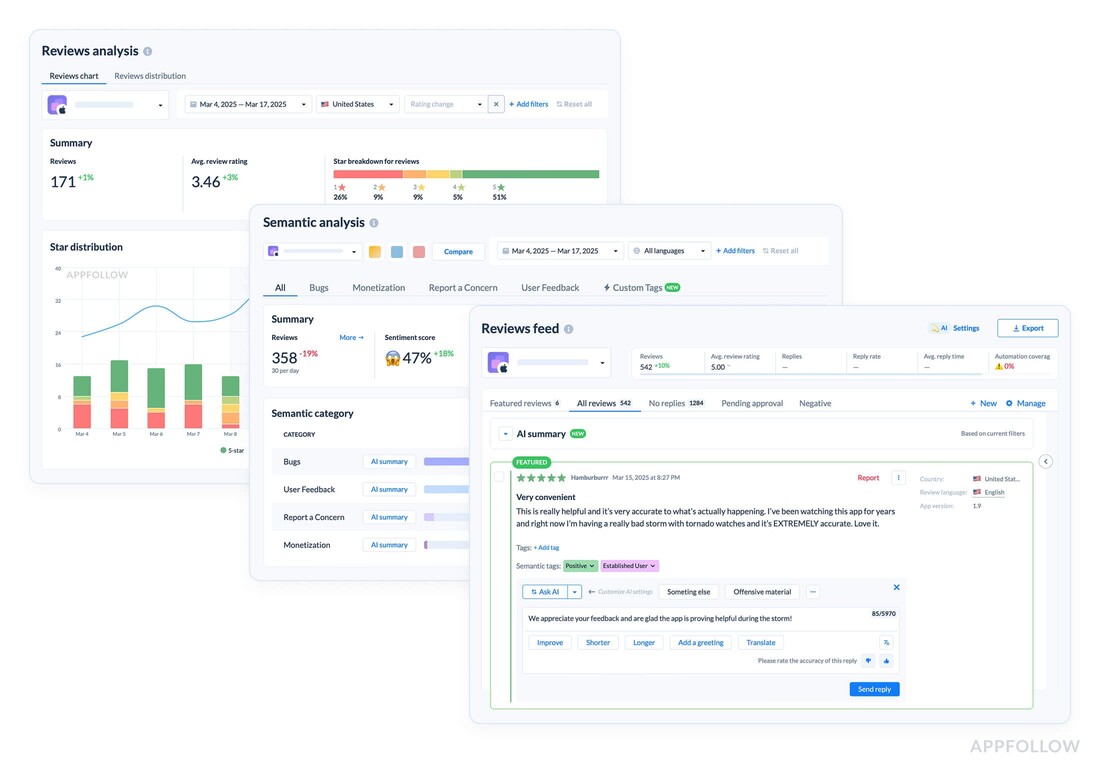
Brands like Riot Games, Wargaming, and Gameloft lean on it to monitor visibility, benchmark conversion, and react to market shifts fast.
If you’re hunting for the best mobile app analytics to guide ASO decisions, this is a strong contender.
- For marketers, it turns scattered signals into next steps without losing speed.
- For teams, saved views and alerts keep everyone aligned on the same source of truth.
- For product, the trail from keyword change to conversion shift becomes visible and actionable.
The software is complemented by app analytics services that help you scale your playbook when needed.
Features of AppFollow mobile app analytics tool
- Keyword Intelligence: Keyword Popularity, Keyword Effectiveness Index, Keyword Difficulty, and the Search Visibility Score, plus Keyword Tracking and Overview for day-to-day optimization.
- Organic performance analytics: Organic Dashboard with visibility, total ranked keywords, and country splits; Downloads by Keywords to attribute installs to queries that move the needle.
- Competitor Tracking: Side-by-side keyword ranks, category, top-chart moves, featured placements, and update, creative timelines to spot what triggered their lift.
- Conversion Benchmark: category-level product page view > install conversion references to set realistic targets.
- Channel Analytics: unify App Store and Google Play impressions, page views, installs, and calculated conversion rates to spot fluctuations and trends.
- Competitive & market context: Compare Discovery, Top Charts and Category Rankings, Featured Timeline, and App Update Timeline to map your moves against rivals and editorials.
- Alerts that matter: instant signals for App Featured and App Updates across titles, descriptions, visuals, and pricing.
- Adjacent workflows when you need them: review reply automations and integrations that keep responses and insights in sync.
This makes AppFollow one of the best analytics tools for mobile apps.
Pricing
AppFollow’s pricing scales by apps, features, and automation depth. You’ve got three tiers:
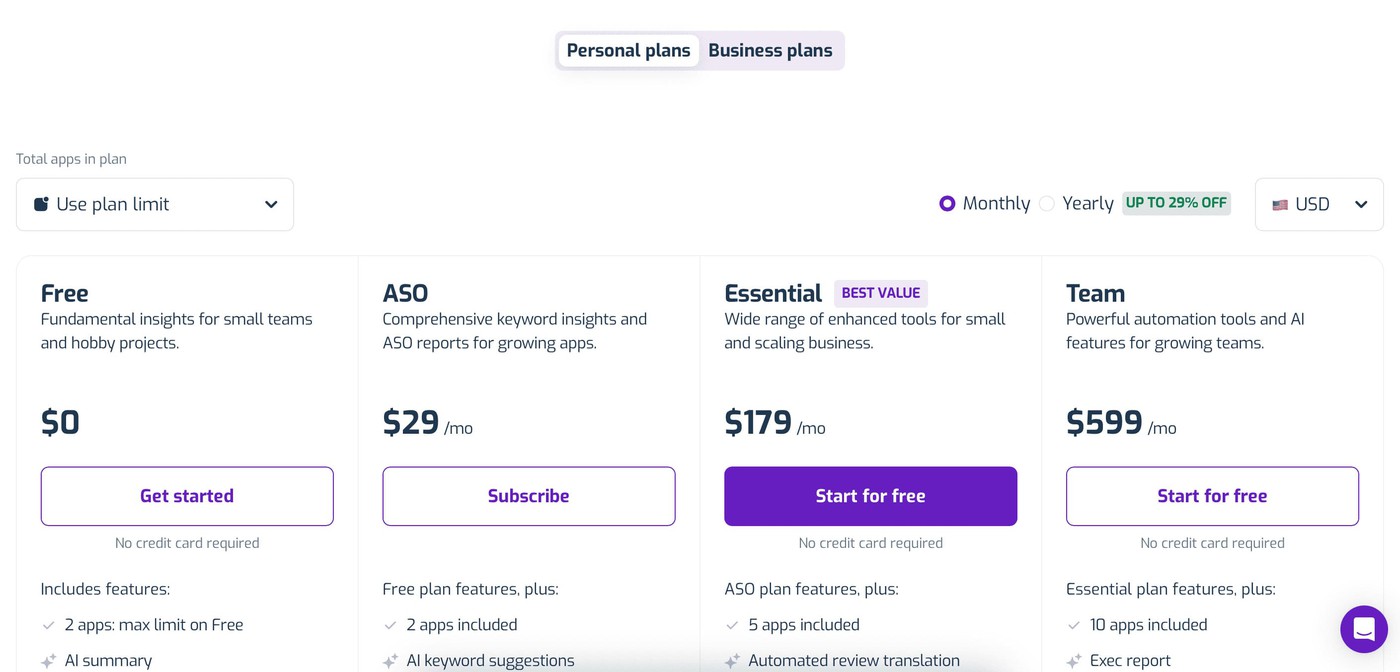
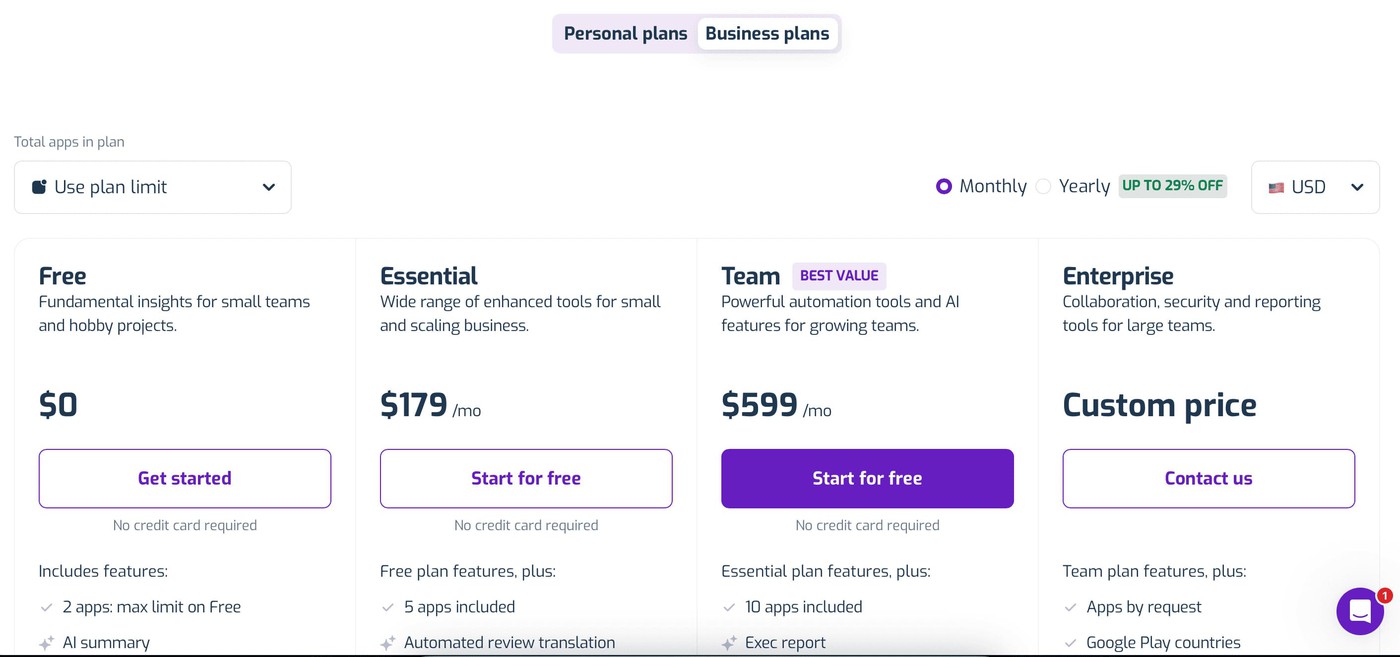
- Free (2 apps, basics, AI summaries),
- ASO - $29/month (2 apps included)
- Essential at $179/month (5 apps, full ASO, keyword data, sentiment tagging),
- and Team at $599/month (advanced replies, semantic tags, spam reports).
All plans include Slack and Zendesk integrations, and the app analytics tool free trial runs 10 days. It’s enough to test alerts, keyword tracking, CR benchmarks, and see if workflows match your ASO process.
Pros and cons
These quotes are from AppFollow users feedback on Capterra and G2.
+ “Really great way to track our App Store listing progress, reply to user reviews and track the performance of keywords and user searches.”
+ “centralizes all app store optimization and user feedback management in one platform.”
+ “AppFollow gathers all important app metrics in one place.”
- “The UI may be tricky.”
- “It was difficult to connect our Android app.”
- “I wish you got more keywords for the essential plan.”
cta_get_started_purple
App Radar
G2 rating: 4.3/5
Capterra rating: 3.9/5
Free trial: 14 days

App Radar dashboard. Image source.
App Radar is one of those quiet power mobile app analytics companies in your App Store analytics stack, built for tracking, optimizing, and scaling mobile growth in one place. It integrates directly with App Store and Google Play, giving you real-time insights into keywords, rankings, competitors, and visibility shifts across markets. Brands like DEGIRO and ProCamera use it to manage ASO workflows and track performance globally.
For marketers shipping frequent updates, it simplifies A, B testing metadata and measuring post-update rank swings. For product teams, it shows how changes in title, description, or visuals move keyword positions and visibility scores. The software handles full ASO audits and suggests keyword improvements backed by real performance data.
Features of app analytics tool
- Track app performance by keyword, country, and category across iOS and Android
- Monitor visibility score, keyword rankings, and top chart performance over time
- Analyze competitors: keyword gaps, metadata changes, global expansion moves
- Optimize metadata and roll out updates with full impact tracking
- Plus, adjacent workflows like review replies and update scheduling
As one of the best mobile app analytics platform, App Radar earns its spot among the best app analytics tools when you want full-cycle ASO management. Among the best mobile analytics tools for teams who need clarity between what was changed… and what worked.
Pricing
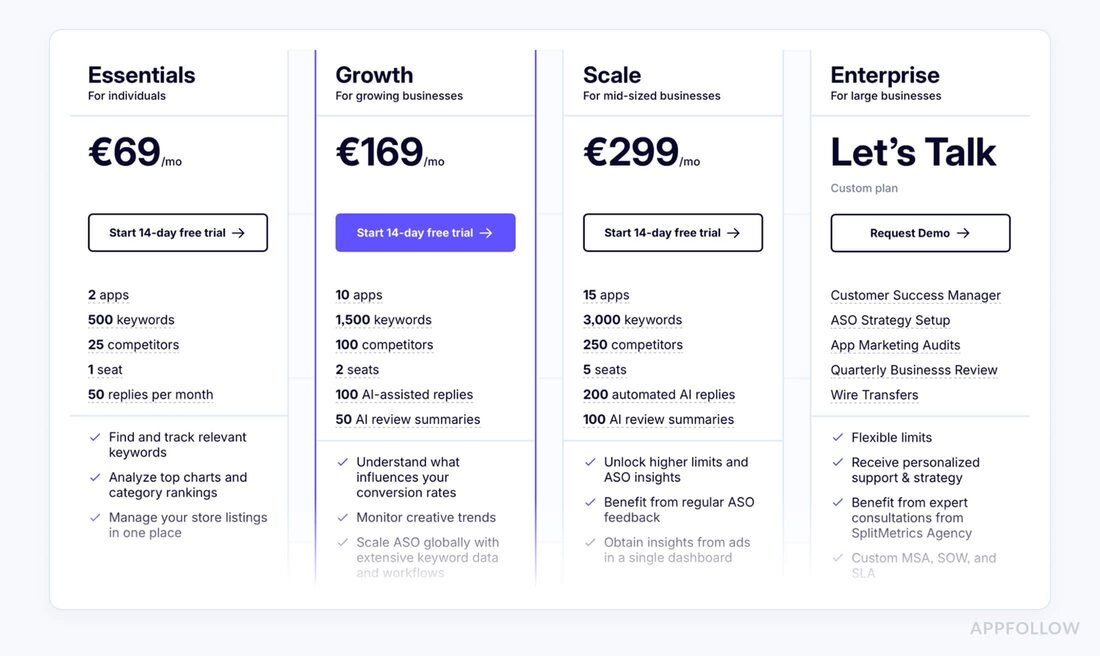
App Radar’s pricing scales with users, apps, and tracked keywords, tailored to how your team runs ASO. Plans start at $75/month and go up to $1,415/month for full automation, competitor tracking, and team access.
There’s also a mobile app analytics tools free version, so you can track keyword rankings, update impact, and visibility scores before you even open your wallet. Perfect for tightening your ASO loop without overcommitting.
Pros and cons based on real user reviews
These quotes are from Capterra and supplemented with insights from App Radar users feedback on G2. Here's a quick look at what users are saying about App Radar:
+ “The ASO features are very easy to use and can help you a lot to track changes in rankings.”
+ “The keyword tracking function is very easy to use and very helpful for your keyword optimization strategy.”
+ “Competitor analysis and keyword suggestions are super useful and very comprehensive.”
- “Sometimes the software is a bit slow and takes time to load data.”
- “More integrations with other platforms could be a game-changer.”
- “The UI can get a bit confusing if you're managing multiple apps at once.”
UXCam
G2 rating: 4.6/5
Capterra rating: 4.7/5
Free trial: 14 days
UXCam dashboard. Image source.
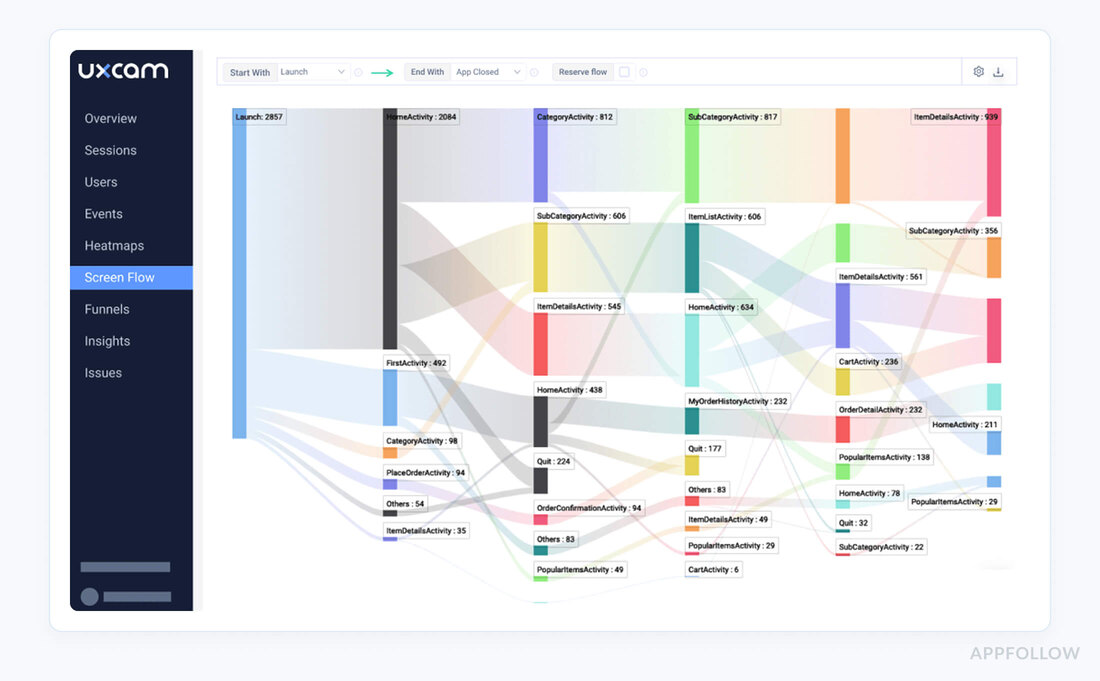
UXCam is an app analytics platform purpose-built for in-app insight: a lightweight SDK captures sessions, gestures, and errors so you can see what happened on mobile, frame by frame. It doesn’t pull data from App Store Connect or Google Play; instead, it sits inside your app to explain the why behind ratings, churn, and conversion swings that show up on the store side. Product teams worldwide have used it since 2014.
Why it’s valuable for marketers and product: you can trace 1★ spikes to specific flows, measure onboarding friction before it tanks reviews, and validate whether a paywall or listing-change drove drop-offs. Session replay, heatmaps, funnels, retention, and issue analytics give you evidence, not hunches.
Analytics tool features
- Session replay & heatmaps to pinpoint UX friction that leads to poor user sentiment and uninstall reviews.
- Funnels & journey analysis to track CPP, store-listing traffic through first run, onboarding, and paywall to conversion.
- Retention cohorts & alerts to see post-release behavior by version, device, or locale and catch regressions fast.
- Issue analytics for crashes, rage taps, and unresponsive gestures that suppress rankings via bad reviews.
- Integrations & export to pipe evidence to support, BI and close the loop with your stack.
- Less relevant here: UXCam isn’t a review-reply software, use separate tools for that.
As mobile app analytics software, UXCam complements store dashboards by explaining the behaviors behind your store KPIs, so you fix what moves ratings and conversion next release.
Pricing
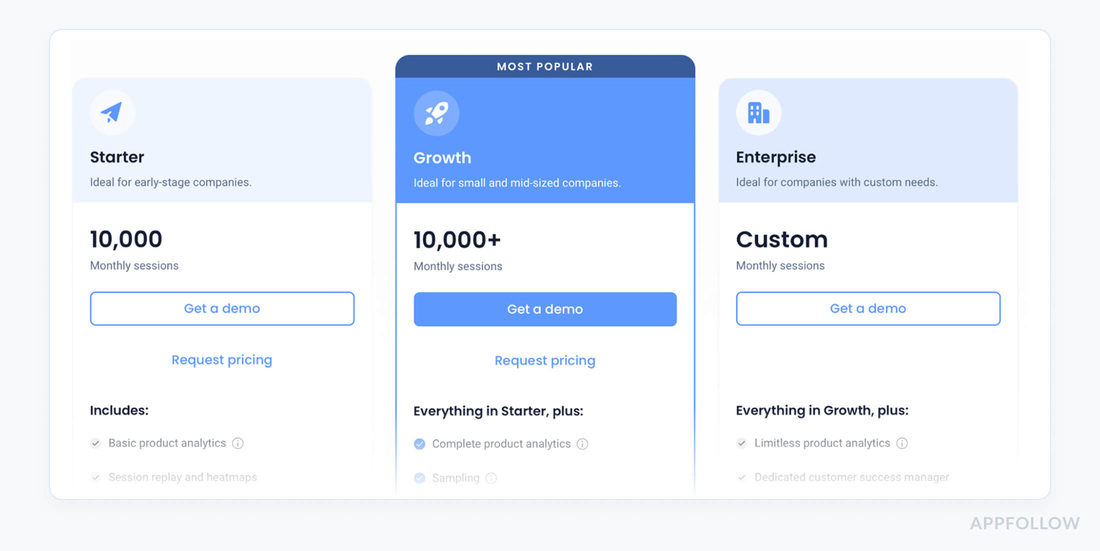
Here’s what Google turns up today:
- Official site: Paid plans are quote-based (no public $$). Free plan is $0 with 3,000 monthly sessions;
- the 14-day trial includes 100k sessions and 1M custom events, starting after SDK install.
- Third-party benchmarks: Vendr (via UXtweak’s roundup) reports a median UXCam price of $20,991, year across buyers. Treat this as directional, not a list price.
- Directory listing: SaaSworthy notes “pricing starts at $199, month” for UXCam; again, indicative rather than official.
Pros and cons
Quotes are from UXcam users feedback on Capterra and G2:
+ “The integration of the product was quite easy it took around 4 hours to set it up on both apps.”
+ “UXCam support is responsive and helpful.”
+ “Easy navigation and its features that allow us to check the detailed session replays of users.”
- “The price tag increases with your user base, and it can be slow to load new sessions.”
- “The most interesting longer sessions often don't get recorded, or get delayed.”
- “I think the user experience of UXCam can be smoother.”
Astro
Free trial: 14 days
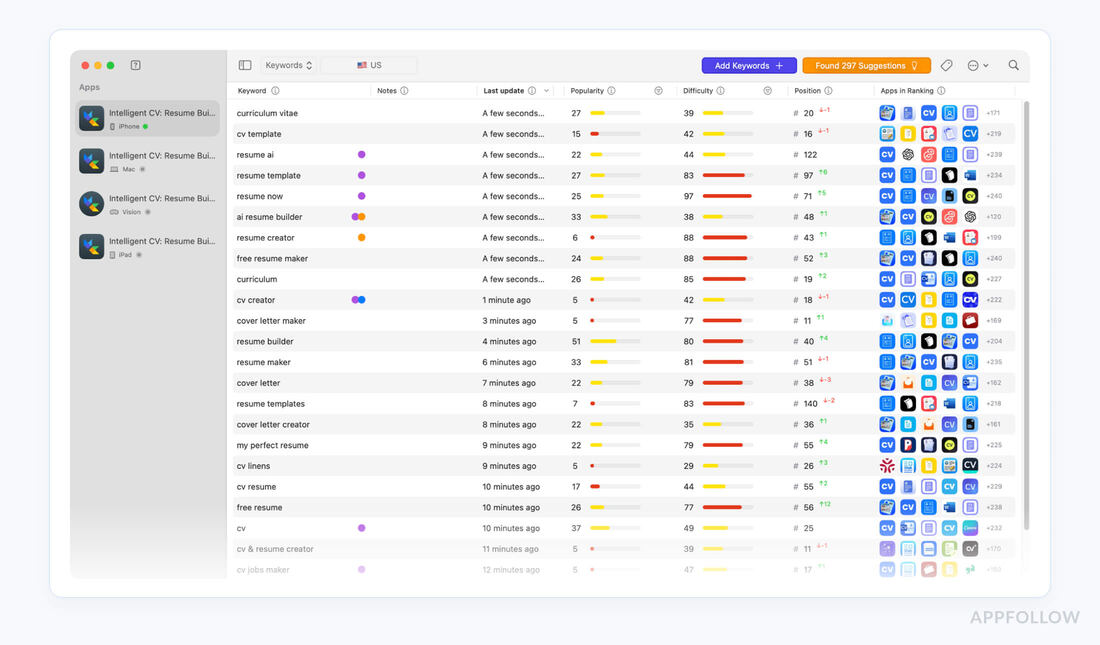
Astro app analytics company dashboard. Image source.
Astro is an App Store–first ASO app analytics platform built for Apple ecosystems: it tracks rankings and keyword demand across iOS, iPadOS, macOS, tvOS, and watchOS, with popularity data sourced from Apple Search Ads. Indie teams like HabitKit’s developer use it to uncover queries that lift impressions after metadata updates.
Why it’s valuable: for marketers and product leads shipping frequent updates, Astro exposes which terms move visibility so your next mobile app release targets demand, not guesses.
It’s lightweight enough for solo users, and structured for teams who need repeatable ASO workflows.
Analytics features
- Keyword research with real demand signals: popularity, difficulty leveraging Apple Search Ads; track rankings across 60+ Apple stores.
- Competitor keywords: see which terms rivals rank for and fill the gaps.
- Translation assist: DeepL hover-to-translate accelerates international keyword scouting.
- Ratings & review monitoring: detect where new reviews land across countries to spot sentiment shifts post-release.
- Keyword organization & planning: tags, bulk import (up to 1000), temporary apps for pre-launch market sizing.
- Less relevant here: Astro doesn’t handle review replies, use separate tools for support workflows.
Astro earns a mention among the best mobile app analytics tools when your mobile roadmap depends on precise keyword targeting, quick cycles, and defensible ASO wins per user locale.
Pricing
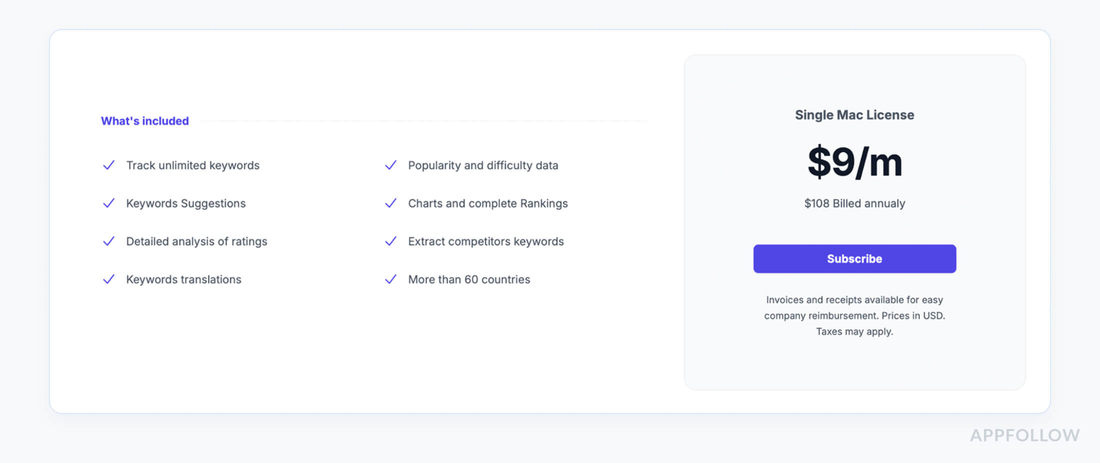
Astro’s pricing is one lane: Single Mac License, fixed subscription with no per-keyword, app caps, $9/month, $108/year. Built for ASA keyword mining, metadata sprints, product-page updates, and review-monitoring workflows.
If you’re weighing free mobile app analytics tools in your stack, Astro focuses your ASO ops without limits.
Pros and cons
All the data you need for making a final decision about Astro pulled from real user feedback and quoted verbatim.
+ “It’s really easy to use and provides great insights on how to improve my app’s visibility.”, Sebastian Röhl. Astro
+ “the app has received 800 downloads on the first 2 days, just by doing ASO with @TryAstroApp.”, Francesco. Astro
+ “You can research any country and evaluate the most appropriate keywords to help your app rank better.”, Mikel Cobián. Astro
- “it’s not free anymore, not even offering a trial to check the platform.”, Alexander Kashubin Product Hunt
- “is there no month subscription?” … “Sadly no.”, Reddit
- “Astro does not even support Google Play.”, Reddit
MobileAction
G2 rating: 4.4/5
Capterra rating: 4.3/5
Free trial: 7 days
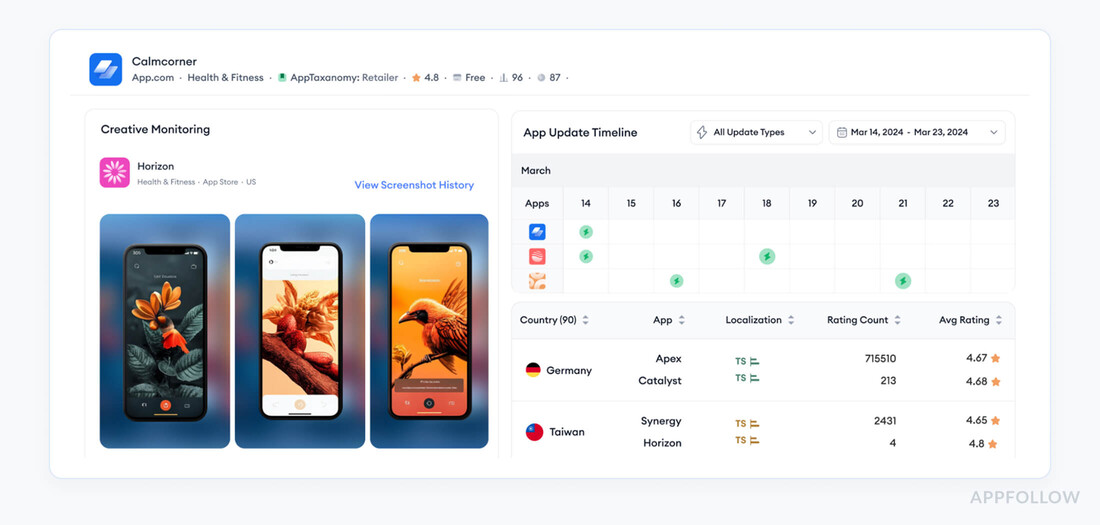
MobileAction dashboard. Image source.
MobileAction is an ASO-focused mobile app analytics tool that plugs into App Store Connect and Google Play Console to track rankings, keywords, category moves, and store changes in one place.
Teams at scale use it to spot demand shifts, benchmark against rivals, and plan metadata updates that move install velocity. Square even credits MobileAction with a 50% ROAS uplift and 40% CPC decrease via Apple Ads + keyword workflows.
This app analytics software is built for mobile growth cycles where each user cohort gets a better first session because you targeted the right queries.
Features
- Keyword research & tracking (difficulty, demand, rank trends) with competitor gap analysis.
- Store monitoring: real-time keyword ranks, ratings, reviews, and competitor updates across iOS and Android.
- Visibility & market intel: category, top-chart tracking, featured placement signals, and market-level reports.
- CPP intelligence & APIs to audit Apple Custom Product Pages and pipe data to your stack.
- Apple Ads synergy via SearchAds.com for keyword-level performance feedback loops.
- Less relevant here: ratings, reviews tracking exists, but reply workflows are outside core ASO tools.
If your mobile app roadmap needs defensible ASO wins, MobileAction earns a spot on your shortlist of the best mobile analytics software.
Pricing
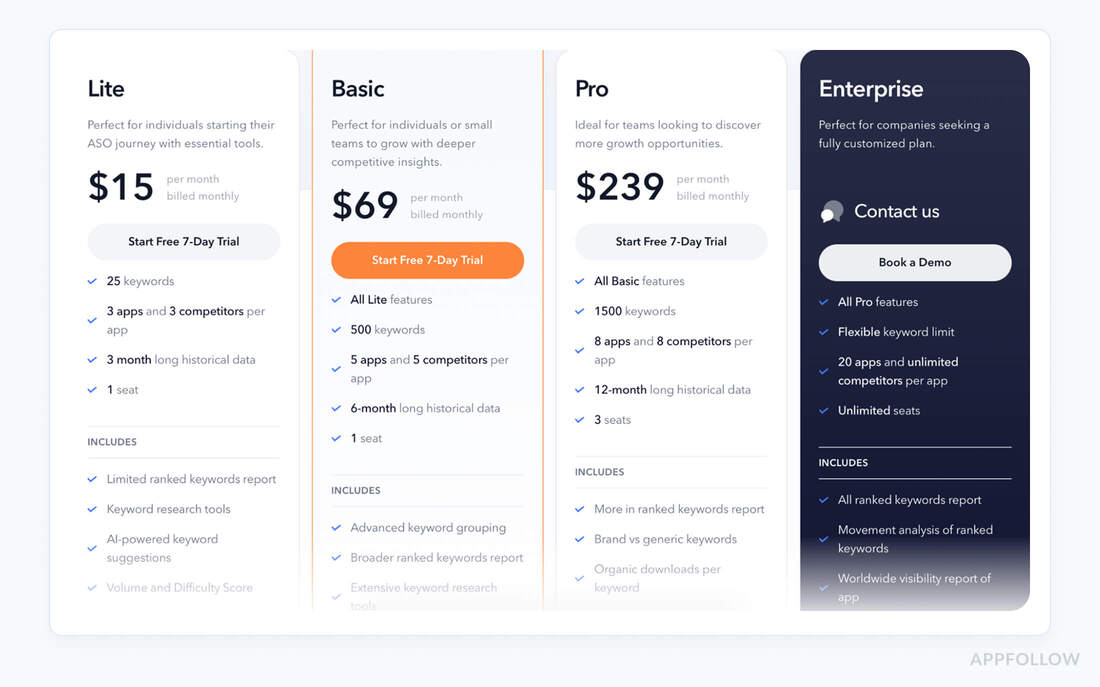
MobileAction prices by product line and data depth, ASO Lite, ASO Intelligence and Market Intelligence, billed monthly or yearly with seat limits and historical windows.
- Starting price: $15/month.
- Final price: $999/month.
Built for keyword research, share-of-voice, ASA planning, and competitor estimates. If you’re comparing free mobile app analytics tools, calibrate expectations here.
Pros and cons
Here’s a snapshot from real MobileAction service customer feedback:
+ “I work on both ASA and ASO, and MobileAction has been a huge time-saver for me.”, Timofei O., ASO & ASA manager. G2
+ “A, B testing feature makes it easy to see what works, and the keyword tracking gives us a clearer view of where we stand against competitors.”, Jimmy ., Global PPC Manager. G2
+ “What truly elevates the experience is the customer support, our CSM has been consistently responsive, helpful, and proactive.”, Karin A., UA manager. G2
- “I’d be happy if I had more places to see how our competitors are working within Apple Search Ads, more keyword details, budgets, and so on.”, Tom K., UA Manager. G2
- “Data refresh times could sometimes be more accurate.”, Cengiz Z., Partner. G2
- “Too expensive and too long of a contract.”, Todd K., VP of Growth. Capterra
AppsFlyer
G2 rating: 4.5/5
Capterra rating: 4.4/5
Free trial: 30 days
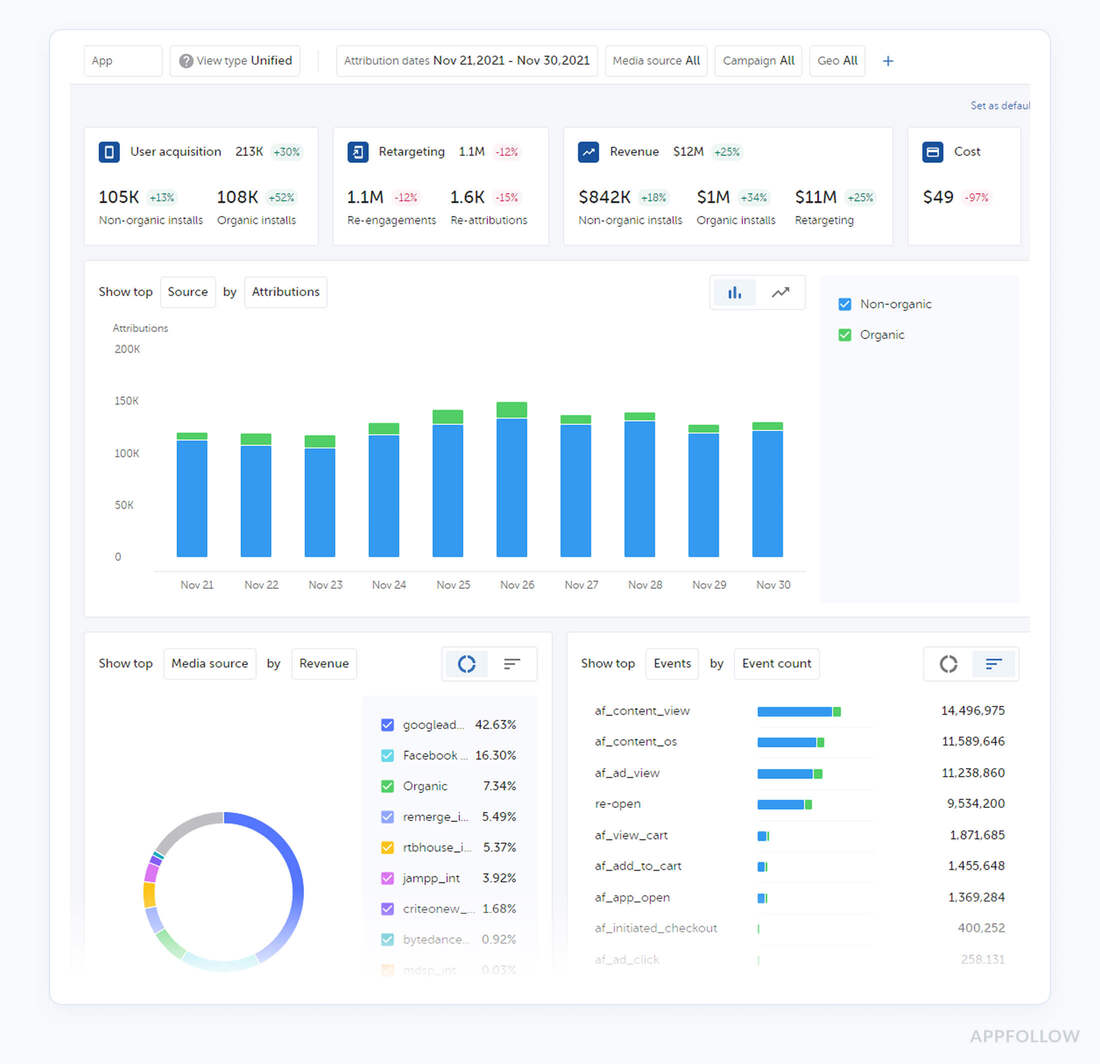
AppFlyer dashboard. Image source.
AppsFlyer is an app analytics tool and MMP that ties your App Store and Google Play growth to real install and revenue signals. It integrates with iOS (SKAN, AdServices) and Android to attribute installs, map in-app events, and surface ROI, so you can see which campaigns, keywords, and creatives moved the needle.
Global companies like Walmart, Grab, TikTok, Adidas, Agoda, King, BBVA, and McDonald’s appear on its customer roster.
Features
- SKAN dashboards & Conversion Studio to control conversion values and analyze iOS campaigns without IDFA, enriched with cost.
- Apple Search Ads integration for click, impression attribution, cost via API, and unified reporting across channels.
- Incrementality testing to prove lift from remarketing and new-user programs before you scale budgets.
- Partner marketplace & SKAN partners to keep your ad networks aligned with measurement changes.
- Fraud protection (Protect360) to keep performance data clean and budgets safe.
- Deep linking & CX (OneLink) to route users from ads to the right store page, app, or web fallback.
- Raw data & APIs (trialled in the Welcome Package) for warehouse, BI, cohorting, and custom KPIs.
- Less relevant here: review-reply workflows aren’t part of this stack, handle those with other tools.
Pricing
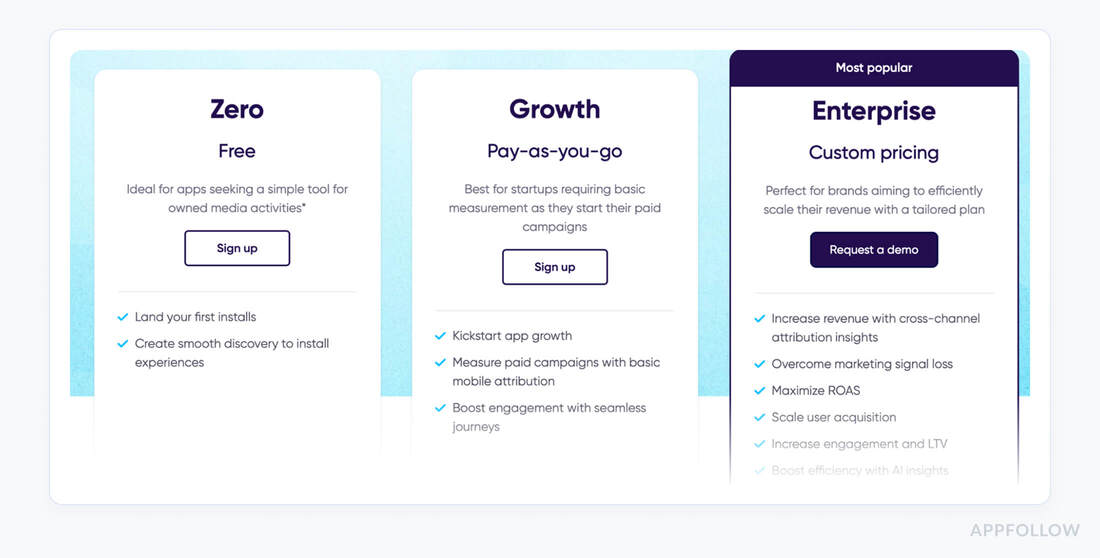
AppsFlyer prices by measured conversions.
- Zero plan is free with a Welcome Package of 12K conversions;
- Growth is pay-as-you-go at $0.07 per conversion after the welcome;
- Enterprise is custom (large deals commonly ~ $0.03 per conversion).
Starting price: $0. Final price: custom. For stacks mixing free mobile app analytics tools, this covers SKAN, deep links, and ROAS tracking.
Pros and cons
Here are concise quotes about the platform performance from real customer feedback:
+ “Great analytics and easy-to-use dashboard, especially ‘My Dashboard’.” G2
+ “reliable, real-time attribution across all our marketing channels.” G2
+ “The AF team is professional and responds quickly.” G2
- “Reports sometimes take time to load, and minor bugs may cause occasional attribution gaps.” G2
- “It was complicated to see attribution issues due to the time zone of that medium.” G2
- “duplicates the numbers for all the totals it includes and must be cleaned manually.” G2
Mixpanel
G2 rating: 4.6/5
Capterra rating: 4.5/5
Free trial: 30 days
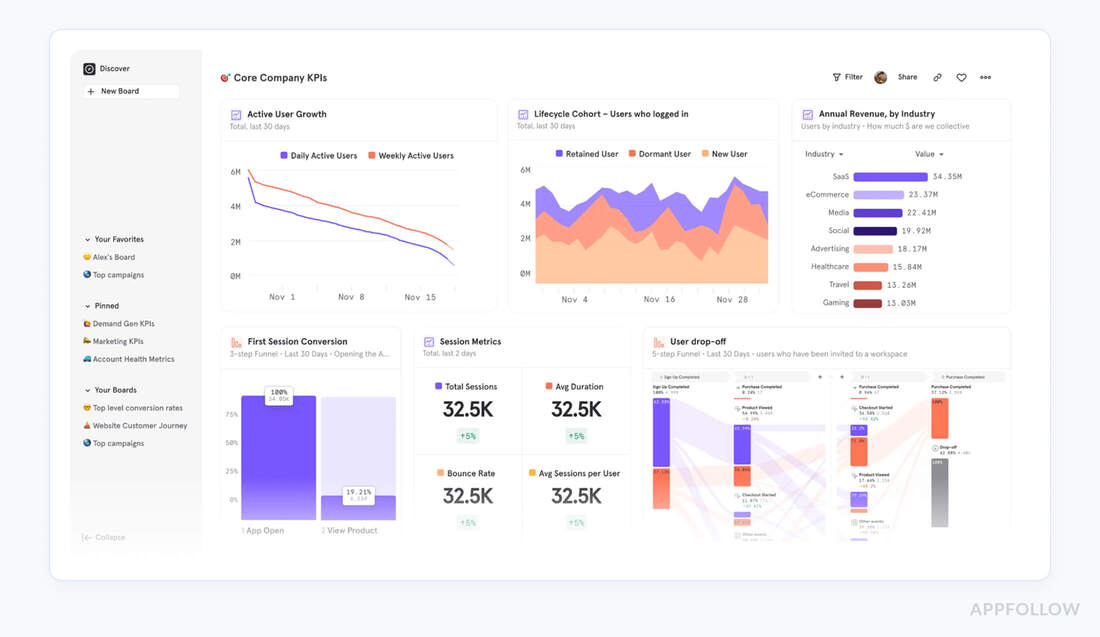
Mixpanel is an analytics tool for understanding what happens after the install, so your store work translates into real activation, retention, and revenue. It integrates via native SDKs for iOS and Android (not directly with app stores) and ties campaign context through attribution partners, which means your Apple Search Ads and UTM sources flow into product analytics without guesswork.
Features
- Acquisition > Activation funnels: Track first open to core action, segment by campaign, source, SKAN partner data to see which store pushes create lift.
- Retention & cohorts by version, locale, device: Spot regressions after a release and prioritize fixes that protect rankings.
- Flows & pathing: Visualize how users move from store-driven traffic to successful outcomes, and where they drop.
- ROAS & cost stitching: Bring ad spend into reports and evaluate paywalls or onboarding changes with revenue in view.
- Session Replay (iOS, Android): Watch real mobile behavior to debug friction that fuels bad reviews or uninstalls.
- Less relevant here: review-reply workflows aren’t built in, use separate tools.
Pricing

Mixpanel prices by events: Growth plan includes 1M monthly events free; then $0.28 per 1K.
- Starting price: $0.
- Final price: ~$200,000/year for large Enterprise deployments.
Pros and cons
Here are concise, verbatim pull-quotes from real customer feedback.
+ “Mixpanel is like my daily newspaper for product usage updates. It’s incredibly easy to implement, and creating boards and reports takes just minutes.” G2
+ “Mixpanel has perfected their user interface, it is such a joy to use and very powerful with advanced features.” G2
+ “Seemless event and funnel segmentation analysis with a lot of crunching functionalities.” Capterra
- “It takes long time to integrate it and It's difficult to do it right.” Capterra
- “The pricing also scales up quickly as your data grows.” G2
- “The fact that I cant manually merge profiles or delink profiles from an identity cluster.” G2
Appfigures
G2 rating: 4.2/5
Capterra rating: 4.5/5
Free trial: 14 days
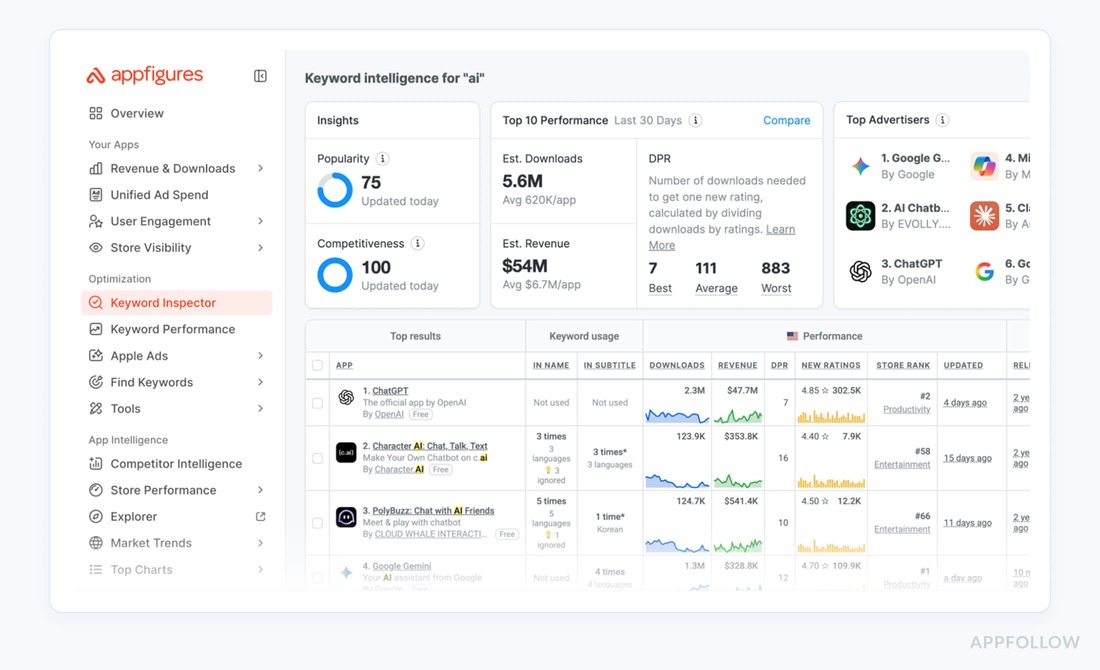
Appfigures dashboard. Image source.
Appfigures is mobile analytics software built to pull your store truth into one place, downloads, revenue, ranks, keywords, and competitor moves. It connects to App Store Connect and Google Play Console for first-party performance, and layers market estimates and ad intel on top so you see cause > effect across launches and metadata passes.
It’s trusted by 250K+ companies worldwide for ASO, benchmarking, and market research.
You get an analytics tool that shows which keywords lift visibility, how category rank shifts by country, and where competitors are gaining share, fast enough to guide your next release checklist.
Features
- Keyword research & rank tracking with hourly updates, difficulty, and discovery workflows.
- Competitor tracking & market intelligence: download, revenue estimates, SDK & publisher intel, and category benchmarking.
- Apple Search Ads intelligence to see who’s buying which terms and how often, informing your ASA plan.
- Store performance analytics: unified downloads, revenue, subscriptions, rankings, and locale splits for your mobile app.
- Review monitoring across stores with alerts and reply-in-dashboard when needed (less relevant to ASO itself).
As one of the most famous application analytics tools, this platform helps mobile teams turn store signals into concrete actions on titles, subtitles, and screenshots.
Pricing
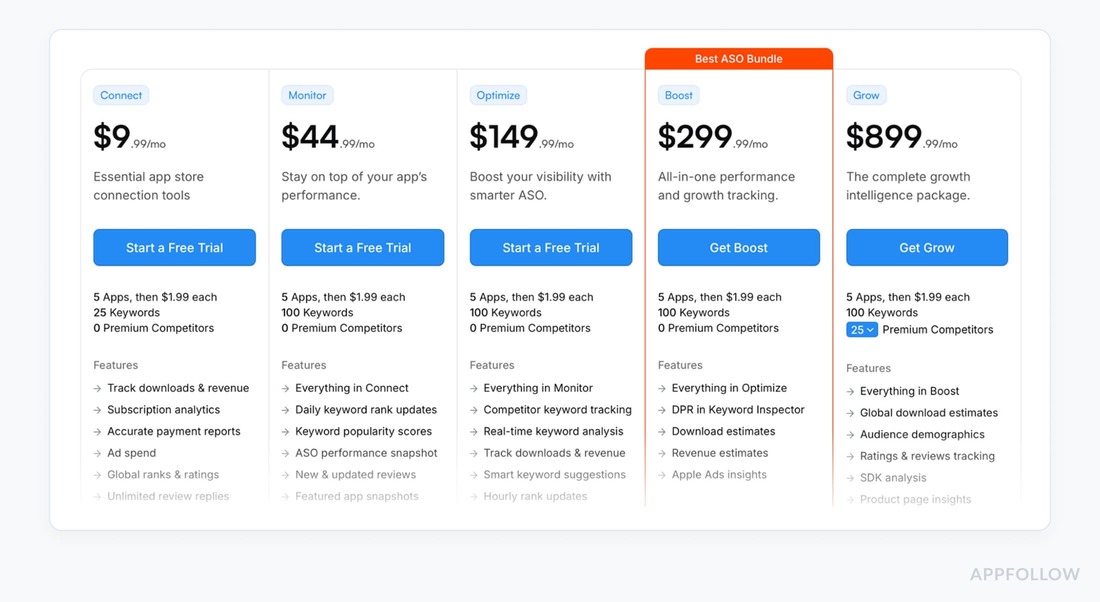
Appfigures prices by product line, Starter (free), Analytics & ASO, and Market Intelligence, with monthly or annual (-20%).
- Starting price: $0.
- Final price: $1,249.99/mo (Pathfinder).
Seat-based Enterprise billing counts active users; add-ons and extra apps adjust cost.
Built for keyword ranks, revenue, reviews, SDK intel, and competitive estimates. If you’re also using free mobile app analytics tools, this anchors ASO ops without guesswork.
Pros and cons
+ “I like being able to have one consolidated place to visit to see performance across all the different app store listings.” G2
+ “I can also respond to app reviews in google and app play store directly from it.” G2
+ “The most valuable feature for us specifically is review tracking and user sentiment.” Capterra
- “Some charts are not accurate, for example the Overview section does not accurately report the number of app downloads.” G2
- “I think I wasn't able to filter the data according to our specific requirements.” G2
- “It's a clean interface with useful data, but it doesn't reliable load.” play.google.com
cta_get_started_yellow
AppBot
G2 rating: 4.6/5
Capterra rating: 4.5/5
Free trial: 14 days
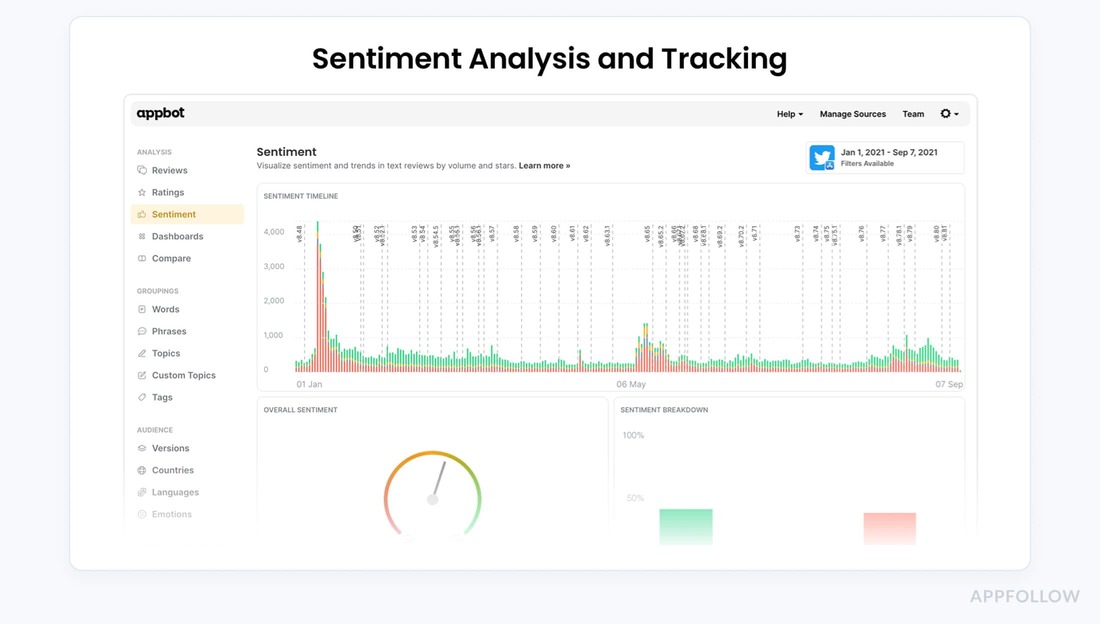
Appbot is app analytics laser-focused on App Store signals from real reviews and ratings. It connects to Apple (iOS & Mac), Google Play, and Microsoft Store, and also covers Amazon, so you can read the market’s voice across every release line and locale. Brands on the logo wall, Johnson & Johnson, Microsoft, Deezer, BMW, Strava, use it to surface issues that hurt rank, prioritize fixes, and watch star trends after each build.
You get mobile app analytics that explain why ratings move: which themes drive drops, which version triggered a shift, and what to change before the next mobile app submission. It feeds crisp inputs into product roadmaps and release notes.
Features
- Review monitoring for iOS, Google Play, Mac, Microsoft; all countries, near real-time. Auto-translation included.
- Sentiment analysis (trained on app reviews) with topic, custom topic, and keyword grouping to pinpoint causes.
- Dashboards & API to merge ratings, reviews with BI, build cohort cuts by version, locale, and automate reporting.
- Integrations: Slack, Zendesk, MS Teams, Google Chat, Zapier, pipe insights where users already work.
- Alerts for spikes in 1★, issue trends, and keywords surfacing in competitor feedback, early warning for ranking risk. Less relevant here: reply workflows (in-Appbot or via Zendesk) when a user response is needed.
Pricing
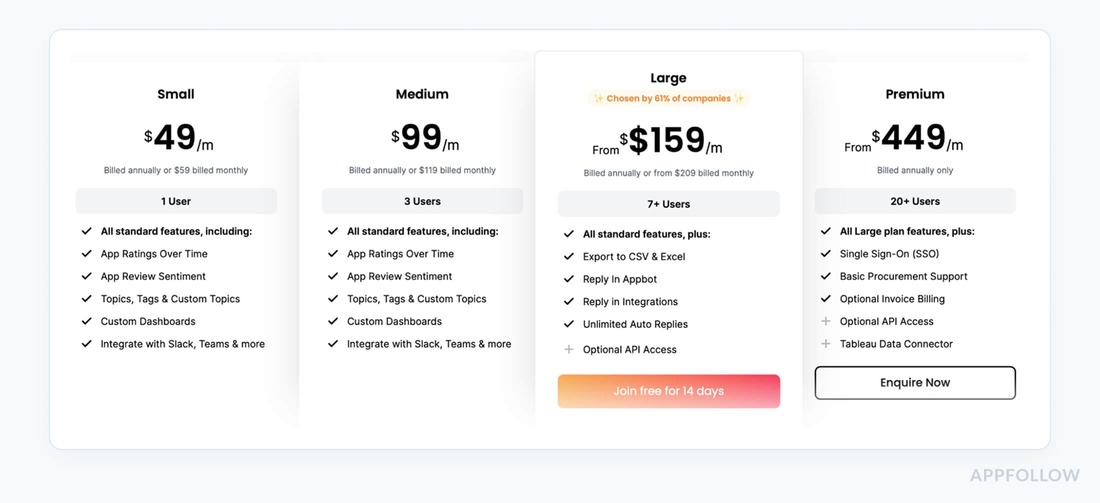
AppBot prices by tier, seats, and tracked sources, billed monthly or annually.
Tiers: Small, Medium, Large, Premium.
- Starting price: $49/mo;
- final price: $449/mo.
Designed for review NLP, sentiment, topic tagging, and Slack, Zendesk routing across rating-response workflows. If your stack includes app analytics free, this plugs the review-intelligence gap.
Pros and cons based on AppBot mobile app analytics software reviews
+ “I love how easy it is to select a time frame and see the ratings and reviews from that time.” G2
+ “It’s easy to use, has interesting dashboards to review, auto-translation, and is quite handy when it comes to making reports.” G2
+ “...the UI is pretty easy to use and straight forward, our customer service team had no issue in using this tool.” Capterra
- “For a single user Large plan is too expensive just to manage the reviews and ratings of their app.” G2
- “I feel the tagging of reviews to words, topics can be better.” G2
- “On several occasions I have experienced some small issues and delays in loading data.” Capterra
AppTweak
G2 rating: 4.6/5
Capterra rating: 4.2/5
Free trial: 7 days
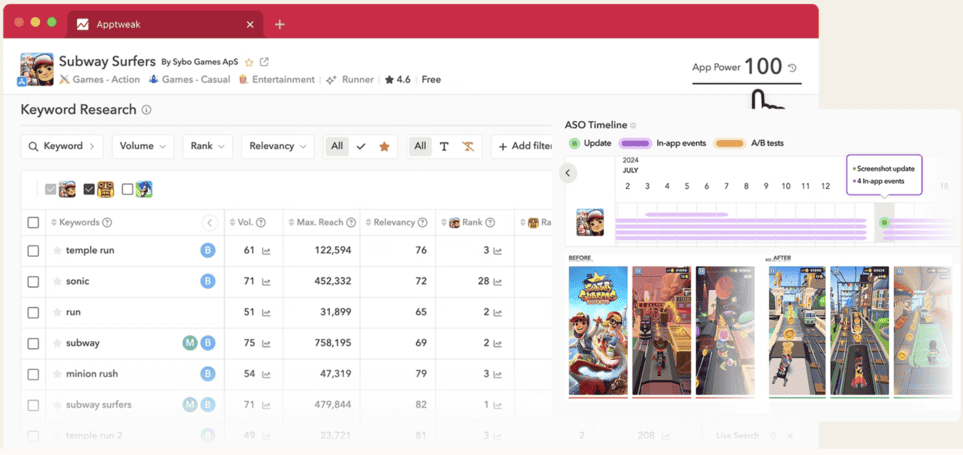
AppTweak dashboard example. Image source.
AppTweak is one of those app analytics platforms built squarely for store-side growth. It connects to the Apple App Store and Google Play (plus API access across 100+ countries) to surface the signals that drive visibility, installs, and revenue. Teams like Binance and SoundCloud tap it for market sizing, ASO strategy, and reputation insights.
Best mobile app analytics features
- Keyword intelligence: 12+ keyword suggestion engines, AI helpers, and unique KPIs to find terms with real potential, then track ranks by country.
- Apple Search Ads workflow: campaign manager with competitive keyword intel and automation for ROAS-centric scaling.
- Market intelligence: download and revenue estimates to benchmark categories and rivals, with analytics views in-app.
- Console-powered analytics: bring App Store Connect, Play Console metrics into unified exports and reporting.
- Localization support: workflows to plan metadata per locale and accelerate expansion across stores.
- Less relevant here: review monitoring, replies with AI assistance when a user response matters.
Pricing
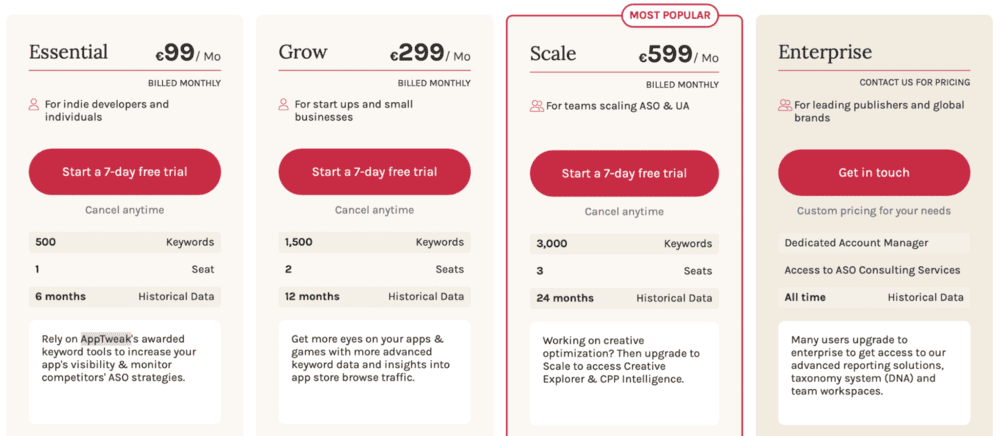
AppTweak prices ASO Intelligence by tier, gating followed apps, tracked keywords, competitors per app, seats, reports, and historical data.
- Starting price: $99/mo;
- final price: $599/mo.
Pros and cons
Here is what AppTweak customers say in their feedback about this platform on app analytics tool market:
+ “Integrating additional data sources like Apple Search Ads, App Store Connect or Google Play data is easy to manage.” G2
+ “Some features are quite unique and very useful for ASO purpose (store explorer, creative and cpp explorer, benchmarks).” G2
+ “Their platform is fast and seamless when it comes to research, data extraction, and overall clear ASO decision making.” G2
- “The new pricing and product split is too pricy and difficult to use.” G2
- “...additional features are still in a development phase and might be slightly behind in capabilities.” G2
- “It’s very busy and complicated, you need to know how to use it.” G2
Firebase (Google Analytics for Firebase)
G2 rating: 4.5/5 (307 reviews)
Free trial: not needed, the analytics tier is free
Best for: teams who need event data yesterday and have no budget
Firebase is where most app teams start, and there's a good reason: the analytics are free with no cap on event volume, only a ceiling of 500 distinct event types per app. Wire the SDK in, get audiences, funnels, real-time views, and a BigQuery export that costs you nothing until the warehouse bill shows up.
Where it stops being enough is the part teams discover in month four. Firebase reports on what happens inside the app. It knows nothing about your store listing: no keyword rankings, no impressions-to-install conversion, no competitor metadata changes, no review sentiment. Ask it why installs dropped 15% and it will show you a flat retention curve and shrug.
Features
- Unlimited event volume, up to 500 distinct event types
- Audiences, funnels, retention and real-time reporting
- Free BigQuery export for raw event access
- Native ties to Google Ads, Crashlytics, Remote Config and A/B Testing
- Cross-platform SDKs including iOS, Android, Flutter, Unity
Pricing. Analytics is free on the Spark plan. Other Firebase services move to pay-as-you-go on Blaze.
Pros and cons
- + "Free, fast to set up, and it plugs into everything Google."
- + "BigQuery export means we never lose raw data."
- - "The 500-event-type limit sneaks up on you once three teams are logging."
- - "No store-side data at all, so we still needed a second tool."
Bottom line: free, fast, and the correct first move. Pair it with an app store analytics tool the moment you start caring about rankings and reviews.
Amplitude
G2 rating: 4.5/5 (2,980 reviews)
Best for: product teams running serious behavioral analysis
Amplitude went event-based on its free plan and the allowance is now genuinely generous: 2 million events a month plus 10,000 session replays, no credit card. Cohorts, pathfinder, retention curves, experimentation, all the machinery a product team wants.
Two catches. Reviewers keep flagging the learning curve, and Userpilot's own comparison notes it is "overwhelming for non-technical users." And like every product-analytics platform, it starts at your app's front door. What happened in the store, before the install, is outside its field of view.
Bottom line: the strongest free behavioral tier in this list. Not an ASO tool, and it doesn't pretend to be.
Also worth knowing about
Tool | What it's for | Free tier | Why it's not a full pick here |
|---|---|---|---|
PostHog | Open-source product analytics, replay, feature flags | 1M events/mo, then $0.00005/event | Steep learning curve; no store data |
Sentry | Crash and error diagnostics | free developer tier | Debugging, not analytics |
Countly | Self-hosted, privacy-first analytics | Lite free forever; Flex free to 500–1,000 MAU | You maintain the infrastructure |
Sensor Tower | Market estimates and competitive intel | none | Market research, not your own app's data |
Adjust | Attribution and MMP | none | Overlaps AppsFlyer |
How to choose the right mobile analytics tool by job-to-be-done
Most teams do not need more analytics. They need fewer blind spots.
A mobile analytics tool should answer the decision you are about to make. Should we change the screenshots? Fix onboarding? Pause a paid channel? Reply to a review spike? Roll back a release? Those are different jobs, and one dashboard rarely does all of them well.
Use this as the practical split:
Your job | What the tool must show | Best-fit tool category |
Grow organic store traffic | Keyword rankings, search visibility, top charts, featured placements, competitor metadata changes, product page conversion, ratings and reviews | App store analytics / ASO analytics |
Improve in-app activation | Events, funnels, paths, cohorts, retention, feature adoption | Product analytics |
Understand why users drop off | Session replay, heatmaps, rage taps, crashes, screen-level friction | UX and behavior analytics |
Prove paid acquisition quality | Install attribution, SKAN, ROAS, cohorts by channel, deep links | Attribution analytics |
Protect release quality | Crash trends, ANRs, performance traces, device/OS breakdowns | Engineering and performance analytics |
Track subscription revenue | Trials, renewals, churn, MRR, LTV, paywall tests | Revenue analytics |
Here is the mistake we see in app teams all the time: they compare tools as if “mobile analytics software” is one category. It is not.
- Firebase can be a strong free starting point for app usage events.
- Mixpanel and Amplitude go deeper into behavioral funnels and retention.
- UXCam and Fullstory help product teams see the friction behind the numbers.
- AppsFlyer is built for attribution.
- AppFollow is strongest when the growth problem sits in the app stores: keyword movement, competitor updates, ratings, reviews, sentiment, and product page conversion.
That difference matters.
- If conversion drops after a screenshot test, a session replay tool will not show you whether a competitor just changed its creative in the same locale.
- If a 1-star wave starts after a release, a product analytics chart may show retention falling, but it will not group the review topics your support team needs to answer today.
- If paid installs are up but store conversion is down, your MMP can prove the campaign moved traffic, but it will not tell you whether your listing stopped selling the install.
Choose by workflow, not by longest feature list.
- For ASO and app store growth teams, the best mobile app analytics platform is the one that connects visibility, conversion, reviews, and competitor movement in one place. You want to see which keywords moved, which country changed, which update happened, and whether ratings or review sentiment explain the shift.
- For product teams, start with event quality. A clean event taxonomy beats a beautiful dashboard built on messy data. Look for funnels, cohorts, path analysis, and retention reports your PMs can use without waiting for a data analyst every morning.
- For UA teams, attribution accuracy comes first. You need channel-level performance, cost, ROAS, deep links, SKAN support, and post-install cohorts. A tool that cannot separate campaign lift from organic movement will make budget decisions fuzzy.
- For early-stage teams, a free app analytics tool can be enough at first. The safe setup is usually Firebase for basic usage analytics, plus a store-focused tool when you start caring about rankings, reviews, and conversion. The moment you are checking App Store Connect, Google Play Console, spreadsheets, and review dashboards before every launch, the “free” stack is already costing you time.
The best choice is rarely the biggest platform. It is the one that gets your team from “something changed” to “here is what we do next” fastest.
When you need an analytics solution vs. a managed analytics service
Choose an analytics solution when your team already knows what to measure and needs faster, cleaner access to the data.
That usually means someone checks the numbers every week:
| What your team tracks | Why it matters |
|---|---|
| Keyword movement | Shows where visibility is rising or slipping |
| Store conversion | Tells you if the app page still sells the install |
| Installs and revenue | Connects ASO work to growth |
| Ratings and reviews | Flags reputation issues before they hit conversion |
| Competitor changes | Explains ranking shifts that did not come from your app |
The tool becomes your control room.
You open the dashboard, spot the drop, compare it against release notes or store updates, and decide what to fix first.
Say your app’s product page conversion falls from 32% to 24% after a screenshot test. You do not need a consultant to tell you something broke. You need the data in one place fast enough to catch the pattern before paid traffic keeps feeding a weaker listing.
A managed analytics service makes more sense when the data exists, but nobody has time to turn it into decisions.
This happens a lot in lean app teams. UA owns campaigns. Product owns activation. Support owns reviews. ASO sits somewhere between marketing and growth, quietly drowning in exports.
Everyone has numbers. Nobody has a clean story. That is where managed analytics earns its seat. Not because dashboards are hard to read, but because diagnosis takes context.
A 15% install drop could come from:
- keyword losses
- a competitor metadata update
- weaker creative
- a rating dip
- seasonality
- a broken release
- poor traffic quality
Someone has to separate noise from “please fix this today.”
Simple rule
| Choose this | When |
|---|---|
| Analytics solution | Your team reviews data weekly and can act on it |
| Managed analytics service | Reports get opened only before quarterly planning |
| Hybrid setup | You need daily visibility plus expert help for audits, launches, or market shifts |
The best setup is often hybrid.
Use the platform for daily visibility. Bring in experts for messy launches, market changes, and moments where the cost of guessing is higher than the cost of getting the answer right.
cta_get_started_yellow
Best free app analytics tools and their real limits
Free plans work when the allowance matches the question you need to answer. Compare the usage ceiling and the missing data source, not only the $0 price.
Free app analytics tools are fine while one person can still explain the numbers. Here's where each ceiling sits, checked September 2026.
Tool | Free allowance | Hard limit that bites first | Paid starts |
|---|---|---|---|
Unlimited event volume | 500 distinct event types per app | $0, Blaze pay-as-you-go | |
1M events/month | Event volume, then usage-based | $0, scales with usage | |
2M events/month + 10K session replays | Event volume | $0, scales with usage | |
1M events/month | Then $0.00005 per event | usage-based | |
3,000 sessions/month, 2 app keys | Recording simply stops at the cap | quote only | |
12,000 conversions, first year | One-time welcome allowance | $0.07/conversion | |
Countly | Lite, self-hosted, free forever | You run the servers | Flex from ~$40–80/mo |
AppFollow | 2 apps, core metrics, AI summaries | Keyword volume on Free | $29/mo |
Free, unlimited | Your apps only, no competitor data | n/a | |
Free, unlimited | Your apps only, no cross-store view | n/a |
A free plan is useful only while its structural limit still matches the workflow. Firebase does not cover store visibility. Mixpanel and Amplitude do not replace ASO or review analytics. AppsFlyer's allowance is tied to the first year. UXCam should be treated as a free trial with custom paid pricing, not as a permanent free tier. Verify every allowance again on the publication date.
Store-side is where free gets thinnest. App Store Connect and Play Console are genuinely good and completely free, but they only ever show you your app. Rankings, competitor metadata changes, keyword movement, review sentiment across locales: you stitch that by hand, every week, forever. That's the arithmetic a paid app store analytics tool has to beat.
Practical rule: use free analytics while one person can still explain the numbers. Move to a paid or specialized platform when three teams are asking different questions from the same messy export.
cta_get_started_yellow
FAQs about app analytics tools
What are app analytics tools? App analytics tools collect and organize data about your app's store performance and in-app behavior: impressions, keyword rankings, downloads, conversion, retention, revenue, crashes, ratings and reviews. Store-side tools cover what happens before the install. Product analytics covers what happens after.
What is the best app analytics tool? No single tool wins every job. For app store growth and reviews, AppFollow. For free event tracking, Firebase. For product funnels, Mixpanel or Amplitude. For attribution, AppsFlyer. For session replay, UXCam.
What's the difference between app analytics and ASO analytics? App analytics measures behavior inside the app. ASO analytics measures visibility and conversion in the store: keyword ranks, impressions, product page views, install conversion, competitor metadata. Different questions, different tools, and most teams need one of each.
What's the difference between app analytics and mobile analytics? Mobile analytics is the broader term and includes mobile web. App analytics narrows it to native iOS and Android apps and their store listings.
Is Firebase enough for mobile app analytics? Firebase is enough while your questions are all about in-app behavior. It has no store-side data, so it can't tell you which keyword drove the install, whether a competitor changed screenshots, or why ratings fell after the last release.
What is the best free app analytics tool? Firebase, for unlimited event volume across up to 500 distinct event types. For store-side work, App Store Connect and Play Console are free but only cover your own app.
How much do app analytics tools cost? Free tiers are common. Paid plans in this comparison run from $9/month (Astro) to $1,415/month (App Radar's top tier), with usage-based tools like Mixpanel, Amplitude and PostHog starting at $0 and scaling by event volume.
Do I need both a product analytics tool and an ASO tool? If you buy store traffic or optimize a listing, yes. Product analytics explains what users did after installing. ASO analytics explains why they installed, or didn't.
What metrics should app analytics tools track? Store conversion rate, product page conversion, D1/D7/D30 retention, DAU/MAU stickiness, ARPU, and crash-free sessions. See the formula table above.
How often should teams check app analytics? Rankings and reviews, daily or on alert. Conversion and retention, weekly. Cohort and revenue analysis, monthly. Anything checked only before quarterly planning is a report, not analytics.
Can I use several app analytics tools together? Most teams do. A typical stack is Firebase or Mixpanel for in-app events, an MMP for attribution, and a store-side platform for rankings, conversion and reviews.
How do iOS privacy changes affect app analytics? ATT and SKAdNetwork limit user-level attribution on iOS, which pushes attribution toward aggregated and modeled reporting. Store-side metrics like impressions, page views and conversion are unaffected because they never depended on the device identifier.
What's the best app analytics tool for Android? Firebase for in-app events, plus a store-side tool that reads Play Console. Note that Play changed store listing reporting to clicks and intent in July 2026, so check that whatever you pick reflects the new metrics.
What's the top analytics software for app developers? Developers usually want Firebase plus a crash tool such as Sentry or Crashlytics. Marketing and ASO teams want store-side visibility on top.
Read also
Your Guide to App Marketing Intelligence: Spy. Learn. Win
21 Mobile App Performance Metrics Behind App Store Success
Android App Analytics Explained by Pros: 5 Lifehacks & Tools
How to Read App Ranking Analytics and Find Growth Gaps
Top 9 Mobile App Analytics Best Practices from Real Pros
Crack App Analytics: Expert Guide to Win the App Store Game in 2025