

What is app metadata?
Table of Content:
App metadata is the text, creative, and technical information that describes an app in the App Store or Google Play. It includes fields such as the app name, subtitle, short description, full description, keyword field, category, screenshots, app preview video, icon, privacy details, and update notes.
In ASO, app metadata tells two audiences what the app is about:
- app store algorithms
- real users deciding whether to install
The first audience affects visibility. The second affects conversion.
That is why metadata is not just “copy for the store page.” It is one of the main surfaces where app positioning, keyword strategy, localization, and conversion work meet.
App metadata definition
App metadata is the set of store listing elements used to describe, categorize, index, and present an app in app stores.
Apple says every element of the App Store product page can help users discover and engage with an app through “thoughtfully crafted metadata” on the product page and in search results. (Source: developer.apple.com)
On Google Play, metadata includes store listing fields such as app name, short description, full description, graphic assets, category, contact details, privacy details, and other information required to publish and market the app. Google recommends using the short description to summarize the app’s biggest benefits and notes that the full description allows up to 4,000 characters. (Source: support.google.com)
For app developers, publishers, and marketers, metadata is the operating layer of ASO. It is where you decide which searches the app should be relevant for and how quickly users understand why the app is worth installing.
App metadata at a glance
Attribute | Details |
Metric or asset type | Store listing information |
Used in | App Store, Google Play |
Includes | App name, subtitle, descriptions, keywords, screenshots, icon, category, video, update notes |
Used by | App developers, ASO teams, mobile marketers, publishers |
Main ASO role | Improve visibility and conversion |
Often compared with | Keywords, creatives, store listing, product page, app assets |
Best analyzed with | Rankings, impressions, product page views, conversion rate, app units, installs, reviews |
Why app metadata matters
App metadata matters because store discovery and conversion both happen on limited real estate.
On the App Store, the app name and subtitle appear in search results along with other product page elements such as screenshots and the icon. Apple tells developers that these elements should clearly communicate the app or game and encourage people to download it. (Source: developer.apple.com)
On Google Play, the short description must communicate the app or game’s message in 80 characters or less, while the full description can use up to 4,000 characters. (Source: support.google.com)
Those limits force prioritization.
You cannot fit every feature, audience, and keyword into the first screen. The team has to decide what the app should rank for, what benefit should lead, and what proof will make users trust the listing enough to install.
Metadata also affects paid efficiency. Apple Ads reports that over 850 million people visit the App Store every week, and search results ads had a tap-through install rate over 60% across available Apple Ads countries and regions from November 2024 to October 2025.
That matters because paid traffic still lands inside the store experience. If the metadata and creative assets do not match the ad promise, users hesitate. Conversion drops. CPI rises.
For practitioners, app metadata answers very practical questions:
- Which keywords are we asking the store to associate with this app?
- Does the first screen explain the app fast enough?
- Are we using the strongest terms in the highest-impact fields?
- Does the message match the traffic source?
- Are localized listings written for local intent or just translated?
- Did a metadata update improve rankings, conversion, or app units?
The mistake is treating metadata like a publishing checklist.
Metadata is not “fill in the app name, description, screenshots, done.”
It is the place where ASO strategy becomes visible to users and legible to app stores.
App metadata: App Store vs Google Play
Metadata field | App Store | Google Play | ASO impact |
App name / title | App name appears on the product page and in search results | App title appears in the store listing and search results | High impact for relevance and first impression |
Subtitle / short description | Subtitle appears below the app name | Short description summarizes the app in 80 characters or less | Strong for positioning and conversion |
Keyword field | Apple provides a keyword field in App Store Connect | Google Play does not use a separate keyword field | Important difference for keyword strategy |
Full description | Used to explain features and value | Full description allows up to 4,000 characters | Stronger role on Google Play than iOS search indexing |
Screenshots | App Store product page and search result preview | Store listing creative asset | Critical for conversion |
App preview / promo video | App preview video available on the App Store | Promo video can be added through YouTube | Supports conversion when it explains the app quickly |
Icon | Appears across store surfaces | Appears across store surfaces | High first-impression impact |
Category | Used to classify the app | Used to classify the app | Helps users and stores understand context |
Ratings and reviews | Visible on the product page | Visible on the store listing | Strong trust and conversion signal |
Privacy information | Required app privacy details | Data safety section | Trust, compliance, and user decision support |
The core difference: Apple gives ASO teams a dedicated keyword field. Google Play relies more heavily on visible text fields, especially title, short description, and full description.
That means you should not copy-paste one metadata strategy across both stores.
What app metadata includes
App name or app title
The app name is one of the most important metadata fields because it appears in search results, on the product page, and across store surfaces.
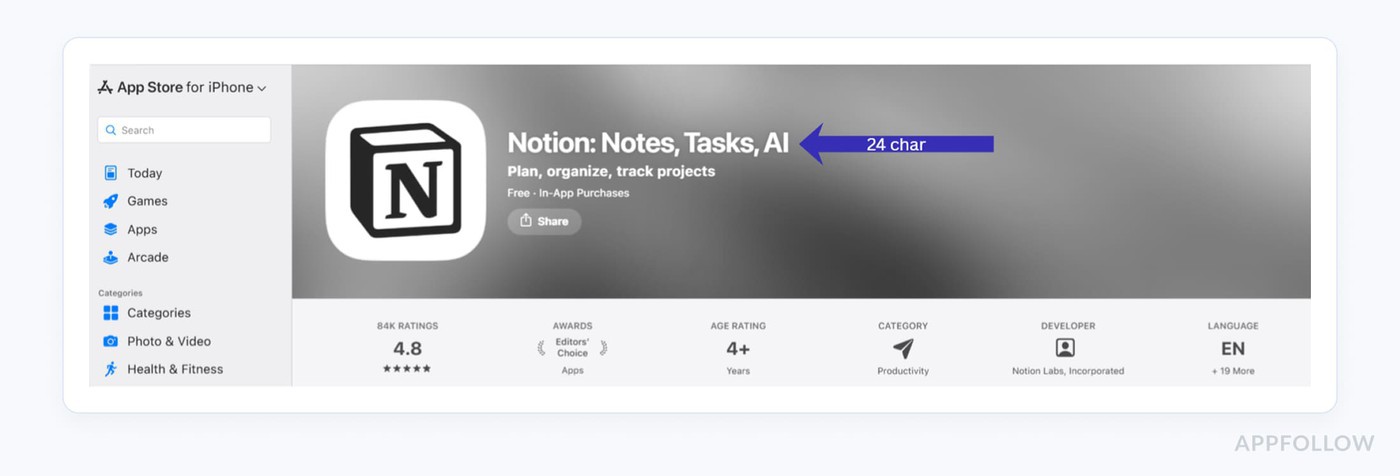
For ASO, the title should do two jobs:
- identify the app clearly
- support the highest-priority keyword or category signal where appropriate
Bad title: “Bloomly”
Better title: “Bloomly: Plant Care Tracker”
The second version tells users and the store what the app does.
Read also: App Store Optimization Title: The 2026 Playbook for iOS & Google Play
Subtitle or short description
On iOS, the subtitle gives users a quick explanation under the app name. On Google Play, the short description summarizes the app in 80 characters or less. (Source: support.google.com)
This field should not repeat the title. It should sharpen the promise.
Example:
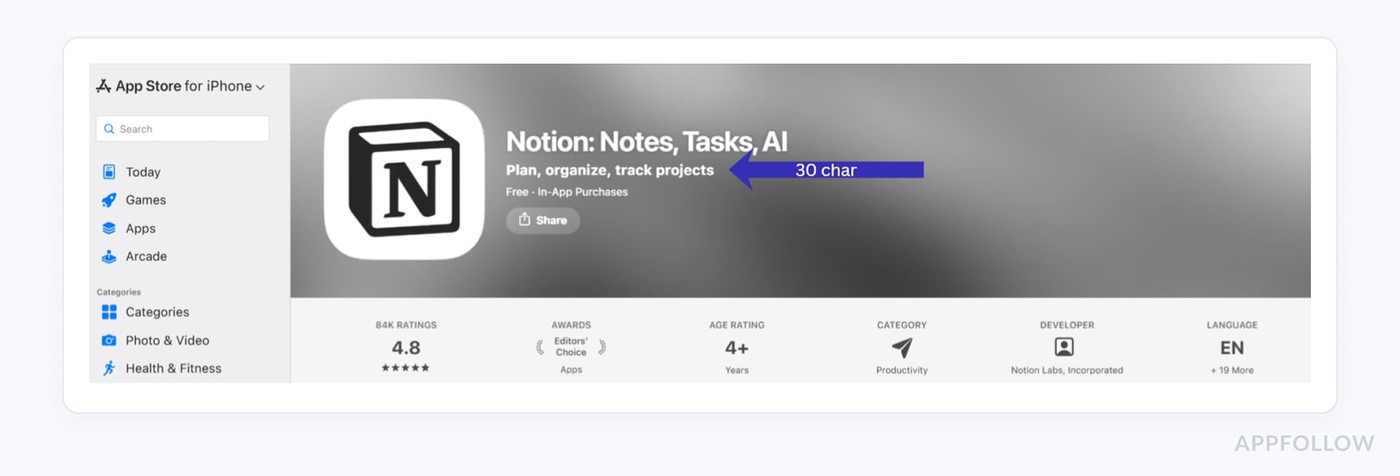
That tells the user what they get before they open the full listing.
Keyword field
The keyword field is specific to Apple’s App Store Connect. It gives teams a place to add terms that help Apple understand which searches may be relevant for the app.
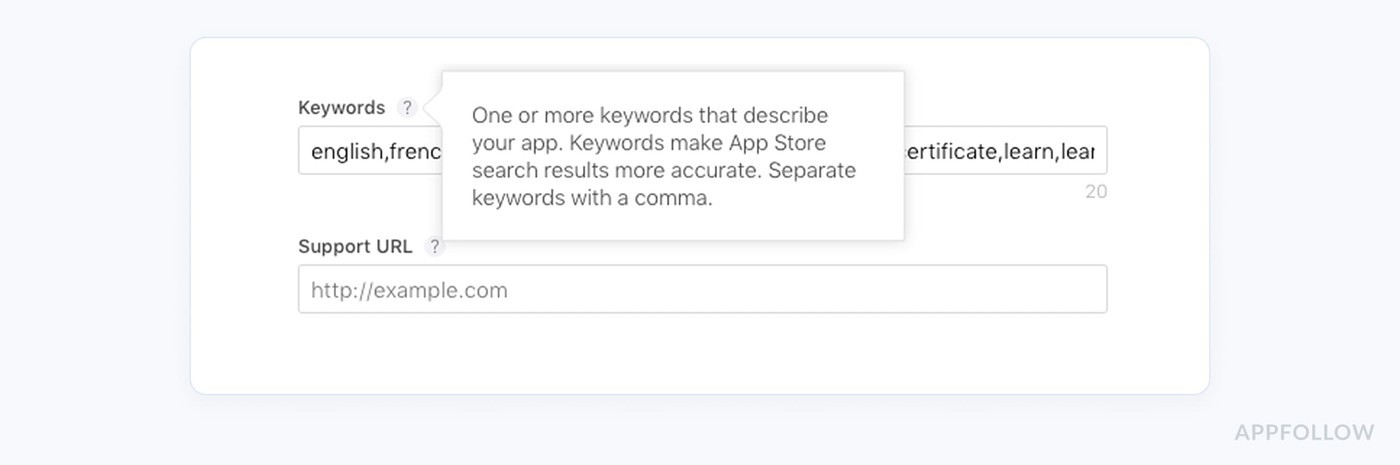
This field is not visible to users, but it should still be treated carefully. Stuffing unrelated words does not create a strong ASO strategy. The best keyword field supports the same positioning users see in the title, subtitle, screenshots, and app experience.
Full description
The full description explains what the app does, who it is for, and why users should care.
On Google Play, the full description can contain up to 4,000 characters. (Source: support.google.com)
Use it to cover core features, use cases, differentiators, social proof, and subscription details where relevant. Avoid turning it into a keyword dump. Users still read enough to decide whether the app feels credible.
Screenshots
Screenshots are creative metadata. They often carry more conversion weight than the long description because users scan visuals before they read.
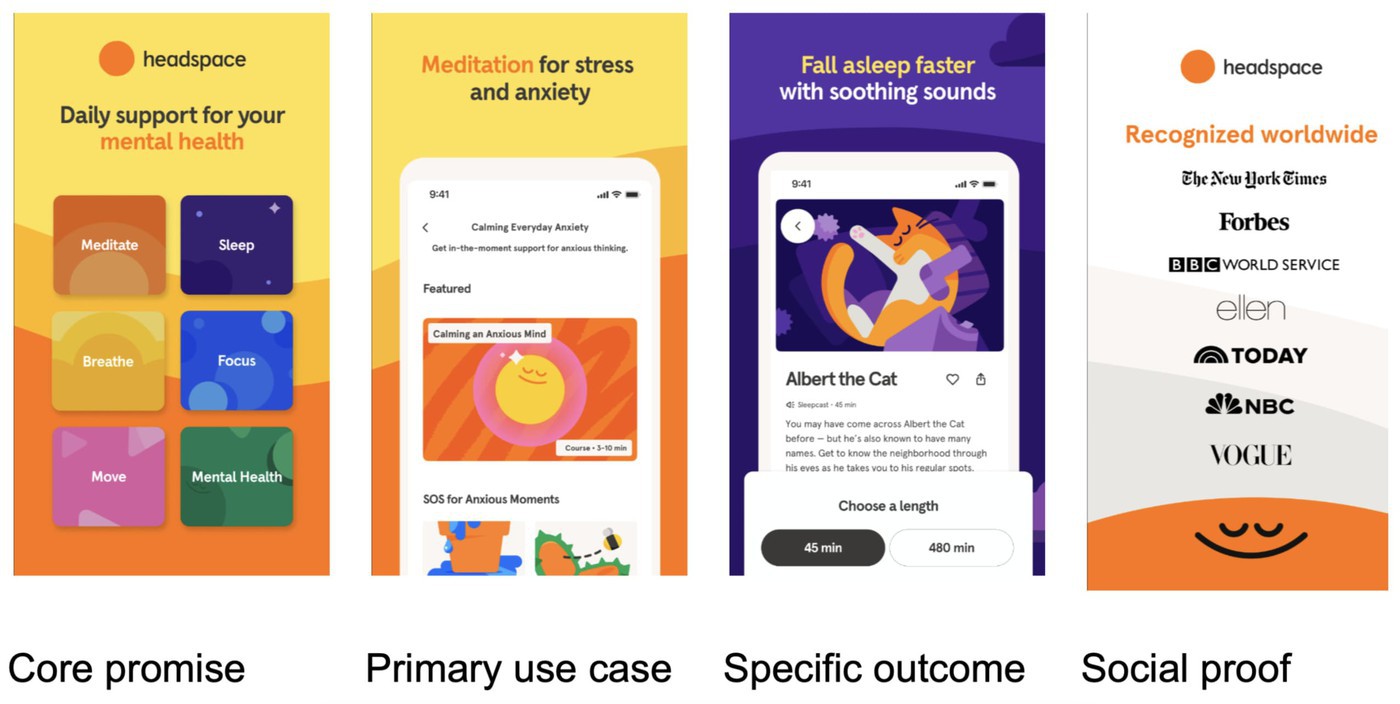
Good screenshots do not just show UI. They explain outcomes.
Weak screenshot caption: “Dashboard”
Better screenshot caption: “Track every bill before it’s due”
That is the difference between showing the app and selling the use case.
Read also: ASO Screenshots in 2026: Best Practices, Specs & App Store Optimization Images That Convert
App icon
The icon is a small asset with large consequences. It appears in search results, charts, ads, and device screens. It has to be recognizable at a small size and consistent with the category.
A finance app icon that looks like a casual game creates friction. A meditation app icon that looks like a banking app does the same.
App preview or promo video
Video can help when the app needs motion, gameplay, workflow, or proof. It is especially useful for games, editing tools, fitness apps, education apps, and products where the value is hard to explain in one static screen.
The first seconds matter. Users should understand the app before they lose patience.
Category
Category metadata helps users and stores understand where the app belongs. It also affects competitive context. A productivity app, finance app, and business app may solve overlapping problems, but they compete in different category environments.
Ratings and reviews
Ratings and reviews are not “metadata copy,” but they are part of the visible store listing experience. They influence trust and conversion.
If the title and screenshots promise one thing while recent reviews complain about something else, users notice.
Update notes
Update notes can support trust when they are specific. “Bug fixes and improvements” says little. “Fixed calendar sync delays and improved offline task loading” tells users the team is maintaining the app.
How app metadata affects ASO
App metadata affects ASO through two routes: visibility and conversion.
Visibility is about being found. Conversion is about being chosen.
For visibility, metadata helps app stores understand which searches and categories are relevant to the app. The app name, subtitle, keyword field, short description, full description, and category all play a role depending on the store.
For conversion, metadata shapes the decision to install. Users see the app name, icon, subtitle, screenshots, ratings, reviews, video, and description before they decide.
A practical ASO review usually asks:
- Are our main keywords present in the right fields?
- Does the title describe the app clearly?
- Does the subtitle or short description add a benefit instead of repeating the title?
- Do screenshots explain the strongest use cases?
- Are ratings and reviews supporting or weakening trust?
- Are localized pages written around actual local search intent?
- Did rankings, product page views, conversion rate, or app units change after the update?
Metadata optimization is not a copywriting exercise alone. It is a measurement loop.
Change the metadata. Watch rankings and conversion. Compare by country. Check competitors. Keep the parts that improved performance.
App metadata example
Let’s say a language learning app wants to improve visibility for Spanish-speaking users searching for English practice.
Weak metadata:
Field | Example |
Title | LinguaPro |
Subtitle | Learn languages easily |
Screenshot caption | Lesson screen |
Description opening | LinguaPro is a language learning application with many features. |
Stronger metadata:
Field | Example |
Title | LinguaPro: Learn English |
Subtitle | Speaking practice in 10 minutes |
Screenshot caption | Practice real English conversations |
Description opening | Learn English with short speaking lessons, pronunciation practice, and daily reminders built for busy learners. |
The stronger version is not just more keyword-aware. It is easier to understand.
A user can see the app category, use case, and benefit faster. The store also gets clearer relevance signals.
Related terms
- Keyword Effectiveness Index (KEI)
- App Store Visibility
- App Visibility
- What is App Store Browse?
- Mobile App Analytics
- What Are Top Charts?
- What is ranking history?
- What is cost per install (CPI)?
- What is an app unit?
- What is an app product page?
FAQs
What is app metadata?
App metadata is the information used to describe, categorize, and present an app in the App Store or Google Play. It includes fields such as app name, subtitle, short description, full description, keyword field, screenshots, icon, category, video, ratings, reviews, and update notes.
What is app metadata in ASO?
In ASO, app metadata is the store listing content that helps app stores understand relevance and helps users decide whether to install. It includes keyword-focused fields, visible copy, creative assets, category information, ratings, reviews, and localization elements.
Why is app metadata important?
App metadata is important because it affects both visibility and conversion. Search-focused fields help stores understand what the app is relevant for. User-facing fields such as title, screenshots, description, ratings, and reviews help users decide whether the app is worth installing.
What app metadata matters most for ASO?
The most important metadata fields usually include app title, subtitle or short description, keyword field on iOS, full description on Google Play, screenshots, icon, ratings, reviews, and localization. The exact priority depends on the store, category, country, and traffic source.
Is app metadata the same on the App Store and Google Play?
No. App metadata works differently on the App Store and Google Play. Apple uses fields such as app name, subtitle, keyword field, screenshots, and product page assets. Google Play relies on app title, short description, full description, graphics, video, category, and store listing content.
How often should app metadata be updated?
App metadata should be updated when keyword research, ranking history, competitor movement, localization data, ratings, reviews, or conversion performance shows a clear reason. Updating metadata too often without measurement can make results harder to read. Most teams test changes in planned cycles.
Can app metadata affect conversion rate?
Yes. App metadata can affect conversion because users rely on the title, subtitle, screenshots, icon, video, description, ratings, and reviews before installing. If the listing explains the value clearly and matches user intent, more visitors may convert into downloads or app units.
How can AppFollow help with app metadata?
AppFollow helps teams monitor the performance signals around app metadata, including keyword rankings, category positions, ratings, reviews, competitors, and store visibility. This helps app teams understand whether metadata updates improve discoverability, conversion context, and competitive performance.
